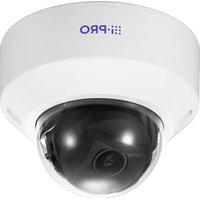
WV-U21350-V3L - Surveillance Camera i-PRO - Free user manual and instructions
Find the device manual for free WV-U21350-V3L i-PRO in PDF.


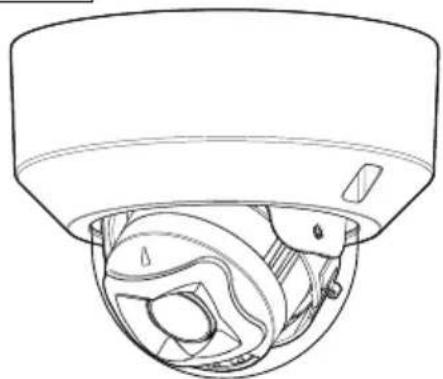
| Product Type | Indoor Network Surveillance Camera |
| Brand | i-PRO |
| Model | WV-U21350-V3L |
| Resolution | 2 MP (AI varifocal model) |
| Power Supply | PoE IEEE 802.3af, 48 V DC, 200 mA |
| Power Consumption | Approx. 9.6 W |
| Dimensions (diameter x height) | Ø129.5 mm x 102 mm |
| Weight | Approx. 380 g |
| Operating Temperature | -10 °C to +50 °C |
| Operating Humidity | 10 % to 90 % (non-condensing) |
| Protection Rating | IP42 (wall mount, wiring downward) |
| Housing Material | ABS resin, i-PRO white |
| Dome Material | Acrylic resin, transparent |
| Artificial Intelligence | Yes, built-in AI model |
| Lens | Varifocal |
| Network Connectivity | Ethernet RJ45, category 5e or higher |
| Local Storage | microSDXC/microSDHC/microSD memory card (optional) |
| Audio Input | Yes, via terminal block (external microphone or line) |
| Audio Output | Yes, via terminal block |
| Supplied Accessories | Important Safety Instructions (1 piece) |
| Maintenance and Cleaning | Clean with a soft dry cloth. Avoid solvents. Disconnect power before cleaning. |
| Safety | Use a surge protector if external cables. Secure mounting required. No power switch, use a circuit breaker. |
| Spare Parts and Repairability | Optional accessories available (mounting plate). Entrust repairs to a professional. |
Frequently Asked Questions - WV-U21350-V3L i-PRO
User questions about WV-U21350-V3L i-PRO
0 question about this device. Answer the ones you know or ask your own.
Ask a new question about this device
Download the instructions for your Surveillance Camera in PDF format for free! Find your manual WV-U21350-V3L - i-PRO and take your electronic device back in hand. On this page are published all the documents necessary for the use of your device. WV-U21350-V3L by i-PRO.
USER MANUAL WV-U21350-V3L i-PRO
Included Installation Instructions
Network Camera
For professional use only
Indoor use
Model No. WV-U21550-V3L
WV-U21350-V3L
WV-U21501-V3L
WV-U21301-V3L
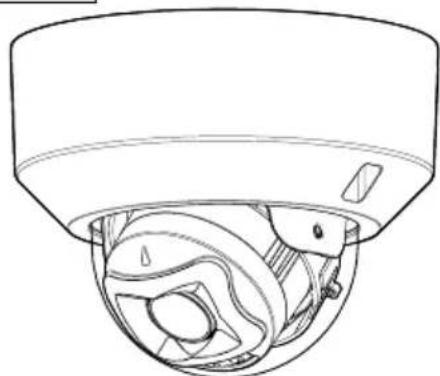
WV-U21550-V3L
About the user manuals
Product documentation is composed of the following documents.
- Installation Guide (this document): Provides information about "Precautions", "Precautions for installation" and the installation method.
- Web Guide (Refer to the link on the following product information website): Includes installation videos, basic functions, and basic operation methods for this device.
- User manual (Refer to the link on the following product information website): This section describes the software operating instructions common to each model. https://i-pro.com/products_and_solutions/en/surveillance/documentation-database
"
(https://i-pro.com/products_and_solutions/en/surveillance/learning-and-support/knowledge-base/technical-information) and will guide you to the right information.
- Before attempting to connect or operate this product, please read these instructions carefully and save Important Safety Instructions leaflet for future use.
- microSDXC/ microSDHC/ microSD memory card is described as microSD memory card.
- The external appearance and other parts shown in this manual may differ from the actual product within the scope that will not interfere with normal use due to improvement of the product.
i-PRO Co., Ltd.
Tokyo, Japan
https://www.i-pro.com/
Authorised Representative in EU: i-PRO EMEA B.V.
Laarderhoogtweg 25,1101 EB Amsterdam,Netherlands
i-PRO EMEA B.V. UK Branch 1010 Cambourne Business Park, Cambridgeshire CB23 6DP


About notations and model number explanation
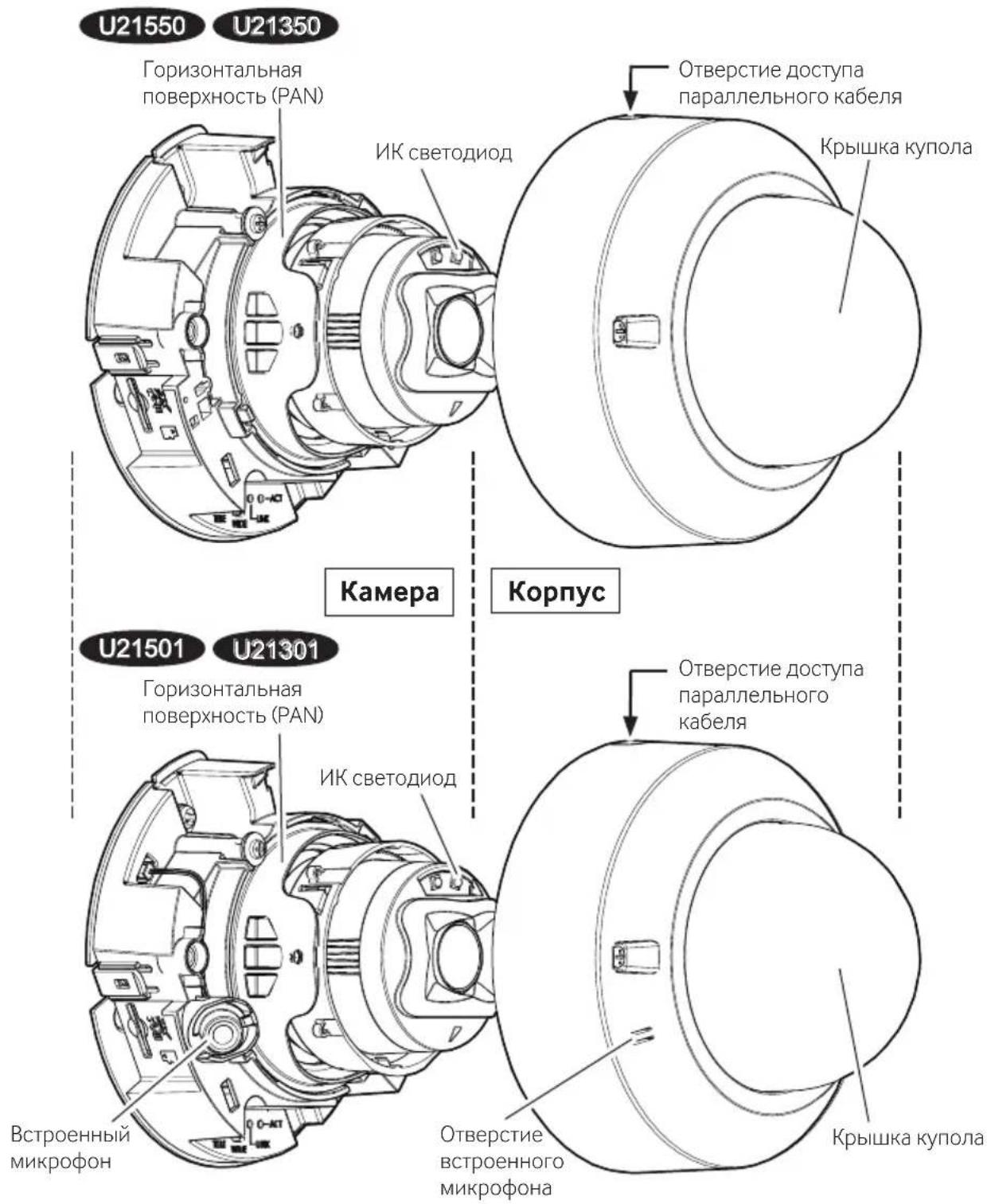
U21550
: WV-U21550-V3L (5MP AI vari-focal model)
U21350
: WV-U21350-V3L (2MP AI vari-focal model)
U21501
: WV-U21501-V3L (5MP Non-AI vari-focal model)
U21301
: WV-U21301-V3L (2MP Non-AI vari-focal model)
Trademarks and registered trademarks
- SD, microSD and microSDXC Logos are trademarks of SD-3C, LLC.
- The terms HDMI, HDMI High-Definition Multimedia Interface, HDMI Trade dress and the HDMI Logos are trademarks or registered trademarks of HDMI Licensing Administrator, Inc.
- All other trademarks identified herein are the property of their respective owners.

Disposal of Old Equipment and Batteries
Only for European Union and countries with recycling systems
These symbols on the products, packaging, and/or accompanying documents mean that used electrical and electronic products and batteries must not be mixed with general household waste. For proper treatment, recovery and recycling of old products and used batteries, please take them to applicable collection points in accordance with your national legislation.
By disposing of them correctly, you will help to save valuable resources and prevent any potential negative effects on human health and the environment.
For more information about collection and recycling, please contact your local authority.
Penalties may be applicable for incorrect disposal of this waste, in accordance with national legislation.

Note for the battery symbol (bottom symbol)
This symbol might be used in combination with a chemical symbol. In this case it complies with the requirement set by the Directive for the chemical involved.
For U.S.A.
NOTE: This equipment has been tested and found to comply with the limits for a Class A digital device, pursuant to Part 15 of the FCC Rules. These limits are designed to provide reasonable protection against harmful interference when the equipment is operated in a commercial environment. This equipment generates, uses, and can radiate radio frequency energy and, if not installed and used in accordance with the instruction manual, may cause harmful interference to radio communications.
Operation of this equipment in a residential area is likely to cause harmful interference in which case the user will be required to correct the interference at his own expense.
FCC CAUTION: Changes or modifications not expressly approved by the party responsible for compliance could void the user's authority to operate the equipment.
Supplier's Declaration of conformity
Trade name : i-PRO
Model No.: WV-U21550-V3L, WV-U21501-V3L WV-U21350-V3L, WV-U21301-V3L

Responsible Party :
i-PRO Americas Inc.
8550 Fallbrook Drive, Suite 200 Houston, Texas 77064
Support Contact: 1-800-513-5417
For U.S.A.
The model number and serial number of this product may be found on the surface of the unit.
You should note the model number and serial number of this unit in the space provided and retain this book as a permanent record of your purchase to aid identification in the event of theft.
Model No.
Serial No.
For U.S.A.
This device complies with part 15 of the FCC Rules.
Operation is subject to the following two conditions: (1) This device may not cause harmful interference, and (2) this device must accept any interference received, including interference that may cause undesired operation.
For Canada
CANICES-3(A)/NMB-3(A)
- Operation of this product in a residential environment could cause radio interference.
Caution: Notice:
- The DC power supply connected to the camera must be in the same building.
- The network camera is only intended for a connection to an ethernet or PoE network without routing to the outside plant.
- This product has no power switch. Be sure to install disconnect devices such as a circuit breaker to shut down the main power of power supplying equipment to this product.
-
Before attempting to connect or operate this product, please read these instructions carefully.
-
This product is not suitable for use in locations where children are likely to be present.
- Do not install this product in locations where ordinary persons can easily reach.
- This product is a professional equipment.
- For information about screws and other parts required for installation, refer to the corresponding section of this document.

Precautions
In order to prevent harm to people and damage to property, it explains what must be observed without fail. The safety statements common to all i-PRO network camera models are posted on the website linked from the two dimensional barcode on the right. Please be sure to confirm it. https://i-pro.com/products_and_solutions/en/surveillance/learning-and-support/knowledge-base/safety-instructions
■ Do not install this product in a restricted or prohibited environment.
Failure to observe this may result in injury, accident, or malfunction due to falling.
Please check the safety precautions common to all models on the website above and the installation precautions in the Installation Guide.
Refer installation work to the dealer.
Installation work requires technique and experience. Failure to observe this may cause fire, electric shock, injury, or damage to the product. Be sure to consult the dealer.
Install the product accurately and securely on an installation area in accordance with the installation instructions.
Failure to observe this may cause injury or accidents.
Take measures of protection against this product falling.
Failure to observe this may cause a drop resulting in injury.
Securely fix the product to the installation surface using screws or anchors. If the fall prevention wire is included, be sure to install it.
- Stop the operation immediately when something is wrong with this product.
When smoke goes up from the product, the smell of smoke comes from the product, or the exterior of the product has deteriorated, continued use will cause a fire or fall of the product resulting in injury, or damage to property.
In this case, turn the power off immediately and contact qualified service personnel for service.
Conduct periodic inspections.
Rust on the metal parts or screws may cause a fall of the product resulting in injury or accidents.
Consult the dealer for the inspections.
Be sure to turn off the power before inspection or maintenance.
Precautions for installation
i-PRO Co., Ltd. assumes no responsibility for injuries or property damage resulting from failures arising out of improper installation or operation inconsistent with this documentation.
In order to prevent injury, the product must be securely mounted to an installation surface according to Installation Guide.
Installation area for this product
Select an appropriate place for the installation area (such as a strong installation surface) in your particular environment.
- Make sure that the installation area is strong enough to hold this product, such as a concrete ceiling.
- Install the camera in the foundation area of the architecture or where sufficient strength is assured.
- Do not mount the product on a plaster board or a wooden section because they are too weak. If the product is unavoidably mounted on such a section, the section shall be sufficiently reinforced.
This camera is designed to be used indoors
This product is not operable outdoors. Do not expose this camera to direct sunlight for hours and do not install the product near a heater or an air conditioner. Otherwise, it may cause deformation, discoloration and malfunction.
Do not place this product in the following places
- Locations where a chemical agent is used such as a swimming pool
- Locations subject to moisture or oil smoke such as a kitchen
- Locations that have a specific environment that is subject to an inflammable atmosphere or solvents
- Locations where a radiation, an X-ray, a strong radio wave or a strong magnetic field is generated
- Locations near coasts directly subjected to sea breezes, or locations subject to corrosive gases such as from hot springs, volcanic regions, etc.
- Locations where the temperature is not within the specified range
- Locations subject to vibrations, such as on vehicles, marine vessels, or above product lines (This product is not designed for on-vehicle use.)
- Locations near rubber products containing sulfur (packing, rubber feet, etc.)
- Locations where it may get directly wet from rain or water splash (including under the eaves, etc.)
- Locations subject to moisture or dust
- Locations subject to sudden changes in temperature such as near air discharge vents of air conditioners or air circulation inlet doors
Screw tightening
Do not use an impact driver. Use of an impact driver may damage the screws or cause tightening excessively.
About reflection of light from outside or IR light
A ghost may appear on the screen depending on the incident angle of external light.
In the case of using the IR light, installation of a camera near a wall may cause reflection of infrared rays resulting in a part of the screen or the entire screen turning whitish.
- Refer to our technical information website
for image examples and measures to take.
Take notice of humidity
Install this product when the humidity is low. If installation is performed when it is raining or in very humid conditions, the inside may be affected by humidity, causing mist-over inside the dome cover.
Protection from lightning
When cables are used outdoors, there is a chance that they may be affected by lightning. In such a case, install a lightning arrester close to the camera, and make the length of the network cable between the camera and lightning arrester as short as possible to prevent the camera from being affected by lightning. Refer to our technical information website
When noise disturbance may happen
Noise may appear in video or audio near a strong electric field from a TV or radio antenna, motors and transformers, or a strong electric field/magnetic field from a power line (lamp line) of AC100 V or more. Conduct the power distribution work to keep 1 m {3.28 feet} away from them or conduct the electric conduit work using metal pipes. (Be sure to make ground connection of the metal pipes.)
Equipment classification and power source indication label
Refer to the indication label on the bottom side of this unit for the equipment classification, power source, and other information.
About static electricity
Before installing or removing this product, be sure to touch metal objects to discharge static electricity from your body.
| Specifications | |
| Power source *1: PoE (IEEE802.3af) | compliant) |
| Power consumption *1: PoE 48 V D | C: 200 mA / Approx. 9.6 W (Class 0 device) |
| Operating environment | |
| Ambient operating temperature: | -10 °C to +50 °C {14 °F to 122 °F} |
| Ambient operating humidity: | 10 % to 90 % (no condensation) |
| Storage environment | |
| Storage temperature: | -30 °C to +60 °C {−22 °F to +140 °F} |
| Storage humidity: | 10 % to 95 % (no condensation) |
| Built-in microphone: Nondirectional | electret condenser microphone |
| U21501 U21301 | |
| Monitor output: HDMI 1080p (60Hz/50Hz), 720p (60Hz/50Hz) | |
| U21501 | |
| Audio output: HDMI LPCM | |
| U21501 | |
| Waterproof and dustproof: IP42 Conformity*2 | |
| Dimensions: ø129.5 mm × 102 mm | m (H) {ø5-3/32 inches × 4-1/32 inches (H)} Dome radius 40 mm {1-9/16 inches} |
| Mass: Approx. 380 g {0.84 lbs} | |
| Finish: | Main body : ABS resin, i-PRO white Dome cover: Acrylic resin, Clear |
1 Refer to our technical information website
Standard accessories
Important Safety Instructions 1 pc.
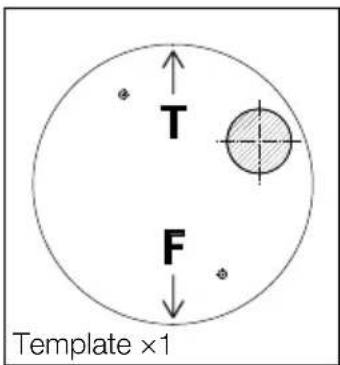
Other items that are needed (not included)
- Mounting screws
| Installation method | Recommended screw1 | Minimum pull-out strength2 |
| Directly mount the camera onto the installation surface. | M4 × 16 mm*3 {5/8 inches} × 2 pcs. | 196 N {44 lbf} |
| Mount the camera to a gangbox/ junction box. | ||
| Mount the camera using the exclusively designed mount bracket. | Refer to the operating instructions of each bracket. | |
1 Select screws according to the material of the location that the camera will be mounted to. In this case, wood screws and nails should not be used.
2 This value indicates the minimum pull-out strength required value per screw. For information about the minimum pull-out strength, refer to our technical information website
*3 The screw length is an example when installing the camera on a robust installation surface with a thickness of 20 mm {25/32 inches} or more.
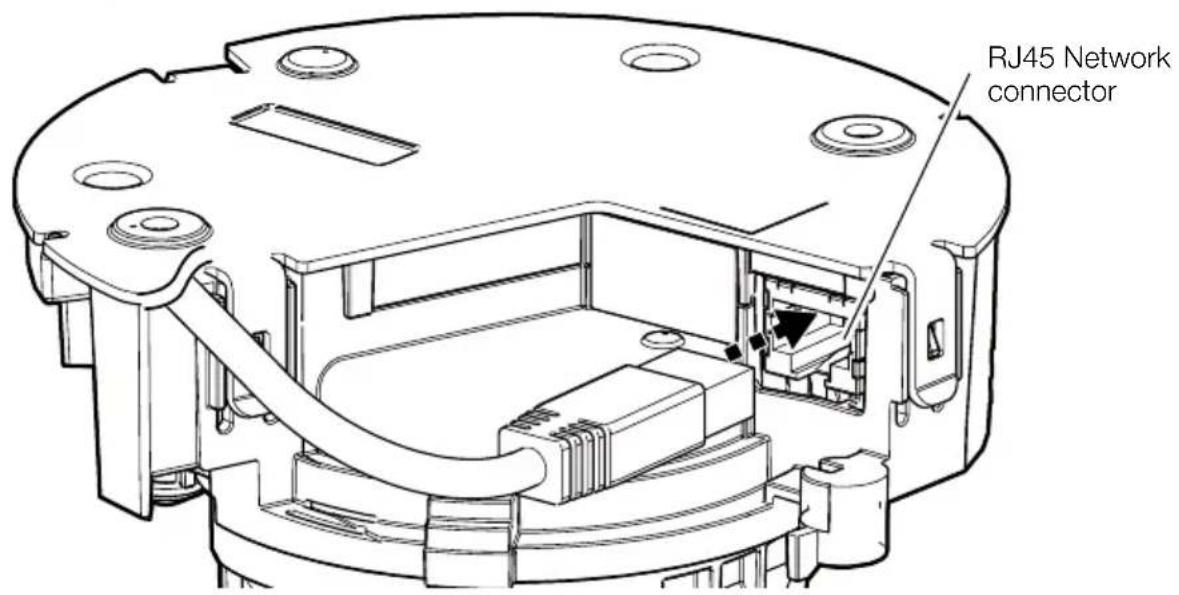
Ethernet cable with RJ45 plug (category 5e or better, straight, all 4 pairs (8 pins), less than 100m {328 feet})
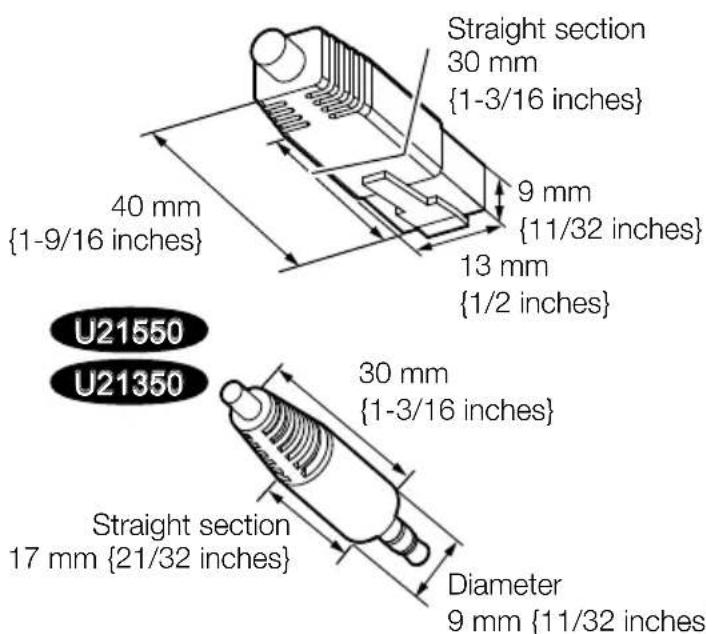
A necessary, audio input cable, audio output cable
U21550 U21350
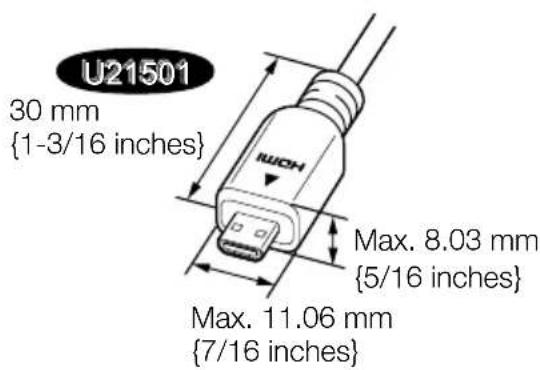
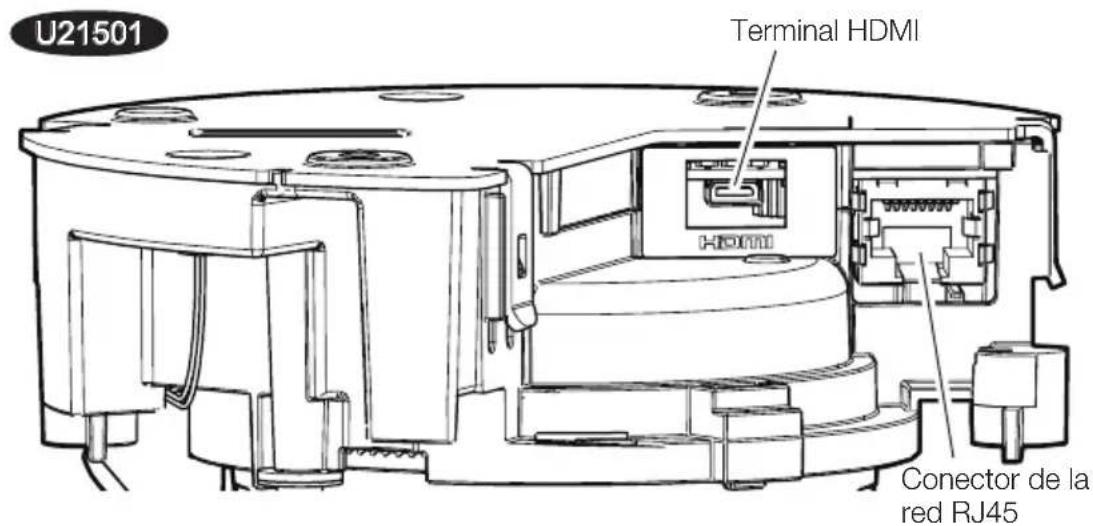
A necessary, Type D micro HDMI cable (camera side)
U21501
Optional accessories

The latest information → Technical information website "Accessory Selector"
Troubleshooting
Before requesting service, refer to "Troubleshooting" of Web Guide. Then, confirm the trouble.
Installation Procedure
Technical Support Video
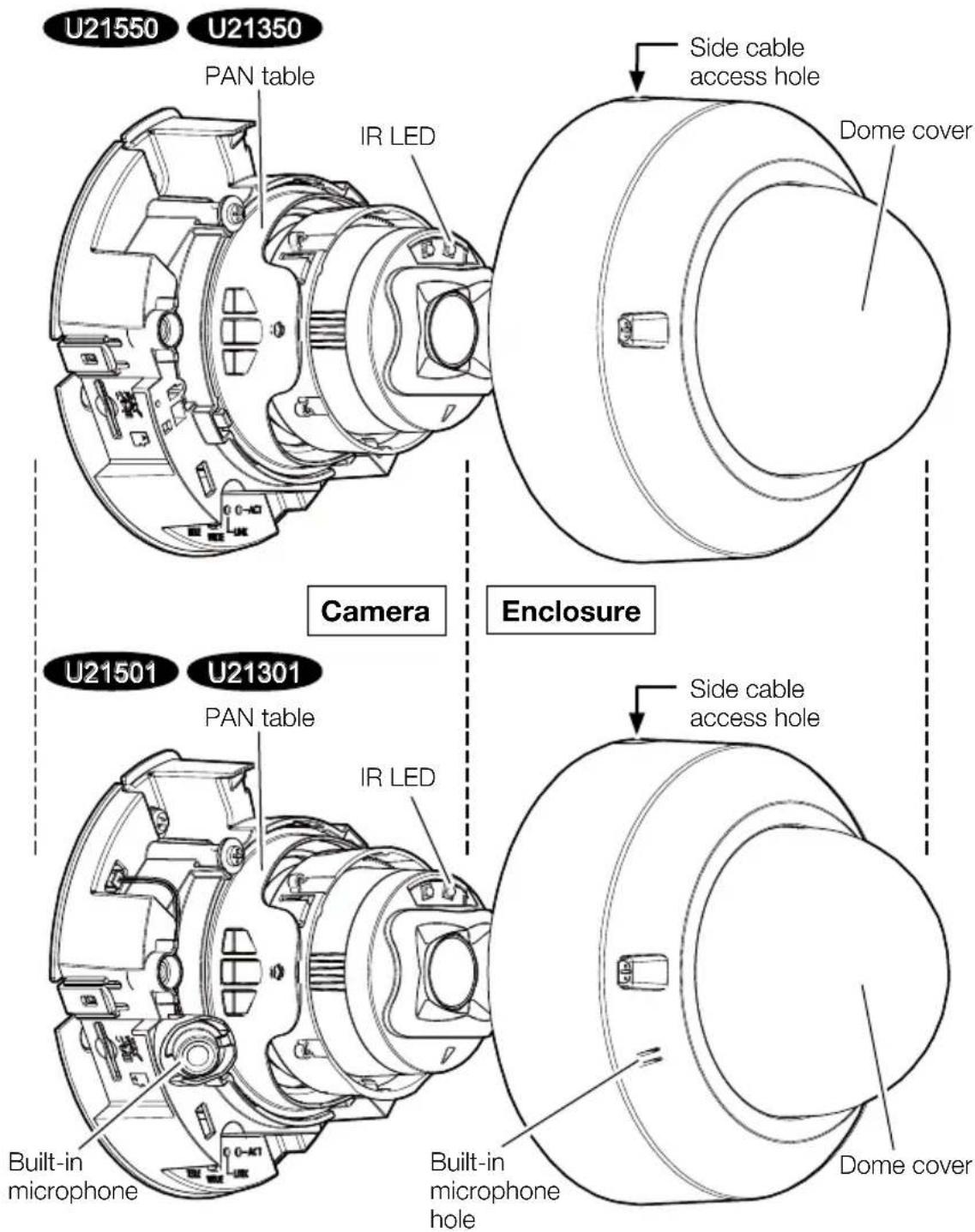
Parts and functions
Parts and functions
(Continued)
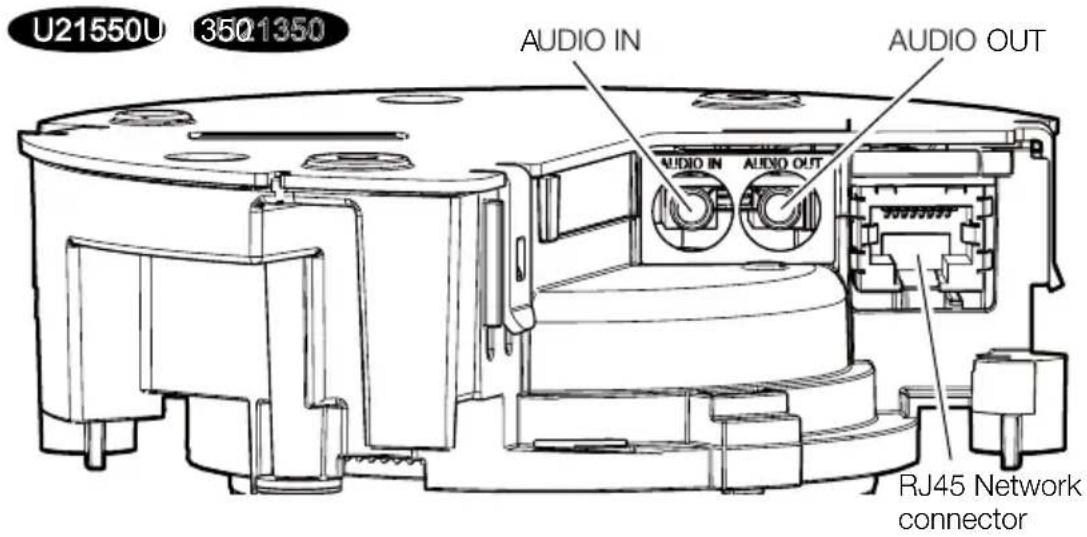
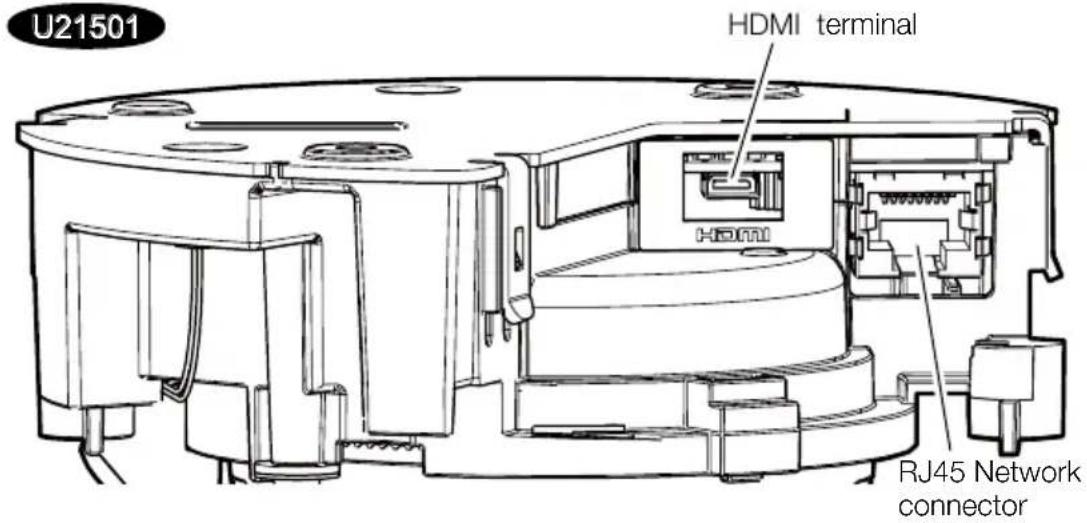
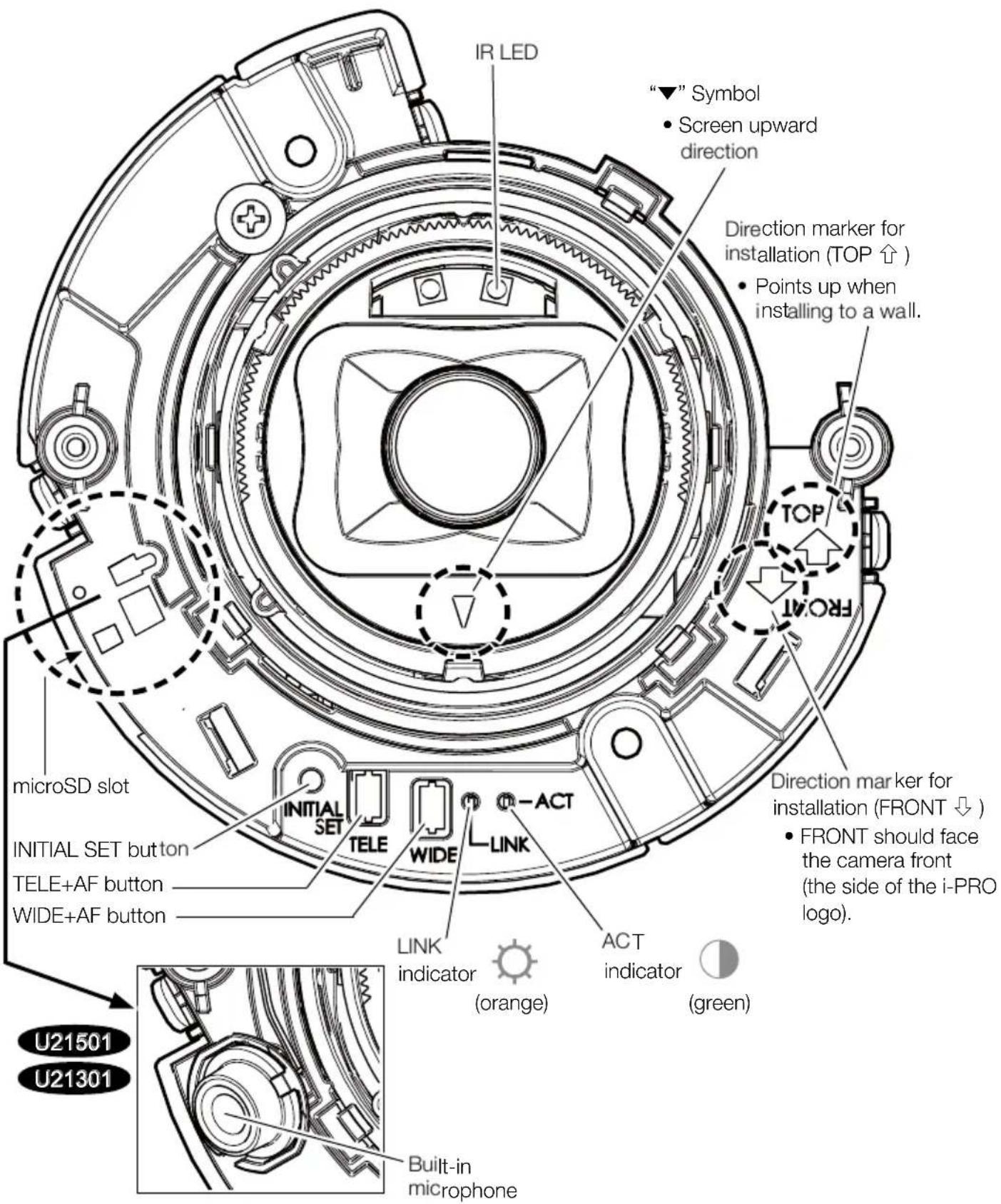

:Lights

:Blinks

: Lights off

- All LEDs turn off ⇒ User manual [Indicator]
Step 1 Preparations
Note:
- The following installation instructions use
and as examples.
Common
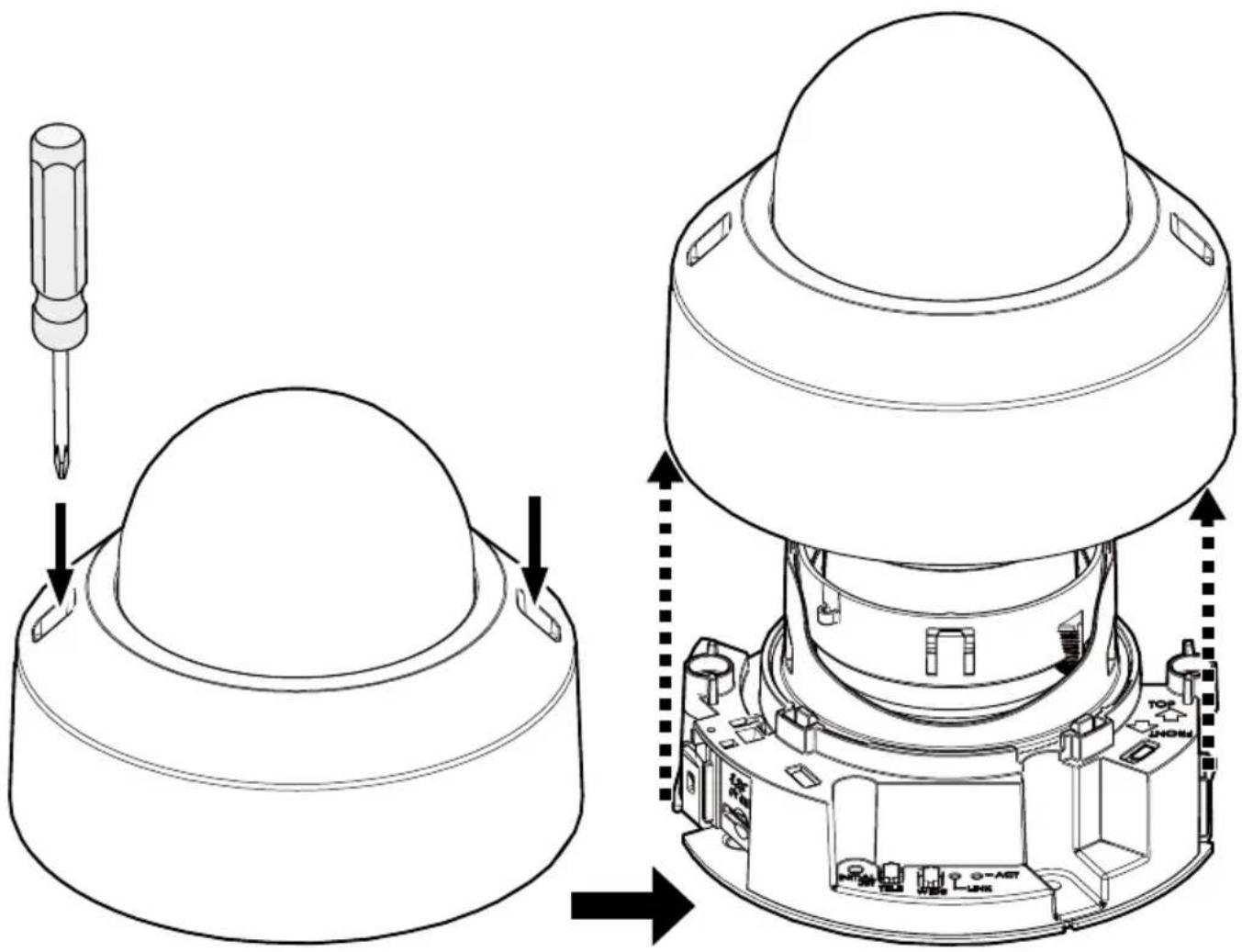
Step 1 Preparations (Continued)
When using the side cable access hole
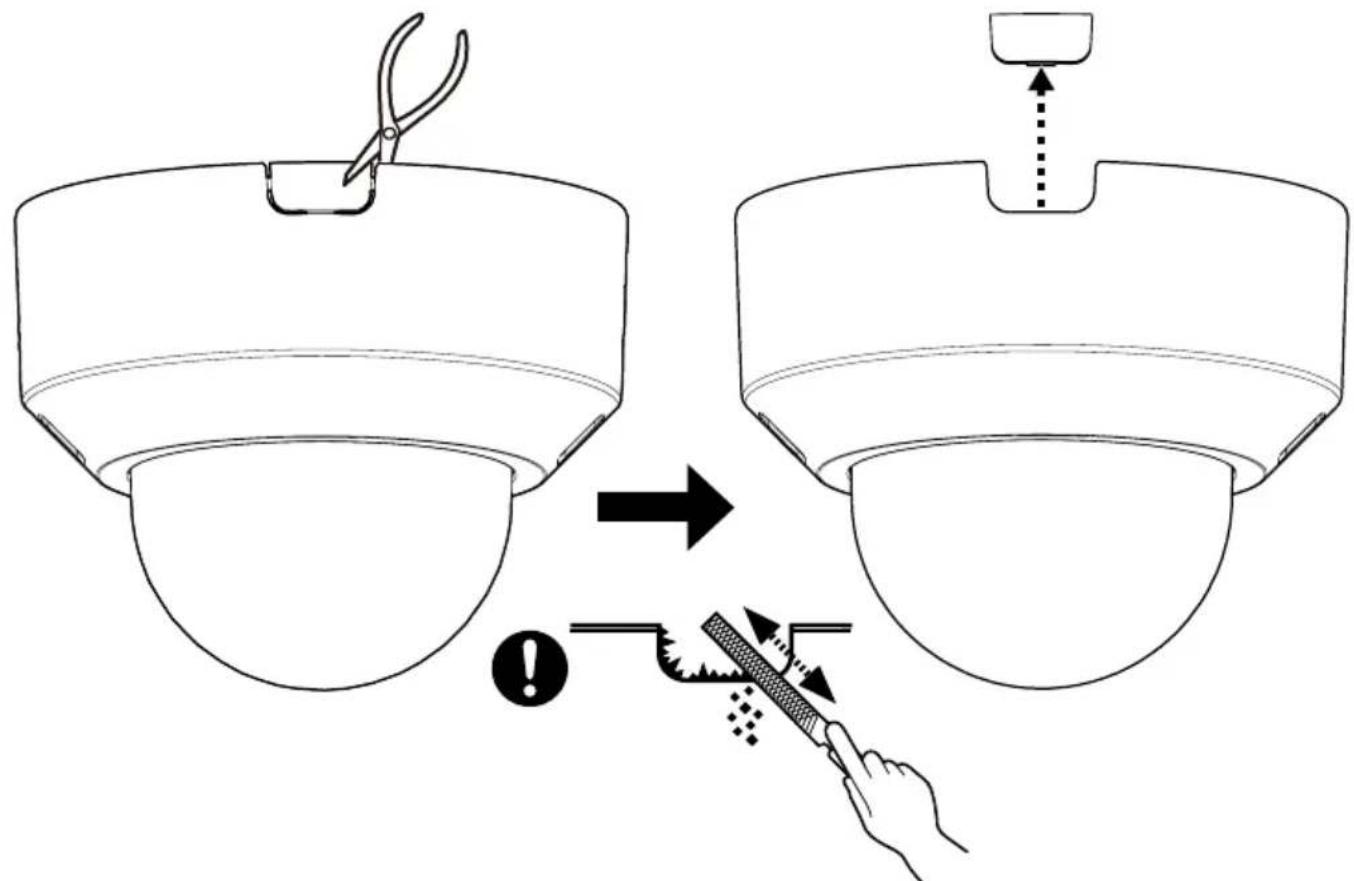
When using the microSD memory card
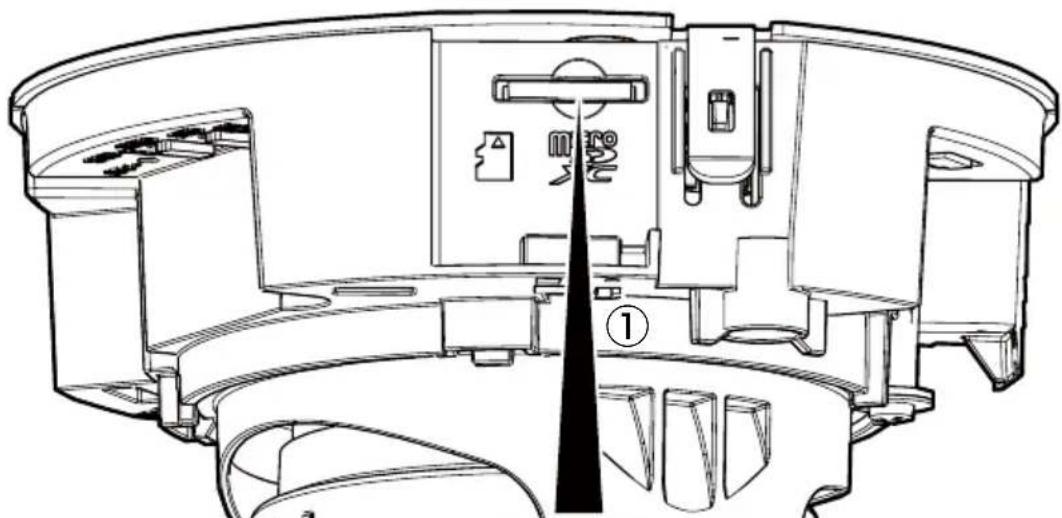

- User manual [Format]
- Use a microSD memory card dedicated to i-PRO cameras.

②
A click sound is heard.
Step 2
Note:
- When running the cable using the side cable access hole of the camera, it is unnecessary to make a cable access hole on the installation surface.
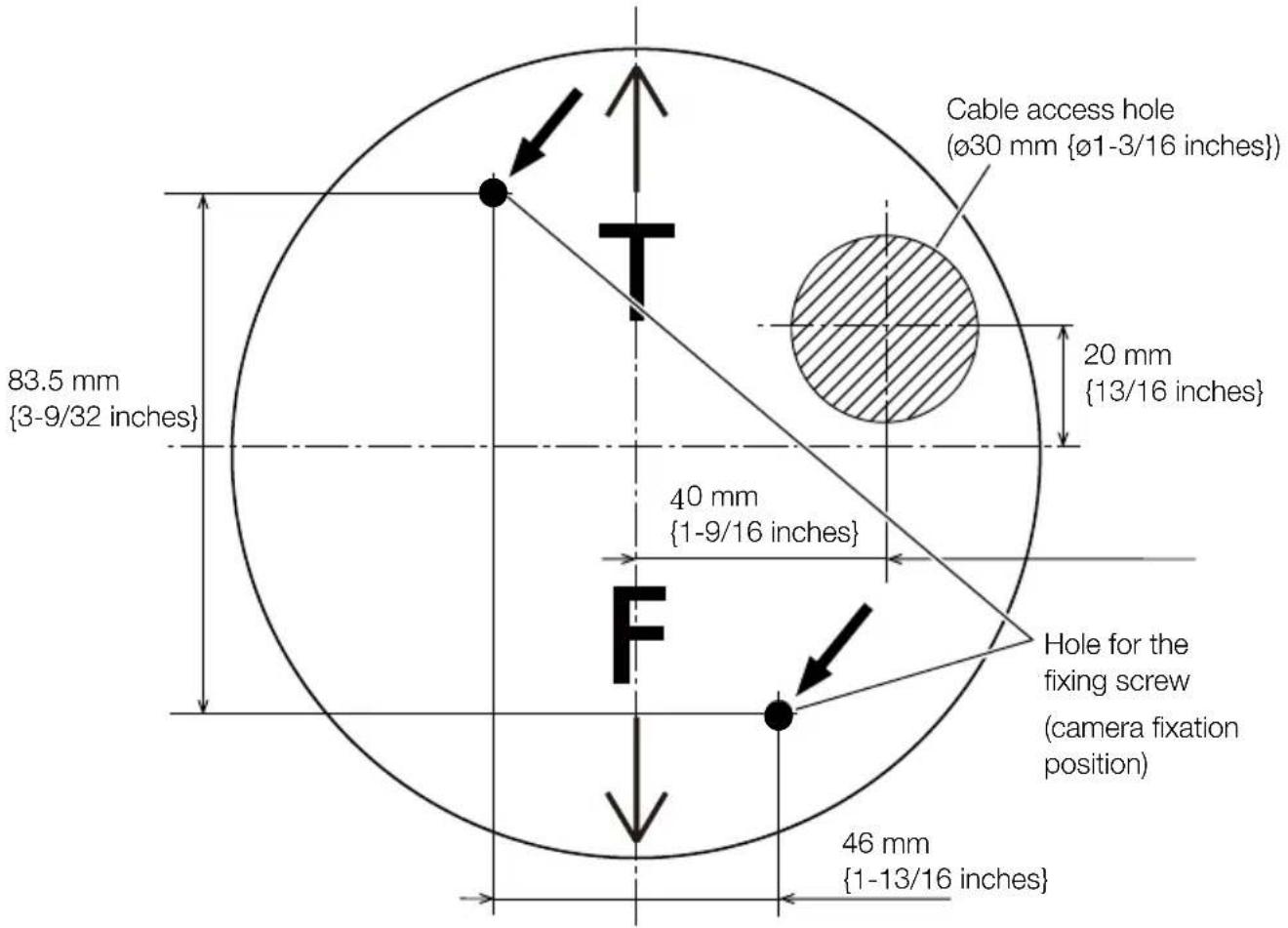
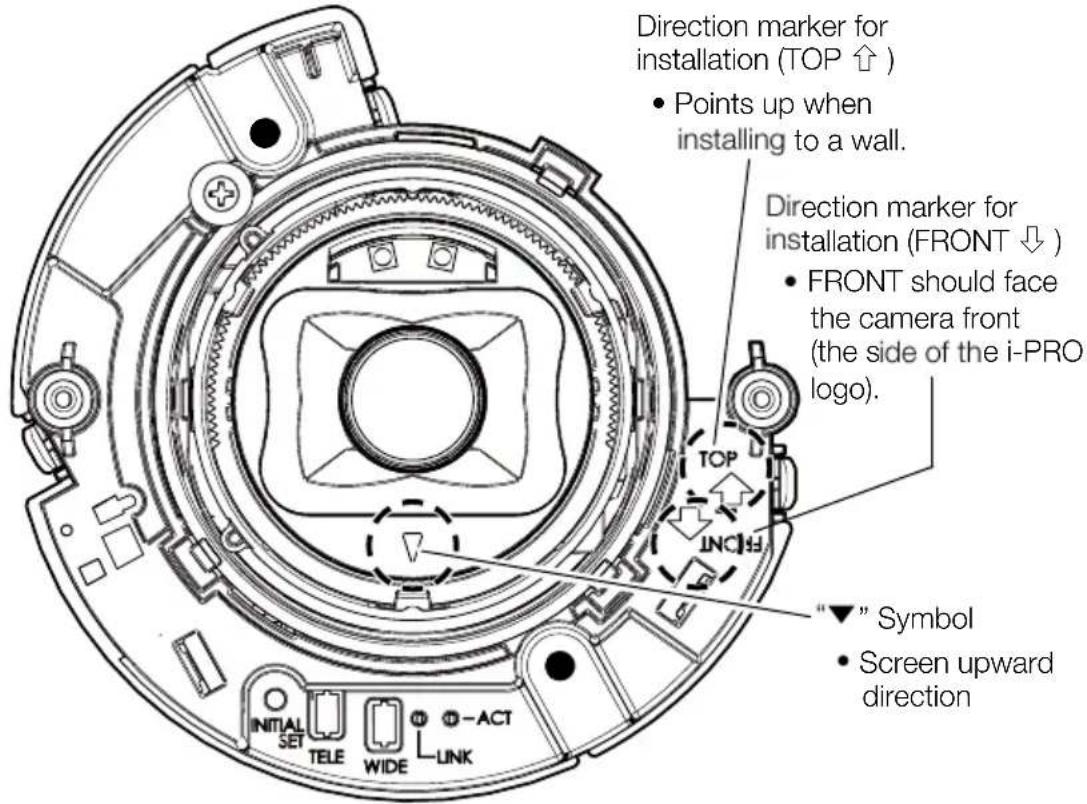

- If there is a gap behind the camera, dust may enter. Refer to our technical information website
for further information.
Step 3
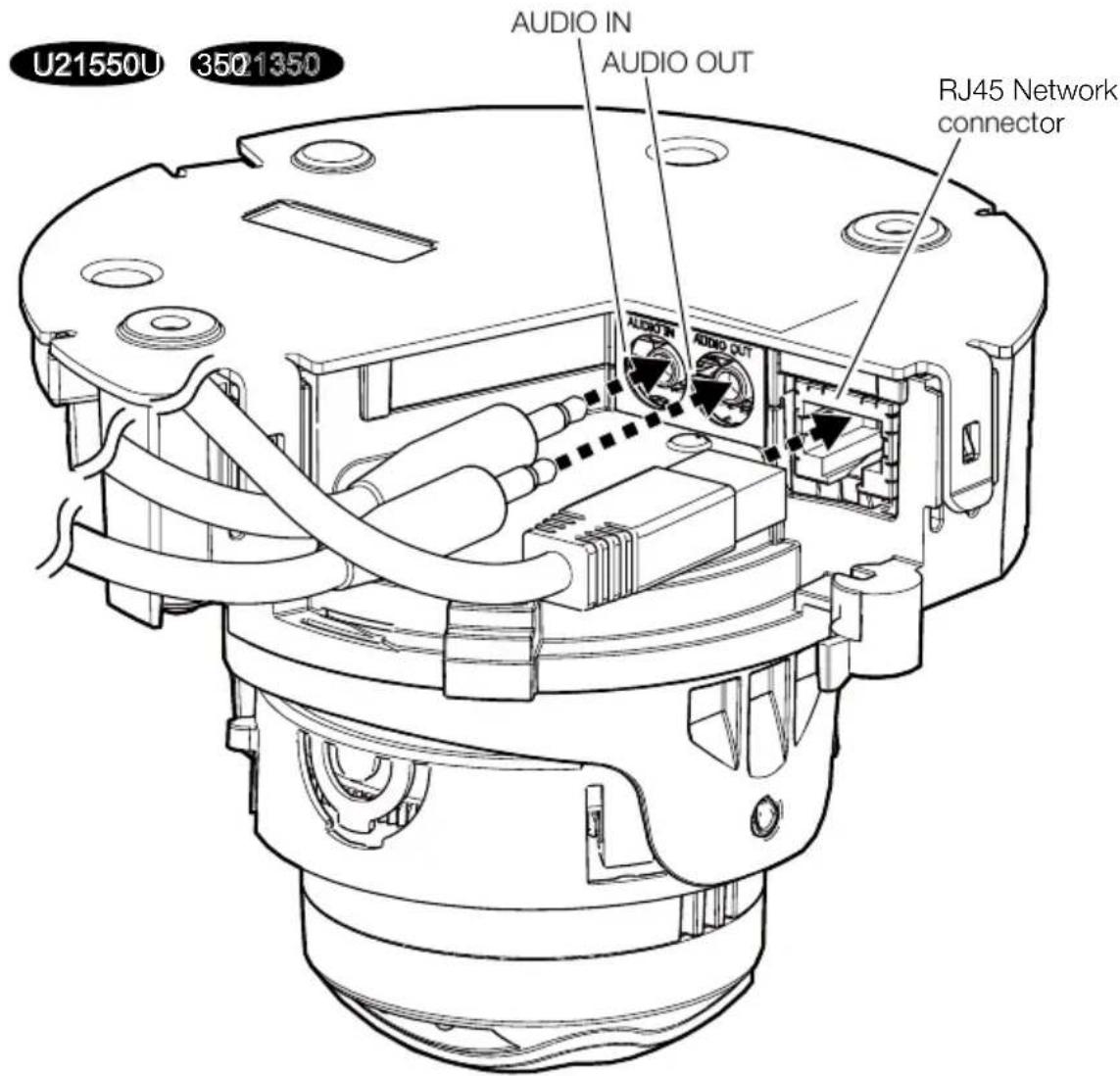

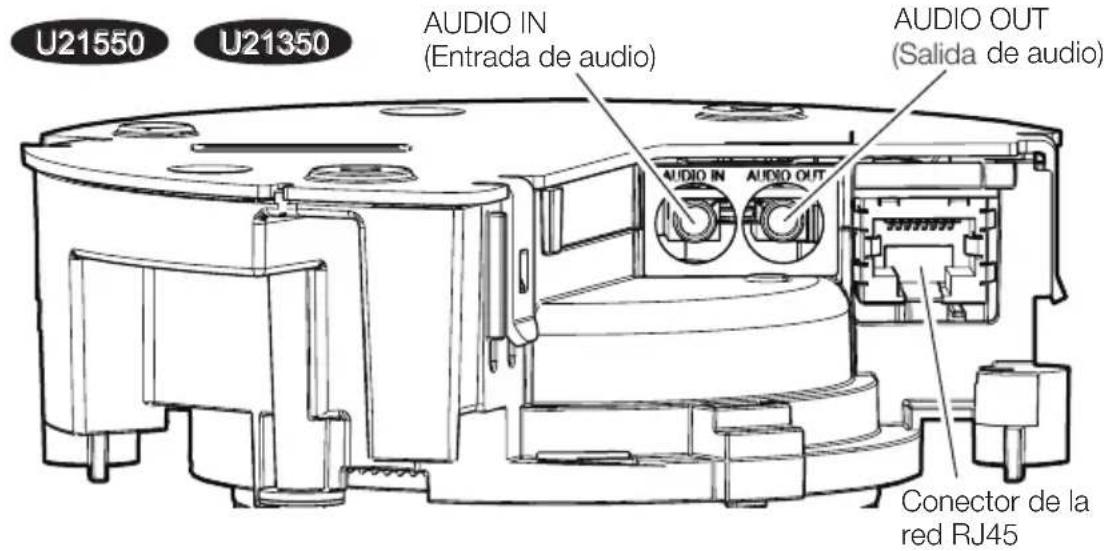
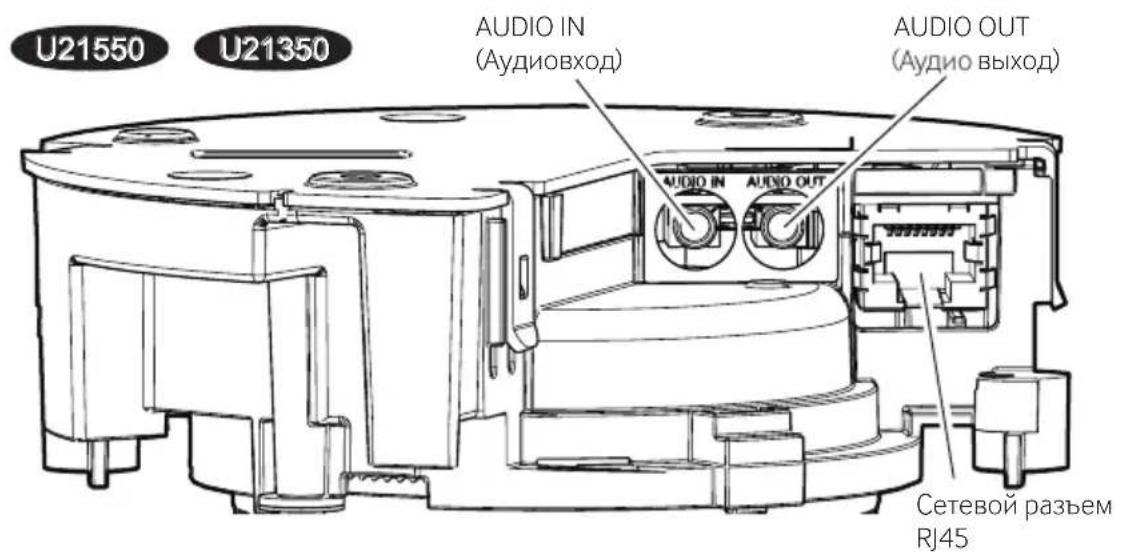
AUDIO IN
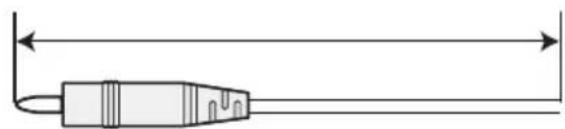
<1 m {3.28 feet} (Mio)
< 10 m {32.8 feet} (Line)
AUDIO OUT
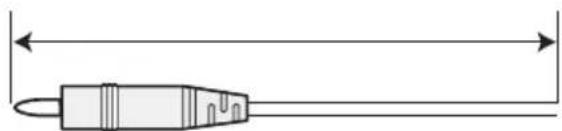
<10 m {32.8 feet}
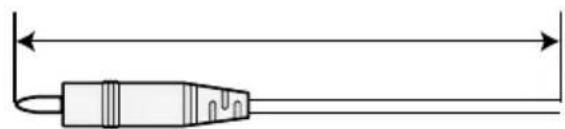
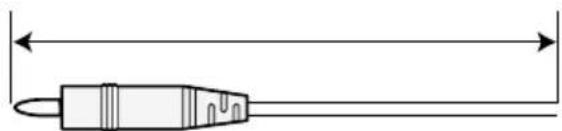
Ethernet cable
Ethernet cable with RJ45 plug
(category 5e or better, straight, all 4 pairs (8 pins),
less than 100m {328 feet})
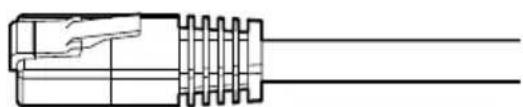
Step 3 (Continued)
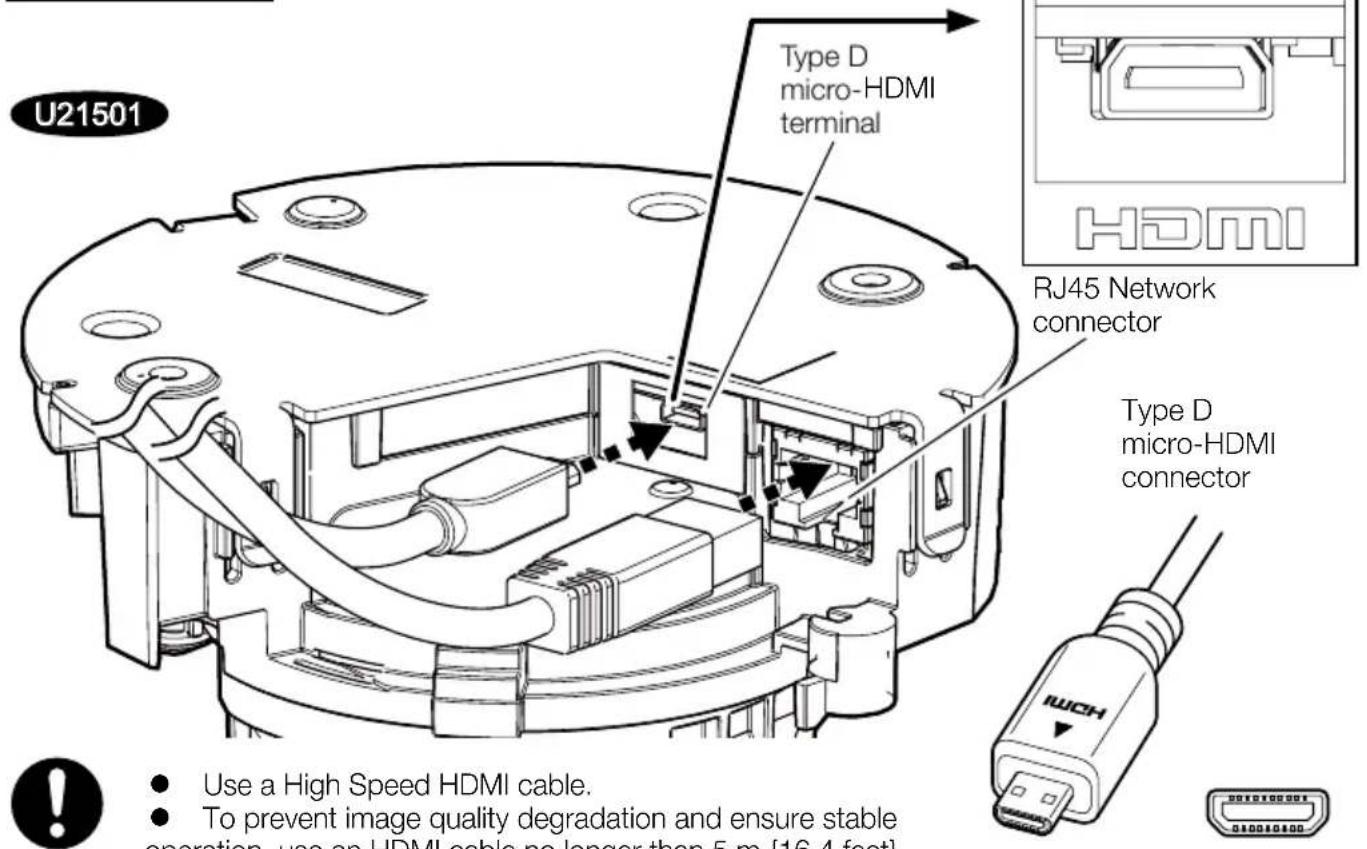
Use a High Speed HDMI cable.
- To prevent image quality degradation and ensure stable operation, use an HDMI cable no longer than 5 m {16.4 feet}.
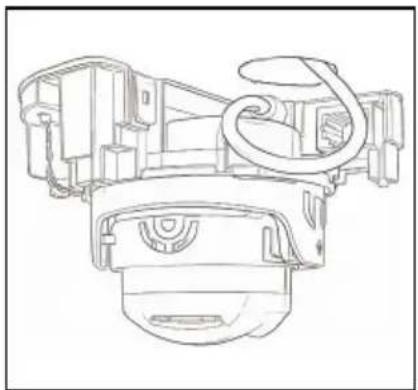
- When using an HDMI cable, connect it to the camera with approx. 150mm (5-29/32 inches) of the cable pulled out from the cable access hole so that no stress is applied to the HDMI cable connector. Arrange the HDMI cable in a loop to ensure proper routing.
Technical Support Video
U21301
Step 4
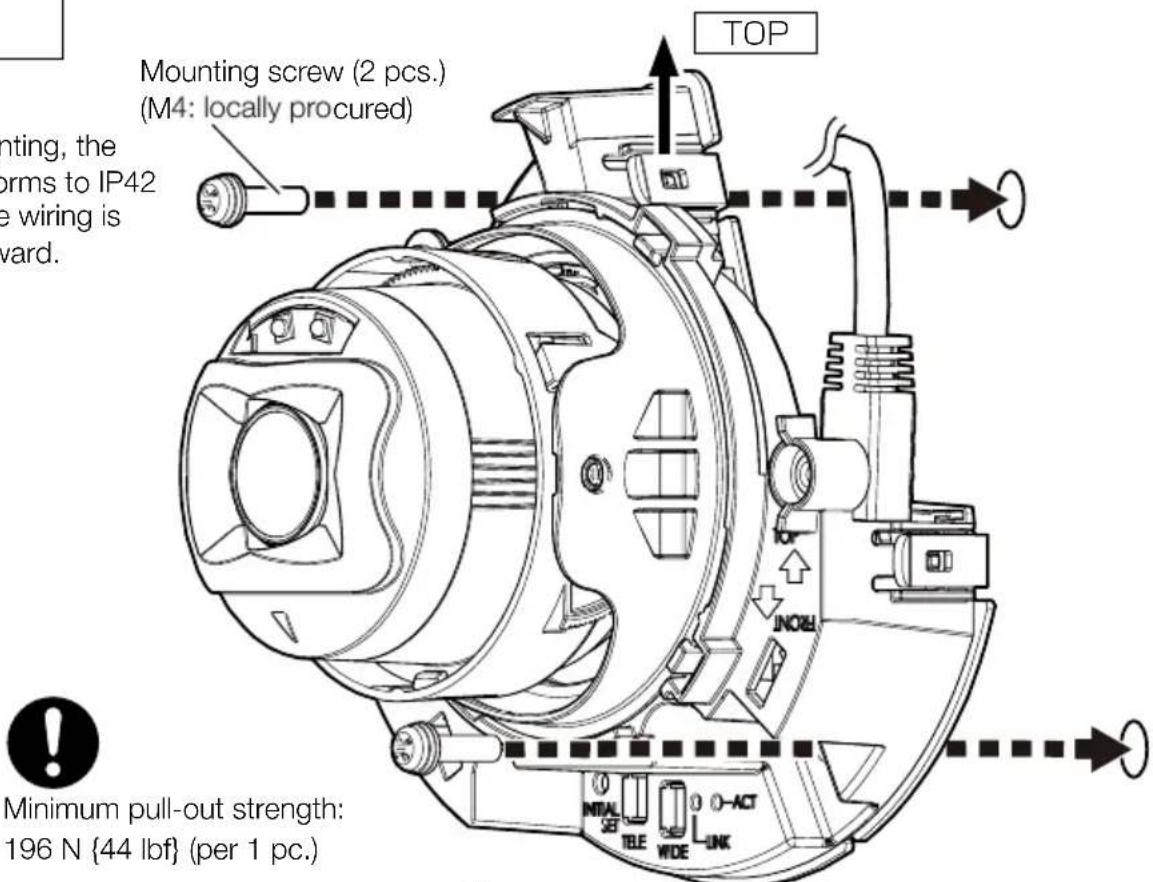
Directly mount the camera onto the installation surface.
Ceiling
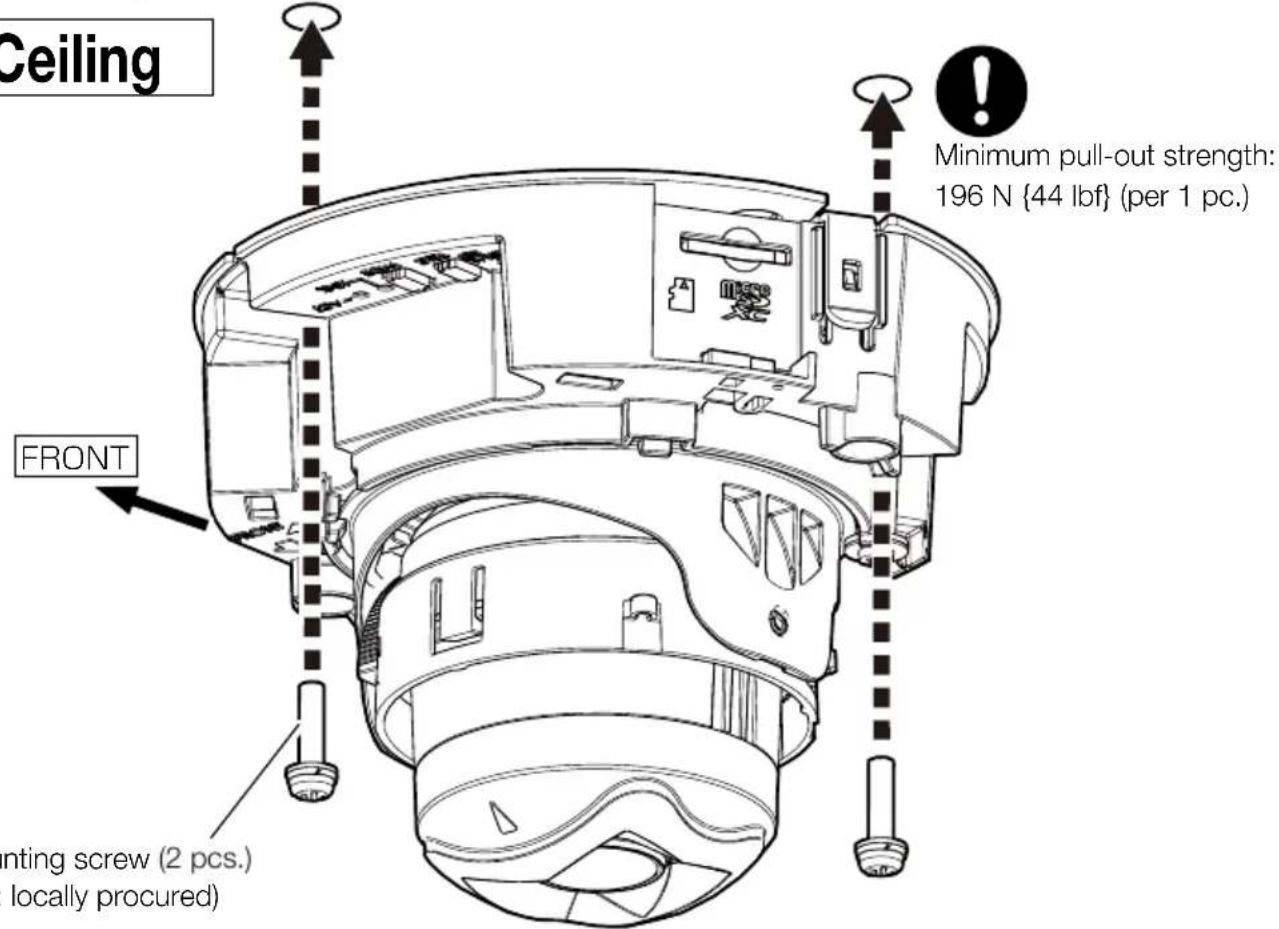
Mounting screw (2 pcs.) (M4: locally procured)
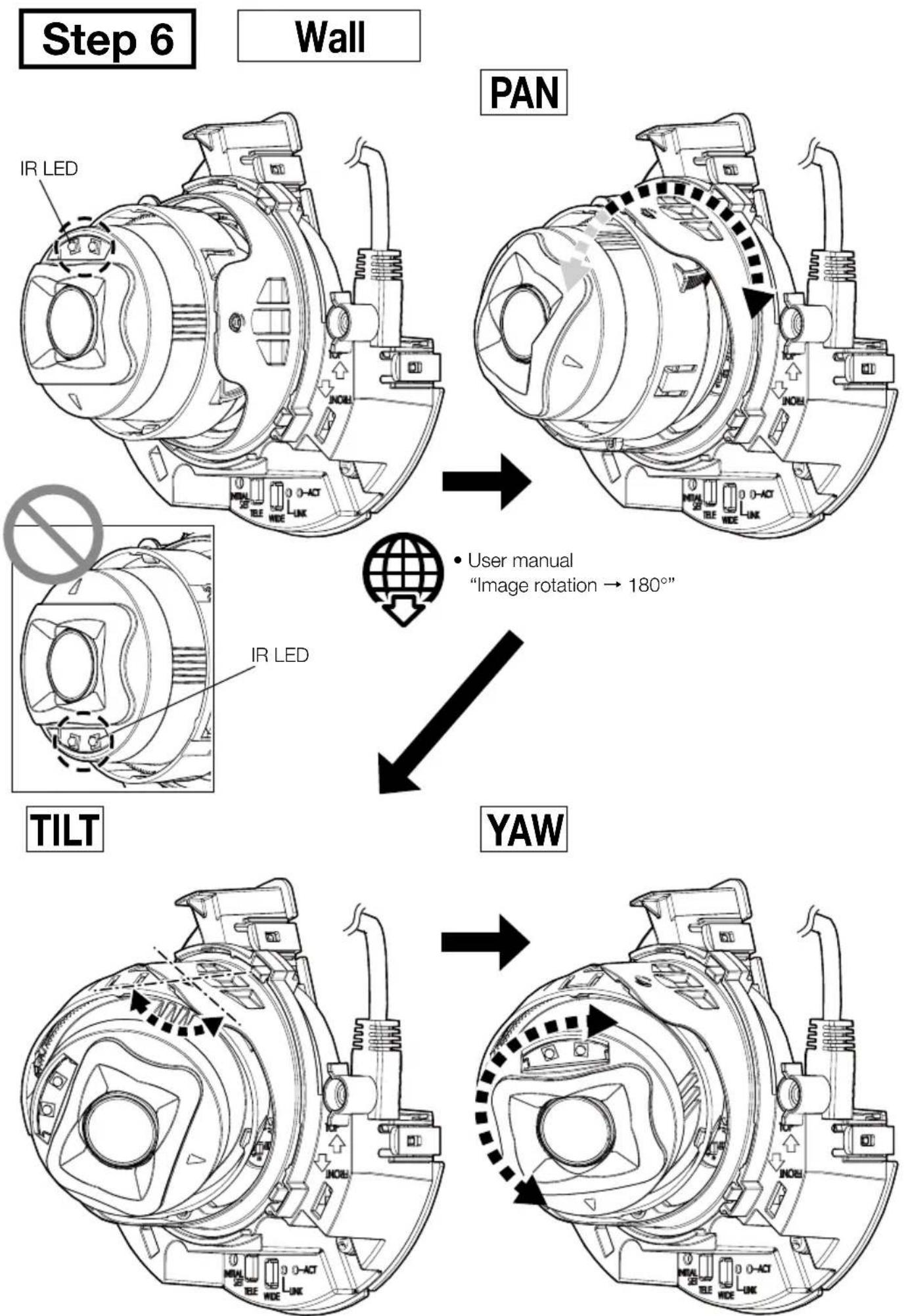
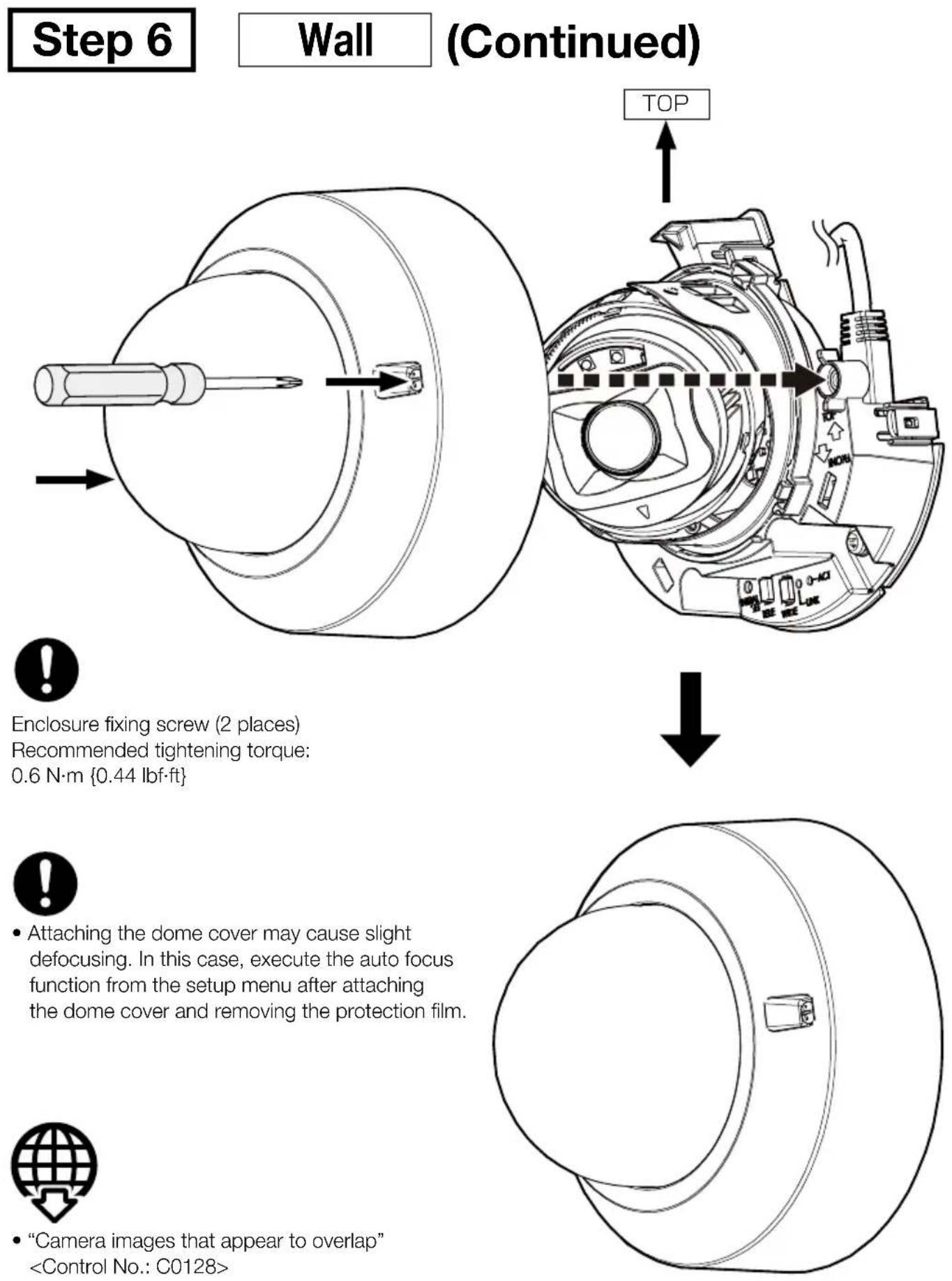
Wall
Note:
- For wall mounting, the camera conforms to IP42 only when the wiring is facing downward.
Step 4 (Continued)
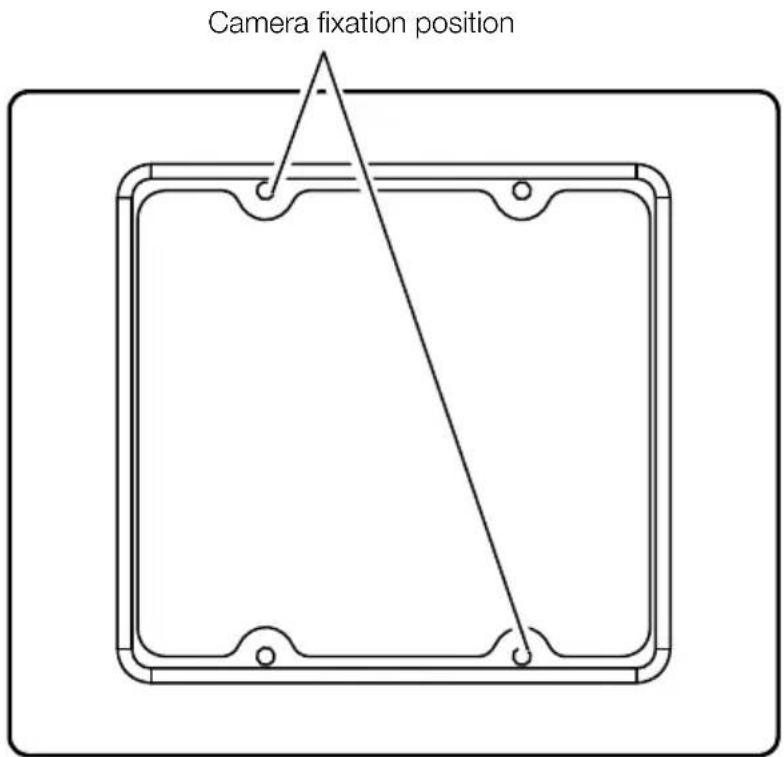
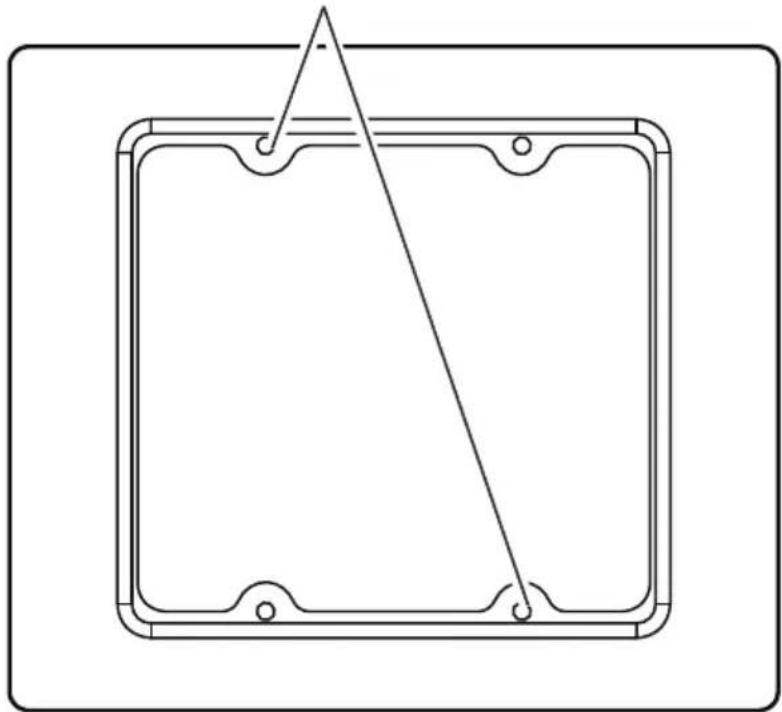
Mount the camera to a gangbox/ junction box.
Step 5 → Turn the power on (PoE).
- If there is a protection film on the lens, remove it.

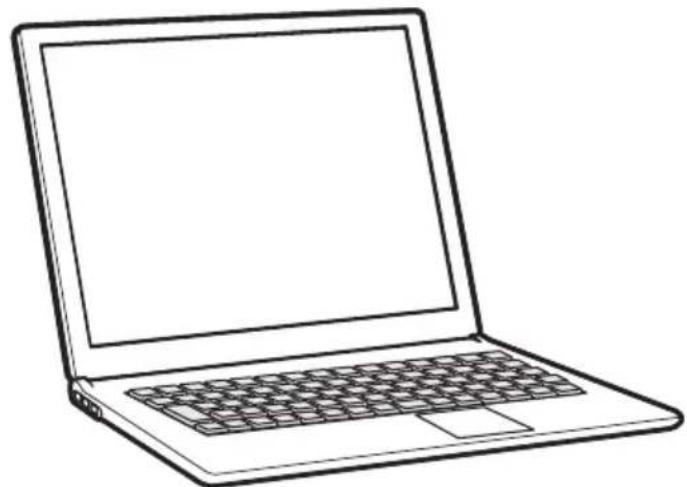
- Technical information website
"IP Setting Software"
or "i-PRO Configuration Tool (iCT)"
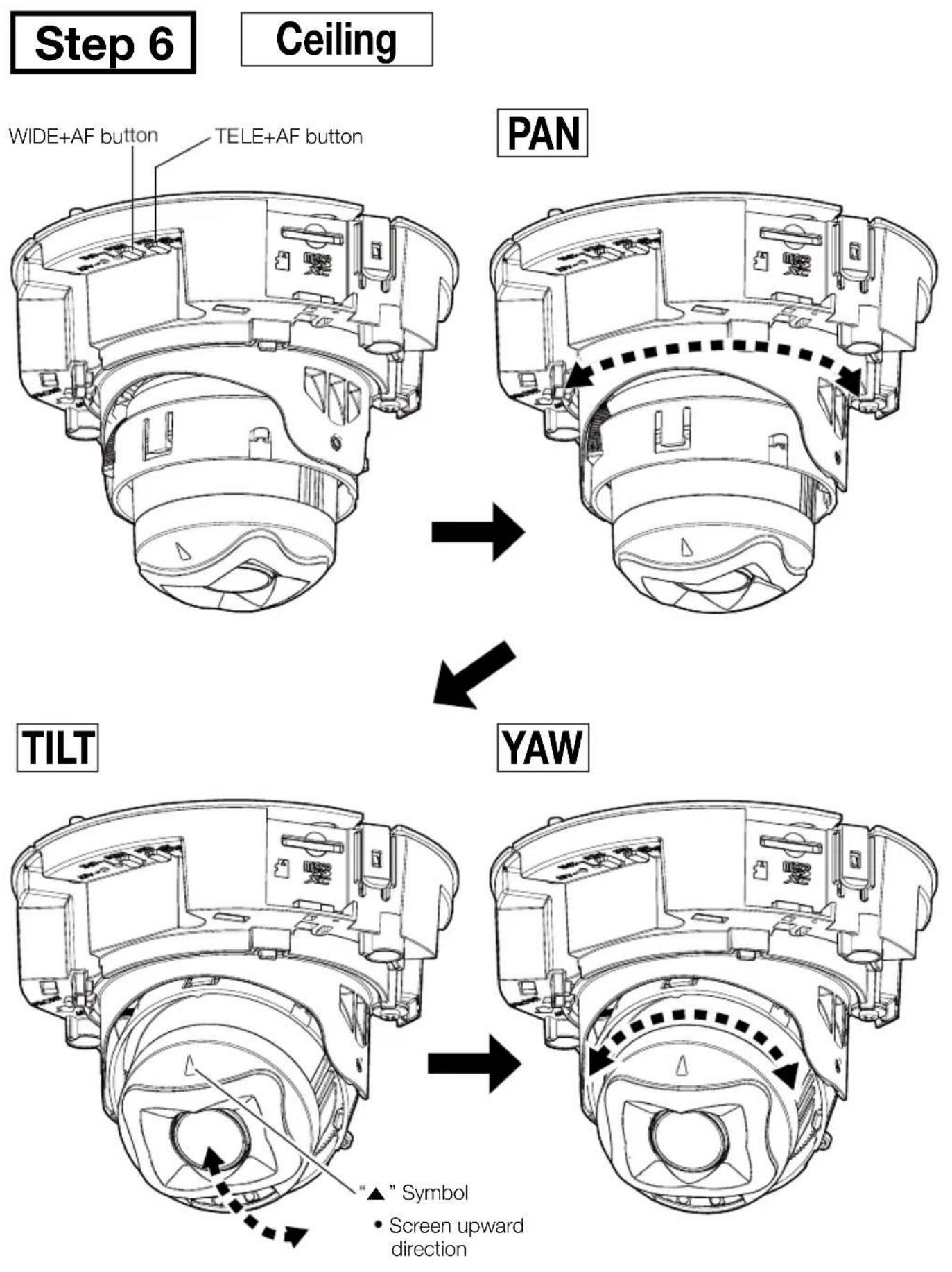
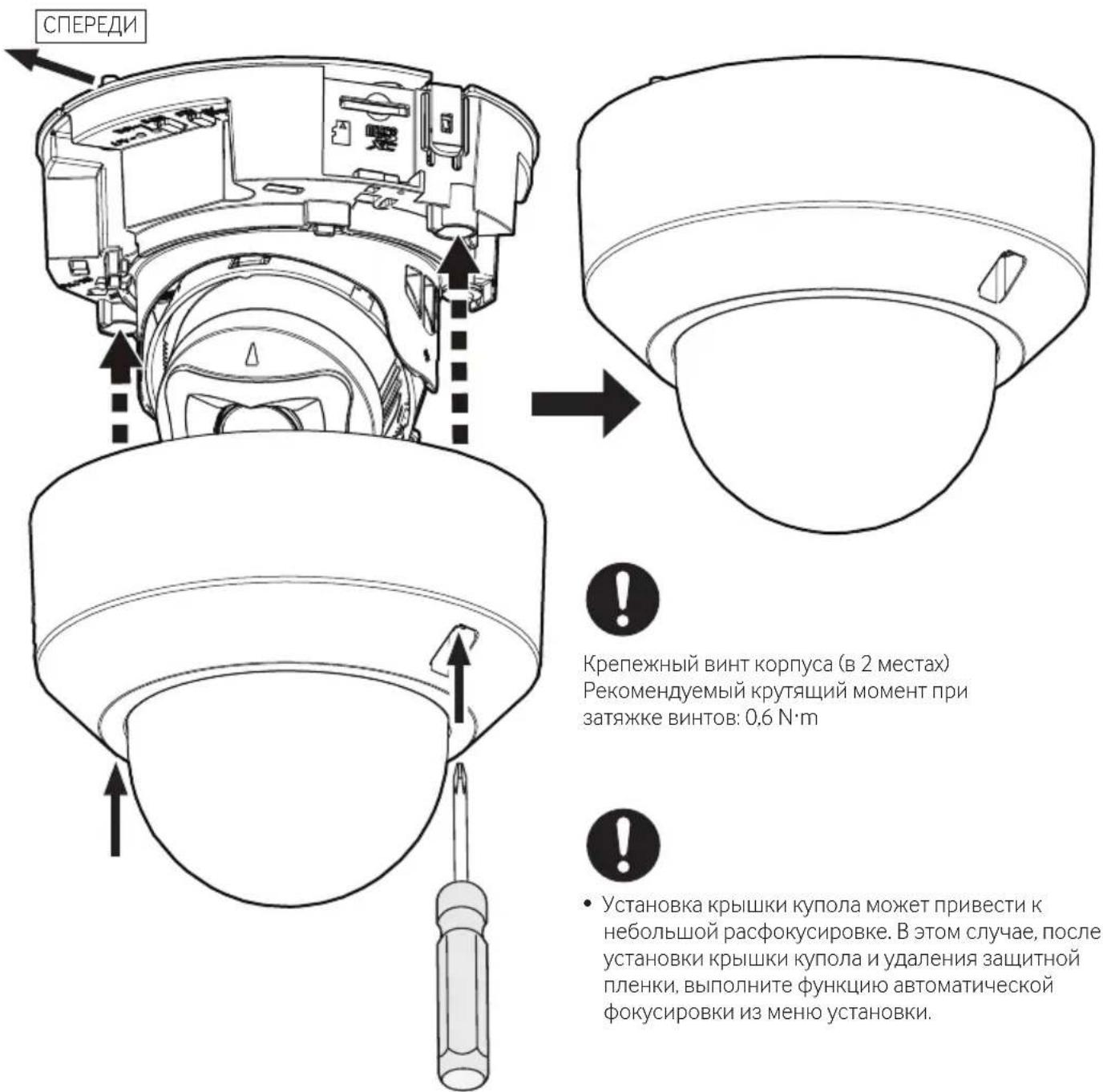
Step 6 Ceiling (Continued)
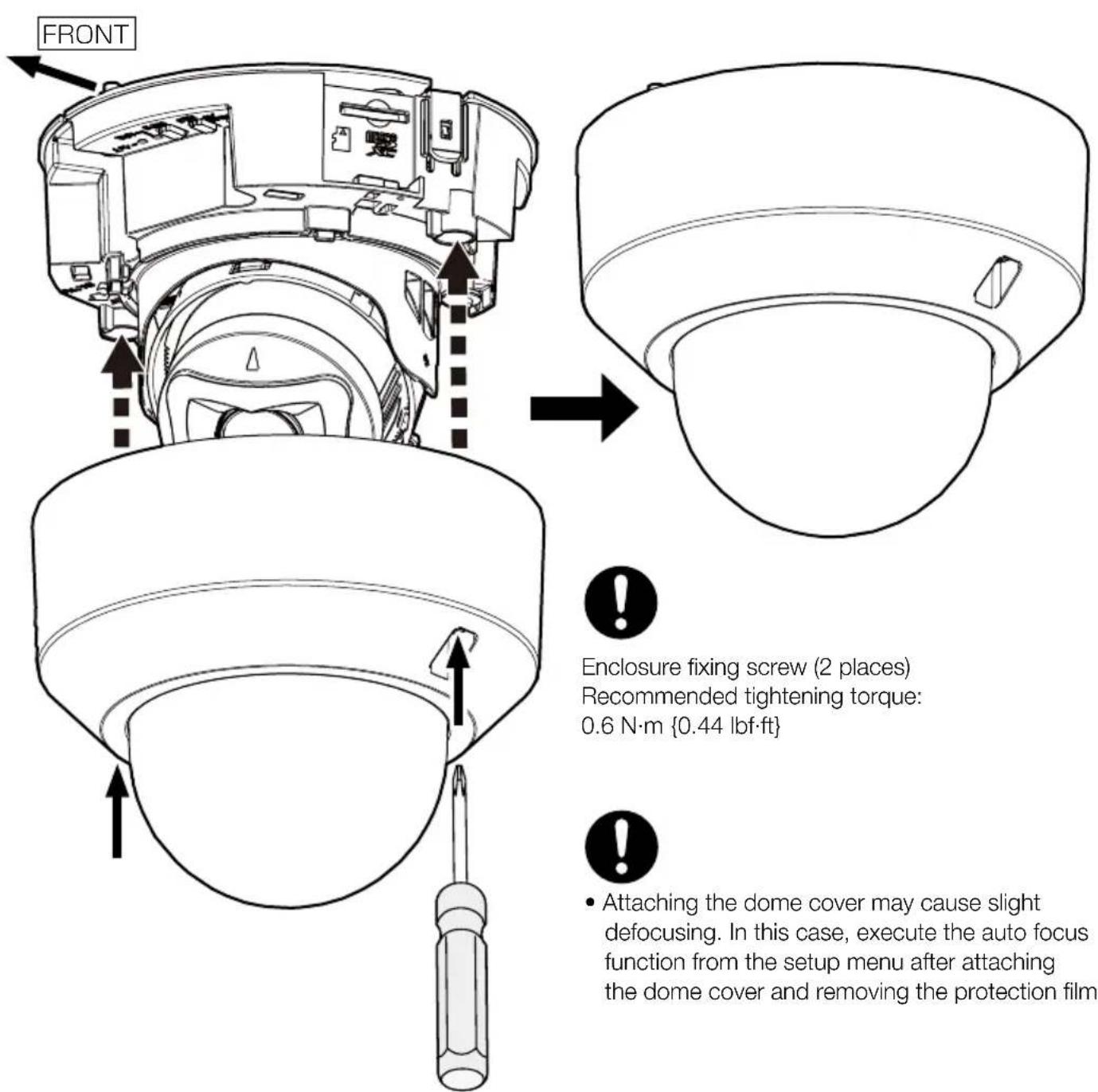

"Camera images that appear to overlap
https://www.i-pro.com/
Authorised Representative in EU: i-PRO EMEA B.V.
Laarderhoogtweg 25,1101 EB Amsterdam,Netherlands
i-PRO EMEA B.V. UK Branch 1010 Cambourne Business Park, Cambridgeshire CB23 6DP

8550 Fallbrook Drive, Suite 200 Houston, Texas 77064
Contact support: 1-800-513-5417
Pour U.S.A.
Attention: Remarque:
https://i-pro.com/products_and_solutions/en/surveillance/learning-and-support/knowledge-base/safety-instructions
Technical Support Video
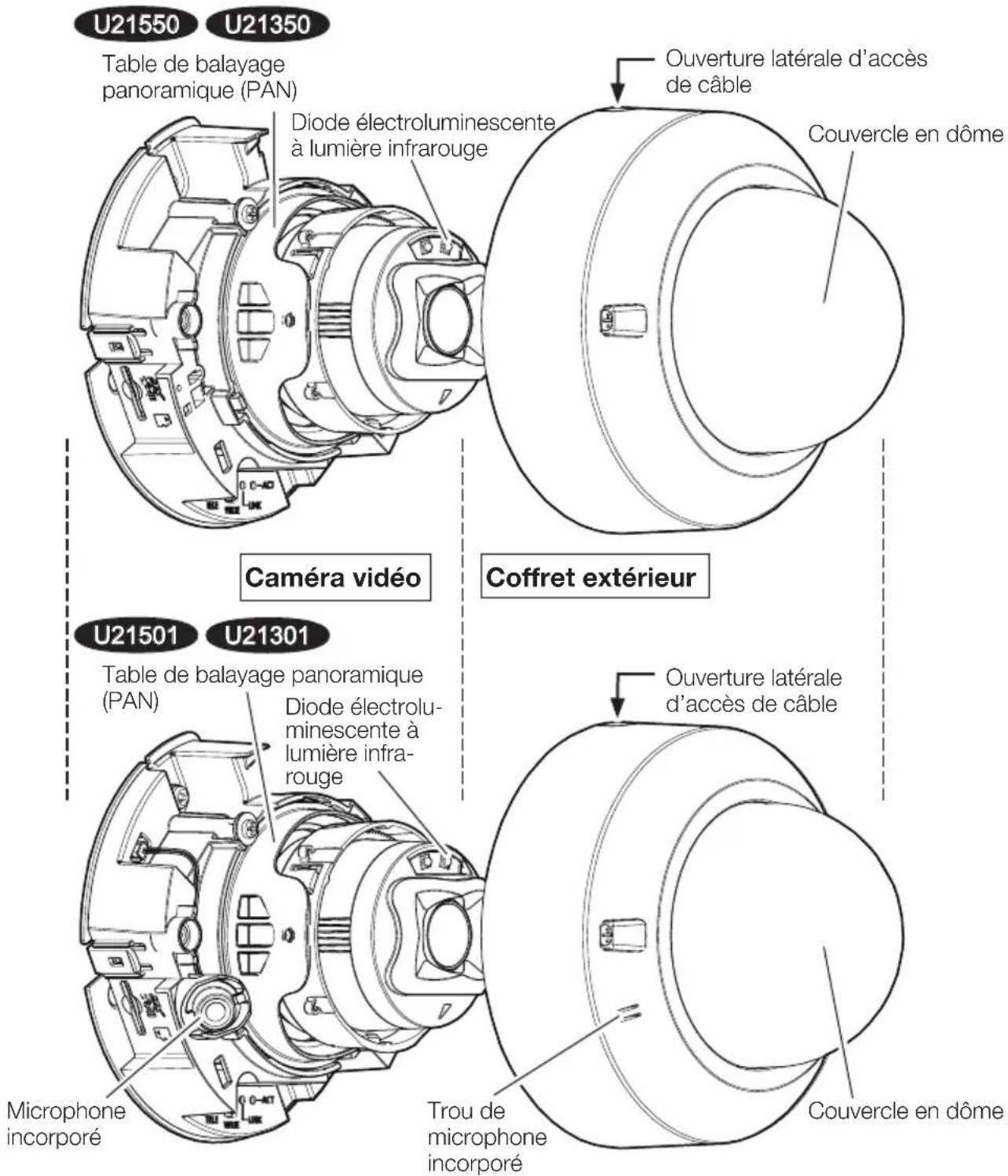
Pièces et fonctions
Technical Support Video
U21301
Étape 4
- "Camera images that appear to overlap"
- "Camera images that appear to overlap"
Installationshandbuch
https://www.i-pro.com/
Authorised Representative in EU: i-PRO EMEA B.V.
Laarderhoogtweg 25,1101 EB Amsterdam,Netherlands
i-PRO EMEA B.V. UK Branch 1010 Cambourne Business Park, Cambridgeshire CB23 6DP

Important Safety Instructions 1 St.
Technical Support Video
AUDIO OUT (Audio Aus)
<10m
Ethernetkabel
Technical Support Video
U21301
- "Camera images that appear to overlap"
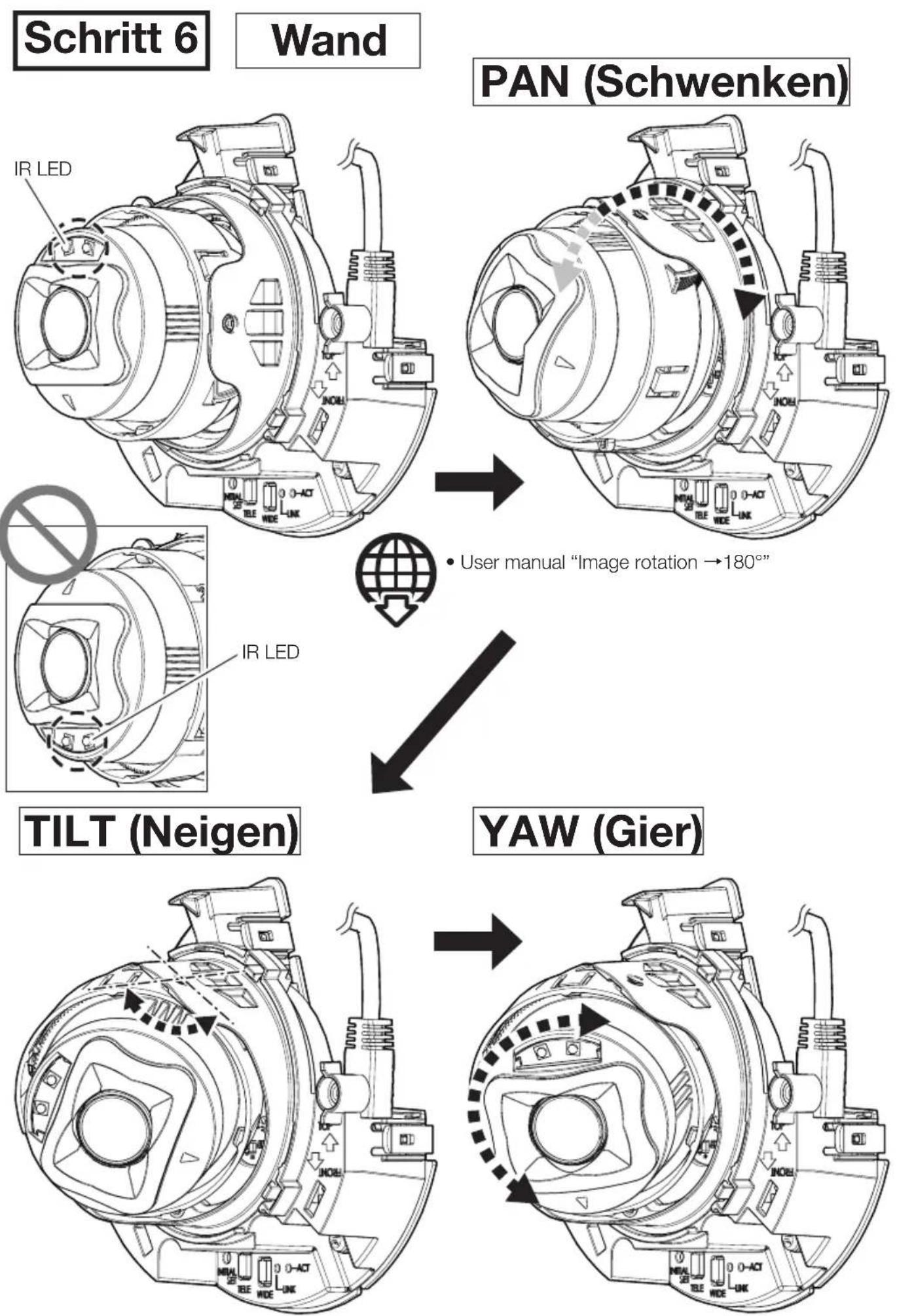
Schritt 6
Wand
(Fortsetzung)
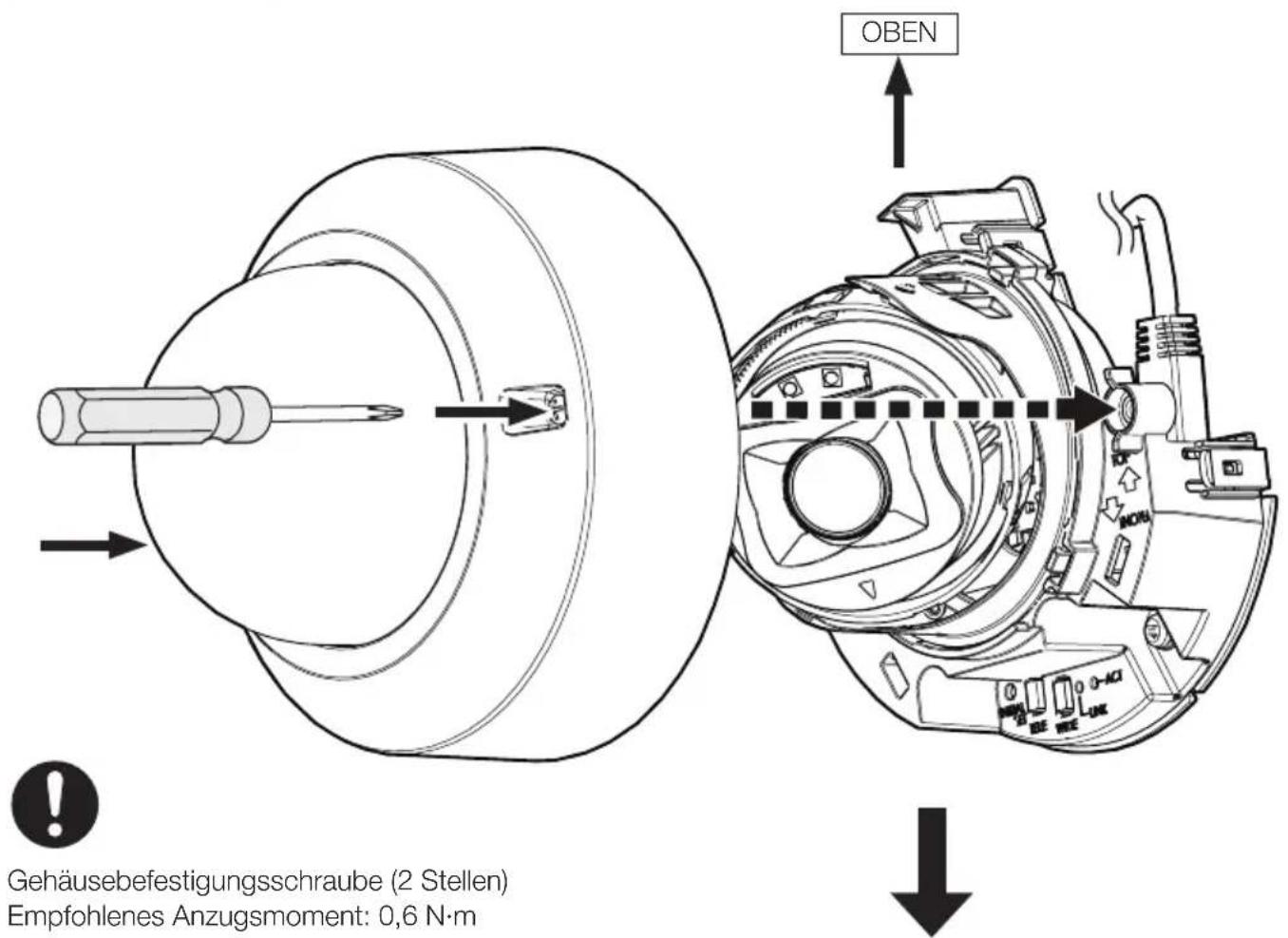

- "Camera images that appear to overlap"
N. modello WV-U21550-V3L
WV-U21350-V3L
WV-U21501-V3L
WV-U21301-V3L
WV-U21550-V3L
https://www.i-pro.com/
Authorised Representative in EU: i-PRO EMEA B.V.
Laarderhoogtweg 25,1101 EB Amsterdam,Netherlands
i-PRO EMEA B.V. UK Branch 1010 Cambourne Business Park, Cambridgeshire CB23 6DP

https://i-pro.com/products_and_solutions/en/surveillance/learning-and-support/knowledge-base/safety-instructions
Important Safety Instructions 1 pz.
Technical Support Video
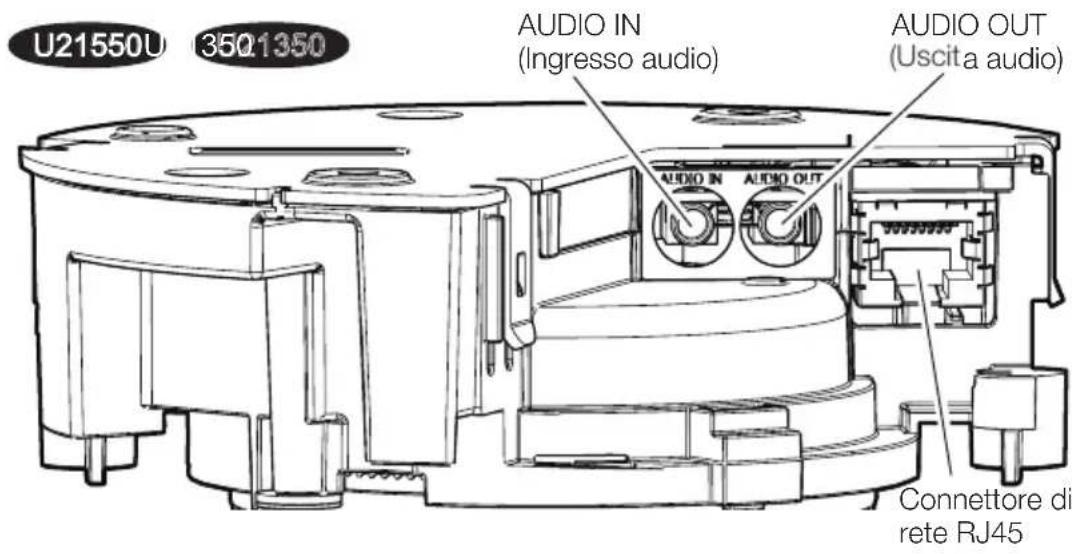
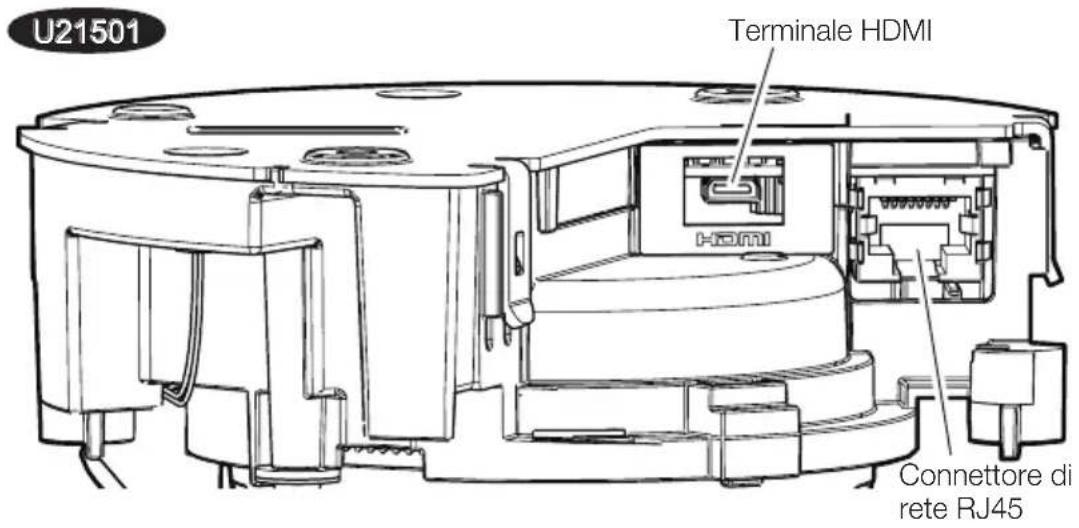
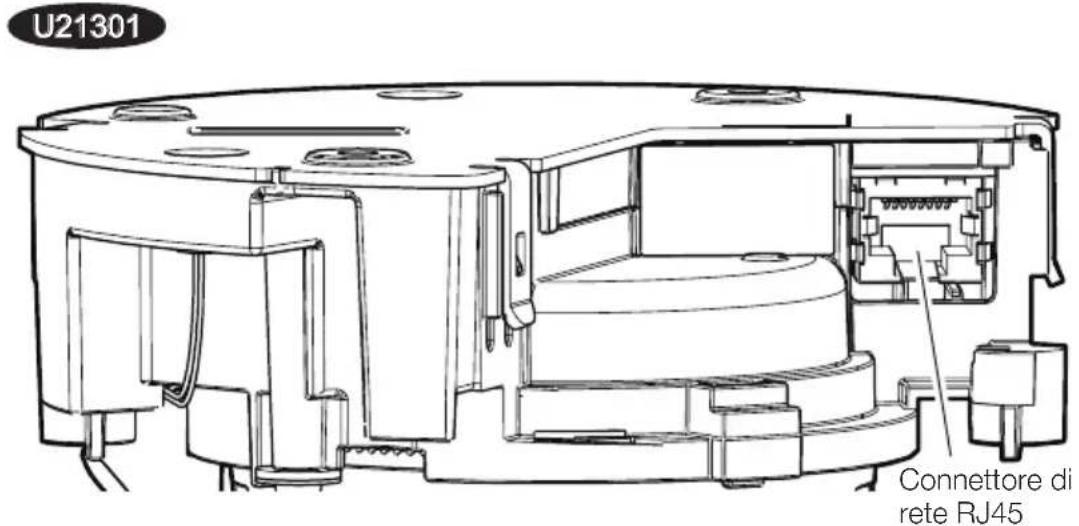
Partie funzioni
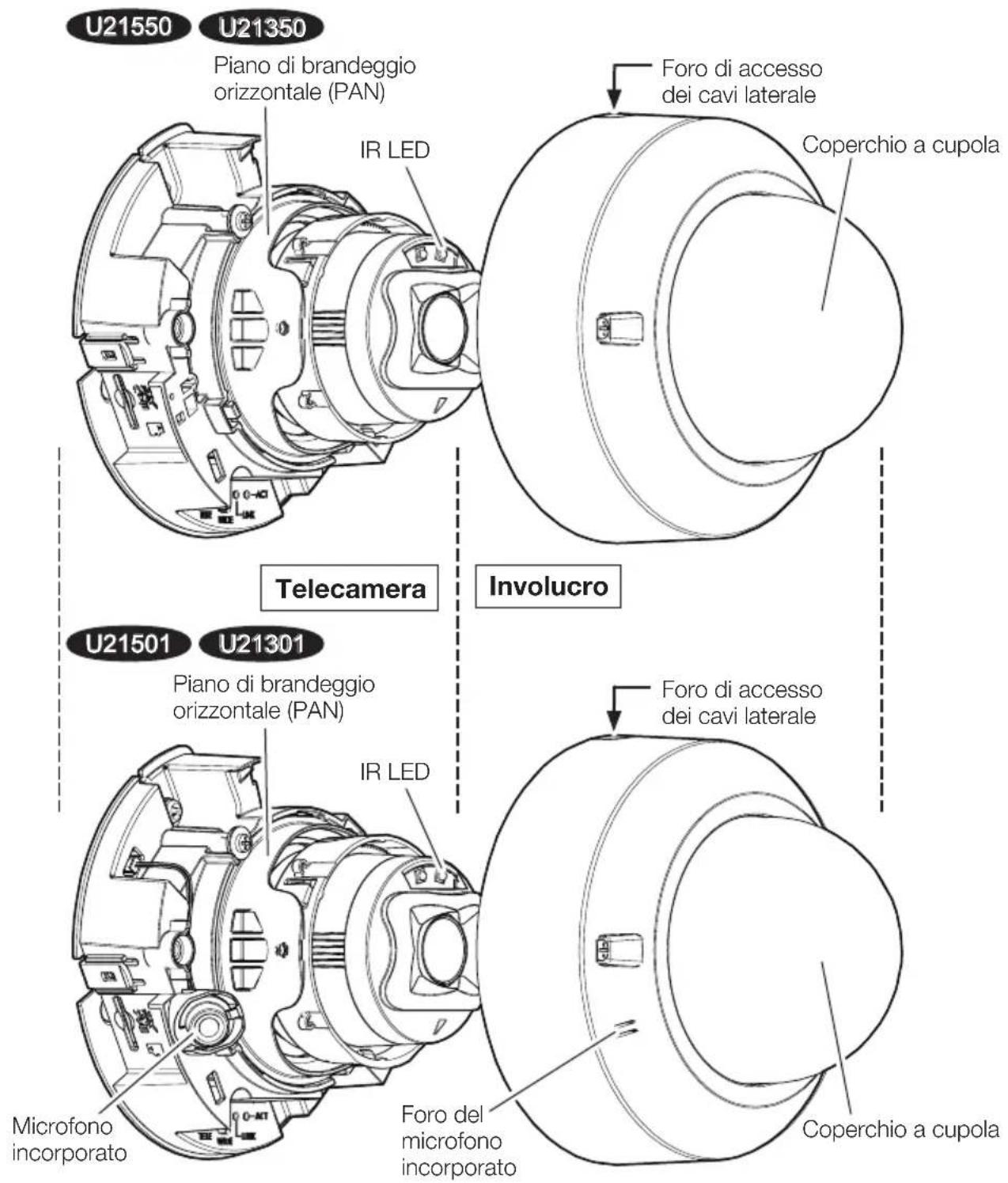
Partie funzioni
(continuazione)
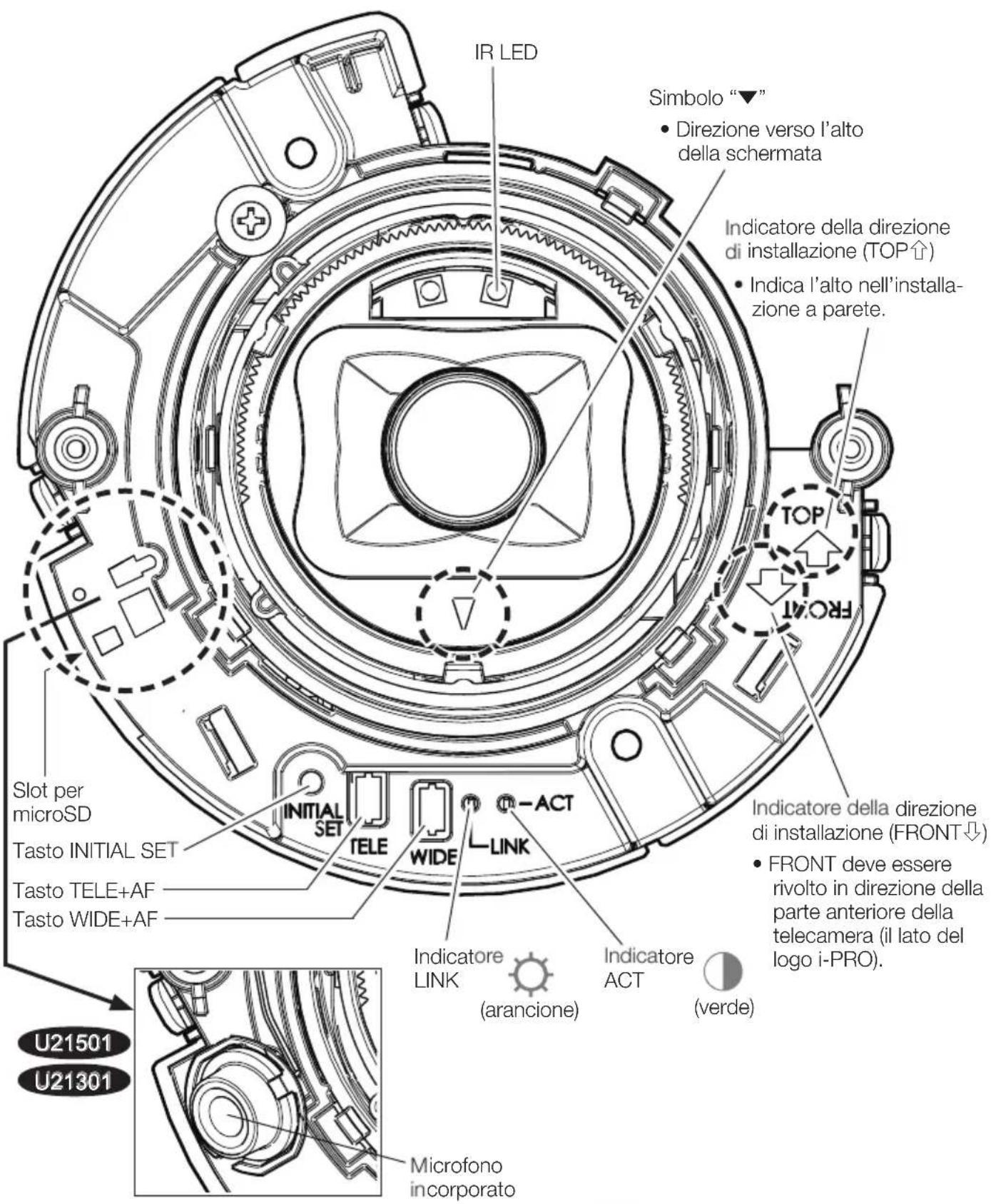

:Acceso

: Lampeggia

: Spento

- Tutti i LED si spengono ⇒ User manual [Indicator]
Passaggio 1
Preparativi
Nota:
Technical Support Video
U21301
"IP Setting Software"
O
“i-PRO Configuration Tool (iCT)”
- "Camera images that appear to overlap"
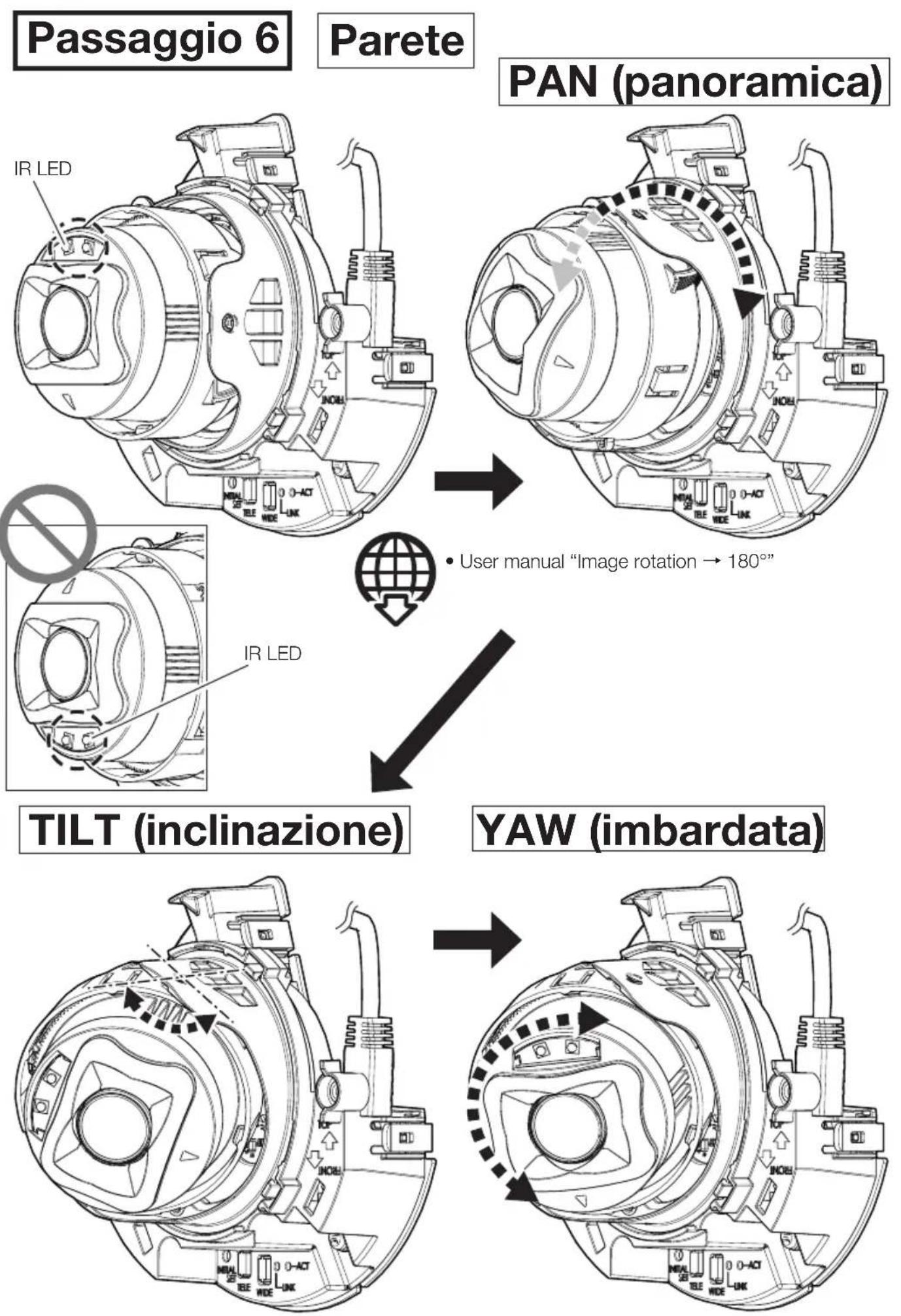
Passaggio 6

- "Camera images that appear to overlap"
Guía de instalación
https://www.i-pro.com/
Authorised Representative in EU: i-PRO EMEA B.V.
Laarderhoogtweg 25,1101 EB Amsterdam,Netherlands
i-PRO EMEA B.V. UK Branch 1010 Cambourne Business Park, Cambridgeshire CB23 6DP

https://i-pro.com/products_and_solutions/en/surveillance/learning-and-support/knowledge-base/safety-instructions

Technical Support Video
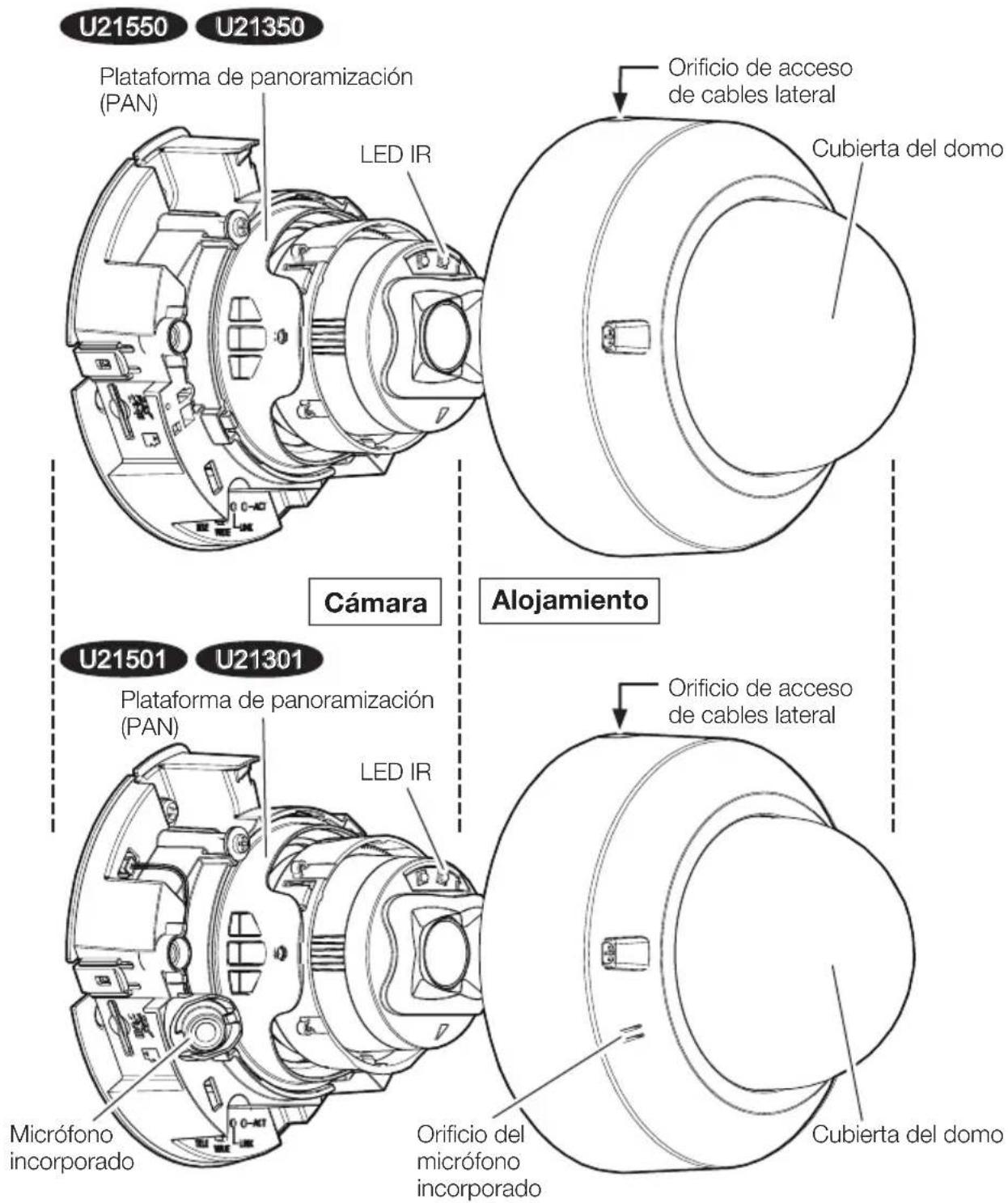
Partes y unidades
(continuación)
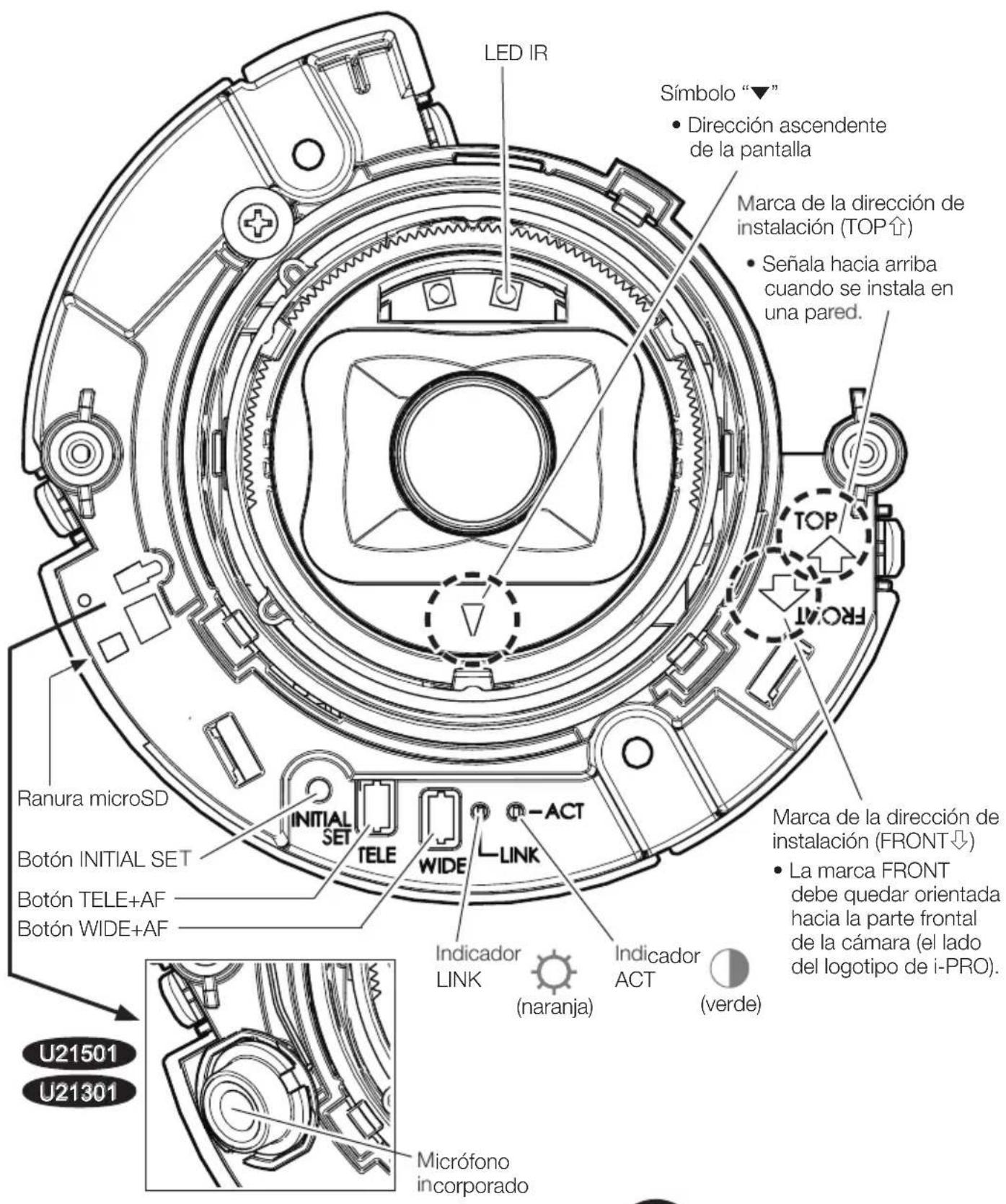

: Se enciende

: Parpadea

: Se apaga

- Todos los LED se apagan ⇒ User manual [Indicator]
Paso 1
Preparativos
Nota:
Technical Support Video
U21301
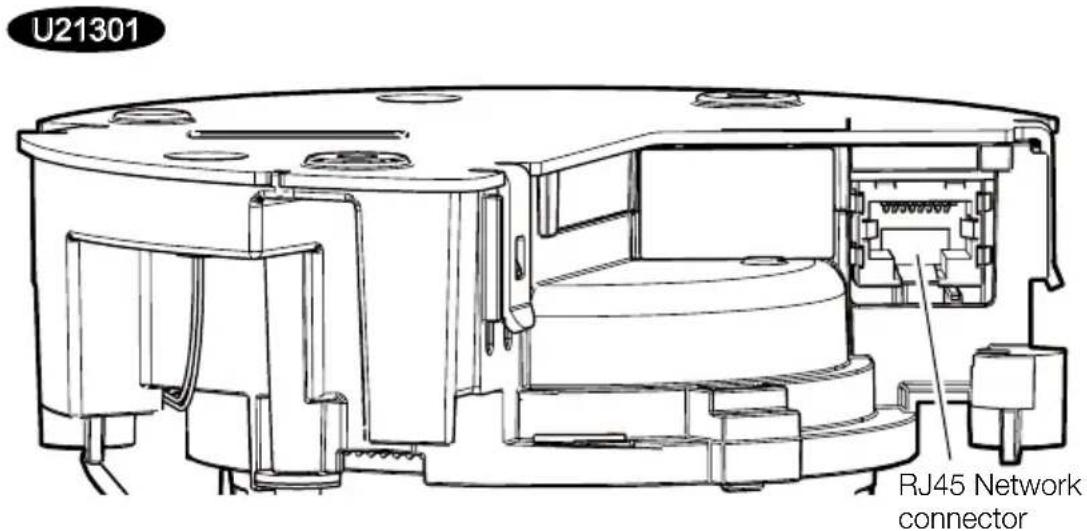
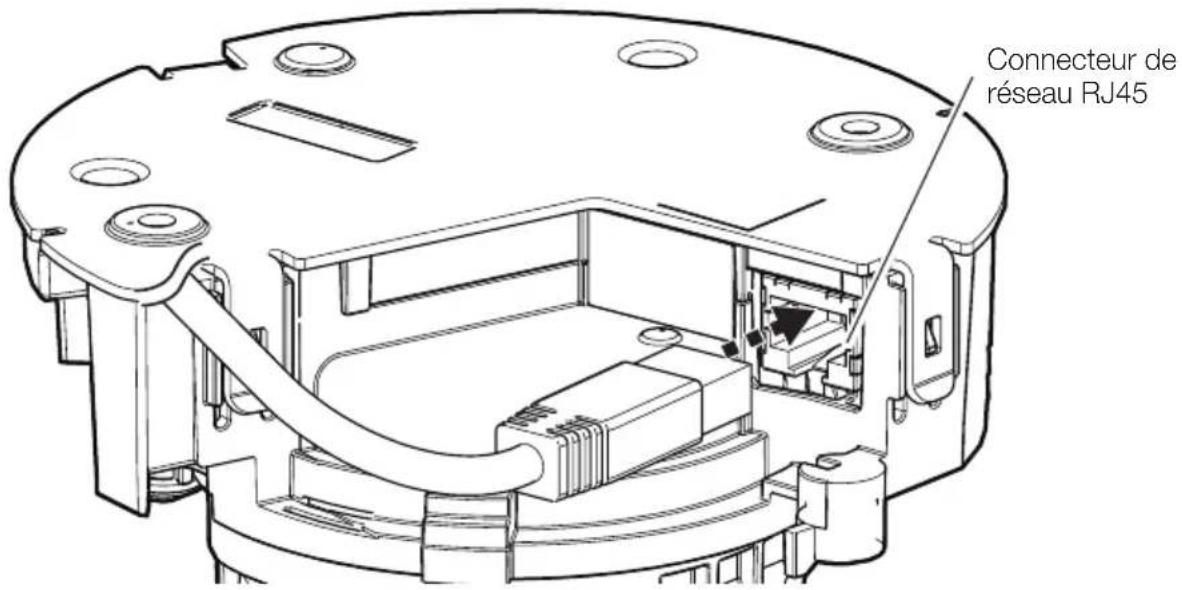
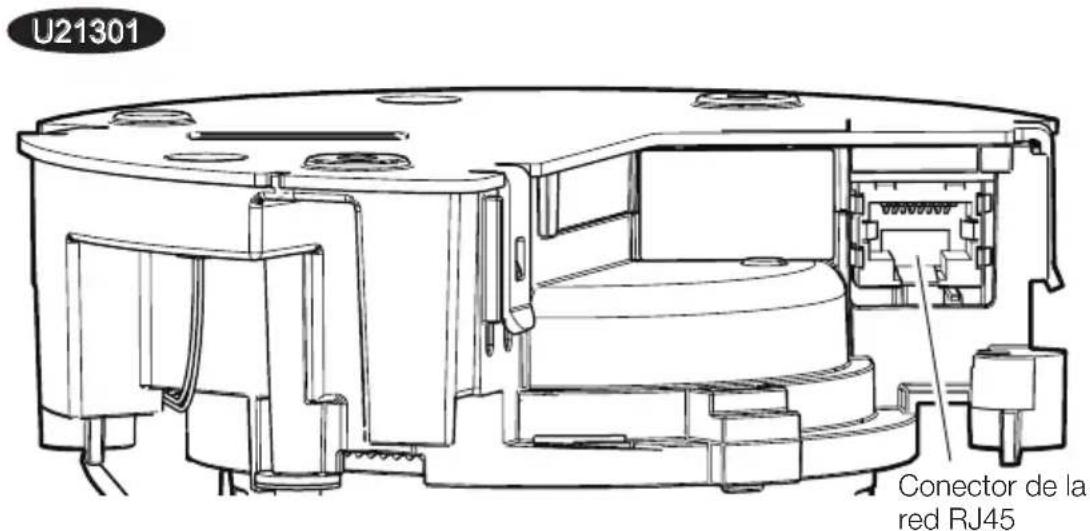
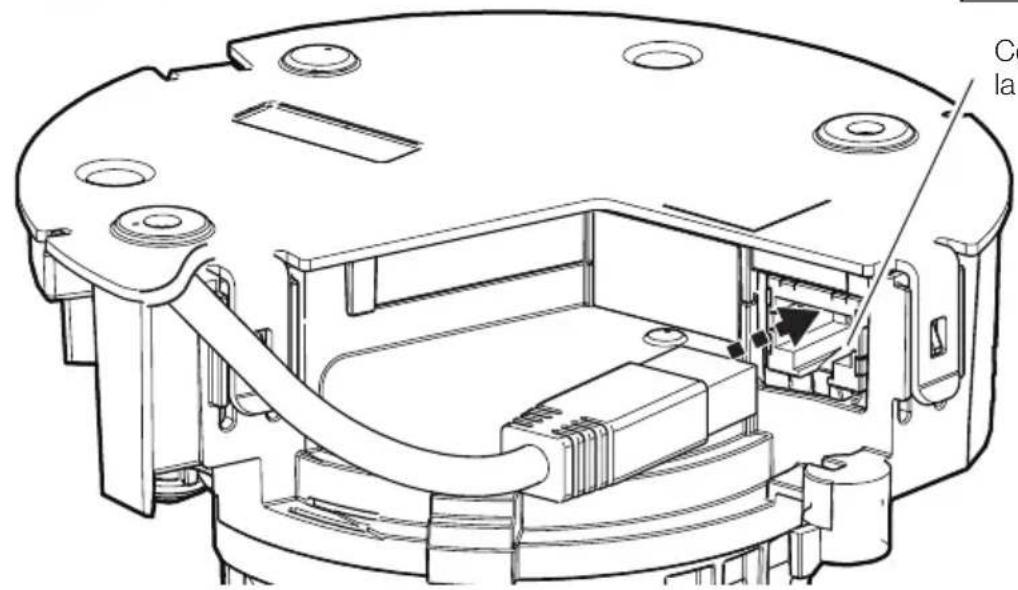
Conector de la red RJ45
Paso 4
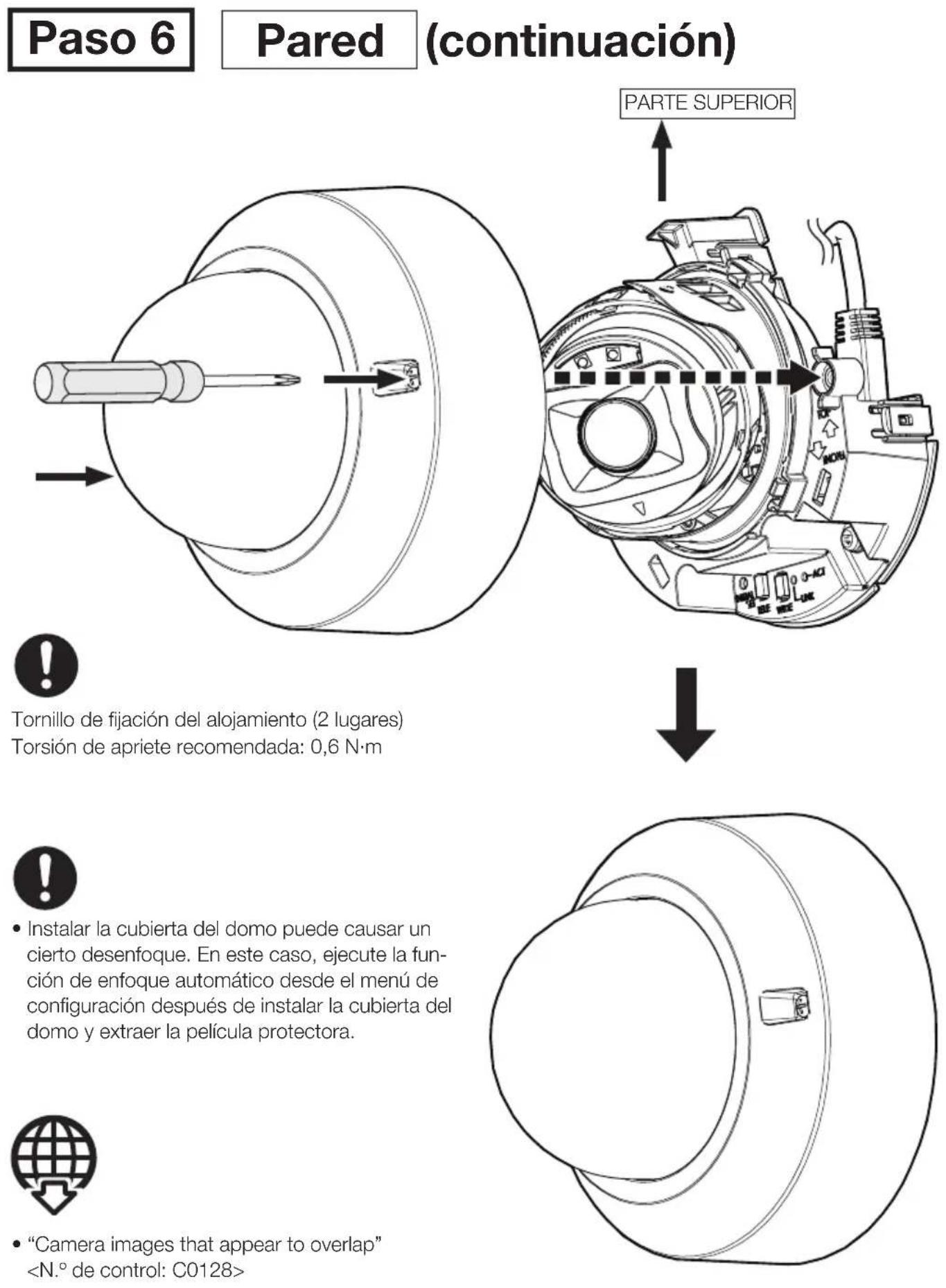
"Camera images that appear to overlap"
PykoBoDCTBO NO MOHTaJy
BxoJaunHe B KOMnIeKTHHcTpkyuHNo MoHTaKy
CeteBaKaMepa
ToIbKO InpofoecchoHaIbHorO HcNoIb3oBaHn
HcnoIb3OBAHHe BHyTpni nOMEueHn
Mодел NB WV-U21550-V3L WV-U21350-V3L WV-U21501-V3L WV-U21301-V3L
WV-U21550-V3L
06 INCTpykunxДЛЯ NOJb3OBaTeJIa
DokymeHTaun npOdykTa COCTOnH3 CNeyUoUnx DOKymeHTOB.
PykoBoCTBO NO MOHTaKy (HactoIIN DOkymeHT): CoepKHT HnFOpMaIIO O "Mepbl npedocTopoXHocTH", "Mepbl npedocTopoXHocTH npH MoHTaKe" n cnoCo6e MoTataKa.
- Be6-pykoBoCTBO (o6paTntecb no cBbIKe Ha cIeDyUOcEm Be6-caTe C HΦopMauné O npOdyKte): BkIouaET BVIEO NO MOHTaxy, 6a3OBbIe φyHKuIN I 6a3OBbIe cnocobpiabotl dna daHHoro yctpoiCTBa.
- User manual (ToIbKO aHrJIHcKn) (O6paTITecb NO cBbJIke Ha cIeDyIOUeM Be6caIte c HNΦOpMaunHe O npOdykTe): B 3OM pa3dJe IprNBeHb INHCTpyKuIN I0 ekCnIyatau, o6uHne dIra BCex MoJeIe. https://i-pro.com/products and solutions/en/surveillance/documentation-database
<KoHTpOlbHbI N0: C * * > , INcNoB3yEmbI B 3Tnx DOkymeHTax, CneNyET INcNoB3OBA Tb IJIa noncka INΦopMaun Ha NaIeM Be6-caIte TexHnueckOn INΦopMaun (https://i-pro.com/ products_and_solutions/en/surveillance/learning-and-support/knowledge-base/technical-information)Инхожденя Нжнoi INΦopMaun.
- Ipejde yem npctyntb K noDcoeHHeHIO nHy npabneHIO HactoIum n3dennem, cJeNyET TuaTeBHO n3yHTb HAcToaUHO IHCTpyKcHIO n CoXpaHNTb 6poHopy "Important Safety Instructions" dnyncnB3ObaHry B 6dyuem.
- Kapta namrtn microSDXC/ microSDHC/ microSD o6o3haeTc kak KapTa namrtn microSD.
BHeuHn Bn n npouhe Detan, NOKa3aHHbte B daHHOM pyKOBOCTBE, MOrY OTNuaTcR O T aKTueeCKoTO H3dJIIN B IpeJEnax, KOrDa 3To He NOMEuaet HopMaJIbHOMy NCNOJB3OBAHnIO n pInuHne yIyUeHnI H3dJIIN.
i-PRO Co., Ltd.
Tokyo, Japan
https://www.i-pro.com/
Authorised Representative in EU: i-PRO EMEA B.V.
Laarderhoogtweg 25,1101 EB Amsterdam,Netherlands
i-PRO EMEA B.V. UK Branch 1010 Cambourne Business Park, Cambridgeshire CB23 6DP

06 ycnoBHom 6o3HaueHn HIOaCHeHH K Homepy MoeJIH
U21550
: WV-U21550-V3L (5MP BapnofoKaJbHaMaMoJeBc INI)
U21350
: WV-U21350-V3L (2MP BapnofoKaJbHaMaOdeIb c INI)
U21501
:WV-U21501-V3L(SMPBapnofokaJIbHnaMoJeIb6e3HH)
U21301
:WV-U21301-V3L(2MPBapnofokaJIbHnaMoJeIb6e3HH)
Toprobbie 3HaKN H 3apeHcTpnpoBaHHbIe Toprobbie MapKn
- JlorotinbI SD, microSD n microSDXC YBnHOTcT ToBapHbIMn 3HaKaMn KOMpaHmN SD-3C, LLC.
- TepmnbHdMI, HDMl High-Definition Multimedia Interface, fmpmehbI cTnB HDMI nIorotnHDMI rBnaHTcra TOBaHbIMN 3HaKaMn nn 3apeHCTpnpoBaHHbIMN TOBaHbIMN 3HaKaMn KOMpaHInn HDMl Licensing Administrator, Inc.
Bce npyne Ha3BaHbIe 3deCb TOPRObIe 3HaKIN ABJIOTc co6CTBeHHOCTbIO COOTBECTByUxN BnaJeNbueB.

[PyccKnЯ3bIK]
Дeкларачи O CoOTBeTcTBH Tpe6OBaHHaM TexHueCKOro PerJaMaHTeA 06 OrpaHnueHH NcNoIb3OBAHHa HekOTOpbIX BpeIbIX BeIeCTB B 3JIeKtpHuYeCKOM 3JIeKtpOHm 6OpyDoBaHH (YtBepJxDehHOrO NocTaHOBLeHem N°1057 Ka6Heta MHHNCTpOB YkpaHbI)
I3dJIeHne COOTBeTCTByET Tpe6oBaHHaM TexHnueckoro PerIaMeHTa 06 OrpaHnueHHu NcNoJIb3OBAHHaHEKOTOpbIX BpeINbIX BeueCTB 3JNeKTpUHeCKOM n 3JNeKTpoHHom o6OpyIDOBaHH (TP ONBB).
Copejahanhe BpeHbIX BeueCTB CnyaX, He npEycMOptpeHHbIX DoonHeHem N°2 TP ONBB:
- CBnHeu (Pb) - He npebblaaet 0,1% Beca BeIeCTBa IIN B KOHcEHTpaunn Do 1000 MInnoHHbX uactei;
- KaДми (Cd) - He npeВьiшаeT 0,01 % Beca BeцecTBa ИИв KОнцeHTpaци Do 100 MInIINOHbIxЧаTei;
- ptytb (Hg) - He npebbiwaet 0,1 % BEca BeuecTba HnN B KOHcEHTpaun Do 1000 MInnnHOHHbix acTei;
- WecTnBaIeHTbIy xpom (Cr6+) - He npEbIaIeT 0.1% Beca BeIeCTBa IIN B KOHcIeHTpaIIN Do 1000 MInIIIOHOHHbIX YacTei;
- noIb6pmbneHobbl (PBB) - He npebbiIaet 0,1 % Beca BeueCTBa IIN B KOHcHTpaCIN Do 1000 MInIHOHHbIX aactei;
- noIbpmnDneHJIOBbIe 3aepbI (PBDE) - He npeBbIaet O,1% Beca BcEecTBA NIN B KOHcHTpaun Do 1000 MmllnoHHbIX cacteY
[KpaiHcbKa MoBa]
Декларачи по ВдноовidiнICTь Вимогam TexhiчHOro PerJaMaHrty 06мжehня BHKOpHCTaHHЯ DeяКnx He6e3neuHnX PeuOBnB eJleKtpnHOMy Ta eJleKtpoHOMy 6laHaHHi (3aTBepdxeHOrO ПocTaHOBOIO N°1057 Ka6iHety MInicTpib YkpaIHn)
Bupi6 Biinobiae BmOram TexHnOro PerIameHry OMeKeHHa BnKOpNCTaHHa DeAKnx He6e3neuHnx PeOBHN BeJeKTpUHOMy Ta eJeKToPHOMy oBaJHaHHi (TP OBHP).
Bmict He6e3neuHnx peoOBn y BnpaKax, He obymoBneHx Bdoatky N°2 TP OBHP,:
- CBnHeu(Pb) - He nepeBnUe 0,1 % BaRn peOOBHH a6o B KOHcEHTpaui do 1000 uactn Ha mIbnoH;
- KaДми(Cd) - He nepeBnUe 0,01 % BaRn peYOBHH a6o B KOHcHTpaIi Do 100 uactNH ha MInbNoH;
- ptytb(Hg) - He nepeBnUyE 0,1% Baru peOvBNH a6o B KOHcHTpaCiI do 1000 qactNH ha MlbyOH;
- 我们能证明 x p 0 (Cr6+) - He nepeBnUyE 0,1% BaH n peOBNH a6o B KOHcEHTpaui Do 1000 uactnHa MIbIoh;
- noJI6pOM6iFeHOnI (PBB) - He nepeBnUe 0,1% BaRn peOvBNn a6o B KOHcEHTpaCii Do 1000 uactnHa mJIbIOH;
- noiipomdefehiolbi eipn (PBDE)-He nepeBnue 0,1% Barn peohBNH a6o B KOHcHTpaui do 1000 qactnHa mibnoh
HΦopMauny o6 n3dennn
CtpaHa-npOu3BODnTeNb CdenaHO B Kntae
Ha3BaHneppon3BODInTeJ i-PRO Co., Ltd.
MecToHaxOxKeHne npOn3B0DHTeTn 2-15-1 KoHaH, MnHaTo-Ky, TokNo 108-6014 JnoHn
TQi/Mecu npOn3BOIDCTBa
IepBa 6yKbA cepHnHO rHomepa H3dJIy kA3bIaE T DBe NocJeHNHe LpHpe) 2001: A, 2002: B,... 2025: Y
2-ay6yKbcepiHoroHomepa npOdyKaTa yKa3bIbaET Meca
(craHbapnnoKeKa6pb).
npimep) RAHbapB:A,ΦeBaPabB,B,...DeKa6pb:B
<Рпсдурпждени>
CneNyTe HnKeepBedeHbIM npabnilam,ecn HHOe He yKa3aHO B Dpyrnx DOkymeHTax.
- UctaHabnBaIte np6op Ha TBepDoN pNOCKoN NOBepxHOCTN, 3a NCKJIIOUeHNEM OTCOeINHReMbIX IJIH HeCbEIMhBIX uacteN.
2.XpaHntb BCyXOM,3aKpbITOM NOMEueHIN.
3.BoBpemTpaHcnpTnOBKn He 6pocatb,He noDBepraTb n3nIshNe BV6paunn ydapam O npyne npedMeTbI. - YTNIN3NPOBaTb B COOTBETCTBn C HauNoHAlhBbIM N/InN MeCTHbIM 3aKOHOaTeJIbCTBOM.
IpaBnla n ycNOBnpeaJIIN3aCnH ne ycTaHOBJeHbI IN3rOToBnTeJem NdoJXHbI COOTBetCTBOBaTb HaCuHOHaJIbHOMy I/IIIMeCTHOMy 3aKOHOdaTeNbCTBy CTpaHbI peaJIIN3aCIn TObapa.
ToIbKO InI npoecchoHaJIbHoro HcNoJIb3OBAHH
CpOK cIyK6bl DaHHoro I3dEIny yCTaHaBnBaETcra IPOIN3BOOnTeJIeM, paBeH 7 rOdaM, HauHHaR C DaTbI IPOIN3BOOnCTBa IprN yCIOBHN, YTO I3dEInye NCIOJb3YeETcBA CTporOM COOTBeTCTBUN C HAcToRJeu INHCTpyKUeH NO EKcPnJaTaaun N IprIMeHNMbIMi TEXHnueCKHMn CTAHApTaMn.
HΦopMaunno O6paueHHo COTXODAMn DJI CTpaH, He BXOaunx B Ebponeckn Co103
DeiCTBnE 3TOrO CmBOJa paCnpocpTaHaeTc TaIbKO Ha Ebponeckn Co03.Ecn Bbl co6napaTecb Bbl6pocntb daHHbI npOyKT, y3HaIte B MeCThIx OprAHX BlaCTN HIn y DInJepa, KaK cJeDyET NoCTynatb C OTXoAMn TAKOROTINa.
PNEyPEXKDEHNE:
- 3KcnpaTaun DaHHOro npOyKaTb B KInbIX paHox MoKeT Bbl3BaTb paHIOIOMexn.
BHHMaHHe: PpMueaHHe:
- NctouHnK nocT.T. noKnJIOueHHbI K KaMepe,doJIxH HaxOuNTbcraB TOM Xe 3DaHIn.
- CeTeBaJ kAmepa npEJaHa3HaueHa TOnbKo InI nOJ KInUOeHnK CetN Ethernet nnn PoE 6e3 MapuTyn3aun Ha JInHeHbIe coOpyKeHn.
-Данн布局пюкг He Meet BbIKHQuaTeIe CETN. 063aTeIbHo yCTaHOte OTKIIIOUaHOuIe yCTpoIcTBA,Тakne KaK abTomaHTueCKn BbIKHQUaTeIb,ДЯOTKIIIOUeHn OCHOBHOrO NITaHn ObOpyIDoBaHn, IcNoJIb3yIOUeROcДЯ ПОdauN PITaHn Ha DaHHoe H3dJIne.
-ПрждуемпсntуNTьК NOДСоЕДИЕНЮ ИЛУправленинHaCTOЯшIM ИЗДeелЯм,СLEДуET TцаTeMbHOИЗУчNTьHaCTOЯшYO INHCTPyKцЮ.
JaHHbI npOdyKT He NOJXoJNT JIA NcNoJIb3OBaHnB MeCTax, IJe MOrYT HAOJITbcra Detn.
- He yctaHaBnBaIte daHHoe ycTpoNCTBO B IeKoOCTyHbIX dIra ObIuHbIX IIOJeMecTx.
-3To n3deneIe yBJIaETcI npofoecnOHaJIbHbIM o6opyDIOBaHHeM.
Дляпolyчениинфорmaци OВиntaxи Дугх DeТалг, HeO6xOДИмьIX ДЯ уCTaHOBKN, OБpaTITecb K COOTBeTCTByHOUSeMy pa3dEny DAHHOrO DOKymeHTa.

:CNMBOL NOCTOHHOROToka
Mepblnpedoctopoxknoctn
Bo n36eXaHHe HaHecEHnB VpeJa IIOJAMm MaTePnaIbHOro yUeep6a o6bAcHraTc Tpe6ObaHn, KOtOpbIe Heo6xOJIMo HeyKoCHTeJIbHO CO6JIoDaTb. PonoKeHHaTexnKn 6e30nacHocTN, O6uJe dJa BceM MoJeNe CeTeBbIX KaMep i-PRO, pa3MeueHbHa Be6-caNte, CcbIky Ha KOTopBn CoepKHT DByx-MepHbI uTpNx-KoD cnpaba. PoxKaanyIcTa, He 3a6yDbTe npocMoTpeTb erO. https://i-pro.com/products_and_solutions/en/surveillance/learning-and-support/knowledge-base/safety-instructions
He yctahabHbaiTe daHHoe H3deIne B orpaHueHHbIX HIN 3aIpeTHbIX 3OHax.
HecobJIOeHHe 3TOro Tpe6ObaHHaMOKeT npNBcTn K TpaBMe, HeCuaCTHomy CnyHaHO INN HeHCpPaBHocTH BCJeDCTBne NaDeHn.
O3HaKombTeCb C MepAMN PpeIOCTOPOXHOCTH, O6UIMM IINBCEX MoJeNe, Ha yKa3aHHOM Bblwe Be6-caIte, a TaKKe C MepAMN PpeIOCTOPOXHOCTH npn MOtTaKe BpyKOBoIDCTBe N0 MOHTaKy.
MOHTaXHbIe pa6oTbI cJeDyET npuyHTb dHnlepy.
MoHTaXHbIe pa6ObTI Tpe6yIOT TexHnueeCKNX HaBbIKOB IOnbItA. HecO6JIIOJeHne 3TOrO Tpe6oBaHHa MoKeT npNBecTH K NOKApY, NopaxHeHHO 3JIeKTPnueeCKIM TOKOM, TpaBMam INI IOBpeKJdeHHU IN3dEHHa. HyxHO o6ra3aTeNbHO o6pa- ⅢaTbCk K dINepy.
Haedxho HToUHO yCTaHOBHe H3dJIne Ha 3OHy MOHTaXa B COOTBeTCTBHN C HHCTpyKcIaMH No yCTaHOBKe.
HecobJIOeHne 3TOro Tpe6ObaHHa MoKet npBBeCTN K TpaBMnPOBaHHo Hnn aBapnA.
I npHmnte MepbI npeOCTOPOXHOCTn npOTNB naeHHaDHHORo H3dEINr.
HecobJIOeHHe 3TOro Tpe6OBAHH MoKet npNBecTN K NaJeHHU yCTPOIyCTBa, BeDyUeMy K TpaBMnPoBAHH.
HaJeKHO npKpeHnTe H3dJIe N MOHTaXHoN NOBepxHOCTN C NOMOcIbIO BnHTOB INI aHKePbIX 6oJTOB.
Ecn npnnaeraetcTpaxoBOHyb TPOsIK, 68a3aTeJbHO yCTaHOBt eero.
B Cnyuae BO3HKnHOBeHHn Ipo6IeM C HactoIcH M npOyKToM CJeIyET HeMeJHeHNO IpeKpaTHTbero HcNoJIb3OBaHHe.
Korda n3 npnbopa BbIeJraTc DbIM, N6o naXHeT bIMOM, N6o Jx HapyHna NOBepXHOCTb np6opa NCnOpTNacb, To npOdoJIkHTeJIbHa pa60Ta np6opa 6yJeT npBOaITb K erO NOKApy IIN naDeHIO H, KaC cNeIDCTBVE, K TpaBMnPOBaHNO, abapnM nn NoTePio CBOYCTB.
B 3TOM cnyae Heo6xOJHMO HemeIeHHO OTKJIouHTb np6op OT CeTN nITaHn, 3aTeM o6paTHTbcr K KBaIIHnCINPOBaHHOMy nepcoHaNo TExo6cnyKnBaHnIO n peMOHTy.
IpoBoAnTe nepHoAnueckne npOBepkn.
PkaBnuHa MeTaNuecknx DeTaJe HIN BnHTOB MoKet BbI3BaTb NaeHne np6opa, BeNyUe e K TpaBMnpoBAHnO HnA bApnaM.
3a npoBepkamn cneDyet o6paatbcK dHnepy.
Ipeed npOBepKo IIN TeXHueckm O6cJyKbAHnem 06a3aTeBbHO BbIKIOaTe NITaHne.
Mepbl ppeoctopoxknoctn np Mohtaxe
i-PRO Co., Ltd. He Hecet OTBeTCTBHeHOctTH 3a TpaBmI MaTePnaJIbHbI yUeep6, npHuHHbIe BCJeCTBHe HenpabNlbHOyCtAHOBKn HnE KcNpyaTuHN He B COOTBeTCTBHN C daHHo DOKyMeHTaUne.
YTo6bI npeoTbpaHTb TpaBmbl, H3dEInHe DOJIxHO 6bITb HaedKHO yCTaHO yCTaHO HA NOBepxHOCTH YcTaHOBN corlaCHO pyKOBOCTBy No MOtAxy.
3OHa noD MOHTaX DaHHoro npH6opa
B KaueCTBe 30Hb IIOJ MOHTaK IIpIbopa (TakO KaN IOBepXHOCTb yCTaHOBk) B OcO6bIX OKpyKaIOUx ycIOBnAX BbIbpaHOT COOTBECTByIOUe MeTO.
CneIyET y6eNTbcra, YTO 30Ha NOI MOHTaX IOCTaTOUHO pOuHa IJI BbIDepKINBaHn MaCCbI DaHHoro npBOpa, KAKBeToHHbI NOTOnIK.
CneIyET CMOHTnPOBaTb KaMepy Ha OCHOBaHHe KOHCTpyKcN 3daHnB MeCTe CIOCTaTOUHO BbICOKO INPOuHOCTbIO.
He cneyuT MOHTPOBaTb np6Op Ha rncocapToHHyIO nHITy HnIepeBAAHHyO nHITy, TaK KaOH He HMeOT DOCTaTOHNO pOuHOtN dIg MoTHaKa. B CNYae BbIHJxHDeHHoro MONTaKa np6OpHa TAKoe MeCTo OHO (MeTO)doJIxHO 6bITb DoCTaTOUHO yCINHeo N yKpenNeHo.
HactozaKaMepa npedHa3HaueHa Iny 3KcnIyatauN B NomeeHHN.
JaHHbI npOdyKT He MoKet 3KcNpyATnpOBaTbcra NOD OTKpbItbIM He6om. He cIeDyET NOBepRaTb daHHyO KaMepy BO3DeHCTBnIO pRMAOM COJIHeHOn paHaun B TeueHne DInTeNbHO BPemEH N He cIeDyET MOHTPOBaTb I3dEJIeB HENOCpeiCTBeHHo 6bn3OCTN OT OToNTeJIa HIN KOHNIOHepa BO3duXa. B IpOTNBOM Cnyae MoKet BO3HKnHYtB DeOpMaUria, ObecuBeuHBaHne i OTKa3 Prn6opa.
He cIeNyET yctaHabnBaTb HactoynipOdyKT B CJIeDyUxN MeCTax:
- Meça, İnde nçônb3OBaH xHmHKaT, KaK nλaBaTeMbHyb 6accSeH
- Mecta, KOTOpbIe NIOBepXeHbI BO3DeIcTBnIO BLnI INIIM MacJyHbIX napOB, TaKne KaK KyxHr
- MecTa co cneuHuecko OKpykaUoIe CpeIoB. B KOTopoN HcNoJIb3yOTcra IerKOBocJIaMeHЯIOUncEpaOdyKtbl NII pactBOpHTeTI
- MecTa, rIe BO3HnKaet paDnaCnra, peHTreHOBCKoe H3JyueHne, CINbHbIe paDIOBOJIHbI ININ CINbHOE MaHHTHOE NOJe
- MecTa B6IIN3n NO6epeKbY, HENOCPeIcTBeHNO NOBepKeHHbIE BO3dEInCTBnIO MOpCKNX 6pN3OB, ININ MeCTa, NOBepKeHHbIE BO3dEInCTBnIO aRpeCCNBbIX Ra3OB, TaKNX KaK Tropyne NCTOHNIK, BykHaHueckne O6NaCTu IN.T.D.
- MecTa, rIe TempepaTpa BbIXOINr 3a IpeJeIbI yCTaHOBJIeHHORo TEMpepaTyPhORo dHaNa3OHa
- MecTa, noDbBepKHeHbIe Bo3dEiCTBnIO Bn6paun, TaKne KaABTomO6uH, MOpCKne Cyda HIN BBiweyKa3aHHaJIHHNpOdyKToB (DaHHbI npOdyKT He ppeHa3HaueH dIra nPpImeHHeNBA BAtOMo6uJx.)
- MecTa pIaOM c npOdyKTamn, copejkaunm cepy, (ynakOBka, pe3HOBbIe HOKKN I T. n.)
- MecTa, rIe OH MoKet nonactb HenocpeDCTBeHHo NOI IOXJb IIN 6pb3rN BOJb (BKNIOaY Ma cTa nOd KApHn3amn T. d.)
- MecTa, NOdBepXeHHbIe BO3dEiCTBnIO BJIaN IIN NbJIN
- MecTa, NOBepKHeHHbIe pe3KIM N3MeHeHnM TemNepaTpybl, HAnpImEp, B6JIu3N OTBepCTn IINyckA BO3Dyxa KOHNiCNoHEpoB INI 3a6OpHbIX 3aCNOHOK UINPKyJlauCIN BO3Dyxa
3aTAAKKa BnHTOB
HeNb3a HcNoB3OBaTb yIapHOro BnHTOBepTa. IcNoB3OBAHne yIapHOro BnHTOBepTa MOKeT Bbl3BaTb NOBpeKdEHNe BnHTOB uN IN x nepetJxKy.
06 OTPaXeHHcBeta ChapyHn HK-cBeta
B 3aBnCIMOCTN O T yIgna nAeHnBHeIg CBeTa Na 3KpaHe MoKeT NOBnTbCn OpeoJ.
B cnyuae nCnoIb3OBAHn IK-cBeta yCTaHOBka KaMepbi pIOM CO cTeHOJ MOKe TcTaTb npUHHoN OtpaKeHnIHpapakpaChbIX Lyye, YTO npNBedeT K OCBeTIeHnO uactn nnBcero kPaHa.
HyXHo 06paTaB BHHMaHHe Ha BLnAaXHOCTb
AnHb np6op CneIyET CMOHTnPOBaTb B yCNOBHX H3KOJ OTHOCTeJIbHO BIAxHOCTN BO3dyxa. EcH yCTaHOBKa BbIOHNrEeTcBO BPEM J0KJIN B yCNOBHX NOBIIeHHO BIAxHOCTN, BHyTpEHnE DeTaH MOrY 6bITb NDbeprHyTb BO3dEChTBIO BIAxHOCTN, YTO PnPBEdET K NOBLeHHO KOHdeHCATA BHYTPN KpbIuKN KyNoJa.
3aunTaOTMOHNN
Korda Ka6eHn HcNoB3yOTcHa yIuue, cyuectByet BepoTHOCTb, YTO OH MOrYT 6bITb NopaKeHb MoJHnei. B 3tOM cIyuae yctahOBInTe rpo3OBOu pa3pndHK pRdOM C kamePoN u cdeJaTe dINHy ceTeBOrO ka6eJIa MeJdy kamePoN u rpo3OBBim pa3pndHkOM MaKcHmAbHo BO3MOxH0 KOpOTKoI dI pypeDToBpaUeHn IOBpeXdEHHa kamepbI MOHNHe.IocTeHTe HaI Be-CAIT TexHnueckO INΦOpMaun
Korda Moryt BO3HnKaTb yMoBble NOMEXN
B BVnDeo nnaydno MoKet Bo3HKnHyTb 7yM B6Ii3n CnIbHorO 3JeKtpueeCKOr O NOr OT TeJIeBN3opa Hn paIIO aHTeHH, 3JeKtpoDBnraTeNei n TpaHcΦopMaTOPOB, IINn CnIbHOrO 3JeKtpueeCKOr O NOr/MaHNTHO rONr OT LInHH 3JeKtponepeDaun c nepemehhblm Tokom (IamnoBaJnnH) 100 V nn 6Oee. POn3BOJnte paobtbo n poPa3BoJke 3JeKtponHtAHnHa paCCTOarHn 1 m n 6Olee ot HxN nn BbINOJnYe pa6OtBi n npoklaJKe 3JeKtpuuecknx Ka6eJe CnCpOJb3ObaHNem MetaIInueeCKX Tpy6. (O6a3aTeJbHO BbINOJnHte 3a3EmJeHne MeTaIIuueeCKX Tpy6).
3TNKETKa KLnaccnHkaunu 6OpuyoBaHHN HcToUHHKa NHTaHH
Cm. nIeHTnHnIpyUOyU OTHKeTky Ha HnKHei CTOpOHe DaHHoro yCTpOietBa IJIaONuYHeHnIHΦOpMaun O KJIaCCnHnKaUuN yCTpOietBa, NCTOChnke PNTaHnI N dpynx daHHbIX.
O cTaTHueckOM 3JIeKTpHueCTBe
Ipejde yem yctaHaBnBaTb Hn CHMaTb DaHHoe n3dJIe, O6ra3aTeJbHO KOCHITcB MetaAnHueCKHX ObekTOB, T06bl ChrTb CTaTHueCKOe 3JeKTPnueCTBO C TeJa.
TexHHueckne xapaKTepeHCTNKN
Important Safety Instructions 1 wT.
Другне Heo6xOdHMbIe 3JIeMeHTbl (He BkJIIOUeHbI)
- YCTaHOBOUHbIE BnHTbl
OnuHbIe npHaJekHOCTN

Послдняифорmaци → Be6-caNT texnueckoинфорmaци "Accessory Selector" <Контpoлььну N°: C0501>
Дeф ekTobka
IpekJe cHem 3aPaaBbTo bOcnyKbAHne, o6paTntecb K pa3JeNy "DeeKTOBa" Be6-pyKOBoDCTBa. 3aTeM IOITBePdnte HaJIuHne Ipo6JIeMbI.
Празецьуновки
UacTNnФyHKcHH
Uactn n yHKcHn
(проблженье)
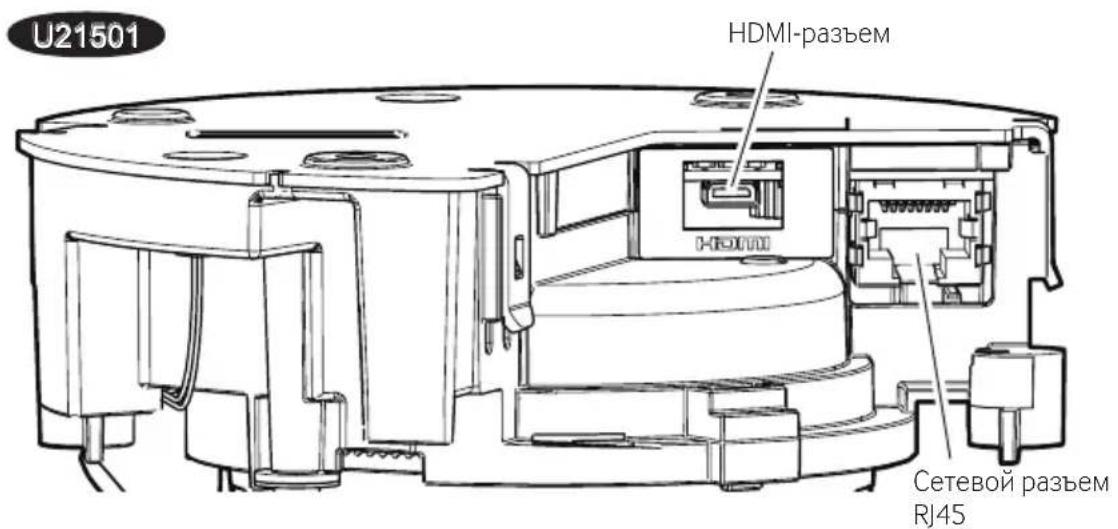


:Topnt

:Muraet

:Jachet

- BCEcBcTeOIOIObI BbIKIOHuaOTcR ⇒ User manual [Indicator]
War 1
ПодgroTOВka
3aMeuHHe:
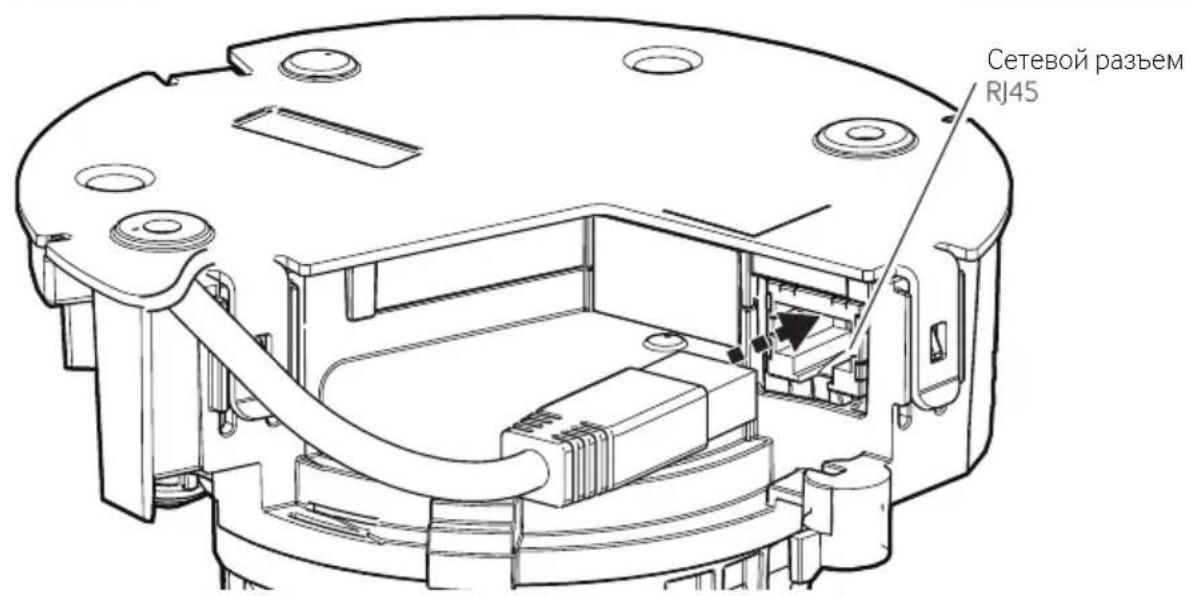
Technical Support Video
U21301
War 4
CMOHTpyTe Kaempy npraMo Ha nobepxHOCTn yctaHOBKn.
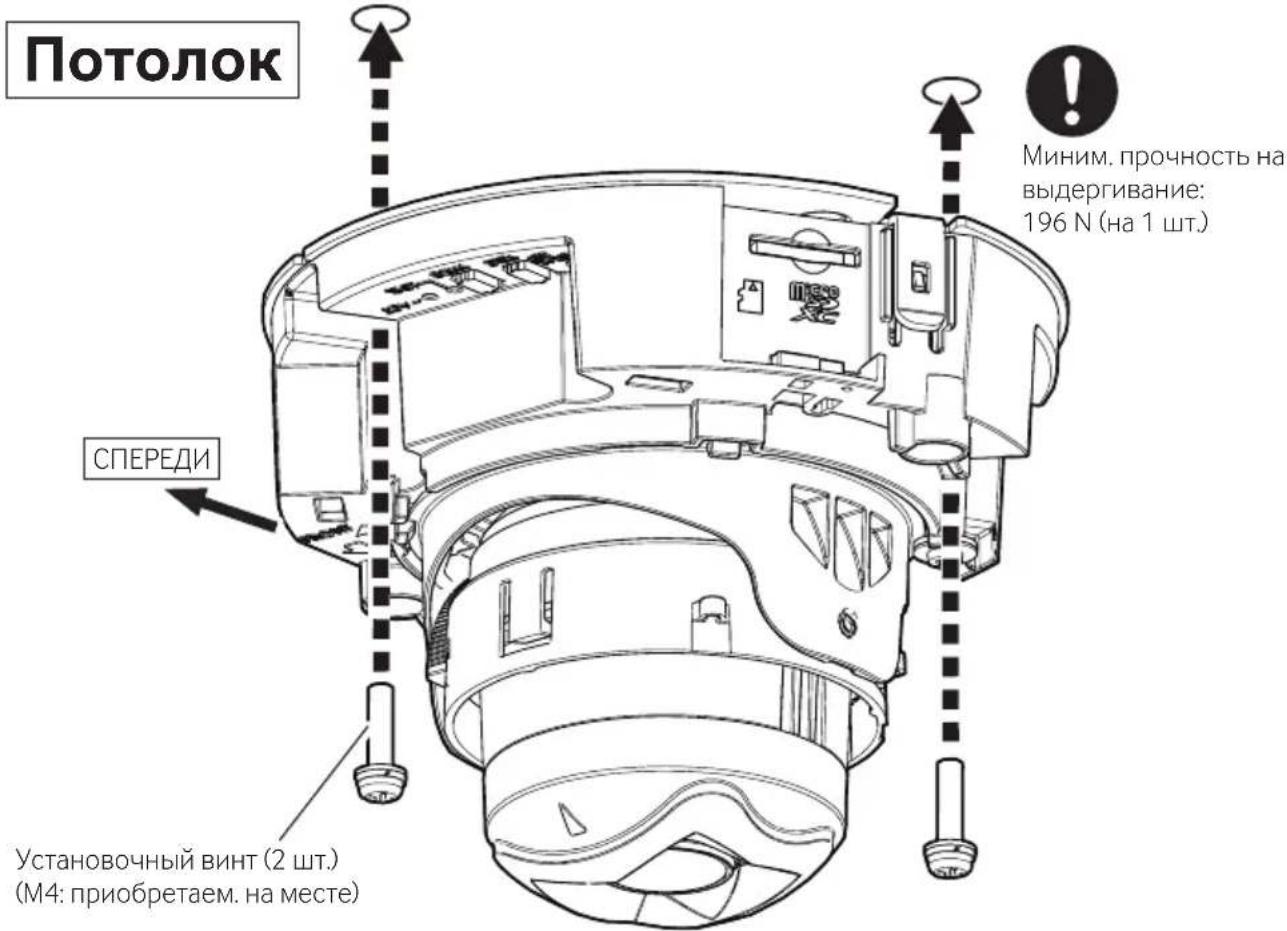
CteHa
3ameuHHe:
Дя yctaHOBKn Ha CTeHy KaMepa COOTBeTCTByeT cTaNdapTy IP42 TOnbKO B TOM Cnyue,ecn npOBoKa HnpaBHeHa Bn3.
YcTaHOBOUHbI BnHT (2 Wt.) (M4: npno6peTaem. Ha MeCTe)
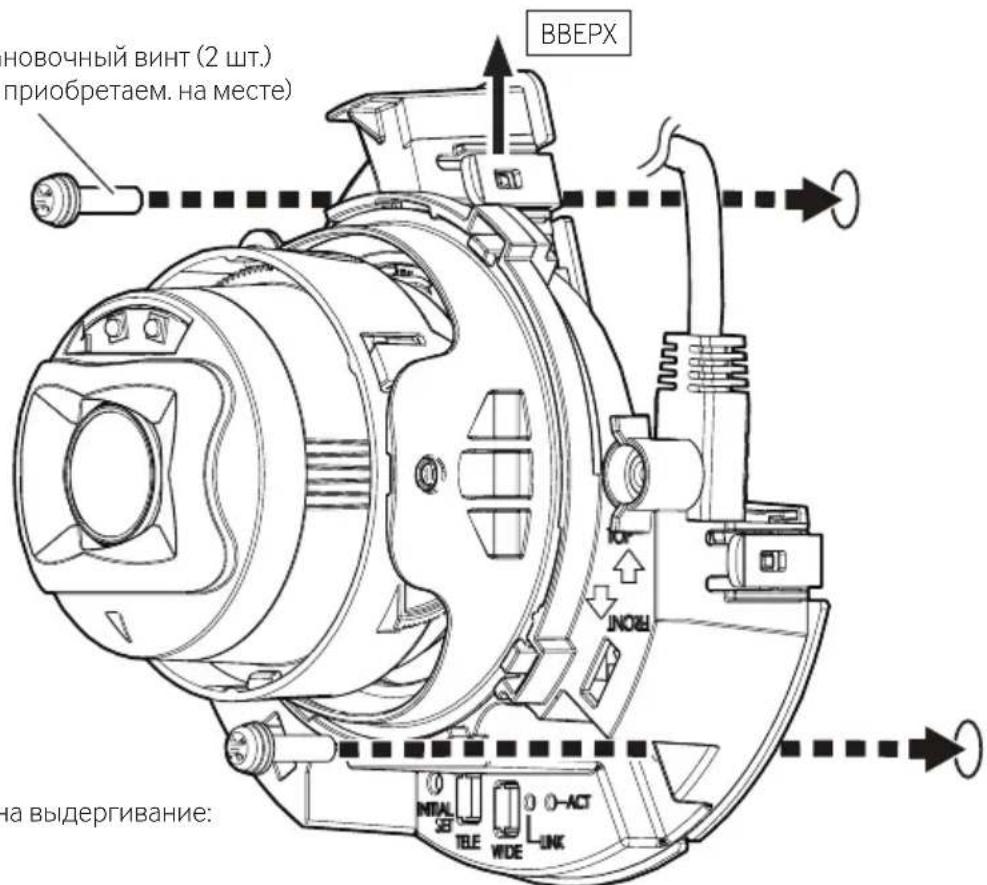

MHHIM. npouHocb Ha BbIeprnBaHHe: 196 N (ha 1 wT.)
Uar 4 (npodoljkeHne)
■ПикpenITEKaMEpyKMOHTaJHOnKopo6Ke/coeHHTeJIbHOJ Kopo6Ke.
IopoJoxKeHne oKcaun KamepbI
War 5
→ Bклочи Teптанne (PoE).
*EcnHa oBeKTHBe HMeeTc 3aHTHnKa CHMNTe ee.

- Be6-caT TexHnueckoHnHOpMauHn "IP Setting Software"
HJH
“i-PRO Configuration Tool (iCT)”
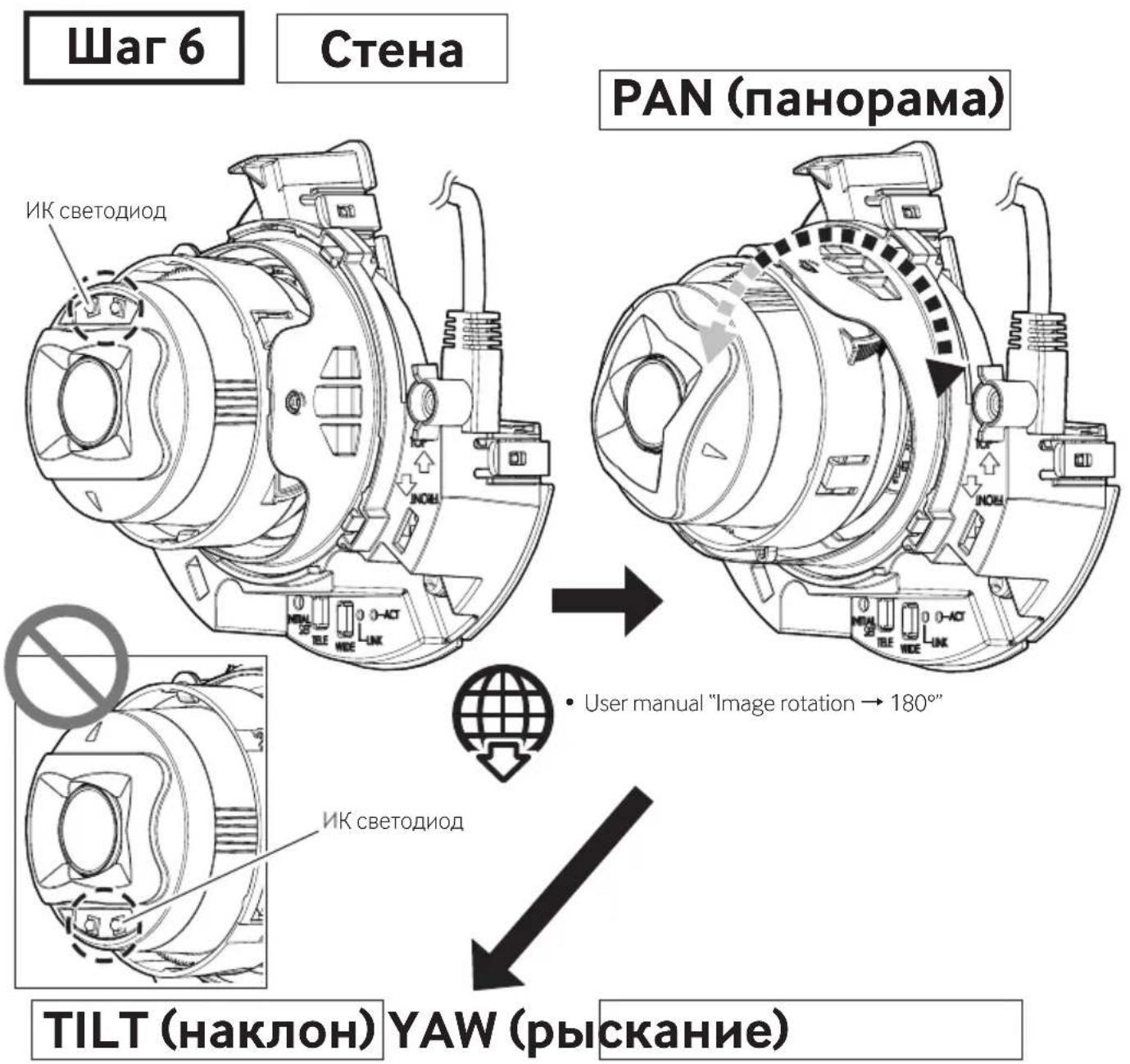
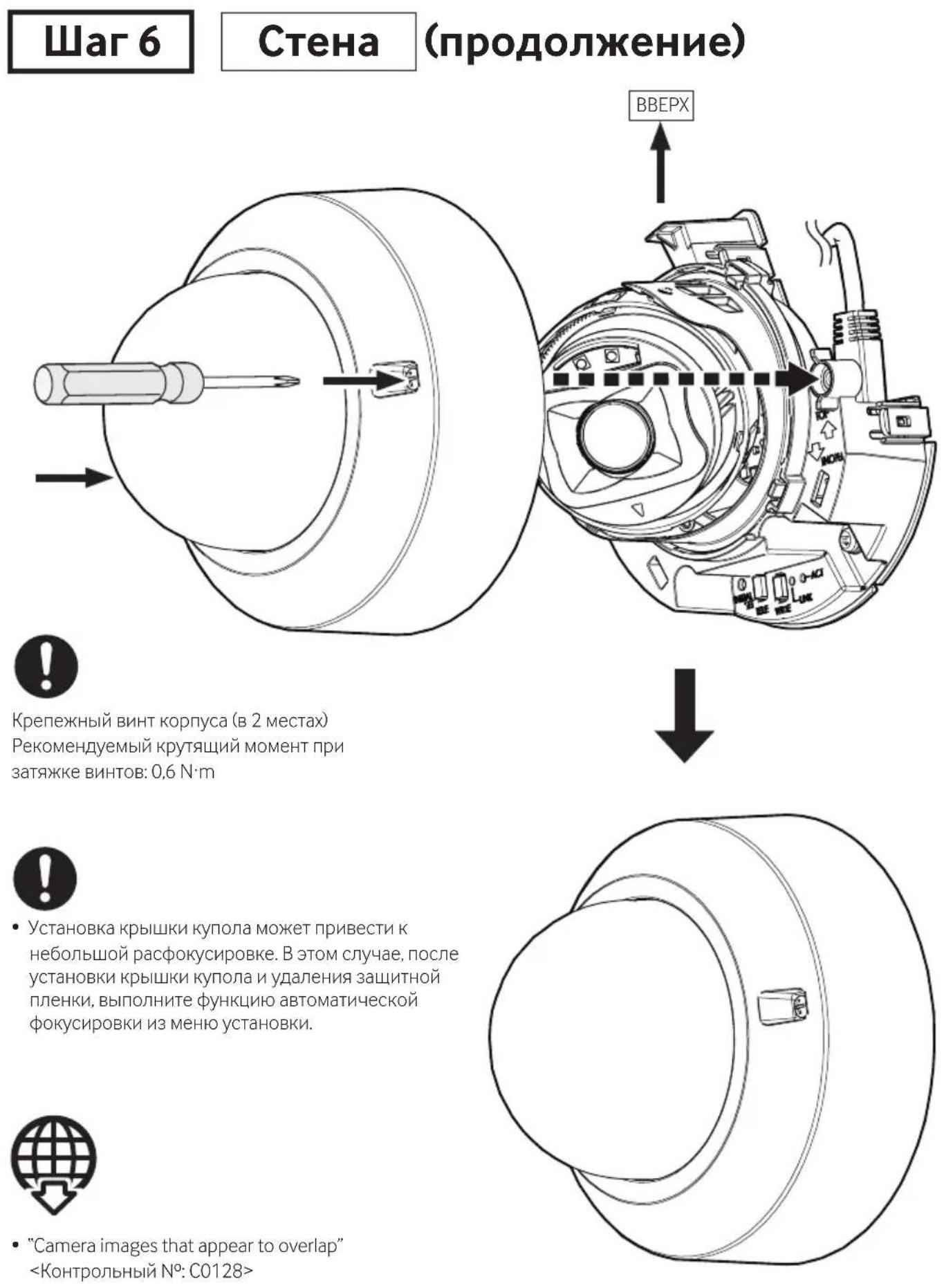
War 6
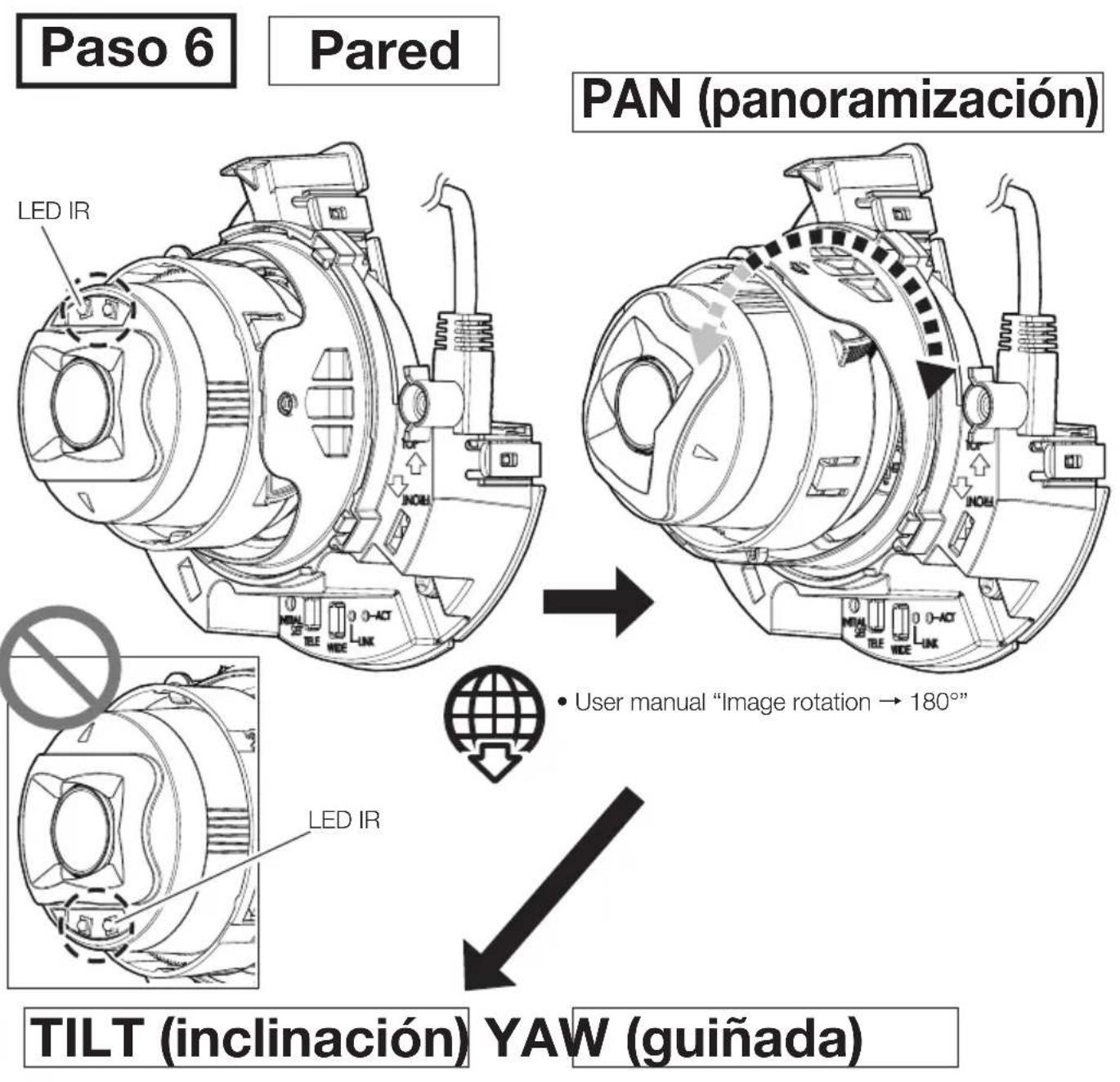
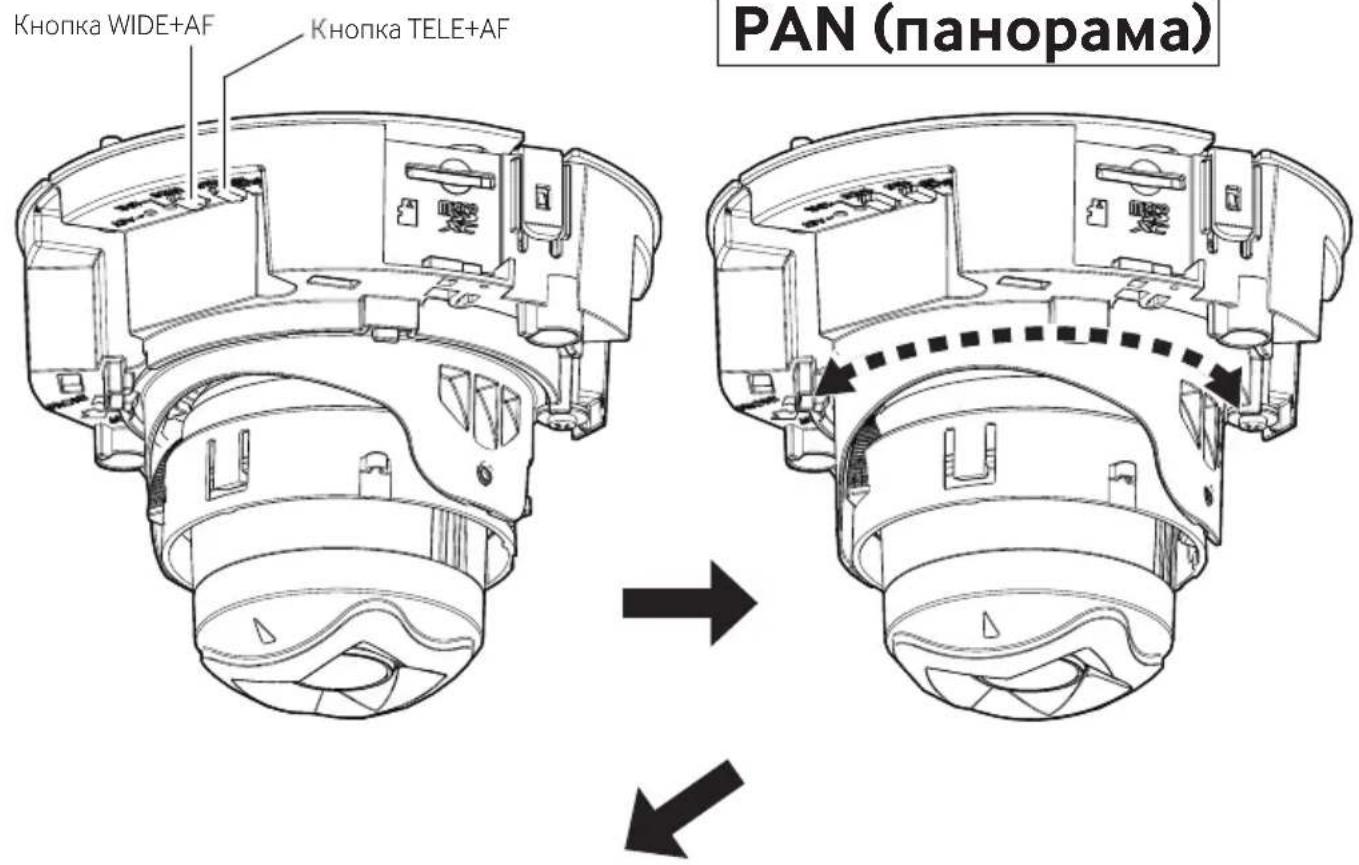
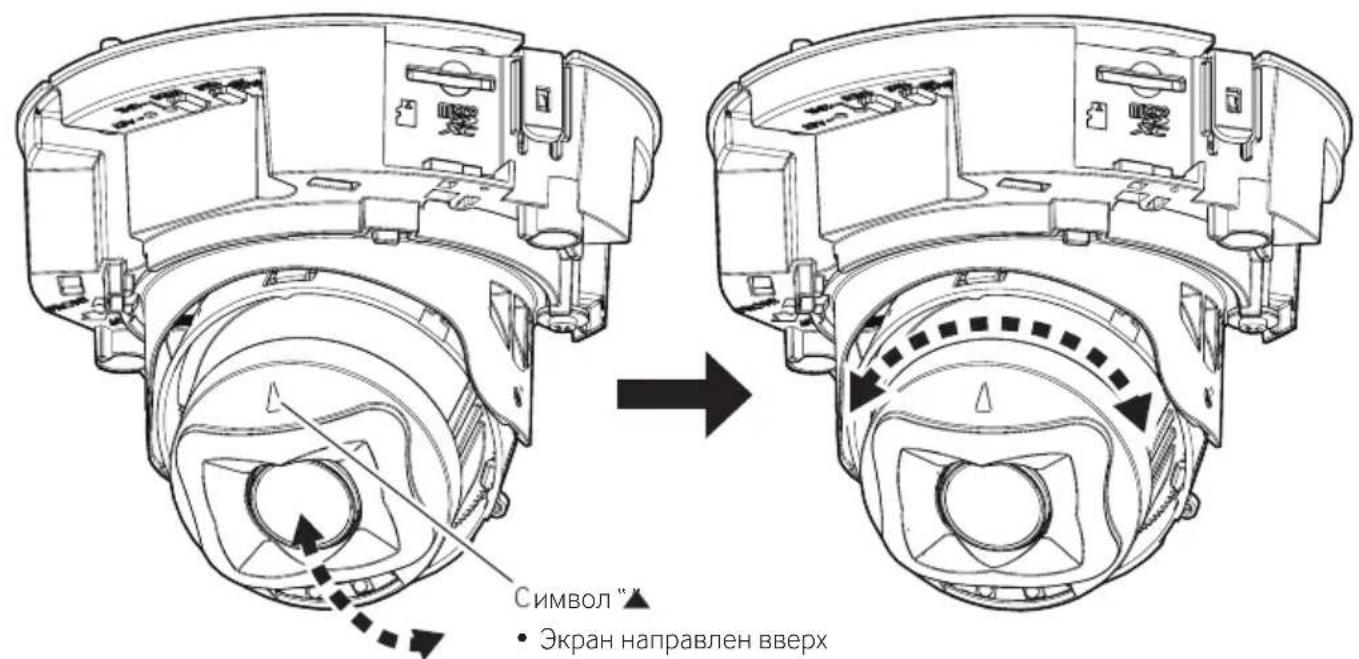
Notolok
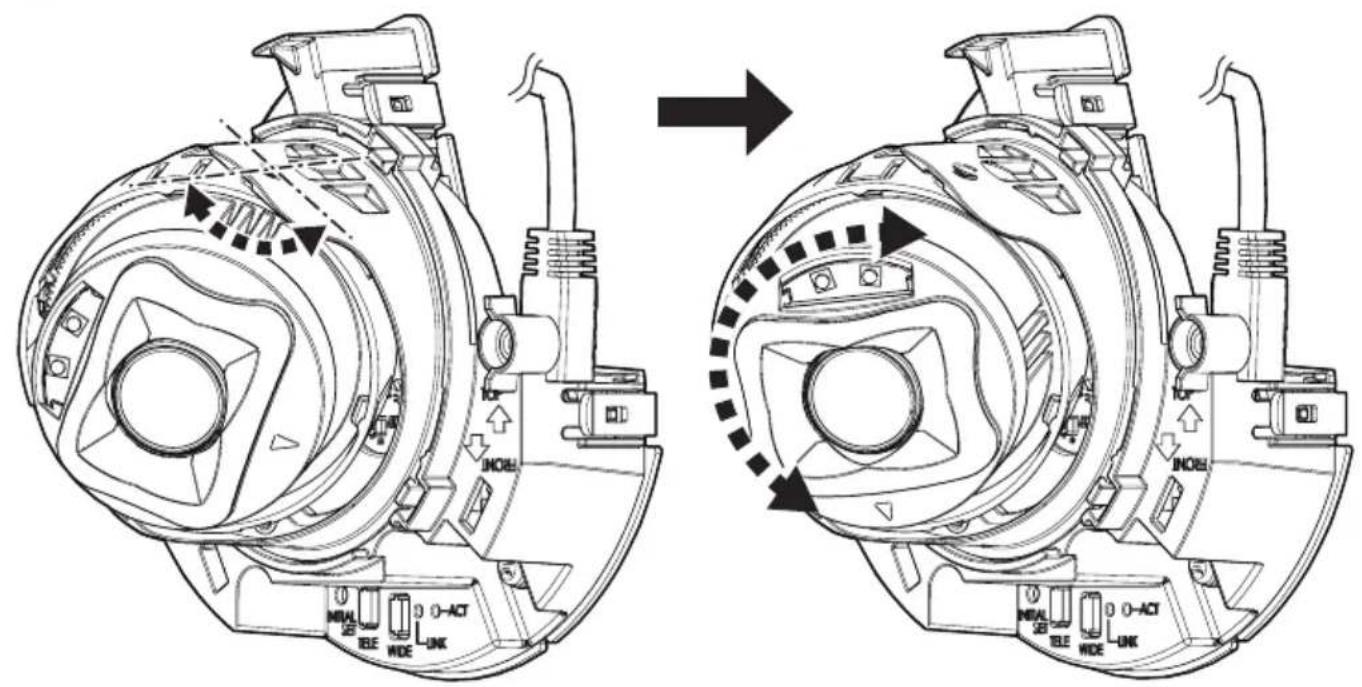
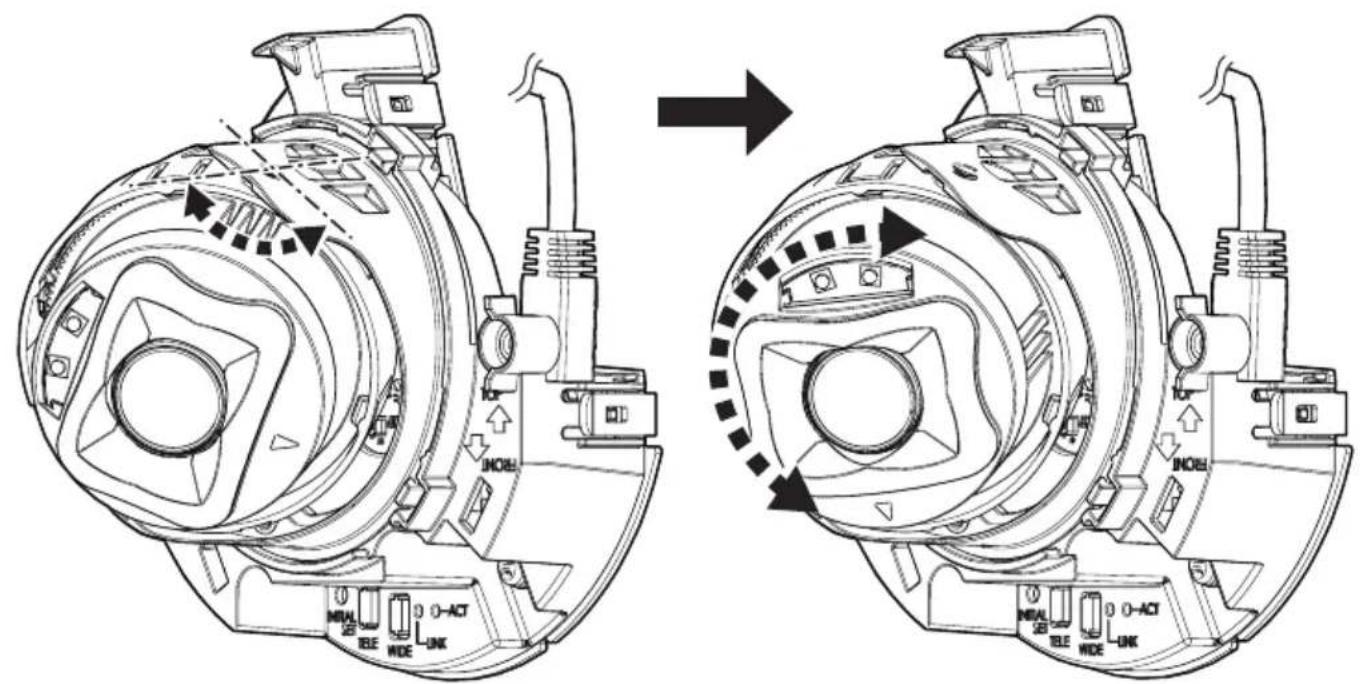
TILT (нakлон) YAW (pbickaнne)

"Camera images that appear to overlap"
- NETWORK CAMERA
- ABOUT THE USER MANUALS
- I-PRO CO., LTD
- ABOUT NOTATIONS AND MODEL NUMBER EXPLANATION
- TRADEMARKS AND REGISTERED TRADEMARKS
- DISPOSAL OF OLD EQUIPMENT AND BATTERIES
- ONLY FOR EUROPEAN UNION AND COUNTRIES WITH RECYCLING SYSTEMS
- NOTE FOR THE BATTERY SYMBOL (BOTTOM SYMBOL)
- FOR U.S.A
- SUPPLIER'S DECLARATION OF CONFORMITY
- FOR CANADA
- CAUTION: NOTICE
- PRECAUTIONS
- PRECAUTIONS FOR INSTALLATION
- STANDARD ACCESSORIES
- OTHER ITEMS THAT ARE NEEDED (NOT INCLUDED)
- OPTIONAL ACCESSORIES
- TROUBLESHOOTING
- INSTALLATION PROCEDURE
- PARTS AND FUNCTIONS
- (CONTINUED)
- STEP 1 PREPARATIONS
- NOTE
- COMMON
- STEP 1 PREPARATIONS (CONTINUED)
- WHEN USING THE SIDE CABLE ACCESS HOLE
- WHEN USING THE MICROSD MEMORY CARD
- STEP 2
- STEP 3
- AUDIO IN
- AUDIO OUT
- ETHERNET CABLE
- STEP 3 (CONTINUED)
- STEP 4
- DIRECTLY MOUNT THE CAMERA ONTO THE INSTALLATION SURFACE
- CEILING
- WALL
- STEP 4 (CONTINUED)
- MOUNT THE CAMERA TO A GANGBOX/ JUNCTION BOX
- STEP 5 → TURN THE POWER ON (POE)
- STEP 6 CEILING (CONTINUED)
- POUR U.S.A
- ATTENTION: REMARQUE
- PIÈCES ET FONCTIONS
- U21301
- ÉTAPE 4
- INSTALLATIONSHANDBUCH
- SCHRITT 6
- WAND
- (FORTSETZUNG)
- PARTIE FUNZIONI
- (CONTINUAZIONE)
- PASSAGGIO 1
- PREPARATIVI
- NOTA
- PASSAGGIO 6
- GUÍA DE INSTALACIÓN
- PARTES Y UNIDADES
- (CONTINUACIÓN)
- PASO 1
- PREPARATIVOS
- PASO 4
- PYKOBODCTBO NO MOHTAJY
- CETEBAKAMEPA
- 06 INCTPYKUNXДЛЯ NOJB3OBATEJIA
- 06 YCNOBHOM 6O3HAUEHN HIOACHEHH K HOMEPY MOEJIH
- TOPROBBIE 3HAKN H 3APEHCTPNPOBAHHBIE TOPROBBIE MAPKN
- [PYCCKNЯ3BIK]
- ДEКЛАРАЧИ O COOTBETCTBH TPE6OBAHHAM TEXHUECKORO PERJAMAHTEA 06 ORPAHNUEHH NCNOIB3OBAHHA HEKOTOPBIX BPEIBIX BEIECTB B 3JIEKTPHUYECKOM 3JIEKTPOHM 6OPYDOBAHH (YTBEPJXDEHHORO NOCTAHOBLEHEM N°1057 KA6HETA MHHNCTPOB YKPAHBI)
- [KPAIHCBKA MOBA]
- ДЕКЛАРАЧИ ПО ВДНООВIDIНICTЬ ВИМОГAM TEXHIЧHORO PERJAMAHRTY 06МЖEHНЯ BHKOPHCTAHHЯ DEЯКNX HE6E3NEUHNX PEUOBNB EJLEKTPNHOMY TA EJLEKTPOHOMY 6LAHAHHI (3ATBEPDXEHORO ПOCTAHOBOIO N°1057 KA6IHETY MINICTPIB YKPAIHN)
- HΦOPMAUNY O6 N3DENNN
- TOIBKO INI NPOECCHOHAJIBHORO HCNOJIB3OBAHH
- HΦOPMAUNNO O6PAUEHHO COTXODAMN DJI CTPAH, HE BXOAUNX B EBPONECKN CO103
- PNEYPEXKDEHNE
- BHHMAHHE: PPMUEAHHE
- MEPBLNPEDOCTOPOXKNOCTN
- HE YCTAHABHBAITE DAHHOE H3DEINE B ORPAHUEHHBIX HIN 3AIPETHBIX 3OHAX
- MOHTAXHBIE PA6OTBI CJEDYET NPUYHTB DHNLEPY
- HAEDXHO HTOUHO YCTAHOBHE H3DJINE HA 3OHY MOHTAXA B COOTBETCTBHN C HHCTPYKCIAMH NO YCTAHOBKE
- I NPHMNTE MEPBI NPEOCTOPOXHOCTN NPOTNB NAEHHADHHORO H3DEINR
- B CNYUAE BO3HKNHOBEHHN IPO6IEM C HACTOICH M NPOYKTOM CJEIYET HEMEJHEHNO IPEKPATHTBERO HCNOJIB3OBAHHE
- IPOBOANTE NEPHOANUECKNE NPOBEPKN
- MEPBL PPEOCTOPOXKNOCTN NP MOHTAXE
- 3ATAAKKA BNHTOB
- ДРУГНЕ HEO6XODHMBIE 3JIEMEHTBL (HE BKJIIOUEHBI)
- ONUHBIE NPHAJEKHOCTN
- ДEФ EKTOBKA
- ПРАЗЕЦЬУНОВКИ
- UACTNNФYHKCHH
- UACTN N YHKCHN
- (ПРОБЛЖЕНЬЕ)
- WAR 1
- ПОДGROTOВKA
- 3AMEUHHE
- WAR 4
- CTEHA
- UAR 4 (NPODOLJKEHNE)
- WAR 5
- → BКЛОЧИ TEПТАНNE (POE)
- WAR 6
- NOTOLOK
Brand : i-PRO
Model : WV-U21350-V3L
Category : Surveillance Camera