E-3021C - Radio LINSAR - Free user manual and instructions
Find the device manual for free E-3021C LINSAR in PDF.


| Product type | Retro analog AM/FM tuner radio |
| Brand | Linsar |
| Model | E-3021C / ATKR-ECOM |
| Power supply | 220-240 V~, 50 Hz |
| Power consumption | 8 W |
| Protection class | II (double insulation) |
| Frequency ranges | FM 88 - 108 MHz, AM 530 - 1600 kHz |
| Speaker | Built-in |
| Antenna | Telescopic antenna (FM), internal ferrite antenna (AM) |
| Auxiliary input | AUX IN socket (3.5 mm) |
| Headphone output | Headphone socket (3.5 mm) |
| Controls | Volume control (on/off), band selector, frequency selector |
| Indicators | Power indicator, fine tuning indicator |
| Auto shut-off function | Yes (AUX IN mode, after 15 minutes without audio input) |
| Intended use | AM/FM radio reception and audio playback via AUX, private use only |
| Cleaning | Dry cloth, do not use harsh cleaning agents |
| Storage | Dry place, protected from sunlight, temperature +5°C to +20°C |
| Safety | Disconnect before cleaning, do not open, do not use near water |
| Repairability | Repairs by a professional only, original spare parts |
| Package contents | Device, power cord, instruction manual |
| Warranty | 2 years, covers material and manufacturing defects |
Frequently Asked Questions - E-3021C LINSAR
User questions about E-3021C LINSAR
0 question about this device. Answer the ones you know or ask your own.
Ask a new question about this device
Download the instructions for your Radio in PDF format for free! Find your manual E-3021C - LINSAR and take your electronic device back in hand. On this page are published all the documents necessary for the use of your device. E-3021C by LINSAR.
USER MANUAL E-3021C LINSAR
natural_image
Two Linsar audio synthesizer devices with dual speakers and control knobs (no visible text or symbols on the devices themselves)Deutsch......2
Français.....15
Italiano.....27
Español..... 39
English...... 51
natural_image
Simple line drawing of a table with an open lid and a ball on top, no text or symbols present.AM
AUX IN Funktion

natural_image
Simple line drawing of a table with an open triangular frame and an arrow indicating direction (no text or symbols)AM

Fonction AUX IN

natural_image
Simple line drawing of a lever with an object on top (no text or symbols)AM
Funzione AUX IN

natural_image
Simple line drawing of a table with an open lid and a curved arrow indicating force or motion (no text or symbols)AM
Función AUX IN

General information....52
Reading and storing the user manual....52
Intended use....52
Explanation of symbols....53
Safety....53
Safety instructions....53
Package contents/device components.... 57
Before first use....58
Check the device and scope of delivery....58
Set up device....58
Power supply....58
Switching the device on and off.... 58
Set radio station....58
Align antenna....59
AUX IN function....59
Headphone function....59
Cleaning....60
Storage....60
Technical data....60
Declaration of conformity....60
Disposal....61
Warranty
General information
Reading and storing the user manual

These operating instructions belong to this Retro Radio Analog AM/FM Tuner (hereinafter referred to as the "device"). It contains important information on commissioning and operation.
Before using the device, read the operating manual carefully, in particular the safety instructions. Failure to follow this operating manual may lead to severe injuries or product damage.
This user manual is based on the standards and regulations that are valid within the European Union. Outside the EU, please also note the country-specific directives and laws.
Keep this operating manual for future reference. If you pass this device on to a third party, you must also supply this operating manual.
Intended use
The device is designed exclusively for radio reception of ultra short wave (FM) and medium wave (AM) radio stations and for playback of audio signals from external devices via the AUX connection.
This device is exclusively intended for private use and not for the commercial sector.
Only use the device as described in this manual. Any other use is improper and may lead to product damage or even personal injury. This device is not a toy.
The manufacturer or retailer assume no liability for damage caused by improper or incorrect use.
Explanation of symbols
The following symbols and signal words are used in this user manual, on the device or on the packaging.

This symbol provides you with useful additional information on handling and use.

Declaration of conformity (see chapter "Declaration of conformity"): Products marked with this symbol meet all the applicable Community regulations of the European Economic Area.

This symbol identifies devices that belong to the protection class II.
Safety
The following signal words are used in this user manual.
WARNING!
This signal symbol/word denotes a hazard with an average risk level that could lead to death or severe injury if it is not avoided.
CAUTION!
This signal symbol/word denotes a hazard with a low risk level that could lead to mild or moderate injury if it is not avoided.
NOTE!
This signal word provides a warning about potential material damage.
Safety instructions
IMPORTANT SAFEGUARDS
When using electrical appliances, basic safety precautions should always be followed including the following safety notices. Read all instructions.

WARNING!
Risk of electric shock!
Faulty electric installation or excess mains voltage can cause an electric shock.
- Only connect the power cable if the mains voltage of the socket matches the information shown on the rating plate.
- Only connect the power cable to an easily accessible socket so that you can quickly disconnect it from the mains power in the event of a malfunction.
- Do not use the device if there is visible damage or if the power cable is defective.
- If the power cable of the device is damaged, it must be replaced by the manufacturer, the manufacturer's customer service or a similarly qualified person in order to prevent hazards.
- Do not open the device. Leave repairs to a qualified service technician. Contact the service address indicated on the warranty card. Liability and warranty claims are excluded if you carry out repairs yourself, improperly connect the device to the power supply or operate it incorrectly.
- Only parts that match the original device data may be used for repairs. This device contains electrical and mechanical parts that are essential for protection against sources of danger.
- Do not operate the device with an external timer or a separate remote control system.
- Do not immerse the device or the power cable in water or other liquids.
- Never touch the power plug with wet hands.
- Never pull the power cable out of the socket by the cord; always grip the plug instead.
-
Never use the power cable as a carry handle.
-
Keep the device and the power cable away from open flames and hot surfaces.
- Install the power cable so that no-one can trip over it.
- Do not bend the power cable and do not pass it over sharp edges.
- Only use the device in indoor rooms. Never operate it in damp rooms or in the rain.
- Never store or use the device where it can fall into a tub or sink. Do not use the device if it has fallen into water.
- Never reach for the device if it has fallen into water. Immediately disconnect the device from the power supply.
- Make sure that children do not insert objects into the device.
- When you are not using the device, cleaning it or if a malfunction occurs, always switch off the device and disconnect the power plug from the socket.
- This device does not contain any user-serviceable parts.
WARNING!
Danger to children and persons with reduced physical, sensory or mental
abilities (e.g. partially disabled, elderly people with reduced physical and mental abilities) or lack of experience and knowledge (e.g. older children).
- Children aged 8 years and older as well as people with reduced physical, sensory or mental abilities or a lack of experience and knowledge may only use this device if they are supervised or have been given instruction on using the device in a safe way and understand the hazards involved.
- Children must not clean or service the product unless they are eight years or older and supervised.
-
Keep children under 8 away from the device and the power cable.
-
Children must not play with the device or the connection cable.
- Do not leave the device unattended when in use.
- Do not let children play with the packaging film. They may become tangled when playing and suffocate.
NOTE!
Risk of damage!
Improper handling can damage the device.
- Never place the device on or near hot surfaces (stove tops, etc.) and never expose the device to high temperatures (heaters, etc.) or to bad weather (rain, etc.).
- Do not place any objects on the device or cover it up.
- Do not let the power cable come into contact with hot parts.
- Never immerse the device in water to clean it, and do not use a steam cleaner. This can damage the device.
- Never wash the device in the dishwasher. This would destroy it.
- Stop using the device if any of its components are cracked or deformed. Only replace damaged components with matching original spare parts.
- Keep the vents clean.
- Do not use the device during a thunderstorm. Switch it off and pull the power cable out of the socket.
Package contents/device components
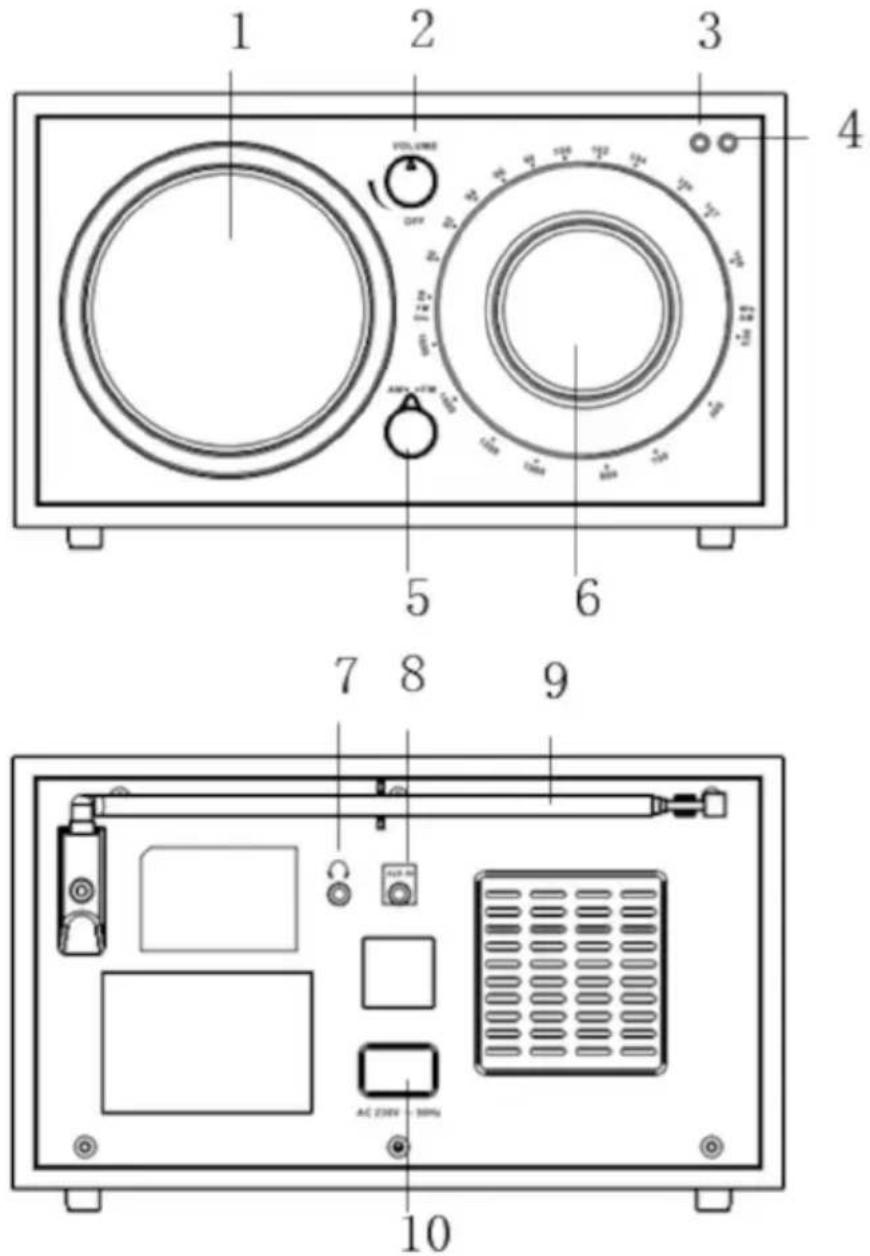
1 Loudspeaker 7 Headphone jack
2 Volume control 8 AUX IN connector
3 Fine tuning indicator 9 Telescopic antenna
4 Power indicator 10 Mains connection
5 Band selector switch 11 Power cable with power plug (not shown)
6 Frequency selector switch
Before first use
Check the device and scope of delivery
NOTE!
Risk of damage!
If opening the packaging with a sharp knife or other pointed objects, careless handling can damage the device.
- Therefore, be very careful when opening.
- Take the device out of the packaging.
- Check that the delivery is complete (see chapter "Scope of delivery").
- Inspect the device and individual parts for damage. Do not operate a damaged device; instead, contact the manufacturer via the service center listed on the warranty card.
- Remove the packaging material and all protective films.
- Before using the device for the first time, clean all parts of the device as described in the chapter "Cleaning".
Set up device
Place the device on a flat and stable surface.
Power supply
- Connect the power cable 11 to the mains connection 10.
- Plug the power plug 11 into a properly installed socket.
Switching the device on and off
- To switch on the device and increase the volume, turn the volume control 2 clockwise.
The power indicator 4 lights up.
- To switch off the device, turn the volume control 2 counterclockwise until you hear a "click".
The power indicator 4 goes out.
Set radio station
- Switch on the device (see "Switching the device on and off").
-
Set the band selector switch 5 to FM or AM.
-
Align the antenna (see "Aligning the antenna").
- Turn the frequency selector switch 6 to tune to the desired station.
When the signal is strong, the fine tuning indicator 3 lights up.
If the signal is weak, the fine tuning indicator may not light up even if the radio signal can still be heard through the loudspeaker.
- Switch off the device after use.
Align antenna
FM
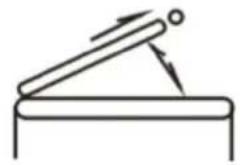
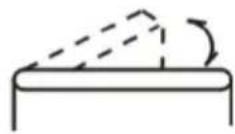
Extend the telescopic antenna 9 and adjust its length and angle for optimum reception.
AM
The sensitive directional ferrite antenna inside the device provides excellent AM reception in most areas. For best reception, turn the device in the direction that gives the best results.
FM
natural_image
Simple line drawing of a lever with an attached rod and pivot point (no text or symbols)AM
AUX IN function

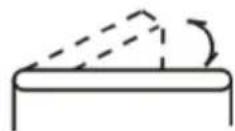
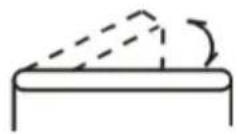
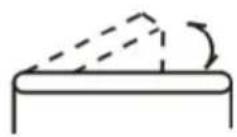
In AUX IN playback mode, the device will automatically switch off after approx. 15 minutes if there is no audio input and no action is performed.
- Connect one AUX cable to the AUX IN connector 8 of the unit and the other end to the LINE OUT output of a computer or other device.
- Turn on music playback on your external device.
- Adjust the volume using the volume control 2.
Headphone function
WARNING!
Health hazard!
Using headphones at high volume for a long period of time can affect or even damage your hearing.
- Reduce the volume to a tolerable level.
Headphones with a 3.5 mm jack plug can be connected to the headphone jack 7.
Cleaning
NOTE!
Risk of damage!
Improper handling can damage the device.
- Do not use any aggressive cleaners, sharp or metal cleaning utensils such as knives, hard scrapers or similar items. These could damage the surfaces.
-
Never wash the device in the dishwasher. This would destroy it.
-
Unplug the power plug 11 from the socket.
- Wipe the device with a dry cloth.
Storage
All parts must be completely dry before storing.
- Always store the device in a dry place.
- Protect the device from direct sunlight.
- Store the device out of reach of children, securely closed and at a storage temperature between +5 °C and +20 °C (room temperature).
Technical data
Model: E-3021C / ATKR-ECOM
Supply voltage: 220-240 V\~, 50 Hz
Power: 8 W
Protection class: II
Frequency range:
FM 88 - 108 MHz
AM 530 - 1600 kHz
Declaration of conformity

You can request the EU declaration of conformity from the address provided at the end of this manual.
Disposal
Disposing of the packaging
Sort the packaging before you dispose of it. Dispose of paperboard and cardboard with the recycled paper service and wrappings with the appropriate collection service.
Dispose of old electrical device
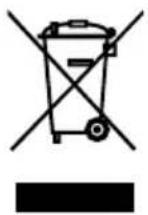
Old electrical devices must not be disposed of as household waste! If the device cannot be used any more, each consumer is obligated by law to dispose of old devices separately from household waste, e.g. at a municipal/city district collection point. It is thereby ensured that old devices are professionally recycled and negative effects on the
environment are avoided. Therefore, electrical devices are marked with the above symbol.
GARANTIE
Retroradio Analog AM/FM Tuner (E-3021C / ATKR-ECOM)
For a period of 2 years from the date of purchase, we guarantee the remedy of defects that are due to material and production faults free of charge by means of exchange.
Warranty claims must be submitted immediately once the defect arises. Warranty claims after expiration of the warranty period are excluded.
In case of a warranty, return the defective device to the service centre together with the completed warranty slip, stating the reason for the complaint.
The warranty will be void in the case of improper or incorrect use, non-observance of the information provided in the user manual for the device, brute force, force majeure or any work on the device that was not carried out by our authorised specialist shops.
WARRANTY
Retro Radio Analog AM/FM Tuner (E-3021C / ATKR-ECOM)
In case of a warranty claim, fill out the card carefully and send it to us together with the device and the sales receipt. Valid for 2 years as of the selling date/postmark.
Customer name:
Reason for complaint:
purchased at (please include sales receipt):
Customer service:
teknihall Elektronik GmbH
Mail: tempo-ecom@teknihall.com
Assar-Gabrielsson-Str. 11-13
63128 Dietzenbach
GERMANY
Hotline: 00800 33300666
Purchaser
Name:
Street:
Town, post code:
Telephone:
Email:
Signature:
Sold by (no service address):
Tempo International GmbH
Friesenweg 7
22763 Hamburg
Germany
- AUX IN Funktion
- Fonction AUX IN
- Funzione AUX IN
- Función AUX IN
- General information....52
- Explanation of symbols....53
- Safety....53
- Package contents/device components.... 57
- Before first use....58
- Set up device....58
- Power supply....58
- Switching the device on and off.... 58
- Set radio station....58
- Align antenna....59
- AUX IN function....59
- Headphone function....59
- Cleaning....60
- Storage....60
- Technical data....60
- Declaration of conformity....60
- Disposal....61
- Warranty
- General information
- Reading and storing the user manual
- Intended use
- Explanation of symbols
- Safety
- Safety instructions
- IMPORTANT SAFEGUARDS
- WARNING!
- Risk of electric shock!
- Danger to children and persons with reduced physical, sensory or mental
- abilities (e.g. partially disabled, elderly people with reduced physical and mental abilities) or lack of experience and knowledge (e.g. older children).
- NOTE!
- Risk of damage!
- Before first use
- Check the device and scope of delivery
- Set up device
- Power supply
- Switching the device on and off
- Set radio station
- Align antenna
- FM
- AM
- AUX IN function
- Headphone function
- Health hazard!
- Cleaning
- Storage
- Technical data
- Declaration of conformity
- Disposal
- Disposing of the packaging
- Dispose of old electrical device
- GARANTIE
- Retro Radio Analog AM/FM Tuner (E-3021C / ATKR-ECOM)
Brand : LINSAR
Model : E-3021C
Category : Radio