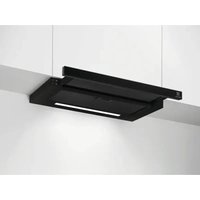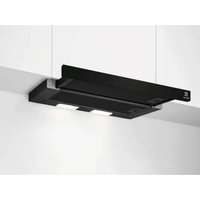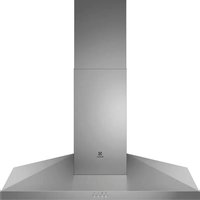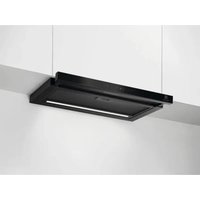
LFP816K - Basket ELECTROLUX - Free user manual and instructions
Find the device manual for free LFP816K ELECTROLUX in PDF.

 FR
FR
 BG
BG
 CS
CS
 DA
DA
 DE
DE
 EL
EL
 EN
EN
 ES
ES
 ET
ET
 FI
FI
 HU
HU
 IT
IT
 KK
KK
 LT
LT
 LV
LV
 MK
MK
 NL
NL
 NO
NO
 PL
PL
 PT
PT
 RO
RO
 RU
RU
 SK
SK
 SL
SL
 SQ
SQ
 SR
SR
 SV
SV
 TR
TR
 UK
UK
User questions about LFP816K ELECTROLUX
0 question about this device. Answer the ones you know or ask your own.
Ask a new question about this device
Download the instructions for your Basket in PDF format for free! Find your manual LFP816K - ELECTROLUX and take your electronic device back in hand. On this page are published all the documents necessary for the use of your device. LFP816K by ELECTROLUX.
USER MANUAL LFP816K ELECTROLUX
natural_image
Simple line drawing of a chimney with three dots on the base (no text or symbols)LFP816K
LFP819K
LFP816Y
LFP819Y

text_image
QR code containing a document icon in the center, likely linking to a digital resource or webpage.natural_image
Technical line drawing of a mechanical component with a curved arrow indicating rotation (no text or symbols)natural_image
Diagram of a solar panel with a grid pattern and a curved arrow indicating rotation (no text or symbols)natural_image
Three diagrams showing a mechanical or electrical setup with arrows indicating movement, no text or symbols present.i
natural_image
Technical line drawing of a mechanical component with a rotating shaft and housing (no text or symbols)natural_image
Diagram of a window with a grid pattern and a curved arrow indicating rotation (no text or symbols)natural_image
Three identical diagrams showing a mechanical or electrical component with arrows indicating movement, no text or symbols present.
natural_image
Technical line drawing of a mechanical component with a rotating shaft and housing (no text or symbols)natural_image
Diagram of a window with grid pattern and directional arrow, no text or symbols presentnatural_image
Three identical diagrams showing a mechanical or electrical component with arrows indicating movement, no text or symbols present.
natural_image
Technical line drawing of a mechanical component with a curved arrow indicating rotation (no text or symbols)natural_image
Diagram of a window with a grid pattern and a curved arrow indicating rotation (no text or symbols)natural_image
Three diagrams showing a mechanical or electrical setup with arrows indicating movement, no text or symbols present.
natural_image
Symbol of a trash bin crossed with a diagonal line, representing no waste or discharge (no text or labels)natural_image
Recycling symbol with three arrows forming a triangle (no text or labels)natural_image
Technical line drawing of a mechanical component with no visible text or symbolsnatural_image
Diagram showing a curved arrow labeled '1' pointing to a grid-patterned panel or panel, with no readable text or symbols.natural_image
Three schematic diagrams showing mechanical or electrical components with arrows indicating movement, no text or symbols present.
Welcome to Electrolux! Thank you for choosing our appliance.

Get usage advice, brochures, troubleshooting, service and repair information:
www.electrolux.com/support
Subject to change without notice.
CONTENTS
- SAFETY INFORMATION AND INSTALLATION....30
- PRODUCT DESCRIPTION....30
- DAILY USE....31
- CARE AND CLEANING.... 33
- ENVIRONMENTAL CONCERNS....34
1. SAFETY INFORMATION AND INSTALLATION

WARNING!
Refer to the separate Installation Instructions booklet for Safety Information and Installation. Read carefully the Safety chapters before any use or maintenance of the appliance.
2. PRODUCT DESCRIPTION
2.1 Control panel overview

text_image
① 1 2 3 1 4 7 10 ② ③ ④ ⑤ ⑥ ⑦ ⑧ ⑨ ⑩Function Description
1 On / Off Turns the hood on and off.
2 First speed The fan switches to first speed level.
3 Second speed The fan switches to second speed level.
4 Third speed The fan switches to third speed level.
5 Maximum speed The fan switches to maximum speed level. After 8 minutes the appliance returns to previous setting.
| Function Description | |
| 6 | Breeze The hood operates on the lowest speed. After 60 minutes the appliance turns off. |
| 7 | Hob ^2 Hood Indicator of the function to control hood from hob. |
| 8 | Filter notification Reminds to change or clean the charcoal filter and clean the grease filter. |
| 9 | Light colour temperature Changes the light colour temperature. |
| 10 | Lamp Turns the lights on and off. Changes the light intensity. |
3. DAILY USE
3.1 Using the hood
Check the recommended speed according to the table below.
| 1 | While heating up food, cooking with covered pots. |
| 2 | While cooking with covered pots on multiple cooking zones or burners, gentle frying. |
| 3 | While boiling and frying big quantities of food without a lid, cooking on multiple cooking zones or burners. |
| While boiling and frying big quantities of food without a lid, big humidity. | |
| Refreshes the air in kitchen after cooking at a very low noise level. The function turns off automatically after 60 minutes. Use after cooking only. |

It is recommended to leave the hood operating for approximately 15 minutes before and after cooking.
Activating the appliance
To operate the hood:
- Pull out the drawer of the hood to switch on the control panel.
You can now activate the functions.
- To activate the function, touch the corresponding symbol.
i
If the fan speed is not set within one minute after switching on the hood, the control panel will deactivate. To activate it again, touch the symbol.
Deactivating the appliance
To turn off the appliance touch ⏻ symbol again or close the hood drawer.
i
When the drawer is closed, the last fan speed setting will be saved. When the drawer is pulled out again, the hood will operate at the last selected fan speed.
Perfect Illumination - Lighting
i
The hood lighting works independently to other hood functions.
Activating and deactivating the lighting To illuminate the cooking surface touch the
symbol. Touch the symbol again to change the light intensity in the following order: Maximum, Medium, Low, Off.
To switch off the lights, touch and hold the symbol for 3 seconds. Closing the drawer has no effect on the hood light.
Setting the light colour temperature

The hood remembers the last setting of the light colour temperature.
There are two ways to set the light colour temperature:
- Touch the symbol to change the colour temperature from neutral, through warm to cold.
- Touch and hold the symbol to move smoothly between light colour temperatures. Release it once you reach the desired setting.
3.2 Hob2Hood®
It is a function that connects the hob to a hood. Both the hob and the hood are equipped with an infrared signal communicator. The fan speed is determined based on the mode setting and the temperature of the hottest cookware on the hob. Alternatively, you can manually control the fan using the hob. This function can be activated from the hob's control panel.

If the hood drawer is closed, the Hob2Hood® will only activate the hood light. The fan will remain off. If the drawer is open, the function will activate both the hood light and the fan.

For more information how to use the function, refer to the hob user manual.
3.3 Filter notification
Filter alarm reminds to change or clean the charcoal filter and clean the grease filter. The
symbol blinks regularly for 30 seconds if the grease filter must be cleaned. The symbol blinks twice per every second for 30 seconds if the charcoal filter must be replaced.

This function activates independently after 40 hours of operation for grease filter and 160 hours of operation for charcoal filter.

Refer to Cleaning the grease filter in the Care and cleaning chapter.

Refer to Replacing the charcoal filter in the Care and cleaning chapter.

The function counter for charcoal filter is disabled by default. For recirculation mode, it must be activated.
To activate or deactivate the counter for charcoal filter:
- Pull out the hood drawer.
- Make sure the fan and the light are turned off.
- Touch symbol for 3 seconds.
The function is activated if symbol ⚙ blinks once. The function is deactivated if symbol ⚙ blinks twice.
To reset the function counter in the notification period:
- Pull out the hood drawer.
- Touch ⚙ symbol for 3 seconds.
The symbol stops blinking for the correct reset.
4. CARE AND CLEANING
4.1 Notes on cleaning
Cleaning Agents
Do not use abrasive detergents and brushes.
Clean the surface of the appliance with a soft cloth with warm water and a mild detergent.
After cooking some parts of appliance can get hot. To avoid stains appliance must be cooled down and dried with clean cloth or paper towels.
Clean stains with a mild detergent.
Keep the hood clean
Clean the appliance each month to prevent the deterioration of the surface material.
Clean the interior and grease filters carefully from fat.
Fat accumulation or other residue may cause fire.
Follow the instructions to clean the filters when the filter notification is on. Refer to the Daily Use chapter.
Charcoal filter
The time of saturation of the charcoal filter varies depending on the type of cooking and the regularity of cleaning the grease filter. Refer to leaflet included in the accessory.

Before carrying out any maintenance, make sure there is no cookware on the hob and that the hood and the hob are disconnected from the power supply.
4.2 Cleaning the grease filter
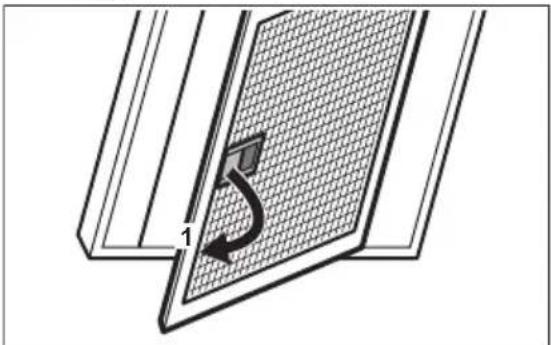
Filters are mounted with the use of clips and pins on the opposite side.
To clean the filter:
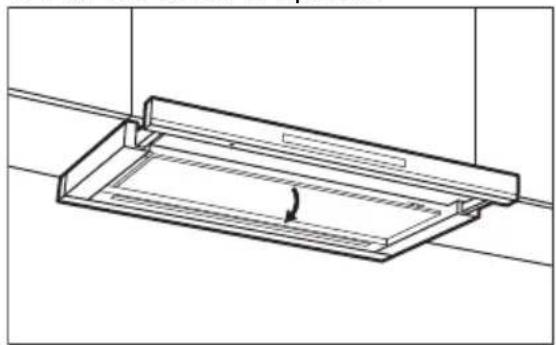
- Pull the cover to open it.
natural_image
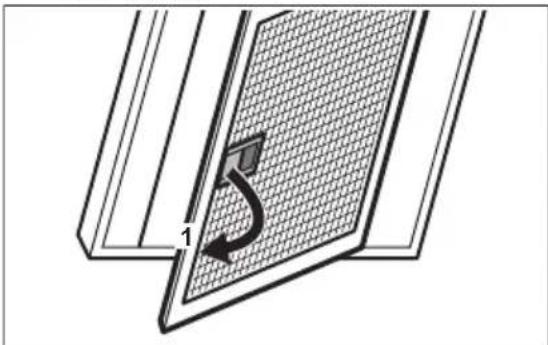
Technical line drawing of a mechanical component with a curved arrow indicating rotation (no text or symbols)- Pull the handle on the filter underneath the hood and slightly tilt the front of the filter down.
natural_image
Diagram of a window with a grid pattern and a curved arrow indicating rotation (no text or symbols)- Clean the grease filters by hand using a sponge with non-abrasive detergents, or clean them in a dishwasher. We recommend cleaning the grease filters by hand.

The dishwasher must be set to a low temperature and a short cycle. The grease filter may discolour, it has no influence on the performance of the appliance.
- To mount the filters back follow the first two steps in reverse order.
Repeat the steps for all filters if applicable.
4.3 Replacing the charcoal filter - optional

Depending on type, filter can be or cannot be regenerated. Refer to the leaflet provided with the filter.
To replace the filter:
- Remove the grease filters from the appliance.
Refer to "Cleaning the grease filter" in this chapter.
- Pull the tabs towards the bottom part of the filter.
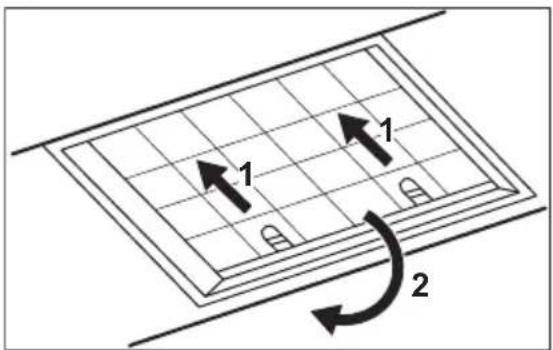
text_image
1 1 2- Slightly tilt the front of the filter downwards, then pull.
- To install a new filter, perform the steps in the following order.
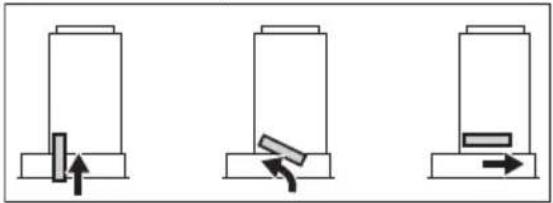
natural_image
Three identical diagrams showing a mechanical or electrical component with arrows indicating movement, no text or symbols present.
Refer to the separate Installation Instructions booklet.
4.4 Replacing the lamp
This appliance is supplied with a LED lamp and separate control gear (LED driver). These parts can be replaced by a technician only. In case of any malfunction refer to "Service" in the "Safety Instructions" chapter.
5. ENVIRONMENTAL CONCERNS
Recycle materials with the symbol Put the packaging in relevant containers to recycle it. Help protect the environment and human health by recycling waste of electrical and electronic appliances. Do not dispose of
appliances marked with the symbol 📀 with the household waste. Return the product to your local recycling facility or contact your municipal office.
natural_image
Technical line drawing of a mechanical assembly with a rectangular frame and internal components (no text or symbols)natural_image
Diagram of a solar panel with a grid pattern and a curved arrow indicating rotation (no text or symbols)natural_image
Three diagrams showing a mechanical or electrical setup with arrows indicating movement, no text or symbols present.
natural_image
Technical line drawing of a mechanical component with a curved arrow indicating rotation (no text or symbols)natural_image
Diagram of a door panel with a grid pattern and a curved arrow indicating rotation (no text or symbols)natural_image
Three identical diagrams showing a mechanical or electrical component with arrows indicating movement, no text or symbols present.
Vt eraldi paigaldusjuhiste brošüüri.
4.4 Lambi vahetamine
natural_image
Technical line drawing of a mechanical component with a curved arrow indicating rotation (no text or symbols)natural_image
Diagram of a window with a grid pattern and a curved arrow indicating rotation (no text or symbols)natural_image
Three identical diagrams showing a mechanical or electrical component with arrows indicating movement, no text or symbols present.
natural_image
Technical line drawing of a mechanical component with a curved arrow indicating rotation (no text or symbols)natural_image
Diagram of a door panel with a grid pattern and a curved arrow indicating rotation (no text or symbols)natural_image
Three identical diagrams showing a mechanical or electrical component with arrows indicating movement, no text or symbols present.
3. SVAKODNEVNA UPORABA
3.1 Uporaba nape
natural_image
Technical line drawing of a mechanical component with a rotating shaft and housing (no text or symbols)- Povucite ručicu na filtru ispod nape i lagano nagnite prednji dio filtra prema dolje.
natural_image
Diagram of a window with a grid pattern and a curved arrow indicating rotation (no text or symbols)- Filtar za masnoću očistite ručno koristeći spužvu s neabrazivnim deterdžentima ili ga očistite u perilici posuđa. Preporučujemo ručno čišćenje filtera za masnoću.

natural_image
Three identical diagrams showing a mechanical or electrical component with arrows indicating movement, no text or symbols present.
Pogledajte zasebnu knjižicu s uputama za postavljanje.
4.4 Zamjena žarulje
natural_image
Technical line drawing of a mechanical component with a curved arrow indicating rotation (no text or symbols)natural_image
Diagram of a solar panel with a grid pattern and a curved arrow indicating rotation (no text or symbols)natural_image
Three identical diagrams showing a mechanical or electrical component with arrows indicating movement, no text or symbols present.
natural_image
Technical line drawing of a mechanical component with a curved arrow indicating rotation (no text or symbols)natural_image
Diagram of a window with a grid pattern and a curved arrow indicating rotation (no text or symbols)natural_image
Three diagrams showing mechanical or electrical components with arrows indicating movement, no text or symbols present.
modification of the following text:
natural_image
Technical line drawing of a mechanical component with a curved arrow indicating rotation (no text or symbols)natural_image
Diagram of a solar panel with a grid pattern and a curved arrow indicating rotation (no text or symbols)- Assidabogos bbonou ozomgmdon bjmmon mngdomus qas smssdmsbnymo lshidgbon lsdysmndou zadmygbdom s6 fynfcmu lsmgib ad5jsdao. h3bdo mgmdgposass bbonou ozomgmdon bjmmon gsluygons30ds.
i
natural_image
Three identical diagrams showing a mechanical or electrical component with arrows indicating movement, no text or symbols present.
natural_image
Technical line drawing of a mechanical component with a curved arrow indicating rotation (no text or symbols)natural_image
Diagram of a window with a grid pattern and a curved arrow indicating rotation (no text or symbols)natural_image
Three identical diagrams showing a mechanical or electrical component with arrows indicating movement, no text or symbols present.
natural_image
Technical line drawing of a rectangular mechanical component with a curved arrow indicating rotation (no text or symbols)natural_image
Diagram of a window with a grid pattern and a curved arrow indicating rotation (no text or symbols)natural_image
Three schematic diagrams showing mechanical or electrical components with arrows indicating movement, no text or symbols present.i
natural_image
Technical line drawing of a rectangular metal frame with a curved arrow indicating rotation (no text or symbols)natural_image
Diagram of a solar panel with a curved arrow indicating rotation or movement, no text or symbols presentnatural_image
Three identical diagrams showing a mechanical or electrical component with arrows indicating movement, no text or symbols present.
natural_image
Technical line drawing of a mechanical component with a curved arrow indicating rotation (no text or symbols)natural_image
Diagram of a solar panel with a grid pattern and a curved arrow indicating rotation (no text or symbols)natural_image
Three diagrams showing mechanical or electrical components with arrows indicating movement, no text or symbols present.
natural_image
Technical line drawing of a rectangular enclosure or tray with a curved arrow indicating rotation (no text or symbols)natural_image
Diagram of a window with a grid pattern and a curved arrow indicating rotation (no text or symbols)text_image
Diagram showing a grid layout with labeled arrows and curved arrows indicating direction or flow, possibly illustrating a mechanical or electrical concept.natural_image
Three identical diagrams showing a mechanical or electrical component with arrows indicating movement, no text or symbols present.
natural_image
Technical line drawing of a mechanical component with a curved arrow indicating rotation (no text or symbols)natural_image
Diagram of a window with a grid pattern and a curved arrow indicating rotation (no text or symbols)natural_image
Three identical diagrams showing a mechanical or electrical component with arrows indicating movement, no text or symbols present.
natural_image
Technical line drawing of a mechanical component with a curved arrow indicating rotation (no text or symbols)natural_image
Diagram of a window grating with a curved arrow indicating rotation (no text or symbols)natural_image
Three identical diagrams showing a mechanical or electrical component with arrows indicating movement, no text or symbols present.
natural_image
Technical line drawing of a mechanical component with a curved arrow indicating rotation (no text or symbols)natural_image
Diagram of a solar panel with a grid pattern and a curved arrow indicating rotation (no text or symbols)natural_image
Three schematic diagrams showing mechanical or electrical components with arrows indicating movement, no text or symbols present.
natural_image
Technical line drawing of a mechanical component with a curved arrow indicating rotation (no text or symbols)natural_image
Diagram of a window with a grid pattern and a curved arrow indicating rotation (no text or symbols)natural_image
Three identical diagrams showing a mechanical or electrical component with arrows indicating movement, no text or symbols present.
natural_image
Technical line drawing of a mechanical component with a curved arrow indicating rotation (no text or symbols)natural_image
Diagram of a solar panel with a grid pattern and a curved arrow indicating rotation (no text or symbols)natural_image
Three schematic diagrams showing mechanical or electrical components with arrows indicating movement, no text or symbols present.
natural_image
Technical line drawing of a rectangular mechanical component with a curved arrow indicating rotation (no text or symbols)natural_image
Diagram of a solar panel with a curved arrow indicating rotation or movement (no text or symbols)- Tukové filtre čistite ručne pomocou špongie s neabrazivnymi čistiacimi prostriedkami alebo ich čistite v umývačke. Odporúčame ručné čistenie tukových filtrov.
i
natural_image
Three schematic diagrams showing mechanical or electrical components with arrows indicating movement, no text or symbols present.i
natural_image
Technical line drawing of a mechanical component with a curved arrow indicating rotation (no text or symbols)natural_image
Diagram of a window with a grid pattern and a curved arrow indicating rotation (no text or symbols)natural_image
Three identical diagrams showing a mechanical or electrical component with arrows indicating movement, no text or symbols present.
2. PËRSHKRIM I PRODUKTIT
natural_image
Technical line drawing of a rectangular mechanical component with internal channels and a curved arrow indicating rotation (no text or symbols)natural_image
Diagram of a window with a grid pattern and a curved arrow indicating rotation (no text or symbols)natural_image
Three diagrams showing mechanical or electrical components with arrows indicating movement, no text or symbols present.
natural_image
Technical line drawing of a mechanical component with a curved arrow indicating rotation (no text or symbols)natural_image
Diagram of a solar panel with a grid pattern and a curved arrow indicating rotation (no text or symbols)text_image
Diagram showing a grid layout with two labeled arrows (1 and 2) indicating direction of movement or flow, possibly illustrating a physics or engineering concept.natural_image
Three diagrams showing a mechanical or electrical setup with arrows indicating motion, no text or symbols present.
natural_image
Technical line drawing of a mechanical component with a curved arrow indicating rotation (no text or symbols)natural_image
Diagram of a door panel with a grid pattern and a curved arrow indicating rotation (no text or symbols)natural_image
Three diagrams showing a mechanical or electrical setup with arrows indicating movement, no text or symbols present.i
Följ det separata häftet, Installationsanvisningar.
natural_image
Technical line drawing of a mechanical component with a rotating arrow (no text or symbols)natural_image
Diagram of a window with a grid pattern and a curved arrow indicating rotation (no text or symbols)text_image
Diagram showing a grid layout with labeled arrows and curved arrows indicating direction or flow, possibly illustrating a physics or engineering concept.natural_image
Three diagrams showing a mechanical or electrical setup with arrows indicating movement, no text or symbols present.5. ÇEVREYLE İLGILI BILGILER
natural_image
Technical line drawing of a mechanical component with a curved arrow indicating rotation (no text or symbols)natural_image
Diagram of a window with a grid pattern and a curved arrow indicating rotation (no text or symbols)natural_image
Three diagrams showing a mechanical or electrical setup with arrows indicating movement, no text or symbols present.
natural_image
Three diagrams showing mechanical or electrical components with arrows indicating movement, no text or symbols present.i