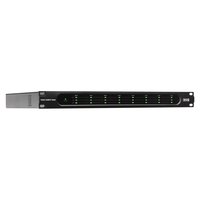
Zone Power Eight - Receiver Rane - Free user manual and instructions
Find the device manual for free Zone Power Eight Rane in PDF.


| Brand | Rane |
| Model | Zone Power Eight |
| Product Type | Audio amplifier/receiver for 70V/100V systems |
| Number of Channels | 8 channels |
| Input Connectors | 8 3-pin Euroblock connectors (ground, cold, hot) |
| Output Connectors | 8 2-pin Euroblock connectors for 70V/100V speakers |
| Power Supply | Mains via supplied IEC cable |
| Fuse | Replaceable, appropriate rating required |
| LED Indicators | Signal (green), clip (red), protect (red) per channel |
| Controls | Volume knob per channel, 70V/100V mode selector per channel |
| Ventilation | Air intake front, exhaust rear – do not obstruct |
| Maintenance and Cleaning | Clean with a dry cloth, keep ventilation grilles clear |
| Safety | Use only 70V/100V speakers with step-down transformer; do not short-circuit outputs |
| Spare Parts and Serviceability | Replaceable fuse; contact support for other repairs |
| Box Contents | Zone Power Eight, 8 3-pin Euroblock connectors, 8 2-pin Euroblock connectors, power cable, user guide |
| General Information | Designed for optimal performance and reliability in professional audio installations |
Frequently Asked Questions - Zone Power Eight Rane
User questions about Zone Power Eight Rane
0 question about this device. Answer the ones you know or ask your own.
Ask a new question about this device
Download the instructions for your Receiver in PDF format for free! Find your manual Zone Power Eight - Rane and take your electronic device back in hand. On this page are published all the documents necessary for the use of your device. Zone Power Eight by Rane.
USER MANUAL Zone Power Eight Rane
User Guide (English)
Introduction
Thank you for purchasing the Zone Power Eight. At Rane, performance and reliability mean as much to us as they do to you. That's why we design our equipment with only one thing in mind—to make your performance the best it can be.
Box Contents
Zone Power Eight
(8) 5 mm, 3-pin Euroblock connectors
(8) 5 mm, 2-pin Euroblock connectors
Power Cable
User Guide
Safety & Warranty Manual
Support
For the latest information about this product (documentation, technical specifications, system requirements, compatibility information, etc.) and product registration, visit ranecommercial.com.
For additional product support, visit ranecommercial.com/support.
Features
Front Panel

-
Power Light: This light will turn on when Zone Power Eight is powered on.
-
Signal/Clip/Protection LEDs: Each column of three LEDs shows the signal status of the corresponding Channel Input (labeled on the front panel as CH1-8):
-
Clip LED (CLIP): When the Clip LED is lit red, the input's signal is "peaking" (higher than 0 dB). To prevent the "clipping" (distortion) that can result from a loud input signal, turn the input's volume knob (on the rear panel) counter-clockwise or reduce the volume on the device plugged into the input.
- Signal LED (SIG): The Signal LED will be lit green when the signal coming from the input is at an optimal volume level.
-
Protection LED (PROT): If the Protection LED turns red, Zone Power Eight is in heat protection mode and will not output sound. To restore sound output, reduce Zone Power Eight's temperature by making sure there is good ventilation and/or decreasing the input volume.
-
Air Intake Vents: Keep these vents clear from obstructions to allow air to flow through the front grill for proper performance.
Rear Panel

- Power Input: Use the included power cable to connect this input to a power outlet.
- Fuse: If the unit's fuse is broken, lift this tab to replace the fuse. Replace it with a fuse with an appropriate rating. Using a fuse with an incorrect rating can damage the unit and/or fuse.
- Exhaust Vents: Air from the front intake flows through the unit and exits here. For proper performance, do not block the air vents.
- Channel Inputs with Volume Knobs (Input 1-8): Use Euroblock connectors to connect these inputs to your audio sources. Each channel has a volume knob that you can use to raise or lower the signal coming from your audio source. See Setup for more instructions.
- Channel Outputs (CH1-8): Use Euroblock connectors to connect these outputs to your loudspeakers. Each output sends the amplified signal from the corresponding Channel Input to the connected loudspeaker. See Setup for more instructions.
Note: Use only 70V/100V speakers designed with step-down transformers. Using low impedance 4Ω/8Ω speakers on 70V/100V outputs will overload and possibly damage this amplifier. - Operation Mode Switches: To set a Channel Output's operation mode in accord with the speaker connected to it, adjust the corresponding switch (1-8) to 70V or 100V.
Setup
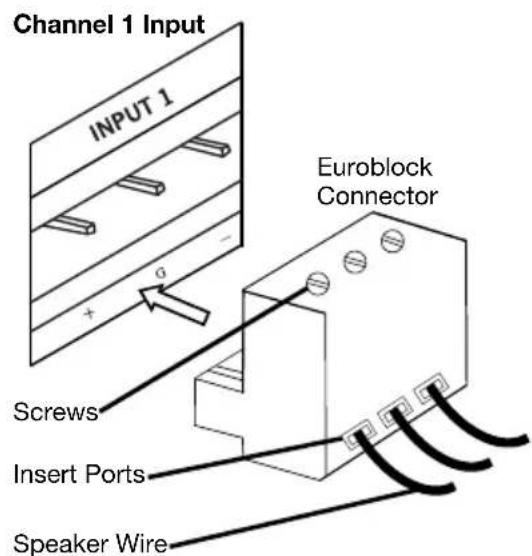
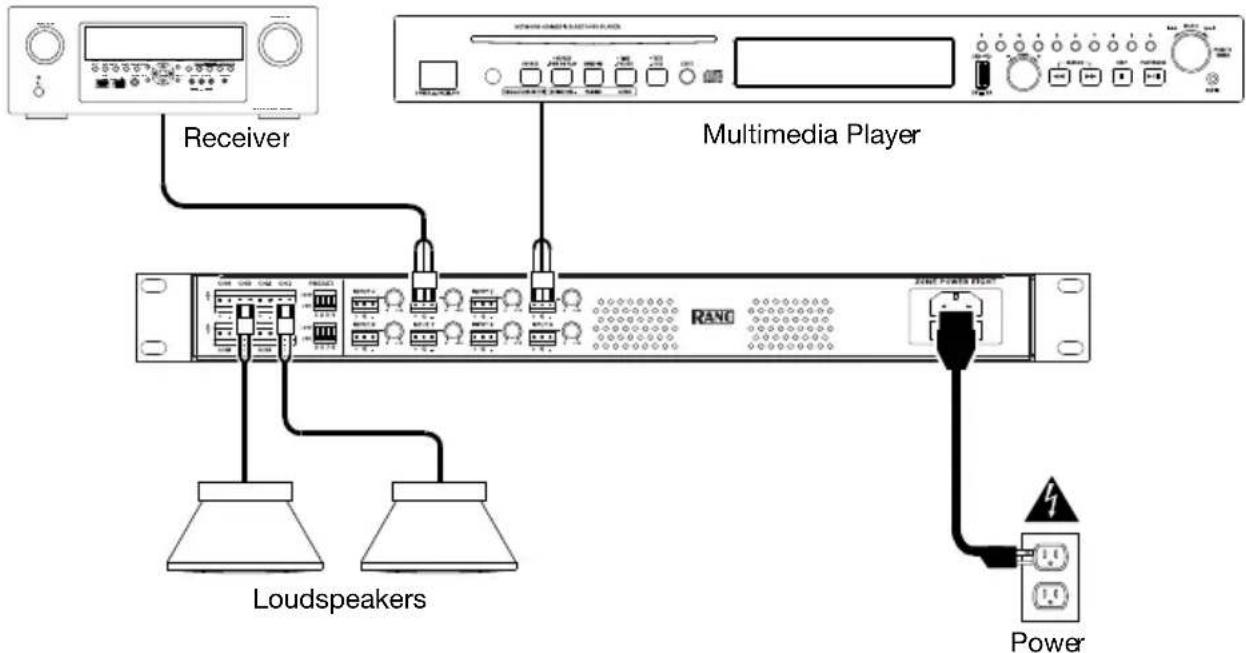
- Use the included 3-pin Euroblock connectors to connect the Channel Inputs on the rear panel to your audio sources. Each input has a ground (G), cold/negative (-), and hot/positive (+) connector. See below for further instructions on the Euroblock connector.
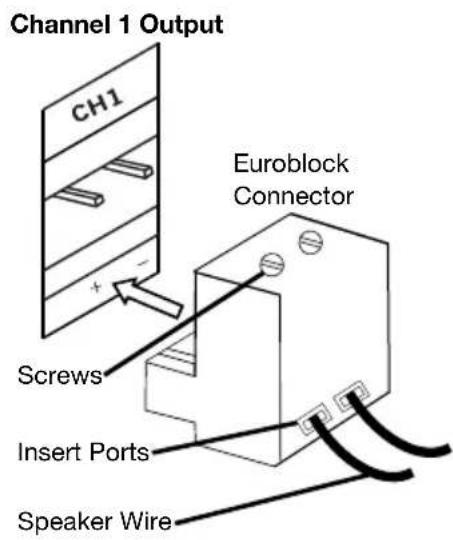
- Use the included 2-pin Euroblock connectors to connect the Channel Outputs on the rear panel to your loudspeakers. Each output has a cold/negative (-) and hot/positive (+) connector. See below for further instructions on the Euroblock connector.
- Use the included power cable to connect the Power Input to a power outlet.
- Power on all of your audio sources and Zone Power Eight.
- Begin playing your audio sources. Adjust the volume knob for each Channel Input as necessary.
Using the Euroblock Connector:
- Use a small screwdriver to loosen the screws corresponding to the insert ports on the Euroblock connector.
- Twist the speaker wire to form a tight strand and insert it into the appropriate insert port (following the +, -, and G labels on the rear panel of Zone Power Eight). Push the wire until it is secured inside. Repeat this step for each port.
- Tighten the screws corresponding to the insert ports on the Euroblock connector.
- Insert the Euroblock connector into the desired Channel Input or Channel Output on Zone Power Eight.
If you would like to disconnect a wire, first make sure you loosen the corresponding screw on the Euroblock connector before you pull out the wire.
Connection Diagram
Items not listed under Introduction > Box Contents are sold separately.
Troubleshooting
If you encounter a problem, first try one or more of the following:
• Make sure all cables and other connected devices are properly and securely connected.
• Make sure you are using Zone Power Eight as described in this user guide.
• Make sure your other devices are working properly.
- If you believe Zone Power Eight is not working properly, check the following table for your problem and solution.
| Problem: | Solution: |
| Power does not turn on. | Make sure the Power Input is properly connected to a power outlet using the included power cable. |
| Zone Power Eight does not produce any sound, or the sound is distorted. | Make sure all cable and device connections are secure and correct.Make sure none of the cables are damaged.Make sure the volume settings on your loudspeaker, mixer, etc. are correct. |
| The sound has a hum or noise. Check the | polarity of the input connections.If an unbalanced connection is used, ensure the terminal (-) is linked to GND.If the clip LED is lit, reduce the volume.Check the polarity of the speaker connections. |
Technical Specifications
| Connectors | (8) Euroblock inputs(8) Euroblock outputs(1) IEC power cable input |
| Total Harmonic Distortion | < 0.1% |
| Frequency Response | 100 Hz–15 kHz (0 ±3 dB) |
| Signal-to-Noise Ratio | >95 dB |
| Channel Separation | >70 dB |
| Input Sensitivity | 0.9–1.1 V (0 ±1 dBv) |
| Input Impedance | 20k Ω balanced or 10k Ω unbalanced |
| Damping Factor | >200 (1k 8 Ω) |
| Voltage Gain | 40 (±1 dB @ 100 V) |
| Power | Via power cableConnection: IECVoltage: 110–120 V or 220–240 V, 50/60 HzConsumption: 1200 W (150 W per channel) |
| Dimensions(width x depth x height) | 19" x 14.2" x 1.7"48.3 x 36.1 x 4.3 cm |
| Weight | 15.4 lb.7 kg |
Specifications are subject to change without notice.
Trademarks & Licenses
Rane is a trademark of inMusic Brands, Inc., registered in the U.S. and other countries. All other product names, company names, trademarks, or trade names are those of their respective owners.
ranecommercial.com
Brand : Rane
Model : Zone Power Eight
Category : Receiver