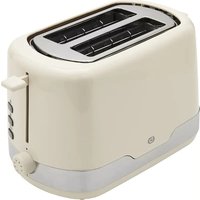
EGP4s - Toaster Essentiel B - Free user manual and instructions
Find the device manual for free EGP4s Essentiel B in PDF.


User questions about EGP4s Essentiel B
0 question about this device. Answer the ones you know or ask your own.
Ask a new question about this device
Download the instructions for your Toaster in PDF format for free! Find your manual EGP4s - Essentiel B and take your electronic device back in hand. On this page are published all the documents necessary for the use of your device. EGP4s by Essentiel B.
USER MANUAL EGP4s Essentiel B
natural_image
White modern toaster with black and silver casing, no visible text or symbols on bodyTo help you get the most out of your purchase
NL. Handleiding
| FRENNLDEES | |||||
| 1 | Fentes à griller Toasting slots | Roostersleuven Toastschlitze Ranuras para tostar | |||
| 2 | Levier du support de viennoiseries | Warming rack lever | Steunhefboom voor zoete deegwaren | Hebel des Brötchenaufsatzes | Palanca del soporte para bollería |
| 3 | Support viennoiseries | Warming rack | Steun zoete deegwaren | Brötchenaufsatz Soporte para bollería | |
| 4 | Levier de mise en marche | Toast lever Werkingshefboom Einschalthebel Palanca de puesta en marcha | |||
| 5 | Bouton (décongélation) | (defrost) button | Knop (ontdooien) | Taste (Auftauen) | Botón (descongelación) |
| 6 | Bouton (réchauffage) | (reheat) button | Knop (opnieuw opwarmen) | Taste (Aufwärmen) | Botón (recalentamiento) |
| 7 | Bouton STOP (annulation) | STOP (cancellation) button | STOP-knop (annulatie) | Taste STOP (Abbrechen) | Botón STOP (cancelación) |
| 8 | Bouton de réglage du niveau de brunissage (thermostat) | Browning level adjustment button (thermostat) | Knop voor het instellen van het bruiningsniveau (thermostaat) | Drehschalter zur Einstellung des Bräunungsgrads (Thermostat) | Botón de ajuste de nivel de tostado (termostato) |
| 9 | Tiroir ramasse-miettes | Crumb tray Kruimelopvanglade Krümelschublade Cajón | recogemigas | ||
consignes d'usage
LISEZ ATTENTIVEMENT CES INSTRUCTIONS AVANT D'UTILISER L'APPAREIL ET CONSERVEZ- LES POUR POUVOIR VOUS Y REPORTER ULTÉRIEUREMENT.
Fonction "Annulation"
instructions for use
READ THESE INSTRUCTIONS CAREFULLY BEFORE USING THE APPLIANCE AND SAVE THESE INSTRUCTIONS FOR FUTURE REFERENCE.
- This appliance is intended for household use only. This appliance is not intended for use in staff kitchen areas in shops, offices or other work environments, farms, hotels, motels or other residential or bed-and-breakfast type environments.
- Do not use this device outdoors. This appliance must not be exposed to rain or moisture.
- This appliance is only used for toasting bread. Do not grill any other type of food.
- Packaging materials (wrapping paper, polystyrene) can be dangerous for children. There is a risk of suffocation! Do not leave packaging materials within the reach of children!
- This appliance can be used by children over eight years of age and by persons with reduced physical, sensory or mental capacity or lack of experience or knowledge, as long as they are properly supervised or have received instructions on using the appliance safely and understand the dangers involved.
• Children must not play with the appliance. - Children must not clean or maintain the appliance, unless they are over eight years of age and are supervised.
- Keep the appliance and its power cord out of the reach of children under the age of eight.
- Do not leave the appliance unattended when plugged in.
- Before plugging in your appliance, make sure that the voltage of your home matches that indicated on the appliance's rating plate.
• To avoid electric shocks, never immerse the power cord, plug or toaster in water or any other liquid.
- Do not handle the appliance or plug with wet hands.
• Always unplug your appliance after each use and allow it to cool before cleaning, storing or moving it.
- When you unplug the cord, always pull it out at the plug. Do not pull on the cord itself.
- When using the toaster, always unwind the power cord completely from its housing to prevent the appliance from overheating.
• Do not use the appliance:
- if the plug or the power cord is damaged;
- if it is not operating properly as a result of any type of damage to the toaster;
- if it has fallen into water;
- if it has been dropped.
• Take it to an after-sales service centre to be inspected.
- No repairs can be carried out by the user.
- The power cable must be checked regularly to avoid any risk of damage. If the power cord is damaged,
it must be replaced by the manufacturer, its after-sales department or a similarly qualified person to avoid any hazards.
• Always use the appliance on a dry surface.
- Do not let the power cord hang over the edge of a table or work surface, or allow it to come into contact with hot surfaces.
- Keep the appliance away from heat sources such as radiators, to avoid deforming the plastic parts.
- Bread can burn. So, do not use the toaster near or under combustible materials, such as curtains.
- Ensure sufficient air flow above and around the appliance.
• Always supervise the appliance during use.
- WARNING! The surfaces of the appliance (metal parts, in particular) may become hot, when it is on. Risk of burns!
- Only use the toaster with the crumb tray inserted in its slot.
- The crumb tray must be cleaned regularly to avoid any risk of fire. To clean the crumb tray, slide it out of its slot on the side of the appliance.
- Only insert slices of bread without spread (i.e. butter, jam, etc.) in the toaster. Similarly, be careful not to insert slices of bread that are too thick and could interfere with the lift function.
- Do not use abrasive cleaners to clean the appliance.
- This toaster is not intended to be controlled by an external timer or by a separate remote control system.
- WARNING! Never attempt to remove slices of bread or other potentially stuck items from the toaster with a knife or any other object, as contact with live parts may result in an electric shock. Let the appliance cool down and unplug it before removing the bread.
- Switch off and unplug the appliance before leaving it unattended and before assembling, disassembling, or cleaning it.
- To clean the surfaces in contact with food, please refer to the "Cleaning and maintenance" section at the end of these instructions.
your product
Box contents
- 1 toaster
- 1 user manual
Technical characteristics
• Power supply: 850 W max.
• Power supply: 220 - 240 V \~ 50-60 Hz
- 2 slots
- 7-position thermostat to choose the level of browning
• Automatic ejection
- Extra-high lift
- Defrost, reheat and cancel functions
• Built-in warming rack
- Removable crumb tray
- Button backlighting
- Cord storage
before first use
- Remove all packaging.
- Fully unwind the power cord and plug the toaster into a wall outlet with an earth connection.
- Run the empty toaster (without bread) with the thermostat at maximum in order to burn off all the residues in the appliance. A little smoke may then be released. During this procedure, make sure the room is well ventilated.
use
WARNING! Risk of burns: the toaster gets very hot during operation. Do not touch the metal parts of the appliance during use.
- Never use the toaster without the crumb tray.
- Push the STOP (cancellation) button and immediately unplug the appliance if any smoke emerges from inside the appliance.
- Wait about 30 seconds between each use for the device to cool down.
Toasting bread
- Place the toaster on a dry, level and stable surface.
- Plug the toaster into a earthed wall outlet.
- Place the slice(s) of bread in the slot.
-
Choose the level of browning you want between 1 and 7 using the thermostat knob:
-
1-2: light toasting
- 3-4-5: medium toasting
- 6-7: high toasting
The higher the level of browning, the longer the toaster will operate.
- Fully lower the toast lever until it locks in position. The toaster starts automatically.
NOTE: If the power cable is not plugged in, the toast lever cannot lock in place.
- The toaster automatically switches off and the toast is ejected when the browning level is reached.
- At the end of use, unplug the appliance from the power outlet and wait for it to cool completely before storing it in a dry place.
If the bread gets stuck in the toaster, unplug the appliance from the power outlet, allow it to cool, then remove the bread. Do not attempt to remove a stuck piece of bread with a metal utensil if the appliance is plugged in. Be careful not to damage the internal parts of the mechanism or heating elements when removing stuck bread.
"Defrost" function
The "Defrost" function allows you to defrost and toast frozen bread or pastries.
- Perform steps 1 to 4 of the previous "Toasting bread" section.
- To defrost and toast frozen bread or waffles, press the ✕(defrost) button. The indicator light of the "defrost" button switches on.
- To cancel the program or interrupt the defrosting process, press the STOP (cancellation) button.
- The toaster automatically switches off and the defrosted and toasted bread is ejected when the browning level is reached.
"Reheat" function
The "Reheat" function allows you to reheat previously toasted bread which has cooled.
- Perform steps 1 to 3 of the previous "Toasting bread" section. There is no need to adjust the thermostat.
- Fully lower the toast lever until it locks in position and then, press the (reheat) button. The indicator light for the reheat button comes on and the toaster starts automatically.
- To cancel the program or interrupt the reheating process, press the STOP (cancellation) button.
- At the end of the cycle, the toaster switches off automatically.
Reheating pastries
To avoid damaging your toaster, do not put croissants or rolls directly into the slot of the toaster. Your toaster has a warming rack for reheating pastries.
- Fully lower the lever of the warming rack to raise it.
- Place the pastries on the rack.
- Lower the toast lever until it locks in place in order to switch on the appliance and press the (theheat) button. The indicator light of the button comes on.
"Cancellation" function
- All the functions of your toaster can be cancelled by pressing the STOP (cancellation) button at any time. The toaster automatically switches off and the bread is ejected.
- Do not attempt to raise the toast lever manually, as this could damage the mechanism and, consequently, the toaster.
Tips for use
- When using for the first time, we recommend choosing browning level 2. Then you can adjust the level of browning according to the different types of bread and your personal taste.
- Select a lower level of browning (1 or 2) to get lightly browned slices of toast.
- Dry bread browns more quickly than fresh bread, and thin slices of bread brown more quickly than thick slices of bread. Select a lower level of browning (1 or 2).
- Wholemeal bread and bread with an uneven surface take longer to toast. Select a higher level of browning (5, 6 or 7).
- If you are inserting only one slice of bread in the toaster, select a lower level of browning to prevent the slice from being over-toasted.
- When testing continuously at the same level of browning, the bread will be more toasted at the end of use than at the start of use.
cleaning and maintenance
- WARNING! Unplug the toaster and allow it to cool before cleaning it.
- Do not immerse the toaster in water or any other liquid!
- Never carry out any action with a metal object inside the appliance at the risk of seriously damaging it.
Cleaning the outer and inner surfaces
- Clean the outer surfaces of the device with a slightly damp cloth and dry it with a soft cloth.
- To clean the inner surfaces, turn the unit upside down and shake it over a bin until all the crumbs that are stuck inside have fallen out.
Cleaning the crumb tray
To avoid any risk of fire, the crumb tray should be cleaned regularly. Do not allow bread crumbs to collect in the bottom of the toaster.
- Pull the crumb tray out of its slot on the side of the appliance using the tab provided.
- Throw the crumbs in a bin, wipe the crumb tray with a slightly damp cloth, and dry it with a soft, dry cloth. Never put the crumb tray in the dishwasher!
- When the tray is completely dry, slide it back into its slot before using the toaster again.
Storage
- When you are not using the appliance, wind the cord in the cord holder located under the appliance once you have made sure that it has cooled down after use.
- Store the device in a cool, dry place.
EN. Environmental protection
This symbol on the product means that its processing as a waste product is subject to regulations related to electric and electronic waste (DEEE). This appliance cannot be considered as household waste and must be subject to collection specific to this waste. Waste return and collection systems are organised by local authorities (recycling centre) and retailers. By directing your appliance at the end of its useful life to the recycling sector, you will contribute to environmental protection and will also prevent harmful consequences on your health.
*EN. 2 year warranty
Warranty valid from the date of purchase (the receipt is proof of purchase). This warranty does not cover defects or damage resulting from a faulty installation, incorrect use, or normal wear and tear.
Getest in onze laboratoria
- consignes d'usage
- Fonction "Annulation"
- instructions for use
- READ THESE INSTRUCTIONS CAREFULLY BEFORE USING THE APPLIANCE AND SAVE THESE INSTRUCTIONS FOR FUTURE REFERENCE.
- your product
- Box contents
- Technical characteristics
- before first use
- use
- WARNING! Risk of burns: the toaster gets very hot during operation. Do not touch the metal parts of the appliance during use.
- Toasting bread
- "Defrost" function
- "Reheat" function
- Reheating pastries
- "Cancellation" function
- Tips for use
- cleaning and maintenance
- Cleaning the outer and inner surfaces
- Cleaning the crumb tray
- Storage
- Environmental protection
- Getest in onze laboratoria
Brand : Essentiel B
Model : EGP4s
Category : Toaster