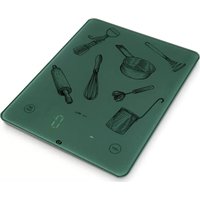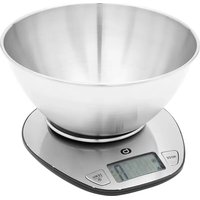
EBCB1 - Kitchen scales Essentiel B - Free user manual and instructions
Find the device manual for free EBCB1 Essentiel B in PDF.


| Brand | Essentiel B |
| Model | EBCB1 |
| Product type | Electronic kitchen scale |
| Maximum capacity | 5000 g / 5000 ml / 11 lb / 166.66 fl.oz |
| Accuracy | 1 g / 0.1 oz |
| Units of measurement | g, ml, lb:oz, fl.oz |
| Measurement mode | Weight, water volume, milk volume |
| Tare function | Yes, zero reset for successive weighings |
| Automatic shut-off | After 2 minutes of inactivity |
| Power supply | 2 LR03/AAA 1.5 V batteries (included) |
| Bowl material | Stainless steel (capacity 1.5 L) |
| Display | LCD digital display |
| Additional functions | Liquid conversion, imperial/metric unit selection |
| Care and cleaning | Wipe with a soft sponge and dish soap, do not immerse |
| Safety | Do not overload (max 5000 g), do not expose to water or heat |
| Warranty | Warranty valid from date of purchase, does not cover damage due to misuse |
| Recycling | Product subject to WEEE regulations, do not dispose of with household waste |
Frequently Asked Questions - EBCB1 Essentiel B
User questions about EBCB1 Essentiel B
0 question about this device. Answer the ones you know or ask your own.
Ask a new question about this device
Download the instructions for your Kitchen scales in PDF format for free! Find your manual EBCB1 - Essentiel B and take your electronic device back in hand. On this page are published all the documents necessary for the use of your device. EBCB1 by Essentiel B.
USER MANUAL EBCB1 Essentiel B
natural_image
Digital kitchen scale with a stainless steel bowl and digital display showing 0.5, no text or symbols on the appliance itself.To help you get the most out of your purchase
NL. Handleiding
General instructions
- This kitchen scale is for household use only. Any other use (medical or commercial) is excluded.
- Always place the scale on a horizontal, flat and stable surface. Do not place the scale on the edge of a table or worktop.
- Place the container or other food to be weighed in the centre of the platform.
- The scale is a high-precision electronic weighing appliance: use it with care. Do not try to take it apart and do not subject it to strong vibrations and shocks.
- Do not press on it or drop the scale.
- Do not store objects on the appliance.
- Do not expose the device to direct sunlight. Keep it away from any source of heat and moisture.
- Make sure that children do not play with the appliance.
- Do not overload the scale (maximum capacity: 5000 g).
- If the result is displayed incorrectly, check that the batteries and contact points are touching. Replace
the batteries if the scale has not been used for a long time, then try again.
- Do not use the kitchen scale in places where magnetic fields could interfere with the information transmitted by the scale.
- When moving the scale to a place with a temperature difference of more than 10^ , leave it to rest for at least two hours before switching it on.
- Never submerge the appliance in water or any other liquid and do not expose it to splashing water.
• Make sure that no liquids get inside the scale.
Battery recycling
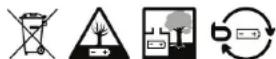
- Do not dispose of batteries in the household waste.
- To protect the environment, dispose of the batteries in accordance with applicable regulations.
- Drop them in your nearest battery container or return them to your store.
- Do not recharge the batteries, dismantle them or throw them into a fire.
- Do not expose them to high temperatures or direct sunlight.
- Do not incinerate them.
your product
Technical features
• Maximum capacity of the scale: 5000 g / 5000 ml / 11lb / 166.66 fl.oz
• Accuracy: 1 g / 0.1 oz
- Stainless steel bowl
- Bowl capacity: 1.5 L
- Converting liquids
• Tare function to weigh successive ingredients
• Works with 2 x 1.5 V LR03/AAA batteries (supplied)
use
Inserting/replacing batteries
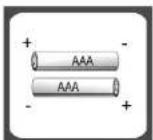
- Remove the battery compartment cover on the back of the scale.
- Insert 2 x 1.5 V LR03/AAA batteries (supplied) in the proper direction, according to the (+) and (-) guides indicated in the compartment (see figure below).
- Replace the cover.
b
• Use only the battery type specified in this manual.
- Do not use 2 types of batteries together.
- Replace the batteries when they are dead or if they leak.
- Remove the batteries if the scale is not to be used for a prolonged period.
Turning the scale on
Press the ☐ button to turn on the scale.
Weighing and choosing the measurement unit
Choice of measurement mode
flowchart
graph LR
    A["MODE"] --> B["Water volume Milk volume Weighing"]
    B --> C["MODE"]
    C --> D["End"]
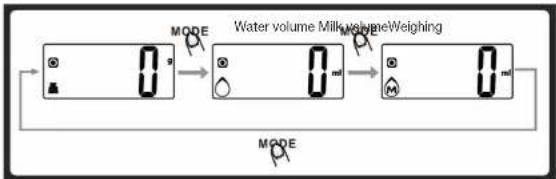
After switching on the scale, press the MODEn to choose the weight of your ingredients or the volume of a liquid.
Choosing the measurement unit
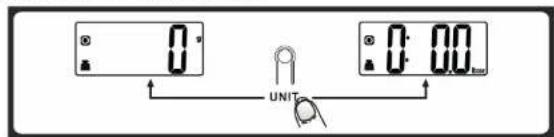
Press the MODE to choose the operating mode (weight, milk volume, water volume)
and press the UNIT button (located under the scale) to switch from the metric system (g, ml) to the imperial system (lb: oz, fl'oz) and vice versa.
- If the weight unit is in grams (g), the default volume unit will be millilitres (ml).
- If the weight unit is in lb:oz, the default volume unit will be fl'oz.
Weight mode
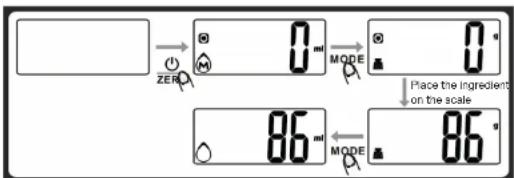
- Place the scale on a flat and stable surface.
- Place the bowl (if used) on the scale.
- Press the ZERO button to turn on the scale.

-
Wait until the display shows "0". Press the MODE button to switch to "weight" mode.
-
Place the ingredient to be weighed on the scale (or in the bowl) to begin weighing. The display shows the weight of the ingredient.
-
For water or milk, press the MODE button to switch to volume mode. The liquid volume is displayed on the screen.
Volume mode
- Place the scale on a flat and stable surface.
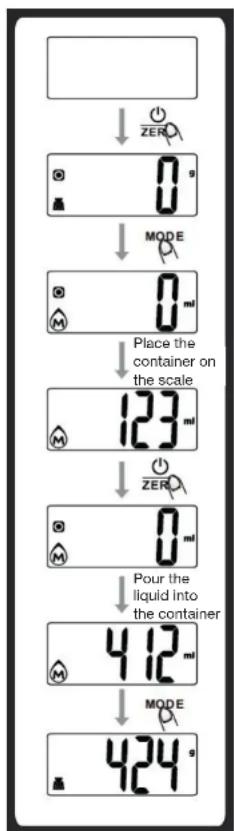
- Press the ZERO button to turn on the scale.
- Wait until the display shows "0". Press the MODE button to choose the required mode ("water volume" or "milk volume").
- Place a container on the scale platform. The display shows the weight of the container.
- Press the ZERO button to reset the scale to zero.
- Pour the liquid into the container. The display shows the volume of the liquid.
- Press the MODE button to switch to "weight" mode. The weight of the liquid appears on the screen.

Reset-to-zero or tare function
This function is used to reset the scale to zero and measure the weight of each ingredient separately, even if you place them in the same container on the scale. Place an ingredient on the scale, its weight is displayed. Press the ZERO button to reset the weight back to "0" before adding the next ingredient. If the screen displays "----", wait for the system to stabilise. After a few seconds, "0" appears on the screen. You can repeat this step as many times as you want.
When you press the ZERO button below 200 g, the symbol (reset) is displayed.
When you press the ⏻ ZERO button above 200 g, the symbol (tare) is displayed.
flowchart
graph TD
    A[" "] --> B["0 g"]
    B --> C["MODE"]
    C --> D["0 ml"]
    D --> E["Place the container on the scale"]
    E --> F["123 ml"]
    F --> G["0 ml"]
    G --> H["Pour the liquid into the container"]
    H --> I["412 ml"]
    I --> J["MODE"]
    J --> K["424 s"]
Automatic shut-down of the scale
- The scale switches off automatically after 2 minutes if no measurement is taken during this time.
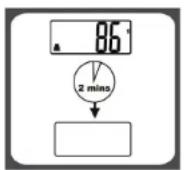
Manual shut-down
To extend the life of the batteries, press the ZERoton to turn off the scale immediately after use.
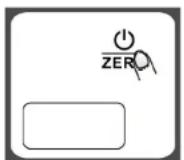
Note: if the display shows "0", briefly press the ⏻ ZERO button; if the display shows a weight, press-and-hold the ⏻ ZERO button for 3 seconds to switch off the scale.
Error messages
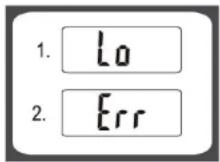
- If the display shows "Lo", it means that the batteries are low. Replace the batteries.
- If the screen displays "Err", this means that the scale is overloaded. Remove the weight. The maximum capacity of the scale is 5000 g.
cleaning
- Wipe the scale platform with a soft damp sponge and a little washing-up liquid. Be careful not to let water or other liquids get inside the appliance, especially in the battery compartment. Dry with a soft, clean cloth.
- Wash the stainless steel bowl with a soft sponge, hot water and washing-up liquid.
- Do not use abrasive detergents or scouring sponge for cleaning as this will damage the coating.
- Do not immerse the device in water or any other liquid.
EN. Environmental protection
This symbol on the product means that its processing as a waste product is subject to regulations related to electric and electronic waste (DEE). This appliance cannot be considered as household waste and must be subject to collection specific to this waste. Waste return and collection systems are organised by local authorities (recycling centre) and retailers. By directing your appliance at the end of its useful life to the recycling sector, you will contribute to environmental protection and will also prevent harmful consequences on your health.
*EN. 2 year warranty
Warranty valid from the date of purchase (the receipt is proof of purchase). This warranty does not cover defects or damage resulting from a faulty installation, incorrect use, or normal wear and tear.