
Nitro TKL NKW120 - Computer Keyboard ACER - Free user manual and instructions
Find the device manual for free Nitro TKL NKW120 ACER in PDF.
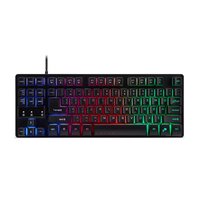


| Product type | Gaming keyboard with tactile switches |
| Brand | Acer |
| Model | Nitro TKL NKW120 |
| Dimensions (L x W x H) | 360 x 137 x 39 mm |
| Weight | 870 g ± 10 g |
| Interface | USB (Plug-and-Play) |
| Cable length | 1.8 m (∅4.0 mm) |
| Backlighting | RGB 3 zones, Lighted/Breathing modes, adjustable brightness (100%, 75%, 50%, OFF) |
| Anti-ghosting keys | 19 keys (Tab, Shift, Ctrl, Alt, Q, W, E, A, S, D, Z, X, C, B, Space, Arrow keys) |
| Windows key lock | Yes (Fn + Windows key) |
| Keyboard lock | Yes (Fn + F11) |
| System compatibility | Windows 7, 8, 8.1, 10 |
| Power supply | Via USB port (5V) |
| Operating temperature | 0 °C to 40 °C |
| Storage temperature | -10 °C to 60 °C |
| Operating humidity | 10% to 90% (non-condensing) |
| Package contents | NITRO TKL gaming keyboard, quick start guide, warranty booklet |
| Cleaning | With a soft, dry cloth, do not immerse in water |
| Safety | Do not disassemble, do not use under abnormal conditions |
| Repairability | Not user-repairable, contact an authorized center |
| Warranty | Manufacturer's warranty (see included booklet) |
| Acer website | www.acer.com |
Frequently Asked Questions - Nitro TKL NKW120 ACER
User questions about Nitro TKL NKW120 ACER
0 question about this device. Answer the ones you know or ask your own.
Ask a new question about this device
Download the instructions for your Computer Keyboard in PDF format for free! Find your manual Nitro TKL NKW120 - ACER and take your electronic device back in hand. On this page are published all the documents necessary for the use of your device. Nitro TKL NKW120 by ACER.
USER MANUAL Nitro TKL NKW120 ACER
This guide outlines the operating procedures and safety precautions. Please read it carefully to make sure you are using your product properly and keep it for future reference.
Specifications
- Model: NKW120
- Switch: Membrane switch • 19 Anti-ghosting Keys:
Tab, Shift, Ctrl, Alt, Q, W, E, A, S, D, Z, X, C, B, Space, ↓, ↑, ←, →
- Backlight: 3 zones • Cable Length: ∅4.0, 1800mm
- Dimensions (L x W x H): 360 x 137 x 39 mm
- Weight: 870g ± 10g
Getting started
- Plug & Play: Simply connect the keyboard to an available USB port and the keyboard will automatically install all necessary drivers.
Keyboard function
| Hotkey Description | |
| ☀️ | Switch the backlight color |
| Fn + ⚙️ | Switch the backlight mode: Lightened/Breathing |
| Fn + Pg Up / Pg Dn Adjust brightness levels. (100%, 75%, 50%, OFF) | |
| Fn + W Switch the W, | A, S, D keys to Up, Left, Down, Right. |
| Fn + 📋️ | Turn on/off the Windows key lock |
| Fn + F11 Turn on/off | the keyboard lock |
Package Contents
• NITRO Gaming Keyboard TKL x 1 - Quick Start Guide x 1 - Warranty booklet x 1
System Compatibility
- Windows 10, Windows 8.1, Windows 8, Windows 7
- Interface: USB Port
Comfort Guideline
Some research has suggested that long periods of repetitive motion, using an improper work space, body position, and poor work habits may be associated with physical discomfort and injury to nerves, tendons, and muscles. Below are some guidelines for optimizing comfort and avoiding injury.
- Place the keyboard and monitor in front of you, and keep the mouse within easy reach.
- Keep your elbows close to your sides and adjust the height of the table and chair so that the mouse and keyboard are positioned below your elbows.
- Ensure your feet are well supported and your shoulders are relaxed.
- Taking frequent short breaks can help ease the tiredness from using the keyboard for a long time.
- Do not sit in the same position all day operating the keyboard and mouse. Leave your seat, do some exercises for your arms and shoulders, and relax your wrists, neck, and legs.
- Be aware of discomfort; if you experience conditions such as pain, numbness, or tingling in your hands, wrists, arms, shoulders, neck, or legs, please consult qualified health professionals.
Caution
- Do not disassemble the device or operate it under abnormal conditions.
- Do not submerge the device in water.
- If the device backlight does not light up, please re-plug the USB.
- If the device is not functioning properly or there is an abnormal thermal situation, please re-plug the connector.
- If you still encounter problems after taking these corrective measures, please contact your dealer or an authorized service center for assistance.
- For more information regarding the Acer accessories, please visit the Acer website at www.acer.com
Environment
Temperature:
- Operating: 0 °C to 40 °C • Non-operating: -10 °C to 60 °C
- Operating: 10% to 90% • Non-operating: 10% to 90%
Humidity (non-condensing):
CE
Europe – EU Declaration of Conformity
We declare under our sole responsibility that the product is in conformity with all the essential requirements and other provisions of the European Council Directive RoHS Directive (2011/65/EU), EMC Directive (2014/30/EU) issued by the Commission of the European Community.
This product must not be disposed of with your other household waste. Treat it in compliance with the local regulations or contact your local city office, your household waste disposal service, or the shop where you purchased the product.

FEDERAL COMMUNICATIONS COMMISSION (FCC) STATEMENT
This equipment has been tested and found to comply with the limits for a Class B digital device, pursuant to part 15 of the FCC Rules.
These limits are designed to provide reasonable protection against harmful interference in a residential installation. This equipment generates, uses, and can radiate radio frequency energy and, if not installed and used in accordance with the instructions, may cause harmful interference to radio communications.
However, there is no guarantee that interference will not occur in a particular installation. If this equipment does cause harmful interference to radio or television reception, which can be determined by turning the equipment off and on, the user is encouraged to try to correct the interference by one or more of the following measures:
- Reorient or relocate the receiving antenna.
- Increase the separation between the equipment and receiver.
- Connect the equipment into an outlet on a circuit different from that to which the receiver is connected.
- Consult the dealer or an experienced radio/TV technician for help.
FCC Caution
Changes or modifications not expressly approved by the part responsible for compliance could void the user's authority to operate the equipment.
This device complies with Part 15 of the FCC Rules. Operation is subject to the following two conditions: (1) this device may not cause harmful interference, and (2) this device must accept any interference received, including interference that may cause undesired operation.
IC Statement
This device complies with Industry Canada license-exempt RSS standard(s). Operation is subject to the following two conditions: (1) this device may not cause interference, and (2) this device must accept any interference, including interference that may cause undesired operation of the device.
Operation is subject to the following two conditions: (1) This device may not cause harmful interference, and (2) this device must accept any interference received, including interference that may cause undesired operation.
FEDERAL COMMUNICATIONS COMMISSION (FCC) STATEMENT
This equipment has been tested and found to comply with the limits for a Class B digital device, pursuant to part 15 of the FCC Rules.
These limits are designed to provide reasonable protection against harmful interference in a residential installation. This equipment generates, uses and can radiate radio frequency energy and, if not installed and used in accordance with the instructions, may cause harmful interference to radio communications.
However, there is no guarantee that interference will not occur in a particular installation. If this equipment does cause harmful interference to radio or television reception, which can be determined by turning the equipment off and on, the user is encouraged to try to correct the interference by one or more of the following measures:
- Reorient or relocate the receiving antenna.
- Increase the separation between the equipment and receiver.
- Connect the equipment into an outlet on a circuit different from that to which the receiver is connected.
- Consult the dealer or an experienced radio/TV technician for help.
FCC Caution
Changes or modifications not expressly approved by the part responsible for compliance could void the user's authority to operate the equipment.
This device complies with Part 15 of the FCC Rules. Operation is subject to the following two conditions: (1) this device may not cause harmful interference, and (2) this device must accept any interference received, including interference that may cause undesired operation.
Compliant with Russian regulatory certification
Tab, Shift, Ctrl, Alt, Q, W, E. A, S, D, Z, X, C, B, Space, ↓, ↑, ←, →
FEDERAL COMMUNICATIONS COMMISSION (FCC) STATEMENT
This equipment has been tested and found to comply with the limits for a Class B digital device, pursuant to part 15 of the FCC Rules.
These limits are designed to provide reasonable protection against harmful interference in a residential installation. This equipment generates, uses and can radiate radio frequency energy and, if not installed and used in accordance with the instructions, may cause harmful interference to radio communications.
However, there is no guarantee that interference will not occur in a particular installation. If this equipment does cause harmful interference to radio or television reception, which can be determined by turning the equipment off and on, the user is encouraged to try to correct the interference by one or more of the following measures:
- Reorient or relocate the receiving antenna.
- Increase the separation between the equipment and receiver.
- Connect the equipment into an outlet on a circuit different from that to which the receiver is connected.
- Consult the dealer or an experienced radio/TV technician for help.
FCC Caution
Changes or modifications not expressly approved by the part responsible for compliance could void the user's authority to operate the equipment.
This device complies with Part 15 of the FCC Rules. Operation is subject to the following two conditions: (1) this device may not cause harmful interference, and (2) this device must accept any interference received, including interference that may cause undesired operation.

Federal Communications Commission Declaration of Conformity
This device complies with Part 15 of the FCC Rules. Operation is subject to the following two conditions: (1) this device may not cause harmful interference, and (2) this device must accept any interference received, including interference that may cause undesired operation.
The following local Manufacturer / Importer is responsible for this declaration:
Product: Keyboard
Model Number: NKW120
SKU Number: NKW120 ******
(** = 0 9, a z, A Z or Blank)
Name of Responsible Party: Acer America Corporation
Address of Responsible Party: 333 West San Carlos St.
Suite 1500
San Jose, CA 95110
U. S. A.
Contact Person: Acer Representative
Phone No.: 254-298-4000
Fax No.: 254-298-4147
EU Declaration of Conformity
We,
Acer Incorporated
8F, 88, Sec. 1, Xintai 5th Rd., Xizhi, New Taipei City 221
And,
Acer Italy s.r.l.
We, Acer Incorporated, hereby declare under our sole responsibility that the product described above is in conformity with the relevant Union harmonization legislation: EMC Directive 2014/30/EU and RoHS Directive 2011/65/EU. The following harmonized standards and/or other relevant standards have been applied:
EN 55032:2015+A11:2020 Class B
EN 55035:2017+A11:2020
EN 50581: 2012
Year to begin affixing CE marking: 2021.
RU Jan / Sr. Manager
Acer Incorporated (New Taipei City)
- 29, 2021
Date
Product name / Наименование / 產品名稱 / 产品名称:
NITRO Keyboard / Клавиатура / 鍵盤 / 键盘
- SPECIFICATIONS
- GETTING STARTED
- PACKAGE CONTENTS
- SYSTEM COMPATIBILITY
- COMFORT GUIDELINE
- CAUTION
- ENVIRONMENT
- TEMPERATURE
- HUMIDITY (NON-CONDENSING)
- CE
- EUROPE – EU DECLARATION OF CONFORMITY
- FEDERAL COMMUNICATIONS COMMISSION (FCC) STATEMENT
- FCC CAUTION
- IC STATEMENT
- COMPLIANT WITH RUSSIAN REGULATORY CERTIFICATION
- FEDERAL COMMUNICATIONS COMMISSION DECLARATION OF CONFORMITY
- EU DECLARATION OF CONFORMITY
- ACER INCORPORATED
- ACER ITALY S.R.L
Brand : ACER
Model : Nitro TKL NKW120
Category : Computer Keyboard