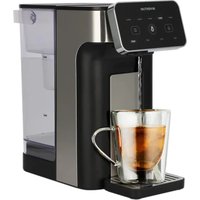
HWD725B - Kettle INVENTUM - Free user manual and instructions
Find the device manual for free HWD725B INVENTUM in PDF.


| Product type | Hot water dispenser |
| Brand | Inventum |
| Model | HWD725B |
| Tank capacity | 1 liter |
| Power supply | 220-240 V ~ 50/60 Hz |
| Power | Approximately 1500 W (estimate) |
| Net weight | Approximately 2 kg (estimate) |
| Dimensions (W x D x H) | Approximately 20 x 30 x 30 cm (estimate) |
| Color | Black / White (not specified) |
| Temperature setting | Yes, button selection (e.g., 100 °C) |
| Quantity setting | Yes, button selection (e.g., 1000 ml) |
| Child safety lock | Yes, lock button for 3 seconds |
| Automatic shut-off when water is low | Yes, with audible alarm |
| Anti-scale filter | Yes, removable and replaceable |
| Filter replacement frequency | Every 150 liters of water (approximately 3 times per year) |
| Cleaning and descaling | Monthly with vinegar or citric acid |
| Removable drip tray | Yes, with cup grid |
| Warranty | 5 years (Inventum, for domestic use in the Netherlands) |
| Included accessories | Anti-scale filter, drip tray, cup grid |
| Intended use | Cold tap water only (no milk, tea, coffee) |
Frequently Asked Questions - HWD725B INVENTUM
User questions about HWD725B INVENTUM
0 question about this device. Answer the ones you know or ask your own.
Ask a new question about this device
Download the instructions for your Kettle in PDF format for free! Find your manual HWD725B - INVENTUM and take your electronic device back in hand. On this page are published all the documents necessary for the use of your device. HWD725B by INVENTUM.
USER MANUAL HWD725B INVENTUM
natural_image
Exterior view of a modern water dispenser with digital display and glass mug (no visible text or symbols)- gebruiksaanwijzing
- instruction manual
- Gebrauchsanweisung
• mode d'emploi
Nederlands
- safety instructions page 9
- appliance description page 12
- before using the first time page 12
- using the appliance page 13
- cleaning & maintenance page 13
General terms and conditions of service and warranty page 28
Deutsch
PROBLEEMOPLOSSING (ALARMWAARSCHUWING)
1 safety instructions
- Carefully and fully read the user manual prior to using the appliance and carefully store the manual for future reference.
- Only use this appliance for the purposes described in the user manual. Only fill the appliance with water, not with other liquids.
- Caution! Avoid contact with hot surfaces when the appliance is switched on. The outside can become very hot.
- Avoid burns due to hot steam. Do not block the steam outlet and carefully open the water reservoir lid when the appliance is on.
- Warning! Avoid spilling water on the connection.
- Warning! Incorrect use could cause injuries.
- Only connect the appliance to alternate current, to an earthed wall socket, with a mains voltage that corresponds with the information provided on the information plate of the appliance.
- Never bend the power cord sharply or allow it to run across hot parts.
- Fully unwind the cord to prevent it from overheating.
- Never place the appliance near appliances that give off heat, such as ovens, gas cookers, hotplates, etc. Keep the appliance away from walls or other object that could catch flame, such as curtains, towels (cotton or paper), etc.
- Always make sure the appliance is on a sturdy, flat, heat-resistant surface and only use it indoors.
- Do not leave the appliance unsupervised if the appliance is operational.
- Do not use the appliance if the plug, cord or appliance are damaged, or if the appliance no longer functions properly or if it is damaged in any other way. If this is the case, consult the shop or our technical service.
- Never replace the plug or cord yourself. Repairs to electrical appliances should only be performed by professionals. Incorrect repairs could cause considerable hazards for the user. Never use the appliance with parts that are not recommended or supplied by the manufacturer.
- Do not pull the cord and/or appliance to remove the plug from the wall socket. Never touch the appliance with wet or moist hands.
- Do not insert the plug in the socket and do not remove it from the socket while your hands are wet.
- Keep the appliance out of reach of children. Children do not see the dangers when handling electrical appliances. Therefore, never allow children to work with electrical appliances without supervision.
- Keep the appliance and cord out of reach of children younger than 8 years of age.
- The appliance can be used by children of 8 years and older and persons with a limited physical, sensory or mental capacity or lack of experience or knowledge, provided they use the appliance under supervision or have been instructed about its safe use and understand the hazards involved.
• Children are not allowed to play with the appliance. - The appliance may not be cleaned or maintained by children, unless this is done under supervision.
- If the appliance is not being used or is being cleaned, switch off the appliance and remove the plug from the socket.
- If the appliance does not function after it has been switched on, it is possible that the fuse or earth leakage circuit breaker has been activated in the electrical distribution box. The group can be overloaded or an earth leakage current may have occurred.
- In case of a breakdown, never make repairs yourself; a blown safety device in the appliance could indicate a defect that cannot be remedied by removing or replacing this safety device. Only original parts should ever be used.
- Never submerge the appliance, cord or plug in water.
- This appliance is intended for household and similar use, such as:
- in staff kitchens, shops, offices and other work environments;
- by guests of hotels, motels and other residential environments;
- in Bed&Breakfast type environments;
- farms.
- Never move the appliance by pulling the cord and make sure that the cord cannot become entangled.
- Use the appliance only for hot water.
- If the appliance is not used as intended, no compensation can be claimed in case of defects or accidents and the warranty will be invalidated.
If you decide not to use the appliance any more due to a defect, we recommend cutting off the cord after removing the plug from the wall socket. Small household appliances do not belong in the dustbin. Take the appliance to the waste processing department concerned of your municipality.
2 appliance description
- Control panel
- Water outlet
- Drip tray height adjustment
- Cup grille
- Drip-tray
- Base unit
- Water reservoir
- Filter support
- Water reservoir handle
- Water reservoir lid

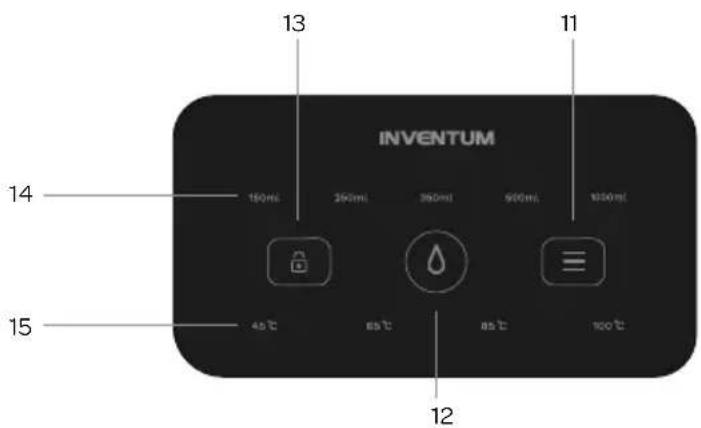
- Setting button
- Water button
- Lock/unlock button
- Quantity buttons
- Temperature buttons
3 before using for the first time
Follow these instructions when using the hot water dispenser for the first time: Carefully unpack the hot water dispenser and all accessories and remove all packaging and any promotional stickers. Keep the packaging (plastic bags and cardboard) out of the reach of children. After unpacking the machine, check it for external damage that may have occurred during transport. Place the hot water dispenser on a sturdy, heat-resistant flat surface.
Clean the water reservoir (7) and rinse it thoroughly. Rinse the inside of the appliance two times, prior to use.
- Place a bowl which can hold at least 1 litre of water under the water outlet (2).
- Fill the water reservoir (7) to its maximum level and plug in the power cord.
- At this time all the indicator lights flash once, the lock button (13) light is on.
- Press the lock button (13) for 3 seconds to unlock, the buzzer rings, the lock button (13) light is off, and the other indicator lights come on. If there is no operation for 1 minute, the machine will automatically enter the lock mode and the lock button (13) indicator light is always on.
- Press the temperature 100^ button (15) and 1000 ml button (14) on the display and then press the water button (12).
- Caution: press the water button (12) immediately to stop the water when the bowl is full. Empty the full bowl in the sink and place it back under the water outlet (2).
- Repeat these steps until the appliance has been rinsed with a full water reservoir (7) twice.
• The appliance is now ready for use.
The hot water dispenser is only suitable for use with cold tap water. Never fill the hot water dispenser with milk, tea, coffee or other liquids.
12 · English
Placing the anti-scale filter
Open the lid (10) of the water reservoir (7) and place the filter support (8). It will fit in the water reservoir (7) in only one way. Place the filter in the opening of the filter support (8) and close the lid (10) of the water reservoir (7).
4 using the appliance
Check that the voltage stated on the information plate matches the voltage used in your region.
Always make sure the appliance is on a sturdy, flat, heat-resistant surface and only use it indoors.
FILLING THE HOT WATER DISPENSER
-
Open the lid (10) of the water reservoir (7).
-
Lift the water reservoir (7) from the appliance with the handle (9) and fill the water reservoir (7) with cold tap water.
-
The water must be between minimum and maximum water level.
-
Place the water reservoir (7) back on the appliance and close the lid (10).
TAKING HOT WATER
- Place a glass or cup under the water outlet (2) on the cup grille (4).
- Press the lock button (13) for 3 seconds to unlock, the buzzer rings, the lock button (13) light is off, and the other indicator lights come on.
- Short press the temperature setting (15) button to select the required temperature, the corresponding button light flashes.
- Short press the quantity setting (14) button to select the required quantity. the corresponding button light flashes.
- Press the water button (12).
- The hot water flows from the water outlet (2).
- When filling several glasses, repeat the above steps.
Caution: the water and steam are hot and could cause burns in case of contact with your skin.
- Remove the drip tray (5) when it is becoming full and empty it above the sink.
- Remove the cup grille (4).
- Place one hand on the appliance, lift the drip tray (5) and pull it out of the appliance
- Empty the drip tray above the sink and rinse it.
- Put the drip tray (5) back into the appliance on the top or bottom ridges (3).
5 cleaning and maintenance
We recommend cleaning the hot water dispenser regularly, e.g. once per month. This is not only beneficial for the life span of the appliance, but also ensures optimum use and, of course, nice water.
Prior to cleaning, always remove the plug from the wall socket and allow the appliance to cool down.
CLEANING
Regularly wipe the outside with a moist cloth. Never use detergents or abrasive cleaning agents!
Clean separate components such as the water reservoir (7), drip tray (5) and cup grille (4) with warm water and a mild washing-up liquid. Dry these components thoroughly.
Attach the separate components and the appliance will be ready for use again.
REPLACING THE ANTI-SCALE FILTER
After every 150 litres of water, the anti-scale filter must be replaced. In case of moderate use, this will be approximately 3 times per year. A new anti-scale filter is available via the Inventum webshop.
Open the lid of the water reservoir (7) and remove the filter support (8) with the filter. Remove the filter from the filter support (8) and place a new filter. The old anti-scale filter can be disposed of. Place the filter support (8) back in the water reservoir (7).
DESCALING
In spite of using an anti-scale filter, it is necessary to descale the appliance each month. Also, if the flow speed of the water is not as it was, the appliance may have to be descaled. Use a descaling agent without chemicals, such as kitchen grade vinegar or citric acid.
- Fill the water reservoir (7) with 2 litres of water and add 50 ml of descaling agent.
-
Place a bowl which can hold at least 1 litre of water under the water outlet (2).
-
Plug in the powercord.
- At this time all the indicator lights flashing once, the lock button (13) light is on.
- Press the lock button (13) for 3 seconds to unlock, the buzzer rings, the lock button (13) light is off, and the other button indicator lights come on. If there is no operation for 1 minute, the machine will automatically enter the lock mode and the lock button (13) indicator light is always on.
- Press on the 100^ button (15) and 1000 ml button (14) on the display and then press the water button (12).
- Caution: press the water button (12) immediately to stop the water when the bowl is full. Empty the full bowl in the sink and place it back under the water outlet (2).
- Repeat these steps 3 times for flushing.
STORAGE
Empty the water reservoir (7) and clean the hot water dispenser before storing it.
When not using the appliance or storing the appliance, wrap the power cord at the bottom of the base.
TROUBLESHOOTING (ALARM WARNING)
If there is a problem, you should first check the following solutions before contacting customer service.
| Problem Possible cause Solution | ||
| The flow speed is reduced. Scaling reduces | the heating speed. The appliance must be | de-scaled. |
| Water shortage prompt of the appliance The | eppliance will immediately stop heating. The pump will stop pumping within 10 seconds. The buzzer will ring 5 times and the indicator lights of the quantity buttons will flash. | Lock the appliance and fill the water reservoir. Follow the steps for taking hot water again. |
REPLACEMENT DU FILTRE ANTICALCAIRE
General terms and conditions of service and warranty
5-year Inventum warranty!
- Customers enjoy a 5-year full manufacturer's warranty on all Inventum products.
- Within this period, a defective product or part, which makes normal functioning of the product or part impossible, will always be repaired free of charge or, if repair is not possible and/or does not provide a solution, replaced (by the same or equivalent product). The assessment of this lies with Inventum.
- In order to make a claim under the 5-year Inventum warranty you must, within two months after discovering the fault or defect, either return the product to the shop where you bought it, or contact the Inventum customer service department by using the form at www.inventum.eu/service.
- The warranty period starts from the date stated on the product's original sales receipt.
- To invoke the warranty, you must always send a copy of the original proof of purchase with the service request and present the original proof of purchase to the service technician.
- The 5-year warranty applies only to normal domestic use of Inventum products within the Netherlands.
Warranty exclusions
- The 5-year Inventum guarantee does not apply in case of: normal wear and tear, consumables, improper use, insufficient or incorrect maintenance, incorrect and/or inexpert assembly and installation of the appliance, repairs by unauthorised third parties, business or commercial use, missing serial number, damage caused by an external cause. This enumeration is not exhaustive.
- B-choice products and products that have been built-in in a showroom are not covered by the 5-year Inventum warranty. All optical damage such as dents, scratches and slight traces of use are excluded from any warranty.
Reporting malfunctions on Inventum products
- Faults or defects on Inventum products can be reported by using the service request form on the website www.inventum.eu/service or through the seller of the product.
- A copy of the original proof of purchase must be included with the request.
- Inventum's service department determines whether the product will be repaired or replaced, based on the request and the sales receipt.
Important to know
- Products sent without prior notification will not be accepted. Further to the notification you will be informed by Inventum whether a warranty applies and whether you must return the product.
- The replacement or repair of a defective product, or a part thereof, does not lead to an extension of the original warranty period.
- Products eligible for replacement or repair must be emptied and clean.
For a detailed explanation of the warranty conditions and items excluded from them, please visit Inventum's website www.inventum.eu/algemene-voorwaarden
These general warranty and service conditions apply to Inventum brand products purchased after 27 April 2022 and intended for use within the Netherlands.
For Inventum products used outside the Netherlands, but within a EU Member State, the warranty rules of that country apply. Inventum provides warranty and service by a white goods technician only in the Netherlands.
As a consumer, you are entitled by law to a properly working product. Does the product break down sooner than you might expect? This means that the product is not in conformity. In that case, the law offers you, the buyer, with a number of legal remedies for your protection. This legal protection is not affected by the above commercial warranty given by Inventum on Inventum products used within the Netherlands.
facebook.com/inventum1908
youtube.com/inventum1908



FSC
www.fsc.org
RECYCLED
Packaging made from recycled material
FSC® C187167
HWD725B/01/1224