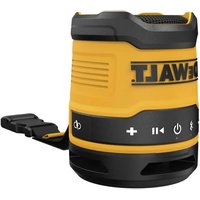
DCR008 - Speaker DEWALT - Free user manual and instructions
Find the device manual for free DCR008 DEWALT in PDF.


| Product Type | Wireless Bluetooth® speaker |
| Brand | DeWalt |
| Model | DCR008 |
| Power Supply | Built-in rechargeable battery, charges via USB (5V, 1A) |
| Battery Life | Indicated by LED (≥40% green, 20-40% yellow, ≤20% blinking red) |
| Charging Time | Approximately 2 hours |
| Audio Output Power | 1 x 5 W |
| Connectivity | Wireless Bluetooth® (range up to 30 m line of sight) |
| Functions | Play/Pause, volume control, track skip (double/triple press), incoming calls, stereo pairing (two speakers) |
| Indicators | Bluetooth® status LED (single blink: on, double blink: pairing, solid: connected) and charge LED (solid red when charging, green or off when charged) |
| Auto-off | After 15 minutes of inactivity (not connected or connection lost) |
| Battery Protection | Automatic hot/cold delay during charging; do not charge below 4°C or above 40°C |
| Cleaning | Dry cloth only; do not use solvents |
| Serviceability | No user-serviceable parts; contact a DeWalt authorized service center |
| Warranty | 3-year limited warranty (see terms at dewalt.com) |
| Safety | Do not expose to water or rain; do not use near heat sources; keep children under supervision |
| Included Accessories | USB charging cable, USB charger plug |
Frequently Asked Questions - DCR008 DEWALT
User questions about DCR008 DEWALT
0 question about this device. Answer the ones you know or ask your own.
Ask a new question about this device
Download the instructions for your Speaker in PDF format for free! Find your manual DCR008 - DEWALT and take your electronic device back in hand. On this page are published all the documents necessary for the use of your device. DCR008 by DEWALT.
USER MANUAL DCR008 DEWALT
English (original instructions) 2
1 Power button
2 Volume up button
3 Volume down button
4 Bluetooth*** status indicator LED
5 Play/Pause button
6 Bluetooth ^® ^** button
7 Carry strap
8 USB charging cable
9 USB charger plug
10 USB charging plug
11 USB charging port cover
12 Charge indicator LED
English
WARNING: Read all safety warnings and all instructions. Failure to follow the warnings and instructions may result in electric shock, fire and/or serious injury.

WARNING: To reduce the risk of injury, read the instruction manual.
Intended Use
This DEWALT Bluetooth ^® speaker is designed to play/stream audio via a wireless Bluetooth ^® connection to a mobile phone or other audio device.
DO nOT use under wet conditions or in presence of flammable liquids or gases.
DO nOT let children come into contact with the unit. Supervision is required when inexperienced operators use this unit.
Definitions: Safety Alert Symbols and Words
This instruction manual uses the following safety alert symbols and words to alert you to hazardous situations and your risk of personal injury or property damage.
DANGER: Indicates an imminently hazardous sedation which, if not avoided, will result in death or serious injury.
WARNING: Indicates a potentially hazardous situation which, if not avoided, could result in death or serious injury.
CAUTION: Indicates a potentially hazardous situation which, if not avoided, may result in minor or moderate injury.
(### without word) Indicates a safety related message.
NOTICE: Indicates a practice not related to personal injury which, if not avoided, may result in property damage.
IMPORTANT SAFETY INSTRUCTIONS
WARNING:
a) Read these instructions.
b) Keep these instructions.
c) Heed all warnings.
d) Follow all instructions.
e) Do not use this apparatus near water.
f) Clean only with a dry cloth.
g) Do not block any ventilation openings. Use in accordance with the manufacturer's instructions.
h) Do not use near any heat sources such as radiators, heat registers, stoves or other apparatus (including amplifiers) that produce heat.
i) Protect the charging cord from being walked on or pinched particularly at plugs, convenience receptacles, and the point where they exit from the apparatus.
j) Only use attachments/accessories specified by the manufacturer.
k) Unplug this apparatus during lightning storms or when unused for long periods of time.
1) Refer all servicing to qualified service personnel. Servicing is required when the apparatus, cord, or plug has been damaged in any way, liquid has been spilled or objects have fallen into the apparatus, the apparatus has been exposed to rain or moisture, the apparatus does not operate normally, or the apparatus has been dropped.
m) Apparatus shall not be exposed to dripping or splashing and no objects filled with liquids, such as vases, shall be placed on the apparatus.
n) Do not use under wet conditions or in presence of flammable liquids or gases.
o) Do not keep ears close to this appliance.
p) Do not charge the unit outdoors.
Safety Instructions for Speakers
- To reduce the risk of fire or electric shock, do not expose this apparatus to rain or moisture. Always keep the charging port cover in place when not being charged.
- Do not abuse charging cord. Never carry the speaker by its charging cord. Never pull the charging cord to disconnect from the charging port. Keep the charging cord away from heat, oil and sharp edges.
- Switch off before leaving speaker unattended, when speaker is not in use, before changing accessories or attachments, and before servicing.
- This appliance is not intended for use by persons (including children) with reduced physical, sensory or mental capabilities, or lack of experience and knowledge, unless they have been given supervision or instruction concerning use of the appliance by a person responsible for their safety.
• Children should be supervised to ensure that they do not play with the appliance. - No exposed flame sources, such as lighted candles, should be placed on or near the speaker.
• To reduce the risk of hearing damage, do not place ears too close to the speaker.
SAVE THESE INSTRUCTIONS FOR FUTURE USE
Additional Safety Information
WARNING: Never modify the speaker or any part of it. Damage or personal injury could result.
The label on your speaker may include the following symbols. The symbols and their definitions are as follows:
V....volts
Hz ......hertz
min......minutes
or DC.....direct current
Class I Construction (grounded)
.../min.....per minute
A.....amperes
W.....watts
Wh.....watt hours
Ah.....amp hours
\~ or AC......alternating current
or AC/DC.... alternating or direct current
Class II Construction (double insulated)
earthing terminal
⚠️ ......safety alert symbol
......visible radiation do not stare into the light
...... wear eye protection
○....wearhearing protection
read all documentation
do not expose to rain
BATTERIES
The product is not fully charged out of the carton. Before using the product, read the safety instructions below and then follow the charging procedures outlined.
NOTE: If the product is unused for approximately 90 days, fully charge the battery to help prolong the life of the battery.
Important Safety Instructions for All Integral Battery Charging
WARNING: Read all safety warnings, instructions, and cautionary markings for the battery, charging cable and product. Failure to follow the warnings and instructions may result in electric shock, fire and/or serious injury.
WARNING: Only charge product using a Listed Class 2 Power adapter that is compliant with applicable country regulations and international/regional safety standards. Using adapters that do not meet applicable safety standards could result in injury.
WARNING: Do not charge the battery at ambient temperatures below 40 °F (4 °C) or above 104 °F
(40 °C). Follow all charging instructions and do not charge the battery outside of the temperature range specified in the instructions. Charging improperly or at temperatures outside of the specified range may damage the battery and increase risk of fire.
- Do not expose a battery to fire or excessive temperature. Exposure to fire or temperature above 266 °F (130 °C) may cause explosion.
- Only use the charging cable supplied by the manufacturer for charging.
- The provided charging cable is not intended for any uses other than charging DEWALT rechargeable tools with charging ports. Charging other types of tools may cause their batteries to overheat and burst, resulting in personal injury, property damage, fire, electric shock or electrocution.
• DO NOT expose charging cable to water, rain or snow.
- Pull by the plugs rather than the cord when disconnecting the charging cable. This will reduce the risk of damage to the plugs and cord.
• Make sure that the cord is located so that it will not be stepped on, tripped over or otherwise subjected to damage or stress.
- DO NOT use a charging cable with a damaged cord or plugs. Have them replaced immediately.
- Foreign materials of a conductive nature, such as, but not limited to, grinding dust, metal chips, steel wool, aluminum foil or any buildup of metallic particles should be kept away from the charging plugs and port.
• Always unplug the charging cable from the power supply when there is no tool attached to it.
Charging Procedure (Fig. A, B)
-
Pull the USB charging port cover 11 away from the speaker.
-
Insert the USB charging plug 10 into the charging port 13.
-
Plug the USB charger plug 9 into any USB charging port (such as on a computer or wall adapter).
nOTE: Charging takes two hours depending on power supply rating (5V, 1A).
-
The charge indicator LED 12 color will be red and remain continuously on while charging.
-
Charging is complete when the charge indicator LED 12 color is green or turns off.
-
The battery can be left charging or the USB charging cable can be disconnected.
Hot/Cold Delay
When the speaker detects that the battery is too hot or too cold, it automatically starts a hot/cold delay, suspending charging until the battery has reached an appropriate temperature. The speaker then automatically switches to charging mode. This feature ensures maximum battery life.
-
A cold battery may charge at a slower rate than a warm battery.
-
The unit can still be used during the over temperature protection cycle.
Important Charging Notes
-
The speaker may become warm to the touch while charging. This is a normal condition, and does not indicate a problem. To facilitate the cooling of the speaker after use, avoid placing the speaker in a warm environment such as in a metal shed or an uninsulated trailer.
-
If the speaker does not charge properly, take the speaker and USB cable to your local service center.
-
You may charge a partially discharged battery whenever you desire with no adverse effect on the speaker.
Checking State of Charge (Fig. A)
- When the speaker is powered on, momentarily press the power button 1 and the speaker will say the percentage of charge remaining in the battery.
- The charge indicator LED 12 will also indicate the state of charge when the speaker is not being charged per the Charge Indicator LED Status chart.
NOTE: The state of charge does not indicate tool functionality and is subject to variation based on product components, temperature and end-user application.
Charge Indicator LED Status
| IEVEI OF ChARgE | ChARgE inDiCATOR IED COIOR | |
| UNIT ON AND NOT CHARGING | ≥40% Green | |
| 20% - 40% Yellow | ||
| ≤20% | Red and blinking. If 3% or less of charge remains, the speaker will say "Battery low, please recharge." | |
| UNIT OFF AND CHARGING | 0% - 99% Red | |
| 100% No illumination | ||
| UNIT ON AND CHARGING | 0% - 99% Red | |
| 100% Green | ||
OPERATION
Button Functions (Fig. A)
Power Button
• To turn the speaker on or off, press and hold the power button 1 until you hear a sequence of tones from the speaker.
- When the speaker is on, momentarily press the power button 1 and the speaker will say the percentage of charge remaining in the battery.
- If the speaker does not respond when buttons are pressed, press and hold the power button 1 for ten seconds to reboot the speaker.
Play/Pause Button
When audio device connected via Bluetooth®: Press the play/pause button 5 to begin playing a selection from the audio device.
- Press the play/pause button 5 again to pause play. Press again to resume play.
• To advance to the next track, press the play/pause button 5 twice quickly.
• To skip to previous track, press the play/pause button three times quickly.
Volume Adjustment Buttons
The volume buttons 2, 3 can be used to increase or decrease volume on the speaker.
- The volume will increase or decrease one level with a quick press of either volume buttons 2, 3.
- The volume will increase continuously with a long press of either volume buttons 2, 3.
Playing Audio
Audio can be played through the speaker via a wireless Bluetooth® connection to a compatible Bluetooth® audio device.
Pairing Speaker with a Bluetooth® Audio Device (Fig. A)
- Place the speaker and the Bluetooth ^® audio device within 3 ft. (1 m) of each other.
- Turn on the speaker by pressing and holding the power button 1 until you hear a sequence of tones. The Bluetooth® status indicator LED 4 will continuously single blink.
- Ensure the Bluetooth® audio device has Bluetooth® turned on. (Please consult your device's instruction manual for specific pairing instructions.)
- Momentarily press the Bluetooth® button 6 on the speaker.
- The blue Bluetooth® status indicator LED 4 will continuously double blink and you will hear tones from the speaker indicating the speaker is in pair mode.
- Select DEWALT DCR008 on your device and confirm pairing.
- Once pairing is successful, the Bluetooth® status indicator LED 4 will remain illuminated blue and you will hear a tone from the speaker.
- The speaker will now play audio from your device.
NOTE: Audio output power: 1x5W.
Bluetooth® Status Indicator LED
| Blink Patterns Status/Mode | |
| Continuously Single Blinks | Speaker Bluetooth® is on. |
| Continuously Double Blinks | Speaker is in pairing mode and discoverable by your device. |
| Solid light Speaker is connected with a device. | |
| No light Speaker has timed out and/or is off. | |
Connecting a Previously Paired Bluetooth® Audio Device If a Bluetooth® device has been previously paired to the speaker, it should automatically reconnect when the speaker is powered on.
NOTE: The Bluetooth® audio device must have Bluetooth® turned on to automatically pair.
- If connection does not occur and you are unable to stream audio, please follow the instructions for Pairing Speaker with a Bluetooth® Audio Device.
Stereo Pairing with Two Speakers
- On both speakers, simultaneously press and hold the Bluetooth® button 6 for three seconds.
- Speakers will say "left channel" or "right channel" to indicate that pairing was successful.
- The Bluetooth® status indicator LED 4 will be blue on the left channel speaker and the Bluetooth® status indicator LED 4 will not be illuminated on right channel speaker.
Timeout Functionality (Fig. A)
To conserve battery life, the speaker is designed to power off automatically after fifteen minutes of inactivity. This inactivity could be due to the device being unpaired for fifteen minutes or the Bluetooth® connection being broken for the same period of time. If the speaker powers off due to inactivity of any kind, refer to Connecting a Previously Paired Bluetooth® Audio Device.
Bluetooth® Range
Optimum Bluetooth ^® streaming range is roughly 30 ft. (9 m) with a straight line of sight to the speaker, but distances up to 100 ft. (30 m) are possible. Physical obstacles, other wireless devices or electromagnetic devices may affect the connection quality.
- If Bluetooth® connection is lost due to exceeding time of separation, exceeding the optimum distance, obstacles or otherwise, reconnecting your device with the speaker may be necessary.
Incoming Call
- If your phone receives a call while it is connected to the speaker, it will pause the Bluetooth® connection.
- When the call is disconnected, the speaker will automatically switch back to the Bluetooth® connection.
MAINTENANCE
Your DEWALT power tool has been designed to operate over a long period of time with a minimum of maintenance. Continuous satisfactory operation depends upon proper tool care and regular cleaning.
Cleaning
WARNING: Never use solvents or other harsh chemicals for cleaning the non-metallic parts of the tool. These chemicals may weaken the plastic materials used in these parts. Use a dry cloth only. Never let any liquid get inside the tool; never immerse any part of the tool into a liquid.
To help reduce the risk of electric shock disconnect the charging cable and install the charging port cover over the charging port before cleaning.
Accessories
WARNING: Since accessories, other than those offered by DEWALT, have not been tested with this product, use of such accessories with this product could be hazardous. To reduce the risk of injury, only DEWALT recommended accessories should be used with this product.
Recommended accessories for use with your product are available at extra cost from your local dealer or authorized service center. If you need assistance in locating any accessory, please contact DEWALT. Call 1-800-4-DEWALT (1-800-433-9258) or visit our website: www.dewalt.com
Repairs
The speaker and charging cable are not serviceable. There are no serviceable parts inside the speaker.
WARNING: To assure product SAFETY and RELIABILITY, repairs, maintenance and adjustment should be performed by a DEWALT factory service center or a DEWALT-authorized service center. Always use identical replacement parts.
Register Online
Thank you for your purchase. Register your product now for:
- WARRANTY SERVICE: Registering your product will help you obtain more efficient warranty service in case there is a problem with your product.
- CONFIRMATION OF OWNERSHIP: In case of an insurance loss, such as fire, flood or theft, your registration of ownership will serve as your proof of purchase.
- FOR YOUR SAFETY: Registering your product will allow us to contact you in the unlikely event a safety notification is required under the Federal Consumer Safety Act.
- Register online at www.dewalt.com..
Three Year Limited Warranty
For warranty terms, go to https://www.dewalt.com/support/warranty.
To request a written copy of the warranty terms, contact: Customer Service at DEWALT Industrial Tool Co., 701 East Joppa Road, Towson, MD 21286 or call 1-800-4-DEWALT (1-800-433-9258).
LATIN AMERICA: This warranty does not apply to products sold in Latin America. For products sold in Latin America, see country specific warranty information contained in the packaging, call the local company or see website for warranty information.
FREE WARNING LABEL REPLACEMENT: If your warning labels become illegible or are missing, call 1-800-4-DEWALT (1-800-433-9258) for a free replacement.
FRAnÇAis
DEWALT Industrial Tool Co. 701 East Joppa Road, Towson, MD 21286
Copyright © 2022
The following are trademarks for one or more DEWALT power tools: the yellow and black color scheme, the "D" shaped air intake grill, the array of pyramids on the handgrip, the kit box configuration, and the array of lozenge-shaped humps on the surface of the tool.
- English
- Intended Use
- Definitions: Safety Alert Symbols and Words
- IMPORTANT SAFETY INSTRUCTIONS
- Safety Instructions for Speakers
- SAVE THESE INSTRUCTIONS FOR FUTURE USE
- Additional Safety Information
- BATTERIES
- Important Safety Instructions for All Integral Battery Charging
- Charging Procedure (Fig. A, B)
- Hot/Cold Delay
- Important Charging Notes
- Checking State of Charge (Fig. A)
- OPERATION
- Button Functions (Fig. A)
- Power Button
- Play/Pause Button
- Volume Adjustment Buttons
- Playing Audio
- Pairing Speaker with a Bluetooth® Audio Device (Fig. A)
- Stereo Pairing with Two Speakers
- Timeout Functionality (Fig. A)
- Bluetooth® Range
- Incoming Call
- MAINTENANCE
- Cleaning
- Accessories
- Repairs
- Register Online
- Three Year Limited Warranty
- FRAnÇAis
Brand : DEWALT
Model : DCR008
Category : Speaker