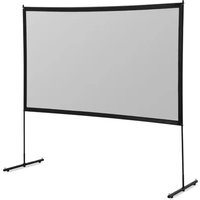
STAR_PFGS_02 - Projection screen Fromm & Starck - Free user manual and instructions
Find the device manual for free STAR_PFGS_02 Fromm & Starck in PDF.


| Product type | Portable green screen (projection screen) |
| Brand | Fromm & Starck |
| Model | STAR_PFGS_02 |
| Dimensions (L x W x H) | 1553 x 170 x 140 mm |
| Projection surface | 1473 x 2040 mm |
| Weight | 9.6 kg |
| Usage | Image projection with projector, green screen for chroma key compositing |
| Assembly | Manual unfolding: unfold the feet, open the cover, pull the handle to deploy the screen |
| Surface material | Matte green fabric for green screen |
| Color | Green projection surface, black border |
| Support type | Integrated folding feet |
| Carrying handle | Yes, integrated |
| Cleaning | With a soft, dry cloth. Do not use water, solvents or sharp objects. |
| Maintenance | Store in a dry, cool place, away from moisture and direct sunlight. |
| Outdoor use | Not recommended in bad weather (wind, rain). Do not leave outdoors overnight. |
| Safety | Do not use if tired or under influence. Keep out of reach of children. Read the instructions before use. |
| Repairability | Repair only by the manufacturer's after-sales service with original parts. |
| Package contents | Projection screen, user manual |
| Warranty | Legal guarantee of conformity. See manufacturer's terms. |
Frequently Asked Questions - STAR_PFGS_02 Fromm & Starck
User questions about STAR_PFGS_02 Fromm & Starck
0 question about this device. Answer the ones you know or ask your own.
Ask a new question about this device
Download the instructions for your Projection screen in PDF format for free! Find your manual STAR_PFGS_02 - Fromm & Starck and take your electronic device back in hand. On this page are published all the documents necessary for the use of your device. STAR_PFGS_02 by Fromm & Starck.
USER MANUAL STAR_PFGS_02 Fromm & Starck
STAR_PFPS_01 | STAR_PFPS_02 | STAR_PFPS_03
STAR_PFPS_04 | STAR_PFPS_05 | STAR_PFPS_06
PORTABLE FLOOR GREEN SCREEN FOR VIDEO EDITING
STAR_PFGS_01 | STAR_PFGS_02
STAR_PFGS_04 | STAR_PFGS_05
USER MANUAL
BEDIENUNGSANLEITUNG
INSTRUKCJA OBSŁUGI
NÁVOD K POUŽITÍ
MANUEL D'UTILISATION
ISTRUZIONI PER L'USO
natural_image
Technical line drawing of a cylindrical mechanical component with red curved arrows indicating motion or force direction (no text or symbols)natural_image
Line drawing of a wooden beam with two red curved arrows indicating rotational motion (no text or symbols)natural_image
Technical line drawing of a mechanical lever system with a red curved arrow indicating rotational motion (no text or symbols)natural_image
Line drawing of a mechanical structure with intersecting beams and supports, no text or symbols presentnatural_image
Diagram of a mechanical device with a central diamond-shaped component and a red arrow indicating downward motion (no text or symbols)1. General Description
The instruction manual is intended to assist in safe and reliable use. The product is designed and manufactured strictly according to technical specifications using the latest technology and components and maintaining the highest quality standards.
PLEASE CAREFULLY READ AND UNDERSTAND THIS INSTRUCTION MANUAL BEFORE OPERATION,
To ensure long and reliable operation of the unit, make sure to operate and maintain it properly in accordance with the guidelines in this instruction manual. The technical data and specifications contained in this instruction manual are up to date. The manufacturer reserves the right to make changes in order to improve the quality. Taking the technical progress and the possibility of reducing noise into account, the unit is designed and built in such a way so that risks resulting from noise emissions are reduced to the lowest possible level.
Explanation of symbols
 | Please read the instructions before use. |
 | CAUTION! Danger of crushing your hand!! |

The illustrations in this instruction manual are for reference only and may differ from the actual product in some details.
The original instruction manual is in the German language version. Other language versions are translations from German.
2. Safety of use
The term "unit" or "product" in the warnings and in the description of the instructions refers to the PORTABLE FLOOR PULL-UP PROJECTION SCREEN/ PORTABLE FLOOR GREEN SCREEN FOR VIDEO EDITING
2.1. Safety in the workplace
a) Keep the work area tidy and well lit. Disorder or poor lighting can lead to accidents. Be foresighted, watch what you are doing and use common sense when using the unit.
b) Only the manufacturer's service department may repair the product. Do not carry out repairs yourself!
c) If you have any doubts as to whether the product is working properly or if it is damaged, contact the manufacturer's service department.
d) Keep these instructions for use for future reference. If the unit is to be passed on to a third party, the operating instructions must also be handed over together with the unit.
e) Keep the packaging and small assembly parts out of the reach of children.
2.2. Personal safety
a) Do not operate this product if you are tired, ill or under the influence of alcohol, drugs or medication that could impair your ability to operate the product.
b) The unit is not intended to be used by persons (including children) with reduced mental, sensory or intellectual functions or persons who lack experience and/or knowledge unless they are supervised or have been instructed by a person responsible for their safety on how to operate the unit.
c) The unit is not a toy. Children should be watched to ensure that they do not play with the unit.
2.3. Safe use of the unit
a) Keep unused equipment out of the reach of children and out of the reach of anyone unfamiliar with the unit or this instruction manual. These units is dangerous in the hands of inexperienced users.
b) Keep the unit in good working condition. Check before each use for general damage or damage to moving parts (cracks in parts and components or any other condition that may affect the safe operation of the unit). If damaged, have the unit repaired before use.
c) Repairs and maintenance should be carried out by qualified personnel using only original spare parts. This will ensure the safety of use.
d) The unit is not a toy. Cleaning and maintenance must not be performed by children without adult supervision.
e) Do not tamper with the unit to alter its performance or design.
f) Keep the unit away from sources of fire and heat.
g) Do not use the unit outdoors during bad weather (wind, rain).
h) Do not leave the unit outside overnight.

CAUTION! Although the product has been designed to be safe, with adequate safeguards, and despite the additional safety features provided to the user, there is still a slight risk of accident or injury when handling the unit. You are advised to use caution and common sense when using this product.
3. Rules of use
The product is designed to watch the image projected by the projector. The user is responsible for any damage resulting from misuse.
3.1. Description
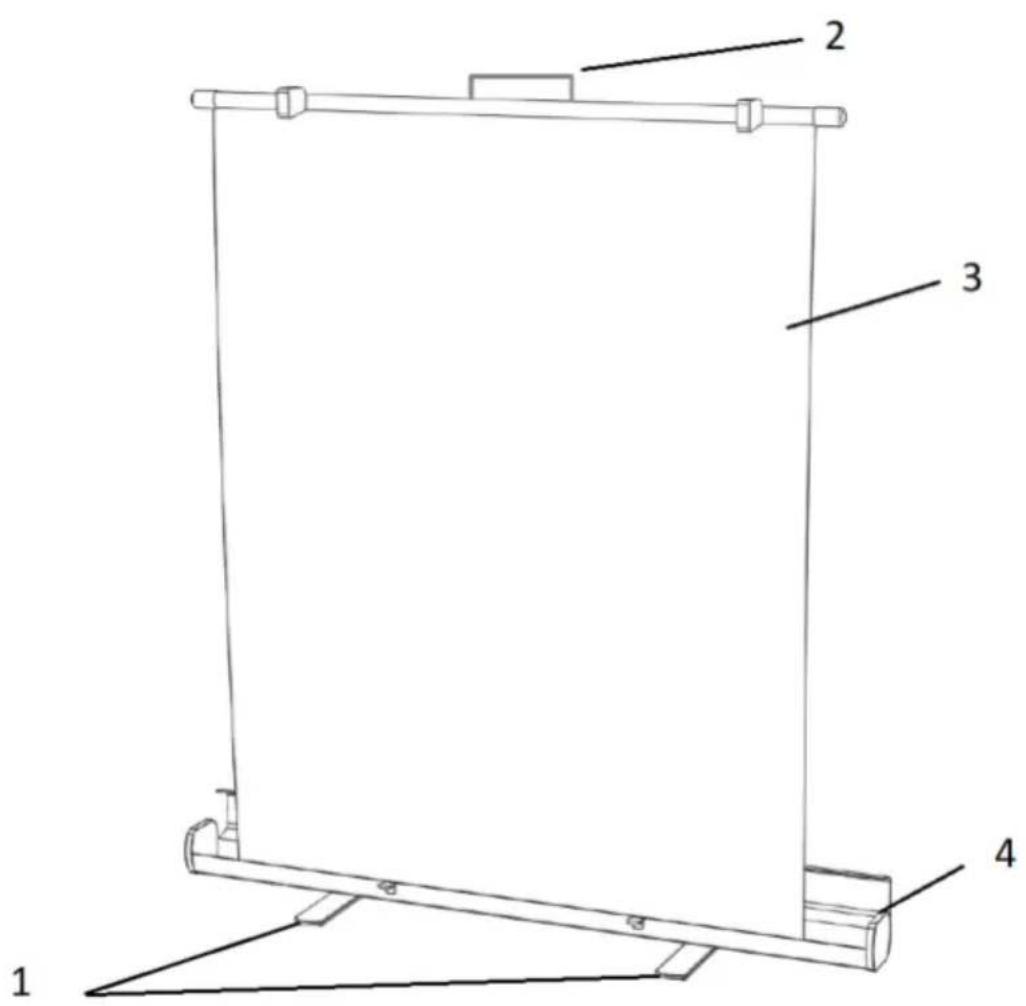
- Legs, base
- Handle
- Screen
- Casing, cover for the screen
3.2. Preparation for operation
Keep the unit away from any hot surfaces. Always operate the unit on a level, stable, clean, fireproof and dry surface and out of the reach of children and persons of impaired mental, sensory and intellectual functions.
ASSEMBLY OF THE UNIT
- Place the screen on a level surface.
- Tilt the legs as shown in the picture.
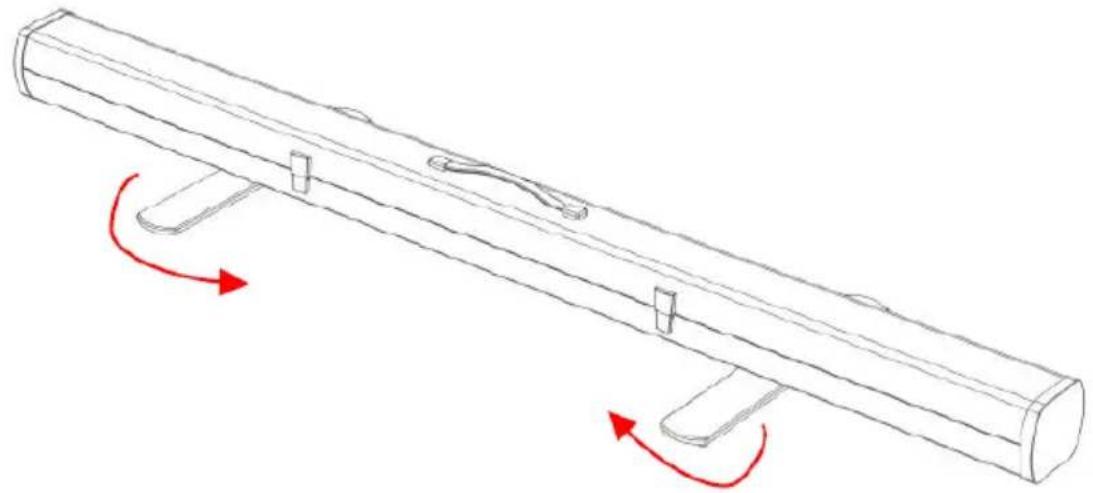
natural_image
Technical line drawing of a mechanical component with red curved arrows indicating motion or force direction (no text or symbols)- Unlock the locking clasp as shown in the picture.
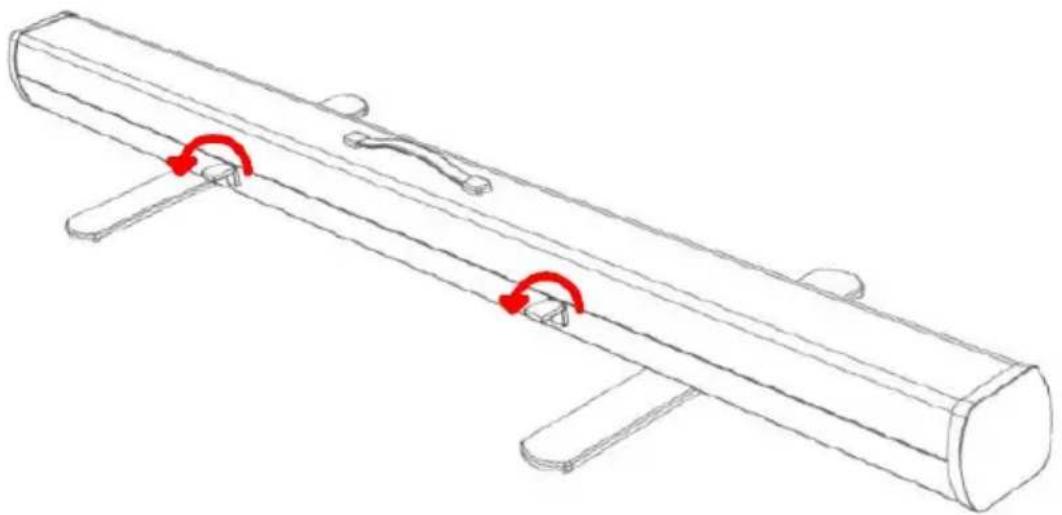
natural_image
Line drawing of a wooden beam with two red curved arrows indicating rotational motion (no text or symbols)- Open the case cover.
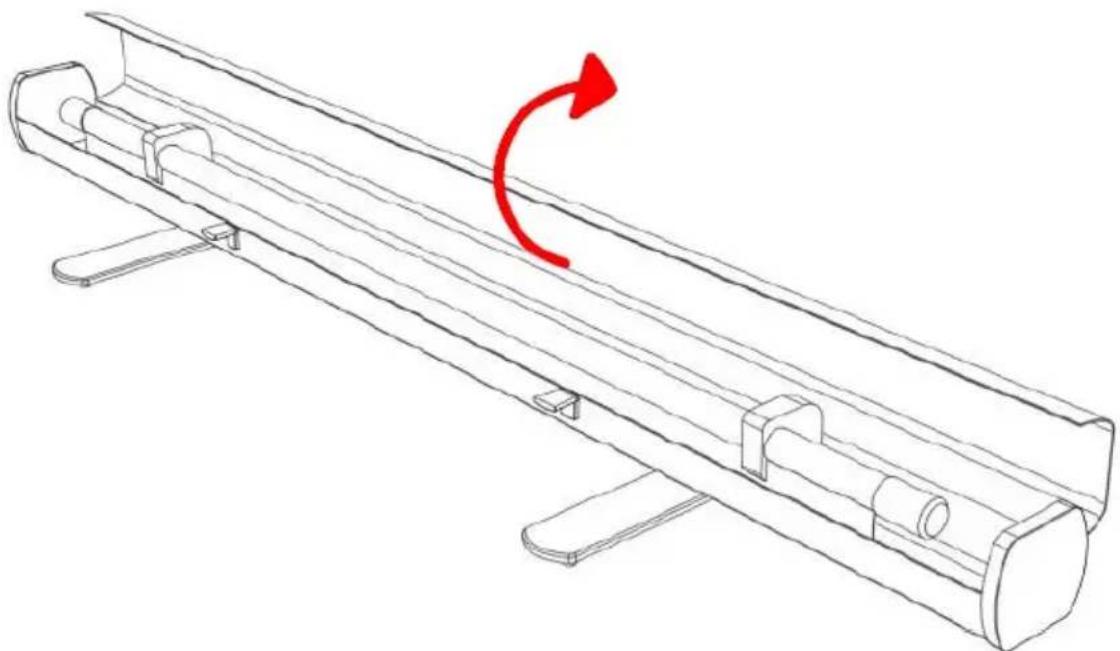
natural_image
Technical line drawing of a mechanical lever system with a red curved arrow indicating rotational motion (no text or symbols)- Grasp the screen by the handle and pull it upward. The rack will hold the screen in the extended position.
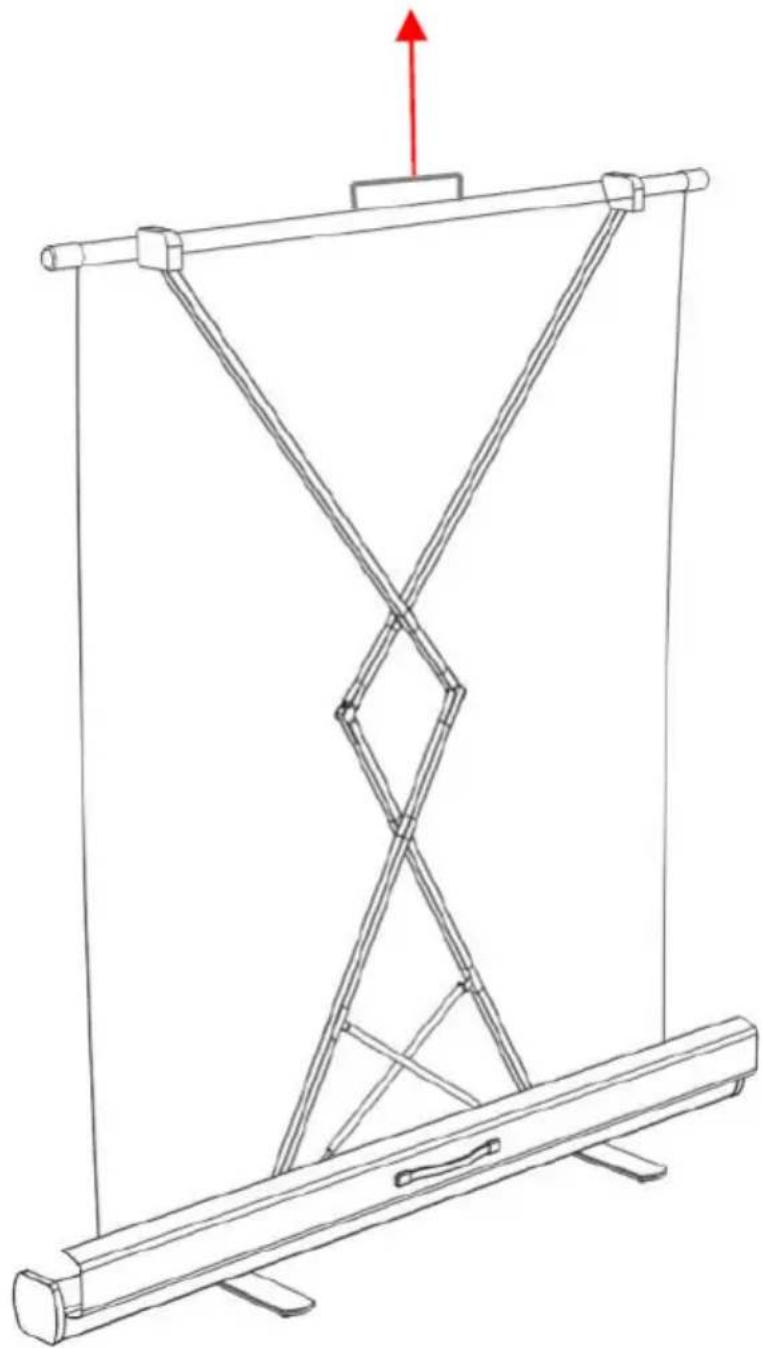
natural_image
Line drawing of a mechanical structure with intersecting beams and supports, no text or symbols present- The screen is ready for use.
- To fold the screen, grasp the handle and pull it down.
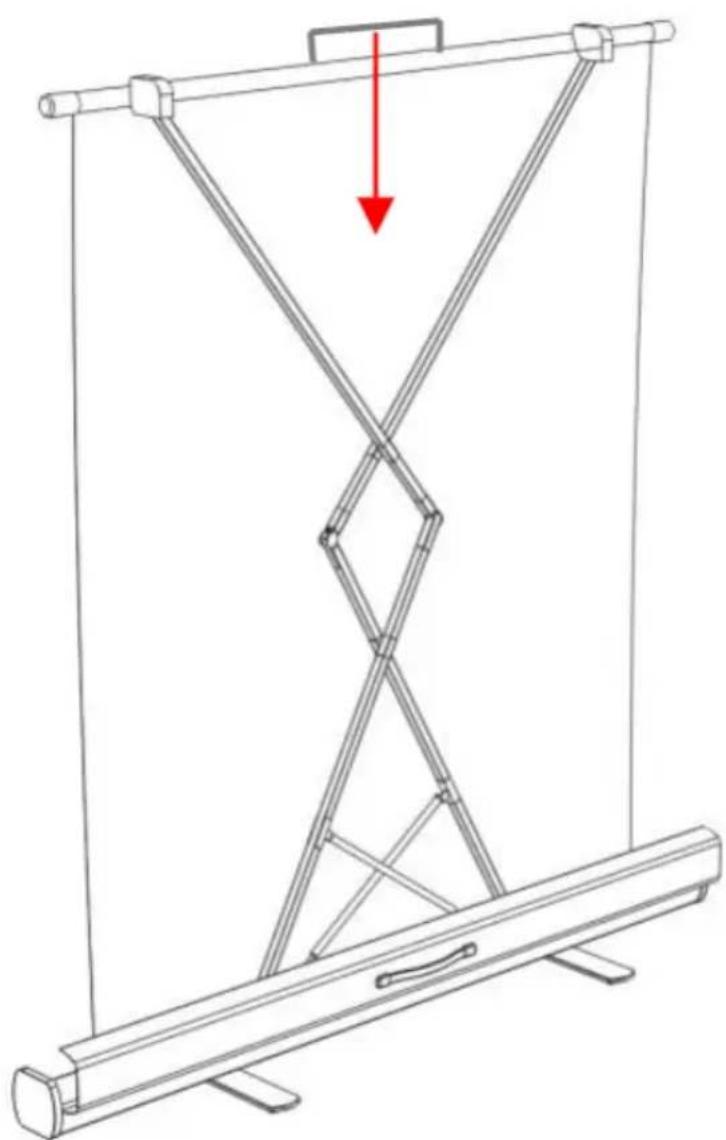
natural_image
Technical line drawing of a mechanical device with a red arrow indicating downward motion (no text or symbols)-
Close the case cover.
-
Lock the safety clasp.
-
Retract the legs.
3.3. Cleaning and maintenance
a) Store the unit in a dry and cool place protected from moisture and direct sunlight.
b) Do not spray the unit with a stream of water or immerse it in water.
c) Use a soft cloth for cleaning.
d) Do not use sharp and/or metal objects (e.g. a wire brush or metal spatula) for cleaning, as these may damage the surface of the material from which the unit is made.
Dane techniczne
| Opisparametru | Wartośćparametru | |||||
| Nazwaproduktu | PRZENOŚNY EKRAN PODŁOGOWY PULL UP | |||||
| Model | STAR_PFPS_01 | STAR_PFPS_02 | STAR_PFPS_03 | STAR_PFPS_04 | STAR_PFPS_05 | STAR_PFPS_06 |
| Wymiary[mm] | 1350x170x140 | 1553x170x140 | 1756x170x140 | 1458x170x140 | 1680x170x140 | 1902x170x140 |
| Powierzchniaprojekcyjna [mm] | 915x122060” 4:3 | 1067x142370” 4:3 | 1220x163080” 4:3 | 1328x74760” 16:9 | 1550x87270” 16:9 | 1771x99680” 16:9 |
| Cieżar [kg] | 10,2 | 11,4 | 12,6 | 10,8 | 11,6 | 13,2 |
| Grubośćczarnegoobramowania [mm]1. lewo/prawo2. góra3. dół | 1. 252. 603. 1176 | 1. 252. 603. 1023 | 1. 252. 603. 870 | 1. 302. 3003. 1343 | 1. 252. 603. 1090 | 1. 252. 603. 1094 |
| Opisparametru | Wartośćparametru | |||
| Nazwaproduktu | PRZENOŚNY PODŁOGOWY ZIELONY EKRAN DO EDYCJI VIDEO | |||
| Model | STAR_PFGS_01 | STAR_PFGS_02 | STAR_PFGS_04 | STAR_PFGS_05 |
| Wymiary[mm] | 1350x170x140 | 1553x170x140 | 1458x170x140 | 1680x170x140 |
| Powierzchniaprojekcyjna[mm] | 1270x2040 | 1473x2040 | 1378x2040 | 1600x2040 |
| Cieżar [kg] | 8,5 | 9,6 | 10,3 | 11,4 |
1. Ogólny opis
natural_image
Technical line drawing of a cylindrical mechanical component with red curved arrows indicating rotational motion (no text or symbols)natural_image
Line drawing of a wooden beam with two red curved arrows indicating rotational motion (no text or symbols)natural_image
Technical line drawing of a mechanical lever system with a red curved arrow indicating rotational motion (no text or symbols)natural_image
Line drawing of a mechanical structure with intersecting beams and supports, no text or symbols presentnatural_image
Diagram of a mechanical device with a central diamond-shaped component and a red arrow indicating downward motion (no text or symbols)natural_image
Technical line drawing of a cylindrical mechanical component with red curved arrows indicating rotational motion (no text or symbols)natural_image
Line drawing of a wooden beam with two red curved arrows indicating rotational motion (no text or symbols)natural_image
Technical line drawing of a mechanical lever system with a red curved arrow indicating rotational motion (no text or symbols)natural_image
Line drawing of a mechanical structure with intersecting beams and supports, no text or symbols presentnatural_image
Technical line drawing of a mechanical device with a red arrow indicating downward motion (no text or symbols)natural_image
Technical line drawing of a cylindrical mechanical component with red curved arrows indicating rotational motion (no text or symbols)natural_image
Line drawing of a wooden beam with two red curved arrows indicating rotational motion (no text or symbols)natural_image
Technical line drawing of a mechanical lever system with a red curved arrow indicating rotational motion (no text or symbols)natural_image
Line drawing of a mechanical structure with intersecting beams and supports, no text or symbols presentnatural_image
Technical line drawing of a mechanical device with a red arrow indicating downward motion (no text or symbols)natural_image
Technical line drawing of a cylindrical mechanical component with red curved arrows indicating rotational motion (no text or symbols)natural_image
Line drawing of a wooden beam with two red curved arrows indicating rotational motion (no text or symbols)natural_image
Technical line drawing of a mechanical lever system with a red curved arrow indicating rotational motion (no text or symbols)natural_image
Line drawing of a mechanical structure with intersecting beams and a central diamond shape, no text or symbols presentnatural_image
Diagram of a mechanical device with a central diamond-shaped component and a red arrow indicating downward motion (no text or symbols)natural_image
Technical line drawing of a cylindrical mechanical component with red curved arrows indicating rotational motion (no text or symbols)natural_image
Line drawing of a wooden beam with two red curved arrows indicating rotational motion (no text or symbols)natural_image
Technical line drawing of a mechanical lever system with a red curved arrow indicating rotational motion (no text or symbols)natural_image
Line drawing of a mechanical structure with intersecting beams and supports, no text or symbols presentnatural_image
Technical line drawing of a mechanical device with a red arrow indicating downward motion (no text or symbols)natural_image
Technical line drawing of a cylindrical mechanical component with red curved arrows indicating rotational motion (no text or symbols)natural_image
Line drawing of a wooden beam with two red curved arrows indicating rotational motion (no text or symbols)natural_image
Technical line drawing of a mechanical lever system with a red curved arrow indicating rotational motion (no text or symbols)natural_image
Line drawing of a mechanical structure with intersecting beams and supports, no text or symbols presentnatural_image
Technical line drawing of a mechanical device with a red arrow indicating downward motion (no text or symbols)natural_image
Technical line drawing of a cylindrical mechanical component with red curved arrows indicating rotational motion (no text or symbols)natural_image
Line drawing of a wooden beam with two red curved arrows indicating rotational motion (no text or symbols)- Åbn husdækslet.
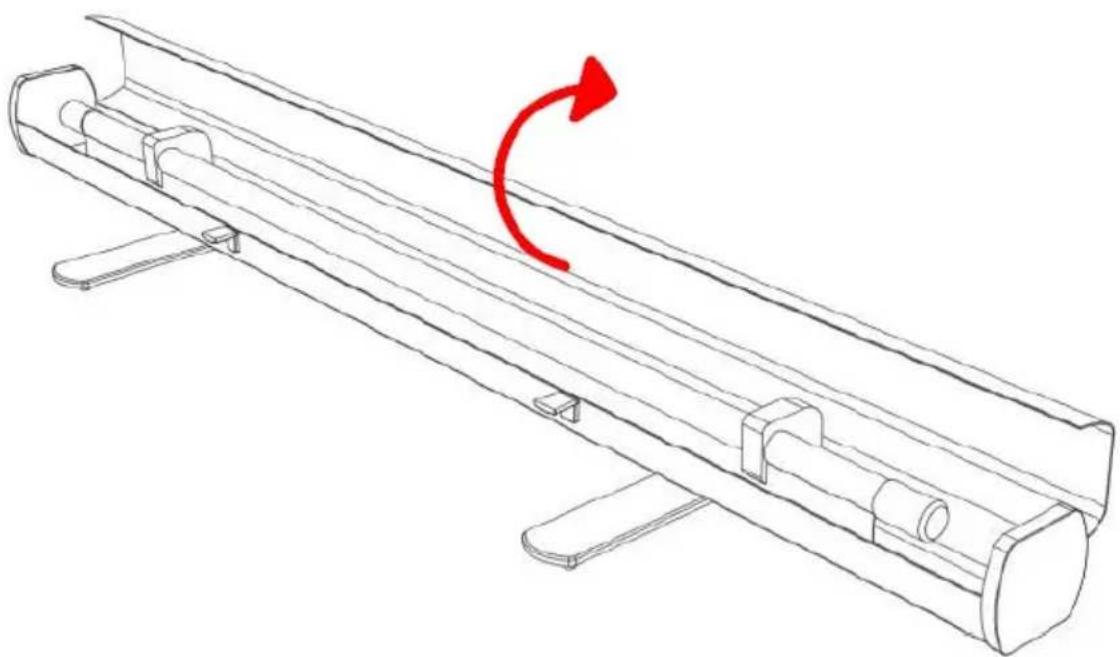
natural_image
Technical line drawing of a mechanical lever system with a red curved arrow indicating rotational motion (no text or symbols)natural_image
Line drawing of a mechanical structure with intersecting beams and supports, no text or symbols presentnatural_image
Diagram of a mechanical device with intersecting rods and a red arrow indicating downward motion (no text or symbols)OUR CUSTOMERS' SATISFACTION IS OUR MAIN GOAL! PLEASE CONTACT US WITH QUESTIONS AT:
NASZYM GŁÓWNYM CELEM JEST SATYSFAKCJA KLIENTÓW W PRZYPADKU PYTAŃ PROSIMY O KONTAKT Z PRZEDSTAWICIELEM W DANYM KRAJU:
NAŠÍM HLAVNÍM CÍLEM JE SPOKOJENOST NAŠICH ZÁKAZNÍKŮ! V PŘÍPADĚ OTÁZEK NÁS PROSÍM KONTAKTUJTE NA:
NOTRE BUT PREMIER EST VOTRE SATISFACTION! POUR TOUTE QUESTION, CONTACTEZ NOUS SUR: