88050 - USB Docking Station DeLOCK - Free user manual and instructions
Find the device manual for free 88050 DeLOCK in PDF.


| Product type | USB-C Docking Station |
| Brand | DeLOCK |
| Model | 88050 |
| Dimensions (L x W x H) | 304 x 76 x 19 mm |
| Power supply | Input: 100-240 V AC, 50/60 Hz, 3 A; Output: 20 V DC, 6 A, 120 W (power adapter included) |
| USB PD charging power | Up to 80 W for the host |
| Maximum video resolution | 4K UHD (3840 x 2160) on each output |
| Number of video outputs | 3 (1x DisplayPort, 2x HDMI): 1 via DP Alt Mode, 2 via DisplayLink |
| USB ports | 4x USB 5 Gbps Type-A, 1x USB 5 Gbps Type-C, 1x USB Type-A charging 5 V / 2.4 A (BC1.2) |
| Audio connector | 3.5 mm 4-pole headphone jack |
| Network | Gigabit Ethernet RJ45 (10/100/1000 Mbps) |
| Card reader | SD and Micro SD (simultaneous use possible) |
| Kensington lock | Yes |
| LED indicator | Blue (device off), Purple (device on) |
| On/off switch | Yes |
| Color | Black |
| Compatible operating systems | Windows 10/11, Mac OS 12.4 or later |
| Package contents | Docking station, USB-C male/male cable (1 m), power adapter (cable 1.2 m), power cord (1.2 m), user manual |
| Maintenance and cleaning | Clean with a dry cloth, avoid moisture and direct sunlight |
| Security | Use the Kensington lock to protect against theft; do not expose to water |
Frequently Asked Questions - 88050 DeLOCK
User questions about 88050 DeLOCK
0 question about this device. Answer the ones you know or ask your own.
Ask a new question about this device
Download the instructions for your USB Docking Station in PDF format for free! Find your manual 88050 - DeLOCK and take your electronic device back in hand. On this page are published all the documents necessary for the use of your device. 88050 by DeLOCK.
USER MANUAL 88050 DeLOCK
USB Type-C™ Triple Display Docking Station
natural_image
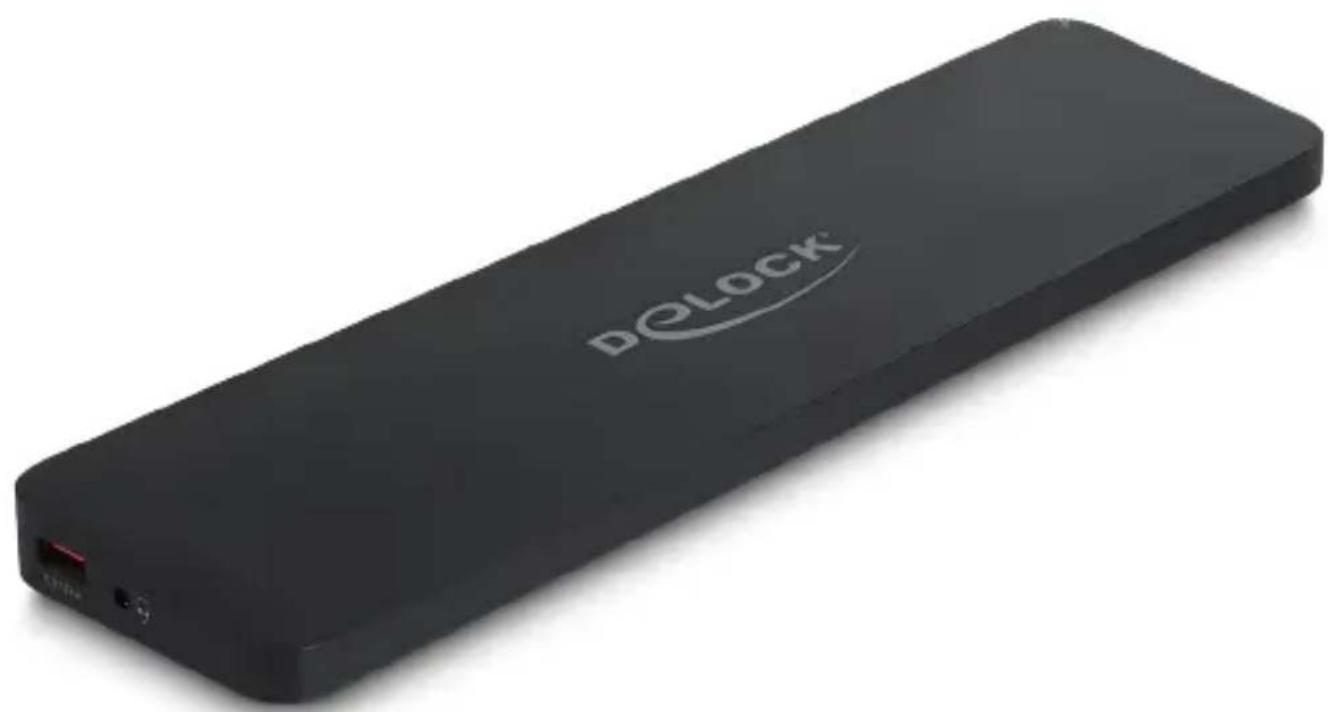
Black DeLock USB flash drive with white logo and red indicator lights (no text or symbols on device body)Maximum resolution
(depending on the system and the connected hardware):
Host USB Type-C™ DP Alt Mode:
| HDMI 1(DP Alt mode) | HDMI 2(DisplayLink®) | DisplayPort(DisplayLink®) | |
| Single Display 4K | / 30 Hz - - | ||
| - 4K / 60 Hz - | |||
| -- 4K / 60 Hz | |||
| Dual Display 4K | / 30 Hz 4K / 60 Hz - | ||
| 4K / 30 Hz - 4K | / 60 Hz | ||
| - 4K / 60 Hz | 4K / 60 Hz | ||
| Triple Display 4K | / 30 Hz 4K / 30 Hz 4 | K / 30 Hz |
| 1 | On / Off switch |
| 2 | 3 x USB 5 Gbps Type-A female |
| 3 | 1 x SD slot1 x Micro SD slot |
| 4 | 1 x Gigabit LAN 10/100/1000 Mbps RJ45 jack |
| 5 | 1 x DisplayPort female (DisplayLink®) |
| 6 | 1 x HDMI female (DisplayLink®) |
| 7 | 1 x HDMI female (DP Alt Mode) |
| 8 | 1 x USB Type-CTM female - Host to connect to computer |
| 9 | 1 x DC 20 V power connector |
| 10 | Security lock (Kensington Lock) for security cable |
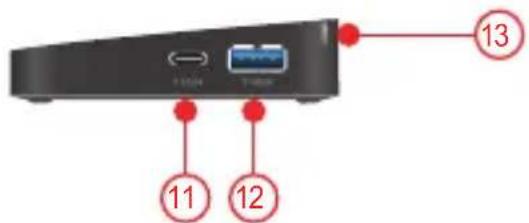

| 11 | 1 x USB 5 Gbps USB Type-CTM female |
| 12 | 1 x USB 5 Gbps Type-A female |
| 13 | 1 x LED indicator |
| 14 | 1 x USB Type-A female 5 V / 2.4 A - Battery Charging specification BC1.2 |
| 15 | 1 x Headset 3.5 mm 4 pin jack |
Description
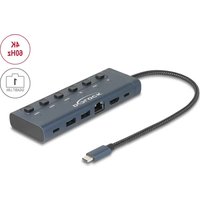
This docking station by Delock can be connected to a computer with a USB-C™ DP Alt Mode, Thunderbolt™ 3 or Thunderbolt™ 4 and provides a variety of interfaces. Three monitors can be operated at the monitor outputs at the same time. Five built-in USB 5 Gbps ports allow the use of peripherals and another USB port can be used to charge mobile devices. Connectors for a headset, a Gigabit network connection, as well as a card reader for SD and Micro SD memory cards complete the features. A safety cable can be attached to the Kensington socket to protect the docking station from theft.
Triple Display 4K UHD resolution
When using the three video outputs at the same time, one monitor is operated via DisplayPort Alternate Mode, the other two via DisplayLink®. The Delock docking station can also be operated on devices without a USB Type-C™ port with DP Alt Mode support, with a video output on a maximum of two monitors.
A maximum resolution of 4K on all ports can be guaranteed, regardless of the operating system. Due to the DisplayLink® graphics chipset it is possible to use mirrored and extended screen functions on Windows and Mac OS operating systems.
USB Power Delivery (USB PD 3.0) support up to 80 watt
Via the power supply, which is connected to the docking station, the host device is charged with up to 80 watts during operation.
Use under the laptop
Due to its elongated, slim shape, the docking station is perfectly suited for use under a laptop, e.g. MacBook. The increased tilt of the laptop serves a better comfort while working, as well as a better cooling of the laptop.
Specification
- Connectors:
1 x USB Type-C ^TM female
1 x DisplayPort female (DisplayLink®)
1 x HDMI female (DisplayLink®)
1 x HDMI female (DP Alt Mode)
4 x USB 5 Gbps Type-A female
1 x USB 5 Gbps USB Type-C™ female
1 x USB Type-A female 5 V / 2.4 A - Battery Charging specification BC1.2
1 x Headset 3.5 mm 4 pin jack
1 x Gigabit LAN 10/100/1000 Mbps RJ45 jack
1 x SD slot
1 x Micro SD slot
1 x DC 20 V power connector
• Transmission of audio and video signals
- Functions: Mirrored or Extended
- It can be used two memory cards at the same time
- Input power: 120 W, 40 W are used for the docking station
- Output power for host: max. 80 W
- 1 x LED indicator
- 1 x On / Off switch
- Colour: black
• Security lock (Kensington Lock) for security cable
- Dimensions (LxWxH): ca. 304 x 76 x 19 mm
Power supply specification
- Wall power supply
- Input: AC 100 \~ 240 V / 50 \~ 60 Hz / 3.0 A
- Output: 20 ~V / 6.0 ~A / 120 ~W
• Ground outside, plus inside - Dimensions:
inside: ∅ ca. 3.0 mm
outside: ∅ ca. 4.5 mm
length: ca. 10.0 mm
System requirements
• Mac OS 12.4 or above
- Windows 10/10-64/11
- A free USB Type-C™ female port (DisplayLink®) or
- Device with a free USB Type-C™ port and DisplayPort alternate mode or with a free Thunderbolt™ 3 or Thunderbolt™ 4 port
Package content
- USB docking station
- Cable USB-C™ male to USB-C™ male, length ca. 1 m
• Power supply, cable length ca. 1.2 m
• Power cord, length ca. 1.2 m - User manual
Safety instructions
- Protect the product against moisture
- Protect the product against direct sunlight
Driver Installation
- Switch on your computer.
- Connect the power supply to the DC female port.
- Connect the docking station to an available USB port of your computer.
- Switch on the Docking Station.
- Download the driver from the product page: https://www.delock.com/produkte/G_88050/treiber.html.
- Follow the instructions of the driver installation.
- The driver will now be installed.
- Click on "Finish".
- Your computer will ask to reboot. Click "Yes" to restart the computer.
- After restart you can start using the device immediately.
Configuration
- Network connection: Supports 10/100/1000 Mbps and can be used immediately.
- USB ports: You can now connect your devices to these 5 ports.
- Audio ports: You can connect your headset and your speakers to the audio ports.
Note
As soon as an audio device is connected to the stereo jack, the output takes place exclusively over it. An output via the video outputs is then not possible.
- Video ports: You can set the additional displays on mirroring or extended. In order to change the setting, proceed like this:
Windows: Click with the right mouse button on the desktop and click on "display settings".
Afterwards you can change the graphics settings.
Mac: Open the System Preferences > Displays.
It can happen that the security settings need to be changed. Therefore go to System Preferences > Security & Privacy > Privacy and set the hook on "DisplayLinkUserAgent".
Note
When using the three video outputs at the same time, one monitor is operated via DisplayPort Alternate Mode, the other two via DisplayLink®. The Delock docking station can also be operated on devices without a USB Type-C™ port with DP Alt Mode support, with a video output on a maximum of two monitors.
- Insert an SD card into the card reader.
- Insert an Micro SD card into the card reader.
- Security
A safety cable can be attached to the Kensington socket to protect the docking station from theft.
- USB Type-A charging port
At this port devices can be charged with up to 5 V / 2.4 A.
- LED indicator
Device switched off: The LED lights up blue.
Device switched on: The LED lights up purple.
Support Delock
If you have further questions, please contact our customer support support@delock.de
You can find current product information on our homepage: www.delock.com
Final clause
Information and data contained in this manual are subject to change without notice in advance. Errors and misprints excepted.
Copyright
No part of this user manual may be reproduced, or transmitted for any purpose, regardless in which way or by any means, electronically or mechanically, without explicit written approval of Delock.
Kurzbeschreibung
interior: ∅ aprox. 3,0 mm
exterior: ∅ aprox. 4,5 mm
interno: ∅ ca. 3,0 mm
esterno: ø ca. 4,5 mm
interior: ∅ aprox. 3,0 mm
exterior: ∅ aprox. 4,5 mm
lungime: aprox. 10,0 mm
Cerinte de sistem
Declaration of conformity
Products with a CE symbol fulfill the EMC directive (2014/30/EU), the ErP directive (2009/125/EC), LVD directive (2014/35/EU) and RoHS directive (2011/65/EU+2015/863+2017/2102), which were released by the EU-comission.
The declaration of conformity can be downloaded here: https://www.delock.de/produkte/G_88050/merkmale.html
WEEE-notice
The WEEE (Waste Electrical and Electronic Equipment)-directive, which became effective as European law on February 13th 2003, resulted in an all out change in the disposal of disused electro devices. The primarily purpose of this directive is the avoidance of electrical waste (WEEE) and at the same time the support of recycling and other forms of recycling in order to reduce waste. The WEEE-logo on the device and the package indicates that the device should not be disposed in the normal household garbage. You are responsible for taking the disused electrical and electronical devices to a respective collecting point. A separated collection and reasonable recycling of your electrical waste helps handling the natural resources more economical. Furthermore recycling of electrical waste is a contribution to keep the environment and thus also the health of men. Further information about disposal of electrical and electronical waste, recycling and the collection points are available in local organizations, waste management enterprises, in specialized trade and the producer of the device.
- USB Type-C™ Triple Display Docking Station
- Maximum resolution
- Description
- Triple Display 4K UHD resolution
- USB Power Delivery (USB PD 3.0) support up to 80 watt
- Use under the laptop
- Specification
- Power supply specification
- System requirements
- Package content
- Safety instructions
- Driver Installation
- Configuration
- Note
- Support Delock
- Final clause
- Copyright
- Kurzbeschreibung
- Cerinte de sistem
- Declaration of conformity
- WEEE-notice
Brand : DeLOCK
Model : 88050
Category : USB Docking Station