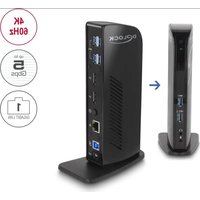
87728 - USB Docking Station DeLOCK - Free user manual and instructions
Find the device manual for free 87728 DeLOCK in PDF.


| Product type | USB Dock |
| Brand | DeLOCK |
| Model | 87728 |
| Color | Black |
| Dimensions (L x W x H) | 190 x 78 x 38 mm |
| Power supply | Power adapter 20 V / 2.25 A (45 W) |
| PC connectivity | USB Type-A or USB Type-C™ / Thunderbolt™ 3 |
| Video outputs | 2 x DisplayPort female |
| Maximum resolution (single display) | 3840 x 2160 @ 60 Hz |
| Maximum resolution (dual display) | 3840 x 2160 @ 60 Hz |
| Front USB ports | 1 x USB 3.2 Gen 1 Type-A + 1 x USB 3.2 Gen 1 Type-A (BC1.2) |
| Rear USB ports | 4 x USB 3.2 Gen 1 Type-A |
| Audio ports | 1 x microphone input 3.5 mm + 1 x speaker output 3.5 mm |
| Network | Gigabit Ethernet (RJ45, 10/100/1000 Mbps) |
| Graphics chip | DisplayLink (mirror or extended mode) |
| Switch | On/Off |
| Supported operating systems | Windows 8.1/10/11, Mac OS 12.0.1+ |
| Maintenance | Clean with a dry, non-abrasive cloth |
| Safety | Protect from moisture and direct sunlight |
| Repairability | Call a professional for any repairs |
| Included accessories | USB-A to USB-B cable (1 m), USB-C to USB-B cable (1 m), power supply, user manual |
Frequently Asked Questions - 87728 DeLOCK
User questions about 87728 DeLOCK
0 question about this device. Answer the ones you know or ask your own.
Ask a new question about this device
Download the instructions for your USB Docking Station in PDF format for free! Find your manual 87728 - DeLOCK and take your electronic device back in hand. On this page are published all the documents necessary for the use of your device. 87728 by DeLOCK.
USER MANUAL 87728 DeLOCK
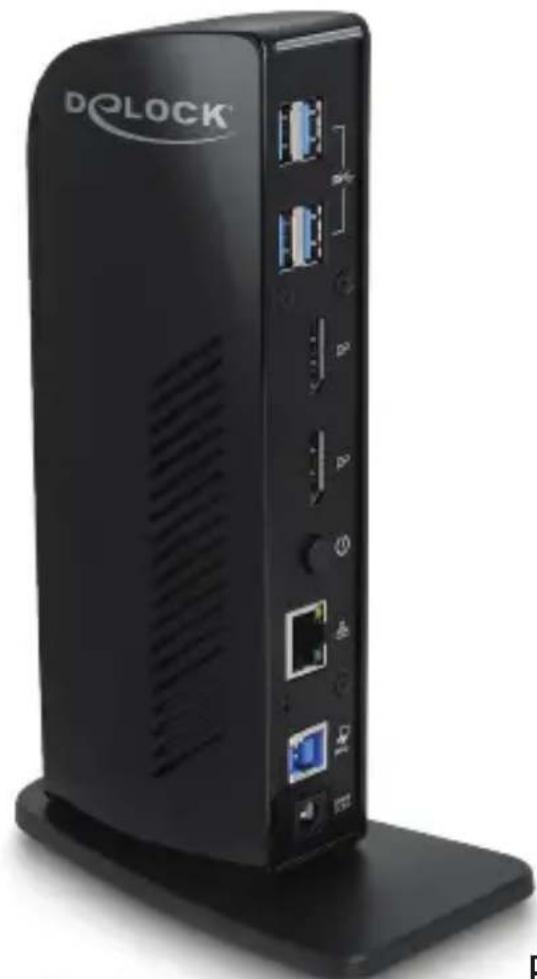
SuperSpeed USB 5 Gbps Docking Station
natural_image
Black DOLOCK device with ports and connectors, no visible text or symbols on body
CE
FC

®
Product-No:87728
User manual no:87728-a
www.delock.com
Layout
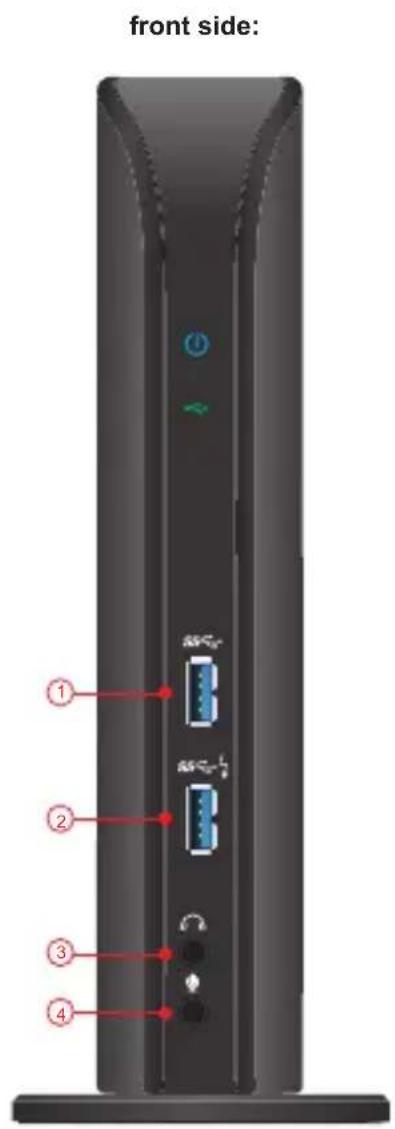
front side:
| 1 | 1 x SuperSpeed USB 5 Gbps (USB 3.2 Gen 1) Type-A female |
| 2 | 1 x SuperSpeed USB 5 Gbps (USB 3.2 Gen 1) Type-A female with Battery Charging specification BC1.2 |
| 3 | 1 x speaker 3.5 mm stereo jack |
| 4 | 1 x microphone 3.5 mm stereo jack |
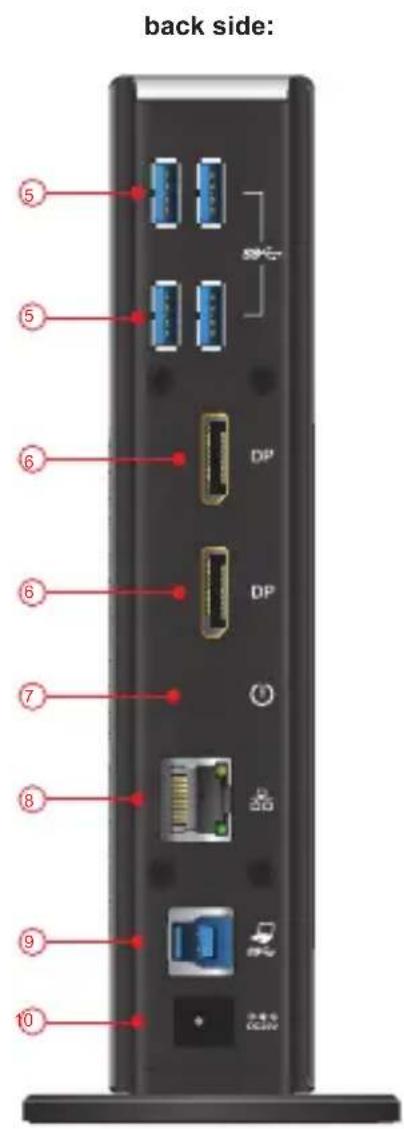
back side:
| 5 | 4 x SuperSpeed USB 5 Gbps (USB 3.2 Gen 1) Type-A female |
| 6 | 2 x DisplayPort female |
| 7 | 1 x On / Off switch |
| 8 | 1 x Gigabit LAN 10/100/1000 Mbps RJ45 jack |
| 9 | 1 x USB 3.2 Gen 1 Type-B female downstream port |
| 10 | 1 x DC 5 V power connector |
USB 3.0 Type-C™ male to USB Type-B male

natural_image
Black USB cable with connector port, no text or symbols visibleUSB 3.0 Type-A male to Type-B male

natural_image
Close-up of a black USB cable with two connectors (no text or symbols visible)External power supply

natural_image
Black cable connector with terminal plug and connector (no text or symbols visible)Description
This docking station by Delock can be connected to a computer with a USB-C ^™ or USB Type-A port and provides a variety of interfaces. Two monitors can be operated simultaneously at the DisplayPort output ports. Six built-in USB 3.2 Gen 1 ports allow the use of peripherals, and connections for microphone and speaker and Gigabit network complete the features.
4K 60 Hz UHD resolution
Ultra-HD (4K) resolution is possible when using only one monitor and also when using both DisplayPort outputs at the same time. There is no DisplayPort Alternate Mode support required.
Extended screen by Displaylink
Due to the Displaylink graphics chipset it is possible to use mirrored and extended screen functions on Windows and Mac OS operating systems.
Specification
- Connectors:
front side:
1 x SuperSpeed USB 5 Gbps (USB 3.2 Gen 1) Type-A female 1 x SuperSpeed USB 5 Gbps (USB 3.2 Gen 1) Type-A female - Battery Charging specification BC1.2
1 x microphone 3.5 mm stereo jack
1 x speaker 3.5 mm stereo jack back side:
4 x SuperSpeed USB 5 Gbps (USB 3.2 Gen 1) Type-A female
2 x DisplayPort female
1 x Gigabit LAN 10/100/1000 Mbps RJ45 jack 1 x SuperSpeed USB 5 Gbps (USB 3.2 Gen 1) Type-B female 1 x DC 5 V power connector - Maximum resolution (depending on the system and the connected hardware): Single display: up to 3840 x 2160 @ 60 Hz
Dual display: up to 3840 x 2160 @ 60 Hz
• Transmission of audio and video signals
• Functions: Mirrored or Extended - 1 x On / Off switch
- Colour: black
- Dimensions without stand (LxWxH): ca. 190 x 78 x 38 mm
Power supply specification
- Wall power supply
• Output: 20 V / 2.25 A
• Ground outside, plus inside - Dimensions: inside: ca. 1.7 mm outside: ca. 4.75 mm length: ca. 9.5 mm
- Input: AC 100 \~ 240 V / 50 \~ 60 Hz / 1.3 A
System requirements
• Mac OS 12.0.1 or above
• Windows 8.1/8.1-64/10/10-64/11
• PC or laptop with a free USB Type-A port or
- PC or laptop with a free USB Type-C™ or Thunderbolt™ 3 port
Package content
- USB docking station
• Cable USB Type-A male to Type-B male, length ca. 1 m - Cable USB-C™ male to USB Type-B male, length ca. 1 m
- Power supply
- User manual
Safety instructions
- Protect the product against moisture
- Protect the product against direct sunlight
Driver Installation
- Switch on your computer.
- Connect the power supply to the DC female port.
- Connect the docking station to an available USB port of your computer.
- Switch on the Docking Station.
- Download the driver from the product page: https://www.delock.com/produkte/G_87728/treiber.html.
- Follow the instructions of the driver installation.
- The driver will now be installed.
- Click on "Finish".
- Your computer will ask to reboot. Click "Yes" to restart the computer.
- After restart you can start using the device immediately.
Configuration
- Network connection: Supports 10/100/1000 Mbps and can be used immediately.
- USB ports: You can now connect your devices to these 6 ports.
-
Audio ports: You can connect your headset and your speakers to the audio ports.
-
DisplayPort ports: You can set the additional displays on mirroring or extended.
In order to change the setting, proceed like this:
Windows: Click with the right mouse button on the desktop and click on "display settings".
Afterwards you can change the graphics settings.
Mac: Open the System Preferences > Displays.
It can happen that the security settings need to be changed. Therefore go to System Preferences > Security & Privacy > Privacy and set the hook on "DisplayLinkUserAgent".
Support Delock
If you have further questions, please contact our customer support support@delock.de
You can find current product information on our homepage: www.delock.com
Final clause
Information and data contained in this manual are subject to change without notice in advance. Errors and misprints excepted.
Copyright
No part of this user manual may be reproduced, or transmitted for any purpose, regardless in which way or by any means, electronically or mechanically, without explicit written approval of Delock.
Edition: 09/2022
Kurzbeschreibung
Declaration of conformity
Products with a CE symbol fulfill the EMC directive (2014/30/EU), the ErP directive (2009/125/EC), LVD directive (2014/35/EU) and RoHS directive (2011/65/EU+2015/863+2017/2102), which were released by the EU-comission.
The declaration of conformity can be downloaded here: https://www.delock.de/produkte/G_87728/merkmale.html
WEEE-notice
The WEEE (Waste Electrical and Electronic Equipment)-directive, which became effective as European law on February 13th 2003, resulted in an all out change in the disposal of disused electro devices. The primarily purpose of this directive is the avoidance of electrical waste (WEEE) and at the same time the support of recycling and other forms of recycling in order to reduce waste. The WEEE-logo on the device and the package indicates that the device should not be disposed in the normal household garbage. You are responsible for taking the disused electrical and electronical devices to a respective collecting point. A separated collection and reasonable recycling of your electrical waste helps handling the natural resources more economical. Furthermore recycling of electrical waste is a contribution to keep the environment and thus also the health of men. Further information about disposal of electrical and electronical waste, recycling and the collection points are available in local organizations, waste management enterprises, in specialized trade and the producer of the device.
- SuperSpeed USB 5 Gbps Docking Station
- Layout
- Description
- 4K 60 Hz UHD resolution
- Extended screen by Displaylink
- Specification
- Power supply specification
- System requirements
- Package content
- Safety instructions
- Driver Installation
- Configuration
- Support Delock
- Final clause
- Copyright
- Kurzbeschreibung
- Declaration of conformity
- WEEE-notice
Brand : DeLOCK
Model : 87728
Category : USB Docking Station