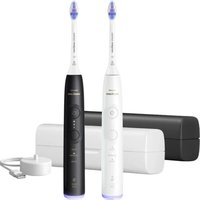
Sonicare 6500 HX7419 - Toothbrush PHILIPS - Free user manual and instructions
Find the device manual for free Sonicare 6500 HX7419 PHILIPS in PDF.

 FR
FR
 AZ
AZ
 BG
BG
 CS
CS
 DA
DA
 DE
DE
 EL
EL
 EN
EN
 ES
ES
 ET
ET
 FI
FI
 HE
HE
 HU
HU
 IT
IT
 KK
KK
 KY
KY
 LT
LT
 LV
LV
 MK
MK
 NL
NL
 NO
NO
 PL
PL
 PT
PT
 RO
RO
 RU
RU
 SK
SK
 SL
SL
 SQ
SQ
 SV
SV
 TG
TG
 TK
TK
 UK
UK
 UZ
UZ
User questions about Sonicare 6500 HX7419 PHILIPS
0 question about this device. Answer the ones you know or ask your own.
Ask a new question about this device
Download the instructions for your Toothbrush in PDF format for free! Find your manual Sonicare 6500 HX7419 - PHILIPS and take your electronic device back in hand. On this page are published all the documents necessary for the use of your device. Sonicare 6500 HX7419 by PHILIPS.
USER MANUAL Sonicare 6500 HX7419 PHILIPS
Welcome to the Philips Sonicare family! This toothbrush enables you to obtain superior plaque removal, whiter teeth and healthier gums. Using Sonicare's combination of gentle sonic technology and clinically developed and proven features, you can be confident that you're getting the very best clean, every time.
Further support and product registration are available to you at:
www.philips.com/support
Important safety information
Only use the product for its intended purpose. Read this information carefully before you use the product and its batteries and accessories, and save it for future reference. Misuse can lead to hazards or serious injuries.
WARNINGS
- Only use original Philips accessories or consumables. If supplied, only use the original USB cable and USB power supply unit.
- This appliance contains no user-serviceable parts. If the appliance is damaged, stop using it and contact the Consumer Care Center in your country. If the USB cable is damaged, stop using it.
- Keep the chargers and Travel-charger-case away from water.
- After cleaning, make sure the chargers and travel charger cases are completely dry before you connect these.
- This appliance can be used by children and persons with reduced physical, sensory or mental capabilities or lack of experience and knowledge if they have been given supervision or instruction concerning use of the appliance in a safe way and understand the hazards involved. Cleaning and user maintenance shall not be made by children without supervision.
- Children should be supervised to ensure that they do not play with the product.
- Do not clean any part of the product in the dishwasher.
- Do not use adapters and chargers outdoors or near heated surfaces.
- This appliance has only been designed for cleaning teeth, gums and tongue.
- Stop using a brush head with crushed or bent bristles. Replace the brush head every 3 months or sooner if signs of wear appear.
- Avoid direct contact with products that contain essential oils or coconut oil. Contact may result in bristles dislodging.
- The maximum altitude of use is 4500 meters.
MEDICAL WARNINGS
- Stop using the appliance and consult your dentist/doctor if excessive bleeding occurs after use, if bleeding continues to occur after 1 week of use or if you experience discomfort or pain.
- If you have had oral or gum surgery in the previous 2 months, consult your dentist before you use this appliance.
- If you have a pacemaker or other implanted device, contact your doctor or the manufacturer of the implanted device prior to use.
- If you have medical concerns, consult your doctor before you use this appliance.
- This appliance is a personal care device and is not intended for use on multiple patients in a dental practice or institution.
BATTERY SAFETY INSTRUCTIONS
- This appliance contains batteries that are only removable by skilled persons.
- Only use the product for its intended purpose. Read this information carefully before you use the product and its batteries and accessories, and save it for future reference. Misuse can lead to hazards or serious injuries. Accessories supplied may vary for different products.
- Only use original Philips accessories and consumables.
- Keep product and batteries away from fire and do not expose them to direct sunlight or high temperatures.
- If the product becomes abnormally hot or smelly, changes color or if charging takes longer than usual, stop using and charging the product and contact Philips.
- Do not place products and their batteries in microwave ovens or on induction cookers.
- Do not open, modify, pierce, damage or dismantle the product or battery to prevent batteries from heating up or releasing toxic or hazardous substances. Do not short-circuit, overcharge or reverse charge batteries.
- This appliance contains batteries that are non-replaceable. When the battery is at end of life, the appliance shall be properly disposed of, see section on Recycling.
- Charge only with Philips HX6110, HYTCxx or safety approved adapters with input ratings: 4.75-5.25VDC, 1.5W.
- Charge and use the product at a temperature between 0 °C and 40 °C (32°F and 104 °F).
- To avoid accidental short-circuiting of batteries after removal, do not let battery terminals come into contact with metal object (e.g. coins, hairpins, rings). Do not wrap batteries in aluminium foil. Tape battery terminals or put batteries in a plastic bag before you discard them.
- This appliance contains a Lithium-ion rechargeable cell. MUST BE RECYCLED OR DISPOSED OF PROPERLY.
Storage and transportation conditions
Temperature -20°C to +60°C (-4 °F to 140 °F).
Electromagnetic fields (EMF)
This Philips appliance complies with all applicable standards and regulations regarding exposure to electromagnetic fields.
Radio Equipment Directive
Hereby, Philips declares that electric toothbrushes with radio equipment type (Bluetooth, NFC) are in compliance with Directive 2014/53/EU.
- The Bluetooth radio frequency interface in applicable products operates at 2.4 GHz.
- The maximum output power by the Bluetooth appliance is 3 dBm.
- The NFC radio frequency interface in applicable products operates at 13.56 MHz
- The maximum RF power transmitted by the appliance is 30.16 dBm.
The full text of the EU declaration of conformity is available at the following internet address: www.philips.com/support
Note: The Features of different models may vary. Some models may not be equipped with Bluetooth or NFC.
SAVE THESE INSTRUCTIONS
The following symbols may appear on the product:

natural_image
Simple line drawing of an open book with no text or symbols visibleThis symbol means read the instructions for use, before using the appliance.
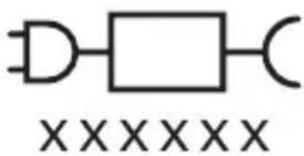
text_image
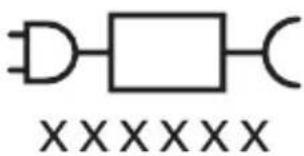
XXXXXXThis symbol means to use the indicated power supply.
Intended use
Sonicare power toothbrushes are intended to remove adherent plaque and food debris from the teeth to reduce tooth decay and improve and maintain oral health.
Your Philips Sonicare (Fig 1.)
1 Handle
2 Power on/off button
3 Intensity indicator
4 Mode/intensity button
5 Mode indicator
6 Brush head replacement reminder
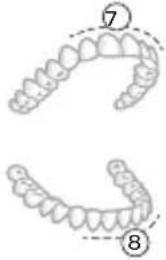
7 Battery indicator
8 Light ring
Accessories:
9 Brush head cap
10 Smart brush head(s)
11 BrushSync symbol
12 USB charger (wall adapter not included)
13 Travel case
14 Charging travel case
15 USB cable
Note: Accessories included may vary based on the model purchased.
Sonicare app - Getting started
The Sonicare app pairs with your toothbrush to provide you a connected experience. By connecting your toothbrush to your Sonicare app account, you will be able to:
- Track your brushing progress
- Receive personalized tips and actionable recommendations to improve your oral health
- Access the full range of benefits and receive ongoing upgrades. The app is compatible with a wide range of mobile phones.
To start using the Sonicare app:
1 Download the Sonicare app to your phone.
2 Ensure that Bluetooth for your phone is turned on.
3 Pick up your toothbrush to ensure it is active (lights on).
4 Open the app and follow the steps.
5 Pair your toothbrush with the app.
6 Create your account via the app. Complete firmware update, if prompted, to access the latest improvements and features.
7 Brush regularly with your toothbrush connected to the app. When you regularly sync the toothbrush with the app, you will receive updates to help improve your oral healthcare.
8 Sync regularly.
9 Keep your phone close to your toothbrush for optimal data transfer.
To sync manually: Connect your toothbrush with the app every two weeks to benefit from the app features/capabilities.
To sync automatically: Allow location permission while setting up the app. By allowing location permission, your phone knows when it is in the connection range of your toothbrush and can refresh your brushing data in the app to provide the latest insights and recommendations.
Note: Make sure your phone's Bluetooth is switched on when using the app so that your toothbrush can transfer and update your brushing data in the app. If you have questions about why your brushing data is collected, be sure to review the Sonicare Privacy Statement, available throughout the app setup process.
App features
Your Sonicare power toothbrush is equipped with smart sensors to provide you with feedback about your brushing habits, including:
- Daily brushing sessions
- Time spent during each brushing session
- Applied brushing pressure
- Personalized tips and actionable recommendations
- Brush head replacement reminder (based on actual use)
The Sonicare app collects the data provided by the smart sensors and tracks your brushing habits over time.
Getting started
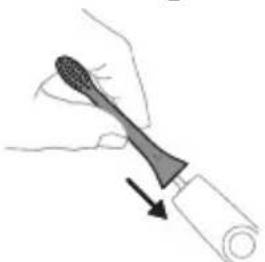
Attaching the brush head
natural_image
Illustration of a hand holding a toothbrush with an arrow indicating force or direction (no text or symbols)1 Align the brush head so the bristles point in the same direction as the front of the handle.
natural_image
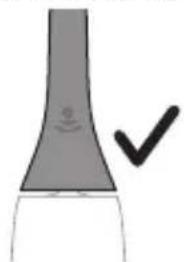
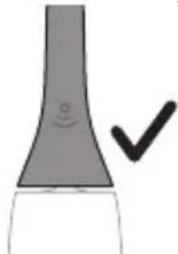
Simple line drawing of a curved object with a checkmark indicating a detail (no text or symbols)2 Firmly press the brush head down onto the metal shaft until it will not go any further.
Note: It is normal to see a slight gap between the brush head and the handle.
Using your Philips Sonicare toothbrush
If you are using your Sonicare toothbrush for the first time, it is normal to feel more vibration than when using a non-electric toothbrush. It is common for first-time users to apply too much pressure. Only apply gentle pressure and let the toothbrush do the brushing for you. Please follow the brushing instructions below for the best experience.
To help you transition to your new Sonicare power toothbrush, use a lower setting for the first 1-2 weeks, then transition to a higher setting.
Brushing instructions
natural_image
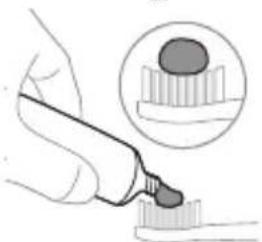
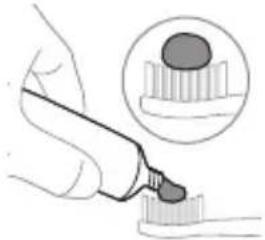
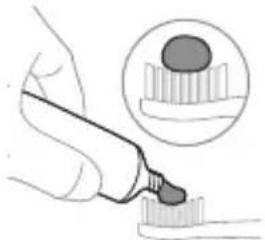
Illustration of a hand using a pipette to apply liquid onto a surface, with an inset showing a droplet on a surface (no text or symbols present)1 Wet the bristles and apply a small amount of toothpaste.
text_image
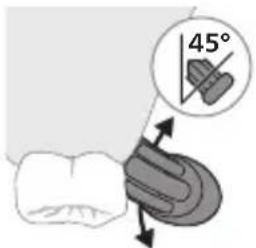
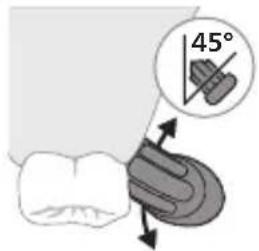
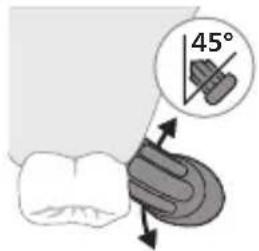
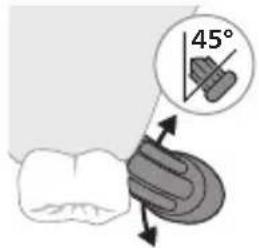
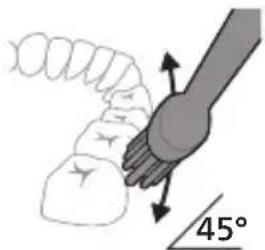
45°2 Place the toothbrush bristles against the teeth at a slight angle (45 degrees). Pressing firmly to make the bristles reach the gumline or slightly beneath the gumline.
Note: Keep the center of the brush in contact with the teeth at all times.
text_image
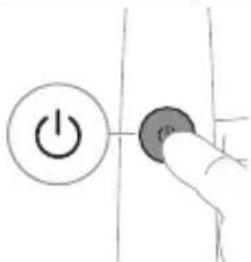
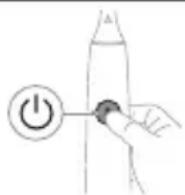
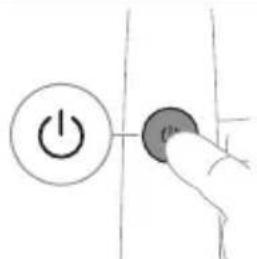
Hand-drawn diagram showing a power button with an icon and a circular button, likely indicating a control or operation step.3 Press the power on/off button to switch on the Philips Sonicare.
natural_image
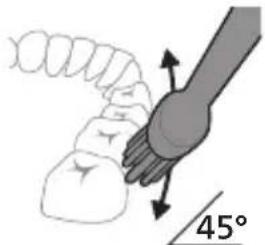
Diagram showing a mechanical joint with a 45-degree angle标注 (no text or symbols beyond the angle marker)4 Gently keep the bristles placed on the teeth and in the gumline. Brush your teeth with small back and forth motion so the bristles reach between the teeth. Continue this motion throughout your brushing cycle.
Note: The bristles should slightly flare. It is not recommended to scrub as you would with a manual toothbrush.
Note: If you apply too much pressure, you will be alerted by a change in vibration of the handle and a flashing purple brushing feedback light.
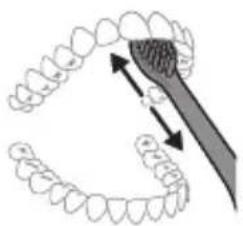
natural_image
Diagram showing dental tool application on upper teeth with magnified view (no text or labels)12 English
5 To clean the inside surfaces of the front teeth, tilt the brush handle semi-upright and make several vertical overlapping brushing strokes on each tooth.
6 After you have completed the brushing cycle, you can spend additional time brushing the chewing surfaces of your teeth and areas where staining occurs. You can also brush your tongue, with the toothbrush switched on or off, as you prefer.
Note: Your Philips Sonicare toothbrush is safe to use on braces (brush heads wear out sooner when used on braces) and dental restorations (fillings, crowns, veneers) if they are properly adhered and not compromised.
BrushPacer
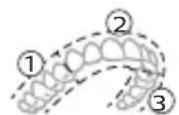
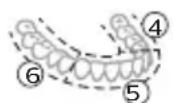
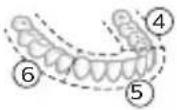
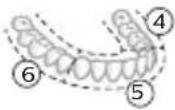
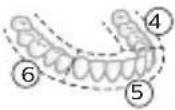
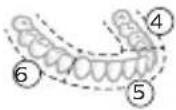
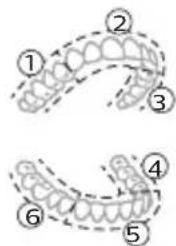
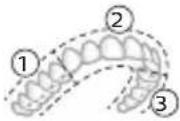
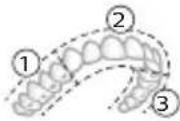
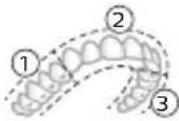
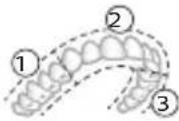
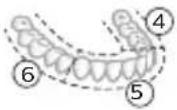
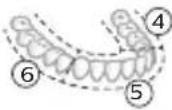
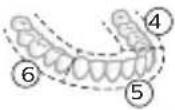
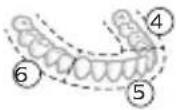
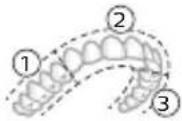
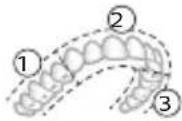
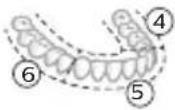
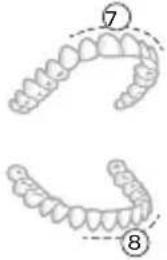
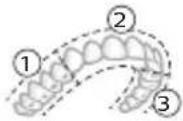
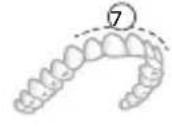
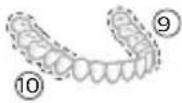
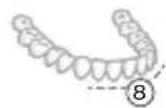
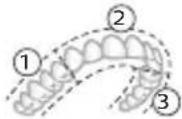
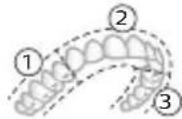
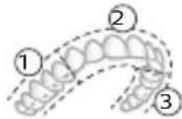
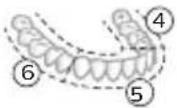
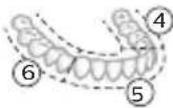
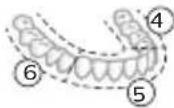
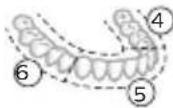
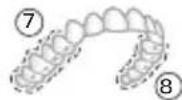
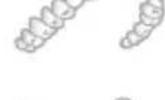
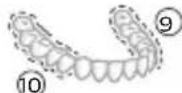
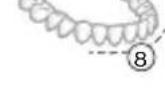
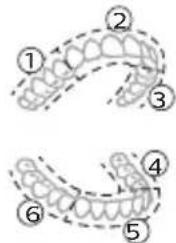
To make sure you brush evenly throughout the mouth, divide your mouth into 6 sections using the BrushPacer feature. The BrushPacer divides the brushing time into 6 equal segments and indicates when you should move to the next area. The segments are indicated with a brief pause in vibration. The toothbrush automatically stops at the end of the brushing session.
Note: Additional time may be added when you use the White or Gum Health modes.
Modes
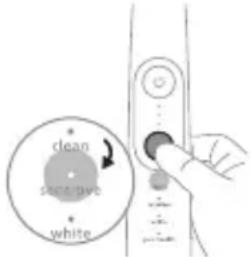
Your power toothbrush is equipped with up to 4 different modes: Clean, Sensitive, White, and Gum Health.
Based on the smart brush head you use, the optimal mode and intensity will be selected automatically by the BrushSync technology.
text_image
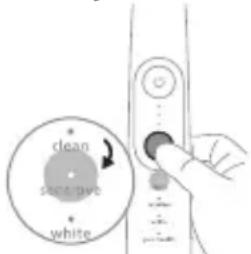
clean save save whiteTo manually change the mode, press the mode/intensity button when the toothbrush is off. All brush heads work with each mode.
Clean Sensitive Gum Health White
| Benefit Plaque removal | Extra gentle mode for sensitive teeth and gums | Plaque removal and gum massage | Plaque and surface stains removal |
| Recommended intensity level | High Low* High High | ||
| Total brushing time | 2 minutes 2 minutes 3 minutesand 20 seconds | 2 minutes and 40 seconds |
Clean Sensitive Gum Health White
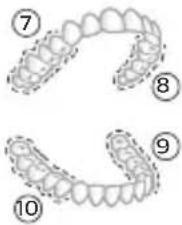
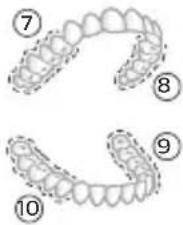
| How to brush | Brush each segment for 20 seconds. | Brush each segment for 20 seconds | Brush each segment for 20 seconds, | Brush each segment for 20 seconds, |
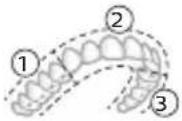 | 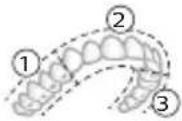 | 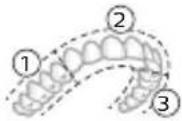 | 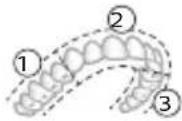 | |
 |  |  |  | |
| then brush segments 7,8,9 and 10 for 20 seconds each. | then brush segments 7 and 8 for 20 seconds each. | |||
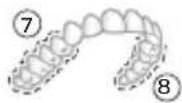 |  | |||
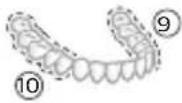 | 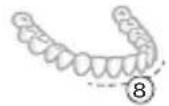 |
Intensities
Intensity settings
natural_image
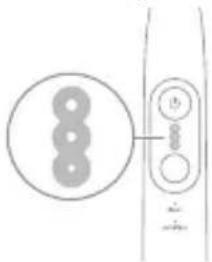
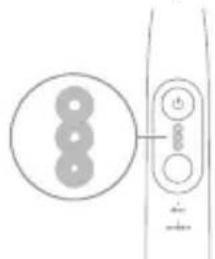
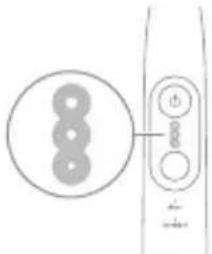
Pure electrical circuit lines without any symbolsYour power toothbrush comes with 3 different intensity settings:
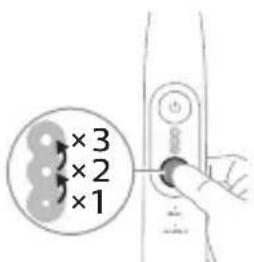
- High intensity (three lights)
- Medium intensity (two lights)
- Low intensity (one light)
Note: We recommend high intensity for best results.
text_image
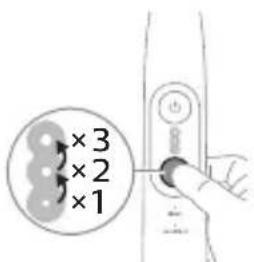
×3 ×2 ×1To manually select your desired intensity, press the mode/intensity button when the toothbrush is on, to cycle through the options. The intensity setting can only be changed when the toothbrush is on.
BrushSync technology
natural_image
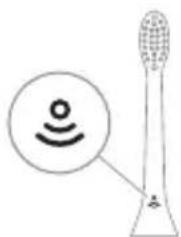
Diagram of a microphone with a circular icon showing signal waves (no text or symbols)BrushSync technology enables your brush head to communicate with your handle using a microchip. The symbol at the bottom of the brush head indicates that the brush head is equipped with this technology.
BrushSync technology enables:
- Brush head replacement reminder
- BrushSync mode pairing
Philips Sonicare offers a wide range of smart brush heads, equipped with BrushSync technology. To explore our full range of toothbrush brush heads, and find the brush head that is best for you, go to
www.philips.com/toothbrush-heads for more information.
Features
- Pressure Sensor Feedback
- BrushPacer
- SmarTimer
- EasyStart
- Brush Head Replacement Reminder
- Brush Head Mode Pairing
Pressure Sensor Feedback
Your Sonicare toothbrush measures the pressure you apply while brushing, to protect your gums and teeth from damage.
natural_image
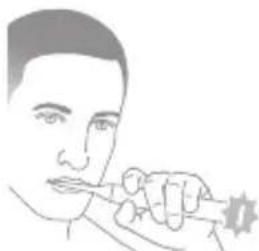
Line drawing of a person using a toothbrush (no text or symbols)If you apply excess pressure, the handle changes its sound and vibration while the brushing feedback light flashes purple at the bottom of the handle until you reduce the pressure.
Note: Your product comes with the Pressure Sensor Feedback activated. To deactivate this feature (see 'Activating or deactivating features').
BrushPacer
text_image
Diagram showing two dental arch structures with numbered labels indicating different tooth locations or regions.The BrushPacer is an interval timer that helps you to brush evenly through the mouth by dividing your mouth into 6 sections.
Note: Additional time may be added when you use the White or Gum Health modes.
SmarTimer
The SmarTimer indicates that your brushing cycle is complete by automatically switching off the toothbrush at the end of the brushing cycle.
Dental professionals recommend brushing no less than 2 minutes twice a day.
Note: If you press the power on/off button after you started the brushing cycle, the toothbrush pauses. If you press the on/off button within 30 seconds, the timer resumes to allow you to finish your brushing cycle. After a pause of 30 seconds, the SmarTimer resets.
EasyStart
This Philips Sonicare model comes with the EasyStart feature deactivated. The EasyStart feature gently increases the power over the first 14 brushings to help you get used to brushing with the Philips Sonicare. The EasyStart feature works with all modes.
*Disclaimer
When the Philips Sonicare toothbrush is used in clinical studies, it must be used at high intensity with the handle fully charged and the EasyStart feature deactivated.
To activate EasyStart (see 'Activating or deactivating features').
Brush Head Replacement Reminder
Your Philips Sonicare is equipped with BrushSync technology that tracks the wear of your brush head.
Note: This feature only works with Philips Sonicare smart brush heads with BrushSync technology.
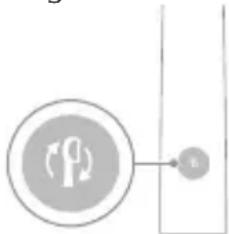
1 When you attach a new smart brush head for the first time, the handle recognizes that you have a Philips brush head with BrushSync technology and begins tracking brush head wear.
2 Over time, based on the pressure you apply and the total time the brush head has been used, the handle tracks brush head wear in order to determine the optimal time to replace your brush head. This feature guarantees the best cleaning and care of your teeth.
flowchart
graph TD
    A["Traffic Light Icon"] --> B["B"]
    style A fill:#f9f,stroke:#333
    style B fill:#ccf,stroke:#333
3 When the Brush Head Replacement Reminder indicator lights up amber, you should replace your brush head.
Note: All smart brush heads come with the brush head replacement reminder feature activated. To deactivate the brush head replacement reminder see 'Activating or deactivating features'.
Brush head mode pairing
Brush heads with BrushSync technology are equipped with a microchip which communicates with the handle and automatically pairs it with the recommended mode and intensity. Most brush heads with BrushSync technology will auto pair to Clean Mode. Brush heads with specific benefits will pair with the corresponding mode (when available), examples include:
- G3 Premium Gum Care: Gum Health Mode
- W3 Premium White or W DiamondClean (NAM) / W OptimalClean (ROW): White Mode
- S2 Sensitive: Sensitive Mode
Note: If you choose to change mode/intensity from the recommended setting, the brush head will remember the your chosen setting for future brushing sessions.
Activating or deactivating features
You can activate or deactivate the following features of your toothbrush:
- EasyStart
- Brush Head replacement reminder
- Pressure Sensor Feedback
Note: The brush head replacement reminder is only compatible with Sonicare smart brush heads. The smart brush head must be attached to the toothbrush in order to activate or deactivate the replacement reminder.
From handle:
Step 1: Place the handle on a plugged in charger/charging travel case.
Step 2: Press and hold power on/off button for:
EasyStart Brush Head Replacement Reminder Pressure Sensor Feedback
Up to 3 seconds Up to 5 seconds Up to 7 seconds

Step 3: Let go of the power on/off button when you hear:
1 beep 1 beep and then 2 beeps 1 beep, 2 beeps and then 3 beeps
Together with:
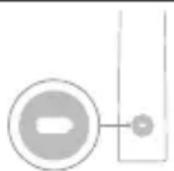
If you see the left LED for the battery indicator flash green 2 times and hear 3 tones low to high, then the feature has been activated.
OR
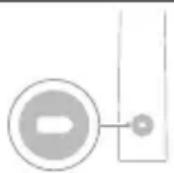
If you see the left LED for the battery indicator flash amber 1 time and hear 3 tones high to low, then the feature has been deactivated.
Charging and battery status
This Philips Sonicare toothbrush is designed to provide on average 42 brushing sessions, each session lasting 2 minutes (21 days if used twice per day) on a fully charged battery. The battery indicator shows the battery status when you complete the 2-minute brushing session, when you pause the toothbrush, or while it is charging.
Note: It can take up to 24 hours to fully charge the battery before first use, but you can use the Philips Sonicare toothbrush before it is fully charged.
Note: Charging your Philips Sonicare toothbrush in the travel case can take up to 48 hours.
Charging
Charging on charger
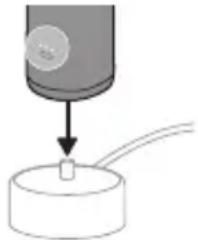
1 Attach the USB charging cord to a wall adapter, plug the wall adapter into an electrical wall outlet.
natural_image
Simple diagram showing a cylindrical object being inserted into a circular base with wires (no text or symbols)2 Place the handle on the charger.
3 Connect the attached USB cable to the 5V DC input power supply unit.
- Charge only with Philips compatible chargers or safety approved adapters with input ratings: 100 - 240V\~; 50/60Hz; 3.5W and output ratings 5VDC; 2.5W.
- A UL-listed or certified 1310 Class 2 power supply (NAM only)
4 The battery indicator and light ring illuminate, the handle beeps twice, and all lights on the handle illuminate upward from the bottom of the handle.
5 The flashing light of the battery indicator shows that the toothbrush is charging.
6 When the handle is on the charger and the battery is fully charged, the LED lights of the battery indicator start flashing green. Once the battery is full, the green light remains solid for 30 seconds and then turns off.
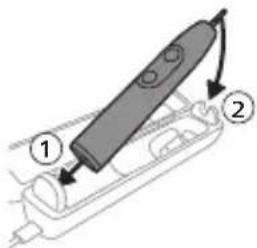
Charging with the travel case
text_image
Diagram of a handheld device with labeled parts, showing two numbered components and directional arrows indicating movement.Note: Accessories included may vary based on the model purchased.
1 Insert the USB cable to the charging travel case.
2 Connect the attached USB cable to the 5V DC input power supply unit.
- Charge only with Philips compatible chargers or safety approved adapters with input ratings: 100 - 240V\~; 50/60Hz; 3.5W and output ratings 5VDC; 2.5W.
- A UL-listed or certified 1310 Class 2 power supply (NAM only).
Important: The wall adapter must be a safe extra low voltage source, compatible with the electrical ratings marked on the bottom of the device.
3 Place the handle in the charging travel case.
- The handle emits 2 short beeps to confirm that the handle is placed properly for charging.
- The flashing light of the battery indicator shows that the toothbrush is charging.
4 The travel case will charge your toothbrush until your toothbrush is fully charged.
- When the handle is fully charged, the battery indicator lights up green for 30 seconds and then switches off.
Note: Charging the handle with the charging travel case may take longer than on the charger.
Battery status
Battery status (handle on plugged-in charger/charging travel case)
When the handle is placed on the charger or in the charging travel case, the battery indicator shows the battery level.
Battery status
Number of flashing LEDs
LED color
Low 1 Flashing green
| Partially full 2 Flashing green | |
| Full 3 Flashing green until full, | then green for 30 seconds and then switches off |
Battery status (when handle is not on plugged-in charger/charging travel case)
When the toothbrush is awake, the battery indicator at the bottom of the handle shows the battery level.
Battery status Number of LEDs LED color
| Full 3 Solid green | |
| Partially full 2 Solid green | |
| Medium low 1 Solid green | |
| Low 1 with 3 beeps after brushing | Flashes amber |
| Empty 1 with 2 beeps after brushing | Flashes amber |
Note: To save energy, the battery indicator will switch off when not in use.
Note: When the battery is completely empty, the toothbrush switches off. Place the toothbrush on the charger to charge it.
Note: To keep the battery fully charged at all times, you may keep your toothbrush on the charger when not in use.
Cleaning
Toothbrush handle
natural_image
Simple line drawing of a medical procedure with a needle inserted into tissue (no text or symbols)22 English
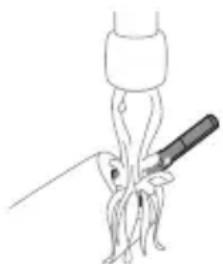
1 Remove the brush head and rinse the metal shaft area and buttons with warm water. Make sure you remove any residual toothpaste on the handle and around the buttons at least once a week, but preferably after each use.
Caution: Do not push on the rubber seal on the metal shaft or around buttons with sharp objects, as this may cause damage.
2 Wipe the entire surface of the handle with a damp cloth.
Note: Do not tap the handle on the sink to remove excess water.
3 Dry the handle with a soft cloth or towel.
Brush head
natural_image
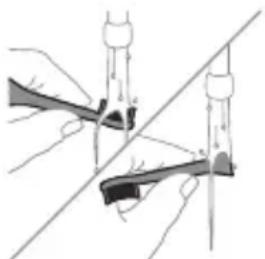
Illustration of two hands using a tool to measure a mechanical component, with no visible text or symbols.1 Rinse the brush head and bristles after each use.
2 Remove the brush head from the handle and rinse the brush head connection with warm water at least once a week. Rinse the travel cap as often as needed and air dry. Use only on a dry brush head.
Note: The brush head cap is used for shipping purposes and is not intended for continued use.
Charger
1 Unplug the charger before you clean it.
2 Wipe the surface of the charger with a damp cloth.
3 Dry the charger with a soft cloth or towel.
Travel case
Rinse with warm water and use a damp cloth to clean the travel case and allow to air dry.
Charging travel case
1 Unplug the charging travel case before cleaning.
2 Use damp cloth to wipe the surface of the travel case and allow to air dry.
Storage
If you are not going to use the product for an extended period of time, unplug it from the electrical outlet, clean it and store it in a cool and dry place away from direct sunlight.
Replacement
Replace Philips Sonicare brush heads every 3 months to achieve optimal results. Use only Philips Sonicare replacement brush heads.
Locating the model number
Look on the bottom of the Philips Sonicare toothbrush handle for the model number (e.g.HX740x).
Troubleshooting (ROW)
This chapter summarizes the most common problems you could encounter with the appliance. If you are unable to solve the problem with the information below, visit www.philips.com/support and insert your model number for a list of frequently asked questions or contact the Consumer Care Center in your country.
Problem Possible Cause Solution
| I cannot fully attach the brush head. There is a gap between the brush head and handle. | This gap is normal and is needed for the brush head to vibrate appropriately. The brush head must be able to move to create the right amount of vibrations. | |
| My Philips Sonicare toothbrush vibration is less powerful than before. | The brush head is too close to the body of the handle. | Remove the brush head from the handle and re-set it on the metal shaft leaving a small gap.(1-2mm). |
| The toothbrush stops working. | The battery is empty. Charge the toothbrush handle on the charger. | |
| I charged my toothbrush, but it only works for a short time. | The toothbrush handle is not placed vertically on the charger, resulting in no charge. | Place the handle vertically on charger base and make sure the charger is plugged in. |
WARRANTY EXCLUSIONS
What is not covered under warranty:
- In mouth attachments including brush heads and nozzles.
- Damage caused by use of unauthorized replacement parts or unauthorized brush heads.
- Damage caused by misuse, abuse, neglect, alterations or unauthorized repair.
- Normal wear and tear, including chips, scratches, abrasions, discoloration or fading.
IMPLIED WARRANTIES
ANY IMPLIED WARRANTIES, INCLUDING IMPLIED WARRANTIES OF MERCHANTABILITY AND FITNESS FOR A PARTICULAR PURPOSE, SHALL BE LIMITED TO THE DURATION OF THE EXPRESS WARRANTIES SET FORTH ABOVE. IN SOME STATES LIMITATIONS ON DURATION OF IMPLIED WARRANTIES DO NOT APPLY.
LIMITATION OF REMEDIES
IN NO EVENT SHALL PHILIPS OR ANY OF ITS AFFILIATED OR SUBSIDIARY COMPANIES BE LIABLE FOR ANY SPECIAL, INCIDENTAL OR CONSEQUENTIAL DAMAGES BASED UPON BREACH OF WARRANTY, BREACH OF CONTRACT, NEGLIGENCE, TORT, OR ANY OTHER LEGAL THEORY. SUCH DAMAGES INCLUDE, WITHOUT LIMITATION, LOSS OF SAVINGS OR REVENUE; LOSS OF PROFIT; LOSS OF USE; THE CLAIMS OF THIRD PARTIES INCLUDING, WITHOUT LIMITATION, DENTISTS AND DENTAL HYGIENISTS; AND COST OF ANY SUBSTITUTE EQUIPMENT OR SERVICES. SOME STATES DO NOT ALLOW THE EXCLUSION OR LIMITATION OF INCIDENTAL OR CONSEQUENTIAL DAMAGES.
Warranty and support (ROW)
If you need information or support, please visit www.philips.com/support or read the international warranty leaflet.
Warranty exclusions
What is not covered under warranty:
- In mouth attachments including brush heads and nozzles.
- Damage caused by use of unauthorized replacement parts or unauthorized brush heads.
- Damage caused by misuse, abuse, neglect, alterations or unauthorized repair.
- Normal wear and tear, including chips, scratches, abrasions, discoloration or fading.
Recycling
- This symbol means that electrical products and batteries shall not be disposed of with normal household waste.
- Follow your country's rules for the separate collection of electrical products and batteries.
- The built-in rechargeable battery must be removed by a qualified professional when the product is discarded. Instructions for removal of built-in rechargeable batteries can be found on
www.philips.com/support. Use the Philips support home search bar to enter the toothbrush model number and find your product. The model number begins with "HX" (e.g. HX123A) and can be found on the bottom of your toothbrush. The battery removal instructions are in the Troubleshooting and Repair section of the product's support page.
- If batteries are damaged or leaking, avoid contact with the skin or eyes. If this occurs, immediately rinse well with water and seek medical care.
- When you handle batteries, make sure that your hands, the product and the batteries are dry.
Giriş
www.philips.com/support
natural_image
Simple line drawing of an open book with no text or symbols visiblenatural_image
Illustration of a hand holding a toothbrush with an arrow indicating force or direction (no text or symbols)natural_image
Simple line drawing of a curved object with a checkmark mark (no text or symbols)natural_image
Illustration of a hand using a pen to apply a sample onto a surface, with an inset showing a textured surface (no text or symbols)text_image
Hand-drawn diagram showing a power button with an 'Power' icon and a button labeled 'On' pointing to it.natural_image
Diagram showing a hand holding a 45-degree angle with a coiled spring (no text or symbols present)natural_image
Illustration of a toothbrush applying sealant to teeth (no text or symbols)text_image
Diagram showing two types of dental arches with numbered labels indicating different tooth positions or regions.text_image
clean safe pipe whiteTamizlama Sensitive Gum Health White
natural_image
Simple line drawing of a three-circle object and a vertical line with two circles connected by lines (no text or symbols)natural_image
Diagram of a microphone with a circular icon showing wireless signal, no text or symbols presentnatural_image
Line drawing of a person using a toothbrush (no text or symbols)text_image
Diagram showing two dental arch structures with numbered labels indicating different tooth locations or regions.flowchart
graph TD
    A["Plug Icon"] --> B["Terminal Node v"]
- W3 Premium White va ya W DiamondClean (NAM) / W OptimalClean (ROW): "White" Rejimi
- S2 Sensitive: Sensitive Rejim.
natural_image
Diagram showing a mechanical component with a downward arrow and a small cylindrical part attached to a base (no text or symbols)text_image
Diagram of a handheld device with labeled parts, showing two numbered components and directional arrows.natural_image
Simple line drawing of a medical procedure with a needle inserted into tissue (no text or symbols)natural_image
Illustration of two hands using a tool to cut or adjust a mechanical component, with no visible text or symbols.www.philips.com/support
natural_image
Simple line drawing of an open book with no text or symbols visiblenatural_image
Illustration of a hand holding a tool with a pointed tip and arrow indicating direction (no text or symbols)natural_image
Simple line drawing of a curved object with a checkmark mark (no text or symbols)natural_image
Illustration of a hand using a pipette to apply liquid onto a surface, with an inset showing a microplate (no text or symbols present)text_image
Hand-drawn diagram showing a power button with an 'Power' icon and a button labeled 'C', connected by a line.natural_image
Illustration of a hand holding a small object with directional arrows indicating movement, labeled '45°' (no text or symbols on the diagram itself)natural_image
Diagram showing dental tool application on upper teeth with magnified detail (no text or symbols)text_image
Diagram showing two dental arch structures with numbered labels indicating different tooth locations or regions.Clean Sensitive (Citlivé zuby) Gum Health White
natural_image
Pure electrical circuit lines without any symbolsnatural_image
Diagram of a microphone with a circular icon showing wireless signal and a sensor symbol (no text or labels)natural_image
Line drawing of a person holding a pen, no text or symbols presentnatural_image
Diagram showing a mechanical component with a downward arrow and a small cylindrical part attached to a circular base (no text or symbols)text_image
Diagram of a handheld device with labeled parts, showing two numbered components and directional arrows.natural_image
Line drawing of a medical procedure with a needle inserted into tissue (no text or symbols)natural_image
Illustration of two hands holding a tool with a diagonal line crossing through (no text or symbols)www.philips.com/support
natural_image
Simple line drawing of an open book with no text or symbols visiblenatural_image
Illustration of a hand holding a toothbrush with an arrow indicating force (no text or symbols)natural_image
Simple line drawing of a curved object with a checkmark mark (no text or symbols)natural_image
Illustration of a hand using a pipette to apply liquid onto a surface, with an inset showing a droplet on a surface (no text or symbols present)text_image
Hand-drawn diagram showing a power button with an 'Power' icon and a circular button labeled 'On'.natural_image
Diagram showing a hand holding a small object with directional arrows, labeled '45°' (no text or symbols on the diagram itself)natural_image
Illustration of dental arching technique showing tooth arrangement and tool placement (no text or symbols)Dansk
text_image
Diagram showing two dental arch structures with numbered labels indicating different tooth locations or regions.text_image
clean safe pipe whiteClean Sensitive Gum Health White
Clean Sensitive Gum Health White
natural_image
Pure electrical circuit lines without any symbolsnatural_image
Diagram of a microphone with a circular icon showing wireless signal, no text or symbols presentnatural_image
Line drawing of a person using a toothbrush (no text or symbols)text_image
Diagram showing two dental arch structures with numbered labels indicating different tooth locations or regions.- G3 Premium Gum Care: Gum Health-indstilling
- W3 Premium White eller W(c) DiamondClean NAM)/W OptimalClean (ROW): White-indstilling
- S2 Sensitive: Sensitive indstilling
natural_image
Diagram showing a mechanical component with a downward arrow and a small cylindrical part attached to a circular base (no text or symbols)text_image
Diagram of a handheld device with labeled parts, showing two numbered components and directional arrows indicating movement.natural_image
Simple line drawing of a medical procedure with a tool and tubing (no text or symbols)natural_image
Illustration of two hands using a tool to cut or adjust a mechanical component, with no visible text or symbols.natural_image
Simple line drawing of an open book with no text or symbols visiblenatural_image
Illustration of a hand holding a toothbrush with an arrow indicating force or direction (no text or symbols)natural_image
Simple line drawing of a curved object with a checkmark indicating a detail (no text or symbols)natural_image
Illustration of a hand using a pipette to apply liquid onto a surface, with an inset showing a droplet on a surface (no text or symbols present)text_image
Hand-drawn diagram showing a power button with an 'Power' icon and a button labeled 'Close' pointing to it.natural_image
Diagram showing a hand holding a small object with directional arrows indicating movement, labeled '45°' (no text or symbols on the diagram itself)natural_image
Diagram showing dental tool interacting with teeth (no text or symbols)text_image
clean smooth whiteClean Sensitive Gum Health White
Clean Sensitive Gum Health White
natural_image
Simple line drawing of a device with three circular components and a vertical connector (no text or symbols)natural_image
Diagram of a toothbrush with a sensor icon and a circular annotation (no text or symbols)natural_image
Line drawing of a person holding a pen, no text or symbols presenttext_image
Diagram showing dental arch structures with numbered labels for orthodontic and orthodontic viewsflowchart
graph TD
    A["Process Node"] --> B["2"]
- G3 Premium Gum Care: Gum Health Putzprogramm
- W3 Premium White oder W DiamondClean (NAM) / W OptimalClean (ROW): White-Modus
- S2 Sensitive: Sensitive-Modus
natural_image
Diagram showing a mechanical component with a downward arrow and a small square component, connected to a circular base (no text or symbols)text_image
Diagram of a handheld device with labeled parts, showing two numbered components and directional arrows indicating movement.natural_image
Simple line drawing of a medical procedure with a needle inserted into tissue (no text or symbols)natural_image
Illustration of two hands using a tool to lift or stand, forming a V-grip (no text or symbols present)www.philips.com/support
Tähtis ohutusteave
MEDITSIINILISED HOIATUSED
www.philips.com/support
natural_image
Simple line drawing of an open book with no text or symbols visiblenatural_image
Illustration of a hand holding a tool with a pointed tip and arrow indicating direction (no text or symbols)natural_image
Simple line drawing of a bulb-like shape with a checkmark mark (no text or symbols)natural_image
Illustration of a hand holding a pen with a magnified inset showing a textured surface (no text or symbols)natural_image
Simple line drawing of a hand pressing a button on a power button (no text or symbols)natural_image
Diagram showing dental tool application on upper teeth with magnified detail (no text or symbols)text_image
Diagram showing two dental arch structures with numbered labels indicating different tooth locations or regions.Clean Sensitive Gum Health White
Clean Sensitive Gum Health White
| Kuidas harjata | Harjake iga segmenti 20 sekundit. | Harjake iga segmenti 20 sekundit | Harjake iga segmenti 20 sekundit, | Harjake iga segmenti 20 sekundit, |
 |  |  |  | |
 |  |  |  | |
| seejärel harjake 7,8,9. ja 10. segmenti mölemat 20 sekundit. | seejärel harjake 7. ja 8. segmenti mölemat 20 sekundit. | |||
 |  |
Kiirused
natural_image
Pure electrical circuit lines without any symbolsnatural_image
Diagram of a microphone with a circular icon showing wireless signal, no text or symbols presentnatural_image
Line drawing of a person using a toothbrush (no text or symbols)text_image
Diagram showing two dental arch structures with numbered labels indicating different tooth locations or regions.flowchart
graph TD
    A["Process Node"] --> B["Output u"]
natural_image
Simple diagram showing a cylindrical object being inserted into a circular base, with an arrow indicating the process (no text or symbols present)text_image
Diagram of a handheld device with labeled parts, showing two numbered components and directional arrows indicating movement.natural_image
Line drawing of a medical procedure involving a tool and tubing (no text or symbols)natural_image
Illustration of two hands using a tool to adjust or install a mechanical component, with no visible text or symbols.natural_image
Simple line drawing of an open book with no text or symbols visiblenatural_image
Illustration of a hand holding a toothbrush with an arrow indicating force or direction (no text or symbols)natural_image
Simple line drawing of a curved object with a checkmark indicating a detail (no text or symbols)natural_image
Illustration of a hand using a pipette to apply liquid onto a surface, with an inset showing a droplet on a surface (no text or symbols present)text_image
Hand-drawn diagram showing a power button with an 'Power' icon and a button labeled 'OK' pointing to it.natural_image
Diagram showing dental tool application on upper teeth with magnified detail (no text or labels)text_image
Diagram showing two types of dental arches with numbered labels indicating different tooth positions or regions.text_image
clean safe pipe whitenatural_image
Diagram showing a circular component with three holes and connected to a vertical line with three circles (no text or symbols)text_image
Diagram showing a microphone with a Wi-Fi symbol and a speech bubble, likely illustrating wireless signal or notification.natural_image
Line drawing of a person holding a pen, no text or symbols presenttext_image
Diagram showing dental arch structures with numbered labels for orthodontic and orthodontic viewsflowchart
graph TD
    A["P"] --> B["T"]
- S2 Sensitive: Modo Sensitive (Suave)
natural_image
Diagram showing a mechanical component with a downward arrow and a small square component on a base (no text or symbols)text_image
Diagram showing a device with labeled parts, including numbered callouts ① and ②.natural_image
Simple line drawing of a squid being injected with a syringe (no text or symbols)Español
natural_image
Illustration of two hands using a tool to cut or adjust a mechanical component, with no visible text or symbols.GARANTÍAS IMPLÍCITAS
natural_image
Simple line drawing of an open book with no text or symbols visiblenatural_image
Illustration of a hand holding a toothbrush with an arrow indicating force or direction (no text or symbols)natural_image
Simple line drawing of a curved object with a checkmark indicating a detail (no text or symbols)natural_image
Illustration of a hand using a pipette to apply liquid onto a surface, with an inset showing a droplet on a surface (no text or symbols present)text_image
Hand-drawn diagram showing a power button with an icon and a button labeled '###' pointing to it.natural_image
Diagram showing a hand holding a tool with a 45-degree angle indicator (no text or symbols present)natural_image
Diagram showing dental tool application on upper teeth with magnified detail (no text or symbols)text_image
Diagram showing two types of dental arches with numbered labels indicating different tooth positions or regions.text_image
clean safe pipe whiteClean Sensitive Gum Health White
Clean Sensitive Gum Health White
natural_image
Simple line drawing of a device with three circular components and connected ports (no text or symbols)natural_image
Illustration of a toothbrush with a sensor icon and signal symbol (no text or labels)natural_image
Line drawing of a person holding a pen, no text or symbols presenttext_image
Diagram showing dental arch structures with numbered labels for orthodontic and orthodontic views- G3 Premium Gum Care : mode Gum Health
- W3 Premium White ou W DiamondClean (NAM) / W OptimalClean (ROW) : mode White
- S2 Sensitive : mode Sensitive
natural_image
Diagram showing a mechanical component with a downward arrow and a small rectangular object on a base (no text or symbols)text_image
Diagram of a handheld device with labeled parts, showing internal components and directional arrows.natural_image
Simple line drawing of a medical procedure with a tool and tubing (no text or symbols)natural_image
Illustration of two hands using a tool to cut or adjust a mechanical component (no text or symbols visible)EXCLUSIONS DE GARANTIE
www.philips.com/support
www.philips.com/support
Napomena: značajke različitih modela mogu se razlikovati. Neki modeli možda nisu opremljeni sustavom Bluetooth ili NFC.
POHRANITE OVE UPUTE
Na proizvodu se mogu pojaviti sljedeći simboli:

natural_image
Simple line drawing of an open book with no text or symbols visibleOvaj simbol znači da prije upotrebe uređaja morate pročitati upute za upotrebu.
text_image
XXXXXXOvaj simbol znači da morate upotrijebiti naznačeno napajanje.
Namjena
Električne četkice za zube Sonicare namijenjene su za uklanjanje naslaga i ostataka hrane sa zuba kako bi se smanjio karijes te poboljšalo i održavalo oralno zdravlje.
Vaš Philips Sonicare (Slika 1)
1 drška
2 gumb za uključivanje/isključivanje
3 indikator intenziteta
4 gumb za način rada / intenzitet
5 indikator načina rada
6 podsjetnik o zamjeni glave četkice
7 indikator baterije
8 svjetlosni prsten
Dodaci:
9 poklopac glave četkice
10 pametne glave četkice
11 simbol značajke BrushSync
12 USB punjač (zidni adapter nije uključen)
13 putna torbica
14 Punjiva putna torbica
15 USB kabel
Napomena: priloženi dodaci mogu se razlikovati ovisno o kupljenom modelu.
Aplikacija Sonicare – početak
Aplikacija Sonicare uparuje se s vašom četkicom za zube kako bi vam omogućila povezivanje. Povezivanjem četkice za zube s vašim računom u aplikaciji Sonicare moći ćete:
- pratiti napredak četkanja
natural_image
Illustration of a hand holding a toothbrush with an arrow indicating force or direction (no text or symbols)natural_image
Simple line drawing of a curved object with a checkmark mark (no text or symbols)2 Glavu četkice čvrsto pritisnite prema dolje na metalnu osovinu drške sve do kraja.
Napomena: Uobičajeno je vidjeti blagi razmak između glave četkice i drške.
Uporaba četkice za zube Philips Sonicare
Ako prvi put upotrebljavate četkicu za zube Sonicare, normalno je da osjećate više vibracija nego pri upotrebi četkice za zube koja nije električna. Korisnici pri prvoj upotrebi često primjenjuju preveliki pritisak. Samo blago pritisnite i četkanje prepustite četkici za zube. Za najbolje iskustvo slijedite upute za četkanje u nastavku.
Da biste se jednostavnije prebacili na svoju novu električnu četkicu za zube Sonicare, upotrebljavajte nižu postavku prvih 1 – 2 tjedna, a zatim prijedite na višu postavku.
Upute za četkanje
natural_image
Illustration of a hand using a pen to apply a sample onto a surface, with an inset showing a droplet on a surface (no text or symbols present)1 Smočite vlakna četkice i nanesite malu količinu paste za zube.
text_image
45°text_image
Hand-drawn diagram showing a power button with an 'Power' icon and a circular button labeled 'OK'.natural_image
Illustration of dental tool interacting with teeth (no text or symbols)text_image
clean safe pipe whiteDa biste ručno promijenili način rada, pritisnite gumb za način rada / intenzitet dok je četkica za zube isključena. Sve glave četkice rade u svakom načinu rada.
Clean Sensitive Gum Health White
| Prednost uklanjanje naslaga | izuzetno osjetljivi način rada za osjetljive zube i desni | uklanjanje naslaga i masaža desni | uklanjanje naslaga i površinskih mrlja |
| Preporučena razina intenziteta | visoka niska* visoka visoka | ||
| Ukupno vrijeme četkanja | 2 minute 2 minute 3 minute i | 20 sekundi | 2 minute i 40 sekundi |
Clean Sensitive Gum Health White
| Kako četkati Četkajte svaki segment 20 sekundi. | Četkajte svaki segment 20 sekundi | Četkajte svaki segment 20 sekundi, | Četkajte svaki segment 20 sekundi, |
|  |  |  |
|  | | |
| a zatim segmente 7,8,9 i 10 četkajte svakog po 20 sekundi. | a zatim segmente 7 i 8 četkajte svakog po 20 sekundi. | ||
 |  |
Jačine
Postavke jačine
natural_image
Pure electrical circuit lines without any symbolsVaša električna četkica za zube ima tri različite postavke intenziteta:
- Visok intenzitet (tri svjetla)
- Srednji intenzitet (dva svjetla)
- Nizak intenzitet (jedno svjetlo)
Napomena: za najbolje rezultate preporučujemo visok intenzitet.
text_image
×3 ×2 ×1natural_image
Diagram of a microphone with a circular icon showing wireless signal, no text or symbols presentTehnologija BrushSync omogućava glavi četkice da komunicira s drškom s pomoću mikročipa. Simbol na donjem dijelu glave četkice naznačuje da je glava četkice opremljena tom tehnologijom.
Tehnologija BrushSync omogućuje:
natural_image
Line drawing of a person using a toothbrush (no text or symbols)text_image
Diagram showing two dental arch structures with numbered labels indicating different tooth locations or regions.flowchart
graph TD
    A["Process Node"] --> B["Process Box"]
natural_image
Diagram showing a mechanical component with a downward arrow and a small cylindrical part attached to a base (no text or symbols)2 Stavite dršku na punjač.
Hrvatski
3 Povežite priloženi USB kabel s ulaznim napajanjem istosmjerne struje od 5 V.
- Punite samo pomoću kompatibilnih adaptera Philips ili drugih adaptera koji su odobreni za siguran rad i imaju sljedeće nazivne ulazne vrijednosti: 100 – 240 V\~; 50/60 Hz; 3,5 W i izlazne nazivne vrijednosti 5 V DC; 2,5 W.
- Napajanje klase 2 (samo NAM) s oznakom UL ili certifikatom 1310
4 Indikator baterije i svjetlosni prsten će svijetliti, drška će emitirati dva zvučna signala, a svjetla na drški svijetlit će od dna drške prema gore.
5 Treperenje indikatora baterije pokazuje da se četkica puni.
text_image
Diagram of a handheld device with labeled parts, showing two numbered components and directional arrows indicating movement.Napomena: priloženi dodaci mogu se razlikovati ovisno o kupljenom modelu.
1 Umetnite USB kabel u putnu torbicu za punjenje.
2 Povežite priloženi USB kabel s ulaznim napajanjem istosmjerne struje od 5 V.
- Punite samo pomoću kompatibilnih adaptera Philips ili drugih adaptera koji su odobreni za siguran rad i imaju sljedeće nazivne ulazne vrijednosti: 100 – 240 V\~; 50/60 Hz; 3,5 W i izlazne nazivne vrijednosti 5 V DC; 2,5 W.
- Napajanje klase 2 (samo NAM) s oznakom UL ili certifikatom 1310.
natural_image
Simple line drawing of a squid being cut with a knife (no text or symbols)1 Odvojite glavu četkice i isperite prostor oko metalne osovine i tipki toplom vodom. Najmanje jednom tjedno, a po mogućnosti nakon svake upotrebe, obavezno uklonite svu preostalu zubnu pastu s drške i oko tipki.
natural_image
Illustration of two hands using a tool to lift or stand, forming a cross over a line (no text or symbols)natural_image
Simple line drawing of an open book with no text or symbols visiblenatural_image
Illustration of a hand holding a toothbrush with an arrow indicating force or direction (no text or symbols)natural_image
Simple line drawing of a funnel with a checkmark indicating completion (no text or symbols)natural_image
Illustration of a hand using a pipette to apply liquid onto a surface, with an inset showing a droplet on a surface (no text or symbols present)text_image
Hand-drawn diagram showing a power button with an icon and a circular button, likely indicating a control or operation step.natural_image
Diagram showing dental tool application on upper teeth with magnified detail (no text or symbols)text_image
Diagram showing two dental arch structures with numbered labels indicating different tooth locations or regions.text_image
clean safe pipe whiteClean Sensibile Gum Health White
Clean Sensibile Gum Health White
natural_image
Pure electrical circuit lines without any symbolstext_image
Diagram showing a microphone with a Wi-Fi symbol and a speech bubble, likely illustrating wireless signal or notification.natural_image
Line drawing of a person holding a pen, no text or symbols presenttext_image
Diagram showing dental arch structures with numbered labels for orthodontic and orthodontic viewsnatural_image
Diagram showing a mechanical component with a downward arrow and a small square component on a base (no text or symbols)text_image
Diagram of a handheld device with labeled parts, showing two numbered components and directional arrows indicating movement.natural_image
Simple line drawing of a medical procedure with a needle inserted into tissue (no text or symbols)natural_image
Illustration of two hands using a tool to cut or mark a mechanical component, with no visible text or symbols.www.philips.com/support
natural_image
Simple line drawing of an open book with no text or symbols visiblenatural_image
Illustration of a hand holding a toothbrush with an arrow indicating force or direction (no text or symbols)natural_image
Simple line drawing of a curved object with a checkmark indicating a detail (no text or symbols)natural_image
Illustration of a hand using a pipette to apply liquid onto a surface, with an inset showing a microplate (no text or symbols present)1 Samitriniet sarus un uzklājiet mazliet zobu pastas.
text_image
45°text_image
Hand-drawn diagram showing a power button with an 'Power' icon and a circular button labeled 'OK'.natural_image
Illustration of a tooth with a dental tool interacting with a tooth (no text or symbols present)text_image
Diagram showing two dental arch structures with numbered labels indicating different tooth locations or regions.text_image
clean safe pipe whiteClean Sensitive Gum Health White
Clean Sensitive Gum Health White
| Kā tīrīt tīriet katru segmentu 20 sekundes. | tīriet katru segmentu 20 sekundes. | Tīriet katru segmentu 20 sekundes, | Tīriet katru segmentu 20 sekundes, |
|  | | |
| | | |
| pēc tam tīriet 7,8,9. un 10. segment- u — katru 20 sekundes. | pēc tam tīriet 7. un 8. segmentu — katru 20 sekundes. | ||
|  | ||
 |  |
natural_image
Simple line drawing of a device with three circular components and a vertical connector (no text or symbols)natural_image
Diagram of a microphone with a circular icon showing signal waves (no text or symbols)natural_image
Line drawing of a person using a toothbrush (no text or symbols)text_image
Diagram showing two dental arch structures with numbered labels indicating different tooth locations or regions.natural_image
Simple diagram showing a mechanical component with a downward arrow and a small circular base (no text or symbols)text_image
Diagram of a handheld device with labeled parts, showing two numbered components and directional arrows indicating movement.natural_image
Simple line drawing of a medical procedure with a tool and tubing (no text or symbols)natural_image
Illustration of two hands using a tool to cut or adjust a mechanical component, with no visible text or symbols.www.philips.com/support
Svarbi saugos informacija
www.philips.com/support
natural_image
Simple line drawing of an open book with no text or symbols visiblenatural_image
Illustration of a hand holding a toothbrush with an arrow indicating force or movement (no text or symbols)natural_image
Simple line drawing of a curved object with a checkmark (no text or symbols)natural_image
Illustration of a hand using a pipette to apply liquid onto a surface, with an inset showing a droplet on a surface (no text or symbols present)text_image
Hand-drawn diagram showing a power button with an 'Power' icon and a button labeled 'OK' pointing to it.natural_image
Diagram showing dental tool interacting with teeth (no text or labels)text_image
Diagram showing two dental arch structures with numbered labels indicating different tooth locations or regions.text_image
clean sensitive whitenatural_image
Pure electrical circuit lines without any symbolsnatural_image
Illustration of a toothbrush with a sensor icon and signal symbol (no text or labels)natural_image
Line drawing of a person holding a toothbrush (no text or symbols)text_image
Diagram showing two dental arch structures with numbered labels indicating different tooth locations or regions.flowchart
graph TD
    A["Traffic Light Icon"] --> B["Terminal Block"]
    style A fill:#f9f,stroke:#333
    style B fill:#ccf,stroke:#333
natural_image
Diagram showing a mechanical component with a downward arrow and a small cylindrical part at the base (no text or symbols)text_image
Diagram of a handheld device with labeled parts, showing two numbered components and directional arrows indicating movement.natural_image
Simple line drawing of a fork with a knife inserted, no text or symbols presentnatural_image
Illustration of two hands using a tool to adjust or install a mechanical component, with no visible text or symbols.natural_image
Simple line drawing of an open book with no text or symbols visiblenatural_image
Illustration of a hand holding a toothbrush with an arrow indicating force or direction (no text or symbols)natural_image
Simple line drawing of a bulb-like shape with a checkmark indicating a measurement or inspection (no text or symbols present)natural_image
Illustration of a hand using a pipette to apply liquid onto a surface, with an inset showing a droplet on a surface (no text or symbols present)text_image
Hand-drawn diagram showing a power button with an 'Power' icon and a circular button labeled 'On'.natural_image
Diagram showing a hand holding a 45-degree angle with a coiled spring and handle (no text or symbols)natural_image
Diagram showing dental tool application on upper teeth with magnified detail (no text or symbols)text_image
clean sensitive whiteClean Sensitive Gum Health White
Clean Sensitive Gum Health White
natural_image
Simple line drawing of a device with three circular components and a vertical connector (no text or symbols)natural_image
Diagram of a toothbrush with a sensor icon and signal symbol (no text or labels)natural_image
Line drawing of a person holding a pen, no text or symbols presenttext_image
Diagram showing dental arch structures with numbered labels for orthodontic and orthodontic viewsnatural_image
Simple diagram showing a mechanical component with a downward arrow and a small square component on a circular base (no text or symbols)text_image
Diagram of a handheld device with labeled parts, showing two numbered components and directional arrows indicating movement.natural_image
Simple line drawing of a medical procedure with a needle inserted into tissue (no text or symbols)natural_image
Illustration of two hands holding a tool with arrows indicating motion or force direction (no text or symbols)www.philips.com/support
natural_image
Simple line drawing of an open book with no text or symbols visiblenatural_image
Illustration of a hand holding a tool with a textured handle and arrow indicating direction (no text or symbols)natural_image
Simple line drawing of a curved object with a checkmark (no text or symbols)natural_image
Illustration of a hand using a pipette to apply liquid onto a surface, with an inset showing a droplet on a surface (no text or symbols present)text_image
Hand-drawn diagram showing a power button with an 'Power' icon and a button labeled 'On' pointing to it.natural_image
Diagram showing a hand holding a 45-degree angle with a coiled spring and handle (no text or symbols)natural_image
Illustration of dental tool application on upper teeth with magnified detail (no text or symbols)text_image
Diagram showing two types of dental arches with numbered labels indicating different tooth positions or regions.text_image
clean safe pipe whiteClean Sensitive Gum Health White
Clean Sensitive Gum Health White
| Poetsinstruc-ties | Poets elk segment 20 seconden lang. | poets elk segment 20 seconden lang | poets elk segment 20 seconden lang, | poets elk segment 20 seconden lang, |
 |  |  |  | |
 |  |  |  | |
| poets vervolgens segment 7,8,9 en 10 elk 20 seconden lang. | poets vervolgens segment 7 en 8 elk 20 seconden lang. | |||
 |  | |||
 |  |
Intensiteit
Intensiteitsstanden
natural_image
Pure electrical circuit lines without any symbolstext_image
Diagram showing a microphone with a Wi-Fi symbol and a speech bubble, likely illustrating wireless signal or sensor interface.natural_image
Line drawing of a person holding a pen, no text or symbols presenttext_image
Diagram showing two dental arch structures with numbered labels indicating different tooth positions or regions.- G3 Premium Gum Care: Gum Health-modus
- W3 Premium White of W DiamondClean (NAM) / W OptimalClean (ROW): White-modus
- S2 Sensitive: Sensitive-poetsstand
natural_image
Diagram showing a mechanical component with a downward arrow and a small square base, connected to a circular base (no text or symbols)text_image
Diagram showing a device with labeled parts, including a brush and directional arrows indicating movement or assembly.natural_image
Illustration of a medical procedure showing a needle inserted into an anatomical structure (no text or labels)natural_image
Illustration of two hands using a tool to cut or mark a surface, with no visible text or symbolswww.philips.com/support
natural_image
Simple line drawing of an open book with no text or symbols visiblenatural_image
Illustration of a hand holding a tool with a pointed tip, showing a force or grip (no text or symbols present)natural_image
Simple line drawing of a curved object with a checkmark mark (no text or symbols)natural_image
Illustration of a hand using a pipette to apply liquid onto a surface, with an inset showing a droplet on a surface (no text or symbols present)text_image
Hand-drawn diagram showing a power button with an 'Power' icon and a circular button labeled 'On'.natural_image
Diagram showing a hand holding a small object with directional arrows indicating movement, labeled '45°' (no text or symbols on the diagram itself)natural_image
Diagram showing dental tool application on upper teeth with magnified view of tooth structure (no text or labels)Norsk
text_image
clean safe pipe whiteClean Sensitive Gum Health White
Clean Sensitive Gum Health White
natural_image
Pure electrical circuit lines without any symbolsnatural_image
Diagram of a microphone with a circular icon showing wireless signal, no text or symbols presentnatural_image
Line drawing of a person using a toothbrush (no text or symbols)text_image
Diagram showing two dental arch structures with numbered labels indicating different tooth locations or regions.flowchart
graph TD
    A["Process Node"] --> B["Output u"]
3 Når indikatorvarselet for utskifting av børstehode lyser gult, bør du bytte børstehodet.
natural_image
Simple diagram showing a cylindrical object being inserted into a circular base with wires (no text or symbols)text_image
Diagram of a handheld device with labeled parts, showing two numbered components and directional arrows indicating movement.natural_image
Line drawing of a medical procedure involving a needle inserted into a patient's leg (no text or labels)natural_image
Illustration of two hands using a tool to cut or adjust a mechanical component, with no visible text or symbols.www.philips.com/support
Xavfsizlikka oid muhim axborot
Mahsulotdan faqat to'g'ri maqsadda foydalaning. Mahsulotdan hamda uning batareyalari va aksessuarlaridan foydalanishni boshlashdan oldin ushbu axborotni diqqat bilan o'qib chiqing va keyinchalik murojaat qilish uchun uni saqlab qo'ying. Noto'g'ri foydalanish xavflarga yoki jiddiy jarohatlarga olib kelishi mumkin.
OGOHLANTIRISHLAR
- Faqat original Philips aksessuarlaridan va sarf materiallaridan foydalaning. Agar to'plamda mavjud bo'lsa, faqat original USB kabeldan va USB ta'minot blokidan foydalaning.
- Jihoz foydalanuvchi xizmat ko'rsata olmaydigan qismlarga ega. Agar jihoz shikastlangan bo'lsa, undan foydalanishni to'xtating va mamlakatingizdagi Mijozlarga xizmat ko'rsatish markaziga murojaat qiling. Agar USB kabel shikastlangan bo'lsa, undan foydalanishni to'xtating.
- Quvvatlagichlar va Sayohat quvvatlagich g'ilofini suvdan narida tuting.
- Tozalashdan keyin quvvatlagichlar va sayohat quvvatlagich g'iloflarini tarmoqqa ulashdan avval to'liq quriganini tekshiring.
- Ushbu jihoz bolalar hamda jismoniy, hissiy yoki aqliy qobiliyatlari cheklangan yoki tajriba va bilimga ega bo'Imagan shaxslar tomonidan, agar ularga jihozdan xavfsiz foydalanish bo'yicha ko'rsatmalar berilgan bo'lsa yoki ular nazorat ostida bo'lsalar va agar ular undan kelib chiqishi mumkin bo'Igan xavfni tushunsalar, ishlatilishi mumkin. Bolalar jihozni tozalash va unga xizmat ko'rsatish ishlarini nazoratsiz amalga oshirmasliklari lozim.
- Bolalar mahsulot bilan o'ynamasliklari nazorat ostida bo'lishi lozim.
- Mahsulotning hech bir qismini idish yuvish mashinasida tozalamang.
- Adapterlar va quvvatlagichdan tashqarida yoki isitiladigan yuzalar yaqinida foydalanmang.
- Jihoz faqat tishlarni, milklarni va tilni tozalash uchun ishlab chiqilgan.
- Tuklari singan yoki bukilgan cho'tka kallagidan foydalanishni to'xtating. Cho'tka kallagini har 3 oyda yoki agar eskirganlik belgilari namoyon bo'lsa – undan ham tezroq almashtiring.
- Tarkibida efir moylari yoki kokos moyi bo’lgan mahsulotlarning bevosita teginishidan saqlaning. Teginish – cho’tkaning siljib qolishiga olib kelishi mumkin.
- Foydalanishning maksimal balandligi – 4500 metr.
TIBBIY OGOHLANTIRISHLAR
- Agar foydalanishdan keyin ortiqcha qon chiqishi kuzatilsa, qon chiqishi 1 hafta foydalangandan keyin ham davom etsa yoki noqulaylik va og'riq his qilsangiz, jihozdan foydalanishni to'xtating va stomatolog/shifokorga murojaat qiling.
- Agar oxirgi 2 oy ichida og'izda yoki milklarda jarrohlik ishlari olib borilgan bo'lsa, jihozdan foydalanishdan avval shifokor bilan maslahatlashing.
- Agar sizga kardiostimulyator yoki boshqa qurilma implantatsiya qilingan bo'lsa, foydalanishdan oldin shifokor bilan yoki implantatsiya qilingan qurilma ishlab chigaruvchisi bilan maslahatlashing.
- Agar salomatligingizda masalalar bor bo'lsa, ushbu jihozdan foydalanishdan avval shifokor bilan maslahatlashing.
- Ushbu jihoz shaxsiy parvarish qurilmasi bo'lib, stomatologik klinikada yoki muassasada bir necha bemorlar foydalanishi uchun mo'ljallanmagan.
BATAREYA XAVFSIZLIGIGA OID KO'RSATMALAR
- Bu jihozda faqat malakali shaxslar chiqara oladiğan batareyalar mavjud.
- Mahsulotdan faqat to'g'ri maqsadda foydalaning. Mahsulotdan hamda uning batareyalari va aksessuarlaridan foydalanishni boshlashdan oldin ushbu axborotni diqqat bilan o'qib chiqing va keyinchalik murojaat qilish uchun uni saqlab qo'ying. Noto'g'ri foydalanish xavflarga yoki jiddiy jarohatlarga olib kelishi mumkin. Taqdim etilayotgan aksessuarlar turli mahsulotlarda o'zaro farqlanishi mumkin.
- Fagat original Philips aksessuarlari va sarf materiallaridan foydalaning.
- Mahsulotni va batareyalarni olovdan nari tuting va quyosh yoki yuqori harorat ta'sirida goldirmang.
- Agar mahsulot noodatiy qizib ketsa yoki hid chiqarsa yoki rangini o'zgartirsa yoki odatdagidan uzoq vaqt quvvatlansa, undan foydalanishni va quvvatlashni to'xtating va Philips kompaniyasiga murojaat giling.
-
Mahsulotni va uning batareyalarini mikroto'lqinli pechga yoki induksiyali plitaga qo'ymang.
-
Batareyalar qizishi yoki zaharli va xavfli moddalar ajralishining oldini olish uchun jihozni yoki batareyani ochmang, o'zgartirmang, teshmang, shikastlamang yoki qismlarga ajratmang. Qayta quvvatlanadigan batareyalarning qisqa tutashuviga, ortiqcha quvvatlanishiga yoki teskari quvvatlanishiga yo'l qo'ymang.
- Bu jihozda almashtirib bo'Imaydigan batareyalar mavjud. Batareya xizmat muddatining oxiriga yetganida jihoz tegishli tarzda chiqindiga tashlanishi kerak, Qayta ishlash bo'limiga qarang.
- Faqat Philips HX6110, HYTCxx yoki nominal kirish quvvatlari bilan xavfsizligi tasdiqlangan adapterlarda quvvatlang: 4,75-5,25VDC, 1,5 Vt.
- Mahsulotni 0 °C va 40 °C orasidagi haroratda quvvatlang va ishlating.
- Batareyani ajratib olgach, qisqa tutashuv sodir bo'lmasligi uchun batareya klemmalariga metall buyum (masalan, tanga, soch qadagich, uzuk) tegishining oldini oling. Batareyalarni zarqog'ozga o'ramang. Batareyani chiqindiga tashlashdan avval, uning klemmalarini skotch bilan o'rang yoki batareyani paketga soling.
- Bu jihozda litiy-ionli qayta quvvatlanadigan batareya mavjud. TEGISHLI TARTIBDA QAYTA ISHLANISHI YOKI CHIQITGA CHIQARILISHI KERAK.
Saqlash va tashish sharoitlari
Harorat -20^ to +60^ ( -4^ dan 140^ gacha) gacha.
natural_image
Simple line drawing of an open book with no text or symbols visiblenatural_image
Illustration of a hand holding a toothbrush with an arrow indicating force or direction (no text or symbols)1 Cho'tka tuklari dastaning old qismi bilan bir xil yo'nalishda bo'lishi uchun cho'tka kallagini tekislang.
natural_image
Simple line drawing of a curved object with a checkmark mark (no text or symbols)2 Cho'tka kallagini u boshqa kirmagunigacha metall valga qattiq dosing.
Izoh: Cho'tka kallagi va dasta orasida kichik tirqish ko'rinishi – normal holat.
Philips Sonicare tish pastangizdan foydalanish
Agar Sonicare tish pastasidan birinchi marta foydalanayotgan bo'lsangiz, elektr bo'Imagan tish cho'tkasidan foydalanishga qaraganda ko'proq tebranish sezish normal holat. Odatda birinchi marta foydalanayotgan foydalanuvchilar ortiqcha bosim beradi. Faqat yumshoq bosib bering va tish cho'tkasi siz uchun tozalashiga imkon bering. Eng yaxshi taassurot uchun tish tozalash ko'rsatmalariga amal qiling.
Yangi Sonicare motorli tish cho'tkasiga o'tishingizga yordam berish uchun ilk 1-2 hafta pastroq sozlamada foydalaning, keyin yuqoriroq sozlamaga o'ting.
Tish tozalash ko'rsatmalari
natural_image
Illustration of a hand using a pipette to apply liquid onto a surface, with an inset showing a droplet on a surface (no text or symbols present)1 Cho'tkani namlang va unga kam miqdorda tish pastasi surting.
text_image
45°2 Tish cho'tkasini tishlar qarshisida kichik (45 daraja) burchak ostida tuting. Cho'tkalar milk chizig'iga yoki uning tagiga yetishi uchun uni qattiq dosing. Izoh: Cho'tka markazini tishlarga doimi to'liq tekkizib turing.
text_image
Hand-drawn diagram showing a power button with an icon and a circular button, likely indicating a control or operation step.3 Philips Sonicare qurilmasini yoqish uchun yoqish/o'chirish tugmasini bosing.
natural_image
Diagram showing a hand holding a tool interacting with a textured surface, labeled 45° (no text or symbols on the diagram itself)4 Cho'tkani tishlar va milk chizig'iga yengil tutib turing. Cho'tkalar tishlar orasiga kirishi uchun cho'tka kallagini oldinga-orqaqa kichik harakatlar bilan tishlaringizni tozalang. Bu harakatlarni tish tozalash siklingiz yakunlangunga qadar bajaring.
natural_image
Diagram showing dental tool application on upper teeth with magnified detail (no text or symbols)5 Old tishlarning ichki yuzalarini tozalash uchun dastani yarim-vertikal qilib ushlang va har bir tishni bir necha vertikal harakatlar bilan birma-bir tozalab chiqing.
text_image
Diagram showing two dental arch structures with numbered labels indicating different tooth locations or regions.352 O'zbek
Og'izni bir tekisda tozalash maqsadida og'zingizni BrushPacer funksiyasi yordamida 6 qismga bo'ling. BrushPacer tish tozalash vaqtini 6 ta teng segmentga bo'ladi va keyingi hududga o'tishingiz kerak bo'Iganida bildiradi. Segmentlar tebranishdagi qisqa pauza orqali bildiriladi. Tish cho'tkasi tish tozalash seansi yakunida avtomatik ravishda to'xtaydi.
Izoh: White yoki Gum Health salomatligi rejimlaridan foydalanganingizda qo'shimcha vaqt kiritilishi mumkin.
Rejimlar
Motorli tish cho'tkangiz 4 tagacha turli rejim bilan jihozlangan: Clean, Sensitive, White va Gum Health.
Siz ishlatayotgan aqlli cho'tka kallagidan kelib chiqib, maqbul rejim va jadallik BrushSync texnologiyasi tomonidan avtomatik ravishda tanlanadi.
text_image
clean white pipe whiteBu rejimni oddiy usulda almashtirish uchun tish cho'tkasi o'chiq paytda rejim/jadallik tugmasini bosing. Barcha cho'tka kallaklari alohida rejim bilan ishlaydi.
Clean Sezuvchan Gum Health White
| Foydasi Qasmoqlarni ketkazish | Sezuvchan tishlar va milklar uchun juda yumshoq rejim | Qasmoqlarni ketkazish va milklarni uqalash | Qasmoqlarni va yuzadagi dog'larni ketkazish |
| Tavsiya etilgan jadallik darajasi | Yuqori Past* Yuqori Yuqori | ||
| Jami tish tozalash vaqti | 2 daqiga 2 daqiga 3 daqiga va | 20 soniya | 2 daqiga va 40 soniya |
Clean Sezuvchan Gum Health White
natural_image
Pure electrical circuit lines without any symbolsMotorli tish cho'tkangiz 3 turdagi jadallik sozlamalari bilan jihozlangan:
- Yuqori jadallik (uchta chiroq)
- O'rta jadallik (ikkita chiroq)
- Past jadallik (bitta chiroq)
natural_image
Diagram of a microphone with a circular icon showing wireless signal, no text or symbols presentBrushSync texnologiyasi cho'tka kallagining dasta bilan mikrochip orqali muloqot qilishiga yordam beradi. Cho'tka kallagi ostidagi belgisi cho'tka kallagi ushbu texnologiya bilan jihozlanganini anglatadi.
BrushSync texnologiyasi quyidagilarni faollashtiradi:
- Cho'tka kallagini almashtirishni eslatish funksiyasi
- BrushSync rejimini jiftlash
Philips Sonicare BrushSync texnologiyasiga ega keng turdagi smart cho'tka kallaklarini taklif qiladi. Tish cho'tkasining cho'tka kallaklari to'liq ko'lami bilan tanishish va sizga eng mos keladigan cho'tka kallagini topish uchun
www.philips.com/toothbrush-heads veb-saytiga kiring.
Funksiyalar
natural_image
Line drawing of a person using a toothbrush (no text or symbols)Ortiqcha bosim qo'llasangiz, bosimni kamaytirmaguningizgacha dasta tovushi va tebranishini o'zgartiradi va dasta quyi qismidagi cho'tkalash bildirgi chirog'i miltillaydi (binafsharang).
Izoh: Mahsulotingizda bosim sensori bildirgisi faol holatda taqdim etiladi. Bu funksiyani faolsizlantirish uchun (qarang "Funksiyalarni faollashtirish yoki faolsizlantirish").
BrushPacer
text_image
Diagram showing two dental arch structures with numbered labels indicating different tooth locations or regions.flowchart
graph TD
    A["Plug Icon"] --> B["Terminal Node v"]
3 Cho'tka kallagini almashtirish haqida eslatuvchi indikator sariq rangda yonganida cho'tka kallagingizni almashtirishingiz kerak.
Izoh: Barcha aqlli cho'tka kallaklari cho'tka kallaklarini almashtirishni eslatish funksiyasi yoqilgan holatda yetkaziladi. Cho'tka kallagini almashtirishni eslatish funksiyasini faolsizlantirish uchun qarang: "Funksiyalarni faollashtirish yoki faolsizlantirish".
Cho'tka kallagini juftlash rejimi
BrushSync texnologiyasiga ega cho'tka kallaklari, dasta bilan muloqot qiladigan hamda uni tavsiya qilingan rejim va jadallik bilan dastaga juftlaydigan mikrochip bilan jihozlangan. BrushSync texnologiyasiga ega ko'pchilik cho'tka kallaklari Clean rejimida avtomatik juftlanadi. Ma'lum afzalliklarga ega cho'tka kallaklari tegishli rejim bilan juftlanadi (mavjud bo'lganda), masalan:
- G3 Premium Gum Care: Gum Health rejimi
- W3 Premium White yoki W DiamondClean (NAM) / W OptimalClean (ROW): White rejimi
- S2 Sensitive: Sensitive rejimi
Izoh: Agar tavsiya etilgan sozlamadan rejim/jadallikni o'zgartirishni tanlasangiz, cho'tka kallagi kelgusida tozalash seanslari uchun tanlagan sozlamangizni yodda saqlaydi.
Funksiyalarni faollashtirish yoki faolsizlantirish
natural_image
Diagram showing a mechanical component with a downward arrow and a small cylindrical part attached to a base (no text or symbols)2 Dastani quvvatlash moslamasiga joylang.
3 Biriktirilgan USB kabelni quyidagi 5V kuchlanishli doim tok ta'minot blokiga ulang.
- Faqat Philips bilan muvofiq quvvatlagichlar yoki nominal kirish quvvatlari bilan xavfsizligi tasdiqlangan adapterlarida quvvatlang: 100 - 240V\~; 50/60Hz; 3,5 Vt va chiqish kuchlanishi 5VDC; 2,5 Vt.
- UL bilan qayd etilgan yoki 1310 Toifa 2 bilan sertifikatlangan quvvat ta'minoti (faqat NAM)
4 Batareya indikatori va chiroq halqasi yonadi, dasta ikki marta signal beradi va dastadagi barcha chiroqlar dastaning yuqori qismidan ostiga qarab yonadi.
5 Batareyaning miltillovchi indikatori tish cho'tkasi quvvatlanayotganini bildiradi
6 Dasta quvvatlagichda bo'lsa va batareya to'liq quvvatlansa, batareya indikatorining LED chiroqlari yashil rangda miltillashni boshlaydi. Batareya to'liq quvvatlansa, yashil chiroq 30 soniya yonib turadi va keyin o'chadi.
Sayohat g'ilofi bilan quvvatlash
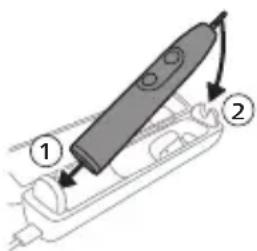
text_image
Diagram of a handheld device with labeled parts, showing two numbered components and directional arrows indicating movement.Izoh: Qadoqdagi aksessuarlar xarid qilingan modelga qarab farqlanishi mumkin.
1 USB kabelni sayohat quvvatlagich g'ilofiga kiriting.
2 Biriktirilgan USB kabelni quyidagi 5V kuchlanishli doim tok ta'minot blokiga ulang.
- Faqat Philips bilan muvofiq quvvatlagichlar yoki nominal kirish quvvatlari bilan xavfsizligi tasdiqlangan adapterlarida quvvatlang: 100 - 240V\~; 50/60Hz; 3,5 Vt va chiqish kuchlanishi 5VDC; 2,5 Vt.
- UL bilan qayd etilgan yoki 1310 Toifa 2 bilan sertifikatlangan quvvat ta'minoti (faqat NAM).
Muhim: Devor adapteri qurilma ostida ko'rsatilgan elektr parametrliari bilan mos keladigan o'ta kam kuchlanishning xavfsiz manbai bo'lishi lozim.
natural_image
Line drawing of a medical procedure with a tool and tubing (no text or symbols)1 Cho'tka kallagini chiqarib oling va metall val atrofi va tugmalarini iliq suv bilan yuving. Dasta va tugmalar atrofidagi tish pastasi goldiqlarini haftada kamida bir marta, lekin yaxshisi har foydalanishdan keyin tozalang.
Ogohlantirish: Metall valdagi yoki tugmalar atrofidagi rezina zichlagichni o'tkir narsalar bilan bosmang, bu shikastlanishga olib kelishi mumkin.
2 Dastaning butun yuzasini nam mato bilan artib oling.
Izoh: Ortiqcha suvni yo'qotish uchun dastani rakovinaga urmang.
3 Dastani yumshoq mato yoki sochiq bilan quriting.
Cho'tka kallagi
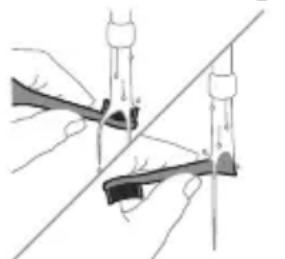
natural_image
Illustration of two hands using a tool to cut or mark a surface, with no visible text or symbols1 Cho'tka kallagi va cho'tkani har foydalanishdan keyin yuving.
2 Cho'tka kallagini dastadan chiqarib oling va cho'tka kallagi ulanish qismini kamida haftada bir marta iliq suv bilan yuving. Sayohat qopqog'ini zarur bo'Igancha tez-tez yuving va havoda quriting. Faqat quruq cho'tka kallagida ishlating.
natural_image
Simple line drawing of an open book with no text or symbols visiblenatural_image
Illustration of a hand holding a tool with a pointed tip and arrow indicating direction (no text or symbols)natural_image
Simple line drawing of a curved object with a checkmark indicating a detail (no text or symbols)natural_image
Illustration of a hand using a pipette to apply liquid onto a surface, with an inset showing a droplet on a surface (no text or symbols present)text_image
Hand-drawn diagram showing a power button with an 'Power' icon and a circular button, likely indicating a control or operation step.natural_image
Diagram of dental arching with tooth structure and tool (no text or labels)text_image
Diagram showing two types of dental arches with numbered labels indicating different tooth positions or regions.text_image
clean sensitive whitenatural_image
Pure electrical circuit lines without any symbolstext_image
Diagram showing a microphone with a Wi-Fi symbol and an icon of the microphone above it.natural_image
Line drawing of a person holding a pen, no text or symbols presenttext_image
Diagram showing two dental arch structures with numbered labels indicating different tooth locations or regions.- G3 Premium Gum Care: tryb Gum Health
- W3 Premium White lub W DiamondClean (NAM) / W OptimalClean (ROW): tryb White
- S2 Sensitive: tryb Sensitive
natural_image
Diagram showing a mechanical component with a downward arrow and a small square base, no text or symbols present.text_image
Diagram of a handheld device with labeled parts, showing two numbered components and directional arrows indicating movement.natural_image
Simple line drawing of a medical procedure with a tool inserted into tissue (no text or symbols)natural_image
Illustration of two hands using a tool to cut or adjust a mechanical component, with no visible text or symbols.www.philips.com/support
natural_image
Simple line drawing of an open book with no text or symbols visiblenatural_image
Illustration of a hand holding a toothbrush with an arrow indicating force or movement (no text or symbols)natural_image
Simple line drawing of a curved object with a checkmark indicating a detail (no text or symbols)natural_image
Illustration of a hand using a pipette to apply liquid onto a surface, with an inset showing a droplet on a surface (no text or symbols present)text_image
Hand-drawn diagram showing a power button with an 'Power' icon and a button labeled 'C' pointing to it.natural_image
Diagram showing dental tool application on upper teeth with magnified detail (no text or labels)text_image
Diagram showing two types of dental arches with numbered labels indicating different tooth positions or regions.natural_image
Pure electrical circuit lines without any symbolsnatural_image
Diagram of a microphone with a circular icon showing wireless signal, no text or symbols presentnatural_image
Line drawing of a person holding a pen, no text or symbols presenttext_image
Diagram showing two dental arch structures with numbered labels indicating different tooth locations or regions.flowchart
graph TD
    A["Process"] --> B["Output"]
- S2 Sensitive: modo Sensitive.
natural_image
Diagram showing a mechanical component with a downward arrow and a small square component on a base (no text or symbols)text_image
Diagram showing a device with labeled parts, including a pen and directional arrows indicating movement or assembly.natural_image
Simple line drawing of a medical procedure with a needle inserted into tissue (no text or symbols)natural_image
Illustration of two hands holding a tool with a diagonal line crossing through (no text or symbols)GARANTIAS IMPLÍCITAS
natural_image
Simple line drawing of an open book with no text or symbols visiblenatural_image
Illustration of a hand holding a tool with a textured handle and arrow indicating motion (no text or symbols)natural_image
Simple line drawing of a curved object with a checkmark (no text or symbols)natural_image
Illustration of a hand using a pipette to apply liquid onto a surface, with an inset showing a droplet on a surface (no text or symbols present)text_image
Hand-drawn diagram showing a power button with an 'OK' icon and a circular button, likely indicating a control or operation step.natural_image
Diagram showing dental alignment with a tooth and a tool, no text or symbols presenttext_image
Diagram showing two dental arch structures with numbered labels indicating different tooth locations or regions.text_image
clean safe pipe whiteClean Sensitive Gum Health White
Clean Sensitive Gum Health White
natural_image
Simple line drawing of a three-circle object and a vertical bar with two circles connected by lines (no text or symbols)natural_image
Diagram of a microphone with a circular icon showing signal waves (no text or symbols)natural_image
Line drawing of a person holding a toothbrush (no text or symbols)text_image
Diagram showing two dental arch structures with numbered labels indicating different tooth locations or regions.- G3 Premium Gum Care: Mod Gum Health
- W3 Premium White sau W DiamondClean (NAM)/W OptimalClean (ROW): Mod White
- S2 Sensitive: Modul Sensitive
natural_image
Diagram showing a mechanical component with a downward arrow and a small square component on a circular base (no text or symbols)text_image
Diagram of a handheld device with labeled parts, showing two numbered components and directional arrows indicating movement.natural_image
Line drawing of a squid being cut with a pen, no text or symbols presentnatural_image
Illustration of two hands using a tool to cut or mark a surface, with no visible text or symbolswww.philips.com/support
natural_image
Simple line drawing of an open book with no text or symbols visiblenatural_image
Illustration of a hand holding a toothbrush with an arrow indicating force or movement (no text or symbols)natural_image
Simple line drawing of a curved object with a checkmark indicating a detail (no text or symbols)natural_image
Illustration of a hand using a pipette to apply liquid onto a surface, with an inset showing a magnified view of a textured surface (no text or symbols present)text_image
Hand-drawn diagram showing a power button with an 'Power' icon and a circular button labeled 'On'.natural_image
Diagram showing a hand holding a small object with directional arrows indicating movement, labeled '45°' (no text or symbols on the diagram itself)Shqip
natural_image
Illustration of dental tool application on upper teeth with magnified view (no text or symbols)text_image
Diagram showing two dental arch structures with numbered labels indicating different tooth locations or regions.text_image
clean safe pipe whiteClean "Sensitive" Gum Health White
Clean "Sensitive" Gum Health White
natural_image
Pure electrical circuit lines without any symbolsnatural_image
Diagram of a microphone with a circular icon showing wireless signal, no text or symbols presentnatural_image
Line drawing of a person using a toothbrush (no text or symbols)text_image
Diagram showing two dental arch structures with numbered labels indicating different tooth locations or regions.- G3 Premium Gum Care: Modaliteti "Gum Health"
- "W3 Premium White" ose "W DiamondClean (NAM)" / "W OptimalClean (ROW)": Modaliteti "White"
- S2 Sensitive: Modaliteti "Sensitive"
natural_image
Diagram showing a mechanical component with a downward arrow and a small cylindrical object on a base (no text or symbols)text_image
Diagram of a handheld device with labeled parts, showing two numbered components and directional arrows.natural_image
Simple line drawing of a medical procedure with a needle inserted into tissue (no text or symbols)natural_image
Illustration of two hands using a tool to cut or mark a surface, with no visible text or symbolswww.philips.com/support
natural_image
Simple line drawing of an open book with no text or symbols visibleTa simbol pomeni, da morate pred uporabo aparata prebrati navodila za uporabo.
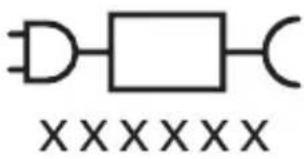
text_image
XXXXXXTa simbol pomeni, da morate uporabiti navedeni napajalnik.
Predvidena uporaba
natural_image
Illustration of a hand holding a toothbrush with an arrow indicating force or direction (no text or symbols)natural_image
Simple line drawing of a bulb-like shape with a checkmark mark (no text or symbols)natural_image
Illustration of a hand using a pipette to apply liquid onto a surface, with an inset showing a droplet on a surface (no text or symbols present)text_image
Hand-drawn diagram showing a power button with an icon and a circular button, likely indicating a control or operation step.3 Zobno ščetko Philips Sonicare vklopite tako, da pritisnete gumb za vklop/izklop.
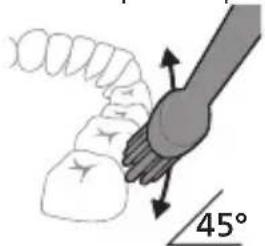
natural_image
Diagram showing a hand holding a small object with directional arrows, labeled '45°' (no text or symbols on the object itself)natural_image
Diagram of dental arching with tooth structure and shaded area (no text or labels)text_image
clean safe pipe whitenatural_image
Pure electrical circuit lines without any symbolsnatural_image
Diagram of a toothbrush with a sensor icon and signal symbol (no text or labels)natural_image
Line drawing of a person using a toothbrush (no text or symbols)text_image
Diagram showing two dental arch structures with numbered labels indicating different tooth locations or regions.flowchart
graph TD
    A["Traffic Light Icon"] --> B["Terminal Block"]
    style A fill:#f9f,stroke:#333
    style B fill:#ccf,stroke:#333
natural_image
Simple diagram showing a mechanical component with a downward arrow and a small circular base (no text or symbols)text_image
Diagram of a handheld device with labeled parts, showing two numbered components and directional arrows.natural_image
Simple line drawing of a medical procedure with a tool and tubing (no text or symbols)natural_image
Illustration of two hands using a tool to lift or stand (no text or symbols present)www.philips.com/support
www.philips.com/support
natural_image
Simple line drawing of an open book with no text or symbols visibleTento symbol znamená, aby ste si pred použitím zariadenia prečítali návod na použitie.
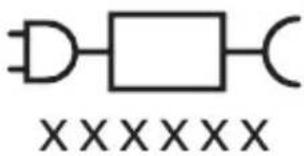
text_image
XXXXXXnatural_image
Illustration of a hand holding a toothbrush with an arrow indicating force or direction (no text or symbols)natural_image
Simple line drawing of a bulb-like shape with a checkmark indicating a measurement or inspection (no text or symbols present)natural_image
Illustration of a hand using a pipette to apply liquid onto a surface, with an inset showing a droplet on a surface (no text or symbols present)text_image
Hand-drawn diagram showing a power button with an 'Power' icon and a button labeled 'On' pointing to it.natural_image
Diagram showing a hand holding a small object with directional arrows indicating movement, labeled '45°' (no text or symbols on the diagram itself)4 Jemne udržujte štetiny v polohe na zuboch a d'asnách. Zuby čistite krátkymi pohybmi dopredu a dozadu tak, aby štetiny dosahovali do priestorov medzi zubami. Tento pohyb opakujte počas celého čistiaceho cyklu.
natural_image
Diagram showing dental tool interacting with teeth (no text or symbols)text_image
Diagram showing two dental arch structures with numbered labels indicating different tooth positions or regions.text_image
clean smooth whitenatural_image
Pure electrical circuit lines without any symbolsnatural_image
Illustration of a toothbrush with a sensor icon and signal symbol (no text or labels)Technológia BrushSync umožňuje komunikáciu kefkového nadstavca s rukovätou pomocou mikročipu. Symbol ♿spodnej časti kefkového nadstavca znamená, že kefkový nadstavec je vybavený touto technológiou. Technológia BrushSync umožňuje:
natural_image
Line drawing of a person holding a pen, no text or symbols presenttext_image
Diagram showing dental arch structures with numbered labels for orthodontic and orthodontic viewsflowchart
graph TD
    A["Process Node"] --> B["Process Box"]
natural_image
Diagram showing a mechanical component with a downward arrow and a small cylindrical part attached to a circular base (no text or symbols)text_image
Diagram of a handheld device with labeled parts, showing two numbered components and directional arrows.natural_image
Simple line drawing of a medical procedure with a needle inserted into tissue (no text or symbols)natural_image
Illustration of two hands using a tool to adjust or install a mechanical component (no text or symbols visible)www.philips.com/support
natural_image
Simple line drawing of an open book with no text or symbols visibleOvaj simbol označava da je potrebno pročitati uputstvo za upotrebu pre korišćenja uređaja.
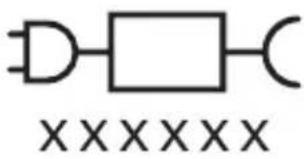
text_image
XXXXXXnatural_image
Illustration of a hand holding a toothbrush with an arrow indicating force or direction (no text or symbols)1 Poravnajte glavu četkice tako da su vlakna okrenuta u istom smeru kao i prednja strana drške.
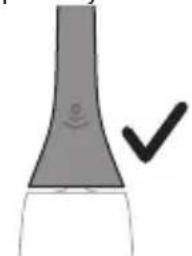
natural_image
Simple line drawing of a funnel-shaped object with a checkmark mark (no text or symbols)2 Čvrsto pritisnite glavu četkice na metalnu osovinu do kraja.
natural_image
Illustration of a hand using a pipette to apply liquid onto a surface, with an inset showing a microplate (no text or symbols present)1 Pokvasite vlakna i nanesite malu količinu paste za zube.
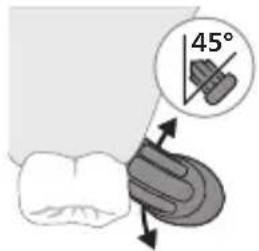
text_image
45°2 Postavite vlakna četkice za zube na zube tako da budu pod blagim uglom (45 stepeni). Čvrsto pritisnite kako bi vlakna stigla do desni ili malo ispod desni.
text_image
Hand-drawn diagram showing a power button with an 'Power' icon and a button labeled 'OK' pointing to it.natural_image
Diagram showing dental tool application on upper teeth with magnified detail (no text or symbols)text_image
Diagram showing two dental arch structures with numbered labels indicating different tooth locations or regions.text_image
clean safe pipe whiteDa biste ručno promenili režim, pritisnite dugme za režim/intenzitet kad je četkica za zube isključena. Sve glave sa četkicom rade u svakom režimu.
Clean Sensitive Gum Health White
| Pogodnost Uklanjanje plaka | Veoma nežan režim za osetljive zube i desni | Uklanjanje plaka i masaža desni | Uklanjanje plaka i mrlja sa površina | |
| Preporučeni nivo intenziteta | Visok Nizak* Visok Visok | |||
| Ukupno vreme pranja zuba | 2 minuta 2 minuta 3 minuta i 20 sekundi | 2 minuta i 40 sekundi | ||
Clean Sensitive Gum Health White
| Kako se pere Perite svaki segment 20 sekundi. | perite svaki segment 20 sekundi | perite svaki segment 20 sekundi, | perite svaki segment 20 sekundi, |
| | | |
| | 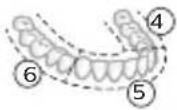 | 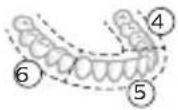 |
| a zatim perite segmente 7,8,9 i 10, svaki po 20 sekundi. | a zatim perite segmente 7 i 8, svaki po 20 sekundi. |
Intenziteti
Postavke intenziteta
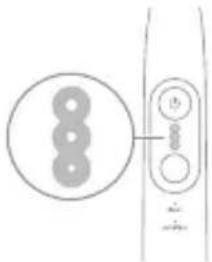
natural_image
Pure electrical circuit lines without any symbolsElektrična četkica za zube ima 3 različitih postavki za intenzitet:
- Veliki intenzitet (tri svetla)
- Srednji intenzitet (dva svetla)
- Mali intenzitet (jedno svetlo)
Napomena: za najbolje rezultate preporučujemo visok intenzitet.
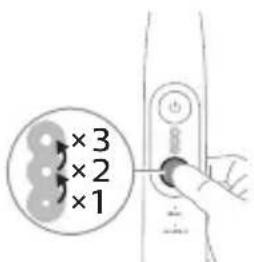
text_image
×3 ×2 ×1Da biste ručno izabrali željeni intenzitet, pritisnite dugme za režim/intenzitet dok je četkica za zube uključena da biste se kretali kroz opcije. Postavka intenziteta se može prilagoditi samo kada je četkica za zube uključena.
Tehnologija BrushSync
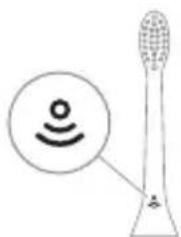
natural_image
Diagram of a toothbrush with a circular icon showing wireless signal (no text or symbols)natural_image
Line drawing of a person using a toothbrush (no text or symbols)Ako prekomerno pritiskate, drška menja zvuk i vibraciju, a svetlo povratnih informacija o pranju zuba treperi ljubičasto na dnu drške dok ne smanjite pritisak.
Napomena: Proizvod se isporučuje sa aktiviranim povratnim informacijama senzora pritiska. Da biste deaktivirali ovu funkciju (pogledajte 'Aktiviranje ili deaktiviranje funkcija').
BrushPacer
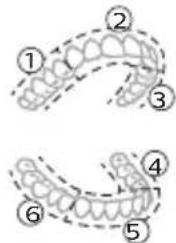
text_image
Diagram showing two dental arch structures with numbered labels indicating different tooth locations or regions.flowchart
graph TD
    A["Plug Icon"] --> B["v"]
natural_image
Diagram showing a mechanical component with a downward arrow and a small cylindrical part, no text or symbols present.2 Postavite dršku na punjač.
3 Povežite priloženi USB kabl na ulazno napajanje jednosmerne struje od 5 V.
text_image
Diagram of a handheld device with labeled parts, showing two numbered components and directional arrows indicating movement.Napomena: Uključeni dodaci mogu da se razlikuju u zavisnosti od kupljenog modela.
1 Umetnite USB kabl u putnu torbicu za punjenje.
2 Povežite priloženi USB kabl na ulazno napajanje jednosmerne struje od 5 V.
natural_image
Simple line drawing of a medical procedure with a needle inserted into tissue (no text or symbols)1 Skinite glavu četkice i isperite prostor oko metalne osovine i dugmadi toplom vodom. Najmanje jednom nedeljno, a po mogućnosti nakon svake upotrebe, obavezno uklonite svu preostalu zubnu pastu sa drške i oko dugmadi.
Oprez: Nemojte da gurate gumenu zaptivku na metalnoj osovini ili u području oko dugmadi oštrim predmetima pošto to može da dovede do oštećenja.
2 Čitavu površinu drške obrišite vlažnom krpom.
Napomena: Nemojte da udarate ručkom o sudoperu da biste uklonili višak vode.
natural_image
Illustration of two hands using a tool to lift or stand, with no visible text or symbols1 Glavu četkice i vlakna isperite nakon svake upotrebe.
2 Bar jednom nedeljno skinite glavu četkice sa drške i toplom vodom isperite njen priključak. Putni poklopac isperite kad god je to potrebno i osušite na vazduhu. Stavljajte ga samo na suvu glavu četkice.
522 Srpski
Napomena: Poklopac glave četkice upotrebljava se u transportu i nije namenjen za stalnu upotrebu.
Punjač
1 Isključite punjač iz električne mreže pre čišćenja.
2 Obrišite površinu punjača vlažnom krpom.
3 Osušite punjač mekom krpom ili peškirom.
Putna torbica
Putnu torbicu isperite toplom vodom i očistite vlažnom krpom i ostavite da se osuši na vazduhu.
Putna torbica za punjenje
1 Pre čišćenja, isključite putnu torbicu za punjenje iz struje.
2 Vlažnom krpom obrišite površinu punjača i putne torbice i ostavite da se osuši na vazduhu.
Skladištenje
Ako proizvod nećete koristiti duže vreme, isključite ga iz zidne utičnice, očistite ga i odložite na hladno i suvo mesto, dalje od direktne sunčeve svetlosti.
Zamena
Zamenite Philips Sonicare glave četkice na svaka 3 meseca kako biste postigli optimalne rezultate. Koristite samo zamjenske glave četkice Philips Sonicare.
www.philips.com/support
natural_image
Simple line drawing of an open book with no text or symbols visiblenatural_image
Illustration of a hand holding a toothbrush with an arrow indicating force or direction (no text or symbols)natural_image
Simple line drawing of a curved object with a checkmark mark (no text or symbols)natural_image
Illustration of a hand using a pen to apply a brush to a surface, with an inset showing a magnified view of a textured surface (no text or symbols present)text_image
Hand-drawn diagram showing a power button with an 'Power' icon and a circular button with a plus sign, connected by a line.natural_image
Diagram showing dental tool interacting with teeth (no text or labels)text_image
clean safe pipe whiteClean Sensitive Gum Health White
Clean Sensitive Gum Health White
natural_image
Pure electrical circuit lines without any symbolsnatural_image
Diagram of a microphone with a circular icon showing wireless signal and a sensor symbol (no text or labels)natural_image
Line drawing of a person holding a pen, no text or symbols presenttext_image
Diagram showing dental arch structures with numbered labels for each tooth and surrounding bone- G3 Premium Gum Care: Gum Health -tila
- W3 Premium White tai W DiamondClean (NAM) / W OptimalClean (ROW): White-tila
- S2 Sensitive: Sensitive-tila
natural_image
Diagram showing a mechanical component with a downward arrow and a small square base, connected to a circular base (no text or symbols)2 Aseta runko laturiin.
text_image
Diagram of a handheld device with labeled parts, showing two numbered components and directional arrows indicating movement.natural_image
Line drawing of a medical procedure with a needle inserted into tissue (no text or symbols)natural_image
Illustration of two hands using a tool to cut or mark a surface, with no visible text or symbolswww.philips.com/support
natural_image
Simple line drawing of an open book with no text or symbols visiblenatural_image
Illustration of a hand holding a toothbrush with an arrow indicating force or direction (no text or symbols)natural_image
Simple line drawing of a vertical pipe or tube with a checkmark mark indicating a detail (no text or symbols)natural_image
Illustration of a hand using a pipette to apply liquid onto a surface, with an inset showing a droplet on a surface (no text or symbols present)text_image
Hand-drawn diagram showing a power button with an 'OK' icon and a circular button, likely indicating a control or operation step.natural_image
Diagram showing dental tool application on upper teeth with magnified detail (no text or symbols)text_image
Diagram showing two dental arch structures with numbered labels indicating different tooth locations or regions.text_image
clean safe pipe whitenatural_image
Simple line drawing of a device with three circular components and a vertical connector (no text or symbols)natural_image
Diagram of a microphone with a circular icon showing wireless signal, no text or symbols presentnatural_image
Line drawing of a person using a toothbrush (no text or symbols)text_image
Diagram showing two dental arch structures with numbered labels indicating different tooth locations or regions.natural_image
Diagram showing a mechanical component with a downward arrow and a small cylindrical part attached to a circular base (no text or symbols)text_image
Diagram of a handheld device with labeled parts, showing two numbered components and directional arrows indicating movement.natural_image
Simple line drawing of a fork with a knife inserted, no text or symbols presentnatural_image
Illustration of two hands using a tool to cut or adjust a mechanical component, with no visible text or symbols.www.philips.com/support
Möhüm howpsuzlyk maglumaty
Bu önümi diñe onuň niyetlenilýän maksady üçin ulanyň. Önümi we onuň batareýalaryny hem-de esbaplaryny ulanmazdan ozal, şu maglumatı üns bilen okaň hem-de geljekde gollanmak üçin ýygnap goýuň. Nädogry ulanmak howplara yá-da agyr şikeslere eltip bilýär.
DUYDURYSLAR
- Diñe hakyky Philips esbaplaryny a-da sarp ediş materiallaryny ulanyň. Eger berlen bolsa, diñe original USB kabelini we USB tok üpjünçilik bloguny ulanyň.
- Bu enjamda ulanyjynyň tehniki hyzmat edip biljek şaýlary ýokdur. Eger enjama zeper ýetse, ony ulanmagy bes ediň we ýurduňyzdaky Müşderi goldawy merkezine ýüz tutuň. USB kabele zeper ýeten bolsa, ony ulanmagy bes ediň.
- Zarýad berijileri we syýahat wagtynda zarýad beriş çeholyny suwdan uzakda saklaň.
- Arassalanyňyzdan soň zarýad berijileri we syýahat wagtynda zarýad beriş çehollaryny birikdirmezden ozal olaryň doly gurandygyna göz yetiriň.
- Enjamy çagalar, şeyle hem enjamy howpsuz görnüşde ulanmak boyunça gözükdirijiler berlen ya-da howpsuz ulanmak boyunça gözegçilik astyndaky we degişli howplar özlerine mälim edilen yagdaýnda fiziki, duýgurlyk yada zehin ukyplary pes ya-da tejribesi we bilimi bolmadyk şahslar hem ulanyp biler. Çagalar gözegçilik astynda däl wagty enjamda arassaçylyk we ulanyjy tarapyndan geçirilmäge degişli abatlayış işlerini geçirmeli däl.
- Çagalaryň önlem bilen oýnamazlygyny üpjün etmek üçin olary gözegçilikde saklamaly.
- Önümiň hiç bir bölegini gap-gaç yuwujyda arassalamaň.
- Adapterleri we zarýad berijileri açyk howada yá-da gyzdyrylýan üstleriň ýakynynda ulanmaň.
-
Bu enjam diñe dişleri, diş etini we dili arassalamak üçin dizayın edilendir.
-
Gyllary mynjiyran ća-da eplenen çotga nasadkasyny ulanmagy bes ediñ.
Nasadkany her 3 aydan ya-da könelme alamatlary yüze çyksa, ondan hem ir calşyryň. - Düzüminde efir yaglary ya-da kokos yagy bar bolan önümler bilen gönümel galtaşdyrmaň. Galtaşma gyllaryň gopmagyna eltip biler.
- Ulanmagyň maksimum beýikligi 4500 metrdir.
LUKMANÇYLYK DUÝDURYŞLARY
- Eger ulanyşdan soň çendenaşa ganama yüze çyksa, ganama ulanyşdan 1 hepde geçensoň yüze çykmaga dowam etse ya-da bimazalyk ya-da agyry duýsaňyz, enjamy ulanmagy bes ediň we stomatolog/lukman bilen maslahatlaşyn.
- Eger öňki 2 ayda agyz yá-da diş eti operasiýasyny geçiren bolsaňyz, bu enjamy ulanmazdan öň stomatologyňyz bilen maslahatlaşyn.
- Eger size kardiostimulýator yá-da başga bir implant enjam goýlan bolsa, ulanmazdan öň lukmanyňyza yá-da implant enjamyň öndürijisine yüz tutuň.
- Eger lukmançylyk taýdan şübhelenseňiz, bu enjamy ulanmazdan öz lukmanyňyz bilen maslahatlaşyn.
- Bu önüm şahsy ideg enjamy bolup, stomatologik klinikada yá-da edarada birnäge näsagda ulaşmak üçin niyetlenilmeyär.
BATAREYIŃ HOWPSUZLYGY BOÝUNÇA GÖZÜKDIRIJILER
natural_image
Simple line drawing of an open book with no text or symbols visibleBu nysan enjamy ulanmazdan ozal ulanyş gözükdirijilerini okaň diýmegi aňladýar.
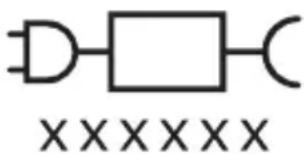
text_image
XXXXXXBu nyşan görkezilen elektrik üpjünçiligini ulanmalydygyny aňladýar.
Niyetlenilýän ulanys
Sonicare Prestige elektrikli diş çotgalary dişiň çüyremegini azaltmak we agyz saglygyny saklamak maksady bilen, dişlerdäki daşy hem-de iýmit galyndylaryny ayyrmaklyga niyetlenilýär.
Philips Sonicare enjamyňyz (Şek. 1.)
natural_image
Illustration of a hand holding a toothbrush with an arrow indicating force or movement (no text or symbols)1 Gyllar tutawajyň öň tarapy bilen bir ugra seredip durar ýaly edip, nasadkany deňlän.
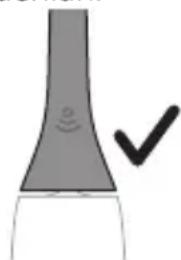
natural_image
Simple line drawing of a curved object with a checkmark indicating a detail (no text or symbols)2 Nasadkany metal walyň üstüne ol aňryk baryp direyänçä közümli basyň.
natural_image
Illustration of a hand using a pipette to apply liquid onto a surface, with an inset showing a droplet on a surface (no text or symbols present)1 Gyllary öllän we üstüne azajyk diş pastasyny çalyn.
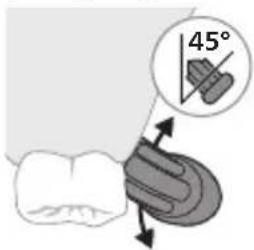
text_image
45°text_image
Hand-drawn diagram showing a power button with an 'Power' icon and a button labeled '0'' pointing to it.natural_image
Diagram showing a hand holding a tool with a 45-degree angle indicator (no text or symbols on the diagram itself)natural_image
Diagram showing dental tool application on upper teeth with magnified view of tooth structure (no text or labels)text_image
Diagram showing two dental arch structures with numbered labels indicating different tooth locations or regions.text_image
clean safe pipe whiteClean Sensitive Gum Health White
| Yeňillik Daş aýrymak Duýgur dişler we diş etleri üçin iňnän mylaýym tertip | Daş aýrymak we diş eti massažy | Daş we üst tegmiller aýrymak | |
| Maslahat berilýan ýygjamlyk derejesi | Ýokary Pes* Ýokary Ýokary | ||
| Jemi çotgalama wagty | 2 minut 2 minut 3 minut we | 20 sekunt | 2 minut we 40 sekunt |
Clean Sensitive Gum Health White
| Çotgalaÿys usuly | Her segmenti 20 sekunt çotgalaň. | Her segmenti 20 sekunt çotgalaň | Her segmenti 20 sekunt çotgalaň, | Her segmenti 20 sekunt çotgalaň, |
| 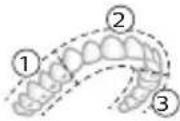 | 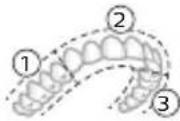 | 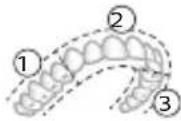 | |
| 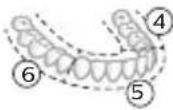 | | | |
| soñra segment 7,8,9 bilen 10-iň her birini 20 sekunt çotgalaň. | soñra segment 7 bilen 8-iň her birini 20 sekunt çotgalaň. | |||
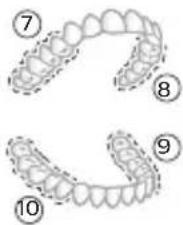 | 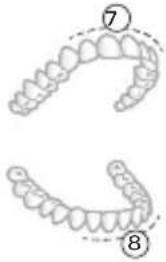 |
Ýygjamlyklar
Ýygjamlyk sazlamalary
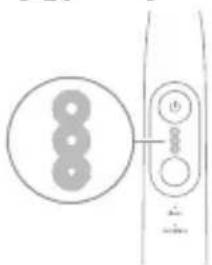
natural_image
Pure electrical circuit lines without any symbolsElektrikli diş çotgaňyz 3 dürli ýygjamlyk sazlamasy bilen gelýär:
- Yokary yygjamlyk (üç çyra)
- Orta ýygjamlyk (iki çyra)
- Pes yygjamlyk (bir çyra)
Bellik: Iň oňat netijeler üçin ýokary ýygjamlygy maslahat berýāris.
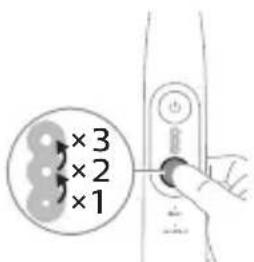
text_image
×3 ×2 ×1natural_image
Diagram of a microphone with a circular icon showing wireless signal, no text or symbols presentnatural_image
Line drawing of a person using a toothbrush (no text or symbols)Eger artykmaç basyş etseñiz, tutawaç tä basyşy azaldyançaňyz öz sesini hem-de titremesini üýtgedýär we tutawajyň aşagyndaky çotgalama seslenme çyrasy mawy reňkde ýanyp-öçýär.
text_image
Diagram showing two dental arch structures with numbered labels indicating different tooth locations or regions.BrushPacer agyz boşlugyňzy 6 bölege bölmek arkaly tutuş agyzda gyradeň çotgalamaga kömek edýän aralyk taýmeri bolup durýar.
Bellik: White yá-da Gum Health tertiplerini ulanýan wagtyňyz, goşmaça wagt goşulmagy mümkin.
SmarTimer
flowchart
graph TD
    A["Plug Icon"] --> B["Terminal Node v"]
- W3 Premium White ya-da W DiamondClean (NAM) / W OptimalClean (ROW): White tertibi
- S2 Sensitive: Sensitive tertibi
natural_image
Diagram showing a mechanical component with a downward arrow and a small cylindrical part attached to a circular base (no text or symbols)2 Tutawajy zarýadnige yerleşdiriň.
3 Dakylgy USB kabelini 5V hemişelik tok çeşmesine birikdiriň,
Türkmençe
- Diñe Philips bilen sazlaşykly ya-da giriş derejesi aşakda berlen howpsuzlygy tassyklanan adapterler bilen zarýad berin: 100 - 240V\~; 50/60Hz; 3,5W we çykyş derejeleri 5V hemişelik tok; 2,5W.
- UL talaplaryna laýyk gelýän ya-da 1310 Class 2 standardy boýunça sertifisirlenen tok çeşmesi (diñe NAM)
text_image
Diagram of a handheld device with labeled parts, showing two numbered components and directional arrows.natural_image
Simple line drawing of a medical procedure with a needle inserted into tissue (no text or symbols)natural_image
Illustration of two hands using a tool to cut or mark a surface, with no visible text or symbols1 Her ulanyşdan soň nasadkany we gyllary ýuwup durlaň. 2 Azyndan hepdede bir gezek nasadkany tutawaçdan ayryp, nasadkanyň birikmesini ýyly suw bilen ýuwup durlaň. Syýahat gapagyny näçe ýygylykda zerur bolsa ýuwup durlaň we howa bilen guradyň. Diňe gury nasadkany ulanyň.
Bellik: Nasadkanyň gapagy ony daşamakda ulanylýar we hemişe ulanylmaga niyetlenilmeyär.
Zarýadnik
Kepillik we goldaw (ROW)
Maglumat yá-da goldaw gerek bolsa, www.philips.com/support salgysyna girin yá-da halkara kepillik hatyny okaň.
natural_image
Simple line drawing of an open book with no text or symbols visiblenatural_image
Illustration of a hand holding a tool with a pointed tip, showing a force or grip (no text or symbols present)natural_image
Simple line drawing of a bulb-like object with a checkmark mark (no text or symbols)natural_image
Illustration of a hand using a pipette to apply liquid onto a surface, with an inset showing a microplate (no text or symbols present)text_image
Hand-drawn diagram showing a power button with an icon and a circular button, likely indicating a switch or control.natural_image
Diagram showing a hand holding a small object with directional arrows indicating movement, labeled '45°' (no text or symbols on the diagram itself)natural_image
Diagram showing dental tool application on upper teeth with magnified detail (no text or symbols)text_image
clean sensitive whitenatural_image
Pure electrical circuit lines without any symbolsnatural_image
Diagram of a microphone with a sensor icon and signal symbol, no text or labels presentnatural_image
Line drawing of a person holding a toothbrush (no text or symbols)natural_image
Simple diagram showing a device pressing into a cylindrical component with a cable (no text or symbols)text_image
Diagram of a handheld device with labeled parts, showing internal components and directional arrows.natural_image
Simple line drawing of a medical procedure with a tool and tubing (no text or symbols)natural_image
Illustration of two hands using a tool to cut or mark a mechanical component, with no visible text or symbols.www.philips.com/support
natural_image
Simple line drawing of an open book with no text or symbols visiblenatural_image
Illustration of a hand holding a toothbrush with an arrow indicating force (no text or symbols)natural_image
Simple line drawing of a curved object with a checkmark indicating a detail (no text or symbols)natural_image
Illustration of a hand using a pipette to apply liquid onto a surface, with an inset showing a droplet on a surface (no text or symbols present)text_image
Hand-drawn diagram showing a power button connected to a circular button, likely indicating a switch or control interface.natural_image
Diagram showing a hand holding a tool with a 45-degree angle indicator (no text or symbols on the diagram itself)natural_image
Diagram showing dental tool application on upper teeth with magnified detail (no text or symbols)text_image
clean safe pipe whitenatural_image
Simple diagram showing a circle with three circles and a vertical line with three circular elements (no text or symbols)natural_image
Illustration of a toothbrush with a circular icon showing a sensor symbol (no text or labels)natural_image
Line drawing of a person holding a toothbrush (no text or symbols)flowchart
graph TD
    A["Process Node"] --> B["Terminal Node 2"]
natural_image
Diagram showing a mechanical component with a downward arrow and a small rectangular object on a base (no text or symbols)text_image
Diagram of a handheld device with labeled parts, showing internal components and directional arrows.natural_image
Line drawing of a medical procedure showing a tool interacting with a bundle of tissue (no text or symbols)natural_image
Illustration of two hands using a tool to lift or stand on a diagonal line (no text or symbols)www.philips.com/support
natural_image
Simple line drawing of an open book with no text or symbols visiblenatural_image
Illustration of a hand holding a toothbrush with an arrow indicating force or movement (no text or symbols)natural_image
Simple line drawing of a curved object with a checkmark indicating a detail (no text or symbols)natural_image
Illustration of a hand using a pipette to apply liquid onto a surface, with an inset showing a droplet on a surface (no text or symbols present)text_image
Hand-drawn diagram showing a power button with an 'OK' icon and a circular button labeled 'OK'.natural_image
Diagram showing dental tool application on upper teeth with magnified view (no text or symbols)text_image
clean safe whiteClean Sensitive Gum Health White
Clean Sensitive Gum Health White
| Кантип | Ар бир | Ар бир | Ар бир | Ар бир |
| тишти | сегментти | сегментти | сегментти | сегментти |
| тазалоо | 20 секунддай | 20 секунддай | 20 секунддай | 20 секунддай |
| керек | тазалаңыз. | тазалаңыз | тазалаңыз, | тазалаңыз, |
| 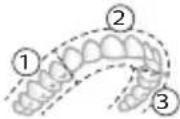 | 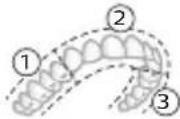 | 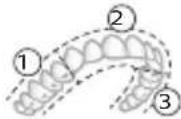 | |
| 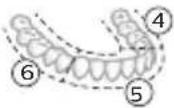 | 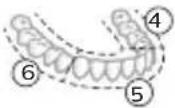 | 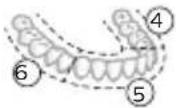 | |
| Андан кийин 7,8,9 жана 10-сегментт-ин ар бирин 20 секунддай тазалаңыз. | Андан кийин 7 жана 8-сегменттин ар бирин 20 секунддай тазалаңыз. | |||
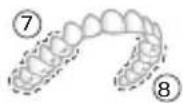 | 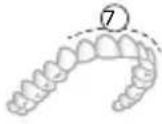 | |||
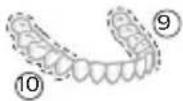 | 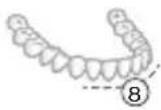 |
Ургаалдыгы
natural_image
Pure electrical circuit lines without any symbolsnatural_image
Diagram of a toothbrush with a sensor icon and signal symbol (no text or labels)natural_image
Line drawing of a person holding a pen, no text or symbols presentflowchart
graph TD
    A["Person Icon"] --> B["Terminal Node 1"]
natural_image
Diagram showing a mechanical component with a downward arrow and a small square component on a base (no text or symbols)2 Кармагычты кубаттагычтын устүне коюңуз.
3 Камтылган USB кабелин 5V DC кубат булагына туташтырыңыз.
text_image
Diagram of a handheld device with labeled parts, showing two numbered components and directional arrows.natural_image
Simple line drawing of a biological or anatomical structure with a central rod and branching elements (no text or symbols)natural_image
Illustration of two hands using a tool to cut or mark a surface, with no visible text or symbolsnatural_image
Simple line drawing of an open book with no text or symbols visiblenatural_image
Illustration of a hand holding a toothbrush with an arrow indicating force or direction (no text or symbols)natural_image
Simple line drawing of a curved object with a checkmark mark (no text or symbols)natural_image
Illustration of a hand using a pipette to apply liquid onto a surface, with an inset showing a magnified view of the surface (no text or symbols present)text_image
Hand-drawn diagram showing a power button with an 'Power' icon and a circular button labeled 'Circle' pointing to it.natural_image
Diagram showing dental tool application on upper teeth with magnified detail (no text or symbols)Clean Sensitive Gum Health White
Clean Sensitive Gum Health White
natural_image
Simple diagram showing a circle with three circles and a vertical line with four circles connected by lines (no text or symbols)natural_image
Illustration of a toothbrush with a sensor icon and a circle highlighting the sensor area (no text or symbols present)natural_image
Line drawing of a person holding a pen, no text or symbols presenttext_image
Diagram showing dental arch anatomy with numbered labels for different tooth positions or regionsnatural_image
Diagram showing a mechanical component with a downward arrow and a small square base, connected to a circular base (no text or symbols)text_image
Diagram of a handheld device with labeled parts, showing two numbered components and directional arrows indicating movement.natural_image
Line drawing of a medical procedure with a tool inserted into tissue (no text or symbols)natural_image
Illustration of two hands using a tool to lift or stand, forming a V-grip (no text or symbols present)natural_image
Simple line drawing of an open book with no text or symbols visiblenatural_image
Illustration of a hand holding a toothbrush with an arrow indicating force (no text or symbols)natural_image
Simple line drawing of a funnel with a checkmark mark (no text or symbols)natural_image
Illustration of a hand using a pipette to apply liquid onto a surface, with an inset showing a droplet on a surface (no text or symbols present)text_image
Hand-drawn diagram showing a power button with an 'Power' icon and a button labeled 'On' pointing to it.natural_image
Diagram showing dental tool interacting with teeth (no text or labels)text_image
Diagram showing two dental arch structures with numbered labels indicating different tooth locations or regions.text_image
clean safe whitenatural_image
Pure electrical circuit lines without any symbolsnatural_image
Diagram of a toothbrush with a circular icon showing wireless signal (no text or symbols)natural_image
Line drawing of a person holding a pen, no text or symbols presentflowchart
graph TD
    A["Process"] --> B["v"]
natural_image
Diagram showing a mechanical component with a downward arrow and a small rectangular object on a base (no text or symbols)text_image
Diagram of a handheld device with labeled parts, showing two numbered components and directional arrows indicating movement.natural_image
Simple line drawing of a medical procedure with a tool and tubing (no text or symbols)natural_image
Illustration of two hands holding a tool with a diagonal line crossing through (no text or symbols)natural_image
Simple line drawing of an open book with no text or symbols visiblenatural_image
Illustration of a hand holding a tool with a pointed tip, showing a force or grip (no text or symbols present)natural_image
Simple line drawing of a curved object with a checkmark mark (no text or symbols)natural_image
Illustration of a hand using a pipette to apply liquid onto a surface, with an inset showing a microplate (no text or symbols present)text_image
Hand-drawn diagram showing a power button with an icon and a circular button, likely indicating a switch or power function.3 Барои фаьол кардани «Philips Sonicare» тугмаи фаьол/хомўшро пахш кунед.
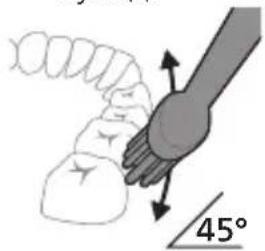
text_image
45°natural_image
Diagram showing dental tool application on upper teeth with magnified view (no text or labels)5 Барои тоза кардани сатххои дарунии дандонхои пеш, дастаки чуткаро нимамудй хам кунед ва дар хар як дандон чанд зарбан амудии якхеларо анчом дихед.
6 Пас аз анчом додани давраи дандоншуй, шумо метавонед вақти иловагиро барои тоза кардани сатхи хояндаи дандонхо ва чойхое, ки дар он догхо пайдо мешаванд, сарф кунед. Шумо инчунин метавонед забони худро бо чёткаи дандоншуйи фаьол ё гайрифаьолшуда ба таври дилхох тоза кунед.
text_image
clean sensitive whitenatural_image
Simple line drawing of a device with three circular components and a vertical connector (no text or symbols)natural_image
Diagram of a toothbrush with a circular icon showing wireless signal and a sensor symbol (no text or labels)natural_image
Line drawing of a person holding a pen, no text or symbols presentnatural_image
Diagram showing a mechanical component with a downward arrow and a small square component on a circular base (no text or symbols)2 Дастакро ба баркпуркунанда чойгир кунед.
text_image
Diagram of a handheld device with labeled parts, showing internal components and directional arrows.natural_image
Simple line drawing of a medical procedure with a tool and tubing (no text or symbols)natural_image
Illustration of two hands using a tool to cut or mark a surface, with no visible text or symbolswww.philips.com/support
natural_image
Simple line drawing of an open book with no text or symbols visiblenatural_image
Illustration of a hand holding a toothbrush with a directional arrow indicating force or movement (no text or symbols)natural_image
Simple line drawing of a bulb-like shape with a checkmark indicating a detail (no text or symbols)natural_image
Illustration of a hand using a pipette to apply liquid onto a surface, with an inset showing a cylindrical object (no text or symbols present)natural_image
Simple line drawing of a hand pressing a button on a power button (no text or symbols)natural_image
Diagram showing a hand holding a small object with directional arrows indicating movement, labeled '45°' (no text or symbols on the diagram itself)natural_image
Illustration of a tooth being brushed with a tool, showing teeth and jawbone structure (no text or symbols)text_image
clean smooth whitetext_image
Diagram showing a circular component with three holes and a vertical line labeled '上+下' (upper + lower)natural_image
Diagram of a toothbrush with a circular icon showing wireless signal (no text or symbols)natural_image
Line drawing of a person using a toothbrush (no text or symbols)text_image
Diagram showing two dental arch structures with numbered labels indicating different tooth locations or regions.flowchart
graph TD
    A["Circle with white symbol"] --> B["Terminal v"]
natural_image
Diagram showing a mechanical component with a downward arrow and a small cylindrical part attached to a base (no text or symbols)text_image
Diagram of a handheld device with labeled parts, showing two numbered components and directional arrows indicating movement.natural_image
Line drawing of a medical procedure with a needle inserted into tissue (no text or symbols)natural_image
Illustration of two hands using a tool to cut or mark a surface, with no visible text or symbolswww.philips.com/support
natural_image
Simple line drawing of an open book with no text or symbols visiblenatural_image
Illustration of a hand holding a toothbrush with an arrow indicating force or direction (no text or symbols)natural_image
Simple line drawing of a curved object with a checkmark mark (no text or symbols)natural_image
Illustration of a hand holding a pipette with a magnified inset showing a droplet on a surface (no text or symbols)text_image
Hand-drawn diagram showing a power button with an 'Power' icon and a button labeled 'C' pointing to it.natural_image
Diagram showing a hand holding a 45-degree angle with a coiled spring (no text or symbols present)natural_image
Diagram showing dental tool application on upper teeth with magnified detail (no text or symbols)text_image
clean sensitive whiteClean Sensitive Gum Health White
Clean Sensitive Gum Health White
natural_image
Pure electrical circuit lines without any symbolsnatural_image
Illustration of a toothbrush with a sensor icon and signal symbol (no text or labels)natural_image
Line drawing of a person holding a pen, no text or symbols presenttext_image
Diagram showing two dental arch structures with numbered labels indicating different tooth positions or regions.natural_image
Simple diagram showing a device with a circular component being inserted into a cylindrical base (no text or symbols)text_image
Diagram of a handheld device with labeled parts, showing two numbered components and directional arrows indicating movement.natural_image
Simple line drawing of a medical procedure with a tool and tubing (no text or symbols)natural_image
Illustration of two hands using a tool to adjust or install a mechanical component, with no visible text or symbols.natural_image
Simple line drawing of an open book with no text or symbols visibleUju ù2wùn gnìg ț unwìhu, nn wùhnpudt2un ț lqwnŋwi oqunwqnndúwù hnwhwùquttn` ùwhupwù uwnpù oqunwqnndtīn:
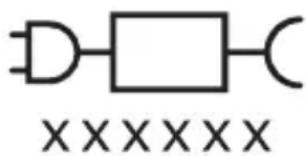
text_image
XXXXXXUju ǔ2wùn gnìg ǐ unwìhu, nn wùhnpudtī2n ǐ oqúnwqnnǎtǐ ǔ2uìwǒ ǐtǐyùnnwúwùnwlywnwnpnniún:
Lwwinnwlywjhù oqinwqnndniú
Sonicare wunwuttnp ùwpnti ni ḥtīyúnwlywù hunqwùwyluttn ùwhuwintuqlwò tǔ ynunwylwò wunwútwwhwn n u uùtnwjhù ùuwgnnnuttn winwuttnhg hānwgutni hwiūwn, hùsù oqūniś ḥuǐwqtgutl wunwuttnh hyunhtun l pwntiwylt l ywu wwwhwutl ptnwuh hunnnzh winnngniŋniūn:
2tn Philips Sonicare-n (Uy. 1.)
1 Enuwl
2 3nuwùph úhwúguìwù/wùgùnúwù lynǎwù
3 hùntùuhùnìpàwù gnighs
4 Ναδης/ηιούμης ηρωνησίας
5 Ntduhutph gnighs
6 lunqwùwlyh qìhuh yhnhuwnhùu wù hì2tigniú
7 Uwpunlngh gnighs
8 Lniuwjhu onwly
Uputuniwnutn.
9 lunqwuwlyh qlhuhlyh ywwwnhs
10 lunqwùwlyh hutlugh qihuhy(utn)
11 BrushSync ǔ2wǔ
12 USB lhgpwulnnhs (wwunh hwnfwnwlyghyn utnwnuqw s5)
13 Azwúhnnwnlywù wwnjwù
14 Lhgpwulnnüwü äwüühnnηwlywü wwwunjwü
15 USB นิที่
L2niú 3tunn unnuúwnnunn wputuniwnuttn ywnnn tǔ unwnptnulti qùuwó uunntihg ywhuulwó:
Sonicare hwultlulwð - hùzhg ulyutl
Sonicare hwultiuwsh qniqwynnuii 5 atn wunwuh hunqwuwuh hun, nnwtuqh hwwwnwnniajniu unw atq lwwwwlgutl hwuwgwughu: Uunwuh hunqwuwuh Sonicare hwultiuwshu lwwwwgti ni htwpniu npip hwwwnwnniajniu yniutuwp.
- 36unlul hunqwùwlyúwù wnnwŋnúpəwghù
- Umwgtp wùhwnwnwùwǔwgulwǒ hūnnhīnǐnǚtn lù qnnòuwlquì wnwǔwnyǔtn`ǎtn ptnwǔh hūnnzh wùnnqniējnìùn pwntǐwǔtǐni huúwùn
- Oqunulti pnlnn wizwulti nipajniutuhg u unwuwj npawghy pwnuwgnutuh
3wyltylwnq hwwuntntgh 5 uh 2wnp p22wjhù htnwhunuutph htn:
Sonicare hwultyluwdhg oqunultini hwuwn.
1 Utnptnutp Sonicare hwultyluwon atn htnwunuh ynw:
2 3wúnqultp, nn átn hánwunuh Bluetooth-p úhwgulwó 5:
3 vtngntp wunwuh hunqwuwyn` hwunqutni hwuwn, nn wju wlnhyl t (inyutnp ywnuniu tu):
4 Fugtp hwultuiwodn u htunutp pwjlnhù:
5 2niqwulntp wunwuh hunqwùwyn hwultyluwoh htun:
Ruijtntu
6 3wultiulwoh uhngnul auntnδtip δtln hw2hyn: tραt wnnwqwnyuh, wnnhwqntp ütnlywnniguwδ δnwaqntnn` ytnghù pwntiwqlniutphg u hwnlynujajniutphg oqnuvtjni hwiúwn:
7 Twnptnwpwn hunqwuwlytp` ywwwugtlnl ôtn wunwuh hunqwuwyn hwultylwohu: tnp wunwuh hunqwuwyn ywnuawulnn ytnwnu hwuwdwuniú tíh hwultylwoh htun, nnp yunwuwp wnnhwgniwutn, nnpup yoqutü puuntilwull ôtn ptnwuh hunnnzh huuwupn:
8 Ξωύωσωύτρ ψωπρτηωρων:
9 3tnwunup unuhly wwhtp winuwih hunqwùwlyhù` unljwùtph owinhúwl
yhnhuwugüwù hwiúwn:
2tnpnj hwúwówútjni hwúwn. 4wwuwógtp winnwúh hunqwúwwyn hwútjuwóh htún wútu tplnji 2wpwρen úty` hwútjuwóh hwnylnipajniùutphg/hùwnwúlnpnuqjniùutphg oqunytjni hwúwn:
Uulnnuun ltpwnl hwudwutni huiwn. 3wultuwon lwnquwnntihu uhwgntp untnnnzuwju pnyunlnipjni: tpat unnwwnntp untwnwnnpiwju pnyunlnipjni, attn htizwhunp yhwjunwptnh wunwuh hunquwwyn` nnu hwuwtihnijwju 2nguwlyutnniu qnuultini ntwpniu, u lhywnnwuw hwltyuwodniu pwniuguti hunquuwlyiwu unjwlutnp` wutuwapwnu ltpnionijniuttn u hnphnnutn unpwwwnntni huiwn:
^12 niù 3wútiúwòu oqunwqnòtìhu hwnúqūtp, nn àtn htīzuwhunuh Bluetooth- n úhwgnwò t, nnwtuqh wunwúh hunqwùwǔn lqunnnwùw qhnhuwùgti u pawnúwgutl hunqwùwúyúwù unjwiùtān hwnútiúwǒniú: bṛt hwngṭn niùtp, pā hùzni tǔ hwnuwpǔniú àtn wunwùtān hunqwùwútīni unjwiùtān, dōwùnpawgtp Sonicare-h qwnunùhnípajwù nnnijahù, nnn hwwuwùtǐh t hwnútiúwòh untnwúwúyúwù nǚpawgpniú:
natural_image
Illustration of a hand holding a toothbrush with an arrow indicating force or direction (no text or symbols)1 lonquuwlyh qihuhyn hwylwuwntgntip wjuwtu, nn uwqhutnu ninnylwó hutu uniu ninnnijuwup, hus pnuwlyh nhuwgh lnnun:
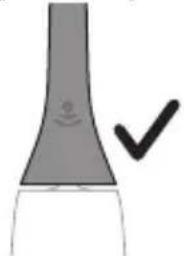
natural_image
Simple line drawing of a funnel with a checkmark indicating completion (no text or symbols)2 Uünin utnútp hunqwùwlyh qjhuhyn utnplu' utunwnwlywù jhutnh útg, uħușlu wju lyuțuq wnzuh:
L2niu' lonquiuwlyh qjhuhyh u pnjuwlyh uhqlu uhnpn wugph wnlywjnjujntiun unnuwlt:
2tn Philips Sonicare wunwutph hunqwuwgh oqunwqndnniŋ
tpti wnwghù wùqwiú tþ oqunwqnδnú ðtn Sonicare wunwúh hunqwùwʊŋ, wultih 2wn jænæng qawln Ἇnnúwɪl ́ hwiútuwinnuð nε ξιλγηνωμwù hunqwùwʊŋ htaːn: lnp wunwghù wùqwiú oqunwqnδnútnŋ zwiŋhg 2wn tǔ utnúniú qnnδwnpnniú: Uhwjù yhnwntp üninp utnúniú u janyl untp, nnwtuqh wunwúh hunqwùwʊŋ ðtn ynhwnptú úwpnh: hünnniú tþp htunutī uunnlu ùtnlywjwgulwó hunqwùwʊŋhg oqunultīni gnigniúutnhù' luwlwqnju ïwnjnìuputn uunwùwɪni hwiúwn:
Uğnün âtn ünp Sonicare LTünnwluwü winnüh hunqwüwluhı ht2unwgütinı hwüwn wnwghü 1-2 zwpwäluw nürpawgoniü oqnuwqnndtp wultih gwön lynnqwülnnniü, wjünihtinlu wügtp wultih pwnàn lynnqwülnnüwü:
Uwpnúwù hnwhuìqùtn
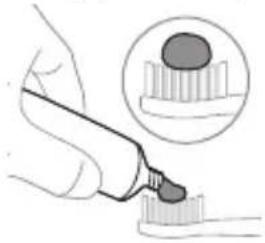
natural_image
Illustration of a hand using a pipette to apply liquid onto a surface, with an inset showing a microplate (no text or symbols present)1 陰ngtp hunqwùwuh ùwqhúutnn u ụtngntp wunwuh ùwðnilyh phz puìwulyniŋniù:
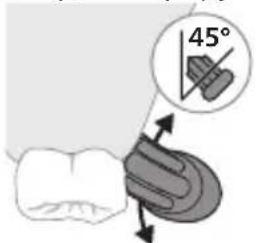
text_image
45°2 Uunwúh hunquùwúh úwqhúutn nntp wunwúutnh únw nnn2 wùljuwú unwú (45 wunhǎwú): Uúnín utnútp, nnwtyuqh úwqhúutn hwuùtǔ lùntnh tanwqàhù yhuí nnwùhg útnpu:
U2niú Uúpnnq dwúwùwly hunqwùwlyh yǔuunnún wjuhtp winnwùutnh htn 2yúwù útq:
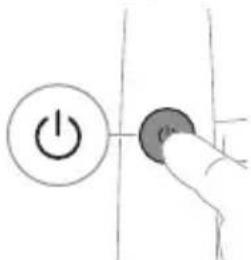
text_image
Hand-drawn diagram showing a power button with an icon and a circular button, likely indicating a control or operation step.3 Utnútp hnuwúph úhwúwú/wùgwnúwú lynówyn' Philips Sonicare-n úhwútúní huuúwn:
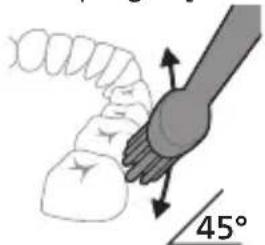
text_image
45°4 Unpntu wuhtp hunquuwlyh uwqtnu wunwutph ynw untwnnulwó u luntinh tanwqdnui: Uwpntp wunwutpn p#p#uwlyh htun ni wnwg 2wndnutpnu, npwtuqh hunquuwlyh uwqhlyutpn hwuutu wunwutphu: Cwnniuwtyp wju 2wndniún átn úwpnuwù yhnih wúpnng núpwgpnu:
L2niú hunquùwlyh úwqhúutpŋ wṭinp ห úh ひnpn ljuìwùwù: hunphnnŋ sh unnuíniú wunwùutpŋ úwpntl wjùwǒu, hùzwibu ŋnip ljuìwpnthp unylnnwlywù wunwùh hunquìwlnyú:
^12 niu 2wihwqwug utd aui2niu qnndwntjni ntwipniu fnip wjn uwhuh yhuwuwip pnuwlyh panpangh yhnhhnuiwu u uwni2wlywqnjuunl pawnpann iniuwjhu gnighsh uhngngnu:
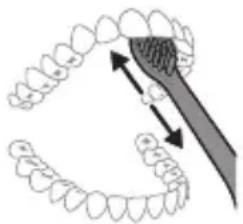
natural_image
Diagram of dental tool interacting with teeth (no text or symbols)5 Ungluh wunwutuh utnuh uwytnunyjutyn uwpntni hwiwn jatptp hunqwuwlyh pnuwlyn yhuwninhn nhnpny l u uh pwuh ninnwhwjug uwpnnn 2wpndiwutn ywuuntpjninpwwuynin wunwuh ynw:
6 Uwpntni yhniù wluwuntinig htunn lqunnn tpr inwgnighs dwuwuuwly hwnluyugutl wunwuttnh dawunn uwytntuuttnr uwpntniù u wju hwnluyudtnhu, npuntn wnwgwuniú 5 pòwynnniú: qunnn tpr iwu lswpnti ltqniù` hunqwuwyn wwhtlnl uhwgulwó lyuì wügwinnwó, hüswtu uwhupuunnniú tpr:
^12 niu 2tn Philips Sonicare winwuh hunqwuwyn wuuunwuaq t winwutnph pntytunutph (hunqwuwyn qihuhyn 2niun t uw2lnu pntytunutph unu) u winwutnph ytnwlywugunn hwnuwnwuputph (ignuniutn, 2wwhlutn, ythuhnutn) oqnwnqnouswu ntwpniu, tipti nnwup wwin2wa t u oqnwnqnouniu u stiu huwhunlniu:
BrushPacer
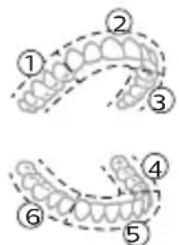
text_image
Diagram showing two dental arch structures with numbered labels indicating different tooth locations or regions.Змунчултні hwúwn, nn hwulwwwnwzwih 6p úwpnniú wúpnng ptnwùn, ptnwùn 6 úwuh puwdwùtp` oqunwqnndtlnú BrushPacer qnnδwnniyən: BrushPacer unthuüninqhwù hunqwùwlyúwiú dwúwùwlyn puwdwùniú 5 6 hwulwwwn úwuh l u waŋwù2wùniú 5, pà tnp 5 hwnlywulnn wùgutl hwgnnn. hwunylwòhù: Змwnylwòdutnh waŋwù2wùniún untnh 5 niútuniú panpangh
Ruijtntu
ywn w h : U w w n t u w tu h w:
^1 2niú' White lywú Gum Health nbdhúutnú oqnuwqnɒtju lywnn l; wultwgʊtʃl inwgnɪghz dwuwiuuŋ:
Ntchutn
Eğluynwlywù hunqwùwlyù niùh úhǔyì 4 unwnptn ntādhūṭṭn. Clean, Sensitive, White u Gum Health:
2tn oqunwqnnpdwd hutlwgh hunqwùwlyh qjhuhlyh hhúwù ynw` BrushSync unthuünqnhwjh úhqngnu wujnnúwin ytwnynu ynàunnultü owunhúwl nbdhún u hàuntüuhylnjəjniún:
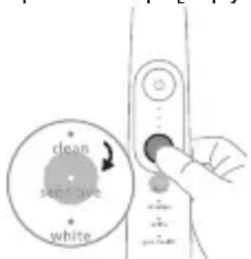
text_image
clean sensitive whiteNTdchún átnpnu ǔnhutīnì hwiúwùn hunquùwú yì wǔguwùwǒ dūwùwùy utnútp ntdhúh/hùntǔuhuǐnipāwù ynǎwùy: Fnnn hunquùwútǔnh qìhuìyǔtinù wzhùwùnniú tǔ jìnnpwùyŋnín ntdchúnú:
Clean Sensitive Gum Health White
| Unwultlnjəniù | Unwùwuhwrhhtrzwgniú | 2wihwqwugutnú ntadhúqqwjniùwnuwutphni lùntphhuwúwn | Unwùwuhwrhhtrzwgniú lu lùntphutpuniú | Unwùwuhwrnh lu uwwytplunjrahpòtnhhtrzwgniú |
| rùntùuhyn-ŋjwiùwnwqwnyul-nŋwuunhǎwùn | Fwnàn Swòn* Fwnàn Fwnàn | |||
| lonqwùwylt-lni nùnhwùnin dwnwùwyln | 2 nnwú 2 nnwú 3 nnwú, 20 | lwwjnyjwiú | 2 nnwú, 40 lwwjnyjwiú | |
Clean Sensitive Gum Health White
| hùwǒu hūnquùwúlq | 3nīnwρwǔy-nīn hwnulwǒn hūnquùwúltp 20 ūw̥jnlyjwǔ: | 3nīnwρwǔy-nīn hwnulwǒn hūnquùwúltp 20 ūw̥jnlyjwǔ | 3nīnwρwǔy-nīn hwnulwǒn hūnquùwúltp 20 ūw̥jnlyjwǔ, | 3nīnwρwǔy-nīn hwnulwǒn hūnquùwúltp 20 ūw̥jnlyjwǔ, |
 | 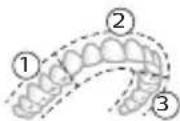 | 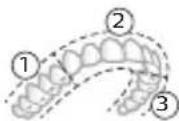 | 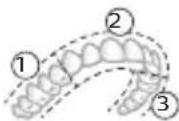 | |
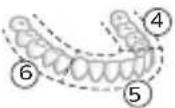 | 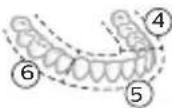 |  | 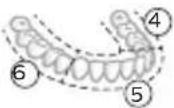 | |
| ww̥w hunqwǔwúltp 7,8,9-nn̥u 10-nn hwnulwǒut-n̥j nīnwρwǔy̥n- 20 ūw̥jnlyjwǔ: | ww̥w hunqwǔwúltp 7-nn̥u 8-nn hwnulwǒut-n̥j jnīnwρwǔy̥n- 20 ūw̥jnlyjwǔ: | |||
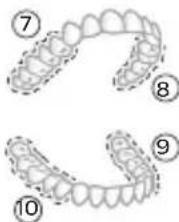 | 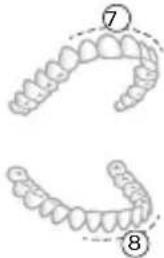 |
hùntùuhǔnīpājwù wùn hǎwùuán hùntùuhǔnīpājwù yúnqwǔnniūuán
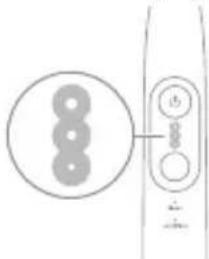
natural_image
Simple diagram showing a circle with three circles and a vertical line with three circles connected by lines (no text or symbols)Etyunpwlywù hunqwùwlyu niùh hùntùuhúlníajwù 3 unwnptn ywnqwwúnnniú. - Fwnàn hùntùuhúlníajniù (tntp lnyu)
- Uhghù hùnbuuhúniājniù (tṛnyi lnu)
- Swon huntuuhuiqniu (utu inyu)
L2niù Lwúwqniù wnnjniùpùtnh hwiúwn hunphnīn bùp unwīhu pwnàn hùntiùuhynjniù:
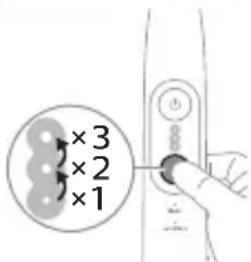
text_image
×3 ×2 ×1natural_image
Diagram of a microphone with a sensor icon and signal symbol (no text or labels)BrushSync unthuünlnqhwiù àtn hunqwùwlyh qihuhlyhù jenyl 5 unwlhu hwnnnnwulgutl pnùwlyh htun úhlynnzhwh oqünyajwúp: hunqwùwlyh qihuhlyh uunnnhù hwnnlwðniú qinùynn 2wùn gnig 5 unwlhu, nn hunqwùwlyh qihuhlyu wwwwhnylquò 5 wju unthuünlnqhwiŋnu:
BrushSync unthunnqhwi wwwhnuniú ξ.
- lunqwùwlyh qlhuhlyh yhnhuwnhùu wù hh2tigniú
- BrushSync nđđhúh qniqwulnniú
Philips Sonicare-ü wunwqwnyniü § BrushSync (hunqwùwqhUhùpnnùwgniü) unthuùnlnqhwnjul hutlugh hunqwùwqh qihuhlùtph lwjü untuwlywuh:
Unquwlyutph qihuhytph utn wupnnq untuwlywuniu dwunpawuwini u atq wutwwhwuiwwwnwwuhwi qihuhyn qunutini u inwgnighz untntlynipajniutph hwuwn wjgtltp www.philips.com/toothbrush-heads:
9nρδωνηγρεύτη
- ǒu2úwù utùunnh wnàwqwùp
- BrushPacer
- SmarTimer
-
EasyStart
-
lunqwùwlyh qjhuhyh yhnhuwnhùu wù hh2tgniu
- lunqwùwlyh qìhuìyì h nàchúh qniqwùnniú
natural_image
Illustration of a person holding a toothbrush, no text or symbols presenttptu wultinnn 2n , wuw pn l u pnpzngn n h u l n i t, h y l p n w l y h u n n h h w u n l w o n i q n y n n l n i w w j h g n i g h z n w n p a n i u w n i z w l y w q n y j u n u h s l u y n h s u l w q t g t p 2n n :
^12 niù ‘Uwnpnú lquhuwnnnuwó ytnwnu wlnhluwgluwó t zúzúwù utüunnh wnàwqwùpn: Uju qnpòwnnijpà wwwwwlnhluwgutīnì hwiśwn (Stu qlnihu «Uynhluwgutī lyuú wwwwwlnhluwgutī qnpòwnnijpàutūn»):
BrushPacer
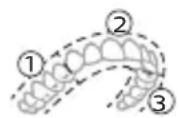
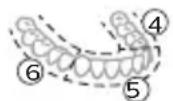
BrushPacer-ŋ hùuntŋuŋwɪtʃnh dwwʊwʒwɪŋ ʒ, nnù oqūnui ʒ àtiq hwulwwwnwzwh ひwpntl ptnwùn` pwduutlnl wju 6 hwnuwrsh:
^1 2nu ^s White yuu ^s Gum Health nbdhuiutnu oqnuwqnndtju ywnn ^t wultiugu ^t lnwgnighz dwuwiuwl:
SmarTimer
SmarTimer-ŋ gnyg ʒ unwju, nn ὑwpnǚwù yhnìu wúwùnulwǒ ʒ ́ uwpnǚwù yhnìh ʊtŋqnìw wúnnúwùn ytnwnyì wùgwuntīnǐ wùnwǔ húnqwǔwūn:
Umwúwρnýd-úwwúwqánúttn hunphnnn tǔ unwíhu úwpntǐ wùnwúuttn onwlywǔ 2 wùqwúhg n_z uwwlywu:
^12 niú ^b pt utnútp hnuwúph úhwúwù/wùgwinúwù lynǎwln úwpnúwù yhníŋ ulyutínig htunn, wunwúh hunqwúwlyn ywùq ywnúh: ^b pt 30 ywynjywùh núpawgpniú utnútp hnuwúph úhwúwù/wùgwinúwù lynǎwlyn, www
- G3 Premium Gum Care`Gum Health n ^t d ^h u
- W3 Premium White lquú W DiamondClean (NAM) / W OptimalClean (ROW) 'White nūdhú
- S2 Sensitive`Sensitive nǚdhu
^12 nii' tæt nnn2tp ynhutl ntdhún/hùntüuhúniŋiùn hunphnnn unpùn lqwnqwulnnniúhg, hunqwüuylh qihuhln yhh2h 2tn lynñúhg nünnpulwó lqwnqwulnnniún htinwqu w2huwwnw2ngwüutnh hwúwn:
Ulnhluwgutl ywi wwwwnlnhluwgutl qnpdwnnyputn
2tn wunwuh hunqwùwlyh ynw 7nip lqwnnn tip wlnhluwgutl ywu wwwwuynhluwgutl htinlwwl qnnðwnnijrəutnn`
natural_image
Diagram showing a mechanical component with a downward arrow and a small cylindrical part attached to a circular base (no text or symbols)text_image
Diagram of a handheld device with labeled parts, showing two numbered components and directional arrows.L2niù 3tūn n̥nn̥nn̥nn̥nn̥nn̥nn̥nn̥nn̥nn̥nn̥nn̥nn̥nn̥nn̥nn̥nn̥nn̥nn̥nn̥nn̥nn̥nn̥nn̥nn̥nn̥nn̥nn̥nn̥nn̥nn̥nn̥nn̥nn̥nn \n̥nn̥tn̥ng yu̥hu̥lu̥wn̥:
1 Stwnntp USB distinguan ihgpwulnnuwu dwuühnnnwuwu wwnjwuh ubq:
2 Чугцюд USB υωηνιμη υħωρητρ 54 33 υπιπρωμή ωηρηνιρωμίρ υπιπρωμύ ρηλής:
- Lhgpwwqnntp uhwju Philips-h htun hwu wuntntgh jhgpwwlnnhsutnnu lwwu wuqnuwugnajwu untuwytinhg hwuwnwnlwd hwnuwnwlyghsutnnu, uninpwjhu zwuhnn2hsutn` 100 - 240\~, 50/603g, 3,54un u tipwjhu zwuhnn2hsutn` 54 33, 2,54un:
- UL uinnwnwnutphu hwiwwwnwnwhwunn ywi uwltnwgulw 1310 2-nn nwh hltynwnwnignui (uhwju NAM):
4wnlunn t. Twnnh hwnúwnphn wbtnp t jhùh wùyúnwùq zwiħwquwǔg gwòn lwnúwù wnpjnn, nnp hwnúwuntntgh wtnp t jhùh uwnph útnpuh úwwuniú úzúwð hītlynnwlywù hwnwzwihtnh htün:
3 Stnwnntp pnüwln lhpwwlnnüwü äwühnnnwlywü wwwunjwüh ütg:
- Frzuwyn 2 ywnǎ wqnwù2wù l pnnūnú, hùzī hwwuunwinnú l, nn przuwyn wwwn2wǎ ytnwnú untānwŋnuwǒ l jhgpwynnúwù hwwún:
- Uwnunlyngh gnighsh jawnpann lnjuŋ gnjg ʃ unwihu, nn wunwuh hunqwùwyn lhgpwulnnu̱niú ʃ:
4 Zwúhnnnwlywù wwnjwn jhgpwnnniú t wunwú hunqwùwlyu wjupwú dwúwùwly, úhùlu wju wúpnngnjaŋwúp jhgpwnnnyh:
natural_image
Simple line drawing of a medical procedure with a needle inserted into tissue (no text or symbols)1 3tizwqntp hunqwùwlyh qihuhyn u ljuwgtp útunwnwlywù jhutnh hwnulwòn u lynǎwlyuttnn unwp gpnul: 3wúnqultp, nn htnzwgntl tpr pnùwlyh ynwjh u lynǎwlyutbnh 2ningn qunùynn wnuwúh úwònilyh útuwgnnnúttnn wnùylwqu 2wpwàn útyi wùqwiú, pwjg gwùlywylh 5' wútù wùqwiú oqnwnqnötánig htunn:
2qnizwgniu' Uh hntp ntunhut yuhpn unin wnwnywttnu' ntwh jhutnh utg ywu lynawylutph 2nngn, pwuh nn wju lqwnn t hwiqtguti yuuuulwoph:
natural_image
Illustration of two hands using a tool to adjust or install a mechanical component, with no visible text or symbols.1 3nɪnwpwɪʒɪŋn oqunwɑŋnðniʊhg htɪnn lʊwɡtɪp hʊnquɪwʊlyh qɪhʊhʊn u uːwɒhʊlʊtənn:
2 3tnwqntp hunqwùwuh qinihun pnùwuhgh u wnùuwrqu 2wprwjan ubu luwgtp hunqwùwuh qihuhyn unwp znnu: Luwgtp āwúhnnnwlquwi lwwhwnhsu wjúpwü hwaówu, nnpwü wühnwdt2un t, u panntp, nn znnwùw: Oqnwwqnndtp úhwju znn hunqwùwuh qihuhyh unw:
^12 niú ^1 nquwùwùh qíhuìyh lǚwìhwnhzǔ oqunwqnδuǐniú ^5 wīnwpúwù ^1 wùwùnwlnyìu lǚwìwùntuǐwǒ z§ 2wnnìwlywǐwù oqunwqnδuǐwù hwiúwùn:
Lhgpwulnnhs
1 Uugwuntp ihgpwulnnhyn` uwhupwù wjù uwpntān:
2 Lhgpwulnnhhsh uwwytnttun uwwpntap huniwwu qnndwlwdpnu:
3 Lhgpwulnnhen znnwgntap yhuwnily yunnnu lyuw unpheny:
phosphorus phosphate
- მორიდეთ პროდექტი და ბატარები ცესხოს და მოუმვერთ მათ პრდაპირ მბის სხიკებს ან მაოალ დემვერატურას.
- συγ 3δημογγβηση γαβωγδός δηγηλύδηφως χβγμπη, σδ λυγδονδο, σδ δηγιβζμπο ωβμί, δηγδυχηφωση 3δημογγβηση γαδμγγβδός φως φωδγβφθες φως φωγζυζδησφωση Philips-ι.
- არ მოთავსოთ პროდექცია და მისი ბატარეები მიკროწალეურ ლემელმი ან ინდექცურ გაცეურაში.
- არ გახსნათ, მუცვალოთ, გახვრიტოთ, დაახიანოთ ან დამალოთ პროდუექტი ან ბატარეა მათი გადახურების ან წოქსიკური ან სახიფათო ნიკოიერებების გამოყოფის თავიდან აროდების მიზნით. არ დაუმვათ ბატარეების მოკლე ჩაროვა, გადაქარბებული დამუხტვა ან უკუდამუხტვა.
- -gl მონყობილობა მეიცაკს ბატარეების, რომელია ჩანაცვლება მუეძლებელია. როდესაც ბატარეის ექსპლუატაცისი კადა ინურება, უნდა მონდეს მონყობილობის სათანადო ურილიზაცია, იხილეთ სექცია გადამუმაცების მესახებ.
- ཕྔུང་པུབསྟན་པདམའོབསྟན་པབམཆ་Philips HX6110, HYTCxx 36 ཀྱིསྟར་བཅུང་པའབས་ལས་སྐད་པའབས་སྐད་པའབས་པའབས་པའབས་པའབས་པའབས་པའབས་པའབས་པའབས་པའབས་པའབས་པའབས་པའབས་པའབས་པའབས་པའབས་པའབས་པའབས་པའབས་པའབས་པའབས་པའབར། དྲུང་པུབསྟན་པདམ་པརྒྱིགས་པརྒྱིགས་པརྒྱིགས་པརྒྱིགས་པརྒྱིགས་པརྒྱིགས་པརྒྱིགས་པརྒྱིགས་པརྒྲུང་པུབསྟན་པདམ་པརྒྱིགས་པརྒྱིགས་པརྒྱིགས་པརྒྱིགས་པརྒྱིགས་པརྒྱིགས་χον-3,5-3φ.
- ഉོན་པདྲུང་ལྟོ་བཞའགས་མཆུང་སྐྱིན་ལྟོ་རྒྱིན་ལྟོ་རྒྱིན་ལྟོ་རྒྱིན་ལྟོ་རྒྱིན་ལྟོ་རྒྱིན་ལྟོ་རྒྱིན་ལൡུང་ལྟོ་རྒྱིན་ལྟོ་རྒྱིན་ལྟོ་རྒྱིན་ལྟོ་རྒྱིན་ལྟོ་རྒྱིན་ལྟོ་རུང་ལྟོ་རྒྱིན་ལྟོ་རྒྱིན་ལྟོ་རྒྱིན་ལྟོ་རྒྱིན་ལྟོ་རྒྱིན་ལྟུང་ལྟོ་རྒྱིན་ལྟོ་རྒྱིན་ལྟོ་རྒྱིན་ལྟོ་རྒྱིན་ལྟོ་རྒྱིན་ལྟཱང་ལྟོ་རྒྱིན་ལྟོ་རྒྱིན་ལྟོ་རྒྱིན་ལྟོ་རྒྱིན་ལྟོ་རྒྱིན་ལྟོ་དངས།
- ཁསྟམོབྱའི རམགྱའི ཁན་ལྟོག སམསྟན གམསྟན གསྟལྡན སྙུངསྟན་ཆུངསྟན, ཆུ ངདུབྱའི ཁསྟམོབྱའི ཁརྒྱུངསྟན་པོསྟན སྙུངསྟན་ཆུངསྟན (ནུ. ཁརྒྱུངསྟན, གདུབྱའི ཁརྒྱུངསྟན, ཁརྒྱུངསྟན) གརྒྱུངསྟན སྙུངསྟན་ཆུངསྟན, གདུབྱའི ཁརྒྱུངསྟན, ཁརྒྱུངསྟན སྙུངསྟན་ཆུངསྟན, གདུབྱའི ཁརྒྱུངསྟན, ཁརྒྱུངསྟན, 3བསྟན་ཆུངསྟན, 3བསྟན་ཆུངསྟན, 3བསྟན་ཆུངསྟན, 3བསྟན་ཆུངསྟན, 3བསྟན་ཆུངསྟན, 3བསྟན་ཆུངས་
- ụ მონყობილობა მუცაკს ლითიუმ-იონურ აკუმულატორს. გადავდება ან უწოლიბაცია უნდა მონდეს სათანადო ნესით.
natural_image
Simple line drawing of an open book with no text or symbols visiblegul bndàmmmm bndbuzl, bunznmbmm zsdmyjbjdnl nblphnyjgn dmbymànmmmdnl zsdmyjbjdsdqg.
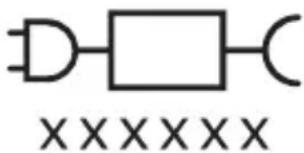
text_image
XXXXXXgl bndommm bndbsz, gudmnygmon dnnnnngdymn 33gdnb bysfm.
∂υδδιδεπος ζυδηγβός
Sonicare grades in the state of the State of the State of the State of the State of the State of the State of the State of the State of the State of the State of the State of the State of the State of the State of the State of the State of the State of the State of the State of the State of the State of the State of the State of the State of the State of the State of the State of the State of the State of the State of the State of the State of the State of the State
zsmbglnb dgtsdgtmngdmsq, 3nmlu mhyb tsbdmngmmdnl gsluydtmogluqdsq qss dgtsbsmhgydmsq.
Philips Sonicare (ปูด. 1.)
natural_image
Illustration of a hand holding a toothbrush with an arrow indicating force or direction (no text or symbols)natural_image
Simple line drawing of a curved object with a checkmark indicating a detail (no text or symbols)natural_image
Illustration of a hand using a pen to apply a sample onto a surface, with an inset showing a magnified view of a sample (no text or symbols present)text_image
Hand-drawn diagram showing a power button with an icon and a circular button, likely indicating a switch or control interface.natural_image
Diagram showing dental tool application on upper teeth with magnified detail (no text or symbols)text_image
clean sensitive whitenatural_image
Simple line drawing of a device with three circular components and a vertical connector (no text or symbols)zònmùn l gāngfēnmtsgānnl 3 lbbzqoubbzs n6fghbunzmònl 3smsdghfēn sjd3l:
natural_image
Diagram of a toothbrush with a sensor icon and a circle highlighting the sensor area (no text or symbols present)natural_image
Line drawing of a person holding a toothbrush (no text or symbols)text_image
Diagram showing dental arch anatomy with numbered labels for different tooth positions or regionsazimuth azimuth azimuth azimuth azimuth azimuth azimuth azimuth azimuth azimuth azimuth azimuth azimuth azimuth azimuth azimuth azimuth azimuth azimuth azimuth azimuth azimuth azimuth azimuth azimuth azimuth azimuth azimuth azimuth azimuth azimuth azimuth azimuth azimuth azimuth azimuth azimuth azimuth azimuth azimuth azimuth azimuth azimuth azimuth azimuth azimuth azimuth azimuth azimuth azimuth azimuth azimuth azimuth azimuth azimuth azimuth azimuth azimuth azimuth azimuth azimuth azimuth azimuth azimuth azimuth azimuth azimuth azimuth azimuth azimuth azimuth azimuth azimuth azimuth azimuth azimuth azimuth azimuth azimuth azimuth azimuth azimuth azimuth azimuth azimuth azimuth azimuth azimuth azimuth azimuth azimuth azimuth azimuth azimuth azimuth azimuth azimuth azimuth azimuth azimuthazimuth 260000000
natural_image
Diagram showing a mechanical component with a downward arrow and a small protrusion, no text or symbols present.text_image
Diagram of a handheld device with labeled parts, showing internal components and directional arrows.phosphorus phosphate
odds funds mg bonds with funds in bonds of funds, which are not
ඉංකිය අජී
Ls3b 3 _330 m ^mn _635 b _0
6560mm06n3 15362 2 3390m0n 36366
natural_image
Simple line drawing of a medical procedure with a needle inserted into tissue (no text or symbols)natural_image
Illustration of two hands using a tool to cut or mark a surface, with no visible text or symbolsnatural_image
Simple line drawing of an open book with no text or symbols visiblenatural_image
Illustration of a hand holding a toothbrush with an arrow indicating force or direction (no text or symbols)1

natural_image
Simple line drawing of a curved object with a circular mark and a checkmark (no text or symbols)הכלה 2
natural_image
Illustration of a hand holding a pen with a magnified inset showing a droplet on a surface (no text or symbols).הכלההוּרָהִיַעֹרְהֶתָהִיַעֹרְהֶתָהִיַעֹרְהֶתָהִיַעֹרְהֶתָהִיַעֹרְהֶתָהִיַעֹרְהֶתָהִיַע 1
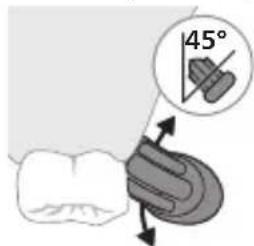
text_image
45°text_image
Hand-drawn diagram showing a power button with an 'OK' icon and a circular button labeled 'OK'..Philips Sonicare 3
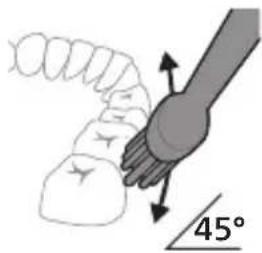
natural_image
Diagram showing a hand holding a tool with directional arrows and a 45° angle marker (no text or symbols present)natural_image
Diagram showing dental tool application on upper teeth with magnified detail (no text or symbols)text_image
clean sensitive whiteGum Health Sensitive Clean
הכלה
הכלה
Gum Health Sensitive Clean
תַלְרָה
20 yu7n
,刀刀刀
תַלְרָה
20 ۷۰۶۷۵
,刀刀刀
בַרְשָׁה בִּוֹת
20 777 2017
הַרְשׁ
אַלְרָה כִי
20 γωνη7
.刀刀
תָאַלְרָה
2
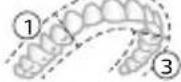
2
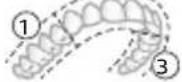
②
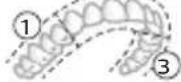
②
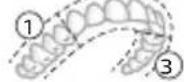
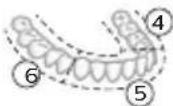
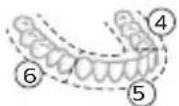
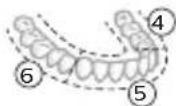
תָאַעְרָה אַעְרָה
8-1 7 אַרְשׁה
20 γωνη7
.תא 70 निय
תָאַעְרִי הַעְרִי
7,8,9 □'υονη
20 γων7 10-1
.תא 70 निय
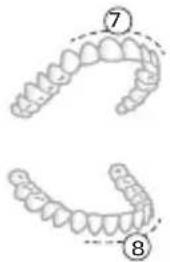
text_image
Diagram showing two dental arch models with numbered labels ⑦ and ⑧ indicating specific tooth positions or regions.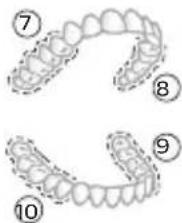
text_image
Diagram showing dental arches with numbered labels 7 through 10, likely for anatomical or orthodontic reference.תָרִי הַלְה
תָאַלְרִי הַעֹתָה
natural_image
Simple line drawing of a device with three circular components and a vertical connector (no text or symbols)natural_image
Illustration of a toothbrush with a sensor icon and a magnified view of its tip (no text or symbols)natural_image
Line drawing of a person using a toothbrush (no text or symbols)natural_image
Diagram showing a mechanical component with a downward arrow pointing to a small cylindrical component (no text or symbols present)text_image
Diagram of a handheld device with labeled parts, showing internal components and directional arrowsnatural_image
Line drawing of a fish being lifted with a pen, showing anatomical structure without any text or symbolsnatural_image
Illustration of two hands using a tool to lift or stand, no text or symbols present.הכלההוּרָהוּרָהוּרָהוּרָהוּרָהוּרָהוּרָהוּרָהוּרָהוּרָהוּרָהוּרָהוּרָהוּרָהוּרָה
-ロナコウ クロナ
-.הַרְׁבָרִים
-הכלה
www.philips.com/Sonicare
©2024 Koninklijke Philips N.V. (KPNV). All rights reserved. Philips and the Philips shield are trademarks of KPNV. Sonicare and the Sonicare logo are trademarks of Philips Oral Healthcare, LLC and/or KPNV.
300012731241 (10/04/2024)