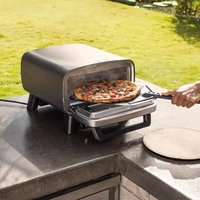
Artisan MO201EU - Pizza oven NINJA - Free user manual and instructions
Find the device manual for free Artisan MO201EU NINJA in PDF.


| Product Type | Outdoor Electric Pizza Oven |
| Brand | Ninja |
| Model | Artisan MO201EU |
| Power Supply | 220-240 V~, 50-60 Hz, 1760 W |
| Minimum Circuit Amperage | 16 A |
| Usage | Outdoor use only, in a well-ventilated area |
| Cooking Modes | Pizza (Artisan, Thin, Pan, NY, Custom), Bake, Prove, Air Fry |
| Temperature Range | From 150 °C to 375 °C (depending on mode) |
| Included Accessories | Pizza stone, cooking pan, Crousti basket, pizza peel, cover |
| Safety Features | READY and ON indicators, automatic shut-off, glass door |
| Cleaning the pizza stone | Scrape gently, do not wet or put in dishwasher |
| Cleaning the cooking pan | Hot soapy water, do not use steel wool, do not put in dishwasher |
| Replacement Parts | Available at ninjakitchen.eu or customer service at +33 800 908874 |
| Commercial Warranty | 2 years from date of purchase, subject to registration |
Frequently Asked Questions - Artisan MO201EU NINJA
User questions about Artisan MO201EU NINJA
0 question about this device. Answer the ones you know or ask your own.
Ask a new question about this device
Download the instructions for your Pizza oven in PDF format for free! Find your manual Artisan MO201EU - NINJA and take your electronic device back in hand. On this page are published all the documents necessary for the use of your device. Artisan MO201EU by NINJA.
USER MANUAL Artisan MO201EU NINJA
natural_image
Black Ninja Artisan 370C toaster oven with digital display and control panel (no visible text or symbols on main body)TAK
ninjakitchen.eu/registerguarantee

natural_image
Line drawing of a rectangular electronic device with a scroll and base (no text or symbols)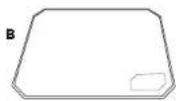

TILBEH∅R INSTALLERET
natural_image
Line drawing of hands inserting a card into a device (no text or symbols)Pizzasten: Placer oivastenen I ovnon, og sørg for, at don slår laddt og sidder i rillerne. Andet tilbehør må aldrig placeres under stenen, unctagen ved opbevaring
natural_image
Line drawing of a hand inserting a container into a tray (no text or symbols)natural_image
Line drawing of a hand inserting a rectangular object into a container (no text or symbols)ninjakitchen.eu/registerguarantee

natural_image
Line drawing of a rectangular electronic device with a scroll and base (no text or symbols)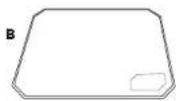
natural_image
Line drawing of hands inserting a card into a device (no text or symbols)natural_image
Line drawing of a hand inserting a container into a tray (no text or symbols)natural_image
Line drawing of a hand inserting a rectangular object into a layered container (no text or symbols)for purchasing the Ninja Artisan Electric Pizza & Air Fry Oven
SCAN HERE for accessories and how-to videos.
REGISTER YOUR PURCHASE

ninjakitchen.co.uk/registerguarantee

an QR code using mobile device
TECHNICAL SPECIFICATIONS
Voltage: 220-240V\~, 50-60Hz
Watts: 1760W
RECORD THIS INFORMATION
Model Number:
Serial Number:
Date of Purchase:
(Keep receipt)
Store of Purchase:
NINJA
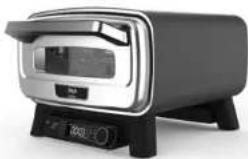
NINJA ARTISAN ELECTRIC
PIZZA & AIR FRY OVEN
MO200 Series | Owner's Guide
natural_image
Modern kitchen appliance with digital display and control buttons (no visible text or symbols)IMPORTANT SAFETY INSTRUCTIONS
FOR OUTDOOR USE ONLY • READ ALL INSTRUCTIONS BEFORE USE

Read and review instructions to understand operation and use of product.

Indicates the presence of a hazard that can cause personal injury, death or substantial property damage if the warning included with this symbol is ignored.

Avoid contact with hot surface. Always use hand protection to avoid burns.
⚠ WARNING
Failure to follow these instructions could result in electric shock, fire or burn hazard which could cause property damage, personal injury, or death. When using electrical appliances, basic safety precautions should always be followed, including the following:
1 To eliminate a choking hazard for young children, discard all packaging materials immediately upon unpacking.
2 DO NOT use this appliance for anything other than its intended use.
3 DO NOT use in moving vehicles or boats. Misuse may cause injury.
4 DO NOT use indoors. This oven is designed for OUTDOOR USE ONLY in a well-ventilated area. If used under any overhead cover, toxic fumes, including carbon monoxide, may accumulate and cause serious bodily injury or death.
5 This appliance can be used by persons, including children, with reduced physical, sensory, or mental capabilities or lack of experience and knowledge if they have been given supervision or instruction concerning use of the appliance in a safe way and understand the hazards involved
6 To avoid property damage from flame or heat maintain a minimum distance of 92cm (3 feet) from rear, sides and top to walls, rails or other combustible constructions.
7 Ensure the surface is level, stable, clean and dry. DO NOT place the appliance near the edge of the surface the oven is placed on during operation.
8 Use care when opening the oven to avoid burns. ALWAYS open door partway before fully opening to check for any flare up as some foods may cause fats, oils or grease to splash and create flare up or flame.
9 Children should be supervised to ensure that they do not play with the appliance. Keep the appliance and its cord out of reach of children. DO NOT allow the appliance to be cleaned or maintained by children.
10 The appliance should be supplied through a residual current device (RCD) having a rated residual operating current not exceeding 30mA. The appliance is to be connected to a socket-outlet having an earthing contact.
11 Only connect this appliance to circuits rated for its power requirements and minimum 16 amps to prevent circuit overloads, potential damage to the appliance, and fire hazards
12 A short power-supply cord is provided to reduce the risk of children grabbing the cord or becoming entangled and to reduce the risk of people tripping over a longer cord. Longer detachable power-supply cord or extension cords are available and may be used if care is exercised in their use.
13 To avoid personal injury and burns allow to cool before cleaning, disassembly, putting in or taking off parts and storage.
14 DO NOT touch hot surfaces. Appliance surfaces are hot during and after operation. To prevent burns or personal injury, ALWAYS use protective hot pads or insulated oven gloves and use available handles and knots. Recommend use of long handled ulensils for adding or removing ingredients.
15 DO NOT touch accessories during or immediately after cooking. The oven will become extremely hot during the cooking process. Avoid physical contact while removing the accessory from the appliance. To prevent burns or personal injury ALWAYS use care when using with product. We recommend use of long handed utensil and protective hot pads or insulated oven gloves.
16 ALWAYS ensure the oven is completely cool before releasing and removing the cooking plates or moving the to avoid burns or personal injury.
17 To protect against electrical shock, keep the cord connection dry and off the ground. DO NOT immerse cord, plugs, or main unit housing in water or other liquid.
18 DO NOT place appliance where the cord may hang over edges of tables or counters where they can be pulled on by children or tripped over.
19 DO NOT place appliance where the cord may touch hot surfaces.
IMPORTANT SAFETY INSTRUCTIONS
FOR OUTDOOR USE ONLY • READ ALL INSTRUCTIONS BEFORE USE
20 NEVER connect this appliance to an external timer switch or separate remote-control system.
21 Only use recommended accessories included with this appliance or authorised by Shark Ninja. The use of accessories or attachments not recommended by Shark Ninja may cause a risk of fire or injury.
22 Before placing any accessory into the oven, ensure it is clean and dry.
23 DO NOT move the appliance when in use.
24 DO NOT cover the air intake vent or air outlet vent while unit is operating. Doing so will prevent even cooking and may damage the unit or cause it to overheat.
25 DO NOT place anything on top of the product when the lid is closed during use.
26 DO NOT use this appliance for deep-frying
27 Should a grease fire occur or the unit emits black smoke, unplug immediately. Wait for smoking to stop before removing any cooking accessories.
28 Socket voltages can vary, affecting the performance of your product. To prevent possible illness, ALWAYS use an external food thermometer to check that your food is cooked to the recommended temperatures.
29 Please refer to the Cleaning & Maintenance section for regular maintenance of the appliance.
30 To disconnect, press the power button to turn the unit off, then unplug from socket when not in use and before cleaning.
31 DO NOT clean this product with a water spray or the like.
32 DO NOT clean with metal scouring pads. Pieces can break off the pad and touch electrical parts, creating a risk of electric shock.
33 Store indoors when not in use for long periods.
34 Store out of reach of children.
35 DO NOT keep uncovered oven exposed to elements. ALWAYS use oven cover when stored outdoors.
36 Use care when opening the oven to avoid burrs. ALWAYS open door to denote before fully opening to check for any flareup as some foods may cause fats, oils, or grease to splash and create flareup or flame.
37 DO NOT use oils, flats, such as butter, olive oil, and margarine, when cooking over 260°C to avoid the risk of smoke and property damage due to smoke.
38 To prevent burns or personal injury ALWAYS use care when interfacing with product. Recommend use of long-handled utensil and protective hot pads or insulated oven unitls.
39 Keep the appliance and its cord out of reach of children. DO NOT allow the appliance to be used near, cleaned, or maintained by children. Close supervision is necessary when used near children.
40 DO NOT use the appliance without the Accessory Frame with a Ninja pan, tray or pizza stone installed. Regularly inspect the appliance and power cord. DO NOT use the appliance if there is damage to the power cord or plug. If the appliance malfunctions or has been damaged in any way, immediately stop use and call Customer Service.
SAVE THESE INSTRUCTIONS.
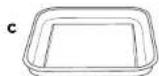
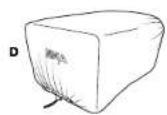
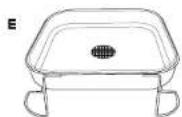
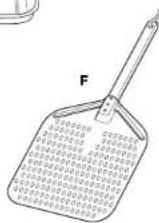
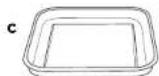
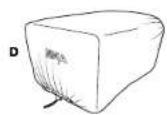
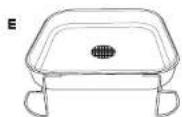
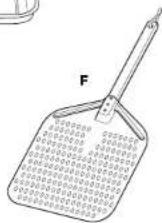
PARTS & ACCESSORIES
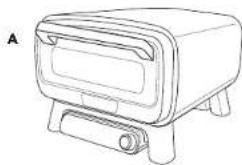
A Assembled Main Unit (power cord not shown)
B Pizza Stone
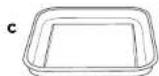
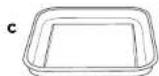
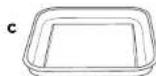
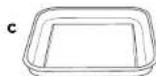
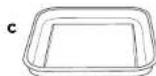
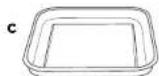
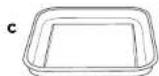
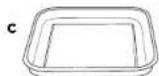
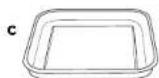
C Bake Pan
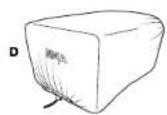
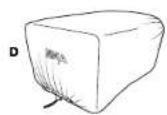
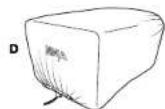
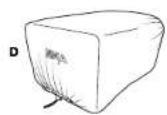
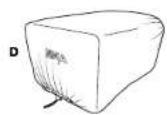
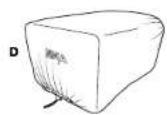
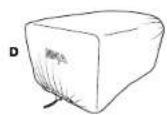
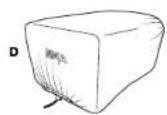
D Cover (not included with all models)
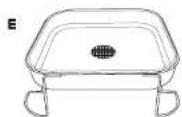
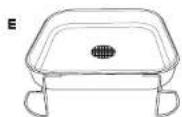
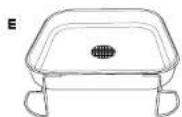
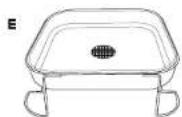
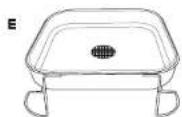
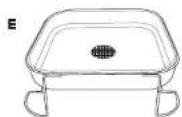
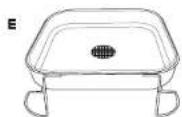
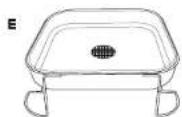
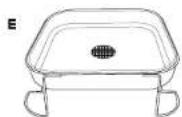
E Air Fry Basket
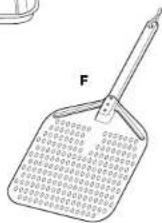
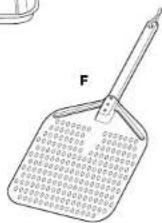
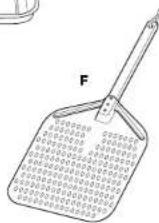
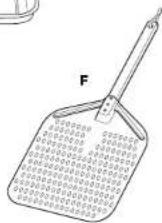
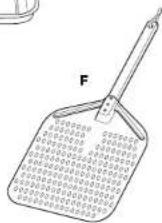
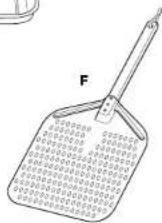
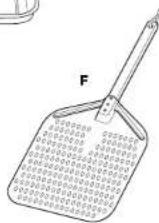
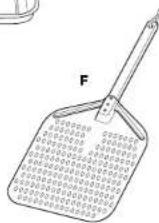
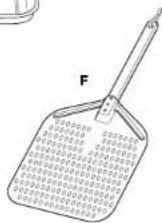
F. Pizza Peel
natural_image
Line drawing of a rectangular electronic device with a scroll and base (no text or symbols)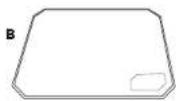
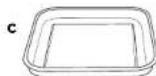
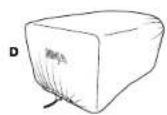
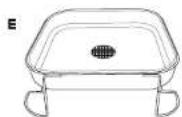
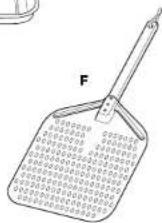
ACCESSORIES INSTALLED
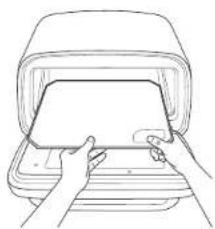
natural_image
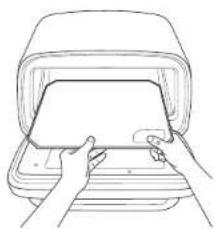
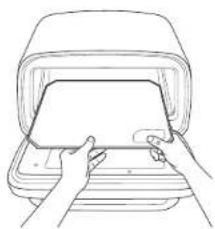
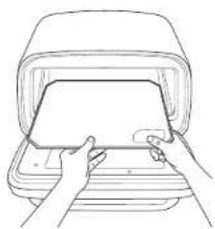
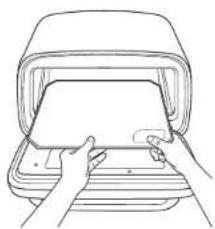
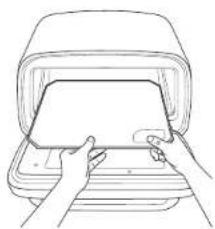
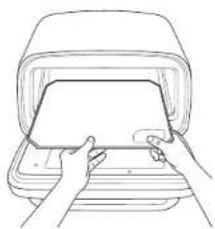
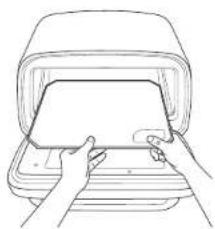
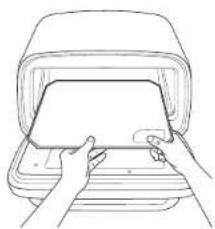
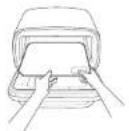
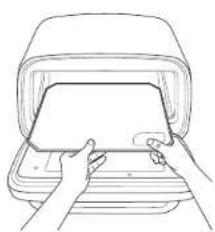
Line drawing of hands inserting a card into a device (no text or symbols)Pizza Stone: Place the pizza stone in the oven, ensuring it sits flat and within the grooves. No other accessories should ever be placed below the stone, except when storing
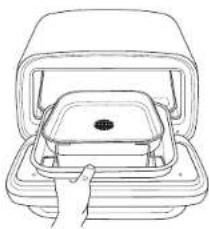
natural_image
Line drawing of a hand inserting a container into an open storage unit (no text or symbols)Air Fry Basket: Always place air fry basket inside the bake pan when using inside the oven to catch any grease and debris.
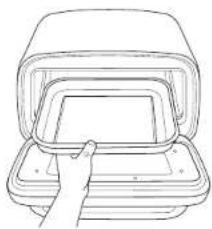
natural_image
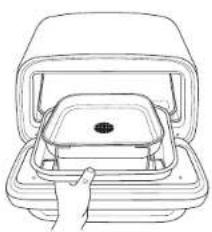
Line drawing of a hand inserting a rectangular object into a container (no text or symbols)Bake Pan: Place the bake pan in the oven, ensuring it sits flat and within the grooves. When placing the bake pan on the pizza stone, ensure the stone is clean first.
BEFORE FIRST USE
IMPORTANT: Remove all packaging, tape, and silica packets from the oven.
1 Remove all accessories from the package and read this manual carefully. Please pay particular attention to operational instructions, warnings, and important safeguards to avoid any injury or properly damage.
2 Wash the bake pan and air fry basket in warm soapy water. Rinse and dry thoroughly.
3 DO NOT use abrasive brushes or soongos on the cooking surface. Damage to the coating can occur.
NOTE: DO NOT got the pizza stone wet or put it in the dishwasher. Place it in the oven after removing all packaging.
NOTE: We recommend placing all accessories inside the oven and running it on BAKE at 250°C for 20 minutes without adding food. This removes any residues. This is completely safe and not cellular to the performance of the oven or accessories.
EXTENSION CORD
If using an extension cord, ensure it is suitable for use outdoors with outdoor appliances. Using the incorrect cord could lead to the cord overheating, melting and/or a drop in voltage. A drop in voltage can increase orheat times and impact cooking performance and/or cook times.
GLASS DOOR
Wait until the oven is completely cool before cleaning the glass door. You can remove grease using dry paper towels or a dry cloth. For more thorough cleaning, use warm, soapy water, but make sure the oven is completely dry before turning it on again.
PREHEAT TEMPERATURES & TIMES
NOTE: Opening the door and using extension cords can extend preheat times. Please make sure to use an extension cord rated for outdoor use.
| TEMP TIME | |
| 150°C-200°C 5-7 mins | |
| 200°C-250°C 7-10 mins | |
| 250°C-300°C | 10-15 mins |
| 300°C-375°C | 15-25 mins |
GETTING TO KNOW THE NINJA ARTISAN ELECTRIC PIZZA & AIR FRY OVEN
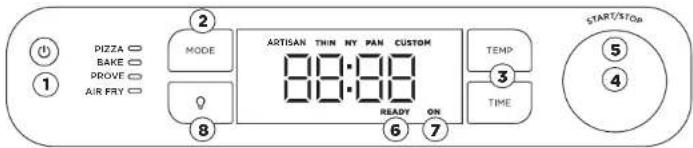
NOTE: Functions may vary by model.
FUNCTIONS
PIZZA: Make your favourite pizza styles at home from fresh to frozen
Artisan - Artisan-style pizzas have char on the outside of the thin, crispy crust and are piled high with fresh mozzarella cheese.
Thin - A thinner crust supports a smattering of thinly sliced ingredients that cook quickly.
Pan - A thicker crust and use of a deep-stylo pan means you can pile on your ingredients, since it oakes longer than a thin crust.
New York Style - Thinner crust with lots of low-mo sture mozzarella cheese piled on top. The cheese extends close to the edge of the dough, leaving about an inch exposed to handle the slice while eating.
Custom - Use your favourite style crust and add your favourite ingredients to create your own custom pizza.
BAKE: Create baked goods with crispy crusts and fluffy corners.
PROVE: Create the perfect environment for dough to rest and rise, enhancing flavour development and improving dough workability before baking. Ideal for achieving rich, well-developed flavours and a smoother texture in your baked goods.
AIR FRY: Cook using little to no oil. Enjoy healthier meals, with extra-crispy results - from chunky chips and roasted vegetables to fried chicken.
OPERATING BUTTONS/DIALS/INDICATOR LIGHTS
1 POWER BUTTON: Press to turn the unit on or off. Ensure unit is off when not in use.
2 MODE BUTTON: Press to select the desired function.
3TEMP/TIMEBUTTONS: Press the TEMF button, then use the right-hand dial to select desired temperature. Press the TIME button, then use the right-hand dial to select desired time.
4RIGHT-HAND DIAL: Use this dial along with the TEMP and TIME buttons to adjust the temperature and time and to choose pizza type.
5 START/STOP: Push the dial to start or stop the current cook function;
NOTE: While not recommended, preheating can be skipped by pressing and holding the right-hand dial for 4 seconds.
6 READY: When cooking multiple pizzas, the READY indicator will illuminate, indicating the pizza stone is at temperature to cook the next pizza.
7 ON: If the oven is on and running, this light will illuminate, indicating the oven is still on and hot. When the oven is not in use, press the power button to turn the unit off.
8 LIGHT: Press to illuminate oven's interior for 30 seconds. Light will always turn on for last 30 seconds of a cock.
USING THE NINJA ARTISAN ELECTRIC PIZZA & AIR FRY OVEN
COOKING FUNCTIONS Pizza
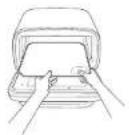
1 Place the pizza stone in the oven.
2 Press the mode button to select PIZZA.
NOTE: If cooking Pan Pizza, you will need to prepare in a deep-cish pan (not included). Pan must be placed on pizza stone during cooking.
3 Use the right-hand dial to select the desired presel pizza type (Artisan, Thin, NY, Pan, Custom).
NOTE: Temp can only be set using CUSTOM.
4 Press START/SICP to begin preheating. Estimated preheat time is 10-25 minutes, depending on set temperature (refer to Preheat Temperatures & Times section and chart).
5 Use the right-hand dia to set TIME. Setting TIME is different for PIZZA. This sets the pizza cook timer (similar to an oven timer). When time has ended, the oven will stay on for up to one hour for cooking back-to-back pizzas.
6 Once the oven has reached temperature, ADD FOOD PRS STRT will display. Place pizza directly on the stone.
7 Press START/STOP again and the timer will begin counting down.
8 When cook time is complete, the oven will beep and GET FOOD will appear on the display. Use pizza pool to remove pizza from oven.
NOTE: We recommend using the Ninja Pizza Peel, with flour to place pizza or stone.
NOTE: COOKING BACK-TO-BACK PIZZAS - For best results, wait until READY appears on the display. This indicates the stone is back up to temperature. Then add the next pizza.
Bake, Prove
1 Press the mode button to select BAKE, PROVE.
2 Press the TEMP button, then use the right-hand dial to set the temp. Press the TIME button, then use the right-hand dial to set the time;
NOTE: prove will automatically set to 30°C. Press time to adjust proving time.
3 Press START/STOP to begin preheating. Estimated preheat time is 5 to 25 minutes depending on set temperature (refer to Preheat Times section and chart).
4 While oven is preheating, start preparing ingredients.
5 When the oven is proheated, ADD FOOD, PRS START will appear on the display.
6 Use oven mills to slide the pan with Ingredients into the oven.
7 Press START/STOP to begin cooking. The timer will begin counting down.
8 When cook time is complete, the oven will beep and DONE will display.
9 Use oven mitts to remove food from the oven. Let it rest, then serve,
Air Fry
1 Press the mode button until Air Fry is selected.
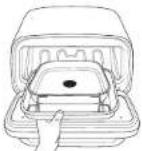
2 Use the dial to adjust the temperature.
3 Press the Time button to adjust the cook time
4 Press Start/Stop to begin Preheating.
5 Place the air fry basket within the bake pan, and acid ingredients.
6 Once preheated, the display will show ADD FOOD PRS START. Place both the air fry basket and bake tray in the oven and close the door. Press start to begin cooking.
7 When the cook time is complete the oven will beep and DONE will display.
8 Use oven mitts to remove food from the oven. Let it rest, then serve.
CLEANING & MAINTENANCE
CLEANING THE OVEN
1 The oven should be cleaned thoroughly after each use. A. WAYS let the appliance and accessories cool before cleaning.
2 Unplug the oven from power source before cleaning. Keep the door open after removing food to allow the oven to cool quicker.
3 Use soap and water with a nylon brush to clean the interior of the oven and the inside of the glass door. DO NOT use abrasive or chemical cleaners, as they will damage the oven.
4 After every use, wipe away any food solatter on the interior walls and glass door of the unit with a soft, damp sponge
Pizza Stone
Allow the pizza stone to cool completely before cleaning. The pizza stone can crack or break if it comes in contact with cold water while it's hot.
1 Scrape lightly. DO NOT use a metal spatula or knife, as these can scratch the pizza stone.
2 Wipe any remaining debris off the stone using a soft cloth.
NOTE: DO NOT get the pizza stone wel.
Bake Pan
1 Allow the bake pan to cool DO NOT put the bake pan in the dishwasher.
2 Use dish soap, warm water, and the rough side of a sponge to remove any remaining discolouration. DO NOT use steel wool or other abrasive scrubbers as this may scratch the cookware.
3 Rinse the pan and cry it with a dish towel.
NOTE: The unit is tested to withstand the outdoor elements. We recommend buying the cover for extra protection, and keeping the unit clean.
REPLACEMENT PARTS
To order additional parts and accessories, visit: ninjakitchen.co.uk/ninja-parts-accessories/ or contact Customer Service at 0800 862 0453. So we may better assist you, please register the product online at ninjakitchen.co.uk/registerguarantee and have the product on hand when you call.
TROUBLESHOOTING & FAQ
WARNING: To reduce the risk of shock and unintended operation, turn power off and unplug unit before troubleshooting.
- Why does "ADD FOOD PRS STRT" appear on the control panel display?
The oven has completed preheating, and it is now time to add the ingredients.
- Why does "E" appear on the control panel display?
The oven is not functioning properly. Contact Customer Service at 0800 862 0453 so we may assist you. Please register the product online at registryourminia.com and have the product on hand when you call.
- Should I add my ingredients before or after preheating?
For best results, let the oven preheat before adding ingredients.
• Why did a circuit breaker trip while using the oven?
This oven uses 1800 walls of power, so it must be plugged into a suitably rated outlet. Avoid running multiple appliances from the same outlet to prevent overloading the circuit.
• Why is my unit not powering on?
Ensure the GFCI plug is plugged in and the RESET button has been pressed. The indicator on the plug should change to red when on. To turn on the oven press the power button on the left side of the control panel, if the oven is still not powering on, make sure it is plugged in, or try a different outlet. If the oven is still not powering on, please contact Customer Service at 0800 862 0453.
• Can I plug the oven into a car outlet?
Only if the outlet is rated for at least 8 amps, 220-240v.
- Can I use an extension cord?
Yes, provided it is suitable for outdoor use and rated for at least 10 amps continuous. Ensure the manufacturers instructions are followed to prevent overheating or damage.
- Can I use the oven inside?
No, this unit is for outdoor use only.
• Can I use oils to cook in my oven at high temperatures?
Use the recommended fats/oils sparingly and only use the "not recommended fats/oils" when specifically called for in a Ninja recipe (refer to "Best Practices when Cooking Above 250°C for approved fats/oils" included in packaging).
• How do I avoid a fire in my oven while batch cooking at high temperatures?
Remember to empty the fat/oil from the bake pan to help prevent spillover. Ensure bake pan is washed thoroughly before each use. This will prevent grease from burning and causing smoke.
• How do I avoid flare-ups when I open the oven?
When cooking at high temperatures, specifically when roasting foods, open the door slowly and at an arm's length. Remember to empty the fat/oil from the bake pan to helo prevent spillover. This will help prevent smoke and flare-ups.
• What does the READY light mean?
READY indicates the pizza stone is at temperature and ready to cook.
• What does the ON light mean?
If the unit is on, this light will illuminate, indicating the unit is still on and hot. When the unit is not in use, press the power button to turn the unit off.
• Can I use my own bake pan?
Yes. Place your bake pan (or deep-dish pizza pan if you're using the preset Pizza "Pan" setting) on the bake pan. DO NOT place any accessories not intended for the Ninja Artisan Electric Pizza & Air Fry Oven directly on the heating elements.
NINJA
TWO (2) YEAR LIMITED GUARANTEE
When a consumer buys a product in Europe, they get the benefit of legal rights relating to the quality of the product (your statutory rights). You can enforce these rights against your retailer. We give you an additional manufacturer's guarantee of two years. These terms and conditions relate to our manufacturer's guarantee only - your statutory rights are unaffected.
The conditions below describe the prerequisites and scope of our guarantee. They do not affect your statutory rights or the obligations of your retailer and your contract with them.
Ninja Guarantees
Every Ninja machine comes with a free parts and labour guarantee. You'll also find online support at www.ninjakitchen.eu
How do I register my Ninja guarantee?
You can register your guarantee online within 28 days of purchase. To save time, you'll need the following information about your product.
- Date you purchased the unit (receipt or delivery note).
• To register online, please visit
www.ninjakitchen.eu
IMPORTANT:
• The guarantee will only cover your product from the date of purchase.
- Please keep your receipt at all times. Should you need to use your guarantee we will need your receipt to verify the information you have supplied to us is correct. The inability to produce a valid receipt may invalidate your guarantee.
What are the benefits of registering my free Ninja guarantee?
When you register your guarantee we'll have your data is to hand if we ever need to get in touch. You can also receive Lps and advice on how to get the best out of your Ninja unit and hear the latest news about new Ninja technology and launches. If you register your guarantee online, you'll get instant confirmation that we've received your details.
What is covered by the free Ninja guarantee?
Repair or replacement of your Ninja machine (at Ninja's discretion), including all parts and labour. A Ninja guarantee is in addition to your legal rights as a consumer.
What is not covered by the free Ninja guarantee?
-
Normal wear and tear of wearable parts (such as accessories). Replacement parts are available for purchase at www.ninjakitchen.eu
-
Damage caused by misuse, abuse, negligent handling, failure to perform required maintenance or damage due to mishandling in transit.
-
Damage caused by maintenance not authorised by Ninja.
Where can I buy genuine Ninja spares and accessories?
You'll find a full range of Ninja spares and replacement parts/accessories for all Ninja machines at www.ninjakitchen.eu
Please remember that damage caused by the use of non-Ninja spares may not be covered under your guarantee.
GRACIAS
ninjakitchen.eu/registerguarantee

natural_image
Line drawing of a rectangular electronic device with a scroll and base (no text or symbols)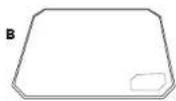
ACCESORIOS INSTALADOS
natural_image
Line drawing of hands inserting a card into a device (no text or symbols)natural_image
Line drawing of a hand inserting a container into a tray (no text or symbols)natural_image
Line drawing of a hand inserting a rectangular object into a container (no text or symbols)Bake (Hornear), Prove (Fermentar)
www.ninjakitchen.eu/registerguarantee

natural_image
Line drawing of a rectangular electronic device with a scroll and base (no text or symbols)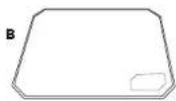
ACCESSOIRES INSTALLÉS
natural_image
Line drawing of hands inserting a card into a device (no text or symbols)natural_image
Line drawing of a hand inserting a container into a tray (no text or symbols)natural_image
Line drawing of a hand inserting a rectangular object into a layered container (no text or symbols)1st/2nd Floor Building \$150,
Thorpe Park, Century Way, Leeds 1315 873 United Kingdom
ninjakitchen.eu/registerguarantee

natural_image
Line drawing of a rectangular electronic device with a scroll and base (no text or symbols)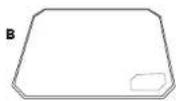
ACCESSORI INSTALLATI
natural_image
Line drawing of hands inserting a card into a device (no text or symbols)natural_image
Line drawing of a hand pressing down on a rectangular device (no text or symbols)natural_image
Line drawing of a hand holding a rectangular object with a screen, no text or symbols presentwww.ninjakitchen.eu/register-guarantee

natural_image
Line drawing of a rectangular electronic device with a scroll and base (no text or symbols)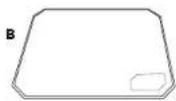
GEÏNSTALLEERDE ACCESSOIRES
natural_image
Line drawing of hands inserting a card into a device (no text or symbols)natural_image
Line drawing of a hand inserting a container into a tray (no text or symbols)natural_image
Line drawing of a hand inserting a rectangular object into a layered container (no text or symbols)www.ninjakitchen.eu/registerguarantee

Skann QR-kode med en mobilenhet
TEKNISKE SPESIFIKASJONER
Spenning: 220-240 V-, 50-60 Hz
Watt 1760 W
TA VARE PÅ DENNE INFORMASJONEN
Modellnummer:
Serienummer:
Kjøpsdato:
natural_image
Line drawing of a rectangular electronic device with a scroll and base (no text or symbols)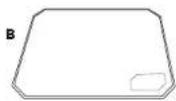
MONTERTE TILBEH∅R
natural_image
Line drawing of hands inserting a card into a device (no text or symbols)natural_image
Line drawing of a hand inserting a container into a tray (no text or symbols)natural_image
Line drawing of a hand inserting a rectangular object into a container (no text or symbols)Bake (Baking), Prove (Heve)
FEILS∅KING OG OFTE STILTE SP∅RSMÅL
ninjakitchen.eu/registerguarantee

natural_image
Line drawing of a rectangular electronic device with a scroll and base (no text or symbols)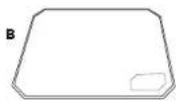
ZAINSTALOWANE AKCESORIA

natural_image
Line drawing of hands inserting a card into a device (no text or symbols)natural_image
Line drawing of a hand inserting a container into a tray (no text or symbols)Kosz do smażenia
natural_image
Line drawing of a hand inserting a rectangular object into a layered container (no text or symbols)www.ninjakitchen.eu/registerguarantee

natural_image
Line drawing of a rectangular electronic device with a scroll and base (no text or symbols)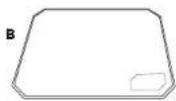
ACESSÓRIOS INSTALADOS
natural_image
Line drawing of hands inserting a card into a device (no text or symbols)natural_image
Line drawing of a hand inserting a container into a tray (no text or symbols)natural_image
Line drawing of a hand inserting a rectangular object into a container (no text or symbols)ninjakitchen.eu/registerguarantee

natural_image
Line drawing of a rectangular electronic device with a scroll and base (no text or symbols)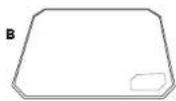
VARUSTEIDEN ASENTAMINEN
natural_image
Line drawing of hands inserting a card into a device (no text or symbols)natural_image
Line drawing of a hand inserting a container into a tray (no text or symbols)natural_image
Line drawing of a hand inserting a rectangular object into a container (no text or symbols)KYPSENNYSTOIMINNOT Pizza (Pizza)
1 Laita pizzakivi unlin.
2 Valitse MODE (TILA) painikkeella PIZZA (PIZZA).
ninjakitchen.eu/registerguarantee

natural_image
Line drawing of a rectangular electronic device with a scroll and base (no text or symbols)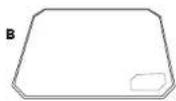
MONTERADE TILLBEHÖR
natural_image
Line drawing of hands inserting a card into a device (no text or symbols)natural_image
Line drawing of a hand inserting a container into a tray (no text or symbols)natural_image
Line drawing of a hand inserting a rectangular object into a multi-tiered container (no text or symbols)© 2024 SharkNinja Operating LLC. TRYKT I KINA
DEUTSCH
© 2024 SharkNinja Operating LLC. GEDRUCKT IN CHINA
ENGLISH
Illustrations may differ from actual product. We are constantly striving to improve our products, therefore the specifications contained herein are subject to change without notice.
NINJA is a registered trademark of Shark Ninja Operating LLC.
© 2024 SharkNinja Operating LLC. PRINTED IN CHINA
ESPAÑOL
© 2024 SharkNinja Operating LLC. IMPRESO EN CHINA
FRANÇAIS
© 2024 SharkNinja Operating LLC. IMPRIMÉ EN CHINE
ITALIANO
© 2024 SharkNinja Operating LLC. STAMPATO IN CINA
NEDERLANDS
© 2024 SharkNinja Operating LLC. GEDRUKT IN CHINA
NORSK
© 2024 SharkNinja Operating LLC. TRYKKET I KINA
PORTUGUÊS
© 2024 SharkNinja Operating LLC. IMPRESSO NA CHINA
SUOMI
© 2024 SharkNinja Operating LLC. PAINETTU KIINASSA
SVENSKA
© 2024 SharkNinja Operating LLC. TRYCKT I KINA
Importør: SharkNinja Europe Ltd. 1st/2nd Floor Building 3150, Thorpe Park, Century Way, Leeds, England, LS15 8ZB, NIP: PL5263721774
ninjakitchen.co.uk
Eksportør: SharkNinja (Hongkong) Company Limited, Unit 606, 6TH Floor Alliance Building, 133 Connaught Road Central, Hongkong
SharkNinja Germany GmbH, Rotfeder-Ring 9, 60327 Frankfurt am Main, Tyskland
ninjakitchen.eu