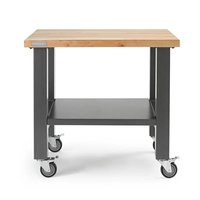
GAMW36HWEG - Workbench Gladiator - Free user manual and instructions
Find the device manual for free GAMW36HWEG Gladiator in PDF.


| Brand | Gladiator |
| Model | GAMW36HWEG |
| Product Type | Modular adjustable height workbench |
| Dimensions (W × D × H) | Approximately 122 cm × 61 cm × 86 cm (depending on adjustment) |
| Work surface material | Wood |
| Frame material | Steel |
| Maximum weight capacity | 1360.8 kg (3000 lb) |
| Adjustable height | Yes (in approximately 2.5 cm increments) |
| Number of legs | 4 (2 outer, 2 inner) + leveling feet |
| Back panel included | Yes |
| Leveling feet | Yes (adjustable up to 1.9 cm) |
| Recommended use | Garage, professional or home workshop |
| Assembly required | Yes (instructions provided) |
| Tools needed for assembly | 9/16" socket wrench, adjustable wrench, 7/16" wrench |
| Maintenance | Clean with mild detergent and warm water, dry thoroughly |
| Wood work surface warranty | 1 year (parts and labor) |
| Metal sections warranty | Lifetime (parts and labor) |
| Country of manufacture | Not specified (warranty valid in the United States and Canada) |
| Customer service contact | United States: 1-866-342-4089, Canada: 1-800-807-6777 |
Frequently Asked Questions - GAMW36HWEG Gladiator
User questions about GAMW36HWEG Gladiator
0 question about this device. Answer the ones you know or ask your own.
Ask a new question about this device
Download the instructions for your Workbench in PDF format for free! Find your manual GAMW36HWEG - Gladiator and take your electronic device back in hand. On this page are published all the documents necessary for the use of your device. GAMW36HWEG by Gladiator.
USER MANUAL GAMW36HWEG Gladiator
Assembly Instructions
MESA DE TRABAJO MODULAR CON ALTURA REGULABLE
ASSEMBLY INSTRUCTIONS....2
Tools and Parts....2
Workbench Use Requirements......2
Unpack the Workbench....2
Parts 3
Install Legs and Back Panel....4
Complete the Assembly....6
Workbench Care....6
WARRANTY 7
www.gladiatorgarageworks.ca
WORKBENCH SAFETY
Your safety and the safety of others are very important.
We have provided many important safety messages in this manual and on your appliance. Always read and obey all safety messages.

This is the safety alert symbol.
This symbol alerts you to potential hazards that can kill or hurt you and others.
All safety messages will follow the safety alert symbol and either the word "DANGER" or "WARNING."
These words mean:
DANGER
You can be killed or seriously injured if you don't immediately follow instructions.
WARNING
You can be killed or seriously injured if you don't follow instructions.
All safety messages will tell you what the potential hazard is, tell you how to reduce the chance of injury, and tell you what can happen if the instructions are not followed.
ASSEMBLY INSTRUCTIONS
Tools and Parts
Gather the required tools and parts before starting installation.
Tools Needed
■ 9/16" socket wrench
■ Adjustable wrench
■ 7/16" wrench
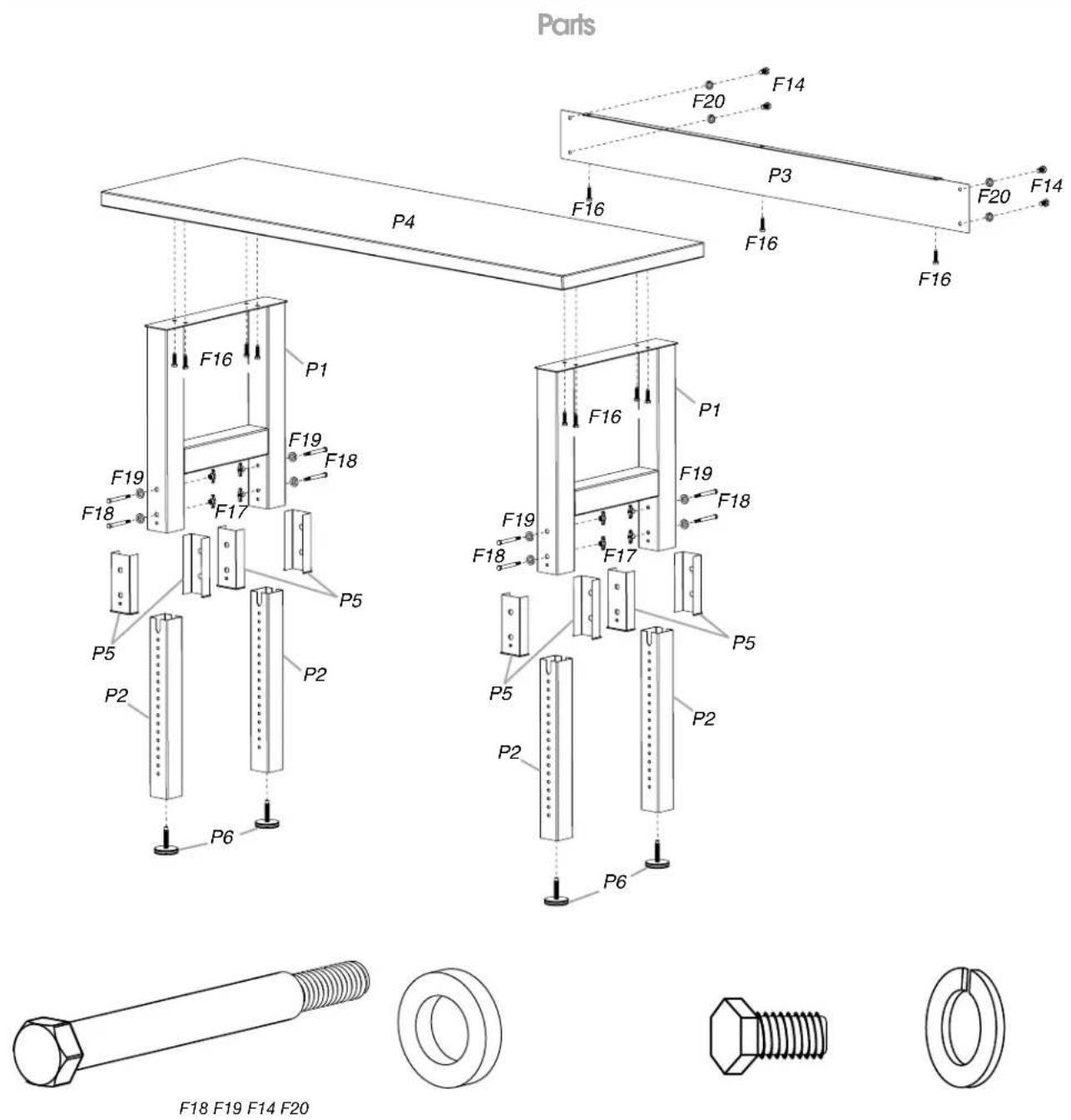
Parts Supplied—4 ft (121.9 cm), 6 ft (182.9 cm), or 8 ft (243.9 cm) Workbench
■ P1—Workbench outer legs (2 welded sets)
■ F14— 14 " - 20 x 34 " bolts (4)
■ P2—Workbench inner legs (4)
■ F16— ^3/8 " x 1 ^1/2 " screws (11)
■ P3—Workbench back panel
■ F17—Wing nuts (8)
■ P4—Workbench top
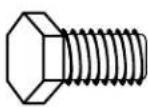
■ F18— ^5/16 " hex-head bolts (8)
■ P5—Spacers (8)
■ F19— ^5/16 " washers (8)
■ P6—Leveling legs (4)
■ F20— 14 " lock washers (4)
Workbench Use Requirements
■ Intended for use in a garage.
■ Maximum weight limit is 3,000 lbs (1,360.8 kg) for the workbench.
Unpack the Workbench
- Unpack the legs and hardware from the box. Verify contents. See "Parts Supplied."
- Remove the back panel and set it aside. NOTE: Leave the workbench top on the cardboard during assembly.
- Remove the corners from the workbench top. The bolt holes should be visible.
- Dispose of/recycle all packaging materials.
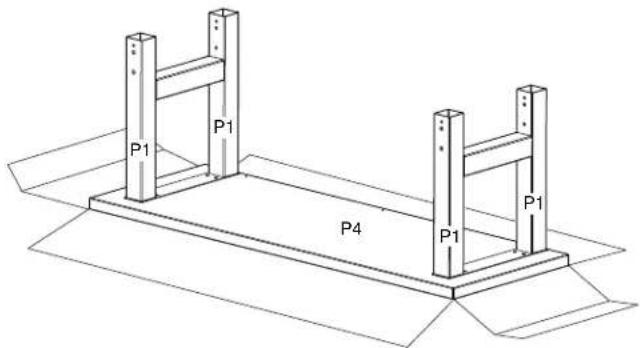
Install Legs and Back Panel
NOTE: Assemble and adjust this workbench upside down according to the illustrations. Be sure that the workbench top is flat on the floor and the legs are in the air.
Outer Leg and Back Panel Installation
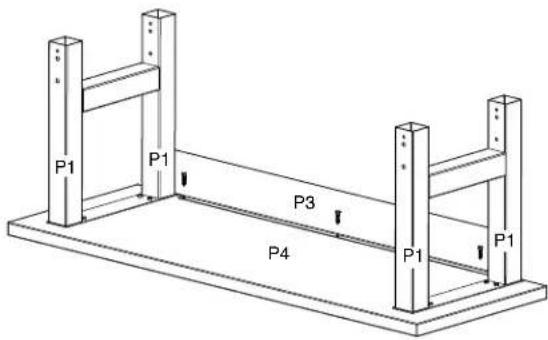
- Place each set of outer legs (P1) on the workbench underside and match the holes.
- Attach the legs (P1) to the workbench top (P4) using the 8 screws (F16). Make sure that the screws are inserted straight into the holes. Install the screws using a 316 " socket wrench, but do not tighten screws completely.
■ Tightening the screws (F16) at an angle can place excessive stress on the screws, which may cause the screws to fail.
■ The holes in the legs are oval to allow space for minor adjustments as the workbench is assembled.
NOTES:
- Attach the back panel (P3) to the outer legs using the 4 bolts (F14) and lock washers (F20) provided. Do not tighten the bolts completely at this time.
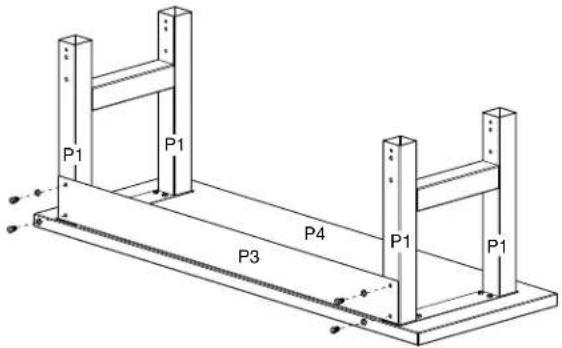
- Attach the back panel (P3) to the workbench top (P4) using the remaining screws (F16). Make sure that the screws are inserted straight into the holes. Tighten the screws using a 916 " socket wrench.
NOTE: Tightening the screws (F16) at an angle can place excessive stress on the screws, which may cause the screws to fail.
-
Using a 716 " wrench, tighten the bolts attaching the back panel (P3) to the outer legs (P1) completely. NOTE: Do not overtighten the bolts and screws.
-
Tighten all remaining bolts and screws. NOTE: Do not overtighten the bolts and screws.
Inner Leg Installation
- Insert one of the plastic spacers (P5) into the outer leg (P1) as shown.
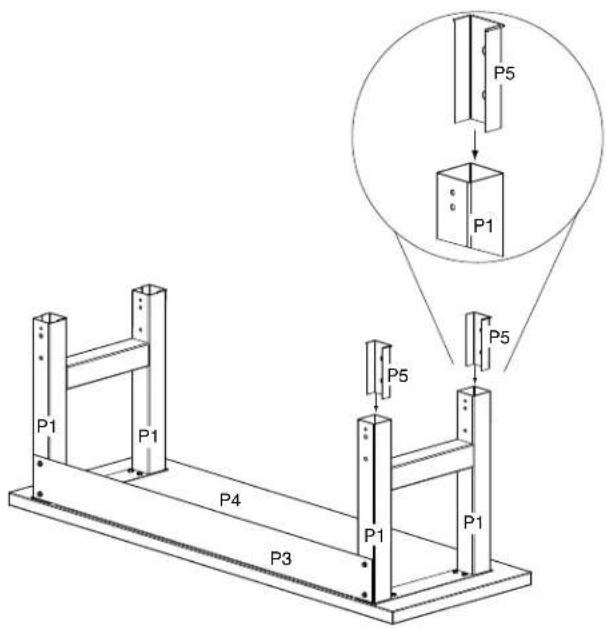
Insert another spacer (P5) into the outer leg (P1) as shown.

The buttons/tabs in the spacers (P5) should nest inside the holes provided in the outer leg (P1) as shown. Repeat for each leg.
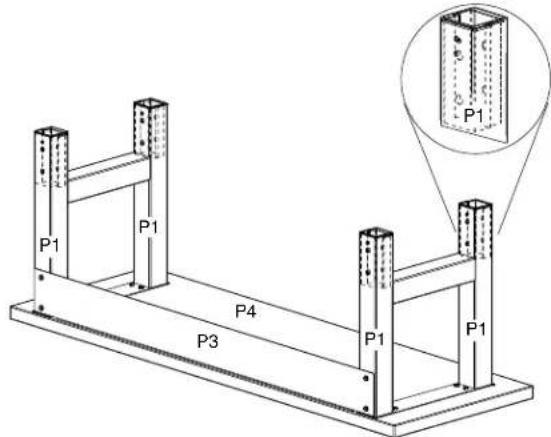
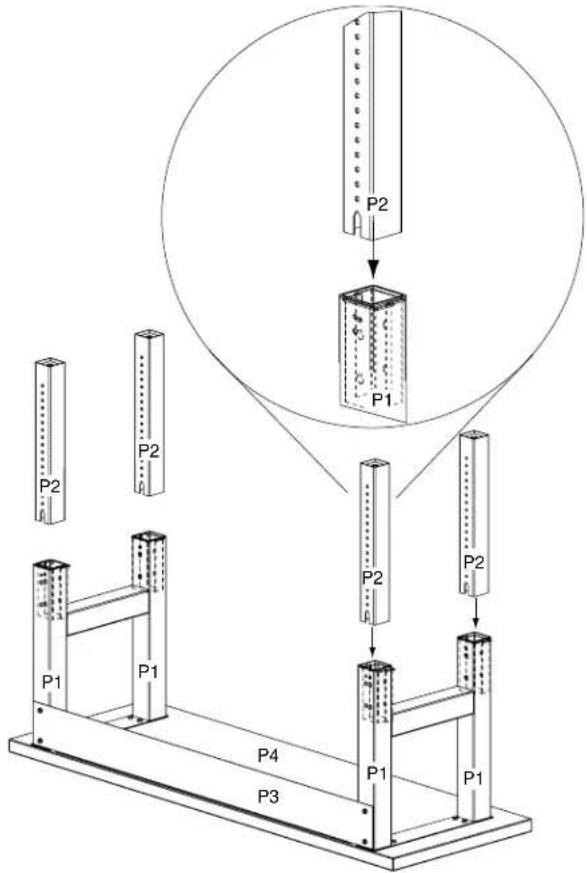
- Insert one of the inner legs (P2) into the outer leg (P1) as shown.
-
Align the adjustment holes in the inner leg (P2) with the adjustment holes in outer leg assembly at the desired height of the workbench.
-
Insert a hex-head bolt (F18) and washer (F19), and secure with a wing nut (F17). Be sure the hex-head bolt aligns with the hex-shaped adjustment hole correctly. Repeat for each leg. NOTE: To minimize multiple adjustments during assembly, make sure the adjustment holes are aligned at the desired height for all the legs.

- Screw in the leveling legs (P6). The leveling legs (P6) have a flat side designed for use with an adjustable wrench, if needed. IMPORTANT: To install the leveling legs (P6), turn clockwise a minimum of 1½" (3.8 cm) (12 full turns). Further adjustment can be made ¾" (1.9 cm) up or down from this position or until the leveling leg cannot be turned any further against the bottom of the inner leg (P2).

NOTE: Before setting workbench upright, verify that the same number of adjustment holes are visible on each leg to ensure that the workbench will be level.
Complete the Assembly
WARNING
Excessive Weight Hazard
Use two or more people to move and assemble workbench.
Failure to do so can result in back or other injury.
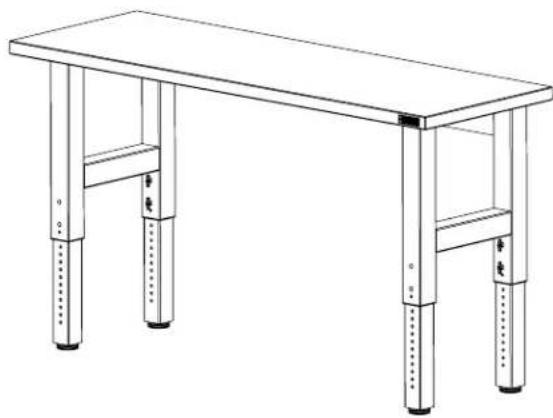
- Using two or more people, stand the workbench upright and place it in its final location.
natural_image
Line drawing of a four-legged table with four legs and four feet, no text or symbols present- Adjust the leveling legs as needed.
Workbench Care
- Wash the workbench with a mild detergent and warm water. Do not allow water to remain on the workbench for any length of time.
- Rinse completely and dry thoroughly.
GLADIATOR® GARAGEWORKS MODULAR WORKBENCH WARRANTY
ONE-YEAR LIMITED WARRANTY ON WOODEN TOP
For one year from the date of purchase, when this product is operated and maintained according to the instructions attached to or furnished with the product, Gladiator ^® GarageWorks will replace or repair the defective product or parts to correct defects in materials or workmanship.
LIFETIME LIMITED WARRANTY ON WORKBENCH METAL SECTIONS
For the life of the product, when the Modular Workbench is used and maintained according to the instructions attached to or furnished with the product, Gladiator ^® GarageWorks will pay for repair or replacement of the defective product or parts to correct defects in materials or workmanship.
Gladiator® GarageWorks will not pay for:
- Service calls to correct the installation of any Gladiator ^® GarageWorks products or to instruct you on how to use or install them.
- Damage resulting from improper handling or shipping of products, or products damaged by accident, misuse, abuse, fire, flood, improper installation, acts of God, neglect, corrosion, modification or mishandling.
- Shipping or freight fees to deliver replacement products or to return defective products.
- Repairs or replacement when your product is used in other than normal, single-family household use, such as a commercial environment or handled in any way inconsistent with the installation instructions included with the product.
- Cosmetic damage including scratches, dings, dents or cracks that do not affect the structural or functional capability of the product.
- Replacement parts or product for Gladiator ^® GarageWorks products operated outside the United States and Canada.
- In Canada, travel or transportation expenses for customers who reside in remote areas.
- Any labor costs during the limited warranty period.
- Damage resulting from improper loading beyond the specified maximum weight capacity outlined in the assembly instructions provided with the product.
- Surfaces damaged due to chemical interaction resulting in corrosion of paint or metal.
- Any damage, splitting, checking, cracking or warping of the wooden top past the first year.
DISCLAIMER OF IMPLIED WARRANTIES: LIMITATION OF REMEDIES
IMPLIED WARRANTIES, INCLUDING TO THE EXTENT APPLICABLE WARRANTIES OF MERCHANTABILITY OR FITNESS FOR A PARTICULAR PURPOSE, ARE EXCLUDED TO THE EXTENT LEGALLY PERMISSIBLE. ANY IMPLIED WARRANTIES THAT MAY BE IMPOSED BY LAW ARE LIMITED TO ONE YEAR, OR THE SHORTEST PERIOD ALLOWED BY LAW. SOME STATES AND PROVINCES DO NOT ALLOW LIMITATIONS OR EXCLUSIONS ON HOW LONG AN IMPLIED WARRANTY OF MERCHANTABILITY OR FITNESS LASTS, SO THE ABOVE LIMITATIONS OR EXCLUSIONS MAY NOT APPLY TO YOU. THIS WARRANTY GIVES YOU SPECIFIC LEGAL RIGHTS, AND YOU MAY ALSO HAVE OTHER RIGHTS WHICH VARY FROM STATE TO STATE OR PROVINCE TO PROVINCE.
Outside the 50 United States and Canada, this warranty does not apply. Contact your authorized Gladiator® GarageWorks dealer to determine if another warranty applies.
If you need service, call the Gladiator® GarageWorks Customer eXperience Center, 1-866-342-4089 (toll-free), from anywhere in the U.S.A. In Canada, contact your Whirlpool Canada LP designated service company or call 1-800-807-6777.
In the United States, Gladiator® GarageWorks means Whirlpool Corporation, Benton Harbor, Michigan 49022. In Canada, Gladiator® GarageWorks means Whirlpool Canada LP, Mississauga, ON L5N 3A7.
10/09
Keep this book and your sales slip together for future reference. You must provide proof of purchase or installation date for in-warranty service.
Write down the following information about your Modular Workbench to better help you obtain assistance or service if you ever need it. You will need to know your complete model number and serial number. You can find this information on the model and serial label located on the back of the product.
| Dealer name | |
| Address | |
| Phone number | |
| Model number | |
| Serial number | |
| Purchase date |
natural_image
Line drawing of a hexagonal bolt with threaded shaft (no text or symbols)F18 F19
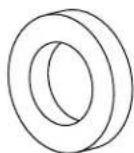
F14 F20
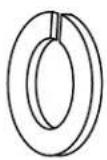
natural_image
Line drawing of a four-legged table with four legs and four feet, no text or symbols presentnatural_image
Line drawing of a four-legged table with four legs and four feet, no text or symbols present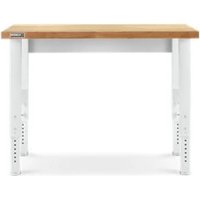


- MESA DE TRABAJO MODULAR CON ALTURA REGULABLE
- WORKBENCH SAFETY
- Your safety and the safety of others are very important.
- DANGER
- WARNING
- ASSEMBLY INSTRUCTIONS
- Tools and Parts
- Tools Needed
- Parts Supplied—4 ft (121.9 cm), 6 ft (182.9 cm), or 8 ft (243.9 cm) Workbench
- Workbench Use Requirements
- Unpack the Workbench
- Install Legs and Back Panel
- Outer Leg and Back Panel Installation
- NOTES:
- Inner Leg Installation
- Complete the Assembly
- Workbench Care
- GLADIATOR® GARAGEWORKS MODULAR WORKBENCH WARRANTY
- LIFETIME LIMITED WARRANTY ON WORKBENCH METAL SECTIONS
- Gladiator® GarageWorks will not pay for:
- DISCLAIMER OF IMPLIED WARRANTIES: LIMITATION OF REMEDIES
- Keep this book and your sales slip together for future reference. You must provide proof of purchase or installation date for in-warranty service.
Brand : Gladiator
Model : GAMW36HWEG
Category : Workbench