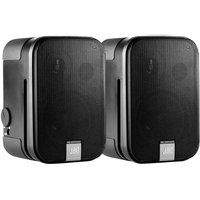
Control 2 PS - Speaker JBL - Free user manual and instructions
Find the device manual for free Control 2 PS JBL in PDF.


User questions about Control 2 PS JBL
0 question about this device. Answer the ones you know or ask your own.
Ask a new question about this device
Download the instructions for your Speaker in PDF format for free! Find your manual Control 2 PS - JBL and take your electronic device back in hand. On this page are published all the documents necessary for the use of your device. Control 2 PS by JBL.
USER MANUAL Control 2 PS JBL
Important Safety Instructions
- Read these instructions.
- Keep these instructions.
- Heed all warnings.
- Follow all instructions.
- Do not use this apparatus near water.
- Clean only with dry cloth.
- Do not block any ventilation openings. Install in accordance with manufacturer's instructions.
- Do not install near any heat sources such as radiators,heat registers, stoves or other apparatus that produce heat.
- Do not defeat the safety purpose of the grounding type plug. A polarized plug has two blades with one wider than the other. A grounding type plug has two blades and a third grounding prong. The wide blade or the third prong is provided for your safety. If the provided plug does not fit into your outlet, consult an electrician for replacement of the obsolete outlet.
- Protect the power cord from being walked on or pinched particularly at plugs, convenience receptacle and the point where the power cord connects to the apparatus.
- Only use attachments/accessories specified by the manufacturer.
- Unplug this apparatus during lightning storms or when unused for long periods of time.
- Refer all servicing to qualified service personnel. Servicing is required when the apparatus has been damaged in any way, including: power-supply cord or plug is damaged, liquid has been spilled or objects have fallen into the apparatus, the apparatus has been exposed to rain or moisture, does not operate normally, or has been dropped.
- The appliance coupler of the power supply cord is used as the ultimate disconnect device from the mains.
The appliance coupler shall remain readily operable.
- The apparatus shall be connected to mains socket outlet with a protective earthing connection.
WARNING
To reduce the risk of fire or electrical shock, do not expose the apparatus to rain or moisture. The apparatus shall not be exposed to dripping or splashing and no objects filled with liquids, such as vases, shall be placed on the apparatus. As with any electronic product, use care not to spill liquids into any part of the system. Liquids can cause a failure and/or a fire hazard.

The lightning flash with the arrowhead symbol, within an equilateral triangle, is to alert the user to the presence of insulated "dangerous voltage" within the products enclosure that may be of sufficient magnitude to constitute a risk of electric shock to humans.
CAUTION!

TO REDUCE THE RISK OF ELECTRONIC SHOCK - DO NOT REMOVE COVER. NO USER SERVICEABLE PARTS INSIDE. REFER SERVICING TO QUALIFIED PERSONNEL. DO NOT EXPOSE THIS APPARATUS TO RAIN OR MOISTURE.
Contents
Thank You for Purchasing the JBL Control 2P Compact Powered Monitor
The Control 2P Compact Powered Reference Monitor System combines legendary JBL loudspeaker design with powerful amplification to deliver rich, accurate performance for demanding audio applications. The compact design, rugged enclosure, and professional feature-set make the Control 2P Compact Powered Reference Monitor ideal for desktop recording and video production, audio visual presentations, professional broadcast applications, and monitoring of electronic musical instruments.
FEATURES
- Studio Quality Transducers for accuracy, and rich bass response
- 35 Watt Dual Channel Power Amplifier and high-sensitivity drivers produce exceptional output
- Balanced XLR / 1/4" Neutrik® Combo, and unbalanced RCA inputs allow connection to a wide range of signal sources
- Stereo Headphone Jack allows monitoring using headphones
- Side-mounted Volume Control simultaneously controls Left and Right speakers
- High Frequency Adjust Control allows fine-tuning of High Frequency response for application requirements
- Magnetically-Shielded Transducers for use near CRT monitors and magnetically-sensitive equipment
- Internal Peak Limiter and Overload Protection circuit protects the system from continuous over-driving
- Wall-mount capable using optional MTC-2P Mounting Kit
- Included Snap-On Pedestals optimize the listening angle for desk top applications
WHAT IS INCLUDED
CONTROL 2P Stereo Pair (C2PS) Includes:
One Control 2P powered Master Speaker
One Control 2P Extension Speaker
- Extension Speaker Wire with right-angle plug.
Universal Power Supply
- Two Snap-On Pedestals
- User's Guide
CONTROL 2P Master Speaker (C2PM) Includes:
One Control 2P powered Master Speaker
- One Universal Power Supply
One Snap-On Pedestal
- User's Guide
OPTIONAL ACCESSORIES
MTC-2P Wall Mount Kit Includes:
- Two Wall Mount Brackets
Wrench - One Power Supply Holder instructions.
-
User's Guide Conventions: Except where noted, all instructions in this manual apply to the C2PS and C2PM models. The use of the word "speakers" (plural) also applies to the single C2PM model speaker.
-
Neutrik and the names of Neutrik products referenced herein are either trademarks and/or service marks of Neutrik.
Features
FRONT VIEW
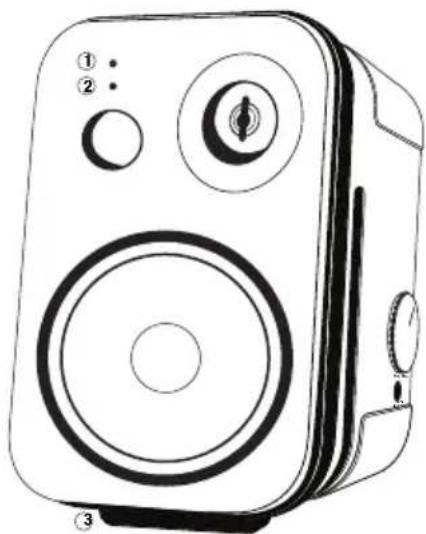
- WHITE LED - Illuminates when the Control 2P is connected to a power source and the POWER SWITCH is set to ON.
- RED LED - Flashes intermittently when the Control 2P approaches thermal protect mode. When the Red LED is flashing, system volume should be reduced. When the Red LED glows continuously, the Control 2P should be turned-off and allowed to cool before re-powering the system.
- SNAP-ON PEDESTAL - Use these adapters to adjust the vertical coverage angle of the Control 2P for optimum performance in desk-top applications.
SIDE VIEW
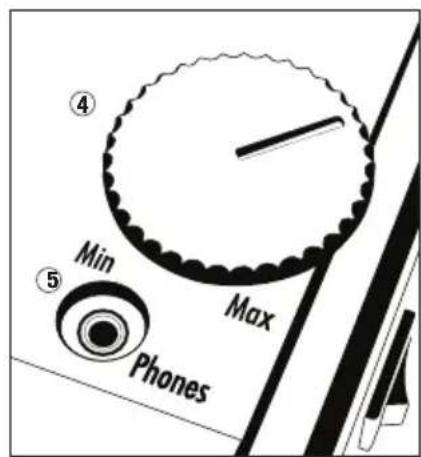
- VOLUME CONTROL - Adjusts the volume output of the Control 2P and connected extension speaker.
- HEADPHONE JACK - 3.5 mm (1/8") stereo jack for headphones. When headphones are connected to this jack, the speakers are automatically muted. CAUTION: listening to music at high volume levels using headphones may lead to hearing damage.
REAR VIEW
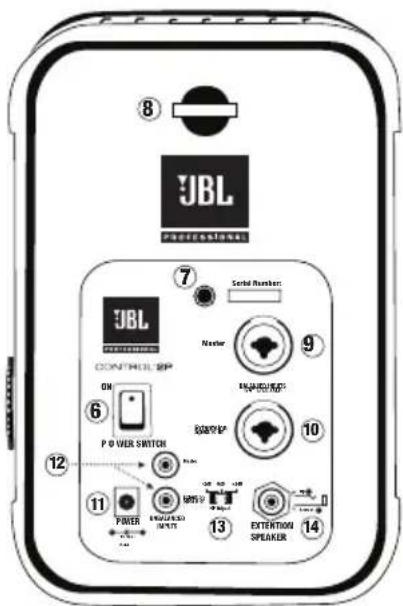
- POWER SWITCH - Turns the Control 2P system OFF and ON.
- MOUNTING BRACKET ATTACHMENT POINT - This 1/4'' x 20 TPI (threads per inch) fitting allows attachment of the optional MTC-2P wall mounting bracket.*
- SAFETY HOOK - Attach suitable safety cable to this hook when mounting speakers.*
- MASTER XLR/1/4" INPUT - A combination XLR and TRS balanced line-level input. 3-pin XLR or 1 / 4'' TRS connectors can be connected to this jack. Note: if a signal is connected to this jack only, sound will only emanate from the Control 2P Master loudspeaker. Signal will not be fed to both loudspeakers.
- EXTENSION SPEAKER XLR/1/4" INPUT - A combination XLR and TRS balanced line-level input. 3-pin XLR or 1/4" TRS connectors can be connected to this jack. NOTE: If a signal is connected to this jack only, sound will only emanate from the Control 2P Extension loudspeaker. Signal will not be fed to both loudspeakers.
- DC POWER INPUT - Input connector for the external power supply.
- RCA INPUTS - Unbalanced input jacks for RCA style connectors. NOTE: if a signal is connected to the red RCA input jack, sound will only emanate from the Control 2P Master loudspeaker. If a signal is connected to the white RCA input jack, sound will only emanate from the Control 2P Extension loudspeaker. NOTE: Do not simultaneously connect sources to the RCA inputs and the XLR/1/4" inputs. Doing so may compromise performance.
- HF ADJUST SWITCH - Use this switch to adjust the amount of high frequency produced by the loudspeaker(s). The 0 dB setting is the normal setting. Use the -2 dB setting to decrease the amount of high frequency produced by the speakers. Use the +2 dB setting to increase the amount of high frequency produced by the speakers.
- EXTENSION SPEAKER JACK - 1/4" output jack for connection of the Control 2P Extension loudspeaker to the Control 2P Master loudspeaker. When the extension speaker cable plug (included) is removed from this jack, the extension speaker amplifier channel is automatically muted.
- SAFETY BAR - An attachment point for connection of an optional safety cable or lanyard from an independent secured mount point.
Applications
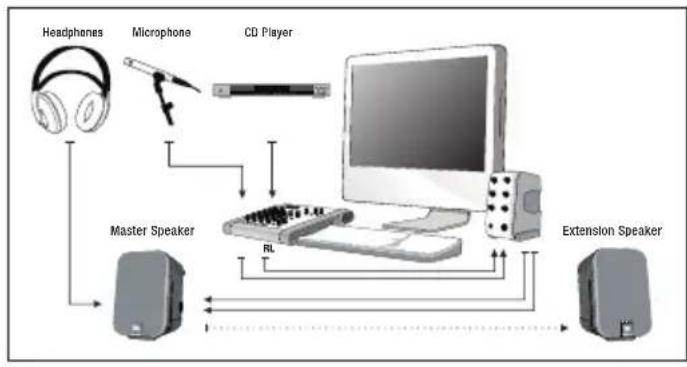
Recording/ Video Production
The Control 2P adds accurate monitoring to professional desk-top recording and video production systems. Connect a pair of headphones to the master speaker headphone jack for private monitoring.
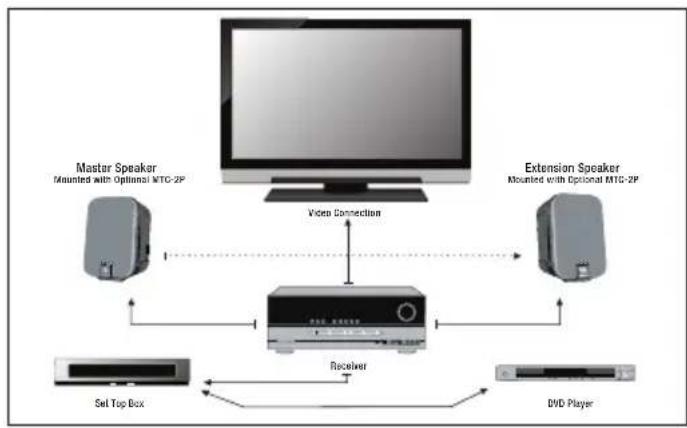
Entertainment Installation
With the optional MTC-2P kit, the Control 2P can be wall-mounted to provide professional quality audio for home and office entertainment installations.
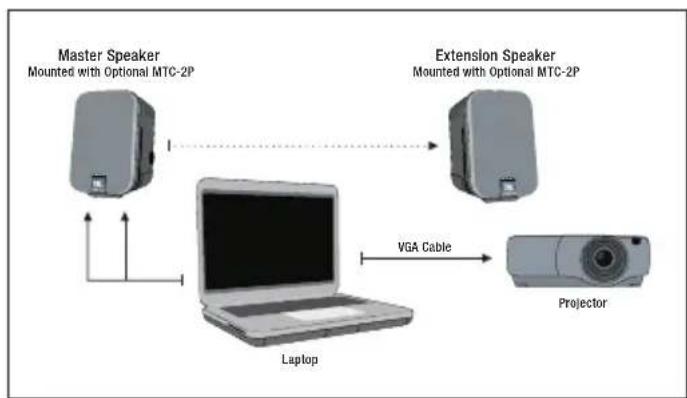
AV Presentations
A pair of Control 2P compact powered monitors, a portable projector and a laptop computer, make a "go-anywhere" presentation system.
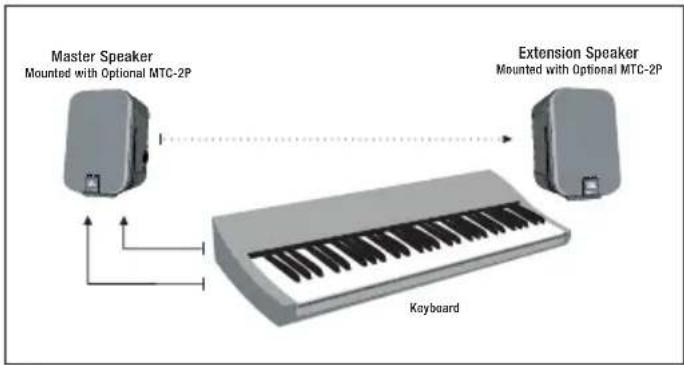
Electronic Musical Instruments
The Control 2P has the input connectors and the power to reproduce a wide range of signal sources including electronic Musical Instruments.
- For desk-top applications, attach a supplied angle pedestal to the bottom of each speaker as shown.
- Position speakers on a desk-top or secure surface. The Control 2P can be wall-mounted using optional MTC-2P mounting kit.*
- Connect the C2P extension speaker to the master speaker using the supplied extension speaker wire as illustrated. To ensure proper polarity, connect wire with red sleeve to the red speaker terminal.
- Connect the Control 2P power supply to the Control 2P Master Loudspeaker Power Connector.
- Connect the signal source to the inputs of the Control 2P Master Loudspeaker. Do not simultaneously connect sources to the RCA inputs and the XLR/1/4" inputs. Doing so may compromise performance.
- Set the POWER SWITCH to the ON position.
- With the sound source producing signal, set the volume control to achieve a suitable listening level.
Trouble Shooting
If there is no sound from your speakers, check these settings on the C2P Master Speaker:
- Make sure a signal source is connected and producing sound
- Make sure the white power ON LED is illuminated on the front of the speaker.
- Confirm the included power supply is connected and the power switch is set to the ON position.
- Make sure the volume control is not set to the full counter clockwise position
- If the C2P Extension Speaker does not produce sound, make sure the extension speaker wire 1/4'' plug is connected to the EXTENSION SPEAKER 1/4'' output connector. Make sure the bare-wire end of the cable is connected to the extension speaker wire terminals.
- If the system sounds as if it lacks low frequency (bass) performance, confirm the bare wire is connected so the RED wire is connected to the RED speaker wire terminal, and the other wire is connected to the BLACK speaker wire terminal.
If the above measures do not correct the problem, please contact JBL Professional
NOTE: If the red LED on the front of the speaker flashes due to continuous over-driving of the system, overload-protection may be activated and no sound will be heard. To resume operation, reduce system volume, turn the power switch OFF and then ON again.
Specifications
Frequency Response (+ / - 3dB) .. 100Hz - 18kHz
Frequency Range (-10dB): 80 Hz - 20 kHz
Maximum Peak SPL
C2PM Master Only 1:111 dB (1)
Maximum Peak SPL Per-Pair1: 115 dB (1)
LF Transducer: 135 mm (5.25 in) low frequency loudspeaker
HF Transducer: 19mm (.75 in) polycarbonate dome tweeter
Overload Protection: Internal Peak Limiter and Overload Protection
Crossover Frequency: 4.2 kHz
Signal Input Connectors (x2): Balanced Neutrik
2 Combo XLR 1/4" TRS; Unbalanced RCA
Input Sensitivity: +4 dBu XLR / 1/4"; 0 dBu RCA
Amplifier Power: 35 Watts continuous per-channel
Power Requirements: 19 VDC / 3.42 A - use only supplied power supply
Headphone Jack: 3.5 mm (1/8")
Enclosure Material: Polypropylene Structural Foam
Finish: Black
Dimensions (H x W x D): 235 x 159 x 143 mm (9.3 x 6.3 x 5.6 in)
Net Weight Master Speaker: 2.6 kg (5.5 lb)
Net Weight Extension Speaker: 2.2 kg (4.5 lb)
Shipping Weight per Pair: 12.5 lb / 5.8 Kg
Optional Accessories: MTC-2P Mounting Kit
ACCESSIONS OPTIONNELS
JBL Professional 8500 Balboa Blvd. Northridge, CA 91329
JBL Professional 8370 Balboa Blvd., Dock D Northridge, CA 91329
Customer Service:
Monday through Friday
8:00am - 5:00pm
Pacific Coast Time In the U.S.A.
(800) 8JBLPRO
(800.852.5776)
www.jblproservice.com
Service Client:
Register your product online at
www.jblpro.com
/registration
Sur Internet:
www.jblpro.com
- Important Safety Instructions
- WARNING
- CAUTION!
- Contents
- Thank You for Purchasing the JBL Control 2P Compact Powered Monitor
- FEATURES
- WHAT IS INCLUDED
- OPTIONAL ACCESSORIES
- FRONT VIEW
- SIDE VIEW
- REAR VIEW
- Applications
- Recording/ Video Production
- Entertainment Installation
- AV Presentations
- Electronic Musical Instruments
- Trouble Shooting
- Specifications
- ACCESSIONS OPTIONNELS
- Customer Service:
- Service Client:
- Sur Internet:
Brand : JBL
Model : Control 2 PS
Category : Speaker