Touch Free Wipe Warmer - Baby products Munchkin - Free user manual and instructions
Find the device manual for free Touch Free Wipe Warmer Munchkin in PDF.


| Brand | Munchkin |
| Model | MKCA0807 REV1 |
| Product type | Touchless wipe warmer |
| Power supply | 12 VDC, 720 mA, 8.64 W (Class 2 power adapter) |
| Line voltage | 110-120 V, 60 Hz |
| Capacity | Up to 100 wipes (depending on brand) |
| Main features | Keeps wipes warm, touchless opening via motion sensor, accent light and night light with touch sensor |
| Heating technology | Electric conduction |
| Motion sensor | Effective zone approx. 7.62 cm (3 inches) above lid |
| Lighting | Accent light (automatic 15 min) and night light (touch) |
| Material | Plastic (not specified) |
| Safety | Do not immerse, risk of strangulation, do not use on wood/painted surfaces |
| Cleaning | Unplug, let cool, clean with non-abrasive cloth |
| Included parts | Main cover, transparent housing, power adapter, integrated motion sensor |
| Warranty | 1 year limited (USA) |
| Customer service | 1-800-344-2229 (Mon-Thu 8am-5pm PST, Fri 8am-1pm) |
| Use | Indoor, household only |
| Automatic light shut-off | After 15 minutes of inactivity |
| Rewetting wipes | Possible with up to 1/2 cup of water |
| Opening for wipes | Present on main cover |
Frequently Asked Questions - Touch Free Wipe Warmer Munchkin
User questions about Touch Free Wipe Warmer Munchkin
0 question about this device. Answer the ones you know or ask your own.
Ask a new question about this device
Download the instructions for your Baby products in PDF format for free! Find your manual Touch Free Wipe Warmer - Munchkin and take your electronic device back in hand. On this page are published all the documents necessary for the use of your device. Touch Free Wipe Warmer by Munchkin.
USER MANUAL Touch Free Wipe Warmer Munchkin
Touch Free Wipe Warmer
Chauffe-lingettes sans contact
natural_image
Line drawing of a closed electronic device casing with a lid and mounting points (no text or symbols)IMPORTANT SAFEGUARDS
Important Safeguards....4
FCC Information....6
INCLUDED PARTS
Included Parts....7
HOW TO USE
Cleaning the Wipe Warmer 8
Preparing the Wipe Warmer 8
Using the Wipe Warmer....9
Using the Hands-Free Motion Sensor....10
Motion Sensor Indicator Light Chart 10
Using the Nightlight....10
Technical Specifications....11
CUSTOMER SERVICE
One-Year Limited Warranty 12
Contact Us 12
RENSEIGNEMENTS IMPORTANTS
WARNING: STRANGULATION HAZARD!
ALWAYS KEEP THE WARMER AND ITS PLUG OUT OF REACH OF SMALL CHILDREN. Do not use with extension cords. This is NOT a toy. Adult use only.
This appliance is not intended for use by children or persons with limited physical and mental capabilities unless they have been instructed or supervised on the proper use of this product by a person responsible for their safety.
- Do not let the cord hang over edge of table or counter, or touch hot surfaces.
- Do not operate any appliance with a damaged cord or plug or after the appliance malfunctions or has been damaged in any manner.
- Close supervision is necessary when any appliance is used near children.
- Do not tamper with warmer in any way.
- Do not use in an oxygen enriched environment or near equipment that stores or emits oxygen.

CAUTION: Electrically operated product.
- Product should be used for intended purposes only – to warm wipes. Do not use unit to warm any other objects.
- To protect against electrical shock do not immerse cord, plug or warmer in water or any other liquid.
• HOUSEHOLD USE ONLY, do not use outdoors.
- Do not use the power cord as a handle.
• NEVER PULL ON THE POWER CORD.
- Arrange power cord to minimize the possibility of accidents.
- Unplug from wall outlet when not in constant use and before cleaning.
- Do not place on or near a hot gas or electric burner, or in a heated oven.
- Do not cover with blanket or any type of insulated material.
- Because of the continuous low levels of heat and moisture associated with the warmer, unit must be placed on a compatible surface (wood and painted surfaces are not recommended). Munchkin, Inc. makes no warranty that surface discoloration or damage may not occur due to heat or moisture.
SAVE THESE INSTRUCTIONS
FCC WARNING
NOTE: This equipment has been tested and found to comply with the limits for a Class B digital device, pursuant to Part 15 of the FCC Rules. These limits are designed to provide reasonable protection against harmful interference in a residential installation. This equipment generates, uses and can radiate radio frequency energy and, if not installed and used in accordance with the instructions, may cause harmful interference to radio communications.
However, there is no guarantee that interference will not occur in a particular installation. If this equipment does cause harmful interference to radio or television reception, which can be determined by turning the equipment off and on, the user is encouraged to try to correct the interference by one or more of the following measures:
- Reorient or relocate the receiving antenna.
- Increase the separation between the equipment and receiver.
- Connect the equipment into an outlet on a circuit different from that to which the receiver is connected.
- Consult the dealer or an experienced radio/TV technician for help.
This device complies with Part 15 of the FCC Rules. Operation is subject to the following two conditions: (1) this device may not cause harmful interference, and (2) this device must accept any interference received, including interference that may cause undesired operation.
CAN ICES-3(B)/NMB-3(B)
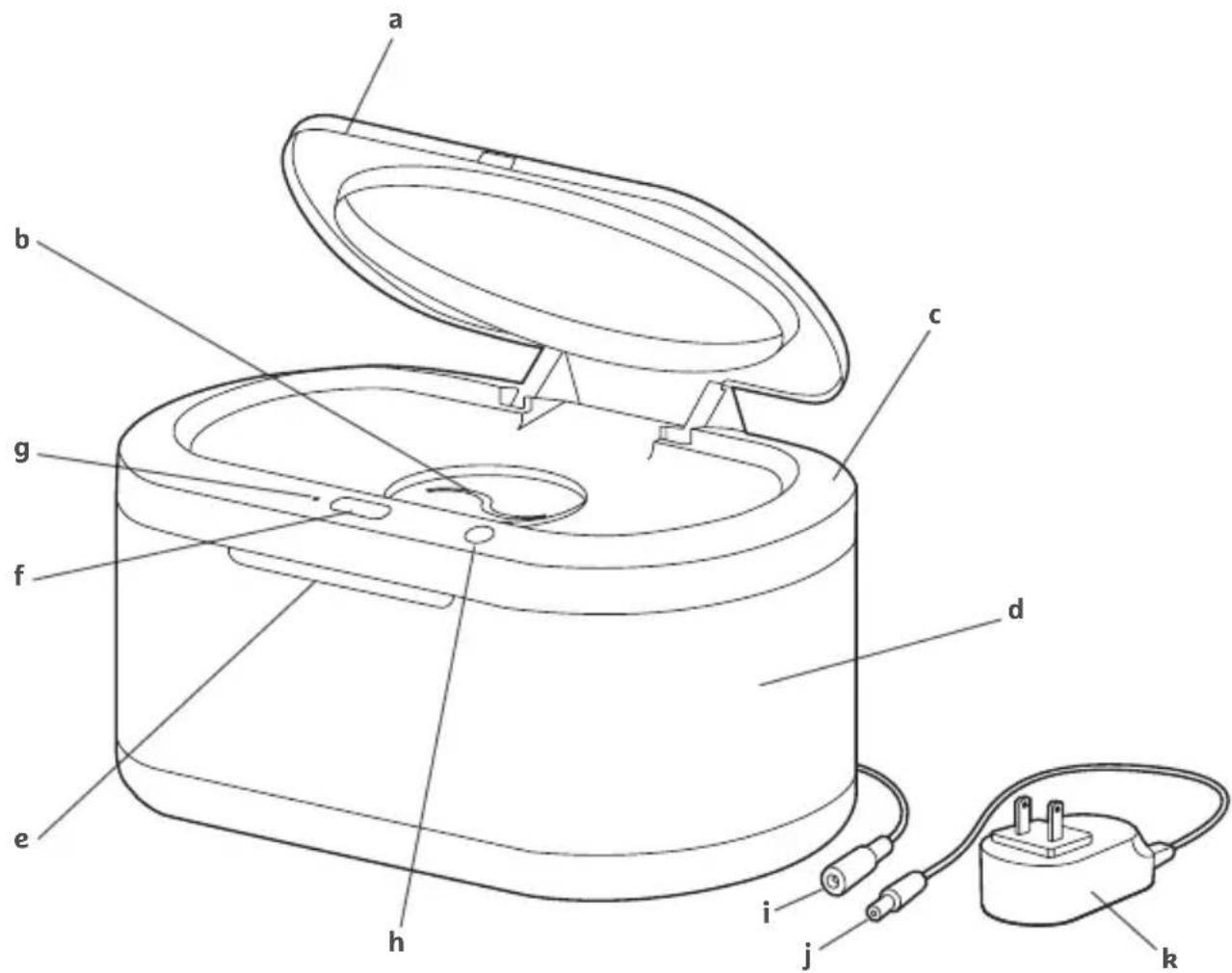
INCLUDED PARTS
text_image
Technical diagram of a portable electrical device with labeled parts including lid, casing, and power plugWIPE WARMER POWER ADAPTOR
a. Lid
b. Wipe opening
c. Main cover
d. Clear body
e. Cover indent
f. Motion sensor
g. Indicator light (motion sensor)
h. Light touch sensor (interior LED)
i. Female plug
j. Male Plug
k. Power Adaptor
CLEANING THE WIPE WARMER
Always unplug the unit and allow it to cool down before cleaning. Remove any wipes and wipe unit clean with a non-abrasive cloth.
Do not immerse the unit or power cord in water as this could create an electrical hazard.
In rare cases, wipes may become discolored due to prolonged exposure to heat.
PREPARING THE WIPE WARMER
Place the unit on a flat, stable surface. Connect the male and female plugs, and then plug the power adapter into a standard household 110-120 volt AC outlet. Do not plug into a 220 volt AC outlet. The indicator light will be on when functioning properly and the unit will begin warming. Only use with a Class 2 Adapter.
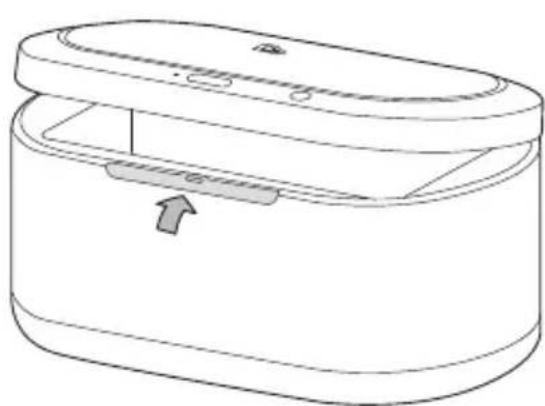
Use the cover indent on the front of the clear body to lift open the main cover.
NOTE: Plugging in the power cord is the only way to turn the wipe warmer on and off.
- Remove baby wipes from their original package and place them inside. The unit accepts up to 100 wipes (depending on brand); do not overfill. Both lids should be able to completely close.
natural_image
Line drawing of a medical or laboratory device with an open lid and internal structure, showing no text or symbols.- With the main cover open, push a corner of the top-most wipe through the wipe opening. Then, close the main cover.
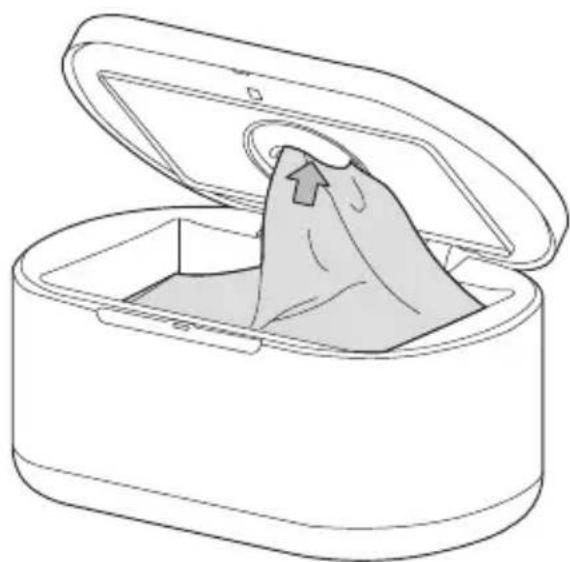
natural_image
Line drawing of an open cylindrical device with a bag partially inserted, showing internal structure and lid (no text or symbols)USING THE TOUCH-FREE WIPE WARMER
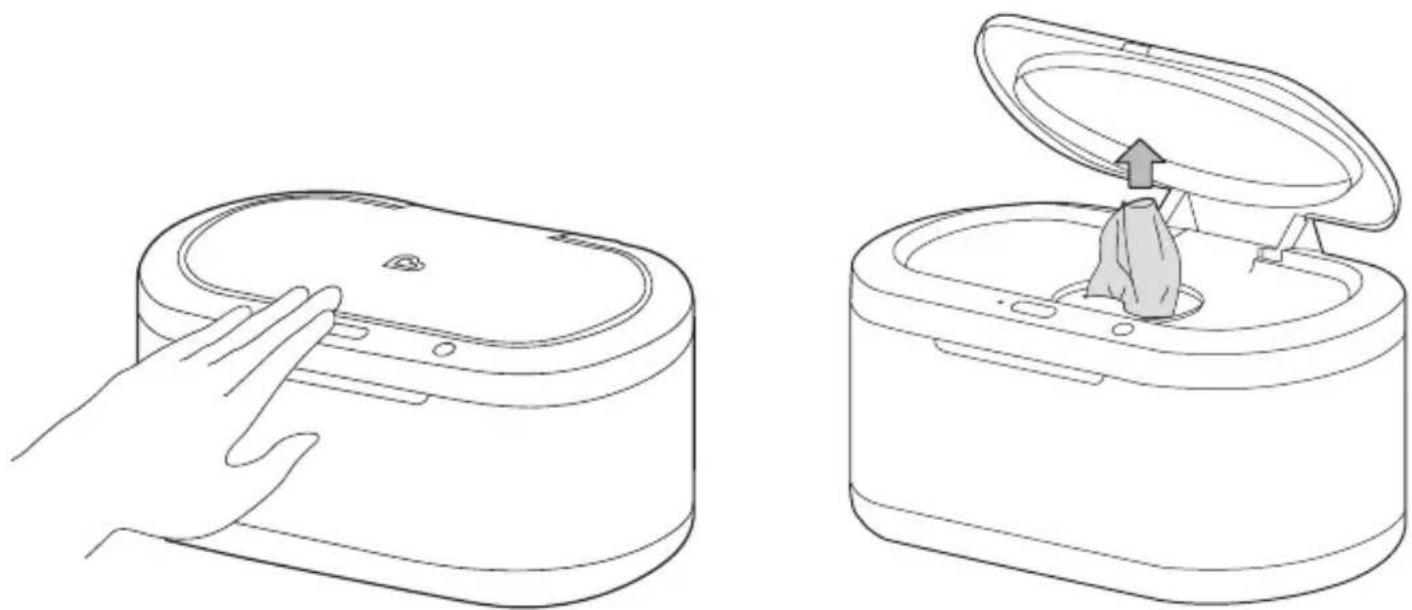
Wave your hand within the effective range of the motion sensor and the lid will open 'hands-free'.
Once the lid is fully opened, pull a wipe through the wipe opening.
Once your hand has been removed from the effective range of the motion sensor, the motion sensor indicator light will blink 5 times before closing to reduce moisture loss.
NOTE: The effective range of the motion sensor is approximately 3 in. (7.62cm) above the main cover.
If the wipes become dry, pour up to 1/2 cup of water directly onto the wipes to re-moisten them. To preserve wipes and save energy, unplug the unit if not in use for a prolonged period of time.
NOTE: The unit is intended to keep wipes warm for comfortable diaper changes. Wipes are not intended to reach a "hot" temperature.
natural_image
Line drawings of a hand pressing down on a cylindrical device and finally onto a closed base with a bag emerging from the top (no text or symbols)MOTION SENSOR INDICATOR LIGHT CHART
| INDICATOR LIGHT MODE | |
| Solid light | Object in range of motion sensor |
| Blinking light | Object not in range of motion sensor |
| No light | Sleeping |
USING THE TASK LIGHT & NIGHTLIGHT
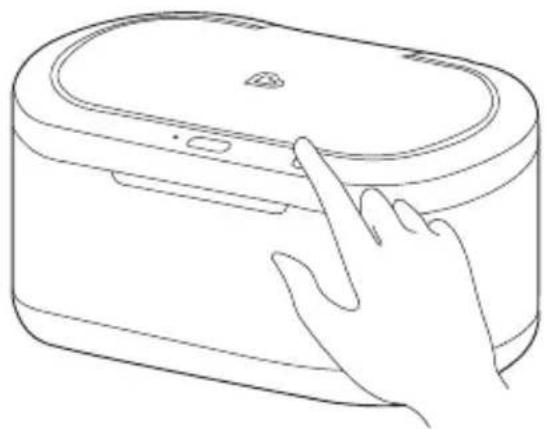
The task light feature is designed to turn ON automatically when you wave your hand within the effective range of the motion sensor. After 15 minutes of non-usage, the task light will perform an auto shut-off.
The task light and nightlight feature can also be turned ON/OFF manually. Simply tap the light touch sensor button to turn ON the task light. Tap the light touch sensor button again for the night light. Tap the light touch sensor button a third time to turn OFF the light and complete the cycle.
NOTE: If you turn the light ON manually, the light will stay ON until:
- User turns OFF the light manually, or
- User activates the motion sensor.
NOTE: If the motion sensor has been activated with the light feature already ON, the task light will shut OFF after 15 minutes of non-usage.
natural_image
Line drawing of a hand interacting with a device resembling a battery or scanner (no text or symbols present)TECHNICAL SPECIFICATIONS
• Product Name: Touch Free Wipe Warmer and Nightlight
• Model: MKCA0807 REV1
Electrical Rating:
• 12VDC, 720mA, 8.64W, Use only with Class 2 power supply
ONE-YEAR LIMITED WARRANTY
Munchkin's Touch Free Wipe Warmer and Nightlight includes a one-year limited warranty against defects from the date of purchase. In the event of a malfunction or defect during the in-warranty period, Munchkin, Inc. at its option, will replace or repair the product under warranty. Upon receipt of the product and proof of purchase with a valid date of purchase, the defective part will be immediately repaired or replaced and returned to you free of charge (USA only). Please send defective unit, proof of purchase and a description of the problem you have encountered to:
Munchkin, Inc.
7835 Gloria Avenue
Van Nuys, CA 91406, USA
Attn: Touch Free Wipe Warmer and Nightlight Warranty
NOTE: This warranty does not cover misuse, abuse, abnormal wear & tear, negligence, environmental exposure, alteration or accident. Any alteration or removal of the product date code invalidates all claims against the manufacture.
CONTACT US
If you have any questions or wish to provide comments about this product, feel free to contact our Customer Satisfaction team at 1-800-344-2229 (M-TH 8:00am-5:00pm PST, F 8:00am-1:00pm PST) or visit our website at www.munchkin.com.
FRENCH
FRANÇAIS
FRANCÉS
RENSEIGNEMENTS IMPORTANTS

MISE EN GARDE :
text_image
Technical diagram of a cylindrical device with labeled parts including an open lid, internal compartments, and a plug.CHAUFFE-LINGETTES ADAPTATEUR D'ALIMENTATION
a. Couvercle
natural_image
Line drawing of a medical or laboratory device with an open lid and internal structure, showing no text or symbols.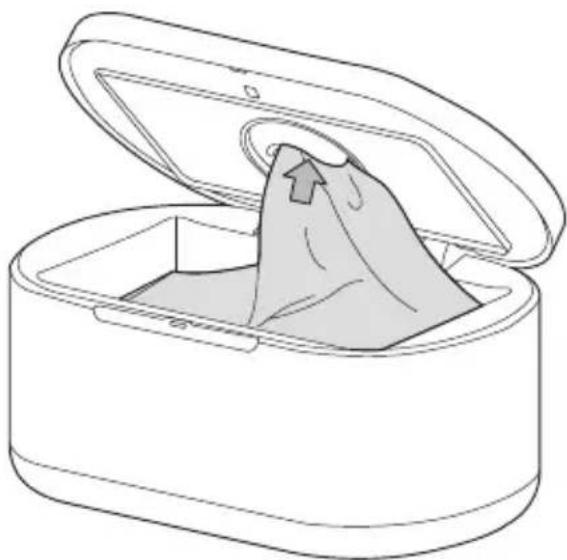
natural_image
Line drawing of an open cylindrical device with a bag partially inserted, showing internal structure and lid (no text or symbols)UTILISER LE CHAUFFE-LINGETTES SANS CONTACT
natural_image
Line drawings of a hand pressing down on a cylindrical device and finally onto a closed base with a lid (no text or symbols)TABLEAU DES TÉMOINS LUMINEUX DU DÉTECTEUR DE MOUVEMENT
natural_image
Line drawing of a hand interacting with a device inside an oval container (no text or symbols)GARANTIE LIMITÉE D'UN AN
Attn: Touch Free Wipe Warmer and Nightlight Warranty
text_image
Technical diagram of a cylindrical device with labeled parts, including an open lid and internal components.natural_image
Line drawing of a cylindrical device with lid and internal compartments, showing a handle and arrow (no text or symbols)natural_image
Line drawing of a closed box with an open lid and a bag emerging from the side (no text or symbols)natural_image
Line drawings of a hand pressing down on a cylindrical device and finally onto a closed base with a bag emerging from the top (no text or symbols)GUÍA DEL INDICADOR LUMINOSO DEL SENSOR DE MOVIMIENTO
natural_image
Line drawing of a hand interacting with a device resembling a battery or scanner (no text or symbols)Attn: Touch Free Wipe Warmer and Nightlight Warranty