Swing - Rocking chair Munchkin - Free user manual and instructions
Find the device manual for free Swing Munchkin in PDF.



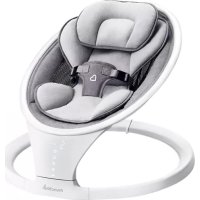
| Product Type | Baby swing |
| Brand | Munchkin |
| Model | Swing (MKCA0788 REV 1) |
| Recommended Age | Up to approximately 9 months (when baby attempts to climb out) |
| Maximum Child Weight | 9 kg (20 lb) |
| Power | Plug-in adapter (100-240 VAC, 50/60 Hz, 0.2 A; output 5 VDC, 1 A). Does not run on batteries. |
| Connectivity | Bluetooth® (built-in speaker), device name: MUNCHKIN |
| Swing Motion | 5 adjustable speeds |
| Timer | 8, 15, 30 minutes or auto-off |
| Built-in Sounds | 8 sounds (ocean, white noise, rain, heartbeat, stream, car ride, birds chirping, fan) |
| Built-in Songs | 12 songs (including Bach, Beethoven, Mozart, Chopin) |
| Volume | 5 adjustable levels |
| Remote Control | Included, CR2025 button battery (replaceable) |
| Safety Harness | 5-point restraint system |
| Care of Body Cushion and Head Support | Machine washable, tumble dry on medium heat |
| Care of Seat Fabric | Wipe with a clean damp cloth, do not bleach, air dry |
| Warranty | One-year limited warranty against defects |
| Customer Service | 1-800-344-2229 (Mon-Thu 8am-5pm, Fri 8am-1pm Pacific Time) or www.munchkin.com |
Frequently Asked Questions - Swing Munchkin
User questions about Swing Munchkin
0 question about this device. Answer the ones you know or ask your own.
Ask a new question about this device
Download the instructions for your Rocking chair in PDF format for free! Find your manual Swing - Munchkin and take your electronic device back in hand. On this page are published all the documents necessary for the use of your device. Swing by Munchkin.
USER MANUAL Swing Munchkin
Bluetooth® Enabled Baby Swing
natural_image
Line drawing of a car interior with seatbelt and dashboard (no text or symbols)IMPORTANT SAFEGUARDS
Important Safeguards....4
FCC Information....5
INCLUDED PARTS
Included Parts....6
HOW TO USE
How to Assemble....7
How to Disassemble 8
How to Use....8
Connecting via Bluetooth ^® 10
Using the Remote Control....10
How to replace Remote Control Battery 11
How to Clean....11
One-Year Limited Warranty 11
CUSTOMER SERVICE
Technical Specifications....12
Contact Us 12
RENSEIGNEMENTS IMPORTANTS
⚠ WARNING: To prevent serious injury or death from infants falling or being strangled in straps:
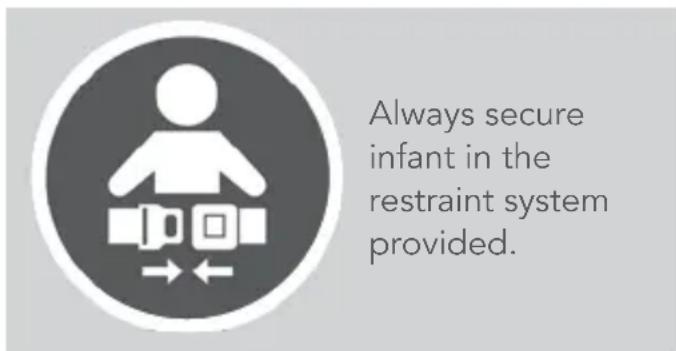
• Always secure infant in the restraint system provided.
- Never leave infant unattended in swing.
- Discontinue use of swing when infant attempts to climb out (approximately 9 months).
• Always place swing on floor. Never use on any elevated surface.
• Maximum weight 20 lbs (9 kg).
- Check this product regularly and contact Munchkin for replacement parts and instruction if needed. Never substitute parts.
- Power adapter cable: strangulation hazard! Keep cable out of reach of children.
- This product contains a Button or Coin Cell Battery. A swallowed Button or Coin Cell battery can cause internal chemical burns in as little as two hours and lead to death.
- Dispose of used batteries immediately. Keep new and used batteries away from children. If you think batteries might have been swallowed or placed inside any part of the body, seek immediate medical attention.
- This product is not intended for prolonged periods of sleeping.
- Do not move or lift this product with the baby inside it.
text_image
Always secure infant in the restraint system provided.BATTERY WARNING
In exceptional circumstances, batteries may leak fluids that can cause a chemical burn injury or ruin your product. To avoid battery leakage, follow the instruction below.
- Insert batteries in the correct polarity position (+ and -).
- Do not short circuit battery terminals.
- Remove batteries during long periods of non-use. Always remove exhausted batteries from product. Dispose batteries properly.
- Use caution when opening battery compartment as some batteries may leak, explode or catch on fire.
- Do not submerge in water or other liquids.
- Do not dispose of this product in a fire. The batteries inside may explode or leak.
- Only batteries of the same or equivalent type as recommended are to be used.
FCC WARNING
The device complies with part 15 of the FCC Rules. Operation is subject to the following two conditions: (1) This device may not cause harmful interference, and (2) This device must accept any interference received, including interference that may cause undesired operation.
⚠ WARNING: Changes or modifications to this unit not expressly approved by the party responsible for compliance could void the user's authority to operate the equipment.
NOTE: This equipment has been tested and found to comply with the limits for a Class B digital device, pursuant to part 15 of the FCC Rules. These limits are designed to provide reasonable protection against harmful interference in a residential installation. This equipment generates, uses and can radiate radio frequency energy and if not installed and used in accordance with the instructions, may cause harmful interference to radio communications. However, there is no guarantee that interference will not occur in a particular installation. If this equipment does cause harmful interference to radio or television reception, which can be determined by turning the equipment off and on, the user is encouraged to try to connect the interference by one or more of the following measures:
• Reorient or relocate the receiving antenna.
- Increase the separation between the equipment and receiver.
- Connect the equipment into an outlet on a circuit different from that to which the receiver is connected.
- Consult the dealer or an experienced radio/TV technician for help.
This CLASS(B) DIGITAL APPARATUS complies with CANADIAN CAN ICES-3 (B)/NMB-3(B)
INCLUDED PARTS
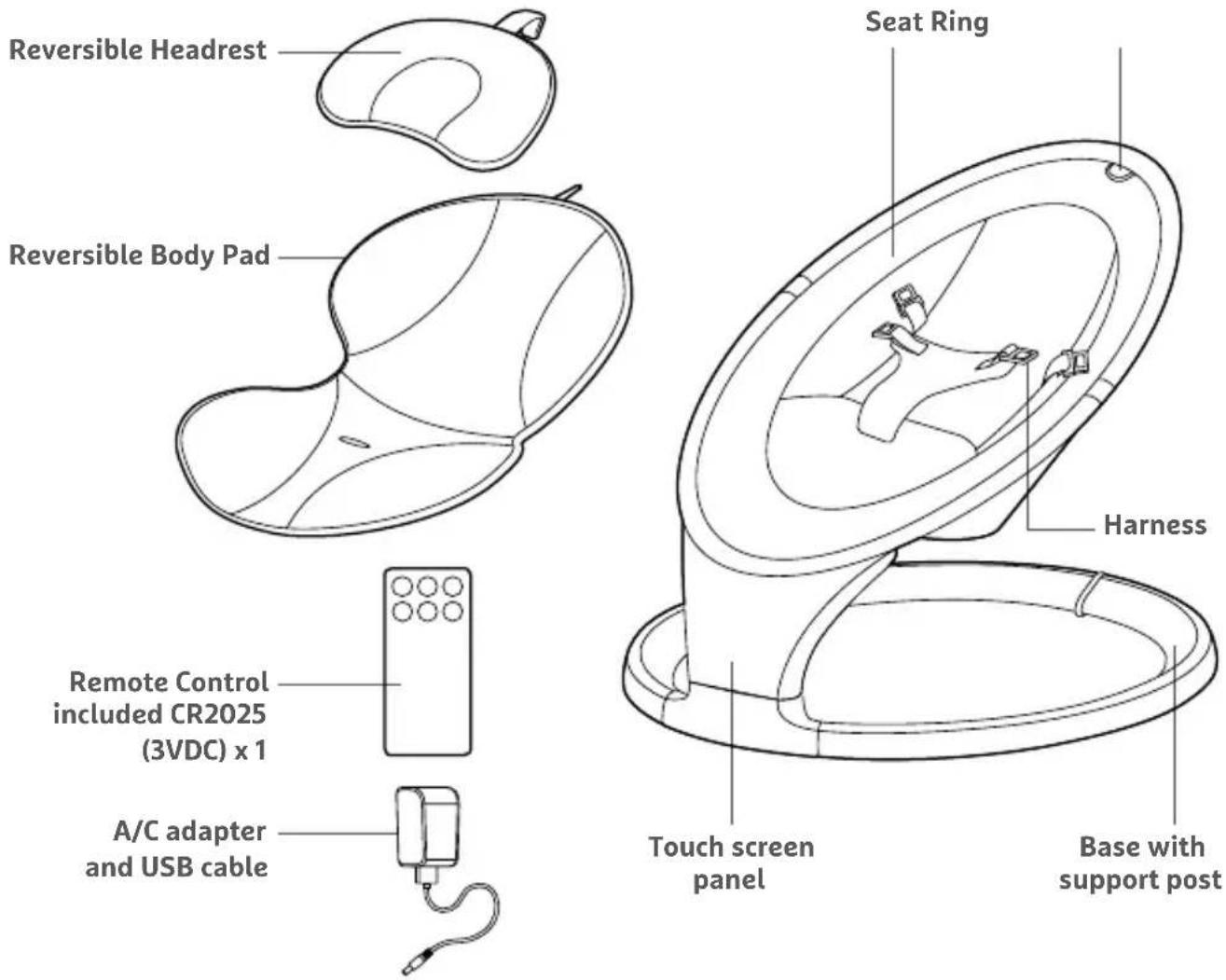
text_image
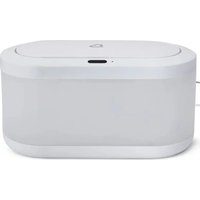
Reversible Headrest Reversible Body Pad Seat Ring Harness Remote Control included CR2025 (3VDC) x 1 A/C adapter and USB cable Touch screen panel Base with support post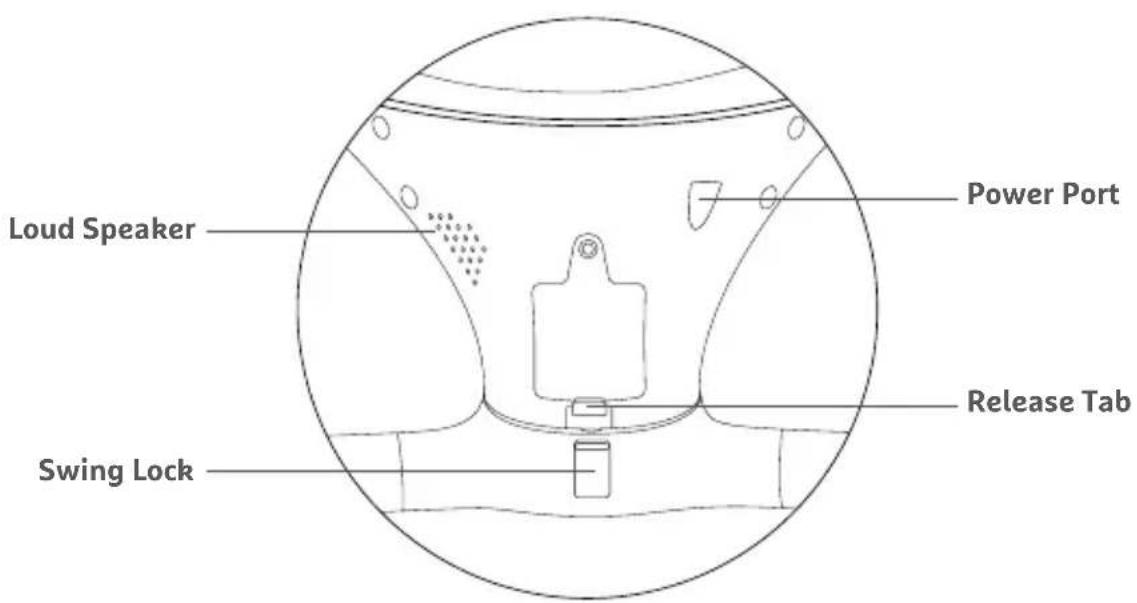
text_image
Loud Speaker Power Port Release Tab Swing LockHOW TO ASSEMBLE
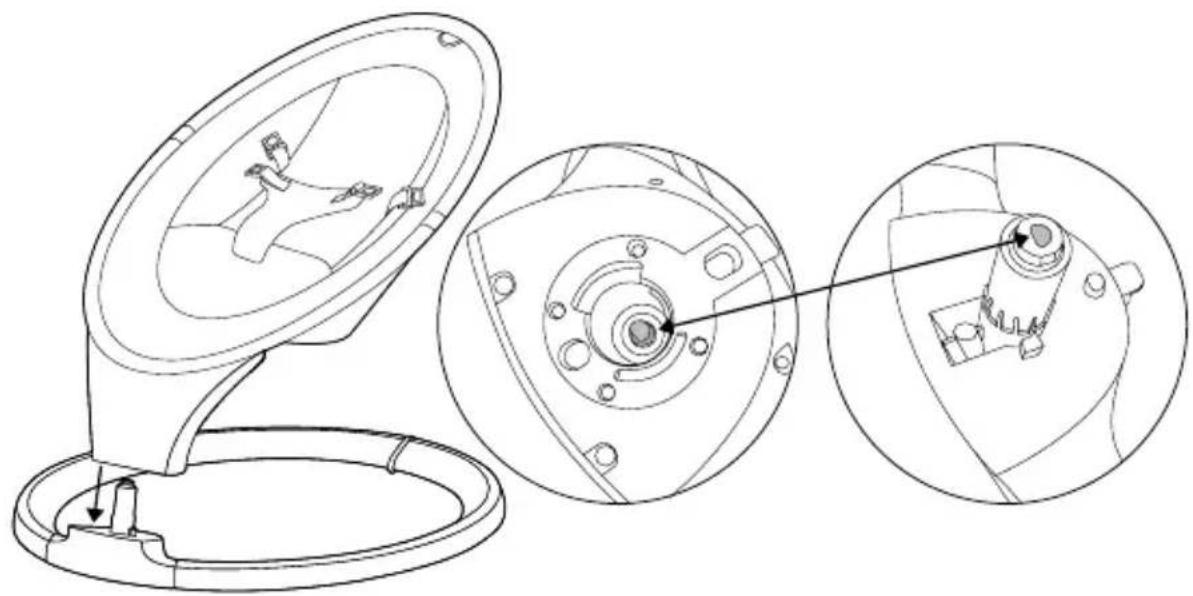
- Slide the seat's frame onto the base support post.
IMPORTANT: The D-shaped anchor inside the seat's frame must fit into the D-shaped port in the support post. Always ensure that the seat is locked securely onto the base before use.
natural_image
Technical line drawing of a mechanical component with three views: top view, front view, and close-up (no text or symbols)-
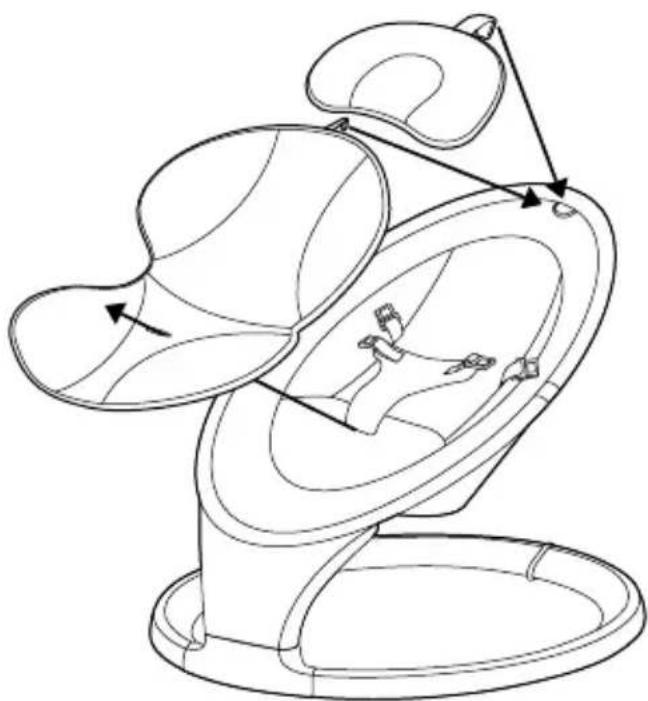
Place the reversible body pad onto the seat, then thread the harness strap through the bottom slot of the pad.
-
Pull the hook-and-loop strap at the top of the body pad through the ring. Fold the strap to secure its position.
-
Place the headrest onto the seat, then pull the hook-and-loop strap through the ring. Fold to secure.
natural_image
Line drawing of a car interior with directional arrows indicating movement or force (no text or symbols)HOW TO DISASSEMBLE
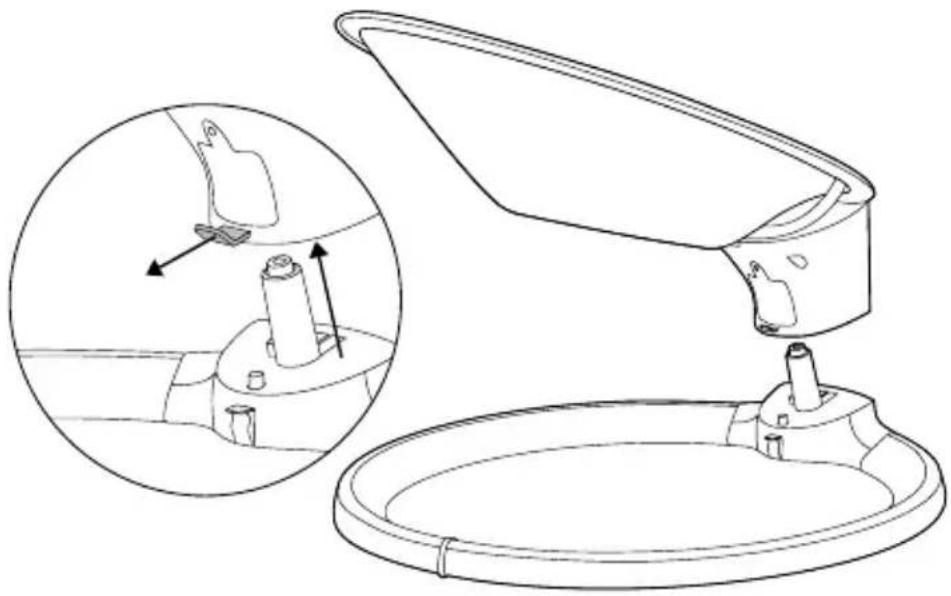
- Pull the release tab out and then lift the seat from the support post.
natural_image
Technical line drawing of a mechanical device with an inset showing internal components (no text or symbols)HOW TO USE
-
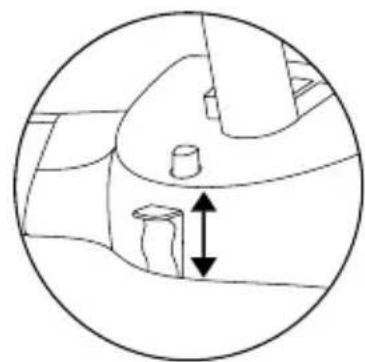
Raise the swing lock on the back of the base to prevent the seat from moving. IMPORTANT: Always set the swing on a flat, stable surface. Never use the seat without safely buckling your child into the harness.
-
Place the baby into the seat and then buckle the safety harness. Adjust the strap length if necessary. After the baby is secure, release the swing lock on the back of the base. Maximum weight 20 lbs (9 kg).
natural_image
Diagram of a mechanical or architectural component with a central cylindrical feature and a vertical double-headed arrow indicating direction (no text or symbols present)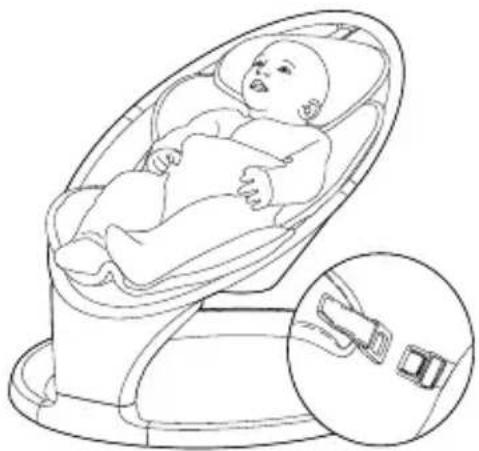
natural_image
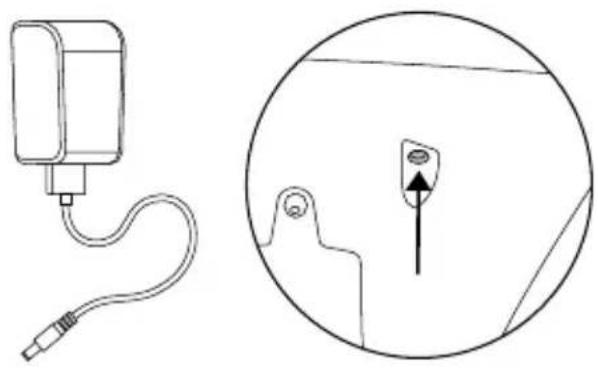
Line drawing of a baby in a car seat with a close-up inset showing the seatbelt (no text or symbols)- Connect the power cord to the port on the back of the display panel. Then plug the cord into an electrical outlet.
NOTE: Swing does not operate off of batteries. Power cord is the only source of power.
-
Touch anywhere near the center of the display panel to activate the screen.
-
Control the unit's functions with the buttons indicated below:
natural_image
Technical line drawing of a medical device connected to a circular inset showing a small object with an arrow (no text or symbols present)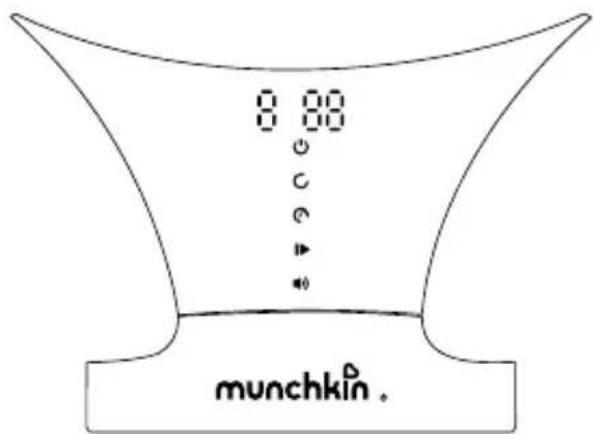
text_image
8:80 C C munchkin.| POWER: Press to turn power ON/OFF. | |
| SWING: Press to increase speed.After 5 levels, speed resets to zero. | |
| TIMER: Press to set time to 8 min, 15 min, 30 min, or cancel.Unit will turn off automatically when timer finishes. | |
| PLAY/PAUSE: Press to play built-in sounds and songs. Press again to choose next sound or song (12 total). Hold for 2 seconds to pause song. | |
| VOLUME: Press to increase sound volume.After 5 levels, volume resets to zero. |
SOUNDS:
Ocean, White noise, Rain, Heartbeat, Stream, Car ride, Birds Chirping, Fan
SONGS:
Bach, Beethoven, Mozart, Chopin
CONNECTING VIA BLUETOOTH®
The swing has a Bluetooth®-enabled speaker that can play music from a mobile device or smartphone.
Simply open your device's Bluetooth® settings and connect to "MUNCHKIN." The swing will chime twice when pairing is successful.
To switch back to built-in sounds, press the swing's play/pause button.
NOTE: The swing must remain within your device's Bluetooth® range for the connection to stay active.
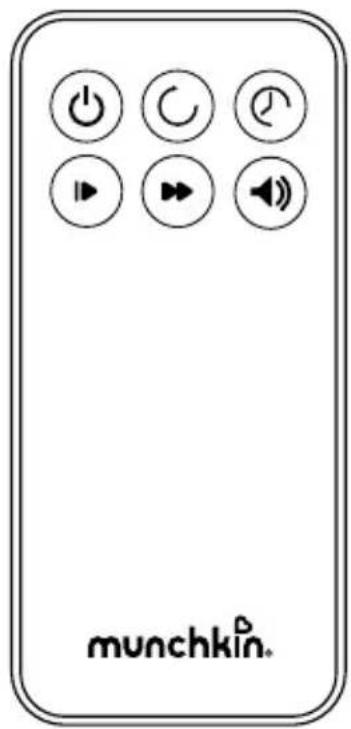
USING THE REMOTE CONTROL
The buttons on the remote control function the same way as the controls on the display panel.

Power: Press to turn power ON/OFF.

Swing: Press to increase speed. After 5 levels, speed resets to zero.

Timer: Press to set time to 8 min, 15 min, 30 min, or cancel. Unit will turn off automatically when timer finishes.

Play/Pause: Press to play built-in sounds and songs. Press again to pause song.

Next: Press to move to the next sound of song (12 total).

Volume: Press to increase sound volume. After 5 levels, volume resets to zero.
text_image
munchkin.HOW TO REPLACE REMOTE CONTROL BATTERY
- Unscrew the battery compartment door using a Phillips-head screwdriver.
- Insert a new CR2025 battery. Ensure correct polarity as indicated in battery compartment.
- Close the compartment door and tighten screw. Do not overtighten.
HOW TO CLEAN
Washing the body pad and headrest: Machine wash cold, tumble dry warm.
Cleaning the seat fabric and swing: Wipe with a clean, damp cloth. Do not bleach. Air Dry.
ONE-YEAR LIMITED WARRANTY
Munchkin's Swing includes a 1-year limited warranty against defects from the date of purchase. In the event of a malfunction or defect during the in-warranty period, Munchkin, Inc. at its option, will replace or repair the product under warranty. Upon receipt of the product and proof of purchase with a valid date of purchase, the defective part will be immediately repaired or replaced and returned to you free of charge (USA only). Please send defective unit, proof of purchase and a description of the problem you have encountered to:
Munchkin, Inc.
7835 Gloria Avenue
Van Nuys, CA 91406, USA
Attn: Swing Warranty
NOTE: This warranty does not cover misuse, abuse, abnormal wear & tear, negligence, environmental exposure, alteration or accident. Any alteration or removal of the product date code invalidates all claims against the manufacture.
TECHNICAL SPECIFICATIONS
• Product Name: Swing
• Model: MKCA0788 REV 1
Electrical Rating
Power Adapter
- Input Voltage:100-240 VAC, 50/60 Hz, 0.2A
• Output Voltage: 5VDC, 1A
Swing
- Dual power inputs: Unit can be powered through micro-USB.
Micro-USB power given priority
• Rated Input: 5VDC, 1A
Remote Control
- Battery CR2025 button Cell
CONTACT US
If you have any questions or wish to provide comments about this product, feel free to contact our Customer Satisfaction team at 1-800-344-2229 (M-TH 8:00am-5:00pm PST, F 8:00am-1:00pm PST) or visit our website at www.munchkin.com.
FRENCH
FRANÇAIS
FRANCÉS
RENSEIGNEMENTS IMPORTANTS
natural_image
Technical line drawing of a mechanical component with three views: top view, front view, and close-up (no text or symbols)natural_image
Line drawing of a car interior with directional arrows indicating movement or force (no text or symbols)DÉMONTAGE
natural_image
Technical line drawing of a mechanical assembly with an inset showing internal components (no text or symbols)MODE D'EMPLOI
natural_image
Diagram of a mechanical or architectural component with a double-headed arrow indicating vertical displacement (no text or symbols present)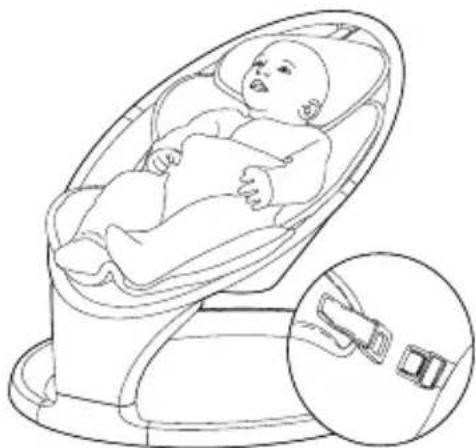
natural_image
Line drawing of a baby in a baby car seatbelt device, with an inset showing the same seatbelt (no text or symbols present)text_image
munchkin.text_image
munchkin.REEMPLACER LA PILE DE LA TÉLÉCOMMANDE
GARANTIE LIMITÉE D'UN AN
Attn: Swing Warranty
natural_image
Technical line drawing of a mechanical component with cross-sectional views (no text or symbols)natural_image
Line drawing of a car interior with directional arrows indicating movement or force (no text or symbols)INSTRUCCIONES DE DESMONTAJE
natural_image
Technical line drawing of a cleaning or assembly device with an inset showing internal components (no text or symbols)INSTRUCCIONES DE USO
natural_image
Diagram of a mechanical or architectural component with a central cylindrical feature and a vertical double-headed arrow indicating direction (no text or symbols present)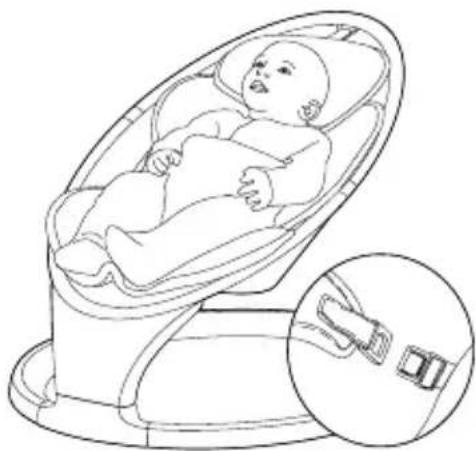
natural_image
Line drawing of a baby reclining inside a car seat, with an inset showing the same seat detail (no text or symbols)text_image
munchkin.text_image
munchkin.Attn: Swing Warranty