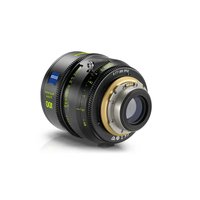
Supreme Prime - Lens ZEISS - Free user manual and instructions
Find the device manual for free Supreme Prime ZEISS in PDF.


| Product type | Cinema lens |
| Brand | ZEISS |
| Model | Supreme Prime |
| Mount | PL (convertible to LPL with electronic interface) |
| Operating temperature | -20 °C to 55 °C |
| Storage temperature | -40 °C to +70 °C |
| Water resistance | Not waterproof, protect from humidity |
| Optical maintenance | Soft brush, microfiber cloth, ZEISS cleaning liquid |
| Safety | Do not expose to direct sunlight, replace caps |
| Authorized modifications | Mount change, external connector, back focus adjustment, focus ring change, firmware update |
| Warranty | 12 months legal warranty |
| Disposal | Do not dispose with household waste, follow local regulations |
| Electromagnetic compatibility | Directive 2014/30/EU, CE marking |
| Customer service | www.zeiss.com/cine |
Frequently Asked Questions - Supreme Prime ZEISS
User questions about Supreme Prime ZEISS
0 question about this device. Answer the ones you know or ask your own.
Ask a new question about this device
Download the instructions for your Lens in PDF format for free! Find your manual Supreme Prime - ZEISS and take your electronic device back in hand. On this page are published all the documents necessary for the use of your device. Supreme Prime by ZEISS.
USER MANUAL Supreme Prime ZEISS
natural_image
Close-up of a black and silver SLS2017 high-end camera lens (no visible text or symbols)
4 English
GB
12 Deutsch D
20 Français F
28 Español E
36 Italiano I
44 Русский
52 日本語
60 中文 CHN
RUS
JP
Carl Zeiss AG
Consumer Products
GB
4
ZEISS Supreme Prime
Disclaimer:
To ensure proper and safe use, we recommend that you used these safety and operating instructions first before using the product and then store them in a safe place. Non observance of these instructions could lead to injury or damage.
Carl Zeiss AG reserves the right to change these specifications without any prior notice. A continuously updated version of the instruction manuals can be found at www.zeiss.com/inemanuals.
all rights reserved. This manual, or parts thereof, may not be reproduced without prior written permission from Carl Zeiss AG, not stored in retrieval systems, or transmitted in any form, whether electronically, mechanically, by telecopy, recording in other media. Copyright 2018, Carl Zeiss AG
Technical Data
Versions
The ZEISS Supreme Prime lenses are available with PL mount and can be converted into the following mounts:
■ LPL (with electronic interface)
Further technical information on the lenses can be found on: www.zeiss.com/cine/supremeprime
Lens components
① Front lens element
② Focus ring
③ Focus index mark
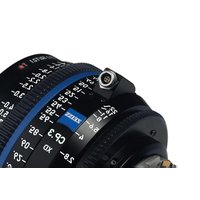
④ External socket (Female 4-Pin mechanical connector)
⑤Aperture index mark
⑥Aperture ring
⑦ Lens mount
⑧ Rear lens element
Safety Tips
Safety & Handling
Never point the lens directly towards the sun because there is a significant risk of harming your eye-sight. Always attach the lens cap when the lens is not in use. Otherwise, there is danger of fire!
Storage & Transportation
Use the product only in temperatures ranging between -20 °C and 55 °C. Store this product only in temperatures ranging between -40 °C and +70 °C. The product is not completely water resistant, dust resistant or waterproof. Protect the camera and lens appropriately when in the rain and in damp or dusty environments. Should the product be exposed to moisture, remove it from the camera. Allow the device to dry completely before you use it again. Do not attempt to dry the product with the aid of an external heat source, e.g., in a microwave oven or with a hairdryer.
Modification, Service and Repair
You are allowed to do the following modifications: Changing the mount, changing the external socket, adjusting the flange focal distance, switching the scale ring and updating the firmware. Please follow the instructions on our website: www.zeiss.com/cine/manuals
Do not undertake any other unauthorized modifications or repairs on the product yourself. By disassembling it, damage may be caused which is not covered by the warranty. If it needs repair, please contact your authorized dealer and distributor. For this purpose, see www.zeiss.com/cine/service
European Directive of Regulation
When the product left the factory it was in a completely safe working condition. It meets the electromagnetic compatibility requirements set out in Directive 2014/30/EU and bears the CE test mark.
Disposal
Do not dispose of the product as household waste but please follow the applicable statutory regulations of the relevant country. Consult local authorities about the options for disposal and recycling if necessary.
Warranty
The product is subject to the statutory warranty of 12 months.
Damage to or problems caused by the unauthorized opening of the product are not covered by the warranty. Before submitting a warranty claim, make sure that the possibility of an operator error has been ruled out. Please refer to the support information in this regard at www.zeiss.com/cine

Handling
GB
Intended Use
ZEISS Supreme Prime lenses are designed for the use on cameras with interchangeable lenses. The usage in any other scenario is not recommended.
Removing the Rear Cap
Remove the rear cap from the lens by turning it counter-clockwise.
Attaching the Rear Cap
Attach the rear cap to the lens by turning it clockwise.
Mounting and Removing the Lens
Please refer to the mounting instructions in the user guide of your camera.
Lens Care Tips
To ensure that your lens is always in perfect condition, the presence of any form of dirt or humidity on the glass surface should be avoided. Dust on the lens can be removed carefully with a soft brush, stains and fingerprints with a soft, dry and clean microfiber cloth. To remove stubborn dirt, we additionally recommend the use of the ZEISS cleaning fluid. Please follow the instructions of the ZEISS Lens Cleaning Kits.
Customer Support
Your nearest ZEISS dealer can be found on the homepage www.zeiss.com/cine
GB
Haftungsausschluss:


- ZEISS Supreme Prime
- Disclaimer:
- Technical Data
- Versions
- Lens components
- Safety Tips
- Safety & Handling
- Storage & Transportation
- Modification, Service and Repair
- European Directive of Regulation
- Disposal
- Warranty
- Handling
- Intended Use
- Removing the Rear Cap
- Attaching the Rear Cap
- Mounting and Removing the Lens
- Lens Care Tips
- Customer Support
- Haftungsausschluss:
Brand : ZEISS
Model : Supreme Prime
Category : Lens