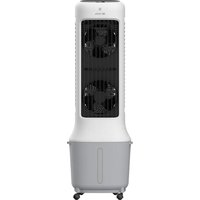
BC10ACP2501W - Air Conditioning Be Cool - Free user manual and instructions
Find the device manual for free BC10ACP2501W Be Cool in PDF.


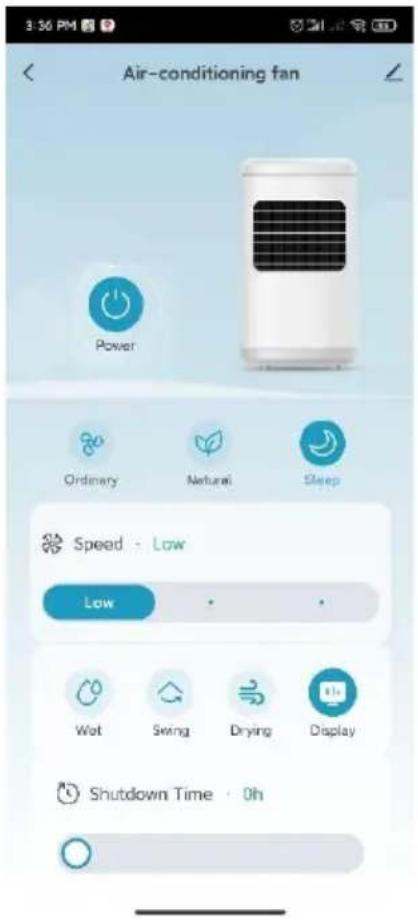
| Product Type | Air Conditioning / Air Cooler |
| Brand | Be Cool |
| Model | BC10ACP2501W |
| Dimensions (W x D x H) | 308.5 x 279.2 x 938.2 mm |
| Net Weight | 6.1 kg |
| Power Supply | 220-240 V~, 50 Hz |
| Rated Power Consumption | 38 W |
| Water Tank Capacity | 10 L |
| Max Airflow | 1000 m³/h |
| Speed Levels | 24 |
| Ventilation Modes | Normal, Natural, Sleep |
| Cooling/Humidification Function | Yes (water pump + cooling packs) |
| Dry Air Function | Yes (removes residual humidity) |
| Timer | 1 to 24 hours |
| Oscillation (Swing) | Yes |
| WiFi Connectivity | Yes (2.4 GHz, Tuya app) |
| Remote Control | Yes (CR2032 battery included) |
| Cooling Packs Included | 2 ice blocks |
| Casters Included | 4 |
| Protection Class | II |
| Sound Power Level | 63 dB(A) |
| Warranty | 2 years (valid in Austria) |
| Maintenance and Cleaning | Clean air filter monthly; water tank and surface with soft cloth and mild detergent |
| Safety | Use qualified socket; do not direct at children; stop if abnormal odor/noise; do not disassemble without authorization |
| Spare Parts and Repairability | Repair by authorized workshop; do not replace parts without authorization; contact customer service |
Frequently Asked Questions - BC10ACP2501W Be Cool
User questions about BC10ACP2501W Be Cool
0 question about this device. Answer the ones you know or ask your own.
Ask a new question about this device
Download the instructions for your Air Conditioning in PDF format for free! Find your manual BC10ACP2501W - Be Cool and take your electronic device back in hand. On this page are published all the documents necessary for the use of your device. BC10ACP2501W by Be Cool.
USER MANUAL BC10ACP2501W Be Cool
natural_image
Line drawing of a portable air conditioner unit with cooling fan and wheels (no text or symbols)HERZLICHEN GLÜCKWUNSCH!
1) Display
4) Frontgehäuse
7) Vertikale Lamellen
BE COOL
natural_image
Line drawing of a portable electric heater with a hand inserting a bucket into it (no text or symbols)natural_image
Line drawing of a portable air conditioner unit with grid and control panel (no text or symbols)1
natural_image
Line drawing of a portable electric heater with cooling fins and a handle (no text or symbols)2
Variante 2:
natural_image
Line drawing of a portable air conditioner unit with cooling fan and bucket (no text or symbols)3
natural_image
Simple line drawing of a cooking pot with a water dropper (no text or symbols)4
BE COOL
natural_image
Simple line drawing of a container with a central vertical tube and side supports (no text or symbols)5
Please take out the pump when using and put it back after use.
6
7
BE COOL
natural_image
Technical line drawing of a rectangular electronic device with star-shaped cutouts and mounting holes (no text or symbols)line
| Wind Type | Value | |---|---| | High-speed wind | 65 | | Medium-speed wind | 65 | | Low-speed wind | 35 | | Stop | 125 | | 7905 | 125 | | 65 | 35 | | 35 | 65 | | 65 | 15 | | 68 | 35 | | 68 | 65 | | 68 | 68 |line
| Time (T=0S) | High-speed wind | Medium speed wind | Low-speed wind | | :--- | :--- | :--- | :--- | | 6S | 0 | 0 | 0 | | 6S | 1 | 0 | 0 | | 12S | 0 | 0 | 0 | | 3S | 0 | 0 | 0 | | 3S | 1 | 0 | 0 | | 6S | 1 | 0 | 0 | | 6S | 0 | 1 | 0 | | 6S | 0 | 0 | 1 | | 6S | 0 | 0 | 0 | | 6S | 0 | 0 | 0 | | 6S | 0 | 0 | 0 | | 6S | 0 | 0 | 0 | | 6S | 0 | 0 | 0 | | 6S | 0 | 0 | 0 | | 6S | 0 | 0 | 0 | | 6S | 0 | 0 | 0 | 7S | 0 | 0 | 0 | | 6S | 1 | 0 | 0 | | 6S | 0 | 0 | 0 | | 6S | 0 | 0 | 0 | | 6S | 0 | 0 | 0 | | 6S | 0 | 0 | 0 | | 6S | 0 | 0 | 0 | | 6S | 0 | 0 | 0 | | 6S | 0 | -1 | -1 | | 6S | -1 | -1 | -1 | | 6S | -1 | -1 | -1 | | 6S | -1 | -1 | -1 | | 6S | -1 | -1 | -1 | | 6S | -1 | -1 | -1 | | 6S | -1 | -1 | -1 | | 6S | -1 | -1 | -1 | | 6S | -1 | +1 | +1 | | 6S | -1 | +1 | +1 | | 6S | -1 | +1 | +1 | | 6S | -1 | +1 | +1 | | 6S | -1 | +1 | +1 | | 6S | -1 | +1 | +1 | | 6S | -1 | +1 | +1 | | 6S | -1 | +1 | +1 7S 7S 7S 7S 7S 7S 7S 7S 7S 7S 7S 7S 7S 7S 7S 7S 7S 7S 7S 7S 7S 7S 7S 7S 7S 7S 7S 7S 7S 7S 7S 7S 7S 7Sline
| Time (T=90S) | High-speed wind | Medium-speed wind | Low-speed wind | Stop | |---|---|---|---|---| | 65 | High-speed wind | | | | | 65 | Medium-speed wind | | | | | 65 | Low-speed wind | | | | | 35 | | | | | | 65 | | | | | | 125 | | | | | | 65 | | | | | | 65 | | | | | | 65 | | | | | | 65 | | | | | | 65 | | | | | | 65 | | | | | | 35 | | | | | | 125 | | | | | | 65 | | | | | | 65 | | | | | T=90SSchlafmodus:
Reset the device first.
Power on the device and confirm that the indicator is blinking rapidly. Note: please complete the network distribution within 3 minutes after resetting the device.
natural_image
Simple circular diagram with a yellow dot and a small circle containing a plus sign, no text or symbols present.Perform net pairing as prompted.
Ensure that the device is powered on.

01:58

Gerät wird gesucht
BE COOL
10:32 AM

Done
Added successfully

Skyscraper Ice Smart Device added successfully
natural_image
Line drawing of a portable air conditioner unit with cooling fins and wheels (no text or symbols)FÉLICITATIONS !
MERCI D'AVOIR CHOISI UN PRODUIT DE LA MARQUE BE COOL.
BE COOL

VEUILLEZ LIRE ATTENTIVEMENT LE MODE D'EMPLOI AVANT DE COMMENCER L'INSTALLATION, L'UTILISATION OU L'ENTRETIEN. PROTÉGEZ-VOUS ET PROTÉGEZ LES AUTRES EN RESPECTANT LES CONSIGNES DE SÉCURITÉ. LE NON-RESPECT DES INSTRUCTIONS PEUT ENTRAÎNER DES BLESSURES ET/OU DES DOMMAGES MATÉRIELS ET/OU ANNULER LA GARANTIE !
INFORMATIONS IMPORTANTES SUR LA SÉCURITÉ, L'EMPLACEMENT ET LE RACCORDEMENT ÉLECTRIQUE
BE COOL
BE COOL
natural_image
Line drawing of a portable air conditioner unit with a bucket being inserted (no text or symbols)natural_image
Line drawing of a portable air conditioner unit with grid-patterned panel and control panel (no text or symbols)1
natural_image
Line drawing of a portable air conditioner unit with cooling fins and a handle (no text or symbols)2
Variante 2 :
natural_image
Line drawing of a portable air conditioner unit with cooling fan and front panel, plus a hand holding a bucket (no text or symbols)3
natural_image
Simple line drawing of a cooking pot with a ladle pouring liquid (no text or symbols)4
BE COOL
natural_image
Simple line drawing of a container with a central vertical tube and side supports (no text or symbols)5
BE COOL
Please take out the pump when using and put it back after use.
6
7
natural_image
Technical line drawing of a rectangular electronic device with star-shaped cutouts and mounting holes (no text or symbols)line
| Wind Condition | Value | | :--- | :--- | | High-speed wind | 65 | | Medium | 65 | | Medium-speed wind | 125 | | Low-speed wind | 65 | | Stop | 35 | | 7-905 | 65 | | 7-905 | 65 | | 7-905 | 65 | | 7-905 | 65 | | 7-905 | 65 | | 7-905 | 65 | | 7-905 | 65 | | 7-905 | 65 | | 7-905 | 65 | | High-speed wind | 65 | | High-speed wind | 65 | | High-speed wind | 65 | | High-speed wind | 65 | | High-speed wind | 65 | | High-speed wind | 65 | | High-speed wind | 65 | | High-speed wind | 65 | | High-speed wind | 65 | | High-speed wind | 65 | | High-speed wind | 65 | | High-speed wind (Stop) | 65 | | High-speed wind (Stop) | 65 | | High-speed wind (Stop) | 65 | | High-speed wind (Stop) | 65 | | High-speed wind (Stop) | 65 | | High-speed wind (Stop) | 65 | | High-speed wind (Stop) | 65 | | High-speed wind (Stop) | 65 | | High-speed wind (Stop) | 60 | | High-speed wind (Stop) | 60 | | High-speed wind (Stop) | 60 | | High-speed wind (Stop) | 60 | | High-speed wind (Stop) | 60 | | High-speed wind (Stop) | 60 | | High-speed wind (Stop) | 60 | | High-speed wind (Stop) | 60 | | High-speed wind (Stop) | 60 | | High speed wind (Stop) | 60 | | High speed wind (Stop) | 60 | | High speed wind (Stop) | 60 | | High speed wind (Stop) | 60 | | High speed wind (Stop) | 60 | | High speed wind (Stop) | 60 | | High speed wind (Stop) | 60 | | High speed wind (Stop) | 60 | | High speed wind (Stop)| 60 | | High speed wind (Stop) | 60 | | High speed wind (Stop) | 60 | | High speed wind (Stop) | 60 | | High speed wind (Stop) | 60 | | High speed wind (Stop) | 60 | | High speed wind (Stop) | 60 | | High speed wind (Stop) | 60 | | High speed wind (Stop) | 60 |line
| Time (s) | High-speed wind | Medium-speed wind | Low-speed wind | Stop | |---|---|---|---|---| | 65 | High-speed wind | | | | | 45 | Medium-speed wind | | | | | 35 | Low-speed wind | | | | | 125 | | | | | | 65 | | | | | | 65 | | | | | | 65 | | | | | | 65 | | | | | | 65 | | | | | | 65 | | | | | | 35 | High-speed wind | | | | | 125 | High-speed wind | | | | | 65 | High-speed wind | | | | | 90 | High-speed wind | | | | | 65 | High-speed wind | | | | | 65 | Medium-speed wind | | | | | 65 | Medium-speed wind | | | | | 65 | Low-speed wind | | | | | 65 | Low-speed wind | | | | | 65 | Low-speed wind | | | | | 65 | Low-speed wind | | | | | 65 | Low-speed wind | | | | | 65 | Low-speed wind | | | | | 65 | Low-speed wind | | | | | 65 | Low-speed wind | | | | | 65 | Low-speed wind | High-speed wind | | | | 65-35s | High-speed wind | High-speed wind | High-speed wind | High-speed wind | | 35s-125s: High-speed wind; 125s-65s: Medium-speed wind; 65s-35s: Low-speed wind; 65s-125s: High-speed wind; 65s-65s: Medium-speed wind; 65s-65s: Low-speed wind; 65s-65s: High-speed wind; 65s-65s: Medium-speed wind; 65s-65s: Low-speed wind; 65s-65s: High-speed wind; 65s-65s: Medium-speed wind; 65s-65s: Low-speed wind; 65s-65s: High-speed wind; 65s-65s: Medium-speed wind; 35s-125s: High-speed wind; 65s-65s: Medium-speed wind; 65s-65s: Low-speed wind; 65s-65s: High-speed wind; 65s-65s: Medium-speed wind; 65s-65s: Low-speed wind; 65s-65s: High-speed wind; 65s-65s: High-speed wind; 65s-65s: Medium-speed wind; 65s-65s: Low-speed wind; 65s-65s: High-speed wind; 65s-65s: Medium-speed wind; 65s-65s: Low-speed wind; 65s-65s: High-speed wind; 65s-125s: High-speed wind; 65s-125s: Medium-speed wind; 65s-125s: Low-speed wind; 65s-125s: High-speed wind; 65s-125s: Medium-speed wind; 65s-125s: Low-speed wind; 65s-125s: High-speed wind; 65s-125s: Medium-speed wind; 35s-125s: High-speed wind; 65s-125s: Medium-speed wind; 65s-125s: Low-speed wind; 65s-125s: High-speed wind; 65s-125s: Medium-speed wind; 65s-125s: Low-speed wind; 65s-125s: High-speed wind; 35s-125s: High-speed wind; 65s-125s: Medium-speed wind; 65s-125s: Low-speed wind; 65s-125s: High-speed wind; 65s-125s: Medium-speed wind; 35s-125s: High-speed wind; 65s-125s: Medium-speed wind; 35s-125s: Low-speed wind; 35s-125s: High-speed wind; 35s-125s: Medium-speed wind; 35s-125s: Low-speed wind; 35s-125s: High-speed wind; 35s-125s: Medium-speed wind; 35s-125s: Low-speed wind; 35s-125s: High-speed wind; 300ms - High-speed wind; 300ms - Medium-speed wind; 300ms - Low-speed wind; 300ms - High-speed wind; 300ms - Medium-speed wind; 300ms - Low-speed wind; 300ms - High-speed wind; 300ms - Medium-speed wind; 300ms - Low-speed wind; 300ms - High-speed wind; 300ms - Medium-speed wind; 300ms - Low-speed wind; 300ms - Long-term duration (longer duration) for long-term duration (longer duration) for medium-term duration (longer duration) for low-term duration (longer duration) for long-term duration (longer duration) for short-term duration (longer duration) for long-term duration (longer duration) for long-term duration (longer duration) for long-term duration (longer duration) for long-term duration (longer duration) for long-term duration (longer duration) for long-term duration (longer duration) for long-term duration (longer duration) for long-term duration (longer duration) for long-term duration (longer duration) for long-term duration (longer duration) for long-term duration (longer duration) for long-time duration (longer duration) for long-time duration (longer duration) for long-time duration (longer duration) for long-time duration (longer duration) for long-time duration (longer duration) for long-time duration (longer duration) for long-time duration (longer duration) for long-time duration (longer duration) for long-time duration (longer duration) for long-time duration (longer duration) for long-time duration (longer duration) for long-time durations (longer duration) for long-time durations (longer duration) for long-time durations (longer duration) for long-time durations (longer duration) for long-time durations (longer duration) for long-time durations (longer duration) for long-time durations (longer duration) for long-time durations (longer duration) for long-time durations (longer duration) for long-time durations (longer duration) for long-time durations (longer duration) for long-time durations, short-duration durations, long-duration durations, and long-duration durations, short-duration durations, long-duration durations, and long-duration durations, short-duration durations, long-duration durations, and long-duration durations, short-duration durations, long-duration durations, and long-duration durations, short-duration durations, long-duration durations, and long-duration durations, short-duration durations, long-duration durations, and long-duration durations, short-duration durations, long-duration durations, and long-duration durations, short-duration durations, long-duration durations, and long-duration durations, short-duration durations, long-duration dimensions, and long-duration dimensions, respectively. The chart illustrates how each dimension is a function of the time period in seconds.Mode veille :
BE COOL
Reset the device first.
Power on the device and confirm that the indicator is blinking rapidly. Note: please complete the network distribution within 3 minutes after resetting the device.

natural_image
Simple icon of a white rectangular device with a yellow dot and a circular button, no text or symbols present.Perform net pairing as prompted.

Confirm the indicator is blinking rapidly.
Ensure that the device is powered on.

01:58

Skyscraper Ice Smart Device added successfully
Schuss Home Electronic
A-1140 Vienne, Scheringgasse 3
Tél : +43 (0)1/ 970 21
natural_image
Line drawing of a portable air conditioner unit with cooling fan and wheels (no text or symbols)COMPLIMENTI! GRAZIE PER AVER SCELTO UN PRODOTTO BE COOL.
BE COOL


LEGGERE ATTENTAMENTE LE ISTRUZIONI PER L'USO PRIMA DI INIZIARE L'INSTALLAZIONE, IL FUNZIONAMENTO O LA MANUTENZIONE. PROTEGGERE SE STESSI E GLI ALTRI SEGUENDO LE ISTRUZIONI DI SICUREZZA. LA MANCATA OSSERVANZA DELLE ISTRUZIONI PUÒ CAUSARE LESIONI PERSONALI E/O DANNI MATERIALI E/O INVALIDARE LA GARANZIA!
INFORMAZIONI IMPORTANTI SULLA SICUREZZA, L'UBICAZIONE E IL COLLEGAMENTO ELETTRICO
BE COOL
BE COOL
natural_image
Line drawing of a portable air conditioner unit with a bucket being inserted (no text or symbols)natural_image
Line drawing of a portable air conditioner unit with grid-patterned panel and control panel (no text or symbols)1
natural_image
Line drawing of a portable electric heater with cooling fins and a handle (no text or symbols)2
Variante 2:
natural_image
Line drawing of a portable air conditioner unit with cooling fan and front panel, plus a hand placing a bucket into the lower portion (no text or symbols)3
natural_image
Simple line drawing of a cooking pot with a ladle pouring liquid (no text or symbols)4
BE COOL
natural_image
Simple line drawing of a container with a central vertical tube and side supports (no text or symbols)5
BE COOL
Please take out the pump when using and put it back after use.
6
7
natural_image
Technical line drawing of a rectangular electronic device with star-shaped cutouts and mounting holes (no text or symbols)line
| Time | High-speed wind | Medium-speed wind | Low-speed wind | Stop | | :--- | :--- | :--- | :--- | :--- | | 65 | 0 | 1 | 0 | 0 | | 66 | 0 | 1 | 0 | 0 | | 67 | 0 | 1 | 0 | 0 | | 68 | 0 | 1 | 0 | 0 | | 35 | 0 | 1 | 1 | 0 | | 125 | 0 | 1 | 1 | 0 | | 126 | 0 | 1 | 1 | 0 | | 127 | 0 | 1 | 1 | 0 | | 35 | 0 | 1 | 1 | 0 | | 65 | 0 | 1 | 1 | 0 | | 135 | 0 | 1 | 1 | 0 | | 35 | 0 | 1 | 1 | 0 | | 65 | 0 | 1 | 1 | 0 | | 66 | 0 | 1 | 1 | 0 | | 67 | 0 | 1 | 1 | 0 | T=905BE COOL
line
| Wind Condition | Value | | :--- | :--- | | High-speed wind | 0 | | Medium | 0 | | Low-speed wind | 0 | | Stop | 0 | 7-90S | 0 |BE COOL
flowchart
graph TD
    A["Reset the device first.<br>Power on the device and confirm that the indicator is blinking rapidly.<br>Note: please complete the network distribution within 3 minutes after resetting the device."] --> B["Perform net pairing as prompted."]
    B --> C{Confirm the indicator is blinking rapidly.}
    C --> D["Verificare che la spia lampeggi."]
    D --> E["Adding device...<br>Ensure that the device is powered on."]
    E --> F["Dispositivo ricercato"]
BE COOL
10:32 AM

Done
Added successfully

Skyscraper Ice Smart / Device added successfully
Schuss Home Electronic
A-1140 Vienna, Scheringgasse 3
Tel: +43 (0)1/ 970 21
natural_image
Line drawing of a portable air conditioner unit with cooling fan and wheels (no text or symbols)GEFELICITEERD!
BEDANKT DAT U HEBT GEKOZEN VOOR EEN PRODUCT VAN BE COOL.
BE COOL

LEES DE BEDIENINGSINSTRUCTIES ZORGVULDIG DOOR VOORDAT U BEGINT MET DE INSTALLATIE, HET GEBRUIK OF HET ONDERHOUD. BESCHERM UZELF EN ANDEREN DOOR DE VEILIGHEIDSINSTRUCTIES OP TE VOLGEN. HET NIET OPVOLGEN VAN DE INSTRUCTIES KAN LEIDEN TOT PERSOONLIJK LETSEL EN/OF MATERIËLE SCHADE EN/OF HET VERVALLEN VAN DE GARANTIE!
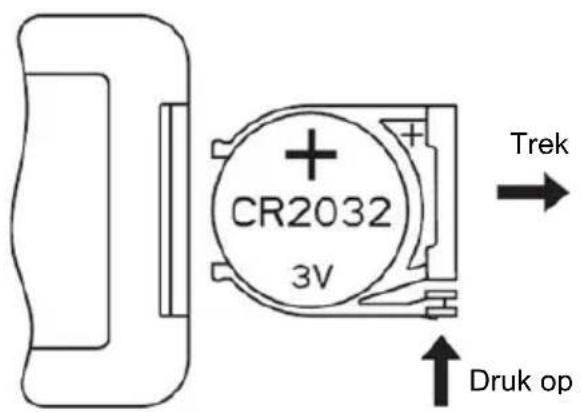
BELANGRIJKE INFORMATIE OVER VEILIGHEID, LOCATIE EN ELEKTRISCHE AANSLUITING
BE COOL
BESCHRIJVING VAN HET APPARAAT
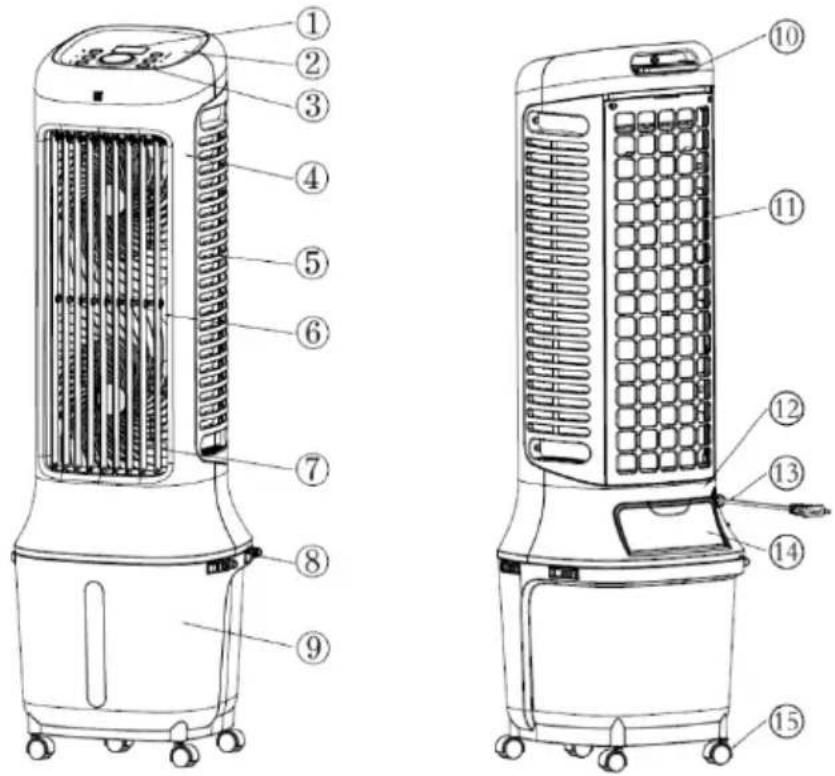
1) Weergave
4) Voorbehuizing
7) Verticale lamellen
BE COOL
natural_image
Line drawing of a portable air conditioner unit with a bucket being inserted (no text or symbols)natural_image
Line drawing of a portable air conditioner unit with cooling fins and a front panel (no text or symbols)1
natural_image
Line drawing of a portable air conditioner unit with cooling fins and a water dispenser (no text or symbols)2
Variant 2:
natural_image
Line drawing of a portable air conditioner unit with a hand inserting a bucket into it (no text or symbols)3
natural_image
Simple line drawing of a cooking pot with a water dropper (no text or symbols)4
BE COOL
natural_image
Simple line drawing of a container with a central vertical tube and side supports (no text or symbols)5
BE COOL
Please take out the pump when using and put it back after use.
6
7
natural_image
Technical line drawing of a rectangular electronic device with star-shaped cutouts and mounting holes (no text or symbols)line
| Time (s) | High-speed wind | Medium-speed wind | Low-speed wind | Stop | |---|---|---|---|---| | 65 | 0 | 0 | 0 | 0 | | 65 | 1 | 0 | 0 | 0 | | 65 | 2 | 0 | 0 | 0 | | 35 | 0 | 0 | 0 | 0 | | 125 | 0 | 0 | 0 | 0 | | 125 | 1 | 0 | 0 | 0 | | 35 | 0 | 0 | 0 | 0 | | 65 | 1 | 0 | 0 | 0 | | 135 | 0 | 0 | 0 | 0 | | 35 | 1 | 0 | 0 | 0 | | 65 | 2 | 0 | 0 | 0 | | 65 | 3 | 0 | 0 | 0 | | 65 | 4 | 0 | 0 | 0 | T=90Sline
| Condition | Value | |---|---| | High-speed wind | 65 | | Medium | 65 | | Low-speed wind | 65 | | Stop | 35 | 7000 MHz | 65 |line
| Time (s) | High-speed wind | Medium-speed wind | Low-speed wind | Stop | |---|---|---|---|---| | 65 | High-speed | | | | | 65 | Medium-speed | | | | | 65 | Low-speed | | | | | 35 | | | | | | 65 | | | | | | 125 | | | | | | 65 | | | | | | 65 | | | | | | 65 | | | | | | 65 | | | | | | 65 | | | | | | 65 | | | | | | 35 | | | | | | 125 | | | | | | 65 | | | | | | 65 | | | | | T-05Slaapstand:
Account registreren, inloggen, wachtwoord herstellen:
BE COOL
BE COOL
flowchart
graph TD
    A["Reset the device first.<br>Power on the device and confirm that the indicator is blinking rapidly.<br>Note: please complete the network distribution within 3 minutes after resetting the device."] --> B["Perform net pairing as prompted."]
    B --> C{Confirm the indicator is blinking rapidly.}
    C --> D["Controller of het indicatorlampje knippert."]
    D --> E["Adding device...<br>Ensure that the device is powered on."]
    E --> F["01:58<br>Scan devices, Register or Cloud, Initiate the device"]
    F --> G["Apparaat gezocht"]
BE COOL
10:32 AM

Done
Added successfully

Skyscraper Ice Smart Device added successfully
Schuss Home Electronic
A-1140 Wenen, Scheringgasse 3
Tel: +43 (0)1/ 970 21
Typeaanduiding: ....
Serienummer:
natural_image
Line drawing of a tall industrial air conditioner unit with cooling fins and wheels (no text or symbols)¡FELICIDADES!
GRACIAS POR HABER ELEGIDO UN PRODUCTO DE BE COOL.
BE COOL

BE COOL
natural_image
Line drawing of a portable air conditioner unit with a bucket being inserted (no text or symbols)natural_image
Line drawing of a portable air conditioner unit with grid-patterned panel and control panel (no text or symbols)1
natural_image
Line drawing of a portable electric heater with cooling fins and a handle (no text or symbols)2
Variante 2:
natural_image
Line drawing of a portable air conditioner unit with cooling fan and front panel, plus a hand placing a bucket into the lower portion (no text or symbols)3
natural_image
Simple line drawing of a cooking pot with a ladle pouring liquid (no text or symbols)4
BE COOL
natural_image
Simple line drawing of a container with a vertical rod and side supports (no text or symbols)5
BE COOL
Please take out the pump when using and put it back after use.
6
7
natural_image
Technical line drawing of a rectangular electronic device with star-shaped cutouts and mounting holes (no text or symbols)line
| Time (s) | High-speed wind | Medium-speed wind | Low-speed wind | Stop | |---|---|---|---|---| | 6 | 0 | 0 | 0 | 0 | | 8 | 1 | 0 | 0 | 0 | | 12 | 0 | 0 | 1 | 0 | | 12 | 0 | 0 | 0 | 0 | | 38 | 0 | 0 | 1 | 0 | | 68 | 0 | 0 | 0 | 1 | | 138 | 0 | 0 | 0 | 1 | | 35 | 0 | 0 | 0 | 1 | | 65 | 0 | 0 | 0 | 1 | | 65 | 1 | 0 | 0 | 1 | T=905BE COOL
line
| Wind Condition | Value | | :--- | :--- | | High-speed wind | 0 | | Medium | 1 | | Low-speed wind | 0 | | Stop | 0 | | 65 | 1 | | 35 | 1 | | 65 | 0 | | 65 | 1 | | 65 | 0 | | 65 | 1 | | 65 | 0 | | 65 | 1 | | 65 | 0 | | 65 | 1 | | 65 | 0 | | 65 | 1 | | 65 | 0 | 7-9-05 | 0 |line
| Time (T=90S) | Condition | |---|---| | 65 | High-speed wind | | 45 | Medium-speed wind | | 35 | Low-speed wind | | 35 | Stop | | 125 | High-speed wind | | 65 | Medium-speed wind | | 65 | Low-speed wind | | 65 | Stop | | 35 | High-speed wind | | 125 | Medium-speed wind | | 65 | Low-speed wind | | 65 | Stop | | 65 | High-speed wind | | 65 | Medium-speed wind | | 65 | Low-speed wind | | 65 | Stop | | 125 | High-speed wind | | 65 | Medium-speed wind | | 65 | Low-speed wind | | 65 | Stop | | 65 | High-speed wind | | 65 | Medium-speed wind | | 65 | Low-speed wind | | 65 | Stop | | 65 | High-speed wind | | 65 | Medium-speed wind | | 65 | Low-speed wind | | 65 | Stop | | 65 | High-speed wind | | 65 | Medium-speed wind | | 65 | Low-speed wind | | 65 | Stop | The chart displays a step function with 'Strong' and 'Stop' labels indicating the presence of each condition in the timeline. The values for 'High-speed wind' and 'Medium-speed wind' are not explicitly labeled on the graph but are inferred from the visual data.Modo de reposo:
BE COOL
flowchart
graph LR
    A["Reset the device first.<br>Power on the device and confirm that the indicator is blinking rapidly.<br>Note: please complete the network distribution within 3 minutes after resetting the device."] --> B["Perform net pairing as prompted."]
    B --> C{Confirm the indicator is blinking rapidly.}
    C --> D["Compruebe que el indicador luminoso parpadea."]
    D --> E["Adding device...<br>Ensure that the device is powered on."]
    E --> F["Dispositivo deseado"]
BE COOL
10:32 AM
82
Done
Added successfully

Skyscraper Ice Smart Device added successfully
Schuss Home Electronic
A-1140 Viena, Scheringgasse 3
Tel.: +43 (0)1/ 970 21
natural_image
Line drawing of a portable air conditioner unit with cooling fan and wheels (no text or symbols)GRATULUJEME!
DĚKUJEME, ŽE JSTE SI VYBRALI PRODUKT BE COOL.
BE COOL

PŘED ZAHÁJENÍM INSTALACE, PROVOZU NEBO ÚDRŽBY SI POZORNĚ PŘEČTĚTE NÁVOD K OBSLUZE. DODRŽOVÁNÍM BEZPEČNOSTNÍCH POKYNŮ CHRAŇTE SEBE I OSTATNÍ. NEDODRŽENÍ POKYNŮ MŮŽE MÍT ZA NÁSLEDEK ZRANĚNÍ OSOB A/NEBO POŠKOZENÍ MAJETKU A/NEBO ZTRÁTU ZÁRUKY!
DŮLEŽITÉ INFORMACE O BEZPEČNOSTI, UMÍSTĚNÍ A ELEKTRICKÉM PŘIPOJENÍ
BE COOL
natural_image
Line drawing of a portable air conditioner unit with a bucket being inserted (no text or symbols)natural_image
Line drawing of a portable air conditioner unit with grid-patterned panel and control panel (no text or symbols)1
natural_image
Line drawing of a portable electric heater with cooling fins and a handle (no text or symbols)2
Varianta 2:
natural_image
Line drawing of a portable air conditioner unit with cooling fan and front panel, plus a hand placing a bucket into the lower portion (no text or symbols)3
natural_image
Simple line drawing of a cooking pot with a ladle pouring liquid (no text or symbols)4
BE COOL
natural_image
Simple line drawing of a container with a central vertical tube and side supports (no text or symbols)5
Please take out the pump when using and put it back after use.
6
7
natural_image
Technical line drawing of a rectangular electronic device with star-shaped cutouts and mounting holes (no text or symbols)line
| Time | High-speed wind | Medium-speed wind | Low-speed wind | Stop | | :--- | :--- | :--- | :--- | :--- | | 68 | 0 | 0 | 0 | 0 | | 65 | 1 | 0 | 0 | 0 | | 65 | 0 | 1 | 0 | 0 | | 65 | 0 | 0 | 1 | 0 | | 38 | 0 | 0 | 1 | 0 | | 128 | 0 | 0 | 0 | 0 | | 128 | 0 | 1 | 0 | 0 | | 128 | 0 | 0 | 1 | 0 | | 38 | 0 | 1 | 0 | 0 | | 68 | 0 | 0 | 1 | 0 | | 138 | 0 | 0 | 0 | 1 | | 38 | 0 | 1 | 0 | 0 | | 38 | 0 | 0 | 1 | 0 | | 68 | 1 | 0 | 0 | 1 | | 68 | 0 | 1 | 0 | 0 | 7905line
| Wind Condition | Value | | :--- | :--- | | High-speed wind | 65 | | Medium | 65 | | Low-speed wind | 65 | | Stop | 35 | | 7000 | 65 |BE COOL
Reset the device first.
Power on the device and confirm that the indicator is blinking rapidly. Note: please complete the network distribution within 3 minutes after resetting the device.
natural_image
Simple circular diagram with a yellow dot and a small circle inside, no text or symbols present.Perform net pairing as prompted.
Ensure that the device is powered on.

01:58

Hledané zařízení
BE COOL
10:32 AM

Done
Added successfully

Skyscraper Ice Smart Device added successfully
Schuss Home Electronic
natural_image
Line drawing of a portable air conditioner unit with cooling fan and wheels (no text or symbols)BLahoželáme!
ĎAKUJEME, ŽE STE SI VYBRALI PRODUKT BE COOL.
BE COOL


PRED ZAČATÍM INŠTALÁCIE, PREVÁDZKY ALEBO ÚDRŽBY SI POZORNE PREČÍTAJTE NÁVOD NA OBSLUHU. DODRŽIAVANÍM BEZPEČNOSTNÝCH POKYNOV CHRÁŇTE SEBA AJ OSTATNÝCH. NEDODRŽANIE POKYNOV MÔŽE MAŤ ZA NÁSLEDOK ZRANENIE OSÔB A/ALEBO POŠKODENIE MAJETKU A/ALEBO STRATU ZÁRUKY!
DÔLEŽITÉ INFORMÁCIE O BEZPEČNOSTI, UMIESTNENÍ A ELEKTRICKOM PRIPOJENÍ
BE COOL
| Zapnuté/vypnuté | Rýchlost' |
| Režim/WIFI | Chladenie/vlhčovač |
| Časovač | Režim otáčania |
| Zníženie Zvyšenie | |
| Dial'kové ovládanie | |
| + Zvýšenie | - Zníženie |
Dial'kové ovládanie
BE COOL
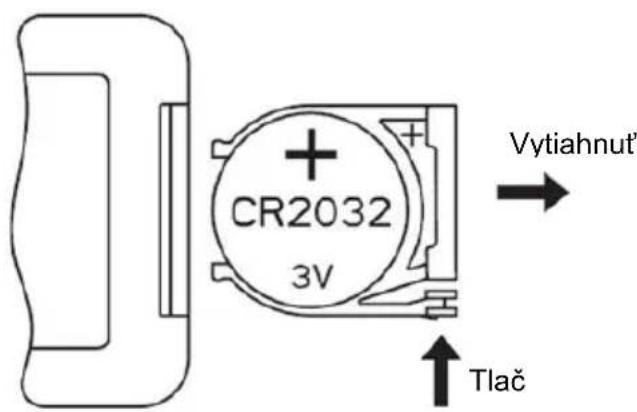
- Teraz vložte novú batériu CR2032, pričom vždy dbajte na označenie polarity (+/-) na batérii a držiaku batérie.
- Potom zasuňte držiak batérie úplne spät do dial'kového ovládača.
natural_image
Line drawing of a portable air conditioner unit with a bucket being inserted (no text or symbols)natural_image
Line drawing of a portable air conditioner unit with grid-patterned panel and control panel (no text or symbols)1

natural_image
Line drawing of a portable electric heater with cooling fins and a water drop (no text or symbols)2
Variant 2:
natural_image
Line drawing of a portable air conditioner unit with cooling fan and bucket, plus a hand holding a brush (no text or symbols)3
natural_image
Simple line drawing of a cooking pot with a ladle pouring liquid (no text or symbols)4
BE COOL
natural_image
Simple line drawing of a container with a central vertical tube and side supports (no text or symbols)5
Please take out the pump when using and put it back after use.
6
7
natural_image
Technical line drawing of a rectangular electronic device with star-shaped cutouts and mounting holes (no text or symbols)line
| Time (s) | High-speed wind | Medium-speed wind | Low-speed wind | Stop | |---|---|---|---|---| | 6S | 0 | 0 | 0 | 0 | | 6S | 1 | 0 | 0 | 0 | | 6S | 2 | 0 | 0 | 0 | | 3S | 0 | 0 | 0 | 0 | | 1.2S | 1 | 0 | 0 | 0 | | 1.2S | 2 | 0 | 0 | 0 | | 3S | 0 | 0 | 0 | 0 | | 6S | 1 | 0 | 0 | 0 | | 1.3S | 2 | 0 | 0 | 0 | | 3S | 0 | 0 | 0 | 0 | | 6S | 1 | 0 | 0 | 0 | | 6S | 2 | 0 | 0 | 0 | | 6S | 3 | 0 | 0 | 0 | | 7-905 | 1 | 0 | 0 | 0 | The chart displays the temporal distribution of wind speed over time in seconds. The x-axis represents time in seconds, and the y-axis represents wind speed in decibels. The legend indicates four wind types: High-speed wind, Medium-speed wind, Low-speed wind, and Stop. The data is presented in a single column format with values for each category. The chart is labeled 'High-speed wind' at the top left, 'Medium-speed wind' at the middle right, 'Low-speed wind' at the bottom left, and 'Stop' at the bottom right.line
| Wind Condition | Value | | :--- | :--- | | High-speed wind | 65 | | Medium | 65 | | Medium-speed wind | 125 | | Low-speed wind | 65 | | Stop | 35 | | 7-905 | 65 |line
| Time (T-90S) | High-speed wind | Medium-speed wind | Low-speed wind | Stop | |---|---|---|---|---| | 65 | High-speed wind | | | | | 65 | Medium-speed wind | | | | | 65 | Low-speed wind | | | | | 35 | | | | | | 65 | | | | | | 125 | | | | | | 65 | | | | | | 65 | | | | | | 65 | | | | | | 65 | | | | | | 65 | | | | | | 65 | | | | | | 35 | | | | | | 125 | | | | | | 65 | | | | | | 65 | | | | | | 65 | | | | | | 65 | | | | | | 65 | | | | | | 65 | | | | | | 65 | | | | | | 65 | | | | | | 65 | | | | | | 65 | | | | | | 65 | | | | | | 68.5 | High-speed wind | High-speed wind | High-speed wind | High-speed wind | | 68.5 | Medium-speed wind | Medium-speed wind | Medium-speed wind | Medium-speed wind | | 68.5 | Low-speed wind | Low-speed wind | Low-speed wind | Low-speed wind | | 68.5 | Stop (Stop) | Stop (Stop) | Stop (Stop) | Stop (Stop) | The chart displays a discrete step function with values at specific time points (e.g., '65' for 'High-speed wind', '65' for 'Medium-speed wind', etc.). The x-axis is labeled 'T-90S'. The y-axis is unlabeled but represents frequency or count. The legend is implied by the color coding: black for High-speed, light blue for Medium-speed, light gray for Low-speed, and dark blue for Stop. The chart visually represents the temporal distribution of these wind types over time.Režim spánku:
Reset the device first.
Power on the device and confirm that the indicator is blinking rapidly. Note: please complete the network distribution within 3 minutes after resetting the device.
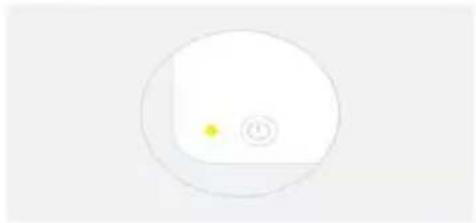
natural_image
Simple circular diagram with a yellow dot and a small circle inside, no text or symbols present.Perform net pairing as prompted.
Ensure that the device is powered on.

01:58

Hl'adané zariadenie
BE COOL
10:32 AM

Done
Added successfully

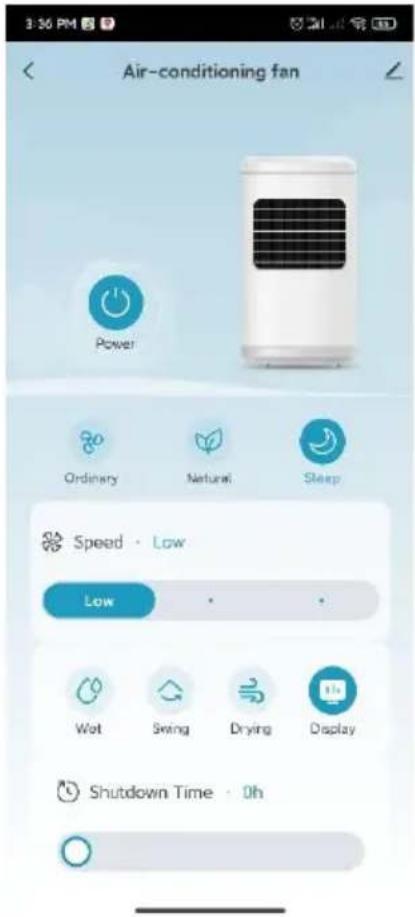
Skyscraper Ice Smart Device added successfully
Schuss Home Electronic
A-1140 Viedeň, Scheringgasse 3
Tel: +43 (0)1/ 970 21
natural_image
Line drawing of a portable air conditioner unit with cooling fins and wheels (no text or symbols)FELICITĂRI!
VĂ MULTUMIM CĂ AȚI ALES UN PRODUS BE COOL.
BE COOL


VĂ RUGĂM SĂ CITIȚI CU ATENȚIE INSTRUCȚIUNILE DE UTILIZARE ÎNAINTE DE A ÎNCEPE INSTALAREA, FUNCTIONAREA SAU ÎNTRETINEREA. PROTEJAȚI-VĂ PE DVS. ȘI PE CEILALȚI PRIN RESPECTAREA INSTRUCTIUNILOR DE SIGURANȚĂ. NERESPECTAREA INSTRUCTIUNILOR POATE DUCE LA VĂTĂMĂRI CORPORALE ȘI/SAU DAUNE MATERIALE ȘI/SAU ANULAREA GARANȚIEI!
INFORMATII IMPORTANTE PRIVIND SIGURANTA, AMPLASAREA ŞI CONEXIUNEA ELECTRICĂ

BE COOL
BE COOL
natural_image
Line drawing of a portable air conditioner unit with a bucket being inserted (no text or symbols)natural_image
Line drawing of a portable air conditioner unit with grid-patterned panel and control panel (no text or symbols)1
natural_image
Line drawing of a portable air conditioner unit with cooling fins and a handle (no text or symbols)2
Varianta 2:
natural_image
Line drawing of a portable air conditioner unit with cooling fan and front panel, plus a hand placing a bucket into the lower portion (no text or symbols)3
natural_image
Simple line drawing of a cooking pot with a ladle pouring liquid (no text or symbols)4
BE COOL
natural_image
Simple line drawing of a container with a central vertical slot and side supports (no text or symbols)5
Please take out the pump when using and put it back after use.
6
7
natural_image
Technical line drawing of a rectangular electronic device with star-shaped cutouts and mounting holes (no text or symbols)line
| Wind Type | Value | |---|---| | High-speed wind | 1 | | Weak | 6 | | Medium-speed wind | 6 | | Low-speed wind | 3 | | Stop | 1 | | 65 | 1 | | 68 | 1 | | 65 | 1 | | 68 | 1 | | 35 | 1 | | 125 | 1 | | 125 | 1 | | 35 | 1 | | 65 | 1 | | 125 | 1 | | 35 | 1 | | 68 | 1 | | 65 | 1 | | 68 | 1 | 7-905 | 1 |line
| Time (s) | Value | |---|---| | 65 | High-speed wind | | 65 | Medium speed wind | | 65 | Low-speed wind | | 35 | Stop | | 700 | High-speed wind | | 700 | Medium speed wind | | 700 | Low-speed wind | | 65 | High-speed wind | | 65 | Medium speed wind | | 65 | Low-speed wind | | 35 | Stop | | 700 | High-speed wind | | 700 | Medium speed wind | | 700 | Low-speed wind | | 65 | High-speed wind | | 65 | Medium speed wind | | 65 | Low-speed wind | | 35 | Stop | | >35 | High-speed wind | | >35 | Medium speed wind | | >35 | Low-speed wind | | >35 | Stop |line
| Time (T-90S) | High-speed wind | Medium-speed wind | Low-speed wind | Stop | |---|---|---|---|---| | 65 | High-speed wind | | | | | 65 | Medium-speed wind | | | | | 65 | Low-speed wind | | | | | 35 | | | | | | 65 | | | | | | 125 | | | | | | 65 | | | | | | 65 | | | | | | 65 | | | | | | 65 | | | | | | 65 | | | | | | 35 | | | | | | 125 | | | | | | 65 | | | | | | 65 | | | | | | 65 | | | | | T-90SModul de veghe:
BE COOL
flowchart
graph TD
    A["Reset the device first.<br>Power on the device and confirm that the indicator is blinking rapidly.<br>Note: please complete the network distribution within 3 minutes after resetting the device."] --> B["Perform net pairing as prompted."]
    B --> C{Confirm the indicator is blinking rapidly.}
    C --> D["Confirmați că indicatorul luminos clipește."]
    D --> E["Dispositiv dorit"]
    F["Adding device...<br>Ensure that the device is powered on."] --> G["01:58"]
    G --> H["Scan devices: Register or Cloud: Initialize the device"]
BE COOL
10:32 AM

Done
Added successfully

Skyscraper Ice Smart Device added successfully
Schuss Home Electronic
A-1140 Viena, Scheringgasse 3
Tel: +43 (0)1/ 970 21
natural_image
Line drawing of a portable air conditioner unit with cooling fan and wheels (no text or symbols)GRATULACJE!
DZIEKUJEMY ZA WYBRANIE PRODUKTU BE COOL.
BE COOL


PRZED ROZPOCZEĘCIEM INSTALACJI, OBSŁUGI LUB KONSERWACJI NALEŻY UWAŻNIE PRZECZYTAĆ INSTRUKCJĘ OBSŁUGI. NALEŻY CHRONIĆ SIEBIE I INNYCH, POSTĘPUJĄC ZGODNIE Z INSTRUKCJAMI BEZPIECZEŃSTWA. NIEPRZESTRZEGANIE INSTRUKCJI MOŻE SPOWODOWAĆ OBRAŻENIA CIAŁA I/LUB USZKODZENIE MIENIA I/LUB UNIEWAŻNIENIE GWARANCJI!
WAŻNE INFORMACJE
DOTYCZACE
BEZPIECZEŃSTWA,
LOKALIZACJI I PODŁĄCZENIA
ELEKTRYCZNEGO

BE COOL
1) Wyświetlacz
4) Obudowa przednia
7) Listwy pionowe
BE COOL
natural_image
Line drawing of a portable air conditioner unit with a bucket being inserted (no text or symbols)natural_image
Line drawing of a portable air conditioner unit with grid-patterned panel and control panel (no text or symbols)1
natural_image
Line drawing of a portable air conditioner unit with cooling fins and a handle (no text or symbols)2
Wariant 2:
natural_image
Line drawing of a portable air conditioner unit with cooling fan and front panel, plus a hand placing a bucket into the container (no text or symbols)3
natural_image
Simple line drawing of a cooking pot with a ladle pouring liquid (no text or symbols)4
BE COOL
natural_image
Simple line drawing of a container with a central vertical tube and side supports (no text or symbols)5
BE COOL
Please take out the pump when using and put it back after use.
6
7
natural_image
Technical line drawing of a rectangular electronic device with star-shaped cutouts and mounting holes (no text or symbols)line
| Time (s) | High-speed wind | Medium-speed wind | Low-speed wind | Stop | |---|---|---|---|---| | 6 | 0 | 0 | 0 | 0 | | 6.5 | 0 | 0 | 0 | 0 | | 7 | 1 | 0 | 0 | 0 | | 7.5 | 0 | 0 | 1 | 0 | | 8 | 0 | 0 | 1 | 0 | | 8.5 | 0 | 0 | 0 | 0 | | 9 | 0 | 0 | 0 | 0 | | 9.5 | 0 | 0 | 0 | 0 | | 10 | 0 | 0 | 0 | 0 | | 11 | 0 | 0 | 0 | 0 | | 12 | 0 | 0 | 0 | 0 | | 12.5 | 0 | 0 | 0 | 0 | | 13 | 0 | 0 | 0 | 0 | | 13.5 | 0 | 0 | 0 | 0 | | 14.5 | 0 | 0 | 0 | 0 | | 15.5 | 1 | 0 | 0 | 0 | | 16.5 | 0 | 0 | 0 | 0 | | 17.5 | 0 | 0 | 0 | 0 | | 18.5 | 1 | 0 | 0 | 0 | | 19.5 | 0 | 0 | 0 | 0 | | 20.5 | 1 | 0 | 0 | 0 | | 21.5 | 0 | 0 | 0 | 0 | | 22.5 | 1 | 0 | 0 | 0 | | 23.5 | 0 | 0 | 0 | 0 | | 24.5 | 1 | 0 | 0 | 0 | | 25.5 | 0 | 0 | 0 | 0 | | 26.5 | 1 | 0 | 0 | 0 | | 27.5 | 0 | 0 | 0 | 0 | | 28.5 | 1 | 0 | 0 | 0 | | T=925 (approx.) | - | - | - | - | The chart displays the frequency of wind events at different times (in seconds). The x-axis represents time in seconds, and the y-axis represents the frequency of occurrence for each wind type. The legend indicates that 'High-speed wind' is the most frequent, followed by 'Medium-speed wind', 'Low-speed wind', and 'Stop'. The data points are labeled with the corresponding wind types and time intervals.line
| Condition | Value | |---|---| | High-speed wind | 65 | | Medium | 65 | | Low-speed wind | 65 | | Stop | 35 | 7000 MHz | 65 |line
| Time (T=90s) | High-speed wind | Medium-speed wind | Low-speed wind | Stop | |---|---|---|---|---| | 65 | High-speed wind | | | | | 65 | Medium-speed wind | | | | | 65 | Low-speed wind | | | | | 35 | | | | | | 65 | | | | | | 125 | | | | | | 65 | | | | | | 65 | | | | | | 65 | | | | | | 65 | | | | | | 65 | | | | | | 35 | | | | | | 125 | | | | | | 65 | | | | | | 65 | | | | | | 90S | High-speed wind | Medium-speed wind | Low-speed wind | StopTryb uśpienia:
BE COOL
flowchart
graph LR
    A["Reset the device first.<br>Power on the device and confirm that the indicator is blinking rapidly.<br>Note: please complete the network distribution within 3 minutes after resetting the device."] --> B["Perform net pairing as prompted."]
    B --> C{Confirm the indicator is blinking rapidly.
}
    C --> D["Upewnij się, że wskaźnik miga."]
    D --> E["Adding device...<br>Ensure that the device is powered on.<br>01:58"]
    E --> F["Scand Devices"]
    E --> G["Register or Cloud"]
    E --> H["Initiable the device"]
    E --> I["Poszukiwane urządzenie"]
BE COOL
10:32 AM
82
Done
Added successfully

Skyscraper Ice Smart Device added successfully
Schuss Home Electronic
A-1140 Wiedeń, Scheringgasse 3
Tel: +43 (0)1/ 970 21
natural_image
Line drawing of a tall industrial air conditioner unit with cooling fins and wheels (no text or symbols)ČESTITKE!
HVALA, DA STE IZBRALI IZDELEK BE COOL.
BE COOL

Aktualna navodila za uporabo in drugi jeziki
PRED ZAČETKOM NAMESTITVE, DELOVANJA ALI VZDRŽEVANJA NATANČNO PREBERITE NAVODILA ZA UPORABO. Z UPOŠTEVANJEM VARNOSTNIH NAVODIL ZAŠČITITE SEBE IN DRUGE. NEUPOŠTEVANJE NAVODIL LAHKO POVZROČI TELESNE POŠKODBE IN/ALI MATERIALNO ŠKODO IN/ALI IZGUBO GARANCIJE!
POMEMBNE INFORMACIJE O VARNOSTI, LOKACIJI IN ELEKTRIČNEM PRIKLJUČKU
BE COOL
BE COOL
- Zdaj vstavite novo baterijo CR2032 in pri tem upoštevajte oznake polarnosti (+/-) na bateriji in nosilcu baterije.
- Nosilec baterije potisnite nazaj v daljinski upravljalnik.
natural_image
Line drawing of a portable air conditioner unit with a bucket being inserted (no text or symbols)natural_image
Line drawing of a portable air conditioner unit with grid-patterned panel and control panel (no text or symbols)1
natural_image
Line drawing of a portable air conditioner unit with cooling fins and a handle (no text or symbols)2
Varianta 2:
natural_image
Line drawing of a portable air conditioner unit with cooling fan and front panel, plus a hand placing a bucket into the lower portion (no text or symbols)3
natural_image
Simple line drawing of a cooking pot with a ladle pouring liquid (no text or symbols)4
BE COOL
natural_image
Simple line drawing of a container with a central vertical tube and side supports (no text or symbols)5
BE COOL
Please take out the pump when using and put it back after use.
6
7
natural_image
Technical line drawing of a rectangular electronic device with star-shaped cutouts and mounting holes (no text or symbols)line
| Wind Condition | Value | | :--- | :--- | | High-speed wind | 1 | | Weak | 6 | | Medium-speed wind | 6 | | Low-speed wind | 3 | | Stop | 1 | | 6S | 1 | | 12S | 1 | | 12S | 1 | | 3S | 1 | | 6S | 1 | | 13S | 1 | | 3S | 1 | | 6S | 1 | | 6S | 1 | | 6S | 1 | T=905line
| Time (T=90S) | High speed wind | Medium speed wind | Low speed wind | |---|---|---|---| | 6s | 0 | 0 | 0 | | 12s | 0 | 0 | 0 | | 3s | 0 | 0 | 0 | | 6s | 0 | 0 | 0 | | 6s | 1 | 0 | 0 | | 6s | 1 | 0 | 0 | | 6s | 1 | 0 | 0 | | 6s | 1 | 0 | 0 | | 3s | 0 | 0 | 0 | | 6s | 1 | 0 | 0 | | 6s | 1 | 0 | 0 | | 6s | 1 | 0 | 0 | | T=90S | 0 | 0 | 0 |BE COOL
Za nove uporabnike: Za registracijo kliknite "Ustvari nov račun".
Prijavite se v svoj račun in odprite aplikacijo. Kliknite "Dodaj napravo" ali simbol "+" v zgornjem desnem kotu, da začnete povezavo. Izberite "Small appliance air cooler (WIFI)" in vnesite geslo Wi-Fi omrežja, s katerim je povezan vaš pametni telefon.
BE COOL
Cancel
EZ Mode
Reset the device first.
Power on the device and confirm that the indicator is blinking rapidly. Note: please complete the network distribution within 3 minutes after resetting the device.
natural_image
Simple circular diagram with a yellow dot and a small circle inside, no text or symbols present.Perform net pairing as prompted.
Ensure that the device is powered on.

01:58

Iskana naprava
BE COOL
10:32 AM

Done
Added successfully

Skyscraper Ice Smart / Device added successfully
Schuss Home Electronic
A-1140 Dunaj, Scheringgasse 3
Tel: +43 (0)1/ 970 21
Oznaka tipa: ....
Serijska številka:
natural_image
Line drawing of a portable air conditioner unit with cooling fan and wheels (no text or symbols)ČESTITAMO! HVALA ŠTO STE ODABRALI PROIZVOD BE COOL.
BE COOL


Trenutni priručnici i dodatni jezici
Preuzmite najnovije upute za uporabu na raznim jezicima putem poveznice www.becool.at/downloads ili skenirajte prikazani QR kod. Slijedite upute na web stranici.

MOLIMO VAS, PAŽLJIVO PROČITAJTE UPUTE ZA UPOTREBU PRIJE POČETKA INSTALACIJE, RADA ILI ODRŽAVANJA. ZAŠTITITE SEBE I DRUGE PRIDRŽAVANJEM SIGURNOSNIH UPUTA. NEPRIDRŽAVANJE UPUTA MOŽE DOVESTI DO OSOBNIH OZLJEDA I/ILI ŠTETE IMOVINE I/ILI PONIŠTENJE JAMSTVA!
VAŽNE INFORMACIJE O SIGURNOSTI, LOKACIJI I ELEKTRIČNOM POVEZIVANJU
BE COOL
1) Prikaz
4) Prednje kućište
7) Vertikalne letvice
10) Držač daljinskog upravljača
13) Mrežni kabel
2) Gornji poklopac
5) Bočni filtar
8) Brava spremnika za vodu
11) Stražnji filter
14) Poklopac za punjenje vode
3) Upravljačka ploča
6) Rešetka za izlaz
zraka
9) Spremnik za vodu
12) Stražnje kućište
15) Mali kotači
BE COOL
Indikatori i elementi upravljanja
BE COOL
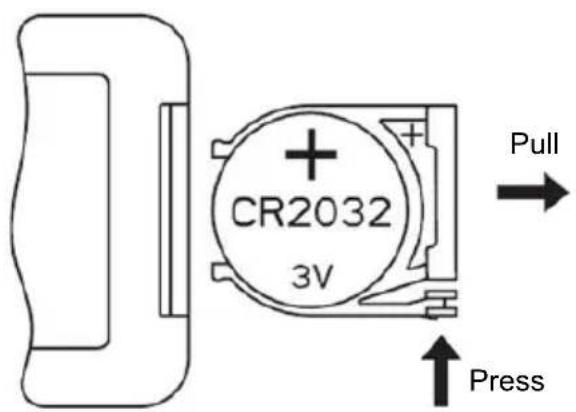
- Sada umetnite novu bateriju CR2032, uvijek pazeći na oznake polariteta (+/-) na bateriji i držaču baterije.
- Zatim gurnite držač baterije do kraja natrag u daljinski upravljač.
natural_image
Line drawing of a portable air conditioner unit with a bucket being inserted (no text or symbols)natural_image
Line drawing of a portable air conditioner unit with grid-patterned panel and control panel (no text or symbols)1
natural_image
Line drawing of a portable air conditioner unit with cooling fins and a handle (no text or symbols)2
Varijanta 2:
natural_image
Line drawing of a portable air conditioner unit with cooling fan and front panel, plus a hand placing a bucket into the container (no text or symbols)3
natural_image
Simple line drawing of a cooking pot with a ladle pouring liquid (no text or symbols)4
BE COOL
natural_image
Simple line drawing of a container with a vertical rod and side supports (no text or symbols)5
Prilikom punjenja spremnika za vodu obratite pozornost na indikator razine vode na prednjoj strani spremnika za vodu (pogledajte sliku 5).
- Pazite da maksimalna razina vode nije premašena.
• Uvijek koristite čistu vodu iz slavine. - Prijateljska napomena: Ako se uređaj koristi prvi put i voda u spremniku za vodu ima blagu promjenu boje ili blagi miris, to je normalna pojava. Nije toksičan, bezopasan i ne šteti zdravlju.
Upotreba i ugradnja pumpe za vodu:
BE COOL
Please take out the pump when using and put it back after use.
6
Otključajte pumpu i spustite je na dno spremnika za vodu. Nakon korištenja hladnjaka zraka, vratite pumpu u poklopac i dobro ga zaključajte.
7
natural_image
Technical line drawing of a rectangular electronic device with star-shaped cutouts and mounting holes (no text or symbols)line
| Wind Speed | Time (s) | |---|---| | High-speed wind | 65 | | Medium-speed wind | 65 | | Low-speed wind | 35 | | Low-speed wind | 125 | | Low-speed wind | 125 | | Low-speed wind | 35 | | Low-speed wind | 65 | | Low-speed wind | 135 | | Low-speed wind | 35 | | Low-speed wind | 65 | | Low-speed wind | 65 | | High-speed wind | 7905 |- Način prirodnog vjetra za normalne razine vjetra 9 do 16 : Normalne razine vjetra 9 do 16 prebacuju se na način prirodnog vjetra i rade srednjom brzinom. Digitalni zaslon prikazuje izvornu brzinu vjetra normalnog načina rada vjetra, koja se ne mijenja kada se promijeni način rada vjetra. Valni oblik razine srednje brzine u prirodnom vjetru je sljedeći:
BE COOL

3. Način prirodnog vjetra za normalne razine vjetra 17 do 24 :
Normalne razine vjetra 17 do 24 prebacuju se na način prirodnog vjetra i rade velikom brzinom. Digitalni zaslon prikazuje izvornu brzinu vjetra normalnog načina rada vjetra, koja se ne mijenja kada se promijeni način rada vjetra. Valni oblik razine velike brzine u prirodnom vjetru je sljedeći:

line
| Condition | Value | |---|---| | High-speed wind | 1 | | Medium-speed wind | 1 | | Low-speed wind | 1 | | Stop | 0 | | Start Time | 35 | | End Time | 35 | | T-POS Start Time | 125 | | T-POS End Time | 125 | | T-POS End Time | 65 |Način mirovanja:
Registirajte račun, prijavite se, oporavite lozinku:
BE COOL
Tap on "Agree" to go to the registration page.
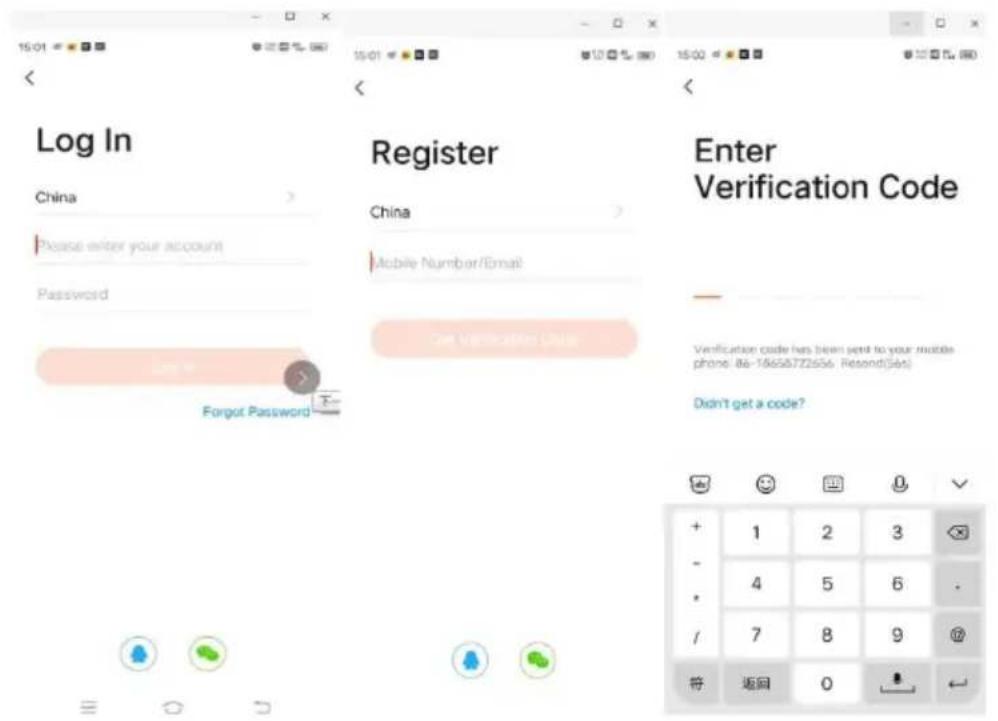
BE COOL
For new users: Click on "Create new account" to register.
- For existing users: If you already have a Tuya account, simply log in with your access data.
Postupak za povezivanje aplikacije Tuya
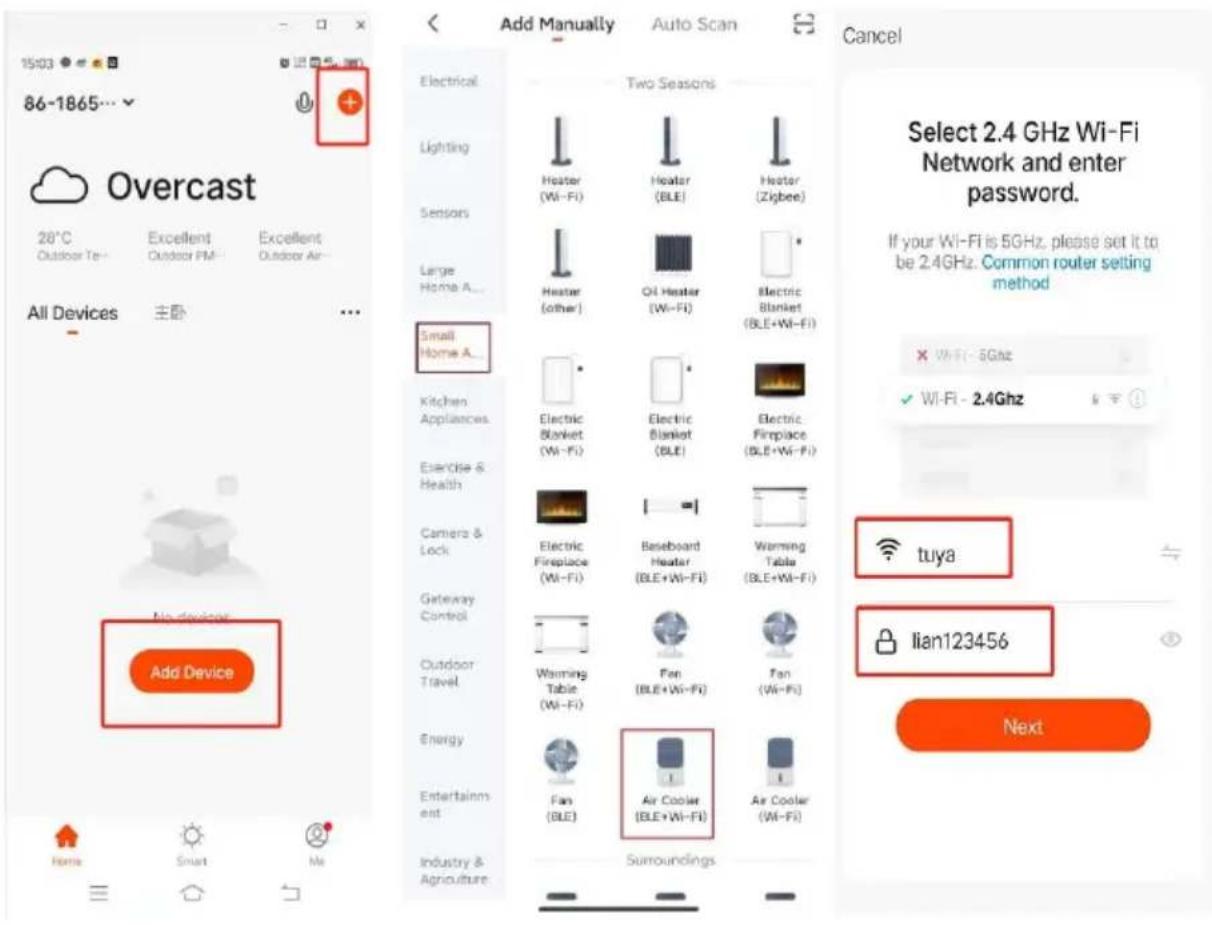
Log in to your account and open the app. Click on "Add device" or the "+" symbol in the top right corner to start the connection. Select "Small appliance air cooler (WIFI)" and enter the Wi-Fi password of the network to which your smartphone is connected.
BE COOL
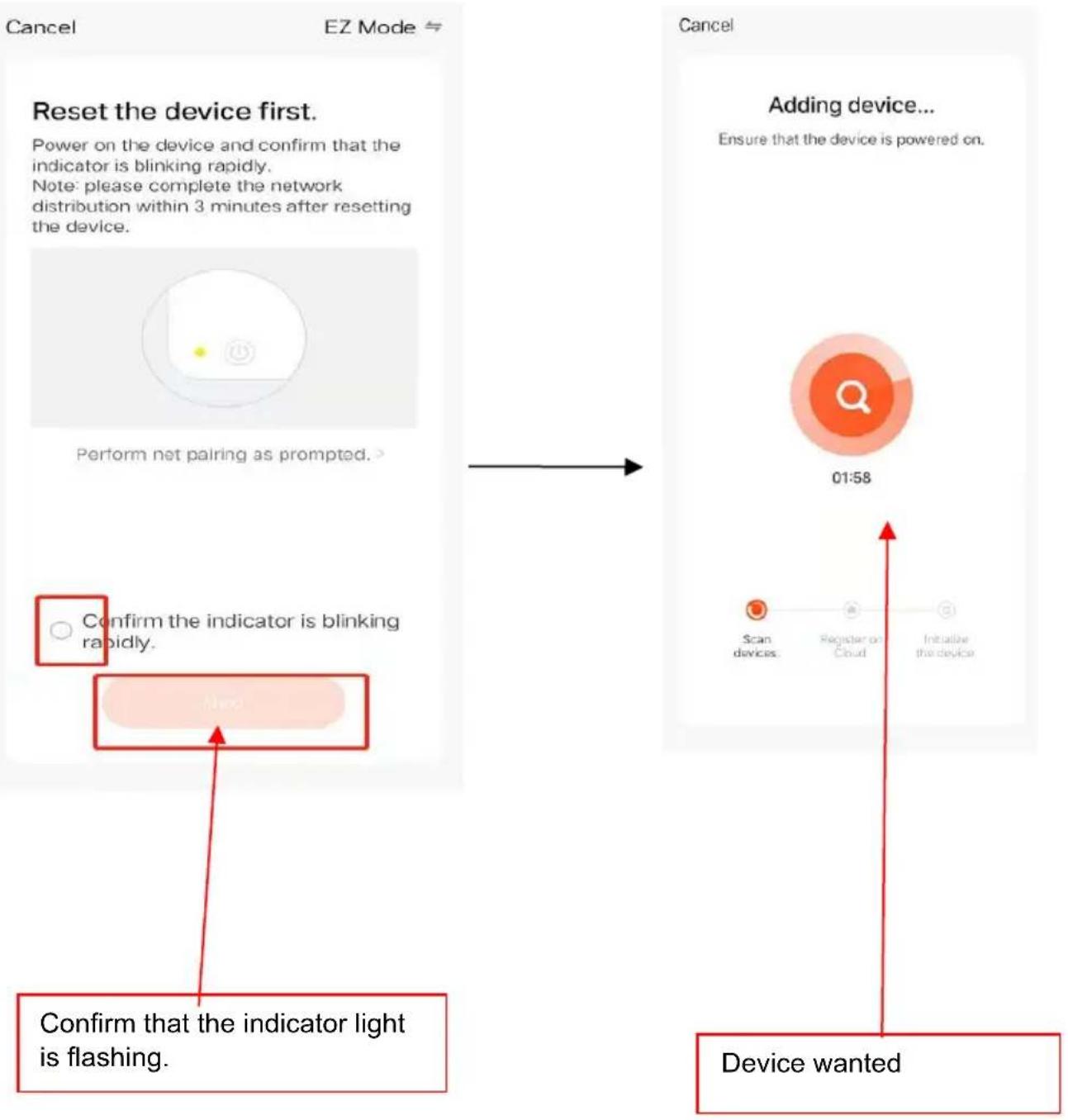
flowchart
graph LR
    A["Reset the device first.<br>Power on the device and confirm that the indicator is blinking rapidly.<br>Note: please complete the network distribution within 3 minutes after resetting the device."] --> B["Perform net pairing as prompted."]
    B --> C{Confirm the indicator is blinking rapidly.
}
    C --> D["Next step"]
    D --> E["Confirm that the indicator light is flashing."]

    F["Adding device...<br>Ensure that the device is powered on.<br>01:58"] --> G["Scan devices:"]
    G --> H["Register or Cloud"]
    H --> I["Initiable the device"]
    I --> J["Device wanted"]
BE COOL
10:32 AM

Done
Added successfully

Skyscraper Ice Smart / Device added successfully
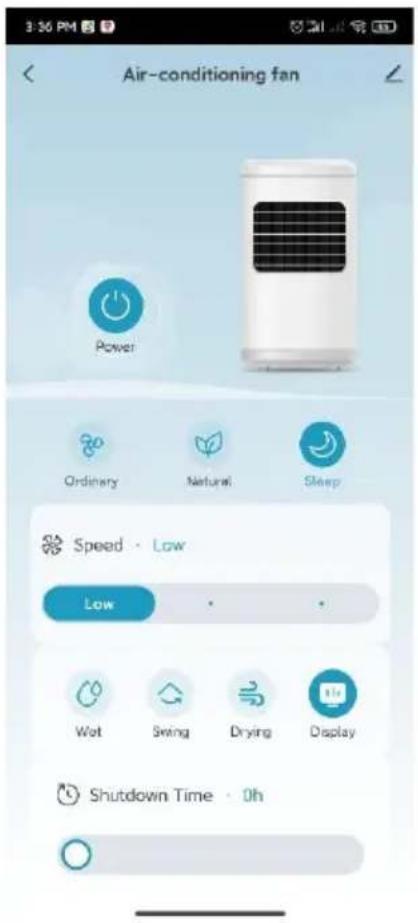
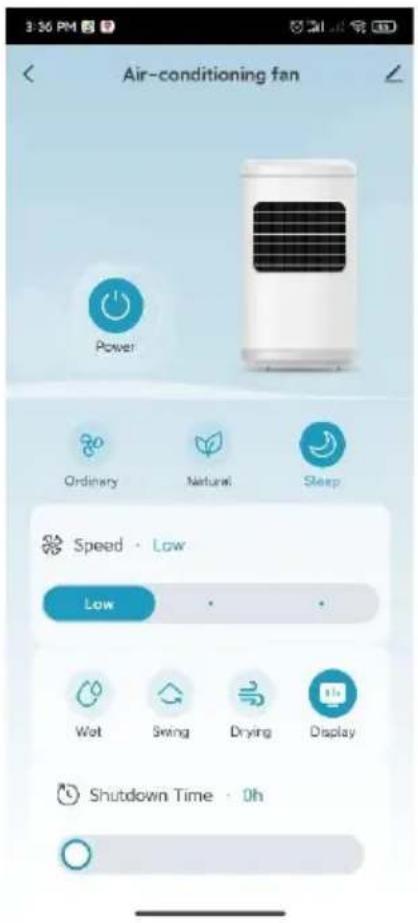
Once pairing is complete, you can call up the main interface and control the device via the app.
Upute za čišćenje

Schuss Home Electronic
A-1140 Beč, Scheringgasse 3
Tel.: +43 (0)1/ 970 21
Type designation: ....
Serial number:
Ovaj jamstveni list potrebno je predati ovlaštenom servisu zajedno s uređajem u slučaju jamstvenog zahtjeva.
BE COOL
USER MANUAL
Air cooler
BC10ACP2501W
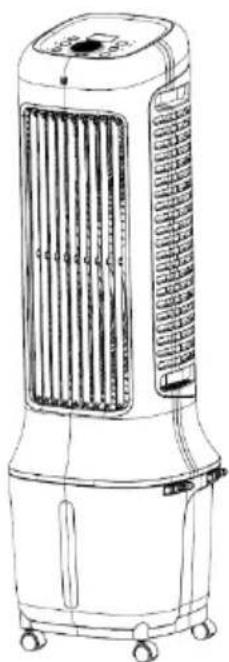
natural_image
Line drawing of a portable air conditioner unit with cooling fan and wheels (no text or symbols)CONGRATULATIONS!
THANK YOU FOR CHOOSING A BE COOL PRODUCT.
BE COOL

Current operating instructions and other languages
Download the latest operating instructions in various languages via the link www.becool.at/downloads or scan the QR code shown. Follow the instructions on the website.

PLEASE READ THE OPERATING INSTRUCTIONS CAREFULLY BEFORE STARTING INSTALLATION, OPERATION OR MAINTENANCE. PROTECT YOURSELF AND OTHERS BY FOLLOWING THE SAFETY INSTRUCTIONS. FAILURE TO FOLLOW INSTRUCTIONS COULD RESULT IN PERSONAL INJURY AND/OR PROPERTY DAMAGE AND/OR VOID THE WARRANTY!
IMPORTANT INFORMATION ON SAFETY, LOCATION AND ELECTRICAL CONNECTION
BE COOL
To avoid the risk of operating errors and to make better use of the appliance, please read the operating instructions before use.
-
The appliance is intended for household and indoor use only.
-
When using this appliance, you must use a qualified power outlet that has been tested and meets the requirements. Please check the voltage used when moving the appliance.
-
This appliance is not intended for use by persons (including children) with reduced physical, sensory or mental capabilities, or lack of experience and knowledge, unless they have been given supervision or instruction concerning use of the appliance by a person responsible for their safety. Children should be supervised to ensure that they do not play with the appliance.
-
This appliance can be used by children aged from 8 years and above and persons with reduced physical, sensory or mental capabilities or lack of experience and knowledge if they have been given supervision or instruction concerning use of the appliance in a safe way and understand the hazards involved. Children must not play with the appliance. Cleaning and maintenance work must not be carried out by children without supervision.
-
If the mains cable is damaged, it must be replaced by the manufacturer, its customer service department or similarly qualified persons in order to avoid a hazard.
-
Disconnect the mains plug during filling and cleaning.
-
Do not touch the mains cable plug with wet hands as
BE COOL
there is a risk of electric shock.
-
Do not pull on the cable when disconnecting the mains cable.
-
Do not fold the mains cable and do not place any heavy objects on it.
-
It is strictly forbidden to insert foreign objects such as wooden or metal sticks into the air inlet and outlet, as this can lead to leaks, short circuits and possible product damage.
-
Do not spray pesticides and flammable sprays near the product, as these can damage the product.
-
Avoid pointing the air outlet of the appliance directly at children for long periods of time, as this may make them ill or affect their health.
-
When using the device, make sure that the mains cable plug is free of foreign objects and that the plug is fully inserted.
-
Unusual handling. If the product emits a strange odor and unusual noises during use, please stop using it immediately and unplug it from the mains.
-
If you have poured water into the appliance, do not tip or bump it when setting it up or moving it to avoid splashes. If the product has been tipped out and there is water in the appliance, unplug it immediately and wait 24 hours for it to dry before switching it on again.
-
The water level in the water tank should not exceed the maximum water level line.
-
If the appliance's water tank is full of water, do not grab the handle to lift the entire machine, otherwise the water in the water tank will overflow. You can only press the handle to move the appliance and only when it is confirmed that there is no or very little water in the
BE COOL
water tank can you grab the handle to move the appliance. Lift the entire machine.
-
When humidifying the air, it is strictly forbidden to dismantle and assemble the air filter net and the holder of the humid curtain, otherwise water droplets will spray out of the air outlet.
-
If you leave the appliance or do not use it for a longer period of time, you must switch it off and disconnect the mains plug from the socket.
-
If the product is defective, please send it to the repair shop or notify customer service and do not disassemble or replace the parts without authorization. Arbitrary disassembly or modification will impair the safety of the product.
-
WARNING: Risk of burns from chemicals. Keep batteries away from children.
-
Do not swallow the battery, risk of chemical burns.
-
This product contains a button cell battery. If the button cell battery is swallowed, it can cause severe internal burns within just 2 hours.
-
If the battery compartment cannot be closed securely, stop using the product and keep it away from children.
-
If you think batteries may have been swallowed or may have entered any part of your body, seek medical advice immediately.
-
The batteries contain environmentally hazardous substances; they must be removed from the appliance and disposed of safely before scrapping.
-
Note that high humidity can promote the growth of biological organisms in the environment.
-
Ensure that the area around the humidifier does not become damp or wet. If the output of the humidifier
BE COOL
cannot be reduced, use the humidifier intermittently.
Make sure that no absorbent materials such as carpets, curtains, drapes or tablecloths become damp.
-
Never leave water in the container when the appliance is not in use.
-
Empty and clean the humidifier before storage. Clean the humidifier before the next use.
Recycling, disposal, declaration of conformity
 | RECYCLINGThe packaging materials can be recycled. It is therefore recommended to dispose of them in sorted waste |
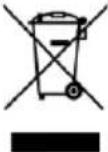 | DISPOSALThe "crossed-out dustbin" symbol requires the separate disposal of waste electrical and electronic equipment (WEEE). Electrical and electronic equipment may contain hazardous and environmentally harmful substances. Therefore, do not dispose of them in unsorted residual waste, but at a designated collection point for waste electrical and electronic equipment. This will help to protect resources and the environment. For further information, please contact your dealer or the local authorities. Directive 2012/19/EU |
 | BATTERY DISPOSALIn accordance with current legislation on batteries, accumulators and related waste, the crossed-out wheeled garbage can symbol on the battery indicates that it is prohibited to dispose of used batteries in household waste. Batteries and accumulators contain highly polluting substances. The user is obliged to dispose of used batteries at the collection points in the municipality or in the appropriate containers. The service is free of charge. In this way, the legal requirements are complied with and the environment is protected.This model is equipped with batteries of type: CR2032. |
 | DECLARATION OF CONFORMITYWe hereby confirm that this product complies with the essential requirements, regulations and directives of the EU. You can view the detailed declaration of conformity at any time under the following link:https://www.schuss-home.at/downloads |
Errors and technical changes excepted.
BE COOL
SCOPE OF DELIVERY
The BE COOL cooler is supplied with:
- 1 × Air cooler
- 1× remote control
• 1× operating instructions - 2× ice packs
- 4 × castors
- Mains cable
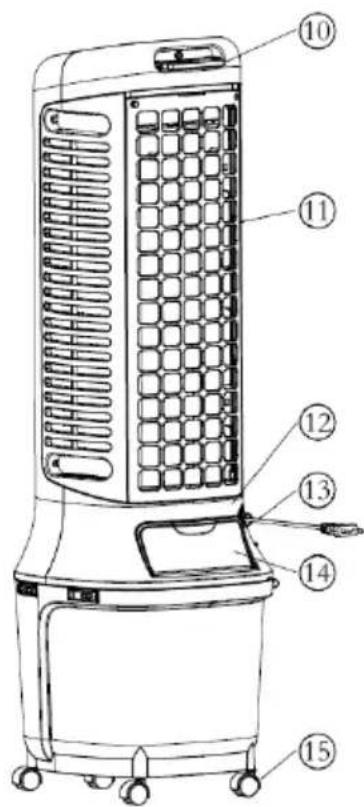
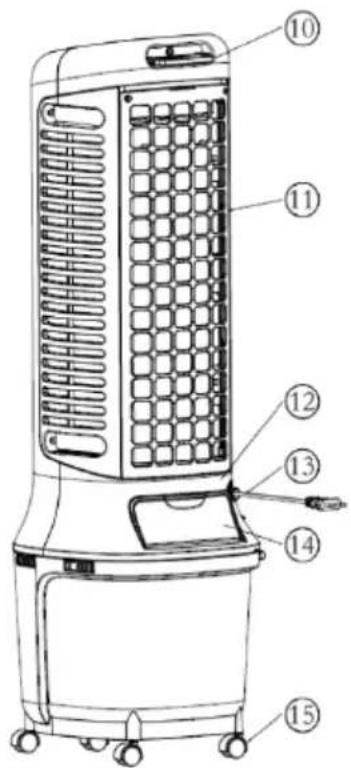
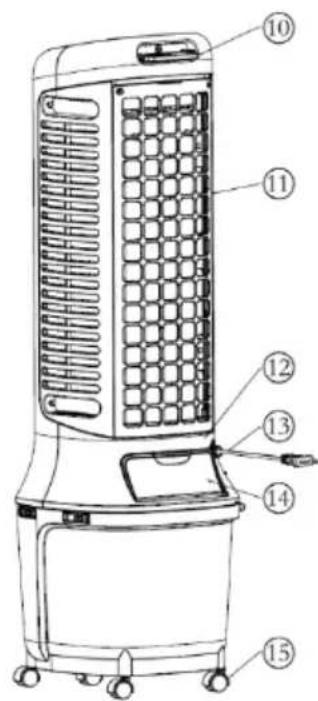
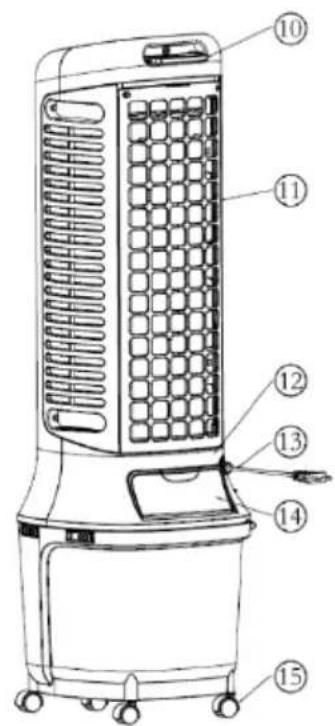
DESCRIPTION OF THE DEVICE
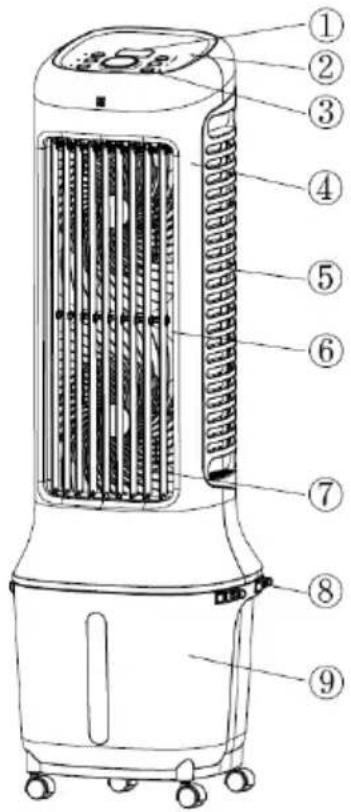
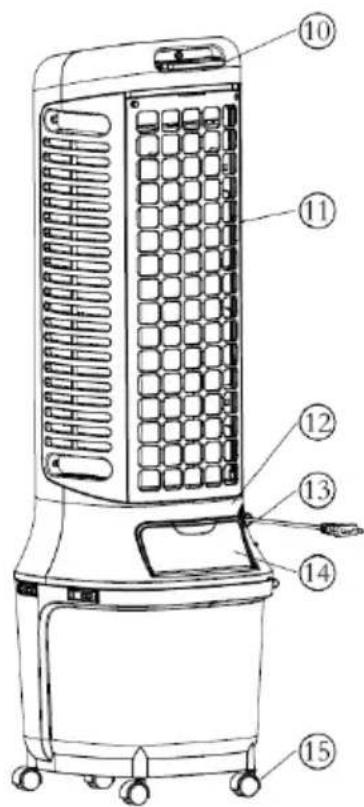
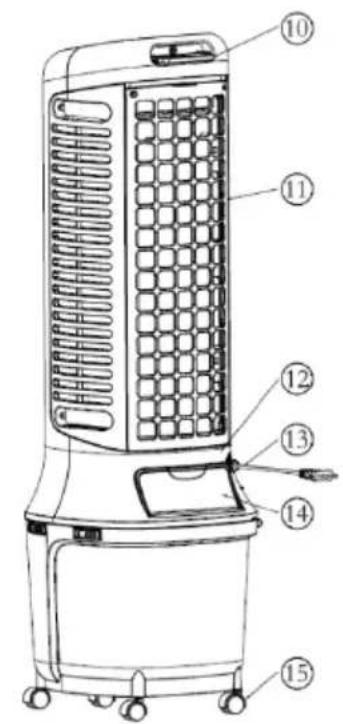
1) Display
4) Front housing
7) Vertical slats
10) Remote control holder
13) Mains cable
2) Top cover
5) Lateral filter
8) Water tank lock
11) Rear filter
14) Water filling flap
3) Control panel
6) Air outlet grille
9) Water tank
12) Rear housing
15) Wheels
BE COOL
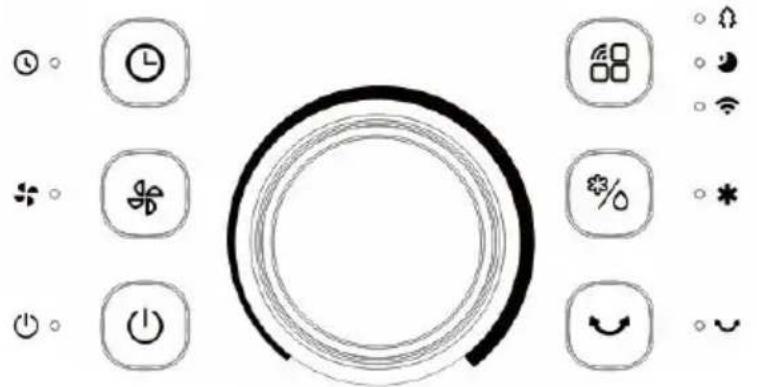
Indicators and control elements
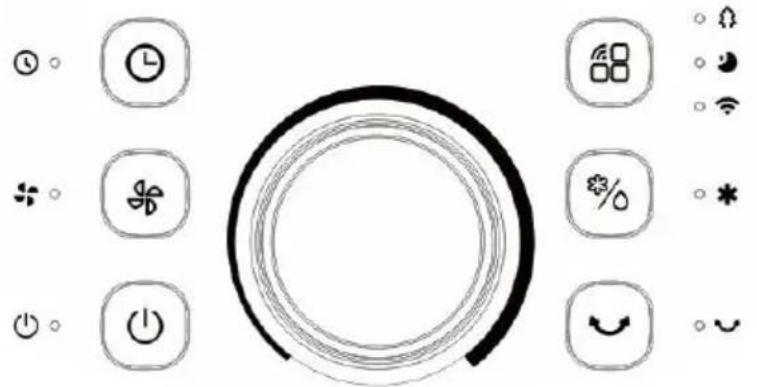
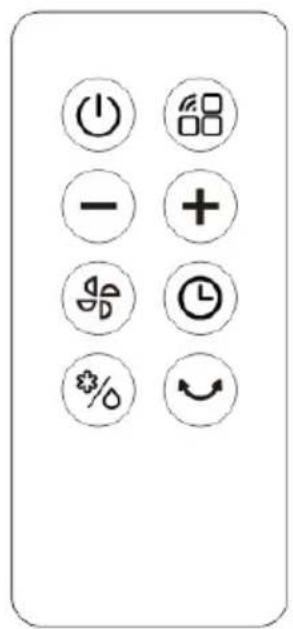
| On/Off | Speed |
| Mode/WIFI | Cooling/humidifier |
| Timer | Swivel mode |
| Decrease Increase | |
| Remote control | |
| + Increase | - Decrease |
Remote control
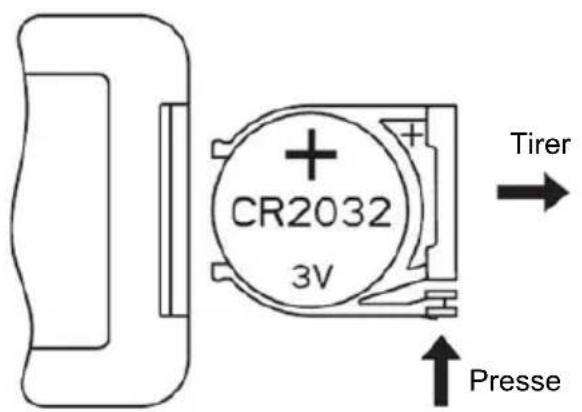
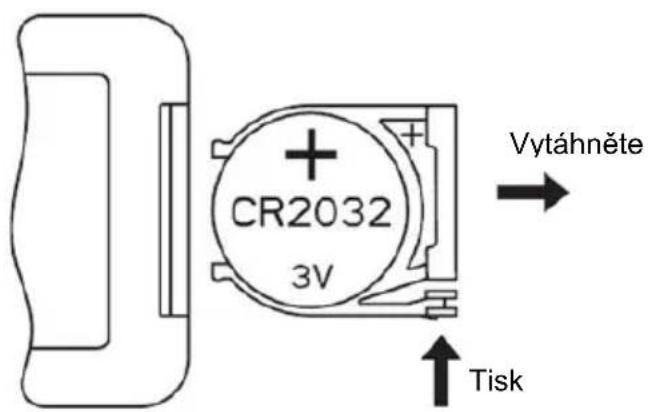
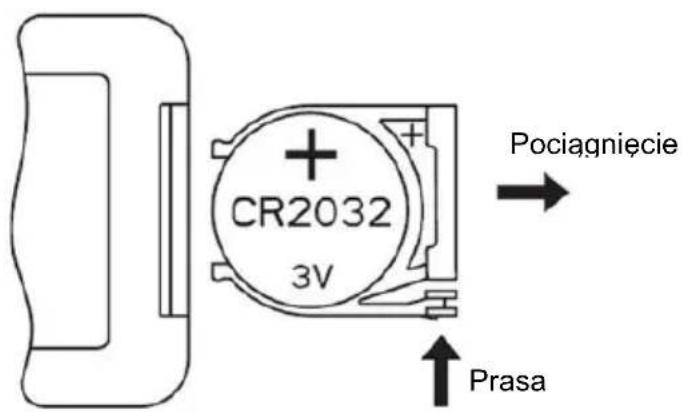
Preparing the remote control - Inserting or replacing the battery
Please note the following instructions:
Initial operation:
To use the remote control for the first time, pull the plastic cover out of the battery compartment on the back of the remote control.
Change the battery:
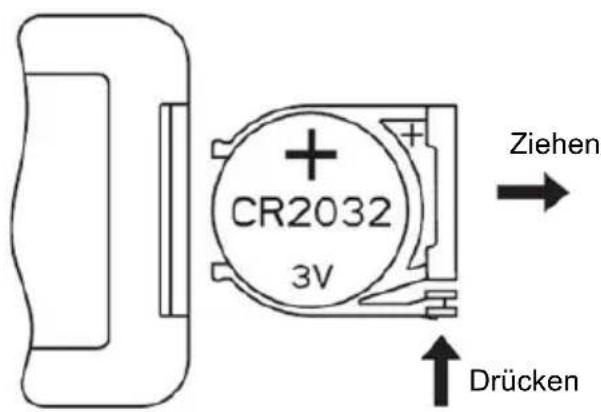
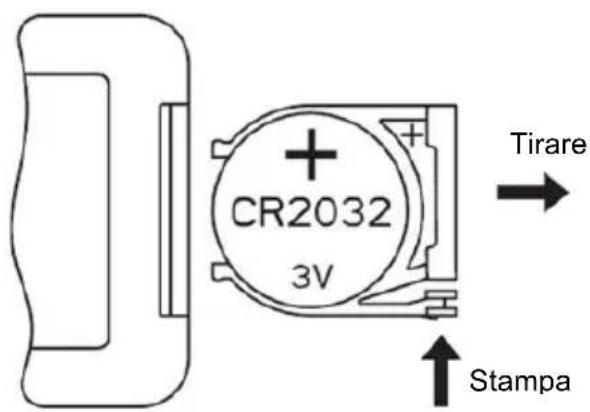
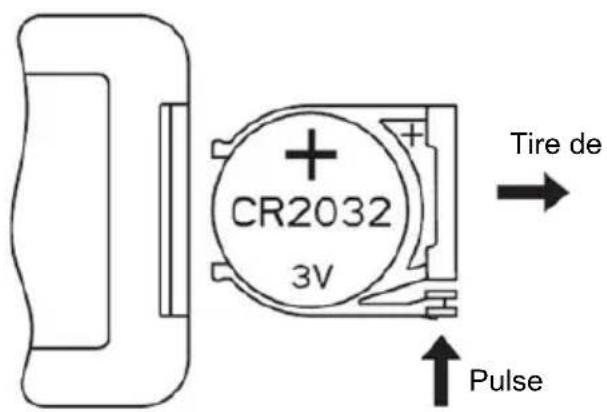
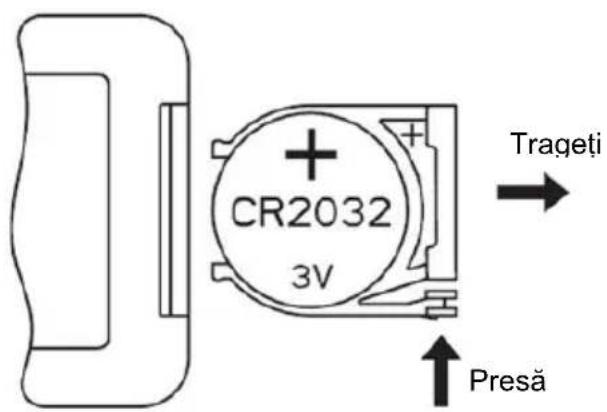
- Pull out the battery holder on the back of the remote control and remove the old battery from the holder:
BE COOL
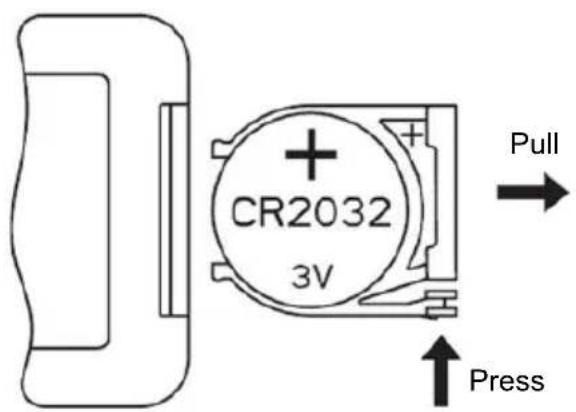
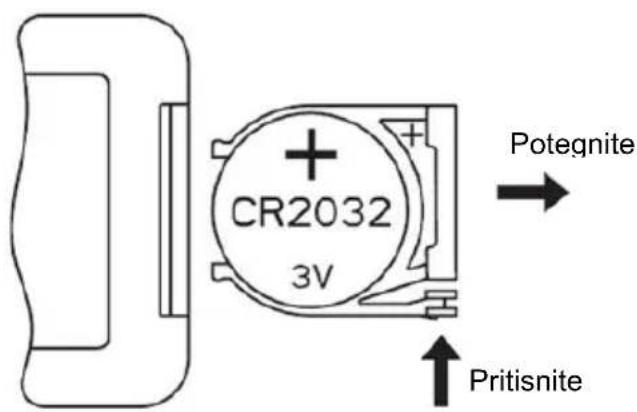
- Now insert a new CR2032 battery, always paying attention to the polarity markings (+/-) on the battery and the battery holder.
- Then push the battery holder all the way back into the remote control.
Correct use of the remote control
Point the remote control directly at the front of the appliance and ensure that there are no obstacles between the remote control and the appliance
Commissioning
Before initial commissioning
Unpacking the device
- Open the box and remove the appliance.
- Remove the packaging completely from the device.
- Unwind the power cable completely, taking care not to damage it.
Installation
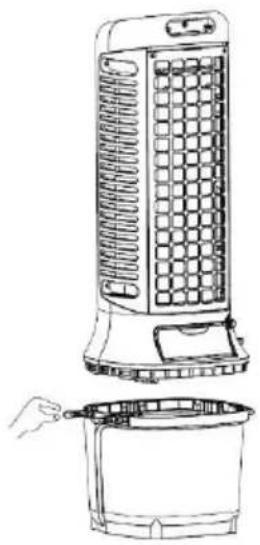
After unpacking the product, fit the castors.
Insert the water pump into the water tank according to the instructions and then attach the appliance cover to the water tank. As soon as the two fastening buckles are engaged, the appliance is ready for use.
BE COOL
natural_image
Line drawing of a portable air conditioner unit with a bucket being inserted (no text or symbols)Within 1 minute after an indicator light lights up, the brightness of the indicator light is reduced to a third of the original brightness if no action is taken on the button during this time.
At this point, the button is reactivated and the indicator light shines at full brightness again
As soon as the appliance is switched on, the last operating status used is retained, with the exception of the timer, sleep mode and dry air functions. To
switch the appliance back on, simply press the "On/Off" button " " in standby mode.
Filling up the water
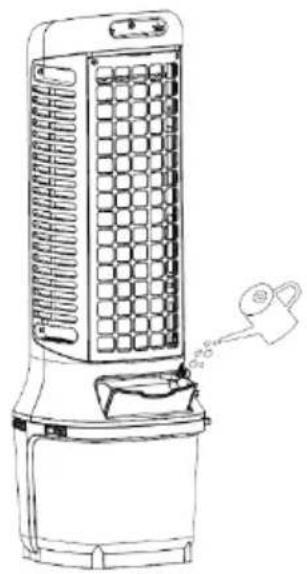
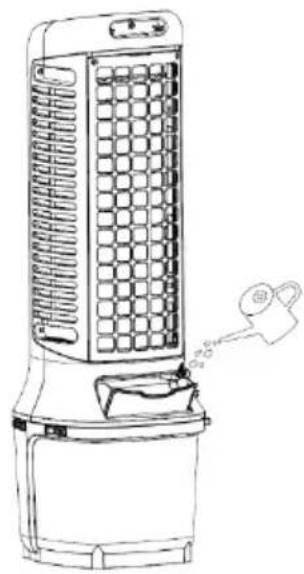
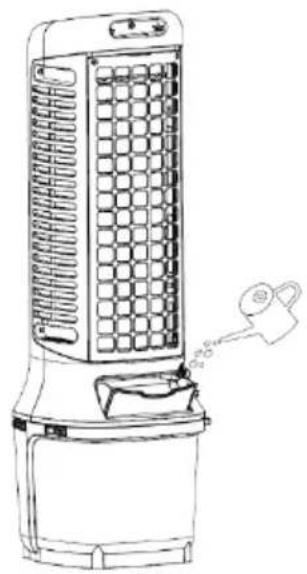
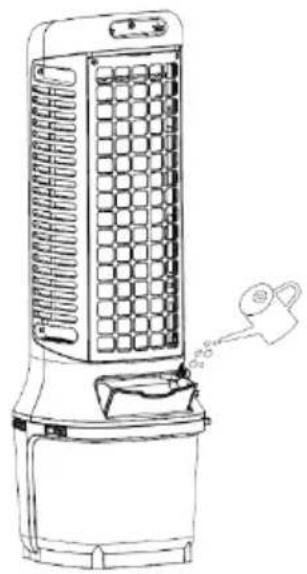
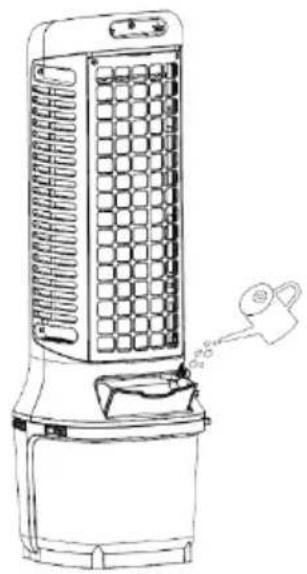
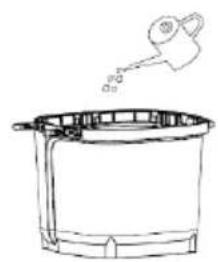
If you want to activate the cooling and humidification function, please fill water into the water tank. There are two ways to add water:
Variant 1:
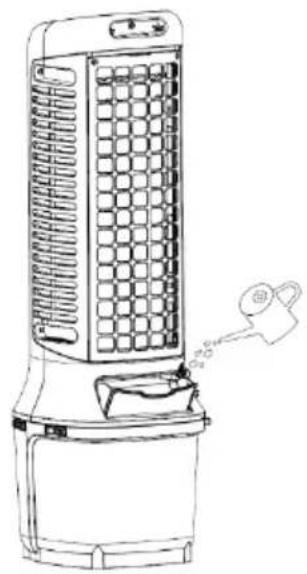
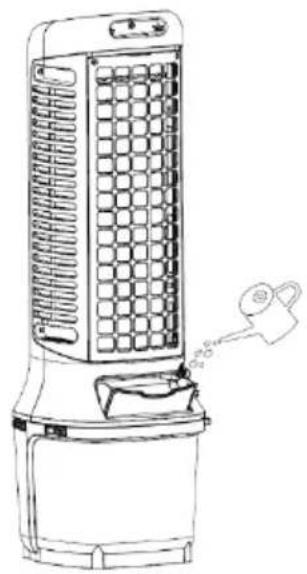
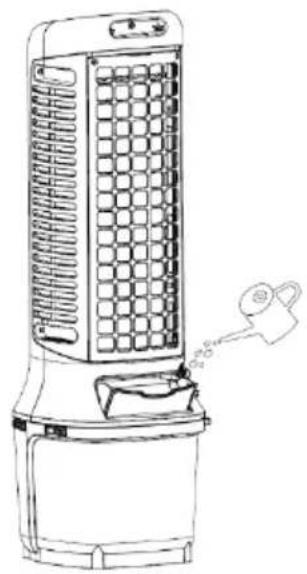
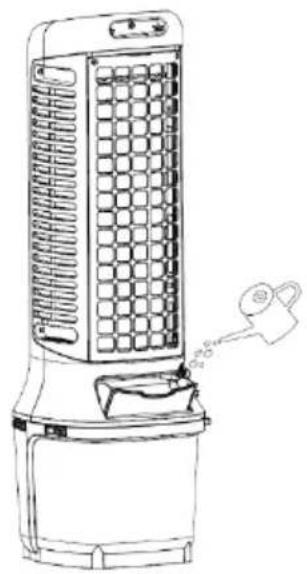
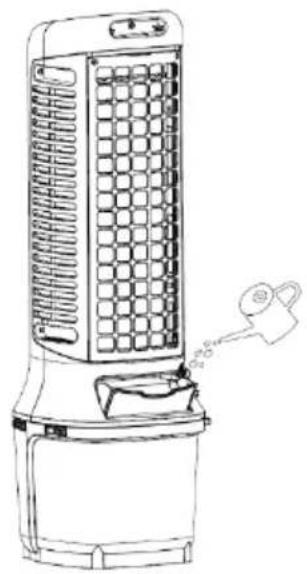
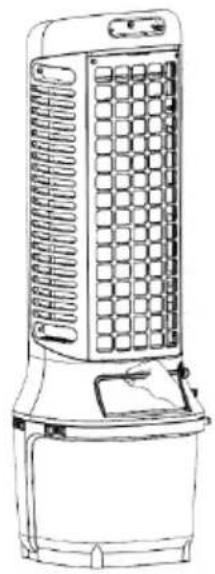
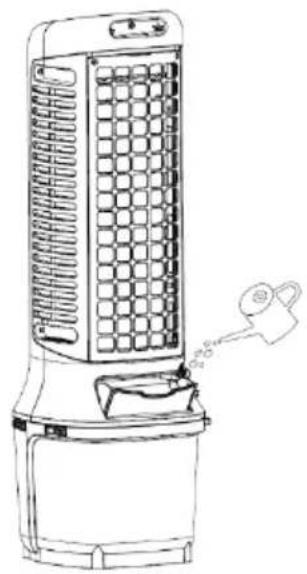
First open the water filling opening and slowly fill the water tank with water (see figure 1 and figure 2). After filling, close the water filling opening again.
BE COOL
natural_image
Line drawing of a portable air conditioner unit with grid-patterned panel and control panel (no text or symbols)1
natural_image
Line drawing of a portable air conditioner unit with cooling fins and a handle (no text or symbols)2
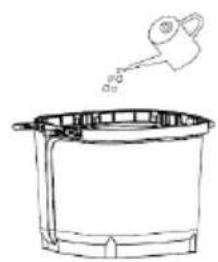
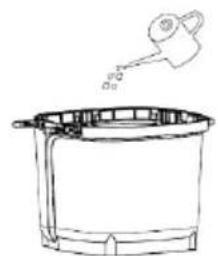
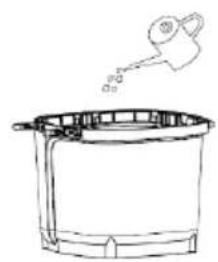
Variant 2:
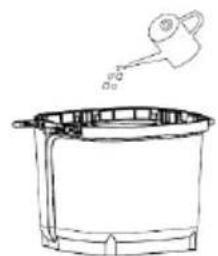
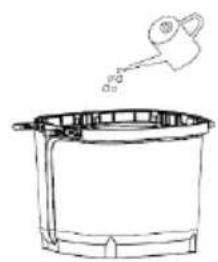
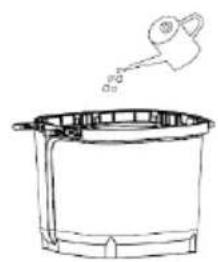
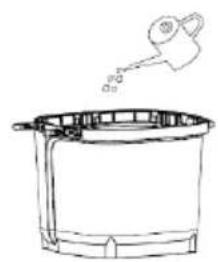
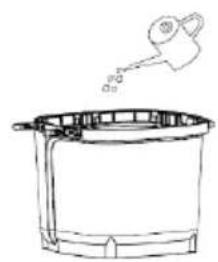
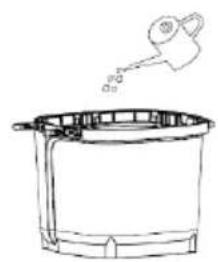
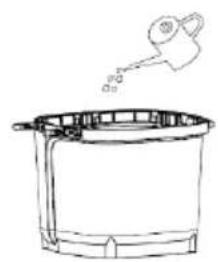
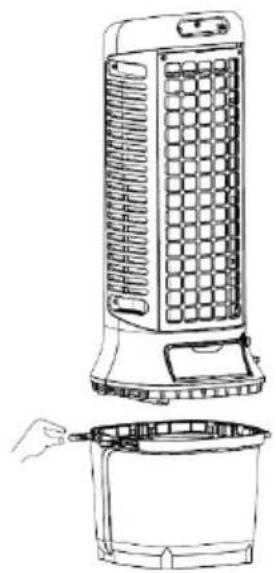
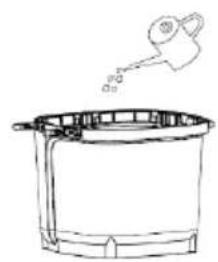
First open the two fastening buckles of the water tank to separate the appliance from the water tank. Then slowly fill the water tank with water (see figure 3 and figure 4). Once you have added the water, reassemble the appliance and the water tank and secure the fastening buckles.
natural_image
Line drawing of a portable air conditioner unit with cooling fan and front panel, plus a hand holding a bucket (no text or symbols)3
natural_image
Simple line drawing of a cooking pot with a ladle pouring liquid (no text or symbols)4
BE COOL
natural_image
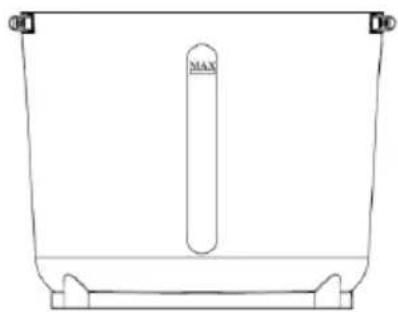
Simple line drawing of a container with a central vertical tube labeled 'MAX' (no text or symbols beyond the label)5
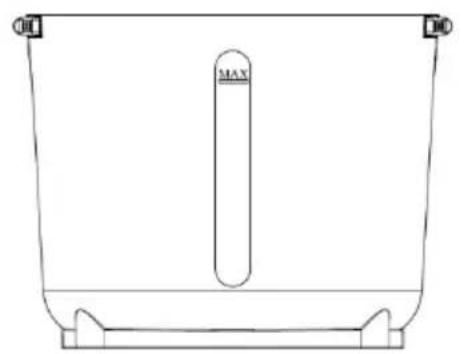
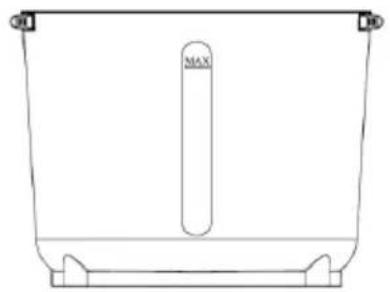
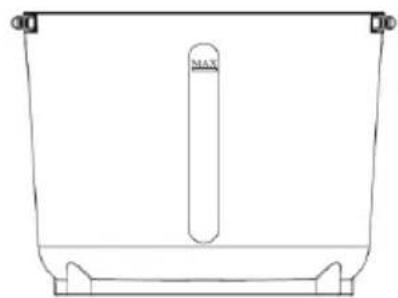
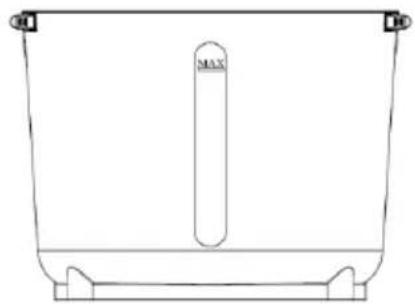
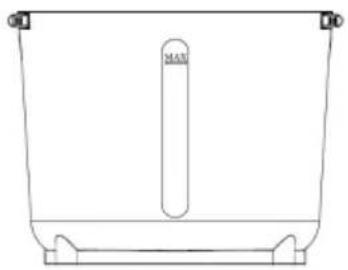
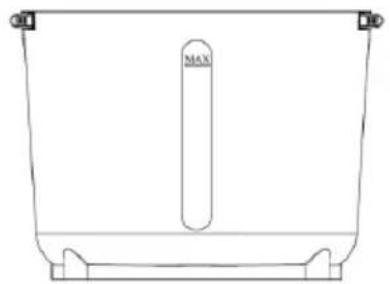
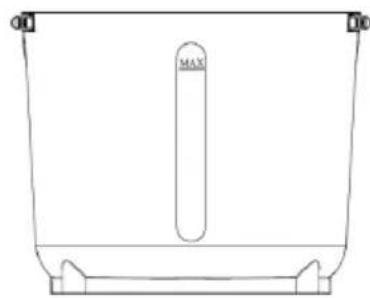
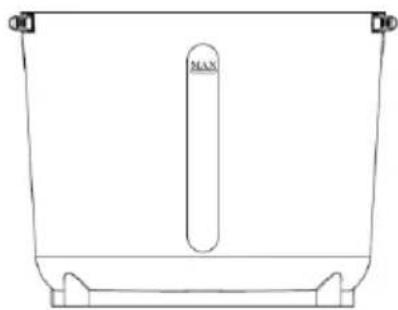
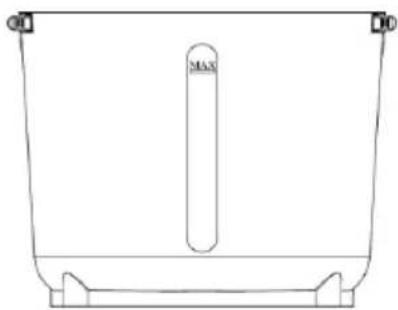
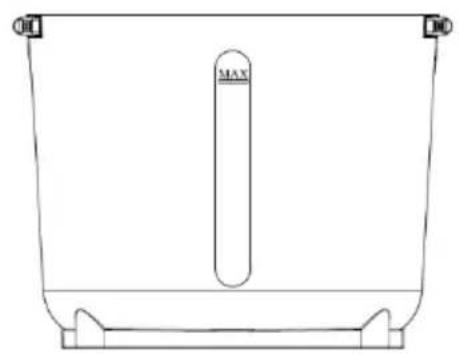
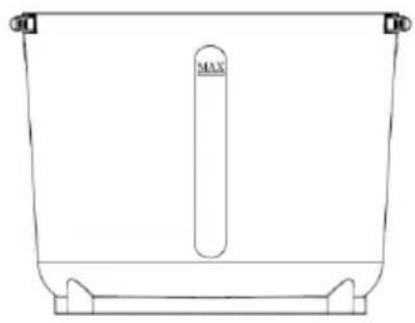
When filling the water tank, pay attention to the water level indicator on the front of the water tank (see figure 5).
- Make sure that the maximum water level is not exceeded.
• Always use clean tap water. - Friendly note: If the appliance is used for the first time and the water in the water tank has a slight discoloration or a slight odor, this is a normal phenomenon. It is non-toxic, harmless and does not affect your health.
Use and installation of the water pump:
BE COOL
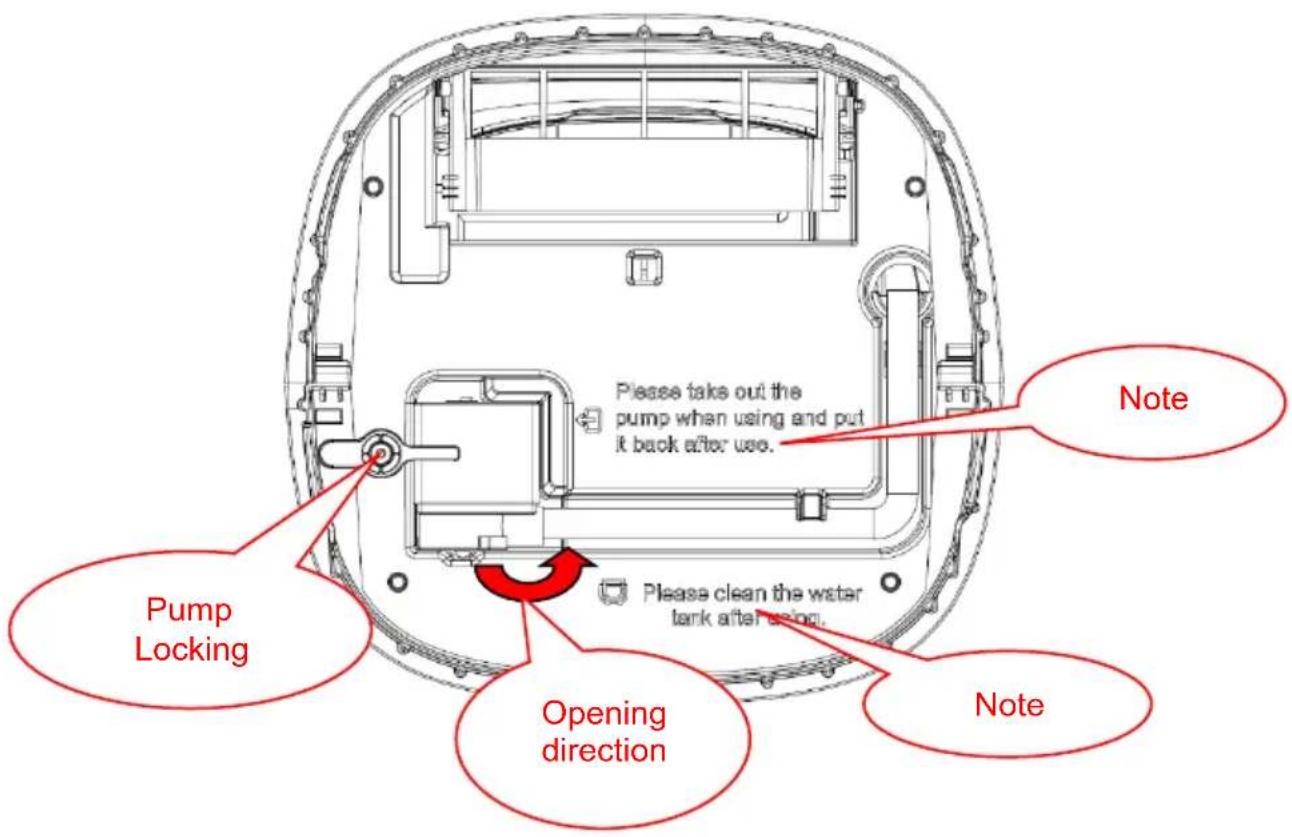
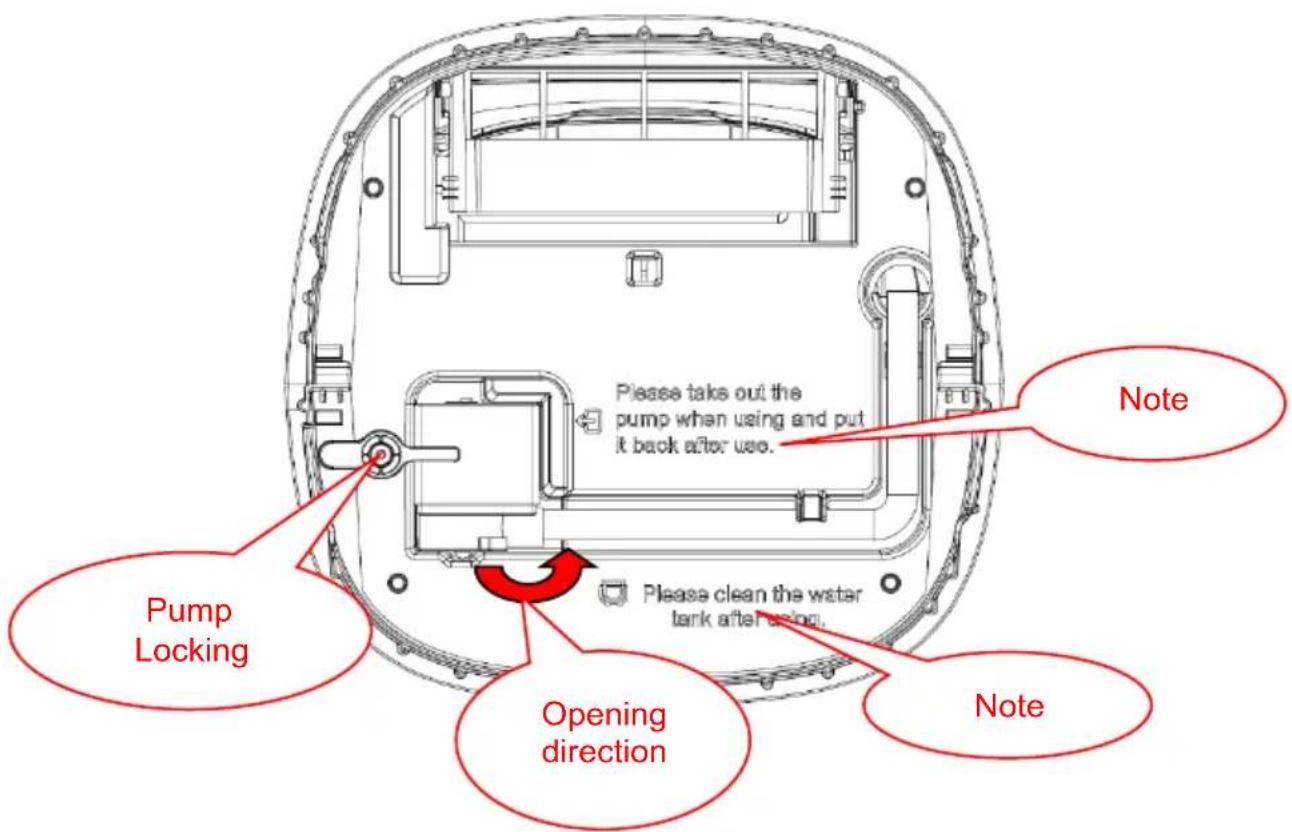
After you have removed the housing, please make sure to check the note on the bottom (see Figure 6 and Figure 7)

Please take out the pump when using and put it back after use.
6
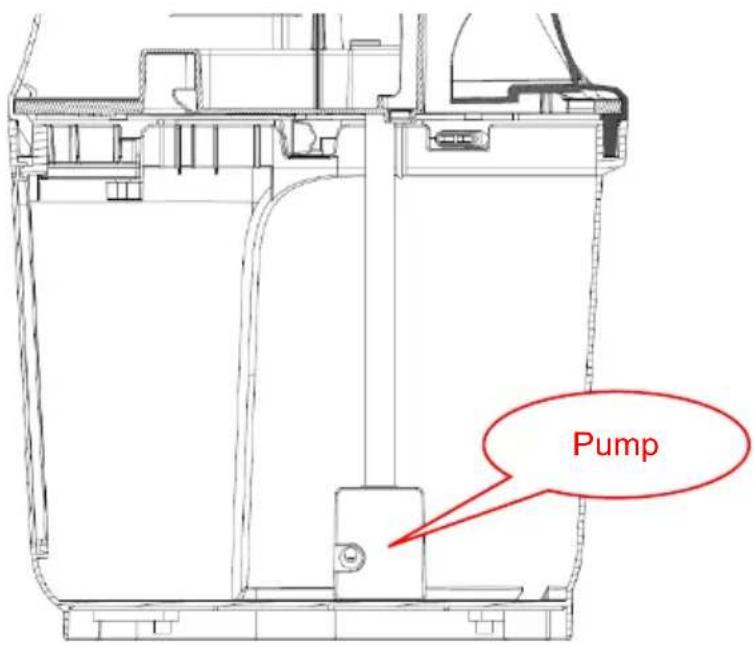
Unlock the pump and lower it to the bottom of the water tank. After using the air cooler, replace the pump in the lid and lock it securely.
7
Turn the water pump lock anticlockwise and remove the water pump and the water pipe from the water tank (the water pipe is secured with two locks). This allows the water pump to sink to the bottom of the water tank by itself.
BE COOL
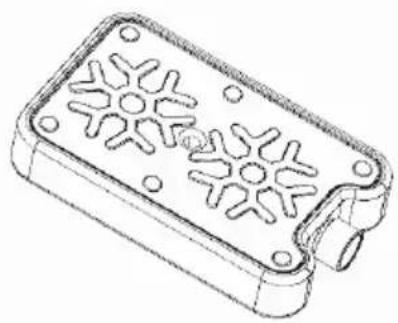
Use of the cool packs:
natural_image
Technical line drawing of a rectangular electronic device with star-shaped cutouts and mounting holes (no text or symbols)Cooling packs have cold and heat storage properties that can absorb the heat in the water, keeping the water temperature in the water tank lower than the ambient temperature for several hours and making the air flow of the cooling fan cooler.
- Place the cool pack in the freezer until it is completely frozen.
- Place the frozen cool pack in the water tank. After about 10 minutes, the water temperature in the tank will be lower than the ambient temperature.
- Do not open the lid of the ice container and do not swallow its contents.
Operation:
After plugging in the mains cable, the device switches to standby mode and all functions are activated. All displays are switched off. With the exception of the ON/OFF button, it is not possible to press any other buttons.
1. "ON/OFF:
Connect the device's power cable to a power socket. The device is now in standby mode. Press the "On/Off button to switch the device on. The device starts by default with wind speed level 8. The digital display shows '8' and the operating indicator and the indicator lights for normal mode "
and wind speed "light up. To switch the device off, press the " " On/Off button again in operating mode.
2. "Wind speed
BE COOL
- When switched on, press the " " button to set the wind speed. The digital display starts to flash. Turn the rotary control slowly to adjust the wind speed from level 1 to level 24. The digital display shows the selected wind speed level.
- Dry air function: When the appliance is switched on, press and hold the "button for 3 seconds to activate the dry air function. This function is used to remove residual moisture from the appliance by activating the highest wind speed (level 24) for 20 minutes. During this time, the wind speed display flashes to indicate the active dry air function.
The dry air function is used to remove moisture from the air cooler and dry the inside of the appliance to prevent mold growth and unpleasant odors. When the function is activated, the maximum wind speed is used to direct the airflow through the appliance and thus remove moisture from the system. This function usually runs for a set period of time (e.g. 20 minutes) and ensures that the appliance dries completely after use or before storage. During the dry air function, all other functions of the appliance are deactivated to ensure that the drying process is not interrupted.
Note: During the dry air function, all other function buttons except the on/off button " ( ) are deactivated.
3."

- When switched on, press the " " timer button to activate the timer function. The digital display starts to flash and the timer indicator light illuminates. Turn the control dial to set the time from 1 hour to 24 hours. The digital display shows the set time.
- Once the timer has been set, the digital display alternately shows the remaining time and the current wind speed at 10-second intervals. The indicator lights for the wind speed and the timer light up accordingly.
4. "Wind modes
When switched on, press the "Wind mode" button " "to switch between
BE COOL
the different modes. The order of the modes is as follows Normal wind → Natural wind → Sleep wind → Normal wind... The corresponding indicator lights show the respective mode.
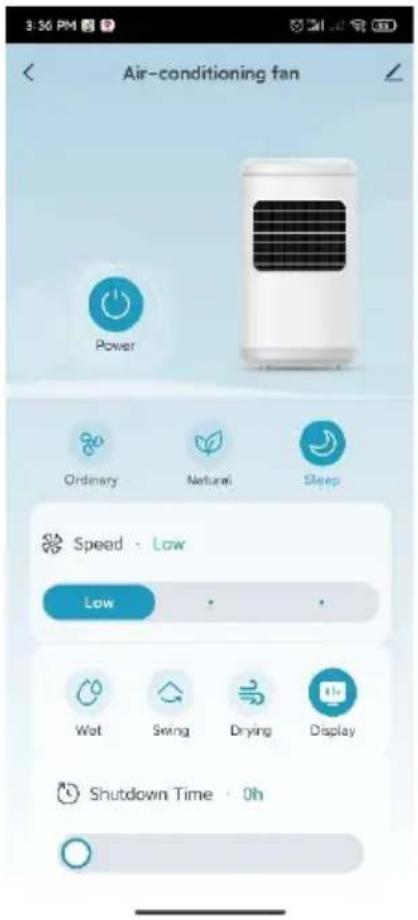
- Normal wind: The device runs according to the wind speed level set by the user, which is divided into three levels: high, medium and low. The fan runs at a fixed speed.
- Natural wind: The appliance runs according to the wind speed set by the user and automatically switches between the high, medium and low levels according to the rules set in the program. This mode imitates the natural breeze, making the air flow softer and more pleasant.
- Sleep wind: The device automatically reduces the wind speed based on the set level and a programmed time sequence.
The specific program waveform of the natural wind mode is as follows:
- Normal wind levels 1 to 8 are switched to natural wind mode and run at low speed. The digital display shows the original wind speed of the normal wind mode, which does not change when the wind mode is changed. The waveform of the low speed level in natural wind mode is as follows:

line
| Wind Condition | Time (s) | | :--- | :--- | | High-speed wind | 65 | | Weak | 65 | | Medium-speed wind | 65 | | Low-speed wind | 35 | | Stop | 35 | | High-speed wind | 125 | | Low-speed wind | 125 | | Medium-speed wind | 125 | | Low-speed wind | 35 | | High-speed wind | 65 | | Low-speed wind | 15 | | Medium-speed wind | 15 | | Low-speed wind | 35 | | High-speed wind | 65 | | Low-speed wind | 65 | | Medium-speed wind | 65 | | Low-speed wind | 65 | T=90S- Natural wind mode for normal wind levels 9 to 16: Normal wind levels 9 to 16 are switched to natural wind mode and run at medium speed. The digital display shows the original wind speed of the normal wind mode, which does not change when the wind mode is changed. The waveform of the medium speed level in natural wind mode is as follows:
BE COOL

line
| Time (s) | Value | |---|---| | 65 | High-speed wind | | 65 | Medium speed wind | | 65 | Low-speed wind | | 35 | Stop | | 700 | High-speed wind | | 700 | Medium speed wind | | 700 | Low-speed wind | | 65 | High-speed wind | | 65 | Medium speed wind | | 65 | Low-speed wind | | 35 | Stop | | 700 | High-speed wind | | 700 | Medium speed wind | | 700 | Low-speed wind | | 65 | High-speed wind | | 65 | Medium speed wind | | 65 | Low-speed wind | | 35 | Stop | | >35 | High-speed wind | | >35 | Medium speed wind | | >35 | Low-speed wind | | >35 | Stop |- Natural wind mode for normal wind levels 17 to 24: Normal wind levels 17 to 24 are switched to natural wind mode and run at high speed. The digital display shows the original wind speed of the normal wind mode, which does not change when the wind mode is changed. The waveform of the high speed level in natural wind mode is as follows:

line
| Time (T-90S) | High-speed wind | Medium-speed wind | Low-speed wind | Stop | |---|---|---|---|---| | 65 | High-speed wind | | | | | 65 | Medium-speed wind | | | | | 65 | Low-speed wind | | | | | 35 | | | | | | 65 | | | | | | 125 | | | | | | 65 | | | | | | 65 | | | | | | 65 | | | | | | 65 | | | | | | 65 | | | | | | 35 | | | | | | 125 | | | | | | 65 | | | | | | 65 | | | | | | 65 | | | | | | 65 | | | | | | 65 | | | | | | 65 | | | | | | 65 | | | | | | 65 | | | | | | 65 | | | | | | 65 | | | | | | 65 | | | | | | 68.5 | High-speed wind | High-speed wind | High-speed wind | High-speed wind | | 68.5 | Medium-speed wind | Medium-speed wind | Medium-speed wind | Medium-speed wind | | 68.5 | Low-speed wind | Low-speed wind | Low-speed wind | Low-speed wind | | 68.5 | Stop | Stop | Stop | Stop | The chart displays a discrete step function with values at specific time points (e.g., '65' for 'Stop') and labels indicating the condition of each step.Sleep mode:
In sleep mode, the device automatically adapts to the set wind speed and reduces it after a set period of time to ensure a comfortable sleep without the unpleasant effects of cold:
1. High speed (level 6-24):
- The device reduces the wind speed by one level every 5 minutes until it reaches level 5. After this, the speed remains constant at level 5.
-
The digital display shows the current wind speed level during the entire process.
-
Medium and low speed (level 1-5):
BE COOL
○ If the device starts at a wind speed between level 1 and 5 and switches to sleep mode, the wind speed is automatically set to level 5 and remains constant.
- The digital display continues to show the set wind level.
5. " Cooling/humidifier
When switched on, press the "cooling/humidification button to switch the cooler and humidification function on or off.
- Cooling/humidification function switched on: The water pump is activated and the corresponding indicator light comes on.
- Cooling/humidification function switched off: The water pump is stopped and the indicator light goes out.
6. "Swivel function
When switched on, press the "swivel button to switch the swivel function on or off. The corresponding indicator light lights up or goes out depending on the setting.
7. "WiFi function
When switched on, press and
hold the wind mode button "for 5 seconds. After the signal tone, the WiFi indicator starts flashing about 5 seconds later and you can configure the network in the standard mode of the app. If no connection is established within 3 minutes, the WiFi indicator goes out. To reconnect, press and hold the wind
mode button " again for 5 seconds. After the signal tone, the WiFi module is reset. About 5 seconds later, the WiFi indicator flashes again and you can configure the network in the app's standard mode. If the WiFi indicator flashes at short intervals, press and hold the wind mode button
" again for 5 seconds. After the signal tone, the WiFi indicator flashes more slowly and the network can be configured in the compatible mode of the
BE COOL
app.
Remarks:
- If the device is switched off 10 seconds after being switched on, the WiFi display returns to its previous state. If the device is switched off and restarted after 10 seconds, the WiFi indicator remains off and the device switches to energy-saving mode. To restart, press and hold the settings button for 5 seconds.
- During the pairing process, the WiFi indicator goes out if no network configuration takes place within 3 minutes. Press and hold the setting button for 5 seconds to restart the pairing process.
- When pairing is complete and the router is switched off, the WiFi indicator goes out. As soon as the router is back in operation, the connection is automatically re-paired.
Further functions:
-
Low water function: If the cooling function is started and a low water level is detected within 5 seconds of the water pump being switched on (after the water pump has been operating for 45 seconds), the pump stops and the indicator light flashes (on at intervals of 0.5 seconds and off at intervals of 0.5 seconds). The humidifier function is deactivated and the indicator light can be switched off by pressing the "button."
-
Memory function with constant power supply: If the appliance is switched on and off normally and a constant power supply is guaranteed, the air cooler saves the last settings set, with the exception of the timer, sleep wind and dry air function.
-
Automatic dimming of the indicator lights: If no action is taken on the buttons within one minute of a pilot light being switched on, the pilot light is automatically dimmed. If a button is pressed again, the indicator light lights up brightly again.
Instructions for turning the rotary knob: When using the rotary knob, it should be turned slowly so that the digital display shows the numbers correctly. If the knob is turned too quickly, this can lead to display problems.
BE COOL
IMPORTANT
Please note that only 2.4GHz networks are supported!
Transmitting power: max. 100 mW
Installing the app
Go to the relevant app store (Google Play or Apple App Store) and search for "Tuya". Alternatively, you can scan the QR code below to download the app directly and register.

Register account, log in, recover password:
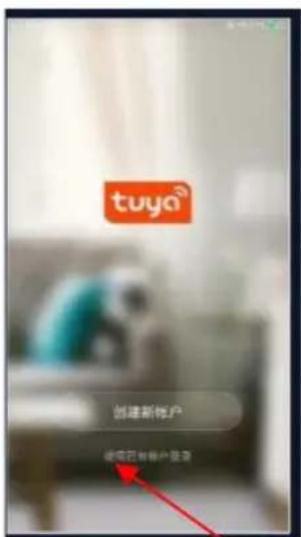
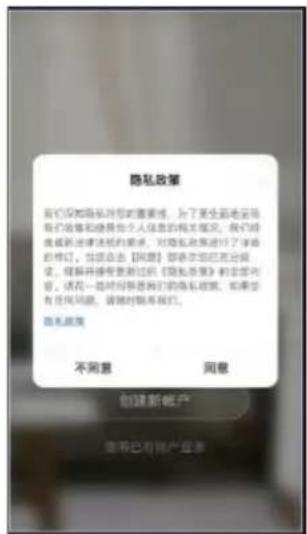
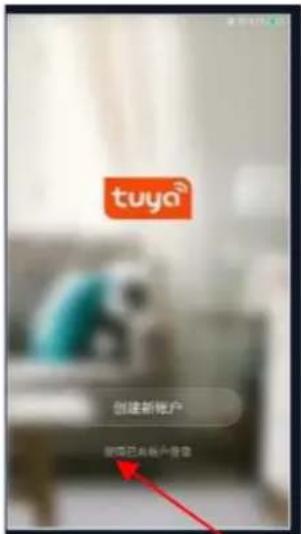
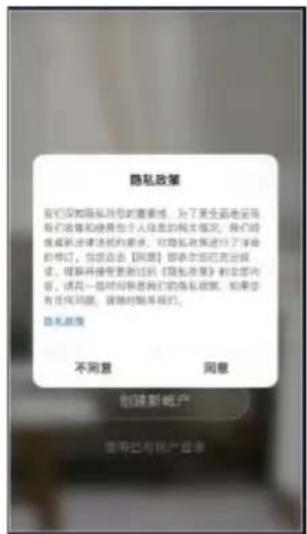
Tap on "Agree" to go to the registration page.
BE COOL
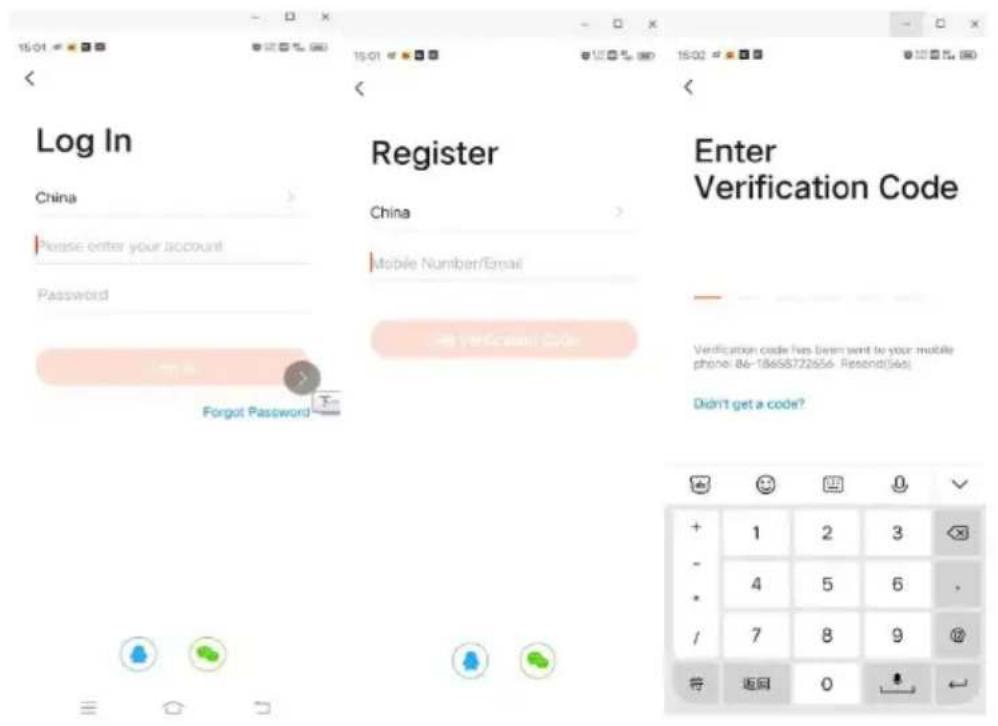
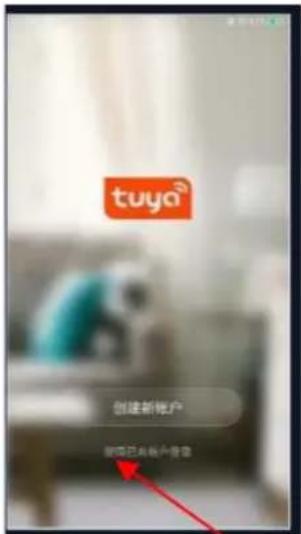
For new users: Click on "Create new account" to register.
- For existing users: If you already have a Tuya account, simply log in with your access data.
BE COOL
The procedure for linking the Tuya app
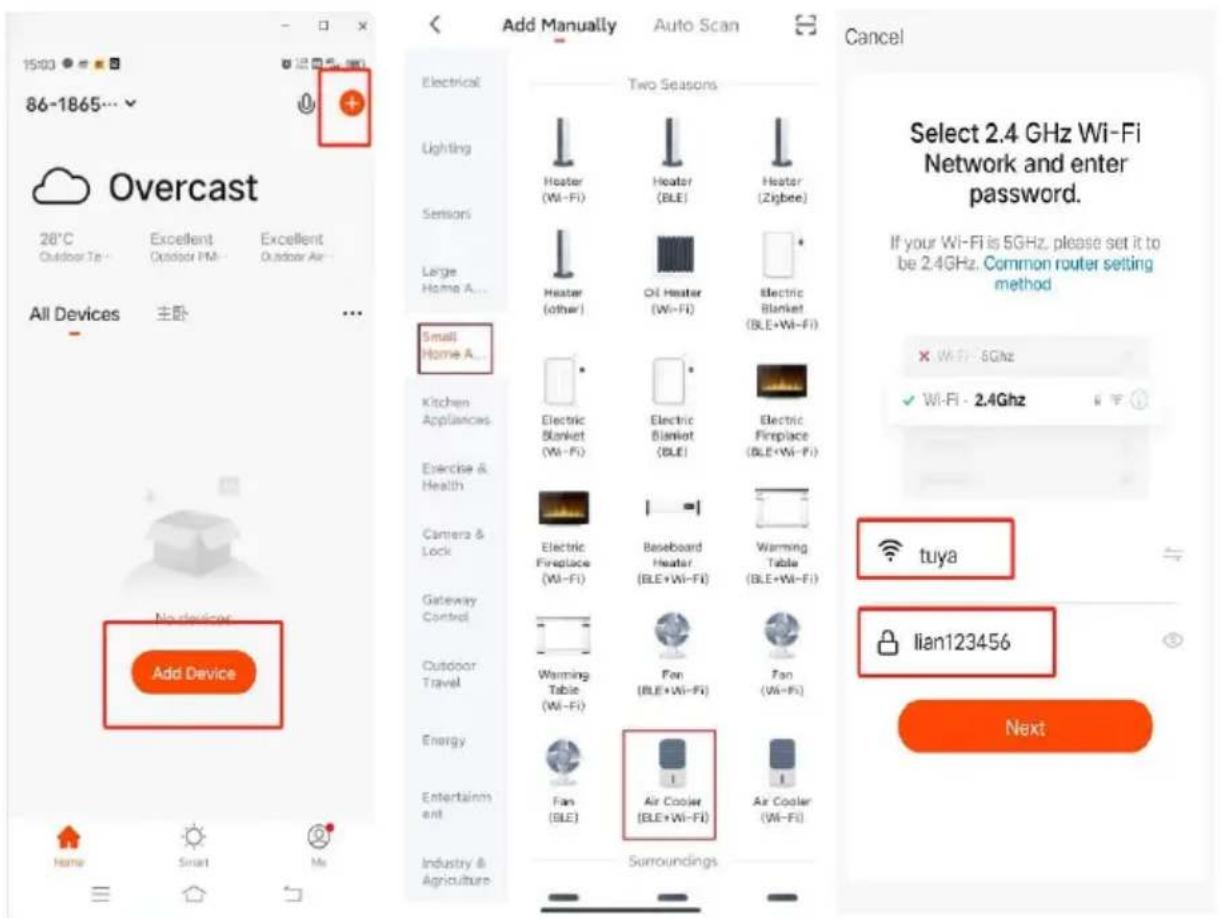
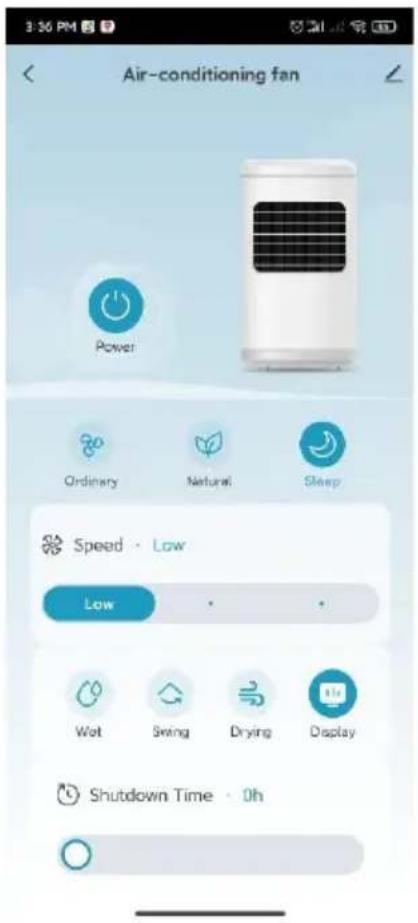
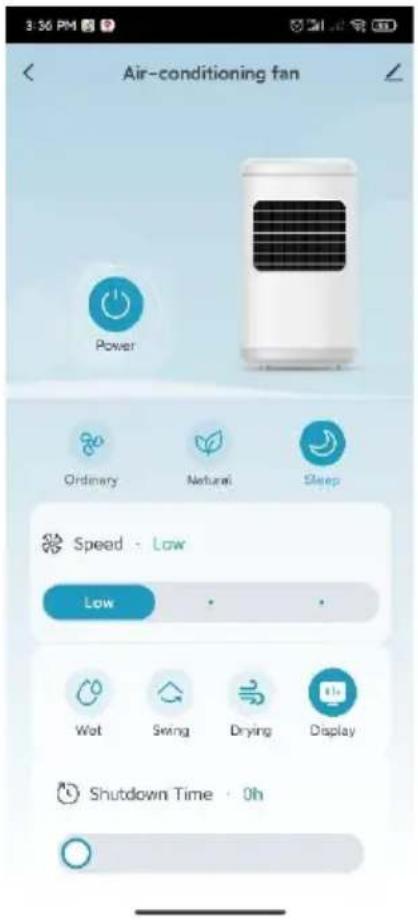
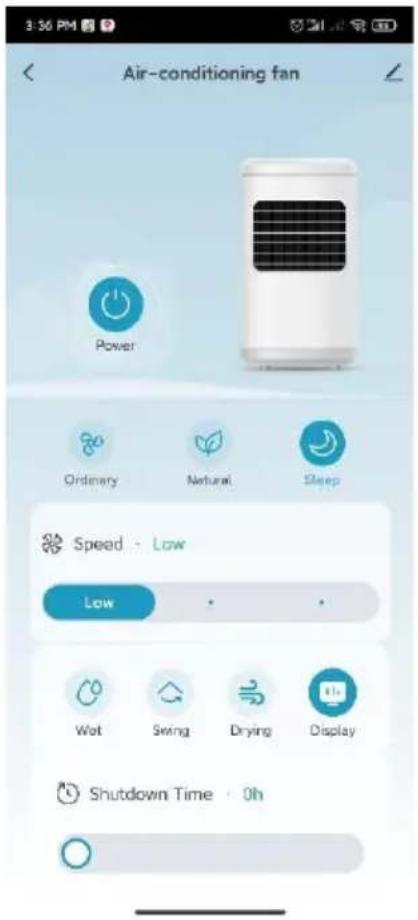
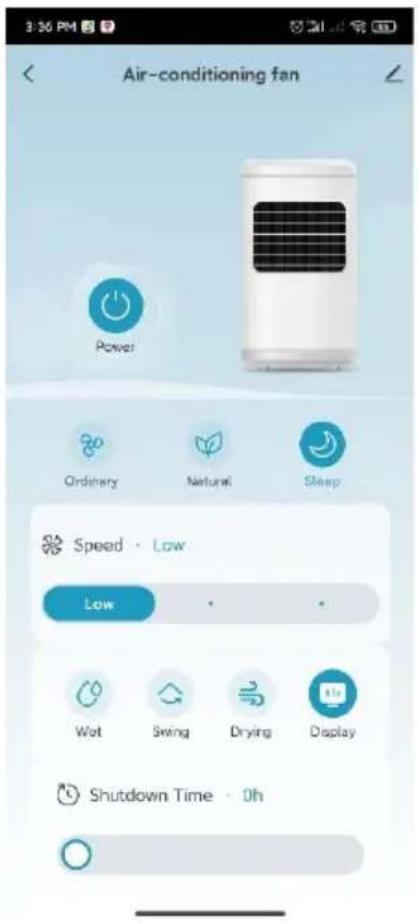
Log in to your account and open the app. Click on "Add device" or the "+" symbol in the top right corner to start the connection. Select "Small appliance air cooler (WIFI)" and enter the Wi-Fi password of the network to which your smartphone is connected.
BE COOL
Cancel
EZ Mode
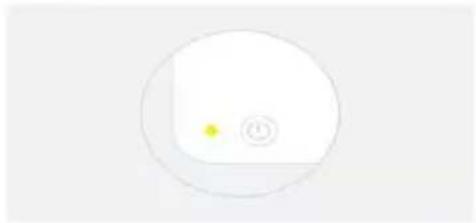
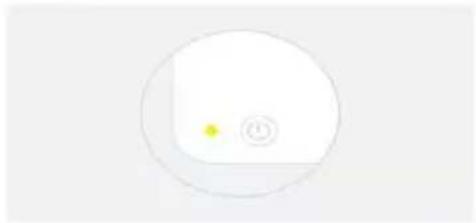
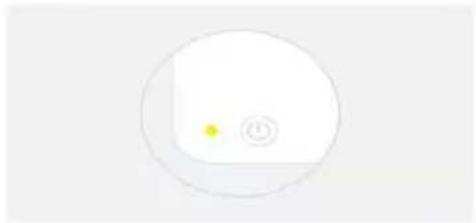
Reset the device first.
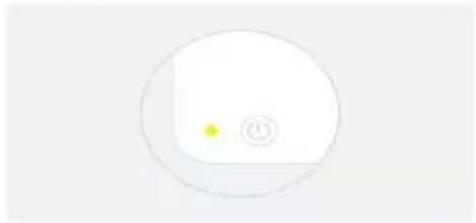
Power on the device and confirm that the indicator is blinking rapidly. Note: please complete the network distribution within 3 minutes after resetting the device.
natural_image
Simple circular diagram with a yellow dot and a small circle inside, no text or symbols present.Perform net pairing as prompted.
Confirm that the indicator light is flashing.
Cancel
Adding device...
Ensure that the device is powered on.

01:58

Device wanted
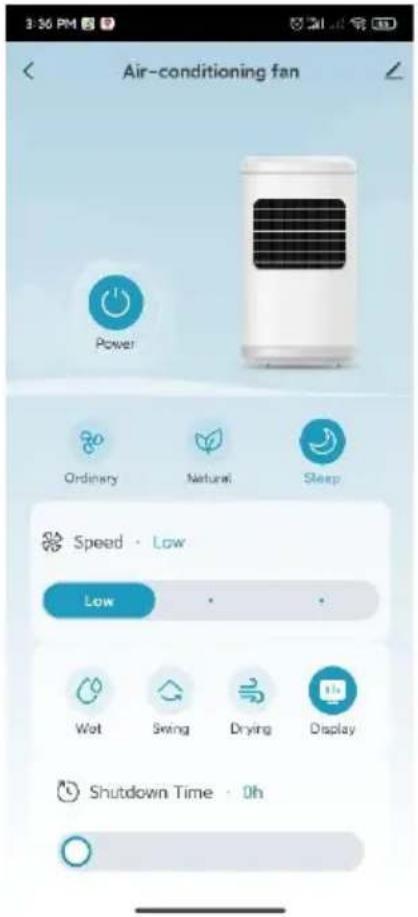
BE COOL
10:32 AM

Done
Added successfully

Skyscraper Ice Smart Device added successfully
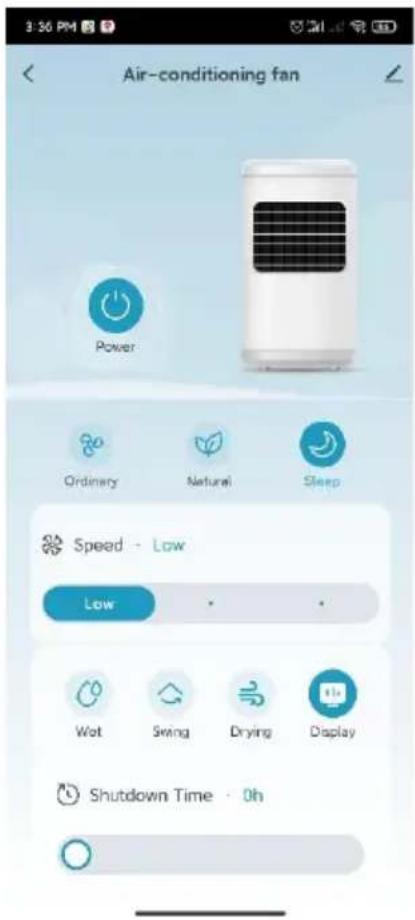
Once pairing is complete, you can call up the main interface and control the device via the app.
Cleaning instructions

Do not use any chemicals when cleaning.
Cleaning the air filter and humidification unit
If too many foreign objects accumulate on the air filter, this can impair the air outlet performance. You should therefore clean it at least once a month.
Switch off the power supply and disconnect the mains plug.

Please ensure that the power cable is disconnected from the mains before
BE COOL
cleaning, otherwise there is a risk of electric shock.
Clean the outer surface:
- If the surface is dusty, wipe it with a soft cloth. If it is very dirty, use lukewarm water (below 50 °C) and a mild detergent. Then wipe dry with a soft cloth.
- Do not use aggressive cleaning agents such as benzine or thinner, as these can damage the surface.
Clean the water tank:
- Pull out the mains plug and turn the locking knob to remove the water tank.
- Clean the tank with a cloth and some detergent, rinse it with water and pour away the waste water.
Clean the housing surface:
- Wipe the housing with a damp cloth, but never rinse it directly with water.
- Do not use aggressive cleaning agents or solvents.
- Make sure that the mains plug is disconnected before cleaning the appliance to avoid electric shock.
After cleaning:
- Reassemble all parts, such as the water tank and the cooling mats, correctly.
- Connect the device and check that it is working properly.
Maintenance:
- If you are not going to use the appliance for a long time, unplug it from the mains, pack it away and protect it from dust.
- Make sure that all parts, especially the cooling mat and the water tank, are dry before storing the appliance.
BE COOL
| Technical information | |||
| Nominal voltage | 220 V- 240 V~ | ||
| Frequency | 50 Hz | ||
| Nominal input power | 38 W | ||
| Water tank capacity | 10 L | ||
| Speed levels | 24 | ||
| Air circulation | 1000 m3/hour. | ||
| WIFI transmission frequency | 2,4GHz | ||
| Transmitting power: | max. 100mW | ||
| Product dimensions | 308.5×279.2×938.2 mm | ||
| Net weight | 6.1 kg | ||
| Information requirements of Regulation (EU) No. 206/2012 | |||
| Article | BC10ACP2501W | ||
| Nominal | 220 - 240V | ||
| Protection | II | ||
| Power consumption when switched off (POFF) | - | ||
| Seasonal power consumption (Q) | 10.5 kWh/a | ||
| Designation | Symbol | Value | Unit |
| Maximum volume flow (Single) | F | 8.7 | m3/min |
| Maximum volume flow (Total) | F | 17.4 | m3/min |
| Fan power consumption | P | 31.2 | W |
| Service ratio | SV | 0.6 | (m3/min)/W |
| Power consumption in standby mode | PSB | 0.4 | W |
| Fan sound power level | LWA | 63 | dB(A) |
| Maximum air velocity | c | 4.6 | m/s |
| Measurement standard for determining the service ratio | IEC 60879:2019 | ||
| Contact addresses for further information and service line: | Schuss Home Electronic GmbHScheringgasse 3, A-1140 ViennaTel: +43 (1) 97 0 21 - 0www.becool.atFB-No.: 23697 4 t / FB-Court: Vienna | ||
BE COOL
WARRANTY
With this quality product from BE COOL, you have made a decision for innovation, durability and reliability.
For this BE COOL appliance we grant a warranty period of 2 years from the date of purchase valid in Austria! If, contrary to expectations, service work is required on your appliance during this period, we hereby guarantee to repair it free of charge (spare parts and labor) or (at Schuss's discretion) to replace the product. If neither repair nor replacement is possible for economic reasons, we reserve the right to issue a current value credit note.
In the case of air conditioners, please always contact the customer hotline as a first step (see sticker on the appliance or front page of the operating instructions); in the case of fans, please contact your specialist dealer or us directly. Please note that repair work not carried out by an authorized workshop in Austria will immediately invalidate this warranty.
This guarantee does not cover
• We do not accept any liability for consequential damage in the event of improper use
• Repair or replacement of parts due to normal wear and tear
• Damage due to non-compliance with the operating instructions
• Devices that are used - even partially - for commercial purposes
• devices mechanically damaged by external influences (fall, impact, breakage, improper use, etc.) as well as signs of wear and tear of an aesthetic nature.
• Devices that have been handled improperly
• Devices that have not been opened by our authorized service workshop.
- Damage caused by improperly closed condensation drain valves on air conditioning units or incorrectly inserted water tanks.
• Unfulfilled consumer expectations.
• Damage caused by force majeure, water, lightning, overvoltage.
• Devices where the type designation and/or serial number on the device has been changed, deleted, made illegible or removed.
• services outside our authorized workshops, the transport costs to an authorized workshop or to us and back, as well as the associated risks.
We would like to emphasize that within the warranty period, a lump sum of € 60,- (indexed based on CPI 2010, June 2015) will be charged for operating errors or if no error was detected.
The provision of a warranty service (repair or replacement of the device) does not extend the absolute warranty period of 2 years from the date of purchase.
The 2-year guarantee is only valid on presentation of the proof of purchase (must include the name and address of the dealer and the full name of the appliance) and the corresponding guarantee certificate, on which the appliance type and the serial number (visible on the box and on the back or bottom of the appliance) must be noted! Without the warranty certificate, only the statutory warranty applies!
We expressly point out that the statutory warranty rights are not affected by this guarantee and remain unaffected. Schuss Home Electronic GmbH and its vicarious agents shall only be liable for damages in the event of gross negligence or intent. Liability for loss of profit, expected but unrealized savings, consequential damages and damages from third party claims is excluded. Damage to or for recorded data is always excluded from the liability for damages.
Congratulations on your choice. We hope you enjoy using your BE COOL appliance!
ADDRESS
Schuss Home Electronic
A-1140 Vienna, Scheringgasse 3
Tel.: +43 (0)1/ 970 21
Type designation: ....
Serial number:
This warranty certificate must be handed over to the authorized service workshop together with the appliance in the event of a warranty claim.
BE COOL
This declaration of conformity is issued under the sole responsibility of the manufacturer.
Schuss Home Electronic GmbH
Scheringgasse 3
1140 Wien, AUSTRIA
Declares, that the product
Manufacturer
Hersteller
SCHUSS HOME ELECTRONIC
GmbH
Designation
Bezeichnung
Luftkühler
Aircooler
Model No.:
Modelnummer
BC10ACP2501W
is conformity with following directives, norms and/or regulations:
DIRECTIVE 2014/53/EU OF THE EUROPEAN PARLIAMENT AND OF THE COUNCIL of April 16, 2014 on the harmonization of the laws of the Member States regarding the making available on the market of radio equipment and repealing Directive 1999/5/EC Official Journal of the EU L 153/62 May 22, 2014
Article 3.1(a) Health:
EN IEC 62311:2020
Article 3.1(b) EMC:
ETSI EN 301 489-1 V2.2.3 (2019-11)
ETSI EN 301 489-17 V3.2.4 (2020-09)
Article 3.2 Radio:
EMC Directive (EMC): 2014/30/EU Directive of the European Parliament and of the Council of 26 February 2014 on the harmonisation of the laws of the Member States relating to electromagnetic compatibility; Official Journal of the EU L96, 29/03/2014, p. 79–106
EN IEC 55014-1:2021
EN IEC 55014-2:2021
EN IEC 61000-3-2:2019 + A1:2021
EN 61000-3-3:2013 + A1:2019 + A2:2021
Low Voltage Directive (LVD):2014/35/EU Directive of the European Parliament and of the Council of 26 February 2014 on the harmonisation of the laws of the Member States relating to the making available on the market of electrical equipment designed for use within certain voltage limits; Official Journal of the EU L96, 29/03/2014, p. 357–374
EN 60335-1:2012 + A11:2014 + A13:2017 + A1:2019 + A2:2019 + A14:2019 + A15:2021
EN 60335-2-80:2003 + A1:2004 + A2:2009
EN 60335-2-98:2003 + A1:2005 + A2:2008 + A11:2019
EN 62233:2008
RoHS Directive: 2011/65/EU Directive of the European Parliament and of the Council of 8 June 2011 on the restriction of the use of certain hazardous substances in electrical and electronic equipment; Official Journal of the EU L174, 1/07/2011, p. 88–110
BE COOL
Reach SVHC(EC)NO. 1907/2006 Schuss Home Electronic GmbH hereby confirms that in the products we supply, there are no substances of very high concern (SVHC) in the candidate list (last ECHA update from June 14, 2023, 235 substances) above 0.1% in accordance with Article 33 of the REACH Regulation (EC) No .1907/2006 are included.
Place and date of issue:
Vienna, 2025-11-04
Declaration reference:
SCHUSS HOME ELECTRONIC GMBH
Scheringgasse 3, 1140 Wien, AUSTRIA
Senior product and purchasing mana
Name, Funktion / name, function
Bevollmächtigter Vertreter des Herstellers Authorized representative of manufacture
Unterschrift / signature
BE COOL
| English [En] | EU DECLARATION OF CONFORMITYManufacturer [I] declares under its sole responsibility that the products [II] are in conformity with the requirements of the EU Directives, Regulations and Harmonised standards [III]. |
| German [De] | EU-KONFORMITÄTSERKLÄRUNGDer Hersteller [I] erklärt in alleiniger Verantwortung, dass die Produkte [II] allen Anforderungen der EU-Richtlinien, Verordnungen und harmonisierten Normen [III] entsprechen. |
| French [Fr] | DÉCLARATION UE DE CONFORMITÉLe fabricant [I] déclare sous sa seule responsabilité que les produits [II] sont conformes aux exigences des directives, règlements et normes harmonisées [III] de l’UE. |
| Spanish [Es] | DECLARACIÓN DE CONFORMIDAD UEEl fabricante [I] declara bajo su exclusiva responsabilidad que los productos [II] están en conformidad con los requisitos de las directivas, regulaciones y normas armonizadas de la UE [III]. |
| Italian [It] | DICHIARAZIONE DI CONFORMITÀ UEl produttore [I] dichiara sotto la sua unica responsabilità che i prodotti [II] sono conformi ai requisiti delle direttive, dei regolamenti e degli standard armonizzati della UE [III]. |
| Greek [EI] | ΔΗΛΩΣΗ ΣΥΜΜΟΡΦΩΣΗΣ EEΟ κατασκευαστής [I] δηλώνει αποκλειστικά με δική του ευθύνη ότι τα προϊόντα [II] συμμορφώνονται με τις απαιτήσεις των Οδηγιών, των Κανονισμών και των Εναρμονισμένων προτύπων της EE [III]. |
| Portuguese [Pt] | DECLARAÇÃO DE CONFORMIDADE UEO fabricante [I] declara sob sua inteira responsabilidade que os produtos [II] estão em conformidade com os requisitos das diretivas, regulamentos e normas harmonizadas da UE [III]. |
| Croatian [Hr] | EU IZJAVA O USKLAĐENOSTIProizvođač [I] izjavljuje pod punom materijalnom odgovornošću da su proizvodi [II] u skladu sa zahtjevima EU direktiva, propisa i harmoniziranih standarda [III]. |
| Czech [Cs] | EU PROHLÁŠENÍ O SHODĚVýrobce [I] prohlašuje na vlastní výlučnou odpovědnost, že výrobky [II] jsou ve shodě s požadavky směrnic, předpisů a harmonizovaných norem EU [III]. |
| Danish [Da] | EU OVERENSSTEMMELSESERKLÆRINGProducenten [I] erklærer under eget ansvar, at produkterne [II] er i overensstemmelse med kravene i direktiverne, forordningerne og de harmoniserede standarder fra EU [III]. |
| Dutch [NI] | EU-CONFIRMITEITSVERKLARINGFabrikant [I] verklaart op eigen verantwoordelijkheid dat de producten [II] in overeenstemming zijn met de eisen van de EG-richtlijnen, voorschriften en geharmoniseerde normen [III]. |
| Estonian [Et] | EL-i VASTAVUSDEKLARATSIOONTootja [I] kinnitab ja kannab ainuisikuliselt vastutust selle eest, et tooted [II] on toodetud kooskõlas Euroopa Liidu direktiivide, standardite ja muude normatiivdokumentidega [III]. |
| Finnish [Fi] | EU-VAATIMUSTENMUKAISUUSVAKUUTUSValmistaja [I] vakuuttaa omalla vastuullaan, että tuotteet [II] ovat EU:n direktiivien, asetusten ja yhdenmukaistettujen standardien [III] vaatimusten mukaisia. |
| Hungarian [Hu] | EU MEGFELELŐSÉGI NYILATKOZATA Gyártó [I] nyilatkozza, hogy kizárólagos felelősséget vállal a termékek [II] EU irányelveknek, szabályozásoknak és harmonizált szabványoknak való megfeleléséről [III]. |
| Latvian [Lv] | ES ATBILSTĪBAS DEKLARĀCIJARAžotājs [I] deklarē uz savu atbildību, ka produkti [II] atbilst ES direktīvu, regulu un saskaņoto standartu [III] prasībām. |
BE COOL
| Lithuanian [Lt] | ES ATITIKTIES DEKLARACIJAGamintojas [I] savo išskirtine atsakomybe pareiškia, kad gaminiai [II] atitinka ES direktyvų, reglamentų ir darniųjų standartų reikalavimus [III]. |
| Norwegian [No] | EU-SAMSVARSERKLÆRINGProdusent [I] erklærte under sitt eget ansvar at sine produkter [II] er i samsvar med kravene i EU-direktivene, forskrifter og harmoniserte standarder [III]. |
| Polish [PI] | DEKLARACJA ZGODNOŚCI UEProducent [I] deklaruje z pełną odpowiedzialnością, że produkty [II] są zgodne z postanowieniami dyrektyw, regulacji oraz norm zharmonizowanych UE [III]. |
| Romanian [Ro] | DECLARAȚIA DE CONFORMITATE UEProducătorul [I] declară pe propria răspundere că produsele [II] sunt în conformitate cu cerințele Directivelor, Normelor și Standardelor armonizate UE [III]. |
| Slovak [Sk] | VYHLÁSENIE O ZHODE EUVýrobca [I] vyhlasuje na svoju vlastnú zodpovednosť, že výrobky [II] sú v súlade s požiadavkami smerníc, nariadení a harmonizovaných noriem EÚ [III]. |
| Slovenian [SI] | IZJAVA EU O SKLADNOSTIProizvajalec [I] s polno odgovornostjo izjavlja, da so izdelki [II] v skladu z zahtevami direktiv, uredb in usklajenih standardov EU [III]. |
| Swedish [Sv] | EU FÖRKLARING OM ÖVERENSSTÄMMELSETillverkaren [I] deklarerar å eget ansvar att produkterna [II] efterlever kraven enligt EU-direktiven, förordningarna och harmoniserade normer [III]. |
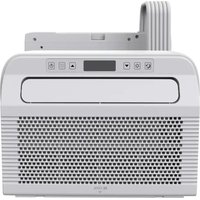
- HERZLICHEN GLÜCKWUNSCH!
- BE COOL
- Variante 2:
- Schlafmodus:
- Reset the device first.
- Added successfully
- FÉLICITATIONS !
- Variante 2 :
- Mode veille :
- GEFELICITEERD!
- Variant 2:
- Slaapstand:
- Modo de reposo:
- Varianta 2:
- Dial'kové ovládanie
- Režim spánku:
- FELICITĂRI!
- Modul de veghe:
- Wariant 2:
- Tryb uśpienia:
- Aktualna navodila za uporabo in drugi jeziki
- Trenutni priručnici i dodatni jezici
- Varijanta 2:
- Način prirodnog vjetra za normalne razine vjetra 17 do 24 :
- Način mirovanja:
- Upute za čišćenje
- USER MANUAL
- Air cooler
- BC10ACP2501W
- CONGRATULATIONS!
- Current operating instructions and other languages
- SCOPE OF DELIVERY
- Remote control
- Preparing the remote control - Inserting or replacing the battery
- Initial operation:
- Change the battery:
- Correct use of the remote control
- Commissioning
- Before initial commissioning
- Unpacking the device
- Installation
- Filling up the water
- Variant 1:
- Operation:
- "ON/OFF:
- "Wind speed
- 3."
- "Wind modes
- Sleep mode:
- High speed (level 6-24):
- " Cooling/humidifier
- "Swivel function
- "WiFi function
- Remarks:
- Further functions:
- IMPORTANT
- Installing the app
- Cleaning instructions
- Cleaning the air filter and humidification unit
- Clean the outer surface:
- Clean the water tank:
- Clean the housing surface:
- After cleaning:
- Maintenance:
- WARRANTY
- This guarantee does not cover
- Schuss Home Electronic GmbH
Brand : Be Cool
Model : BC10ACP2501W
Category : Air Conditioning