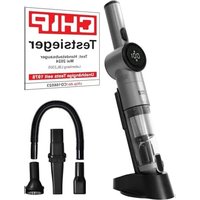
LBL2305 - Vacuum Cleaner Lebenlang - Free user manual and instructions
Find the device manual for free LBL2305 Lebenlang in PDF.


| Brand | Lebenlang |
| Model | LBL2305 |
| Product type | Vacuum cleaner |
| Vacuum type | Cordless vacuum cleaner |
| Power supply | Built-in rechargeable battery |
| Charger | Mains adapter with Type-C cable (included) |
| Filter type | Washable filter |
| Tank capacity | Not specified |
| Suction power | Adjustable (Standard mode and Boost power) |
| Display | Digital screen with battery indicator and full tank indicator |
| Included accessories | Crevice tool, brush, flexible hose |
| Functions | Dry vacuuming only |
| Use | Indoor only |
| Maintenance | Regularly clean the filter and empty the dust collector |
| Safety | Do not vacuum liquids, hot ashes, sharp or flammable objects |
| Switch | On/off button |
| Power control | Dedicated button (green = standard, red = boost) |
| Low battery indicator | White flashing and decreasing numbers on the screen |
| Warranty | Manufacturer standard |
| Repairability | Repair by a professional only |
Frequently Asked Questions - LBL2305 Lebenlang
User questions about LBL2305 Lebenlang
0 question about this device. Answer the ones you know or ask your own.
Ask a new question about this device
Download the instructions for your Vacuum Cleaner in PDF format for free! Find your manual LBL2305 - Lebenlang and take your electronic device back in hand. On this page are published all the documents necessary for the use of your device. LBL2305 by Lebenlang.
USER MANUAL LBL2305 Lebenlang
Contact us We speak English
Thank you for your trust in LEBENLANG. We pursue the highest standards of quality and design and hope you enjoy your new device.
Please read the instructions for use carefully and completely before using the device. Only use the device in accordance with the instructions for use and the safety instructions. Any other use may result in damage to the device or personal injury.
The manufacturer assumes no liability for damage caused by improper use.
General safety instructions
Please keep the manual in a safe place for future reference.
-Vacuum dry only.
- Children must be supervised by an adult. Do not let children play with the vacuum cleaner.
- DO NOT pick up water, wet objects, liquids, ash, hot coals, cigarette butts, matches or other hot, smoking or burning objects, etc.
- DO NOT pick up flammable or combustible materials (e.g. lighter fluid, gasoline, kerosene, etc.) or use in the presence of explosive liquids or vapors.
- DO NOT vacuum up toxic materials (e.g. chlorine bleach, ammonia, drain cleaner, etc.).
- DO NOT vacuum up toner (for laser printers, copiers, etc.) as there is a risk of fire and explosion.
- DO NOT pick up plaster dust, cement dust, etc., as the filter will clog very quickly.
DO NOT use the vacuum cleaner without the filter in place.
- DO NOT store or use the device near high temperature areas.
- DO NOT use the vacuum cleaner if it is clogged. Turn off the device and clear any obstructions before proceeding.
- When unplugging the charging cable, hold the plug of the charging cable, do not pull the power cable itself.
- Avoid leaving the vacuum cleaner on when not in use, to avoid causing damage.
- If the power cord is damaged, it must be replaced by a professional. Never replace the cable yourself.
- Do not vacuum large or sharp objects such as glass.
Always check the device and the charger for damage. - If the frame or other parts of the machine are damaged, stop working immediately and turn off the machine.
- The power cord must be kept away from hot surfaces. (e.g. kitchen utensils and other hot objects).
- Do not touch the charger or power cord with wet hands.
- When using this device, do not point it at people or animals.
- Only use the supplied accessories.
- Only use the supplied charger.
- Keep out of reach of CHILDREN.
- This device is intended for indoor use only. Do not use outdoors.
- Do not open the device or charger without permission, and do not replace the power cord by yourself. Please send the vacuum cleaner to professionals for maintenance. To avoid injury, do not attempt to repair the device yourself.
- Please take extra care not to trip over the power cord when charging the device.
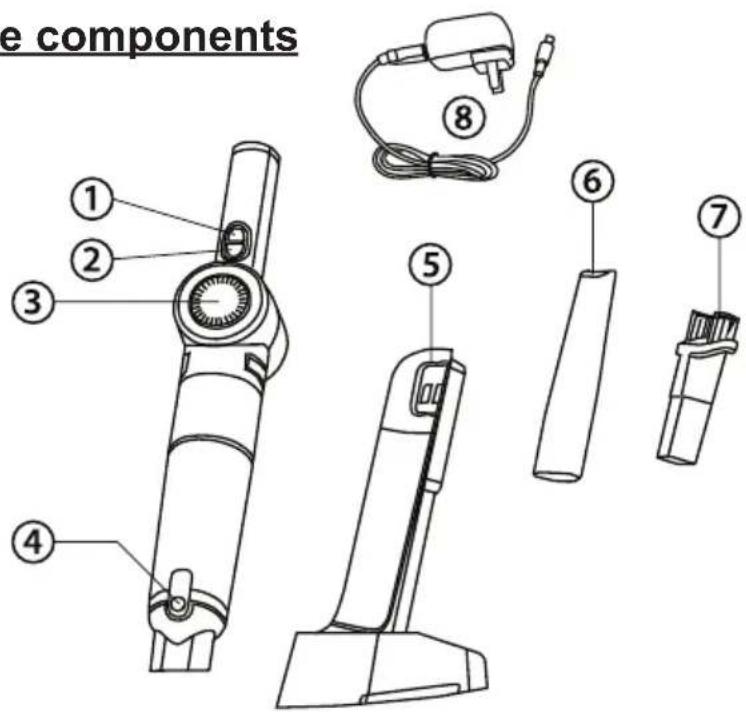
Name and position of the components
- On/Off switch
- Power control button
- Display screen
- Dust bin opener
- Charging station
- Crevice nozzle
- Brush
- Power plug
Loading process
- Plug the Type-C cable into the charging port on the top of the device to charge (make sure the device is turned off before charging).
- The charger may become hot during charging.
Charge indicator
- Important: Please use the supplied original charger for charging!
The battery indicator on the screen will flash white while charging. The digital display shows the charging status.
- When the device is fully charged, the battery indicator will be solid and the battery power digital display will show "100". The digital display turns off after ten minutes.
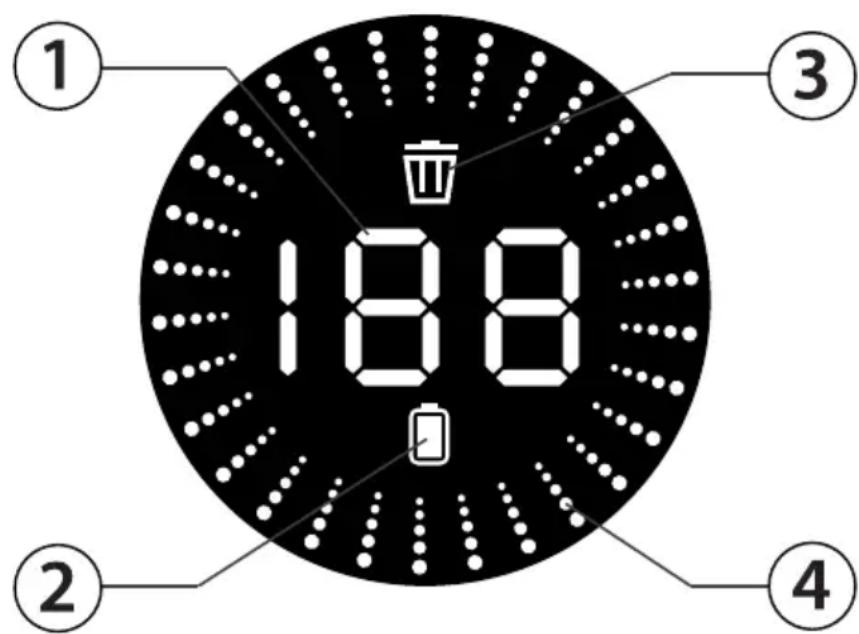
- Battery level
- Charging icon
- Warning: full dust collector
- Power level indicator
Use and function
Do not use this product while charging.
Please check regularly whether there is a foreign object in the suction area, as this could scratch your floor.
- Insert the crevice nozzle into the device to clean the table, car interior, corners, etc.
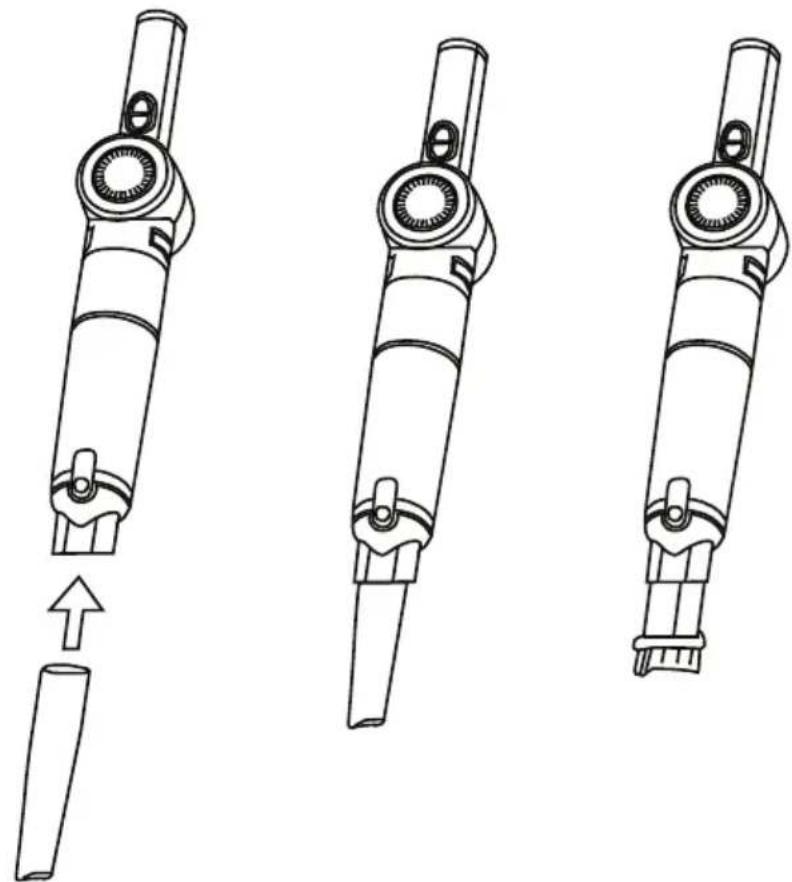
- Insert the brush into the vacuum cleaner to clean sofas, carpets and more.
- Press the power button to turn the device on or off.
- Press the power control button to select the power. Standard performance: green light. Extra power: red light.
- When using the vacuum cleaner, the battery indicator is white and the battery power digital display will be on.
- When the battery is low, the battery indicator will flash white and the number on the digital display will decrease. When the battery is completely discharged, all displays go out.
- Please empty the dust collector and clean the filter at the latest when the "Dust collector full warning light" flashes
Hose accessories
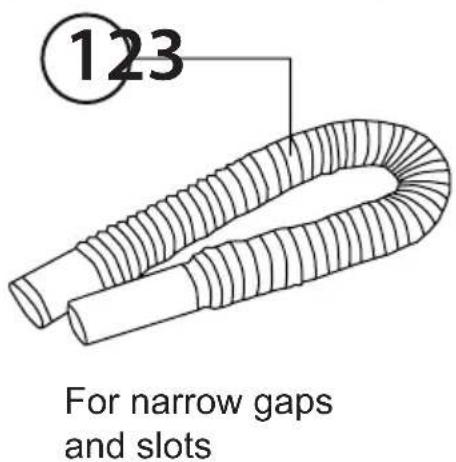
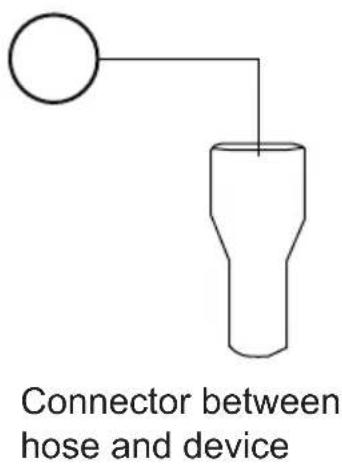
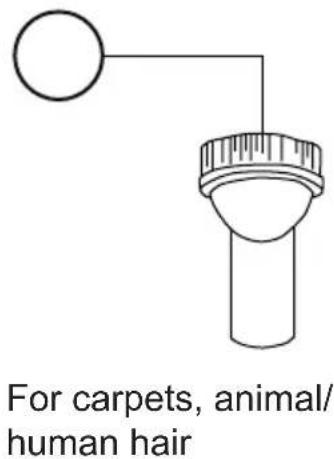
- Hose
- Hose connector
- Brush attachment
Cleaning the dust collector
Note - The filter needs to be cleaned regularly to get the best suction performance and to avoid overheating and damaging your vacuum cleaner. Cleaning is best done at the same time as emptying the dust container after you have finished working with the vacuum cleaner.
- Press the dust collector opener, remove the suction nozzle from the device and empty the chamber above the dustbin.
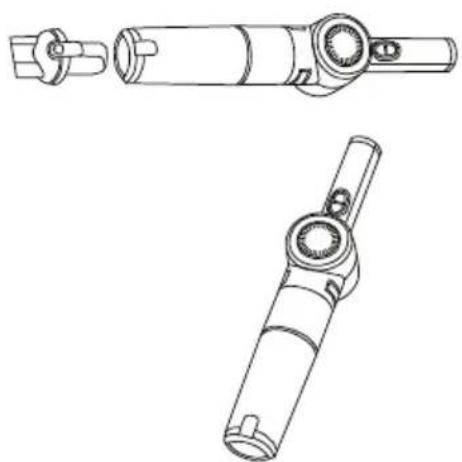
- Turn the dust collector to the left and then remove it.
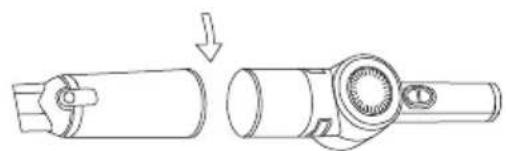
- Remove the filter inside. 4. C
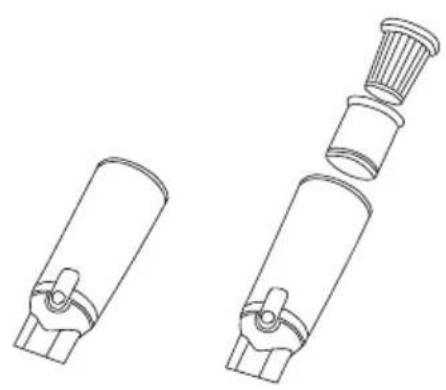
lean the filter and dust collector. Only wash the filter when it is very dirty, otherwise simply tap the edge of the filter on a hard surface to remove dust and dirt.

- Allow the filter to dry completely and put it back in the dust collector.
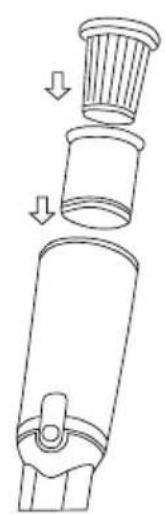
- Turn the dust collector to the right to fix it in the device.
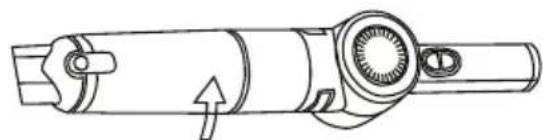
NOTE: Never use the vacuum cleaner with a wet or damp filter or without the filter installed.
Using a wet or damp filter will damage the filter, can cause serious damage to the vacuum cleaner and will void your warranty.
Important: Make sure the filter and dust collector are completely dry before replacing them.
FRANÇAIS
Brand : Lebenlang
Model : LBL2305
Category : Vacuum Cleaner