Comfort Air 99384 - Fan TREBS - Free user manual and instructions
Find the device manual for free Comfort Air 99384 TREBS in PDF.


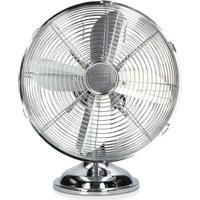
| Product type | Table fan |
| Brand | Trebs |
| Model | Comfort Air 99384 |
| Dimensions (LxWxH) | 39 x 33.5 x 27 cm |
| Weight | 2.7 kg |
| Power supply | 220-240 V, 50 Hz |
| Power consumption | 35 W |
| Number of speeds | 3 (I, II, III) |
| Oscillation function | Yes, 70° angle |
| Tilt function | Yes, from 5° upward to 20° downward |
| Noise level | 57.8 dB(A) |
| Warranty | 24 months |
| Maintenance and cleaning | Clean with a soft dry cloth; do not use water, sprays, or chemicals |
| Safety | Do not use outdoors, do not insert objects into the grilles, do not use an extension cord |
| Spare parts and repairability | No user-replaceable parts; contact customer service for any repairs |
| General information | Household use only; maintenance-free motor (sealed bearings) |
Frequently Asked Questions - Comfort Air 99384 TREBS
User questions about Comfort Air 99384 TREBS
0 question about this device. Answer the ones you know or ask your own.
Ask a new question about this device
Download the instructions for your Fan in PDF format for free! Find your manual Comfort Air 99384 - TREBS and take your electronic device back in hand. On this page are published all the documents necessary for the use of your device. Comfort Air 99384 by TREBS.
USER MANUAL Comfort Air 99384 TREBS
natural_image
Close-up of a metallic office fan with visible blades and grid pattern (no text or symbols)Handleiding Tafelventilator
Manual Desk fan
text_image
Technical diagram of a fan and lamp with numbered components and exploded viewsIMPORTANT SAFETY REGULATIONS
Please read all safety regulations carefully before using the product.
- Only use the fan in the manner described in this manual.
- Always place the fan on a flat surface.
- This fan may not be used without a pedestal or lying on its side.
- Don't use this fan outdoors.
- Don't use this fan in spaces with a high humidity, such as bathrooms.
- Don't use the fan in an environment where gasoline, paint or similar flammable liquids are used or stored.
- Before use, check the rated voltage indicated on the label on the product. This fan is designed for an electric power supply of 220-240V\~50Hz.
- This fan must be earthed!
- Don't use any electrical extension cord for this fan.
- This fan is not suitable for dimmers.
- Don't arrange the cable underneath a covering object. Arrange the cable in such a way that nobody can trip over it.
- Regularly check the cable for any damage. If the cable is damaged, it must be replaced by the manufacturer or supplier. The cable may also be repaired by a qualified person to prevent dangerous situations.
- The user may not open the fan.
- No parts of this fan may be replaced by the user.
- This product is not suitable for children younger than 8 years old.
- This product is not intended for use by persons (including children) with reduced physical, sensory or mental abilities, or with a lack of knowledge and experience, unless they're under the supervision of or have received instructions regarding the device from a person responsible for their safety.
- Never insert your finger through the mesh of the fan.
18 Don't allow children to insert objects through the mesh. - Don't use the fan near a window.
20 Never let hair, curtains, table cloths or clothing get near the fan. - Make sure that the fan does not touch any objects during oscillation.
- The fan must always be disconnected from the wall outlet when not in use. Make sure the fan is fully switched off before removing the plug from the wall outlet.
- Switch off the fan and remove the plug from the wall outlet before cleaning the fan.
- You may use a soft and dry cloth to remove dust from the fan. If the fan is very dirty, you may use a slightly moist cloth to clean the fan. Never use any cleaning agents, sprays or other chemical liquids, as they will damage the fan.
- The motor bearings are permanently sealed and don't require additional lubrication.
- Never let water get into or onto the fan housing.
- Store the fan in its original packaging in a dry ventilating room.
FAN STRUCTURE
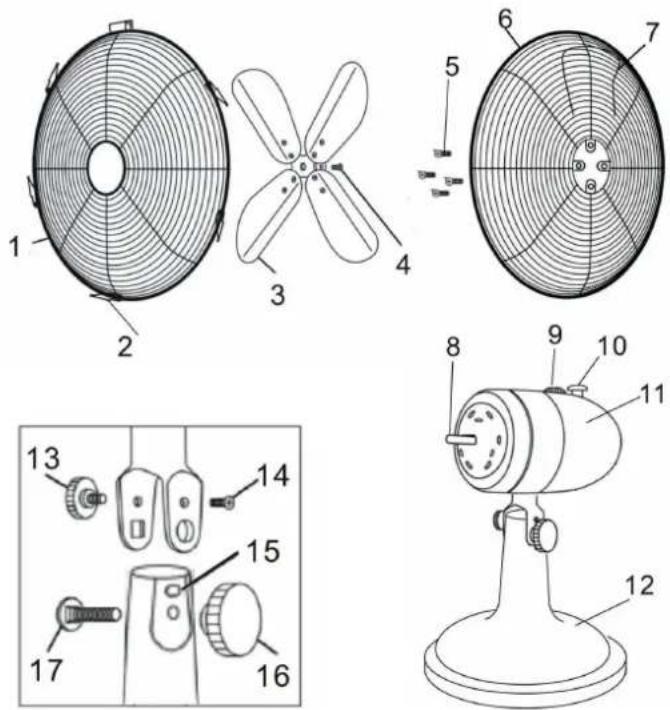
| 1. Protective front cover |
| 2. Protective covers fixing screw location |
| 3. Fan blades |
| 4. Fan blade fixing screw |
| 5. Protective rear cover fixing screws |
| 6. Protective rear cover |
| 7. Carry handle |
| 8. Motor shaft |
| 9. Speed setting dial |
| 10. Oscillation button |
| 11. Motor housing |
| 12. Pedestal |
| 13. Adjustable tilt button |
| 14. Motor housing fixing screw |
| 15. Location for motor housing fixing screw |
| 16. Motor housing carry button |
| 17. Carry bolt |
INSTALLATION
- Place the housing of the motor (11) onto the pedestal (12).
- Tighten the fixing screw of the motor housing (14) against its designated location (15).
- At the other side, tighten the adjustable tilt button (13) into the pedestal.
- Place the carry bolt (17) in the hole under the adjustable tilt button (13).
- Fix the carry button for the motor housing (16) onto the carry bolt (17).
- Place the protective rear cover (6) with the handle (7) upwards over the motor shaft (8) and then tighten it to the motor housing using the 4 screws (5).
- Slide the fan blades (3) over the motor shaft (8) and fix them to the motor shaft using the fixing screw (4).
- Turn the clips of the protective front cover (1) outwards and hang the protective cover over the edge of the protective rear cover. Make sure that the opening at the bottom of the protective front cover (2) is aligned with the opening at the bottom of the protective rear cover.
- Insert the screw (2) through both openings at the bottom of the protective covers and fix the covers together using the nut.
- Finally, close the clips around both protective covers.
OPERATION INSTRUCTIONS
- Place the fan on a flat surface.
- Check whether the voltage corresponds to what is indicated on the product label.
- Insert the plug into a wall outlet.
-
Rotate the button (9) to activate the fan and set the airflow speeds.
-
Position I provides the lowest airflow.
• Position II provides an average airflow.
• Position III provides a high airflow. -
Rotate the button to the '0' setting to switch off the fan.
- The fan oscillates automatically from left to right. If you'd like to fix its position, depress the oscillation button (10) at the rear of the fan. The fan will then remain in that position. Pull the button (10) back up to make the fan oscillate automatically again.
- You may tilt the fan head by loosening the tilt knob (13) and tightening it again in the desired tilt position.
- Remove the plug from the wall outlet when not using the fan. Make sure that the fan is fully switched off before doing so.
DISCARDING OLD EQUIPMENT
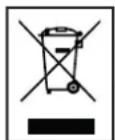
Old electric and electronic devices often contain valuable materials. However, they also contain harmful substances that were necessary for their functionality and safety. If these are placed with the non-recyclable waste or disposed of incorrectly, they can be harmful to human health and the environment. Never place your device with the non-recyclable waste.
REMARK
- Use the collection points available in your community and recycle old electric and electronic devices. Contact your town hall, the local waste disposal company or your dealer for more information.
• Make sure that your old device, until it's picked up, is safely stored out of reach of children.
WARRANTY
- We provide a warranty of 24 months for this product. The warranty starts on the date of purchase and is intended for faults due to production or the used materials.
- Your statutory warranty rights in accordance with § 439 ff. BGB-E will remain unaffected by this.
- The warranty does not apply to damages as a result of improper handling or use, nor to malfunctions that only have a minor effect on the functionality or value of the product. Normal wear and tear, transport damage, to the extent that we are not responsible for this, as well as damages caused by repairs not performed by us, are also excluded from the warranty rights.
• This device is designed for household use and has the right performance levels. - Any use in commercial situations is only covered by the warranty if the device is not put under a heavier strain that in a household situation. The device is not intended for additional commercial use.
- In the case of well-founded complaints, we will repair the defective device at our discretion or replace it with a device that shows no problems.
All possible manufacturing faults must be reported within 14 days of delivery. All further claims are excluded.
When invoking the warranty, please contact us first before sending us the product (you must always provide us with proof of purchase).
TECHNICAL DETAILS
- Model: 99384 - Desk fan
- Voltage: 220V-240V; 50Hz
- Power consumption: 35 W
- Oscillation angle: 70 degrees
- Tilt angle: 5 degrees upwards, 20 degrees downwards
- Noise level: 57.8 dB(A)
- Product dimensions: 39x33.5x27 cm
- Weight: 2.7 kg
SERVICE
If you have any further questions regarding the product after having read the user's manual, please contact the Trebs customer service:
CE Regulations
Hereby, Trebs B.V., Thermiekstraat 1a, 6361 HB Nuth, The Netherlands, declares that this product is in compliance with the essential EU directive requirements.
The declaration of conformity may be consulted via techdoc@commaxxgroup.com
CE