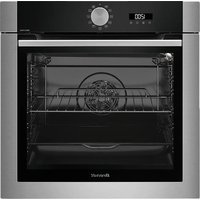
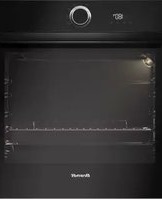
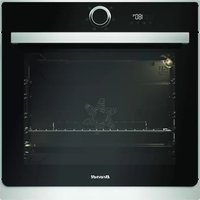
BOP7534X - Oven BRANDT - Free user manual and instructions
Find the device manual for free BOP7534X BRANDT in PDF.
User questions about BOP7534X BRANDT
0 question about this device. Answer the ones you know or ask your own.
Ask a new question about this device
Download the instructions for your Oven in PDF format for free! Find your manual BOP7534X - BRANDT and take your electronic device back in hand. On this page are published all the documents necessary for the use of your device. BOP7534X by BRANDT.
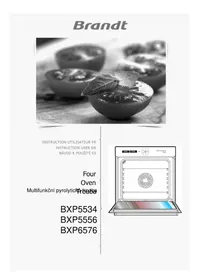
USER MANUAL BOP7534X BRANDT
natural_image
Black-and-white photo of a dessert with a lemon garnish, surrounded by bowls (no visible text or symbols)INSTRUCTIONS UTILISATEUR FR
FOUR

natural_image
Line drawing of an oven with a circular vent and control panel (no text or symbols)
text_image
ORIGINE FRANCE® GRANTIEChère Cliente, Cher Client,
text_image
QR code image containing encoded data, no visible human-readable text
Important :
text_image
Technical diagram of an oven with labeled components including control panel, fan, and door.natural_image
Pure diagram of a grid structure with an arrow pointing to it, no text or symbols present- Plat multi usages lèche-frites 45mm
natural_image
3D rendering of a mechanical component with an arrow indicating direction (no text or symbols)• Plat Patisserie 20mm
natural_image
3D rendering of a gray tray with an arrow pointing to the bottom (no text or symbols)natural_image
Diagram of a rectangular tray with arrows indicating force or movement, no text or symbols presentMise en garde :
natural_image
Mechanical assembly diagram showing a lever mechanism with labeled component A (no text or symbols beyond label)natural_image
Diagram of a tray with arrows indicating movement or force, no text or symbols presentnatural_image
Mechanical assembly diagram showing a lever mechanism with directional arrows and a magnified inset view (no text or symbols)
Conseil :
text_image
CLEAN 35° P - = - 200°C L G - + +text_image
00:00 00:25
Système "Smart Assist"
natural_image
Two-panel illustration showing a person using a wall-mounted rack to lift a door, with arrows indicating the motion direction (no text or symbols present)natural_image
Illustration of a hand using a tool to cut a component, with no visible text or symbolstext_image
Diagram showing a hand holding a laptop with labeled parts A, likely illustrating a device or installation procedure.
natural_image
Illustration of hands operating a window with a tray and handle, no text or symbols present
text_image
x4text_image
Diagram showing a device with directional arrows and a magnified view of the screen, likely illustrating a process or operation.
natural_image
Diagram of a kitchen appliance with a magnified inset showing internal components (no text or symbols)
natural_image
Diagram showing a printer's internal structure being inserted into a paper airplane (no text or symbols visible)- Remplacement de la lampe

Important :
text_image
Diagram illustrating a mechanical assembly with labeled components and directional arrows indicating rotation or assembly.RELATIONS CONSOMMATEURS
natural_image
Simple illustration of a metal bowl inside a rectangular frame, no text or symbols present
natural_image
Simple illustration of a bowl with a lid inside a container, no text or symbols present
text_image
25 mm 4natural_image
Black-and-white photo of a dessert with mint garnish, surrounded by bowls (no visible text or symbols)POKYNY PRO UŽIVATELE CS
TROUBA

natural_image
Line drawing of an oven with a circular vent and control panel (no text or symbols)
text_image
ORIGINE FRANCE® GARANTIEVážený kliente,
text_image
QR code image containing encoded data, no visible human-readable text
Důležité:
text_image
Technical diagram of an oven with labeled components including control panel, fan, and door.natural_image
Pure diagram of a grid-like structure with an arrow pointing to it, no text or symbols present.
natural_image
3D rendering of a mechanical component with an arrow pointing to it (no text or symbols visible)
natural_image
3D rendering of a gray tray with a black arrow pointing to the bottom (no text or symbols)
natural_image
Diagram of a rectangular tray with arrows indicating force or movement, no text or symbols presentINSTALACE A DEMONTÁŽ POSUVNÉ TRATĚ
natural_image
Mechanical assembly diagram showing a lever mechanism with labeled component A (no text or symbols beyond label)
natural_image
Diagram of a tray with arrows indicating movement or force, no text or symbols present
natural_image
Mechanical assembly diagram showing a lever mechanism with directional arrows and a magnified inset view (no text or symbols)
Rada :
text_image
CLEAN 35° P - = - 200°C L G - + +text_image
00:00 00:25 L - + L - +
natural_image
Two-panel illustration showing a person using a wall-mounted rack device, with arrows indicating the process (no text or symbols present)natural_image
Illustration of a hand using a tool to adjust or install a mechanical component, with no visible text or symbols.text_image
Diagram showing a hand holding a laptop with labeled parts A, likely illustrating a device or installation procedure.
natural_image
Illustration of a person using a tool to adjust or install a rectangular panel inside a cabinet (no text or symbols visible)
text_image
x4text_image
Diagram showing a device with directional arrows and a magnified view of the screen, likely illustrating a process or operation.
natural_image
Diagram of a kitchen appliance with a magnified inset showing internal components (no text or symbols)
natural_image
Diagram showing a printer's internal structure being inserted into a printer, with arrows indicating the process (no text or symbols present)• Výměna lampy

Důležité:
text_image
Diagram illustrating a mechanical assembly with labeled components and directional arrows indicating rotation or assembly.Vlastnosti žárovky:
25 W, 220-240 V\~, 300°C, zadek G9.
natural_image
Simple illustration of a metal bowl inside a rectangular frame, no text or symbols present
natural_image
Simple illustration of a bowl with a lid inside a container, no text or symbols present
text_image
25 mm 4natural_image
Black-and-white photo of a bowl with decorative elements, possibly a dessert or dessert, with blurred background objects (no visible text or symbols)BRUGERVEJLEDNING DA
OVN

natural_image
Line drawing of an oven with a circular vent and control panel (no text or symbols)
text_image
ORIGINE FRANCE® GRANTIEKære kunde,
text_image
QR code image containing encoded data, no visible human-readable text
Vigtigt:
INSTALLATION AF DIT APPARAT 7
BESKRIVELSE AF DIT APPARAT 9
text_image
Technical diagram of an oven with labeled components including control panel, fan, and door.A Betjeningspanel
B Lampe
© Låge
D Håndgreb
natural_image
Pure diagram of a grid-like structure with an arrow pointing to it, no text or symbols present.
natural_image
3D rendering of a mechanical component with an arrow indicating direction (no text or symbols)
natural_image
3D rendering of a gray tray with a black arrow pointing to the bottom surface (no text or symbols)
natural_image
Diagram of a rectangular tray with arrows indicating force or movement, no text or symbols presentAdvarsel:
natural_image
Mechanical assembly diagram showing a lever mechanism with labeled component A (no text or symbols beyond label)
natural_image
Diagram of a tray with arrows indicating movement or force, no text or symbols present
natural_image
Mechanical assembly diagram showing a lever mechanism with directional arrows and a magnified inset view (no text or symbols)
Rådgivning:
text_image
CLEAN 35° P - = - 200°Ctext_image
00:00 00:25
natural_image
Two-panel illustration showing a person using a rack-mounted device to lift or lift the other (no text or symbols present)natural_image
Illustration of a hand holding a small mechanical component with a downward arrow, next to a close-up of a textured surface (no text or symbols)text_image
Diagram showing a hand holding a laptop with labeled parts A, likely illustrating a device or installation procedure.
natural_image
Illustration of hands installing or adjusting a window frame inside a cabinet (no text or symbols visible)
text_image
x4text_image
Diagram illustrating a 3D printer or printer mechanism with directional arrows and a magnified view of the device's internal structure.
natural_image
Diagram of a computer with an open screen and a magnified inset showing a close-up of the screen (no text or symbols present)
natural_image
Diagram showing a printer's internal structure with an open base and a magnified view of the printer's internal components (no text or symbols present)text_image
Diagram illustrating a mechanical assembly with labeled components and directional arrows indicating rotation or assembly.Pærens egenskaber:
25 W, 220-240 V\~, 300°C, sokkel G9.
natural_image
Black-and-white photo of a bowl with ice cream and mint leaf garnish, blurred background with indistinct bowls (no text or symbols visible)natural_image
Line drawing of an oven with a circular vent and control panel (no text or symbols)
text_image
ORIGINE FRANCE® GRANTIEtext_image
QR code image containing encoded data, no visible human-readable text
text_image
Technical diagram of an oven with labeled components including control panel, fan, and door.natural_image
Pure diagram of a grid-like structure with an arrow pointing to it, no text or symbols present.
natural_image
3D rendering of a mechanical component with an arrow indicating direction (no text or symbols)
natural_image
Close-up of a gray plastic tray with a black arrow pointing to it (no text or symbols visible)
natural_image
Diagram of a rectangular tray with arrows indicating force or movement, no text or symbols presentAchtung
natural_image
Mechanical assembly diagram showing a lever mechanism with labeled component A (no text or symbols beyond label)
natural_image
Diagram of a tray with arrows indicating movement or force, no text or symbols present
natural_image
Mechanical assembly diagram showing a lever mechanism with directional arrows and a magnified inset view (no text or symbols)
Empfehlung
text_image
CLEAN 35° P - = - 200°Ctext_image
00:01 00:25
natural_image
Two-panel illustration showing a person using a ladder to lift a wall-mounted rack, with arrows indicating motion (no text or symbols)natural_image
Illustration of a hand holding a small mechanical component with a downward arrow, next to a separate view of a metallic tool (no text or symbols)text_image
Diagram showing a hand holding a laptop with labeled parts A, likely illustrating a device or installation procedure.
natural_image
Illustration of hands installing or adjusting a window frame inside an oven (no text or symbols visible)
text_image
x4text_image
Diagram illustrating a 3D printer or printer mechanism with directional arrows and a magnified view of the device's internal structure.
natural_image
Diagram of a computer with an open screen and a magnified inset showing a close-up of the screen (no text or symbols present)
natural_image
Diagram showing a printer's internal structure with an open base and a magnified view of the printer's internal components (no text or symbols present)text_image
Diagram illustrating a mechanical assembly with labeled components and directional arrows indicating rotation or assembly.natural_image
Black-and-white photo of a bowl with mint leaf garnish, blurred bowls in background (no visible text or symbols)ΟΔΗΓΙΕΣ ΧΡΗΣΤΗ ΕΛ
ΦΟΥΡΝΟΣ

natural_image
Line drawing of an oven with a circular vent and control panel (no text or symbols)
text_image
ORIGINE FRANCE® GARANTIEΑγαπητέ Πελάτη,
text_image
QR code image containing encoded data, no visible human-readable text
Σημαντικό:
text_image
Technical diagram of an oven with labeled components including control panel, fan, and door.natural_image
Pure diagram of a grid-like structure with an arrow pointing to it, no text or symbols present.
natural_image
3D model of a rectangular container with internal compartments and a black arrow pointing to one side (no text or symbols)
natural_image
3D rendering of a gray tray with a black arrow pointing to the bottom-right corner (no text or symbols)
natural_image
Diagram of a rectangular tray with arrows indicating force or movement, no text or symbols present! Progoxì:
natural_image
Mechanical assembly diagram showing a lever mechanism with labeled component A (no text or symbols beyond label)
natural_image
Diagram of a tray with arrows indicating movement or force, no text or symbols present
natural_image
Mechanical assembly diagram showing a lever mechanism with directional arrows and a magnified inset view (no text or symbols)
Συμβουλές:
text_image
CLEAN 35° P - = - 200°Ctext_image
00:00 00:25
ΛΕΙΤΟΥΡΓΙΑ SMART ASSIST.
natural_image
Two-panel illustration showing a person using a rack-mounted device, with arrows indicating motion direction (no text or symbols)natural_image
Illustration of a hand using a tool to cut a mechanical component, with no visible text or symbols.text_image
Diagram showing a hand using a tool to adjust or install a device with labeled components A, likely illustrating a mechanical or electrical setup.
natural_image
Illustration of hands operating a door with a tray and handle, no text or symbols present
text_image
x4text_image
Diagram showing a device with directional arrows and a magnified view of the component, likely illustrating a process or assembly.
natural_image
Diagram of a kitchen appliance with a magnified inset showing internal components (no text or symbols)
natural_image
Diagram showing a printer's internal structure being inserted into a machine, with magnified view of the printer's base (no text or symbols present)text_image
Diagram illustrating a mechanical assembly with labeled components and directional arrows indicating rotation or movement.natural_image
Black-and-white photo of a bowl with mint leaf garnish, blurred bowls in background (no text or symbols visible)USER INSTRUCTIONS EN
OVEN

natural_image
Line drawing of an oven with a circular vent and control panel (no text or symbols)
text_image
ORIGINE FRANCE® GRANTIEDear Customer,
You have just acquired a BRANDT product and we would like to thank you.
We have designed and made this product with you, your lifestyle and your requirements in mind so that it meets your expectations. We have devoted our know-how, our innovative spirit and the passion that has been guiding us for over 60 years.
In an effort to ensure that our products meet your requirements in the best possible way, our Customer Relations department is at your disposal, to answer all your questions and to listen to all your suggestions.
Visit our website www.brandt.com where you will find our latest innovations, as well as useful and complementary information.
BRANDT is delighted to assist you every day and hopes you get the most out of your purchase.
text_image
ORIGINE FRANCE® GRANTIEBVCert.6011825
The label "Origine France Garantie" assures the consumer the traceability of a product by giving a clear and objective indication of the source. Brandt brand is proud to affix this label on products from our French factories based in Orléans and Vendôme.
https://brandt.com/

text_image
QR code image containing encoded data, no visible human-readable text
Important: Before using your appliance, read this user guide carefully miliarise yourself more quickly with its operation.
SAFETY INSTRUCTIONS ....4
ENVIRONMENT 6
Environment 6
Energy saving councils 6
INSTALLATION 7
Choice of location and fitting 7
Electrical connection....8
DESCRIPTION OF THE OVEN....9
Presentation of the oven....9
Display and buttons 9
Accessories....10
HOW TO USE YOUR APPLIANCE 12
Setting 12
Setting menu 12
Cocking mode....14
Starting cooking....15
CLEANING....17
Cleaning inside - outside....18
ANOMALIES AND SOLUTIONS....20
SERVICE CALLS 21
Service calls....21
COOKING AID....21
Cooking tables....22
Recipes with yeast 24
Performance testing....25
Automatic combined steam functions 26
IMPORTANT - READ CAREFULLY AND RETAIN FOR FUTURE USE.
This user guide is available for download on the brand's website.
When you receive the appliance, unpack it or have it unpacked immediately. Check its general appearance. Make a note of any reservations on the delivery slip and keep a copy.

Important:
This appliance may be used by children aged 8 years and older, and by persons with impaired physical sensorial or mental capacities, or without experience or knowledge, if they are supervised or have received prior instructions on how to use the appliance safely and have understood the risks involved. Children must not be allowed to play with the appliance. Cleaning and maintenance operations must not be carried out by children without supervision.
— Children must be supervised to prevent them from playing with the appliance.

WARNING:
— The appliance and its accessible parts become hot during use. Be careful not to touch the heating elements inside the oven. Children under 8 years old must not be allowed near it unless they are supervised at all times.
— This appliance is designed to cook with the door closed.
— Before pyrolytic cleaning of your oven, remove all accessories and any thick deposits.
— During cleaning, the surfaces may become warmer than under normal conditions of use. It is advisable to keep children away from the appliance.
— Do not use a steam cleaner.
— Do not use abrasive cleaning products or hard metal scrapers for cleaning the oven's glass door, as they could scratch the surface and cause the glass to shatter.

WARNING :
Make sure the appliance is disconnected from the power before replacing the lamp in order to avoid the risk of electric shock. Change the lamp only when the appliance has cooled down. To unscrew the view port and the light, use a rubber glove, which will make disassembly easier.
The electrical plug must remain accessible after installation.
— It must be possible to disconnect the appliance from the power supply, either using a plug or by fitting a switch on the fixed wiring system in accordance with installation rules.
— If the power cable is damaged, it should be replaced by the manufacturer, its after-sales service department or by a similarly qualified person in order to avoid danger.
— This appliance may be installed either under a worktop or in a cabinet column, as indicated on the installation diagram.
— Centre the oven in the unit so as to ensure a minimum distance of 10 mm between the appliance and the surrounding unit. The material of the unit supporting the appliance must be heat-resistant (or covered with a heat-resistant material). For greater stability, attach the oven to the unit with 2 screws through the holes provided on the side panels.
— In order to avoid overheating, the appliance must not be installed behind a decorative door..
— This appliance is designed to be used for domestic and similar
applications such as:
Kitchen areas for the staff of shops, offices and other professional premises; Farms; Use by clients of hotels, motels and other residential type establishments; guest house type environments.
— The oven must be turned off when cleaning inside the oven.
Do not modify the characteristics of this appliance; doing so could be dangerous.
Do not use your oven as a larder or to store any items after use.
CARE FOR THE ENVIRONMENT
- This appliance's packing materials are recyclable. Please recycle them and help protect the environment by depositing them in municipal containers provided for this purpose.
- Your appliance also contains many recyclable materials. It is therefore marked with this logo to indicate that used appliances must not be mixed with other waste.
The appliance recycling organised by your manufacturer will therefore be conducted in optimum conditions, in accordance with European directive 2002/96/EC on electrical and electronic equipment waste.
Consult your local authority or your retailer to locate your nearest used appliance drop-off points.
- We thank you for your help in protecting the environment.
ENERGY SAVING COUNCIL
Keep the oven door closed during baking.
CHOICE OF LOCATION AND FITTING
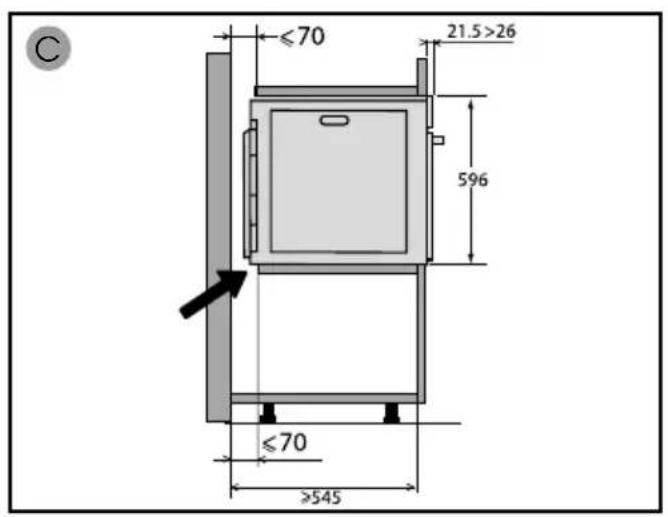
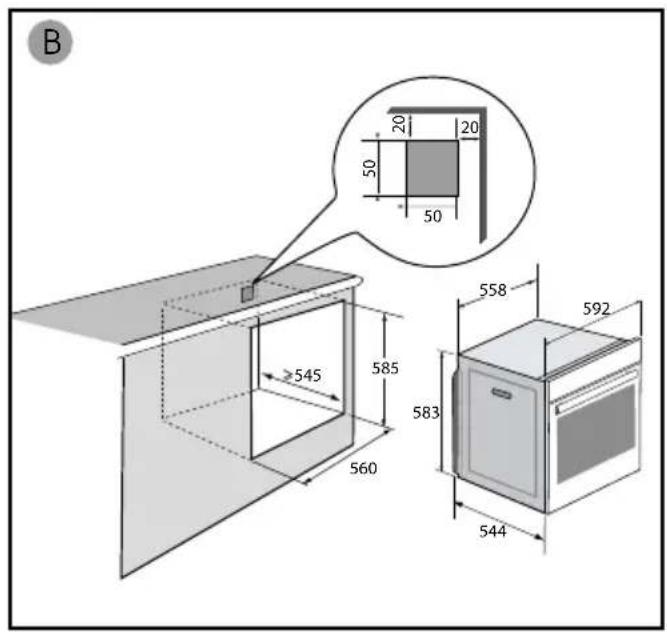
The diagrams show the dimensions of a cabinet that will be able to hold your oven.
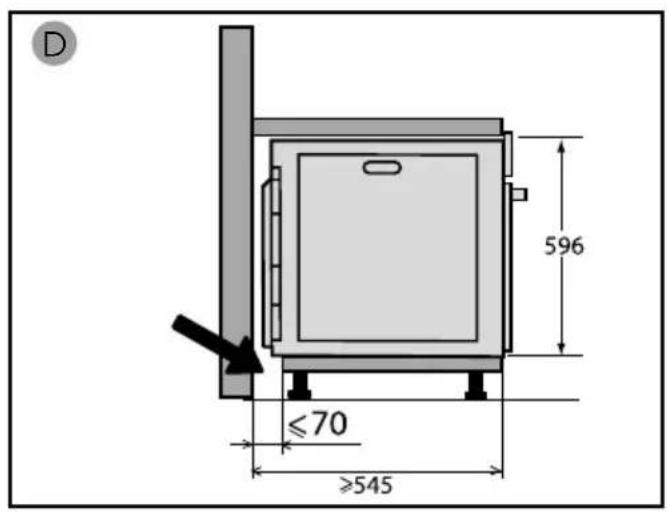
This appliance may be installed either under a worktop (A) or in a column (B). If the cabinet is open, its opening at the back must be 70 mm maximum.
Install the oven in the furniture. To do this, remove the rubber stops and pre-drill a 2-mm diameter hole in the wall of the furniture to avoid splitting the wood. Attach the oven with the two screws. Re-position the rubber stops.

Tip
To be certain that you have properly installed your appliance, do not hesitate to call on a household appliance specialist.

Warning :
If the electrical installation in your residence requires any changes in order to hook up your appliance, contact a professional electrician. If the oven malfunctions in any way, unplug the appliance or remove the fuse corresponding to the sector where the oven is hooked up.
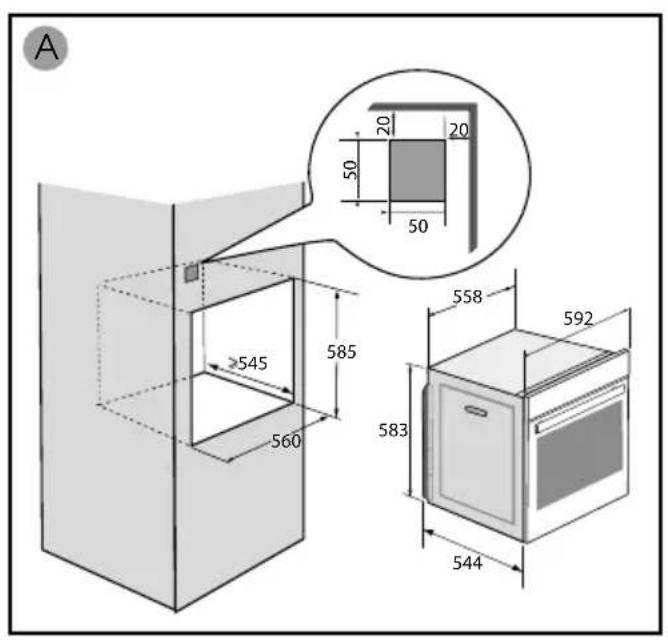
text_image
A ≥545 560 585 583 558 592 544 20 20 50 50
text_image
B 50 20 20 50 50 545 585 560 558 592 583 544
text_image
C ≤70 21.5>26 596 ≤70 >545
text_image
D 596 ≤70 ≥545ELECTRICAL CONNECTION
Your oven must be connected with a (standard) power cable with 3 conductors of 1.5mm^2 (1 live + 1 neutral + earth) which must be connected to a 220-240V\~ single-phase grid by means of a 1 live + 1 neutral + earth CEI 60083 standard power socket or via an all-poles cut-off device in compliance with the installation rules.

Warning
The safety wire (green-yellow) is connected to the appliance's terminal and must be connected to the earth terminal of the electrical set-up.
The fuse in your set-up must be 16 amperes.
We cannot be held responsible for any accident resulting from inexistent, defective or incorrect earthing.
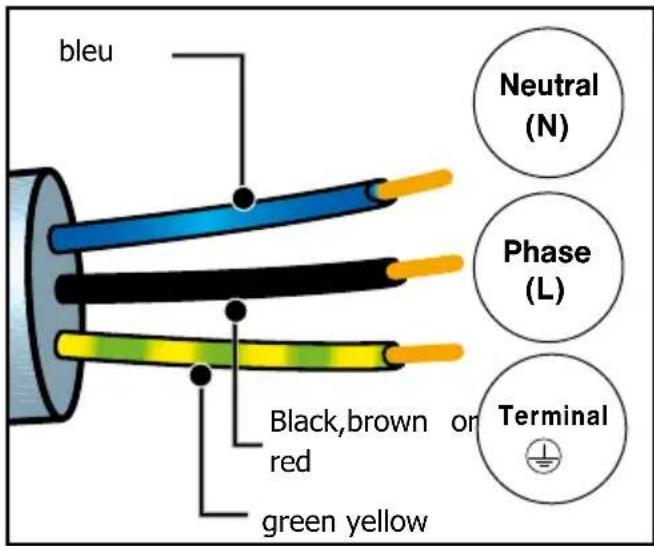
text_image
bleu Black,brown or red green yellow Neutral (N) Phase (L) Terminal- Prior to first use
Before using your oven for the first time, heat it with the door closed for about 15 minutes on the highest temperature. to break in the appliance. The mineral wool surrounding the oven cavity may initially give off a particular odour due to its composition. You may also notice smoke development. This is normal.
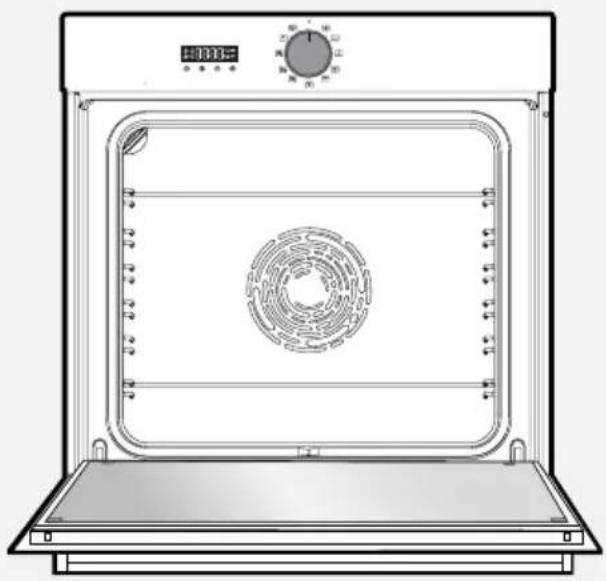
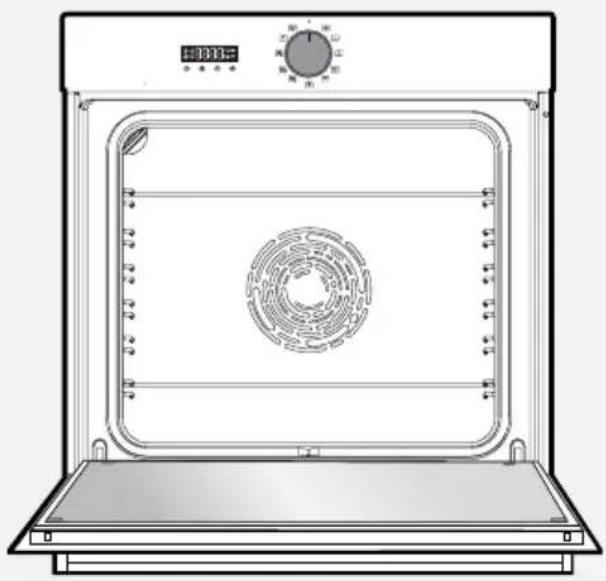
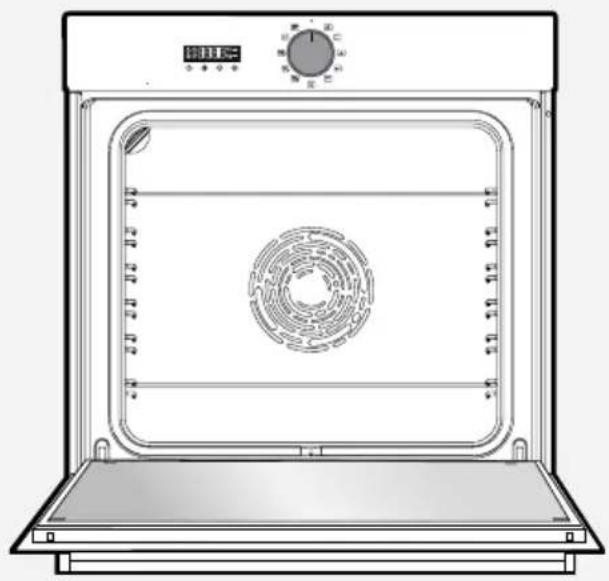
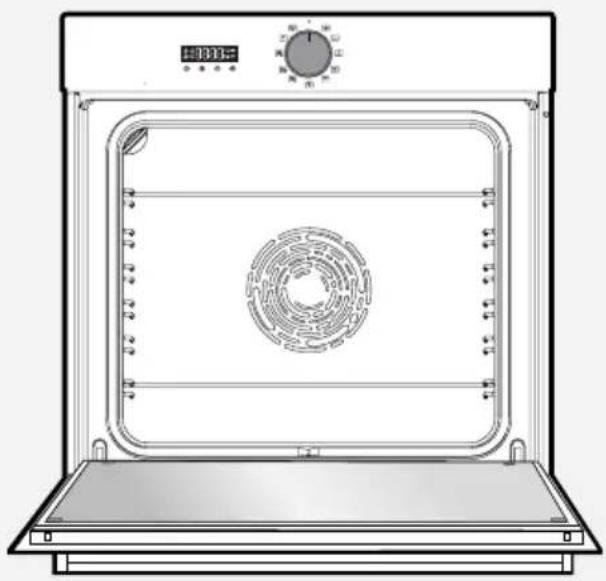
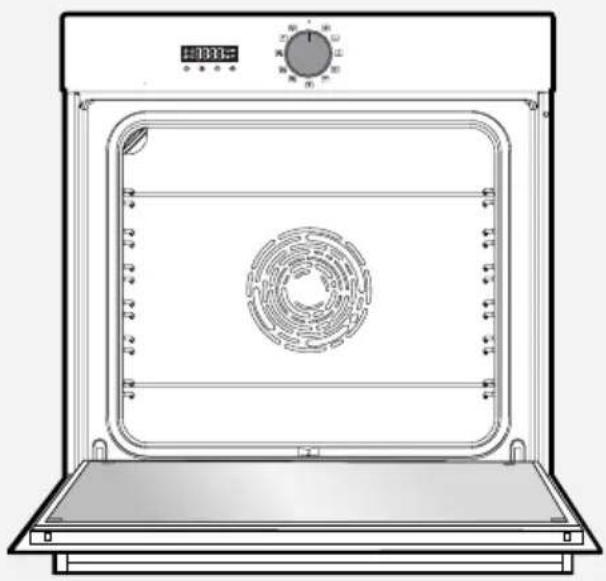
PRESENTATION OF THE OVEN
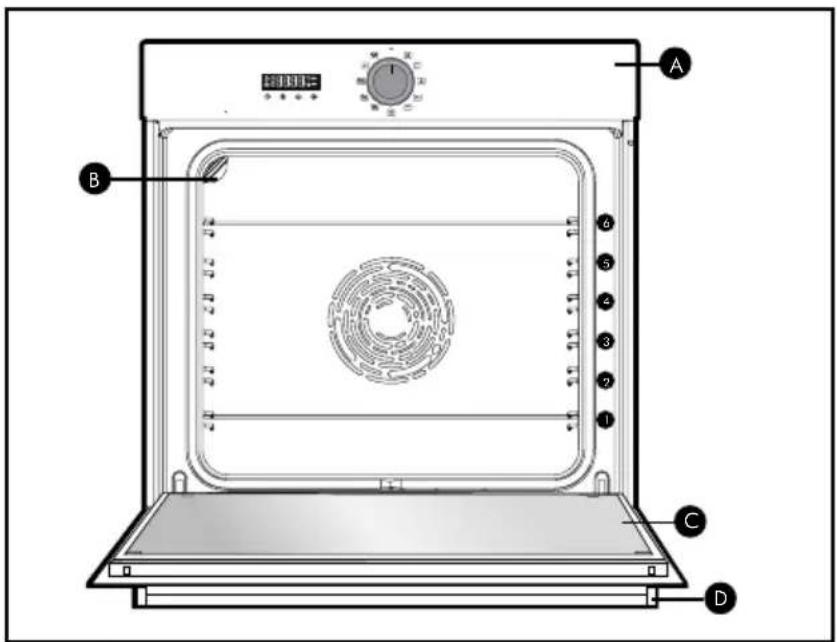
text_image
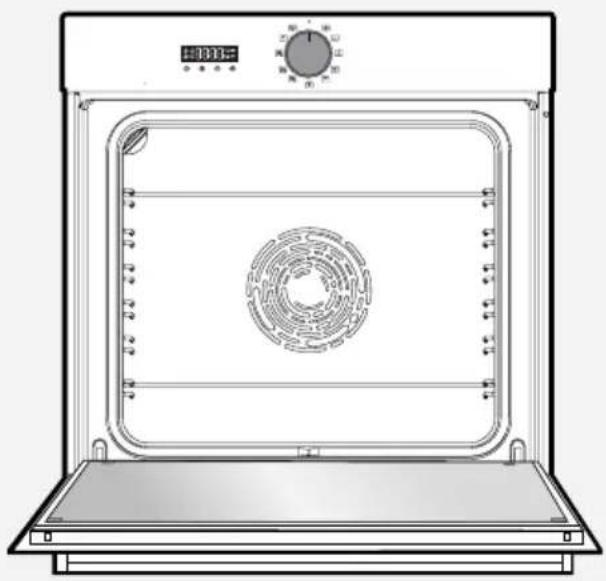
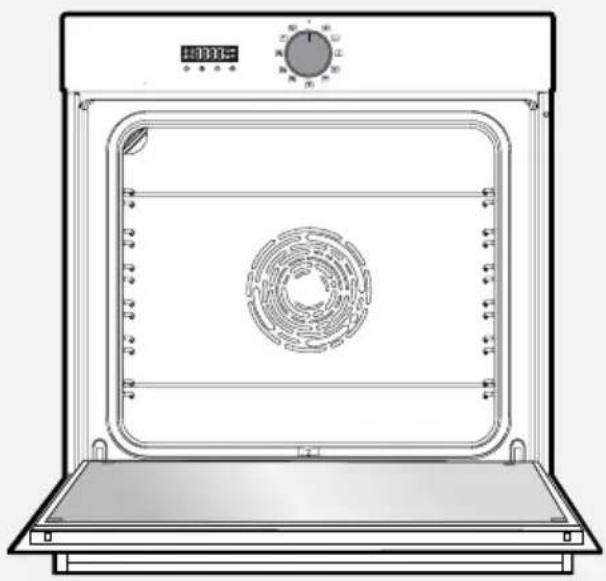
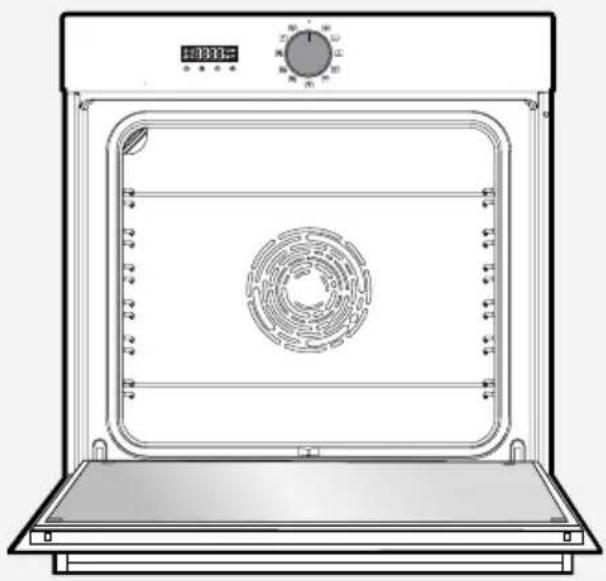
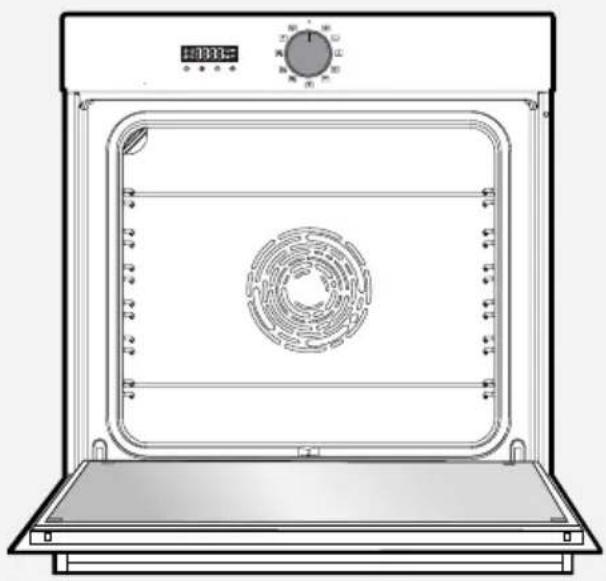
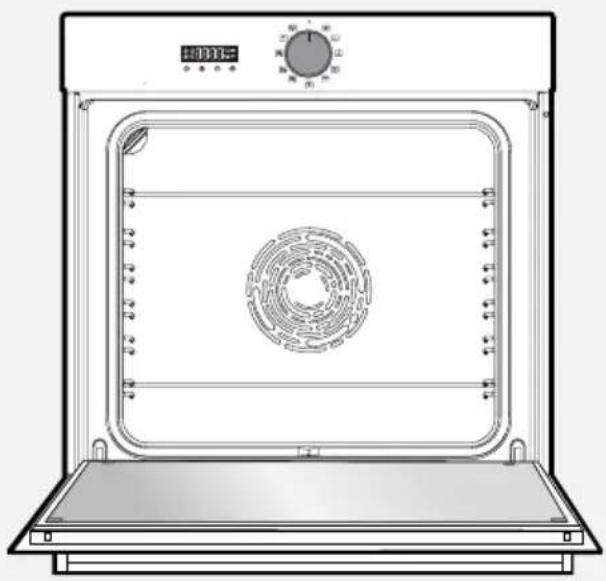
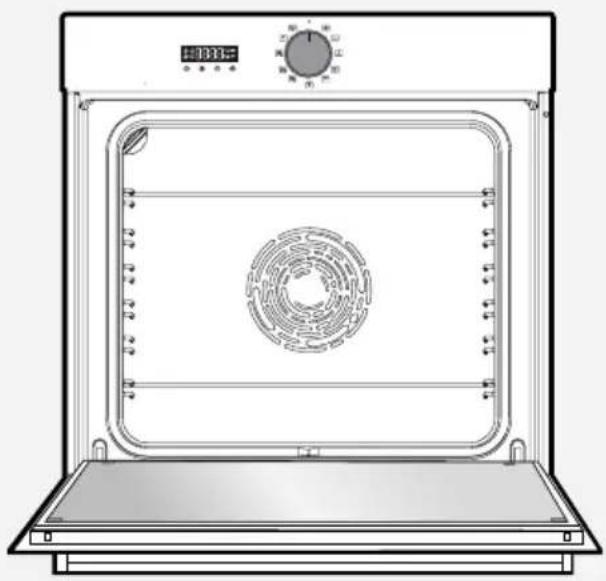
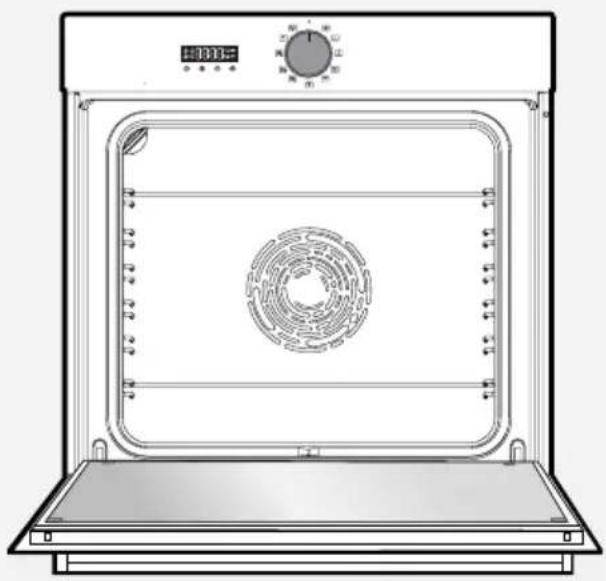
A B C DA Control panel
B Light
© Door
D Handle
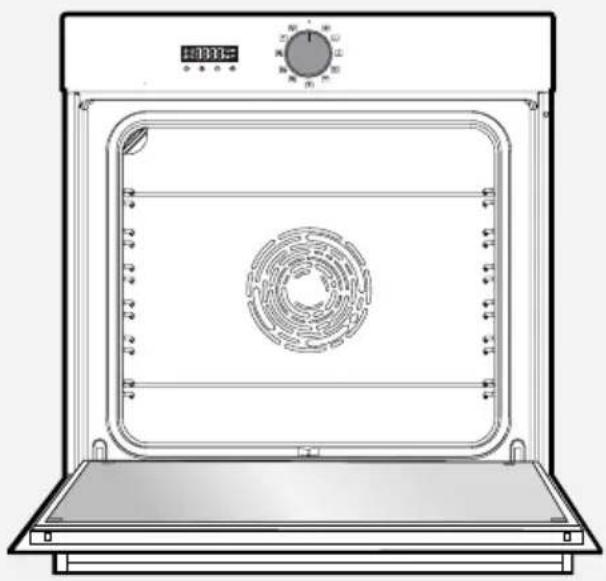
This oven has 6 positions for the accessories: shelf supports 1 to 6.
DISPLAY AND BUTTONS
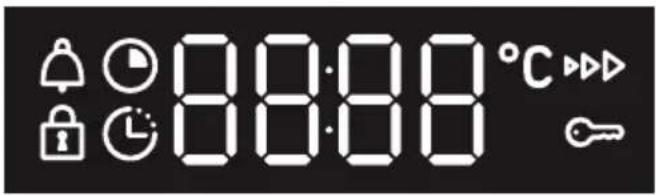
- Display

text_image
88:88 °CCooking time
End of cooking
Keypad lock
Timer
°C Temperature indicator
▶▶ Pre-heating indicator
Door lock
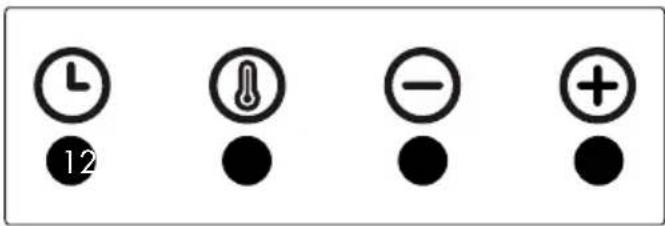
- Buttons

text_image
121 Set clock and cooking time
② Set temperature
3 - button
4 + button
ACCESSORIES (depending on model)
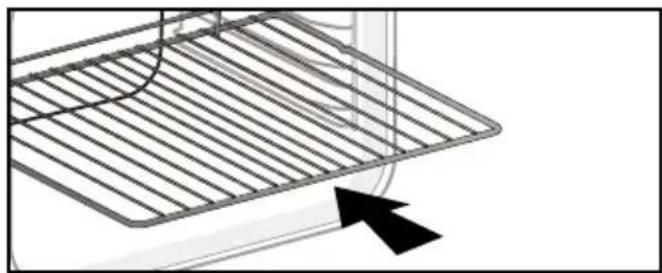
- Anti-tip safety grid
The grid can be used to hold all dishes and moulds containing foodstuffs to be cooked or browned. It can be used for barbecues (to be placed directly on the grid).
Insert the anti-tip safety grid towards the back of the oven.
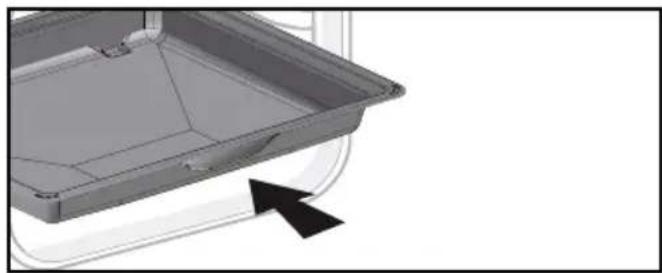
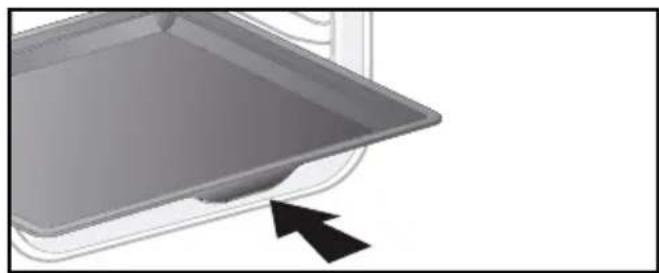
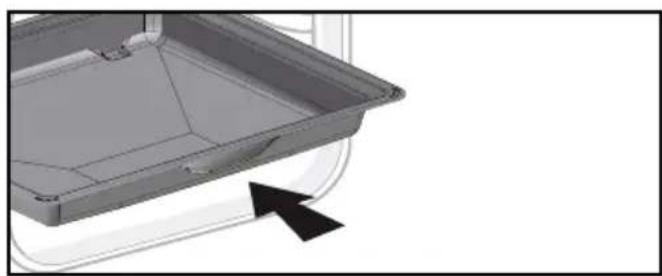
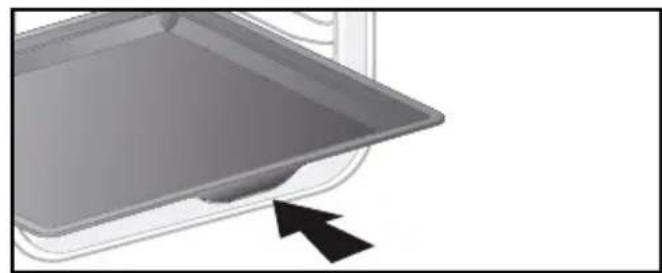
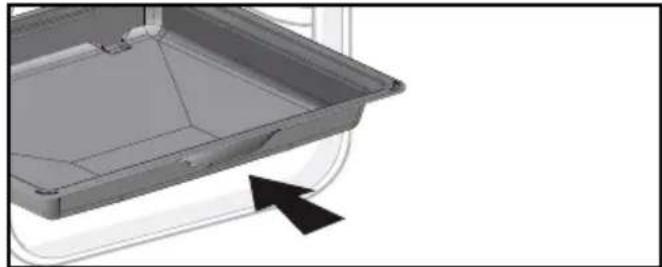
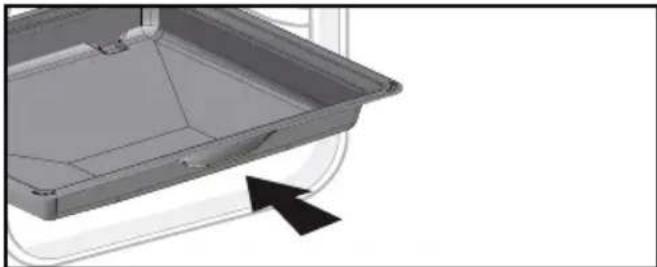
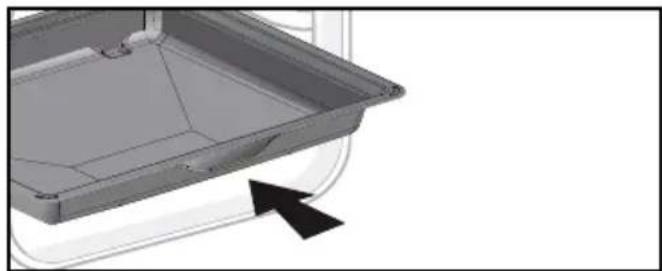
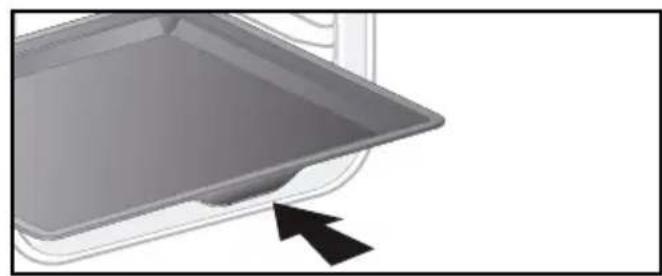
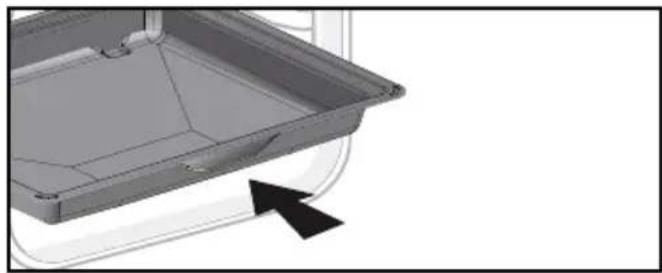
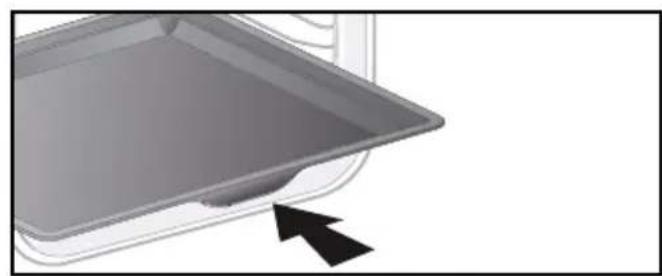
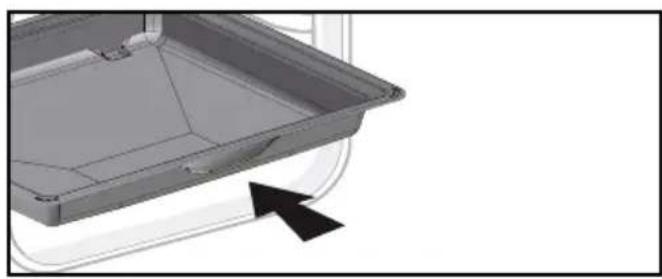
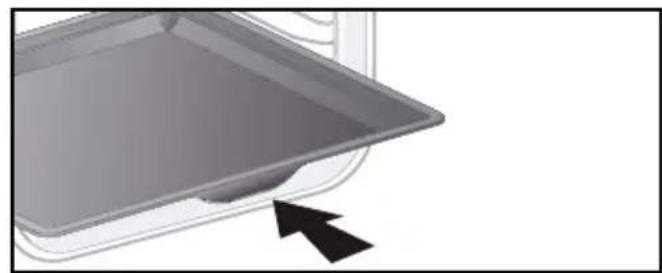
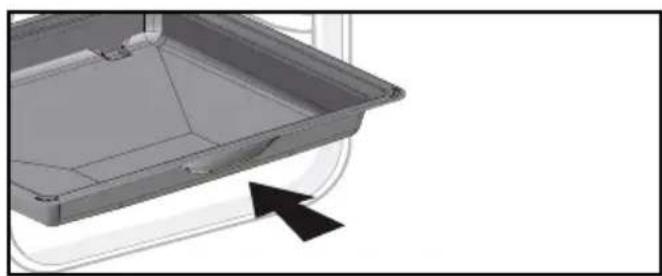
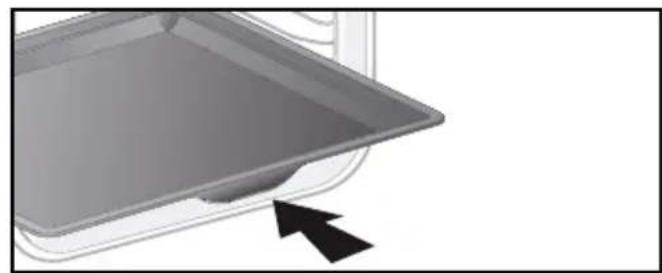
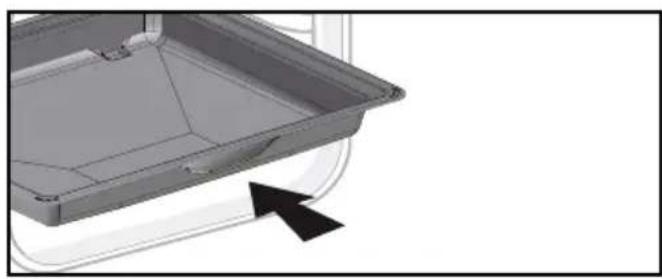
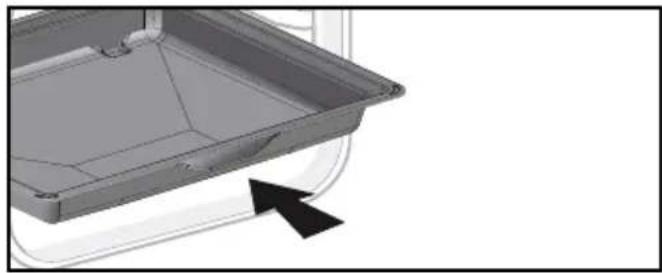
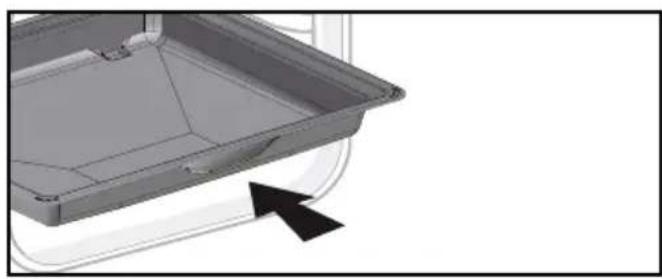
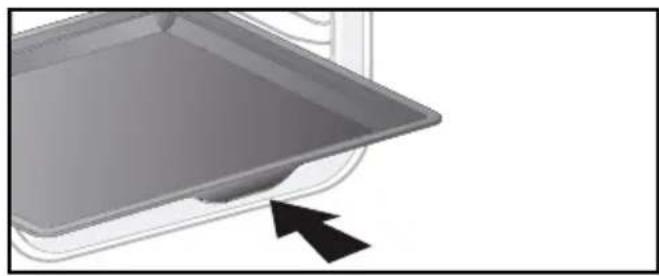
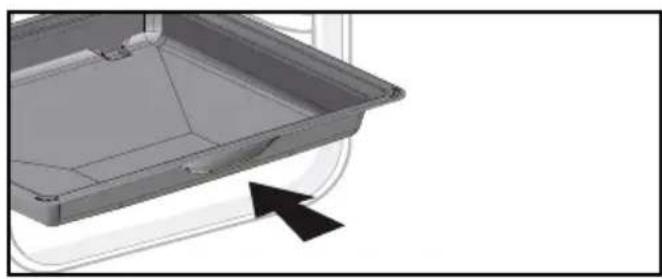
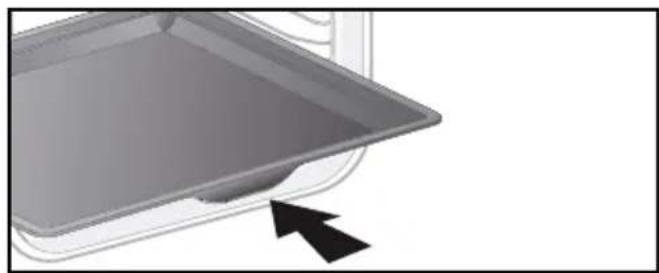
• Multi-purpose 45mm drip pan
When inserted in the supports under the grid with the handle towards the oven door, it collects juice and fat from grilling, and can be used half-filled
with water as a double-boiler.
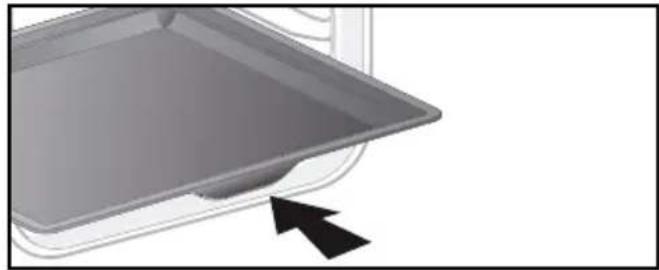
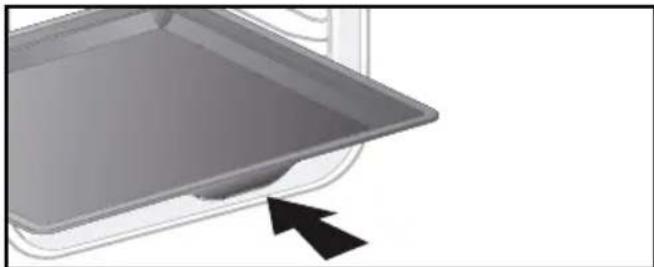
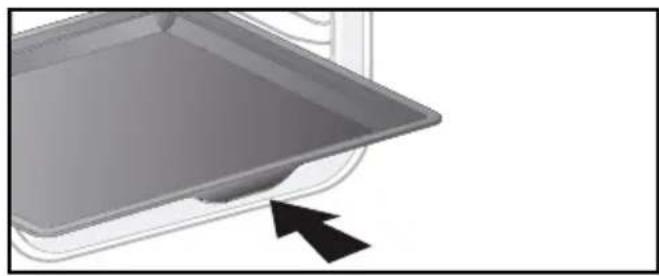
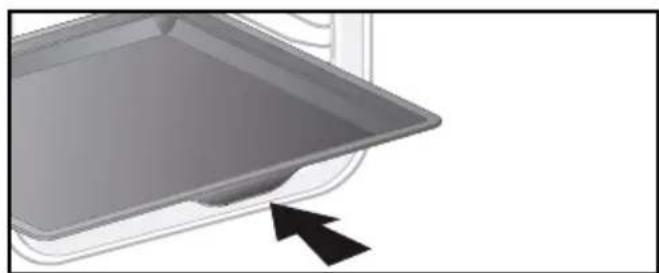
- 20mm pastry dish
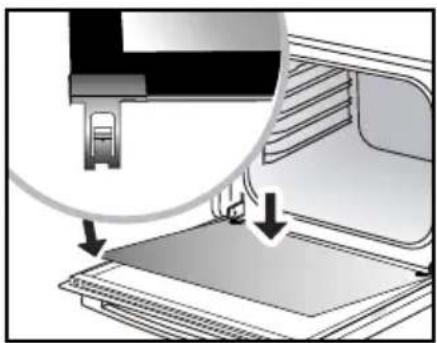
When inserted in the supports with the handle towards the oven door, it is ideal for baking cookies, shortbread and cupcakes. Its tilted surface makes it practical and easy to use. Can also be inserted into the supports under the grid to collect juice and fat from grilling.
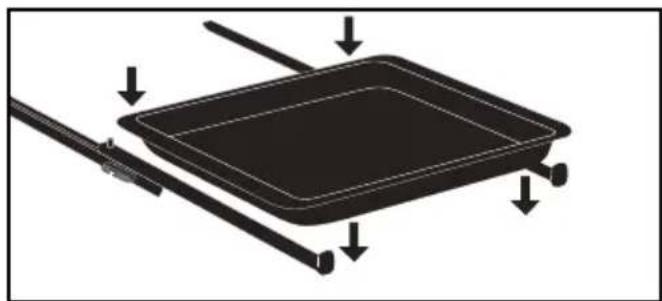
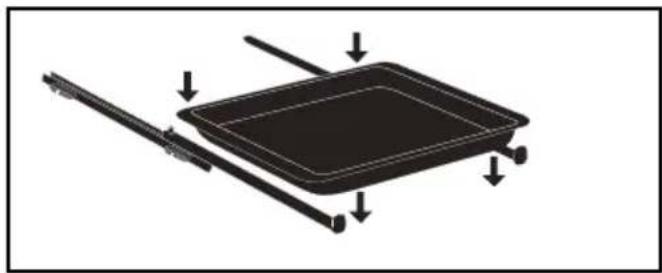
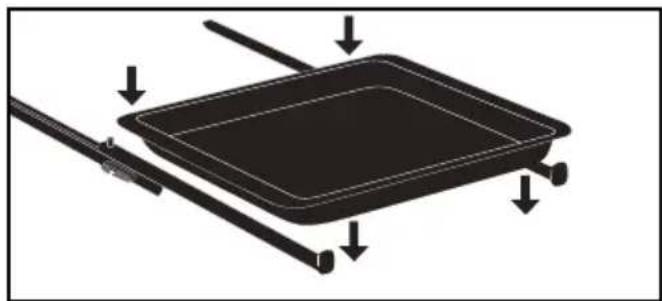
- Sliding rail system
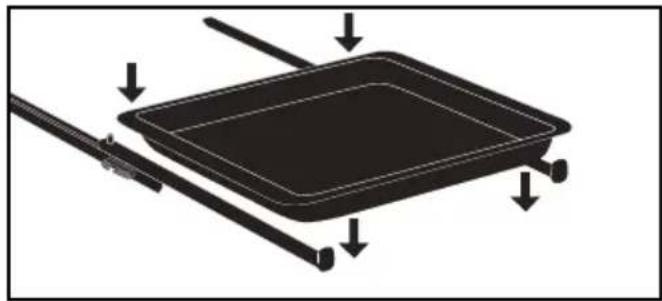
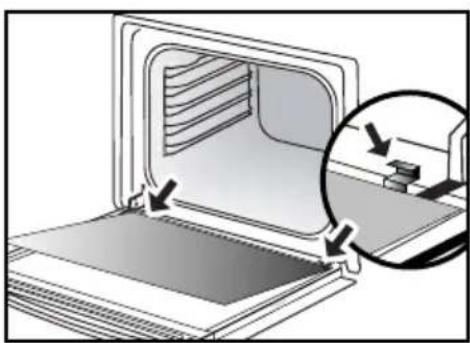
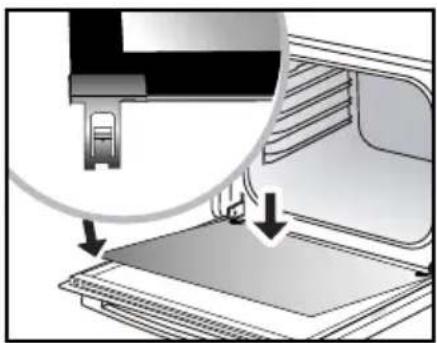
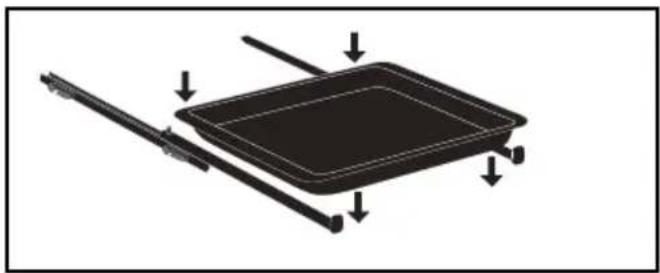
The new sliding rail system makes food more practical and easier to handle as the trays can be effortlessly pulled for simpler handling. The trays can be completely removed, providing full access. Their stability ensures that food can be handled safely, reducing the risk of burns. This means that you can take food out of the oven far more easily.
Warning :
Remove the accessories and supports from the oven before beginning pyrolysis cleaning.
natural_image
Pure diagram of a grid-like structure with an arrow pointing to it, no text or symbols present.
natural_image
3D CAD model of a mechanical component with an arrow indicating direction (no text or symbols)
natural_image
3D rendering of a tray with an arrow pointing to the bottom section (no text or symbols)
natural_image
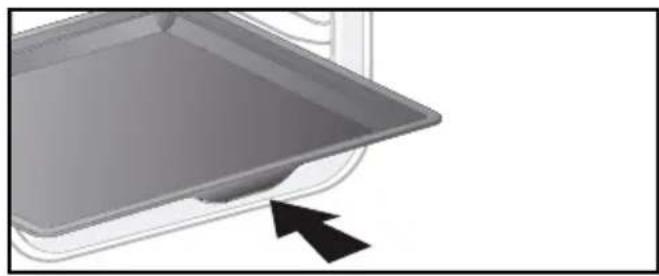
Diagram of a rectangular tray with arrows indicating force or movement, no text or symbols presentWarning :
Under the effect of heat, the accessories may become deformed without affecting their function. They will return to their original shape when cooled.
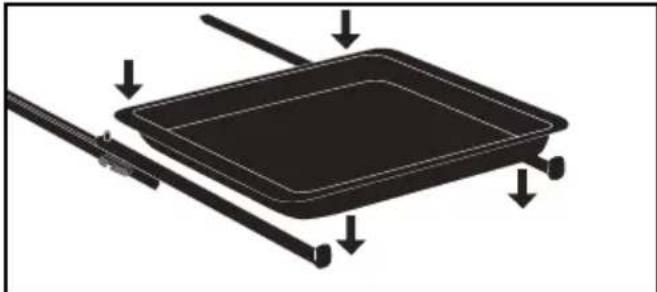
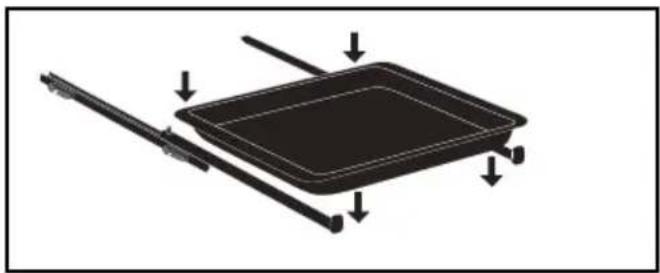
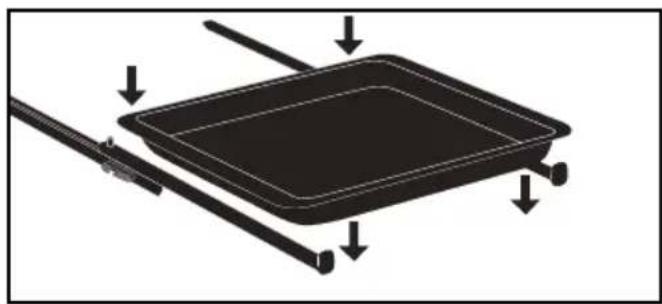
INSTALLING AND REMOVING THE SLIDING RAILS
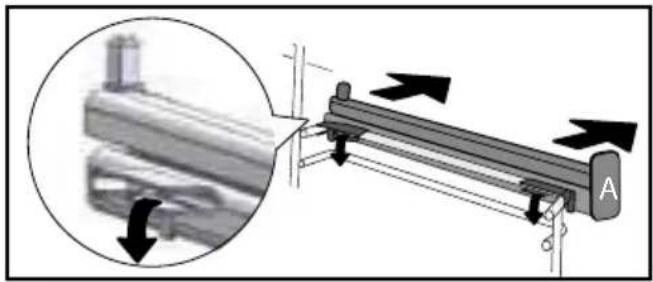
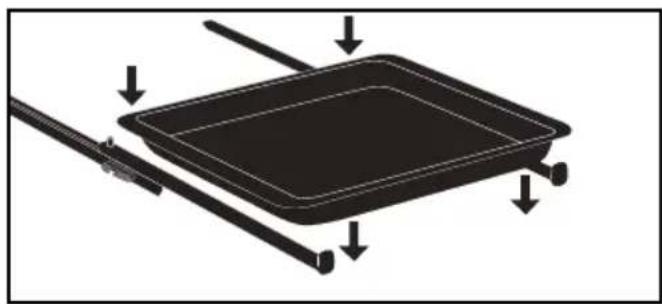
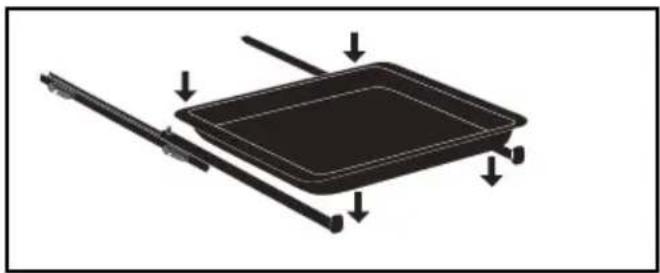
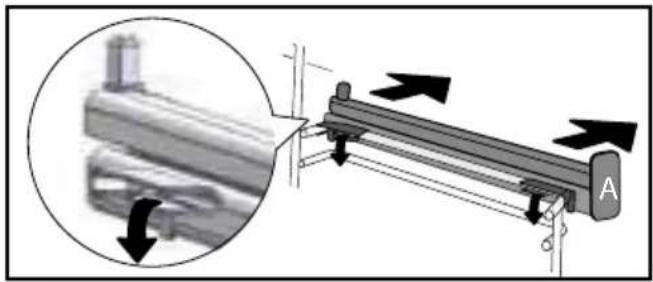
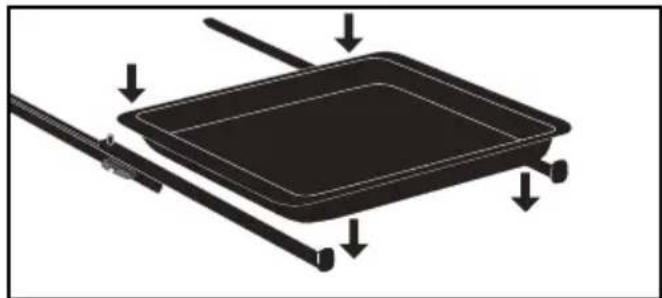
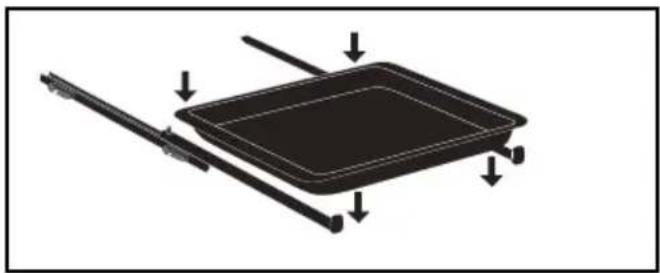
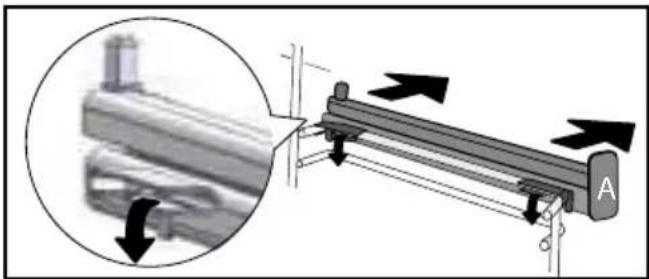
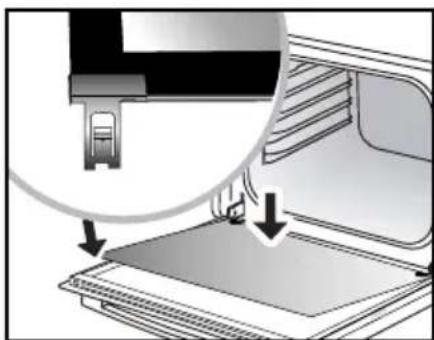
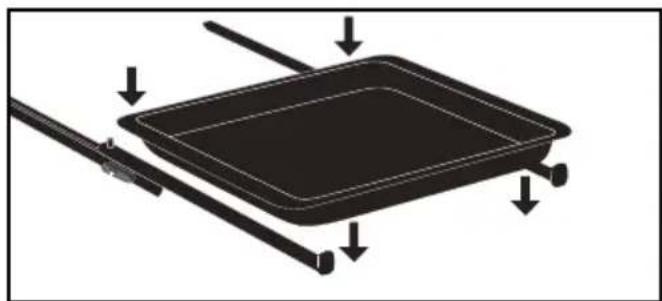
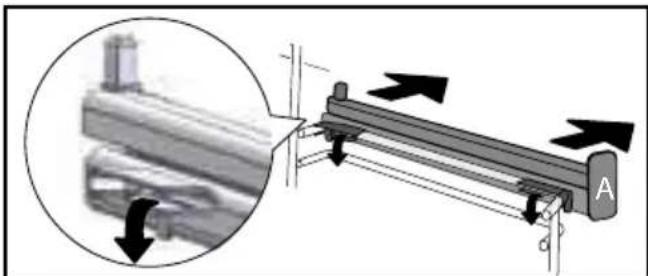
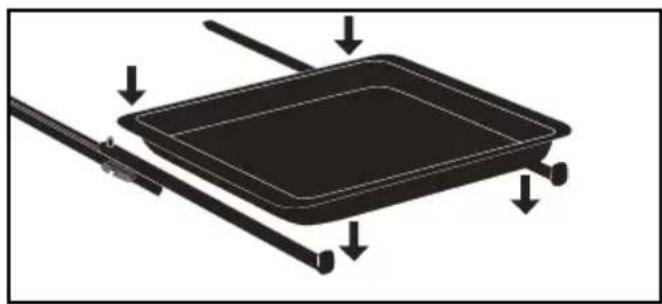
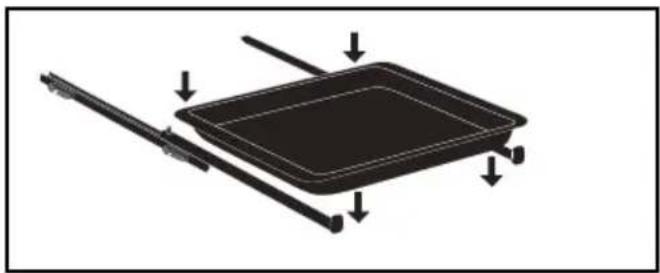
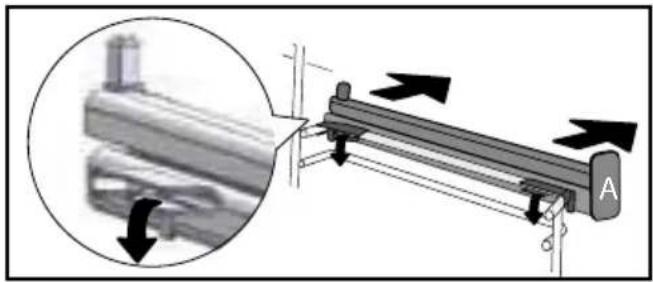
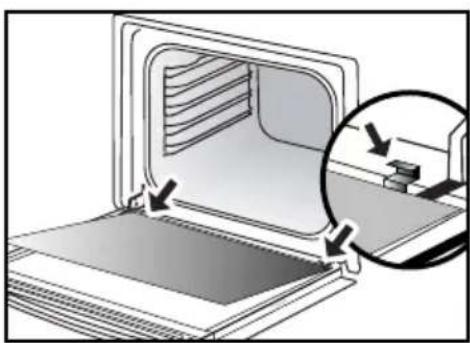
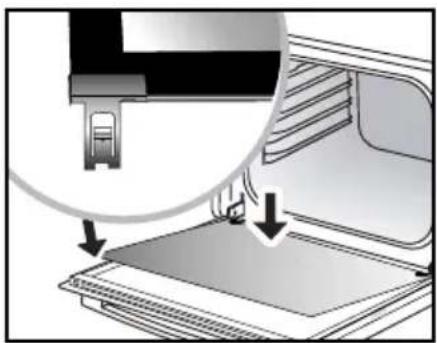
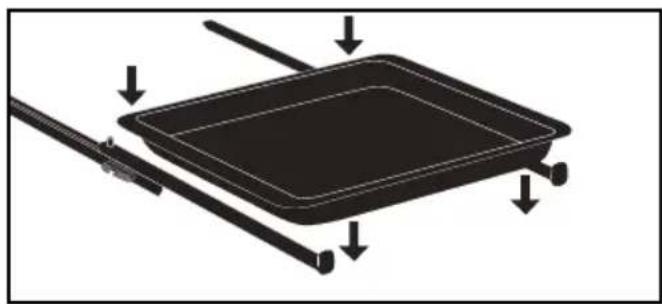
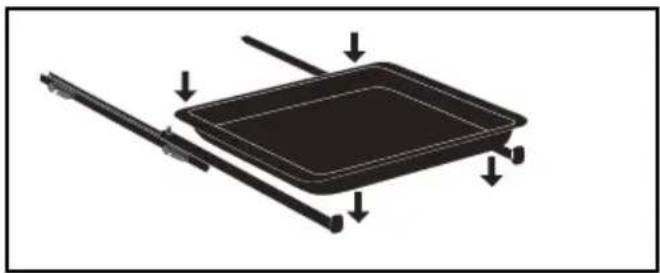
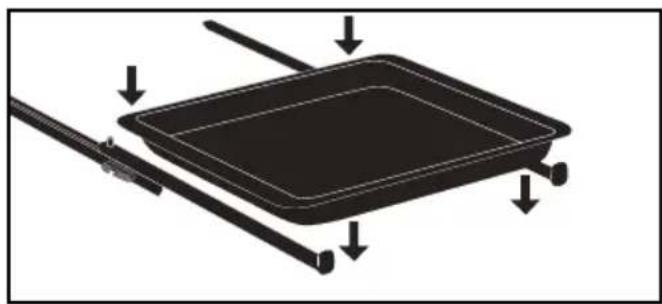
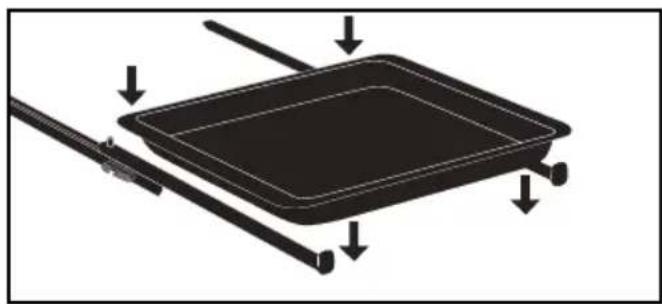
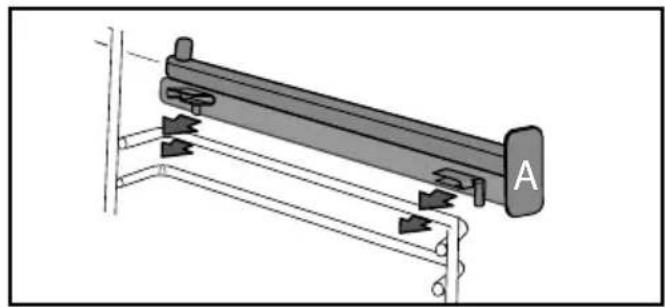
After removing the 2 shelf runners, choose the height (2 to 5) at which you want to fit your rails. Snap the left rail against the left shelf runner by applying enough pressure to the front and back of the rail so that the 2 tabs on the side of the rail slot into the shelf runner. Do the same for the right-handrail.
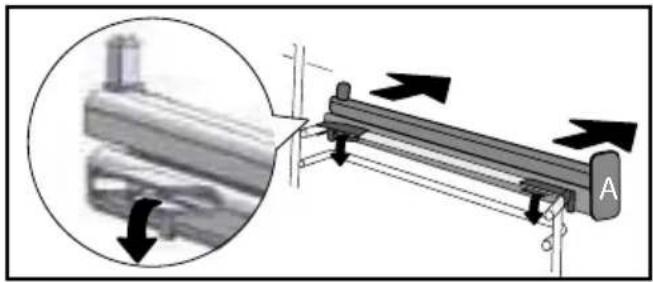
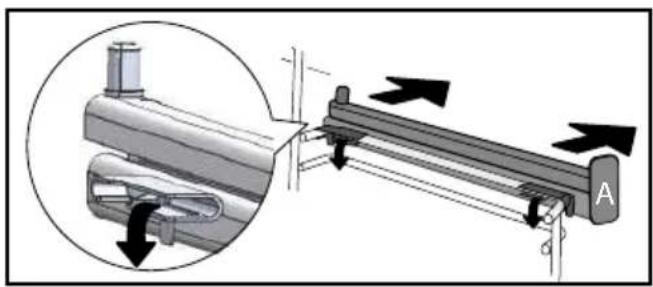
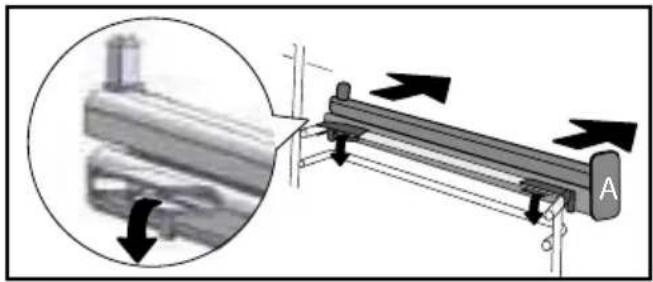
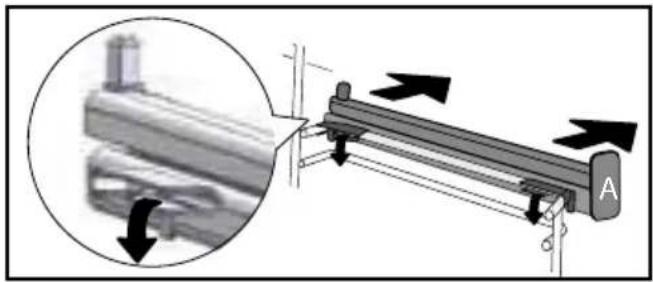
NOTE: the telescopic sliding part of the rail must unfold towards the front of the oven, with the buffer A opposite you.
Insert your 2 shelf runners and then put your tray on the 2 rails. The system is now ready to use.
To remove the rails, remove the shelf runners again. Slightly prise apart the bottom of the tabs fixed on each rail to release
natural_image
Mechanical assembly diagram showing a lever mechanism with labeled component A (no text or symbols beyond label)
natural_image
Diagram of a rectangular tray with directional arrows indicating movement or force (no text or symbols)
natural_image
Mechanical assembly diagram showing a lever mechanism with directional arrows indicating motion (no text or symbols present)
To avoid fumes when cooking fatty meats, we recommend you add a small amount of water or oil to the bottom of the drip pan.
SETTING
- Setting the clock
When switching on the display flashes at 12:00.
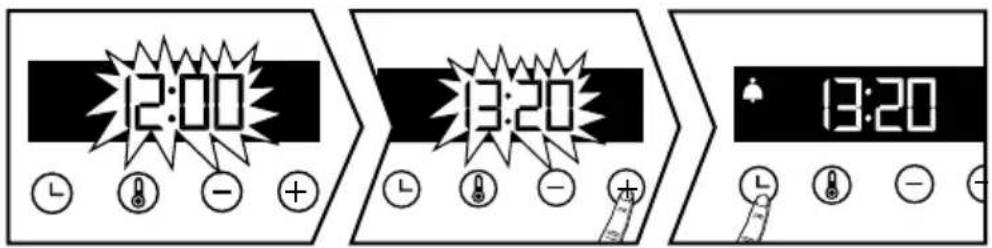
text_image
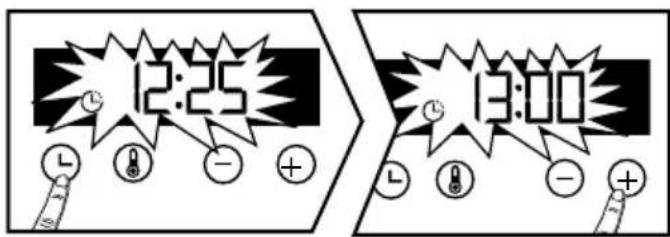
12:00 13:20 13:20When switching on the display flashes at 12:00. Set the clock with + or -. Confirm with Ⓛ. If there is a power cut, the clock flashes
- Changing the clock
The function selector switch must be in the 0 position.
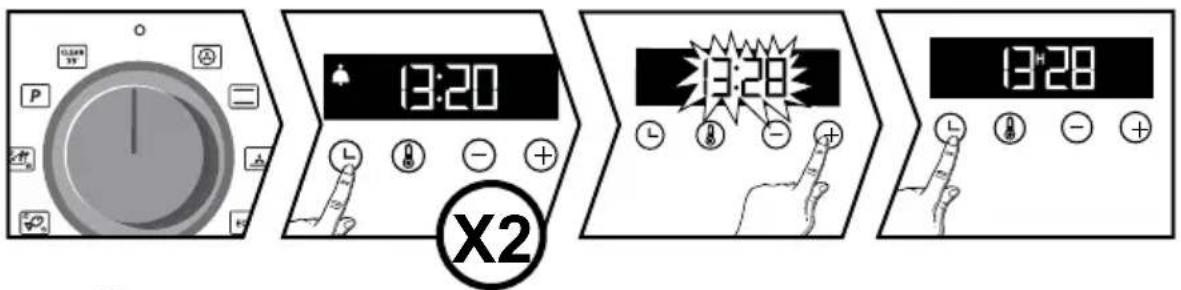
text_image
13:20 X2 13:28 13:28Press ⏱ The symbol ♠ appears. Press ⏱ again adjust the clock setting with + or - . Confirm with ⏱ . The cooking end time is automatically saved after a few seconds.
- Timer
This function can only be used when the oven is switched off.

flowchart
graph LR
A["Clock"] --> B["Time: 12:00-15:00"]
B --> C["L: L"]
B --> D["+"]
B --> E["-"]
C --> F["L: L"]
D --> G["+"]
E --> H["-"]
F --> I["L: L"]
G --> J["+"]
H --> K["-"]
Press Ⓛ. The timer flashes. Set the timer with + or -. Press to confirm. The timer will then start. Once the time has lapsed, there is a sound signal. To stop it, press any key. The time appears again in the display.
NB: You can modify or cancel the timer at any time. To cancel, go back to the timer menu and set to 00:00. Without having to confirm, the adjustment is automatically saved after a few seconds.
- Keypad locking
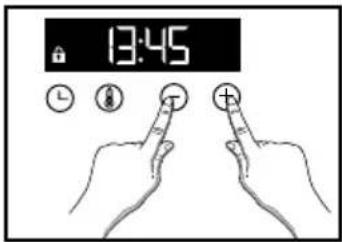
text_image
13:45Press + and - at the same time until the 🔒 symbol appears on the screen. To unlock the keypad, press + and - together until the 🔒 symbol disappears off the screen.
SETTING
You can adjust different settings on your oven. To do so: Press ⏻ until you get to the "MENU" display to access the settings mode.
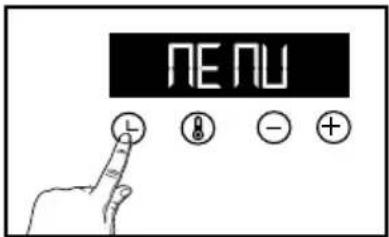
text_image
MENUPress again o scroll through the different settings. Activate or de-activate the different parameters with + and -; see table below:
| AUTO: In cooking mode, the light inside the oven automatically turns itself off after 90 seconds.ON: In cooking mode, the light is on all the time. | |
| Activate/de-activate the beeping sound of the buttons | |
| Activate/de-activate pre-heating mode | |
| Activate/de-activate demonstration mode |
To exit the "MENU", press Ⓛ.
COOKING MODES
MANUAL FUNCTIONS :

CIRCULATING HEAT\*
Min temperature 35°C, max 250°C
Recommended for keeping white meat, fish and vegetables moist. For cooking multiple items on up to three levels.

TRADITIONAL
Min temperature 35°C, max 275°C
Recommended for slow, gentle cooking: rich game, etc. For retaining the juices in red meat roasts. For simmering in a covered casserole, dishes that were begun on the hob (coq au vin, stew).

PULSED BOTTOM
(Min temperature 75°C, max 250°C)
Recommended for moist dishes (quiches, tarts with juicy fruits, etc.). The pastry will be thoroughly cooked on the bottom. Recommended for recipes which rise (cake, brioche, kügelhopf, etc.) and for soufflés which will not be stopped by a crust on the top.

ECO\*
Min temperature 35°C, max 275°C
This setting saves energy while maintaining the quality of the cooking.
All types of cooking are done without preheating.

FULL GRILL
Min temperature 180°C, max 275°C
Recommended for toast, gratin dishes, browning crème brûlée, etc.

GRILL PULSE
Min temperature 100°C, max 250°C
Roasts and poultry are juicy and crisp all over.
Slide the drip tray on to the bottom shelf support. Recommended for all spit-roasted poultry or meat, for sealing and thoroughly cooking a leg or a rib of beef. To retain the moist texture of fish steaks.
*Cooking mode as per standard EN 60350-1: 2016 to demonstrate compliance with requirements of the energy label of European regulation UE/65/2014.
Brandt offers you 3 new functions which automatically combine two cooking modes: traditional cooking and steam cooking in order to preserve the nutritional qualities of food and achieve faster cooking.

WHITE MEAT
Recommended for preserving the mussel and fondant of pork and veal rotisseries.

FISH
Recommended for cooking whole fish or fillets.

POULTRY
Recommended for cooking chickens, turkeys, guinea fowl and ducks.
For these 3 functions, all you need to do is introduce lukewarm water in sufficient quantity into your dish (drip pan) and place it in your oven in the bottom tier and your food to be cooked in tier 3.
For the quantity of water to be introduced into the drip pan, refer to the table of automatic combined functions with steam association at the end of the manual.

"Smart Assist"
Your oven has the "SMART ASSIST" function which, when programming a cooking time, will suggest a cooking time which can be modified depending on the selected cooking mode.
STARTING COOKING
- Immediate cooking
The programmer must only display the time. It should not be flashing.
Turn the function selector to any position.
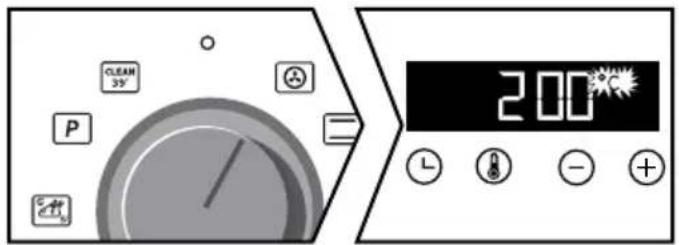
text_image
CLEAM 35° P = 200°C L - +For manual functions :
The temperature rise starts immediately. Your oven recommends a modifiable temperature. The oven heats up and the temperature indicator flashes. A series of beeps will sound when the oven reaches the programmed temperature.
For automatic functions:
appears on the screen.
Select your food using the table at the end of the manual. Press the + and - keys until you obtain the desired diagram in the display, then confirm with Ⓛ.
A weight flashes; enter the actual weight of your food with the + and - keys then validate with ⏻.
You have nothing else to adjust, the temperature and the cooking time are calculated automatically. The end of cooking time flashes, confirm with ⏰.
Your cooking starts immediately.
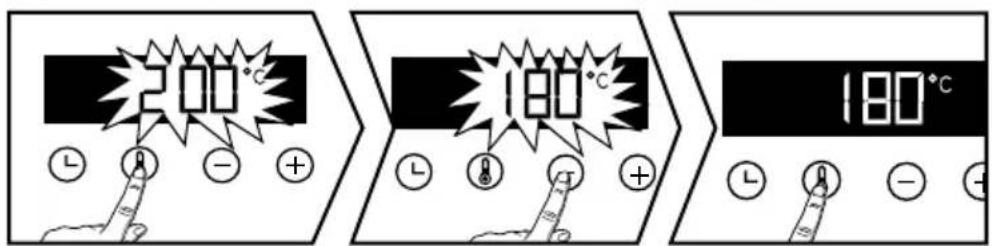
- Changing the temperature
Press Ⓞ.
Adjust the temperature with + or -.Confirm by pressing ⓘ.

text_image
200°C L ● - + 180°C L ● + + 180°C L ● - +- Programming the cooking time
Use the immediate cooking programme, then press ⏻the cooking time flashes and it is now possible to set it. Press + and - to adjust the cooking time.
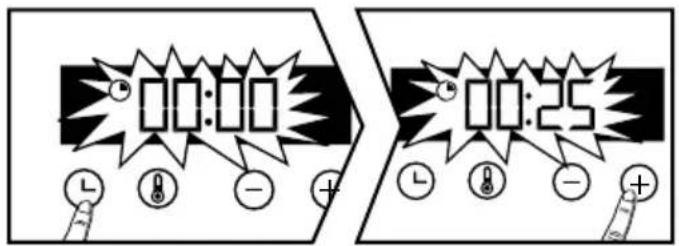
text_image
00:00 10:25
"Smart Assist"
Your oven has the "SMART ASSIST" function which, when programming a cooking time, will suggest a cooking time which can be modified depending on the selected cooking mode.
See the table opposite:
The cooking time is saved automatically after a few seconds. The time starts to count down as soon as the cooking temperature is reached.
| COOKING MODE | TIME |
![]() | 30 min |
![]() | 30 min |
![]() | 30 min |
![]() | 30 min |
![]() | 7 min |
![]() | 15 min |
- Delayed start
Proceed as for programmed cooking. After setting the cooking time, press ④the cooking end time flashes.

text_image
12:25 L + - + E:00 L + - +The display flashes. Set the cooking end time with + and - .
The cooking end time is automatically saved after a few seconds. The cooking end time display stops flashing.
CLEANING INSIDE - OUTSIDE
- Self-cleaning of the cavity by pyrolysis

Warning
Remove the accessories and wire tiers from the oven before starting a pyrolysis cleaning. Before starting a pyrolysis cleaning of your oven, remove any large overflows that may have occurred. Remove excess grease from the door with a damp sponge.
For safety reasons, the pyrolysis cleaning operation is only carried out after the door has been automatically locked, the door cannot be unlocked.
- Immediate self-cleaning
The timer should display the time of day, without flashing. Select one of the self-cleaning cycles with the function lever or : P
text_image
2H20 ECO
= Cleaning in 39 minutes
- At the end of each cooking cycle, "Clean 39" scrolls on the screen, suggesting that you start the cleaning process. Position the lever on this function and confirm with the key ⏻. The time 0:39 is displayed alternating with "Clean 39", your cleaning starts. After a few minutes, a key appears and the oven door is automatically locked for safety reasons during the entire programme.
If you wish to start a "Clean 39" oven that is cold or not hot enough, the program start conditions will not allow this cleaning to take place. 0:00 will appear on the display and you will have to select the other self-cleaning position.

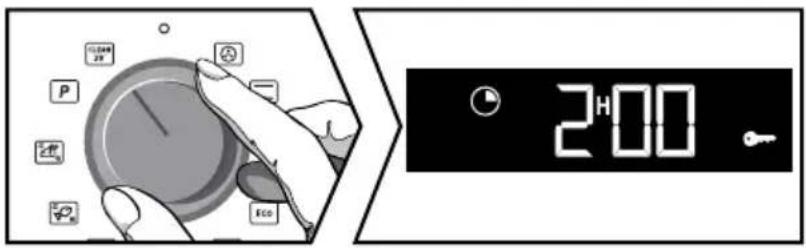
= Pyrolysis of 2 hours. Set the joystick to this function.
Set the joystick to this function. Pyr is displayed on the screen. Press + to choose your pyrolysis according to the degree of soiling of your oven.
Depending on your choice, the duration 2:00 is displayed. Confirm with the ⏰. pyro displayed, the pyrolysis starts.
At the end of the cleaning process the display shows 0:00 and the door unlocks.
Reset the function selector switch to 0.
- Delayed self-cleaning
You have the possibility to postpone the departure of your Pyrolysis. When the duration of the programme is shown on the display, press the button ⏻ and set the new end time using the + and - keys, then confirm with ⏻. Self-cleaning will start later and finish at the new programmed time. Reset the function selector switch to 0 at the end of the cleaning process.
- Cleaning the outer surfaces
Use a window washing product applied to a soft cloth. Do not use abrasive creams or scouring sponges.
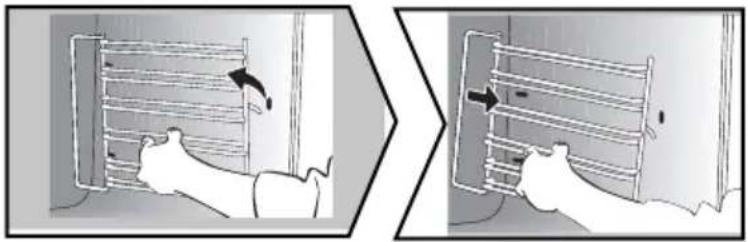
- Cleaning the shelf supports
Lift the front part of the wire shelf support upwards. Press the entire shelf support and release the front hook from its housing. Then gently pull the whole of the support towards you to release the rear hooks from their housing. Pull out the two shelf supports.
natural_image
Two-panel illustration showing a person using a ladder to lift a wall-mounted device, with no visible text or symbols.- Cleaning the inside glass

Warning
Do not use scouring cleaning products, abrasive sponges or metal scrapers to clean the oven's class door, which may scratch the surface and lead to the glass breaking.
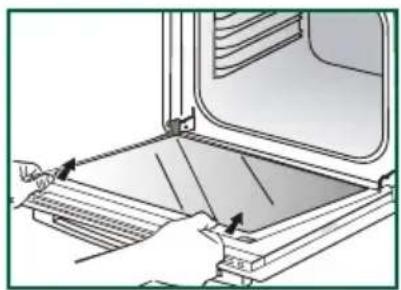
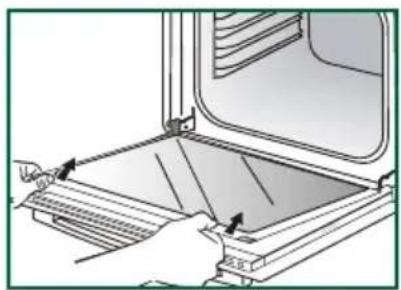
To clean the inside glass, remove the door. Before doing this, remove any excess grease with a soft cloth and washing up liquid.
- Cleaning the inside glass
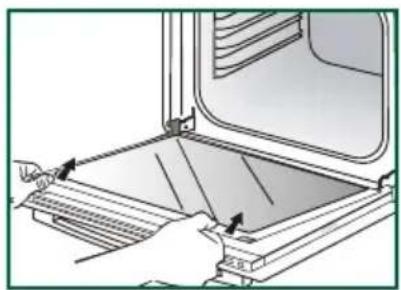
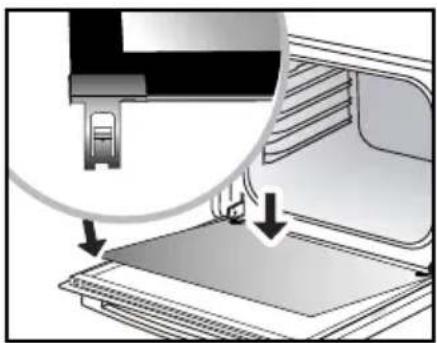
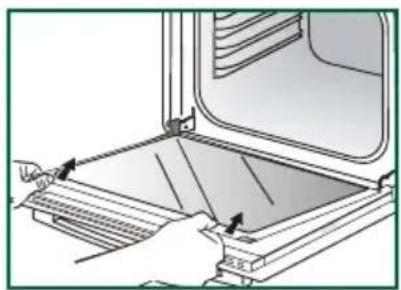
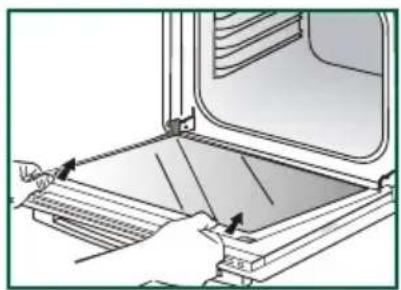
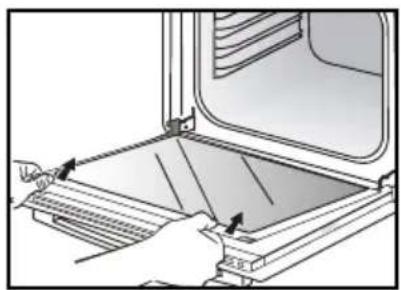
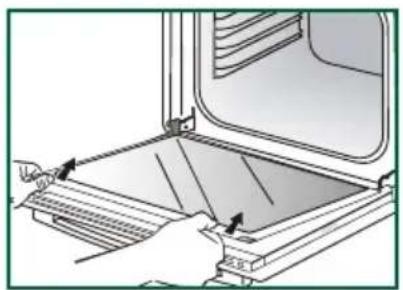
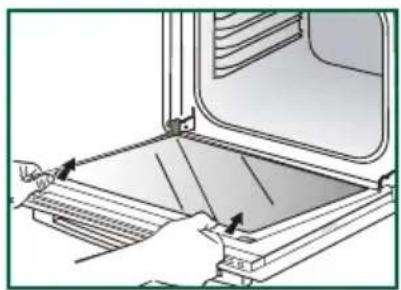
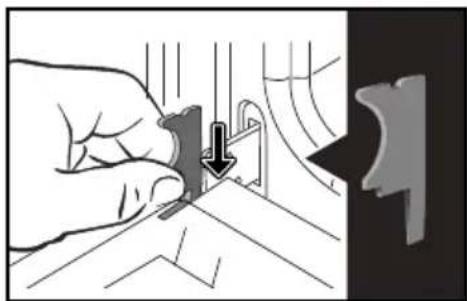
Open the door fully and block it with the plastic wedge provided in your appliance's plastic pouch.
natural_image
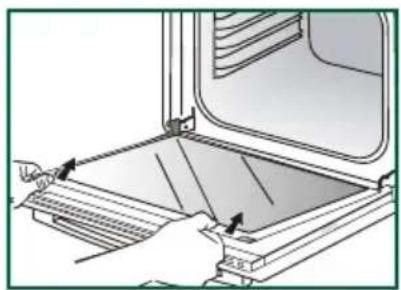
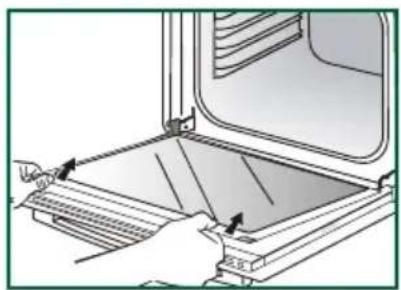
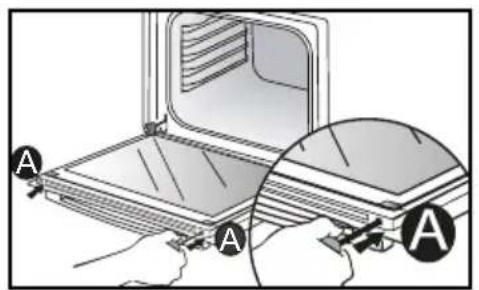
Illustration of a hand using a tool to cut a mechanical component, with no visible text or symbols.Use a tool (screwdriver) to press the slots A in order to unclip the glass panel. Remove the glass panel.

Important :
Make sure to mark the mounting direction of this first window (shiny side towards you).
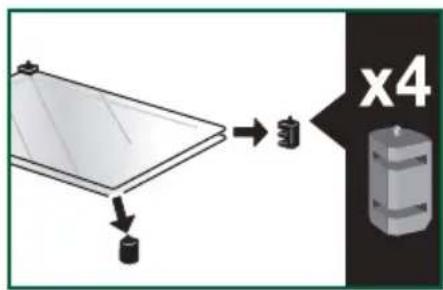
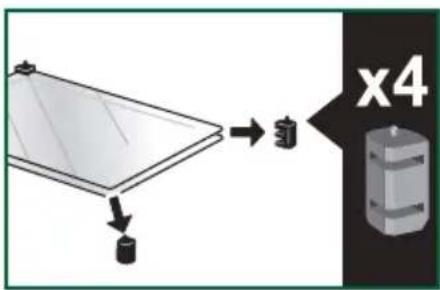
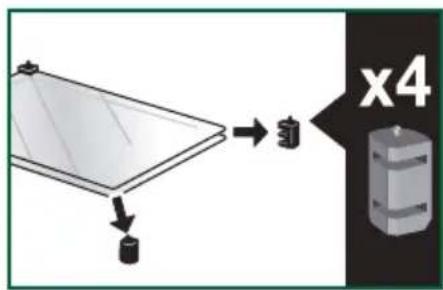
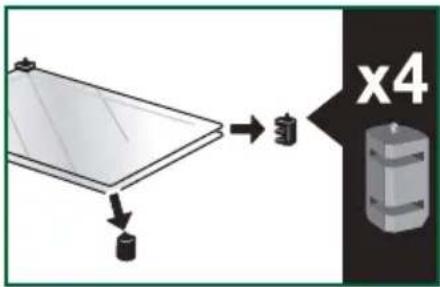
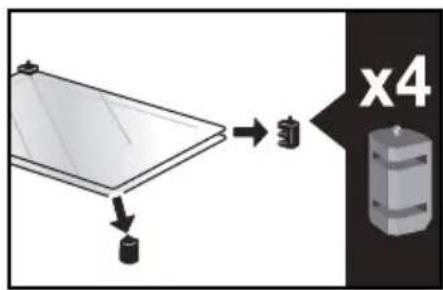
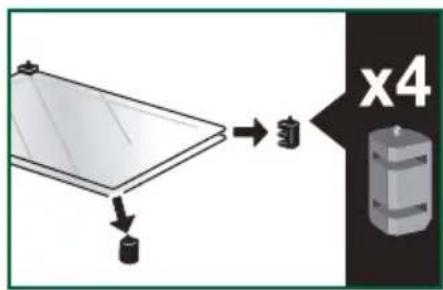
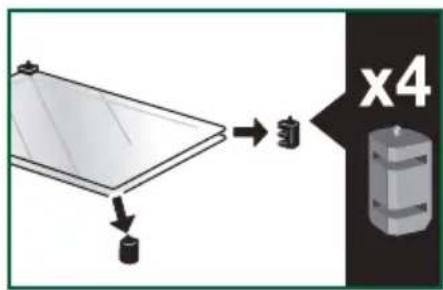
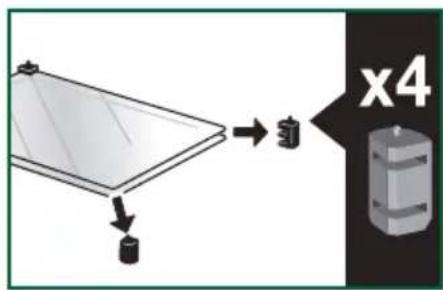
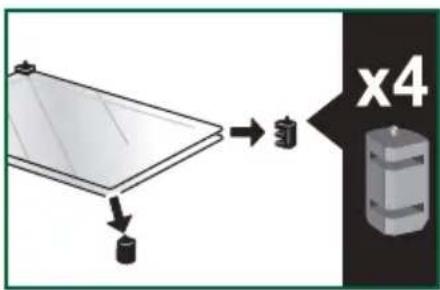
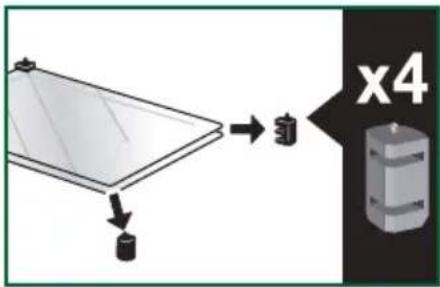
Depending on the model, the door consists of two additional glass panels, with a black rubber spacer at each corner. If necessary, remove them to clean.
Do not soak the glass panels in water. Rinse with clean water and dry off with a lint-free cloth.
text_image
Diagram showing a hand holding a laptop with labeled parts A, likely illustrating a device or installation procedure.
natural_image
Illustration of hands operating a window with a tray and handle, no text or symbols present
text_image
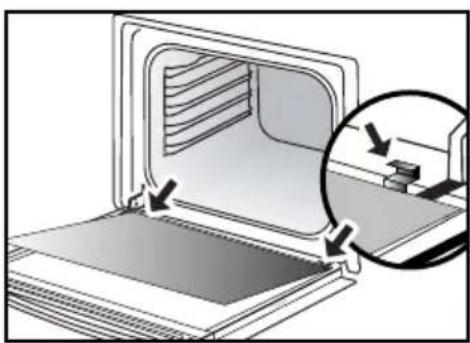
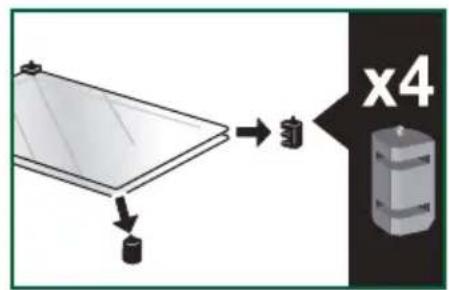
x4• Re-assembling the door
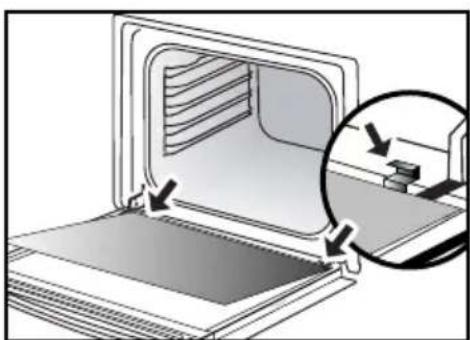
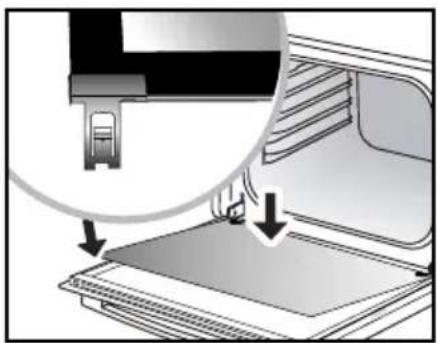
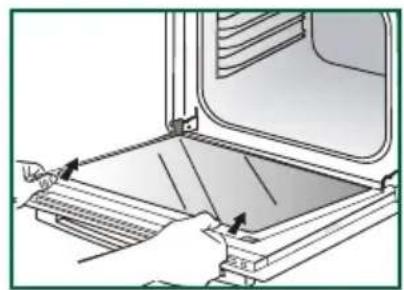
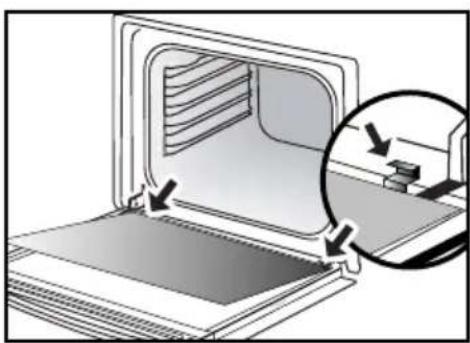
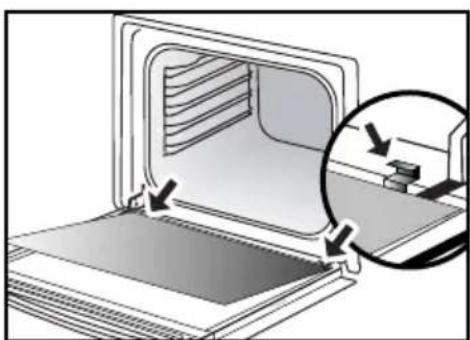
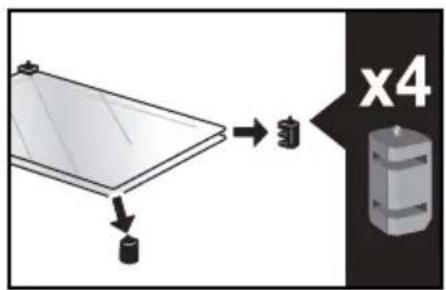
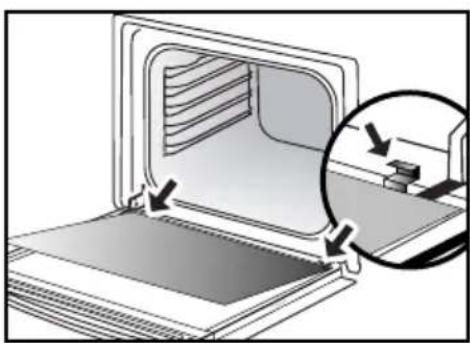
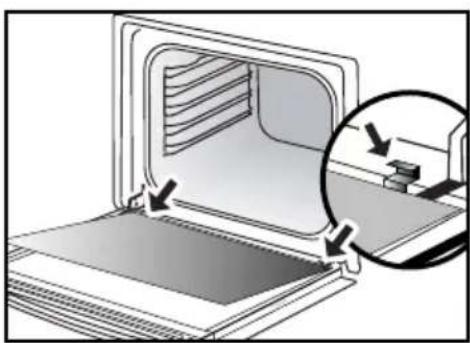
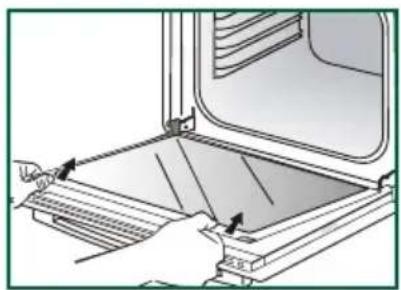
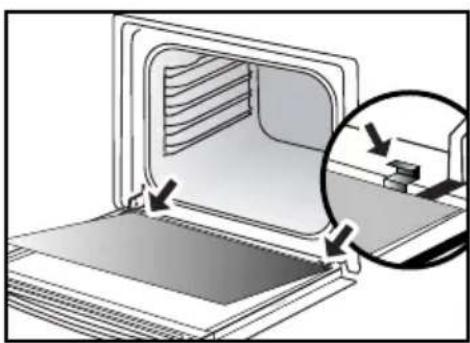
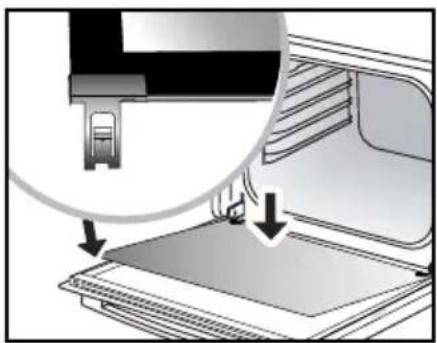
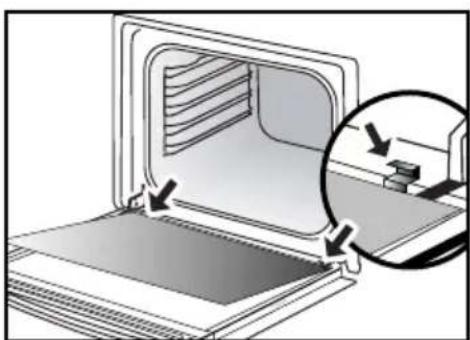
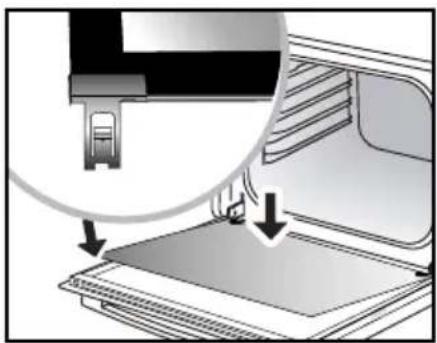
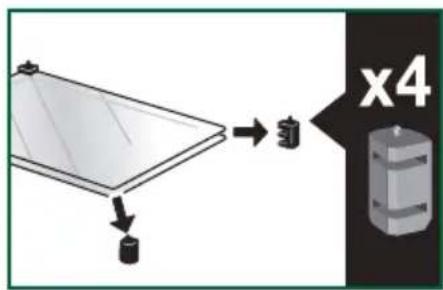
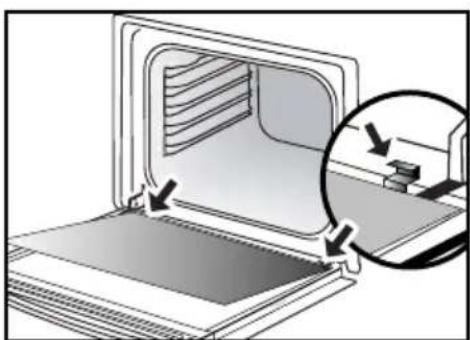
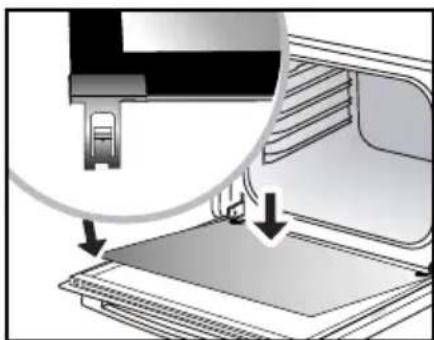
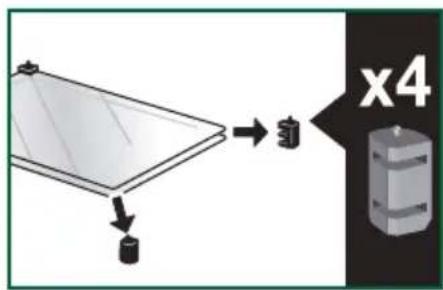
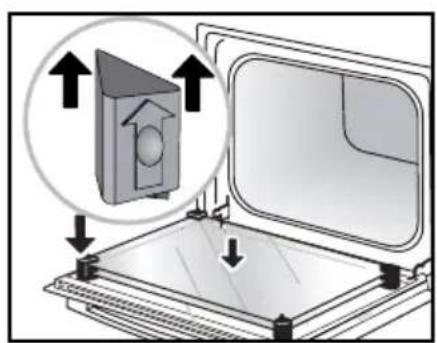
After cleaning, reposition the four rubber stops with the arrow upwards.
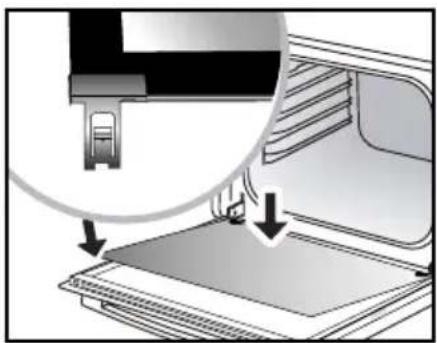
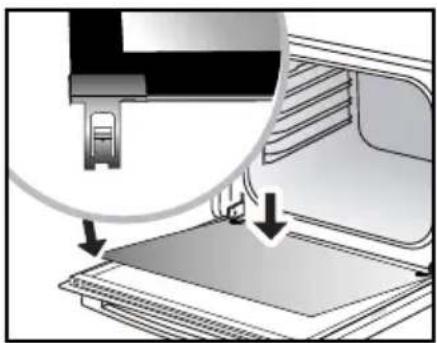
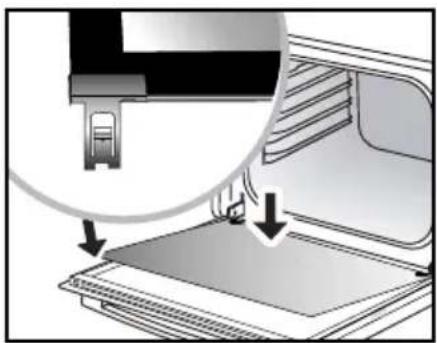
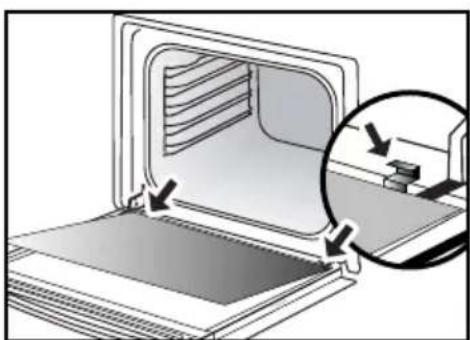
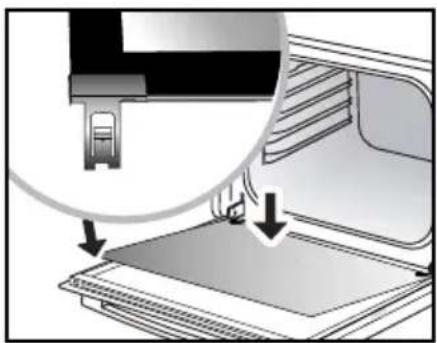
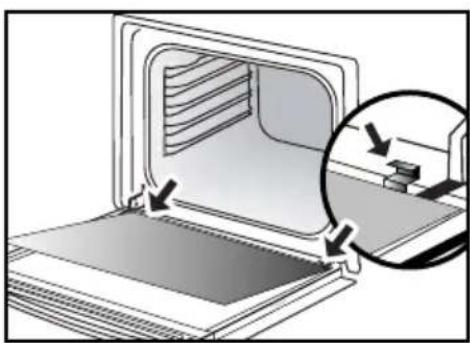
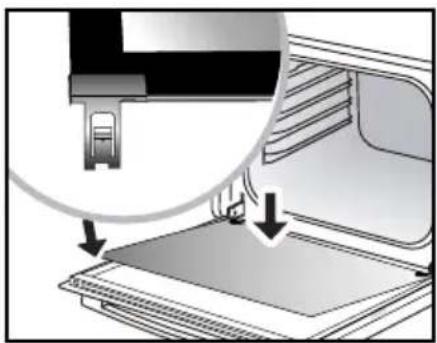
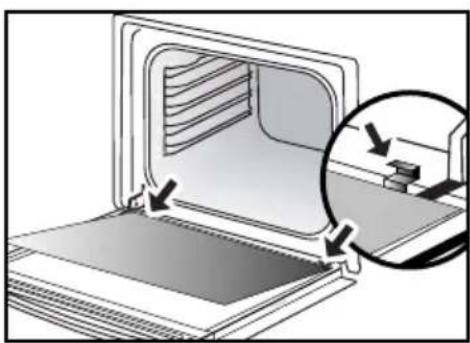
Reposition all of the glass panels.
Slip the last glass panel into the metal stops, then clip it in with the shiny side facing outwards.
Remove the plastic wedge.
Your appliance is now ready for use again.
natural_image
Diagram showing a 3D printer with an open lid and a magnified view of the printer's internal structure (no text or symbols)
natural_image
Diagram of a computer oven with a magnified inset showing internal components (no text or symbols)
natural_image
Diagram showing a printer's internal structure with an open base and a magnified view of the printer's tip (no text or symbols present)- Replacing the oven lamp

Warning:
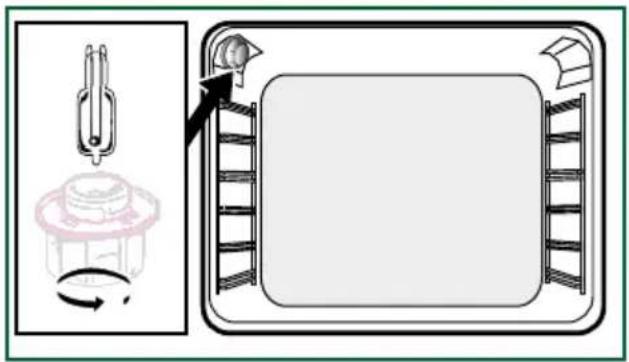
Make sure the appliance is disconnected from the power before replacing the lamp in order to avoid the risk of electric shock. Change the lamp only when the appliance has cooled down.
text_image
Diagram illustrating a bed mat setup with a fork, cup, and tray, showing a rotating component and a person interacting.Bulb specification:
25 W, 220-240 V\~, 300°C, G9 cap.
To unscrew the view port and the light, use a rubber glove, which will make disassembly easier. This product contains a light source of energy efficiency class G.
ANOMALIES AND SOLUTIONS
The oven is not heating. Check that the oven is correctly connected and that your installation's fuse is not out of service. Increase the selected temperature.
The oven light is not working. Replace the bulb or the fuse. Check that the oven is correctly connected.
The cooling fan continues to operate after the oven stops. This is normal; the fan may continue running until a maximum of 1 hour after cooking to lower the temperature inside and outside the oven. If the fan runs for over an hour, contact the After Sales Department.
The pyrolysis cleaning cycle does not begin. Check that the door is locked. If there is a door locking or temperature sensor fault, contact the Customer Services Department.
The symbol 🔍 flashes in the display.
Door locking fault; contact the Customer Services Department.
Vibration noise.
Check that the power cord is not in contact with the rear wall.
This does not affect the proper operation of your unit, but may generate vibration noise during ventilation. Remove your unit and move the cord. Replace your oven.
SERVICE CALLS
Any repairs made to your appliance must be carried out by a qualified professional authorised to work on the brand. When calling, please provide the complete references of your appliance (commercial reference, service reference, serial number), so that we can handle your call better. This information appears on the manufacturer's nameplate attached to your equipment.
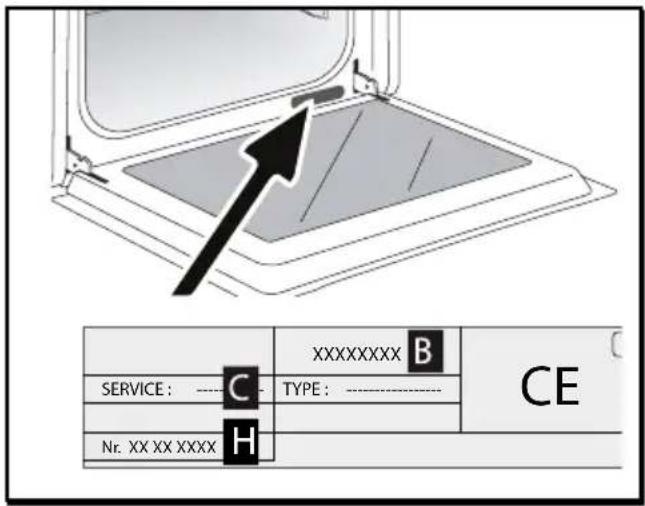
text_image
XXXXXXXXXX B SERVICE : ----C ---- TYPE : ---- CE Nr. XX XX XXXX HB: Commercial reference
C: Service reference
H: Serial number
GENUINE REPLACEMENT PARTS
During maintenance work, request that only certified genuine replacement parts are used.

| DISHES | min | ||||||||||||||
| Meat | |||||||||||||||
| Roast pork (1kg) | 200 | 2 | 180 | 2 | 60 | ||||||||||
| Roast veal (1kg) | 200 2 | 180 | 2 | 60-70 | |||||||||||
| Roast beef | 240 | 2 | 30-40 | ||||||||||||
| Lamb (leg, shoulder, 2.5kg) | 220 | 1 | 220 200 | 2 | 60 | ||||||||||
| Poultry (1kg) | 200 | 2 22 | 0 | 180 | 2 21 | 0 3 | 60 | ||||||||
| Large pieces of poultry | 18016 | 0-90 | |||||||||||||
| Chicken thighs | 220 3 | 210 3 | 20-30 | ||||||||||||
| Pork/veal chops | 210 3 | 20-30 | |||||||||||||
| Beef ribs (1kg) | 210 3 | 210 3 | 20-30 | ||||||||||||
| Lamb chops | 210 3 | 20-30 | |||||||||||||
| Fish | |||||||||||||||
| Grilled fish | 275 4 | 15-20 | |||||||||||||
| Cooked fish (bream) | 200 | 3 | 180 | 3 | 30-35 | ||||||||||
| Fish in papillotte | 220 | 3 | 200 | 3 | 15-20 | ||||||||||
| Vegetables | |||||||||||||||
| Gratins (cooked foods) | 275 2 | 30 | |||||||||||||
| Potato gratin | 200 | 2 | 180 | 2 | 45 | ||||||||||
| Lasagne | 200 | 3 | 180 | 3 | 45 | ||||||||||
| Stuffed tomatoes | 170 | 3 | 160 | 2 | 30 | ||||||||||
| Pastries | |||||||||||||||
| Sponge cake | 180 | 2 | 180235 | ||||||||||||
| Swiss roll | 220 | 3 | 18025-10 | ||||||||||||
| Buns | 18012 | 10180 | 235-45 | ||||||||||||
| Brownies | 180 | 2 | 1753 | 20-25 | |||||||||||
| Cake - Pound cake | 18011 | 80118 | 80245-50 | ||||||||||||
| Clafoutis | 200 | 2 | 1803 | 30-35 | |||||||||||
| Baked custards | 165 | 2 | 150230-40 | ||||||||||||
| Cookies - Shortbread | 175 | 3 | 15-20 | ||||||||||||
* Depending on the model
| DISHES | ![]() | ||||||||||||||
| Pastries | |||||||||||||||
| Madeleines | 220 | 3 | 200 | 3 | 5-10 | ||||||||||
| Choux pastry | 200 | 3180 | 31803 | 30-40 | |||||||||||
| Flaky pastry hors d'oeuvres | 2203 | 200 3 | 5-10 | ||||||||||||
| Savarin cake | 1803 | 175 3 | 30-35 | ||||||||||||
| Shortcrust tart | 2001 | 195 1 | 30-40 | ||||||||||||
| Thin flaky crust tart | 2151 | 200 1 | 20-25 | ||||||||||||
| Tart made with yeast-based pastry | 2101 | 200 1 | 10-30 | ||||||||||||
| Other | |||||||||||||||
| Skewers | 22032 | 0410 | -15 | ||||||||||||
| Terrine pâté | 200219 | 0280 | -100 | ||||||||||||
| Shortcrust pizza | 200230 | -40 | |||||||||||||
| Dough-based pizza | 15-18 | ||||||||||||||
| Quiches | 35-40 | ||||||||||||||
| Soufflé | 180250 | ||||||||||||||
| Pies | 200240 | -45 | |||||||||||||
| Bread | 220200 | 22030 | -40 | ||||||||||||
* Depending on the model

All T°C and cooking times are given for pre-heated ovens.
N.B: Before being placed in the oven, all meat must remain at least 1 hour at room temperature.
| RELATIONSHIP OF SETTINGS TO TEMPERATURE T °F /°C | |||||||||
| Setting | 1 | 2 | 3 | 4 | 5 | 6 | 7 | 8 | 9 maxi |
| °Fahrenheit | 85 | 140 | 195 | 250 | 300 | 355 | 410 | 465 | 525 |
Recipe with yeast (depending on model)
Ingredients:
- Flour 2 kg ● Water 1240 ml ● Salt 40 g ● 4 packets of dehydrated baker's yeast Mix the dough in a mixer and allow to rise in the oven.
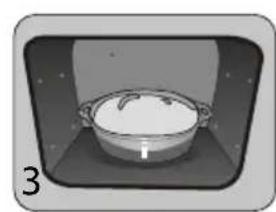
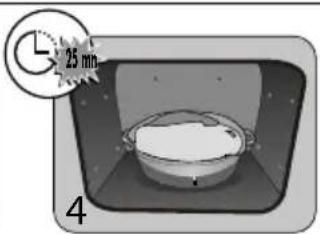
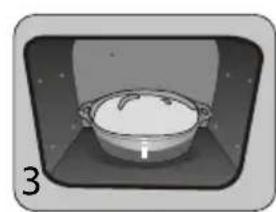
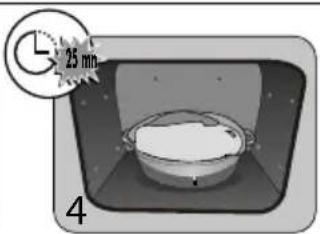
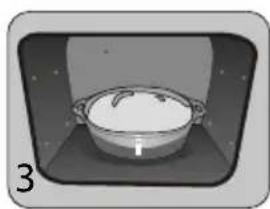
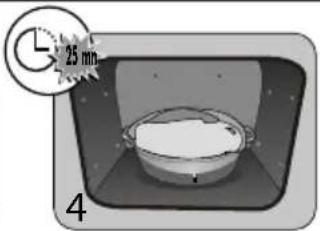
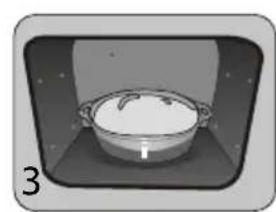
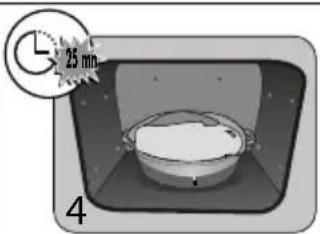
Method: For yeast-based pastry recipes. Pour the dough into a heat-resistant dish. Remove the wire shelf supports and put the dish on the bottom.
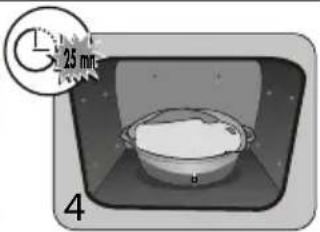
Pre-heat the oven to 40—50°C with the circulating heat function for five minutes. Stop the oven and allow the dough to rise for 25-30 minutes thanks to the residual heat.
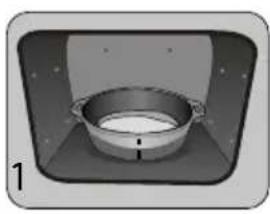
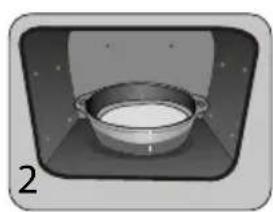
natural_image
3D rendering of a bowl inside a rectangular chamber, no text or symbols visible
natural_image
Illustration of a metal bowl on a tray, no text or symbols present
natural_image
Simple illustration of a cooking pot inside a container (no text or symbols)
text_image
25 mm 4PERFORMANCE TESTING ACCORDING TO STANDARD CEI 60350
| FOOD | * Cooking modes | SHELF ACCESSORIES °C TIME min. PREHEAT | ||||
| Shortbread (8.4.1) | ![]() | 5 Deep Tray 45mn 150 30-40 yes | ||||
| Shortbread (8.4.1) | ![]() | 5 Deep Tray 45mn 150 25-35 yes | ||||
| Shortbread (8.4.1) | ![]() | 2 + 5 Deep Tray 45mn + grill 150 25-45 yes | ||||
| Shortbread (8.4.1) | ![]() | 3 Deep Tray 45mn 175 25-35 yes | ||||
| Shortbread (8.4.1) | ![]() | s Deep Tray 45mn + grill 160 30-40 yes | ||||
| Small cakes (8.4.2) 5 Deep | ![]() | 170 25-35 yes | ||||
| Small cakes (8.4.2) | ![]() | 5 Deep Tray 45mn 170 25-35 yes | ||||
| Small cakes (8.4.2) | ![]() | 2 + 5 Deep Tray 45mn + grill 170 20-40 yes | ||||
| Small cakes (8.4.2) 3 Deep | ![]() | 170 25-35 yes | ||||
| Small cakes (8.4.2) | ![]() | 2 + 5 Deep Tray 45mn + grill 170 25-35 yes | ||||
| Fatless sponge cake (8.5.1) | ![]() | 4 Grill 150 30-40 yes | ||||
| Fatless sponge cake (8.5.1) | ![]() | 4 Grill 150 30-40 yes | ||||
| Fatless sponge cake (8.5.1) | ![]() | 2 + 5 Deep Tray 45mn + grill 150 30-40 yes | ||||
| Fatless sponge cake (8.5.1) | ![]() | 3 Grill 150 30-40 yes | ||||
| Fatless sponge cake (8.5.1) 2+ | ![]() | Tray 45mn + grill 150 30-40 yes | ||||
| Apple pie (8.5.2) | ![]() | 1 Grill 170 90-120 yes | ||||
| Apple pie (8.5.2) | ![]() | 1 Grill 170 90-120 yes | ||||
| Apple pie (8.5.2) | ![]() | 3 Grill 180 90-120 yes | ||||
| Surface browning (9.2.2) | ![]() | 5 Grill 275 3-6 yes | ||||
*Depending on the model
N.B.: To cook on 2 levels, dishes can be taken out at different times.
TABLE OF COMBINED FUNCTIONS AUTOMATIC WITH VAPOR ASSOCIATION
| Position of | Display in programmer | Food Amount of water to add | |
| Chicken | 500 ml lukewarm water in the multipurpose tray | ||
| Duck | 500 ml lukewarm water in the multipurpose tray | ||
| Turkey | 500 ml lukewarm water in the multipurpose tray | ||
| Pintade | 800 ml lukewarm water in the multipurpose tray | ||
| Whole ☐sh (large) | 500 ml lukewarm water in the multipurpose tray | ||
| Whole ☐sh (☐at) | 300 ml lukewarm water in the multipurpose tray | ||
| Small whole ☐sh | 300 ml lukewarm water in the multipurpose tray | ||
| Fish ☐llets | 300 ml lukewarm water in the multipurpose tray | ||
| Roast pork | 500 ml lukewarm water in the multipurpose tray | ||
| Roast veal | 500 ml lukewarm water in the multipurpose tray | ||
IMPORTANT
Insert the multipurpose tray (with lukewarm water) in the lower shelf, level 1 and your food to be cooked in the shelf level 3.
Brandt

natural_image
Black-and-white photo of a bowl with mint leaf garnish, blurred background shows other bowls (no text or symbols visible)natural_image
Line drawing of an oven with a circular vent and control panel (no text or symbols)
text_image
ORIGINE FRANCE® GRANTIEtext_image
QR code image containing encoded data, no visible human-readable text
Importante:
text_image
Technical diagram of an oven with labeled parts A, B, C, and D, showing internal structure and control panel.natural_image
Pure diagram of a grid structure with an arrow pointing to it, no text or symbols present
natural_image
3D CAD model of a mechanical component with an arrow indicating direction (no text or symbols)
natural_image
Close-up of a gray tray with a black arrow pointing to the bottom area (no text or symbols visible)
natural_image
Diagram of a rectangular tray with arrows indicating force or movement, no text or symbols presentAdvertencia:
natural_image
Mechanical assembly diagram showing a lever mechanism with labeled component A (no text or symbols beyond label)
natural_image
Diagram of a rectangular tray with arrows indicating direction, no text or symbols present
natural_image
Mechanical assembly diagram showing a lever mechanism with directional arrows and a magnified inset view (no text or symbols)
Consejo
flowchart
graph LR
A["Clock"] --> B["Time: 12:00"]
B --> C["L"]
B --> D["G"]
B --> E["-"]
B --> F["+"]
C --> G["Warning: 12:00"]
D --> H["Warning: 12:00"]
E --> I["Warning: 12:00"]
F --> J["Warning: 12:00"]
G --> K["OK"]
H --> L["OK"]
I --> M["OK"]
J --> N["OK"]
text_image
CLEAN 35° P - = - 200°Ctext_image
00:00 00:25
Sistema"Smart Assist"
natural_image
Two-panel illustration showing a person using a ladder to lift a wall-mounted device, with no visible text or symbols.natural_image
Illustration of a hand using a tool to cut a component, with no visible text or symbolstext_image
Diagram showing a hand using a tool to adjust or install a device with labeled parts A, likely illustrating a process or installation procedure.
natural_image
Illustration of hands installing or adjusting a window frame inside an oven (no text or symbols visible)
text_image
x4text_image
Diagram illustrating a 3D printer or printer mechanism with directional arrows and a magnified view of the device's internal structure.
natural_image
Diagram of a computer oven with a magnified inset showing internal components (no text or symbols)
natural_image
Diagram showing a printer's internal structure being inserted into a paper airplane (no text or symbols visible)natural_image
Diagram showing a mechanical assembly with a rotating component and a rectangular housing (no text or symbols)natural_image
Black-and-white photo of a dessert with a mint leaf garnish, surrounded by bowls (no visible text or symbols)KÄYTTÄJÄN OHJEET FI
UUNI

natural_image
Line drawing of an oven with a circular vent and control panel (no text or symbols)
text_image
ORIGINE FRANCE® GRANTIEHyvä asiakas,
text_image
QR code image containing encoded data, no visible human-readable text
Tärkeä:
text_image
Technical diagram of an oven with labeled components including control panel, fan, and door.natural_image
Pure diagram of a grid-like structure with an arrow pointing to it, no text or symbols present.
natural_image
3D model of a mechanical component with a black arrow pointing to a feature (no text or symbols visible)
natural_image
3D rendering of a gray tray with a black arrow pointing to the bottom (no text or symbols)
natural_image
Diagram of a rectangular tray with arrows indicating force or movement, no text or symbols presentVaroitus:
natural_image
Mechanical assembly diagram showing a lever mechanism with labeled component A (no text or symbols beyond label)
natural_image
Diagram of a rectangular tray with arrows indicating force or movement, no text or symbols present
natural_image
Mechanical assembly diagram showing a lever mechanism with directional arrows and a magnified inset view (no text or symbols)
Vinkki
text_image
CLEAN 35° P - = - 200°Ctext_image
Diagram showing two scenarios with labeled symbols (L, +, -) and time markers, likely representing a process or status change.
natural_image
Two-panel illustration showing a person using a rack-mounted device to lift or rotate a wall, with no visible text or symbols.natural_image
Illustration of a hand holding a small mechanical component with a downward arrow, next to a close-up of a textured surface (no text or symbols)text_image
Diagram showing a hand holding a laptop with labeled parts A, likely illustrating a device or installation procedure.
natural_image
Illustration of a person using a tool to adjust or install a tray inside a large appliance (no text or symbols visible)
text_image
x4natural_image
Diagram showing a 3D printer with an open lid and a magnified view of the printer's internal structure (no text or symbols)
natural_image
Diagram of a computer oven with a magnified inset showing internal components (no text or symbols)
natural_image
Diagram showing a printer's internal structure being inserted into a printer, with magnified detail highlighting the component (no text or symbols present)text_image
Diagram illustrating a mechanical assembly with labeled components and directional arrows indicating rotation or assembly.Lampun tyyppi:
25 W, 220-240 V\~, 300°C, kanta G9.
POIKKEAMAT JA RATKAISUT
Uuni ei lämpene.
natural_image
Black-and-white photo of a dessert with a mint leaf garnish, blurred background objects (no visible text or symbols)ISTRUZIONI PER L'UTENTE IT
FORNO

natural_image
Line drawing of an oven with a circular vent and control panel (no text or symbols)
text_image
ORIGINE FRANCE® GRANTIEGentile Cliente,
text_image
QR code image containing encoded data, no visible human-readable text
Importante:
text_image
Technical diagram of an oven with labeled components including control panel, fan, and door.natural_image
Pure diagram of a grid-like structure with an arrow pointing to it, no text or symbols present.
natural_image
3D rendering of a mechanical component with an arrow indicating direction (no text or symbols)
natural_image
3D rendering of a gray tray with a black arrow pointing to the bottom surface (no text or symbols)
natural_image
Diagram of a rectangular tray with arrows indicating force or movement, no text or symbols presentAttenzione:
natural_image
Mechanical assembly diagram showing a lever mechanism with labeled component A (no text or symbols beyond label)
natural_image
Diagram of a rectangular tray with arrows indicating force or movement, no text or symbols present
natural_image
Mechanical assembly diagram showing a lever mechanism with directional arrows and a magnified inset view (no text or symbols)
Consiglio
text_image
CLEAN 35° P - = - 200°Ctext_image
00:01 00:25
natural_image
Two-panel illustration showing a person using a rack-mounted device to lift or lift the other (no text or symbols present)natural_image
Illustration of a hand using a tool to cut a component, with no visible text or symbolstext_image
Diagram showing a hand holding a laptop with labeled parts A, likely illustrating a device or installation procedure.
natural_image
Illustration of a person using a tool to adjust or install a rectangular panel inside a cabinet (no text or symbols visible)
text_image
x4text_image
Diagram showing a device with directional arrows and a magnified view of the screen, likely illustrating a process or operation.
natural_image
Diagram of a kitchen appliance with a magnified inset showing internal components (no text or symbols)
natural_image
Diagram showing a printer's internal structure being inserted into a printer, with arrows indicating the process (no text or symbols present)text_image
Diagram illustrating a mechanical assembly with labeled components and directional arrows indicating rotation or assembly.natural_image
Black-and-white photo of a bowl with decorative elements, possibly a dessert or dessert, with blurred background bowls (no visible text or symbols)GEBRUIKERSINSTRUCTIES NL
OVN

natural_image
Line drawing of an oven with a circular vent and control panel (no text or symbols)
text_image
ORIGINE FRANCE® GRANTIEGeachte klant,
text_image
QR code image containing encoded data, no visible human-readable text
Belangrijk:
UW APPARAAT INSTALLEREN 7
BESCHRIJVING VAN UW APPARAAT 9
text_image
Technical diagram of an oven with labeled components including control panel, fan, and door.A Bedieningspaneel
B Lamp
© Deur
D Handgreep
natural_image
Pure diagram of a grid-like structure with an arrow pointing to it, no text or symbols present.
natural_image
3D model of a rectangular tray with a curved handle and arrow indicating direction (no text or symbols)
natural_image
3D rendering of a gray tray with a black arrow pointing to the bottom surface (no text or symbols)
natural_image
Diagram of a rectangular tray with arrows indicating force or movement, no text or symbols presentAdvies
natural_image
Mechanical assembly diagram showing a lever mechanism with labeled component A (no text or symbols beyond label)
natural_image
Diagram of a rectangular tray with arrows indicating force or movement, no text or symbols present
natural_image
Mechanical assembly diagram showing a lever mechanism with directional arrows and a magnified inset view (no text or symbols)
Advies :
text_image
CLEAN 35° P - = - 200°Ctext_image
00:00 00:25 L - + L - +
_25^ = Reiniging in 39 minuten
natural_image
Two-panel illustration showing a person using a rack-mounted device to lift or lift the other (no text or symbols present)natural_image
Illustration of a hand using a tool to cut a component, with no visible text or symbolsnatural_image
Black-and-white photo of a bowl with mint leaf garnish, blurred bowls in background (no text or symbols visible)BRUKSANVISNINGER NO
OVN

natural_image
Line drawing of an oven with a circular vent and control panel (no text or symbols)
text_image
ORIGINE FRANCE® GRANTIEKjære kunde
Du har nettopp kjøpt et produkt fra BRANDT og vi takker for tilliten til våre produkter.
text_image
QR code image containing encoded data, no visible human-readable text
Viktig:
text_image
Technical diagram of an oven with labeled components including control panel, fan, and door.A Kontrollpanel
B Lampe
© Dør
D Håndtak
natural_image
Pure diagram of a grid-like structure with an arrow pointing to it, no text or symbols present.
natural_image
3D model of a mechanical component with a black arrow pointing to a feature (no text or symbols visible)
natural_image
3D rendering of a gray tray with a black arrow pointing to the bottom (no text or symbols)
natural_image
Diagram of a rectangular tray with arrows indicating force or movement, no text or symbols presentVIKTIG:
natural_image
Mechanical assembly diagram showing a lever mechanism with labeled component A (no text or symbols beyond label)NB: den teleskopiske glidedelen av skinnen skal kunne trekkes utover med enden (A) mot deg.
natural_image
Diagram of a rectangular tray with arrows indicating force or movement, no text or symbols presentnatural_image
Mechanical assembly diagram showing a lever mechanism with directional arrows and a magnified inset view (no text or symbols)
Råd
text_image
CLEAN 35° P - = 200°C L +/-text_image
00:10 00:25
natural_image
Two-panel illustration showing a person using a wall-mounted device to lift a panel, with arrows indicating motion (no text or symbols)natural_image
Illustration of a hand holding a small object with a downward arrow, next to a close-up of a mechanical component (no text or symbols)text_image
Diagram showing a hand holding a laptop with labeled parts A, likely illustrating a device or installation procedure.
natural_image
Illustration of a person using a tool to adjust or install a rectangular panel inside a cabinet (no text or symbols visible)
text_image
x4- Montere dørvinduene
natural_image
Diagram showing a 3D printer with an open lid and a magnified view of the printer's internal structure (no text or symbols)
natural_image
Diagram of a computer oven with a magnified inset showing internal components (no text or symbols)
natural_image
Diagram showing a printer's internal structure being inserted into a printer, with arrows indicating the process (no text or symbols present)- Bytte lyspære

Advarsel:
text_image
Diagram illustrating a mechanical assembly with labeled components and directional arrows indicating rotation or assembly.natural_image
Black-and-white photo of a bowl with a leaf garnish, blurred background objects (no visible text or symbols)INSTRUKCJA OBSŁUGI PL
PIEKARNIK

natural_image
Line drawing of an oven with a circular vent and control panel (no text or symbols)
text_image
ORIGINE FRANCE® GRANTIESzanowni Klienci,
text_image
QR code image containing encoded data, no visible human-readable text
Uwaga:
WYBÓR MIEJSCA INSTALACJI I WBUDOWANIA
text_image
Technical diagram of an oven with labeled components including control panel, fan, and door.natural_image
Pure diagram of a grid-like structure with an arrow pointing to it, no text or symbols present.
natural_image
3D CAD model of a mechanical component with an arrow indicating direction (no text or symbols)
natural_image
Close-up of a gray tray with a black arrow pointing to the bottom portion (no text or symbols visible)
natural_image
Diagram of a rectangular tray with arrows indicating force or movement, no text or symbols presentPorada
natural_image
Mechanical assembly diagram showing a lever mechanism with labeled component A (no text or symbols beyond label)natural_image
Diagram of a rectangular tray with arrows indicating force or movement, no text or symbols presentnatural_image
Mechanical assembly diagram showing a lever mechanism with directional arrows and a magnified inset view (no text or symbols)
Rada :
text_image
CLEAN 35° P - = - 200°Ctext_image
Diagram showing two scenarios of a device with labeled buttons and clock indicators, likely representing time or status changes.
System „Smart Assist“
natural_image
Two-panel illustration showing a person using a rack-mounted device to lift or rotate a wall, with no visible text or symbols.natural_image
Illustration of a hand using a tool to cut a component, with no visible text or symbolstext_image
Diagram showing a hand holding a laptop with labeled parts A, likely illustrating a device or installation procedure.
natural_image
Illustration of hands installing or adjusting a window frame inside a machine (no text or symbols visible)
text_image
x4text_image
Diagram showing a device with directional arrows and a magnified view of the screen, likely illustrating a process or operation.
natural_image
Diagram of a kitchen appliance with a magnified inset showing internal components (no text or symbols)
natural_image
Diagram showing a printer's internal structure with an open base and a magnified view of the printer's tip (no text or symbols present)• WYMIANA LAMPKI

Ostrzeżenie
text_image
Diagram illustrating a mechanical assembly with labeled components and rotation directionnatural_image
Simple illustration of a metal bowl inside a rectangular frame, no text or symbols present
natural_image
Simple illustration of a bowl with food inside a container (no text or symbols)
text_image
25 mm 4natural_image
Black-and-white photo of a dessert with a mint leaf garnish, surrounded by other bowls (no visible text or symbols)INSTRUÇÕES DO USUÁRIO PT
FORNO

natural_image
Line drawing of an oven with a circular vent and control panel (no text or symbols)
text_image
ORIGINE FRANCE® GRANTIECaro(a) cliente,
text_image
QR code image containing encoded data, no visible human-readable text
Importante:
text_image
Technical diagram of an oven with labeled components including control panel, fan, and door.A Módulo de comandos
B Lâmpada
© Porta
D Pega
natural_image
Pure diagram of a grid-like structure with an arrow pointing to it, no text or symbols present.
natural_image
3D model of a mechanical component with a black arrow pointing to a feature (no text or symbols visible)
natural_image
3D rendering of a gray tray with a black arrow pointing to the bottom (no text or symbols)
natural_image
Diagram of a rectangular tray with arrows indicating force or movement, no text or symbols presentCuidado :
natural_image
Mechanical assembly diagram showing a lever mechanism with labeled component A (no text or symbols beyond label)natural_image
Diagram of a tray with arrows indicating movement or force, no text or symbols presentnatural_image
Mechanical assembly diagram showing a lever mechanism with directional arrows and a magnified inset view (no text or symbols)
Conselho
flowchart
graph LR
A["Clock with 20 P"] --> B["Time: 12:00"]
B --> C["L"]
B --> D["G"]
B --> E["-"]
B --> F["+"]
C --> G["Display state: 12:00"]
D --> H["Display state: 12:00"]
E --> I["Display state: 12:00"]
F --> J["Display state: 12:00"]
G --> K["Display state: 12:00"]
H --> L["Display state: 12:00"]
I --> M["Display state: 12:00"]
J --> N["Display state: 12:00"]
K --> O["Display state: 12:00"]
L --> P["Display state: 12:00"]
M --> Q["Display state: 12:00"]
text_image
CLEAN 35° P - = - 200°Ctext_image
00:00 00:25
"Smart Assist"
natural_image
Two-panel illustration showing a person installing or adjusting a wall-mounted device, with no visible text or symbols.natural_image
Illustration of a hand using a tool to cut a component, with a close-up view of the component (no text or symbols present)text_image
Diagram showing a hand holding a laptop with labeled parts A, likely illustrating a device or installation procedure.
natural_image
Illustration of a person using a tool to adjust or install a rectangular panel inside a cabinet (no text or symbols visible)
text_image
x4text_image
Diagram showing a device with directional arrows and a magnified view of the screen, likely illustrating a process or operation.
natural_image
Diagram of a kitchen appliance with a magnified inset showing internal components (no text or symbols)
natural_image
Diagram showing a printer's internal structure being inserted into a printer, with arrows indicating the process (no text or symbols present)text_image
Diagram illustrating a mechanical assembly with labeled components and directional arrows indicating rotation or assembly.natural_image
Black-and-white photo of a dessert with a mint leaf garnish, blurred background objects (no visible text or symbols)POKYNY PRE POUŽÍVATEL'A SK
RÚRA

natural_image
Line drawing of an oven with a circular vent and control panel (no text or symbols)
text_image
ORIGINE FRANCE® GRANTIEVážený klient,
text_image
QR code image containing encoded data, no visible human-readable text
Dôležité:
text_image
Technical diagram of an oven with labeled components including control panel, fan, and door.natural_image
Pure diagram of a grid-like structure with an arrow pointing to it, no text or symbols present.natural_image
3D rendering of a mechanical component with an arrow indicating direction (no text or symbols)- Plech na pečivo, 20 mm
natural_image
3D rendering of a gray tray with an arrow pointing to the bottom-right corner (no text or symbols)natural_image
Diagram of a rectangular tray with arrows indicating force or movement, no text or symbols presentnatural_image
Mechanical assembly diagram showing a lever mechanism with labeled component A (no text or symbols beyond label)natural_image
Diagram of a tray with arrows indicating movement or force, no text or symbols presentnatural_image
Mechanical assembly diagram showing a lever mechanism with directional arrows and a magnified inset view (no text or symbols)text_image
CLEAN 35° P - = - 200°CManuálne funkcie:
• NASTAVENIE TEPLOTY
Ked' sa presuniete na požadovanú funkciu pečenia, stlačte tlačidlo Ⓞ.
text_image
Diagram showing two scenarios with labeled symbols (L, +, -) and time markers, likely representing electrical or mechanical states.
natural_image
Two-panel illustration showing a person using a wall-mounted rack device, before and after change (no text or symbols)- ČISTENIE VNÚTORNÝCH OKIEN
Upozornenie:
natural_image
Illustration of a hand using a tool to cut a component, with a close-up view of the component (no text or symbols present)text_image
Diagram showing a hand using a tool to adjust or install a device with labeled parts A, likely illustrating a mechanical or electrical setup.
natural_image
Illustration of hands operating a door with a tray and handle, no text or symbols present
text_image
x4- Spätná montáž okien dverí
text_image
Diagram showing a device with directional arrows and a magnified view of the screen, likely illustrating a process or operation.
natural_image
Diagram of a kitchen appliance with a magnified inset showing internal components (no text or symbols)
natural_image
Diagram showing a printer's internal structure with an open base and a magnified view of the printer's tip (no text or symbols present)• VÝMENA SVETLA

Upozornenie:
text_image
Diagram illustrating a mechanical assembly with labeled components and directional arrows indicating rotation or movement.natural_image
Simple illustration of a metal bowl inside a rectangular frame, no text or symbols present
natural_image
Simple illustration of a bowl with a lid inside a container, no text or symbols present
text_image
25 mm 4FUNKČNÉ SKÚŠKY VHODNOSTI PODL'A NORMY IEC 60350
| JEDLO | *Režim varenia | ÚROVEN | Príslušenstvo °C | DURATION min. | PREDOHREV | |
| Krehké pečivo (8.4.1) | ![]() | 5 jedlo | 45 mm 150 30-40 Áno | |||
| Krehké pečivo (8.4.1) | ![]() | 5 jedlo | 45 mm 150 25-35 Áno | |||
| Krehké pečivo (8.4.1) | ![]() | 2 + 5 jedlo | 45 mm + grille 150 25 | -45 Áno | ||
| Krehké pečivo (8.4.1) | ![]() | 3 jedlo | 45 mm 175 25-35 Áno | |||
| Krehké pečivo (8.4.1) | ![]() | 2 + 5 jedlo | 45 mm + grille 160 30 | -40 Áno | ||
| Koláčiky malé (8.4.2) | ![]() | 5 jedlo | 45 mm 170 25-35 Áno | |||
| Koláčiky malé (8.4.2) | ![]() | 5 jedlo | 45 mm 170 25-35 Áno | |||
| Koláčiky malé (8.4.2) | ![]() | 2 + 5 jedlo | 45 mm + grille 170 20 | -40 Áno | ||
| Koláčiky malé (8.4.2) | ![]() | 3 jedlo | 45 mm 170 25-35 Áno | |||
| Koláčiky malé (8.4.2) | ![]() | 2 + 5 jedlo | 45 mm + grille 170 25 | -35 Áno | ||
| Mäkký koláč bez tučný (8.5.1) | ![]() | 4 grille | 150 30-40 Áno | |||
| Mäkký koláč bez tučný (8.5.1) | ![]() | 4 grille | 150 30-40 Áno | |||
| Mäkký koláč bez tučný(8.5.1) | ![]() | 2 + 5 jedlo | 45 mm + grille 150 30 | -40 Áno | ||
| Mäkký koláč bez tučný(8.5.1) | ![]() | 3 150 30-40 Áno | ||||
| Mäkký koláč bez tučný (8.5.1) | ![]() | 2 + 5 jedlo | 45 mm + grille 150 30 | -40 Áno | ||
| Pre Apple Pie(8.5.2) | ![]() | 1 grille | 170 90-120 | Áno | ||
| Pre Apple Pie(8.5.2) | ![]() | 1 grille | 170 90-120 | Áno | ||
| Pre Apple Pie (8.5.2) | ![]() | 3 grille | 180 90-120 | Áno | ||
| Gratinovaný povrch(9.2.2) | ![]() | 5 | grille | 275 | 3-6 | Áno |
* Podl'a modelu
natural_image
Black-and-white photo of a dessert with mint garnish, served in a bowl (no visible text or symbols)BRUKSANVISNINGS SV
UGN

natural_image
Line drawing of an oven with a circular vent and control panel (no text or symbols)
text_image
ORIGINE FRANCE® GRANTIEBästa kund,
text_image
QR code image containing encoded data, no visible human-readable text
Viktigt:
VAL AV PLACERING OCH INBYGGNAD
text_image
Technical diagram of an oven with labeled components including control panel, fan, and door.natural_image
Pure diagram of a grid-like structure with an arrow pointing to it, no text or symbols present.
natural_image
3D model of a mechanical component with a black arrow pointing to a feature (no text or symbols visible)
natural_image
3D rendering of a gray tray with a black arrow pointing to the bottom (no text or symbols)
natural_image
Diagram of a rectangular tray with arrows indicating force or movement, no text or symbols presentMise en garde :
natural_image
Mechanical assembly diagram showing a lever mechanism with labeled component A (no text or symbols beyond label)natural_image
Diagram of a tray with arrows indicating movement or force, no text or symbols presentnatural_image
Mechanical assembly diagram showing a lever mechanism with directional arrows and a magnified inset view (no text or symbols)
Råd
text_image
CLEAN 35° P - = - 200°C L O - + +natural_image
Two-panel illustration showing a person using a metal rack to lift a wall, with arrows indicating the motion direction (no text or symbols)natural_image
Illustration of a hand using a tool to cut a component, with no visible text or symbolstext_image
Diagram showing a hand using a tool to adjust or install a device with labeled components A, likely illustrating a mechanical or electrical setup.
natural_image
Illustration of hands operating a door with a lid, showing internal components and arrows indicating movement (no text or symbols)
text_image
x4text_image
Diagram showing a device with directional arrows and a 3D object, likely illustrating a process or operation.
natural_image
Diagram of a kitchen appliance with a magnified inset showing internal components (no text or symbols)
natural_image
Diagram showing a printer's internal structure with an open base and a magnified view of the printer's internal components (no text or symbols present)- Byta ugnslampa

Varning:
text_image
Diagram illustrating a mechanical assembly with labeled components and rotation directionGlödlampans specifikationer:
25 W, 220-240 V\~, 300°C, culot G9.