BXP6132B - Oven BRANDT - Free user manual and instructions
Find the device manual for free BXP6132B BRANDT in PDF.


Pick your language and provide your email: we'll send you a specifically translated version.
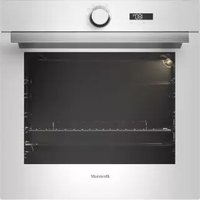
| Product Type | Built-in Electric Oven |
| Brand | Brandt |
| Model | BXP6132B |
| Dimensions (HxWxD) | 595 x 595 x 568 mm |
| Oven Capacity | 71 liters |
| Weight | Approx. 30 kg |
| Power Supply | 220-240 V ~ 50/60 Hz |
| Max Power Consumption | 2.2 kW |
| Energy Efficiency Class | A+ |
| Cooking Functions | Conventional, Fan-assisted, Grill, Fan Grill, Defrost, Pizza, Warm |
| Oven Cleaning | Catalytic panels (rear wall) |
| Controls | Electronic timer with touch controls |
| Display | LED digital display |
| Safety Features | Child lock, Automatic shut-off, Cool door |
| Included Accessories | Wire shelf, Baking tray, Grill rack |
| Installation Type | Built-in (under counter or column) |
| Door Type | CoolTouch, removable inner glass |
| Net Weight | 28.5 kg |
| Spare Parts Availability | Replacement heating elements, thermostats, door gaskets available |
| Reparability Index | 8.5/10 (easily serviceable) |
| Noise Level | 49 dB |
Frequently Asked Questions - BXP6132B BRANDT
How do I preheat the Brandt BXP6132B oven?
Select the desired cooking function and set the temperature using the touch controls. Press the start button to begin preheating. The oven will signal when it reaches the set temperature.
What does the 'Fan Grill' function do?
The Fan Grill function combines the grill with a fan to distribute heat evenly, ideal for cooking large pieces of meat or poultry while maintaining crispy surfaces.
How do I clean the catalytic panels?
Catalytic panels are self-cleaning. They absorb grease and evaporate it during high-temperature cooking cycles. Wipe any residue with a damp cloth after the oven cools down.
Why is my oven not heating up?
Check if the oven is properly plugged in and the circuit breaker is on. Ensure the timer is set for a cooking duration. If the problem persists, the heating element or thermostat may need replacement.
Can I use aluminum foil in the oven?
Avoid using aluminum foil directly on the bottom of the oven as it can block heat. You can line the baking tray with foil, but ensure it does not touch the heating elements.
How do I set the child lock?
Press and hold the key symbol button for 3 seconds until the lock icon appears on the display. To unlock, press and hold again.
What is the maximum baking temperature?
The maximum temperature is 250°C for conventional and 230°C for fan-assisted functions.
How do I replace the oven light bulb?
Disconnect the power. Remove the glass cover by turning it counterclockwise. Replace the halogen bulb (G9, 25W max) and reassemble.
My oven display shows 'Err' – what does it mean?
An Err code indicates a sensor or wiring fault. Reset the oven by turning off power for 5 minutes. If the error persists, contact Brandt service.
How do I extend the warranty?
Register your product on Brandt’s official website within 30 days of purchase to receive an extended warranty period. Keep your purchase receipt.
User questions about BXP6132B BRANDT
0 question about this device. Answer the ones you know or ask your own.
Ask a new question about this device
No questions yet. Be the first to ask one.
Download the instructions for your Oven in PDF format for free! Find your manual BXP6132B - BRANDT and take your electronic device back in hand. On this page are published all the documents necessary for the use of your device. BXP6132B by BRANDT.
USER MANUAL BXP6132B BRANDT
Manual assistant
Powered by Anthropic
Waiting for your message
Product information
Brand : BRANDT
Model : BXP6132B
Category : Oven