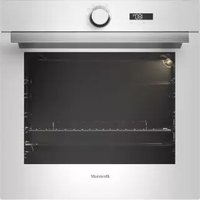
BXP6132W - Oven BRANDT - Free user manual and instructions
Find the device manual for free BXP6132W BRANDT in PDF.


Pick your language and provide your email: we'll send you a specifically translated version.
| Product Type | Built-in Electric Oven |
| Brand | Brandt |
| Model | BXP6132W |
| Energy Source | Electric |
| Power Supply | 230 V, 50 Hz |
| Total Power Consumption | 2.5 kW |
| Dimensions (H x W x D) | 595 x 595 x 568 mm |
| Oven Capacity | 71 L |
| Weight | 31 kg |
| Energy Efficiency Class | A+ |
| Cooking Modes | Convection, Grill, Pizza, Defrost, Fan-assisted, Lower heat |
| Cleaning Type | Catalytic self-cleaning |
| Safety Features | Child lock, Automatic shut-off, Cool touch door |
| Oven Light | Yes, replaceable |
| Display Type | LED digital |
| Timer | Yes, with end of cooking indicator |
| Control Type | Touch control + rotary knobs |
| Door Type | Cool front, double glazed |
| Spare Parts Availability | Available through Brandt authorized service centers |
| Repairability Index | 8.2 / 10 |
| Warranty | 2 years |
| Included Accessories | 1 grill rack, 1 baking tray |
Frequently Asked Questions - BXP6132W BRANDT
How do I install the Brandt BXP6132W oven?
Ensure the oven is installed by a qualified electrician. The oven must be connected to a 230 V, 50 Hz supply and placed in a suitable cutout. Refer to the installation manual for exact dimensions and safety clearances.
How do I clean the oven with catalytic liners?
The catalytic liners absorb grease during cooking. To clean, heat the oven empty at 250°C for one hour. Wipe away any ash residue with a damp cloth after cooling. Do not use abrasive cleaners.
What cooking modes are available on the BXP6132W?
It offers convection, grill, pizza, defrost, fan-assisted, and lower heat modes. Use the touch control to select the desired mode.
How do I set the timer?
Press the timer button and use the +/- controls to set the desired cooking duration. The oven will automatically shut off when the time elapses and sound an alarm.
Is the oven door cool to the touch?
Yes, the double-glazed cool front door remains safe to touch during operation, but the inner glass may be hot. Keep children away.
What should I do if the oven light is not working?
Turn off the power supply. Remove the light cover and replace the bulb with a new 25W, 300°C halogen bulb. Reattach the cover and restore power.
Can I use aluminum foil in the oven?
Avoid placing aluminum foil directly on the oven floor as it may block heat circulation and damage the enamel. You can use foil on baking trays.
How do I activate the child lock?
Press and hold the child lock button for 3 seconds. The display will show a lock icon. Repeat to deactivate.
Why is the oven not heating?
Check the power supply and circuit breaker. If the oven still does not heat, it may be a faulty heating element or thermostat. Contact Brandt service for repair.
Where can I find spare parts for the BXP6132W?
Spare parts are available through Brandt authorized service centers. Visit the Brandt website or call customer support for the nearest service point.
User questions about BXP6132W BRANDT
0 question about this device. Answer the ones you know or ask your own.
Ask a new question about this device
No questions yet. Be the first to ask one.
Download the instructions for your Oven in PDF format for free! Find your manual BXP6132W - BRANDT and take your electronic device back in hand. On this page are published all the documents necessary for the use of your device. BXP6132W by BRANDT.
USER MANUAL BXP6132W BRANDT
Manual assistant
Powered by Anthropic
Waiting for your message
Product information
Brand : BRANDT
Model : BXP6132W
Category : Oven