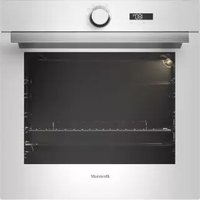
BOP7537W - Oven BRANDT - Free user manual and instructions
Find the device manual for free BOP7537W BRANDT in PDF.


Pick your language and provide your email: we'll send you a specifically translated version.
| Brand | Brandt |
| Model | BOP7537W |
| Product type | Built-in oven |
| Dimensions (H x W x D) | 59.5 x 59.5 x 54.8 cm (standard) |
| Weight | Approximately 30 kg |
| Power supply | Electric, 230 V / 50 Hz |
| Maximum power | Approximately 2800 W |
| Main functions | Convection, bottom heat, grill, defrost, interior light |
| Capacity | Approximately 70 litres |
| Number of shelf levels | 5 |
| Cleaning | Pyrolytic (self-cleaning at high temperature) |
| Safety | Door lock during pyrolytic cycle, automatic shut-off |
| Display and controls | Digital touch or rotary display depending on version |
| Timer | Programmable up to 24 h |
| Door | Cool door (double glazing) |
| Included accessories | Rack, drip tray, possibly rotisserie accessories |
| Spare parts | Available from Brandt after-sales service |
| Repairability | Repairability index to check on packaging or energy label |
| Energy class | Generally A+ (depending on model) |
| Energy consumption | Approximately 0.93 kWh in conventional cycle |
Frequently Asked Questions - BOP7537W BRANDT
How to install the BOP7537W oven?
Ensure the recess measures at least 59.5 cm wide and 59.5 cm high. Plug into a dedicated 230 V outlet. Refer to the installation diagram in the full manual.
How to use the pyrolytic function?
Select the Pyrolytic mode via the selector. Remove accessories, close the door and lock it. The temperature rises to about 500 °C to burn off residues. Once the cycle ends (2-3 h), wipe away the ashes.
What to do if the oven does not heat up?
First check the power supply and circuit breaker. Ensure the timer is not in timer mode. If the problem persists, contact after-sales service.
How to set the clock?
Press the Clock button until the display flashes. Turn the knob to set the time, then confirm. The manual details the precise steps.
Does the door indicator light up during cooking?
Yes, an indicator light shows that the oven is operating or preheating. It turns off once the temperature is reached or after a stop.
What accessories are supplied with the oven?
The oven comes with a metal rack, a drip tray, and sometimes a rotisserie. Check the full packaging.
How to clean the door glass?
Use a soft cloth dampened with soapy water or white vinegar. Avoid abrasive products. Some models have a removable glass; consult the manual for disassembly.
The oven beeps, what to do?
A beep may indicate the end of cooking or an error. Check the error code table in the manual. If the beep persists, turn the appliance off and on again.
Can I use aluminum foil in the oven?
Avoid direct contact with the heating elements. Place it on the drip tray to protect the bottom, but never cover the entire bottom to avoid blocking heat.
How to change the oven light bulb?
Unplug the appliance. Remove the glass cap (turn left). Replace with a specific spare bulb (G9, 25 W, 300 °C resistance). Reinstall the cap.
User questions about BOP7537W BRANDT
0 question about this device. Answer the ones you know or ask your own.
Ask a new question about this device
No questions yet. Be the first to ask one.
Download the instructions for your Oven in PDF format for free! Find your manual BOP7537W - BRANDT and take your electronic device back in hand. On this page are published all the documents necessary for the use of your device. BOP7537W by BRANDT.
USER MANUAL BOP7537W BRANDT
Manual assistant
Powered by Anthropic
Waiting for your message
Product information
Brand : BRANDT
Model : BOP7537W
Category : Oven