
BOH5235W - Oven BRANDT - Free user manual and instructions
Find the device manual for free BOH5235W BRANDT in PDF.


Pick your language and provide your email: we'll send you a specifically translated version.
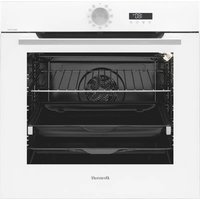
| Product Type | Built-in Electric Oven |
| Brand | BRANDT |
| Model | BOH5235W |
| Installation Type | Built-in |
| Energy Source | Electric |
| Energy Efficiency Class | A |
| Oven Capacity | 72 litres |
| Number of Cooking Functions | 9 |
| Control Type | Retractable rotary knobs |
| Display Type | LED digital display |
| Cleaning System | Hydrolytic cleaning |
| Safety Features | Child lock, cool touch door |
| Dimensions (H x W x D) | 59.5 x 59.5 x 56.8 cm |
| Weight | 31.5 kg |
| Power Rating | 3.0 kW |
| Voltage | 230 V |
| Frequency | 50 Hz |
| Timer Function | Yes |
| Interior Light | Yes |
| Number of Glass Layers | 4 |
| Included Accessories | Grill grid, baking tray |
Frequently Asked Questions - BOH5235W BRANDT
How do I preheat the oven?
Turn the function selector to the desired cooking mode and set the temperature using the thermostat knob. Wait until the oven reaches the set temperature; the indicator light will go out. For best results, preheat for 10-15 minutes before placing food inside.
What is the recommended cleaning method?
Use the hydrolytic cleaning cycle: pour water into the bottom of the oven, activate the special cleaning function, and allow the steam to soften grease. After cooling, wipe the interior with a soft damp cloth. Avoid abrasive cleaners.
Can I use the oven without the rotisserie?
Yes, the rotisserie is an optional accessory. Most functions work perfectly without it. Simply select the standard heating mode (e.g., top/bottom heat or convection) and cook as usual.
How do I set the timer?
Press the timer button on the control panel, then use the +/- buttons to select the desired duration. The oven will automatically switch off when the time is up. A buzzer will sound to alert you.
Why is the oven not heating up?
Check the power supply, ensure the oven is properly plugged in and the circuit breaker is on. Verify that a cooking function is selected and the temperature is set. If the problem persists, contact customer service; the heating element may be faulty.
How to replace the interior light bulb?
Disconnect the oven from the power supply. Unscrew the glass cover inside the oven, remove the old bulb, and replace it with a new one of the same type (typically 25W/300°C). Refit the cover and reconnect the power.
Is the oven suitable for cooking with convection?
Yes, this oven features a convection function that circulates hot air evenly for faster and more uniform cooking. Use the fan-assisted mode for baking pastries or roasting meats on multiple shelves.
What accessories are included with the oven?
The oven comes with a grill grid and a baking tray. These are suitable for grilling, baking, and roasting. Other accessories like a rotisserie or additional trays may be purchased separately.
How do I lock the oven controls to child safety?
Activate the child lock by pressing and holding the lock button for 3 seconds (or as indicated in the manual). The lock symbol appears on the display, preventing accidental changes to settings. To unlock, repeat the operation.
What are the oven dimensions for built-in installation?
The standard built-in dimensions are 59.5 cm in height, 59.5 cm in width, and 56.8 cm in depth. Make sure the cabinet cutout matches these measurements and provides adequate ventilation.
User questions about BOH5235W BRANDT
0 question about this device. Answer the ones you know or ask your own.
Ask a new question about this device
No questions yet. Be the first to ask one.
Download the instructions for your Oven in PDF format for free! Find your manual BOH5235W - BRANDT and take your electronic device back in hand. On this page are published all the documents necessary for the use of your device. BOH5235W by BRANDT.
USER MANUAL BOH5235W BRANDT
Manual assistant
Powered by Anthropic
Waiting for your message
Product information
Brand : BRANDT
Model : BOH5235W
Category : Oven