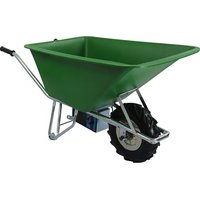
E-PowerBarrow - Electric wheelbarrow Lescha - Free user manual and instructions
Find the device manual for free E-PowerBarrow Lescha in PDF.


| Product type | Electric wheelbarrow |
| Brand | Lescha |
| Model | E-PowerBarrow |
| Dimensions (L x W x H) | 147 cm x 64 cm x 64 cm |
| Weight (without battery) | 22 kg |
| Weight of lead-acid AGM battery | 7.1 kg |
| Weight of lithium-ion battery | 1.8 kg |
| Battery type | Heavy Duty: 24 V / 10 Ah lead-acid AGM; Heavy Duty Pro: 29 V / 12 Ah lithium-ion |
| Battery life | Not specified |
| Maximum speed (Heavy Duty) | 5 km/h |
| Maximum speed (Heavy Duty Pro) | 5.7 km/h |
| Maximum load | 150 kg (75 kg on downhill) |
| Maximum gradient | 30 degrees |
| Motor | Brushed motor 430 W |
| Bucket capacity | 100 L or 160 L depending on series |
| Bucket material | Electro-galvanized steel or HDPE plastic |
| Recommended tire pressure | 1.5 bar |
| Operating temperature | -10 °C to 40 °C |
| Charger power supply | 240 V AC / 47-63 Hz, output DC 24 V / 2.5 A |
| Main functions | Load transport, forward/reverse, electric braking HDC (hill descent control) |
| Safety | Automatic return safety switch, HDC system, removable battery, overload protection |
| Maintenance and cleaning | Clean with dry brush or running water; do not use high-pressure cleaner |
| Warranty | 1 year for the wheelbarrow, 6 months for the battery |
| Spare parts and repairability | Tires, inner tubes and cables excluded from warranty; repair by a professional |
| Intended use | Transport of solid non-flowing products, max 150 kg, by persons over 16 years old |
Frequently Asked Questions - E-PowerBarrow Lescha
User questions about E-PowerBarrow Lescha
0 question about this device. Answer the ones you know or ask your own.
Ask a new question about this device
Download the instructions for your Electric wheelbarrow in PDF format for free! Find your manual E-PowerBarrow - Lescha and take your electronic device back in hand. On this page are published all the documents necessary for the use of your device. E-PowerBarrow by Lescha.
USER MANUAL E-PowerBarrow Lescha
Manufactured by: ALTRAD FORT BV
Safety & Operating Instructions
EN: Read and understand this manual and all instructions before operating this wheelbarrow!
EN: E-PowerBarrow Heavy Duty- and Heavy Duty pro series have a one (1) year warranty from the date of purchase. Warranty void if: the product is disassembled by a non-authorized person or if the product is not used or maintained in conformity with the guidelines in this manual. Batteries have a six (6) month limited warranty.
Excluded from warranty are: Tire, Tube and Cables
Figure 1: Onderdelen/Components of/Bestandteile der/Composants de la brouette - E-PowerBarrow
1.2 Operating Conditions 8
4.6 Make test drives.... 10
- De bediening van de E-PowerBarrow .... 10
5.1 De gashendel box (figuur 2) ...... 10
1.2 Operating Conditions ...... 13
1.3 Description 13
1.4 Identification 13
- Warnings 13
2.1 Warning signs on the wheelbarrow 13
2.2 General warning ....13
- Safety.... 14
3.1 Intended use....14
3.2 Who can control the wheelbarrow .....14
3.3 Clothes 14
3.4 Safety switches....14
- First use of the E-PowerBarrow....14
4.1 Handling procedure first use 14
4.2 Unpacking....14
4.3 Component list....14
4.4 Read and understand the manual 14
4.5 Charge the battery....15
4.6 Make test drives 15
- How to operate the E-PowerBarrow....15
5.1 The throttle box (figure 2) ...... 15
5.2 Using the electronic brake HDC 15
5.3 Working with the E-PowerBarrow.... 16
5.4 Removing / replacing the battery 16
5.5 Replacing the battery.... 16
5.6 Warning lights and warning sounds.... 16
- Maintenance....16
6.1 Battery 16
6.2 Cleaning the E-PowerBarrow 16
6.3 Storing the E-PowerBarrow 16
6.4 Transporting the E-PowerBarrow 16
-
Troubleshooting....17
-
Deutsch Technische daten .....18
FS-series: 160l, 7,0mm HDPE plastic, green
GL-series: 100l, 6,5mm HDPE plastic, yellow
1.2 Operating Conditions
4.6 Make test drives
natural_image
Close-up of a hand pressing down on a blue component, with arrows pointing to the area (no visible text or symbols)1. English - Specifications
1.1 Specifications E-PowerBarrow
● Max. speed Heavy Duty series: 5 km/h (+/-10% depending on the mounted tire)
● Max. speed Heavy Duty pro series: 5.7 km/h (+/-10% depending on the mounted tire)
● Max. load: 150 kg
● Motor: Carbon brush motor 430 W
● Structure: φ 30 x 1.5 mm
● Surface coating: electrolytic galvanizing
● Dimensions: 147 cm x 64 cm x 64 cm (l x w x h)
● Tire: 4.80/4.00-8 ( φ 400 mm).4.10/3.50-4
● Battery Heavy Duty: 24V/10Ah AGM lead acid
● Battery Heavy Duty Pro: 29V/12Ah Lithium Ion
● Overload protection: Yes, heat sensor
● Charger: 240VAC / 47-63Hz DC24V / 2.5Ah
● Max. slope: 30 degrees
● Weight: 22 kg without battery
- Mounted tray:
UV-series: 100 l, 1.2 mm galvanized steel
FS-series: 160 l, 7.0 mm HDPE plastics, green
GL-series: 100 l, 6.5 mm HDPE plastics, yellow
1.2 Operating Conditions
● Working temperature: between -10 ° and 40°
● Altitude: up to 2000 m
● Relative humidity: between 30% and 95%
1.3 Description
The E-PowerBarrow is composed of a frame with an electric powered hub motor, a battery and a tray. The battery is under the wheelbarrow and can be removed. At the right lever is the panel for controlling the E-PowerBarrow
1.4 Identification
An E-PowerBarrow can be identified by a unique serial number on the hub motor.
2. Warnings
2.1 Warning signs on the wheelbarrow

General warning that shows the location of the electric system of the E-PowerBarrow.
2.2 General warning

WARNING!
WHEN USING THE E-POWERBARROW THERE IS A RISK OF PERSONAL INJURIES OR DAMAGE TO PROPERTY. THEREFORE READ THIS MANUAL BEFORE YOU OPERATE THE E-POWERBARROW. IF THE MANUAL FOR WHATEVER REASON CAN'T BE READ PLEASE ASK YOUR SUPPLIER FOR A NEW MANUAL. STORE THE MANUAL IN A DRY PLACE.

WARNING!
WHEN USING THE E-POWERBARROW UP OR DOWN A SLOPE DO NOT LOAD THE WHEELBARROW WITH MORE THEN 75KG.

WARNING!
ALWAYS MOUNT THE OPTIONAL SUPPORTING WHEELS WHEN LOADING THE WHEELBARROW OVER 75Kg TO PREVENT PERSONAL INJURIES.

WARNING!
- Do not use the E-PowerBarrow for the transport of persons.
- Do not drive the E-PowerBarrow electric hub wheel under water or mud.
- Do not clean the E-PowerBarrow with high-pressure water (Power washer).
- Do not overload the E-PowerBarrow.
- Do not use the E-PowerBarrow on steeper surfaces than mentioned in the specifications.
- Do not use the E-PowerBarrow when there is a malfunction.
-
Do not use the E-PowerBarrow when the tire pressure is below 1.5 bar.
-
Do not use the E-PowerBarrow on a slippery surface.
- Maintenance other than cleaning can only be executed by a professional.
- Always remove the battery when repairing the electric powered wheel.
- Do not remove the safety stickers on the E-PowerBarrow. If they are damaged ask your supplier for a replacement sticker.
- The E-PowerBarrow can only be used when all parts are functioning correctly.
- Only use the E-PowerBarrow according to the intended use (paragraph 3.1).
- Only use the E-PowerBarrow when there is sufficient light.
- Only use the E-PowerBarrow on a solid surface with no risk of falling or sinking.
- Make sure long hair is kept away from the electric wheel.
- Do not put hands between the frame and the electric powered wheel.
- Remove the battery when the wheelbarrow is unattended.
- Remove the battery when the E-PowerBarrow is lifted.
- Only charge the wheelbarrow in a ventilated area.
- Always keep a safe distance from other people or property when using the E-PowerBarrow.
3. Safety
3.1 Intended use
The E-PowerBarrow Heavy Duty series are wheelbarrows that can be used to transport solid, non-flowable goods from one place to another with a maximum weight of 150 kg. The size of the goods should not exceed the dimensions of the tray.
3.2 Who can control the wheelbarrow
- The E-PowerBarrow can be controlled by people from age 16+.
- The person using the E-PowerBarrow should be in
good physical condition to be able to correctly control the E-PowerBarrow.
- The person using the E-PowerBarrow should have read and understood the manual.
- The person controlling the E-PowerBarrow should control the machine with responsibility.
3.3 Clothes
There are no special clothes required for working with the E-PowerBarrow, nevertheless be careful with wearing loose clothes or loose parts of clothes that could get stuck in the electric wheel.
3.4 Safety switches
The yellow speed control on the throttle is a safety switch that will always return to a neutral position when released. Do not use the E-PowerBarrow when this switch is not working correctly.
4. First use of the E-PowerBarrow
4.1 Handling procedure first use
- Unpack the wheelbarrow
- Control components (See parts overview Table 1)
- Read and understand the manual
- Charge battery
- Make several test drives with an empty tray
- Start using the E-PowerBarrow
4.2 Unpacking
Remove all packaging material from the E-PowerBarrow.
4.3 Component list
If any part of the component list is missing please contact your E-PowerBarrow supplier immediately.
4.4 Read and understand the manual
Before starting to work with the E-PowerBarrow make sure you read and understand the manual. If anything is unclear please contact your sales representative. If the manual got damaged or lost and therefore can't be read, please ask your supplier for a new manual.
4.5 Charge the battery
Charge the battery for at least 4 – 5 hours before first use according to the following procedure:
- Connect the charger to the battery.
- Plug-in the charger to a power source.
- The charger now starts charging and the LED of the charger is RED during the charging stage.
- When the charger LED turns GREEN, charging is complete. Unplug the charger.
- Repeat the above steps for every recharging cycle.

WARNING!
The red LED on the BATTERY only indicates that the battery is receiving power from the charger. It is NOT used to indicate when charging is completed. If the LED does not light up, DO NOT charge the battery further. Call your sales representative immediately.
4.6 Make test drives
After charging the battery, place the battery back in the battery holder.
The battery will be held in place by the sled underneath the wheelbarrow. The battery has two recesses. These allow the battery to slide correctly in the battery holder. The yellow connector locks the battery to the battery holder.
After replacing the battery make a first test drive in a safe and easy environment. It is important to get acquainted with the E-PowerBarrow before using it in a more challenging environment.

WARNING!
- Make sure there is enough free space around the wheelbarrow for a first test drive.
● Make sure the wheelbarrow is on a smooth surface to get used to the wheelbarrow. - Look behind you and be careful when driving backwards with the wheelbarrow.
- In case of danger immediately release the yellow safety joystick, the motor will stop.
5. How to operate the E-PowerBarrow
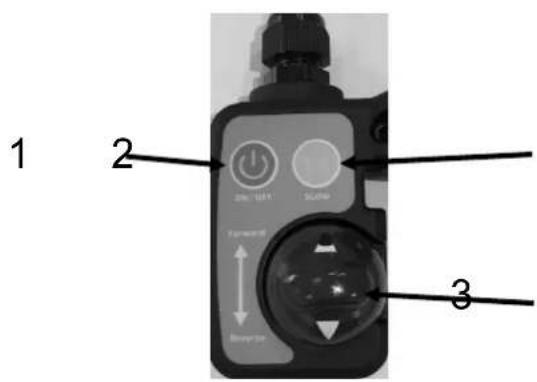
5.1 The throttle box (figure 2)
-
Press button (1) "ON/OFF" button for 1 sec. to activate the electric system of the wheelbarrow. The green LED will light up in the "ON/OFF" button. Pressing "ON/OFF" button shorter than 1 sec. will not power on the wheelbarrow.
-
Press the yellow joystick throttle (3) slowly forward to start the hub motor.
-
The further you press the yellow joystick throttle (3) the faster the wheelbarrow will go.
-
Release the yellow joystick throttle (3) to stop the E-PowerBarrow.
-
Press the yellow joystick throttle (3) backwards to reverse the wheelbarrow.
-
Press button (1) on/off for 1 sec. to de-activate the electric system of the wheelbarrow. Pressing "ON/OFF" button shorter than 1 sec. will not power off the wheelbarrow.
5.2 Using the electronic brake HDC

WARNING!
● Never overload (MAX 75Kg) the wheelbarrow when driving down a hill.
- Get acquainted with the hill descent control before using its maximum capacity.
● Make sure the breaking front wheel has enough grip on the surface.
- Never use the wheelbarrow on a slippery surface.
- In case of emergency press the stands of the wheelbarrow on the ground or flip the wheelbarrow over sideways.
The wheelbarrow has a hill descent control (HDC) system that can be used to take a loaded wheelbarrow safely down the hill.
The system can be activated by pressing the “SLOW” button (2) on the throttle box (figure 2) for one second. A red LED will light up in the button. When the HDC is activated the yellow joystick throttle (3) will be deactivated. Now the motor will limit the speed of the wheelbarrow to a maximum of 1.8 km/h.

WARNING!
The brake function will lose its functionality when the front wheel has not enough grip on the surface.
By pressing the “SLOW” function again for 1 second the HDC will be de-activated. The red LED will be off. Now the throttle will be activated again!

WARNING!
Make sure the wheelbarrow is on a horizontal surface before de-activating the HDC function.
5.3 Working with the E-PowerBarrow
The E-PowerBarrow can be used to transport loads from one place to another. When loading the wheelbarrow make sure that the weight of the load is equally divided in the tray.
5.4 Removing / replacing the battery
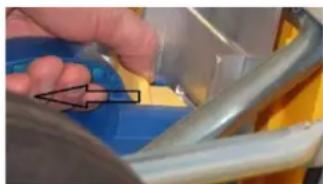
The battery of the E-PowerBarrow can be removed. To remove the battery, place the wheelbarrow up with the levers pointing up. Press the yellow button on the battery to release the safety switch from the battery. Now lift the battery up until it is released from the wheelbarrow.
natural_image
Close-up of a hand pressing down on a blue surface with a black arrow pointing to the area (no text or symbols visible)5.5 Replacing the battery
The battery can be put back by sliding it back under the E-PowerBarrow.
On the top of the battery are two rails that can connect with the rails mounted on the E-PowerBarrow. When sliding down the rails the battery is fixed after the yellow safety button gave a click and the battery can't be taken up anymore.
5.6 Warning lights and warning sounds
Table 2 from this manual provides information about the different warning lights and sounds.

WARNING!
When the motor indicates an overload: Put the throttle immediately in neutral position then choose another route or partially unload the wheelbarrow. Continuous overloading of the E-PowerBarrow motor will damage the motor.
6. Maintenance
6.1 Battery
The life of a battery is extended if the battery is fully charged. Therefore, always charge the battery after use. When the battery is not used for more than two weeks in a row, charge the battery again to keep it in good condition. Always store the battery in a warm dry place.
6.2 Cleaning the E-PowerBarrow
Clean the E-PowerBarrow first with a dry brush. If necessary, the wheelbarrow can be cleaned with ordinary running water.
6.3 Storing the E-PowerBarrow
The E-PowerBarrow should be stored in a dry place.
6.4 Transporting the E-PowerBarrow
The E-PowerBarrow weighs about 22 kg without battery. The weight of the E-PowerBarrow slightly differs depending on the mounted tray.

WARNING!
Always remove the battery before loading the E-PowerBarrow for transport.
Always remove the battery before lifting the E-PowerBarrow.
The weight of the Lithium battery is 1.8 kg.
The weight of the AGM lead battery is 7.1 kg.
Make sure the E-PowerBarrow is fixed to the vehicle during transport.
7. Troubleshooting
Please read this chapter if the E-PowerBarrow is not working as expected. If the given solutions do not fix the problem, please contact your sales specialist for support. The E-PowerBarrow Heavy Duty can't be switched on:
- Check if the battery is placed correctly.
- Check if the battery is charged.
- Check if the yellow joystick throttle is in neutral position.
The E-PowerBarrow is switched on but not reacting to the throttle:
- Check if the tire has enough pressure, if the pressure is too low the hub motor will run within the tire without moving the tire itself.
- Check if the "SLOW" function is enabled.
- Check if the red warning LED is lit up in the ON/OFF button; if yes, the battery is empty.

UN 3480 & UN 3481
natural_image
Close-up of a hand holding a blue object with an arrow pointing to it, next to a metallic frame (no visible text or symbols)natural_image
Close-up of a hand pressing down on a blue plastic component with a black arrow pointing to the part (no visible text or symbols)


- Operating Conditions
- Make test drives
- English - Specifications
- Specifications E-PowerBarrow
- Description
- Identification
- Warnings
- Warning signs on the wheelbarrow
- General warning
- WARNING!
- Safety
- Intended use
- Who can control the wheelbarrow
- Clothes
- Safety switches
- First use of the E-PowerBarrow
- Handling procedure first use
- Unpacking
- Component list
- Read and understand the manual
- Charge the battery
- How to operate the E-PowerBarrow
- The throttle box (figure 2)
- Using the electronic brake HDC
- Working with the E-PowerBarrow
- Removing / replacing the battery
- Replacing the battery
- Warning lights and warning sounds
- Maintenance
- Battery
- Cleaning the E-PowerBarrow
- Storing the E-PowerBarrow
- Transporting the E-PowerBarrow
- Troubleshooting
Brand : Lescha
Model : E-PowerBarrow
Category : Electric wheelbarrow