QPCD05AXMW - Air Conditioning HAIER - Free user manual and instructions
Find the device manual for free QPCD05AXMW HAIER in PDF.


User questions about QPCD05AXMW HAIER
0 question about this device. Answer the ones you know or ask your own.
Ask a new question about this device
Download the instructions for your Air Conditioning in PDF format for free! Find your manual QPCD05AXMW - HAIER and take your electronic device back in hand. On this page are published all the documents necessary for the use of your device. QPCD05AXMW by HAIER.
USER MANUAL QPCD05AXMW HAIER
Portable Air Conditioner
natural_image
Illustration of a white industrial air conditioner unit with control panel and wheels (no text or symbols)Design may vary by model number.
Some models may have an additional letter after the model number.
AIR CONDITIONER SAFETY 2
PARTS AND FEATURES....3
INSTALLATION REQUIREMENTS 3
Tools and Parts 3
Location Requirements 4
Electrical Requirements....4
INSTALLATION INSTRUCTIONS 5
Step 1 - Unpack Air Conditioner 5
Step 2 - Install Exhaust Nozzle to Main Window Panel 5
Step 3 - Install Main Window Panel and Extension Panels....5
Step 4 - Attach Exhaust Hose to the Exhaust Nozzle 6
Step 5 - Connect Exhaust Hose to the Air Conditioner 7
Step 6 - Complete Installation....7
CONTROL PANEL....8
Buttons 8
Remote Control 8
Indicator Lights 8
AIR CONDITIONER USE 9
AIR CONDITIONER CARE 9
Cleaning 9
Air Filters....9
Internal Water Tank 9
Storage 9
TROUBLESHOOTING....10
LIMITED WARRANTY 11
RECORD KEEPING 1
RECORD KEEPING
Thank you for purchasing this Haier product. This user manual will help you get the best performance from your new air conditioner.
Model number
For future reference, record the model and serial number located on the label on the side of your air conditioner, and the date of purchase.
Serial number
Staple your proof of purchase to this manual to aid in obtaining warranty service if needed.
Date of purchase
AIR CONDITIONER SAFETY
Your safety and the safety of others are very important.
We have provided many important safety messages in this manual and on your appliance. Always read and obey all safety messages.

This is the safety alert symbol.
This symbol alerts you to potential hazards that can kill or hurt you and others. All safety messages will follow the safety alert symbol and either the word "DANGER," "WARNING" or "CAUTION."
These words mean:
! DANGER
An imminently hazardous situation. You could be killed or seriously injured if you don't immediately follow instructions.
WARNING
A potentially hazardous situation which, if not avoided, could result in death or serious bodily injury.
CAUTION
A potentially hazardous situation which, if not avoided, may result in moderate or minor injury.
All safety messages will tell you what the potential hazard is, tell you how to reduce the chance of injury, and tell you what can happen if the instructions are not followed.
IMPORTANT SAFETY INSTRUCTIONS
WARNING: To reduce the risk of fire, electrical shock, injury to persons, or damage when using the air conditioner, follow basic precautions, including the following:
- Read all of the instructions before using this appliance.
- Plug into a grounded 3 prong outlet.
- Do not remove ground prong.
- Do not use an adapter.
- Do not use an extension cord.
- Do not operate the air conditioner if it has a damaged cord or plug, if it is not working properly, or if it has been damaged or dropped.
- The air conditioner should be serviced only by qualified service personnel. Call an authorized service company for examination, repair, or adjustment.
-
Disconnect power before servicing.
-
Disconnect power before cleaning.
NOTE: Turning off power by pressing the Power button does NOT disconnect the appliance from the power supply. - Do not install or use the air conditioner in any area where the atmosphere contains combustible gases or where the atmosphere is contaminated. Avoid any chemicals coming in contact with your air conditioner.
- Do not store anything directly on top of the air conditioner.
- Use two or more people to move and install air conditioner.
- Never operate the air conditioner without the filters in place.
- Do not use the air conditioner near a bathtub, shower or wash basin or other wet area.
READ AND SAVE THESE INSTRUCTIONS
PARTS AND FEATURES
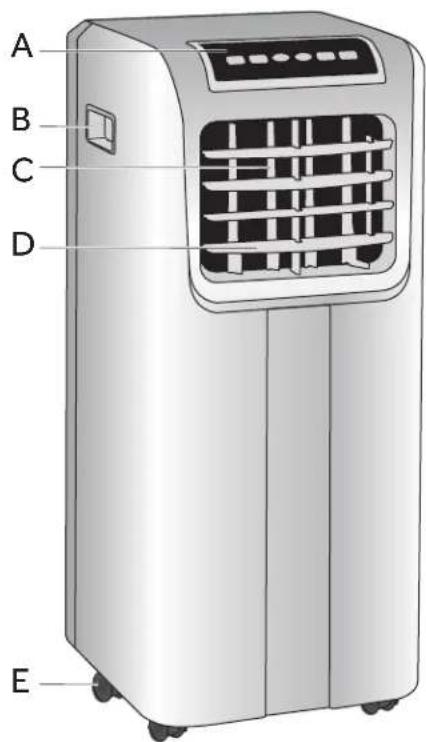
text_image
A B C D E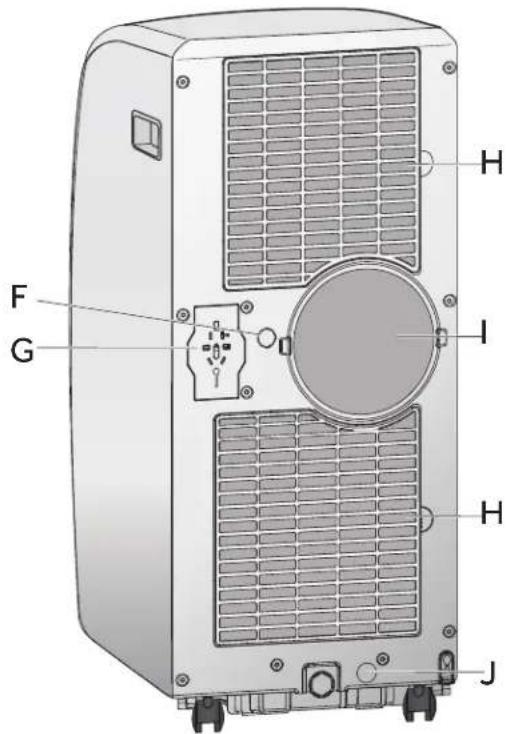
text_image
F G H I H JA
Control Panel
B
Side Handle
©
Vertical Air Vent
Louver
D
Horizontal Air Vent
Louver
E
Casters
F
Center Drain Cap
G
Power Cord Storage
H
Air Filter
I
Real Air Discharge
J
Lower Drain Cap
INSTALLATION REQUIREMENTS
TOOLS AND PARTS
Gather the required tools and parts before starting installation.
TOOLS NEEDED
- Flat-blade Screwdriver
•Phillips Screwdriver
PARTS SUPPLIED
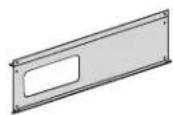
● Main Window Panel
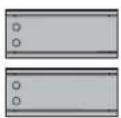
• Extension Panels (2)

- Flat Screws (6)
4 for extension panels
2 for nozzles

- Pointed Screws (7) 2 for top window brackets 1 for security bracket 4 for main window panel
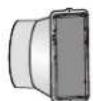
- Exhaust Nozzle
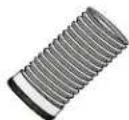
● Exhaust Hose (1 or 2 depending on model)

● Top Window Bracket (2)
Use for Vinyl Windows

● Bottom Window Bracket (2)
Use for Vinyl Windows
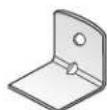
• Security Bracket

• Top Foam Strip • (10 mm x 10 mm x 102 cm)
Bottom Foam Strip (3 mm x 10 mm x 102 cm)
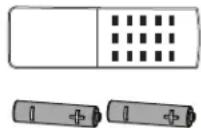
- Remote Control
- Batteries (2)
LOCATION REQUIREMENTS
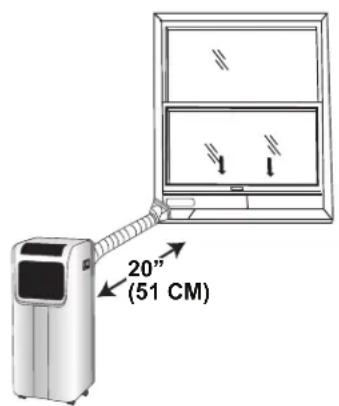
- Place the air conditioner on a flat, level surface in a location that is at least 20" (51 cm) from any wall.
NOTE: The recommended distance from the window for optimal performance is 30" (76 cm).
- Maintain a minimum 20" (51 cm) clearance around the air conditioner to not block airflow.
- Keep the air conditioner free of any obstructions such as drapes, curtains, blinds, etc.
- The exhaust hose should be free of any obstructions.
- Do not place the air conditioner on an unstable or raised surface because it could fall and cause damage or injury.
- Do not place the air conditioner in direct sunlight or near a heat source such as baseboard heaters, stoves, etc.
- The window panel can be installed in a window with a minimum 20" (51 cm) to a maximum 40" (101.6 cm) opening.
text_image
20" (51 CM)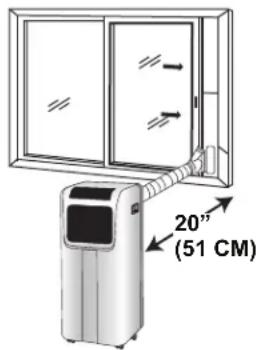
text_image
20" (51 CM)ELECTRICAL REQUIREMENTS
WARNING

Electrical Shock Hazard
Plug into a grounded 3 prong outlet.
Do not remove the ground prong from the power cord plug.
Do not use an adapter.
Do not use an extension cord.
Failure to do so can result in death, fire or electrical shock.
POWER SUPPLY CORD
Wiring Requirements
• 115 Volt, 60Hz, 15-amp fused grounded 3 prong outlet
- The use of a time-delay fuse or time-delay circuit breaker is recommended.
• Use a dedicated circuit only.
NOTE: Do not operate any other electrical appliances on this circuit or you may trip the circuit breaker/fuse.
If this power supply cord is damaged, it cannot be repaired. It must be replaced with a cord from the product manufacturer. If the power supply cord is damaged call Haier Customer Service: 1-877-337-3639.
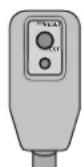
To test the power supply cord before operation:
- Plug the power cord into a grounded 3 prong outlet.
- Press the Test button, and then press and release the Reset button to restore power.
REQUIRED GROUNDING METHOD
This air conditioner must be grounded. The air conditioner is equipped with a power supply cord that has a 3 prong grounding plug. The power supply cord must be plugged into a mating, grounded 3 prong outlet, and grounded in accordance with all local codes and ordinances.
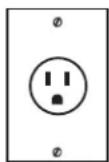
115V 15 Amp
INSTALLATION INSTRUCTIONS
STEP 1 - UNPACK AIR CONDITIONER
WARNING
Excessive Weight Hazard
Use two or more people to move and install air conditioner.
Failure to do so can result in back or other injury.
- Remove packaging materials. Save the carton and the foam packaging for storing the air conditioner when not in use.
NOTE: There are NO packing materials inside the air conditioner to remove—Do Not open the cabinet.
• Properly dispose of/recycle all packing material. - Handle the air conditioner gently.
- Keep the air conditioner upright and level. Do not set the air conditioner on its side, front, back or upside down.
STEP 2 - INSTALL EXHAUST NOZZLE TO MAIN WINDOW PANEL
- Hold the main window panel so that the L-shaped edges of the panel are facing you.
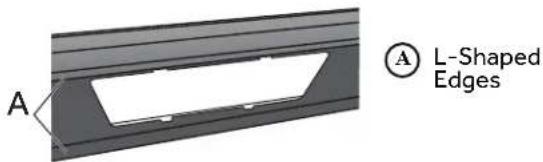
text_image
A A L-Shaped Edges- Align the exhaust nozzle with the slots in the opening, and then insert and slide the nozzle to access the hole from the back of the main window panel.

text_image
A BA Main Window Panel
(B) Exhaust Nozzle (1 or 2 depending on model)
- Turn the main window panel over, so that the nozzle is away from you. Insert a flat screw through the hole to fasten the window panel to the adapter.
NOTE: On a dual hose unit, install the smaller hose nozzle to the left-hand hole in the panel.

text_image
A Flat ScrewSTEP 3 - INSTALL MAIN WINDOW PANEL AND EXTENSION PANELS
NOTE: Depending on the size of your window opening, use the main panel and one or both of the extension panels.
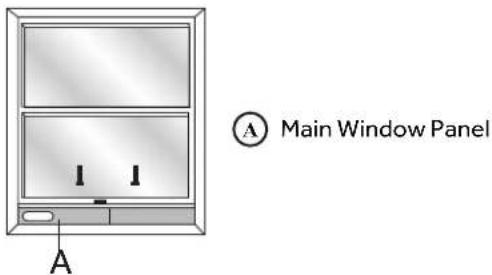
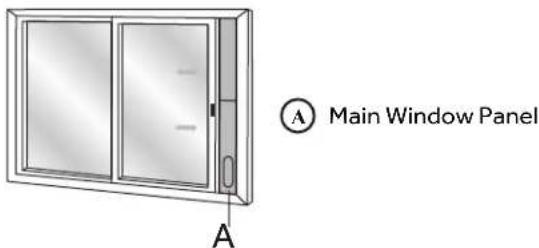
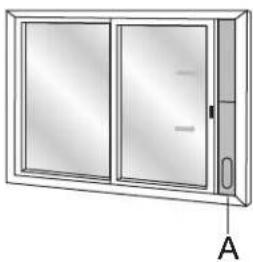
- Open the window and place the main window panel into the window.
NOTE: The window assembly is designed to accommodate either a vertical slide or horizontal slide window.
Vertical Slide Window
text_image
A Main Window Panel AHorizontal Slide Window
text_image
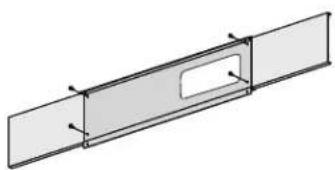
A Main Window Panel A- Adjust the extension panel(s) to the width or height of the window as shown.
NOTE: Some window installations may require the extension panels to be trimmed.
- Depending on the number of extension panels used, use two or four flat screws to secure the extension panel(s) to the main panel. Install from the back.
natural_image
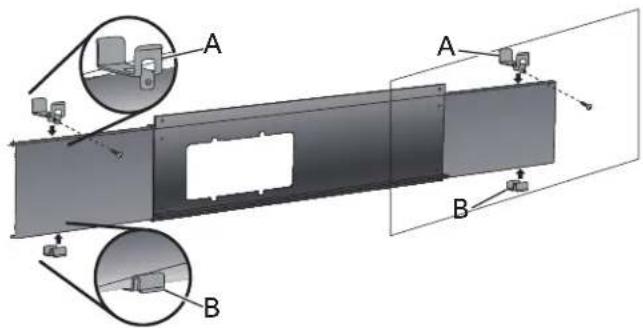
Pure technical line drawing of a rectangular plate with a central slot and side supports (no text or symbols)NOTE: There are many window types on the market today. Use the foam strips and brackets (provided) to secure the extension panels that will fit the window opening.
- For vinyl windows only.
Skip to step 6 for wood windows.
Place the two top window brackets and two bottom window brackets where they will best support the extension panels.
Before Assembly USE ONLY FOR VINYL
text_image
Technical diagram showing a mechanical assembly with labeled components A and B, including zoomed-in insets for detail views.Ⓐ Top Window Brackets
B Bottom Window Brackets
After Assembly
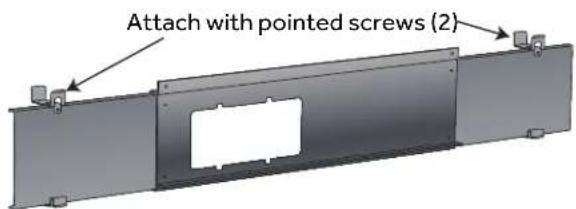
text_image
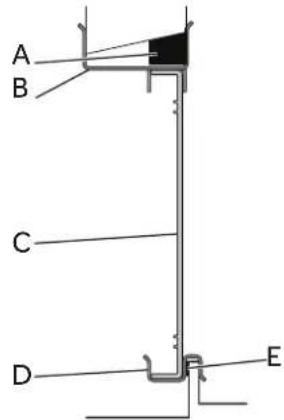
Attach with pointed screws (2)- Apply the top foam strip (provided) across the top of the window panel assembly, and then apply the bottom foam strip (provided) across the bottom front edge of the window panel assembly, as shown.
text_image
A B C D ETYPICAL VINYL WINDOW INSTALLATION
A Top Foam Strip
(B) Top Bracket
© Extension Panel
D Bottom Bracket
E Bottom Foam Strip
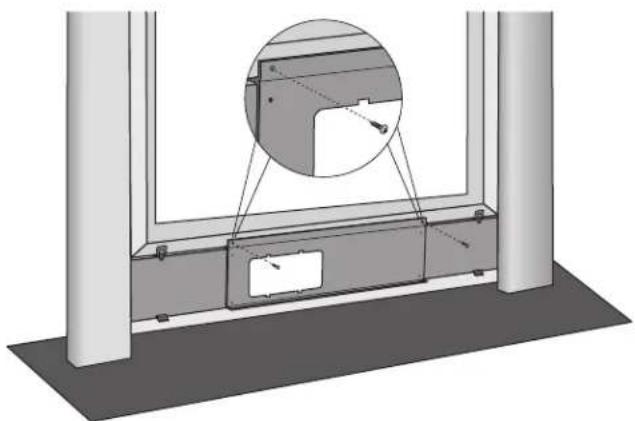
- Place the window panel assembly in the window, and using the screws provided, fasten the assembly to the window sill and window frame.
natural_image
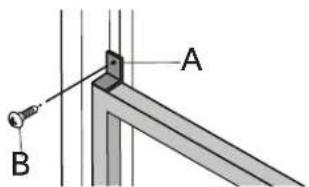
Technical diagram of a window frame with an inset showing a close-up of a component (no text or symbols present)- Using one pointed screw, install the Security bracket to the window.
NOTE: The security bracket prevents the window from being opened from the outside.
text_image
Technical diagram showing a mechanical assembly with labeled components A and B, likely for a welding or mounting procedure.A Security Bracket B Pointed Screw (1)
STEP 4 - ATTACH EXHAUST HOSE TO THE EXHAUST NOZZLE
- Grasp both ends of the exhaust hose and gently pull to expand the hose.
NOTE: Do not attach additional hoses to extend the iēnē÷ē¶Yēiō·úòiç·çèæðēäöè·æòòiñê·èHæièñæülānç·ðäü·damage the air conditioner.
- Using a counterclockwise motion, attach the open end of the exhaust hose to the exhaust nozzle.
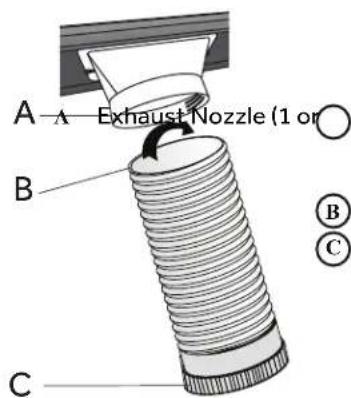
text_image
A Exhaust Nozzle (1 or) B C B C2 depending on model)
B Hose (open end) C Hose (connector end)
INSTALLATION INSTRUCTIONS
STEP 5 - CONNECT EXHAUST HOSE TO THE AIR CONDITIONER
IMPORTANT: When connecting the hose, the air conditioner must be close enough to the window that you will not dislodge the window seal plate. Once the hose is connected, move the air conditioner 20" (51 cm) from the wall.
- Extend the flexible exhaust hose to reach out to the unit.
- Aim the opening of the hose to the air exhaust outlet and push it hard straight into the outlet until it clicks.
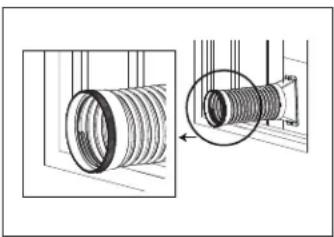
natural_image
Technical illustration of a coiled pipe assembly with a magnified inset showing the internal structure (no text or symbols)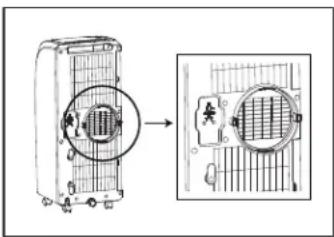
text_image
Diagram showing a device with internal grid structure before and after processing, with Chinese annotation boxes.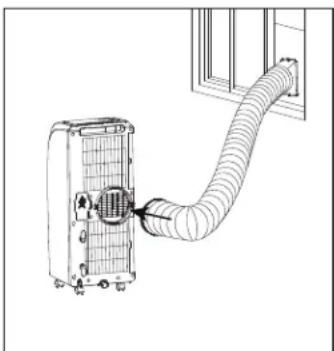
natural_image
Diagram of a wall-mounted air duct system with a grid-patterned panel and pipe connection (no text or symbols)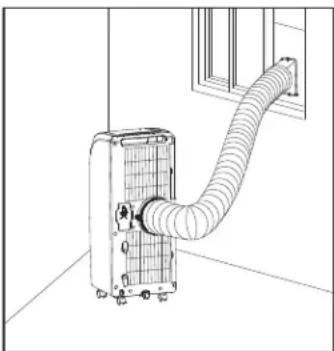
natural_image
Line drawing of an air conditioner unit with coiled hose and ventilation slots (no text or symbols)STEP 6 - COMPLETE INSTALLATION
WARNING

Electrical Shock Hazard
Plug into a grounded 3 prong outlet.
Do not remove the ground prong from the power cord plug.
Do not use an adapter.
Do not use an extension cord.
Failure to do so can result in death, fire or electrical shock.
- Plug the power cord into a grounded 3 prong outlet.
- Press the Reset button on the power cord to ensure the safety plug is providing power to the air conditioner.
CONTROL PANEL
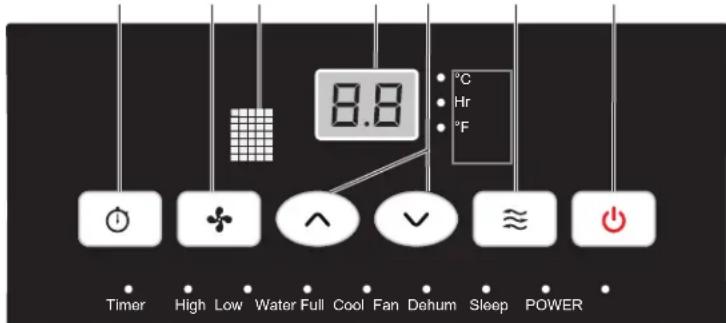
A B C D E F G
text_image
8.8 °C Hr °F Timer High Low Water Full Cool Fan Dehum Sleep POWERBUTTONS

TIMER BUTTON
Program a time from (1-hour to 24-hours) for the air conditioner to turn Off or On. When a Time Delay is programmed, the Timer indicator light will illuminate.
While the air conditioner is operating:
- Press the Timer button.
- Press the Up/Down arrow buttons to select the number of hours you want the air conditioner to continue to operate before turning Off.
NOTE: Wait approximately 5 seconds for the Turn-Off time to be saved.
While the air conditioner is o:
- Press the Timer button.
- Press the Up/Down arrow buttons to select the number of hours you want the air conditioner to remain o before turning On.
NOTE: Wait approximately 5 seconds for the Turn-On time to be saved.
To cancel the timer:
- Press the Timer button once, the hours remaining will flash, press the timer button again and the timer will be canceled.
B FAN SPEED BUTTON
The fan speed can be adjusted from Low speed to High speed when the air conditioner is in operation.
NOTE: The fan speed cannot be adjusted when the unit is in Dehum mode.
- Press the Fan Speed button to toggle among the two speeds. The corresponding fan speed indicator will illuminate.
C REMOTE CONTROL SIGNAL RECEIVING WINDOW
Aim the Remote Control at this window so the Control will receive the signal.
D CONTROL PANEL DISPLAY
Displays the Set Temperature in degrees Fahrenheit or degrees Celsius, or the hours remaining in a Time Delay. The corresponding indicator light will illuminate.
E UP AND DOWN ARROW BUTTONS
Adjusts the Temperature or Hours in Time Delay. To Set the Temperature:
The temperature can be set between 62^ F and 86^ F ( 17^ C and 30^ C) when the air conditioner is in Cool mode.
- Press the Mode button until the Cool mode is selected.
- Press the Up Arrow or Down Arrow buttons to select the Temperature.
NOTE: The temperature cannot be set when the air conditioner is in either Fan or Dry mode.
F MODE BUTTON
Press the Mode button to toggle among the three operating modes. The corresponding indicator will illuminate.
Cool – Cools the room to the set temperature.
Dehum – Reduces the humidity in the room
Fan – Circulates the air in the room without cooling
G POWER BUTTON
Turns ON/OFF power to the air conditioner.
NOTE: Turning o power by pressing the Power button does NOT disconnect the appliance from the power supply.
- Press the Power button. The Power indicator will illuminate.
REMOTE CONTROL
A
B
- Insert the two batteries (provided).
- Aim the remote control at the signal receiver on the control panel to operate the air conditioner.
A SLEEP BUTTON
Increases the set temperature by 2^ F ( 1^ C) after 2-hours, and then increases the temperature by an additional 2^ F ( 1^ C) after another 2-hours.
NOTE: The fan will operate at Low speed and cannot be adjusted while in Sleep mode.
Press the Sleep button to enter Sleep mode. The Sleep indicator will illuminate.
To Cancel Sleep Mode:
- Press the Sleep button or the Mode button (Cool, Fan or Dry) on the remote control.
B °C/°F BUTTON
- Press the °C/°F button to toggle between displaying the temperature in degrees Fahrenheit or degrees Celsius. The corresponding indicator will illuminate.
INDICATOR LIGHTS
A
Illuminate to indicate the selected mode, speed or condition.
A WATER FULL
The Water Full indicator illuminates, when the internal water tank has filled with condensed water. The air conditioner will turn o automatically. To drain the water tank, see "Air Conditioner Care" for instructions.
AIR CONDITIONER USE
IMPORTANT: If the air conditioner has been tilted on its side, wait 24 hours before turning on the air conditioner to allow the oil to return to the compressor. This will prevent the air conditioner from failing prematurely.
- Allow 20" (51 cm) of space around the unit for proper air circulation.
- Do Not operate the air conditioner without air filters in place.
- Do not spill liquid on the control panel; it may cause an electrical short to the interior electronic parts that would either disable them or cause them to function improperly.
-
When turning on the air conditioner for the first time after plugging it into an electrical outlet, the unit will start in Cooling mode set at 75°F (24°C), and at High fan speed. The control panel will display the current room temperature.
-
When turning on the unit after previous use, it will remember the last settings used.
- After a normal shut down, please wait for 3 minutes before restarting the unit.
- In Cooling mode, this unit should not require water to be removed. This model has a unique design that continuously evaporates the water.
- When the unit is operated in high humidity conditions, you may need to empty the water tank periodically.
- The unit will shut down automatically when the water tank is full. The Water Full indicator illuminates to alert you of this condition.
AIR CONDITIONER CARE
WARNING

Electrical Shock Hazard
Disconnect power before cleaning.
Failure to do so can result in death or electrical shock.
CLEANING
- Unplug or disconnect power.
- Use only a soft cloth dampened with water to clean the cabinet.
NOTE:
- Do not use a liquid or spray cleaner to clean the air conditioner.
-
DO NOT use chemicals, abrasives, ammonia, chlorine bleach, concentrated detergents, solvents or scouring pads. Some of these chemicals/items may damage and/or discolor your air conditioner.
-
Dry thoroughly with a soft cloth.
-
Plug in or reconnect power.
AIR FILTERS
The air filters should be cleaned at least once a week for your unit to operate at optimum efficiency.
IMPORTANT: Do Not operate the air conditioner without air filters in place.
- Unplug or disconnect power.
-
Pull on the tabs to slide out the filters from the back of the air conditioner.
NOTE: The secondary filters are accessible once the main filters are removed. -
Wash or vacuum the dust from the air filters.
NOTE: If washed, gently shake the filter to remove the excess water and dust particles trapped in the filter. -
Reinstall the filters.
-
Plug in or reconnect power.
INTERNAL WATER TANK
The Water Full indicator illuminates, when the internal water tank has filled with condensed water.
To Empty the Internal Water Tank:
- Unplug or disconnect power.
- Place a shallow 1 quart or larger pan (not included) below the lower drain located on the back (near the bottom) of the air conditioner.
- Remove the cap and the rubber plug and drain the water tank.
- Re-insert the drain plug and screw the cap snugly into place.
- Plug in or reconnect power.
STORAGE
If the unit is not being used for a long period of time:
- Unplug or disconnect power.
- Drain the water from the water tank. See "Air Conditioner Care."
- Use the original packaging to repack the unit to avoid a buildup of dust or dirt.
- Store the air conditioner in a cool, dry location.
TROUBLESHOOTING
First try the solutions suggested here to possibly avoid the cost of a service call.
| PROBLEM POSSIBLE CAUSE(S) SOLUTION | ||
| Unit does not start or operate | Power supply cord is not plugged into an outlet. | Plug the power cord into a grounded 3 prong outlet. |
| Power supply cord has tripped. Press and release | the RESET button on the power supply cord. | |
| The Power button has not been pressed. Press | the Power button on the Control Panel or Remote Control to turn ON the air conditioner. | |
| There is no power to the electrical outlet. Plug a | working lamp into the outlet to check for power. | |
| A household fuse has blown or a circuit breaker has tripped. | Replace the fuse or reset the circuit breaker. | |
| The control was programmed for a Time Delay. | Cancel the Time Delay. See “Control Panel.” | |
| The batteries in the remote control are dead. | Replace the batteries. | |
| The internal water tank is full.NOTE: The air conditioner automatically turns òg[änç]÷èèàå÷èð[fɔnɪnçiaæ÷òð[tiðiñå÷èð÷ò alert you of this condition. | Empty the water tank. See “Air Conditioner Care.” | |
| Remote control is not working | Batteries are dead. Replace the batteries. | |
| Batteries are installed incorrectly. Make sure the | batteries are inserted in the correct position. | |
| Air conditioner is working but the room is not cooling. | The room temperature is hot.NOTE: On extremely hot and humid days, the air conditioner will take longer to cool the room. | Êriòú÷ìðèléòð÷èèlòòð÷òæòïlúèèñlùòøHõö÷ì÷øöñon the unit.Make sure the air conditioner has an adequate BTU rating for the size of the room being cooled. |
| The control is set incorrectly to Fan or Dehum mode. | Set the Mode to Cool and the Fan Speed to High. | |
| Êiôhóúíòðè÷òìæ÷èç Ûèdòuèlānülòǎo÷àæièö÷ | ÷èèlaiôhóúlānçlòècìèæ÷àiôhóúléòðøniéòðæòöiîê | |
| Temperature set too high. Lower the set temperature. | ||
| ÊiôÎHi÷èòàòèçìö÷üìòðèö÷òìæ÷èç | Îneañ÷èèlaiòÎHi÷èðÜeèrÉiôIòñç÷ìònéðÎaðèlÉ | |
| Air conditioner installed incorrectly | Check the exhaust hose and window panel for proper installation. | |
| Doors and windows are open. | Close the doors and windows to the room being cooled to prevent cooled air from escaping. | |
FOR MORE HELP, VISIT HAIERAMERICA.COM OR CALL THE CONSUMER HELP LINE AT 1-877-337-3639.
LIMITED WARRANTY
| For The Period Of: Will Replace: | |
| One YearFrom the date of the original purchase | Replacement, repair, or refund of the original retail price for any product which fails due to a defect in materials or workmanship. If the unit is exchanged, the replacement unit is warranted for the remainder of your product's original one-year warranty period. GE will, at its sole discretion, replace the product with a product of the same or comparable functionality and quality or refund the original retail price. |
In Order to Make a Warranty Claim During the First 90 Days from the Date of Original Purchase:
■ Properly pack your unit. We recommend using the original carton and packing materials.
■ Return the product to the retail location where it was purchased.
■ Include in the package a copy of the sales receipt or other evidence of date of original purchase. Also print your name and address and a description of the defect.
In Order to Make a Warranty Claim During the Remainder of the One-Year Warranty:
■ Locate your original sales receipt and make a note of your model and serial number.
■ Call 1.877.337.3639 (in the United States) to initiate the product replacement process. In Canada, call 1.877.470.9174.
■ You will be asked to provide your name, address, date of purchase, model and serial number.
■ GE Appliances will arrange for a carton to be sent to your home to recover the product.
■ Please return all requested materials (postage pre-paid) in the carton provided. Please include a description of the defect.
■ You should receive your replacement product or refund within 7 to 10 business days after your package is received.
What Will Not Cover:
- Customer instruction. This owner's manual provides information regarding operating instructions and user controls.
■ Improper installation. If you have an installation problem, or if the air conditioner is of improper capacity, contact your dealer or installer. You are responsible for providing adequate electrical connecting facilities.
■ Failure of the product resulting from modifications to the product or due to unreasonable use including failure to provide reasonable and necessary maintenance.
■ Replacement of house fuses or resetting of circuit breakers.
■ Failure due to corrosion on models not corrosion-protected.
■ Damage to the product caused by improper power supply voltage, accident, fire, floods or acts of God.
■ Incidental or consequential damage caused by possible defects with this air conditioner.
■ Damage caused after delivery.
EXCLUSION OF IMPLIED WARRANTIES - Your sole and exclusive remedy is product repair as provided in this Limited Warranty. Any implied warranties, including the implied warranties of merchantability or fitness for a particular purpose, are limited to one year or the shortest period allowed by law.
For US Customers: This warranty is extended to the original purchaser and any succeeding owner for products purchased for home use within the USA. If the product is located in an area where service by a GE Appliances Authorized Servicer is not available, you may be responsible for a trip charge or you may be required to bring the product to an Authorized GE Appliances Service location for service. In Alaska, the warranty excludes the cost of shipping or service calls to your home.
Some states do not allow the exclusion or limitation of incidental or consequential damages. This warranty gives you specific legal rights, and you may also have other rights which vary from state to state. To know what your legal rights are, consult your local or state consumer affairs office or your state's Attorney General.
Warrantor US:
GE Appliances, a Haier company
TABLE DES MATIÈRES
SÉCURITÉ DU CLIMATISEUR 13
PIÈCES ET CARACTÉRISTIQUES ....14
EXIGENCES D'INSTALLATION....14
INSTRUCTIONS D'INSTALLATION....16
text_image
F G H I H Jnatural_image
Illustration of basic electrical components including battery, resistor, and capacitor (no text or symbols)text_image
20" (51 cm) 20"natural_image
Pure technical line drawing of a rectangular plate with a slot, no text or symbols presenttext_image
Technical diagram showing a mechanical assembly with labeled components A and B, including zoomed-in insets for detail views.natural_image
Technical diagram of a window frame with an inset showing a close-up of a mechanical component (no text or symbols present)natural_image
Technical illustration of a coiled pipe assembly with a magnified inset showing the internal structure (no text or symbols)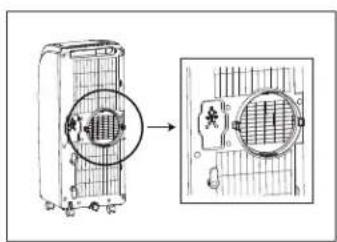
text_image
Diagram showing a device with a circular component and its corresponding magnified view, likely illustrating a process or assembly.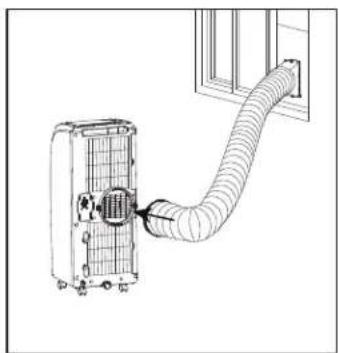
natural_image
Diagram of a wall-mounted air duct system with a grid-patterned panel and pipe connection (no text or symbols)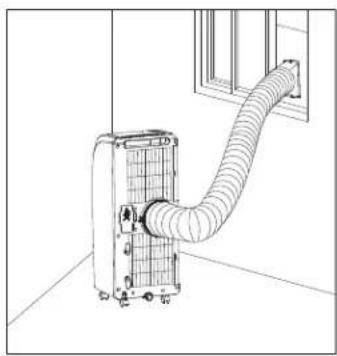
natural_image
Line drawing of a wall-mounted air conditioner unit with coiled tubing, mounted on a floor near a window (no text or symbols)ÉTAPE 6 - FIN DE L'INSTALLATION
AVERTISSEMENT
© BOUTON POWER (MISE SOUS TENSION)
GE Appliances, a Haier company
ÍNDICE
SEGURIDAD DEL ACONDICIONADOR DE AIRE 25
PIEZAS Y CARACTERÍSTICAS 26
text_image
F G D I H H Jtext_image
20" (51 cm)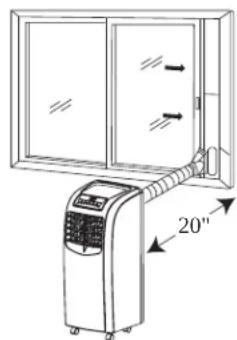
text_image
20"natural_image
Technical diagram of a rectangular structural component with a cutout and labeled point A (no text or symbols beyond label)A
natural_image
Diagram of a double-framed cabinet with two doors and a door, labeled A (no text or symbols on the cabinet itself)A
Panel principal de la ventana
Ventana deslizable horizontal
natural_image
Diagram of a double-framed cabinet with labeled component A, showing glass panels and door (no text or symbols beyond label)A
Panel principal de la ventana
text_image
Technical diagram showing a mechanical assembly with labeled components A and B, including zoomed-in insets for detail views.natural_image
Technical diagram of a window frame with an inset close-up showing a component detail (no text or symbols)© Manguera (extremo del conector)
PASO 5 - CONECTE LA MANGUERA DE ESCAPE PARA EL ACONDICIONADOR DE AIRE
natural_image
Technical illustration of a coiled pipe assembly with a magnified inset showing the internal structure (no text or symbols)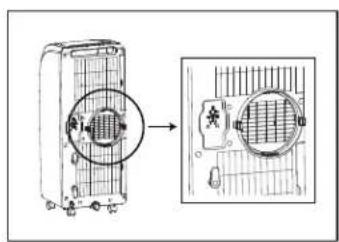
text_image
Diagram showing a device with a circular component and its internal grid, with an arrow pointing to the component's structure.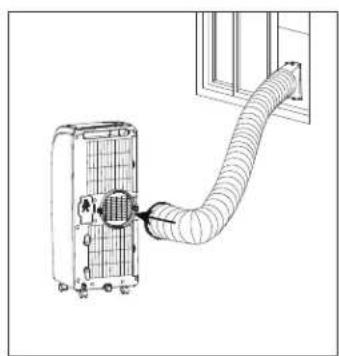
natural_image
Diagram of a wall-mounted air duct system with a grid-patterned panel and pipe connection (no text or symbols)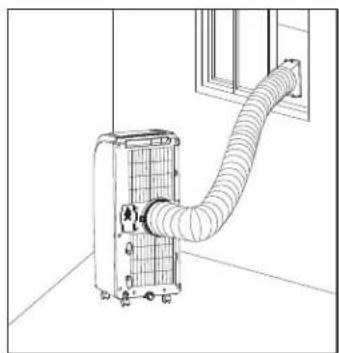
natural_image
Line drawing of an air conditioner unit with a coiled hose and ventilation duct, mounted near a window (no text or symbols)Εἰεῖοῦὸ ἐὸ ÷ ἀςὸ ἰὸ ὁεῖδι ÷ ἐν ἥλὰ ἐξαῖροῖ ἦྡ ὄδὶ ÷ ἀειῖν Ἐεῖς ἐζῶδ ἐδο ÷ δὲ ÷ ÷ ὁδὸ ἀσῶν ἀσεῖν ÷ ἐδὸ Ἄλὸ ÷ ἀλέδαῖν ÷ ἀλῆτὸ ἐδαῖν ἐδαῖν ἐδαῖν ἐδαῖν ἐδαῖν ἐδαῖν ἐδαῖν ἐδαῖν ἐδαῖν ἐδαῖν ἐδαῖν ἐδαῖν ἐδαῖν ἐδαῖν ἐδαῖν ὅδο ἀσῶν ἀσεῖν ἐδαῖν ἐδαῖν ἐδαῖν ἐδαῖν ἐδαῖν ἐδαῖν ἐδαῖν ἐδαῖν ἐδαῖν ἐδαῖν ἐδαῖν ἐδαῖν ἐδαῖν ἐδαῖ νος ἐδαῖ νος ἐδαῖ νος ἐδαῖ νος ἐδαῖ νος ἐδαῖ νος ἐδαῖ νος ἐδαῖ νος ἐδαῖ νος ἐδαῖ νος ἐδαῖ νος ἐδαῖ νος,
IMPORTANT
Do Not Return This Product To The Store
If you have a problem with this product, please call 1-877-337-3639 for the name and telephone number of the nearest authorized service center.
DATED PROOF OF PURCHASE REQUIRED FOR WARRANTY SERVICE