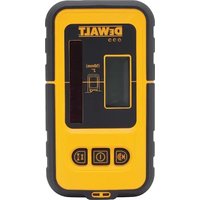
DW0892 - Laser level DEWALT - Free user manual and instructions
Find the device manual for free DW0892 DEWALT in PDF.


| Product Type | Digital Laser Sensor for Laser Level |
| Brand | DeWalt |
| Model | DW0892 |
| Power Source | 9V Battery (included) |
| Auto Shut-off | After 5 minutes of inactivity |
| Accuracy | Two modes: high precision and lower precision |
| Display | LCD screen with operation and volume icons |
| Audible Signal | Yes, adjustable via volume button |
| Compatibility | DeWalt DW088, DW089 lasers and other compatible lasers (excluding rotary) |
| Laser Class | Class 2 |
| Mounting | Integrated magnets and bracket for graded rod (bracket included? Not specified) |
| Usage | Indoor and outdoor, do not immerse |
| Operating Temperature | Not specified; avoid extreme temperatures |
| Dimensions | Not specified (approx. 15 x 8 x 3 cm) |
| Weight | Not specified (approx. 200 g with battery) |
| Maintenance | Clean with a soft, dry cloth; do not use solvents |
| Repairability | No user-serviceable parts except battery; contact an authorized service center |
| Warranty | 3-year limited, with one-year free maintenance contract and 90-day money-back guarantee |
| Standards | Compliant with FCC Part 15 and ICES-003 (Class B) |
| Included Accessories | 9V battery; optional mounting bracket (not mentioned as included) |
Frequently Asked Questions - DW0892 DEWALT
User questions about DW0892 DEWALT
0 question about this device. Answer the ones you know or ask your own.
Ask a new question about this device
Download the instructions for your Laser level in PDF format for free! Find your manual DW0892 - DEWALT and take your electronic device back in hand. On this page are published all the documents necessary for the use of your device. DW0892 by DEWALT.
USER MANUAL DW0892 DEWALT
DFWALT Industrial Tool Co., 701 East Joppa Road, Baltimore, MD 21286
(MAR13) Part No. N278820 DWU892 Copyright © 2012, 2013 DENWALT
The following are trademarks for one or more DWALT power tools: the yellow and black color scheme, the ^ D^ shaped air intake grill, the array of pyramids on the handgrip, the slit box configuration, and the array of loosing-shaped humpes on the surface of the tool.
Definitions: Safety Guidelines
The definitions below describe the level of severity for each signal word. Please read the manual and pay attention to these symbols.
DANGER: Indicates an imminently hazardous situation which, if not avoided, will result in death or serious injury.
WARNING: indicates a potentially hazardous situation which, if not avoided, could result in death or serious injury.
CAUTION: Indicates a potentially hazardous situation which, if not avoided, may result in minor or moderate injury.
NOTICE: Indicates a practice not related to personal injury which, if not avoided, may result in property damage.
IF YOU HAVE ANY QUESTIONS OR COMMENTS ABOUT THIS OR ANY DEWALT TOOL, CALL US TOLL FREE AT: 1-800-4-DEWALT (1-800-433-9258).

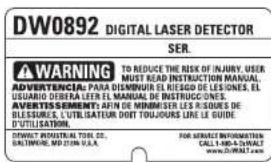
WARNING: To reduce the risk of injury, read the instruction manual.
Safety Instructions
WARNING! Read all safety warnings and all instructions. Failure to follow the warnings and instructions may result in electric shock, fire and/or serious injury.
SAVE ALL WARNINGS AND INSTRUCTIONS FOR FUTURE REFERENCE
General Safety Rules For Battery Operated Tools
WARNING! Read and understand all instructions. Failure to follow all instructions listed below may result in electric shock, fire and/or serious personal injury.
WORK AREA
- Keep your work area clean and well lit. Cluttered or dark areas invite accidents.
- Keep children away. Do not let children come into contact with the tool. Supervision is required for inexperience users.
- Use appropriate tool. The intended use is described in this instruction manual. Do not force small tools or attachments to do the job of a heavy-duty tool. The tool will do the job better and safer at the rate for which it was intended.
WARNING: The use of any accessory or attachment or performance of any operation with this tool, other than those recommended in this instruction manual may present a risk of personal injury.
The laser detector may not function properly in the presence of some high frequency fields.
ELECTRICAL SAFETY
- Use battery operated tool only with the specifically designed batteries. Use of any other batteries may create a risk of fire.
This Class B digital apparatus complies with Canadian ICES-003.
This device complies with Part 15 of the FCC Rules. Operation is subject to the following two conditions:
1) This device may not cause harmful interference, and 2) This device must accept any interference received, including interference that may cause undesired operation.
NOTE: This equipment has been tested and found to comply with the limits for a Class B digital device, pursuant to Part 15 of the FCC Rules. These limits are designed to provide reasonable protection against harmful interference in a residential installation. This equipment generates, uses and can radiate radio frequency energy and, if not
installed and used in accordance with the instructions, may cause harmful interference to radio communications. However, there is no guarantee that interference will not occur in a particular installation. If this equipment does cause harmful interference to radio or television reception, which can be determined by turning the equipment off and on, the user is encouraged to try to correct the interference by one or more of the following measures:
Reorient or relocate the receiving antenna.
- Increase the separation between the equipment and receiver.
- Connect the equipment into an outlet on a circuit different from that to which the receiver is connected.
- Consult the dealer or an experienced radio/TV technician for help.
Additional Safety Rules For Batteries
This tool is powered by one 9 volt battery.
WARNING: Batteries can explode, or leak, and can cause injury or fire. To reduce this risk:
- Carefully follow all instructions and warnings on the battery label and package.
Always insert batteries correctly with regard to polarity (+ and -), marked on the battery and the equipment.
Do not short battery terminals.
Do not charge batteries.
- Remove dead batteries immediately and dispose of per local codes.
Do not dispose of batteries in fire.
- Keep batteries out of reach of children.
- Remove batteries if the device will not be used for several months.
TOOL USE AND CARE
- Do not use tool if switch does not turn it on or off. Any tool that cannot be controlled with the switch is dangerous and must be repaired.
- Store idle tools out of the reach of children and do not allow persons unfamiliar with the power tool or these instructions to operate the tool. Power tools are dangerous in the hands of untrained users.
- Use only accessories that are recommended by the manufacturer for your model. Accessories that may be suitable for one tool, may become hazardous when used on another tool.
SERVICE
- Have your tool serviced by a qualified repair person using only identical replacement parts. This will ensure that the safety of the tool is maintained.
Additional Safety Rules For Battery Operated Tools
The label on your tool may include the following symbols. The symbols and their definitions are as follows:
V. . . . . . . . . . . . . . . . . . . . . . . . . . . . . . . . . . . . . . . . . . . . . . . . . . . . . . . . . . . . . . . . . . . . . . . . .
bZ hertz
min.........minutes
---or DC...direct current
Class I Construction
(grounded)
Class I Construction
double insulated)
..min. .per minute
IPM............impacts per minute
SPM.........strokes per minute
A..amperes
W. warts
or AC..alternating current
≈ or AC/DC....alternating or direct current
no..no load speed
n............rated speed
- .earthing terminal
..safety alert symbol
BPM............boats per minute
RPM.......revolutions per minute
sflm.........surface feet per minute
SAVE THESE INSTRUCTIONS FOR FUTURE USE
COMPONENTS (Fig. 1, 2)
WARNING: Never modify the power tool or any part of it. Damage or personal injury could result.
A. LCD display window
B. Speaker
C. Battery compartment cover
D. Marking notches
E. Power button
F. Volume Button
G. Accuracy button
H. Magnets
The detector gives both visual signals through the LCD display window (A) and audio signals through the speaker (B) to indicate the location of the laser beam.
The DEWALT Digital Laser Detector can be used with or without the detector clamp. When used with the clamp, the detector can be positioned on a grade rod, leveling pole, stud or post.
INTENDED USE
The DEWALT Digital Laser Detector helps in locating a laser beam emitted by the laser in bright light conditions or over long distances. The detector can be used in both indoor and outdoor situations where it is difficult to see the laser beam.
The detector is designed exclusively for use with the DW088 and DW089 line laser and other compatible DeWALT line lasers. It is not for use with rotating lasers.
DO NOT use under wet conditions or in presence of flammable liquids or gases.
The digital laser detector is a professional laser accessory.
DO NOT let children come into contact with the attachment and laser. Supervision is required when inexperienced operators use this laser.
ASSEMBLY AND ADJUSTMENTS
WARNING: To reduce the risk of injury, turn unit off and disconnect it from power source before installing and removing accessories, before adjusting or when making repairs. An accidental start-up can cause injury.
Batteries (Fig. 1)
The digital laser detector is powered by a 9-volt battery. To install the battery provided, lift up on the battery compartment cover (C). Place the 9-volt battery in the compartment, aligning the battery as shown on the embossed icon.
Detector Controls (Fig. 1)
The detector is controlled by the power button (E) and the volume button (F).
When the power button is pushed once, the detector is turned on. The top of the sensor window shows the ON icon and the volume icon.
The DeWALT Digital Laser Detector also has an auto shut-off feature. If a laser beam does not strike the beam detection window, or if no buttons are pressed, the detector will shut itself off in about 5 minutes.
To turn off the audible signal push the button again; the volume icon will disappear.
The detector powers up in the narrow accuracy setting (icon appears in the lower left corner). Press the accuracy button (G) once to change to wide accuracy setting (icon now appears in the lower right corner).
Accuracy
The detector provides two accuracy settings, wide and narrow. In the wide setting, the detector provides a larger tolerance for indicating that the detector is "on grade." In the narrow setting, this tolerance is reduced for more accurate indication of "on grade."
For the most accurate results, start the work using the wide setting and finish in the narrow setting.
Magnets (Fig. 1)
The magnets (H) allow the detector to be mounted to the metal tracks during the installation of a suspended ceiling.
OPERATION
WARNING: To reduce the risk of injury, turn unit off and disconnect it from power source before installing and removing accessories, before adjusting or when making repairs. An accidental start-up can cause injury.
Instructions for Use
WARNING:
This detector should only be used to detect a Class 2 laser.
- Always observe the safety instructions and applicable regulations for this detector and for the laser.
Before first use, remove and discard the protective tape from the screens.
CAUTION: LASER RADIATION - DO NOT STARE INTO LASER'S BEAM. CLASS 2 LASER PRODUCT.
Detector Operation (Fig. 1)
-
Set up and position the laser.
-
Tum the detector on by pressing the power button (E).
- Position the detector so that the sensor window (I) is facing the laser beam. Move the detector up or down within the approximate area of the beam, until you have centered the detector. For information about the display window indicators and the audible signal indicators, refer to the table titled Indicators.
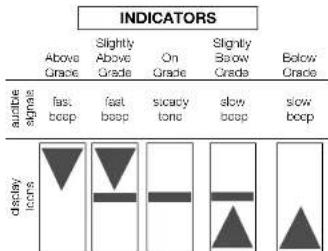
- Use the marking notches (D) to accurately mark the position of the laser beam.
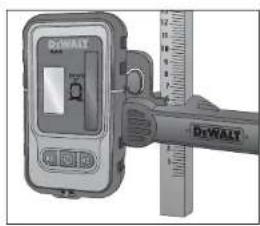
Mounting on a Grade Rod (Fig. 1, 2)
- To secure your detector to a grade rod, first attach the detector to the clamp by pushing in on the clamp latch (J). Slide the tracks (K) on the clamp around the rail (L) on the detector until the latch (M) on the clamp pops into the latch hole (N) on the detector.
- Open the jaws of the clamp by turning the clamp knob (O) counterclockwise.
- Position the detector at the height needed and turn the clamp knob clockwise to secure the clamp on the rod.
- To make adjustments in height, slightly loosen the clamp, reposition and relighten.
MAINTENANCE
WARNING: To reduce the risk of injury, turn unit off and disconnect it from power source before installing and removing accessories, before adjusting or when making repairs. An accidental start-up can cause injury.
Your attachment has been designed to operate over a long period of time with a minimum of maintenance. Continuous satisfactory operation depends upon proper tool care and regular cleaning.
Detector Service
Except for batteries, there are no user serviceable parts in the Digital Laser Detector. Do not disassemble the unit. Unauthorized tampering with the laser detector will void all warranties.
Detector Cleaning and Storage
- Dirt and grease may be removed from the exterior of the detector using a cloth or soft, non-metallic brush.
- The Dr-WALT digital laser detector is rain resistant but not immersible. Do not pour water on the unit or submerge it under water.
- The best storage place is one that is cool and dry—away from direct sunlight and excess heat or cold.
Detector Troubleshooting
THE DETECTOR WILL NOT TURN ON
- Press and release the power button.
- Check to see that the battery is in place and in the proper position.
If the detector is very cold, allow it to warm up in a heated area. - Replace the 9-volt battery. Turn the unit on.
If the detector still does not turn on, take the detector to a DFWALT service center.
THE DETECTOR'S SPEAKER MAKES NO SOUND
- Ensure that the detector is on.
Press the volume button. It will toggle on and off. - Ensure that the laser is turned on and that it is emitting a laser beam.
If the detector is still not making any sound, take it to a D-WALT service center.
THE DETECTOR DOES NOT RESPOND TO THE BEAM FROM ANOTHER LASER UNIT
- The DWALT Digital Laser Detector has been designed to work only with the DW088 and the DW089 and certain other compatible line lasers.
THE DETECTOR GIVES OFF A TONE BUT THE LCD DISPLAY WINDOW DOES NOT FUNCTION
If the detector is very cold, allow it to warm up in a heated area.
- If the LCD display window is still not functioning, take the detector to a DEWALT service center.
BRIGHT LIGHT SHINING ON DETECTOR CAUSES CONTINUOUS "ON-GRADE" SIGNAL
- In the presence of very intense ambient light, the detector may give a false or erratic indication of volv.
- Reposition the detector out of the intense light or shade the sensor window (I) to resume normal operation.
Cleaning
WARNING: Blow dirt and dust out of all air vents with clean, dry air at least once a week. To minimize the risk of eye injury, always wear ANSI Z87.1 approved eye protection when performing this.
WARNING: Never use solvents or other harsh chemicals for cleaning the non-metallic parts of the tool. These chemicals may weaken the plastic materials used in these parts. Use a cloth dampened only with water and mild soap. Never let any liquid get inside the tool; never immerse any part of the tool into a liquid.
Accessories
WARNING: Since accessories, other than those offered by DEWALT, have not been tested with this product, use of such accessories with this tool could be hazardous. To reduce the risk of injury, only DEWALT recommended accessories should be used with this product.
Recommended accessories for use with your tool are available at extra cost from your local dealer or authorized service center, if you need assistance in locating any accessory, please contact DEWALT Industrial Tool Co., 701 East Joppa Road, Baltimore, MD 21286, call 1-800-4-DEWALT (1-800-433-9258) or visit our website: www.dewalt.com.
Repairs
To assure product SAFETY and RELIABILITY, repairs, maintenance and adjustment (including brush inspection and replacement) should be performed by a DEWAL factory service center,
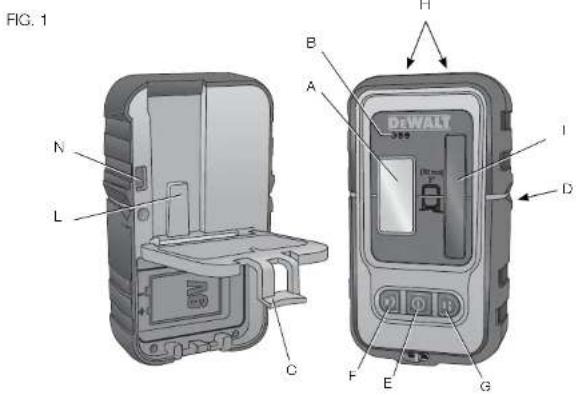
FIG. 2

a DEWALT authorized service counter or other qualified service personnel. Always use identical replacement parts.
Register Online
Thank you for your purchase. Register your product now for
WARRANTY SERVICE: Registering your product will help you obtain more efficient warranty service in case there is a problem with your product.
- CONFIRMATION OF OWNERSHIP: In case of an insurance loss, such as fire, flood or theft, your registration of ownership will serve as your proof of purchase.
FOR YOUR SAFETY: Registering your product will allow us to contact you in the unlikely event a safety notification is required under the Federal Consumer Safety Act.
Register online at www.dewalt.com/register.
Three Year Limited Warranty
DEWALT will repair, without charge, any defects due to faulty materials or workmanship for three years from the date of purchase. This warranty does not cover part failure due to normal wear or tool abuse. For further detail of warranty coverage and warranty repair information, visit www.dewalt.com or call 1-800-4-DEWALT (1-800-433-9258). This warranty does not apply to accessories or damage caused where repairs have been made or attempted by others. This warranty gives you specific legal rights and you may have other rights which vary in certain states or provinces.
In addition to the warranty, DeWALT tools are covered by our:
1 YEAR FREE SERVICE
DLWALT will maintain the tool and replace worn parts caused by normal use, for free, any time during the first year after purchase.
90 DAY MONEY BACK GUARANTEE
If you are not completely satisfied with the performance of your DEWALT Power Tool, Laser, or Nailer for any reason, you can return it within 90 days from the date of purchase with a receipt for a full refund - no questions asked.
LATIN AMERICA: This warranty does not apply to products sold in Latin America. For products sold in Latin America, see country specific warranty information contained in the packaging, call the local company or see website for warranty information.
FREE WARNING LABEL REPLACEMENT: If your warning labels become illegible or are missing, call 1-800-4 DEWALT (1-800-433 9258) for a free replacement.