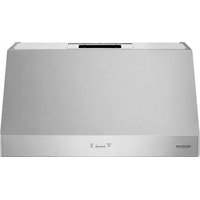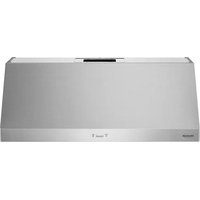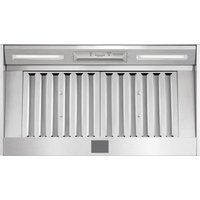
SKSHI3601S - Fan SIGNATURE - Free user manual and instructions
Find the device manual for free SKSHI3601S SIGNATURE in PDF.


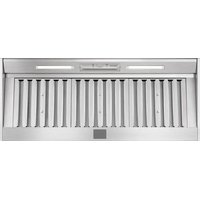
| Product Type | Range Hood |
| Brand | Signature |
| Model | SKSHI3601S |
| Width | 36 inches (91.4 cm) |
| Number of Filters | 2 baffle filters |
| Lighting | 2 LED light bars (2 levels: high/low) |
| Fan Speeds | 5 speeds (adjustable from 1 to 5) |
| Maximum Airflow (CFM) | 600 CFM (adjustable to 390 or 290 CFM) |
| Smart Features | Built-in Wi-Fi, compatible with LG ThinQ app |
| Delay Shut-Off Function | Yes (5 minutes, activated by pressing and holding for 3 seconds) |
| Filter Cleaning Reminder | Yes (after 60 hours of use, reset by pressing the – button for 3 seconds) |
| Surface Material | Brushed stainless steel |
| Power Supply | 120 V, 60 Hz, AC |
| Wi-Fi Frequency | 2.4 GHz only |
| Limited Warranty | 3 years (parts and labor) |
| Maintenance | Clean filters every 30 days; clean grease cup regularly |
| Safety | Automatic shut-off in case of overheating; installation and grounding instructions |
Frequently Asked Questions - SKSHI3601S SIGNATURE
User questions about SKSHI3601S SIGNATURE
0 question about this device. Answer the ones you know or ask your own.
Ask a new question about this device
Download the instructions for your Fan in PDF format for free! Find your manual SKSHI3601S - SIGNATURE and take your electronic device back in hand. On this page are published all the documents necessary for the use of your device. SKSHI3601S by SIGNATURE.
USER MANUAL SKSHI3601S SIGNATURE
Scan to see the online manual.

SIGNATURE
KITCHEN SUITE
OWNER'S MANUAL
HOOD
Read this owner's manual thoroughly before operating the appliance and keep it handy for reference at all times.
ENGLISH
SKSHI3601S SKSHI4801S

MFL70282906
Rev.01_031924
www.signaturekitchensuite.com
Copyright © 2024 Signature Kitchen Suite. All Rights Reserved.
natural_image
Pure geometric diagram with intersecting lines and circles, no text or symbols present2
TABLE OF CONTENTS
3 IMPORTANT SAFETY INSTRUCTIONS
3 READ ALL INSTRUCTIONS BEFORE USE
3 WARNING STATEMENTS
5 CAUTION STATEMENTS
6 PRODUCT OVERVIEW
6 Product Features
7 OPERATION
7 Control Panel
8 SMART FUNCTIONS
8 LG ThinQ Application
11 MAINTENANCE
11 Care and Cleaning
13 TROUBLESHOOTING
13 Before Calling for Service
15 LIMITED WARRANTY
15 USA
17 CANADA
natural_image
Pure geometric diagram with intersecting lines and circles, no text or symbols presentIMPORTANT SAFETY INSTRUCTIONS
READ ALL INSTRUCTIONS BEFORE USE
Safety Messages
Your safety and the safety of others are very important.
We have provided many important safety messages in this manual and on your appliance. Always read and follow all safety messages.

This is the safety alert symbol.
This symbol alerts you to potential hazards that can kill or injure you and others. All safety messages will follow the safety alert symbol and either the word WARNING or CAUTION.
These words mean:

WARNING
You may be killed or seriously injured if you do not follow instructions.

CAUTION
You may be injured or cause damage to the product if you do not follow instructions.
All safety messages will tell you what the potential hazard is, tell you how to reduce the chance of injury, and tell you what may happen if the instructions are not followed.
READ AND SAVE THESE INSTRUCTIONS
WARNING STATEMENTS

WARNING
• To reduce the risk of explosion, fire, death, electric shock, scalding or injury to persons when using this product, follow basic precautions, including the following:
Installation
- If you receive a damaged product, immediately contact your dealer or builder. Do not install or use a damaged hood.
- Make sure that the range hood has been properly installed and grounded by a qualified installer according to the accompanying installation instructions. Have the installer show you the location of the fuse or junction box so that you know where and how to turn the power off.
- Do not install, repair or replace any part of the range hood unless specifically recommended in the literature accompanying it. A qualified service technician should perform all other service.
- Do not tamper with the controls.
- If the cooktop and range hood are near a window, use an appropriate window treatment. Avoid long drapes or other window coverings that could blow over the cooktop and hood, resulting in a fire hazard.
- The minimum vertical distance between the cooktop surface and the exterior part of the hood must be no less than 26" (66 cm). The required vertical distance may be longer for the range or cooktop being used. Consult the range or cooktop installation instructions for the minimum vertical distance from the appliance being used.
- Do not mount in a fire-rated wall.
- To Reduce The Risk Of Fire Or Electric Shock, Do Not Use This Fan With Any Solid-State Speed Control Device.
4 IMPORTANT SAFETY INSTRUCTIONS
Operation
• To avoid the possibility of explosion or fire, do not store or use combustible, flammable or explosive vapors and liquids (such as gasoline) inside or in the vicinity of this or any other appliance. Also keep items that could explode, such as aerosol cans, away from cooktop burners, ovens and range hoods. Do not store flammable or explosive materials in adjacent cabinets or areas.
• TO REDUCE THE RISK OF FIRE, ELECTRIC SHOCK, OR INJURY TO PERSONS, OBSERVE THE FOLLOWING:
- Use this unit only in the manner intended by the manufacturer. If you have questions, contact the manufacturer.
-
Before servicing or cleaning unit, switch the power off at the service panel and lock the service panel door to prevent the power from being switched on accidentally. When the service panel door cannot be locked, securely fasten a prominent warning device, such as a tag, to the service panel.
-
Use the range hood only for its intended purpose as outlined in this manual. DO NOT use this range hood to vent hazardous or explosive materials or vapors. If you have questions, contact the manufacturer.
- Never allow the filters to become blocked or clogged. Do not allow foreign objects, such as cigarettes or napkins, to be sucked into the hood.
• Always run the fan(s) whenever the cooktop is operating. - Do not leave children alone or unattended in the area where the cooktop and range hood are in use. Never allow children to sit or stand on an appliance. Do not let children play with a range, cooktop or range hood. Do not store items of interest to children above or around the cooktop, range or range hood.
• To avoid the possibility of explosion or fire, do not store or use combustible, flammable or explosive vapors and liquids (such as gasoline) inside or in the vicinity of this or any other appliance. Also keep items that could explode, such as aerosol cans, away from cooktop burners, ovens and range hoods. Do not store flammable or explosive materials in adjacent cabinets or areas.
• To reduce the risk of a range-top grease fire:
- Never leave surface units unattended at high settings. Boil-overs cause smoking and greasy spill-overs that may ignite. Heat oils slowly on low or medium settings.
- Always turn the hood ON when cooking at high heat or when flambéing food (i.e. Crepes Suzette, Cherries Jubilee, Peppercorn Beef Flambé).
- Clean the ventilating fans frequently. Grease should not be allowed to accumulate on the fan or filter.
- Use the proper pan size. Always use cookware appropriate for the size of the surface element.
• TO REDUCE THE RISK OF INJURY TO PERSONS IN THE EVENT OF A RANGE TOP GREASE FIRE:
- SMOTHER FLAMES with a close-fitting lid, cookie sheet or metal tray, then turn off the burner. BE CAREFUL TO PREVENT BURNS. If the flames do not go out immediately, EVACUATE AND CALL THE FIRE DEPARTMENT.
- NEVER PICK UP A FLAMING PAN - you may be burned.
- DO NOT USE WATER, including wet dish cloths or towels - a violent steam explosion may result.
- Use a fire extinguisher ONLY if:
You have a Class ABC extinguisher, and you already know how to operate it.
The fire is small and contained in the area where it started.
The fire department is being called.
You can fight the fire with your back to an exit.
• TO REDUCE THE RISK OF FIRE, ELECTRIC SHOCK, OR INJURY TO PERSONS, OBSERVE THE FOLLOWING:
- Use this unit only in the manner intended by the manufacturer. If you have questions, contact the manufacturer.
• THIS IS A FAN - NOT A TOY!
• TO REDUCE THE RISK OF PERSONAL INJURY AND ELECTRIC SHOCK, IT SHOULD NOT BE PLAYED WITH OR PLACED WHERE SMALL CHILDREN CAN REACH IT.
- Do not operate any fan with a damaged cord or plug. Discard fan or return to an authorized service facility for examination and/or repair.
Maintenance
• To avoid the risk of electric shock, before cleaning the range hood, turn off the main power switch.
• TO REDUCE THE RISK OF FIRE, ELECTRIC SHOCK, OR INJURY TO PERSONS, OBSERVE THE FOLLOWING:
- Before servicing or cleaning the product, switch power off at the service panel and lock the service panel door to prevent the power from being switched on accidentally. When the service panel door cannot be locked, securely fasten a prominent warning device, such as a tag, to the service panel.
CAUTION STATEMENTS

CAUTION
- To reduce the risk of minor or moderate injury to persons, malfunction, or damage to the product or property when using this product, follow basic precautions, including the following:
Operation
- For general ventilating use only. DO NOT use to exhaust hazardous or explosive materials and vapors.
SAVE THESE INSTRUCTIONS
6 PRODUCT OVERVIEW
PRODUCT OVERVIEW
Product Features
Parts
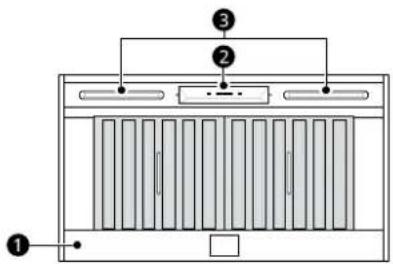
①Hood
②Control Panel
③LED Strip Light
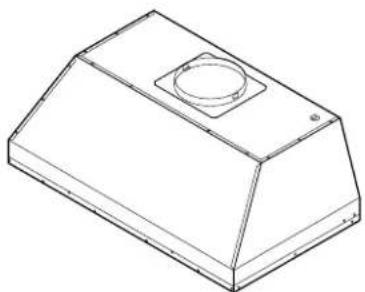
Product Specifications
natural_image
Isometric line drawing of a rectangular mechanical housing with a circular recess and mounting holes (no text or symbols)| Model SKSHI3601S SKSHI4801S | ||
| Width 36" | 48" | |
| Filter 2 ea | 3 ea | |
| Light 2 ea | (LED strip type) | |
OPERATION
Control Panel
Control Panel Features
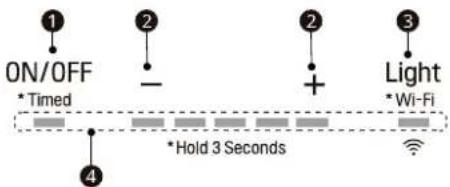
①Power/Delay Off Button
Power Button Function
- Press this button to turn power on or off for entire hood (fan and light).
• The hood remembers the last speed and light level when it is turned off.
Delay Off Button Function
- While the fan is on, press and hold this button for three seconds. The fan speed changes to level 1 and the 5 minute delay off timer starts.
LEDs illuminate and slowly blink in accordance with the time remaining until the fan and light automatically turn off.
Pressing the button while the delay off function is enabled will turn the hood off and cancel the delay off function.
②Speed Selection Button
Fan Speed Decrease Button (-)
- Press this button to decrease the fan speed from level 5 to level 1.
• To turn the fan off, press this button when the fan speed is at level 1.
Fan Speed Increase Button (+)
- Press this button to increase the fan speed from level 1 to level 5.
- When the hood is off, press this button to turn the fan on at level 1.
③Light Button
• The light has two levels: high and low.
- When the light is off, press this button repeatedly to select high, low and off.
- Press and hold this button for 3 seconds to connect to a home Wi-Fi network. See SMART FUNCTIONS for more information.
④ Display Indicators
Baffle Filter Clean Reminder (always enabled)
• After 60 hours of fan usage, the display indicators will begin to slowly blink indicating it is time to clean the baffle filters.
- To reset the baffle filter clean reminder, press the - button ② for three seconds. All LED indicators will blink two times confirming the 60-hour timer has been reset.
8 SMART FUNCTIONS
SMART FUNCTIONS
LG ThinQ Application
This feature is only available on models with Wi-Fi.
The LG ThinQ application allows you to communicate with the appliance using a smartphone.
LG ThinQ Application Features
- Settings
- Allows you to set the fan speed and light level on the hood from the application.
• Monitoring
- This function helps you check the current status of the hood.
NOTE
- If you change your wireless router, Internet service provider, or password, delete the connected appliance from the LG ThinQ application and connect it again.
• To disconnect the appliance from the Wi-Fi network, delete the hood from the list of connected products in the LG ThinQ application.
• This information is current at the time of publication. The application is subject to change for product improvement purposes without notice to users.
Installing LG ThinQ Application and Connecting an LG Appliance
Models with QR Code
Scan the QR code attached to the product using the camera or a QR code reader application on your smartphone.
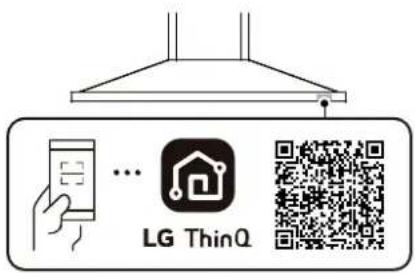
Models without QR Code
1 Search for and install the LG ThinQ application from the Google Play Store or Apple App Store on a smartphone.
2 Run the LG ThinQ application and sign in with your existing account or create an LG account to sign in.
3 Touch the add (+) button on the LG ThinQ application to connect your LG appliance. Follow the instructions in the application to complete the process.
NOTE
- To verify the Wi-Fi connection, check that the 📞 icon on the control panel is lit.
- The appliance supports 2.4 GHz Wi-Fi networks only. To check your network frequency, contact your Internet service provider or refer to your wireless router manual.
- LG ThinQ is not responsible for any network connection problems or any faults, malfunctions, or errors caused by network connection.
• The surrounding wireless environment can make the wireless network service run slowly. - If the distance between the appliance and the wireless router is too far, the signal becomes weak. It may take a long time to connect or fail to install the application.
- If the appliance is having trouble connecting to the Wi-Fi network, it may be too far from the router. Purchase a Wi-Fi repeater (range extender) to improve the Wi-Fi signal strength.
- The network connection may not work properly depending on the Internet service provider.
- The Wi-Fi may not connect or the connection may be interrupted because of the home network environment.
- If the appliance cannot be connected due to problems with the wireless signal transmission, unplug the appliance and wait about a minute before trying again.
- If the firewall on your wireless router is enabled, disable the firewall or add an exception to it.
- The wireless network name (SSID) should be a combination of English letters and numbers. (Do not use special characters.)
natural_image
Pure geometric diagram with intersecting lines and circles, no text or symbols present- Smartphone user interface (UI) may vary depending on the mobile operating system (OS) and the manufacturer.
- If the security protocol of the router is set to WEP, network setup may fail. Change the security protocol (WPA2 is recommended), and connect the product again.
Wireless LAN Module Specifications
| Frequency Range | 2412 MHz - 2462 MHz |
| Output Power (Max) | < 30 dBm |
FCC Notice
The following notice covers the transmitter module contained in this product.
This equipment has been tested and found to comply with the limits for a Class B digital device, pursuant to Part 15 of the FCC Rules. These limits are designed to provide reasonable protection against harmful interference in a residential installation. This equipment generates, uses, and can radiate radio frequency energy and, if not installed and used in accordance with the instructions, may cause harmful interference to radio communications. However, there is no guarantee that interference will not occur in a particular installation. If this equipment does cause harmful interference to radio or television reception, which can be determined by turning the equipment off and on, the user is encouraged to try to correct the interference by one or more of the following measures:
- Reorient or relocate the receiving antenna.
- Increase the separation between the equipment and the receiver.
- Connect the equipment into an outlet on a circuit different from that to which the receiver is connected.
- Consult the dealer or an experienced radio/TV technician for help.
This device complies with part 15 of the FCC Rules. Operation is subject to the following two conditions:
(1) This device may not cause harmful interference and
(2) This device must accept any interference received, including interference that may cause undesired operation.
Any changes or modifications in construction of this device which are not expressly approved by the party responsible for compliance could void the user's authority to operate the equipment.
FCC RF Radiation Exposure Statement
This equipment complies with FCC radiation exposure limits set forth for an uncontrolled environment. This transmitter must not be co-located or operating in conjunction with any other antenna or transmitter.
This equipment should be installed and operated with a minimum distance of 20 cm (7.8 inches) between the antenna and your body. Users must follow the specific operating instructions for satisfying RF exposure compliance.
Industry Canada Statement
This device contains licence-exempt transmitter(s)/receiver(s) that comply with Innovation, Science and Economic Development Canada's licence-exempt RSS(s). Operation is subject to the following two conditions:
(1) This device may not cause interference.
(2) This device must accept any interference, including interference that may cause undesired operation of the device.
IC Radiation Exposure Statement
This equipment complies with IC radiation exposure limits set forth for an uncontrolled environment.
This equipment should be installed and operated with a minimum distance of 20 cm (7.8 inches) between the antenna and your body.
NOTE
- THE MANUFACTURER IS NOT RESPONSIBLE FOR ANY RADIO OR TV INTERFERENCE CAUSED BY UNAUTHORIZED MODIFICATIONS TO THIS EQUIPMENT. SUCH MODIFICATIONS COULD VOID THE USER'S AUTHORITY TO OPERATE THE EQUIPMENT.
Open Source Software Notice Information
To obtain the source code that is contained in this product, under GPL, LGPL, MPL, and other open source licenses that have the obligation to disclose
10 SMART FUNCTIONS
source code, and to access all referred license terms, copyright notices and other relevant documents, please visit https://opensource.lge.com.
SIGNATURE KITCHEN SUITE will also provide open source code to you on CD-ROM for a charge covering the cost of performing such distribution (such as the cost of media, shipping, and handling) upon email request to opensource@lge.com.
This offer is valid to anyone in receipt of this information for a period of three years after our last shipment of this product.
MAINTENANCE
Care and Cleaning
Surface Maintenance
Periodically clean the surface of the hood with hot soapy water and a clean cotton cloth. Do not use corrosive or abrasive detergent, or steel wool/scouring pads which will scratch and damage the surface. Do not use products containing chlorine bleach or citrus-based cleaners.
For heavier soil use a liquid degreaser.
After cleaning, you may use non-abrasive stainless steel polish or cleaners to polish and buff out the stainless luster and grain. Using a clean microfiber or cotton cloth, scrub lightly and with the grain.
natural_image
Technical line drawing of a rectangular air vent with internal grating and airflow direction indicated by arrows (no text or symbols)- Follow these steps in reverse to reassemble the filter.
Cleaning the Baffle Filters
The filters are intended to trap residue and grease from cooking. Although the filters should never need replacing, they are required to be cleaned every 30 days or when the Clean Filter Indicator is illuminated on the liner controls
Remove and clean the filters by hand or in a dishwasher on low heat. If the filters are heavily soiled, spray them with a degreasing detergent and leave them to soak.
Dry filters and re-install before using hood.
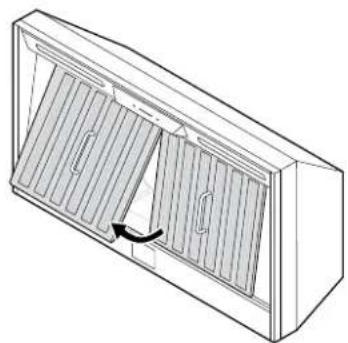
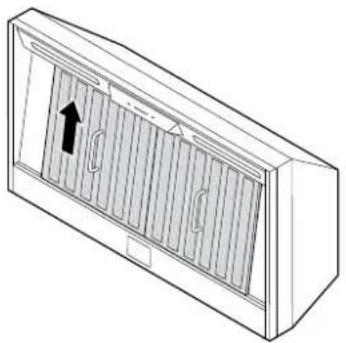
Removing Filters
1 Hold the handle and lift the filter upward.
natural_image
Line drawing of a rectangular air vent with ventilation grilles and airflow direction arrow (no text or symbols)Cleaning the Grease Tray
The grease tray is intended to catch residue and grease that may drip from the baffle filters.
The grease tray should be cleaned when baffle filters are cleaned. Clean the grease tray by soaking in hot soapy water and gently scrubbing any residue off with a soft terry cloth. Dry grease tray and reinstall before using hood.
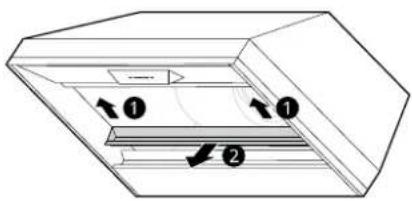
Removing the Grease Tray
Grease tray has a hooked lip that attaches to bottom panel top edge.
Remove grease tray by:
1 Pull up on tray to release from bottom panel.

2 Pull tray out of liner body. ②
2 Pull the bottom of the filter forward and remove it.

natural_image
Pure geometric diagram with intersecting lines and circles, no text or symbols present12 MAINTENANCE
Checking Max CFM Level
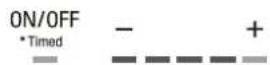
1 With the hood off, press and hold the power button for three seconds. The indicator lights will light up to show the maximum CFM level of the hood.
• SKSHI3601S:
- 5 indicator lights: default max. CFM (600)
- 4 indicator lights: max. 390 CFM
- 3 indicator lights: max. 290 CFM
• SKSHI4801S:
- 5 indicator lights: default max. CFM (1200)
- 4 indicator lights: max. 590 CFM
- 3 indicator lights: max. 390 CFM
2 The number of fan speed settings depends on the max CFM setting.
SKSHI3601S: 390 CFM = max. 4 speeds and
290 CFM = max. 3 speeds
SKSHI4801S: 590 CFM = max. 4 speeds and
390 CFM = max. 3 speeds
natural_image
Pure geometric diagram with intersecting lines and circles, no text or symbols presentTROUBLESHOOTING
Before Calling for Service
Parts and Features
| Problem Possible | Cause & Solution |
| After installation, the appliance doesn't work. | The power source is not turned ON.• Make sure the circuit breaker and the appliance's power is ON. |
| The power cord and the cable locking connector are not connected properly.• Make sure the power cord is properly connected to the appliance. | |
| Lights work, but blower is not turning. | The thermally protected system detects if the blower is too hot to operate and shuts the blower down.• The blower will function properly after the thermally protected system cools down. |
| The appliance is vibrating. | The blower is not securely in place.• Tighten the screws holding the blower in place. |
| Damaged blower wheel• Call a SIGNATURE KITCHEN SUITE Customer Information Center at 1-855-790-6655 (U.S.A.) or 1-888-289-2802 (Canada). | |
| The appliance is not secured in place.• Check the installation of the hood. | |
| The blower is working, but the lights are not. | The LED light connector is disconnected or the LED light is defective.• Call a SIGNATURE KITCHEN SUITE Customer Information Center at 1-855-790-6655 (U.S.A.) or 1-888-289-2802 (Canada). |
| The speed levels of the blower sound the same. | Using the wrong size of ducting• Change the ducting to at least 8" round or 3-1/4" x 10" rectangular for single blower or 10" round for dual blower. |
| The hood is not venting out properly. | The hood might be hanging too far above the cooktop.• Adjust the distance between the cooktop and the bottom of the hood to within 26" to 36". |
| The wind from the opened windows or opened doors in the surrounding area are affecting the ventilation of the hood.• Close all windows and doors to eliminate the outside airflow. | |
| Blockage in the duct opening or ductwork.• Clear any blockages from the ductwork or duct opening. | |
| The direction of duct opening is against the wind.• Adjust the duct opening direction. | |
| Using the wrong size of ducting.• Change the ducting to the correct size. | |
| Baffle filter is vibrating. | Baffle filter is loose.• Adjust or change the filter. |
| The appliance turns on by itself. | A spotlight or kitchen lamp is shining directly onto the switch controls.• The switch controls are light sensitive. A light source aimed directly at the switch controls may disrupt switch functions. |
14 TROUBLESHOOTING
Wi-Fi
| Problem Possible | Cause & Solution |
| Trouble connecting appliance and smartphone to Wi-Fi network | The password for the Wi-Fi network was entered incorrectly. · Delete your home WI-FI network and begin the connection process again. |
| Mobile data for your smartphone is turned on. · Turn off the Mobile data on your smartphone before connecting the appliance. | |
| The wireless network name (SSID) is set incorrectly. · The wireless network name (SSID) should be a combination of English letters and numbers. (Do not use special characters.) | |
| The router frequency is not 2.4 GHz. · Only a 2.4 GHz router frequency is supported. Set the wireless router to 2.4 GHz and connect the appliance to the wireless router. To check the router frequency, check with your Internet service provider or the router manufacturer. | |
| The appliance and the router are too far apart. · If the appliance is too far from the router, the signal may be weak and the connection may not be configured correctly. Move the router closer to the appliance or purchase and install a Wi-Fi repeater. | |
| During Wi-Fi setup, the app is requesting a password to connect to the product (on certain phones). · Locate the network name which starts with "LG" under Settings > Networks. Note the last part of the network name. - If the network name looks like LGE_Appliance_XX-XX-XX, enter lge12345. - If the network name looks like LGE_Appliance_XXXX, enter XXXX twice as your password. For example, if the network name appears as LGE_Appliance_8b92, then you would enter 8b928b92 as your password. In this instance, the password is case sensitive and the last 4 characters are unique to your appliance. |
LIMITED WARRANTY
USA
TERMS AND CONDITIONS
Should your SIGNATURE KITCHEN SUITE Hood ("Product") fail due to a defect in materials or workmanship under normal and proper use, during the warranty period set forth below, SIGNATURE KITCHEN SUITE will, at its option, repair or replace the Product. This limited warranty is valid only to the original retail purchaser of the Product ("You") and applies only when purchased lawfully and used within the United States including U.S. Territories.
Warranty Period Scope of Warranty
Three (3) years from date of original retail purchase Parts and Labor (internal / functional parts only)
- Replacement Products and parts are warranted for the remaining portion of the original warranty period or ninety (90) days, whichever is greater.
- Replacement Products and parts may be new, reconditioned, refurbished, or otherwise factory remanufactured.
- Replaced Product or part(s) will be the property of SIGNATURE KITCHEN SUITE.
- Proof of original retail purchase specifying the Product model and date of purchase is required to obtain warranty service under this limited warranty.
EXCEPT TO THE EXTENT PROHIBITED BY APPLICABLE LAW, ANY IMPLIED WARRANTY OF MERCHANTABILITY OR FITNESS FOR A PARTICULAR PURPOSE ON THE PRODUCT IS LIMITED IN DURATION TO THE DURATION OF THE ABOVE LIMITED WARRANTY. UNDER NO CIRCUMSTANCES SHALL SIGNATURE KITCHEN SUITE OR ITS U.S. DISTRIBUTORS/DEALERS BE LIABLE FOR ANY INDIRECT, INCIDENTAL, CONSEQUENTIAL, SPECIAL, OR PUNITIVE DAMAGES, INCLUDING, WITHOUT LIMITATION, LOST GOODWILL, LOST REVENUES OR PROFITS, WORK STOPPAGE, IMPAIRMENT OF OTHER GOODS, COST OF REMOVAL AND REINSTALLATION OF THE PRODUCT, LOSS OF USE, OR ANY OTHER DAMAGES WHETHER BASED IN CONTRACT, TORT, OR OTHERWISE. SIGNATURE KITCHEN SUITE'S TOTAL LIABILITY, IF ANY, SHALL NOT EXCEED THE PURCHASE PRICE PAID BY YOU FOR THE PRODUCT.
SOME STATES DO NOT ALLOW THE EXCLUSION OR LIMITATION OF INCIDENTAL OR CONSEQUENTIAL DAMAGES OR LIMITATIONS ON HOW LONG AN IMPLIED WARRANTY LASTS, SO THE ABOVE EXCLUSIONS OR LIMITATIONS MAY NOT APPLY TO YOU. THIS LIMITED WARRANTY GIVES YOU SPECIFIC LEGAL RIGHTS AND YOU MAY ALSO HAVE OTHER RIGHTS THAT VARY FROM STATE TO STATE.
THIS LIMITED WARRANTY DOES NOT COVER:
- Service trips to deliver, pick up, or install, educate how to operate, correct wiring, or correct unauthorized repairs.
- Damage or failure of the Product to perform during power failures and interrupted or inadequate electrical service.
- Damage or failure of the Product caused by leaky or broken water pipes, frozen water pipes, restricted drain lines, inadequate or interrupted water supply or inadequate supply of air.
- Damage or failure of the Product resulting from operating the Product in a corrosive atmosphere or contrary to the Product owner's manual.
- Damage or failure of the Product caused by accidents, pests and vermin, lightning, wind, fire, floods, acts of nature, or any other causes beyond the control of SIGNATURE KITCHEN SUITE.
- Damage or failure of the Product caused by unauthorized modification or alteration, or if the Product is used for other than the intended purpose, or any water leakage where the Product was not properly installed.
- Damage or failure of the Product caused by incorrect electrical current, voltage, or plumbing codes.
natural_image
Pure geometric diagram with intersecting lines and circular shapes, no text or symbols present16 LIMITED WARRANTY
- Damage or failure of the Product caused by transportation, storage, and/or handling, including scratches, dents, chips, and/or other damage to the finish of the Product, unless such damage is reported within one (1) week of delivery.
- Damage or failure of the Product resulting from misuse, abuse, improper installation, repair, or maintenance. Improper repair includes the use of parts not authorized by SIGNATURE KITCHEN SUITE. Improper installation or maintenance includes installation or maintenance contrary to the Product owner's manual.
- Damage or failure of the Product caused by the use of parts, components, accessories, consumable cleaning products, or any other products or services that were not authorized by SIGNATURE KITCHEN SUITE.
- Damage or missing items to any display or open box Product.
• Refurbished Product or any Product sold "As Is", "Where Is", "With all Faults", or similar disclaimer. - Products with original serial numbers that have been removed, altered, or cannot be readily determined.
• Increases in utility costs and additional utility expenses. - Any noises associated with normal operation.
- Products used for other than normal and proper household use (e.g., commercial or industrial use) or contrary to the Product owner's manual.
- Costs associated with removal and reinstallation of the Product for repairs, or the removal and reinstallation of the Product if it is installed in an inaccessible location or not installed in accordance with the Product Owner's manual.
- Accessories, removable components, or consumable parts (e.g. Shelves, door bins, drawers, water/air filters, racks, light bulbs, batteries, etc., as applicable), except for internal/functional parts covered under this limited warranty.
The cost of repair or replacement under these excluded circumstances shall be borne by You.
TO OBTAIN WARRANTY SERVICE AND ADDITIONAL INFORMATION
Call 1-855-790-6655 and select the appropriate option from the menu.
Or visit our website at http://www.signaturekitchensuite.com.
Or by mail: SIGNATURE KITCHEN SUITE Customer Service P.O. Box 240007 Huntsville, AL 35813 ATTN: CIC
CANADA
TERMS AND CONDITIONS
Should your SIGNATURE KITCHEN SUITE Hood ("Product") fail due to a defect in materials or workmanship under normal and proper use, during the warranty period set forth below, SIGNATURE KITCHEN SUITE will, at its option, repair, replace or pro rate the Product upon receipt of proof of the original retail purchase. This limited warranty is valid only to the original retail purchaser of the Product and applies only to a Product distributed, purchased from an authorized retailer and used within Canada, as determined at the sole discretion of SIGNATURE KITCHEN SUITE.
| WARRANTY PERIOD: (Note: If the original date of purchase cannot be verified, the warranty will begin sixty (60) days from the date of manufacture). | |
| Warranty Period Scope of Warranty | |
| Three (3) years from the date of original retail purchase | Parts and Labor (internal/functional parts only) |
- Replacement products and parts are warranted for the remaining portion of the original warranty period or ninety (90) days, whichever is greater.
- Replacement products and parts may be new, reconditioned, refurbished, or otherwise factory remanufactured, all at the sole discretion of SIGNATURE KITCHEN SUITE.
- Proof of original retail purchase specifying the Product model and date of purchase is required to obtain warranty service under this Limited Warranty.
SIGNATURE KITCHEN SUITE'S SOLE LIABILITY IS LIMITED TO THE LIMITED WARRANTY SET OUT ABOVE. EXCEPT AS EXPRESSLY PROVIDED ABOVE, SIGNATURE KITCHEN SUITE MAKES NO, AND HEREBY DISCLAIMS, ALL OTHER WARRANTIES AND CONDITIONS RESPECTING THE PRODUCT, WHETHER EXPRESS OR IMPLIED, INCLUDING BUT NOT LIMITED TO, ANY IMPLIED WARRANTY OR CONDITION OF MERCHANTABILITY OR FITNESS FOR A PARTICULAR PURPOSE, AND NO REPRESENTATIONS SHALL BE BINDING ON SIGNATURE KITCHEN SUITE. SIGNATURE KITCHEN SUITE DOES NOT AUTHORIZE ANY PERSON TO CREATE OR ASSUME FOR IT ANY OTHER WARRANTY OBLIGATION OR LIABILITY IN CONNECTION WITH THE PRODUCT. TO THE EXTENT THAT ANY WARRANTY OR CONDITION IS IMPLIED BY LAW, IT IS LIMITED TO THE WARRANTY PERIOD SET OUT ABOVE. UNDER NO CIRCUMSTANCES SHALL SIGNATURE KITCHEN SUITE, THE MANUFACTURER OR DISTRIBUTOR OF THE PRODUCT, BE LIABLE FOR ANY INCIDENTAL, CONSEQUENTIAL, SPECIAL, DIRECT, INDIRECT, PUNITIVE OR EXEMPLARY DAMAGES, INCLUDING, WITHOUT LIMITATION, LOSS OF GOODWILL, LOST PROFITS, LOSS OF ANTICIPATED PROFITS, LOST REVENUE, LOSS OF USE, OR ANY OTHER DAMAGE, WHETHER ARISING DIRECTLY OR INDIRECTLY FROM ANY CONTRACTUAL BREACH, FUNDAMENTAL BREACH, TORT OR OTHERWISE, OR FROM ANY ACTS OR OMISSIONS. SIGNATURE KITCHEN SUITE'S TOTAL LIABILITY, IF ANY, SHALL NOT EXCEED THE PURCHASE PRICE PAID BY YOU FOR THE PRODUCT.
This Limited Warranty gives you specific legal rights. You may also have other rights that vary from province to province depending on applicable provincial laws. Any term of this Limited Warranty that negates or varies any implied condition or warranty under provincial law is severable where it conflicts with such provincial law without affecting the remainder of this warranty's terms.
THIS LIMITED WARRANTY DOES NOT COVER:
- Service trips to i) deliver, pick up, or install or; educate on how to operate the Product; ii) correct wiring or plumbing; or iii) correct unauthorized repairs or installations of the Product;
- Damage or failure of the Product to perform during power failures and interrupted or inadequate electrical service;
- Damage or failure caused by leaky or broken water pipes, frozen water pipes, restricted drain lines, inadequate or interrupted water supply or inadequate supply of air;
- Damage or failure resulting from operating the Product in a corrosive atmosphere or contrary to the instructions outlined in the Product's owner's manual;

18 LIMITED WARRANTY
- Damage or failure to the Product caused by accidents, pests and vermin, lightning, wind, fire, floods, acts of God, or any other causes beyond the control of SIGNATURE KITCHEN SUITE or the manufacturer;
- Damage or failure resulting from misuse, abuse, improper installation, repair, or maintenance of the Product. Improper repair includes use of parts not authorized or specified by SIGNATURE KITCHEN SUITE. Improper installation or maintenance includes installation or maintenance contrary to the Product's owner's manual;
- Damage or failure caused by unauthorized modification or alteration of the Product, or if used for other than the intended household purpose/use of the Product, or damage or failure resulting from any water leakage due to improper installation of the Product;
- Damage or failure caused by incorrect electrical current, voltage or plumbing codes;
- Damage or failure caused by use that is other than normal household use, including, without limitation, commercial or industrial use, including use in commercial offices or recreational facilities, or as otherwise outlined in the Product's owner's manual;
- Damage or failure caused by the use of any accessories, components or cleaning products, including, without limitation, water filters, that are not approved/authorized by SIGNATURE KITCHEN SUITE;
- Damage or failure caused by transportation and handling, including scratches, dents, chips and/or other damage to the finish of the Product, unless such damage results from defects in materials or workmanship and is reported to SIGNATURE KITCHEN SUITE within one (1) week of delivery of the Products:
- Damage or missing items to any display, open box, refurbished or discounted Product;
• Refurbished Product or any Product sold "As Is", "Where Is", "With all Faults", or any similar disclaimer; - Products with original serial numbers that have been removed, altered or cannot be readily determined at the discretion of SIGNATURE KITCHEN SUITE:
• Increases in utility costs and additional utility expenses in any way associated with the Product; - Any noises associated with normal operation of the Product;
- Replacement of any part that was not originally included with the Product;
- Replacement of light bulbs, filters, fuses or any other consumable parts;
• Costs associated with removal and/or reinstallation of the Product for repairs; and - Shelves, door bins, drawers, handle and accessories to the Product, except for internal/functional parts covered under this Limited Warranty.
All costs and expenses associated with the above excluded circumstances, listed under the heading. This Limited Warranty Does Not Cover, shall be borne by the consumer.
TO OBTAIN WARRANTY SERVICE AND ADDITIONAL INFORMATION, PLEASE CALL OR VISIT OUR WEBSITE:
- Call 1-888-289-2802 and select the appropriate option from the menu.
- Visit our website at https://www.signaturekitchensuite.com
• By mail: 20 Norelco Drive, North York, ON, M9L 2X6
SKSHI3601S SKSHI4801S
2
ÍNDICE
5 M E N S A J E S D E P R E C A U C I Ó N
natural_image
Pure geometric diagram with intersecting lines and circles, no text or symbols present①Campana
②Panel de control
③Tira de luz LED
natural_image
Isometric line drawing of a rectangular mechanical housing or enclosure with a circular recess and mounting holes (no text or symbols)| Modelo | SKSHI3601S SKSHI4801S |
| Ancho 36" 48" | |
| Filtro 2 c/u 3 c/u | |
| Luz 2 c/u (tipo: tira LED) | |
FUNCIONAMIENTO
Panel de control
natural_image
Pure geometric lines and shapes without any text, numbers, or symbols
natural_image
Pure geometric diagram with intersecting lines and circular shapes, no text or symbols presentnatural_image
Line drawing of a rectangular air vent with ventilation grilles and airflow direction arrow (no text or symbols)natural_image
Technical line drawing of a cabinet or enclosure with ventilation grilles and a directional arrow indicating airflow (no text or symbols)SKSHI3601S SKSHI4801S
2
TABLE DES MATIÈRES
3 CONSIGNES DE SÉCURITÉ IMPORTANTES
3 LISEZ TOUTES LES CONSIGNES AVANT L'UTILISATION
3 MISES EN GARDE
5 MISES EN GARDE
6 APERÇU DU PRODUIT
8 Application LG ThinQ
11 ENTRETIEN
natural_image
Pure geometric diagram with intersecting lines and circles, no text or symbols presentCONSIGNES DE SÉCURITÉ IMPORTANTES
LISEZ TOUTES LES CONSIGNES AVANT L'UTILISATION
natural_image
Isometric line drawing of a rectangular mechanical housing with a circular recess and mounting holes (no text or symbols)Application LG ThinQ
natural_image
Pure geometric diagram with intersecting lines and circles, no text or symbols presentnatural_image
Diagram of a rectangular air vent with internal grating and an arrow indicating direction (no text or symbols)natural_image
Technical line drawing of a cabinet or enclosure with ventilation grilles and a curved arrow indicating rotation (no text or symbols)
12 ENTRETIEN
CFM = max. 3 vitesses
SKSHI4801S: 590 CFM = max. 4 vitesses et 390
CFM = max. 3 vitesses
DÉPANNAGE

natural_image
Pure geometric lines forming a crosshair symbol (no text or labels)
natural_image
Pure geometric diagram with crosshair and circular shapes, no text or symbols present


natural_image
Pure geometric lines forming a crosshair symbol (no text or labels)Customer Information Center
For inquires or comments, call;
1-855-790-6655 USA, Consumer User
1-888-289-2802 CANADA, Consumer User