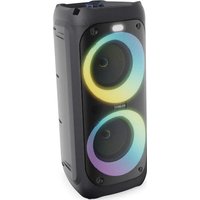
P200 - Speaker Majority - Free user manual and instructions
Find the device manual for free P200 Majority in PDF.


User questions about P200 Majority
0 question about this device. Answer the ones you know or ask your own.
Ask a new question about this device
Download the instructions for your Speaker in PDF format for free! Find your manual P200 - Majority and take your electronic device back in hand. On this page are published all the documents necessary for the use of your device. P200 by Majority.
USER MANUAL P200 Majority
What's In the Box? 3
Controls And Functions.... 4
Instructions Guide.... 6
Basic Operation....6
Control Buttons Functionality.... 7
Bluetooth Mode 8
SD Card (TF) Mode 8
USB Playback Mode 8
FM Radio Mode....9
Troubleshooting & Support.... 10
Specification.... 11
Warranty.... 11
Safety Information.... 12
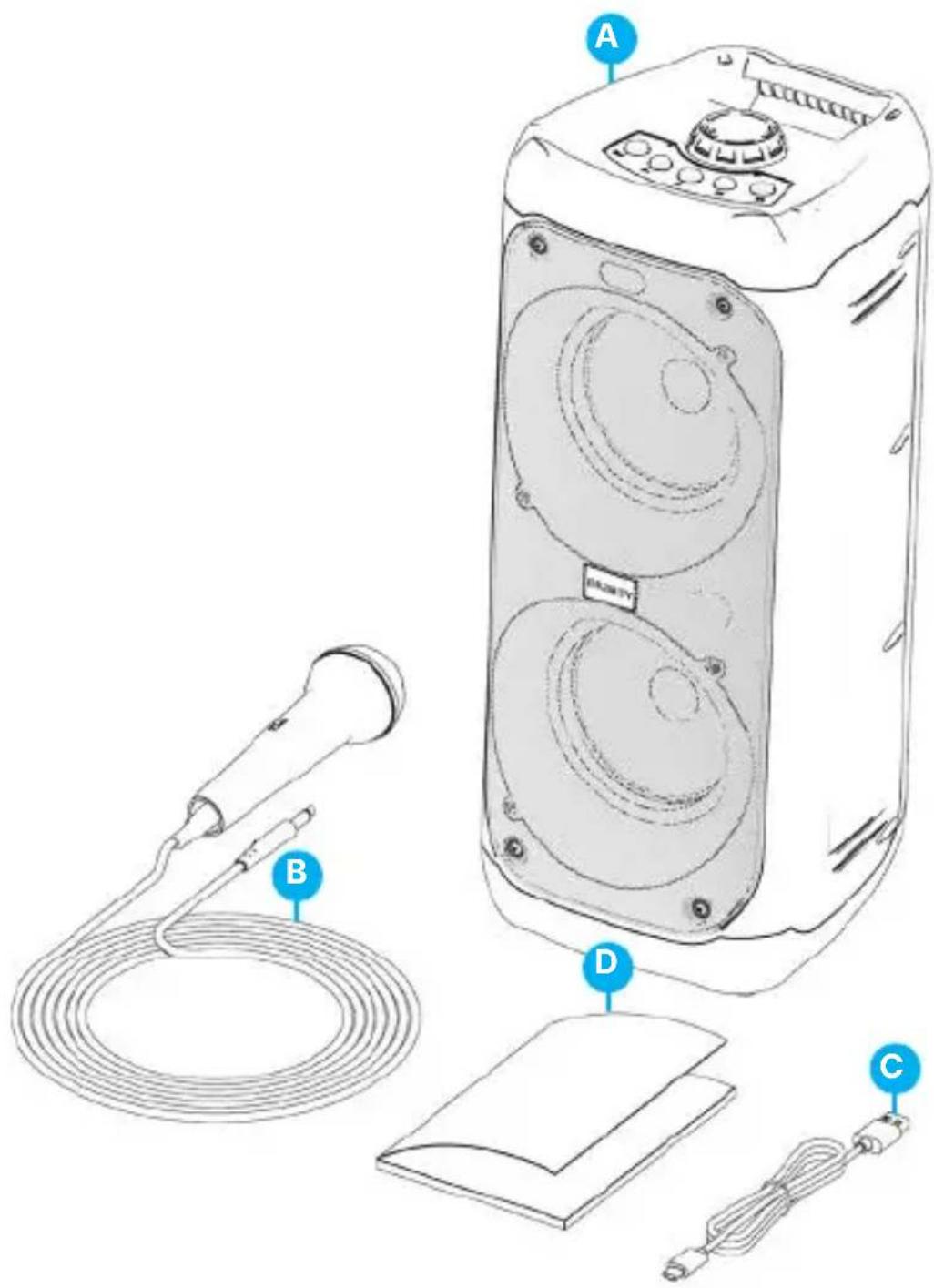
What's in the Box?
A. The Majority P200 Party Speaker
B. Wired Microphone
C. USB Type-C Charging Cable
D. User Manual
text_image
Diagram of a device with labeled parts including a microphone, cable, and speaker unit (A), showing component labels A, B, C, D.Front & Top View
text_image
1 2 3 4 5 6
natural_image
Technical line drawing of a rectangular electronic device with two circular speaker centers and mounting feet (no text or symbols)-
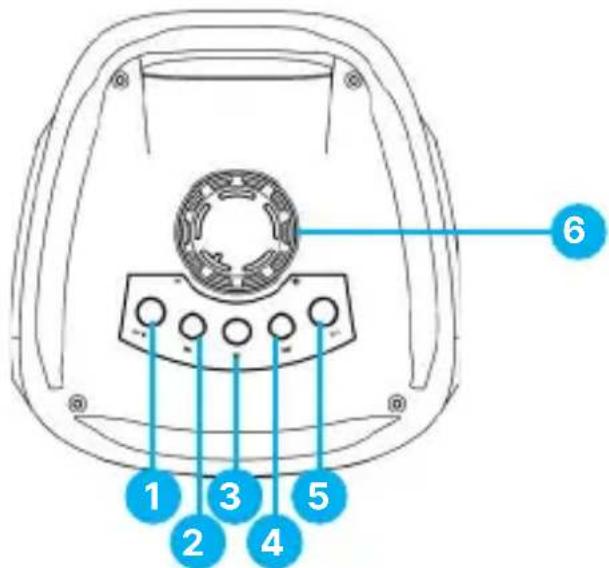
Mode/Lighting
-
Next
-
Previous
-
EQ
-
Play/Pause/TWS
-
Volume +/-
Back View
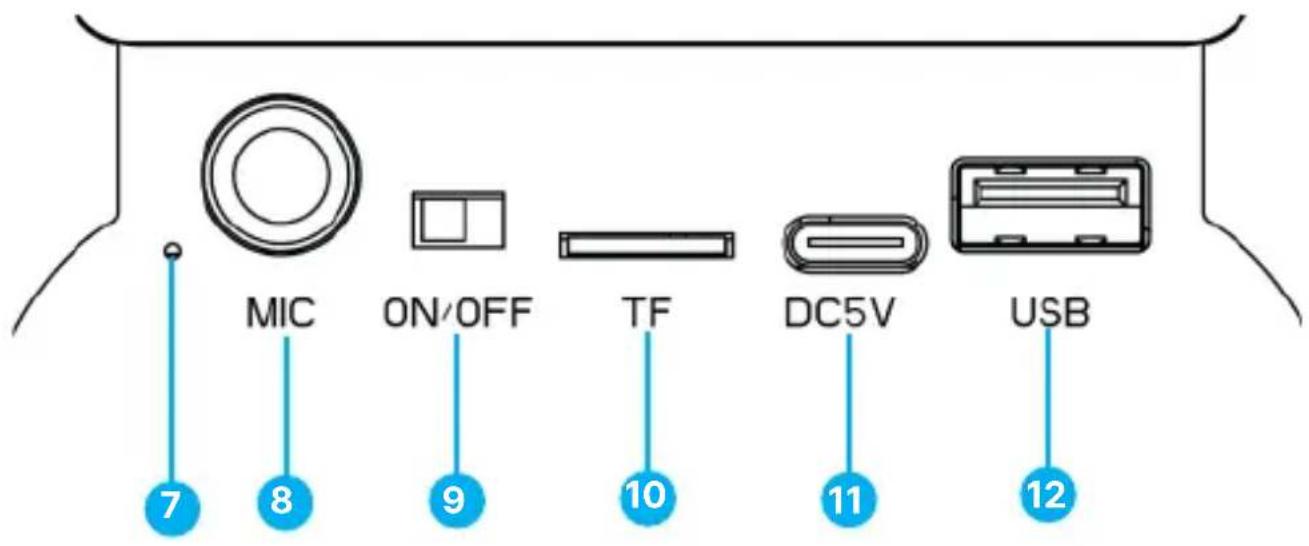
text_image
MIC ON/OFF TF DC5V USB 7 8 9 10 11 12- Charging LED light
- Microphone Port
-
Switch ON/OFF
-
TF Card Playback Port
- USB Type-C Charging Port (DC5V)
- USB Playback Port
Please note that the instructions within this user manual will refer to the button number on the speaker (Ref 'number'), in accordance with the diagrams from pages 4-5.
Basic Information
Remove the packaging and prepare your Majority P200 party speaker for use.
Charging Time
Insert the USB Type-C cable at the back of the unit (Ref.11), and then connect with a plug (DC5V) to the mains for charging. The charging LED display with light up red to indicate charging (Ref.7). It takes up to 8 hours to process a full charge course of the speaker. Once fully charged the red LED light will switch off. Disconnect the party speaker from mains and take advantages of its portability.
Please Note: It would be recommended to process a full charge course when not in use for longer battery life.
Play time
The Majority P200 has an internal rechargeable battery. Once fully charged, the speaker can be used on battery power for up to 5 hours.
Please Note: The playtime may vary based on the volume level and lighting modes usage while playing on battery power.
Microphone
Insert the wired microphone included in the box into 'MIC' port (Ref.8) at the back of the unit. The microphone can be used in all modes: Bluetooth, TF Crad, USB or FM Radio.
Power ON/OFF
Slide the 'Switch' button (Ref.9) to left or to the right to power on/off your party speaker.
Party LED lightening:
Press and hold the 'Mode/Lightning' button (Ref.1) for 2-3 seconds to change the lights mode. There are four lighting modes available to choose from which can be used in all modes: BT, FM Radio, USB or SD.
'Mode/Lighting' Button (Ref.1)
Press this button repeatedly to change the Party Speaker modes: Bluetooth, TF Card, USB or FM Radio.
Press and hold this button for 2-3 seconds to change the party speaker lighting modes.
'Previous' button (Ref.2)
Press to skip and play the previous audio track in Bluetooth, TF Card or USB Playback Mode.
Press this button in 'FM Radio' Mode to play the previous FM radio station listened to.
Play/Pause/TWS button (Ref.3)
Press to play or pause music.
Press and hold for 2-3 seconds to process an automatic radio stations scan while in FM Mode.
The 'TWS' function can only be used when using two Majority P200 Party Speakers which you can connect and use as two Bluetooth Party Speakers.
Please Note: Each package only contains one Majority P200.
To connect two Majority P200's, ensure that both speakers are powered on and not paired individually with other devices via Bluetooth. Press the 'TWS' button (Ref.3) twice on one of these speakers and both will connect wirelessly with each other. A voice prompted message will then be heard. Once both Majority P200 Party Speakers are connected, switch on Bluetooth on your phone then search for 'Majority P200'. Select and pair with the speakers. You can now play audio on both party speakers. To disconnect press the 'TWS' button (Ref.3) again on one of the speakers.
Next button (Ref.4)
Press to skip and play the next audio track while in Bluetooth, TF card or USB Playback Mode.
Press to play the next radio station while in FM Radio Mode.
EQ button (Ref.5)
Press the EQ button to toggle in between equalisers sound modes for more bass or treble as per your preferences. There are 6 equalisers modes in total.
Volume Rotary Knob (Ref.6)
Control the volume level -/+ by rotating the 'Volume' knob to the left or right.
Bluetooth Mode
The Majority P200 can be paired via Bluetooth with a phone or a tablet to play audio from via your party speaker.
Press the 'MODE' button at the top of the speaker (Ref.1) repeatedly to change the speaker mode to Bluetooth. A voice message will sound the speaker mode.
Once in Bluetooth Mode, the speaker is ready to pair. Activate Bluetooth on your device, and search on your list for 'Majority P200'. Select the speaker to pair with your device.
Once connected, you can start playing audio from your device via your party speaker.
Please Note: The Majority P200 cannot be paired with Bluetooth earbuds or earphones.
USB Playback Mode
Press the 'Mode' button (Ref.1) repeatedly to change to USB Mode. A voice message will sound to confirm the mode.
The USB stick should be of up to 32GB and must be formatted in FAT32 before adding on your stick the audio files in supported formats MP3 or WAV.
Insert the USB stick into the USB playback port (Ref.12) and the Majority P200 will automatically start playing audio from your USB.
Please note: The Majority P200 USB port cannot be used as a connection port with other devices as this is just for playback.
TF Playback Mode
Press the 'MODE' button (Ref.1) at the top of the unit repeatedly to change the speaker mode to TF. A voice message will sound to confirm this mode.
The TF Card should be of up to 32GB, which must be formatted before adding audio files in supported formats MP3 or WAV.
Insert the TF card into its port (Ref.10) at the back of the speaker.
The Majority P200 will then start playing audio from your TF card.
FM Radio Mode
Press the 'MODE' button (Ref.1) at the top of the unit repeatedly to change the speaker mode to FM Radio. A voice message will sound to confirm this mode.
Press and hold the 'Play/Pause/TWS' Button (Ref.3) for 2-3 seconds to start processing an automatic scan for the FM radio stations available at your location.
Once the search has been completed, the Majority P200, will automatically save all FM radio stations available at your location. The party speaker will then start playing the first radio station found.
Press the 'PREVIOUS' (Ref.2) or 'NEXT' (Ref.4) buttons to play the next/previously stored FM radio station.
| Observation Potential Cause/Solution | |
| No Power/Function | Check the switch button on the back of the speaker and make sure is set to 'ON'.Ensure the speaker battery is fully charged. |
| No Sound | Increase the volume using the rotary knob on the speaker. If you are paired via Bluetooth with another device and there is no sound, increase the volume level from your device, then the increase volume on the speaker. |
| Bluetooth not connecting | Ensure the Majority P200 is not paired with other devices and is set to Bluetooth Mode.Ensure your device has Bluetooth activated and search for the 'Majority P200' select and connect. You will now play audio via your party speaker. |
Support
If you require further assistance with your Majority product, please contact our support team on the Majority website: www.majority.co.uk/support
Specification & Warranty
Specification
| Power Supply DC5V (100W) | |
| Bluetooth Version V 5.0 | |
| Bluetooth Operating Distance 10 Metres | |
| Supported audio formats (TF,USB) MP3, WAV. | |
| FM Frequency Range | FM 87.5-108MHZ |
| TF Card Use a TF Card of up to 32GB | |
| USB Playback Stick Use a USB stick size of up to 32 GB | |
| Weight 2.14 Kg | |
| Dimensions 18.3 X18.9X41.5 cm. |
Warranty
Register your product within 30 days of purchase at www.majority.co.uk to activate your extended warranty. Terms and conditions apply.

natural_image
Solid dark blue rectangle with no visible text, symbols, or features.P200 Parteisprecher
Benutzerhandbuch
MAJORITY
text_image
Diagram of a device with labeled parts including a microphone, cable, and speaker unit (A), showing component labels A, B, C, D.natural_image
Technical line drawing of a two-tiered speaker or audio device with concentric circular design (no text or symbols)Taste 'Next' (Ref. 4)
www.majority.co.uk/support
text_image
Diagram of a device with labeled parts including a microphone, cable, and speaker unit (A), showing component labels A, B, C, D.natural_image
Technical line drawing of a rectangular electronic device with two circular cutouts and mounting holes (no text or symbols)Allumage de la LED Party.
Bouton 'Mode/Eclairage' (Ref.1)
Bouton Lecture/Pause/TWS (Ref.3)
Assistance technique
text_image
Diagram of a device with labeled parts including a microphone, cable, and speaker unit (A), showing component labels A, B, C, D.natural_image
Technical line drawing of a speaker or audio device with concentric circular components and mounting holes (no text or symbols)Pulsante Play/Pausa/TWS (Ref.3)
text_image
Diagram of a device with labeled parts including a microphone, cable, and speaker unit (A), showing component labels A, B, C, D.natural_image
Technical line drawing of a rectangular electronic device with two circular speaker centers and mounting feet (no text or symbols)EN Safety and Usage Guidelines (All where applicable)
General Safety Information - Read and Retain: Review all safety and operating instructions before use; keep them for future reference. Follow Instructions: Adhere strictly to all safety and operational guidelines. Water Exposure: Keep the device away from water; avoid placing liquids near it. Ventilation: Ensure ventilation openings are unobstructed to prevent overheating. Heat Sources: Keep the device away from heat-emitting appliances. Wall Mounting - Installation Safety: Follow the manufacturer's instructions and use approved mounting kits only. Avoid drilling into areas with cables, gas, or water lines. Use proper tools and safety apparatus. Regular Maintenance: Inspect regularly for wear or damage, especially if wall-mounted. Relocation: Detach from the wall mount before moving. Child Safety: Keep out of children's reach and ensure heavy items are securely mounted. Seismic Precautions: Use specialized mounts in earthquake-prone areas. Electrical Safety - Power Source: Use the specified power source; consult an electrician if unsure. Cable Management: Protect the power cord from damage. Power Disconnection: Keep the main plug accessible; unplug during storms or long periods of non-use. Battery Safety - Charging: Use the manufacturer's charger; avoid extreme conditions. Heat Exposure: Keep batteries away from heat to prevent explosion or leakage. Battery Condition: Discontinue use if the battery is damaged; dispose of it properly. Replacement: Only use recommended batteries; incorrect types can cause hazards. External Batteries: Use only specified types, observing correct polarity. Battery Removal: Remove batteries if not used for an extended period. Disposal: Follow local regulations for battery disposal; do not incinerate. Connectivity Safety - Cable Connections: Power off devices before connecting or disconnecting cables. Bluetooth Pairing: Ensure a secure connection; avoid interference from other devices. Volume Control: Keep volume moderate to prevent hearing damage. Connectivity and Data Security - Wireless Security: Review privacy policies and secure your network. Software Updates: Keep software updated for security and performance. Children's Safety Warnings - Product Use: Intended for adults; keep away from children. Battery Warning: Keep batteries and items containing batteries out of children's reach. Volume Control: Maintain a safe volume level to protect children's hearing. Fire Hazard - Flammable Materials: Do not place open flames near the product. Overheating: Avoid covering the product to prevent overheating and fire risks. Disposal and Recycling - Product Disposal: Dispose of at a recycling centre according to local laws. Environmental Compliance: Follow regulations for battery and electronic waste disposal. User Maintenance - Cleaning: Unplug before cleaning; use a dry cloth only. Servicing: Only qualified personnel should perform repairs. Data Protection: Reset to factory settings before returning or disposing of the product. Disclaimer: Failure to follow these instructions may result in injury, death, or property damage. The manufacturer is not liable for damage caused by improper use.
Declaration of Conformity:
We, Izilla Ltd, Newton House, 2 Pioneer Court, Histon, Cambridge, CB24 9PT declare under our sole responsibility that the product:
Product Name: P200 Party Speaker Model: 1000002992 Brand Name: Majority
To which this declaration referred is in conformity to the following harmonized standards or normative documents (CE & Rohs 2.0);
EN 55035:2017, EN 55032:2015, EN61000-3-2:2014, EN61000-3-3:2013, EEN62368-1:2004+A11:2017, ETSI EN 301 489-1 V2.2.3(2019-11), ETSI EN 301 489-17, V3.2.2(2019-12), ETSI EN 300 328 V2.2.2 (2019-07), EN 62479: 2010, IEC 62321-3-1:2013, IEC 62321-4:2013, IEC 62321-5:2013, IEC 62321-6:2015, IEC 62321-7-1:2015, IEC 62321-7-2:2017, IEC 62321-8:2017, (EC)NO 1275/2008,EN50564:2011, (EC)NO 801/2013.
Complying with the requirements or provisions of Council Directives which relate to:
EMC Directive 2014/30/EU, RED Directive 2014/53/EU, LVD Directive 2014/35/EU, Directive (2011/65/EU) and its amendment directives 2015/863/EU (RoHS 2.0) of the, European parliament, ERP Directive 2009/125/EC.
All essential test suites have been carried out.
Point of Contact: Eddie Latham | Founder
Signed:

Date of Issue: January 2024
Place of Issue: Cambridge, UK
Importer's Addresses:
UK: iZilla Ltd, Newton House, 2 Pioneer Court, Histon, Cambridge, CB249PT
Email: techsupport@majority.co.uk
EU RP: AR Experts, Po Box 5047, 3620 AA Breukelen, The Netherlands
Email: info@ar-experts.eu
US: iZilla Ltd C/O A.N.Deringer Inc, 19520 Wilmington Ave, Rancho
Dominguez, CA, 90220
Email: techsupport@majority.co.uk

ATTENTION
RISK OF ELECTRIC SHOCK DO NOT OPEN


CAUTION
RISQUE D'ELECTROCUTION NE PAS OUVRIR


IMPORTANT: Please read all instructions carefully before use and keep for future reference
MAJORITY
www.majority.co.uk

text_image
FR + + + +