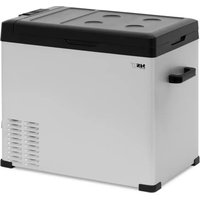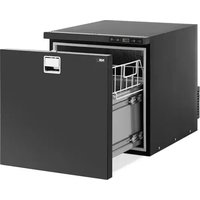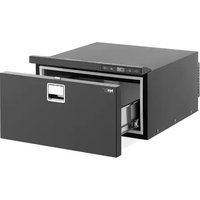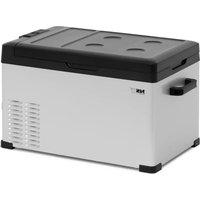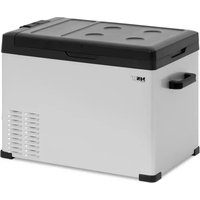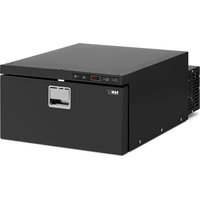
CRF30-46W - Fridge MSW - Free user manual and instructions
Find the device manual for free CRF30-46W MSW in PDF.


| Product Type | Car Cooler (Portable Refrigerator) |
| Model | MSW-CRF30-46W |
| Supply Voltage | DC 12/24 V |
| Rated Current | 6.9 A (12 V) / 4.1 A (24 V) |
| Rated Power | 46 W |
| Protection Class | III (Extra Low Voltage) |
| Dimensions (L x W x H) | 440 x 725 x 250 mm |
| Net Weight | 19.2 kg |
| Cooling Temperature Range | -12 °C to +10 °C |
| Capacity | 28 L |
| Climate Class | SN, N, ST, T (ambient temperature up to 43 °C) |
| Refrigerant Type | R600a (isobutane) / 38 g |
| Insulation Gas | Cyclopentane (C5H10) |
| Main Functions | Digital display, temperature adjustment, sleep mode (SLEEP), voltage protection (H1/H2/H3), °C/°F selection, tilt sensor, automatic restart after power failure |
| Maintenance and Cleaning | Disconnect before cleaning; use a soft damp cloth with mild detergent; do not immerse; clean ventilation openings with a brush |
| Safety | Tilt protection (>30° turns off the appliance); door lock; do not use metal tools to defrost; do not store explosive substances |
| Spare Parts and Reparability | Replaceable fuse (on red wire); sealed compressor and refrigeration circuit; repairs by after-sales service only |
| General Information | Intended use in vehicles, boats, trailers (12/24 V); not intended for persons with reduced capabilities without supervision |
Frequently Asked Questions - CRF30-46W MSW
User questions about CRF30-46W MSW
0 question about this device. Answer the ones you know or ask your own.
Ask a new question about this device
Download the instructions for your Fridge in PDF format for free! Find your manual CRF30-46W - MSW and take your electronic device back in hand. On this page are published all the documents necessary for the use of your device. CRF30-46W by MSW.
USER MANUAL CRF30-46W MSW
MSW-CRF30-46W
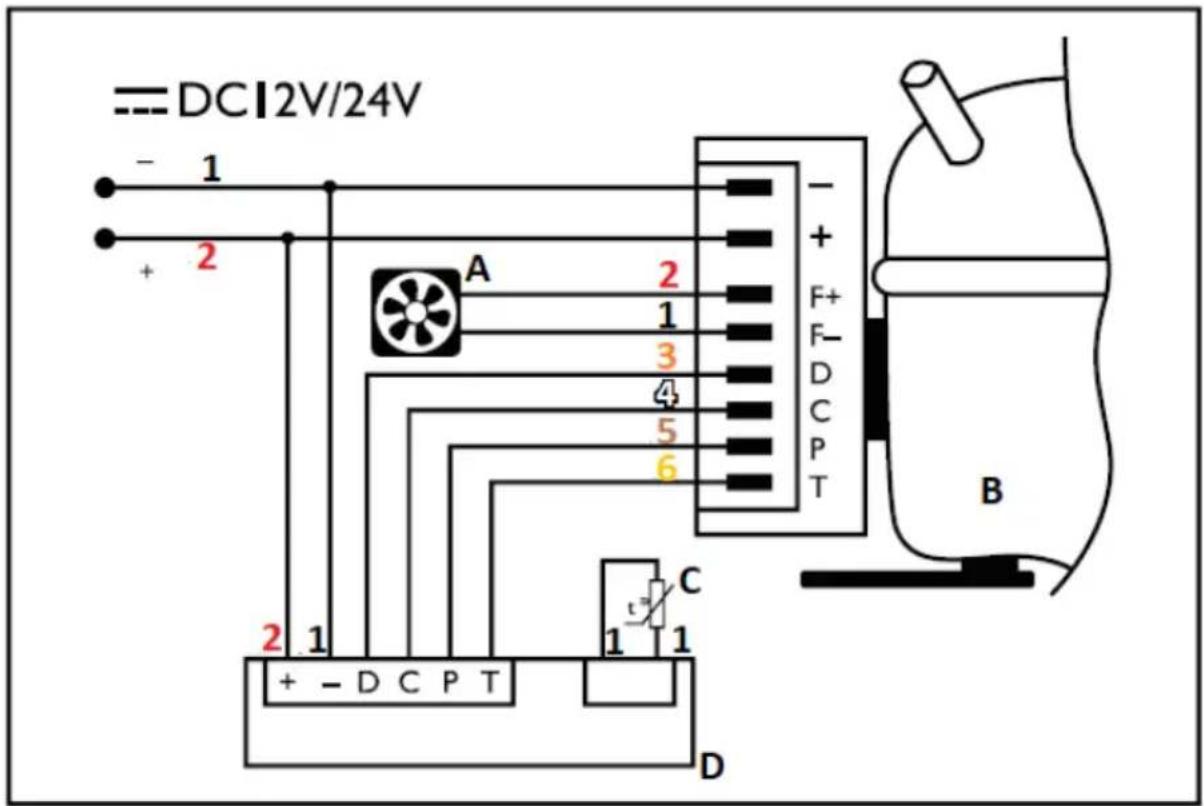
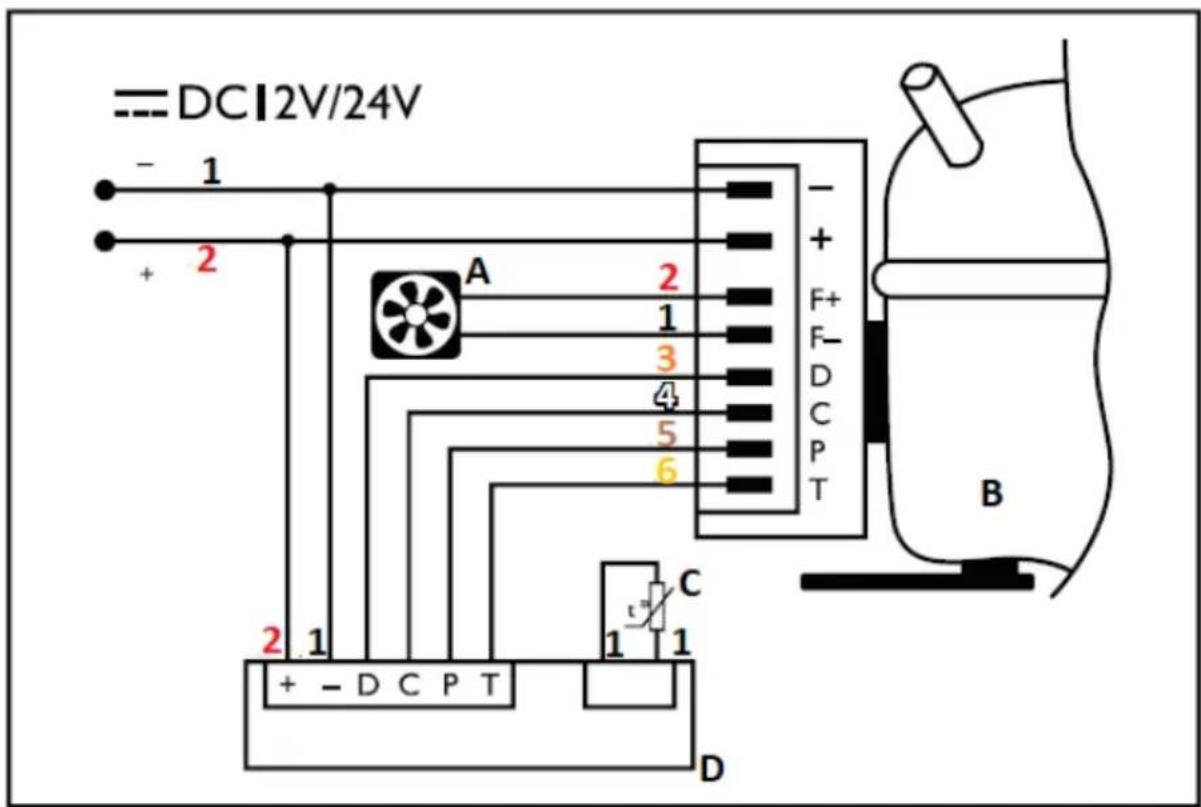
SCHALTPLAN
natural_image
Technical line drawing of a rectangular enclosure with internal grating and mounting holes, mounted on a base (no text or symbols)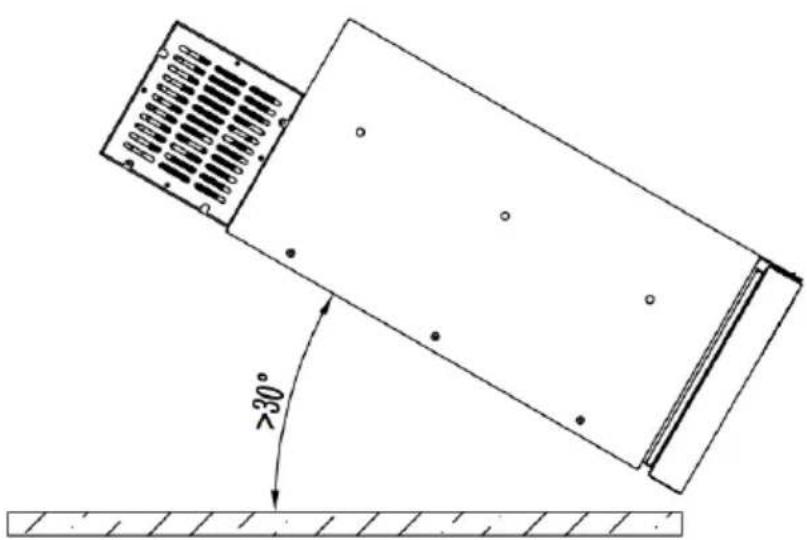
This manual is designed to support safe and reliable use. The product has been designed and manufactured strictly according to the technical specifications, using the latest technology and components and maintaining the highest quality standards.
PLEASE READ THIS MANUAL CAREFULLY AND UNDERSTAND IT BEFORE STARTING WORK.
For long and reliable operation of the device, make sure that it is properly operated and maintained in accordance with the instructions contained in this manual. The technical data and specifications provided in this manual are up to date. The manufacturer reserves the right to introduce changes in order to improve quality. Taking into account technological progress and noise reduction potential, the device has been designed and built so as to reduce the risk resulting from noise emissions to the lowest level.
Explanation of symbols
| CE | The product meets the requirements of relevant safety standards. |
 | Please read the manual before use. |
 | Recyclable product. |
 | NOTE!or WARNING! or REMEMBER! describing a given situation (a general warning sign). |
 | NOTE! Fire hazard - flammable material! |
 | Protection class III equipment. |

NOTE! The illustrations in this manual are provided for illustrative purposes only and may differ in some details from the actual product appearance.
The original manual is the German language version. The other language versions are translations from German.
2. Safety of use

NOTE! Read all safety warnings and all instructions. Non-compliance with the warnings and instructions may result in electric shock, fire and/or severe personal injury or death.
The term "appliance" or "product" in the warnings and in the description of the instructions refers to the CAR REFRIGERATOR.
2.1. Electrical safety
a) The device plug must fit into the socket. Do not modify the plug in any way. Genuine plugs and matching sockets reduce the risk of electric shock.
b) Do not touch the device with wet or damp hands.
c) Do not use the cable in an inappropriate manner. Never use it to transport the appliance or to pull the plug out of the socket. Keep the cable away from sources of heat, oil, sharp edges or moving parts. Damaged or tangled cables increase the risk of electric shock.
d) Do not use the device if the power cable is damaged or shows clear signs of wear. A damaged supply cable should be replaced by a qualified electrician or the manufacturer's service technician.
e) When cleaning or using the device, never immerse it in water or other liquids.
f) Make sure to only use grounded power sources.
2.2. Safety in the workplace
a) Keep the work area tidy and well lit. Untidy or poorly illuminated workspace may lead to accidents. Be anticipative, watch what you do and exercise common sense when using the device.
b) Do not use the device in an explosive area, for example where flammable liquids, gases or dust are present. The device produces sparks which can ignite dust or vapours.
c) In case of finding any damage to the device or irregularity in its operation, it should be immediately switched off and reported to an authorised person.
d) The product may only be repaired by the manufacturer's service centre. Do not attempt to make any repairs yourself!
e) In case of doubt as to whether the device is working properly, contact the manufacturer's service centre.
f) In case of fire or fire ignition, only powder or snow (CO2) extinguishers should be used to extinguish the live equipment.
g) Make sure to regularly check the condition of the safety information stickers. If the stickers are illegible, they must be replaced.
h) Keep this manual for future reference. If the equipment is to be passed on to third parties, the instructions for use must also be handed over with the equipment.
i) Keep parts of the packaging and small assembly parts out of the reach of children.
j) When using this device together with other devices, please follow the other operating manuals as well.
2.3. Personal safety
a) It is prohibited to operate the device when tired, ill, under the influence of alcohol, drugs or medication that substantially limits your ability to operate the device.
b) The device is not intended to be used by persons (including children) with reduced mental, sensory or intellectual functions or lack of experience and/or knowledge, unless they are supervised by a person responsible for their safety or have been given instructions by such person on how to operate the device.
c) The device is not a toy. Children should be supervised to ensure that they do not play with the equipment.
2.4. Safe use of the device
a) Do not use the device if the ON/OFF switch does not function properly (does not turn the device on and off). Devices that cannot be controlled by a switch are unsafe, cannot operate and must be repaired.
b) The unit must be disconnected from the power supply before adjustment, cleaning and maintenance. This preventive measure reduces the risk of accidental activation.
c) The equipment may only be repaired and maintained by qualified personnel, using genuine spare parts. This will ensure safe use.
d) To ensure the designed operational integrity of the unit, do not remove factory installed covers or loosen screws.
e) When transporting and moving the device from its place of storage to the place of use, it is important to observe the health and safety rules for manual transport operations that apply in the country where the device is used.
f) It is forbidden to move, shift or rotate the device during operation.
g) The device should be cleaned regularly to prevent permanent accumulation of dirt.
h) The device is not a toy. Cleaning and maintenance may not be performed by children without the supervision of an adult.
i) It is prohibited to modify the design of the device in order to change its parameters or structure.
j) Keep the device away from sources of fire and heat.
k) Do not block the ventilation openings of the equipment!
I) Under no circumstances should the casing be opened.
m) Never store heavy, poisonous or corrosive objects inside the unit.
n) In order to avoid damage to the compressor in transport, do not tilt the refrigerator by an angle greater than 45^ .
o) Do not operate the refrigerator in unheated rooms or places where humidity is high.
p) Do not use mechanical devices to accelerate the cooling!
q) Do not damage the refrigerant circuit.
r) Do not use electrical appliances other than those provided by the manufacturer inside the refrigerator.
s) Food and beverages may only be stored in the device in the original packaging or in sealed containers.
t) Do not store explosive substances such as cans containing compressed flammable gas inside the equipment.
u) Do not store glassware with freezing liquids in the unit.
v) It is advisable to keep your hands dry when performing activities which involve inserting your hands into the device, otherwise it may result in frost damage to the skin.
w) Do not immerse the device in water or expose it to weather conditions (rain, sun, etc.) or to high humidity conditions.
x) Do not use the unit with the top cover turned towards the ground. We recommend that the angle of inclination to the ground does not exceed 30^ .
y) It is forbidden to use hard, metal or sharp tools to remove ice from the cooling compartment.
z) When transporting the device, do not hold the handle.
aa) Due to the door locking system, children must not use the device unsupervised. Elderly persons and pregnant women must also be careful to avoid clutching their hands.
bb) Do not install the device in a sealed enclosure - adequate ventilation must be provided.

NOTE! Although the equipment has been designed to be safe, with adequate safeguards, and despite the use of additional user safety features, there is still a small risk of accident or injury when handling the equipment. We recommend that you exercise caution and common sense when using it.
3. Principles of use
The device is designed for storing food products at low temperatures. It is designed for built-in installation and can be used in vehicles, boats or trailers fitted with 12 or 24 volt electrical systems.
The user is responsible for any damage resulting from use other than intended.
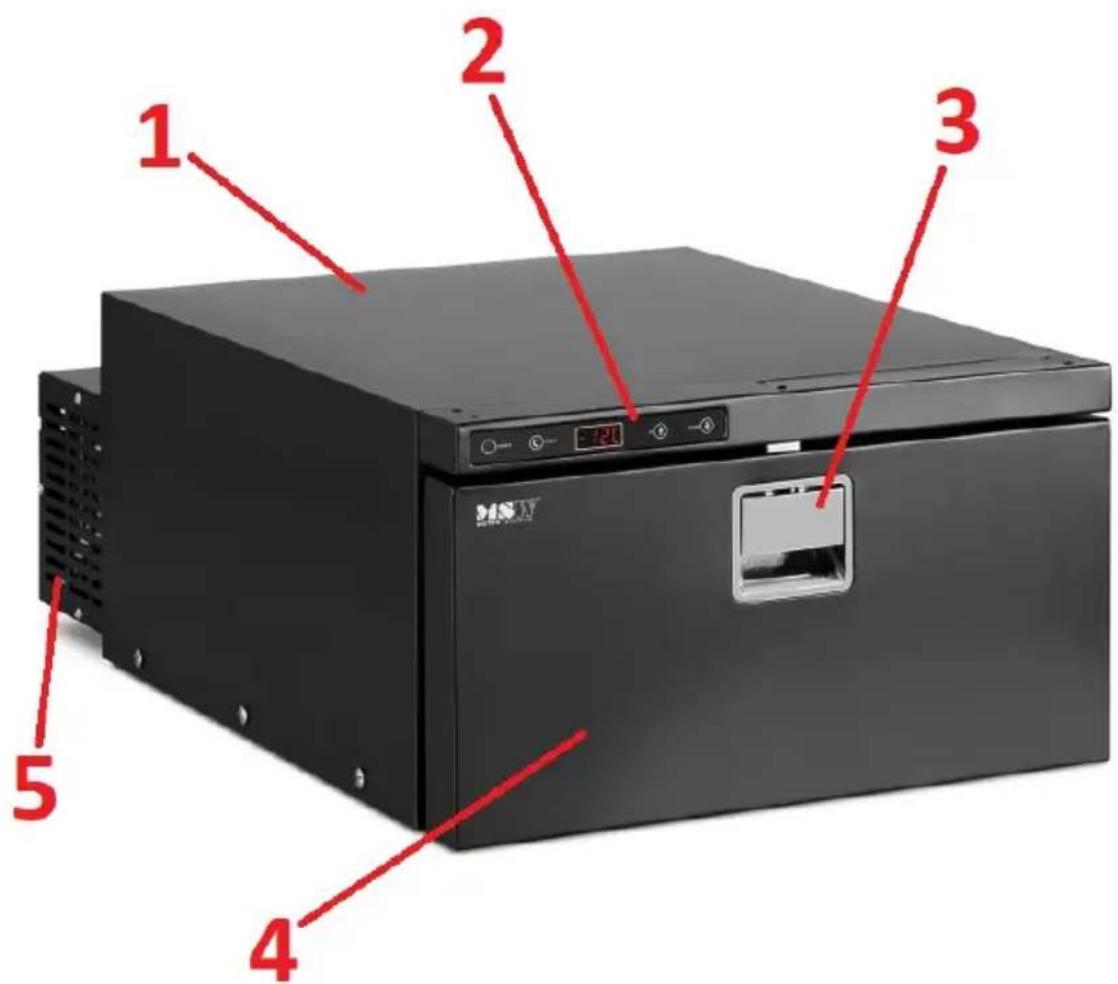
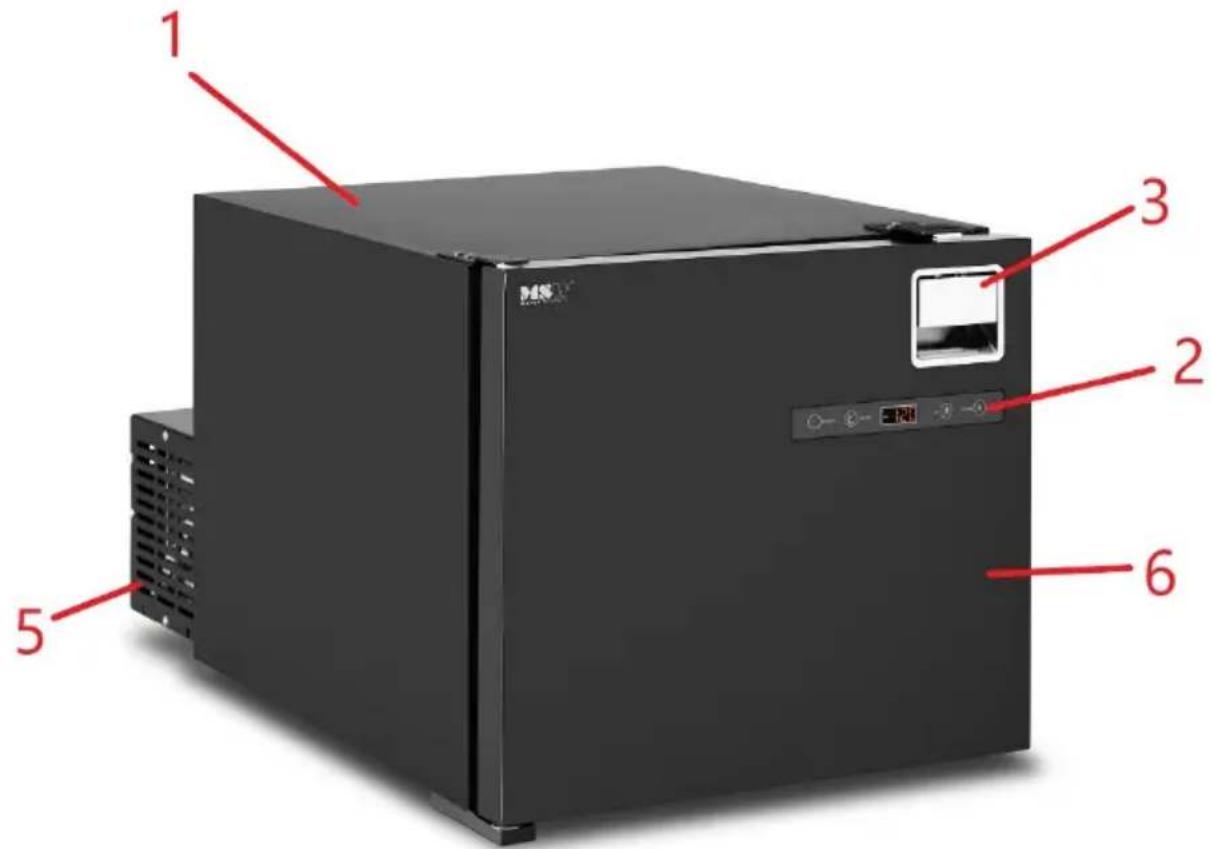
3.1. Description of the equipment
MSW-CRF50-50W
MSW-CRF16-35W
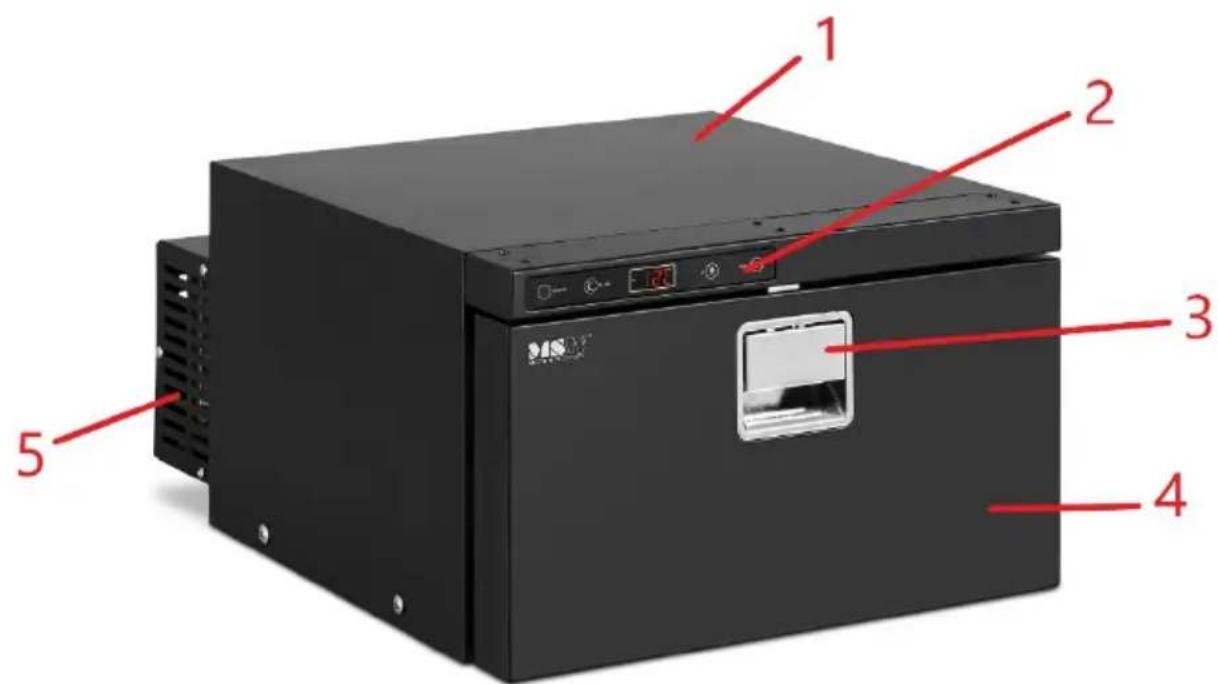
MSW-CRF30-46W
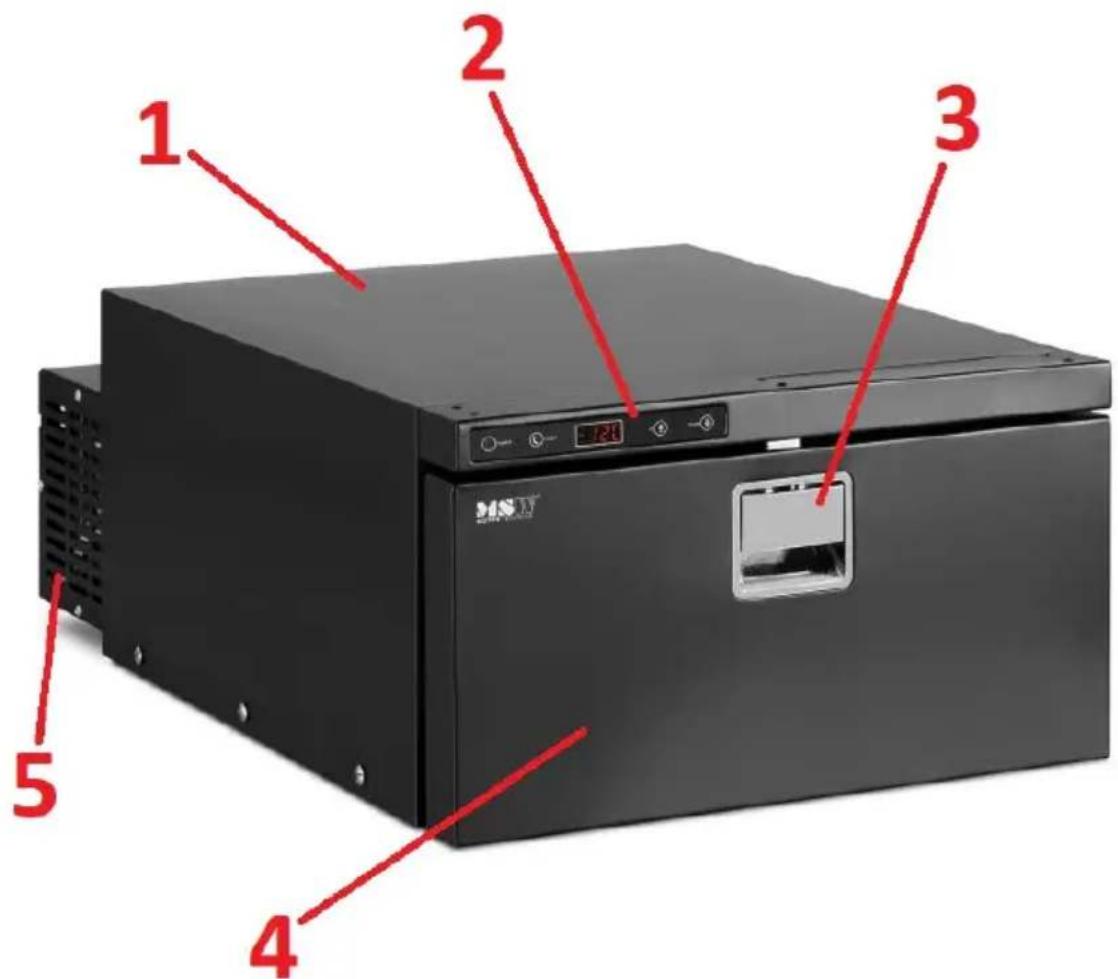
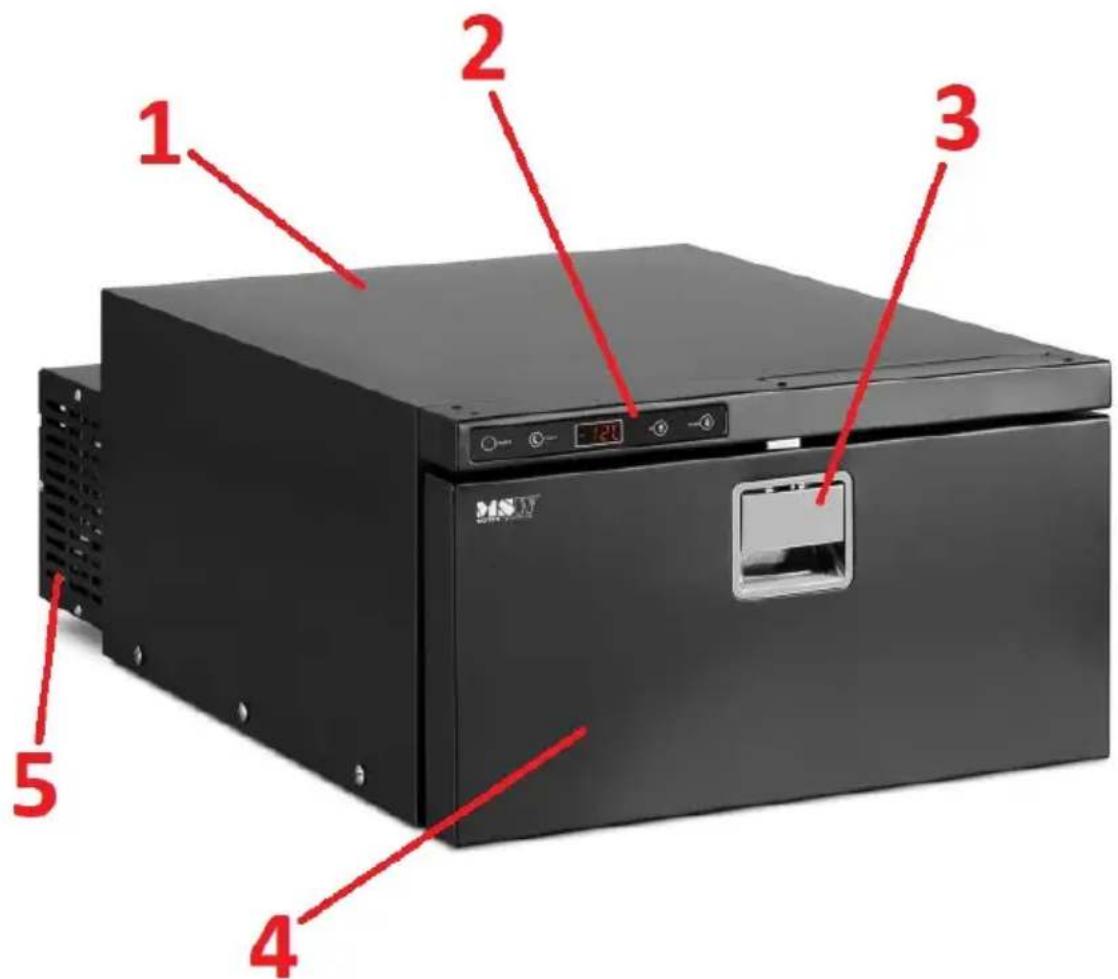
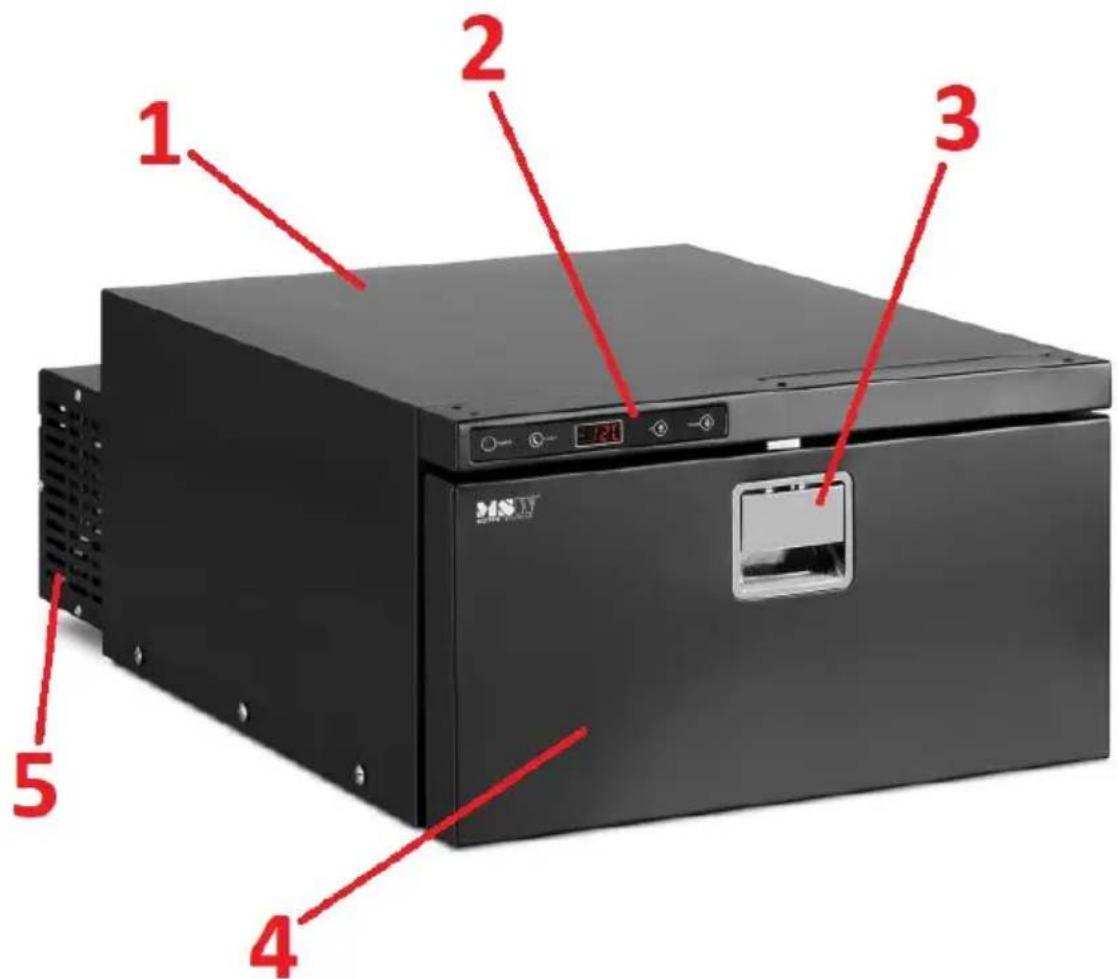
- Casing
- Control panel
- Handle (with protection against unintended opening)
- Drawer doors
- Refrigeration unit with power supply connection
- Door
3.2. Getting ready for operation
POSITIONING OF THE DEVICE
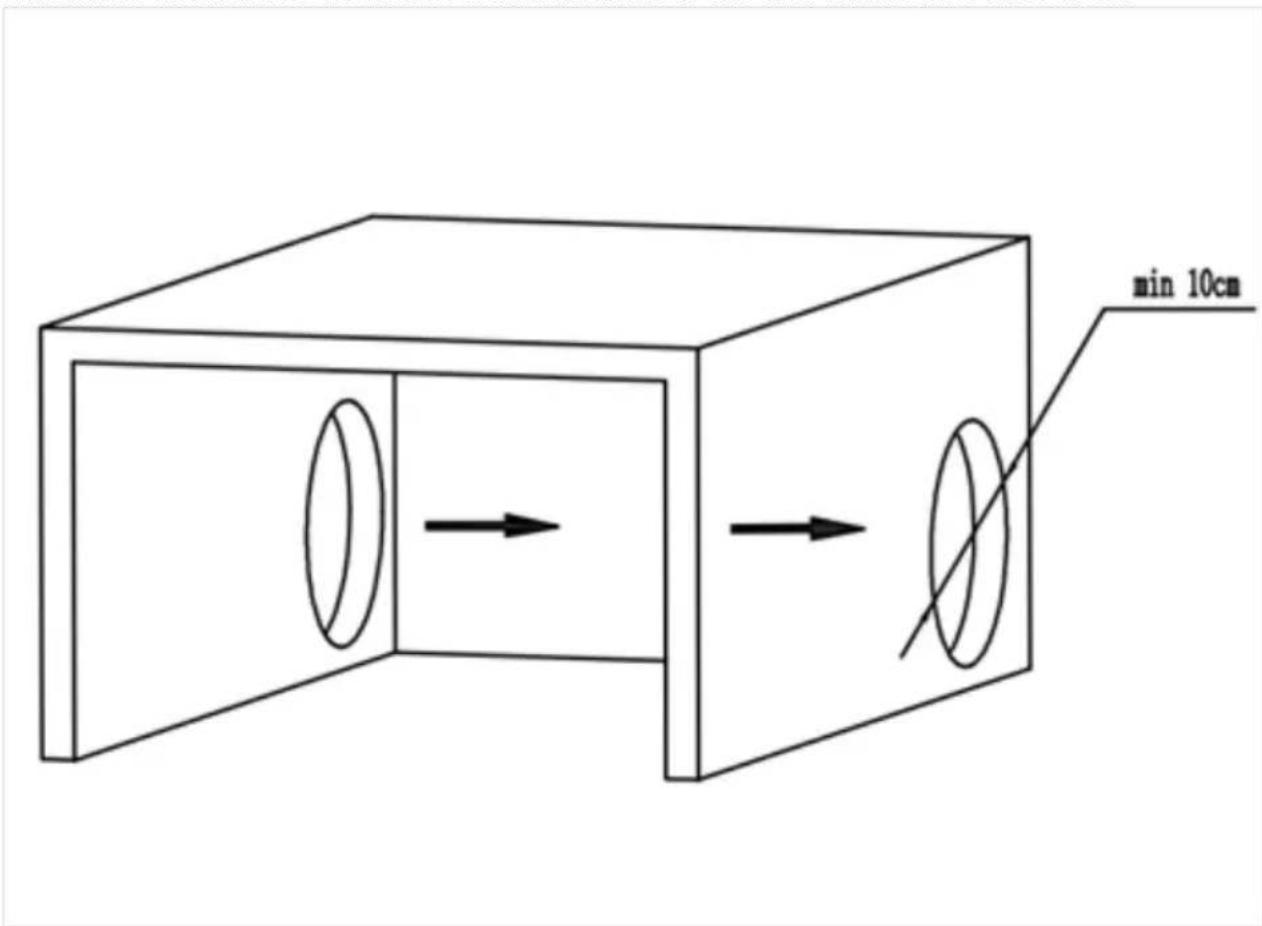
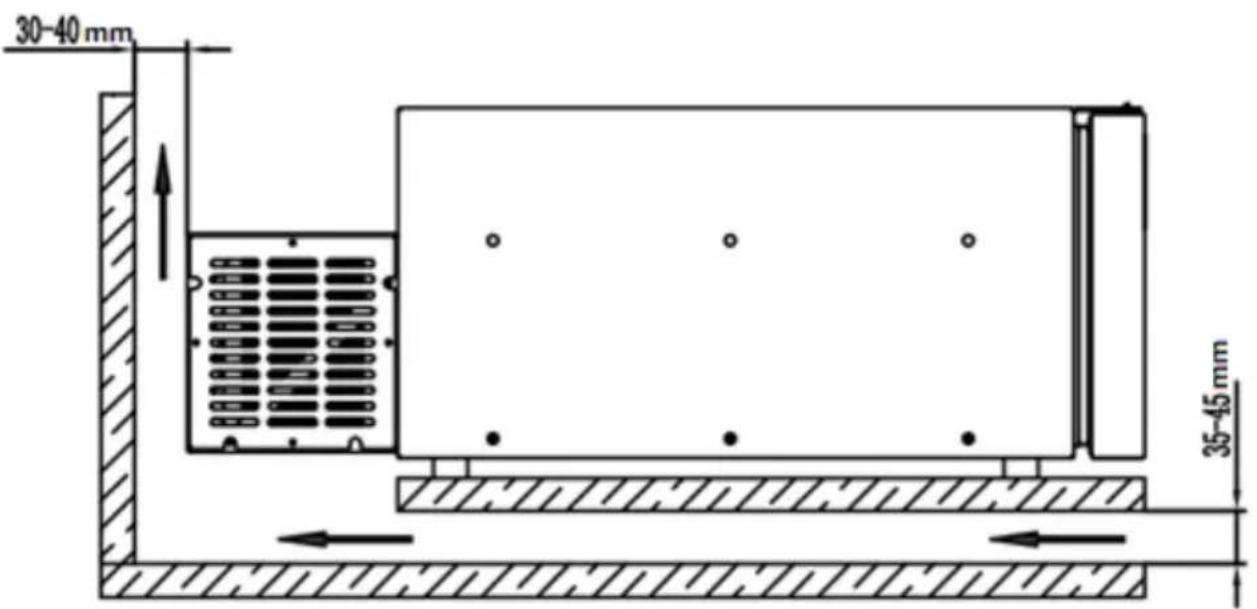
Ambient temperature must not exceed 43^ C and relative humidity should not exceed 85%. The device should be positioned in a manner that ensures proper air circulation. A minimum distance of 10 cm from each wall of the equipment must be maintained. Keep the device away from any hot surfaces. Always use the appliance on a level, stable, clean, fireproof and dry surface, out of the reach of children and persons with reduced mental, sensory or intellectual functions. The device should be placed in such a way that the mains plug can be reached at any time. Make sure that the energy supply to the equipment corresponds to that specified on the rating plate!
Before first use, clean the inside of the refrigerator using a damp cloth soaked in lukewarm water with a mild food-grade detergent such as washing-up liquid or a little baking soda. Wipe dry before operation.
INSTALLATION OF THE DEVICE
The appliance is designed for built-in installation; however, when installing it, minimum clearances from the wall and airflow around it must be observed.
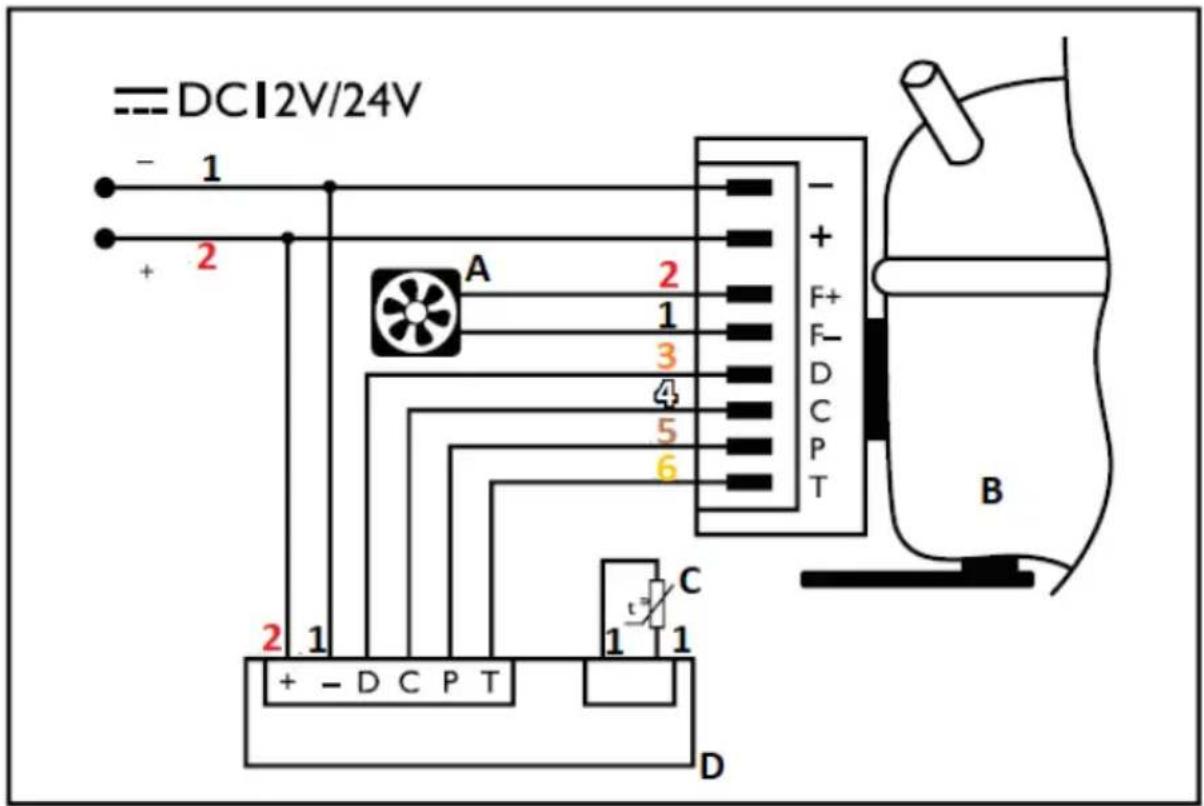
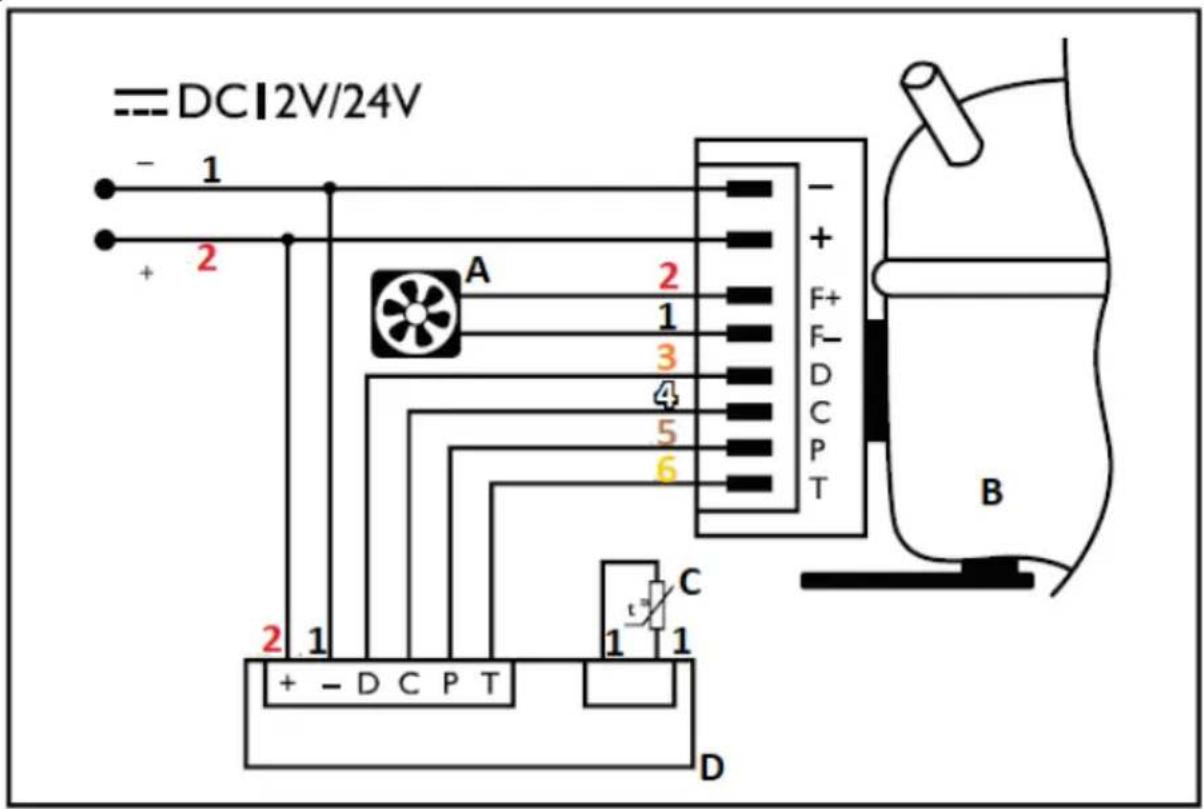
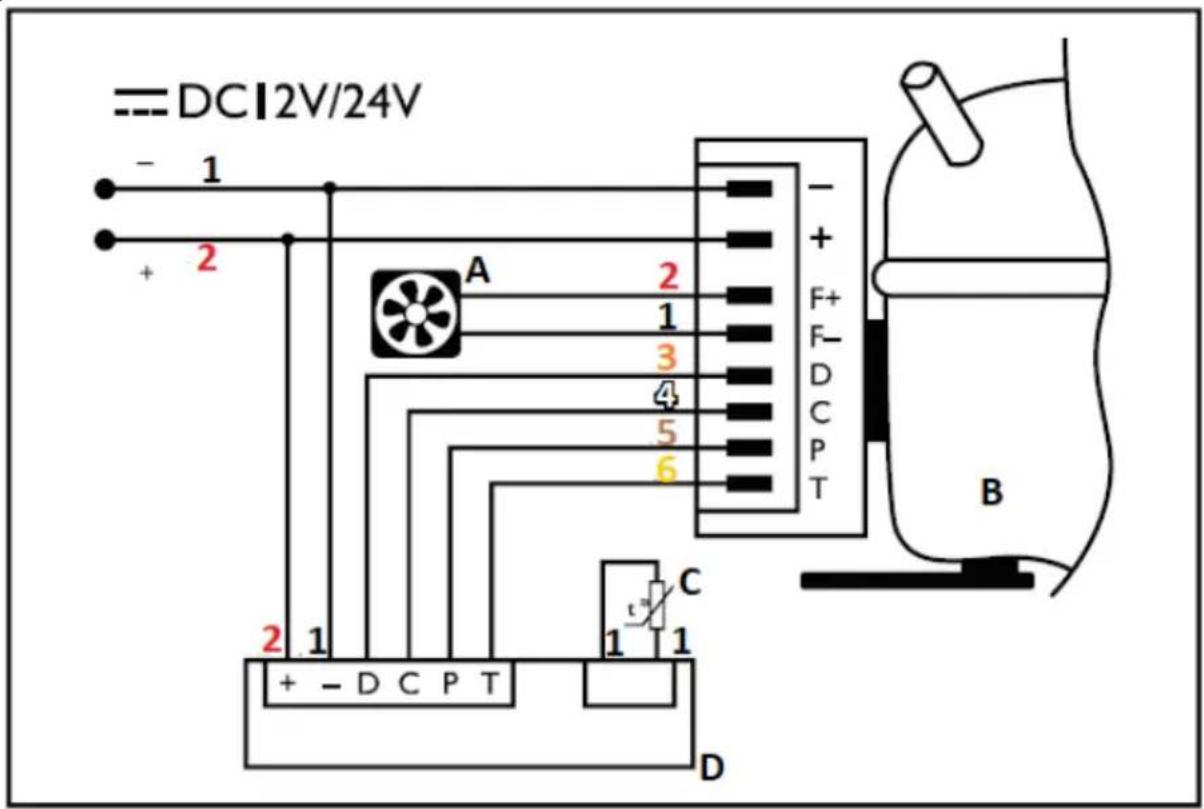
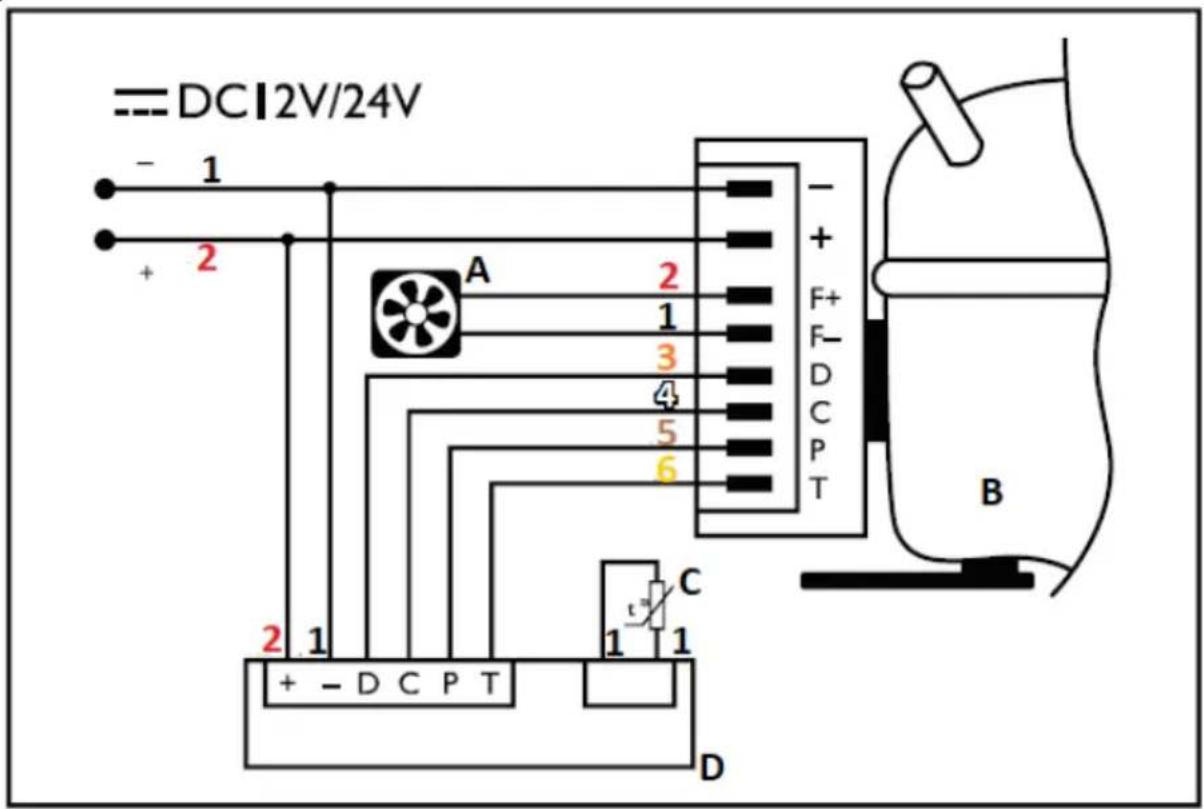
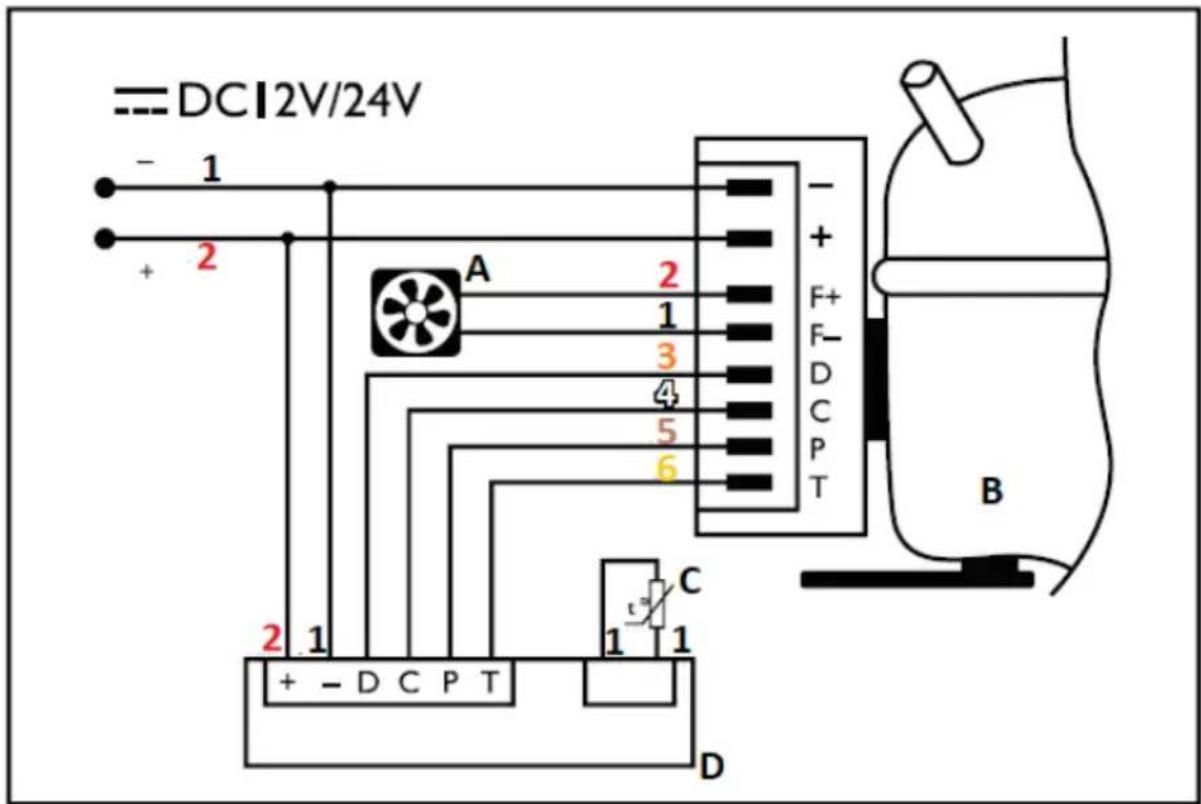
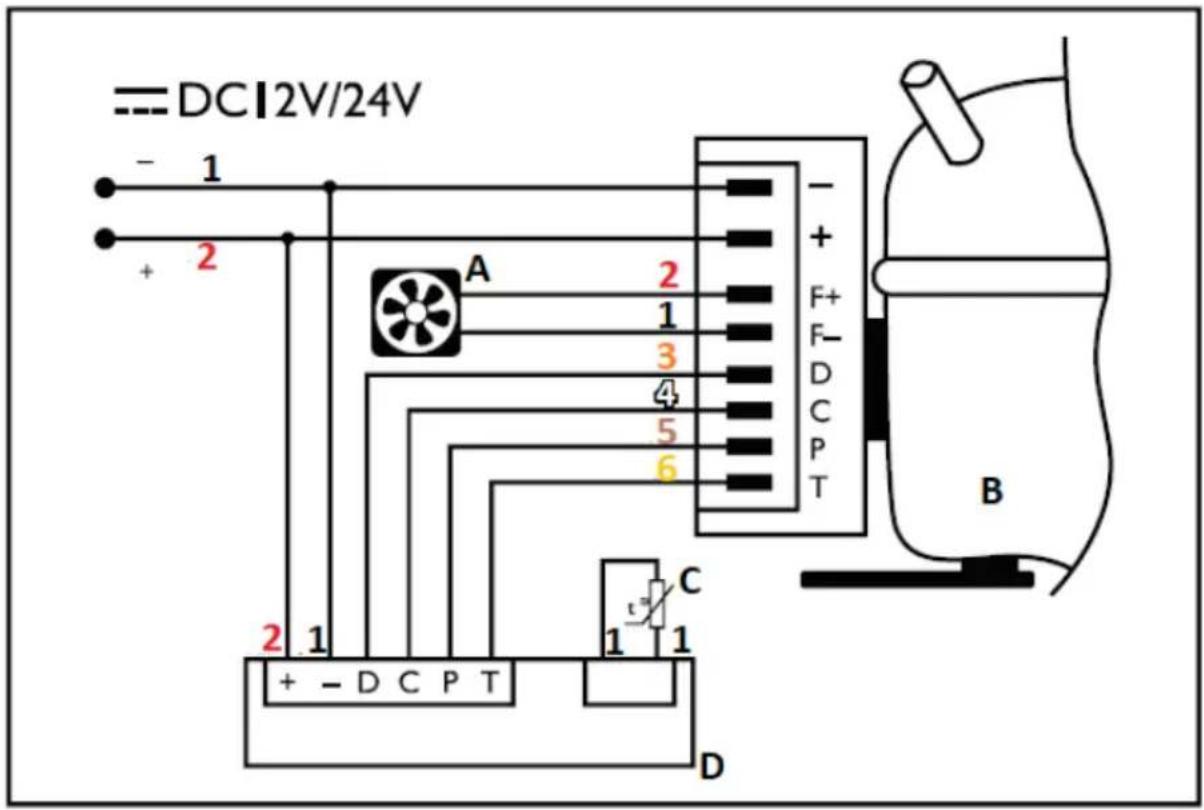
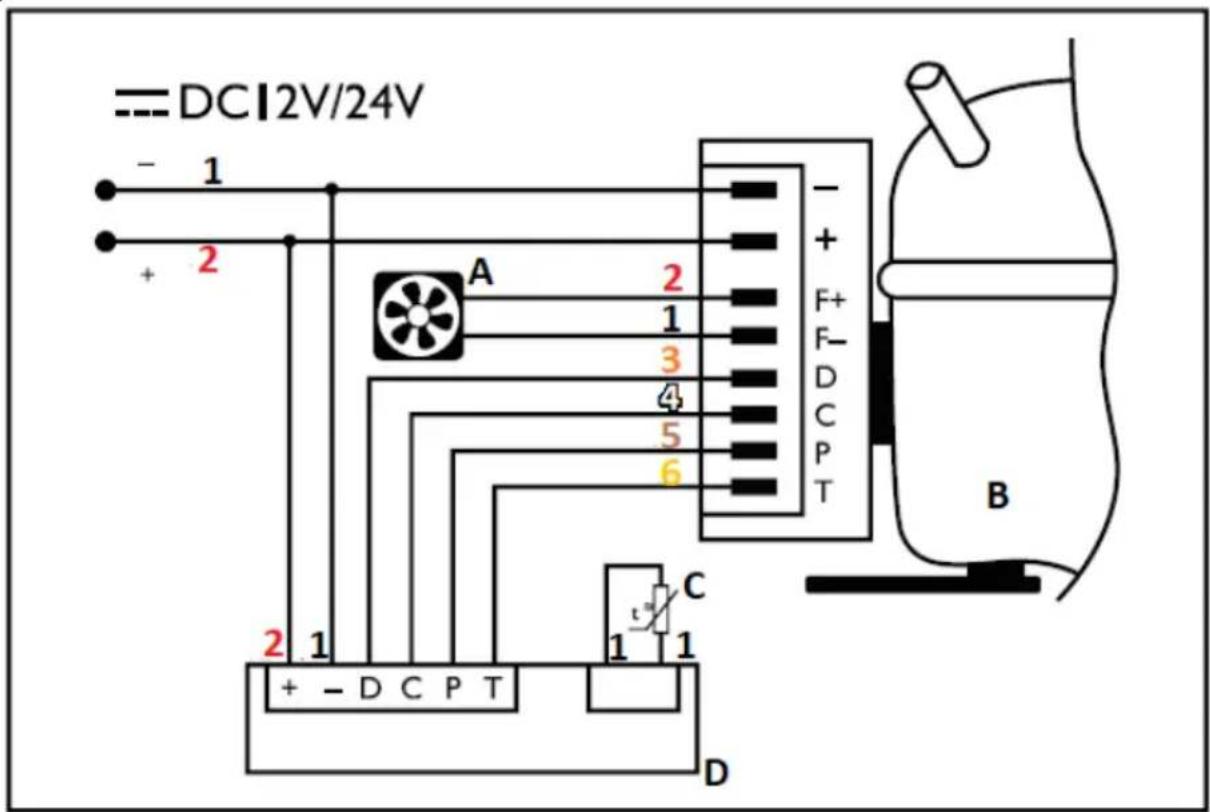
- Black
- Red
- Orange
- White
- Brown
- Yellow
A. Fan motor
B. Compressor
C. Temperature sensor
D. Controller unit
3.3. Operation of the device
Control panel:

The device is controlled via the control panel.
3.3.1 Switching the device on/off.
Once the device is connected to the power source, press and hold the "POWER" button for 3 seconds - the display will show the current temperature inside the refrigerator.
Press and hold the "POWER" button for 5 seconds to switch off the device.
3.3.2 Setting the temperature
After switching the device on, press the "UP" button (up arrow icon) or "DOWN" (down arrow icon) depending on the temperature you wish to set and the change of settings will be continuously indicated on the digital display. After that the screen will return to the display of the current temperature inside the fridge
3.3.3 Standby mode (SLEEP)
To activate the standby mode, press and hold the button labelled "SLEEP" (moon icon) for 1 second after switching the device on. In standby mode the unit operates in an energy-saving manner, i.e. compressor speed is reduced, the unit consumes less power and the display shows an indicator light signalling that the mode has been activated.
3.3.4 Device settings
To change the operating settings of the device, press and hold the "SLEEP" button (moon icon) for 5 seconds while the device is switched on:
a) Selection of voltage protection
When displaying H1/H2/H3 values while 2 Hz is blinking, select the value (the default is H2). In order to change a parameter, press the "DOWN" or "UP" button to select a given value. If no button is pressed for the next 5 seconds, the device will save the currently selected value.
| Input voltage | Level | Cut-off level (V) | Switch-on level (V) |
| 12V | H1 | 10 | 11.4 |
| H2 | 11.1 | 12.2 | |
| H3 | 11.6 | 12.7 | |
| Voltage type recognition threshold: | 17V | ||
| 12<->24V | |||
| 24V | H1 | 21.2 | 23 |
| H2 | 23.3 | 25.3 | |
| H3 | 24.5 | 26.2 | |
b) Setting the performance level
After setting voltage protection (see previous paragraph), press the "SLEEP" button for 1 second to select the performance mode of the unit: HH (automatic) or ECO (energy saving - see item 3.3.3 for details). The default setting is "HH". To change the mode, select the appropriate one using the "UP" and "DOWN" buttons. If no button is pressed for the next 5 seconds, the device will save the currently selected mode.
c) Selection of temperature scale units
After selecting the operating level, press the "SLEEP" button for one second to select the temperature scale displayed – °C or F. Select the desired unit using the "UP" or "DOWN" buttons. If no button is pressed for the next 5 seconds, the device will save the currently selected value and return to the set operating mode. However, if you press the "SLEEP" button again for 1 second, it will return to the setting of the option in subsection a), then, b), c) and so on over and over again.
3.3.5 Tilt sensor/power cuts
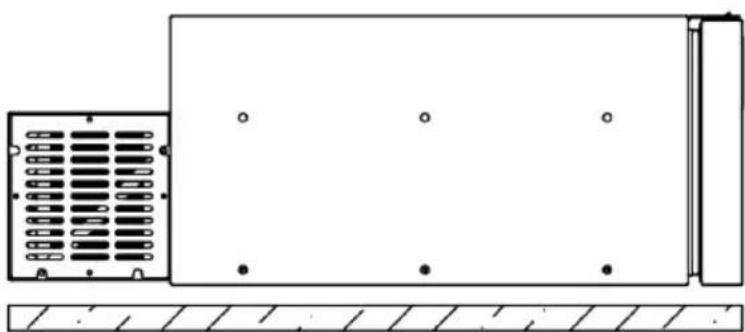
The unit has a built-in tilt sensor that protects the unit from a drop in performance and potential damage. If the operating unit is tilted backwards (i.e. on the compressor side) more than 30^ from its horizontal plane, the sensor will switch off the unit automatically. If the sensor detects that the appliance has returned to the horizontal position, the fridge will restart and operate with the preset parameters.
natural_image
Technical line drawing of a rectangular enclosure with internal compartments and mounting holes, no text or symbols present.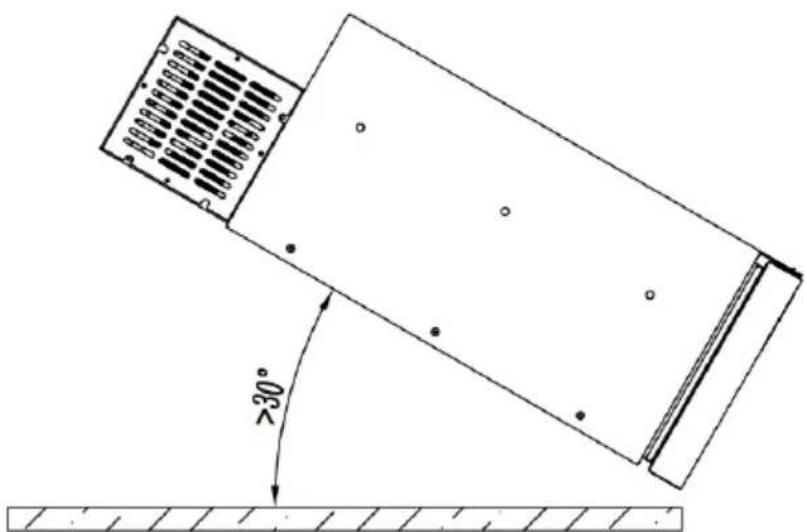
Similarly, in case the power supply is interrupted during operation, the unit will automatically restart as soon as the power supply returns and will operate according to the preprogrammed settings.
3.3.6 Error codes
In case of a disruption in operation or a failure, the red light will illuminate, an audible alarm will sound and an error code will be displayed:
| Error code Description | Possible cause | |
| E0 | NTCthermistor failure | - |
| E1 | Compressor failure | Input voltage too low. |
| E2 | Fan damage. | |
| E3 | Control unit error or blocked compressor. | |
| E4 | Compressor speed too low. | |
| E5 | Ambient temperature too low. | |
3.3.7 Troubleshooting
| Problem | Possible cause | Solution |
| The device does not operate, the compressor does not start. | No power or incorrect power connection. | Check input voltage, battery and power connection. |
| Blown fuse of the refrigerator. | Replace with an operational fuse - its socket is located on the red wire of the power supply connection. | |
| The compressor operates, but the refrigerator does not chill. | Refrigerant leakage through the evaporator. | Check the unit for leaks, refill the refrigerant. |
| The compressor has been running for a long time but is not chilling properly. | Improper air circulation around the unit, fan not working properly, drawer (door) not closed. | Improve air circulation/ventilation around the unit, check the condition of the fan, check the drawer closure and its seal. |
| The compressor operates continuously. | Improper air circulation around the unit, high ambient temperature. | Improve ventilation around the unit. |
3.4. Cleaning and maintenance
a) Before any cleaning, adjustment or replacement of accessories, and also when the appliance is not in use, pull out the mains plug and cool the appliance completely.
- Wait for the rotating parts to stop.
b) Only use only non-corrosive agents for cleaning the surfaces.
c) Only gentle cleaning agents designed for cleaning food contact surfaces may be used to clean the appliance.
d) After each cleaning, all components should be thoroughly dried before the unit is used again.
e) Do not spray the device with a stream of water or immerse it in water.
f) Ensure that no water enters through the ventilation openings in the casing.
g) Clean the ventilation openings with a brush and compressed air.
h) Use a soft, damp cloth for cleaning.
i) Never use sharp and/or metal objects (e.g. a wire brush or metal spatula) for cleaning as these may damage the surface of the device.
j) Do not clean the unit with acidic substances, medical products, solvents, fuel, oil or other chemicals, as this may cause damage to the unit.
k) The unit has a closed refrigerant circuit which does not require periodic filling. Refilling should only be carried out in case of repairs of a leaking system.
I) If the device is not used for an extended period of time, unplug it from the power supply, wait until it has thawed completely and remove any moisture from the inside. You can also leave it with the drawer (door) slightly ajar to ensure air exchange inside the unit.
DISPOSAL OF USED EQUIPMENT.
At the end of the useful life of the product, it may not be disposed of as normal household waste. It must be taken to a collection and recycling centre for electrical and electronic equipment. This is indicated by a symbol on the product, the user manual or the packaging. The materials used in the device are recyclable according to their designation. By reusing, repurposing or otherwise utilising your used equipment, you are making an important contribution to protecting the environment.
Your local administration will be able to provide you with information about the appropriate disposal point.
Dane techniczne
SCHEMAT ELEKTRYCZNY
natural_image
Technical line drawing of a rectangular enclosure with internal grid patterns and mounting holes, mounted on a base (no text or symbols)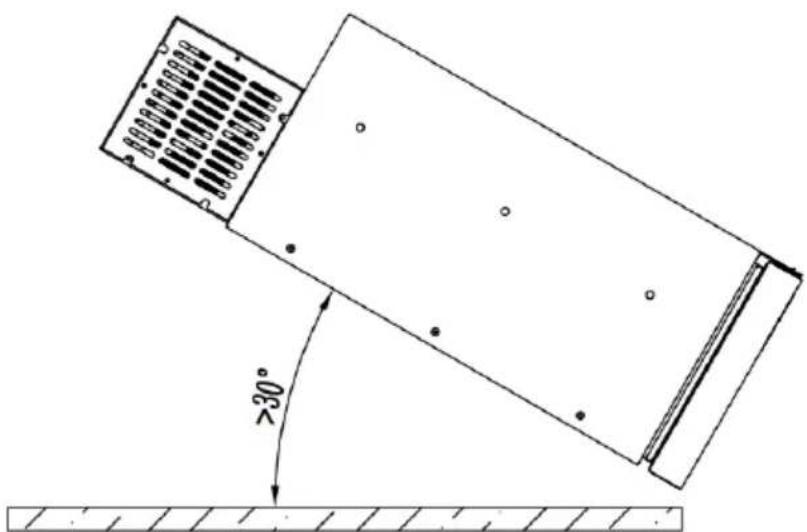
ELEKTRICKÁ SCHÉMATA
natural_image
Pure technical diagram of a rectangular enclosure with internal compartments and mounting holes, no text or symbols present.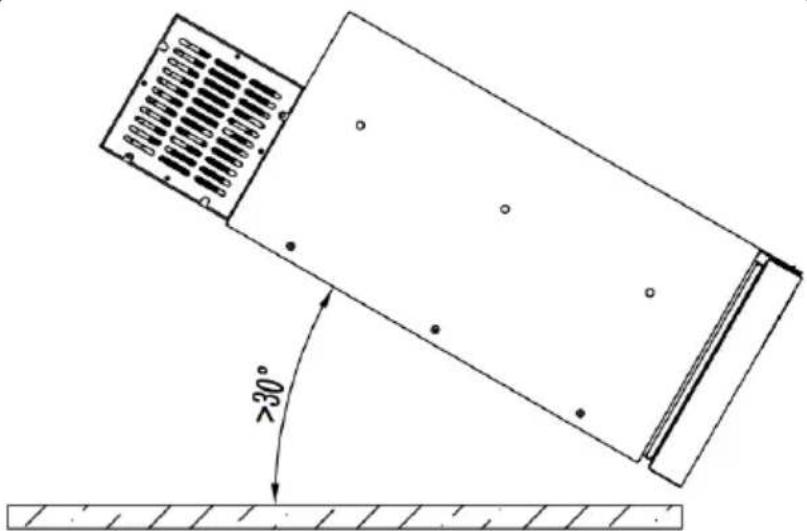
MSW-CRF30-46W
SCHEMAS ÉLECTRIQUES
- Noir
- Rouge
- Orange
- Blanc
- Brun
- Jaune
natural_image
Technical line drawing of a rectangular enclosure with internal compartments and mounting holes, no text or symbols present.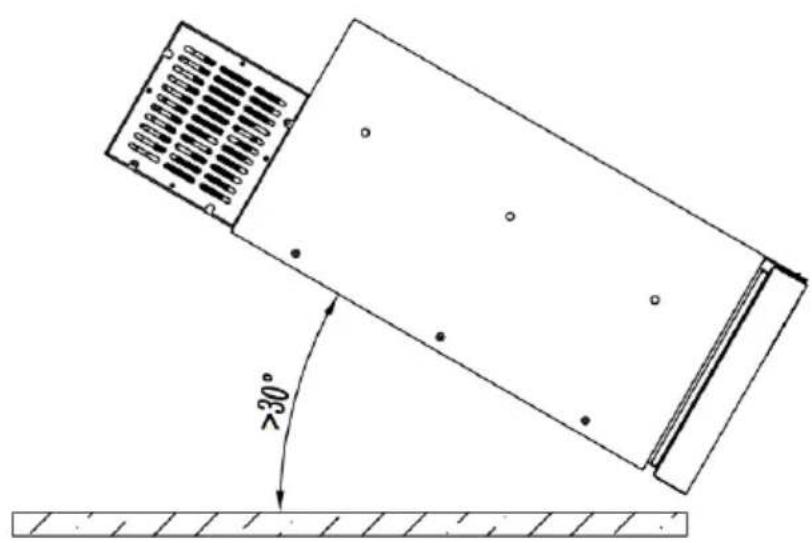
natural_image
Technical line drawing of a mechanical component with a 30-degree angle标注 (no text or symbols beyond the angle marker)MSW-CRF30-46W

SCHEMI ELETTRICI
natural_image
Technical line drawing of a mechanical component with a 30-degree angle annotation (no text or symbols present)MSW-CRF30-46W
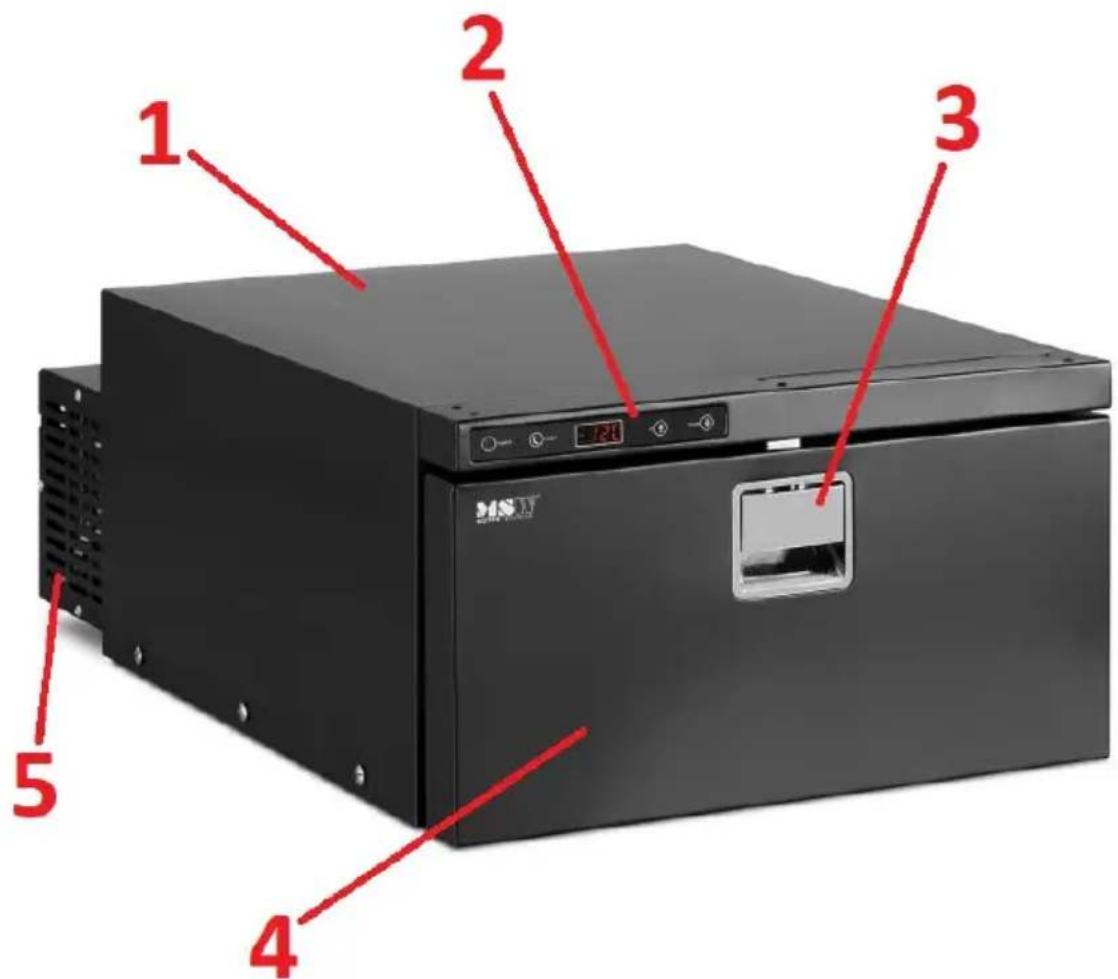
DIAGRAMA ELECTRÓNICO
natural_image
Technical line drawing of a rectangular electronic device with internal components and mounting holes (no text or symbols)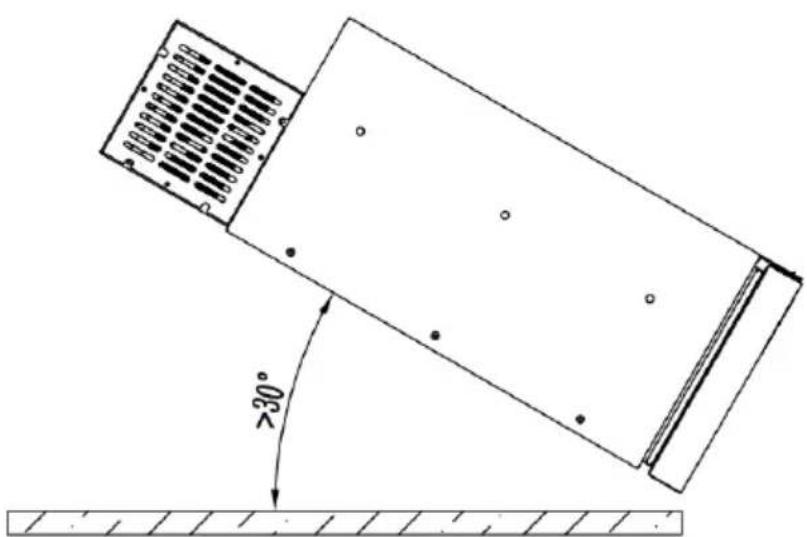
MSW-CRF30-46W
ELEKTROMOS RAJZOK
natural_image
Technical line drawing of a mechanical component with a 30-degree angle annotation (no text or symbols present)KREDSL∅BSDIAGRAM
natural_image
Technical line drawing of a rectangular enclosure with internal compartments and mounting holes, mounted on a hatched base (no text or symbols)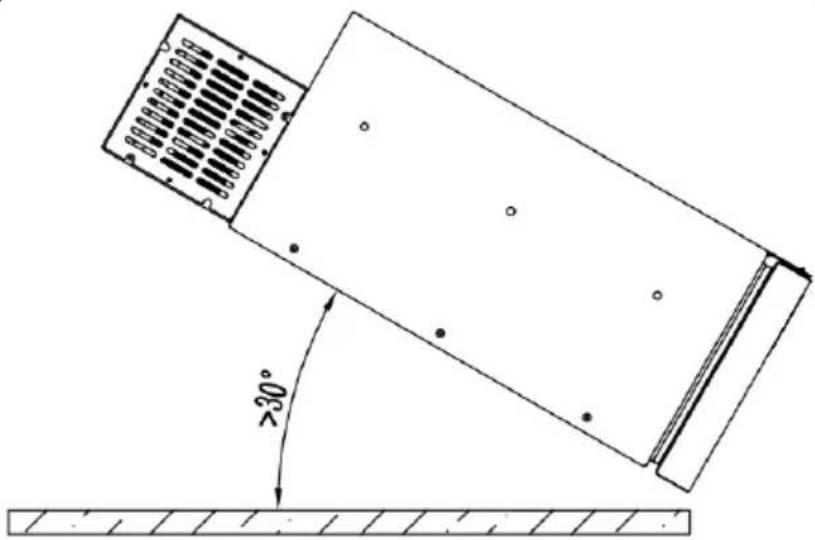
natural_image
Technical line drawing of a mechanical component with a 30-degree angle标注 (no text or symbols beyond the angle marker)For the disposal of the device please consider and act according to the national and local rules and regulations.
CONTACT
expondo Polska sp. z o.o. sp. k.