
WHP0400VW - Washing machine MAYTAG - Free user manual and instructions
Find the device manual for free WHP0400VW MAYTAG in PDF.


| Product Type | Commercial Washer |
| Brand | Maytag |
| Model | WHP0400VW |
| Use | Commercial Laundry |
| Installation Type | On pedestal (optional commercial pedestal) |
| Leveling Legs | 2 legs provided (for dryer pedestal), 4 sheet metal screws #12 x 5/8" |
| Required Tools | Utility knife, 1/4" and 5/16" hex sockets, 14 mm wrench, level, pliers, bucket |
| Location Requirements | At least 18 inches (46 cm) above the floor in garage |
| Electrical Supply | Disconnect before servicing |
| Warranty | 1 year limited (parts only) |
| Safety | Risk of explosion if flammable vapors; use two people to move |
| Parts Provided | 4 screws, 2 leveling legs, instructions |
| Maintenance | Check hoses, clean regularly |
| Installation | Requires prior removal of washer/dryer |
Frequently Asked Questions - WHP0400VW MAYTAG
User questions about WHP0400VW MAYTAG
0 question about this device. Answer the ones you know or ask your own.
Ask a new question about this device
Download the instructions for your Washing machine in PDF format for free! Find your manual WHP0400VW - MAYTAG and take your electronic device back in hand. On this page are published all the documents necessary for the use of your device. WHP0400VW by MAYTAG.
USER MANUAL WHP0400VW MAYTAG
PEDESTAL INSTALLATION INSTRUCTIONS
For use only with commercial washers and dryers
TABLE OF CONTENTS
PEDESTAL SAFETY . . . . . . . . . . . . . . . . . . . . . . . . . . . . . . . . . . . . . . . . . . . . . . . . . . . . . . . . . . . . . . . . . . . . . . . . . . . . . . . . . . . . . . . . INSTALLATION. INSTRUCTIONS....2 ....
INSTALLATION REQUIREMENTS .......Installing the Pedestal : .2.
Tools and Parts Complete the Installation
Location Requirements . . . . . . . . . . . . . . . . . . . . . . . . . . . . . . . . . . . . . . . . . . . . . . . . . . . . . . . . . . . . . . . . . . . . . . . . . . . . . . . . . . . . . . . . . . COMMERCIAL PEDESTAL WARRANTY . .
Before Installing the Pedestal . . . . . . . . . . . . . . . . . . . . . . . . . . . . . . . . . . . . . . . . . . . . . . . . 3
PEDESTAL SAFETY
Your safety and the safety of others are very important.
We have provided many important safety messages in this manual and on your appliance. Always read and obey all safety messages.

This is the safety alert symbol.
This symbol alerts you to potential hazards that can kill or hurt you and others.
All safety messages will follow the safety alert symbol and either the word "DANGER" or "WARNING."
These words mean:
! DANGER
You can be killed or seriously injured if you don't immediately follow instructions.
WARNING
You can be killed or seriously injured if you don't follow instructions.
All safety messages will tell you what the potential hazard is, tell you how to reduce the chance of injury, and tell you what can happen if the instructions are not followed.
INSTALLATION REQUIREMENTS
Tools and Parts
Gather the required tools and parts before starting installation. Read and follow the instructions provided with any tools listed here.
Tools needed
■utility knife
■1/4" hex head ratchet or open-end wrench
■5/16" hex head ratchet or open-end wrench
■14 mm open-end wrench
level
■9/16" open-end wrench
■pliers or slip-joint pliers
bucket
Parts supplied
■four #12 x 5/8" hex head sheet metal screws (in parts bag)
■two adjustable feet (in parts bag)
■Installation Instructions
NOTE: If the pedestal is to be installed under a washer, use the
feet that were factory installed on the washer for the pedestal installation, and save the two adjustable feet supplied in the bag for use with dryer pedestal installation.
Location Requirements
WARNING

Explosion Hazard
Keep flammable materials and vapors, such as gasoline, away from dryer.
Place dryer at least 18 inches (46 cm) above the floor for a garage installation.
Failure do to so can result in death, explosion, or fire.
NOTE: If the dryer and pedestal assembly is located in a garage, 15.5" (39.4 cm) must be added under the pedestal so that the dryer is 18" (46 cm) above the garage floor.
Before Installing the Pedestal
IMPORTANT: If your washer and dryer are already installed, they must be uninstalled.
If you need to uninstall your washer or dryer, see the installation instructions that came with your model for tools required.
Uninstalling your washer
WARNING
Excessive Weight Hazard
Use two or more people to move and uninstall washer.
Failure to do so can result in back or other injury.
NOTE: To prevent suspension and structural damage, your washer must be properly set up for relocation by a certified technician.
- Turn off the hot and cold water faucets.
- Unplug the power supply cord or disconnect power.
- Slowly loosen the fill hoses at the faucets to relieve the water pressure. Use a sponge or towel to absorb the released water.
-
Remove the "HOT" and "COLD" fill hoses from the back of the washer. Drain the water from the hoses into a bucket.
-
Squeeze the ears of the drain hose clamp with pliers to open and slide the clamp down the hose. Disconnect the drain hose from the washer and drain any water in the hose into a bucket.
-
Pull the washer away from wall so it can be tipped on its back.
-
Protect the floor with a large piece of cardboard cut from the pedestal carton. Lay the washer on its back (make sure that 5. the power supply cord is not under the washer) so that the cardboard is under the entire lower back edge of the washer. An additional small amount of water will drain out of the washer when it is tipped back.
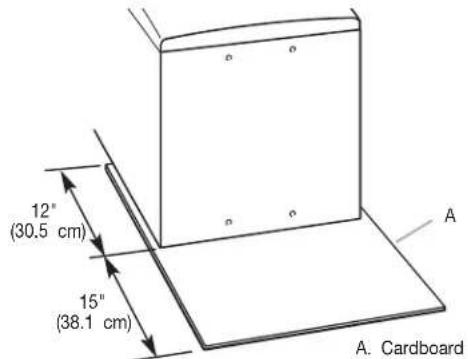
- Go to "Installing the Pedestal" section.
Uninstalling your electric dryer
- Unplug the power supply cord.
WARNING

Electrical Shock Hazard
Disconnect power before servicing.
Replace all parts and panels before operating.
Failure to do so can result in death or electrical shock.
- Disconnect wiring if dryer is direct wired.
WARNING
Excessive Weight Hazard
Use two or more people to move and uninstall dryer.
Failure to do so can result in back or other injury.
- Pull the dryer away from the wall enough to loosen the vent clamp. Loosen the clamp and gently remove the exhaust vent from the dryer exhaust outlet.
- Pull the dryer away from the wall so that it can be tipped on the its back.
Protect the floor with a large piece of cardboard cut from the pedestal carton. Lay the dryer on its back (make sure that the power supply cord is not under the dryer) so that the cardboard is under the entire lower back edge of the dryer.
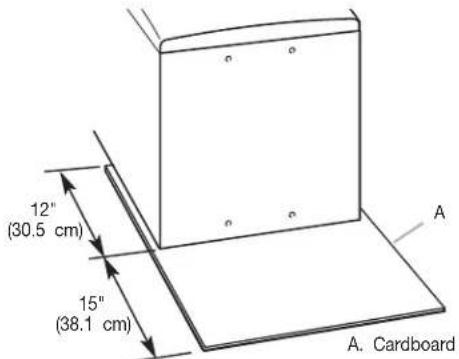
- Go to "Installing the Pedestal" section.
Uninstalling your gas dryer
- Unplug the power supply cord or disconnect power.
- Turn off the gas supply.
WARNING
Excessive Weight Hazard
Use two or more people to move and uninstall dryer.
Failure to do so can result in back or other injury.
- Pull the dryer away from the wall enough to loosen the vent clamp. Loosen the clamp and gently remove the exhaust vent from the dryer exhaust outlet.
- Disconnect the flexible gas supply line from the dryer. Put a piece of tape over the open ends of the gas line connection fittings.
- Pull the dryer away from the wall so that it can be tipped on its back.
- Protect the floor with a large piece of cardboard cut from the pedestal carton. Lay the dryer on its back (make sure that the power supply cord is not under the dryer) so that the cardboard is under the entire lower back edge of the dryer.
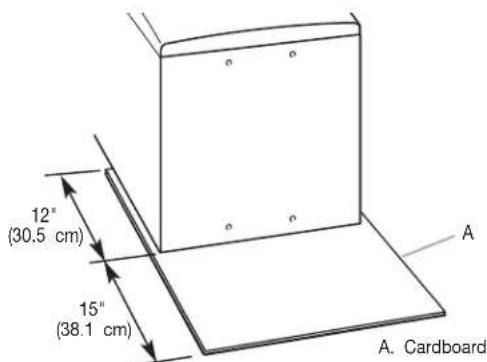
- Go to "Installing the Pedestal" section.
Washer or dryer is still in its packaging
WARNING
Excessive Weight Hazard
Use two or more people to move washer or dryer.
Failure to do so can result in back or other injury.
- Position the packaged washer or dryer close to its final position. Cut the packaging as follows:
Washer: Cut plastic film along dotted cut line around the base. Do not remove the packaging. Do not remove the shipping bolts at this time.
Dryer: Cut carton around top and down corners along dotted cut lines. Lay all four carton sides on floor. Discard carton top and corner posts.
IMPORTANT: Leave carton bottom underneath dryer.
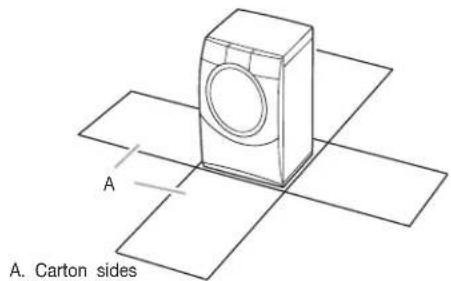
- Lay washer or dryer on its back.
NOTE: When laying the washer on its back, hold the bottom cap down on the floor. Do not remove the plastic film, corner posts, or top cap. These protect the floor and washer back. When laying the dryer on its back, the floor and dryer back are protected by cartoning.
INSTALLATION INSTRUCTIONS
Installing the Pedestal
Follow these instructions to install the pedestal on a washer
WARNING
Excessive Weight Hazard
Use two or more people to move and install pedestal.
Failure to do so can result in back or other injury.
The parts bag contains four #12 x 5/8" hex head sheet metal screws, two adjustable feet, and the Installation Instructions.
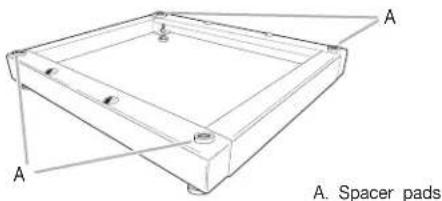
- Make sure that all four spacer pads are in place on the top of the pedestal. These pads are factory-installed to reduce vibration between the pedestal and the washer or dryer.
natural_image
Technical line drawing of a square frame with labeled points A and A', no text or symbols present-
Remove the feet installed on your washer or dryer.
-
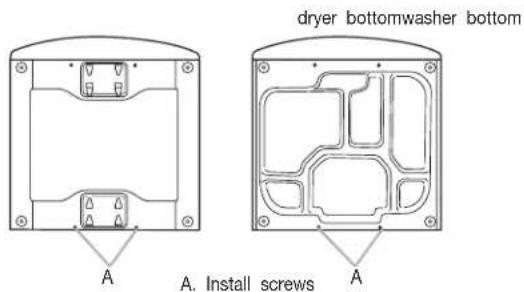
Partially install two of the #12 x 5/8" hex head sheet metal screws in the lower holes. Leave a space of about 3/8" (1 between the screw head and the bottom of the washer or dryer.
-
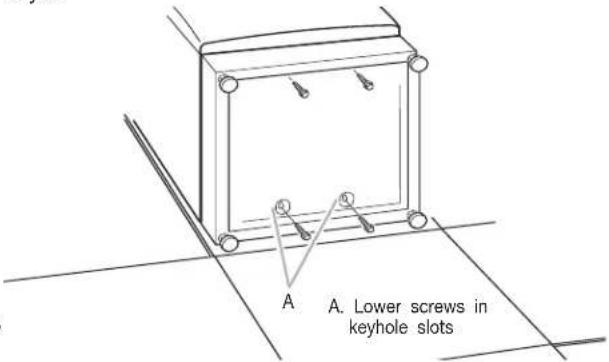
Move the pedestal against the washer or dryer bottom. Slide the pedestal's keyhole slots over the lower two partially installed screws.
-
Position the pedestal toward the front of the washer or dryer and install the two remaining hex head sheet metal screws. Do not tighten completely.
-
Align the sides of the pedestal so that they are even with the sides of the washer or dryer. Reach inside pedestal opening and securely tighten all four pedestal screws.
-
For the washer, install the feet that came with it and save the two feet included in the carton for future use on a dryer pedestal. For the dryer, install the feet that came with the pedestal.
-
Tip the washer or dryer back to its upright position. Remove and discard packaging including the washer's plastic film, corner posts, and top cap.
Complete the Installation
Follow the installation instructions that came with your model to complete installing or reinstalling your washer or dryer (i.e., oises, vents, etc.).
Level the Washer or Dryer and Pedestal
Properly leveling and locking the feet on the washer or dryer avoids excessive noise and vibration.
-
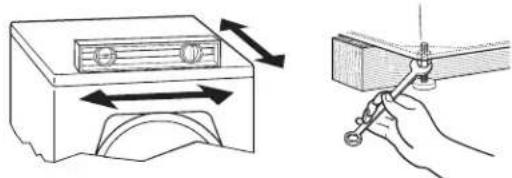
Check that the four locknuts on the pedestal feet are tightened against the pedestal cabinet using a 14 mm open-end wrench.
-
Place the washer or dryer in its final location and check the levelness of the washer or dryer. The washer or dryer should not move front-to-back, side-to-side, or diagonally when pushed on its top edges. Remove the shipping bolts from the washer.
natural_image
Illustration showing a device with bidirectional arrows and a hand holding a tool, no text or symbols present.- If the washer or dryer is not level, move the washer or dryer out slightly before tipping back. First prop the front with a wood block, loosen the locknuts, and adjust the pedestal feet as necessary. Then prop the back and adjust the pedestal feet as necessary. Repeat steps 1–3 until the washer or dryer is level.
IMPORTANT: All four feet must be tightened. If the locknuts are not tight against the pedestal cabinet, the washer or dryer may vibrate.
COMMERCIAL PEDESTAL WARRANTY
ONE YEAR LIMITED WARRANTY
For one year from the date of purchase, when this product is installed, maintained, and operated according to instructions attached to or furnished with the product, we will pay for factory-specified parts to correct defects in materials or workmanship. Proof of original purchase date is required to obtain service under this warranty.
ITEMS WE WILL NOT PAY FOR
- All other costs including labor, transportation, or custom duties.
- Service calls to correct the installation of your commercial appliance, to instruct you how to use your commercial appliance, to replace or repair fuses, or to correct external wiring or plumbing.
- Repairs when your commercial appliance is used for other than normal, commercial use.
- Damage resulting from improper handling of product during delivery, theft, accident, alteration, misuse, abuse, fire, flood, acts of God, improper installation, installation not in accordance with local electrical or plumbing codes, or use of products not approved by the manufacturer.
- Pickup and Delivery. This commercial appliance is designed to be repaired on location.
- Repairs to parts or systems resulting from unauthorized modifications made to the commercial appliance.
- The removal and reinstallation of your commercial appliance if it is installed in an inaccessible location or is not installed in accordance with published installation instructions.
- Chemical damage is excluded from all warranty coverage.
- Changes to the building, room, or location needed in order to make the commercial appliance operate correctly.
DISCLAIMER OF IMPLIED WARRANTIES; LIMITATIONS OF REMEDIES
CUSTOMER'S SOLE AND EXCLUSIVE REMEDY UNDER THIS LIMITED WARRANTY SHALL BE PRODUCT REPAIR AS PROVIDED HEREIN. IMPLIED WARRANTIES, INCLUDING WARRANTIES OF MERCHANTABILITY OR FITNESS FOR A PARTICULAR PURPOSE ARE LIMITED TO ONE YEAR OR THE SHORTEST PERIOD ALLOWED BY LAW. WHIRLPOOL SHALL NOT BE LIABLE FOR INCIDENTAL OR CONSEQUENTIAL DAMAGES. SOME STATES AND PROVINCES DO NOT ALLOW THE EXCLUSION OR LIMITATION OF INCIDENTAL OR CONSEQUENTIAL DAMAGES OR LIMITATIONS ON THE DURATION OF IMPLIED WARRANTIES OF MERCHANTABILITY OR FITNESS, SO THESE EXCLUSIONS OR LIMITATIONS MAY NOT APPLY TO YOU. THIS WARRANTY GIVES YOU SPECIFIC LEGAL RIGH AND YOU MAY ALSO HAVE OTHER RIGHTS, WHICH VARY FROM STATE-TO-STATE OR PROVINCE-TO-PROVINCE
If you need service, please contact your authorized Commercial Laundry distributor. To locate your authorized Maytag Commercial Laundry distributor, or for web inquiries, visit www.MaytagCommercialLaundry.com
3/08
For written correspondence:
Commercial Laundry Service Department
2000 M-63 North
Benton Harbor, Michigan 49022 USA
ÍNDICE
Commercial Laundry Service Department
2000 M-63 North
Benton Harbor, Michigan 49022 USA
TABLE DES MATIÈRES
SÉCURITÉ DU PIÉDESTAL ..... INSTRUCTIONS D'INSTALLATION .....
EXIGENCES D'INSTALLATION . . . . . . . . . . . . . . . . . . . . . . . . . . . . . . . . . . . . . . . . . . . . . . . . . . . . . . . . . . . . . . . . . . . . . . . . . . . . Installation du piédestal 12
natural_image
Technical line drawing of a rectangular frame with labeled points A and B, no text or symbols presentA. Cales d'espacement
natural_image
Pure technical line drawing of a mechanical component with no text, numbers, or symbolsA. Visser les vis en place ^A
natural_image
Diagram of a device with bidirectional arrows indicating movement or force (no text or symbols)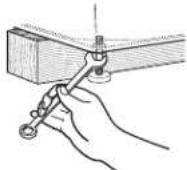
All rights reserved. Printed in U.S.A.


- PEDESTAL INSTALLATION INSTRUCTIONS
- TABLE OF CONTENTS
- PEDESTAL SAFETY
- Your safety and the safety of others are very important.
- ! DANGER
- WARNING
- INSTALLATION REQUIREMENTS
- Tools and Parts
- Tools needed
- Parts supplied
- Location Requirements
- Explosion Hazard
- Before Installing the Pedestal
- Uninstalling your electric dryer
- Uninstalling your gas dryer
- Washer or dryer is still in its packaging
- INSTALLATION INSTRUCTIONS
- Installing the Pedestal
- Complete the Installation
- Level the Washer or Dryer and Pedestal
- COMMERCIAL PEDESTAL WARRANTY
- ONE YEAR LIMITED WARRANTY
- ITEMS WE WILL NOT PAY FOR
- DISCLAIMER OF IMPLIED WARRANTIES; LIMITATIONS OF REMEDIES
- ÍNDICE
- TABLE DES MATIÈRES
Brand : MAYTAG
Model : WHP0400VW
Category : Washing machine