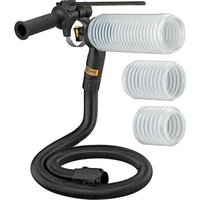
DWH200D - Dust collector DEWALT - Free user manual and instructions
Find the device manual for free DWH200D DEWALT in PDF.


| Product Type | Dust Collector |
| Brand | DeWalt |
| Model | DWH200D |
| Intended Use | Dust extraction during hammer drilling in masonry and dry concrete |
| Compatibility | SDS Plus rotary hammers, hammer drills, premium cordless drill/drivers |
| Included Adapters | Metal ring adapter (for SDS Plus 15) and plastic ring adapter (for hammer drills 16) |
| Included Bellows | Short bellow (152 mm total, 102 mm usable), long bellow (254 mm total, 203 mm usable), shoulder bit bellow |
| Wear Ring | Included, to be placed at the end of the bellow |
| Depth Adjustment Rod | Yes, adjustable |
| Vacuum Connection | Dust extraction connection port (7) compatible with hose 8 and AirLock system |
| Protection Cap | Included for use without vacuum |
| Material | Plastic and metal (adapters) |
| Safety | Read warnings; wear PPE (goggles, mask, hearing protection); do not use in wet conditions |
| Maintenance | Blow dust from vents with dry air; do not use solvents; clean with damp cloth and mild soap |
| Wear Parts | Dust brush (replaceable), bellows |
| Repairs | Have serviced at a DeWalt authorized service center |
| Warranty | 3-year limited (parts and labor) |
| Free Service | One-year free service contract + 90-day money-back guarantee |
| Country of Origin | Not specified in the manual |
| Dimensions (L x W x H) | Not provided |
| Weight | Not provided |
| Package Contents | Assembled dust extraction system, adapters, bellows, wear ring, adjustment rod, cap, manual |
Frequently Asked Questions - DWH200D DEWALT
User questions about DWH200D DEWALT
0 question about this device. Answer the ones you know or ask your own.
Ask a new question about this device
Download the instructions for your Dust collector in PDF format for free! Find your manual DWH200D - DEWALT and take your electronic device back in hand. On this page are published all the documents necessary for the use of your device. DWH200D by DEWALT.
USER MANUAL DWH200D DEWALT
Dust Extraction System
Definitions: Safety Alert Symbols and Words
This instruction manual uses the following safety alert symbols and words to alert you to hazardous situations and your risk of personal injury or property damage.
DANGER: Indicates an imminently hazardous situation which, if not avoided, will result in death or serious injury.
WARNING: Indicates a potentially hazardous situation which, if not avoided, could result in death or serious injury.
CAUTION: Indicates a potentially hazardous situation which, if not avoided, may result in minor or moderate injury.
(### without word) Indicates a safety related message.
NOTICE: Indicates a practice not related to personal injury which, if not avoided, may result in property damage.
Fig. A
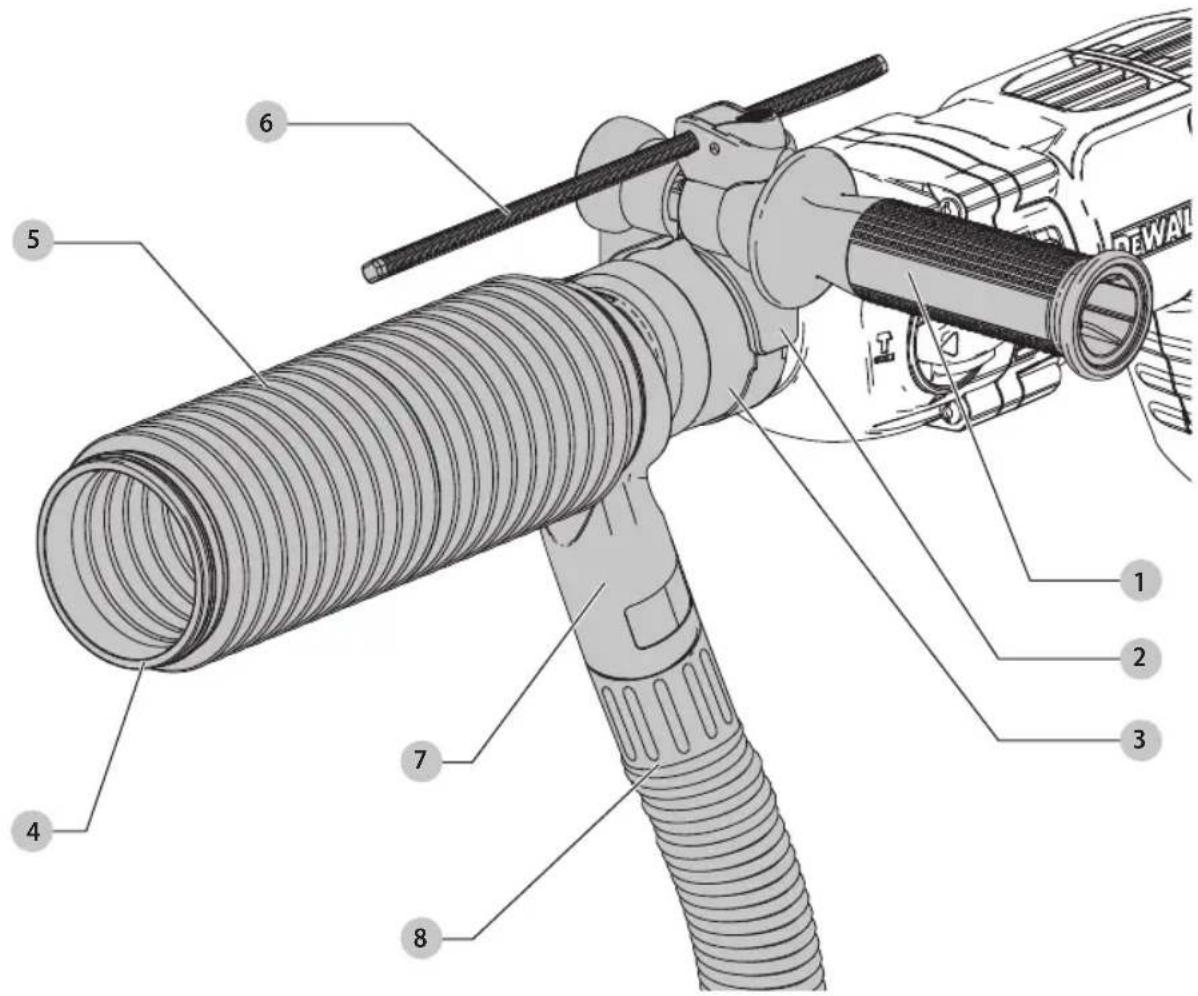
1 Side Handle
2 Ring opening
3 Ring adapter
4 Wear ring
5 Long bellow
6 Depth adjustment rod
7 Dust extraction connection port
8 Dust hose
WARNING: Read all safety warnings and all instructions. Failure to follow the warnings and instructions may result in electric shock, fire and/or serious injury.

WARNING: To reduce the risk of injury, read the instruction manual.
If you have any questions or comments about this or any DEWALTtool, call us toll free at: 1-800-4-DEWALT(1-800-433-9258).
English
Safety Instructions
WARNING! Always observe safety regulations applicable in your country or region to reduce the risk of fire, electric shock and personal injury.
Read all of this manual carefully before operating the attachment. Also refer to the manual of any power tool that will be used with this attachment.
SAVE THIS MANUAL FOR FUTURE REFERENCE
General Safety Rules
a) Keep work area clear. Cluttered areas and benches invite injuries.
b) Keep children away. Do not let children come into contact with the tool or extension cord.
Supervision is required for those under 16 years of age.
c) Use appropriate tool. The intended use is described in this instruction manual. Do not force small tools or attachments to do the job of a heavy-duty tool. The tool will do the job better and safer at the rate for which it was intended.
WARNING: The use of any accessory or attachment performance of any operation with this tool, other than those recommended in this instruction manual, may present a risk of personal injury.
Additional Specific Safety Rules for Dust Extraction Systems
- Do not use the attachment for drilling applications in wood, steel or plastic.
- Do not use the attachment in core drilling applications.
- Do not use the attachment for chiselling applications.
- Use only power tools recommended by D -FWALT with this attachment. For more information about DEWALT power tools compatible with this attachment, please contact your local dealer, refer to the addresses at the back of the manual or visit www.dewalt.com.
- Do not use the tool in damp or wet conditions.
- Do not allow to be used as a toy. Close attention is necessary when used by or near children.
- Use only as described in this manual. Use only manufacturer's recommended attachments.
- Do not put any object into openings. Do not use with any opening blocked; keep free of dust, lint, hair and anything that may reduce air flow.
- Keep hair, loose clothing, fingers and all parts of body away from openings and moving parts.
- Do not use to pick up flammable or combustible liquids, such as gasoline, or use in areas where they may be present.
Additional Safety Information
WARNING: Never modify the unit or any part of it. Emission or personal injury could result.
WARNING: ALWAYS use safety glasses. Everyday eyeglasses are NOT safety glasses. Also use face or dust mask if cutting operation is dusty. ALWAYS WEAR CERTIFIED SAFETY EQUIPMENT:
• ANSI Z87.1 eye protection (CAN/CSA Z94.3),
• ANSI S12.6 (S3.19) hearing protection,
• NIOSH/OSHA/MSHA respiratory protection.
WARNING: Some dust created by power sanding, sanding, grinding, drilling, and other construction activities contains chemicals known to the State of California to cause cancer, birth defects or other reproductive harm. Some examples of these chemicals are:
- lead from lead-based paints,
• crystalline silica from bricks and cement and other masonry products, and
• arsenic and chromium from chemically-treated lumber.
Your risk from these exposures varies, depending on how often you do this type of work. To reduce your exposure to these chemicals: work in a well ventilated area, and work with approved safety equipment, such as those dust masks that are specially designed to filter out microscopic particles.
- Avoid prolonged contact with dust from power sanding, sawing, grinding, drilling, and other construction activities. Wear protective clothing and dust wash exposed areas with soap and water. Allowing dust to get into your mouth, eyes, or lay on the skin may promote absorption of harmful chemicals.
WARNING: Use of this tool can generate and/or disperse dust, which may cause serious and permanent respiratory or other injury. Always use NIOSH/OSHA approved respiratory protection appropriate for the dust exposure. Direct particles away from face and body.
WARNING: Always wear proper personal hearing protection that conforms to ANSI S12.6 (S3.19)
during use. Under some conditions and duration of use, noise from this product may contribute to hearing loss.
CAUTION: When not in use, place tool on its side on a stable surface where it will not cause a tripping or falling hazard. Some tools with large battery packs will stand upright oxn the battery pack but may be easily knocked over.
• Air vents often cover moving parts and should be avoided. Loose clothes, jewelry or long hair can be caught in moving parts.
Intended Use
Your dust extraction system DWH200D has been designed for the extraction of dust in professional hammer drilling in masonry or dry concrete with solid drill bits and stop bits mounted to the power tool. DO nOT use with hollow bits or core bits.
This dust extraction system will fit most DEWALTcorded and cordless SDS Plus rotary hammers, corded hammer drills and premium cordless drill/driver/hammer drills.
DO nOT use under wet conditions or in presence of flammable liquids or gases.
The dust extraction system is an attachment for use with professional power tools.
DO nOT let children come into contact with the tool. Supervision is required when inexperienced operators use this tool.
ASSEMBLY AND ADJUSTMENTS
WARNING: To reduce the risk of serious personal injury, turn unit off and disconnect it from power source before making any adjustments or removing/installing attachments or accessories.
An accidental start-up can cause injury.
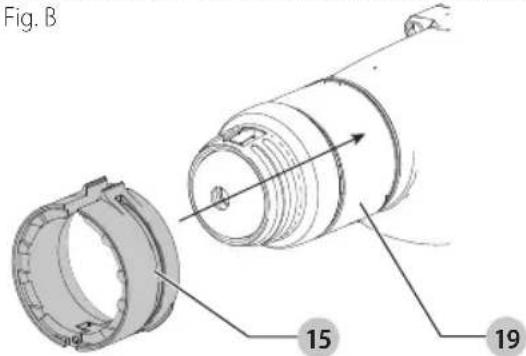
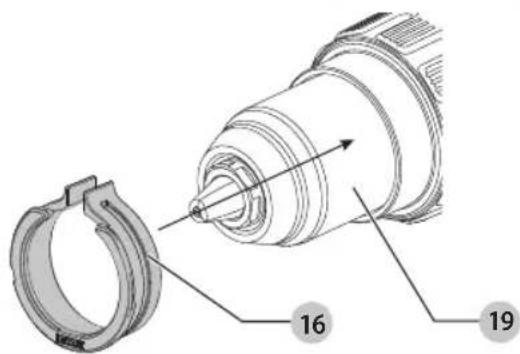
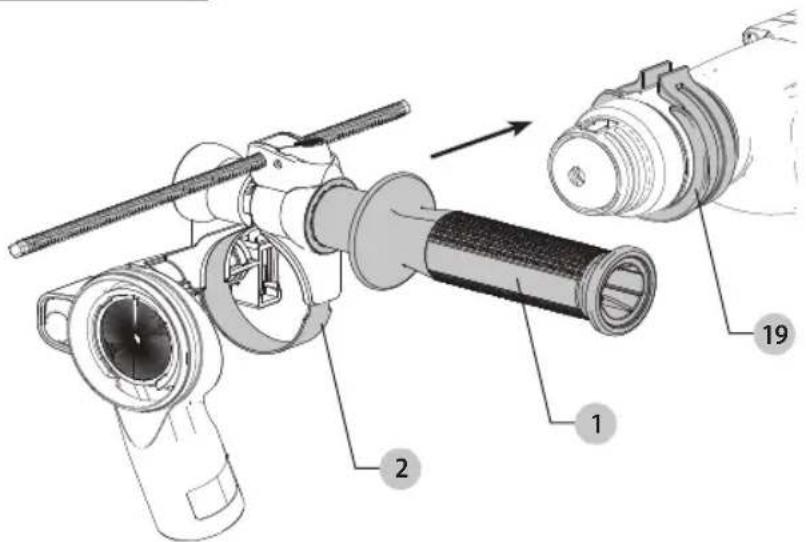
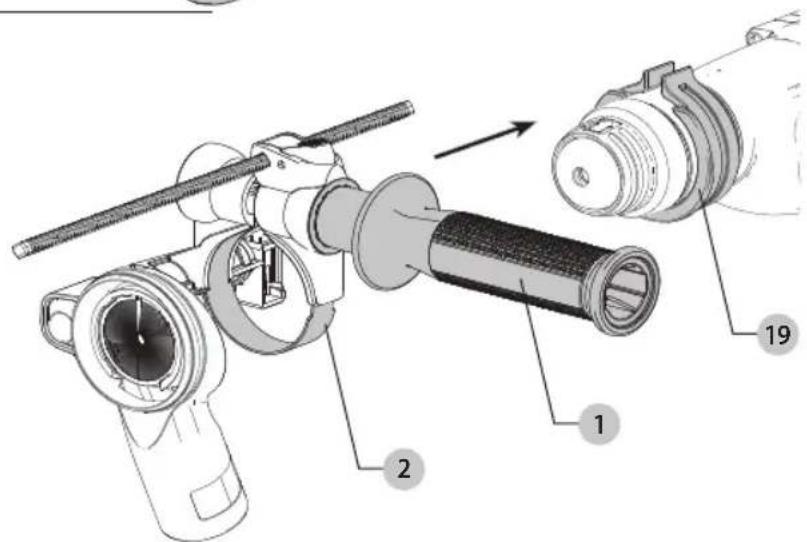
Attaching the Ring Adapter (Fig. A, B)
Your dust extraction system comes with two adapters; a metal ring adapter with hinge for SDS Plus rotary hammers 15 and a plastic ring adapter for percussion hammerdrills 16.
Refer to the Fitment Guide chart for proper adapter use.
NOTE: If the diameter of the tool's collar is 54 mm, no ring adapter is needed.
- If a ring adapter is needed, choose the correct ring adapter for your tool.
- Open the ring adapter and slide it onto the tool's collar 19 as shown in Figure B.
nOTE: The adapter will slide back and forth on the tool. Fig. B
FITMENT GUIDE
| No adapter collar needed | D25333, DCH293, D25263, DCH263, DCH273, D25262, D25323, DCH253, DCH213, D25223, D25213, D25123 |
| Toothed adapter needed | DCH133, D25133, D25260, D25052, D25012, D25023, DWD525, DWD520 |
| Smooth adapter needed | DCD950, DCD970, DCD985, DCD995, DCD996, DCD997 |
Assembling the Dust Extraction System (Fig. A, C–E)
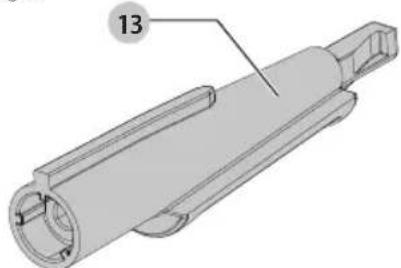
The standard SDS Plus tool holder adapter (short) 14 comes attached to some tools. But if your tool requires the Quick Change Chuck (QCC) SDS Plus tool holder adapter (long) 13, assemble as follows.
- Remove the cross head screw from the short adapter 14 using a cross head screwdriver (Fig. C). Then use the screw to assemble the long tool holder adapter 13 (Fig. D) to the dust brush body 18. Tighten securely.
- Carefully slide the newly assembled dust brush and tool holder adapter into the slot on the top of the side handle assembly until you hear a click (Fig. E).
Fig. C
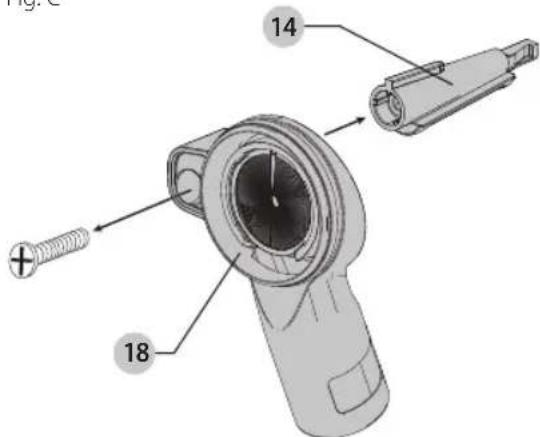
Fig. D
natural_image
Technical drawing of a mechanical component with labeled part 13 (no text or symbols beyond label)Attaching the Dust Extraction System to the Tool (Fig. A, F)
- Slide the assembled dust extraction system onto the nose of the tool through the ring opening 2, past the tool holder and sleeve and onto the tool's collar 19. If a ring adapter is needed, refer to Attaching the Ring Adapter.
English
Fig. E
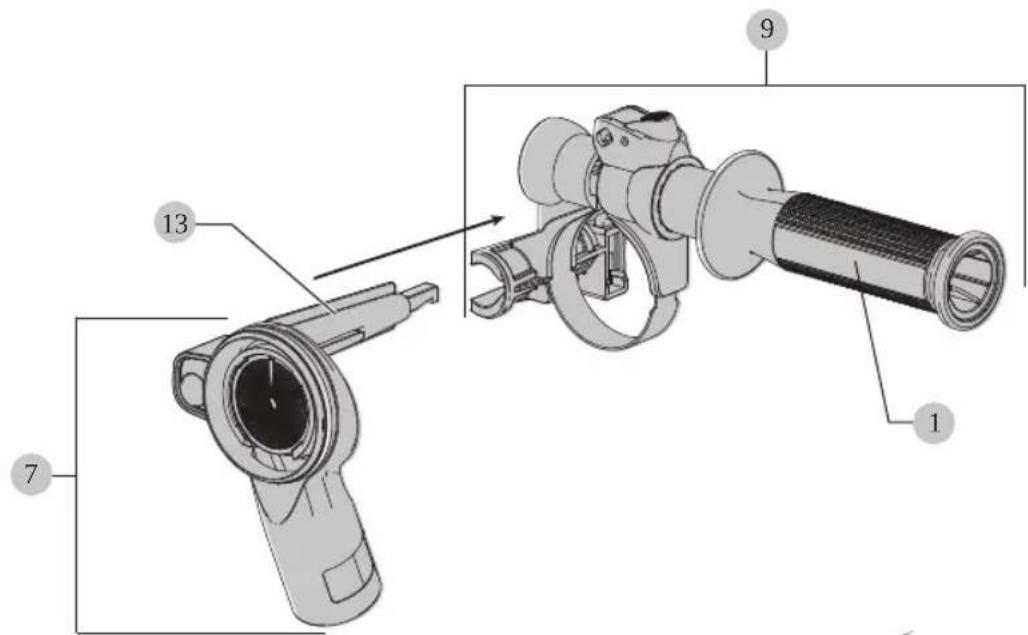
Fig. F
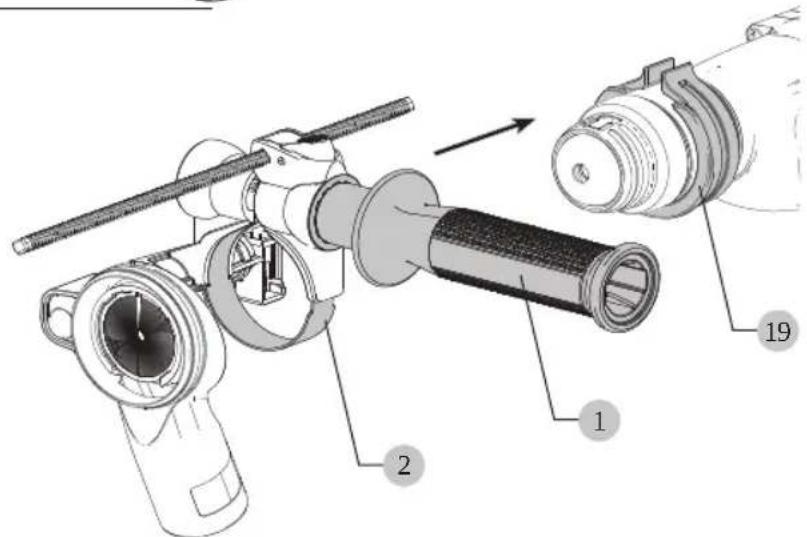
- Rotate the dust extraction system to the desired position on the tool.
- Lock the assembly in place by securely tightening the side handle ●1rotating the grip clockwise firmly so that the assembly will not rotate due to the torque of the tool.
- Install and adjust the depth adjustment rod to desired length.
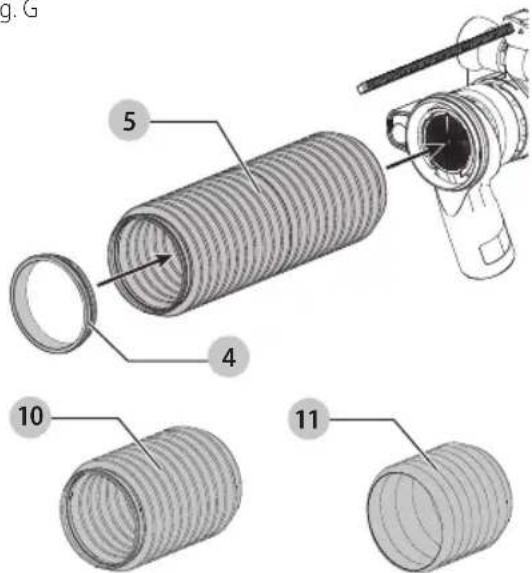
Attaching and Removing the Bellows (Fig. A, G)
Your dust extraction system comes with a short bellow 10 a long bellow 5 and a stop bit bellow 11 Refer to the chart below for proper usage for each bellow.
BELLOW USAGE
Short bellow To be used with 6" (152 mm) overall length [4" (102 mm) useable] bits.
Long bellow To be used with 10" (254 mm) overall length [8" (203 mm) useable] bits.
Stop bit bellow To be used with SDS Plus rotary hammer stop bits.
Attaching the Bellow
You can attach the bellow with the bit either installed or removed.
- Push the bellow onto the end of the dust extraction unit while using a twisting motion until the bellow is secure.
- Place the wear ring 4 on the opposite end of the bellow, closest to the work piece.
Removing the Bellow
To remove the bellow, twist and pull the bellow away from the dust extraction unit.
English
Fig. G
Attaching a Dust Extractor to the Dust Extraction Assembly (Fig. H–J)
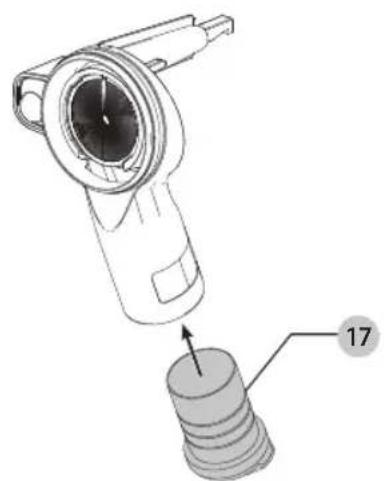
- Insert the dust hose 8 into the dust extraction connection port 7 and a dust extractor (Fig. H). NOTE: The dust extraction system is compatible with or without a dust extractor. The tool can be used with the plug 17 inserted in the dust extraction connection port 7 (Fig. I). If you are using the plug, it is recommended you remove the dust from the bellow after drilling each hole.
Fig. H
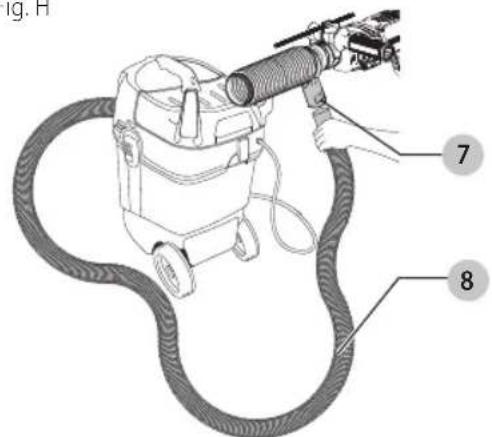
Fig.1
natural_image
Technical illustration of a mechanical device with a numbered component (17), no visible text or symbolsAirLock Compatible (Fig. A, H-J)
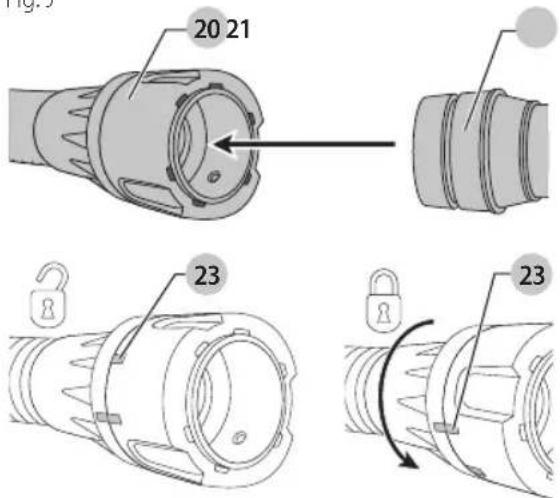
Your DEWALT dust extractor is compatible with the DEWALT AirLock connection system. The AirLock allows for a fast, secure connection between the dust hose 8 and power tool. The AirLock connector 20 (Fig. J) connects directly to DEWALT compatible tools or through the use of an AirLock adapter 21 (available from your local DEWALT supplier). nOTE: If using an AirLock adapter 21, ensure it is firmly attached to the tool outlet before following the steps below.
- Ensure the collar on the AirLock connector is in the unlock position. (Refer to Figure J.) Align notches 23 on collar and AirLock connector as shown for unlock and lock positions.
- Push the AirLock connector onto the dust extraction system hose 8.
- Rotate the collar to the locked position. nOTE: The ball bearings inside collar lock into the slot and secure the connection. The dust extraction system is now securely connected to the dust extractor.
Fig. J
Removing the Dust Extraction System from the Tool (Fig. A, I)
- Remove the dust hose 8 or the dust port plug 17 from the dust extraction connection port 7.
- Remove the bit from the tool holder.
- Turn side handle 1 to loosen and slide from the nose of the tool.
- If a ring adapter was used, open and remove the adapter from the nose of the tool.
OPERATION
Instructions for Use
WARNING: Always observe the safety instructions and applicable regulations.
WARNING: To reduce the risk of serious personal injury, turn tool off and disconnect tool from power source before making any adjustments or removing/installing attachments or accessories.
Be sure the trigger switch is in the OFF position. An accidental start-up can cause injury.
English
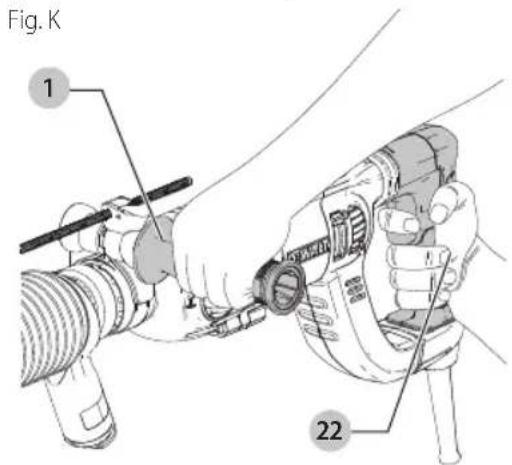
Proper Hand Position (Fig. K)
WARNING: To reduce the risk of serious personal injury, ALWAYS use proper hand position as shown.
WARNING: To reduce the risk of serious personal injury, ALWAYS hold securely in anticipation of a sudden reaction.
Proper hand position requires one hand on the main handle 22 of the hammer and one hand on the side handle 1 of the dust extraction system.
MAINTENANCE
Your DeWALdust extraction system has been designed to operate over a long period of time with a minimum of maintenance. Continuous satisfactory operation depends upon proper tool care and regular cleaning.
WARNING: To reduce the risk of serious personal injury, turn tool off and disconnect tool from power source before making any adjustments or removing/installing attachments or accessories.
Be sure the trigger switch is in the OFF position. An accidental start-up can cause injury.
WARNING: Use only DEWAL Treplacement parts.
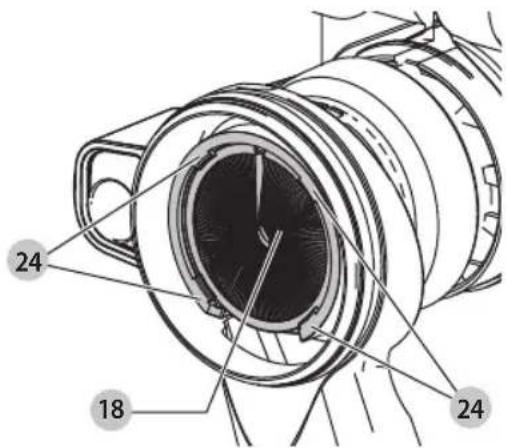
Replacing the Dust Brush (Fig. L)
WARNING: Wear approved eye protection and approved dust mask when performing this procedure.
The dust brush will wear during use and will need to be replaced.
- To remove the dust brush 18, pry it away from the four small tabs 24 holding it in place.
- Insert the new dust brush making sure it is securely held by the four small tabs.
Fig. L
Cleaning
WARNING: Blow dirt and dust out of all air vents with clean, dry air at least once a week. To minimize the risk of eye injury, always wear ANSI Z87.1 approved eye protection and dust mask when performing this procedure.
WARNING: Never use solvents or other harsh chemicals for cleaning the non-metallic parts of the tool. These chemicals may weaken the plastic materials used in these parts. Use a cloth dampened only with water and mild soap. Never let any liquid get inside the tool; never immerse any part of the tool into a liquid.
Accessories
WARNING: Since accessories, other than those acquired by DEWALT have not been tested with this product, use of such accessories with this tool could be hazardous. To reduce the risk of injury, only DEWALT recommended accessories should be used with this product.
Recommended accessories for use with your tool are available at extra cost from your local dealer or authorized service center. If you need assistance in locating any accessory, please contact DeWALIndustrial Tool Co., 701 East Joppa Road, Towson, MD 21286, call 1-800-4-DeWAL(T-800-433-9258) or visit our website: www.dewalt.com.
Repairs
WARNING: To assure product SAFETY and REABILITY, repairs, maintenance and adjustment (including brush inspection and replacement, when applicable) should be performed by a DEWALT factory service center or a DEWALT authorized service center. Always use identical replacement parts.
Register Online
Thank you for your purchase. Register your product now for:
- WARRANTY sERViCE: Registering your product will help you obtain more efficient warranty service in case there is a problem with your product.
- COnFiRMATiOn OF OWnERshiP: In case of an insurance loss, such as fire, flood or theft, your registration of ownership will serve as your proof of purchase.
- FOR YOUR SAFETY: Registering your product will allow us to contact you in the unlikely event a safety notification is required under the Federal Consumer Safety Act.
Register online at www.dewalt.com/register.
Three Year Limited Warranty
DEWALT will repair, without charge, any defects due to faulty materials or workmanship for three years from the date of purchase. This warranty does not cover part failure due to normal wear or tool abuse. For further detail of warranty coverage and warranty repair information, visit www.dewalt.com or call 1-800-4-DEWALT(1-800-433-9258). This warranty does not apply to accessories or damage caused where repairs have been made or attempted by others. THIS LIMITED WARRANTY IS GIVEN IN LIEU OF ALL OTHERS, INCLUDING THE IMPLIED WARRANTY OF MERCHANTABILITY AND FITNESS FOR A PARTICULAR PURPOSE, AND EXCLUDES ALL INCIDENTAL OR CONSEQUENTIAL DAMAGES. Some states do not allow limitations on how long an implied warranty lasts or the exclusion or limitation of incidental or consequential damages, so these limitations may not apply to you. This warranty gives you specific legal rights and you may have other rights which vary in certain states or provinces.
In addition to the warranty, DEWALTtools are covered by our:
1 YEAR FREE sERViCE
DEWALTwill maintain the tool and replace worn parts caused by normal use, for free, any time during the first year after purchase.
90 DAY MOnEY BACK gUARAnTEE
If you are not completely satisfied with the performance of your DEWALT Power Tool, Laser, or Nailer for any reason, you can return it within 90 days from the date of purchase with a receipt for a full refund – no questions asked.
IATin AMERiCA: This warranty does not apply to products sold in Latin America. For products sold in Latin America, see country specific warranty information contained in the packaging, call the local company or see website for warranty information.
FREE WARning IABEI REPIACEMENT: If your warning labels become illegible or are missing, call 1-800-4-DEWALT (1-800-433-9258) for a free replacement.
natural_image
3D mechanical component diagram with labeled part 13 (no text or symbols on the object itself)Fig. F
FRAnÇAis
natural_image
Technical illustration of a mechanical device with a numbered component (17), no visible text or symbolsnatural_image
3D mechanical component diagram showing a cylindrical assembly with a labeled part (13), no text or symbols present.Fig. F
natural_image
Technical illustration of a mechanical device with a numbered component (17), no visible text or symbolsEje Central Lázaro Cárdenas No. 18 - Local (55) 5588 9377 D, Col. Obrera
MERIDA, YUC
Calle 63 #459-A - Col. Centro (999) 928 5038
MONTERREY, N.L.
Av. Francisco I. Madero 831 Poniente - Col. (818) 375 23 13 Centro
PUEBLA, PUE
17 Norte #205 - Col. Centro (222) 246 3714
QUERETARO, QRO
Av. San Roque 274 - Col. San Gregorio (442) 2 17 63 14
SAN LUIS POTOSI, SLP
natural_image
Pure horizontal and vertical lines without any text, numbers, or symbols
natural_image
Pure geometric lines forming a symmetrical shape with no text, numbers, or symbolsDEWALT Industrial Tool Co., 701 East Joppa Road, Towson, MD 21286
(JAN20) Part No. N488282 DWH200D Copyright © 2018, 2020 DEWALT
The following are trademarks for one or more DEWALT power tools: the yellow and black color scheme, the "D" shaped air intake grill, the array of pyramids on the handgrip, the kit box configuration, and the array of lozenge-shaped humps on the surface of the tool.