ScoopFree PAL19-14656 - Pets PETSAFE - Free user manual and instructions
Find the device manual for free ScoopFree PAL19-14656 PETSAFE in PDF.


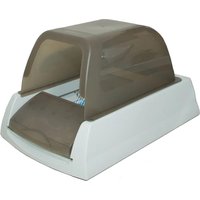
| Product Type | Self-cleaning Litter Box |
| Brand | PetSafe |
| Model | ScoopFree Ultra (PAL19-14656) |
| Power Supply | AC adapter, 1.8 m cord |
| Recommended Litter Type | PetSafe Crystal Litter (disposable trays) |
| Tray Capacity | Approximately 2.5 kg of Crystal Litter |
| Tray Duration (1 cat) | 20 to 30 days |
| Raking Delay | Adjustable: 5, 10, or 20 minutes |
| Presence Detection | Infrared sensors |
| Health Counter | Records the number of cycles |
| Motor | Quiet |
| Privacy Hood | Included and removable |
| Dimensions (approx.) | 60 x 45 x 40 cm |
| Weight (approx.) | 5 kg |
| Materials | ABS plastic, electronic adapter |
| Use | Indoor only |
| Warranty | 2 years limited |
| Standards | CE, IC |
| Maintenance | Clean with water and mild soap |
| Spare Parts | Replacement litter trays, privacy hood, adapter |
Frequently Asked Questions - ScoopFree PAL19-14656 PETSAFE
Warning: do not place the box where people or pets could trip over the cord.
User questions about ScoopFree PAL19-14656 PETSAFE
0 question about this device. Answer the ones you know or ask your own.
Ask a new question about this device
Download the instructions for your Pets in PDF format for free! Find your manual ScoopFree PAL19-14656 - PETSAFE and take your electronic device back in hand. On this page are published all the documents necessary for the use of your device. ScoopFree PAL19-14656 by PETSAFE.
USER MANUAL ScoopFree PAL19-14656 PETSAFE
ScoopFree™ Ultra Self-Cleaning Litter Box
natural_image
Line drawing of a mechanical component with internal structure, enclosed in a circular frame (no text or symbols)Hereinafter Radio Systems Corporation, Radio Systems PetSafe Europe Ltd., Radio Systems Australia Pty Ltd. and any other affiliate or Brand of Radio Systems Corporation may be referred to collectively as "We" or "Us".
IMPORTANT SAFETY INFORMATION
Explanation of Attention Words and Symbols used in this guide

This is the safety alert symbol. It is used to alert you to potential personal injury hazards. Obey all safety messages that follow this symbol to avoid possible injury or death.
⚠ WARNING
WARNING indicates a hazardous situation which, if not avoided, could result in death or serious injury.
CAUTION
CAUTION, used with the safety alert symbol, indicates a hazardous situation which, if not avoided, could result in minor or moderate injury.
CAUTION
CAUTION, used without the safety alert symbol, indicates a hazardous situation which, if not avoided, could result in harm to your pet.
NOTICE
NOTICE is used to address safe use practices not related to personal injury.
⚠ WARNING
When using electrical appliances, basic safety precautions should always be followed to reduce the risk of fire, electric shock persons, including the following:
- To protect against electric shock, do not place the unit, electrical Power Adaptor, or plug in water or other liquids. If the plug of the device gets wet, turn off the electricity to that electrical outlet. Do not attempt to unplug.
- Do not use outdoors. FOR INDOOR HOUSEHOLD USE ONLY.
- Do not pull on the electrical Power Adaptor to remove the plug from the electrical outlet. To unplug, grasp the plug, not the electrical Power Adaptor.
- Do not use accessories or attachments that are not recommended by the manufacturer as they may cause fire, electric shock, or injury.
- Do not operate if the unit has a damaged electrical Power Adaptor or plug, or if it is malfunctioning or has been damaged. Call the Customer Care Centre immediately for further instructions.
- Do not use the unit for anything other than its intended use.
- Packaging material is not a toy. Keep away from children and pets.
- Keep plastic bags away from babies and children. Do not use in cribs, beds, carriages, or play pens. The thin film may cling to nose and mouth and prevent breathing.
CAUTION
- To reduce the risk of injury, close supervision is necessary when the unit is used by or near children. Do not let small children play with or near the Litter Box. Avoid contact with moving parts.
- Pregnant women, babies, small children, and immune deficient individuals should avoid contact with cat litter waste. Cats' waste may contain toxoplasmosis bacteria that can be harmful to these individuals.
- Do not allow anything to rest on the Power Adaptor plug.
- Do not plug the Power Adaptor plug in an area where people or animals may walk or trip on it.
• Always unplug the unit when not in use, before putting on or taking off parts, and before cleaning.
CAUTION
- If your kitten is under 6 months of age leave the unit UNPLUGGED and scoop waste until kitten is 6 months old.
NOTICE
- Remove all packaging material before connecting the Power Adaptor.
- Do not place the Litter Box on an unsteady surface.
- Do not use any other type of litter. Only use PetSafe® disposable Crystal Litter Trays with this product. The Crystal Litter is pre-measured for optimal performance. Using too much or not enough litter can cause the Litter Box to malfunction.
- If solid waste is collecting outside of the Waste Compartment, it is time to change the Litter Tray.
- Increased elimination habits of cats who consume a diet high in crude fiber, ash and by-products, cats older than 10 years of age and cats with diabetes, kidney and thyroid problems may result in a shorter Litter Tray life. Kittens may have softer stool than mature cats, which increases the likelihood that it may stick to the Rake.
SAVE THESE INSTRUCTIONS
Thank you for choosing the PetSafe® Brand. You and your pet deserve a companionship that includes memorable moments and a shared understanding together. Our products and training tools enhance the relationship between pets and their owners. If you have any questions about our products or training your pet, please visit our website at www.petsafe.net or contact our Customer Care Centre. For a listing of Customer Care Centre telephone numbers, visit our website at www.petsafe.net.
To get the most protection out of your warranty, please register your product within 30 days at www.petsafe.net. By registering and keeping your receipt, you will enjoy the product's full warranty and, should you ever need to call the Customer Care Centre, we will be able to help you faster. Most importantly, your valuable information will never be given or sold to anyone. Complete warranty information is available online at www.petsafe.net.
Table of Contents
Components....4
Features 4
How the System Works....4
Key Definitions....5
Prepare the Litter Box....5
Install the Litter Tray 6
Install the Privacy Hood 6
Program the Rake Delay 7
Program the Health Counter....7
Introducing Your Cat to the Litter Box....8
Changing the Litter Tray 8
Maximizing Litter Tray Life. 8
Care and Cleaning....9
Troubleshooting 9
Warranty 10
Compliance....11
Important Recycling Advice .... 11
Terms of Use and Limitation of Liability 11
Components
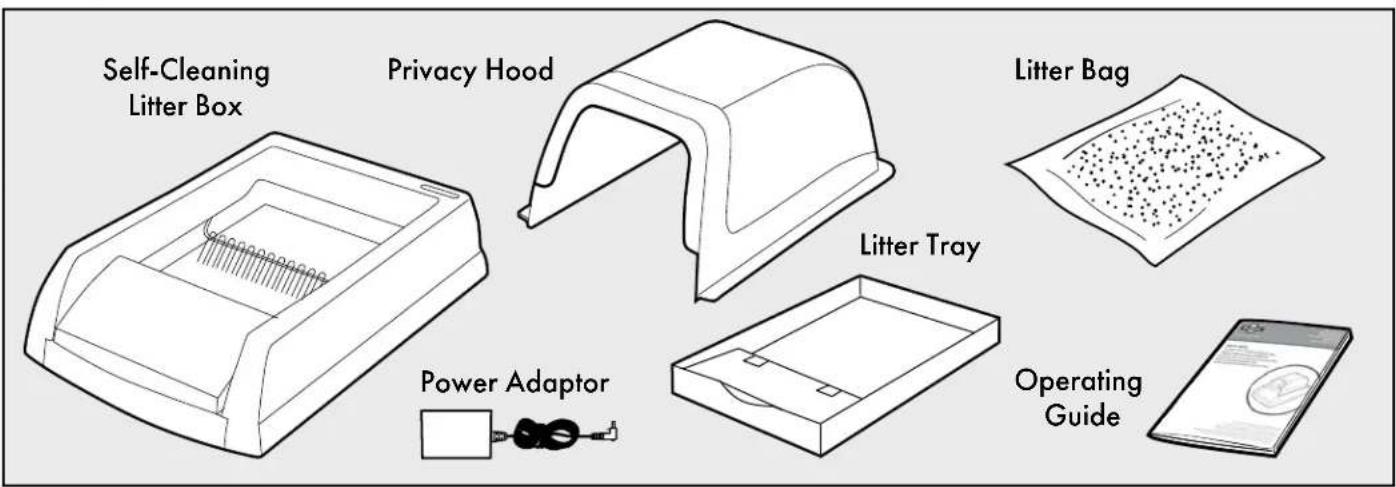
Features
- Disposable Litter Tray provides hands-off convenience and odour control
- Lined Litter Tray protects against leakage
• Fresh bed of Crystal Litter every time - 99% dust free Crystal Litter
• Each Replacement Crystal Litter Tray lasts up to 30 days (depending on number of cats)
• Covered waste compartment - Cleaning cycle begins automatically when cat is not present
- Adjustable Rake Delay
• Health Counter tracks the frequency of Litter Box usage - Privacy Hood included
- Quiet yet powerful motor
• Power Adaptor with 1.8 m cord
How the System Works
The PetSafe® ScoopFree™ Ultra Self-Cleaning Litter Box is easy to set up, use, and maintain. The automatic operation allows you to spend less time cleaning and more time with your cat. The system includes your first disposable Litter Tray, which is filled with premium Crystal Litter. The Crystal Litter immediately absorbs urine and dries out solid waste, resulting in unbeatable odour control. Detection Sensors detect when your cat is inside the Litter Box. A 20-minute countdown cycle begins when your cat leaves the Litter Box. If your cat returns to the Litter Box, the countdown cycle will stop and reset when your cat leaves the Litter Box again. After the countdown, the Rake automatically sweeps the solid waste into the covered Waste Compartment, leaving the litter clean and fresh. The Rake flips over on its return path to smooth and level the litter bed. There is nothing to fill, empty, or clean for weeks!
Key Definitions
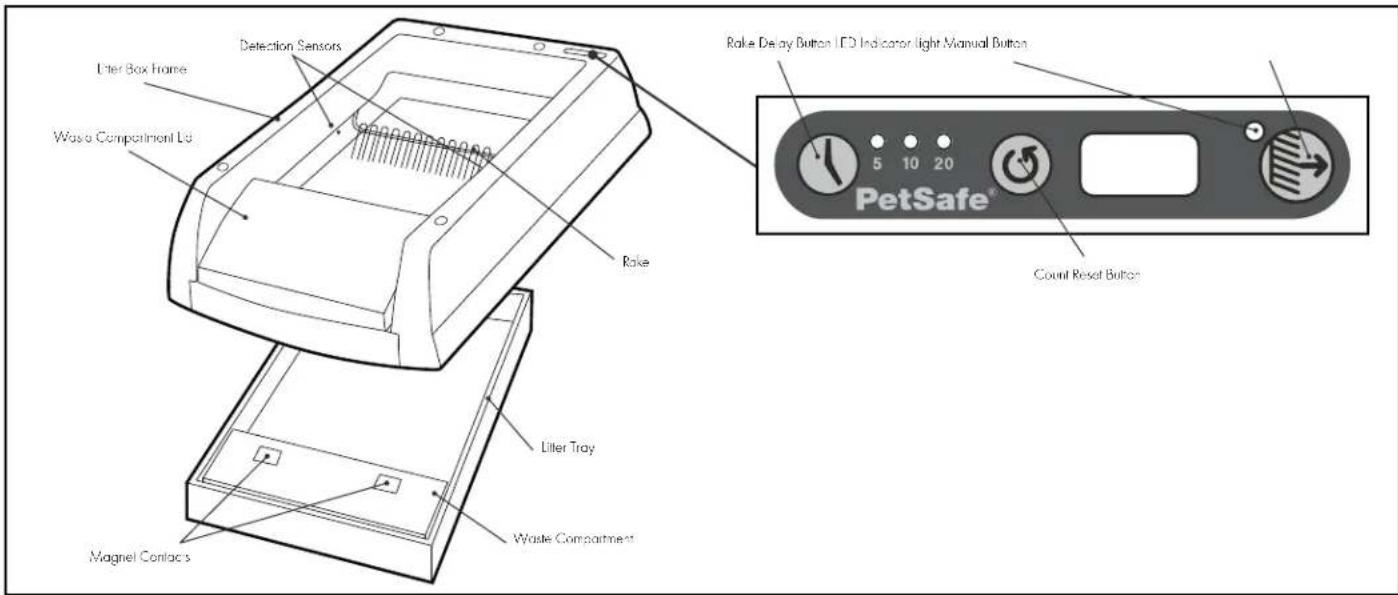
Litter Box Frame: Rests on top of the Litter Tray.
Rake: Automatically sweeps solid waste into the Waste Compartment after your cat has left the Litter Box. The Rake can also be manually operated with the Manual Button.
Detection Sensors: Detect when your cat is inside the Litter Box.
LED Indicator Light: Indicates the Litter Box is on and the status of the Rake.
Manual Button ⬇: Manually operates the Rake and returns the Rake to the Home position if it has stopped mid-cycle.
Rake Delay Button Ⓤ: Programs the Rake to sweep the Litter Box at 5-, 10-, or 20-minute intervals after your cat has left the Litter Box.
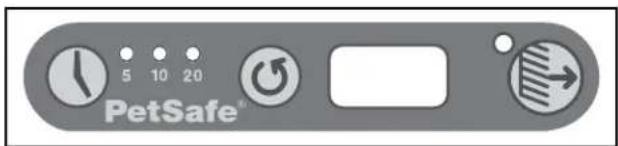
Count Reset Button Ⓤ: Resets the Health Counter back to 0.
Waste Compartment: Holds the solid waste.
Waste Compartment Lid: Attaches to the Litter Tray Waste Compartment by the Magnet Contacts to hide and keep solid waste inside the Waste Compartment.
Litter Tray: Provides the base for the Litter Box Frame, holds the Crystal Litter, and includes the Waste Compartment. One disposable Litter Tray with premium Crystal Litter is included with your system. Additional Litter Trays are available for purchase. Contact our Customer Care Centre or visit our website at www.petsafe.net to locate a retailer near you.
Crystal Litter: Absorbs urine and dries out solid waste, resulting in unbeatable odour control. Note: Crystal Litter does not clump.
Privacy Hood: Provides privacy for your cat as well as increased litter containment and odour control.
STEP 1
Prepare the Litter Box
The Litter Box is packaged for protection during shipping. Please remove all packaging material carefully. The Power Adaptor, universal tips, and the bag of Crystal Litter are shipped within the packing material. Do not discard packaging until you complete product setup.
Find a clean, dry, and level location for your Litter Box. Connect the Power Adaptor to the Litter Box and a standard wall outlet.
Important: The Rake may move automatically when you connect power to the Litter Box. Make sure there is nothing inside the Litter Box when you plug in the Power Adaptor.
If not at the Home position, the Rake will automatically move to it. After the Rake stops, the LED Indicator Light will light solid green.
LED Indicator Light
The LED Indicator Light is located on top of the Litter Box. It tells you the status of the Litter Box and can help you diagnose potential problems.
| Function Indicator Light Rake/Action | ||
| Litter Box is on Solid green Rake is in Home position | ||
| Detection Sensors are triggered by a cat in the Litter Box | flashes green 4 times per second Rake is in Home position | |
| Cat has left the Litter Box Flashes green once per second | Rake Delay countdown is activated | |
| Rake Delay countdown complete Flashes green once per | second Automatic raking is in process | |
| Obstruction or interruption | Flashes green 8 times per second | Refer to the “Troubleshooting” section for solutions |
STEP 2
Install the Litter Tray
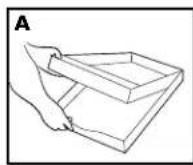
- Place the Litter Tray cover under the Litter Tray (A). The cover is extra protection against leaks and will be used later for disposal.
- Record Today's Date of Litter Tray installation and Tray Change Date on the Waste Compartment label. See the Recommended Litter Tray Replacement chart in the "Changing the Litter Tray" section to determine the Tray Charge Date.
Note: Using a Litter Tray longer than the recommended period may result in leakage.
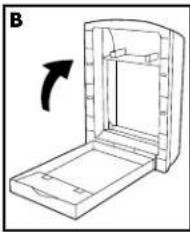
- Lift the Litter Box Frame at the Waste Compartment Lid until it is standing on its end.
- Position the Litter Tray below the Litter Box Frame. Ensure the Waste Compartment is below the Waste Compartment Lid (B).
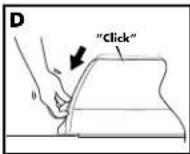
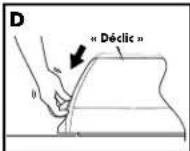
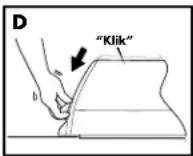
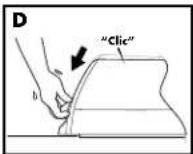
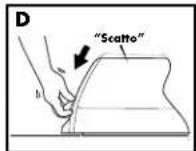
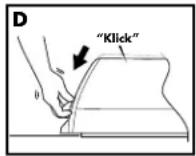
- Lower the Litter Box Frame onto the Litter Tray (C). You should hear a click confirming the magnets on the Waste Compartment Lid have connected to the Magnet Contacts on the Litter Tray Waste Compartment (D). Ensure the Litter Box Frame is level and sitting on the Litter Tray.
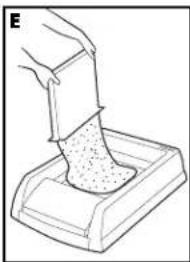
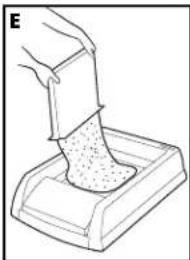
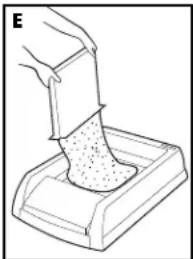
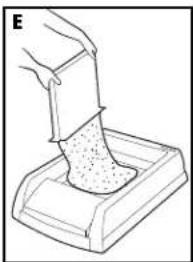
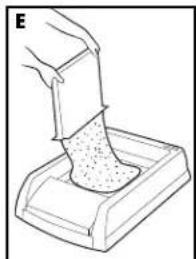
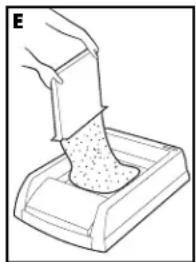
- Open the bag of Crystal Litter by tearing the corner notch. Pour litter into the tray (E). Spread the litter evenly, but do not put litter under the Waste Compartment. Discard bag.
- Ensure the LED Indicator Light is on solid green. If flashing, level out the litter so that it is not blocking the Detection Sensors.
natural_image
Diagram of a mechanical device with an open lid and internal structure, showing a rotation arrow (no text or symbols)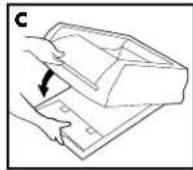
natural_image
Line drawing of a hand pressing a small container with granular material (no text or symbols)STEP 3
Install the Privacy Hood
The removable Privacy Hood adds more privacy for your cat along with better litter containment and odour control for you..
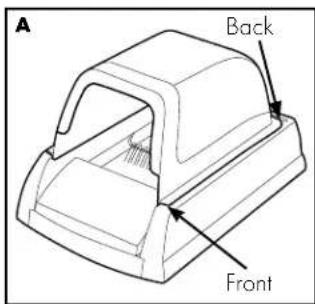
- Place the posts on the bottom of the Privacy Hood into the holes on the top of the Litter Box (A).
- Insert the posts at the back of the Litter Box first and then the front. The Privacy Hood should fit snuggly into all four holes.
STEP 4
Program the Rake Delay
The Adjustable Rake Delay allows you to choose how quickly the automatic Rake sweeps solid waste into the Waste Compartment. The default is a 20-minute delay to allow crystals to fully absorb liquids and dehydrate solid waste and reduce the risk of clumping or caking. If you are concerned about minimizing the odour of fresh solid waste, speed up the cycle to 5- or 10-minute intervals.
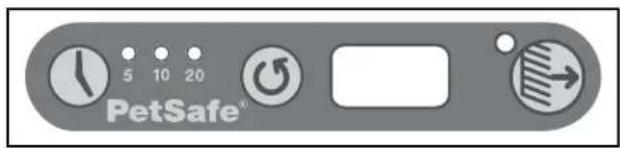
- Press the Rake Delay Button ( Ⓤ ) to select a delay interval.
- The Rake Delay Indicator will light next to the selected delay interval: 5 minutes, 10 minutes, or 20 minutes.
We recommend you begin with the default 20-minute delay interval to ensure you and your cat readily adapt to the Litter Box before trying a shorter interval.
Use the Manual Button
Although the Litter Box is designed to operate automatically, you can manually control the Rake by pushing the Manual Button (→) on the top of the Litter Box.
- Push once to start the Rake cycle.
- Push again to stop the Rake cycle.
- Push one more time to return the Rake to the Home position.
If the Rake is stopped somewhere other than the Home position, press the Manual Button to reset the cycle and return the Rake.
STEP 5
Program the Health Counter
The Health Counter tracks your cat's Litter Box activity to help you better understand when the Litter Tray needs to be changed. It also helps to monitor your cat's health. Irregularities in your cat's frequency of Litter Box use could be a sign of a problem. Share that information with your veterinarian - it may help keep your cat healthy and reduce your vet bills.
To Reset the Health Counter:
The Health Counter automatically increases by one each time the Rake completes a cycle. To reset the Health Counter, press and hold the Count Reset Button ( ) next to the display for 2 seconds. We recommend you reset the Health Counter each time you replace the Litter Tray.
Introducing Your Cat to the Litter Box
Some cats may require an adjustment period to acclimate to a new litter box. Here are a few tips to help with the transition:
- Place the new Litter Box next to your cat's old litter box.
- Allow your cat to have access to both the old and new litter boxes for at least a week. This time may vary based on the temperament of your cat.
- You may want to leave the system unplugged to allow your cat to use the new Litter Box without any distractions.
Note: You must manually scoop solid waste from the Litter Box during the transition. - Allow your cat's old litter box to remain dirty. Cats prefer a clean litter box and this will make the new Litter Box more appealing.
- Add a few handfuls of Crystal Litter to your cat's old litter box before transitioning to the new Litter Box. Add a few small handfuls of your cat's old litter to the Crystal Litter Tray after the transition.
- Once your cat is acclimated to the new Litter Box, plug in the system and remove the old Litter Box from the area.
Changing the Litter Tray
Do not add litter or remove solid waste during normal operation. The Crystal Litter will remain clean for weeks at a time. See the chart below for the recommended Litter Tray replacement schedule.
Note: Please see page 2 for important safety information.
- Gently shake the Litter Box to reduce Crystal Litter that may have accumulated behind the Rake. This will reduce or prevent spillage that may occur when lifting the Litter Box Frame.
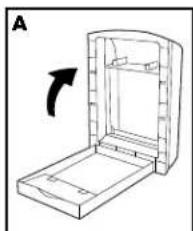
- Lift the front of the Litter Box Frame until it is standing on its end (A) and remove the Litter Tray.
- Remove the cover from under the Litter Tray and place it on top of the Litter Tray (B). Secure with tape if desired or place within a drawstring rubbish bag.
- Dispose of the used Litter Tray.
- Install a new Litter Tray as shown in the "Install the Litter Tray" section.
natural_image
Diagram of a mechanical device with an arrow indicating rotation (no text or symbols present)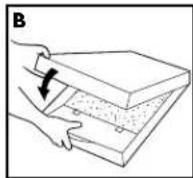
NOTICE If solid waste is collecting outside of the Waste Compartment, it is time to change the Litter Tray.
Recommended Litter Tray Replacement
| 1 Cat 20 - 30 days |
| 2 Cats 10 - 15 days |
| 3 Cats 7 - 10 days |
Maximizing Litter Tray Life
• The Litter Box works best if placed away from areas of high humidity such as bathrooms and showers.
- Cats with diets high in crude fiber and ash content will produce more solid waste. This may prematurely fill the Waste Compartment. To maximize Litter Tray life, consider changing the cat's diet to a brand with no by-products or fillers.
- Kittens will go through Litter Trays faster than adult cats. Typically once kittens reach the 6-8 months age-range their Litter Box frequency lessens.
CAUTION If your kitten is under 6 months of age leave the unit UNPLUGGED and scoop waste until kitten is 6 months old.
- Stirring the Crystal Litter once a week may better accommodate cats that are ill or have a high urine output. Stirring will distribute saturated crystals and extend the life of the Litter Tray.
- Be sure to mix in the Crystal Litter from behind the Rake and along the sides of the Litter Box. This will benefit cats that do not dig or that consistently urinate in the same spot. Do not mix in Crystal Litter from under the Waste Compartment.
NOTICE
Increased elimination habits of cats who consume a diet high in crude fiber, ash and by-products, cats older than 10 years of age and cats with diabetes, kidney and thyroid problems may result in a shorter Litter Tray life. Kittens may have softer stool than mature cats, which increases the likelihood that it may stick to the Rake.
Care and Cleaning
The Litter Box seldom needs cleaning because of its revolutionary design; surfaces most likely to become soiled are discarded with each Litter Tray. Nevertheless, you may occasionally choose to clean your Litter Box as follows.
Note: Please see page 2 for important safety information.
- Remove the Power Adaptor from the Litter Box.
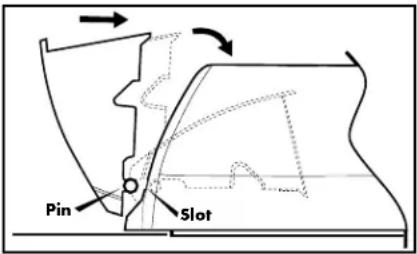
- Remove the Waste Compartment Lid by tilting it outwards until it falls out of its slots.
- Wipe all surfaces with mild soap and water.
- Wipe the Rake with a sponge or soft brush.
- Make sure the Detection Sensors are not blocked.
- Re-attach the Waste Compartment Lid by sliding the posts back into the Litter Box slots.
Troubleshooting
| The Indicator light is flashing rapidly and the Rake is at the Home position. | Check if the Waste Compartment is full. If it is, replace the Litter Tray.Check for obstructions and remove if necessary.Ensure the magnets on the Waste Compartment Lid are properly attached to the Litter Tray. If not, lift the Waste Compartment Lid and lower it back down; you should hear a "click" when correctly attached to the Litter Tray. See the "Install the Litter Tray" section.Ensure the Waste Compartment Lid is properly installed. See the "Care and Cleaning" section.Ensure the Litter Box Frame is seated properly on the Litter Tray.Ensure the Litter Box is on a level surface.Ensure the Crystal Litter is evenly distributed. Never add extra litter.Press the Manual Button to start a Rake cycle. When the Rake returns to the Home position, the Indicator Light will light solid green. |
| The Indicator light is flashing rapidly and the Rake is stopped several inches away from the Home position. | Check for any obstructions behind the Rake. Remove any obstructions if found.Press the Manual Button. The Rake will return to the Home position and the LED Indicator Light will light solid green. |
| The Indicator light shows the Detection Sensors are triggered but the Rake does not start sweeping after the Rake delay countdown time elapses. | Check to see if the Detection Sensors are obstructed.Clear any litter or solid waste that may have collected on the Detection Sensors.Press the Manual Button. The LED Indicator Light should stop flashing and turn solid green. |
| The magnets on the Waste Compartment Lid do not attach to the Litter Tray. | The Waste Compartment Lid may not be properly installed.Remove and reinstall the Waste Compartment Lid. See the "Care and Cleaning" section.Press down on the Waste Compartment Lid or lift the Waste Compartment on the Litter Tray until you hear a "click" indicating the magnets have attached. |
| The Litter Box Frame is not level on the Litter Tray. | The Litter Box should rest on the Litter Tray when installed, not on the floor. See the "Prepare the Litter Box" section. |
Warranty
Two Year Non-Transferrable Limited Warranty
This Product has the benefit of a limited manufacturer's warranty. Complete details of the warranty applicable to this Product and its terms can be found at www.petsafe.net and/or are available by contacting your local Customer Care Centre.
Europe – Radio Systems PetSafe Europe Ltd., 2nd Floor, Elgee Building, Market Square, Dundalk, Co. Louth, Ireland
Canada – Radio Systems Corporation, 10427 PetSafe Way, Knoxville, TN 37932 USA
Australia/New Zealand – In compliance with the Australian Consumer Law, Warranties Against Defects, effective January 1, 2012, warranty details of this Product are as follows: Radio Systems Australia Pty Ltd. (hereinafter referred to as "Radio Systems") warrants to the original retail purchaser, and not any other purchaser or subsequent owner, that its Product, when subject to normal and proper residential use, will be free from defects in material or workmanship for a period of two (2) years from the purchase date. An "original retail consumer purchaser" is a person or entity who originally purchases the Product, or a gift recipient of a new Product that is unopened and in its original packaging. When serviced by Radio Systems Customer Service, Radio Systems covers labour and parts for the first two years of ownership; after the first two years, a service or upgrade charge will apply relative to replacement of the Product with new or refurbished items at Radio Systems' sole discretion.
The limited warranty is non-transferrable and shall automatically terminate if the original retail consumer purchaser resells the Radio Systems Product or transfers the property on which the Radio Systems Product is installed. This Limited Warranty excludes accidental damage due to dog chews; lightning damage; or neglect, alteration, and misuse. Consumers who purchase products outside of Australia, New Zealand, or from an unauthorised dealer will need to return the Product to the original place of purchase for any warranty issues.
Please note that Radio Systems does not provide refunds, replacements, or upgrades for change of mind, or for any other reason outside of these Warranty terms.
Claims Procedure: Any claim made under this Warranty should be made directly to Radio Systems Australia Pty Ltd. Customer Care Centre at:
Radio Systems Australia Pty Ltd.
PO Box 7266, Gold Coast Mail Centre QLD 9726, Australia
Australia Residents: 1800 786 608
New Zealand Residents: 0800 543 054
Email: info@petsafeaustralia.com.au
To file a claim, a proof of purchase must be provided. Without a proof of purchase, Radio Systems will not repair or replace faulty components. Radio Systems requests the Consumer to contact the Radio Systems Customer Care Centre to obtain a Warranty Return number, prior to sending the Product. Failure to do so may delay in the repair or replacement of the Product.
If the Product is deemed to be faulty within 30 days from date of original purchase, Radio Systems will organise for a replacement to be sent in advance of returning the faulty Product. A Post Bag will be included with the replacement Product for the return of the faulty Product. The Product must be returned within 7 days of receiving the replacement. If the Product is deemed to be faulty after 30 days from the date of original purchase, the consumer will be required to return the Product to Radio Systems at the consumer's own expense. Radio Systems will test and replace the faulty unit or its components and return to the consumer free of charge, provided the Product is within its said warranty period. This warranty is in addition to other rights and remedies available to you under the law. Radio Systems goods come with guarantees that cannot be excluded under the Australia Consumer Law. You are entitled to a replacement or refund for a major failure and for compensation for any other reasonably foreseeable loss or damage. You are also entitled to have the goods repaired or replaced if the goods fail to be of acceptable quality and the failure does not amount to a major failure.
Should you have any queries or require any further information, please contact our Customer Care Centre on 1800 786 608 (Australia) or 0800 543 054 (New Zealand).
Compliance
CE
This equipment complies with the EMC and Low Voltage Directives. Unauthorised changes or modifications to the Product that are not approved by Radio Systems Corporation may violate EU regulations, could void the user's authority to operate the equipment, and will void the warranty.
The Declaration of Conformity can be found at: http://www.petsafe.net/customercare/eu_docs.php.
IC
This device complies with Industry Canada licence-exempt RSS standard(s). Operation is subject to the following two conditions: (1) this device may not cause interference, and (2) this device must accept any interference, including interference that may cause undesired operation of the device.
ACMA
This device complies with the applicable EMC requirements specified by the ACMA (Australian Communications and Media Authority).

Important Recycling Advice
Please respect the Waste Electrical and Electronic Equipment regulations in your country. This equipment must be recycled. If you no longer require this equipment, do not place it in the normal municipal waste system. Please return it to where it was purchased in order that it can be placed in our recycling system. If this is not possible, please contact the Customer Care Centre for further information.
Terms of Use and Limitation of Liability
1. Terms of Use
Use of this Product is subject to your acceptance without modification of the terms, conditions and notices contained herein. Use of this Product implies acceptance of all such terms, conditions and notices. If you do not wish to accept these terms, conditions, and notices, please return the Product, unused, in its original packaging and at your own cost and risk to the relevant Customer Care Centre together with proof of purchase for a full refund.
2. Proper Use
If you are unsure whether this Product is appropriate for your pet, please consult your veterinarian or certified trainer prior to use. Proper use includes, without limitation, reviewing the entire Operating Guide and any specific safety information statements.
3. No Unlawful or Prohibited Use
This Product is designed for use with pets only. Using this Product in a way that is not intended could result in violation of Federal, State or local laws.
4. Limitation of Liability
In no event shall Radio Systems Corporation or any of its associated companies be liable for (i) any indirect, punitive, incidental, special or consequential damage and/or (ii) any loss or damages whatsoever arising out of or connected with the misuse of this Product. The Purchaser assumes all risks and liability from the use of this Product to the fullest extent permissible by law.
5. Modification of Terms and Conditions
Radio Systems Corporation reserves the right to change the terms, conditions and notices governing this Product from time to time. If such changes have been notified to you prior to your use of this Product, they shall be binding on you as if incorporated herein.
natural_image
Line drawing of a mechanical device with an open lid and internal compartments, showing a rotation arrow (no text or symbols)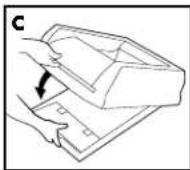
natural_image
Line drawing of a hand pressing down on a textured surface within a rectangular base (no text or symbols)ÉTAPE 3
natural_image
Diagram of a mechanical device with an arrow indicating rotation (no text or symbols present)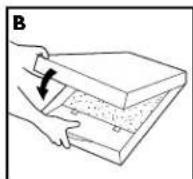
Europe – Radio Systems PetSafe Europe Ltd., 2nd Floor, Elgee Building, Market Square, Dundalk, Co. Louth, Irlande
natural_image
Line drawing of a mechanical device with an arrow indicating rotation (no text or symbols)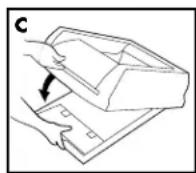
natural_image
Line drawing of a hand pouring granular material into a rectangular container (no text or symbols)STAP 3
De privacykap installeren
natural_image
Diagram of a mechanical device with an arrow indicating rotation (no text or symbols present)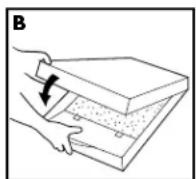
AANWIJZING
Radio Systems PetSafe Europe Ltd., 2nd Floor, Elgee Building, Market Square, Dundalk, Co. Louth, Ierland
Conformiteit
CE
natural_image
Line drawing of a mechanical device with an arrow indicating rotation (no text or symbols)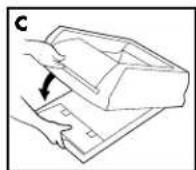
natural_image
Line drawing of a hand pressing a granular substance into a rectangular container (no text or symbols)PASO 3
natural_image
Diagram of a mechanical device with an arrow indicating rotation (no text or symbols present)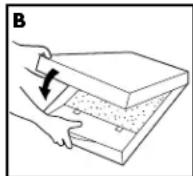
Radio Systems PetSafe Europe Ltd., 2nd Floor, Elgee Building, Market Square, Dundalk, Co. Louth, Irlanda
Conformidad
CE
natural_image
Line drawing of a mechanical device with an arrow indicating rotation (no text or symbols)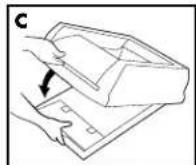
natural_image
Line drawing of a mechanical component with a textured base and a pointed tip (no text or symbols)FASE 3
natural_image
Diagram of a mechanical device with an arrow indicating rotation (no text or symbols present)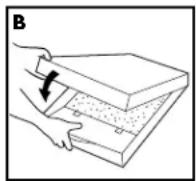
Radio Systems PetSafe Europe Ltd., 2nd Floor, Elgee Building, Market Square, Dundalk, Co. Louth, Irlanda
Conformità
CE
natural_image
Diagram of a mechanical device with an arrow indicating rotation (no text or symbols present)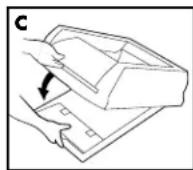
natural_image
Line drawing of a hand pouring granular material into a rectangular container (no text or symbols)SCHRITT 3
natural_image
Diagram of a mechanical device with an arrow indicating rotation (no text or symbols present)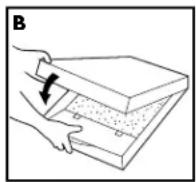
Radio Systems PetSafe Europe Ltd., 2nd Floor, Elgee Building, Market Square, Dundalk, Co. Louth, Irland
Konformität
CE
PetSafe ^® products are designed to enhance the relationship between you and your pet. To learn more about our extensive product range which includes Containment Systems, Training Systems, Bark Control, Pet Doors, Health & Wellness, Waste Management and Play & Challenge products, please visit www.petsafe.net.
Radio Systems Corporation
10427 PetSafe Way
Knoxville, TN 37932
(865) 777-5404
Radio Systems PetSafe Europe Ltd.
2nd Floor, Elgee Building, Market Square,
Dundalk, Co. Louth, Ireland
+353 (0) 76 892 0427
www.petsafe.net
400-1772-19/1
DO NOT PRINT THIS PAGE
| Radio Systems®CORPORATIONThe world leader in pet training products | RSC Part #:400-1772-19 |
| Description: MANUAL SCOOPFREE ULTRA INTL | |
| Created by: R CaseyInitial Creation Date: 7/8/2013 | |
| Material: 80g Wood Free PaperColor: WhitePrinting: BlackFinishing: Die Cut, Fold,2 Saddle Stitch, and Bulk Pack | Approved by: Y. ShahDate Approved: July 17, 2015 |
| Program used: INDESIGN CC | |
| Revision: 001 ECO: RSC12169 | |
| Revision Description: sustaining/content updates | |
| Revision Date: June 2, 2015 |