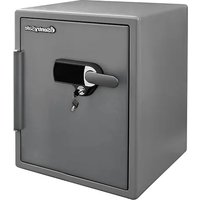
SFW205UPC - Safe SentrySafe - Free user manual and instructions
Find the device manual for free SFW205UPC SentrySafe in PDF.


User questions about SFW205UPC SentrySafe
0 question about this device. Answer the ones you know or ask your own.
Ask a new question about this device
Download the instructions for your Safe in PDF format for free! Find your manual SFW205UPC - SentrySafe and take your electronic device back in hand. On this page are published all the documents necessary for the use of your device. SFW205UPC by SentrySafe.
USER MANUAL SFW205UPC SentrySafe
text_image
SentrySafeWater/Fire Resistant Alarm Safe
Thank you for choosing SentrySafe to store all your important documents and valuables.
We hope that this product will help you stay organized and provide you with the peace-of-mind of knowing the things most important to you are protected.
Your SentrySafe Product
Your SentrySafe product has a number of features to keep your important documents and valuables protected including:

Water Protection UL Classified

Fire Protection

Digital Media Protection

Loud Audible Alarm
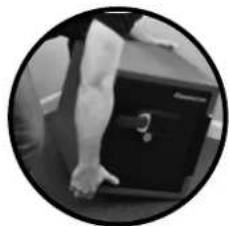
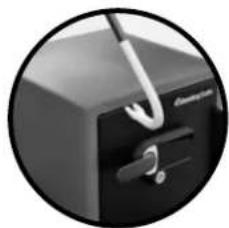
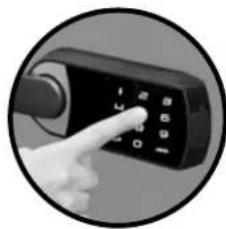
THE LOUD AUDIBLE ALARM ALERTS YOU WHEN:
natural_image
Black-and-white circular photo of a person's arm holding a black box (no visible text or symbols)The safe is picked up or moved
natural_image
Close-up of a black electronic device with a metallic clip and handle, no visible text or symbolsThere is an attempt to pry the door open
natural_image
Close-up of a hand pointing at a black handheld device with a keypad (no visible text or symbols)The wrong combination is entered 5 times
natural_image
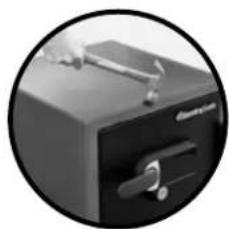
Close-up of a black office desk drawer with handle and lock (no visible text or symbols)The safe is jolted, hit or jarred
Using Your SentrySafe Alarm Safe
Preparing Your Safe for First Time Use
1 Remove lock out screw indicated by the yellow tag on the inside of the door of the safe.
2 Remove battery compartment from inside door and insert 4 AAA alkaline batteries. DO NOT use rechargeable batteries or any other type of non-alkaline battery. Do not mix old and new batteries. Do not mix alkaline and standard batteries.
3 Replace battery compartment.
Using Your Safe
1 Touch the keypad to wake up the safe.
2 Enter the 5 digit factory code found on the back of this owner's manual.
3 Turn handle to open safe.
IMPORTANT: Test your code several times before putting valuables inside.
IMPORTANT: A dual key lock option may be included in your safe. Using this key can disable/enable entry into the safe.
IMPORTANT: If you exert too much force on the handle, the handle will move without moving the bolts. When this happens, you will hear a 'click.' DO NOT be alarmed. This feature is designed to protect the bolts from being over powered by force. Simply exert force in the opposite direction (lifting up) until the handle clicks back into place.

Setting the Alarm
IMPORTANT: Like a home alarm system, the alarm must be set each time you lock your safe to activate the audible alert. In the event your alarm is not activated and 5 wrong code attempts are entered, the safe will go into delay mode for 2 minutes. No alarm will go off when moved, jarred or with attempted forced entry.
1 Close and lock the door of your safe.
② Touch the keypad to wake up the safe.
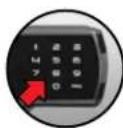
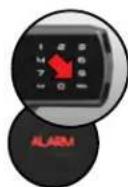
3 Press: "0" - "PROG" - "9"
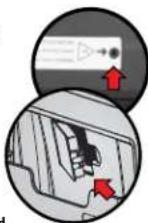
The alarm indicator will blink every 10 seconds to indicate the alarm has been activated.
Programmable Codes
Your SentrySafe comes with 3 types of codes for accessing your safe. For more information on programming these codes see the "Programming Safe Features" section of this owner's manual.
FACTORY CODE (FC): The safe will ALWAYS unlock using this 5 digit code (found on the back of this owner's manual). This code cannot be deleted or changed.
USER CODE (UC): A 5 digit programmable code of your choosing that can be changed or deleted.
SECONDARY CODE (SC): A 5 digit programmable code of your choosing that can be changed or deleted. Can only be programmed after a user code has been activated.

Audible Alarm Features
Turning off the Alarm
If the loud audible alarm on your safe has been triggered:
1 Touch the keypad to wake up the safe.
2 Enter a valid code.
NOTE: You will need to enter your code again to open the safe.
NOTE: The Factory Code (FC) or User Code (UC) must be entered to program safe settings. A secondary code cannot be used.
Changing Alarm Sensitivity
You can change the level of sensitivity on your safe alarm from a scale of zero "0" to "5". Zero "0" being the least sensitive only responding to incorrect codes and "5" being the most sensitive to slight movement of the safe.
1 Touch the keypad to wake up the safe.
2 Press: "0" - "PROG" - "PROG" - "(FC)" OR "(UC)" - "3"
3 Then press "0", "1", "2", "3", "4" OR "5" to program your desired sensitivity.
Changing Length of Alarm
You may also change the length of which your alarm will sound once triggered from 01 to 99 minutes.
1 Touch the keypad to wake up the safe.
2 Press: "0" - "PROG" - "PROG" - "(FC)" OR "(UC)" - "4"
3 Then press any number between 01 and 99 to indicate the number of minutes you would like your alarm to sound once triggered.
Programming Safe Features YOUR DIGITAL LOCK
Programming the User Code (UC)
Only 1 user code can be programmed at a time.
1 Touch the keypad to wake up the safe.
2 Press: "PROG" - "FACTORY CODE (FC)" (found on the back of this owner's manual).
3 The Program indicator light will blink.
4 Press the five digit user code you have chosen for your safe.
Deleting a User Code
1 Touch the keypad to wake up the safe.
2 Press: "PROG" - "FACTORY CODE (FC)" (found on the back of this owner's manual).
③ The Program indicator light will blink.
4 Press: "0" - "0" - "0" - "0" - "0"
NOTE: The electronic lock will NOT indicate that it has deleted the user code—please test code to make sure it has been deleted.
Programming the Secondary Code (SC)
Only 1 user code can be programmed at a time.
1 Touch the keypad to wake up the safe.
2 Press: "PROG" - "PROG" - "PROGRAMMED USER CODE (UC)"
3 The Program indicator light will blink.
4 Press the live digit secondary code you have chosen for this safe.
Deleting a Secondary Code
1 Touch the keypad to wake up the safe.
2 Press: "PROG" - "PROG" - "PROGRAMMED USER CODE (UC)"
3 The Program indicator light will blink.
4 Press: "0" - "0" - "0" - "0" - "0"
NOTE: The electronic lock will NOT indicate that it has deleted the user code—please test code to make sure it has been deleted.
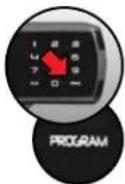
Programming Safe Features BATTERY AUXILIARY OVERRIDE
If battery power in the safe is running low and cannot operate the safe, you will need to use the Battery Auxiliary Override feature to open the safe.
IMPORTANT: This should not be used as a primary means to gain entry into the safe.
1 Open the silicone cap found on the side of the lock.
2 Insert a 9 volt battery into this slot.
3 Touch the keypad to wake up the safe.
4 Enter your five digit code.
5 Turn handle to open safe.
DO NOT use rechargeable batteries or any other type of non-alkaline battery.
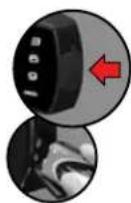
Programming Safe Features OTHER PROGRAMMABLE SAFE FEATURES
Length of Interior Light
NOTE: The Factory Code (FC) or User Code (UC) must be entered to program safe settings. A secondary code cannot be used.
1 Touch the keypad to wake up the safe.
2 Press: "0" - "PROG" - "PROG" - "(FC)" OR "(UC)" - "2"
3 Press: "0" to program to turn off
"1" to program for 30 seconds
"2" to program for 60 seconds
Digital Keypad Sound On/Off
1 Touch the keypad to wake up the safe.
2 Press: "0" - "PROG" - "PROG" - "(FC)" OR "(UC)" - "1"
3 Press: "1" to turn on the digital keypad sound or Press: "0" to turn off the digital keypad sound
Cleaning Your Keypad
Use a soft cloth or microfiber cloth to wipe the surface of your lock to remove fingerprints.

Safe Warnings and Important Information

- This product is not intended for the secure storage of all materials. Items such as firearms, other weapons, combustible materials and medication should not be stored in this unit.
• DO NOT store delicate items directly in your safe.
- In order to protect your valuables from potential threats of flood, your safe is equipped with an airtight gasket. Because of this gasket, moisture in the air could potentially be locked inside your safe and accumulate inside your safe.
- The desiccant bag included in your safe during shipment should be left inside your safe. DO NOT DISCARD IT. It is intended to help absorb moisture. Replace or recharge your desiccant bag every 6 months for optimum performance.
- If you choose to store delicate items such as jewelry with working parts, watches, stamps or photos in your safe, we recommend putting them in an air-tight container prior to placing in the safe for storage.
- NOTE: SentrySafe will not be responsible for any damage or loss of items placed in the unit due to moisture.
- DO NOT store pearls in this safe unit. In the event of a fire, the interior of your safe may reach up to 350°F. While this temperature is safe for your paper documents, digital media and other valuables, pearls can be damaged at much lower temperatures.
- DO NOT store any film based technology or media in this safe.
- This product is not intended to protect computer floppy disks or diskettes, film cartridges, tapes, audio/video cassettes or photo negatives.
- Your safe is only part of your total security protection.
- SentrySafe recommends that you store your safe in closets, offices, basements, bedrooms and any other locations that are convenient for you but out of direct line of sight from prying eyes. The location of the safe does not affect the safe's ability to protect your valuables inside.

Limited Lifetime After-Fire Replacement Program
If your SentrySafe product is in a fire, it will be sealed shut making it necessary for it to be pried open. To help your family begin again, SentrySafe will ship a replacement free of charge. To be eligible for the Limited Lifetime After Fire Replacement Program, you (the original owner) must register your product using the included registration form or by visiting www.registermysafe.com.
For more information about the Limited Lifetime After-Fire Replacement Program, visit SentrySafe.com
Troubleshooting
| THE PROBLEM: WHY IT IS HAPPENING: THE SOLUTION: | ||
| The door will not lock. 1. Shipping screw is in plate. | 2. Confirm that there is no obstruction in the door. | 1. Remove the screw on the back inside of the door.2. Remove all items and accessories from inside the safe.If this resolves the issue, re-set the accessories and organize items to properly fit. |
| The handle is not in the horizontal position when the safe is locked. | The clutch mechanism has been engaged. Rotate the handle up or down until it clicks into the horizontal position. | |
| Cannot open door after inputting the electronic code. | 1. Safe doors equipped with a water-resistant gasket may initially be tight.2. Key lock is in the locked position (select models only).3. Battery power is low. | 1. Hold the handle up while inputting the code and then pull down on the handle.2. If your safe is equipped with a key lock ensure that the key is in the unlocked position (select models only).3. Use auxiliary battery connection to gain access to your safe and replace main batteries. |
| Red indicator light blinks three times and there are three beeps. | An incorrect code has been entered. | Verify code and re-enter. If the programmable code you are using doesn't work then use the factory code. If successful re-program your programmable code. |
| Red indicator light blinks five times and there are five beeps. | Keypad communication error. Please call our Customer Service center. | |
| Red indicator light blinks once and there is one beep. | Program button is pressed out of sequence. Start over. | |
| Yellow "low battery" light is blinking. Battery power is low. Replace batteries. | ||
| Cannot open door after inputting code and yellow "low battery" light is on. | Battery power is low. Lock may not function properly. | Use auxiliary battery connection to gain access to your safe and replace main batteries. |
| Alarm is triggered. | Safe has been moved, jarred or an incorrect code has been entered 5 times. | Wake up the safe and enter a programmed code or factory code. |
| Red alarm and red error light are blinking. | Alarm was triggered. | Wake up the safe and enter a programmed code or factory code. |
| Alarm frequently goes off. | Alarm programmed too sensitive. | Change sensitivity by following directions under "Audible Alarm Features" in this owner's manual. |
natural_image
Close-up of a person's arm holding a dark object, possibly a device or tool, in a circular frame (no visible text or symbols)natural_image
Close-up of a black office desk with a metal clip attached to the frontrest (no visible text or symbols)natural_image
Close-up of a hand pointing at a black handheld device with a keypad (no visible text or symbols)natural_image
Close-up of a black office case with a handle and scroll, enclosed in a circular frame (no visible text or symbols)natural_image
Black-and-white circular photo of a person's arm holding a dark object, no visible text or symbolsnatural_image
Close-up of a black box with a metallic clip and handle, no visible text or symbolsnatural_image
Close-up of a hand pointing at a black handheld device with a keypad (no visible text or symbols)natural_image
Close-up of a black office case with a handle and lock (no visible text or symbols)Thank you for choosing SentrySafe!
Our US-based customer care team is happy to help.
: SentrySafe.com
:1-800-828-1438
Got a question? We're happy to help!
If you ever have any questions regarding your SentrySafe product, please give us a call at 1-800-828-1438 or visit our website at SentrySafe.com. Many concerns can be resolved quickly over the phone.
Never forget your combination again!
Registering your SentrySafe allows you to securely store your combination online, access your owner's manual, and more. So you can always have reliable access to the things that matter most to you. Visit SentrySafe.com to learn more.
Organize Your Safe to Fit Your Needs
Need help getting organized? SentrySafe has a variety of organizational features available to help you personalize your safe to fit the needs of your home and business. Visit SentrySafe.com or call our customer care team at 1-800-828-1438 for more information.
Key No. (Not All Models)


