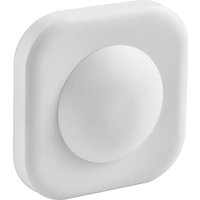
VALLHORN 905.043.41 - Alarm system IKEA - Free user manual and instructions
Find the device manual for free VALLHORN 905.043.41 IKEA in PDF.


| Product Type | Motion Detector |
| Brand | IKEA |
| Model | VALLHORN 905.043.41 |
| Power Supply | 2 AAA/HR03 1.2 V batteries (LADDA rechargeable recommended) |
| Wireless Range | 10 m in free field |
| Detection Angle | 60° - 120° |
| Detector Range | Approximately 10 m |
| Operating Frequency | 2 405 - 2 480 MHz |
| Output Power | 3 dBm |
| Protection Rating | IP44 |
| Operating Temperature | -5 °C to 40 °C |
| Main Functions | Motion detection, Day/Night modes, adjustable timer |
| Compatibility | IKEA connected plugs and lights, DIRIGERA hub (or without hub up to 10 products) |
| Max number of products without hub | 10 |
| Maintenance and Cleaning | Wipe with a dry, soft cloth. Do not use abrasive cleaners or solvents. |
| Safety | Do not expose to direct sunlight or heat source. Use correct type of batteries. |
| Factory Reset | Press the pairing button 4 times within 5 seconds |
| Battery Replacement | Red LED indicates replacement. Use 2 AAA/HR03 batteries. |
| Recycling | Do not dispose of with household waste. Sort according to local regulations. |
Frequently Asked Questions - VALLHORN 905.043.41 IKEA
User questions about VALLHORN 905.043.41 IKEA
0 question about this device. Answer the ones you know or ask your own.
Ask a new question about this device
Download the instructions for your Alarm system in PDF format for free! Find your manual VALLHORN 905.043.41 - IKEA and take your electronic device back in hand. On this page are published all the documents necessary for the use of your device. VALLHORN 905.043.41 by IKEA.
USER MANUAL VALLHORN 905.043.41 IKEA
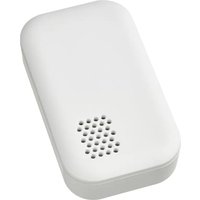
VALLHORN motion sensor works with smart lights and plugs from IKEA. It can be used with DIRIGERA hub to control smart products via the IKEA Home smart app.
IKEA Home smart app
For Apple devices, download the app using the App Store. For Android devices, download the app using Google Play store.
Note: If you have a TRÅDFRI gateway please use IKEA Home smart 1 app. For the best experience, please upgrade to DIRIGERA hub.
Getting started with DIRIGERA hub
Download the IKEA Home smart app and follow the instructions on screen. With DIRIGERA, you can connect as many products as you want to one motion sensor.
Getting started without DIRIGERA hub
- Make sure the smart product you want to connect is installed and powered on.
- Hold the motion sensor close to the smart product (less than 5 cm away).
- Press and hold the Pairing button for at least 10 seconds. A red LED will steadily shine under the lens of the motion sensor. The smart product will pulse with a white LED once connected.
Good to know
Without DIRIGERA, you can connect a maximum of 10 smart products to one motion sensor. Remember to add one product at a time. If your products are close together, disconnect the ones you have already connected while adding the next product.
Get to know your product
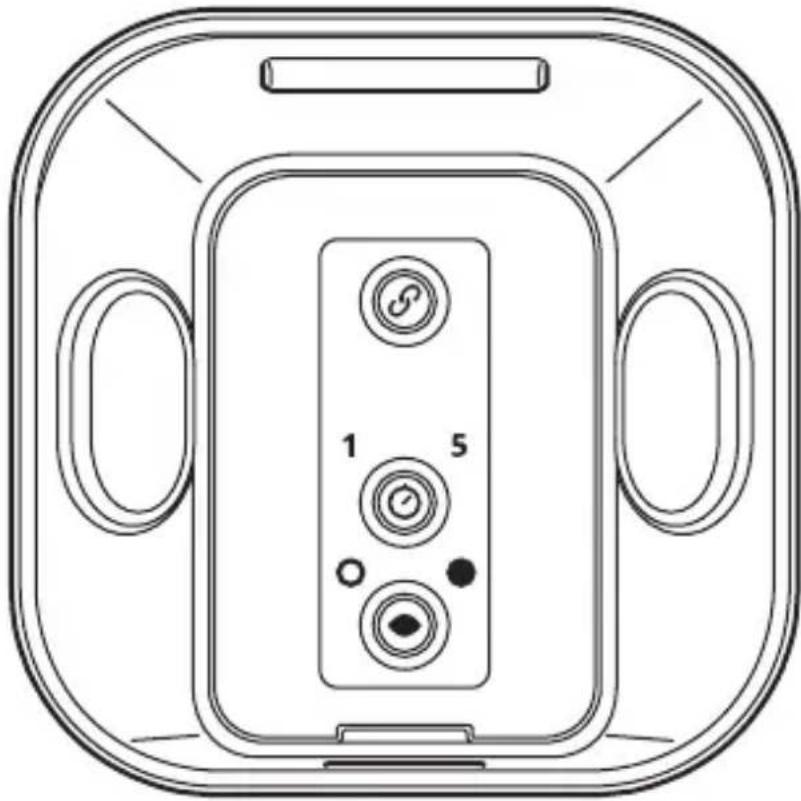
natural_image
Technical line drawing of a device back panel with labeled buttons (no text or symbols beyond basic labels)
Pairing button

Choose how many minutes the connected lights and plugs will be on.

Choose between light and dark mode. In light mode, the detected motion will turn on lights in any surrounding. In the dark mode, the detected motion will turn on the lights only in the dark surrounding.
Changing the batteries
A red LED light will light up under the lens of the motion sensor to show that new batteries are needed. Open the battery lid and replace with two new AAA/HR03 batteries. We recommend using LADDA rechargeable batteries. Please note they are sold separately.
Factory reset
To reset and remove all connected products, quick-press the Pairing button 4 times (within 5 seconds). Follow steps 1-3 to reconnect your smart products.
Care instructions
To clean the product, wipe it with a soft dry cloth. Do not use abrasive cleaning agents, chemical solvents or other equipment that may damage the products.
IMPORTANT!
- Operating temperature: -5^ to 40^ .
- Do not leave the sensor in direct sunlight or close to any heat source to prevent overheating.
- Different building materials and placement of the units can affect the wireless connectivity range.
WARNING!
Risk of explosion if either battery is replaced by an incorrect type. Do not mix batteries of different capacities, types or date stamps. Dispose of used batteries according to instructions.
Technical data
Model: VALLHORN motion sensor
Type: E2134
Input: 2.4V, 2 x LADDA batteries HR03/AAA 1.2V
Range: 10 m in open air.
Sensor view angle: 60° - 120°
Sensor range: About 10 m
Operating frequency: 2405-2480 MHz
Output power: 3 dBm
IP-class: IP44
Manufacturer: IKEA of Sweden AB
Address: Box 702, SE-343 81 Älmhult, SWEDEN
The crossed-out wheeled bin symbol indicates that the item should be disposed of separately from household waste. The item should be handed in for recycling in accordance with local environmental regulations for waste disposal. By separating a marked item from household waste, you will help reduce the volume of waste sent to incinerators or land-fill and minimize any potential negative impact on human health and the environment. For more information, please contact your IKEA store.
Deutsch
natural_image
Technical line drawing of a device back panel with labeled buttons (no text or symbols beyond basic labels)
Kopplungstaste

natural_image
Technical line drawing of a device back panel with labeled buttons (no text or symbols beyond basic labels)
Bouton d'appairage

Fabricant: IKEA of Sweden AB
Adresse: Box 702, SE-343 81 Älmhult, SUÈDE
natural_image
Technical line drawing of a device front panel with labeled buttons (no text or symbols beyond basic labels)
Koppelknop

natural_image
Technical line drawing of a device front panel with labeled buttons (no text or symbols beyond basic labels)
Parringsknap

Producent: IKEA of Sweden AB
Adresse: Box 702, SE-343 81, Älmhult, SVERIGE
natural_image
Technical line drawing of a device front panel with labeled buttons (no text or symbols beyond basic labels)
Pörunarhnappur

Framleiðandi: IKEA of Sweden AB
Heimilisfang: Box 702, SE-343 81 Älmhult, SVÍPJÓD
natural_image
Technical line drawing of a device front panel with labeled buttons (no text or symbols beyond basic labels)
Sammenkoblingsknappen

Produsent: IKEA of Sweden AB
natural_image
Technical line drawing of a device back panel with labeled buttons (no text or symbols beyond basic labels)
Pariliitospainike

natural_image
Technical line drawing of a device back panel with labeled buttons (no text or symbols beyond basic labels)
natural_image
Technical line drawing of a device back panel with labeled buttons (no text or symbols beyond basic labels)
Tlačítko párování

natural_image
Technical line drawing of a device back panel with labeled buttons (no text or symbols beyond basic labels)
natural_image
Technical line drawing of a device front panel with labeled buttons (no text or symbols beyond basic labels)
natural_image
Technical line drawing of a device back panel with labeled buttons (no text or symbols beyond basic labels)
Párosítás gomb

natural_image
Technical line drawing of a device back panel with labeled buttons (no text or symbols beyond basic labels)
Przycisk parowania

Producent: IKEA of Sweden AB
Adres: Box. 702, SE-343 81 Älmhult, SZWECJA
natural_image
Technical line drawing of a device back panel with labeled buttons (no text or symbols beyond basic labels)
Sidumisnupp

Tootja: IKEA of Sweden AB
Aadress: Box 702, SE-343 81 Älmhult, ROOTSI
natural_image
Technical line drawing of a device front panel with labeled buttons (no text or symbols beyond basic labels)
natural_image
Technical line drawing of a device front panel with labeled buttons (no text or symbols beyond basic labels)
Susiejimo mygtukas

natural_image
Technical line drawing of a device front panel with labeled buttons (no text or symbols beyond basic labels)
natural_image
Technical line drawing of a device front panel with labeled buttons (no text or symbols beyond basic labels)
Buton de pairing

natural_image
Technical line drawing of a device front panel with labeled buttons (no text or symbols beyond basic labels)
Párovacie tlačidlo

Vyberte, kolko minút budú svietit' pripojené svetlá a zástrčky.

natural_image
Technical line drawing of a device front panel with labeled buttons (no text or symbols beyond basic labels)
Бутон за сдвояване

natural_image
Technical line drawing of a device back panel with labeled buttons (no text or symbols beyond basic labels)
Gumb za uparivanje

natural_image
Technical line drawing of a device casing with labeled buttons (no text or symbols beyond basic labels)
Κουμπί ζεύξης

natural_image
Technical line drawing of a device front panel with labeled buttons (no text or symbols beyond basic labels)
Кнопка сопряжения

natural_image
Technical line drawing of a device front view with labeled buttons (no text or symbols beyond basic labels)
natural_image
Technical line drawing of a device back panel with labeled buttons (no text or symbols beyond basic labels)
Dugme za uparivanje

natural_image
Technical line drawing of a device front panel with labeled buttons (no text or symbols beyond basic labels)
Gumb za seznanjanje

Izberite, koliko minut bodo priključene luči in vtiči vklopljeni.

natural_image
Technical line drawing of a device front panel with labeled buttons (no text or symbols beyond basic labels)
Eşleştirme düğmesi

natural_image
Technical line drawing of a device casing with labeled buttons (no text or symbols beyond basic labels)زر الإقران


Brand : IKEA
Model : VALLHORN 905.043.41
Category : Alarm system