USER MANUAL AC0920 PHILIPS
natural_image
Two Philips air purifiers with visible grille and speaker grille, one white and one gray, against a plain background (no text or symbols on the devices themselves)
-1
-1
1_
1
English 4
Bahasa Indonesia 22
Čeština 40
Deutsch 58
Eesti 77
Español 95
Français 113
Hrvatski 131
Italiano 149
Latviešu 167
Lietuviškai 185
Magyar 203
Nederlands 221
Polski 239
Português 257
Română 275
Shqip 293
Slovenščina 311
Slovensky 329
Srpski 347
Български 365
Македонски 383
Українська 401
419 العربية
4 English
Important
Read this user manual carefully before you use the appliance, and save it for future reference.
Danger
- Do not clean the appliance with water, any other liquid, or a (flammable) detergent, nor let them enter the appliance, to avoid electric shock and/or a fire hazard.
- Do not spray any flammable materials such as insecticides or fragrance around the appliance.
Warning
- Check if the voltage indicated on the appliance corresponds to the local power voltage before you connect the appliance.
- If the power cord is damaged, you must have it replaced by Philips, a service center authorized by Philips, or similarly qualified persons in order to avoid a hazard.
- Do not use the appliance if the adaptor, the power cord, or the appliance itself is damaged.
- Only to be used together with the adaptor provided with the appliance.
- This appliance can be used by children aged from 8 years and above and persons with reduced physical, sensory or mental capabilities or lack of experience and knowledge if they have been given supervision or instruction concerning use of the appliance in a safe way and understand the hazards involved.
- Children shall not play with the appliance.
- Cleaning and maintenance shall not be made by children without supervision.
- Do not block the air inlet and outlet, e.g. by placing items on the air outlet or in front of the air inlet.
- Make sure that foreign objects do not fall into the appliance through the air outlet.
Caution
- We recommend people who are allergic to dust, pollen, pets or mold, not to replace filters by themselves or to take protective measures, such as mask and gloves. This appliance is not a substitute for proper ventilation, regular vacuum cleaning, or use of an extractor hood or fan while cooking.
- Always place and use the appliance on a dry, stable, level, and horizontal surface.
- Leave at least 20cm free space around the appliance and leave at least 30cm free space above the appliance.
- Do not sit or stand on the appliance. Do not place anything on top of the appliance.
-
Do not place the appliance directly below an air conditioner to prevent condensation from dripping onto the appliance.
-
Only use the original Philips filters specially intended for this appliance. Do not use any other filters.
- Combustion of the filter may cause irreversible human hazard and/or jeopardize other lives. Do not use the filter as fuel or for similar purpose.
- Avoid knocking against the appliance (the air inlet and outlet in particular) with hard objects.
- Do not insert your fingers or objects into the air outlet or the air inlet to prevent physical injury or malfunctioning of the appliance.
- Do not use this appliance when you have used indoor smoke-type insect repellents or in places with oily residues, burning incense, or chemical fumes.
- Do not use the appliance near gas appliances, heating devices or fireplaces.
- Always unplug the appliance when you want to move, clean appliance, replace the filter or carry out other maintenance.
- The appliance is only intended for household use under normal operating conditions.
- Do not use the appliance in wet surroundings or in surroundings with high ambient temperatures, such as the bathroom, or in a room with major temperature changes.
- The appliance does not remove carbon monoxide (CO) or radon (Rn). It cannot be used as a safety device in case of accidents with combustion processes and hazardous chemicals.
Electromagnetic fields (EMF)
This appliance complies with the applicable standards and regulations regarding exposure to electromagnetic fields.
Recycling

This symbol means that this product shall not be disposed of with normal household waste (2012/19/EU).
Follow your country's rules for the separate collection of electrical and electronic products. Correct disposal helps prevent negative consequences for the environment and human health.
Your air purifier
Congratulations on your purchase, and welcome to Philips!
To fully benefit from the support that Philips offers, register your product at www.philips.com/support.
6 English
Product overview
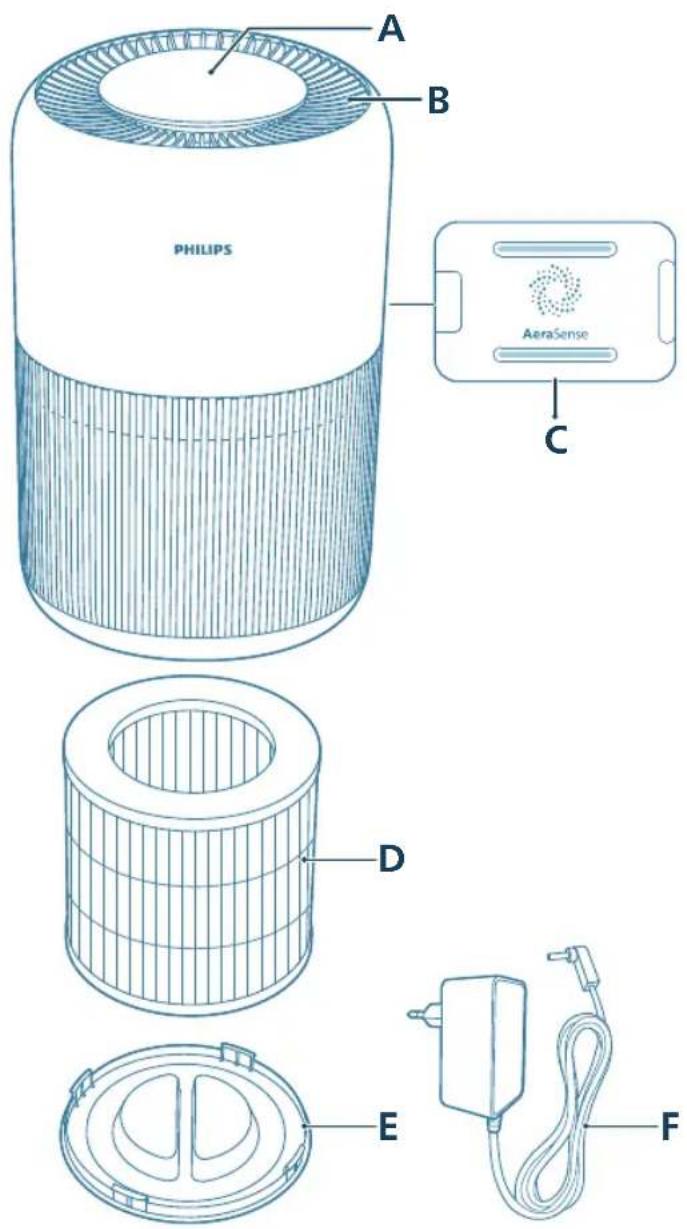
A Control panel D Filter (FY0900)
B Air outlet E Base
C Air quality sensor F Adapter (KA2401A-2401000EU)
Controls overview
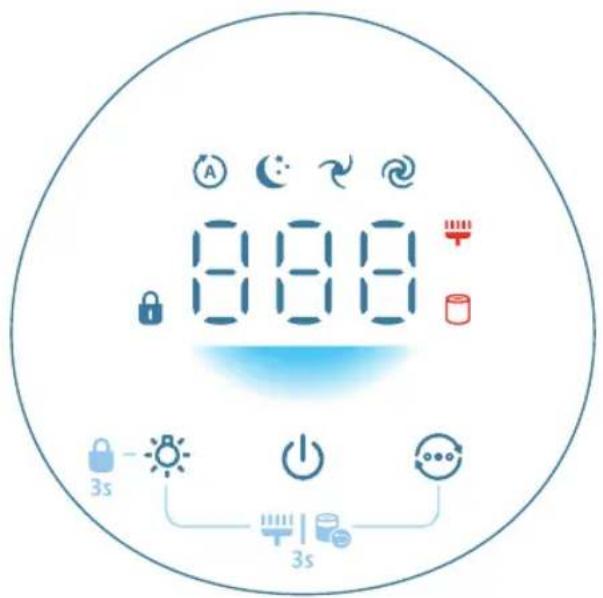
Control buttons:
| Power on/off button Light on/off button | |
| Mode switch button | |
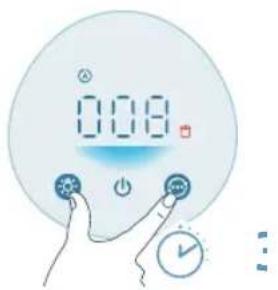
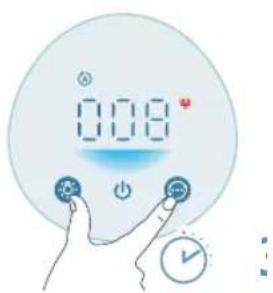
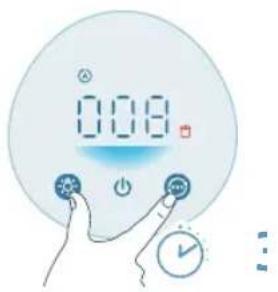
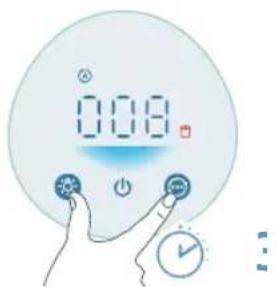
| Long press the button(s) for 3 seconds: |
| Child lock Filter reset | |
| Display panel: |
| Auto mode Medium mode | |
| Sleep mode Turbo mode | |
| Child lock indicator Filter cleaning alert | |
| Filter replacement alert | |
Getting started
Installing the filter
Remove all packaging of the filter before use.
Note: Make sure the air purifier is unplugged from the electrical outlet before installing the filter.
8 English
natural_image
Illustration of a cylindrical object pressing down on a striped cloth with an arrow indicating downward motion (no text or symbols)
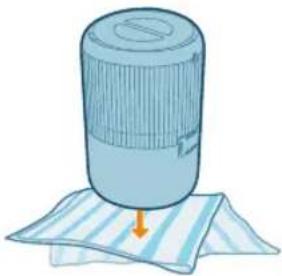
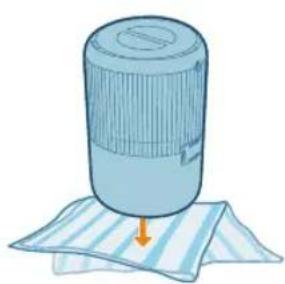
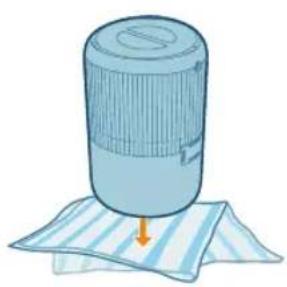
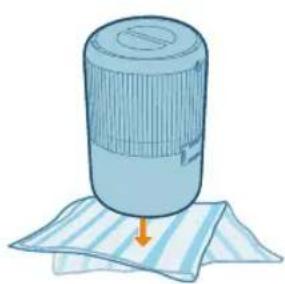
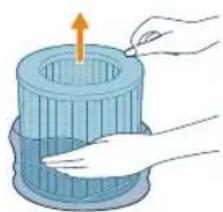
1 Turn the appliance upside down and place it on a soft cloth.
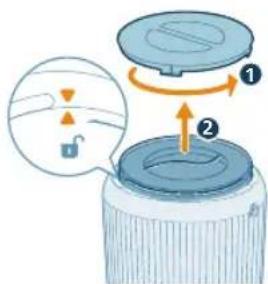
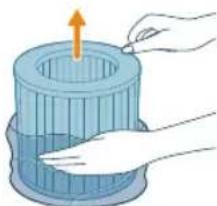
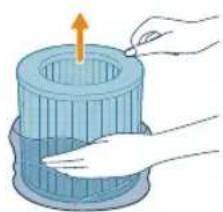
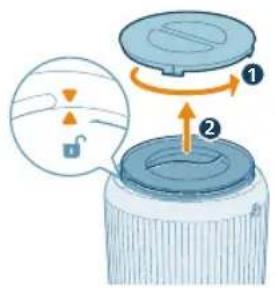
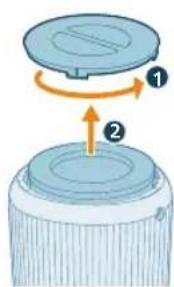
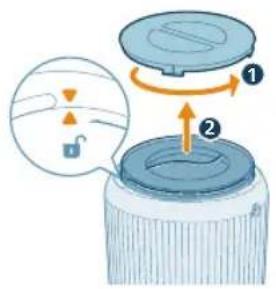
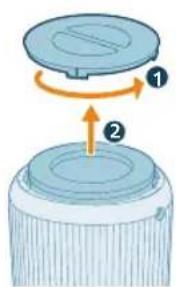
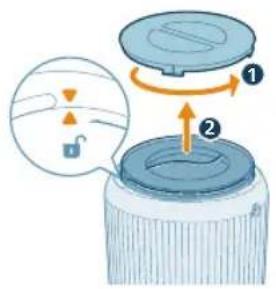
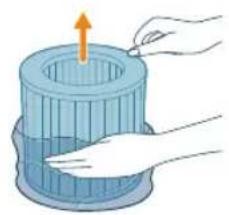
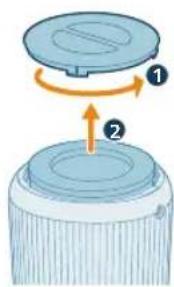
2 Rotate the base anti-clockwise to remove it from the appliance. Pull the filter out from the appliance.
natural_image
Illustration of a hand holding a blue cylindrical container with an upward arrow, no text or symbols present
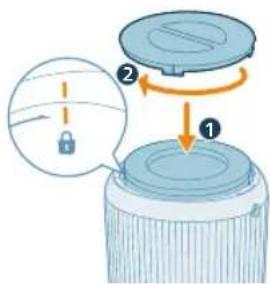
3 Remove all packaging materials of the air purification filter.
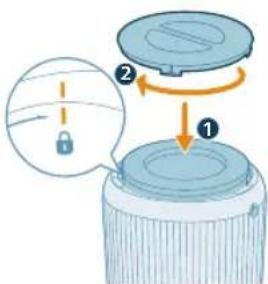
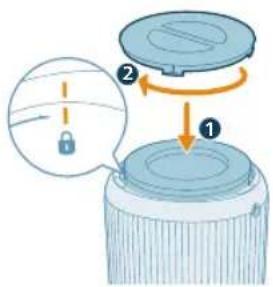
4 Put the filter back into the appliance. Reattach the base and rotate it clockwise to fasten the base.
Connecting power
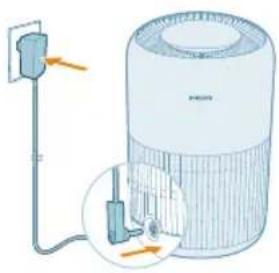
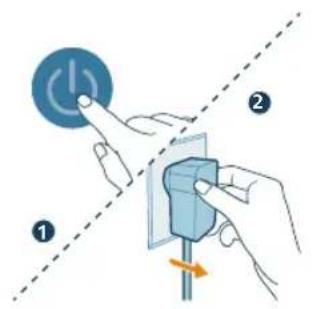
CAUTION: Risk of electric shock! When you unplug the adaptrt, always pull the plug from the socket. Never pull the cord.
natural_image
Diagram of a portable air conditioner unit with attached power outlet and wiring (no text or symbols)
Connect the power adapter to:
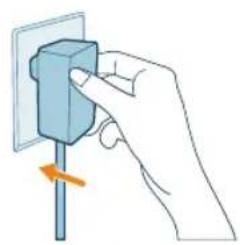
- First, the power adapter on the appliance.
- Then, the wall outlet.
Using the air purifier
Understanding the air quality light
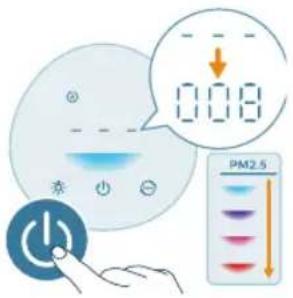
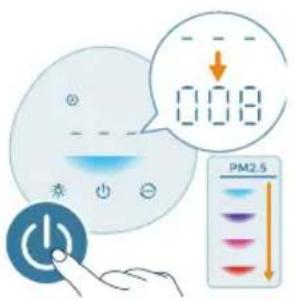
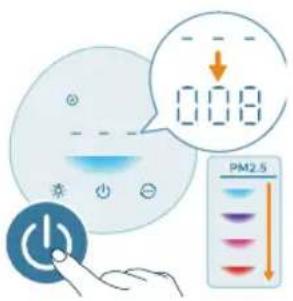
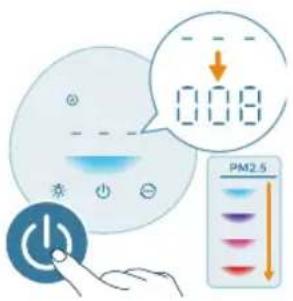
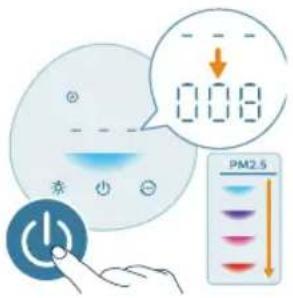
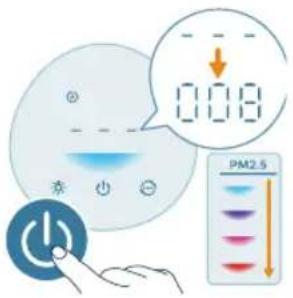
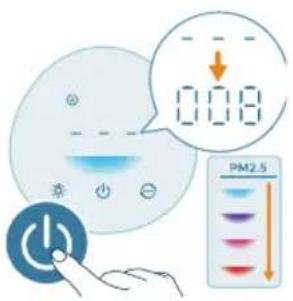
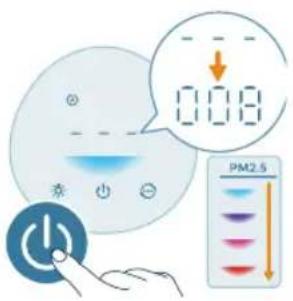
The air quality light automatically goes on when the air purifier is switched on, and lights up all colors in sequence. After approximately 30 seconds, the particle sensor selects the color that corresponds to the surrounding air quality of airborne particles.
The color of the air quality light is determined by the PM2.5 reading.
PM2.5
AeraSense sensing technology accurately detects and quickly responds to even the slightest particle change in the air. It provides you with reassurance with real-time PM2.5 feedback.
Most of the indoor air pollutants fall under PM2.5 – which refers to airborne particle pollutants smaller than 2.5 micrometers. Common indoor sources of fine particles are tobacco smoke, cooking, burning candles. Some airborne bacteria and the smallest mold spores, pet allergen and dust mite allergen particles also fall under PM2.5.
PM2.5 level Air quality color Air quality level
| ≤12 Blue Good |
| 13-35 Blue-purple Fair |
| 36-55 Purple-red Poor |
| >55 Red Very poor |
Turning on and off
Note:
For optimum purification performance, close doors and windows.
Keep curtains away from the air inlet or air outlet.
English
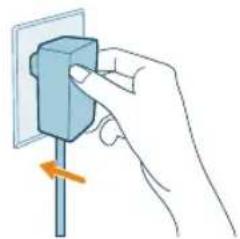
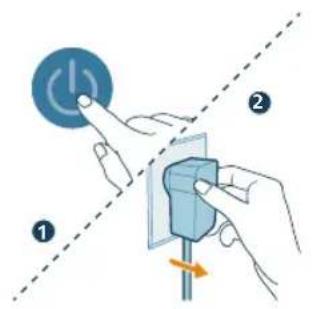
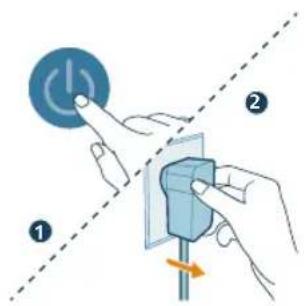
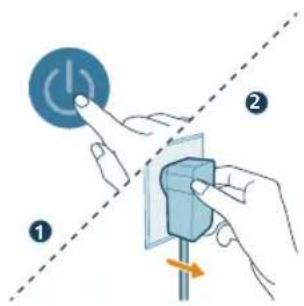
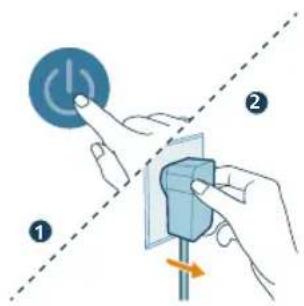
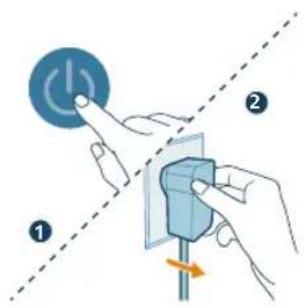
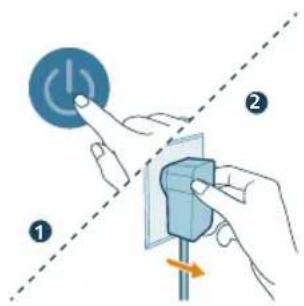
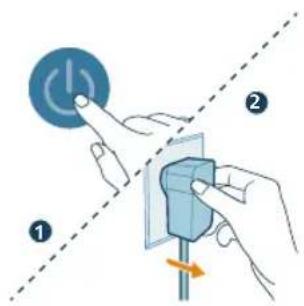
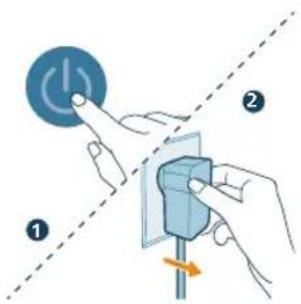
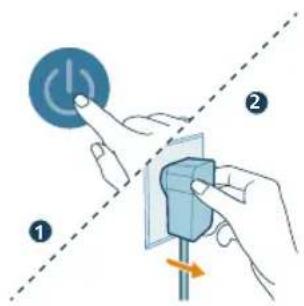
1 Put the plug of the air purifier in the power socket.
natural_image
Hand holding a blue electrical socket with a pull pointer, showing a rotation arrow (no text or symbols)
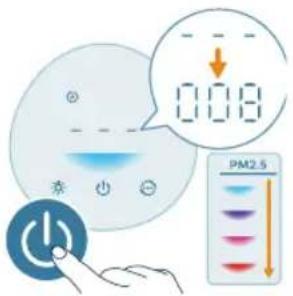
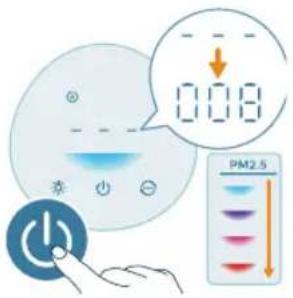
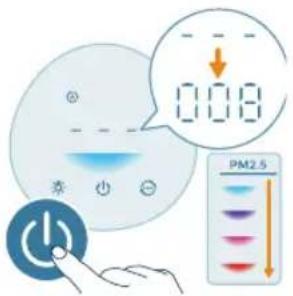
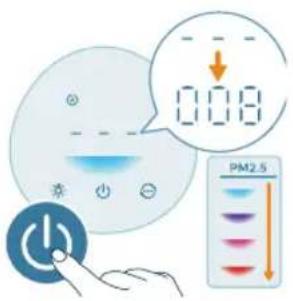
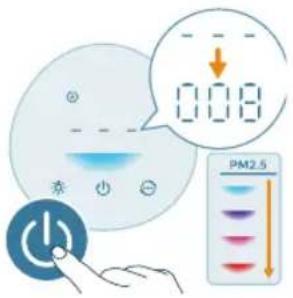
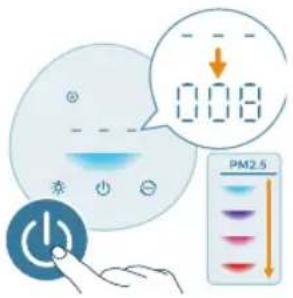
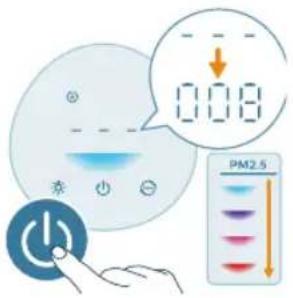
2 Press the power button to switch on the air purifier.
- The air purifier beeps.
- The displays on the screen during warming up. Then the air purifier shows the PM2.5 level after measuring the air quality.
- The air purifier operates in the Auto mode with PM2.5 displayed on the screen.
3 Press the power button again to switch off the air purifier.
Note: If the air purifier stays connected to the electrical outlet after turning OFF, the air purifier will operate under the previous settings when turned ON again.
Changing the mode setting
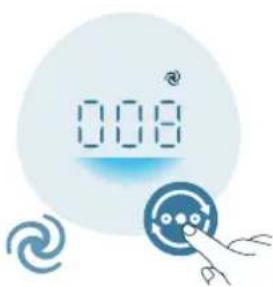
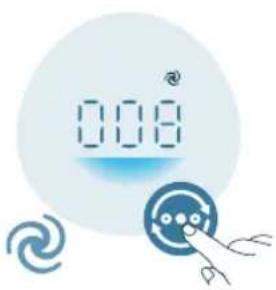
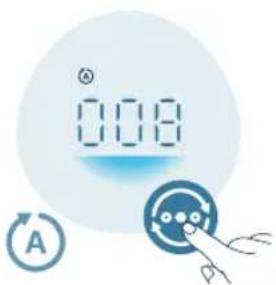
You can choose the Auto mode, the Medium mode, the Turbo mode, or the Sleep mode by pressing the mode switch button.
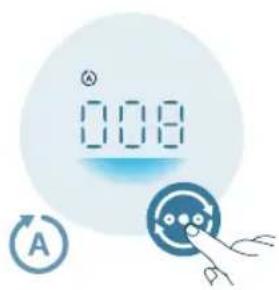
Auto mode ( A). The air purifier automatically adjusts the fan speed in accordance with the ambient air quality.
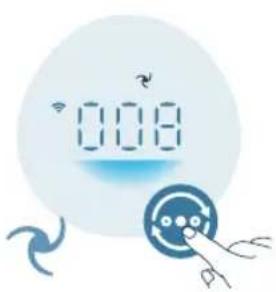
Medium mode ( ?): In the Medium mode, the air purifier operates on a medium speed.
natural_image
Digital display showing '0.08' with a speedometer icon and a stylized eye symbol (no text or numbers present)
Turbo mode ( ☑: The air purifier operates on the highest speed.
natural_image
Illustration of a crescent moon, star, and a circular icon with a face, next to a stylized hand holding a pointer (no text or symbols)
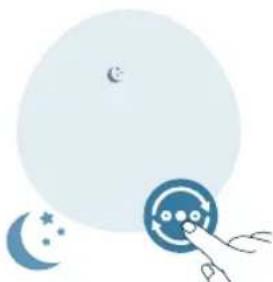
Sleep mode ( ): The air purifier operates quietly at a low speed. After 3 seconds, the display lights turn off.
Using the light on/off function
natural_image
Illustration of a digital climate control device with sun icons and a hand pointing to it (no text or symbols on the device itself)
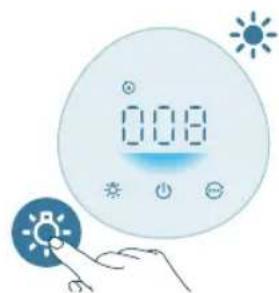
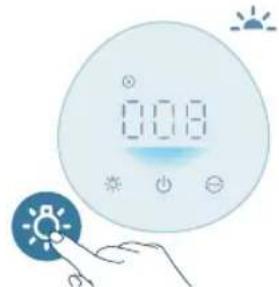
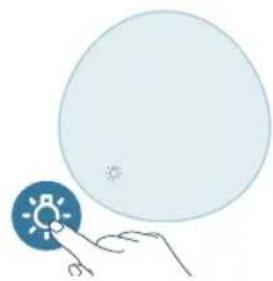
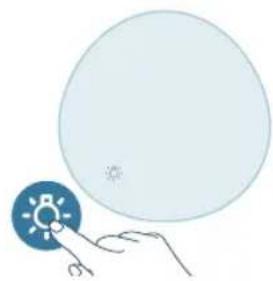
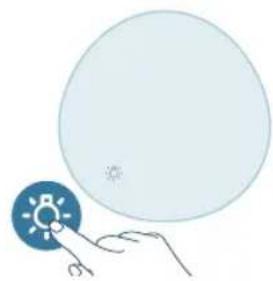
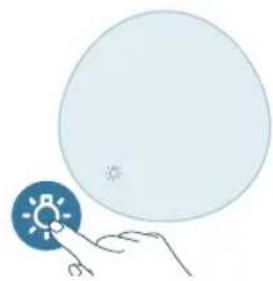
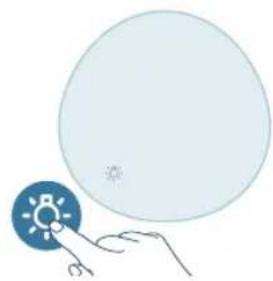
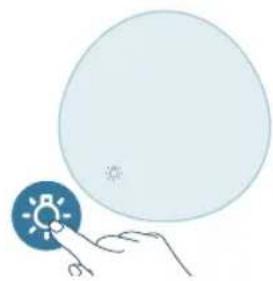
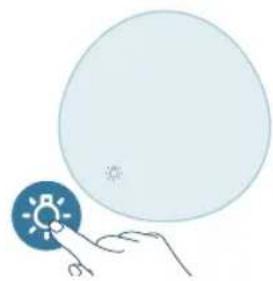
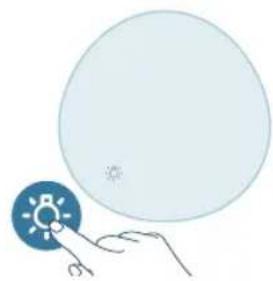
You can press the light on/off button to turn on, dim or turn off all lights and the control panel.
- The control panel is turned on.
natural_image
Illustration of a digital climate control panel with sun icons and a hand pointing to it (no text or symbols on the panel itself)
- The control panel is dimmed.
12 English
natural_image
Illustration of a hand holding a circular object with a sun icon, next to a blue circular shape (no text or symbols)
- The control panel is turned off.
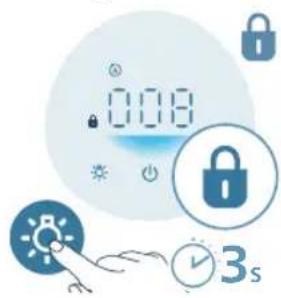
Setting the child lock
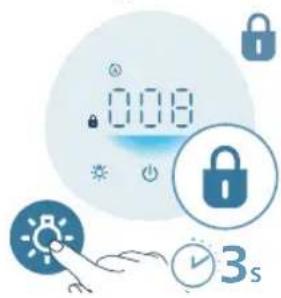
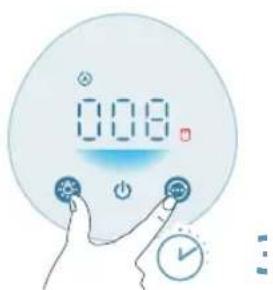
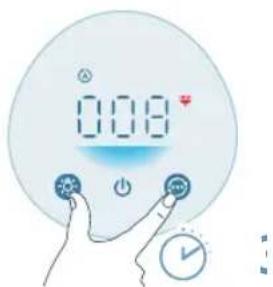
1 Press the button for 3 seconds to activate the child lock.
- The displays on the screen.
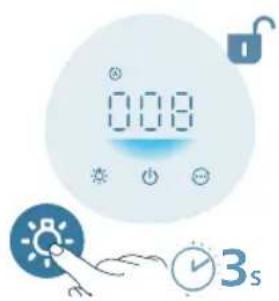
2 Press the button for 3 seconds again to deactivate the child lock.
- The disappears from the screen.
Cleaning and maintenance
Note:
Always unplug the appliance before you clean it.
Never immerse the appliance in water or any other liquid.
Never use abrasive, aggressive, or flammable cleaning agents such as bleach or alcohol to clean any part of the appliance.
Never use any liquids (including water) to clean the filter.
Do not attempt to clean the air quality sensor with a vacuum cleaner.
Cleaning schedule Frequency Cleaning method
When necessary Wipe the plastic part of the appliance with a soft, dry cloth
Clean the air outlet cover
Every two months Clean the particle sensor with a dry cotton swab

displays on the screen Clean the surface of the filter
Cleaning the body of the air purifier
Regularly clean the inside and outside of the air purifier to prevent dust from collecting.
1 Use a soft, dry cloth to clean both the interior and exterior of the air purifier.
2 The air outlet can also be cleaned with a dry, soft cloth.
Cleaning the particle sensor
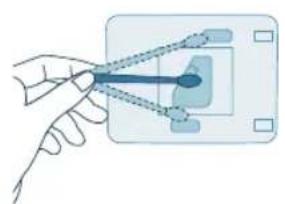
Clean the air quality sensor every 2 months for optimal functioning of the appliance.
If the air purifier is used in a dusty environment, it may need to be cleaned more often.
If the humidity level in the room is very high, condensation may develop on the particle sensor and the air quality light may indicate a more poor air quality even though the air quality is actually good. If this occurs, clean the air quality sensor.
1 Switch off the air purifier and unplug from the power socket.
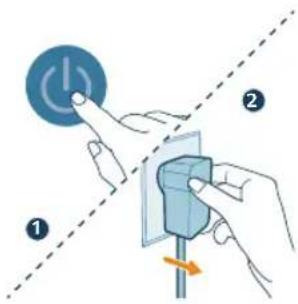
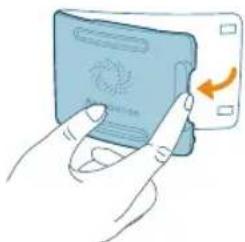
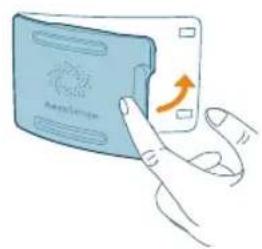
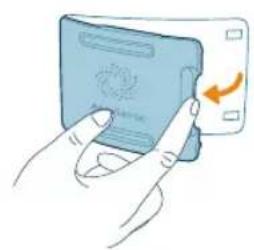
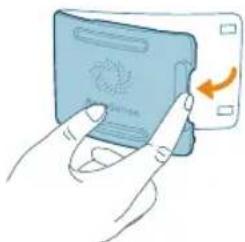
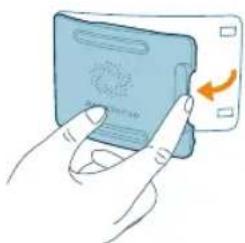
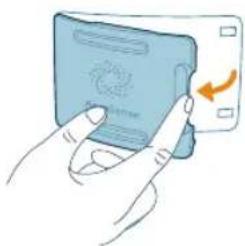
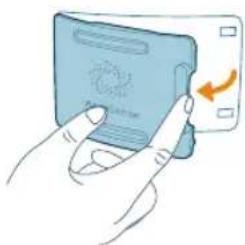
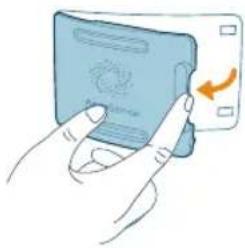
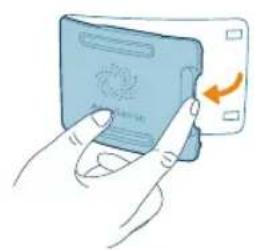
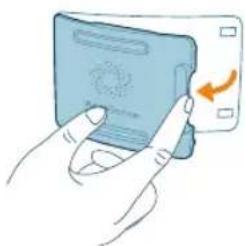
2 Open the air quality sensor cover.
natural_image
Illustration of a hand pressing a blue card with a circular icon and an orange arrow (no text or symbols)
14
English
natural_image
Illustration of a hand holding a small object with a blue arrow pointing to it, connected by dashed lines to a rectangular panel (no text or symbols)
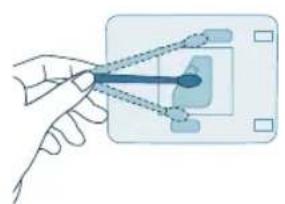
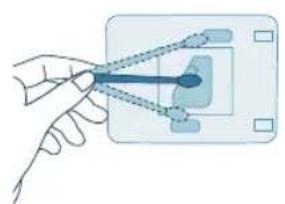
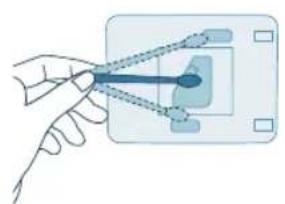
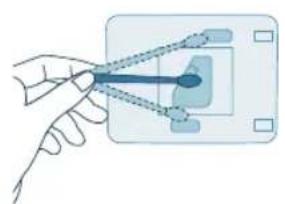
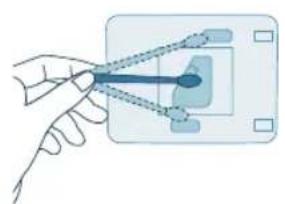
3 Clean the particle sensor with a damp cotton swab.
4 Dry all parts thoroughly with a dry cotton swab.
natural_image
Illustration of a hand inserting a card into a device (no text or symbols visible)
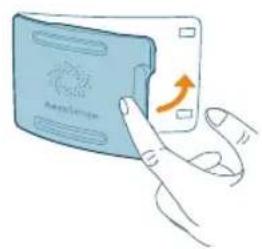
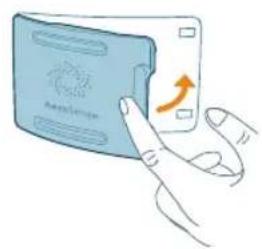
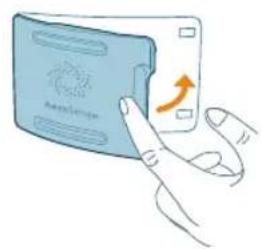
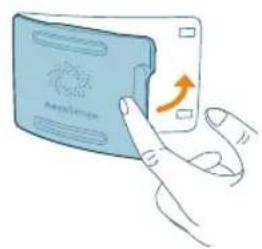
5 Close the air quality sensor.
Cleaning the surface of the filter
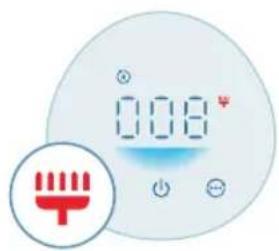
When the filter cleaning alert displays on the screen, clean the surface of the filters with a vacuum cleaner.
Note: We recommend people who are allergic to dust, pollen, pets or mold, not to replace filters by themselves or to take protective measures, such as wearing a mask and gloves.
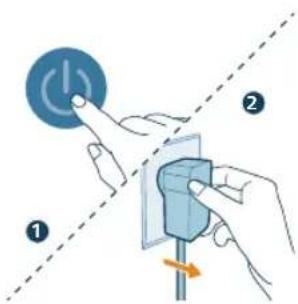
1 Switch off the air purifier and unplug from the power socket.
natural_image
Illustration of a cylindrical object with a downward arrow placed on a striped cloth (no text or symbols)
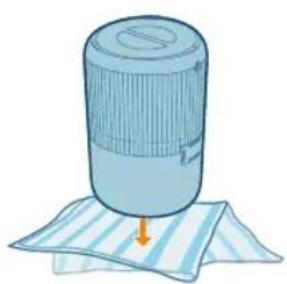
2 Turn the appliance upside down and place it on a soft cloth.

3 Rotate the base anti-clockwise to remove it from the appliance. Pull the filter out from the appliance.
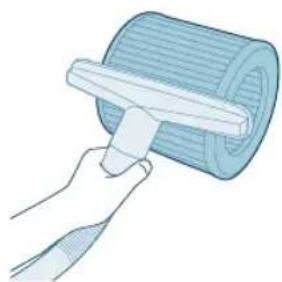
4 Clean the surface of the filters with a vacuum cleaner.
5 Put the filter back into the appliance. Reattach the base and rotate it clockwise to fasten the base.
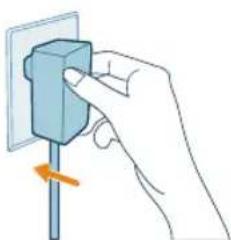
6 Put the adapter of the air purifier in the power socket.
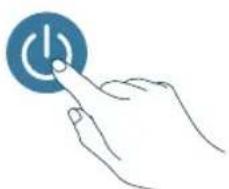
7 Press the button to switch on the appliance.
English
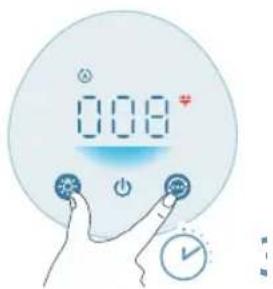
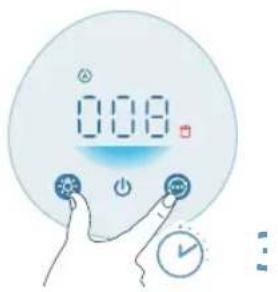
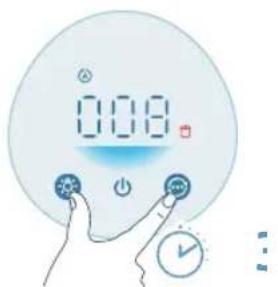
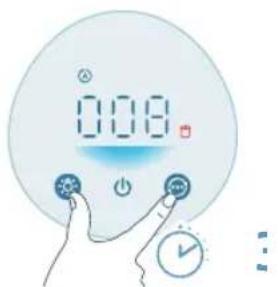
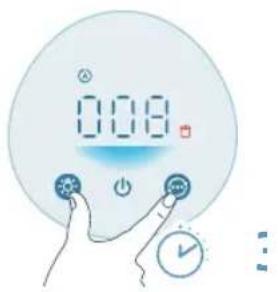
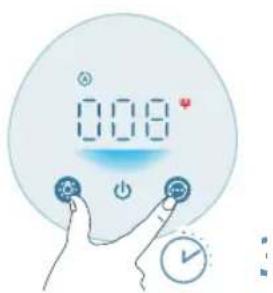
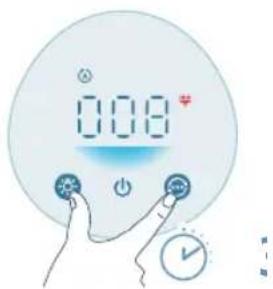
8 Press and hold the hand button for 3 seconds to reset the filter cleaning time.
- After the reset is successful, the filter cleaning alert disappears from the screen.
natural_image
Illustration of a hand holding a spray can with a blue tip (no text or symbols)
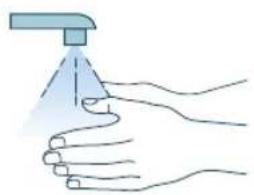
9 Wash your hands thoroughly after cleaning the filters.
Replacing the filter
Understanding the healthy air protect lock
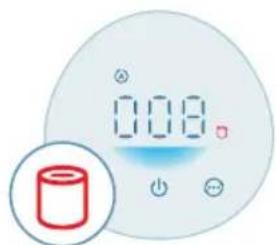
This air purifier is equipped with a filter replacement indicator to make sure that the air purification filter is in optimal condition when the air purifier is operating. When the filter needs to be replaced, the filter replacement alert lights up red.
If the filter is not replaced in time, the air purifier will stop operating and automatically lock to protect the air quality in the room. Replace the filter as soon as possible.
Replacing the filter
Note:
The filter is not washable or reusable.
Always turn off the air purifier and unplug from the electrical outlet before replacing the filter.
When the filter replacement alert displays on the screen, replace the filter (FY0900).
Note: We recommend people who are allergic to dust, pollen, pets or mold, not to replace filters by themselves or to take protective measures, such as wearing a mask and gloves.s
natural_image
Digital thermometer display with a red cylindrical icon below (no text or symbols on the device itself)
1 Switch off the air purifier and unplug from the power socket.
natural_image
Illustration of a cylindrical object with a downward arrow placed on a striped cloth (no text or symbols)
2 Turn the appliance upside down and place it on a soft cloth.
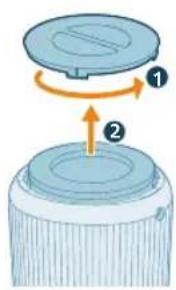
3 Rotate the base anti-clockwise to remove it from the appliance. Pull the filter out from the appliance. Discard the used filter.
natural_image
Illustration of hands holding a blue cylindrical object with an upward arrow, no text or symbols present
4 Remove all packaging materials of the new filters.
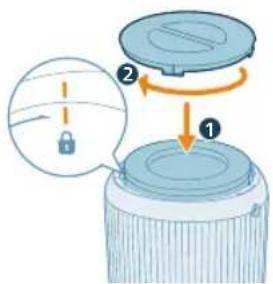
5 Put the new filter back into the appliance. Reattach the base and rotate it clockwise to fasten the base.
English
natural_image
Hand holding a blue electrical socket with a pull arrow, no text or symbols visible
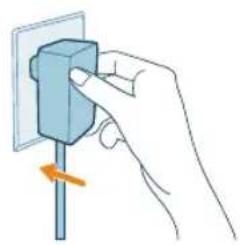
6 Put the adapter of the air purifier in the power socket.
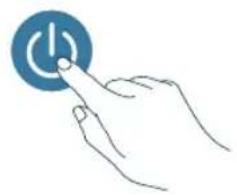
7 Press the button to switch on the appliance.
natural_image
Hand icon showing a hand pressing a blue circular button with a power symbol (no text or numbers)
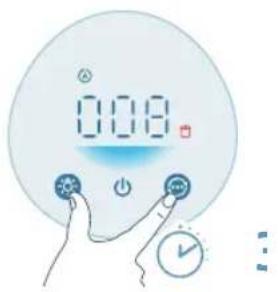
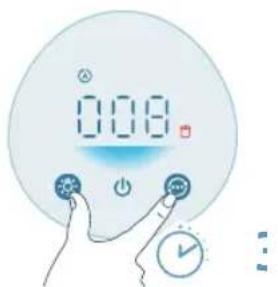
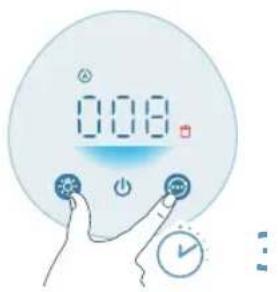
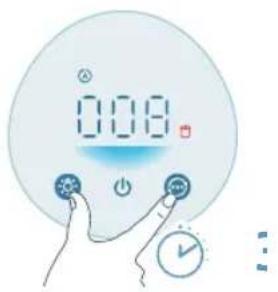
8 Press and hold the 📂 and button for 3 seconds to reset the filter lifetime counter.
- After the reset is successful, the filter replacement alert disappears from the screen.
natural_image
Illustration of a hand spraying a spray bottle onto a surface (no text or symbols)
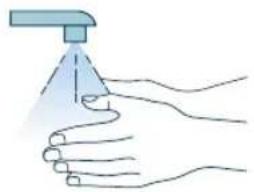
9 Wash your hands thoroughly after replacing the filter.
Note: Do not smell the filter as it has collected pollutants from the air.
Filter reset
You can replace the filters even before filter replacement alert (☐) displays on the screen. After replacing filters, you need to reset the filter lifetime counter manually.
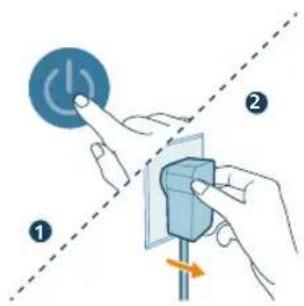
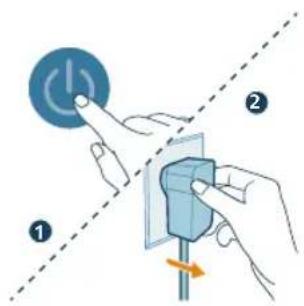
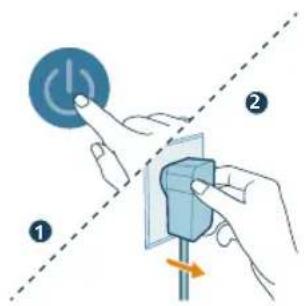
1 Press the button to turn off the appliance. Unplug the appliance.
natural_image
Illustration of a hand holding a blue electrical socket with a pull pointer (no text or symbols)
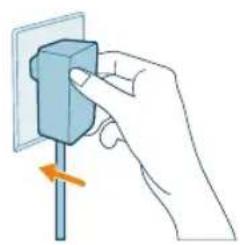
2 Make sure the appliance is completely unplugged, and then put the power adapter in the power socket.
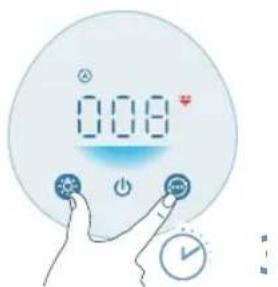
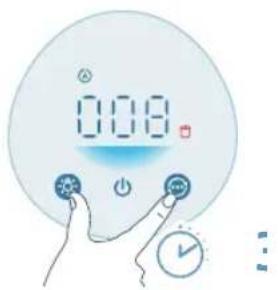
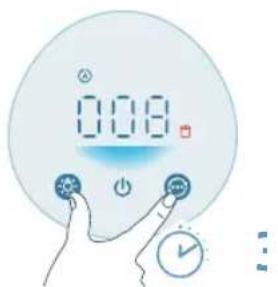
3 Within 15 seconds after power on, press and hold the and button for 3 seconds to reset the filter lifetime counter.
Storage
1 Turn off the air purifier and unplug from the power socket.
2 Clean the air purifier and the surface of the filter (see Chapter "Cleaning and Maintenance").
3 Let all parts air dry thoroughly before storing.
4 Wrap the filter in air tight plastic bags.
5 Store the air purifier, filter in a cool, dry location.
6 Always thoroughly wash hands after handling filter.
Troubleshooting
This chapter summarizes the most common problems you could encounter with the appliance. If you are unable to solve the problem with the information below, contact the Consumer Care Center in your country.
Problem Possible solution
English
| The appliance does not work properly. The filter replacement alert is on but you have not replaced the corresponding filter. As a result, the appliance is now locked. In this case, replace the filter and reset the filter lifetime counter. |
| The airflow that comes out of the air outlet is significantly weaker than before. | The surface of the filter is dirty. Clean the surface of the filter (see Chapter 'Cleaning and maintenance'). |
| The air quality does not improve, even though the appliance has been operating for a long time. | Check if the packing material is removed from the filter. |
| Make sure that the filter (FY0900) is properly installed. |
| Room size is large or the outdoor air quality is poor.For optimum purification performance, please close the doors and windows when operating the air purifier. |
| There are indoor pollution resources. For instances, smoking, cooking, incense. |
| Filters reach the end of life. Replace the filter with a new one. |
| The appliance produces a strange smell. The first few times you use the appliance, it may produce a plastic smell. This is normal. However, if the appliance produces a burnt smell even if removing the filter, contact your Philips dealer or an authorized Philips service center. The filter may produce smell after being used for a while because of the absorption of indoor gases. It's recommended that you put the filter in a well-ventilated place for a couple of hours to reduce the smell. |
| The appliance is extra loud. It's normal if the appliance runs at the Turbo mode. |
| In Auto mode, the appliance will run in higher speed when the air quality is poor.When using the appliance in a bedroom at night, choose the Sleep mode. |
| If anything drops into air outlet, it may also cause abnormal loud sounds.Immediate turn off appliance, and get foreign objectives out of appliance. |
| If there is abnormal sound, contact the Consumer Care Center in your country. |
| The appliance still indicates that I need to replace filter, but I already did. | Perhaps you did not reset the filter lifetime counter. Switch on the appliance. Then touch and hold the ⚙️ and 😊 simultaneously for 3 seconds. |
| Error code "E1" displays on the screen. The motor has malfunctions. Contact the Consumer Care Center in your country. |
Warranty and support
Versuni offers a two-year warranty after purchase on this product. This warranty is not valid if a defect is due to incorrect use or poor maintenance. Our warranty
does not affect your rights under law as a consumer. For more information or for invoking the warranty, please visit our website www.philips.com/support.
Order parts or accessories
If you have to replace a part or want to purchase an additional part, go to your Philips dealer or visit www.philips.com/support.
If you have problems obtaining the parts, please contact the Philips Consumer Care Center in your country.
22 Bahasa Indonesia
Penting
Tombol kontrol:
| Tombol daya Tombol lampu hidup/mati | |
| Tombol pengganti mode | |
| Tekan dan tahan tombol selama 3 detik: |
| Kunci anak Pengaturan ulang filter | |
| Panel tampilan: |
| Mode otomatis Mode medium | |
| Mode tidur Mode turbo | |
| Indikator kunci anak Peringatan pembersihan filter | |
| Peringatan penggantian filter | |
Memulai
Memasang filter
natural_image
Illustration of a cylindrical object with a downward arrow placed on a striped cloth (no text or symbols)
natural_image
Illustration of a hand placing a blue cylindrical object into a container with an upward arrow (no text or symbols)
natural_image
Diagram of a portable air purifier with attached power outlet and plug, showing internal components (no text or labels)
Hubungkan adaptor daya ke:
natural_image
Hand holding a blue electrical socket with a pull arrow, no text or symbols visible
natural_image
Illustration of a digital timer with '0.08' display and a circular button, accompanied by a stylized swirl and finger icon (no text or symbols)
natural_image
Digital display showing '0.08' with a small icon and a circular button, no readable text or symbols present.
natural_image
Illustration of a crescent moon, star, and a circular icon with a finger pointing at it (no text or symbols)
natural_image
Illustration of a digital climate control panel with sun and power buttons, no text or symbols present
natural_image
Illustration of a digital climate controller with sun icons and a hand pointing to it (no text or symbols on the device itself)
- Panel kontrol diredupkan.
Bahasa Indonesia
natural_image
Illustration of a hand holding a circular object with a sun icon, next to a blue circular shape (no text or symbols)
- Panel kontrol dimatikan.
Mengatur kunci anak
natural_image
Illustration of hands inserting a card into a device (no text or symbols visible)
2 Buka tutup sensor partikel.
32 Bahasa Indonesia
natural_image
Illustration of a hand holding a small object with a blue arrow pointing to it, connected by dashed lines to a rectangular panel (no text or symbols)
natural_image
Illustration of a hand inserting a card into a device (no text or symbols visible)
5 Tutup sensor partikel.
Membersihkan permukaan filter

natural_image
Digital kitchen control panel with digital display and red brush icon (no text or symbols)
natural_image
Illustration of a cylindrical object pressing down on a striped cloth with an arrow indicating downward motion (no text or symbols)
natural_image
Illustration of a hand spraying a spray bottle onto a surface (no text or symbols)
natural_image
Digital kitchen control panel with a red cylindrical icon and indicator lights (no text or symbols on the device)
natural_image
Illustration of a cylindrical object with a downward arrow placed on a striped cloth (no text or symbols)
natural_image
Illustration of hands cleaning a cylindrical container with an upward arrow (no text or symbols)
natural_image
Hand holding a blue electrical socket with a pull pointer, no text or symbols visible
natural_image
Hand icon showing a finger pressing a blue circular button with an 'Power' symbol (no text or numbers present)
natural_image
Illustration of a hand spraying a spray gun with a triangular spray nozzle (no text or symbols)
natural_image
Hand holding a small electronic component with an arrow indicating rotation (no text or symbols)
Tlačítka ovládání:
natural_image
Illustration of a cylindrical object with a downward arrow placed on a striped cloth (no text or symbols)
natural_image
Illustration of a hand placing a blue cylindrical object into a container with an upward arrow (no text or symbols)
natural_image
Diagram of a portable air purifier with attached power outlet and plug, showing internal components (no text or labels)
natural_image
Hand holding a blue electrical socket with a pull pointer, no text or symbols visible
natural_image
Illustration of a digital timer with '10:08' and a circular icon featuring a phone symbol (no text or symbols present)
natural_image
Digital display showing '0.08' with a speedometer icon and a stylized eye symbol (no text or numbers present)
natural_image
Illustration of a crescent moon, crescent moon with stars, and a circular target-like symbol (no text or symbols present)
natural_image
Illustration of a digital climate control panel with sun icons and a hand pointing to it (no text or symbols)
natural_image
Illustration of a digital climate control panel with sun icons and a hand pointing to it (no text or symbols on the panel itself)
natural_image
Illustration of a hand holding a small blue circular object with a sun icon, next to a large white circle (no text or symbols)
natural_image
Illustration of a hand inserting a card into a bank card (no text or symbols visible)
natural_image
Illustration of a hand holding a small object with a blue arrowhead, connected to a rectangular panel (no text or symbols)
natural_image
Illustration of a hand inserting a card into a device (no text or symbols visible)
natural_image
Digital kitchen control panel with digital display and red trigger icon (no text or symbols)
natural_image
Illustration of a cylindrical object with a downward arrow placed on a striped cloth (no text or symbols)
natural_image
Illustration of a hand holding a spray can with a funnel (no text or symbols)
natural_image
Digital kitchen counter with digital display showing 0.08, no visible text or symbols on the counter itself
natural_image
Illustration of a cylindrical object with a downward arrow placed on a striped cloth (no text or symbols)
natural_image
Illustration of hands cleaning a cylindrical container with an upward arrow (no text or symbols)
natural_image
Hand holding a blue electrical socket with a pull pointer, no text or symbols visible
natural_image
Hand icon showing a hand pressing a blue circular button with a power symbol (no text or numbers)
natural_image
Illustration of a hand spraying a spray gun with a triangular tip (no text or symbols)
natural_image
Hand holding a blue electrical socket with a pull arrow, no text or symbols visible
Bedientasten:
natural_image
Illustration of a cylindrical object with a downward arrow placed on a striped cloth (no text or symbols)
natural_image
Illustration of a hand placing a tool into a blue cylindrical container with an upward arrow (no text or symbols)
natural_image
Diagram of a portable air conditioner unit with attached circuit board and power outlet (no text or symbols)
natural_image
Illustration of a digital thermometer with '100' and '2' symbols, next to a stylized clock face and a finger pointing at it (no readable text or numbers)
natural_image
Digital display with '0.08' and a circular icon, accompanied by a hand interacting with a button (no text or symbols)
natural_image
Illustration of a crescent moon, star, and circular object with a hand pointing at it (no text or symbols)
natural_image
Illustration of a digital climate meter with sun icons and a hand pointing to it (no text or symbols on the meter itself)
natural_image
Illustration of a digital climate control device with sun and moon symbols (no text or numbers)
natural_image
Illustration of a hand holding a light bulb with a small sun icon, next to a large circular object (no text or symbols)
natural_image
Illustration of a hand inserting a card into a mobile device (no text or symbols visible)
natural_image
Hand holding a connector to a device panel (no text or symbols visible)
natural_image
Illustration of a hand inserting a card into a device (no text or symbols visible)
natural_image
Digital thermometer with a red brush icon and '0.08' display, no readable text or symbols beyond the display.
natural_image
Illustration of a cylindrical object with a downward arrow placed on a striped cloth (no text or symbols)
natural_image
Illustration of a hand using a tool to lift a cylindrical object (no text or symbols)
natural_image
Hand holding a blue electrical plug with a pull arrow, no text or symbols visible
natural_image
Hand icon showing a hand pressing a button with a power symbol (no text or labels)
natural_image
Illustration of a hand holding a spray gun with a triangular tip (no text or symbols)
natural_image
Illustration of a cylindrical object with a downward arrow placed on a striped cloth (no text or symbols)
natural_image
Illustration of a hand placing a blue cylindrical object into a container with an upward arrow (no text or symbols)
natural_image
Hand holding a blue electrical plug with a pull rod, showing a change in the arrow (no text or symbols present)
natural_image
Hand icon showing a blue circular button with a white 'Power' symbol, pointing to it (no text or symbols present)
natural_image
Illustration of a hand spraying a spray bottle onto a surface (no text or symbols)
natural_image
Hand holding a blue electrical plug with a pull arrow, no text or symbols visible
Juhtnupud:
natural_image
Illustration of a cylindrical object with a downward arrow placed on a striped cloth (no text or symbols)
1 Pöörake seade tagurpidi ja asetage see pehmele lapile.
natural_image
Illustration of a hand placing a blue cylindrical object into a container with an upward arrow (no text or symbols)
natural_image
Diagram of a portable air conditioner unit with attached power outlet and internal components (no text or symbols)
natural_image
Hand holding a blue electrical socket with a scroll arrow indicating rotation (no text or symbols)
natural_image
Illustration of a digital timer with '10:08' and a circular icon featuring a camera and a bird (no text or symbols)
natural_image
Digital display showing '0.08' with a small icon and a circular button, no readable text or symbols present.
natural_image
Illustration of a crescent moon, crescent moon with stars, and a stylized face inside a large circle (no text or symbols)
natural_image
Illustration of a digital climate control device with sun icons and a hand pointing to it (no text or symbols on the device itself)
natural_image
Illustration of a digital climate controller with sun and moon symbols, no text or labels present
- Juhtpaneel on hämardunud.
natural_image
Illustration of a hand holding a circular object with a sun icon, no text or symbols present
natural_image
Illustration of hands holding a card with a circular logo and an arrow indicating rotation (no text or symbols)
natural_image
Illustration of a hand holding a small object with a blue arrow pointing to it, connected by dashed lines to a rectangular panel (no text or symbols)
natural_image
Illustration of a hand inserting a card into a device (no text or symbols visible)
natural_image
Digital kitchen control panel with digital display and red trigger icon (no text or symbols)
natural_image
Illustration of a cylindrical object with a downward arrow placed on a striped surface (no text or symbols)
2 Pöörake seade tagurpidi ja asetage see pehmele lapile.
Eesti

natural_image
Illustration of a hand spraying water with a spray can (no text or symbols)
natural_image
Digital thermometer with a red cylindrical icon below it, no visible text or symbols on the device itself.
natural_image
Illustration of a cylindrical object with a downward arrow placed on a striped surface (no text or symbols)
2 Pöörake seade tagurpidi ja asetage see pehmele lapile.
natural_image
Illustration of hands holding a blue cylindrical object with an upward arrow, no text or symbols present
natural_image
Hand holding a blue electrical socket with a pull arrow, no text or symbols visible
7 Vajutage nuppu, et seade sisse lülitada.
natural_image
Hand icon showing a finger pressing a blue circular button with an 'Power' symbol (no text or numbers present)
natural_image
Illustration of a hand spraying a spray bottle onto a surface (no text or symbols)
natural_image
Hand holding a blue electrical socket with a pull arrow, no text or symbols visible
Botones de control:
natural_image
Illustration of a cylindrical object with a downward arrow placed on a striped cloth (no text or symbols)
natural_image
Illustration of a hand placing a blue cylindrical object into a container with an upward arrow (no text or symbols)
natural_image
Diagram of a portable air conditioner unit with attached circuit board and power outlet (no text or symbols)
natural_image
Illustration of a digital thermometer with a circular dial and a hand interacting with it (no text or symbols)
natural_image
Digital display showing '0.08' with a speedometer icon and a stylized eye symbol (no text or numbers present)
natural_image
Illustration of a crescent moon, a crescent moon with stars, and a stylized face with eyes and hands (no text or symbols)
natural_image
Illustration of a digital climate controller with sun icons and a hand pointing to it (no text or symbols on the device itself)
natural_image
Illustration of a digital climate control panel with sun icons and a hand pointing to it (no text or symbols on the panel itself)
natural_image
Illustration of a hand holding a circular object with a sun icon, no text or symbols present
natural_image
Illustration of hands inserting a card into a device (no text or symbols visible)
natural_image
Illustration of a hand holding a small object with a blue arrow pointing to it, connected by dashed lines to a rectangular panel (no text or symbols)
natural_image
Illustration of a hand inserting a card into a device (no text or symbols visible)
natural_image
Digital kitchen control panel with digital display and red trigger icon (no text or symbols)
natural_image
Illustration of a cylindrical object with a downward arrow placed on a striped cloth (no text or symbols)
natural_image
Illustration of a hand spraying a spray bottle onto a surface (no text or symbols)
natural_image
Digital display of a cylindrical device with control buttons and indicator lights (no text or symbols visible)
natural_image
Illustration of a cylindrical object with a downward arrow placed on a striped surface (no text or symbols)
natural_image
Illustration of hands holding a blue cylindrical object with an upward arrow, no text or symbols present
natural_image
Hand holding a blue electrical socket with a pull pointer, no text or symbols visible
natural_image
Hand icon showing a finger pressing a blue circular button with an 'Power' symbol (no text or numbers present)
natural_image
Illustration of a hand spraying a spray bottle onto a surface (no text or symbols)
natural_image
Hand holding a blue electrical socket with a pull arrow, no text or symbols visible
natural_image
Illustration of a cylindrical object with a downward arrow placed on a striped cloth (no text or symbols)
natural_image
Illustration of a hand placing a blue cylindrical object into a container with an upward arrow (no text or symbols)
natural_image
Diagram of a portable air conditioner unit with attached circuit board and power outlet (no text or symbols)
natural_image
Hand holding a blue electrical plug with a pull pointer, showing a rotation arrow (no text or symbols)
natural_image
Digital display with '0.08' and a circular icon, no readable text or symbols
natural_image
Illustration of a crescent moon, star, and circular button with a hand pointing at it (no text or symbols)
natural_image
Illustration of a digital climate meter with sun icons and a hand pointing at it (no text or symbols)
natural_image
Illustration of a digital climate control device with sun and power buttons, no text or symbols present
natural_image
Illustration of a hand holding a circular object with a sun icon, no text or symbols present
natural_image
Illustration of a hand inserting a card into a card with an arrow indicating rotation (no text or symbols)
natural_image
Illustration of a hand holding a small object with a blue arrow pointing to it, connected by dashed lines to a rectangular panel (no text or symbols)
natural_image
Illustration of a hand inserting a card into a device (no text or symbols visible)
natural_image
Illustration of a cylindrical object with a downward arrow placed on a striped cloth (no text or symbols)
natural_image
Illustration of a hand holding a spray can with a funnel (no text or symbols)
natural_image
Illustration of a cylindrical object with a downward arrow placed on a striped surface (no text or symbols)
natural_image
Illustration of hands cleaning a cylindrical container with an upward arrow (no text or symbols)
natural_image
Hand holding a blue electrical socket with an arrow indicating rotation (no text or symbols)
natural_image
Hand icon showing a finger pressing a blue circular button with an 'Power' symbol (no text or numbers present)

natural_image
Illustration of a hand spraying a spray bottle with a triangular tip (no text or symbols)
natural_image
Hand holding a blue electrical socket with a pull arrow, no text or symbols visible
Gumbi za upravljanje:
natural_image
Illustration of a cylindrical object with a downward arrow placed on a striped cloth (no text or symbols)
1 Okrenite aparat naopako i stavite ga na meku krpu.
natural_image
Illustration of a hand placing a blue cylindrical object into a container with an upward arrow (no text or symbols)
3 Uklonite svu ambalažu filtra za pročišćavanje zraka.
natural_image
Diagram of a portable air conditioner unit with attached power outlet and internal components (no text or symbols)
Adapter za napajanje ukopčava se na sljedeći način:
- Najprije u adapter za napajanje na aparatu.
- Zatim u zidnu utičnicu.
Upotreba pročišćivača zraka
natural_image
Hand holding a blue electrical socket with a pull arrow, no text or symbols visible
natural_image
Illustration of a digital timer with '100' and a circular icon featuring a camera, no text or symbols present.
Način rada Srednja (7): U načinu rada Srednja pročišćivač zraka radi pri srednjoj brzini.
natural_image
Digital display showing '0.08' with a small icon and a finger pointing at it, next to a swirling line (no text or symbols)
natural_image
Illustration of a crescent moon, star, and circular button with a finger pointing at it (no text or symbols)
Način rada za spavanje (J): Pročišćivač zraka radi tiho pri maloj brzini. Indikatori zaslona isključuju se nakon 3 sekunde.
natural_image
Illustration of a digital climate control device with sun, power, and cooling icons (no text or symbols)
natural_image
Illustration of a digital climate controller with sun and moon symbols, no text or labels present
natural_image
Illustration of a hand holding a blue circular object with a sun icon, no text or symbols present
1 Isključite pročišćivač zraka i iskopčajte ga iz strujne utičnice.
natural_image
Illustration of hands inserting a card into a device (no text or symbols visible)
2 Otvorite poklopac senzora čestica.
natural_image
Illustration of a hand holding a small object with a blue arrow pointing to it, connected by dashed lines to a rectangular panel (no text or symbols)
3 Očistite senzor čestica vlažnim pamučnim štapićem.
4 Sve dijelove temeljito osušite suhim pamučnim štapićem.
natural_image
Illustration of a hand inserting a card into a device (no text or symbols visible)
5 Zatvorite senzor čestica.
natural_image
Digital kitchen control panel with digital display and red brush icon (no text or symbols)
Kad se na zaslonu prikaže upozorenje za čišćenje filtra očistite površinu filtara usisavačem.
1 Isključite pročišćivač zraka i iskopčajte ga iz strujne utičnice.
natural_image
Illustration of a cylindrical object pressing down on a striped cloth with an arrow indicating downward motion (no text or symbols)
2 Okrenite aparat naopako i stavite ga na meku krpu.
142
Hrvatski

natural_image
Illustration of a hand holding a spray can with a funnel (no text or symbols)
natural_image
Digital thermometer with a red cylindrical icon below it, no visible text or symbols on the device itself.
Hrvatski
1 Isključite pročišćivač zraka i iskopčajte ga iz strujne utičnice.
natural_image
Illustration of a cylindrical object with a downward arrow placed on a striped surface (no text or symbols)
2 Okrenite aparat naopako i stavite ga na meku krpu.
3 Okrečite podnožje u smjeru suprotnom od kazaljke na satu kako biste ga odvojili od aparata. Izvadite filtar iz aparata. Bacite istrošeni filtar.
natural_image
Illustration of hands cleaning a cylindrical container with an upward arrow (no text or symbols)
4 Uklonite svu ambalažu s novih filtara.
natural_image
Hand holding a blue electrical socket with a pull arrow, no text or symbols visible
7 Pritisnite gumb za uključivanje aparata.
natural_image
Hand holding a blue circular button with a white 'Power' symbol (no text or numbers present)
8 Pritisnite i 3 sekunde zadržite gumbe ⚙️ kako biste ponovo postavili brojač trajanja filtra.
natural_image
Illustration of a hand spraying a spray bottle onto a surface (no text or symbols)
9 Nakon zamjene filtra temeljito operite ruke.
Napomena: Nemojte mirisati filtar jer su u njemu skupljeni onečišćivači iz zraka.
Ponovno postavljanje filtra
Filtre možete zamijeniti i prije prikaza upozorenja za zamjenu filtra ( ) na zaslonu. Nakon zamjene filtara ručno trebate ponovo postaviti brojač trajanja filtra.
natural_image
Hand holding a blue electrical socket with a pull arrow, no text or symbols visible
2 Provjerite je li aparat potpuno iskopčan, a zatim ukopčajte adapter za napajanje u strujnu utičnicu.
natural_image
Illustration of a cylindrical object with a downward arrow placed on a striped surface (no text or symbols)
natural_image
Illustration of a hand placing a blue cylindrical object into a container with an upward arrow (no text or symbols)
natural_image
Diagram of a portable air conditioner unit with attached power outlet and internal components (no text or symbols)
natural_image
Hand holding a blue electrical socket with a pull arrow, no text or symbols visible
natural_image
Illustration of a digital timer with '100' and a circular button, accompanied by a stylized swirl and hand pointer (no text or symbols)
natural_image
Digital display showing '0.08' with a small icon and a circular button, no readable text or symbols present.
natural_image
Illustration of a crescent moon, crescent moon with stars, and a stylized face with a finger (no text or symbols)
natural_image
Illustration of a digital climate control panel with sun and power buttons, no text or symbols present
natural_image
Illustration of a digital climate controller with sun icons and a hand pointing to it (no text or symbols on the device itself)
natural_image
Illustration of a hand holding a blue circular object with a sun icon, no text or symbols present
natural_image
Illustration of a hand inserting a card into a card with an arrow indicating rotation (no text or symbols)
natural_image
Illustration of a hand holding a small object with a blue arrow pointing to it, connected by dashed lines to a rectangular panel (no text or symbols)
natural_image
Illustration of a hand inserting a card into a device (no text or symbols visible)
natural_image
Illustration of a cylindrical object pressing down on a striped cloth with an arrow indicating downward motion (no text or symbols)
natural_image
Illustration of a hand holding a spray can with a funnel (no text or symbols)
natural_image
Illustration of a cylindrical object with a downward arrow placed on a striped surface (no text or symbols)
natural_image
Illustration of hands holding a blue cylindrical object with an upward arrow, no text or symbols present
natural_image
Hand holding a blue electrical socket with a pull pointer, no text or symbols visible
natural_image
Hand icon showing a blue circular button with a white 'Power' symbol, no text or labels present.
natural_image
Illustration of a hand holding a spray can with a funnel (no text or symbols)
natural_image
Hand holding a blue electrical socket with a pull arrow, no text or symbols visible
Vadības pogas
natural_image
Illustration of a cylindrical object with a downward arrow placed on a striped cloth (no text or symbols)
natural_image
Illustration of hands holding a blue cylindrical container with an upward arrow (no text or symbols)
natural_image
Diagram of a portable air conditioner unit with attached power outlet and internal components (no text or symbols)
natural_image
Hand holding a blue electrical plug with a pull arrow, no text or symbols visible
natural_image
Illustration of a digital timer with '100' and a circular button, accompanied by a stylized swirl and hand cursor (no text or symbols)
natural_image
Digital display showing '0.08' with a speedometer icon and a stylized eye symbol (no text or numbers present)
natural_image
Illustration of a crescent moon, star, and a circular button with a pointer, set against a light blue background (no text or symbols)
natural_image
Illustration of a digital climate control device with sun icons and a hand pointing to it (no text or symbols)
natural_image
Illustration of a digital climate control device with sun icons and a hand pointing to it (no text or symbols on the device itself)
natural_image
Illustration of a hand holding a blue circular object with a sun icon, no text or symbols present
natural_image
Illustration of a hand inserting a card into a card with an arrow indicating the card's rotation (no text or symbols present)
2 Atveriet dalinu sensora pârsegu.
natural_image
Illustration of a hand holding a small object with a blue arrow pointing to it, connected by dashed lines to a rectangular panel (no text or symbols)
3 Notiriet dalinu sensoru ar mitru vates tamponu.
4 Visas daļas rūpīgi nosusiniet ar sausu vates tamponu.
natural_image
Illustration of a hand inserting a card into a device (no text or symbols visible)
5 Aizveriet dalinu sensoru.
natural_image
Digital kitchen control panel with digital display and red brush icon (no text or symbols)
natural_image
Illustration of a cylindrical object with a downward arrow pointing to a striped cloth (no text or symbols)
natural_image
Illustration of a hand spraying a spray bottle with a funnel (no text or symbols)
natural_image
Digital kitchen counter with digital display showing 0.08, no visible text or symbols on the counter itself
natural_image
Illustration of a cylindrical object with a downward arrow placed on a striped surface (no text or symbols)
natural_image
Illustration of hands cleaning a cylindrical container with an upward arrow (no text or symbols)
natural_image
Hand holding a blue electrical socket with a pull pointer, no text or symbols visible
7 Nospiediet pogu 📍lai ieslēgtu ierīci.
natural_image
Hand icon showing a finger pressing a blue circular button with an 'Power' symbol (no text or numbers present)

natural_image
Illustration of a hand spraying a spray bottle onto a surface (no text or symbols)
1 Lai izslegtu ierici, nospiediet pogu . Atvienojiet ierici no elektrotikla.
natural_image
Hand holding a blue electrical socket with a pull arrow, no text or symbols visible
Valdymo mygtukai:
natural_image
Illustration of a cylindrical object with a downward arrow placed on a striped cloth (no text or symbols)
natural_image
Illustration of a hand placing a blue cylindrical object into a container with an upward arrow (no text or symbols)
natural_image
Diagram of a water heater with labeled components and wiring (no text or symbols present)
Galios adapterio prijungimas:
natural_image
Hand holding a blue electrical plug with a pull arrow, no text or symbols visible
natural_image
Digital display showing '0.08' with a speedometer icon and a stylized eye symbol (no text or numbers present)
natural_image
Illustration of a crescent moon, star, and a circular icon with a pointing finger (no text or symbols)
natural_image
Illustration of a digital climate control panel with sun icons and a hand pointing to it (no text or symbols)
natural_image
Illustration of a digital climate controller with a hand pointing at it, no text or symbols present.
- Valdymo skydelis pritemdytas.
natural_image
Illustration of a hand holding a circular object with a sun icon, next to a blue circular shape (no text or symbols)
natural_image
Illustration of a hand inserting a card into a card with an arrow indicating rotation (no text or symbols)
natural_image
Illustration of a hand holding a small object with a blue arrow pointing to it, connected by dashed lines to a rectangular panel (no text or symbols)
natural_image
Illustration of a hand inserting a card into a device (no text or symbols visible)
natural_image
Digital kitchen control panel with digital display and red trigger icon (no text or symbols)
natural_image
Illustration of a cylindrical object with a downward arrow placed on a striped surface (no text or symbols)
natural_image
Illustration of a hand holding a spray can with a funnel (no text or symbols)
natural_image
Digital kitchen counter with digital display showing 0.08, no visible text or symbols on the counter itself
natural_image
Illustration of a cylindrical object with a downward arrow placed on a striped surface (no text or symbols)
natural_image
Illustration of hands holding a blue cylindrical object with an upward arrow, no text or symbols present
natural_image
Hand holding a blue electrical socket with a pull pointer, no text or symbols visible
natural_image
Hand icon showing a finger pressing a blue circular button with an 'Power' symbol (no text or numbers present)
natural_image
Illustration of a hand spraying a spray gun with a triangular spray nozzle (no text or symbols)
natural_image
Hand holding a blue electrical socket with a pull arrow, no text or symbols visible
Vezérlógombok:
natural_image
Illustration of a cylindrical object with a downward arrow placed on a striped cloth (no text or symbols)
natural_image
Illustration of a hand placing a blue cylindrical object into a container with an upward arrow (no text or symbols)
natural_image
Diagram of a portable air purifier with attached power outlet and plug, showing internal components (no text or labels)
natural_image
Hand holding a blue electrical socket with a pull arrow, no text or symbols visible
natural_image
Illustration of a digital thermometer with a circular dial and a button, accompanied by a stylized swirl and hand icon (no text or symbols)
natural_image
Digital display showing '0.08' with a small icon and swirl design, no readable text or symbols
natural_image
Illustration of a crescent moon, star, and circular icon with a finger pointing at it (no text or symbols)
natural_image
Illustration of a digital climate control panel with sun and power buttons, no text or symbols present
natural_image
Illustration of a digital climate control panel with sun icons and a hand pointing to it (no text or symbols on the panel itself)
natural_image
Illustration of a hand holding a circular object with a sun icon, next to a blue circular shape (no text or symbols)
natural_image
Illustration of hands inserting a card into a card with an arrow indicating rotation (no text or symbols)
natural_image
Illustration of a hand holding a small object with a blue arrow pointing to it, connected by dashed lines to a rectangular panel (no text or symbols)
natural_image
Illustration of a hand inserting a card into a device (no text or symbols visible)
natural_image
Illustration of a cylindrical object with a downward arrow placed on a striped surface (no text or symbols)
natural_image
Illustration of a hand spraying a spray bottle from a water dispenser (no text or symbols)
natural_image
Digital kitchen control panel with digital display and control buttons (no text or symbols)
Magyar
natural_image
Illustration of a cylindrical object with a downward arrow placed on a striped surface (no text or symbols)
natural_image
Illustration of hands placing a component into a cylindrical container with an upward arrow (no text or symbols)
natural_image
Hand holding a blue electrical socket with a pull pointer, no text or symbols visible
natural_image
Hand icon showing a hand pressing a blue circular button with a power symbol (no text or numbers)
natural_image
Illustration of a hand spraying a spray gun with a funnel (no text or symbols)
natural_image
Hand holding a blue electrical socket with a pull pointer, no text or symbols visible
Bedieningsknoppen:
natural_image
Illustration of a cylindrical object with a downward arrow placed on a striped surface (no text or symbols)
natural_image
Illustration of a hand placing a blue cylindrical object into a container with an upward arrow (no text or symbols)
natural_image
Diagram of a compact air purifier with attached power outlet and internal components (no text or labels)
natural_image
Hand holding a blue electrical socket with a pull arrow, no text or symbols visible
natural_image
Digital display showing '0.08' with a small icon and a circular symbol below (no readable text or symbols)
natural_image
Illustration of a crescent moon, a crescent moon with stars, and a stylized face inside a circle (no text or symbols)
natural_image
Illustration of a digital climate control panel with sun icons and a hand pointing to it (no text or symbols on the panel itself)
natural_image
Illustration of a digital climate control device with sun icons and a hand pointing to it (no text or symbols)
natural_image
Illustration of a hand holding a circular object with a sun icon, no text or symbols present
natural_image
Illustration of hands inserting a card into a device (no text or symbols visible)
natural_image
Illustration of a hand holding a small object with a blue arrow pointing to it, connected by dashed lines to a rectangular panel (no text or symbols)
natural_image
Illustration of a hand inserting a card into a device (no text or symbols visible)
natural_image
Illustration of a cylindrical object with a downward arrow placed on a striped cloth (no text or symbols)
natural_image
Illustration of a hand holding a spray gun with a triangular spray tip (no text or symbols)
natural_image
Illustration of a cylindrical object with a downward arrow placed on a striped surface (no text or symbols)
natural_image
Illustration of hands holding a blue cylindrical object with an upward arrow, no text or symbols present
natural_image
Hand holding a blue electrical socket with a pull pointer, no text or symbols visible
natural_image
Hand icon showing a finger pressing a blue circular button with an 'Power' symbol (no text or numbers present)
natural_image
Illustration of a hand spraying a spray gun with a triangular spray nozzle (no text or symbols)
natural_image
Hand holding a blue electrical socket with a pull arrow, no text or symbols visible
natural_image
Illustration of a cylindrical object with a downward arrow placed on a striped cloth (no text or symbols)
natural_image
Illustration of a hand placing a blue cylindrical object into a container with an upward arrow (no text or symbols)
natural_image
Diagram of a portable air conditioner unit with attached circuit board and power outlet (no text or symbols)
natural_image
Illustration of a digital timer with '0.08' and a circular button, accompanied by a stylized swirl and hand icon (no text or symbols)
natural_image
Digital display showing '0.08' with a speedometer icon and a stylized eye symbol (no text or numbers present)
natural_image
Illustration of a crescent moon, crescent moon with stars, and a circular icon with a dot (no text or symbols)
natural_image
Illustration of a digital climate meter with sun, power button, and battery (no text or symbols)
natural_image
Illustration of a digital climate control panel with sun and solar icons, no text or symbols present
natural_image
Illustration of a hand holding a circular object with a sun icon, next to a blue circular shape (no text or symbols)
natural_image
Illustration of hands inserting a card into a device (no text or symbols visible)
natural_image
Illustration of a hand holding a small object with a blue arrow pointing to it, connected by dashed lines to a rectangular panel (no text or symbols)
natural_image
Illustration of a hand inserting a card into a device (no text or symbols visible)
natural_image
Illustration of a cylindrical object pressing down on a striped cloth with an arrow indicating downward motion (no text or symbols)
natural_image
Illustration of a hand spraying a spray bottle onto a surface (no text or symbols)
natural_image
Digital display with a red cylindrical icon and control buttons, no readable text or symbols.
252 Polski
natural_image
Illustration of a cylindrical object with a downward arrow placed on a striped surface (no text or symbols)
natural_image
Illustration of hands holding a blue cylindrical object with an upward arrow, no text or symbols present
natural_image
Hand holding a blue electrical socket with a pull pointer, no text or symbols visible
natural_image
Hand icon showing a finger pressing a blue circular button with an 'Power' symbol (no text or numbers present)
natural_image
Illustration of a hand spraying a spray gun with a triangular spray nozzle (no text or symbols)
natural_image
Hand holding a blue electrical socket with a pull pointer, no text or symbols visible
Botões de controlo:
Installing the filter
Remove all packaging of the filter before use.
Note: Make sure the air purifier is unplugged from the electrical outlet before installing the filter.

natural_image
Illustration of a cylindrical object with a downward arrow placed on a striped cloth (no text or symbols)
1 Turn the appliance upside down and place it on a soft cloth.
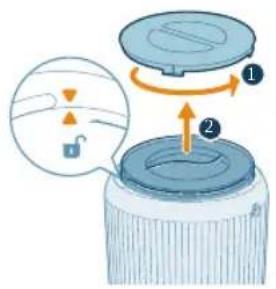
2 Rotate the base anti-clockwise to remove it from the appliance. Pull the filter out from the appliance.
natural_image
Illustration of a hand placing a blue cylindrical object into a container with an upward arrow (no text or symbols)
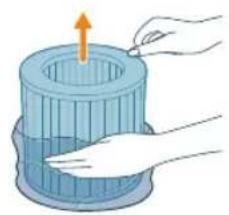
3 Remove all packaging materials of the air purification filter.
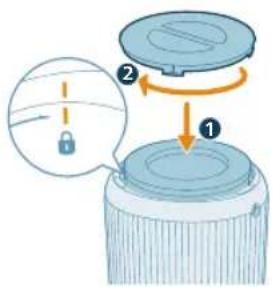
4 Put the filter back into the appliance. Reattach the base and rotate it clockwise to fasten the base.
Connecting power
CAUTION: Risk of electric shock! When you unplug the adaptrt, always pull the plug from the socket. Never pull the cord.
natural_image
Diagram of a portable air conditioner unit with a power outlet and internal components, showing no text or symbols.
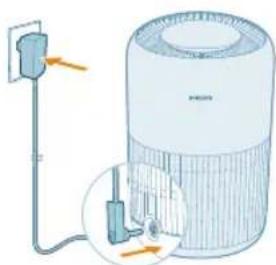
Connect the power adapter to:
- First, the power adapter on the appliance.
- Then, the wall outlet.
Utilizar o purificador de ar
Understanding the air quality light
The air quality light automatically goes on when the air purifier is switched on, and lights up all colors in sequence. After approximately 30 seconds, the particle sensor selects the color that corresponds to the surrounding air quality of airborne particles.
The color of the air quality light is determined by the PM2.5 reading.
PM2.5
AeraSense sensing technology accurately detects and quickly responds to even the slightest particle change in the air. It provides you with reassurance with real-time PM2.5 feedback.
Most of the indoor air pollutants fall under PM2.5 – which refers to airborne particle pollutants smaller than 2.5 micrometers. Common indoor sources of fine particles are tobacco smoke, cooking, burning candles. Some airborne bacteria and the smallest mold spores, pet allergen and dust mite allergen particles also fall under PM2.5.
PM2.5 level Air quality color Air quality level
| ≤12 Blue Good |
| 13-35 Blue-purple Fair |
| 36-55 Purple-red Poor |
| >55 Red Very poor |
Ligar e desligar
Nota:
natural_image
Hand holding a blue electrical socket with a pull pointer, no text or symbols visible
Changing the mode setting
You can choose the Auto mode, the Medium mode, the Turbo mode, or the Sleep mode by pressing the mode switch button.
natural_image
Illustration of a digital timer with Wi-Fi signal and a stylized eye icon, no text or symbols present.
natural_image
Digital display showing '0.08' with a speedometer icon and a stylized eye symbol (no text or numbers present)
natural_image
Illustration of a crescent moon, a crescent moon with stars, and a stylized face with eyes and hands (no text or symbols)
natural_image
Illustration of a digital climate control device with sun icons and a hand pointing to it (no text or symbols on the device itself)
natural_image
Illustration of a digital climate controller with a hand pointing to its function button (no text or symbols on the device itself)
- O painel de controlo está regulado.
natural_image
Illustration of a hand holding a circular object with a sun icon, no text or symbols present
Always unplug the appliance before you clean it.
Never immerse the appliance in water or any other liquid.
Never use abrasive, aggressive, or flammable cleaning agents such as bleach or alcohol to clean any part of the appliance.
Never use any liquids (including water) to clean the filter.
Do not attempt to clean the air quality sensor with a vacuum cleaner.
Programa de limpeza
Cleaning the particle sensor
Clean the air quality sensor every 2 months for optimal functioning of the appliance.
If the air purifier is used in a dusty environment, it may need to be cleaned more often.
If the humidity level in the room is very high, condensation may develop on the particle sensor and the air quality light may indicate a more poor air quality even though the air quality is actually good. If this occurs, clean the air quality sensor.
1 Switch off the air purifier and unplug from the power socket.
natural_image
Illustration of a hand inserting a card into a device (no text or symbols visible)
2 Open the air quality sensor cover.
natural_image
Illustration of a hand holding a small object with a blue arrow pointing to it, connected by dashed lines to a rectangular panel (no text or symbols)
3 Clean the particle sensor with a damp cotton swab.
4 Dry all parts thoroughly with a dry cotton swab.
natural_image
Illustration of a hand inserting a card into a device (no text or symbols visible)
5 Close the air quality sensor.
natural_image
Digital kitchen control panel with digital display and red trigger icon (no text or symbols)
natural_image
Illustration of a cylindrical object with a downward arrow placed on a striped surface (no text or symbols)
natural_image
Illustration of a hand spraying a spray bottle onto a surface (no text or symbols)
Replacing the filter
Understanding the healthy air protect lock
This air purifier is equipped with a filter replacement indicator to make sure that the air purification filter is in optimal condition when the air purifier is operating. When the filter needs to be replaced, the filter replacement alert lights up red.
If the filter is not replaced in time, the air purifier will stop operating and automatically lock to protect the air quality in the room. Replace the filter as soon as possible.
Replacing the filter
Note:
The filter is not washable or reusable.
Always turn off the air purifier and unplug from the electrical outlet before replacing the filter.
natural_image
Digital thermometer display with a red cylindrical icon below (no text or symbols on the device itself)
270 Português
natural_image
Illustration of a cylindrical object with a downward arrow placed on a striped surface (no text or symbols)
natural_image
Illustration of hands holding a blue cylindrical object with an upward arrow, no text or symbols present
natural_image
Hand holding a blue electrical socket with a pull pointer, no text or symbols visible
natural_image
Hand icon showing a finger pressing a blue circular button with an 'Power' symbol (no text or numbers present)
natural_image
Illustration of a hand spraying a spray gun with a triangular spray nozzle (no text or symbols)
natural_image
Hand holding a blue electrical plug with a pull pointer, showing a current direction (no text or symbols)
1 Turn off the air purifier and unplug from the power socket.
2 Clean the air purifier and the surface of the filter (see Chapter "Cleaning and Maintenance").
3 Let all parts air dry thoroughly before storing.
4 Wrap the filter in air tight plastic bags.
5 Store the air purifier, filter in a cool, dry location.
6 Always thoroughly wash hands after handling filter.
Butoane de control:
natural_image
Illustration of a cylindrical object with a downward arrow placed on a striped cloth (no text or symbols)
natural_image
Illustration of a hand placing a blue cylindrical object into a container with an upward arrow (no text or symbols)
natural_image
Diagram of a water heater with labeled components and wiring (no text or symbols present)
natural_image
Hand holding a blue electrical socket with a pull pointer, showing a rotation arrow (no text or symbols)
natural_image
Illustration of a digital timer with '1008' and a circular button, accompanied by a stylized swirl and finger icon (no text or symbols)
natural_image
Digital display showing '0.08' with a speedometer icon and a stylized eye symbol (no text or numbers present)
natural_image
Illustration of a crescent moon, a crescent moon with stars, and a stylized face with a circular symbol (no text or symbols present)
natural_image
Illustration of a digital climate control device with sun, power, and battery symbols (no text or labels)
natural_image
Illustration of a digital climate controller with a hand pointing to it, showing sun and power icons (no text or symbols on the device itself)
- Panoul de control este estompat.
natural_image
Illustration of a hand holding a circular object with a sun icon, next to a blue circular shape (no text or symbols)
- Panoul de control este oprit.
natural_image
Illustration of hands inserting a card into a device (no text or symbols visible)
natural_image
Illustration of a hand holding a small object with a blue arrow pointing to it, connected by dashed lines to a rectangular panel (no text or symbols)
natural_image
Illustration of a hand inserting a card into a device (no text or symbols visible)
natural_image
Digital kitchen control panel with digital display and red trigger icon (no text or symbols)
natural_image
Illustration of a cylindrical object pressing down on a striped cloth with an arrow indicating downward motion (no text or symbols)
natural_image
Illustration of a hand spraying a spray bottle onto a surface (no text or symbols)
natural_image
Digital display with a red cylindrical icon and control buttons, no readable text or symbols.
natural_image
Illustration of a cylindrical object with a downward arrow placed on a striped surface (no text or symbols)
natural_image
Illustration of hands holding a blue cylindrical object with an upward arrow, no text or symbols present
natural_image
Hand holding a blue electrical socket with a pull pointer, no text or symbols visible
natural_image
Hand icon showing a blue circular button with a white 'Power' symbol, pointing at it (no text or symbols present)
natural_image
Illustration of a hand spraying a spray gun with a triangular spray nozzle (no text or symbols)
natural_image
Hand holding a blue electrical socket with a pull arrow, no text or symbols visible
Butonat e komandimit:
natural_image
Illustration of a cylindrical object with a downward arrow placed on a striped cloth (no text or symbols)
natural_image
Illustration of a hand placing a blue cylindrical object into a container with an upward arrow (no text or symbols)
natural_image
Diagram of a water heater with labeled components and wiring (no text or symbols present)
natural_image
Hand holding a blue electrical socket with a scroll arrow indicating rotation (no text or symbols)
natural_image
Illustration of a digital timer with '10:08' and a circular icon featuring a camera and a hand interacting with it (no text or symbols)
natural_image
Digital display showing '0.08' with a speedometer icon and a stylized eye symbol (no text or numbers present)
natural_image
Illustration of a crescent moon, crescent moon with stars, and a circular icon with a face, no text or symbols present.
natural_image
Illustration of a digital climate control panel with sun and power buttons, no text or symbols present
natural_image
Illustration of a digital climate controller with a hand pointing to it, showing sun and solar symbols (no text or labels)
- Paneli i kontrollit zbehet.
natural_image
Illustration of a hand holding a circular object with a sun icon, no text or symbols present
- Paneli i kontrollit fiket.
natural_image
Illustration of a hand inserting a card into a mobile device (no text or symbols visible)
natural_image
Hand holding a small object with connected lines, pointing at a rectangular panel (no text or symbols visible)
natural_image
Illustration of a hand inserting a card into a device (no text or symbols visible)
natural_image
Digital thermometer with a red brush icon and '0.08' display, no readable text or symbols beyond the display.
natural_image
Illustration of a cylindrical object with a downward arrow placed on a striped cloth (no text or symbols)
natural_image
Illustration of a hand using a tool to lift a cylindrical object (no text or symbols)
natural_image
Hand holding a blue electrical plug with a pull arrow, no text or symbols visible
natural_image
Hand icon showing a hand pressing a button with a blue circular button (no text or symbols)
natural_image
Illustration of a hand holding a spray gun with a blue spray can (no text or symbols)
natural_image
Illustration of a cylindrical object with a downward arrow placed on a striped cloth (no text or symbols)
natural_image
Illustration of a hand placing a blue cylindrical object into a container with an upward arrow (no text or symbols)
natural_image
Hand holding a blue electrical socket with a pull arrow, no text or symbols visible
natural_image
Hand icon showing a blue circular button with a white 'Power' symbol, no text or numbers present

natural_image
Illustration of a hand spraying a spray gun with a funnel (no text or symbols)
natural_image
Hand holding a blue electrical plug with a pull arrow, no text or symbols visible
Upravljalni gumbi:
natural_image
Illustration of a cylindrical object with a downward arrow placed on a striped cloth (no text or symbols)
1 Aparat obrnite navzdol in ga položite na mehko krpo.
2 Podstavek obrnite v levo, da ga odstranite z aparata. Filter povlecite iz aparata.
natural_image
Illustration of a hand placing a blue cylindrical object into a container with an upward arrow (no text or symbols)
4 Filter namestite nazaj v aparat. Znova namestite podstavek in ga obrnite v desno, da ga pritrdite.
natural_image
Diagram of a water heater with labeled components and wiring (no text or symbols present)
natural_image
Hand holding a blue electrical socket with a pull arrow, no text or symbols visible
2 Za vklop čistilnika zraka pritisnite gumb za vklop/izklop.
natural_image
Digital display showing '0.08' with a speedometer icon and a stylized eye symbol (no text or numbers present)
natural_image
Illustration of a crescent moon, a crescent moon with stars, and a circular icon with a grid of dots (no text or symbols)
natural_image
Illustration of a digital climate control device with sun icons and a hand pointing to it (no text or symbols)
natural_image
Illustration of a digital climate control panel with sun icons and a hand pointing to it (no text or symbols on the panel itself)
natural_image
Illustration of a hand holding a circular object with a sun icon, no text or symbols present
natural_image
Illustration of hands inserting a card into a card with an arrow indicating the card's direction (no text or symbols present)
2 Odprite pokrov senzorja kakovosti zraka.
natural_image
Illustration of a hand holding a small object with a blue arrow pointing to it, connected by dashed lines to a rectangular panel (no text or symbols)
3 Senzor delcev očistite z vlažno vatirano paličico.
4 Vse dele temeljito osušite s suho vatirano paličico.
natural_image
Illustration of a hand inserting a card into a device (no text or symbols visible)
natural_image
Illustration of a cylindrical object with a downward arrow placed on a striped surface (no text or symbols)
2 Aparat obrnite navzdol in ga položite na mehko krpo.
322 Slovenščina
3 Podstavek obrnite v levo, da ga odstranite z aparata. Filter povlecite iz aparata.
natural_image
Illustration of a hand using a tool to lift a cylindrical component (no text or symbols)
4 Površino filtrov očistite s sesalnikom.
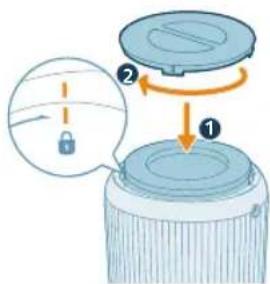
5 Filter namestite nazaj v aparat. Znova namestite podstavek in ga obrnite v desno, da ga pritrdite.
natural_image
Hand holding a blue electrical socket with a pull arrow, no text or symbols visible
6 Adapter čistilnika zraka priključite v električno vtičnico.
7 Pritisnite gumba vklop aparata.
natural_image
Hand icon showing a blue circular button with a white 'Power' symbol, no text or numbers present
natural_image
Illustration of a hand holding a spray can with a funnel (no text or symbols)
9 Ko očistite filtre, si temeljito umijte roke.
Menjava filtra
natural_image
Digital thermometer with a red circular icon below it, no visible text or symbols on the device itself.
natural_image
Illustration of a cylindrical object with a downward arrow placed on a striped surface (no text or symbols)
2 Aparat obrnite navzdol in ga položite na mehko krpo.
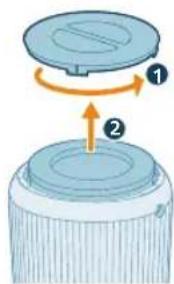
3 Podstavek obrnite v levo, da ga odstranite z aparata. Filter povlecite iz aparata. Rabljeni filter zavrzite.
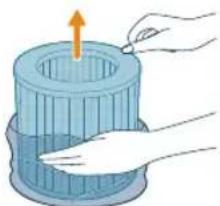
natural_image
Illustration of a hand pressing down on a blue cylindrical container with an upward arrow (no text or symbols)
4 Z novih filtrov odstranite ves embalažni material.
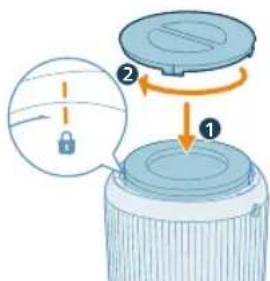
5 V aparat vstavite novi filter. Znova namestite podstavek in ga obrnite v desno, da ga pritrdite.
6 Adapter čistilnika zraka priključite v električno vtičnico.
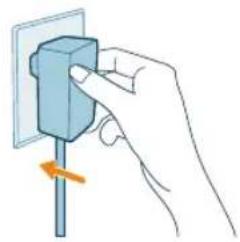
natural_image
Hand holding a blue electrical socket with a pull pointer, no text or symbols visible
7 Pritisnite gumb za vklop aparata.
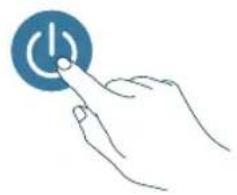
natural_image
Hand icon showing a hand pressing a button with a blue circular icon (no text or symbols)
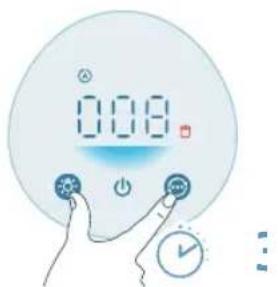
natural_image
Illustration of a hand spraying a spray gun with a triangular spray nozzle (no text or symbols)
9 Ko zamenjate filter, si temeljito umijte roke.
natural_image
Hand holding a blue electrical socket with a pull pointer, showing a rotation arrow (no text or symbols)
Ovládacie tlačidlá:
natural_image
Illustration of a cylindrical object with a downward arrow placed on a striped cloth (no text or symbols)
natural_image
Illustration of a hand placing a blue cylindrical object into a container with an upward arrow (no text or symbols)
natural_image
Diagram of a compact air purifier with attached power outlet and internal components (no text or labels)
natural_image
Hand holding a blue electrical socket with a pull pointer, no text or symbols visible
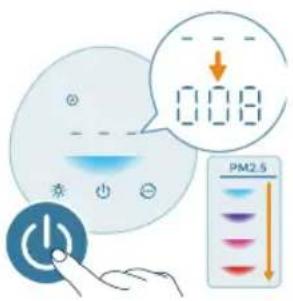
natural_image
Digital display showing '0.08' with a small icon and a circular button, no readable text or symbols present.
natural_image
Illustration of a crescent moon, crescent moon with stars, and a stylized face with a finger (no text or symbols)
natural_image
Illustration of a digital climate control panel with sun and power buttons, no text or symbols present
natural_image
Illustration of a digital climate control panel with sun icons and a hand pointing to it (no text or symbols on the device itself)
natural_image
Illustration of a hand holding a circular object with a sun icon, no text or symbols present
1 Vypnite čistič vzduchu a odpojte ho od elektrickej zásuvky.
natural_image
Illustration of hands holding a card with a circular logo and an arrow indicating rotation (no text or symbols)
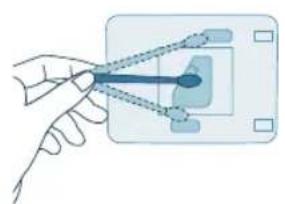
natural_image
Illustration of a hand holding a small object with a blue arrow pointing to it, connected by dashed lines to a rectangular panel (no text or symbols)
natural_image
Illustration of a hand inserting a card into a device (no text or symbols visible)
1 Vypnite čistič vzduchu a odpojte ho od elektrickej zásuvky.
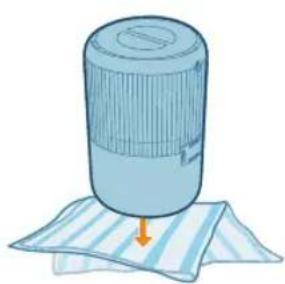
natural_image
Illustration of a cylindrical object with a downward arrow placed on a striped cloth (no text or symbols)
natural_image
Illustration of a hand spraying a spray bottle from a water dispenser (no text or symbols)
natural_image
Digital kitchen control panel with digital display and control buttons (no text or symbols visible)
342 Slovensky
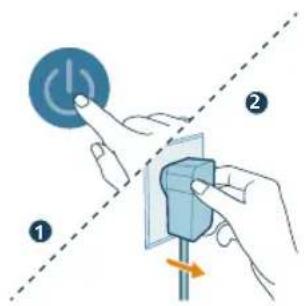
1 Vypnite čistič vzduchu a odpojte ho od elektrickej zásuvky.
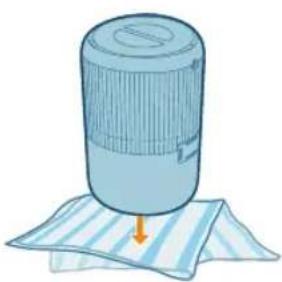
natural_image
Illustration of a cylindrical object with a downward arrow placed on a striped surface (no text or symbols)
natural_image
Illustration of hands holding a blue cylindrical object with an upward arrow, no text or symbols present
natural_image
Hand holding a blue electrical socket with a pull pointer, no text or symbols visible
natural_image
Hand icon showing a blue circular button with a white 'Power' symbol, pointing at it (no text or symbols present)
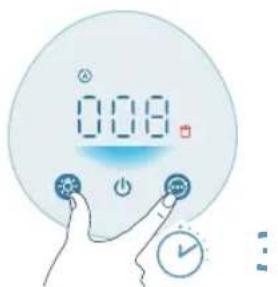
8 Na 3 sekundy stlačte tlačidlá a a resetujte počítadlo životnosti filtra.
- Po úspešnom resetovaní zmizne z obrazovky upozornenie na výmenu filtra.
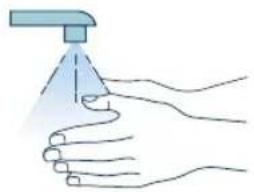
natural_image
Illustration of a hand spraying a spray gun with a triangular tip (no text or symbols)
natural_image
Hand holding a blue electrical socket with a pull arrow, no text or symbols visible
Kontrolna dugmad:
| Dugme za uključivanje/isključivanje Dugme za oključivanje/isključivanje svetla |
| Dugme za promenu režima |
| Pritisnite i držite dugmad 3 sekunde: |
| Dečija brava Resetovanje filtera + |
| Panel ekrana: |
| Automatski režim Srednji režim |
| Režim za spavanje Turbo režim |
| Indikator dečije brave Upozorenje za čišćenje filtera |
| Upozorenje za zamenu filtera |
Kako početi
Instaliranje filtera
Uklonite svu ambalažu sa filtera pre upotrebe.
natural_image
Illustration of a cylindrical object with a downward arrow placed on a striped cloth (no text or symbols)
1 Okrenite aparat naopako i postavite ga na mekanu tkaninu.
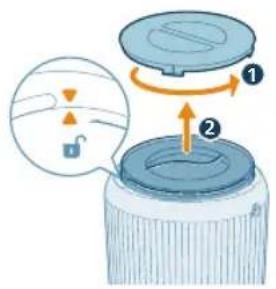
2 Okrenite postolje suprotno od smera kazaljke na satu da biste ga skinuli sa aparata. Izvucite filter iz aparata.
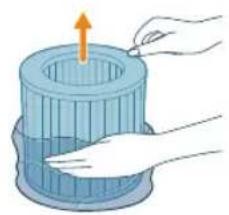
natural_image
Illustration of a hand placing a blue cylindrical object into a container with an upward arrow (no text or symbols)
3 Uklonite svu ambalažu filtera za prečišćavanje vazduha.
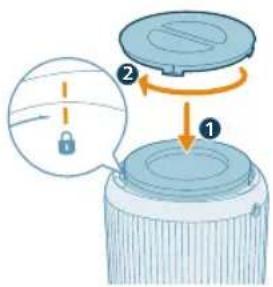
4 Vratite filter u aparat. Vratite postolje na mesto i okrenite ga u smeru kazaljke na satu da biste ga fiksirali.
natural_image
Diagram of a portable air purifier with attached power outlet and plug, showing internal components (no text or labels)
natural_image
Hand holding a blue electrical socket with a pull pointer, no text or symbols visible
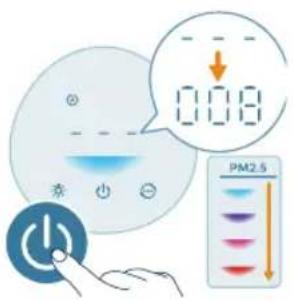
2 Pritisnite dugme za napajanje da biste uključili prečišćivač vazduha.
- Prečišćivač vazduha se oglašava zvučnim signalom.
- --- se prikazuje na ekranu tokom zagrevanja. Zatim prečišćivač vazduha prikazuje nivo PM2.5 nakon merenja kvaliteta vazduha.
- Prečišćivač vazduha radi u automatskom režimu dok se na ekranu prikazuje PM2.5.
3 Ponovo pritisnite dugme za napajanje da biste isključili prečišćivač vazduha.
natural_image
Illustration of a digital timer with '10:08' and a circular button, accompanied by a stylized swirl and hand icon (no text or symbols)
Srednji režim (9): U srednjem režimu prečišćivač vazduha radi srednjom brzinom.
354 Srpski
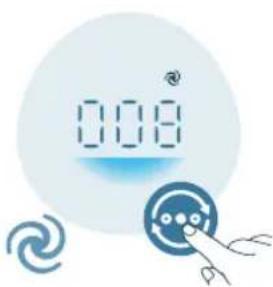
natural_image
Digital display showing '0.08' with a speedometer icon and a stylized eye symbol (no text or numbers present)
Turbo režim (4): Prečišćivač vazduha radi na najvećoj brzini.
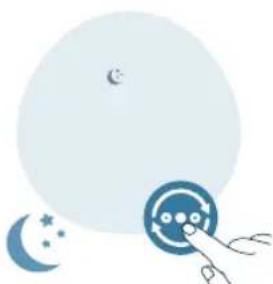
natural_image
Illustration of a crescent moon, a crescent moon with stars, and a stylized eye icon with hands (no text or symbols)
Režim za spavanje (Q: Prečišćivač vazduha radi tiho na maloj brzini. Ekran se isključuje nakon 3 sekunde.
Korišćenje funkcije uključivanja/isključivanja svetla
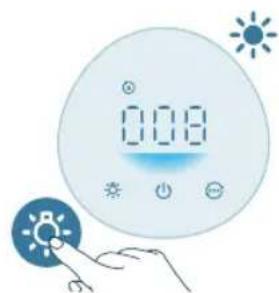
natural_image
Illustration of a digital climate controller with sun and power buttons, no text or symbols present
Možete da pritisnete dugme za uključivanje/isključivanje svetla da biste uključili, prigušili ili isključili sva svetla i kontrolnu tablu.
- Kontrolna tabla je uključena.
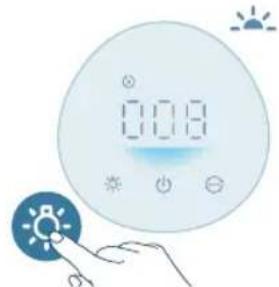
natural_image
Illustration of a digital climate control panel with sun icons and a hand pointing to it (no text or symbols on the panel itself)
- Kontrolna tabla je prigušena.
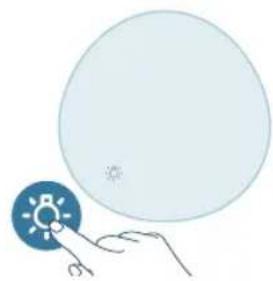
natural_image
Illustration of a hand holding a circular object with a sun icon, no text or symbols present
- Kontrolna tabla je isključena.
natural_image
Illustration of a hand inserting a card into a card with an arrow indicating rotation (no text or symbols)
2 Otvorite poklopac senzora za čestice.
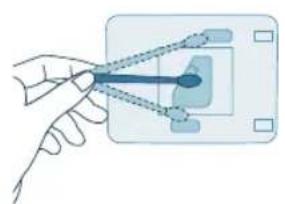
natural_image
Illustration of a hand holding a small object with a blue arrowhead, connected to a rectangular panel (no text or symbols)
natural_image
Illustration of a hand inserting a card into a device (no text or symbols visible)
5 Zatvorite senzor za čestice.
Čišćenje površine filtera
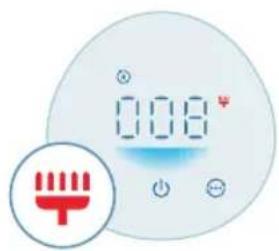
natural_image
Digital kitchen control panel with digital display and red trigger icon (no text or symbols)
Kada se upozorenje za čišćenje površine filtera 🚪 prikaže na ekranu, očistite površinu filtera usisivačem.
Napomena: Preporučujemo da osobe koje su alergične na prašinu, polen, kućne ljubimce ili bud ne menjaju filtere samostalno ili da primene mere zaštite, poput nošenja maske i rukavica.
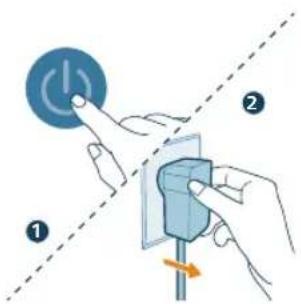
natural_image
Illustration of a cylindrical object with a downward arrow placed on a striped cloth (no text or symbols)
2 Okrenite aparat naopako i postavite ga na mekanu tkaninu.
Srpski

3 Okrenite postolje suprotno od smera kazaljke na satu da biste ga skinuli sa aparata. Izvucite filter iz aparata.
4 Očistite površinu filtera usisivačem.
5 Vratite filter u aparat. Vratite postolje na mesto i okrenite ga u smeru kazaljke na satu da biste ga fiksirali.
natural_image
Illustration of a hand spraying a spray bottle onto a surface (no text or symbols)
8 Pritisnite dugmad 🚫 📞ržite 3 sekunde da biste resetovali vreme za čišćenje filtera.
- Nakon uspešnog resetovanja, upozorenje za čišćenje filtera nestaje sa ekrana.
natural_image
Illustration of a cylindrical object with a downward arrow placed on a striped surface (no text or symbols)
2 Okrenite aparat naopako i postavite ga na mekanu tkaninu.

3 Okrenite postolje suprotno od smera kazaljke na satu da biste ga skinuli sa aparata. Izvucite filter iz aparata. Bacite iskorišćeni filter.
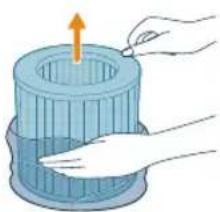
natural_image
Illustration of hands holding a blue cylindrical object with an upward arrow, no text or symbols present
4 Uklonite svu ambalažu novih filtera.

5 Stavite novi filter u aparat. Vratite postolje na mesto i okrenite ga u smeru kazaljke na satu da biste ga fiksirali.
natural_image
Hand holding a blue electrical socket with a pull pointer, no text or symbols visible
7 Pritisnite dugme da biste uključili aparat.
natural_image
Hand icon showing a hand pressing a blue circular button with a power symbol (no text or labels)
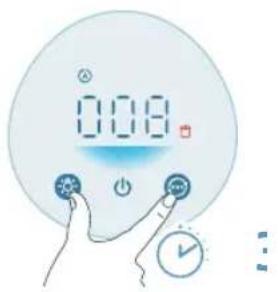
8 Dodirnite dugmad iržite 3 sekunde da biste resetovali brojač za radni vek filtera.
- Nakon uspešnog resetovanja, upozorenje za zamenu filtera nestaje sa ekrana.
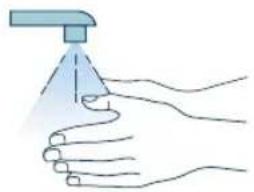
natural_image
Illustration of a hand spraying a spray bottle onto a surface (no text or symbols)
9 Temeljno operite ruke nakon zamene filtera.
1 Pritisnite dugme da biste isključili aparat. Isključite aparat iz zidne utičnice.
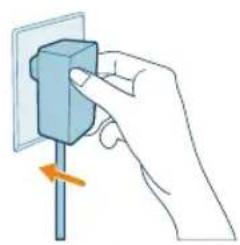
natural_image
Hand holding a small blue electrical socket with a pull arrow, no text or symbols visible
Контролни бутони:
natural_image
Illustration of a cylindrical object with a downward arrow placed on a striped cloth (no text or symbols)
natural_image
Illustration of a hand holding a blue cylindrical container with an upward arrow, no text or symbols present
natural_image
Diagram of a water heater with labeled components and wiring (no text or symbols present)
natural_image
Hand holding a blue electrical plug with a pull arrow, no text or symbols visible
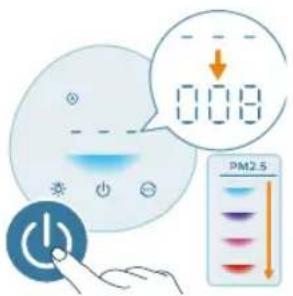
natural_image
Illustration of a digital timer with a bird flying above it, next to a stylized eye icon and a hand pointing at it (no text or symbols)
natural_image
Digital display with '0.08' and a circular icon, accompanied by a hand interacting with a button (no text or symbols)
natural_image
Illustration of a crescent moon, star, and circular button with a hand pointing at it (no text or symbols)
natural_image
Illustration of a digital climate control panel with sun and power buttons, no text or symbols present
natural_image
Illustration of a digital climate control device with sun and moon symbols, no text or labels present.
natural_image
Illustration of a hand holding a circular object with a sun icon, next to a blue circular shape (no text or symbols)
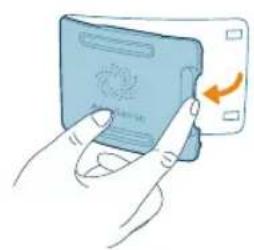
natural_image
Illustration of a hand inserting a card into a mobile device (no text or symbols visible)
natural_image
Hand holding a small object with connected lines, pointing at a rectangular panel (no text or symbols visible)
natural_image
Illustration of a hand inserting a card into a device (no text or symbols visible)
natural_image
Illustration of a cylindrical object with a downward arrow placed on a striped cloth (no text or symbols)
natural_image
Illustration of a hand using a tool to lift a cylindrical component (no text or symbols visible)
natural_image
Hand holding a blue electrical socket with a pull arrow, no text or symbols visible
natural_image
Hand pressing a button with a blue circular icon (no text or symbols)
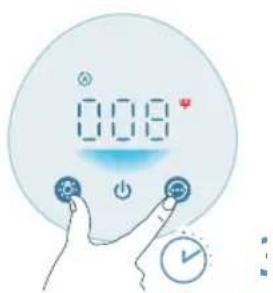
natural_image
Illustration of a hand spraying a spray gun with a funnel (no text or symbols)
natural_image
Illustration of a cylindrical object with a downward arrow placed on a striped cloth (no text or symbols)
natural_image
Illustration of a hand pressing down on a blue cylindrical object with an upward arrow (no text or symbols)
natural_image
Hand holding a blue electrical plug with a pull rod, showing a force or adjustment (no text or symbols)
natural_image
Hand icon showing a blue circular button with a white 'Power' symbol, no text or symbols present
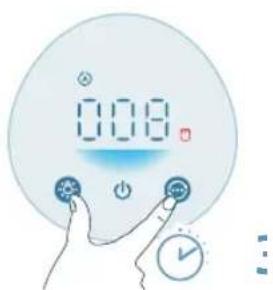
natural_image
Illustration of a hand spraying a spray gun with a funnel (no text or symbols)
natural_image
Hand holding a blue electrical plug with a pull arrow, no text or symbols visible
natural_image
Illustration of a cylindrical object with a downward arrow placed on a striped cloth (no text or symbols)
natural_image
Illustration of a hand placing a blue cylindrical object into a container with an upward arrow (no text or symbols)
natural_image
Diagram of a water heater with labeled components and wiring (no text or symbols present)
natural_image
Hand holding a blue electrical socket with a pull arrow, no text or symbols visible
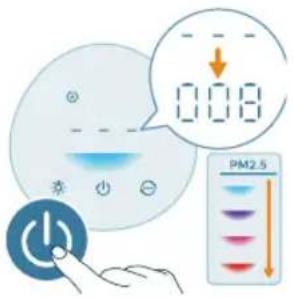
natural_image
Digital display with '0.08' and a circular icon, accompanied by a hand interacting with a button (no text or symbols)
natural_image
Illustration of a crescent moon, star, and circular button with a hand pointing at it (no text or symbols)
natural_image
Illustration of a digital climate meter with sun icons and a hand pointing to it (no text or symbols on the meter itself)
natural_image
Illustration of a digital climate control device with sun, power, and flame icons (no text or symbols)
natural_image
Illustration of a hand holding a small blue circular object with a sun icon, next to a large light blue circle (no text or symbols)
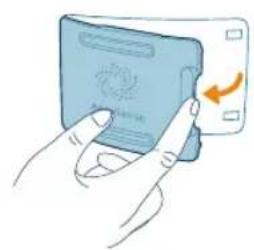
natural_image
Illustration of a hand inserting a card into a mobile device (no text or symbols visible)
natural_image
Hand holding a small blue object with connecting lines, connected to a rectangular panel (no text or symbols visible)
natural_image
Illustration of a hand inserting a card into a device (no text or symbols visible)
natural_image
Illustration of a cylindrical object with a downward arrow placed on a striped cloth (no text or symbols)
natural_image
Illustration of a hand using a tool to lift a cylindrical object (no text or symbols)
natural_image
Hand holding a blue electrical plug with a pull arrow, no text or symbols visible
natural_image
Hand icon showing a hand pressing a button with a blue circular symbol (no text or symbols present)
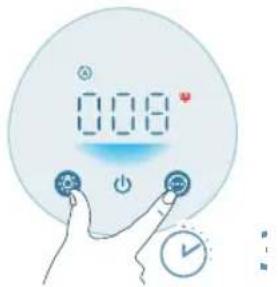
natural_image
Illustration of a hand holding a spray gun with a blue spray can (no text or symbols)
natural_image
Digital kitchen counter with digital display showing 0.08, no visible text or symbols on the counter itself
natural_image
Illustration of a cylindrical object with a downward arrow placed on a striped surface (no text or symbols)
natural_image
Illustration of a hand placing a blue cylindrical object into a container with an upward arrow (no text or symbols)
natural_image
Hand holding a blue electrical plug with a pull rod, showing a change in the arrow (no text or symbols present)
natural_image
Hand icon showing a blue circular button with a white 'Power' symbol, pointing to it (no text or symbols present)
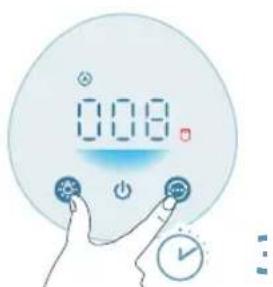
natural_image
Illustration of a hand spraying a spray gun with a triangular spray nozzle (no text or symbols)
natural_image
Hand holding a blue electrical socket with a pull pointer, showing a rotation arrow (no text or symbols)
Кнопки керування:
natural_image
Illustration of a cylindrical object with a downward arrow placed on a striped cloth (no text or symbols)
natural_image
Illustration of a hand placing a blue cylindrical object into a container with an upward arrow (no text or symbols)
natural_image
Diagram of a water heater with labeled components and wiring (no text or symbols present)
natural_image
Digital display with '0.08' and a circular icon, accompanied by a hand interacting with a button (no text or symbols)
natural_image
Illustration of a crescent moon, star, and circular object with a hand pointing at it (no text or symbols)
natural_image
Illustration of a digital climate meter with sun, power, and solar icons (no text or symbols)
natural_image
Illustration of a digital climate control device with sun and moon symbols, no text or labels present.
natural_image
Illustration of a hand holding a circular object with a sun icon, no text or symbols present
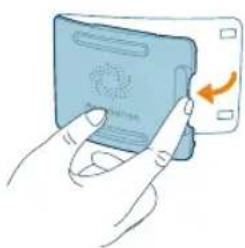
natural_image
Illustration of a hand inserting a card into a device (no text or symbols visible)
natural_image
Illustration of a hand holding a small object with a blue arrow pointing to it, connected by dashed lines to a rectangular panel (no text or symbols)
natural_image
Illustration of a hand inserting a card into a device (no text or symbols visible)
natural_image
Digital kitchen control panel with digital display and red trigger icon (no text or symbols)
natural_image
Illustration of a cylindrical object pressing down on a striped cloth with an arrow indicating downward motion (no text or symbols)
natural_image
Illustration of a hand using a spray gun to clean water (no text or symbols)
natural_image
Digital temperature controller with a red cylindrical icon below (no text or symbols on the device face)
natural_image
Illustration of a cylindrical object with a downward arrow placed on a striped surface (no text or symbols)
natural_image
Illustration of hands holding a blue cylindrical object with an upward arrow, no text or symbols present
natural_image
Hand holding a blue electrical socket with a pull pointer, no text or symbols visible
natural_image
Hand holding a blue circular button with a power symbol (no text or numbers present)
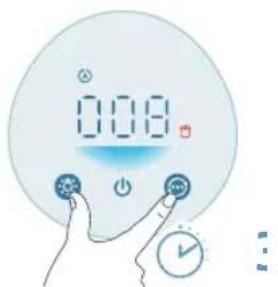
natural_image
Illustration of a hand spraying a spray gun with a funnel (no text or symbols)
natural_image
Hand holding a blue electrical socket with a pull arrow, no text or symbols visible
natural_image
Illustration of a cylindrical object with a downward arrow placed on a striped cloth (no text or symbols)
- قماش ناعمة
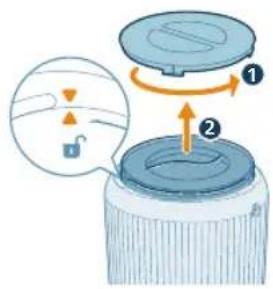
لف SPR من الجهاز.
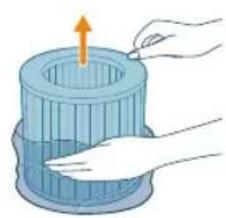
natural_image
Illustration of a hand inserting a plug into a blue cylindrical container with an upward arrow (no text or symbols)
لتر تنقية الهواء.3.
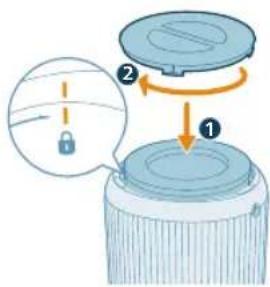
لتشبيتها بالجهاز.4.
توصيل الطاقة
natural_image
Diagram of a portable air conditioner unit with attached power outlet and internal circuit (no text or symbols)
natural_image
Hand holding a blue electrical socket with a pull pointer, showing a rotation arrow (no text or symbols)
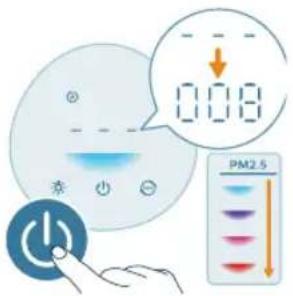
هاز تنقية الهواء.
natural_image
Digital display showing '0.08' with a small icon and a circular button, no readable text or symbols present.
natural_image
Illustration of a crescent moon, star, and circular face with a finger pointing at it (no text or symbols)
natural_image
Illustration of a digital climate controller with sun icons and a hand pointing to it (no text or symbols on the device itself)
natural_image
Illustration of a digital climate controller with sun and moon symbols, no text or labels present
natural_image
Illustration of a hand holding a sun icon next to a large circle (no text or symbols)
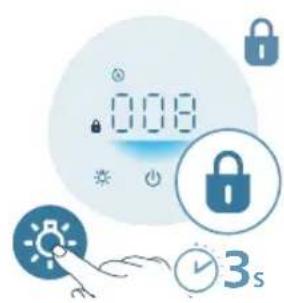
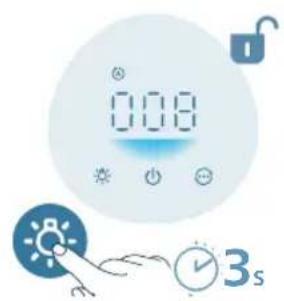
العربية 427
من مأخذ الطاقة.
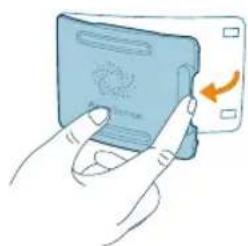
natural_image
Illustration of hands inserting a card into a card with an arrow indicating rotation (no text or symbols)
عر جودة الهواء.2.
429 العربية
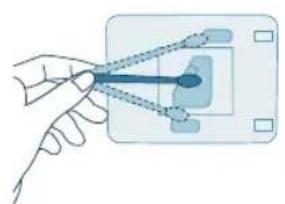
natural_image
Hand holding a plug inserted into a socket socket (no text or symbols visible)
منquentرطب.
منquent جاف.
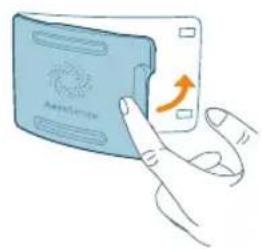
natural_image
Illustration of a hand inserting a card into a device (no text or symbols visible)
عر جودة الهواء.5
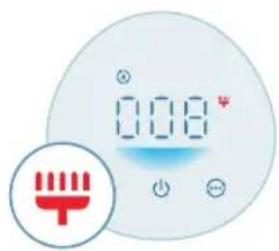
natural_image
Digital thermometer display with red trigger icon and '0.08' value, no readable text or symbols beyond the display.
تنظيف سطح الفلتر
عن مأخذ الطاقة.
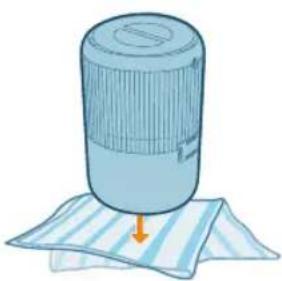
natural_image
Illustration of a cylindrical object with a downward arrow placed on a striped cloth (no text or symbols)
- قماشن ناعمة
430
العربية

الفاتر من الجهاز.
مكنسة كهربائية. 4.
natural_image
Illustration of a hand holding a spray gun with a blue spray can (no text or symbols)
©
ت تنظيف الفلتر.8.
natural_image
Digital kitchen counter with digital display showing 0.08, no visible text or symbols on the counter itself
432
العربية
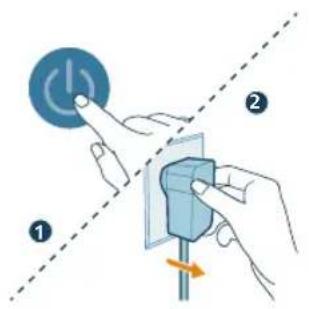
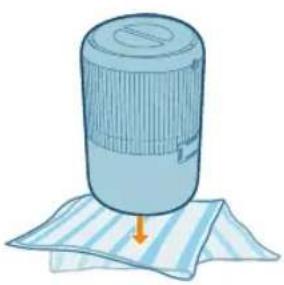
natural_image
Illustration of a cylindrical object with a downward arrow placed on a striped sheet (no text or symbols)
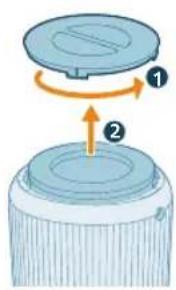
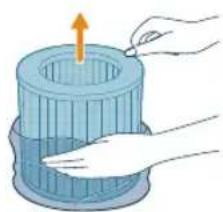
natural_image
Illustration of hands cleaning a cylindrical container with an upward arrow (no text or symbols)
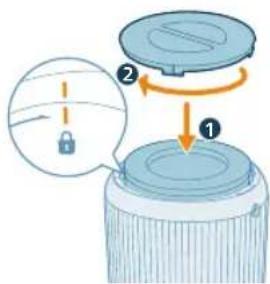
من مأخذ الطاقة.
- قماشن ناعمة
natural_image
Hand holding a blue electrical socket with a pull arrow, no text or symbols visible
(
letشفيل الجهاز.
natural_image
Hand icon showing a blue circular button with a white 'Power' symbol, no text or numbers present
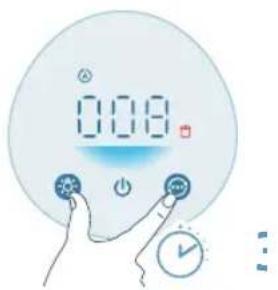
[Non-Text]
، استهلاك الفلتر.
natural_image
Illustration of a hand spraying a spray gun with a funnel (no text or symbols)
(
ال közويد بالطاقة.
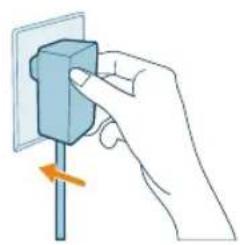
natural_image
Illustration of a hand holding a blue electrical socket with a pull arrow, no text or symbols present
ي مأخذ الطاقة.
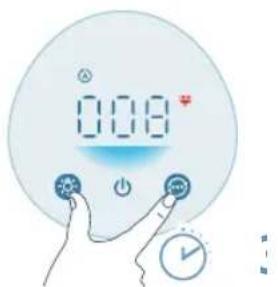

Guidance Teogünen exceeded
التخزين
من مأخذ الطاقة.
2.("ليف والصيانة")
باء قبل تخزینها.3.
- لدخول الهواء
کان بارد وجاد.5.
الإمنساك بالفلتر.6
PHILIPS and the Philips Shield Emblem are registered trademarks of Koninklijke Philips N.V. and are used under license.
This product has been manufactured by and is sold under the responsibility of Versuni Holding B.V., and Versuni Holding B.V. is the warrantor in relation to this product.
2024 © Versuni Holding B.V.


