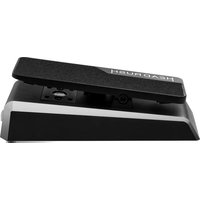
Expression Pedal - Guitar effects pedal HeadRush - Free user manual and instructions
Find the device manual for free Expression Pedal HeadRush in PDF.


User questions about Expression Pedal HeadRush
0 question about this device. Answer the ones you know or ask your own.
Ask a new question about this device
Download the instructions for your Guitar effects pedal in PDF format for free! Find your manual Expression Pedal - HeadRush and take your electronic device back in hand. On this page are published all the documents necessary for the use of your device. Expression Pedal by HeadRush.
USER MANUAL Expression Pedal HeadRush
HEAD RUSH ^ Expression Model
Expression Pedal
User Guide
English (3–6)
Guía del usuario
Español (7–10)
Guide d'utilisation
Français (11–14)
Guida per l'uso
Italiano (15–18)
Benutzerhandbuch
Deutsch (19–22)
Appendix
English (23)
HEAD RUSH
User Guide (English)
Box Contents
HeadRush Expression Pedal
6 mm Hex Key
User Guide
Safety & Warranty Manual
Support
For the latest information about this product (documentation, technical specifications, system requirements, compatibility information, etc.) and product registration, visit headrushfx.com.
For additional product support, visit headrushfx.com/support.
Features
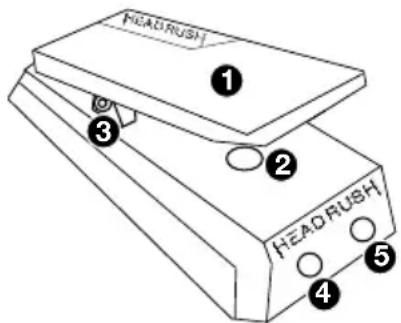
- Foot Pedal: Place your foot on the foot pedal and move the pedal from the toe-down to toe-up position (and vice-versa) to adjust the parameter(s) on your connected device.
- Toe Switch: Push down on the toe portion of the pedal when it is in the toe-down position to activate the toe switch function.
- Tension Adjustment Screw: This screw enables you to adjust the "action" of the pedal to suit your style by using the included 6 mm hex key. If you would like a tighter or heavier movement of the pedal, turn the screw clockwise. If you would like a smoother or softer pedal movement, turn the screw counter-clockwise.
text_image
HEADRUSH ① ② ③ ④ ⑤ HEADRUSHImportant: For fine adjustment only. Do not turn the bolt more than a 1/2 revolution in either direction.
-
Expression Pedal Output: (1/4"/6.35 mm, TRS): Connect this output to the expression pedal input of your device using a standard 1/4" (6.35 mm) TRS cable. See the diagram below for an example of a TRS connector.
-
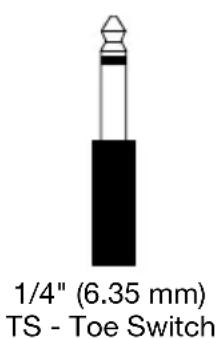
Toe Switch Output: (1/4"/6.35 mm, TS): Connect this output to the toe switch input of your device using a standard 1/4" (6.35 mm) TS cable. See the diagram below for an example of a TS connector.
text_image
1/4" (6.35 mm) TS - Toe Switch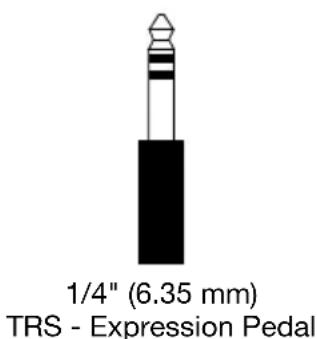
text_image
1/4" (6.35 mm) TRS - Expression PedalOperation
Setup with the HeadRush Pedalboard
When connected to a HeadRush Pedalboard, you can use the HeadRush Expression Pedal to control the parameter(s) assigned to Bank B of a rig. For more information on assigning parameters from your rig to the HeadRush Expression Pedal, please consult the HeadRush Pedalboard User Guide available at headrushfx.com.
To set up the HeadRush Expression Pedal with the HeadRush Pedalboard:
- Connect the Expression output of the HeadRush Expression Pedal to the HeadRush Pedalboard's EXPR 2 input using a standard 1/4" (6.35 mm) TRS cable.
- On the HeadRush Pedalboard, tap the ... icon on the top right of the screen and then tap Global Settings to enter the Global Settings menu.
- In the Global Settings menu go to page 3 by selecting/tapping the 3 on the bottom of the Global Settings menu.
- On Global Settings page 3, turn Pedal Configuration's External Pedal from Off to On.
The HeadRush Expression Pedal will now control the parameter(s) assigned to Bank B of a rig.

text_image
PEDAL CONFIGURATION EXTERNAL PEDAL OFF ON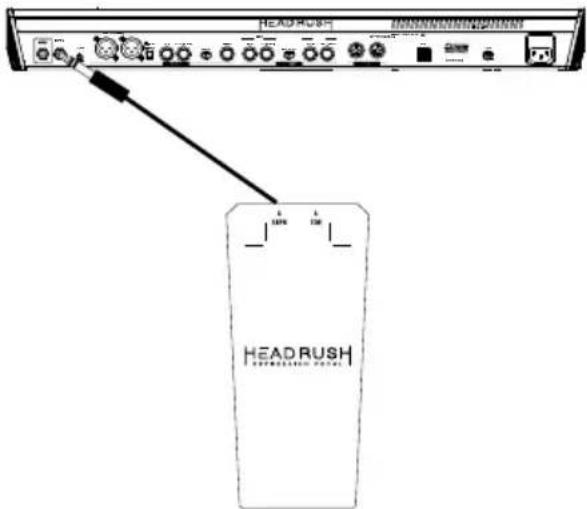
text_image
HEADRUSH HEADRUSH HEADRUSH HEADRUSH HEADRUSH HEADRUSH HEADRUSH HEADRUSH HEADRUSH HEADRUSH HEADRUSH HEADRUSH HEADRUSH HEADRUSH HEADRUSH HEADRUSH HEADRUSH HEADRUSH HEADRUSH HEADRUSH HEADRUSH HEADRUSH HEADRUSH HEADRUSH HEADRUSH HEADRUSHNote: The HeadRush Expression Pedal's built-in toe-switch feature is not supported by the HeadRush Pedalboard. If you are using the Classic mode for the expression pedal of a rig, the HeadRush Pedalboard's internal pedal toe switch will activate or deactivate parameter(s) assigned to Bank A only. If you are using the Advanced mode for the expression pedal of the rig, the HeadRush Pedalboard's internal pedal toe switch will be disabled entirely.
Setup with the HeadRush Gigboard
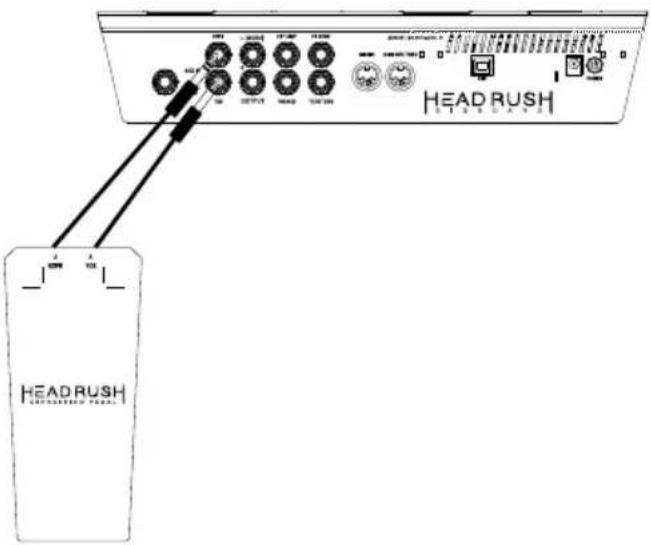
When connected to a HeadRush Gigboard, you can use the HeadRush Expression Pedal to control the parameter(s) assigned to Bank A and/or Bank B of a rig. You can switch between controlling Bank A and Bank B on the Gigboard by using the toe switch feature on the HeadRush Expression Pedal. For more information on assigning parameters from your rig to the HeadRush Expression Pedal, please consult the HeadRush Gigboard User Guide available at headrushfx.com.
To set up the HeadRush Expression Pedal with the HeadRush Gigboard:
- Connect the Expression output of the HeadRush Expression Pedal to the EXPR input using a standard 1/4" (6.35 mm) TRS cable.
- Connect the Toe output of the HeadRush Expression Pedal to the Toe input using a standard 1/4" (6.35 mm) TS cable.
- On the HeadRush Pedalboard, tap the ... icon on the top right of the screen and then tap Global Settings to enter the Global Settings menu.
- On the Global Settings page under the External Pedal/Ext Amp parameters, set the Toe Switch parameter to be MOMNT, and Pedal Polarity parameter to be NORM.
The HeadRush Expression Pedal will now be able to control the parameter(s) assigned to Bank A and/or Bank B of a rig.
Setup with the HeadRush Looperboard
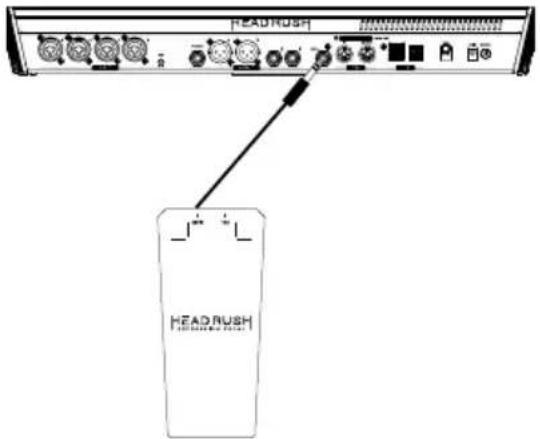
When connected to a HeadRush Looperboard, you can use the HeadRush Expression Pedal to control up to 4 parameters at a time, including FX Rack Parameters, Track Volume, and Track Panning. For more information on assigning parameters from your rig to the HeadRush Expression Pedal, please consult the HeadRush Looperboard User Guide available at headrushfx.com.
To set up the HeadRush Expression Pedal with the HeadRush Looperboard:
Connect the Expression output of the HeadRush Expression Pedal to the EXPR input using a standard 1/4" (6.35 mm) TRS cable. The HeadRush Expression Pedal will now control any assigned parameters for a loop.
Note: The HeadRush Expression Pedal's built-in toe-switch feature is not supported by the HeadRush Looperboard.
text_image
HEADRUSH HEADRUSHSetup with other devices
Other devices such as guitar effects processors, vocal effects processors, keyboards, etc. may also be compatible with the HeadRush Expression Pedal. If you are unsure if your device is compatible with the HeadRush Expression Pedal, please consult the device's manual or manufacturer to confirm that the specifications listed in the end of this manual match the device's requirements.
To set up the HeadRush Expression Pedal with other devices:
- If your device has an input for an expression pedal, connect the Expression output of the HeadRush Expression Pedal to this input using a standard 1/4" (6.35 mm) TRS cable.
- If your device has an input for a toe switch, connect the Toe output of the HeadRush Expression Pedal to this input using a standard 1/4" (6.35 mm) TS cable.
- If necessary, change any settings on your device to enable the functionality of the expression pedal and toe switch.
Assistance technique
text_image
PEDAL CONFIGURATION EXTERNAL PEDAL OFF ONtext_image
PEDAL CONFIGURATION EXTERNAL PEDAL OFF ON6 mm-Inbusschlüssels
Benutzerhandbuch
text_image
PEDAL CONFIGURATION EXTERNAL PEDAL OFF ONTechnical Specifications
| Potentiometer | 10 kΩ linear - wiper connected to TRS jack “Tip”“Tip to Sleeve” resistance at max with pedal in Toe position |
| Expression Output | 1/4" / 6.35 mm TRS output |
| Toe Switch | Momentary style toe switch |
| Toe Switch Output | 1/4" / 6.35 mm TS output |
| Dimensions(width x depth x height) | 10.3" x 4.9" x 2.6" / 262 x 125 x 67 mm |
| Weight | 3.3 lbs / 1.5 kg |
Specifications are subject to change without notice.
Trademarks & Licenses
HeadRush is a trademark of inMusic Brands, Inc., registered in the U.S. and other countries. All other product names, company names, trademarks, or trade names are those of their respective owners.