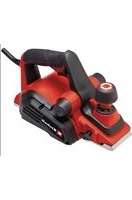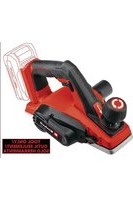
Expert TE-PL 18/82 Li - Plane EINHELL - Free user manual and instructions
Find the device manual for free Expert TE-PL 18/82 Li EINHELL in PDF.


User questions about Expert TE-PL 18/82 Li EINHELL
0 question about this device. Answer the ones you know or ask your own.
Ask a new question about this device
Download the instructions for your Plane in PDF format for free! Find your manual Expert TE-PL 18/82 Li - EINHELL and take your electronic device back in hand. On this page are published all the documents necessary for the use of your device. Expert TE-PL 18/82 Li by EINHELL.
USER MANUAL Expert TE-PL 18/82 Li EINHELL
EN Original operating instructions Cordless Planer
natural_image
Exterior view of a Einhardt industrial tool (no text or symbols visible)7

natural_image
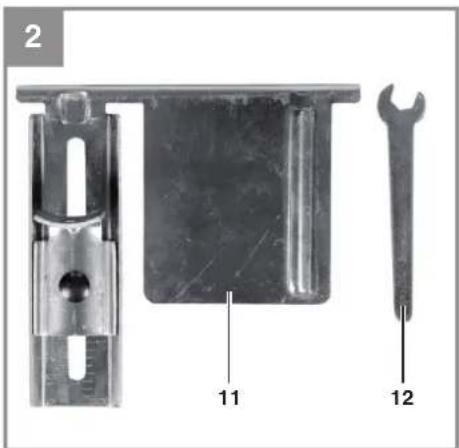
Three mechanical components: a T-shaped bracket, a metal plate with holes, and a wrench-like tool (no text or symbols visible)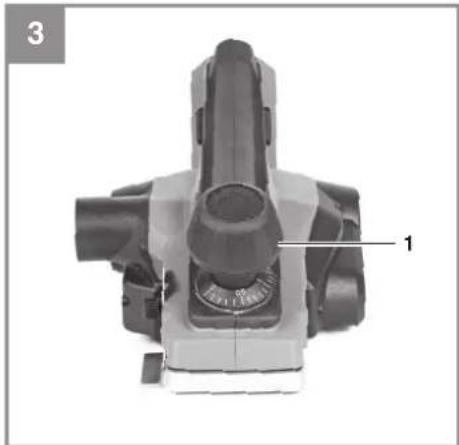
natural_image
Top-down view of a mechanical device with labeled component '1' (no text or symbols beyond label)-2-
flowchart
graph TD
    A["1"] --> B["2"]
    B --> C["3"]
    C --> D["4"]
    D --> E["8"]
    E --> F["5"]
    style A fill:#f9f,stroke:#333
    style B fill:#f9f,stroke:#333
    style C fill:#f9f,stroke:#333
    style D fill:#f9f,stroke:#333
    style E fill:#ccf,stroke:#333
    style F fill:#ccf,stroke:#333

EN
Table of contents
- Safety information
- Layout and items supplied
- Intended use
- Technical data
- Before starting the equipment
- Operation
- Cleaning, maintenance and ordering spare parts
- Disposal and recycling
- Storage
Danger! - Read the operating instructions to reduce the risk of injury

Caution! Wear ear-muffs. The impact of noise can cause damage to hearing.

Caution! Wear a breathing mask. Dust which is injurious to health can be generated when working on wood and other materials. Never use the tool to work on any materials containing asbestos!

Caution! Wear safety goggles. Sparks generated during work or splinters, chips and dust emitted by the equipment can cause loss of sight.

Store the batteries only in dry rooms with an ambient temperature of 50^ F to 104^ F ( +10^ C to +40^ C). Place only fully charged batteries in storage (charged at least 40%).
EN
DANGER!
When using the equipment, a number of safety precautions must be observed to avoid injuries and damage. Please read the complete operating instructions and safety information with due care. Keep these operating instructions in a safe place so that the information is available at all times. If you give the equipment to any other person, hand over these operating instructions and the safety information as well. We cannot accept any liability for damage or accidents which arise due to failure to follow these instructions and the safety information.
1. Safety information
DANGER!
Read all the safety information and instructions. Failure to adhere to the safety information and instructions set out below may result in electric shock, fire and/or serious injury. Keep all the safety information and instructions in a safe place for future use.
General safety information for power tools The term „power tool“ used in the safety regulations refers to power tools operated from the mains power supply (with a power cable) and to battery operated power tools (without a power cable).
1) Work area safety
a) Keep work area clean and well lit. Cluttered and dark areas invite accidents.
b) Do not operate power tools in explosive atmospheres, such as in the presence of fl ammable liquids, gases or dust. Power tools create sparks which may ignite the dust or fumes.
c) Keep children and bystanders away while operating a power tool. Distractions can cause you to lose control.
2) Electrical safety
a) Power tool plugs must match the outlet. Never modify the plug in any way. Do not use any adapter plugs with earthed (grounded) power tools. Unmodified plugs and matching outlets will reduce risk of electric shock.
b) Avoid body contact with earthed or grounded surfaces such as pipes, radiators, ranges and refrigerators. There is an increased risk of electric shock if your body is
earthed or grounded.
c) Do not expose power tools to rain or wet conditions. Water entering a power tool will increase the risk of electric shock.
d) Do not abuse the cord. Never use the cord for carrying, pulling or unplugging the power tool. Keep cord away from heat, oil, sharp edges or moving parts. Damaged or entangled cords increase the risk of electric shock.
e) When operating a power tool outdoors, use an extension cord suitable for outdoor use. Use of a cord suitable for outdoor use reduces the risk of electric shock.
f) If operating a power tools in a damp location is unavoidable, use a residual current device (RCD) protected supply. Use of an RCD reduces the risk of electric shock.
3) Personal safety
a) Stay alert, watch what you are doing and use common sense when operating a power tool. Do not use a power tool while you are tired or under the influence of drugs, alcohol or medication. A moment of inattention while operating power tools may result in serious personal injury.
b) Use personal protective equipment. Always wear eye protection. Protective equipment such as dust mask, non-skid safety shoes, hard hat, or hearing protection used for appropriate conditions will reduce personal injuries.
c) Prevent unintentional starting. Ensure the switch is in the off -position before connecting to power source and/or BATTERY pack, picking up or carrying the tool. Carrying power tools with your fi nger on the switch or energising power tools that have the switch on invites accidents.
d) Remove any adjusting key or wrench before turning the power tool on. A wrench or a key left attached to a rotating part of the power tool may result in personal injury.
e) Do not overreach. Keep proper footing and balance at all times. This enables better control of the power tool in unexpected situations.
f) Dress properly. Do not wear loose clothing or jewellery. Keep your hair, clothing and gloves away from moving parts. Loose clothes, jewellery or long hair can be caught in moving parts.
g) If devices are provided for the connection of dust extraction and collection facilities,
EN
ensure these are connected and properly used. Use of these devices can reduce dust related hazards.
h) Do not let familiarity gained from frequent use of tools allow you to become complacent and ignore tool safety principles. A careless action can cause severe injury within a fraction of a second.
4) Power tool use and care
a) Do not force the power tool. Use the correct power tool for your application. The correct power tool will do the job better and safer at the rate for which it was designed.
b) Do not use the power tool if the switch does not turn it on and off. Any power tool that cannot be controlled with the switch is dangerous and must be repaired.
c) Disconnect the plug from the power source and/or remove the battery pack, if detachable, from the power tool before making any adjustments, changing accessories, or storing power tools. Such preventive safety measures reduce the risk of starting the power tool accidentally.
d) Store idle power tools out of the reach of children and do not allow persons unfamiliar with the power tool or these instructions to operate the power tool. Power tools are dangerous in the hands of untrained users.
e) Maintain power tools and accessories. Check for misalignment or binding of moving parts, breakage of parts and any other condition that may affect the power tool's operation. If damaged, have the power tool repaired before use. Many accidents are caused by poorly maintained power tools.
f) Keep cutting tools sharp and clean. Properly maintained cutting tools with sharp cutting edges are less likely to bind and are easier to control.
g) Use the power tool, accessories and tool bits etc., in accordance with these instructions and in the manner intended for the particular type of power tool, taking into account the working conditions and the work to be performed. Use of the power tool for operations different from intended could result in a hazardous situation.
h) Keep handles and grasping surfaces dry, clean and free from oil and grease. Slippery handles and grasping surfaces do not allow for safe handling and control of the tool
in unexpected situations.
5) Battery tool use and care
a) Recharge only with the charger specified by the manufacturer. A charger that is suitable for one type of battery pack may create a risk of fi re when used with another battery pack.
b) Use power tools only with specifically designated battery packs. Use of any other battery packs may create a risk of injury and fire.
c) When battery pack is not in use, keep it away from other metal objects, like paper clips, coins, keys, nails, screws or other small metal objects that can make a connection from one terminal to another. Shorting the battery terminals together may cause burns or a fi re.
d) Under abusive conditions, liquid may be ejected from the battery; avoid contact. If contact accidentally occurs, fl ush with water. If liquid contacts eyes, additionally seek medical help. Liquid ejected from the battery may cause irritation or burns.
e) Do not use a BATTERY pack or tool that is damaged or modified. Damaged or modified batteries may exhibit unpredictable behaviour resulting in fi re, EXPLOSION or risk of injury.
f) Do not expose a BATTERY pack or tool to fi re or excessive temperature. Exposure to fi re or temperature above 266°F (130°C) may cause explosion.
g) Follow all charging instructions and do not charge the BATTERY pack or tool outside the temperature range specified in the instructions. Charging improperly or at temperatures outside the specified range may damage the BATTERY and increase the risk of fi re.
6) Service
a) Have your power tool serviced by a qualified repair person using only identical replacement parts. This will ensure that the safety of the power tool is maintained.
b) Never service damaged BATTERY packs. Service of BATTERY packs should only be performed by the manufacturer or authorized service providers.
Additional safety instructions
We pay a great deal of attention to the design of every battery pack to ensure that we supply you
EN
with batteries which feature maximum power density, durability and safety. The battery cells have a wide range of safety devices. Each individual cell is initially formatted and its electrical characteristic curves are recorded. These data are then used exclusively to be able to assemble the best possible battery packs.
Despite all the safety precautions, caution must always be exercised when handling batteries. The following points must be obeyed at all times to ensure safe use.
Safe use can only be guaranteed if undamaged cells are used. Incorrect handling can cause cell damage.
Caution! Analyses confirm that incorrect use and poor care are the main causes of the damage caused by high performance batteries.
Information about the battery
- The battery pack supplied with your cordless tool is not charged. The battery pack has to be charged before you use the tool for the first time.
- For optimum battery performance avoid low discharge cycles. Charge the battery pack frequently.
- Store the battery pack in a cool place, ideally at 59°F (15°C) and charged to at least 40%.
- Lithium-ion batteries are subject to a natural ageing process. The battery pack must be replaced at the latest when its capacity falls to just 80% of its capacity when new. Weakened cells in an aged battery pack are no longer capable of meeting the high power requirements and therefore pose a safety risk.
- Do not throw battery packs into an open fire. There is a risk of explosion!
- Do not ignite the battery pack or expose it to fire.
- Do not exhaustively discharge batteries. Exhaustive discharge will damage the battery cells. The most common cause of deep discharge is lengthy storage or non-use of partly discharged batteries. Stop working as soon as the performance of the battery falls noticeably or the electronic protection system triggers. Place the battery pack in storage only after it has been fully charged.
- Protect batteries and the tool from overloads. Overloads will quickly result in overheating and cell damage inside the battery housing without this overheating actually being apparent externally.
- Avoid damage and shocks. Replace batte-
ries which have been dropped from a height of more than one meter or which have been exposed to violent shocks without delay, even if the housing of the battery pack appears to be undamaged. The battery cells inside the battery may have suff ered serious damage. In this respect, please also read the waste disposal information.
- If the battery pack suffers overloading and overheating, the integrated protective cut-off will switch off the equipment for safety reasons. Caution! Do not press the ON/OFF switch any more if the protective cut-off has actuated. This may damage the battery.
- Use only original battery packs. The use of other batteries may result in injuries, explosion and a fire risk.
- Protect your rechargeable battery against moisture, rain and high humidity. Moisture, rain and high humidity can cause dangerous cell damage. Never charge or work with batteries which have been exposed to moisture, rain or high humidity – replace them immediately.
- If your equipment is fitted with a detachable battery, remove the battery for safety reasons after you have finished your work
Information on chargers and the charging process
- Please check the data marked on the rating plate of the battery charger. Be sure to connect the battery charger to a power supply with the voltage marked on the rating plate. Never connect it to a different mains voltage.
- Protect the battery charger and its cable from damage and sharp edges. Have damaged cables repaired without delay by a qualified electrician.
- Keep the battery charger, batteries and the cordless tool out of children's reach.
- Do not use damaged battery chargers.
- Do not use the supplied battery charger to charge other cordless tools.
- In heavy use the battery pack will become warm. Allow the battery pack to cool to room temperature before commencing with the charging.
- Do not over-charge batteries. Do not exceed the maximum charging times. These charging times apply only to discharged batteries. Frequent insertion of a charged or partly charged battery pack will result in over-charging and cell damage. Do not leave batteries in the charger for days on end.
EN
- Never use or charge batteries if you suspect that the last time they were charged was more than 12 months previously. There is a high probability that the battery pack has already suffered dangerous damage (exhaustive discharge).
- Charging batteries at a temperature below 50^ F ( 10^ C) will cause chemical damage to the cell and may cause a fire.
- Do not use batteries which have heated during the charging process, as the battery cells may have suffered dangerous damage.
- Do not use batteries which have suff ered curvature or deformation during the charging process or which show other non-typical symptoms (gassing, hissing, cracking,...)
- Never fully discharge the battery pack (recommended depth of discharge max. 80%) A complete discharge of the battery pack will lead to premature ageing of the battery cells.
- Never charge the batteries unsupervised.
Protection from environmental influences
- Wear suitable work clothes. Wear safety goggles.
- Protect your cordless tool and the battery charger from moisture and rain. Moisture and rain can cause dangerous cell damage.
- Do not use the cordless tool or the battery charger near vapors and infl ammable liquids.
- Use the battery charger and cordless tools only in dry conditions and an ambient temperature of 50^ F to 104^ F ( 10^ C to 40^ C).
- Do not keep the battery charger in places where the temperature is liable to reach over 104^ F ( 40^ C). In particular, do not leave the battery charger in a car that is parked in the sunshine.
- Protect batteries from overheating. Overloads, over-charging and exposure to direct sunlight will result in overheating and cell damage. Never charge or work with batteries which have been overheated – replace them immediately if possible.
- Storage of batteries, battery chargers and cordless tools. Store the charger and your cordless tool only in dry places with an ambient temperature of 50^ F to 104^ F ( 10^ C to 40^ C). Store the lithium-ion rechargeable battery in a cool and dry place at 50^ F to 68^ F ( 10^ C to 20^ C). Protect them from humidity and direct sunlight! Place only fully charged batteries in storage (charged at least 40%).
- Prevent the lithium-ion battery pack from freezing. Battery packs which were stored below
32^ F ( 0^ C) for more than 60 minutes must be disposed of.
- When handling batteries beware of electrostatic charge: Electrostatic discharges cause damage of the electronic protection system and the battery cells. Avoid electrostatic charging and never touch the battery poles.
Battery Caution + Disposal
Disposal
Should your appliance need replacement after extended use, do not dispose of it with the household refuse, but in an environmentally safe way.
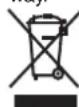
Waste produced by electrical machine items should not be handled like normal household rubbish. Please recycle where recycle facilities exist. Check with your local authority or retailer for recycling advice.
Always dispose of your battery pack according to federal, state, and local regulations. Contact a recycling agency in your area for recycling locations.
⚠️ CAUTION! Even discharged battery packs contain some energy. Before disposing, use electrical tape to cover the terminals to prevent the battery pack from shorting, which could cause a fi re or explosion.
⚠ WARNING! To reduce the risk of injury or explosion, never burn or incinerate a battery pack even if it is damaged, dead, or completely discharged. When burned, toxic fumes and materials are emitted into the surrounding atmosphere.
- Batteries vary according to device. Consult your manual for specific information.
- Install only new batteries of the same type in your product (where applicable).
- Failure to insert batteries in the correct polarity, as indicated in the battery compartment or manual, may shorten the life of the batteries or cause batteries to leak.
- Do not mix old and new batteries.
- Do not mix Alkaline, Standard (Carbon-Zinc), or Rechargeable (Nickel Cadmium, Nickel Metal Hydride, or Lithium-Ion) batteries.
- Do not dispose of batteries in fire.
- Batteries should be recycled or disposed of as per state and local guidelines.
When shipping or disposing of batteries and cordless tools, always ensure that they are packed individually in plastic bags to prevent short circuits and fi res.
EN
Special safety information
Secure the workpiece whenever possible: Use clamps or a vise to hold the workpiece securely. This is far safer than holding it in your hand and also means that you have both hands free to operate the electric tool.
Safety information for planes
- Wait for the cutter to stop before setting the tool down. An exposed rotating cutter may engage the surface leading to possible loss of control and serious injury.
- Hold the power tool by insulated gripping surfaces, because the cutter may contact its own cord. Cutting a "live" wire may make exposed metal parts of the power tool "live" and could give the operator an electric shock.
- Use clamps or another practical way to secure and support the workpiece to a stable platform. Holding the workpiece by your hand or against the body leaves it unstable and may lead to loss of control.
- To avoid damage to the electric plane, make sure there are no foreign objects attached to the workpiece.
- Hold the tool's handle in both hands; place the front base plate of the plane on the workpiece. The base plates must lie flat on the workpiece while planing is in progress.
- Allow the tool to reach its full speed before you begin planing.
- Set the chip depth to 0 mm when you have finished your work.
- The planing knives should be replaced by a new pair of planing knives as soon as they become worn.
- Some types of planing knife have two blades. If one of the blades becomes blunt, the planing knife can be reversed.
- Blunt planing knives cannot be resharpened.
• Always replace both knives. - Only the original knife shaft from the manufacturer is allowed to be used for this electric plane.
• To work well and safely you must use only clean and sharp planing knives.
SAVE THESE INSTRUCTIONS
2. Layout and items supplied
2.1 Layout
- Setting knob for the chip depth
- Chip ejector
- Safety lock-off
- On/Off switch
- Rear base plate
- Belt cover
- Parking soleplate
- Front base plate
- Thumb screw for step depth scale
- Step depth scale
- Parallel stop
- Wrench
- Mounting
- Thumb screw
- Lock bolt
- Wing nut
- V-shaped groove
- Hexagonal screws
- Screws
- Belt pulley, large
- Drive belt
- Belt pulley, small
- Battery capacity indicator
- Battery capacity indicator button
- Pushlock button
2.2 Items supplied
Please check that the article is complete as specified in the scope of delivery. If parts are missing, please contact our service center or the store where you made your purchase at the latest within 5 work days after purchasing the article and upon presentation of a valid bill of purchase.
- Open the packaging and take out the equipment with care.
- Remove the packaging material and any packaging and/or transportation braces (if present).
- Check to see if all the items are supplied.
- Inspect the equipment and accessories for transport damage.
- If possible, keep the packaging until the end of the guarantee period.
Danger!
The equipment and packaging material are not toys. Do not let children play with plastic bags, plastic sheets and small parts. There is a risk of choking and suffocating!
EN
- Cordless Planer
- Step depth scale
- Parallelstop
Wrench - Original operating instruction with safety information
Separately available accessories
18V 1.5Ah P-X-C lithium-ion battery
18V 2.0Ah P-X-C lithium-ion battery
18V 2.5Ah P-X-C lithium-ion battery
18V 3.0Ah P-X-C lithium-ion battery
18V 4.0Ah P-X-C lithium-ion battery
18V 5.2Ah P-X-C Plus lithium-ion battery
18V 4-6 Multi Ah P-X-C Plus lithium-ion battery
18V P-X-C Dual Port Fast Charger
18V P-X-C Fast Charger
Explore battery + charger options at einhellUSA.com
3. Intended use
The cordless planer is designed for planing, rebating and chamfering pieces of wood.
The equipment is allowed to be used only for its prescribed purpose. Any other use is deemed to be a case of misuse. The user/operator and not the manufacturer will be liable for any damage or injuries of any kind resulting from such misuse.
Please note that our equipment has not been designed for use in commercial, trade or industrial applications. Our warranty will be voided if the equipment is used in commercial, trade or industrial businesses or for equivalent purposes.
4. Technical data
Motor power supply: 18 V
No-load speed: 15.000 rpm (min ^-1 )
Planing width: 3 ^1/4 in. (83 mm)
Planing depth: 164 in. to 564 (0.4-2 mm)
Maximum rabbit depth: 5/16 in. (8 mm)
Weight (Tool only): 5.3 lbs (2.4 kg)
Wear ear-muff s.
The impact of noise can cause damage to hearing.
Reduce noise generation and vibration to a minimum!
- Use only equipment that is in perfect condition.
- Maintain and clean the equipment regularly.
• Adapt your way of working to the equipment.
• Do not overload the equipment.
• Have the equipment checked if necessary. - Switch off the equipment when not in use.
- Wear gloves.
CAUTION!
Residual risks
Even if you use this electric power tool in accordance with the instructions, certain residual risks cannot be eliminated. The following hazards may arise in connection with the equipment's construction and layout:
- Lung damage if no suitable protective dust mask is used.
- Damage to hearing if no suitable ear protection is applied.
- Health damage caused by hand-arm vibrations if the equipment is used over a longer period or is not properly guided and maintained.
Limit the operating time.
All stages of the operating cycle must be considered (for example, times in which the electric tools are switched off and times in which the tool is switched on but operates without load).
5. Before starting the equipment
Warning!
Always remove the battery before making adjustments to the tool.
5.1 Adjusting the chip depth (Fig. 3/Item 1)
You can adjust the chip depth in steps of 164 in. to 564 in. (0.4-2 mm) by turning the setting knob for the chip depth (1).
Turn the setting knob for the chip depth (1) clockwise: the chip depth will increase
Turn the setting knob for the chip depth (1) counter-clockwise: the chip depth will decrease
After fi nishing your work, set the chip depth so that the knives are lowered and therefore protected from damage. Turn the setting knob for the
EN
chip depth to position "0" for this purpose.
5.2 Chip extraction (Fig. 1)
For optimum chip extraction you can connect the equipment to a vacuum cleaner (not supplied).
To do so, insert the vacuum cleaner tube into the chip discharge (2).
Important!
The vacuum cleaner you use for the vacuum extraction must be suitable for the material you are cutting.
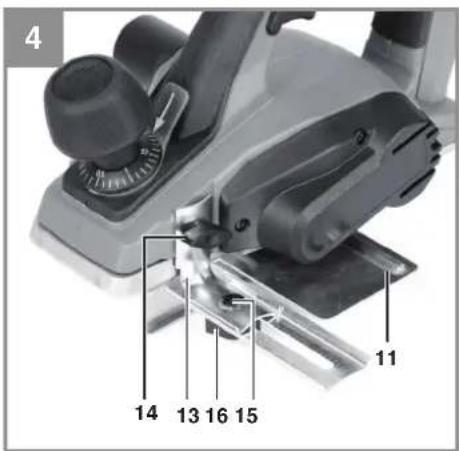
5.3 Parallel stop (Fig. 4)
Use the parallel stop (11) when you want to plane parallel to the edge of the workpiece.
Installing the parallel stop
- Fasten the mount (13) of the parallel stop to the left side of the tool using the supplied thumb screw (14).
- Now connect the mount (13) to the slide of the parallel stop (11).
- The guide rail must always be aligned in downward direction.
- Fix the distance required between the parallel stop and the edge of the workpiece.
- Fasten the parts with the lock bolt (15) and the wing nut (16).
6. Operation
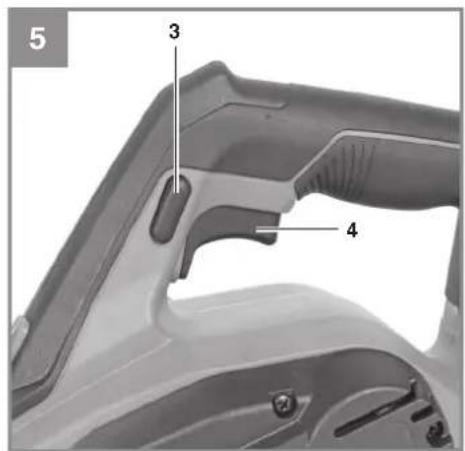
6.1 ON/OFF switch (Fig. 5)
- The plane comes with a safety switch which is designed to prevent accidents.
• To switch on the plane, press the side safety lock-off (3) and press the ON/OFF switch (4). - To switch off the plane, release the ON/OFF switch (4). The ON/OFF switch (4) will return to its starting position.
6.2 Practical tips
Warning! Only ever move the plane against the workpiece while the plane is switched on.
6.2.1 Planing surfaces
Set the desired chip depth. Place the plane by its front base plate onto the piece of wood you want to machine and switch on the plane. Holding the plane with both hands, push it over the surface making sure that the front and the rear base plate both lie fully on the workpiece. For the fi nish-machining of surfaces use a small chip depth and make several passes over the surface.
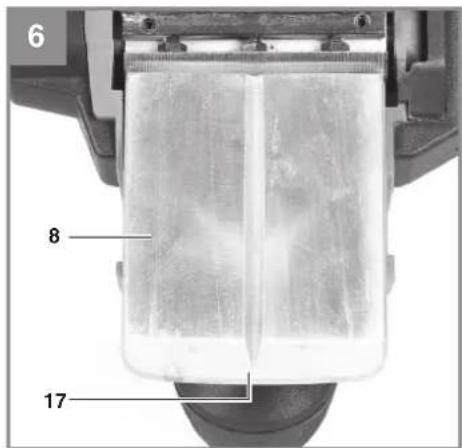
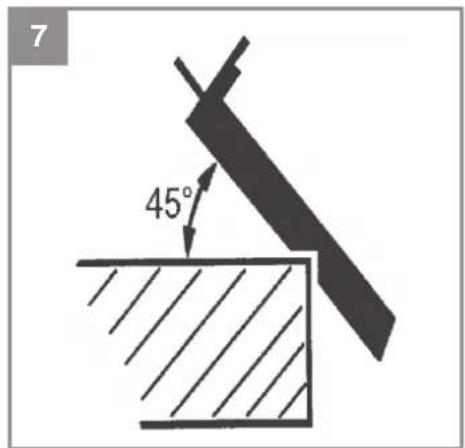
6.2.2 Chamfering edges (Fig. 6-7)
- There is a V-shaped groove (17) in the front base plate that enables you to plane edges at an angle of 45^ for a smooth finish.
- Switch on the tool and wait for it to reach full speed. Place the V-shaped groove (17) of the plane against the edge of the workpiece at an angle of 45°.
- Now move the plane along the edge of the workpiece.
• To achieve high-quality results you should keep the feed speed and angle constant.
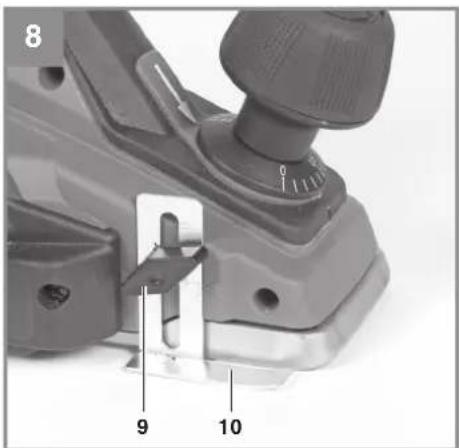
6.2.3 Planing steps (Fig. 4/8)
- The planing of steps is possible with the help of the parallel stop (11).
- Mount the parallel stop (11) on the left side of the tool (see section 5.3).
- To mount the depth stop, use the locking screw (9) to fasten the step depth scale (10) to the front right side of the plane housing (see Fig. 8).
- Release the locking screw (9) and position the step depth scale (10) so that the required step depth is displayed. Retighten the locking screw (9).
Width of step:
You can set the width of the step with the parallel stop (11).
Depth of step:
We recommend you to set a cutting depth of 2 mm and to keep planing the workpiece until the required depth of step is reached.
6.3 Charging the Li battery pack
The corresponding instructions can be found in the original operating instructions for your charger.
6.4 Battery capacity indicator
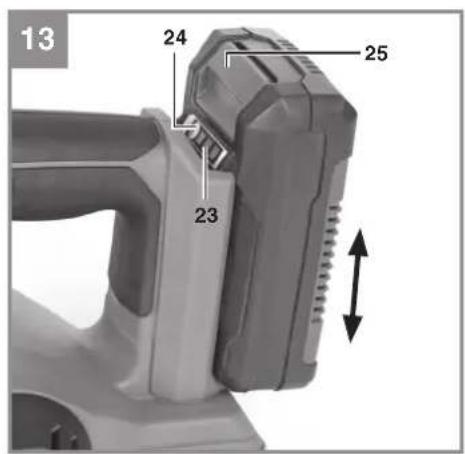
(Fig. 13 / item 23)
Press the battery capacity indicator switch (24). The battery capacity indicator (23) shows the charge status of the battery using 3 LEDs.
All 3 LEDs lit:
The battery is fully charged.
2 or 1 LED(s) lit:
The battery has an adequate remaining charge.
EN
1 LED fl ashing:
The battery is empty, recharge the battery.
All LEDs fl ashing:
The battery pack has been deep-discharged and is defective. Do not re-use or charge a defective battery pack.
7. Cleaning, maintenance and ordering spare parts
HAZARD!
Always take the battery out of the equipment before starting any cleaning work.
7.1 Cleaning
- Keep all safety devices, air vents and the motor housing free of dirt and dust as far as possible. Wipe the equipment with a clean cloth or blow it down with compressed air at low pressure.
• We recommend cleaning the equipment immediately each time after use. - Clean the equipment regularly with a damp cloth and some soft soap. Do not use cleaning agents or solvents; these may be aggressive to the plastic parts in the equipment. Ensure that no water can get into the interior of the equipment. The ingress of water into an electric power tool increases the risk of an electric shock.
7.2 Maintenance
There are no other parts inside the equipment which require maintenance.
7.3 Changing the planing knife (Fig. 9)
Danger! Remove the battery before doing any work on the tool!
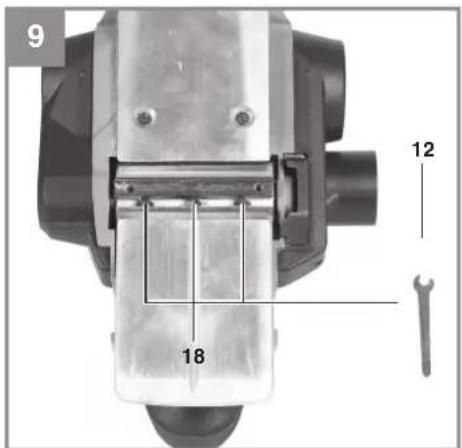
The plane is fitted with two reversible carbide knives. Reversible knives have two cutting edges and can be reversed. The guide slot on the reversible knives ensures the same height setting after a change. Worn, blunt or damaged knives must be replaced.
Reversible carbide knives cannot be re-sharpened.
Undo the three hexagonal screws (18) with the supplied wrench (12) and use a piece of wood to push the reversible carbide blade sideways out of the planing shaft (see Fig. 9).
Clean the knife seat before fi tting. Install the knives in reverse order. Check that the planing knife coincides with both ends of the planing shaft. Always replace both knives to ensure a uniform chip depth.
Danger! Before you switch on the plane make sure the knives are installed securely and in the right place.
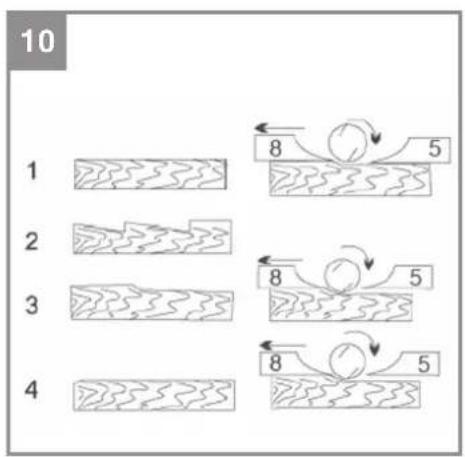
Check the correct setting (Fig. 10)
(8) Front base plate (moving plane shoe)
(5) Rear base plate (fi xed plane shoe)
1. Correct setting
Result: Smooth planed surface
2. Notches in the surface
Problem: The cutting edge of the planing knife (or both planing knives) is not parallel to the height of the rear base plate.
3. Furrows at the start of the planed surface
Problem: The cutting edge of the planing knife (or both planing knives) is below the height of the rear base plate.
4. Furrows at the end of the planed surface
Problem: The cutting edge of the planing knife (or both planing knives) is above the height of the rear base plate.
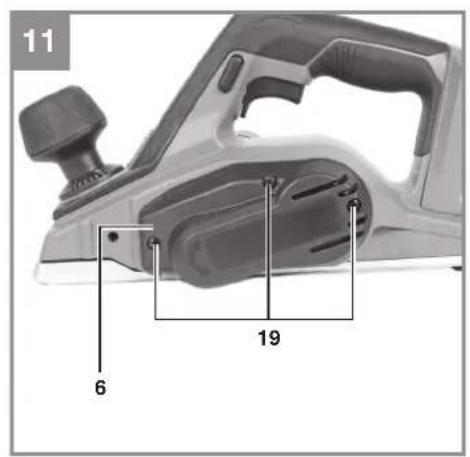
7.4 Replacing the drive belt (Fig. 11-12)
- The belt should be replaced by a trained expert.
- The drive belt (21) must be replaced if it is worn.
- Undo the screws (19) and remove the side belt cover (6).
- Remove the worn drive belt (21) and clean the two belt pulleys (20/22).
- Place the new drive belt on the small belt pulley (22) and pull the belt onto the large belt pulley (20) while turning the planing shaft.
- Ensure that the longitudinal grooves on the drive belt are in the guide grooves on the drive wheels.
- Mount the belt cover (6) and secure it with the screws (19).
7.5 Ordering replacement parts:
Service
- If your power tool requires service, contact an authorized Einhell USA dealer or call the Einhell USA customer service center at 1-866-EINHELL
EN
(1-866-346-4355). Only identical replacement parts should be utilized for repairs. This will ensure that the safety of the power tool is maintained.
- If the battery charger cable is damaged, it must be immediately replaced to avoid a hazard. Contact the Einhell USA® customer service center at 1-866-EINHELL
(1-866-346-4355) for assistance.
To ensure that any defective/damaged lithium-ion batteries are properly packaged and delivered when you send them to us, please contact our customer service or the point of sale at which the equipment was purchased.
When shipping or disposing of batteries and cordless tools, always ensure that they are packed individually in plastic bags to prevent short circuits and fi res.
8. Disposal and recycling
The equipment is supplied in packaging to prevent it from being damaged in transit. The raw materials in this packaging can be reused or recycled. The equipment and its accessories are made of various types of material, such as metal and plastic. Never place defective equipment in your household refuse. The equipment should be taken to a suitable collection center for proper disposal. If you do not know the whereabouts of such a collection point, you should ask in your local council offices.
9. Storage
Store the equipment and its accessories out of children's reach in a dark and dry place at above freezing temperature. The ideal storage temperature is between 41°F and 86°F
(5°C and 30°C). Keep the electric tool in its original packaging.
The reprinting or reproduction by any other means, in whole or in part, of documentation and papers accompanying the products is strictly subject to the express consent of Einhell Germany AG.
Subject to technical changes
EN
Einhell®
EINHELL CUSTOMER PROMISE
QUALITY COMES FIRST. The Einhell name is synonymous with high-performance tools and high-quality European craftsmanship. From cordless screwdrivers to electric lawn mowers, Einhell USA designs and develops state-of-the-art handheld power and garden tools for DIY enthusiasts, hobby gardeners, and handymen.
Einhell USA's quality assurance and engineering teams ensure products are subjected to stringent quality and performance tests. We know that sometimes tough tools go through tough times. In the event that you should experience any issue with your product, you have our commitment that we'll do everything we can to get you back a tool that's ready to work as hard as you do.
PRODUCT REGISTRATION:
Einhell strongly encourages you to register your purchase. You can register online at EinhellUSA.com Failure to register your product purchase will not diminish your warranty rights. However, registering your purchase will allow Einhell to better serve you with any of your customer service needs.
WHAT IS COVERED?
Einhell warrants to the owner that if this Machine fails within 2 years from the date of purchase due to a defect in material or workmanship or as a result of normal wear and tear from ordinary household use, Einhell will send a replacement part or product, as needed, free of charge and with free shipping to the original purchaser. If, in Einhell's sole discretion, the failed Machine cannot be repaired with a part, Einhell will elect to either (A) send a new Machine at no charge and with free shipping or (B) refund the full purchase price to the owner.
WHO CAN SEEK WARRANTY COVERAGE?
This Warranty is extended by Einhell to the owner of this Machine (a "Machine" consists of a product powered by a motor) for residential and personal household use only. This warranty is limited to thirty (30) days from the start of original purchase of any EINHELL brand product that is used for commercial purposes, or any other income-producing purpose. Should ownership of this machine change during the coverage period, please update the Machine's owner information at EinhellUSA.com
WHAT IS NOT COVERED?
This warranty does not cover any product that has been subject to misuse, neglect, negligence, or accident, or that has been operated in any way contrary to the operating instructions as specified in the operator's manual. This Warranty does not cover cosmetic changes that do not affect performance.
This Warranty is only valid if the Machine is used and maintained in accordance with the instructions, warnings and safeguards contained in the owner's manual. Einhell will not be responsible for the cost of any unauthorized warranty repairs. This warranty does not cover any cost or expense incurred by the purchaser in providing substitute equipment or service during reasonable periods of malfunction or non-use of this product while waiting for a replacement part or unit under this warranty.
Wearing parts like belts, augers, chains and tines are not covered under this warranty, and can be purchased at EinhellUSA.com or by calling 1-866-EINHELL (1-866-346-4355). Batteries are covered in full for 90-days from the date of purchase.
Repair, replacement or refund of the purchase price are the exclusive remedies of purchaser and the sole liability of Einhell under this warranty. No employee or representative of Einhell is authorized to make any additional warranty or any modification to this warranty which may be binding upon Einhell. Accordingly, purchaser should not rely upon any additional statements made by any employee or representative of Einhell. In no event, whether based on contract, indemnity, warranty, tort (including negligence), strict liability or otherwise, shall Einhell be liable for any special, indirect, incidental, or consequential damages, including, without limitation, loss of profit or revenue.
Some states do not allow limits on warranties. In such states, the above limitations may not apply to you.
Outside the USA and Canada, other warranties may apply.