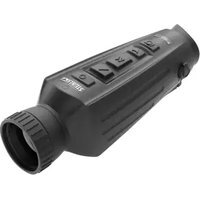
Nighthunter H35 Gen 1 - Binoculars Steiner - Free user manual and instructions
Find the device manual for free Nighthunter H35 Gen 1 Steiner in PDF.


| Product type | Thermal binoculars |
| Brand | Steiner |
| Model | Nighthunter H35 Gen 1 |
| Detector resolution | 640 x 512 pixels, 12 μm pitch |
| Spectral band | 8 to 14 μm (LWIR) |
| Thermal sensitivity (NETD) | ≤50 mK |
| Focal length | 35 mm |
| Aperture | F1.0 |
| Magnification | 2x to 16x (smooth zoom) |
| Field of view at 100 m | 12.5 x 9.4 m |
| Display | LCOS, resolution 1280 x 960 |
| Battery | 2 x 18650, 6000 mAh built-in, battery life >4.5 h |
| Charging | USB Type-C, 5 V / 2 A |
| Internal storage | 16 GB |
| Connectivity | WiFi (Steiner Connect APP), Micro HDMI, USB |
| Color palettes | White hot, Black hot, Red hot, Iron, Blue hot |
| Functions | Photo, video, thermal tracking, stadiametric rangefinder, PIP |
| Calibration modes | Automatic, Scene, Shutter |
| Operating temperature range | -10°C to 50°C |
| Warranty | 2 years |
| Maintenance | Clean with microfiber cloth, do not use solvents, store in a dry and ventilated place |
Frequently Asked Questions - Nighthunter H35 Gen 1 Steiner
User questions about Nighthunter H35 Gen 1 Steiner
0 question about this device. Answer the ones you know or ask your own.
Ask a new question about this device
Download the instructions for your Binoculars in PDF format for free! Find your manual Nighthunter H35 Gen 1 - Steiner and take your electronic device back in hand. On this page are published all the documents necessary for the use of your device. Nighthunter H35 Gen 1 by Steiner.
USER MANUAL Nighthunter H35 Gen 1 Steiner
Bedienungsanleitung
Instruction Manual
Istruzioni d'uso
Congratulations on your purchase of a Steiner Nighthunter H35. Review this manual thoroughly before using and keep it available for future reference.
CAUTIONS
- Do not directly expose the thermal imager to high intensity light sources such as the sun, carbon dioxide lasers or electric welding machines.
- The thermal imager combines precision optical instruments and electrostatically sensitive electronics, any abuse of the thermal imager and its accessories can compromise performance and longevity and may void the warranty.
- When the thermal imager will be not used for a long time, charge the thermal imager at least 4 hours every two months during the storage, and store the thermal imager in a dry and well-ventilated environment.
- Do not charge the battery in an environment over 40° C.
Our company shall not bear any legal responsibility for any mistake and/or accident caused by the user's own reasons or reasons of any third party in the course of using this product or property loss and/or personal injury caused by misjudgment against images.
We prepare this guide with the purpose of facilitating users in the enjoyment and understanding of our products. We try our best to ensure the accuracy of contents of this guide, but we cannot ensure the completeness of its contents. Since we are continuously updating and upgrading our products, we reserve the right to modify this guide at any time without prior notice.
NIGHTHUNTER H35 FEATURES
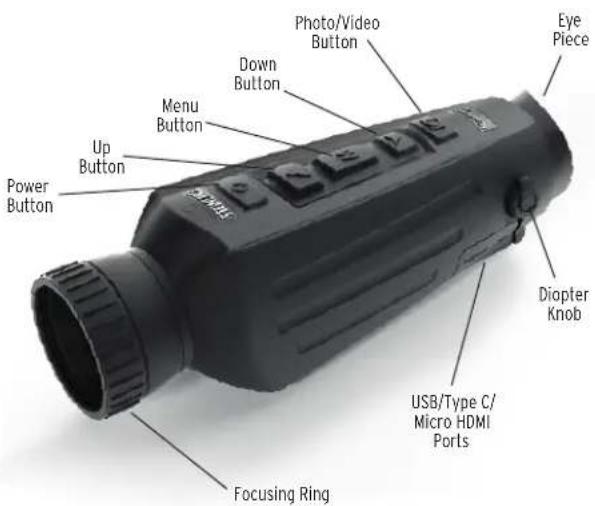
BUTTON FUNCTION
| Buttons | Device current status | Short press Long press | |
| Power button | Power-off / Power on | ||
| Power on Calibration Display off Power-off | |||
| Display off Display on / | |||
| ▲ Up button | No display in the menu bar | Switch scene mode Zoom in | |
| Display in the menu bar | Upward switching options | / | |
| Change parameter value | |||
| M Menu button | No display in the menu bar | / Enter the main menu | |
| Display in the menu bar | Enter the sub-menu | Exit the menu bar / back to the previous menu | |
| Select option/ parameter value | |||
| Down button▼ | No display in the menu bar | Switch to color palettes mode | Zoom out |
| Menu bar display | Downward switching options | / | |
| Change parameter value | |||
| Photo / video | Photo mode | Photo | / |
| Video mode | / Start video recording | ||
| / | Stop video recording | ||
| NOTE: Users can adjust the device language according to their individual needs, German/English/Italian/French/Spanish. | |||
MAIN MENU
- Press and hold the M button to enter the main menu
- Press the Up/Down button to switch between Image quality adjustment, Calibration mode, WiFi, power saving settings, indication settings, general settings and other settings
Picture In Picture (PIP)
- With the PIP window open, select the left / middle / right for placement
• The window image is 2X magnification of the main image
Screen Brightness
- Brightness levels can be adjusted from 10 to 100 percent
Stadiametric Rangefinder
The stadiametric rangefinder lets you estimate the distance of a target. There are three reference animals available on the device - Rabbit (35 cm / 13.7 inch), Boar (90 cm / 35.4 inch.), Deer 150 cm / 59.1 inch).
How to use the stadia lines:
- Align the lower horizontal line with the bottom of the target image, press the Up/Down button to change the width between the upper and lower horizontal lines until the upper horizontal line is aligned with the top of the target icon
• The distance can now be calculated and displayed automatically - By comparing the target size with the three reference animal sizes, the user can roughly calculate the distance of the target
Hot Track
- When hot track is turned on, the active crosshair tracks the point with the highest temperature in the scene
Energy-Saving Mode
- In the energy-saving mode, screen brightness is reduced to 30 percent and the WiFi is turned off
- When the energy-saving mode is off, the screen brightness and WiFi are restored to their original state
NOTE - If WiFi cannot be turned on, please check if the energy-saving mode is off.
Color Palettes
- White hot - The objects with higher temperature show in white or light gray
- Black hot - The objects with higher temperature show in black or dark gray
- Adjustable red hot - The objects with higher temperature show in red. Users can adjust the intensity of range of red heat from level 1 to 10
- Iron - The objects with higher temperature show in iron red
- Blue hot - The objects with lowest temperature show in blue or dark blue, and the object with higher temperature shows in white
Brightness
- Adjustable from level 1 to 10 level
Contrast
- Adjustable from level 1 to 10 level
Calibration model
- Automatic - The device automatically corrects the image quality without any action
- Scene - The user manually corrects the image quality as needed. For manual correction, the lens cover needs to be attached before calibration
- Shutter - The user manually corrects the image quality as needed and the device shutter closes for calibration
WiFi
The imager can be connected to the mobile phone via WiFi and the imager can be operated remotely via the mobile phone APP. When WiFi is turned on, but not connected, the WiFi icon flashes and the WiFi name is displayed at the top of the screen.
When the WiFi is connected, the WiFi icon is always on.
- Mobile phone APP - Search and download 'Steiner Connect' APP in the mobile phone app market. Open the APP, and find the WiFi name of NIGHTHUNTER H35 (followed by 4 digits unique identification number) in your mobile phone WiFi settings, enter the password '12345678', then after the connection is successful, the user can operate remotely
• Android: Please search and download in Google Play
- iOS: Please search and download in the APP Store
Power saving settings
- Auto Stand-By - If there is no operation during the preset time, the unit enters Stand-by mode. If the work indicator is on before entering Standby mode, the work indicator will flash in Stand-by mode
- Auto Power - If there is no operation during the preset time, the unit will power off automatically
Note: Auto Stand-by and Auto power-off cannot be performed while WiFi is connected
Indication settings
- Charging indication - In the charging state, you can turn the charging indicator on or off
- Working indication - In the normal working state, you can turn the working indicator on or off
General settings
• Time style - Select 12-hour or 24-hour style
- Date style - Choose different date styles according to your preference
• Time setup - Adjust the current date and time
Watermark Settings
- Users can choose the display style of any watermark on the screen
Language Settings
• Language choices include German/English/Italian/French/Spanish
Memory Card Formatting
- Allows the user to format and empty onboard storage
Restore Default
• This function restores the factory settings
Charging
When using the thermal imager for the first time, use the USB charger to charge the internal battery for at least four hours. When charging, insert the matching Type C USB charging cable and plug into power.
• Charging specifications: 5V, 2A.
- Charging indicator is red during normal charging.
- Charging indicator is green when charging is complete.
- Do not charge the battery in an environment over 40°C or 104°F.

Note - Charging when the thermal imager is being used does not charge the battery. This icon indicates the unit is using the external power for normal operations.

This icon indicates that the external power supply is charging the battery
Video output
There is a video output port beside the USB interface on the side of the thermal imager.
The screen image of the thermal imager can be output to an external monitor through the matching HDMI video cable. There are two display modes, either the external screen or the screen of the device, but only one mode is active.
Note - When HDMI is used to connect the external display screen, the real-time screen can only be viewed via the external display. When the HDMI cable is unplugged, the internal screen of the device is restored.
STORAGE AND MAINTENANCE
When the thermal imager will be not used for a long time, store in a dry, well-ventilated environment and charge the unit at least four hours every two months during the storage
The infrared lens of the thermal imager is coated with an anti-reflection film. Clean the lens only when dirt or smudges are present. Frequent scrubbing may damage the lens coating.
To clean non-optical surfaces of the thermal imager, do not scrub with chemical solvents or cleaners. On exterior surfaces, wipe with a soft and dry microfiber cloth.
WARRANTY
The Nighthunter H35 thermal products are covered by the Steiner 2 year warranty and Steiner will repair or replace your product if it is defective. Do not disassemble the thermal imager as this will void the warranty. Contact your nearest Steiner dealer for assistance.
PRODUCT FUNCTION TECHNICAL SPECIFICATIONS
| Nighthunter H35 | |
| Smooth zoom Yes | |
| Photo Yes | |
| Video Yes | |
| WiFi Yes | |
| Screen brightness 1 ~ 10 levels | |
| Image brightness 1 ~ 10 levels | |
| Image contrast 1 ~ 10 levels | |
| Image enhancement Yes | |
| Scene mode Enhanced/Detect/Standard | |
| Energy-saving Yes | |
| Color palettes White hot / Black hot /Adjustable red hot / Iron / Blue hot | |
| Hot track | Yes |
| Calibration mode | Automatic/Scene/Shutter |
| Stadiametric rangefinder | Yes |
| Auto power-off Yes | |
| Auto Stand-by | Yes |
| Language settings | German/English/Italian/French/Spanish |
| Time settings | Yes |
| Watermark settings | Yes |
| PIP | Yes |
| Restore default | Yes |
| Memory card formatting | Yes |
| Nighthunter H35 | ||
| Detector | Resolution | 640 x 512@12μm |
| Spectrum 8 | ~14μm | |
| NETD | ≤50mk @ F1 25 °C | |
| Lens | Focal length 35mm F1.0 | |
| Focus | manual | |
| Field of view @ 100m | 12.5 x 9.4 m | |
| Output frame rate | 50Hz | |
| System magnification | 2x-16x | |
| Power supply | Battery | 2 * 18650, 6000 mAh, built-in |
| Charging method | Multi changable plugsGB/AU/EU/CN/UL | |
| Adaptor | Standard USB power adaptor 5VDC,max, 10W | |
| Working time | Battery continuous working time ≥4.5 hours @25 °C (only watching) | |
| Interface | USB | TYPE C (USB 2.0 standard), recharg-able, support data transmission |
| Video interface Micro | HDMI | |
| WiFi | Support WiFi (APP) communication,realtime video transmission | |
| Display | Display | LCOS |
| Resolution | 1280 x 960 | |
| Max screen size with 1 meter distance | 22 inch | |
| Magnification | 2.04x | |
| Video output format | digital video | |
TECHNICAL SPECIFICATIONS
| Nighthunter H35 | ||
| System Memory capacity 16GB | ||
| Environment | Working temp -10 °C - | 50 °C |
| Storage temp -30 °C - | 60 °C | |
| Humidity 10% | ~ 95%, not-condensing | |
| Shock | 30G 11ms semi-sinosoidalIEC60068-2-27 | |
| Vibration | 10Hz ~ 150Hz ~ 10Hz 0.15mmIEC60068-2-6 | |
| Drop 1m drop | ||
| Waterproof Yes | ||
| Certification UN38.3, RoHS, CE, FCC, EAC | ||
| Detection | Man 1800 m | |
| Vehicle 4400 m | ||
| Red Deer 3200 m | ||
| Roe Deer 2000 m | ||
| Recognition | Man 450 m | |
| Vehicle 1100 m | ||
| Red Deer 825 m | ||
| Roe Deer 500 m | ||
| Identification | Man 225 m | |
| Vehicle 550 m | ||
| Red Deer 400 m | ||
| Roe Deer 250 m | ||
NOTES
Specifications subject to change without notice.
Beretta Holding company

- CAUTIONS
- MAIN MENU
- PICTURE IN PICTURE (PIP)
- SCREEN BRIGHTNESS
- STADIAMETRIC RANGEFINDER
- HOT TRACK
- ENERGY-SAVING MODE
- COLOR PALETTES
- BRIGHTNESS
- CONTRAST
- CALIBRATION MODEL
- WIFI
- POWER SAVING SETTINGS
- NOTE: AUTO STAND-BY AND AUTO POWER-OFF CANNOT BE PERFORMED WHILE WIFI IS CONNECTED
- INDICATION SETTINGS
- GENERAL SETTINGS
- WATERMARK SETTINGS
- LANGUAGE SETTINGS
- MEMORY CARD FORMATTING
- RESTORE DEFAULT
- CHARGING
- VIDEO OUTPUT
- STORAGE AND MAINTENANCE
- WARRANTY
Brand : Steiner
Model : Nighthunter H35 Gen 1
Category : Binoculars