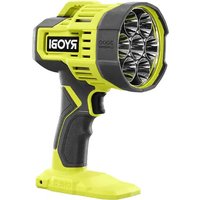
One+ PCL661 - Lighting RYOBI - Free user manual and instructions
Find the device manual for free One+ PCL661 RYOBI in PDF.


| Product Type | Cordless LED Work Light |
| Brand | RYOBI |
| Model | One+ PCL661 |
| Max Luminous Flux | 3,000 lumens |
| Color Temperature | Approximately 5,000 K |
| Number of Light Levels | 3 (High, Medium, Low) |
| Overheat Protection | Yes, automatic intensity reduction then shutdown |
| Battery Type | Lithium-ion (Li-ion) – One+ System |
| Power Source | RYOBI One+ Battery Pack (not included) |
| Recommended Uses | Lighting of distant or dark objects and spaces |
| Maintenance and Cleaning | Clean with a dry cloth; do not use solvents; remove battery before cleaning |
| Safety | Do not point the beam into eyes; do not expose to rain; store in a dry place; read the manual |
| Warranty | 3-year limited warranty |
| Customer Service | 1-800-525-2579 (USA) |
| Replacement Parts | Available from the manufacturer; call 1-800-525-2579 |
| Repairability | LEDs not replaceable; repair by qualified technician |
Frequently Asked Questions - One+ PCL661 RYOBI
User questions about One+ PCL661 RYOBI
0 question about this device. Answer the ones you know or ask your own.
Ask a new question about this device
Download the instructions for your Lighting in PDF format for free! Find your manual One+ PCL661 - RYOBI and take your electronic device back in hand. On this page are published all the documents necessary for the use of your device. One+ PCL661 by RYOBI.
USER MANUAL One+ PCL661 RYOBI
natural_image
Line drawing of a RYOBI flash light bulb with hexagonal lens and base (no text or symbols on body)TABLE OF CONTENTS
**********************************************************************
■ Important Safety Instructions ...... 2-3
Symbols......4
■ Features....4
■ Assembly 5
■ Operation....5
■ Maintenance....6
■ Illustrations ....7
■ Parts Ordering and Service......Back page

WARNING: To reduce the risk
of injury, the user must read and understand the operator's manual before using this product.
SAVE THIS MANUAL FOR FUTURE REFERENCE
TABLE DES MATIÈRES
**********************************************************************
IMPORTANT SAFETY INSTRUCTIONS

WARNING!
READ AND UNDERSTAND ALL INSTRUCTIONS. Failure to follow all instructions listed below, may result in electric shock, fire and/or serious personal injury.

WARNING!
When using electric appliances, basic precautions should always be followed, including the following:
- Read all the instructions before using the appliance.
■ To reduce the risk of injury, close supervision is necessary when an appliance is used near children.
■ To reduce the risk of electrical shock, do not put light or charger in water or other liquid. Do not place or store appliance where it can fall or be pulled into a tub or sink.
■ Use only the charger supplied by the manufacturer to recharge.
■ Use this product only with batteries and chargers listed in tool/appliance/battery pack/charger correlation supplement 987000-432.
■ Use only recommended battery pack. Any attempt to use another battery pack will cause damage to your light and could possibly explode, cause a fire, or personal injury.
■ Remove battery pack from light before performing any routine maintenance or cleaning.
■ Do not modify or attempt to repair the appliance or the battery pack (as applicable) except as indicated in the instructions for use and care.
■ Have servicing performed by a qualified repair person using only identical replacement parts. This will ensure that the safety of the product is maintained.
■ Do not disassemble the light.
■ Do not place light or battery pack near fire or heat. They may explode. Also, do not dispose of a worn out battery pack by incinerating. Do not incinerate the battery, even if it is severely damaged or completely worn out. The battery may explode in fire.
■ Do not operate light or charger near flammable liquids or in gaseous or explosive atmospheres. Internal sparks may ignite fumes. - Do not store your light in a damp or wet location. Do not store in locations where the temperature is less than 50°F or more than 100°F. Do not store in outside sheds or in vehicles.
■ Do not expose a battery pack or appliance to fire or excessive temperature. Exposure to fire or temperature above 265°F may cause explosion.
■ Follow all charging instructions and do not charge the battery pack or appliance outside of the temperature range specified in the instructions. Charging improperly or at temperatures outside of the specified range may damage the battery and increase the risk of fire.
■ Do not permit children to use light, lens, and surrounding housing.
- Keep light dry, clean, and free from oil and grease. Always use a clean cloth when cleaning. Never use brake fluids, gasoline, petroleum-based products, or any strong solvent to clean the light.
■ Under abusive conditions, liquid may be ejected from the battery; avoid contact. If contact accidentally occurs, flush with water. If liquid contacts eyes, additionally seek medical help. Liquid ejected from the battery may cause irritation or burns.
- Don't expose light to rain. Water entering a power tool will increase the risk of electric shock or malfunction.
■ Do not overreach. Keep proper footing and balance at all times. Proper footing and balance enable better control of the light in unexpected situations. Do not use on a ladder or unstable support.
■ Do not use a battery pack or appliance that is damaged or modified. Damaged or modified batteries may exhibit unpredictable behavior resulting in fire, explosion or risk of injury.
LIGHT USE AND CARE
■ This product is for household use only.
■ Store light out of the reach of children and other untrained persons. Flashlights are dangerous in the hands of untrained users.
■ Do not use or permit use of light in bed or sleeping bags. This light lens can melt fabric and a burn injury could result.
SAFETY RULES FOR LIGHT
■ Always remove battery pack before storing the device.
■ Under extreme usage or temperature conditions, battery leakage may occur. If liquid comes in contact with your skin, wash immediately with soap and water. If liquid gets in your eyes, flush them with clean water for at least 10 minutes, then seek immediate medical attention.
■ Batteries can explode in the presence of a source of ignition, such as a pilot light. To reduce the risk of serious personal injury, never use any cordless product in the presence of open flame. An exploded battery can propel debris and chemicals. If exposed, flush with water immediately.
IMPORTANT SAFETY INSTRUCTIONS
■ Do not crush, drop or damage battery pack. Do not use a battery pack or charger that has been dropped or received a sharp blow. A damaged battery is subject to explosion. Properly dispose of a dropped or damaged battery immediately. Failure to heed this warning can result in serious personal injury.
■ Save these instructions. Refer to them frequently and use them to instruct others who may use this tool. If you loan someone this tool, loan them these instructions also.
SAVE THESE INSTRUCTIONS
SYMBOLS
| The following signal words and meanings are intended to explain the levels of risk associated with this product. SYMBOL SIGNAL MEANING | ||
 | DANGER: | Indicates a hazardous situation, which, if not avoided, will result in death or serious injury. |
 | WARNING: | Indicates a hazardous situation, which, if not avoided, could result in death or serious injury. |
 | CAUTION: | Indicates a hazardous situation, that, if not avoided, may result in minor or moderate injury. |
| NOTICE: | (Without Safety Alert Symbol) Indicates information considered important, but not related to a potential injury (e.g. messages relating to property damage). | |
| Some of the following symbols may be used on this product. Please study them and learn their meaning. Proper interpretation of these symbols will allow you to operate the product better and safer. SYMBOL NAME DESIGNATION/EXPLANATION | ||
 | Safety Alert Indicates a potential personal injury hazard. | |
 | Read Operator's Manual | To reduce the risk of injury, user must read and understand operator's manual before using this product. |
 | Wet Conditions Alert Do not expose to rain or use in damp locations. | |
 | Extremely Bright Light | This product uses extremely bright LEDs. To avoid serious eye injury, do not shine into eyes or face. |
 | Recycle Symbol | This product uses lithium-ion (Li-ion) batteries. Local, state or federal laws may prohibit disposal of batteries in ordinary trash. Consult your local waste authority for information regarding available recycling and/or disposal options. |
| V Volts Voltage | ||
| W Watts Power | ||
| min Minutes | Time | |
| == | Direct Current | Type or a characteristic of current |
FEATURES
PRODUCT SPECIFICATIONS
Light Output 3,000 Lumens (Maximum)
Kelvin Rating ....Approximately 5000K
ASSEMBLY

WARNING:
Do not use this product if it is not completely assembled or if any parts appear to be missing or damaged. Use of a product that is not properly and completely assembled or with damaged or missing parts could result in serious personal injury.

WARNING:
Do not attempt to modify this product or create accessories or attachments not recommended for use with this product. Any such alteration or modification is misuse and could result in a hazardous condition leading to possible serious personal injury.
If any parts are damaged or missing, please call 1-800-525-2579 for assistance.
OPERATION

WARNING:
Do not direct the light beam at persons or animals and do not stare into the light beam yourself (not even from a distance). Staring into the light beam may result in serious injury or vision loss.

WARNING:
Do not allow familiarity with products to make you careless. Remember that a careless fraction of a second is sufficient to inflict serious injury.

WARNING:
Do not use any attachments or accessories not recommended by the manufacturer of this product. The use of attachments or accessories not recommended can result in serious personal injury.
NOTICE:
Operate in a well ventilated area. Do not block vents. Keep them clear to allow proper ventilation.
APPLICATIONS
You may use this product for the purpose listed below:
■ To illuminate distant objects and areas requiring additional light
INSTALLING/REMOVING BATTERY PACK
See Figure 1, page 7.
■ Insert the battery pack as shown.
■ Make sure the latches on each side of the battery pack snap into place and the battery pack is secured in the product before beginning operation.
■ Depress the latches to remove the battery pack.
If the light flashes during operation, try recharging and reinstalling the battery pack.
For complete charging instructions, see the operator's manuals for your battery pack and charger.

WARNING:
Battery products are always in operating condition. Therefore, remove the battery pack when the product is not in use or when carrying at your side.
INSTALLING/REMOVING BELT HOOK (NOT INCLUDED)
See Figure 2, page 7.
The belt hook is interchangeable. It may be installed on either side of the base.
- Align hole in belt hook with hole in tool's base.
■ Install screw to secure belt hook in place.
■ To uninstall, remove screw and then belt hook.
The spotlight has four settings: high, medium, low, and off.
■ High: Press and release the switch trigger once.
■ Medium: Press and release the switch trigger twice.
■ Low: Press and release the switch trigger three times.
■ Off: Press and release the switch trigger a fourth time.
OVER TEMPERATURE PROTECTION
If overheating occurs, the light will attempt to cool itself by dimming.
If dimming does not cool the light sufficiently, it will shut off.
As soon as the unit reaches normal operating temperature, it can be turned on again. If it shuts off, allow approximately 10 minutes of cool-down time before attempting to resume operation.
MAINTENANCE

WARNING:
When servicing, use only identical replacement parts. Use of any other parts may create a hazard or cause product damage.

WARNING:
To avoid serious personal injury, always remove the battery pack from the product when cleaning or performing any maintenance.
GENERAL MAINTENANCE
Avoid using solvents when cleaning plastic parts. Most plastics are susceptible to damage from various types of commercial solvents and may be damaged by their use.

WARNING:
Do not at any time let brake fluids, gasoline, petroleum-based products, penetrating oils, etc., come in contact with plastic parts. Chemicals can damage, weaken or destroy plastic which may result in serious personal injury.
NOTICE:
The LEDs cannot be replaced. Any attempt to replace the LEDs may damage the spotlight.
STORAGE
Store indoors in a dry, locked up place, out of the reach of children, with the battery pack removed. Keep away from corrosive agents such as garden chemicals and de-icing salts.
NOTE: ILLUSTRATIONS START ON PAGE 7 AFTER FRENCH AND SPANISH LANGUAGE SECTIONS.
INSTRUCTIONS IMPORTANTES CONCERNANT LA SÉCURITÉ

AVERTISSEMENT !
A - Belt hook (not included) [crochet de ceinture (non inclus), gancho para el cinto (no incluida)]
B - Screw (vis, tornillo)
Fig. 3

A - Switch trigger (gâchette de commande, gatillo del interruptor)
NOTES/NOTAS
NOTES/NOTAS
To request service, purchase replacement parts,
locate an Authorized Service Center or obtain Customer or Technical Support:
Visit www.ryobitools.com or call 1-800-525-2579
If any parts or accessories are damaged or missing, do not return this product to the store.
Call 1-800-525-2579 for immediate service.
Please obtain your model and serial number from the product data plate.
This product is covered under a 3-year limited Warranty. Proof of purchase is required.
MODEL NUMBER* ____ SERIAL NUMBER ____
*Model number on product may have additional letters at the end. These letters designate manufacturing information and should be provided when calling for service.
RYOBI is a trademark of Ryobi Limited and is used pursuant to a license granted by Ryobi Limited.