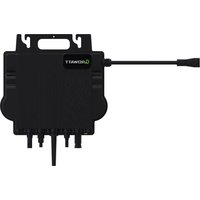
NEO 600-1000M-X - Solar inverter Growatt - Free user manual and instructions
Find the device manual for free NEO 600-1000M-X Growatt in PDF.


User questions about NEO 600-1000M-X Growatt
0 question about this device. Answer the ones you know or ask your own.
Ask a new question about this device
Download the instructions for your Solar inverter in PDF format for free! Find your manual NEO 600-1000M-X - Growatt and take your electronic device back in hand. On this page are published all the documents necessary for the use of your device. NEO 600-1000M-X by Growatt.
USER MANUAL NEO 600-1000M-X Growatt
natural_image
Black GROWATT device with attached cable and connector (no visible text or symbols on body)NEO 600M-X
NEO 800M-X
NEO 1000M-X
Quick Installation Guide
Important Notice
Copyright © 2024 Shenzhen Growatt New Energy Co., Ltd. All rights reserved. No part of this document may be reproduced, stored in a retrieval system, or transmitted, in any form or by any means, electronic, mechanical, photographic, magnetic or otherwise, without the prior written permission of Shenzhen Growatt New Energy Co., Ltd.
Shenzhen Growatt New Energy Co., Ltd. (hereinafter referred to as Growatt) makes no representations, express or implied, with respect to this documentation or any of the equipment and/or software it may describe, including (with no limitation) any implied warranties of utility, merchantability, or fitness for any particular purpose. All such warranties are expressly disclaimed. Neither Growatt nor its distributors or dealers shall be liable for any indirect, incidental, or consequential damages under any circumstances.
(The exclusion of implied warranties may not apply in all cases under some statutes, and thus the above exclusion may not apply.)
The content of this manual is constantly reviewed and subject to change without notice. Every attempt has been made to make this document complete, accurate and up-to-date. Readers are cautioned, however, that Growatt reserves the right to make changes without notice and shall not be responsible for any damages, including indirect, incidental or consequential damages, caused by reliance on the material presented, including, but not limited to, omissions, typographical errors, arithmetical errors or listing errors in the content material.
This manual will be updated frequently, please refer to Growatt website at en.growatt.com for the latest version.
All trademarks are recognized even if these are not marked separately. Missing designations do not mean that a product or brand is not a registered trademark.
Table of contents
ENGLISH
Quick Installation Guide .... 1
DEUTSCH
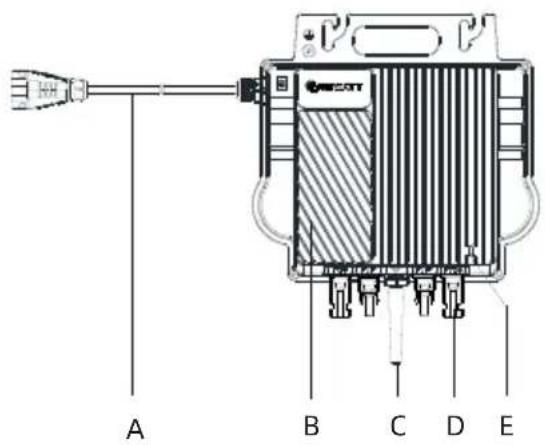
| Position | Description |
| A | AC cable |
| B | Heat sink |
| C | Antenna |
| D | PV terminal |
| E | LED |
| F | Back plate |
| G | Handle |
| H | Grounding hole |
 NOTE NOTE | 1. This document is intended for use as a quick installation guide. For details, please refer to the Installation and Operation Manual.2. Growatt shall not be liable for any damage caused by improper operations. |
1.2 System Overview
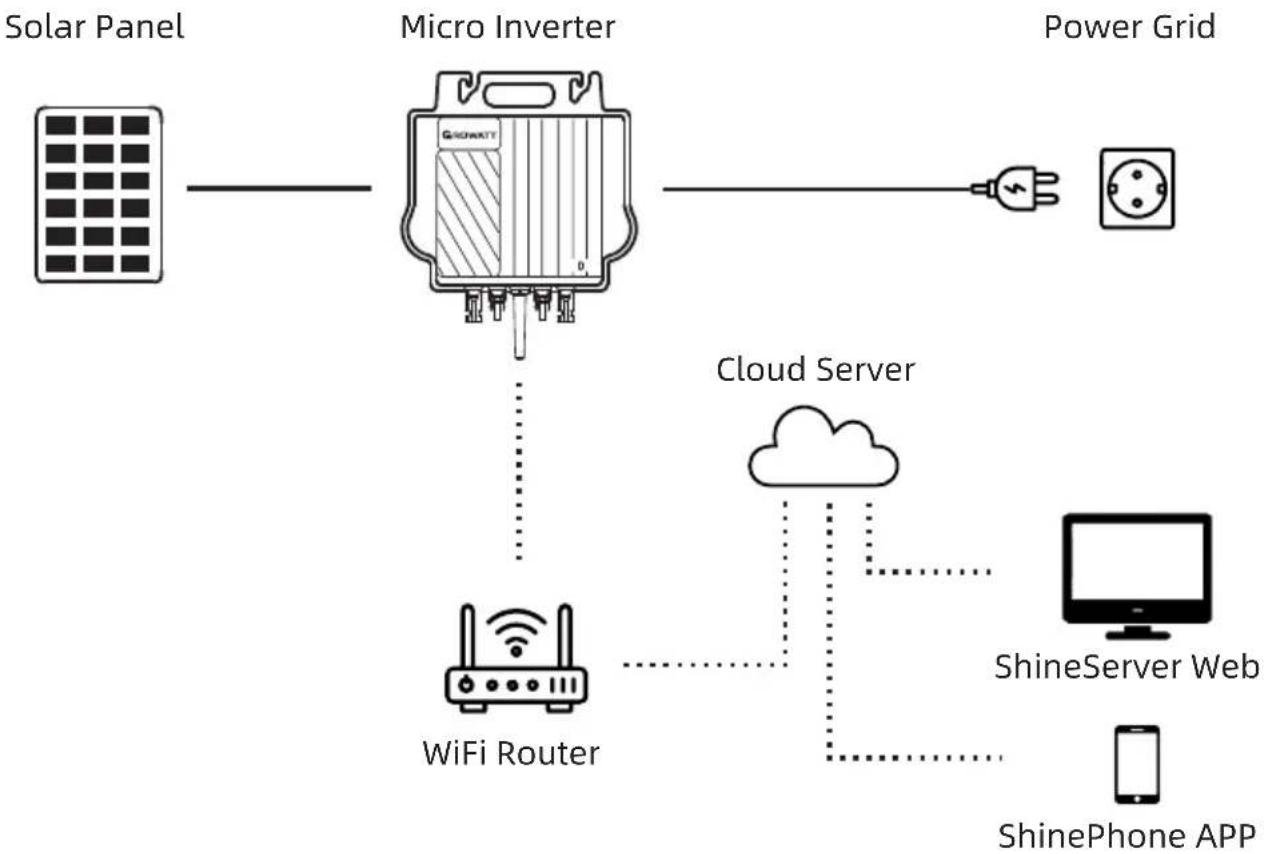
flowchart
graph LR
    A["Solar Panel"] --> B["Micro Inverter"]
    B --> C["Power Grid"]
    B --> D["Cloud Server"]
    D --> E["WiFi Router"]
    E --> F["ShineServer Web"]
    E --> G["ShinePhone APP"]
    B --> H["GridAT1"]
1
English
1.3 Accessories
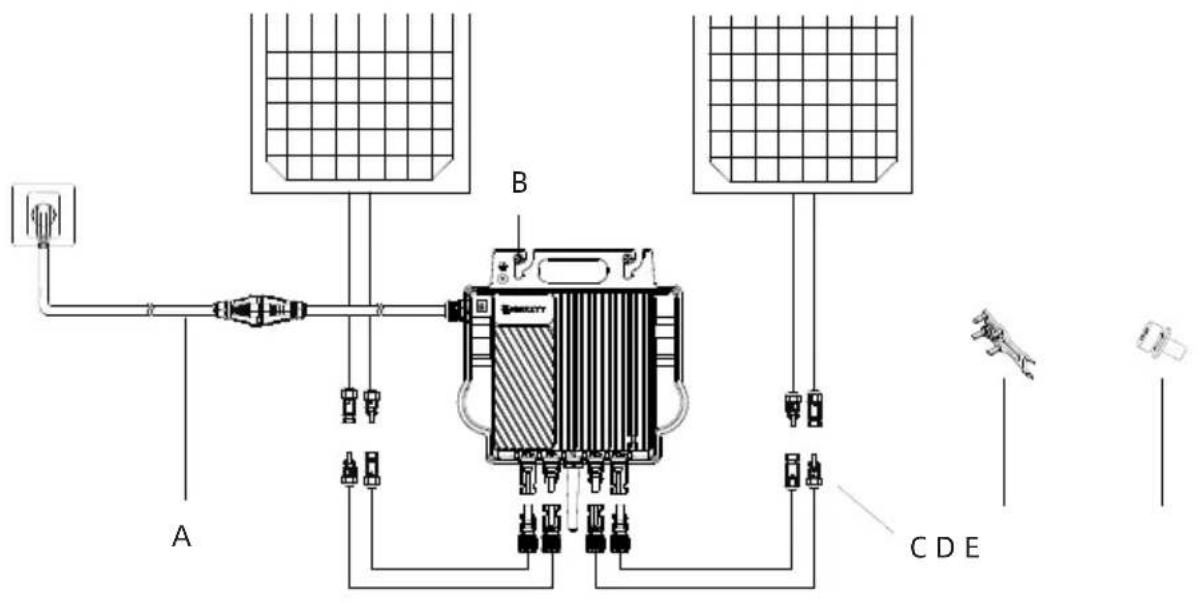
text_image
A B C D E| Position | Description |
| A | AC Adapter Cable |
| B | Mounting screw (M6*20) |
| C | PV Extension Cable |
| D | 2-in-1 Unlock Tool |
| E | Grounding screw (M4*6) |
 NOTE NOTE | The PV extension cable and the AC adapter cable should be prepared by the installer. |
Installation and configuration 2
2.1 Installation steps
Step 1. Install the NEO Microinverter
Mount the NEO Microinverter to the rail using accessories recommended by your module racking vendor.
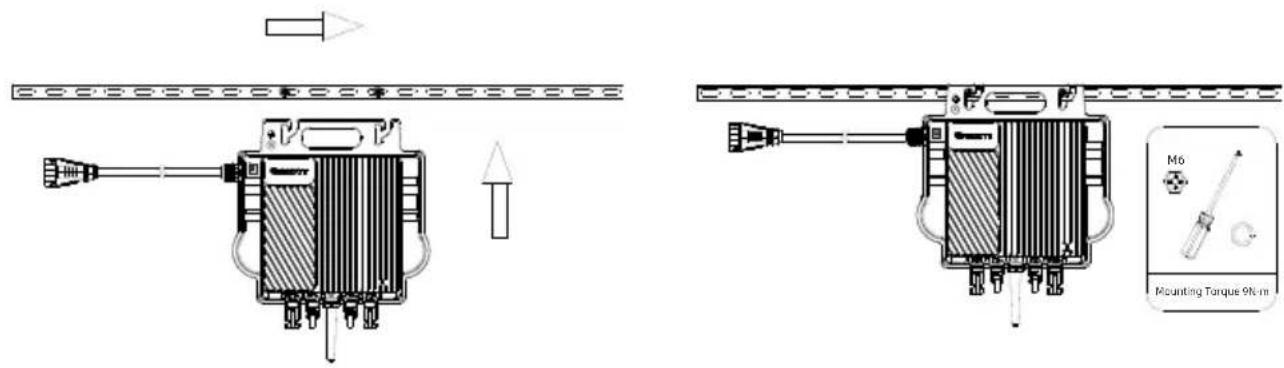
text_image
Technical diagram showing two mechanical components with labeled parts including a mounting torque and M6 component.1
English
Step 2. Ground the system
a. The AC cable has an embedded earth wire, which might be sufficient to ensure proper grounding.
b. In area with special grounding requirements, external grounding may be needed by grounding the screw hole on the handle.
Step 3. Connect the PV Module
a. Mount the NEO Microinverter below the PV modules.
b. Connect the DC cables of PV modules to the DC input of the Microinverter.
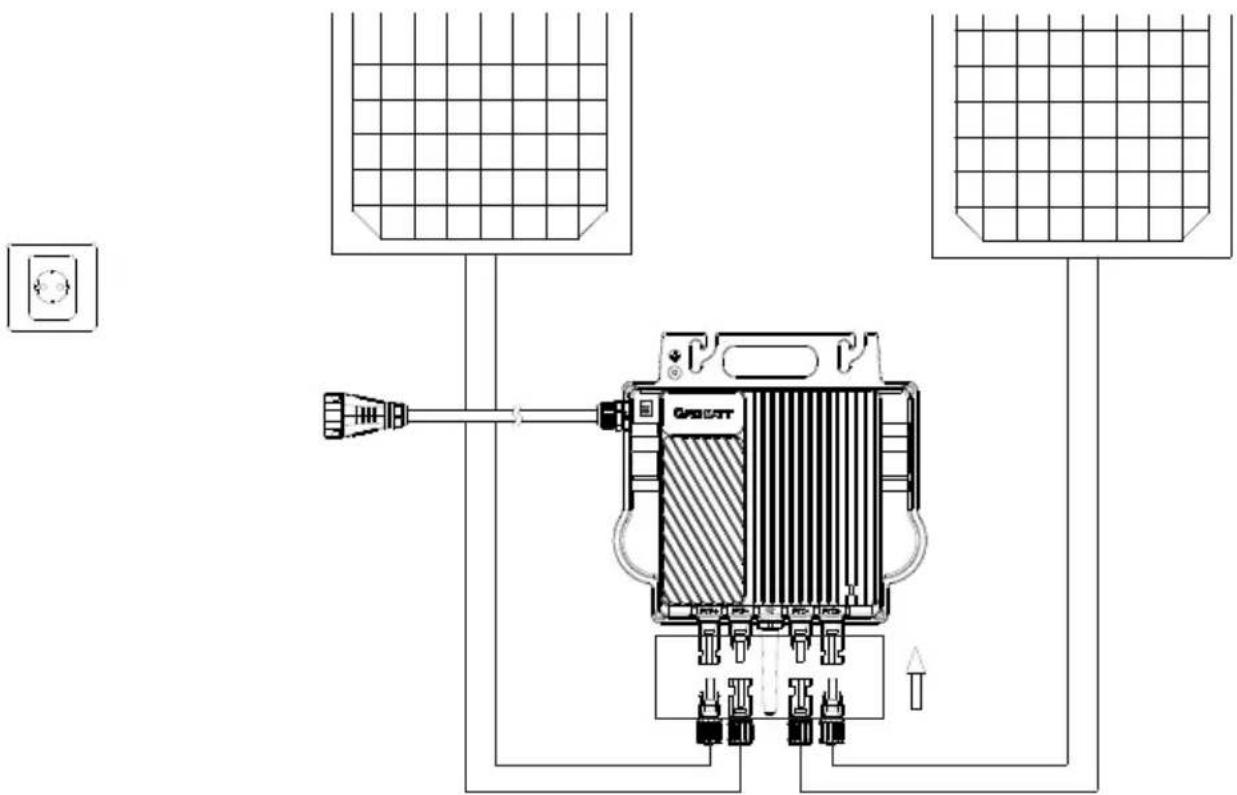
text_image
Technical diagram of a power supply or control unit with labeled components and connections WARNING WARNING | Ensure that the Microinverter and all DC and AC connectors are not exposed to direct sunlight, rain and snow. Do not install the Microinverter at the gap between the PV modules. Maintain a minimum of 20mm clearance between the roof and the back plate of the Microinverter to ensure ventilation and heat dissipation. |
 NOTE NOTE | 1. If the DC cable is too short for installation, use the DC Extension Cable to connect PV modules to the Microinverter, otherwise the PV terminals will be damaged.2. Do not connect the positive and negative DC cables into two different input channels. |
Step 4. Connect the Microinverter and the AC adapter cable
a. Connect the AC cable with the AC adapter cable. Make sure that you hear a click sound as proof of a robust connection.
b. Plug the AC adapter cable to the socket to wire it to the local grid network.

text_image
Click POCOTYStep 5. Power on the system
Upon the completion of electrical connections, the system will start generating power in about two minutes.
2.2 WiFi Configuration
Step 1. Download the APP
Method 1: Scan the QR code below to download ShinePhone.
Method 2: Search for ShinePhone in Apple Store or Google Play to download the APP.
Note: We recommend updating to the latest version when it is available.

text_image
QR code with a blue circular logo in the center, likely linking to a digital resource or website.[Android&iOS]
Step 2. Register an account
Prerequisite: Enable Bluetooth and Location Services before running the ShinePhone APP.
a. Run the ShinePhone APP and tap "Register" on the login screen.
b. Fill in the registration information and tap "Register".
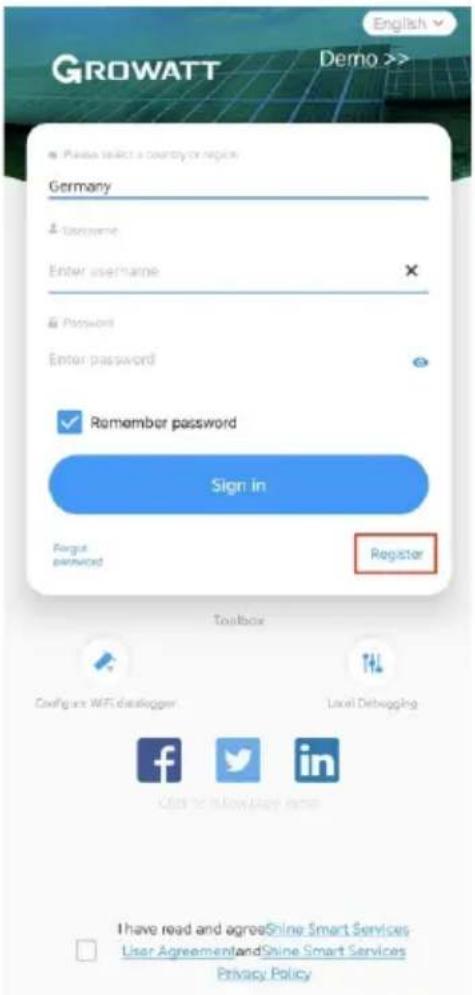
text_image
GROWATT English Demo >> Please select a country or region. Germany Language Enter username Password Enter password Remember password Sign in Fogat password Register Toolbox Config are WiFi developer Local Debugging f t in I have read and agreeShine Smart Services User AgreementandShine Smart Services Privacy Policy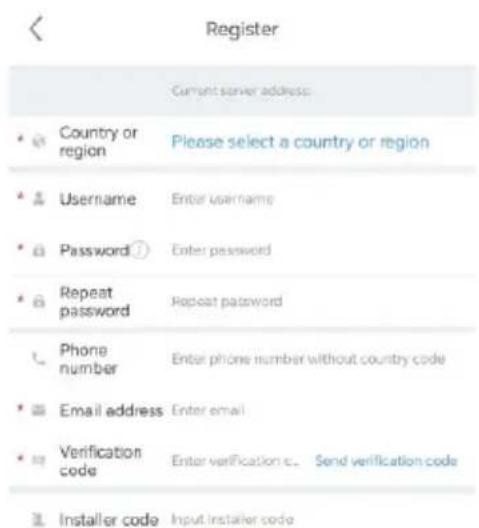
text_image
Register Current server address: Country or region Please select a country or region Username Enter username Password Enter password Repeat password Repeat password Phone number Enter phone number without country code Email address Enter email Verification code Enter verification c. Send verification code Installer code Input installer code
text_image
I have read and agree Shine Smart □ Services User Agreement and Shine Smart Services Privacy Policy RegisterStep 3. Add a plant
a. Go to the "Add Plant" Page.
b. Fill in the plant information.
c. Tap "Add Plant" to add the power station.
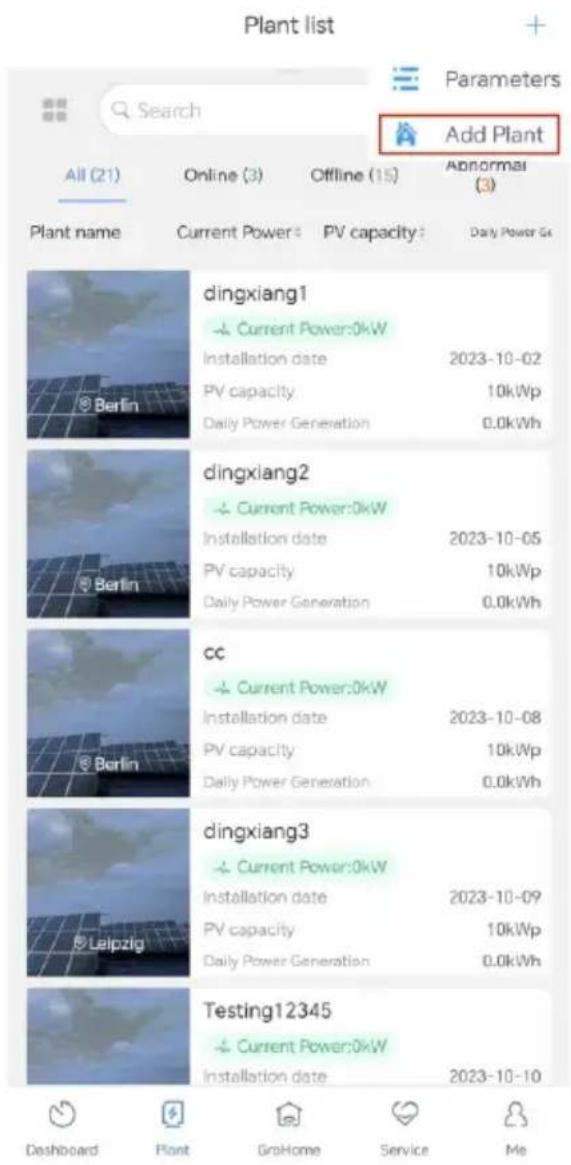
text_image
Plant list Parameters Search Add Plant All (21) Online (3) Offline (15) Abnormal (3) Plant name Current Power PV capacity Daily Power Go dingxiang1 Current Power:0kW Installation date 2023-10-02 PV capacity 10kWp Daily Power Generation 0.0kWh dingxiang2 Current Power:0kW Installation date 2023-10-05 PV capacity 10kWp Daily Power Generation 0.0kWh cc Current Power:0kW Installation date 2023-10-08 PV capacity 10kWp Daily Power Generation 0.0kWh dingxiang3 Current Power:0kW Installation date 2023-10-09 PV capacity 10kWp Daily Power Generation 0.0kWh Testing12345 Current Power:0kW Installation date 2023-10-10 Dashboard Plant GroHome Service Me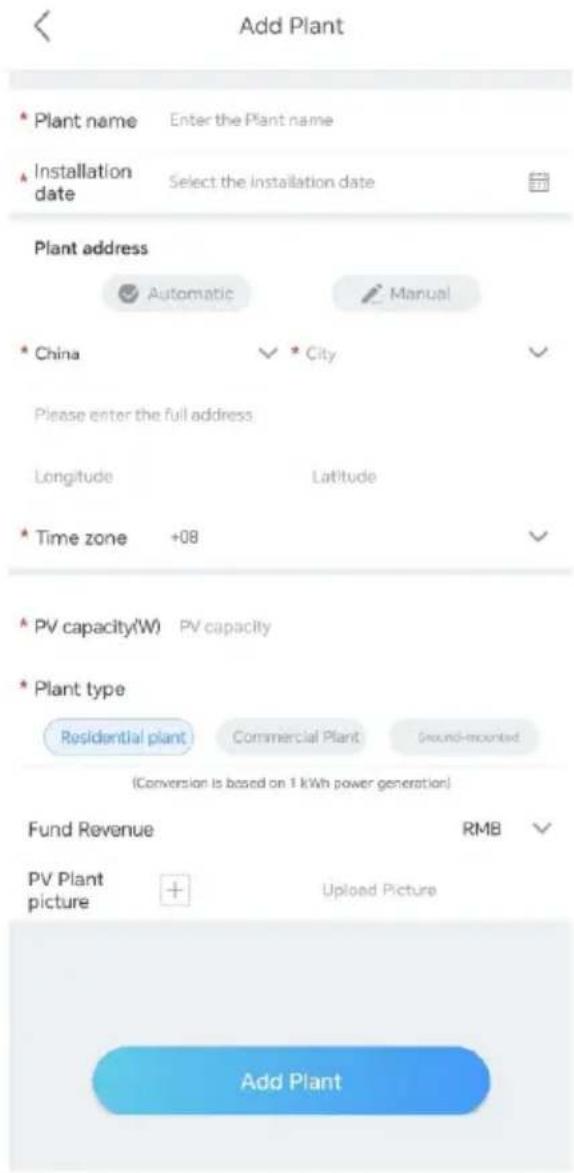
text_image
Add Plant * Plant name Enter the Plant name * Installation date Select the installation date Plant address Automatic Manual * China City Please enter the full address. Longitude Latitude * Time zone +08 * PV capacity(W) PV capacity * Plant type Residential plant Commercial Plant Ground-mounted (Conversion is based on 1 kWh power generation) Fund Revenue RMB PV Plant picture + Upload Picture Add PlantStep 4. Add a Microinverter
Prerequisite:
- Ensure that the Microinverter has been connected to the PV modules. WiFi configuration can be performed after the PV modules have been powered on for one minute.
- Integrated in the Microinverter, the datalogger is used to log the operating data of the Microinverter. The Serial Number of the datalogger is needed during the WiFi configuration.
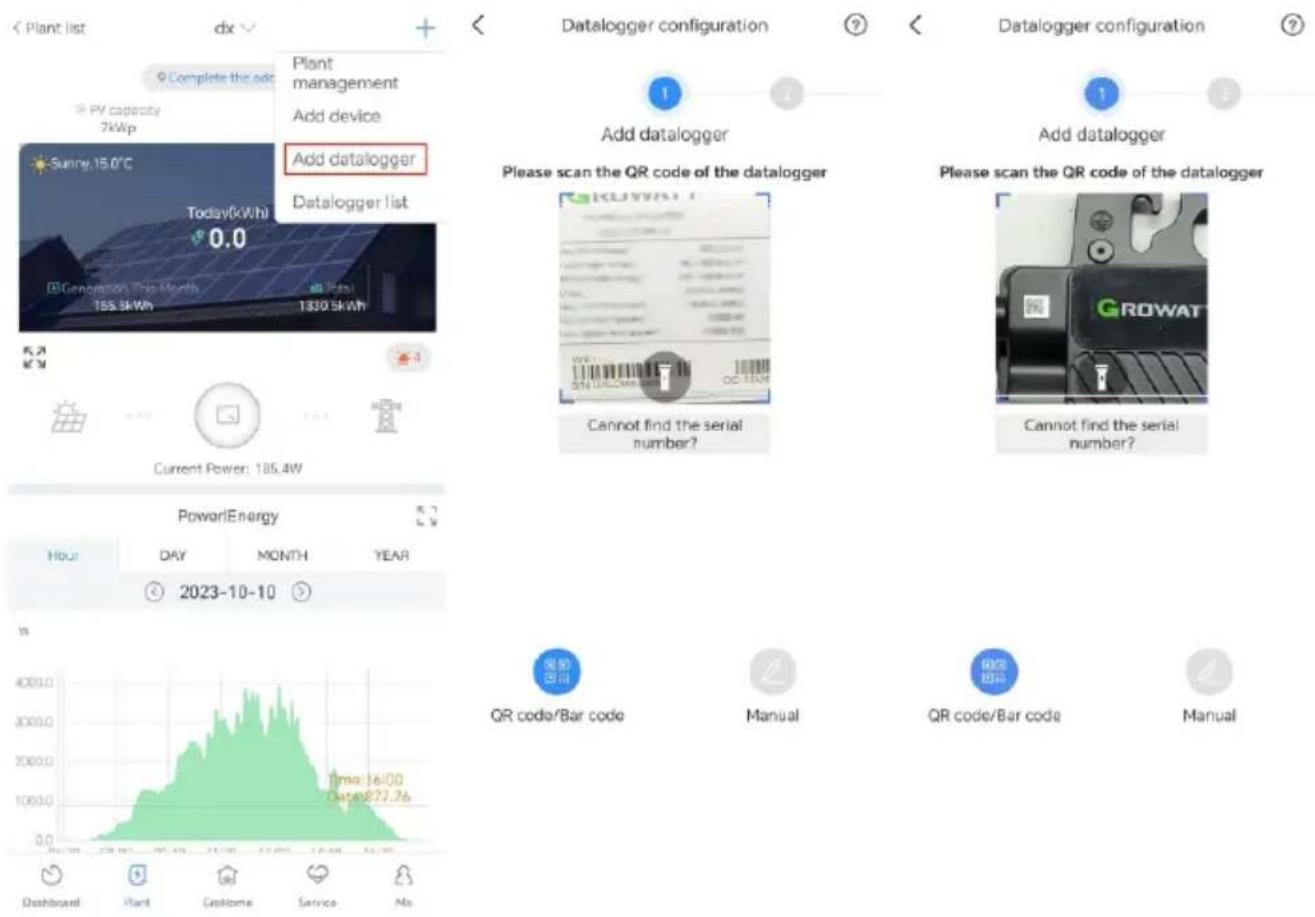
a. Select the target plant, then tap "Add datalogger".
b. Scan the barcode at the bottom-left corner of the nameplate or the QR code on the front side of the equipment. Alternatively, you can select "Manual", enter the SN and verification code of the datalogger, then tap "Confirm".
c. In Bluetooth mode, the APP will identify and connect to the datalogger automatically.
d. Skip this step if the datalogger has been successfully connected. If not, please repeat step b.
e. Enter the WiFi name and password, then click "Configure immediately".
f. Wait for the datalogger to connect to the router and server.
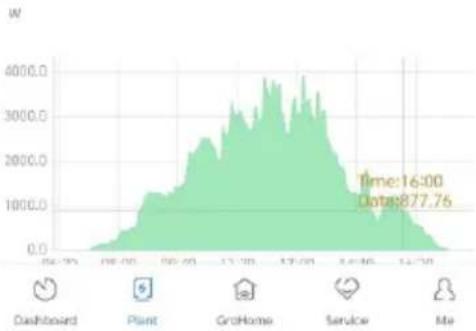
g. Once the configuration succeeds, you can check the operating status of the datalogger and the Microinverter on the "Plant" page.
text_image
< Plant list dx Complete the ado PV capacity 7kWp Sunny 15.0°C Today(kWh) 0.0 Generation (This Month) 155.5kWh Add datalogger Datalogger list Current Power: 185.4W Datalogger configuration Add datalogger Please scan the QR code of the datalogger GROWAT Cannot find the serial number? Add datalogger Please scan the QR code of the datalogger GROWAT Cannot find the serial number? PowerEnergy Hour DAY MONTH YEAR 2023-10-10 W 4000.0 3000.0 2000.0 1000.0 0.0 Dashboard Plant Customs Service No QRS QR code/Bar code Manual QR code/Bar code Manual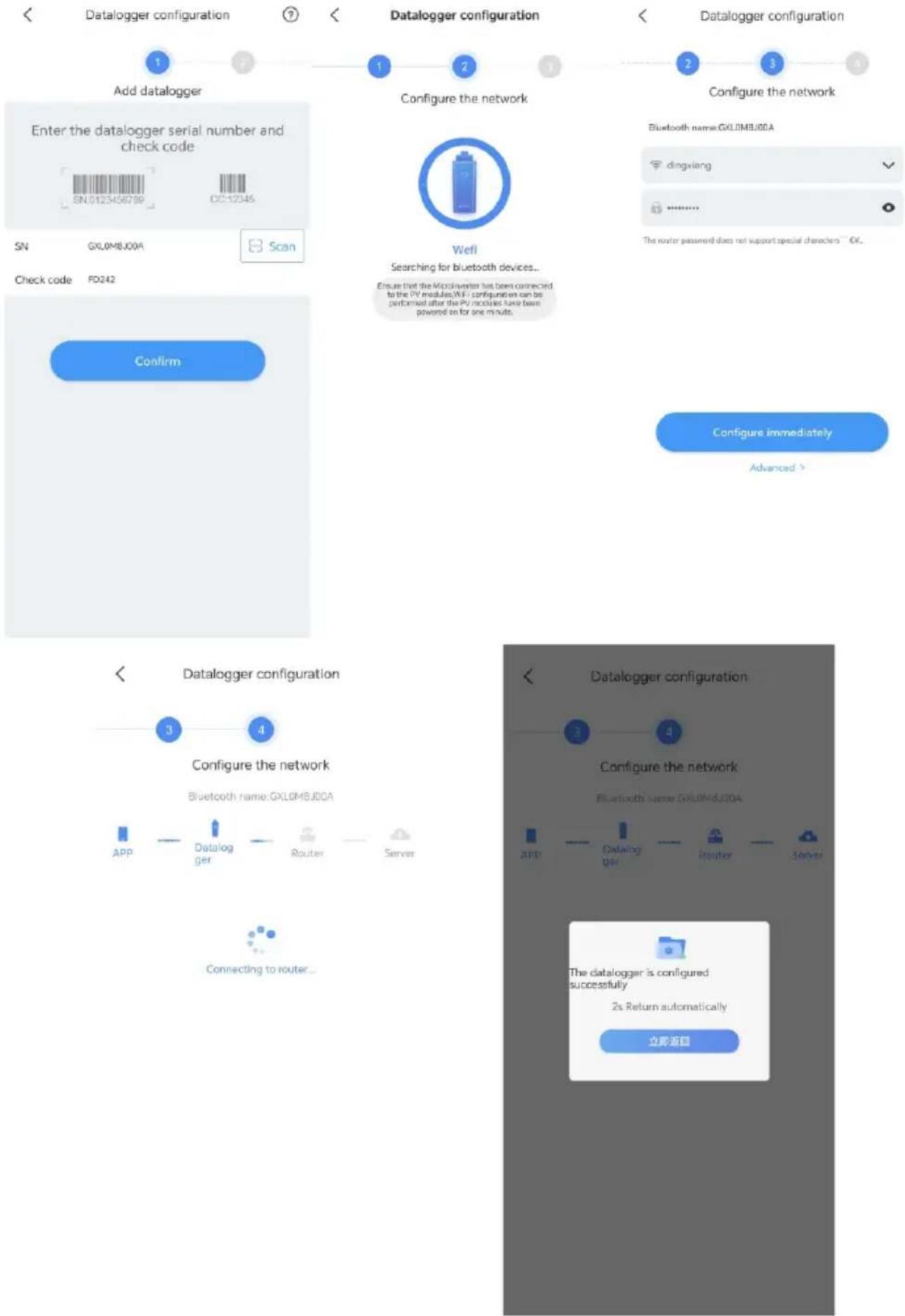
flowchart
graph TD
    A["Add datalogger"] --> B["Enter the datalogger serial number and check code"]
    B --> C["SN: 0123456789"]
    B --> D["C2-12345"]
    A --> E["Configure the network"]
    E --> F["Check code: FXL0MBJ00A"]
    E --> G["Configure the network"]
    G --> H[" wells"]
    H --> I["Searching for bluetooth devices..."]
    I --> J["Ensure that the Microcontroller has been connected to the PV modules/IN-FI configuration can be performed after the PV modules have been powered on for one minute."]
    J --> K["Configure immediately"]
    K --> L["Advanced >"]
    M["Confirm"] --> N["Data logger configuration"]
    N --> O["Configure the network"]
    O --> P["Bluetooth name: FXL0MBJ00A"]
    P --> Q["APP"]
    P --> R["Datalogger"]
    P --> S["Router"]
    P --> T["Server"]
    N --> U["Connecting to router..."]
    V["Data logger configuration"] --> W["Configure the network"]
    W --> X["Bluetooth name: FXL0MBJ00A"]
    X --> Y["APP"]
    X --> Z["Datalogger"]
    X --> AA["Router"]
    X --> AB["Server"]
    W --> AC["The datalogger is configured successfully\n2s Return automatically\n立即返回"]
Step 5. Check the status of the datalogger and the Microinverter
ShinePhone
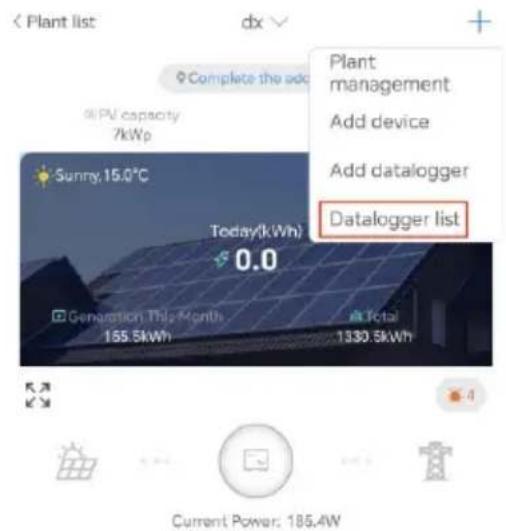
a. Click "Datalogger list" to view the status of the datalogger.
b. You can edit, configure, or delete the datalogger.
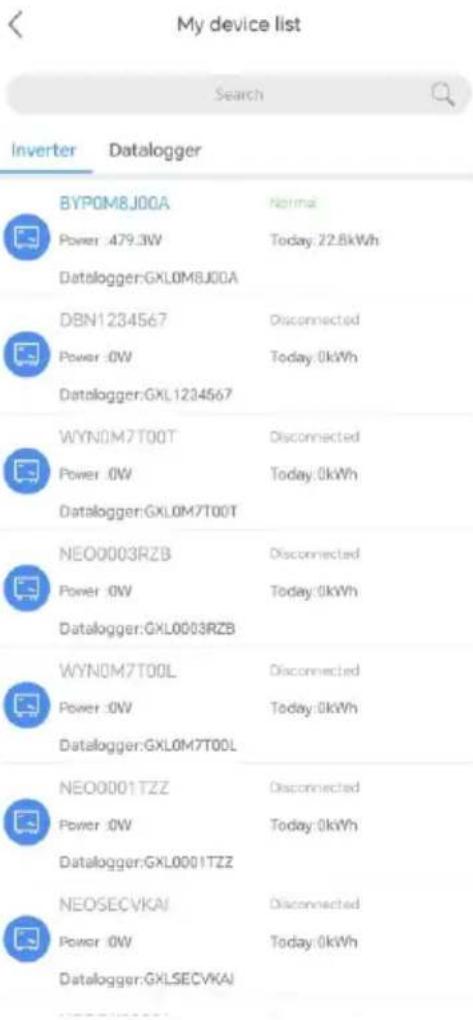
c. Tap "My device list", then select the target inverter to view its detailed running status.
text_image
Plant list dx Complete the add PV capacity 7kWp Sunny.15.0°C Today(kWh) 0.0 Generation This Month 155.5kWh Total 1330.5kWh Plant management Add device Add datalogger Datalogger list Current Power: 185.4W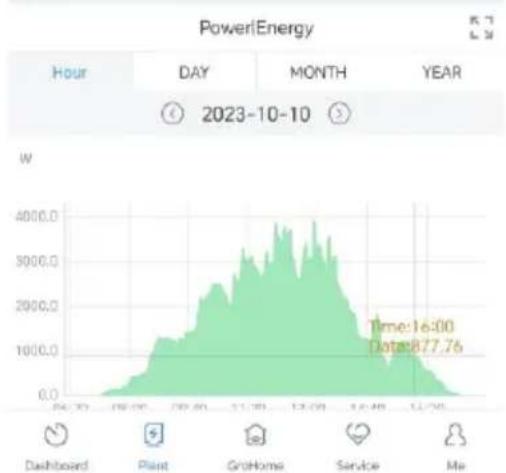
area
PowerEnergy | Hour | Day | Month | Year | |---|---|---|---| | 06:30 | 0.0 | 0.0 | 2023-10-10 | | 07:00 | 500.0 | 0.0 | 2023-10-10 | | 07:30 | 1500.0 | 0.0 | 2023-10-10 | | 08:00 | 2500.0 | 0.0 | 2023-10-10 | | 08:30 | 3500.0 | 0.0 | 2023-10-10 | | 09:00 | 4500.0 | 0.0 | 2023-10-10 | | 09:30 | 5500.0 | 0.0 | 2023-10-10 | | 10:00 | 6500.0 | 0.0 | 2023-10-10 | | 10:30 | 7500.0 | 0.0 | 2023-10-10 | | 11:00 | 8500.0 | 0.0 | 2023-10-10 | | 11:30 | 9500.0 | 0.0 | 2023-10-10 | | 12:00 | 8500.0 | 0.0 | 2023-10-10 | | 12:30 | 7500.0 | 0.0 | 2023-10-10 | | 13:00 | 6500.0 | 0.0 | 2023-10-10 | | 13:30 | 5500.0 | 0.0 | 2023-10-10 | | 14:00 | 4500.0 | 0.0 | 2023-10-10 | | 14:30 | 3500.0 | 0.0 | 2023-10-10 | | 15:00 | 2500.0 | 5.6776 | Time: 16:00 | | 15:30 | 1500.0 | -4.6776 | Date: August 7, 2, May, June, July, August, September, October, November, December, January, December, March, April, May, June, July, August, September, October, November, December, January, December, March, April, May, June, July, August, September, October, November, December, January, December, March, April, May, June, July, August, September, October, November, December, January, December, March, April, May, June, July, August, September, October, November, December, January, December, March, April, May, July, August, September, October, November, December, January, December, March, April, May, July, August, September, October, November, December, January, December, March, April, May, July, August, September, October, November, December, January, December, March, April, May, July, August, September, October, November, December, January, December, March, April, May, July, August, September, October, November, February, December, March, April, May, July, August, September, October, November, December, January, December, March, April, May, July, August, September, October, November, December, January, December, March, April, May, July, August, September, October, November, December, January, December, March, April, May, July, August, September, October, November, December, January, December, March, April, May, July, Aug w Dashboard Plant GroHome Service Me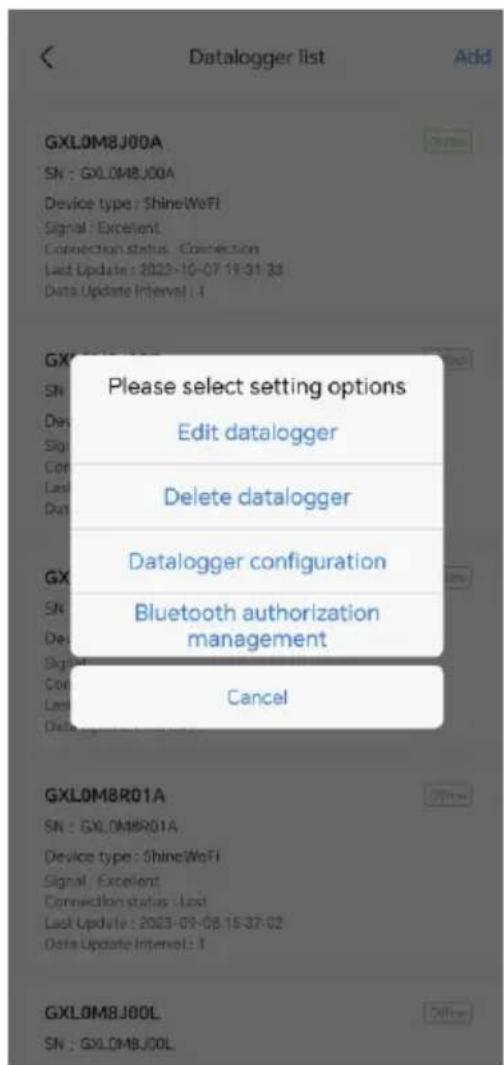
text_image
Datalogger list Add GXL0M8J00A SN : GXL0M8J00A Device type : ShineWeFi Signal : Excellent Connection status : Connection Last Update : 2022-10-07 19:31:33 Data Update Interval : 1 Please select setting options Edit datalogger Delete datalogger Datalogger configuration Bluetooth authorization management Cancel GXLOM8R01A SN : GXL0M8R01A Device type : ShineWeFi Signal : Excellent Connection status : Last Last Update : 2023-09-08 15:37:02 Data Update Interval : 1 GXLOM8J00L SN : GXL0M8J00L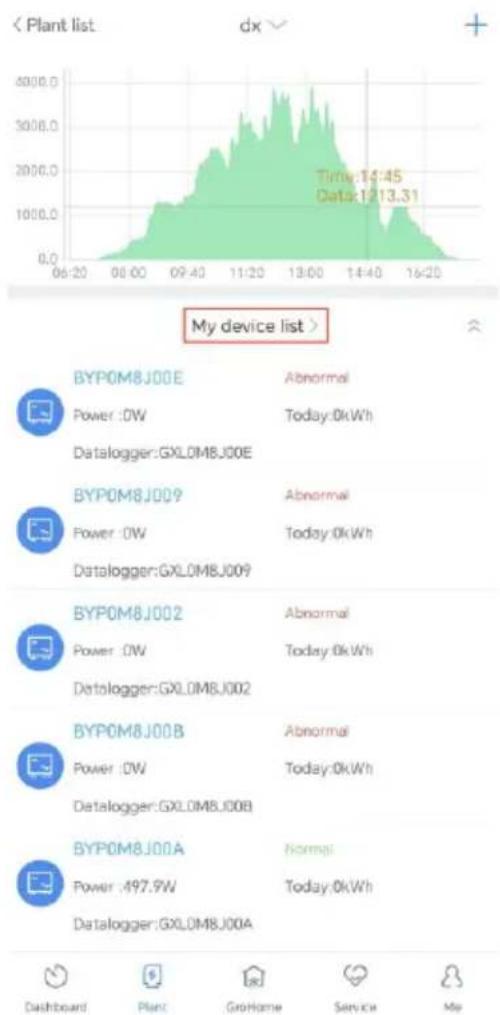
line
| Device | Power (kW) | Today (kWh) | |--------|------------|-------------| | BYPOM8J00E | - | Abnormal | | Power :OW | - | Today:0kWh | | Datalogger:GXL0MBJ00E | - | - | | BYPOM8J009 | - | Abnormal | | Power :OW | - | Today:0kWh | | Datalogger:GXL0MBJ009 | - | - | | BYPOM8J002 | - | Abnormal | | Power :OW | - | Today:0kWh | | Datalogger:GXL0MBJ002 | - | - | | BYPOM8J00B | - | Abnormal | | Power :OW | - | Today:0kWh | | Datalogger:GXL0MBJ00B | - | - | | BYPOM8J00A | - | Normal | | Power :497.9W | - | Today:0kWh | | Datalogger:GXL0MBJ00A | - | - | Time: 14:45, Data: 12:13.31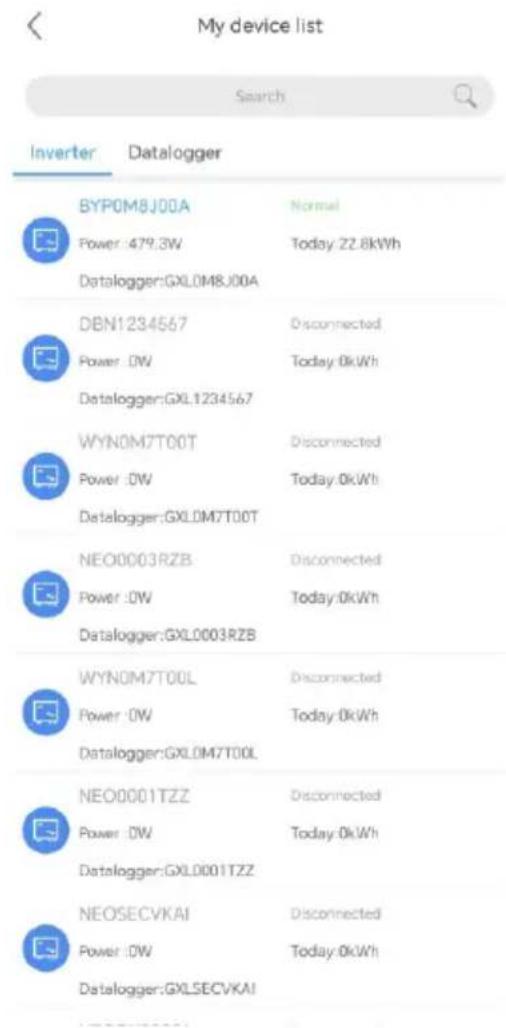
text_image
My device list Search Inverter Datalogger BYP0M8J00A Normal Power:479.3W Today:22.6kWh Datalogger:GXL0M8J00A DBN1234567 Disconnected Power:OW Today:0kWh Datalogger:GXL1234567 WYN0M7T00T Disconnected Power:OW Today:0kWh Datalogger:GXL0M7T00T NEO0003RZB Disconnected Power:OW Today:0kWh Datalogger:GXL0003RZB WYN0M7T00L Disconnected Power:OW Today:0kWh Datalogger:GXL0M7T00L NEO0001TZZ Disconnected Power:OW Today:0kWh Datalogger:GXL0001TZZ NEOSECVKAI Disconnected Power:OW Today:0kWh Datalogger:GXLSECVKAIWeb: https://server.growatt.com/?lang=en
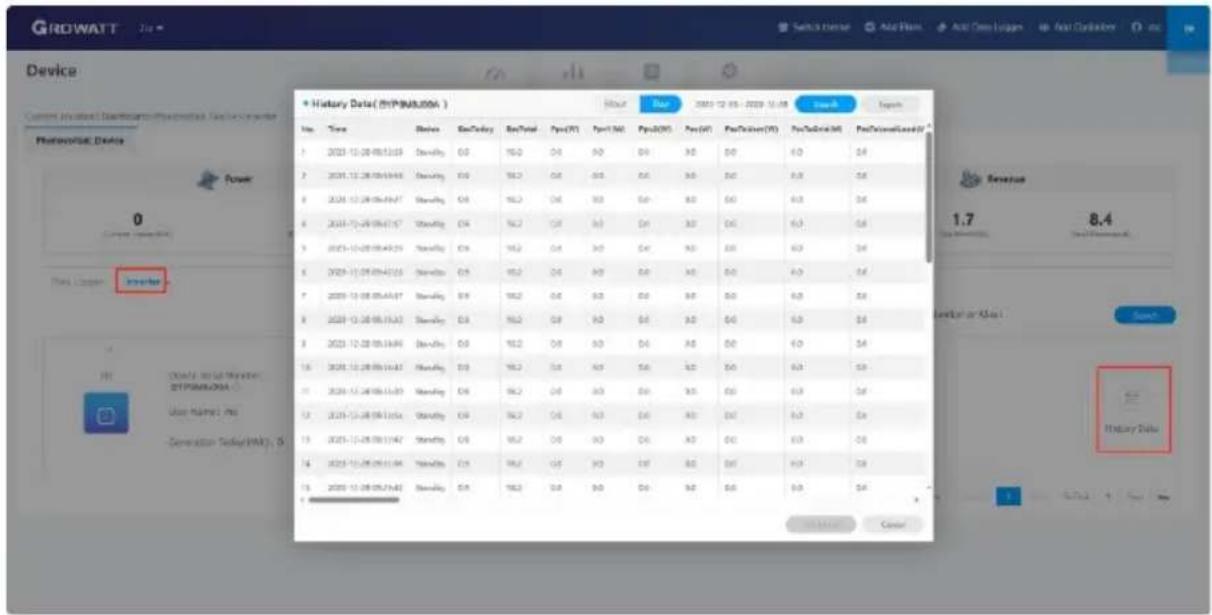
a. You can log into the Server website using the same user name and password registered on the ShinePhone APP. After selecting your target plant, you can have access to the detailed information.
b. Click "Inverter" to view the running status and historical data of the Microinverter.
text_image
GROWATT Device Current Product: Diagnostics-Pharmaceuticals-Capacitor Pharmaceutical Device Power 0 Current Product This Carrier Investor 1.7 8.4 Level of or Class Search History Data + History Data (HYPN/A) Hour Hour 2005-12-05 - 2009-12-08 Search Export No. Time Review Buy/Day Buy/Total Pvc(%) Pvc(N) Pvc(O) Pvc(F) Pvc(K) Pvc(L) Pvc(M) Pvc(N) Pvc(N) Pvc(N) 1 2023-12-28 05:13:09 Show/Day 0.0 16.0 D4 A0 D4 A0 D4 A0 D4 A0 D4 A0 2 2024-12-28 05:14:08 Show/Day 0.0 16.2 D4 A0 D4 A0 D4 A0 D4 A0 D4 A0 3 2024-12-28 05:14:07 Show/Day 0.0 16.2 D4 A0 D4 A0 D4 A0 D4 A0 D4 A0 4 2024-12-28 05:14:07 Show/Day 0.0 16.2 D4 A0 D4 A0 D4 A0 D4 A0 D4 5 2023-12-28 05:15:29 Show/Day 0.0 16.2 D4 A0 D4 A0 D4 A0 D4 A0 D4 A0 6 2023-12-28 05:15:28 Show/Day 0.0 16.2 D4 A0 D4 A0 D4 A0 D4 A0 D4 7 2023-12-28 05:15:27 Show/Day 0.0 16.2 D4 A0 D4 A0 D4 A0 D4 A0 8 2023-12-28 05:15:23 Show/Day 0.0 16.2 D4 A0 D4 A0 D4 A0 D4 A0 9 2023-12-28 05:15:33 Show/Day 0.0 16.2 D4 A0 D4 A0 D4 A0 D4 A0 10 2023-12-28 05:16:36 Show/Day 0.0 16.2 D4 A0 D4 A0 D4 A0 D4 A0 11 2023-12-28 05:16:33 Show/Day 0.0 16.2 D4 A0 D4 A0 D4 A0 D4 A0 12 2023-12-28 05:16:36 Show/Day 0.0 16.2 D4 A0 D4 A0 D4 A0 D4 A0 13 2023-12-28 05:17:42 Show/Day 0.0 16.2 D4 A0 D4 A0 D4 A0 D4 A0 14 2023-12-28 05:17:38 Show/Day 0.0 16.2 D4 A5 D4 A5 D4 A5 D4 A5 15 2023-12-28 05:18:33 Show/Day 0.0 16.2 D4 A5 D4 A5 D4 A5 D4 Source: Cenov2.3 Check the installation (For qualified installer only)
| No. | Check items | Y/N | |
| 1 | DC | All DC connectors are connected securely | |
| 2 | AC | The AC cable is securely connected with the AC adapter cable | |
| 3 | The ground wire is properly installed (optional) | ||
| 4 | Monitor | The monitoring system is working properly |
3 Troubleshooting
When an exception occurs, you can observe the LED indicator to check the device status, or run the ShinePhone APP and go to the Log page to view detailed fault information.
3.1 LED Indicator Status
The LED indicator flashes at start-up. Steady green indicates a successful startup.
| System status | Indicator status | Description |
| Waiting | Flashing green (on for 1s and off for 5s) | Requirements are not met: PV voltage is not within the start-up range; phase locking fails; grid voltage or frequency is not within the permissible range |
| Countdown for grid-connection | Flashing green (on for 1s and off for 1s) | When the requirements are met, the microinverter will count down to connect to the grid |
| Grid-tied | Steady green | Successfully connected to the grid, the router and two PV modules |
| Flashing green (on for 5s and off for 5s) | Successfully connected to the grid, but failed to connect to the router | |
| Fault | Steady red | Hardware damaged |
| Flashing red (on for 1s and off for 1s) | Recoverable fault caused by the field environment | |
| Programming | Flashing orange (on for 1s and off for 1s) | Update firmware online |
The microinverter is powered by PV modules. If the LED indicator is off, please check the DC side connection. If the connection is correct and the PV voltage is higher than 16V, contact your distributor or Growatt customer service.
3.2 System faults
System faults generally occur due to an exception in the system rather than the microinverter. Please check the items as instructed below before replacing the microinverter.
| Event code | Description | Suggestion |
| PV VoltageHigh Error:202(1~2) | The PV input voltage exceeds the upper threshold.202(1): PV1 Voltage High202(2): PV2 Voltage High | 1. Check if the voltage of each PV module is below 60V with a multimerter.2. If the DC input voltage is within the permissible range and the error message persists, please contact Growatt support. |
| PV IsolationLowWarning:223 | Insulation problem | 1. Check if the microinverter is properly grounded.2. Check the insulation of PV cables.3. Check the impedance between PV (+) / PV (-) and ground (must be more than 2KΩ).If the values mentioned above are within the permissible range and the warning message persists, please contact your dealer or Growatt customer service. |
| AC V OutrangeError:300(1~7) | 300(1~3): Grid under-voltage300(4~6): Grid over-voltage300(7): 10 min value grid overvoltage | 1. Check the AC wiring, especially the neutral and ground wires.2. Check if the grid voltage is within the permissible range.3. Restart the microinverter. If problem persists, please contact your dealer or Growatt customer service. |
| No AC connection Error: 302 | No AC connection | Check the AC wiring. |
| AC F Outrange Error: 304 | 304(1~2,7): Grid under-frequency304(3~4,6): Grid over-frequency304(5): ROCOF Fault | 1. Check the AC wiring, especially the neutral and ground wire.2. Check if the grid frequency is within the permissible range.3. Restart the microinverter. If problem persists, please contact your dealer or Growatt customer service. |
3.3 Microinverter fault
| Event code | Description | Suggestion |
| Error: 408 | Over or Under Temperature | If the ambient temperature of microinverter is lower than 65°C, restart the microinverter. If the error message persists, please contact your dealer or Growatt customer service. |
| Error: 409 | 409(1): BUS instantaneous voltage is below 250V409(2): BUS instantaneous voltage is over 500V | 1. If the alarm occurs occasionally and the microinverter still work properly, no special treatment is required.2. If the error occurs frequently and cannot be recovered, please contact your dealer or Growatt customer service. |
| Error: 416 | Device failure | Please contact your dealer or Growatt customer service. |
Technical Data 4
| Specifications\Model | NEO 600M-X | NEO 800M-X | NEO 1000M-X |
| Input data (DC) | |||
| Nominal voltage | 16-60V | ||
| MPP voltage range | 28-60V | ||
| Max. input current per MPP tracker | 18A | ||
| Max. short-circuit current per MPP tracker | 23A | ||
| Output data (AC) | |||
| AC nominal power | 600W | 800W | 1000W |
| Max. AC apparent power | 600VA | 800VA | 1000VA |
| Nominal AC voltage* | 230V | ||
| AC grid frequency/range* | 50Hz/60Hz | ||
| Rated output current | 2.61A | 3.48A | 4.35A |
| Power factor(@nominal power) | 0.8 leading ... 0.8 lagging | ||
| General data | |||
| Dimensions (W/H/D) in mm | 270mm×252mm×41.5mm | ||
| Weight | 3.1kg | ||
| Operating temperature range | -40 °C ... +65°C | ||
| Protection degree | Ip67 (NEMA 6) | ||
| Wireless parameters | |||
| Wireless standard | 802.11 b/g/n | ||
| Wireless frequency | 2.4GHz | ||
| Maximum output power | +20dBm | ||
| Encryption scheme | AES | ||
| Certificates and approvals | |||
| Grid regulation | N4105; EN50549; IEC61727, IEC62116; C10, C11; G98 | ||
| Safety | CE(EMC;LVD;RED) | ||
| Place of production | Made in China | ||
All specifications are subject to change without notice.
* The AC Voltage and Frequency Range may vary depending on specific country grid standard.
5 Safety
 | Danger to life due to lethal voltages!High voltages which may cause electric shocks are present in the conductive parts of the microinverter. Prior to performing any operations on the microinverter, disconnect the device from all power sources. |
 | Danger to life due to fire or explosion➢ Do not install or use in potentially flammable and explosive atmospheres.➢ Do not allow terminator to come in contact with open flame. |
 | Risk of burns due to hot enclosure parts➢ The microinverter generates heat when it is in operation. Do not touch the enclosure of the device; otherwise, it might result in burns.➢ The microinverter should be protected against accidental contact. |
 | Electromagnetic Radiation➢ Never install the microinverter near electronic sensitive devices, such as the radio, the telephone and the television.➢ Keep a safe distance of at least 20 cm from the microinverter at all times.Growatt assumes no responsibility for compliance to EMC regulations for the entire system |
 | Do not throw awayDo not dispose of faulty microinverters or accessories together with household waste. Please comply with the disposal regulations for electronic waste which apply at the installation site. |
 | Do not disassemble the microinverter by yourself➢ Do not disassemble the microinverter by yourself to avoid device damage.➢ If you encounter any issue about the microinverter that cannot be solved, please contact Growatt supplier. |
Declaration of conformity 6
This product complies with the following regulations and requirements:
Electromagnetic Compatibility Directive:2014/30/EU (EMC)
Radio equipment instruction:2014/53/EU(RED)
Electrical Equipment (Safety) Regulations 2016:2014/35/EU(LVD)
Restriction of Hazardous Substances Directive: 2011/65/EU(EU) and 2015/863 (RoHS)
You can download the Declaration of Conformity at
https://en.growatt.com/upload/file/EU_Conformity_Declaration_NEO_600_1000M_X.pdf.
Service and Contact 7
Find contact info for worldwide after-sales service at
https://en.growatt.com/support/contact.
Shenzhen Growatt New Energy Co., Ltd.
4-13/F, Building A, Sino-German (Europe) Industrial Park, Hangcheng Blvd, Bao'an District, Shenzhen, China
T +86 755 2747 1942
E service@ginverter.com
w en.growatt.com
1 Übersicht
text_image
Technical diagram of a power supply or control unit with labeled components and wiring connectionstext_image
Click GPROTTtext_image
QR code with a blue circular logo in the center, likely linking to a digital resource or website.[Android&iOS]
Schritt 2. Account registrieren
text_image
GROWATT Demo >> Please select a default or default Germany 4 credentials Enter username Password Enter password Remember password Sign in Register Target password Checkbox Configure Wi-Fi datalogger Social Debugging f t in click in smart and privacy I have read and agreeShine Smart Services. User AgreementandShine Smart Services Privacy Policy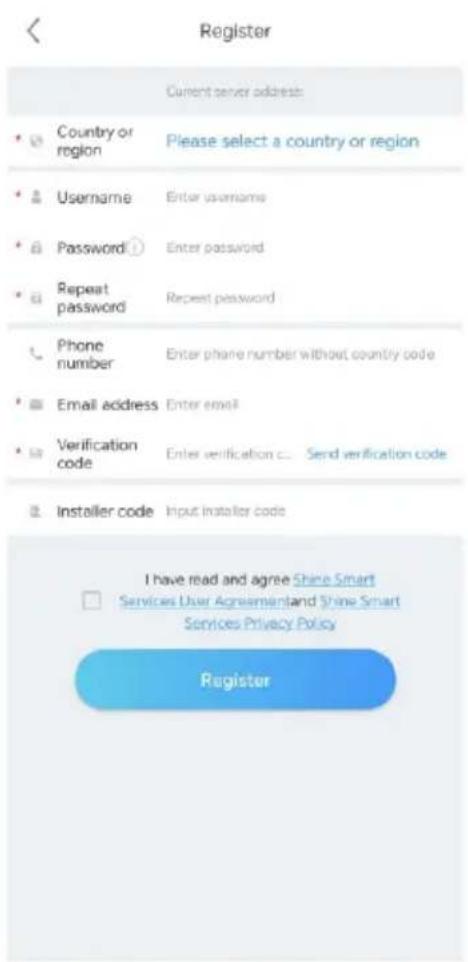
text_image
Register Current server address: • Country or region Please select a country or region • Username Enter username • Password: Enter password • Repeat password Repeat password • Phone number Enter phone number without country code • Email address Enter email • Verification code Enter verification c... Send verification code • Installer code Input installer code I have read and agree Shine Smart □ Services User Agreementand Shine Smart Services Privacy Policy Registertext_image
Plant list Parameters Search Add Plant All (21) Online (3) Offline (15) Abnormal (3) Plant name Current Power PV capacity Daily Power Gt dingxiang1 Current Power:0kW Installation date 2023-10-02 PV capacity 10kWp Daily Power Generation 0.0kWh dingxiang2 Current Power:0kW Installation date 2023-10-05 PV capacity 10kWp Daily Power Generation 0.0kWh cc Current Power:0kW Installation date 2023-10-08 PV capacity 10kWp Daily Power Generation 0.0kWh dingxiang3 Current Power:0kW Installation date 2023-10-09 PV capacity 10kWp Daily Power Generation 0.0kWh Testing12345 Current Power:0kW Installation date 2023-10-10 Dashboard Plant GroHome Service Me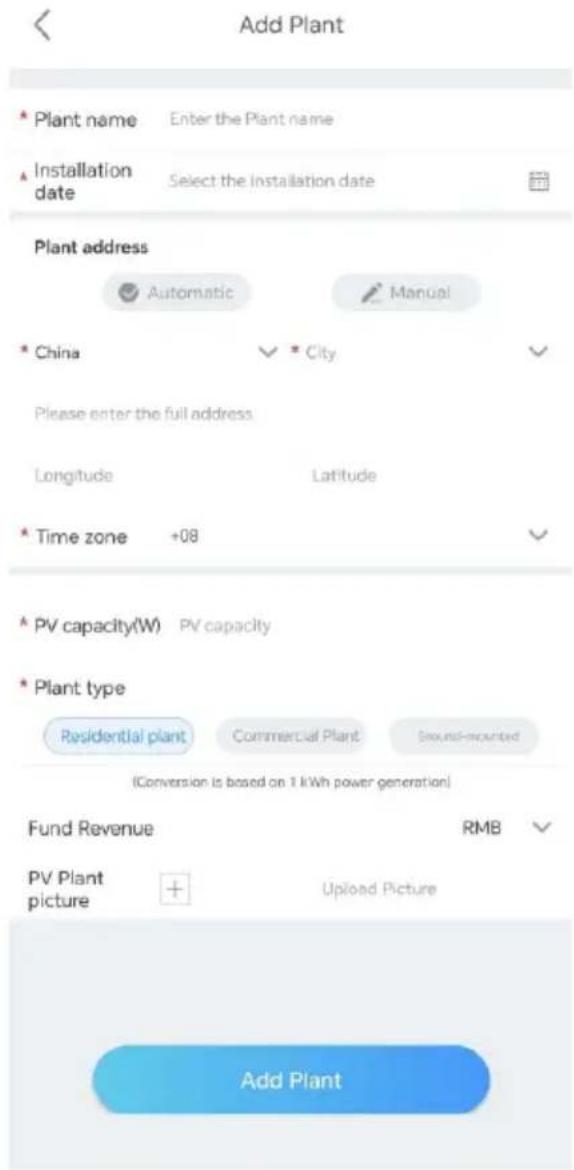
text_image
Add Plant * Plant name Enter the Plant name * Installation date Select the installation date Plant address Automatic Manual * China City Please enter the full address Longitude Latitude * Time zone +08 * PV capacity(W) PV capacity * Plant type Residential plant Commercial Plant Sound-mounted (Conversion is based on 1 kWh power generation) Fund Revenue RMB PV Plant picture + Upload Picture Add Plantflowchart
graph TD
    A["Add datalogger"] --> B["Enter the datalogger serial number and check code"]
    B --> C["SN: 0123456789"]
    B --> D["C2-12345"]
    C --> E["GXLOMBJ00A"]
    D --> F["Scan"]
    G["Configure the network"] --> H[" wells"]
    H --> I["Searching for bluetooth devices..."]
    I --> J["Ensure that the Microcontroller has been connected to the PV modules/IN-FI configuration can be performed after the PV modules have been powered on for one minute."]
    J --> K["Configure immediately"]
    K --> L["Advanced >"]
    M["Confirm"] --> N["Data logger configuration"]
    N --> O["Configure the network"]
    O --> P["Bluetooth name:GXL0MBJ00A"]
    P --> Q["APP"]
    P --> R["Datalogger"]
    P --> S["Router"]
    P --> T["Server"]
    U["Connecting to router..."] --> V["Data logger configuration"]
    V --> W["Configure the network"]
    W --> X["Bluetooth name:GXL0MBJ00A"]
    X --> Y["APP"]
    X --> Z["Datalogger"]
    X --> AA["Router"]
    X --> AB["Server"]
    AC["The datalogger is configured successfully"] --> AD["2s Return automatically"]
    AD --> AE["立即返回"]
text_image
Plant list dx Complete the ado PV capacity 7kWp Sunny, 15.0°C Today(kWh) 0.0 Generation This Month 155.5kWh Total 1330.5kWh Plant management Add device Add datalogger Datalogger list Current Power: 185.4W PowerEnergy Hour DAY MONTH YEAR 2023-10-10 W Time: 16:00 Date: 877.76 Dashboard Plant GroHome Service Me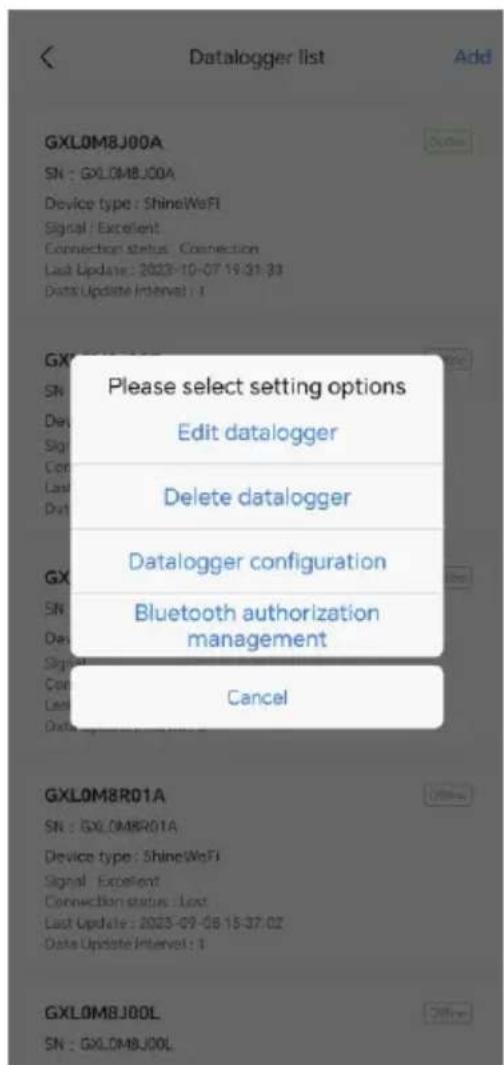
text_image
Datalogger list Add GXL0M8J00A SN : GXL0M8J00A Device type : ShineWeFi Signal / Excellent Connection status: Connection Last Update: 2023-10-07 19:31:33 Data Update Interval: 1 Please select setting options Edit datalogger Delete datalogger Datalogger configuration Bluetooth authorization management Cancel GXLOM8R01A SN : GXL0M8R01A Device type : ShineWeFi Signal / Excellent Connection status: Last Last Update: 2023-09-08 15:37:02 Data Update Interval: 1 GXLOM8J00L SN : GXL0M8J00L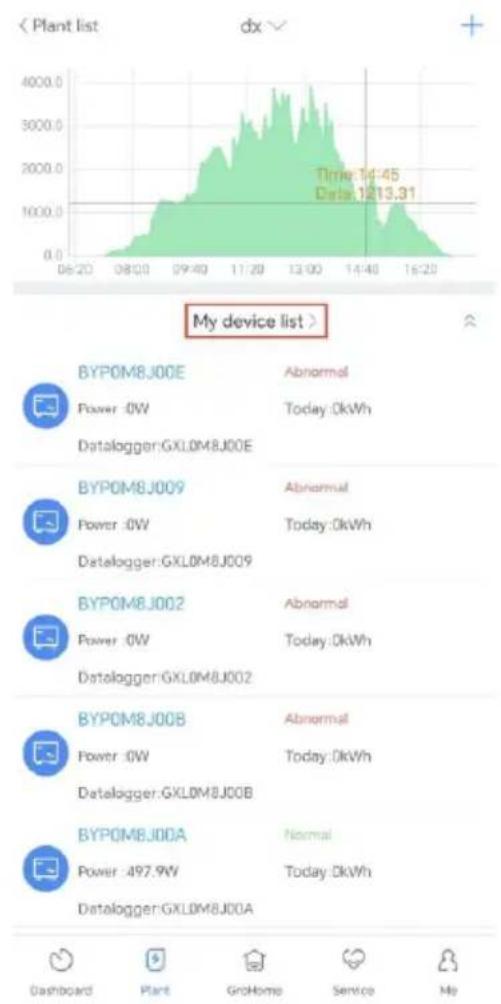
line
| Time | Power (kWh) | Today (kWh) | | -------- | ----------- | ----------- | | 14:45 | - | - | | 12:13.31 | - | - |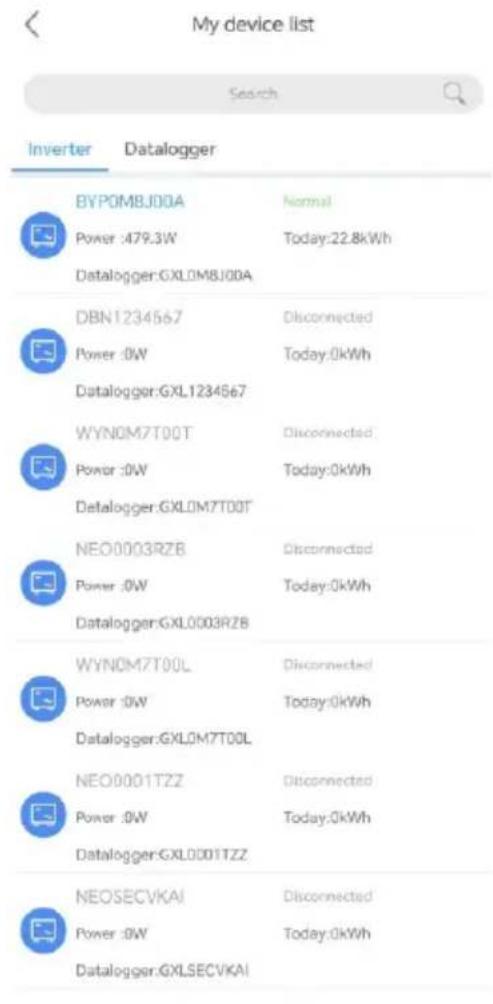
text_image
My device list Search Inverter Datalogger BYPOMBJ00A Normal Power :479.3W Today:22.8kWh Datalogger:GXL0M8J00A DBN1234567 Disconnected Power :0W Today:0kWh Datalogger:GXL1234567 WYNOM7T00T Disconnected Power :0W Today:0kWh Datalogger:GXL0M7T00T NEO0003RZB Disconnected Power :0W Today:0kWh Datalogger:GXL0003RZB WYNOM7T00L Disconnected Power :0W Today:0kWh Datalogger:GXL0M7T00L NEO0001TZZ Disconnected Power :0W Today:0kWh Datalogger:GXL0001TZZ NEOSECVKAI Disconnected Power :0W Today:0kWh Datalogger:GXLSECVKAIWeb: https://server.growatt.com/?lang=en
text_image
GROWATT Device + History Data (2019/08/03) Jan Sep Dec Dec/Day RevTotal Pvs(PT) Pvs(NG) Pvs(NGV) Pvs(N) Pvs(Diver)(N) Pvs(Diver)(N) Revenue 1.7 8.4 Current Inventory 2019/08/03 User Rating / No Generation Today/WAY; 0 History Datahttps://en.growatt.com/upload/file/EU_Conformity_Declaration_NEO_600_1000
4-13/F, Building A, Sino-German (Europe) Industrial Park, Hangcheng Blvd, Bao'an District, Shenzhen, China
T +86 755 2747 1942
E service@ginverter.com
W en.growatt.com
1 Visión General
text_image
Technical diagram showing two mechanical components with labeled parts including a motor and a mounting torque indicator.text_image
QR code with a blue circular logo in the center, likely linking to a digital resource or website.[Android&iOS]
text_image
GROWATT English Demo >> Please select a country or region Germany Username Enter username Password Enter password Remember password Sign in Forward password Register Checkbox Configure WiFi datelogger Local Debugging f t in I have read and agreeShine Smart Services User AgreementandShine Smart Services Privacy Policy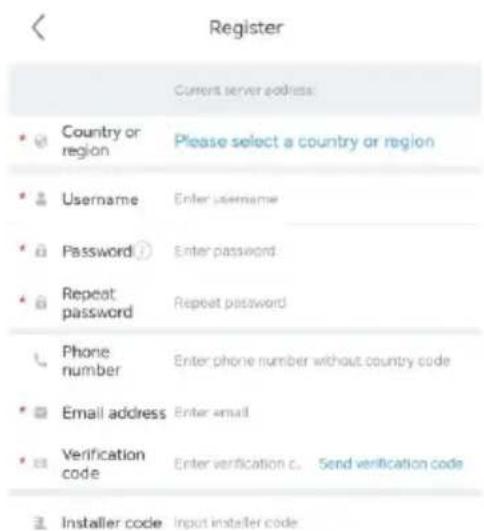
text_image
Register Current server address: Country or region Please select a country or region Username Enter username Password Enter password Repeat password Repeat password Phone number Enter phone number without country code Email address Enter email Verification code Enter verification c. Send verification code Installer code Input installer code
text_image
I have read and agree Shine Smart □ Services User Agreement and Shine Smart Services Privacy Policy Registertext_image
Plant list Parameters Search Add Plant All (21) Online (3) Offline (15) Abnormal (3) Plant name Current Power PV capacity Daily Power Gt dingxiang1 Current Power:0kW Installation date 2023-10-02 PV capacity 10kWp Daily Power Generation 0.0kWh dingxiang2 Current Power:0kW Installation date 2023-10-05 PV capacity 10kWp Daily Power Generation 0.0kWh cc Current Power:0kW Installation date 2023-10-08 PV capacity 10kWp Daily Power Generation 0.0kWh dingxiang3 Current Power:0kW Installation date 2023-10-09 PV capacity 10kWp Daily Power Generation 0.0kWh Testing12345 Current Power:0kW Installation date 2023-10-10 Dashboard Plant GroHome Service Me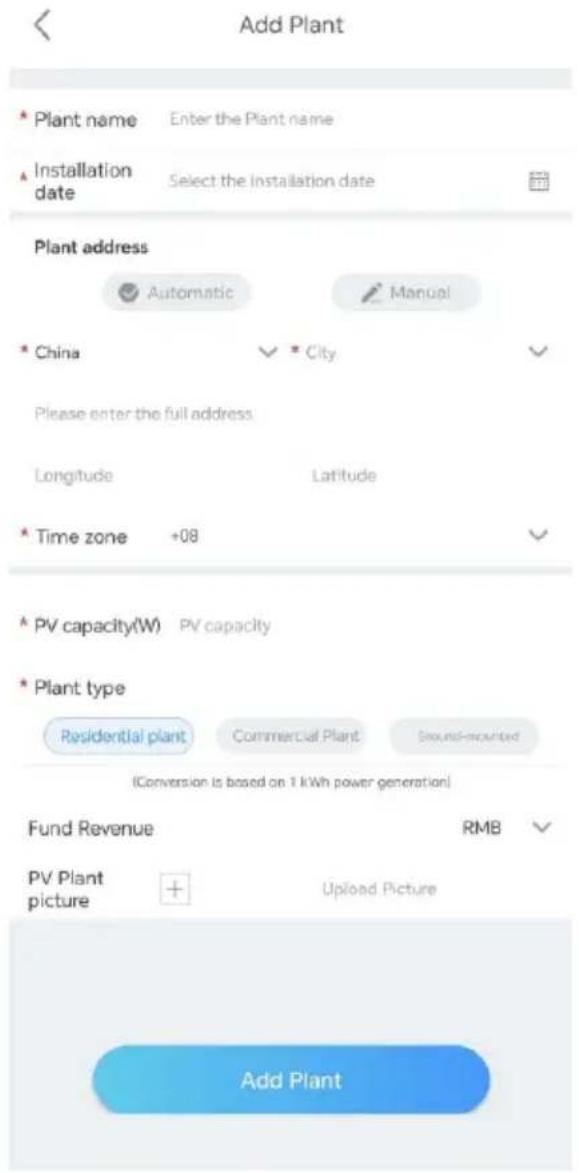
text_image
Add Plant * Plant name Enter the Plant name * Installation date Select the installation date Plant address Automatic Manual * China City Please enter the full address Longitude Latitude * Time zone +08 * PV capacity(W) PV capacity * Plant type Residential plant Commercial Plant Sound-mounted (Conversion is based on 1 kWh power generation) Fund Revenue RMB PV Plant picture + Upload Picture Add PlantPaso 4. Añadir un Microinversor
Requisito previo:
text_image
< Plant list dx Complete the add PV capacity 7kWp Sunny.15.0°C Today(4kWh) 0.0 DDGeneration TI & Month 15& 9kWh Total 1300 kWh Current Power: 185.4W Power/Energy Hour DAY MONTH YEAR 2023-10-10 W Dashboard Plant CareHome Service Me Datalogger configuration Add datalogger Please scan the QR code of the datalogger KOWAT Cannot find the serial number? Add datalogger Please scan the QR code of the datalogger GROWAT Cannot find the serial number? QR code/Bar code Manual QR code/Bar code Manual Español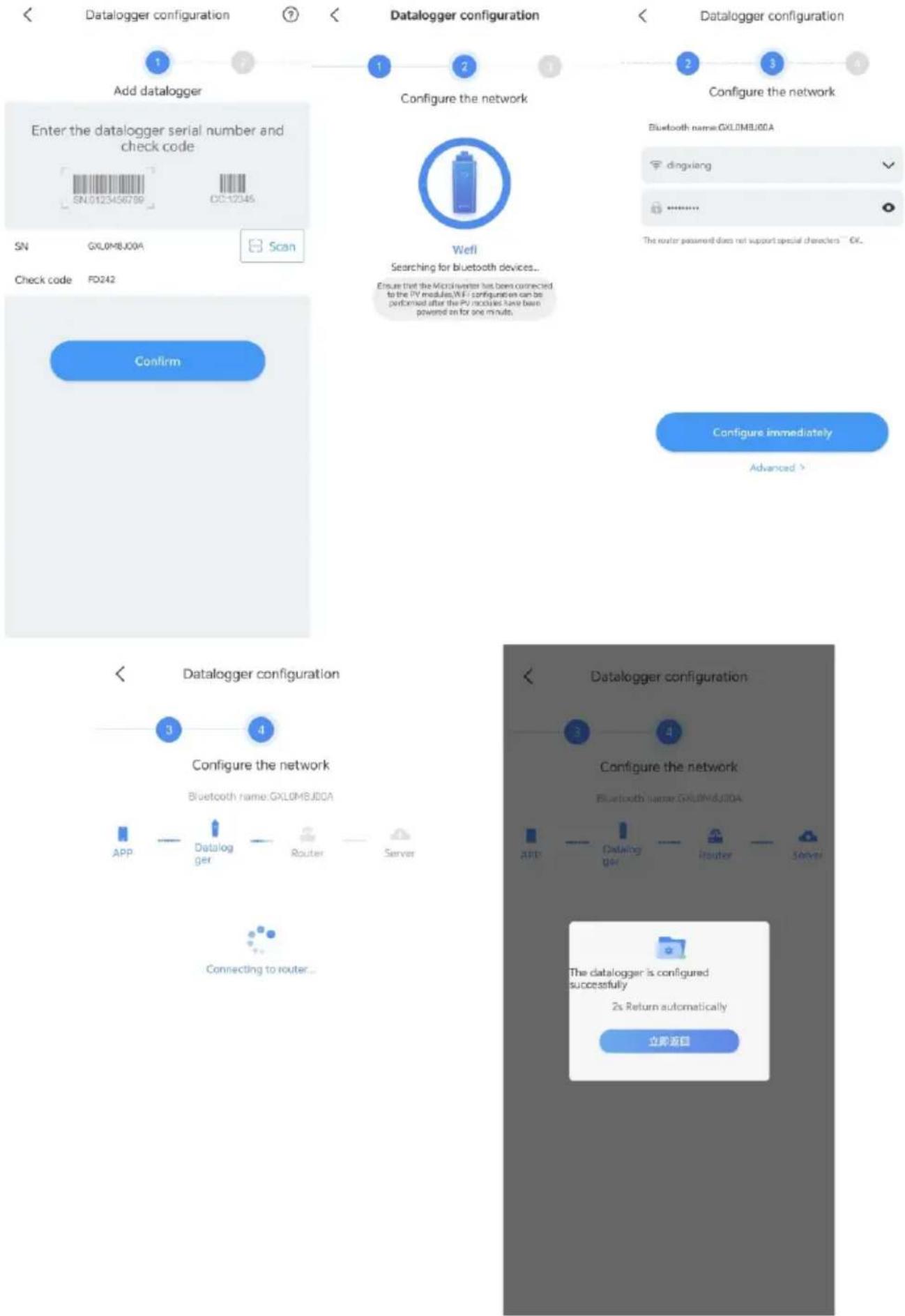
flowchart
graph TD
    A["Add datalogger"] --> B["Enter the datalogger serial number and check code"]
    B --> C["SN: 0123456789"]
    B --> D["C2-12345"]
    A --> E["Configure the network"]
    E --> F["Check code: FXL0MBJ00A"]
    E --> G["Configure the network"]
    G --> H[" wells"]
    H --> I["Searching for bluetooth devices..."]
    I --> J["Ensure that the Microcontroller has been connected to the PV modules/IN-FI configuration can be performed after the PV modules have been powered on for one minute."]
    J --> K["Configure immediately"]
    K --> L["Advanced >"]
    M["Confirm"] --> N["Data logger configuration"]
    N --> O["Configure the network"]
    O --> P["Bluetooth name: FXL0MBJ00A"]
    P --> Q["APP"]
    P --> R["Datalogger"]
    P --> S["Router"]
    P --> T["Server"]
    N --> U["Connecting to router..."]
    V["Data logger configuration"] --> W["Configure the network"]
    W --> X["Bluetooth name: FXL0MBJ00A"]
    X --> Y["APP"]
    X --> Z["Datalogger"]
    X --> AA["Router"]
    X --> AB["Server"]
    W --> AC["The datalogger is configured successfully\n2s Return automatically\n立即返回"]
natural_image
Four icons: solar panel, grid, power transmission tower, and a separate circular symbol (no text or labels)Current Power: 185.4W
| PowerlEnergy | |||
| Hour | DAY | MONTH | YEAR |
| ④ 2023-10-10 ⑤ | |||
line
| Time | Value | | -------- | ------- | | 16:00 | 877.76 |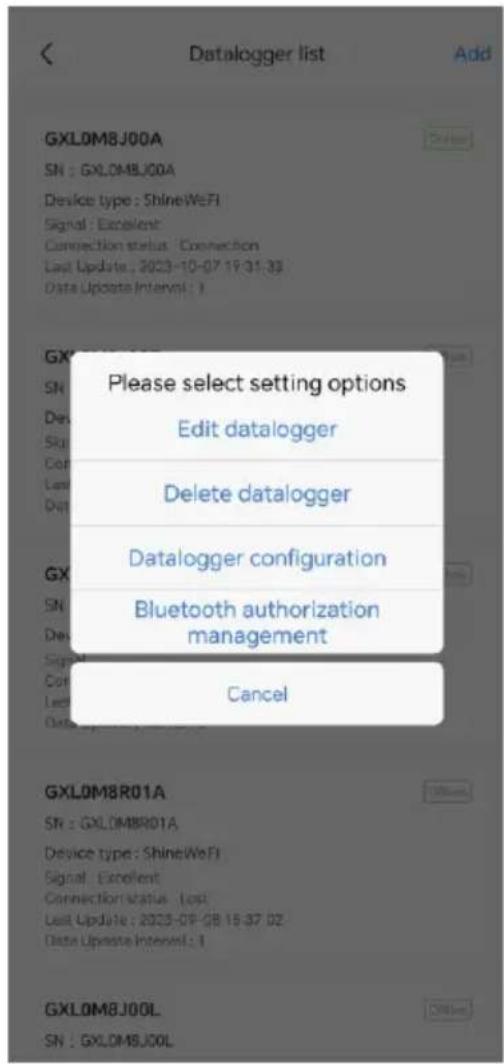
text_image
Datalogger list Add GXLDM8J00A SN : GXLDM8J00A Device type : ShineWiFi Signal : Excellent Connection status : Connection Last Update : 2023-10-07 19:31:33 Data Update Interval : 1 Please select setting options Edit datalogger Delete datalogger Datalogger configuration Bluetooth authorization management Cancel GXLDM8R01A SN : GXLDM8R01A Device type : ShineWiFi Signal : Excellent Connection status : Last Last Update : 2023-09-28 15:37:02 Data Update Interval : 1 GXLDM8J00L SN : GXLDM8J00L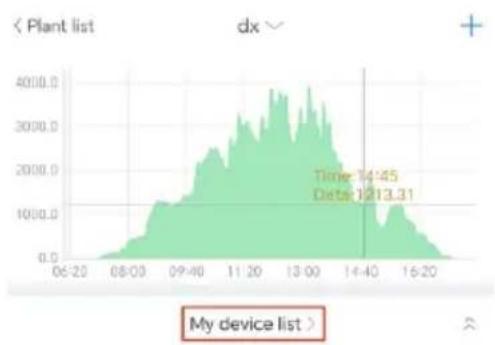
area
| Time | Value | | :--- | :--- | | 14:45 | 1213.31 | | 16:20 | Not labeled (implied by context) |
BYPOMBJ00E
Abnormal
Power :0W
Today: OkWh
Datalogger:GXL0M8J00E

ВУРОМВЬОО9
Abnormal
Power :0W
Today OkWh
Datalogger:GXLDM8J009

BYP0M6J002
Abnormal
Power:0W
Today: 0kWh
Datalogger:GXLDM8J002

BYPOM8J00B
Abnormal
Power:0W
Today OkWh
Datalogger:GXL0M8J00B

BYP0M8J00A
7420118
Power:497.9W
Today OkWh
Datalogger:GXL0M8J00A


text_image
My device list Search Inverter Datalogger BYP0M8J00A Normal Power :479.3W Today: 22.8kWh Datalogger:GXL0M8J00A DBN1234567 Disconnected Power :0W Today: 0kWh Datalogger:GXL1234567 WYN0M7T00T Disconnected Power :0W Today: 0kWh Datalogger:GXL0M7T00T NEO0003RZB Disconnected Power :0W Today: 0kWh Datalogger:GXL0003RZB WYN0M7T00L Disconnected Power :0W Today: 0kWh Datalogger:GXL0M7T00L NEO0001TZZ Disconnected Power :0W Today: 0kWh Datalogger:GXL0001TZZ NEOSECVKAI Disconnected Power :0W Today: 0kWh Datalogger:GXLSECVKAIWeb: https://server.growatt.com/?lang=en
https://en.growatt.com/upload/file/EU_Conformity_Declaration_NEO_600_1000M_X.pdf.
4-13/F, Building A, Sino-German (Europe) Industrial Park, Hangcheng Blvd, Bao'an District, Shenzhen, China
T +86 755 2747 1942
E service@ginverter.com
w en.growatt.com
1 Aperçu
text_image
Technical diagram showing two mechanical components with labeled mounting torque and a magnified inset of the motor assembly.text_image
Technical diagram of an MPCOT electrical contactor with solar panel connections and power outlettext_image
QR code with a blue circular logo in the center, likely linking to a digital resource or website.[Android&iOS]
text_image
GROWATT English Demo >> Please select a country or region. Germany Username Enter Username Password Enter password Remember password Sign in Register Forget Password Toolbox Configure WiFi certificate Local Dislogging f t in I have read and agree Shine Smart Services User Agreement and Shine Smart Services Privacy Policy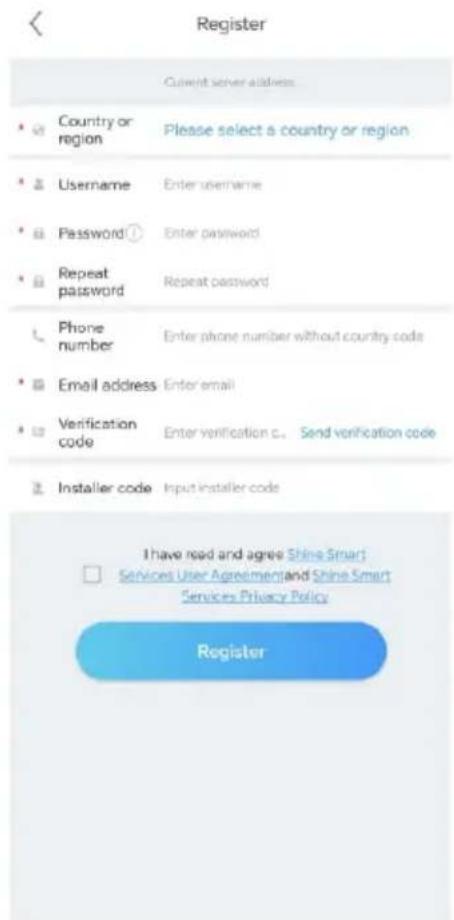
text_image
Register Current server address Country or region Please select a country or region Username Enter username Password Enter password Repeat password Repeat password Phone number Enter phone number without country code Email address Enter email Verification code Enter verification c. Send verification code Installer code Input installer code I have read and agree Shine Smart Services User Agreement and Shine Smart Services Privacy Policy Registertext_image
Add Plant Plant name Enter the Plant name Installation date Select the installation date Plant address Automatic Manual China City Please enter the full address Longitude Latitude Time zone +08 PV capacity(W) PV capacity Plant type Residential plant Commercial Plant Ground-mounted (Conversion is based on 1 kWh power generation) Fund Revenue RMB PV Plant picture + Uploaded Picture Add Planttext_image
Plant list dx Complete the add PV capacity 7kWp Sunny:15.0℃ Today(kWh) 0.0 Generation This Month 155.5kWh Total 1330.5kWh Plant management Add device Add datalogger Datalogger list Current Power: 185.4W PowerEnergy Hour DAY MONTH YEAR 2023-10-10 W Time:16:00 Date:877.76 Dashboard Plant GroHome Service Me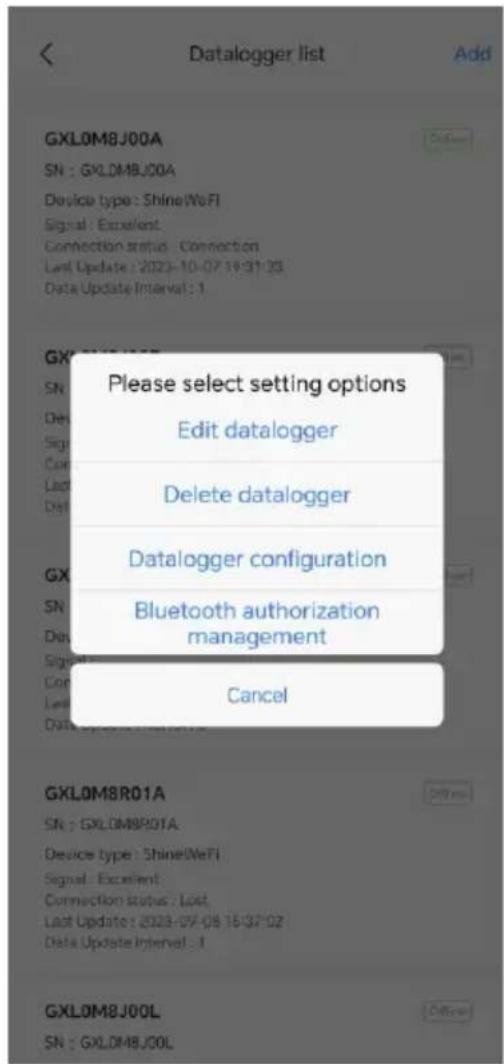
text_image
Datalogger list Add GXL0M8J00A SN : GXL0M8J00A Device type: Shine(WeFi) Signal: Excellent Connection status: Connection Last Update : 2023-10-07 19:31:25 Data Update Interval : 1 Please select setting options Edit datalogger Delete datalogger Datalogger configuration Bluetooth authorization management Cancel GXL0M8R01A SN : GXL0M8R01A Device type: Shine(WeFi) Signal: Excellent Connection status: Lost, Last Update : 2023-07-08 16:37:02 Data Update Interval : 1 GXL0M8J00L SN : GXL0M8J00L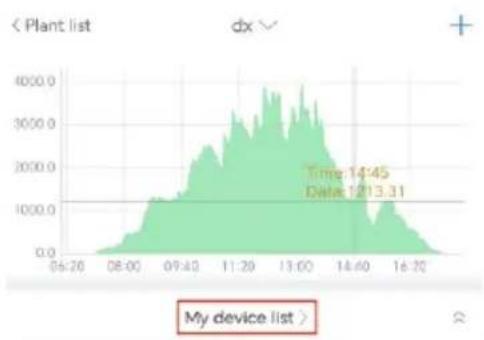
area
| Time | Value | |---|---| | 14:45 | 1213.31 | | 16:20 | Not labeled (implied by context) |
BYP0M8J00E
Power :0W
Datelogger:GXL0M8J00E

BYP0M8J009
Power :0W
Datalogger:GXL0M8J009

BYP0M8J002
Power :0W
Datalogger:GXL0M8J002

BYP0M8J00B
Power :0W
Datalogger:GXL.0M8J00B

BYP0M8J00A
Power:497.9W
Datalogger:GXL0MSJ00A

Dashboard

Plated

GroHome

Service

Mo

My device list

Inverter
Datalogger

BYP0M8J00A
Роснег 479.3W
Normal
Datalogger:GXL0M8J00A

DBN1234567
Disconnected
Power (IV)
Today: OkWh
Datalogger:GXL1234567

WYN0M7T00T
Disconnected
Power:0W
Today: OkWh
Datalogger:GXL0M7T00T

NEO0003RZB
Discorrected
Power:0V
Today: OkWh
Datelogger:GXL0003R2B

WYNOM7TOOL
Disconnected
Power:0W
Today OkWh
Datalogger:GXL0M?TT00L

NEO0001T22
Disconnected
Power : 0W
Today OkVih
Web: https://server.growatt.com/?lang=en
https://en.growatt.com/upload/file/EU_Conformity_Declaration_NEO_600_1000M_X.pdf.
4-13/F, Building A, Sino-German (Europe) Industrial Park, Hangcheng Blvd, Bao'an District, Shenzhen, China
T +86 755 2747 1942
E service@ginverter.com
w en.growatt.com
1 Panoramica
1.1 Panoramica del microinverter
text_image
A B C D E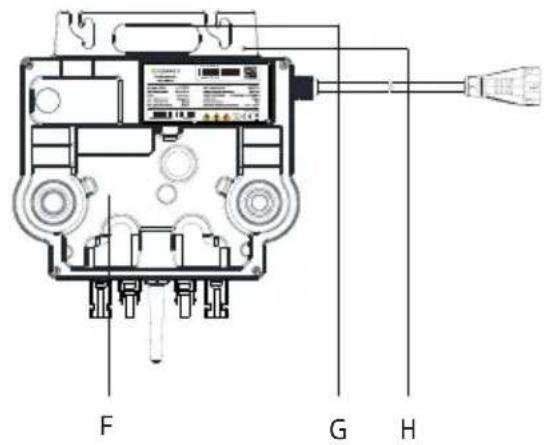
text_image
F G Htext_image
Technical diagram showing two mechanical components with labeled parts including a mounting torque and a motor M6.text_image
Technical diagram of a GRCOT electrical contactor with grid wiring, showing connections to solar panels and power supply.text_image
QR code with a blue circular logo in the center, likely linking to a digital resource or website.[Android&iOS]
text_image
GROWATT English Demo >> Please select a country or region Germany Username Enter username Password Enter password Remember password Sign in Regular Password Register Toolbox Configure WiFi debugger Local Debugging f t in Use a Windows User name Have read and agreeShine Smart Services User AgreementandShine Smart Services Privacy Policy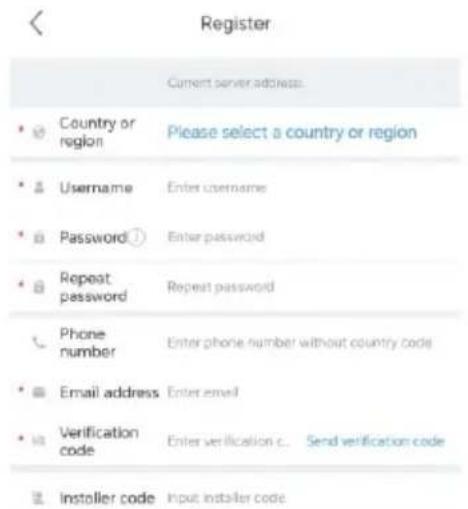
text_image
Register Current server address • Country or region Please select a country or region • Username Enter username • Password Enter password • Repeat password Repeat password • Phone number Enter phone number without country code • Email address Enter email • Verification code Enter verification c... Send verification code • Installer code Input installer code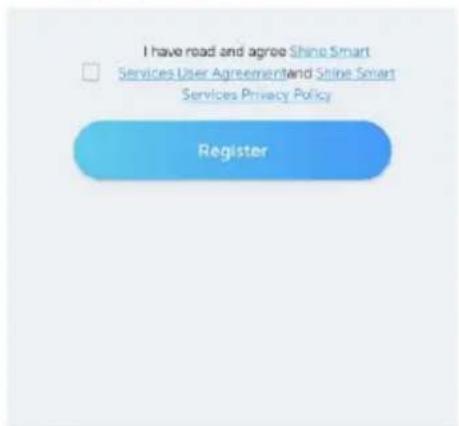
text_image
I have road and agree Shine Smart Services User Agreement and Shine Smart Services Privacy Policy Registertext_image
Add Plant Plant name Enter the Plant name Installation date Select the Installation date Plant address Automatic Manual China City Please enter the full address Longitude Latitude Time zone +08 PV capacity(W) PV capacity Plant type Residential plant Commercial Plant Ground-mounted (Conversion is based on 1 kWh power generation) Fund Revenue RMB PV Plant picture + Uploaded Picture Add Planttext_image
Plant list dx Complete the side PV capacity 7kWp Sunny 15.0°C Today(kWh) 0.0 Plant management Add device Add datalogger Datalogger list Generation: This Month 15& 5kWh all Rats 1320.5kWh Current Power: 185.4W PowerEnergy Hour DAY MONTH YEAR 2023-10-10
text_image
Datalogger configuration Add datalogger Please scan the QR code of the datalogger Cannot find the serial number?
text_image
Datalogger configuration Add datalogger Please scan the QR code of the datalogger GROWAT Cannot find the serial number?
area
| Category | Value | |---|---| | Time | 16:00 | | Date | 877.26 |
text_image
添加 QR code/Bar code Manual
text_image
QR code/Bar code Manual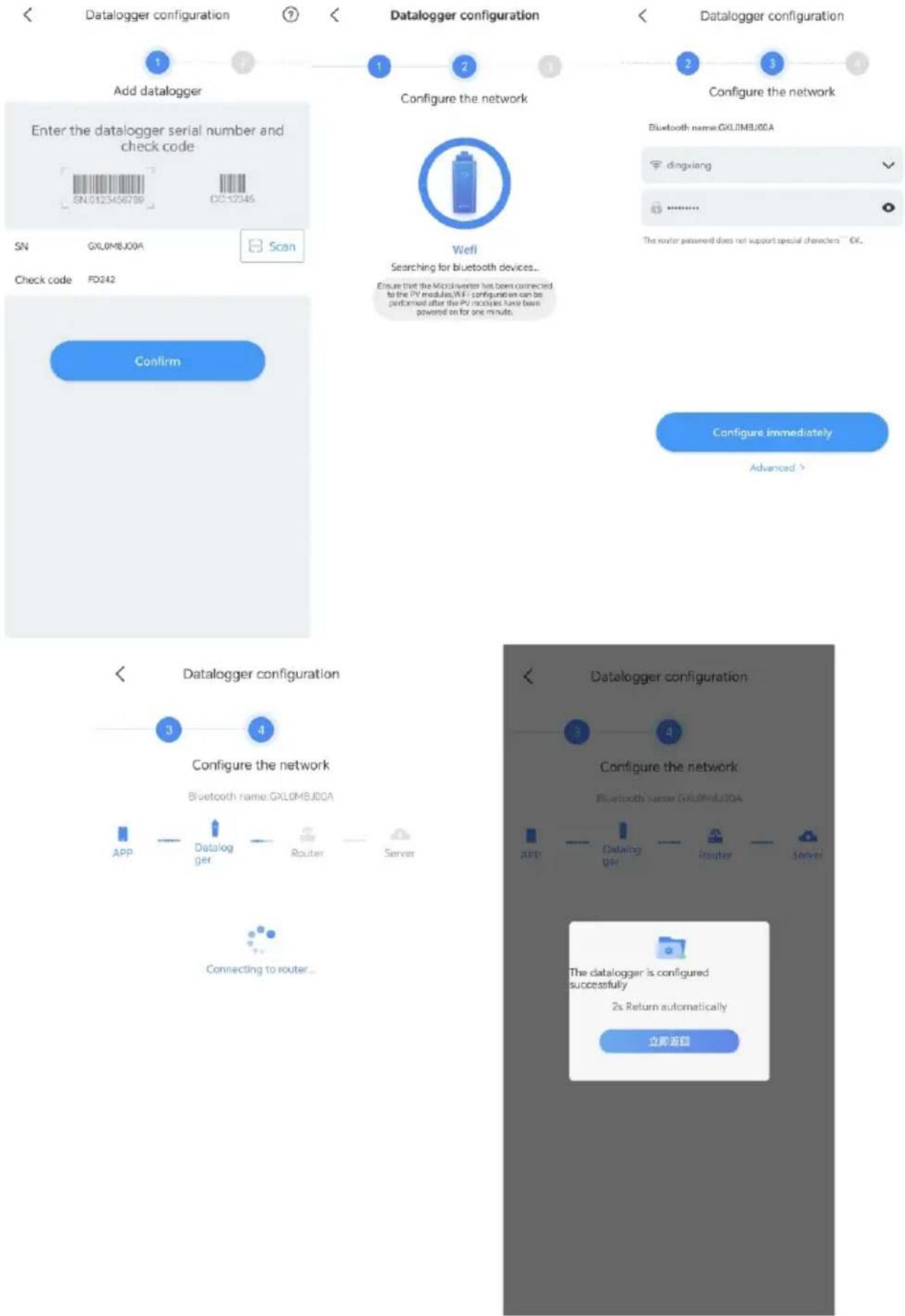
flowchart
graph TD
    A["Add datalogger"] --> B["Enter the datalogger serial number and check code"]
    B --> C["SN: GXL0MBJ00A"]
    C --> D["Scan"]
    D --> E["Check code: FD242"]
    E --> F["Confirm"]
    F --> G["Configure the network"]
    G --> H["APP: Datalogger"]
    H --> I["Router"]
    I --> J["Server"]
    J --> K["Connecting to router..."]
    K --> L["Configure the network"]
    L --> M["Bluetooth name: GXL0MBJ00A"]
    M --> N["APF: Datalogger"]
    N --> O["Router"]
    O --> P["Server"]
    P --> Q["The datalogger is configured successfully\n2s Return automatically\n立即返回"]
text_image
Plant list dx Complete the ado PV capacity 7kWp Sunny 15.0°C Today(kWh) 0.0 Generation This Month 155.5kWh Total 1330.5kWh Plant management Add device Add datalogger Datalogger list Current Power: 185.4W PowerEnergy Hour DAY MONTH YEAR 2023-10-10 W 4000.0 3000.0 2000.0 1000.0 0.0 Dashboard Plant GroHome Service Me Time:16:00 Date:877.76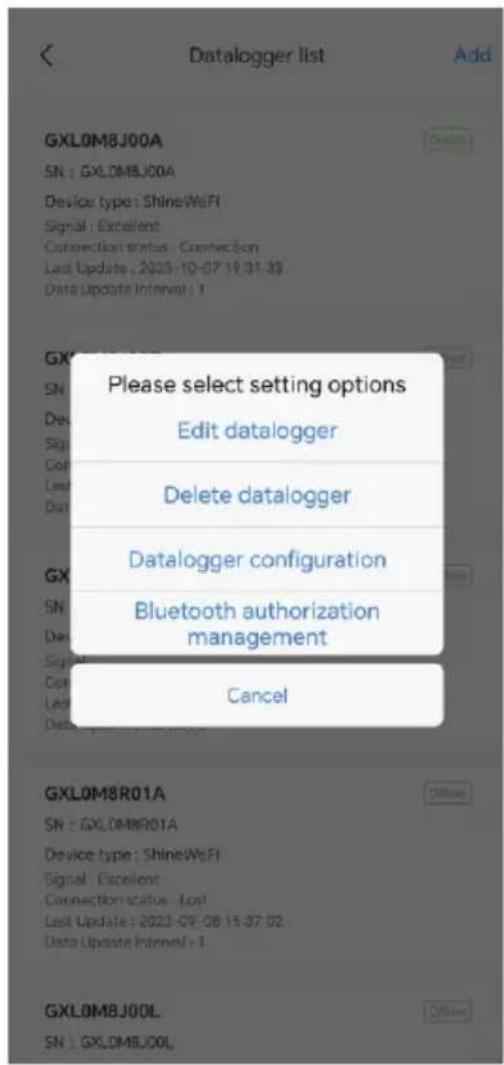
text_image
Datalogger list Add GXL0M8J00A SN : GXL0M8J00A Device type : ShineWiFi Signal : Excellent Connection status : Connection Last Update : 2023-10-07 19:31:39 Data Update Interval : 1 Please select setting options Edit datalogger Delete datalogger Datalogger configuration Bluetooth authorization management Cancel GXL0M8R01A SN : GXL0M8R01A Device type : ShineWiFi Signal : Excellent Connection status : Low Last Update : 2023-09-08 15:37:02 Data Update Interval : 1 GXL0M8J00L SN : GXL0M8J00L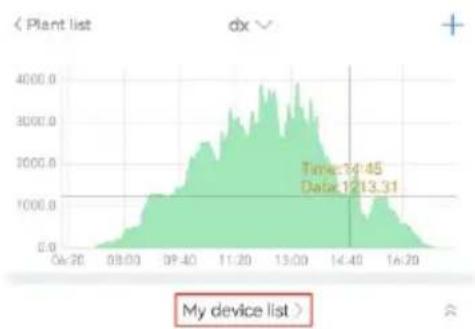
line
| Time | Value | | -------- | ------- | | 14:45 | 1445.00 | | 1213.31 | 1213.31 |
BYPOMEJ00E
Power: 0W
Datalogger:GXL0MBJ00E

BYP0M8J009
Power 0W
Datalogger:GXL0M8J009

BYP0M8J002
Power:0W
Datalogger:GXL0MBJ002

BYPOM8J008
Power: 0W
Datalogger:GXL0M8J00B

BYP0M8J00A
Power:497.9W
Datalogger:GXL0MBJ00A


My device list

Inverter
Datalogger

BYP0M8J00A
Power 479.3W
Datalogger:GXL0M8J00A

DBN1234567
Power:0W
Datalogger:GXL1234567

WYNOM7T00T
Power: [W]
Datalogger:GXL0M7T00T

NEO0003RZB
Power: 0W
Datalogger:GXL0003R2B

VYNOMZTOOL
Power [W
Datalogger:GXL0M7T00L

NEO0001TZZ
Power (W)
Sito web: https://server.growatt.com/?lang=en
text_image
GROWATT Device Lear's Education (Standard) Photovoltaic Device Photovoltaic Device Power 0 Current Source: 2023 Data Linkages ServiceNow Device Serial Version HYPOKLOCA User Names: m/s Conservation Tools: Pcs. 0 History Date: (HYPOKLOCA) Year: Day: 2023-10-28 - 2023-12-25 Search Export No. Time Status Back/Day Back/Total Pvs(NT) Pvs(NT) Pvs(NT) Pvs(M) Pvs(N+M)(NT) Pvs(N+M)(R) Pvs(N+M)(L+M) Revenue 1.7 New Year: 2023 8.4 Total Revenue(R) Number of Albas Sales Product Datahttps://en.growatt.com/upload/file/EU_Conformity_Declaration_NEO_600_1000M_X.pdf.
https://en.growatt.com/support/contact.
Shenzhen Growatt New Energy Co., Ltd.
4-13/F, Building A, Sino-German (Europe) Industrial Park, Hangcheng Blvd, Bao'an District, Shenzhen, China
T +86 755 2747 1942
E service@ginverter.com
w en.growatt.com
1 Overzicht
text_image
Technical diagram showing two mechanical components with labeled parts including a M6 torque and mounting torque.text_image
Technical diagram of a gray power supply unit with grid connection and power outlet, showing wiring and component labels.text_image
QR code with a blue circular logo in the center, likely linking to a digital resource or website.[Android&iOS]
text_image
GROWATT English Demo >> Please select a country or region Germany Username Enter username Password Enter password Remember password Sign in Register password Register Toolbox Configure Wi-Fi dataggeber Local Debugging f t in I have read end agreeShine Smart Services User AgreementandShine Smart Services Privacy Policy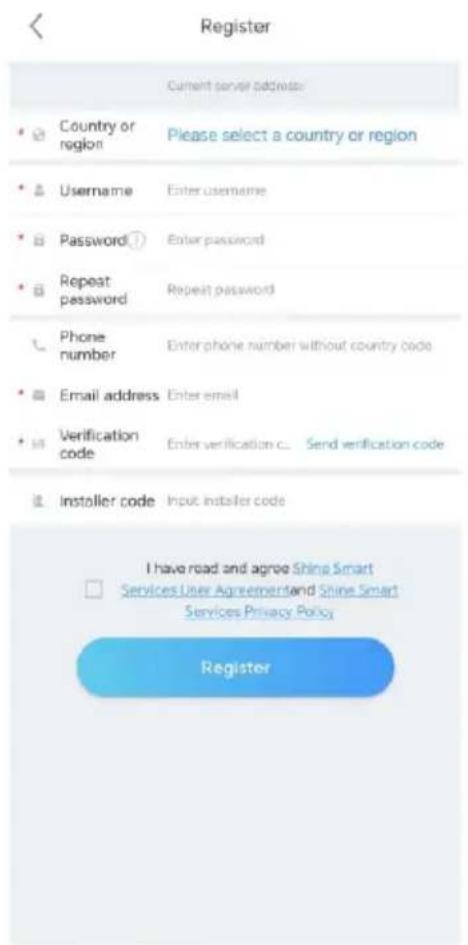
text_image
Register Current server address: • Country or region Please select a country or region • Username Enter username • Password ① Enter password • Repeat password Repeat password • Phone number Enter phone number without country code • Email address Enter email • Verification code Enter verification c... Send verification code • Installer code Input installer code I have road and agree Shine Smart □ Services User Agreementand Shine Smart Services Privacy Policy Registertext_image
Plant list Parameters Search Add Plant All (21) Online (3) Offline (15) Abnormal (3) Plant name Current Power PV capacity Daily Power Grid dingxiang1 Current Power:0kW Installation date 2023-10-02 PV capacity 10kWp Daily Power Generation 0.0kWh dingxiang2 Current Power:0kW Installation date 2023-10-05 PV capacity 10kWp Daily Power Generation 0.0kWh cc Current Power:0kW Installation date 2023-10-08 PV capacity 10kWp Daily Power Generation 0.0kWh dingxiang3 Current Power:0kW Installation date 2023-10-09 PV capacity 10kWp Daily Power Generation 0.0kWh Testing12345 Current Power:0kW Installation date 2023-10-10 Dashboard Plant GroHome Service Me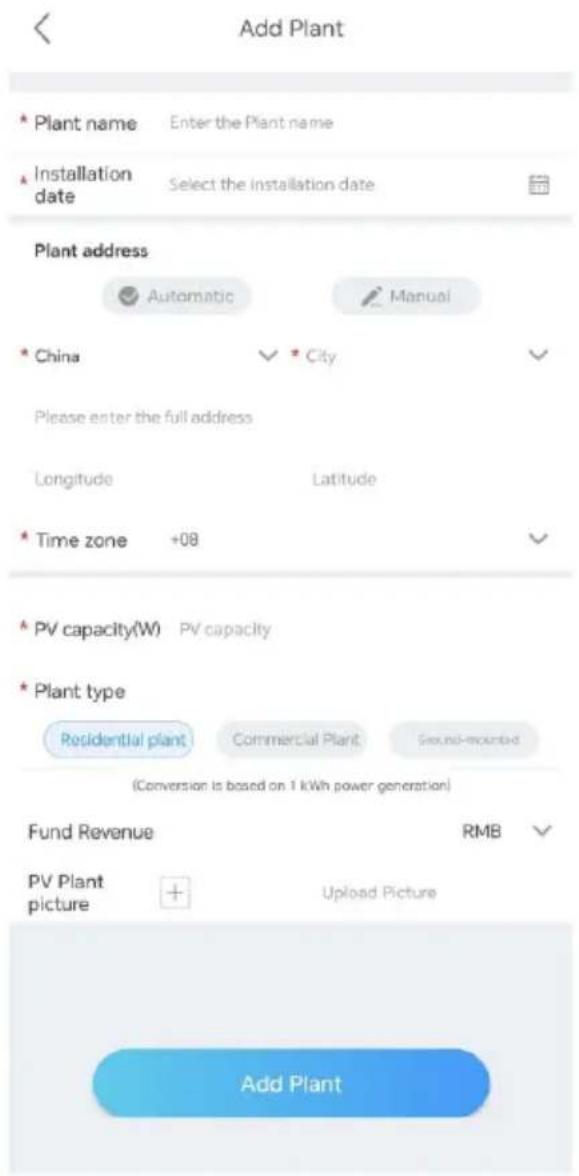
text_image
Add Plant * Plant name Enter the Plant name * Installation date Select the installation date Plant address Automatic Manual * China City Please enter the full address Longitude Latitude * Time zone +08 * PV capacity(W) PV capacity * Plant type Residential plant Commercial Plant Ground-mounted (Conversion is based on 1 kWh power generation) Fund Revenue RMB PV Plant picture + Upload Picture Add Planttext_image
Plant list dx Complete the add PV capacity 7kWp Sunny 15.0°C Today(4kWh) 0.0 Generation 71e-Month 156.3kWh 1300.5kWh Current Power: 185.4W PowerEnergy Hour DAY MONTH YEAR 2023-10-10 W Time: 16:00 Date: 877.76 Dashboard Plant GridHome Service No Datalogger configuration Add datalogger Please scan the QR code of the datalogger Add datalogger Please scan the QR code of the datalogger Cannot find the serial number? QR code/Bar code Manual QR code/Bar code Manual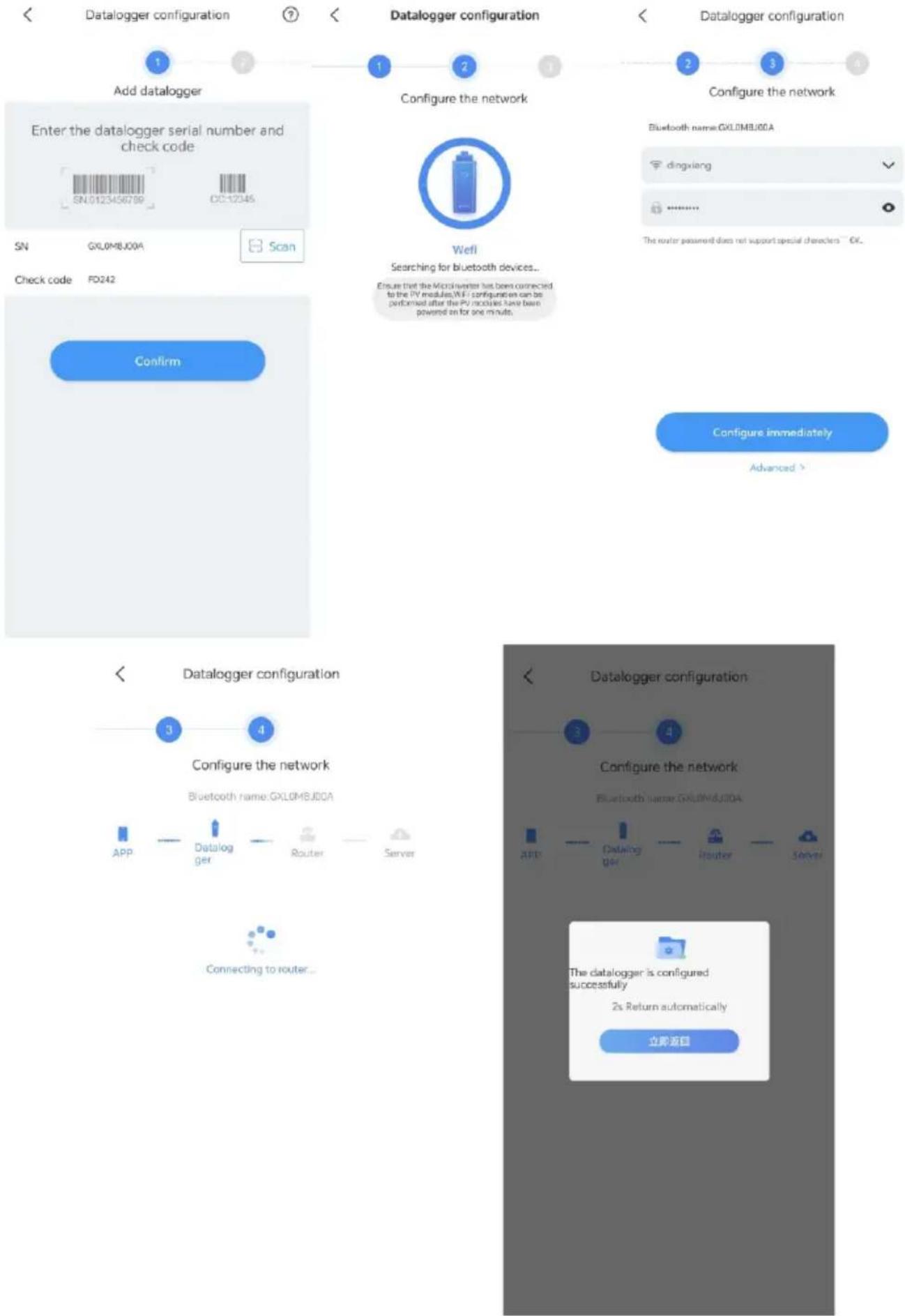
flowchart
graph TD
    A["Add datalogger"] --> B["Enter the datalogger serial number and check code"]
    B --> C["SN: GXL0MBJ00A"]
    C --> D["Scan"]
    D --> E["Check code FD242"]
    E --> F["Confirm"]
    F --> G["Configure the network"]
    G --> H["APP: Datalogger"]
    H --> I["Router: Server"]
    I --> J["Connecting to router..."]
    J --> K["Configure the network"]
    K --> L["APF: Datalogger"]
    L --> M["Router: Server"]
    M --> N["The datalogger is configured successfully\n2s Return automatically\n立即返回"]
text_image
My device list SearchInverter Datalogger

BYPOMEJ00A
Power:479.3W
Datellogger:GXLOMBJ00A

DBN1234567
Power: 0W
Datalogger:GXL1234567

WYNOM7T00T
Power 0W
Datalogger:GXLÖM2T00T

NEO0003R2B
Power: 0W
Datalogger:GXLO003R2B

WYNOMZTOOL
Power:0V
Datalogger:GXLOM7T00L

NEO0001TZZ
Power:0W
Web: https://server.growatt.com/?lang=en
text_image
GROWATT Device Product version: BYPOM,000A No. Time Status Date Date Price/Price Price/Price Price/Price Price/Price Price/Price Price/Price Price/Price Price/Price Price/Price Price/Price Price/Price Price/Price Price/Price/Price/Price/Price/Price/Price/Price/Price/Price/Price/Price/Price/Price/Price/Price/Price/Price/Price/Price/Price/Price/Price/Price/Price/Price/Price/Price/Price/Price/Price/Price/Price/Price/Price/Price/Price/Price/Price/Price/Price/Price/Price/Price/Price/Price/Price/Price/Price/Price/Price/Time 2023-12-28 09:45:28 Weekly Q.P. 16.2 0.6 0.6 0.6 0.6 4.0 5.0 0.6 2023-12-28 09:45:28 Weekly Q.P. 16.2 0.6 0.6 0.6 0.6 4.0 5.0 0.6 2023-12-28 09:45:17 Weekly Q.P. 16.2 0.6 0.6 0.6 0.6 4.0 5.0 0.6 2023-12-28 09:45:17 Weekly Q.P. 16.2 0.6 0.6 0.6 0.6 4.0 5.0 0.6 2023 -12 -28 09:45:28 Weekly Q.P. 16.2 0.6 0.6 0.6 0.6 4.0 5.0 0.6 2023-12-28 09:45:28 Weekly Q.P. 16.2 0.6 0.6 0.6 0.6 4.0 5,0 0.6 2023-12-28 09:45:57 Weekly Q.P. 16.2 0.6 0.6 0.6 0.6 4.0 5.0 0.6 2023-12-28 09:45:57 Weekly Q.P. 16.2 0.6 0.6 0.6 0.6 4.0 5,0 0.6 2023-12-28 09:45:57 Weekly Q.P. 16.2 0.6 0.6 0.6 0.6 4,0 A.D. 2023-12-28 09:45:57 Weekly Q.P. 16.2 0.6 0.6 0.6 0.6 A.D. 2023-12-28 09:45:57 Weekly Q.P. 16.2 0.6 0.6 0.6 A.D. 2023-12-28 09:45:42 Weekly Q.P. 16.2 0.6 0.6 0.6 A.D. 2023-12-28 09:45:31 Weekly Q.P. 16.2 0.6 0.6 A.D. 2023-12-28 09:45:54 Weekly Q.P. 16.2 0.6 A.D. 2023-12-28 09:45:43 Weekly Q.P. 16.2 A.D. 2023-12-28 09:45:44 Weekly Q.P. 16.2 B.D. 2023-12-28 09:45:43 Copyright / Altar Service / Altar Home Data Copyright / Altar Copyright / Altar Copyright / Altar Copyright / Altar Copyright / Altar Copyright / Altar Copyright / Altar Copyright / Altar Copyright / Altar Copyright / Altar Copyright / Altar Copyright / Altar Copyright / Altar Copyright / Altar Copyright / Altar Copyright / Altar Copyright / Altar Copyright / Altar Copyright / Altar Copyright / Altar Copyright / Altur Copyright / Altur Copyright / Altur Copyright / Altur Copyright / Altur Copyright / Altur Copyright / Altur Copyright / Altur Copyright / Altur Copyright / Altur Copyright / Altur Copyright / Altur Copyright / Altur Copyright / Altur Copyright / Altur Copyright / Altur Copyright / Altur Copyright / Altur Copyright / Altur Copyright / Altur Copyright / Altul Copyright / Altul Copyright / Altul Copyright / Altul Copyright / Altul Copyright / Altul Copyright / Altul Copyright / Altul Copyright / Altul Copyright / Altul Copyright / Altul Copyright / Altul Copyright / Altul Copyright / Altul Copyright / Altul Copyright / Altul Copyright / Altul Copyright / Altul Copyright / Altul Copyright / Altul Copyright / Altu Copyright / Altu Copyright / Altu Copyright / Altu Copyright / Altu Copyright / Altu Copyright / Altu Copyright / Altu Copyright / Altu Copyright / Altuhttps://en.growatt.com/support/contact.
Shenzhen Growatt New Energy Co., Ltd.
4-13/F, Building A, Sino-German (Europe) Industrial Park,
Hangcheng Blvd, Bao'an District, Shenzhen, China
T +86 755 2747 1942
E service@ginverter.com
w en.growatt.com

natural_image
Stylized grayscale globe with leafy tree above Earth, symbolizing global biodiversity (no text or symbols)
Download Manual






Growatt New Energy
Shenzhen Growatt New Energy Co., Ltd.
4-13/F, Building A, Sino-German (Europe) Industrial Park, Hangcheng Blvd, Bao'an District, Shenzhen, China
T +86 755 2747 1942
E service@ginverter.com
w en.growatt.com
GR-UM-338-M-01 (PN:044.0126601)