Arthritis Knee 2836AB - Electronic muscle stimulator REVITIVE - Free user manual and instructions
Find the device manual for free Arthritis Knee 2836AB REVITIVE in PDF.


User questions about Arthritis Knee 2836AB REVITIVE
0 question about this device. Answer the ones you know or ask your own.
Ask a new question about this device
Download the instructions for your Electronic muscle stimulator in PDF format for free! Find your manual Arthritis Knee 2836AB - REVITIVE and take your electronic device back in hand. On this page are published all the documents necessary for the use of your device. Arthritis Knee 2836AB by REVITIVE.
USER MANUAL Arthritis Knee 2836AB REVITIVE
natural_image
White REVITIVE medical device with digital display and a gray bandage (no visible text or symbols)
PLEASE READ THE USER'S MANUAL CAREFULLY BEFORE USING THIS PRODUCT
VEUILLEZ LIRE ATTENTIVEMENT LE MANUEL DE L'UTILISATEUR AVANT D'UTILISER CE PRODUIT
If symptoms persist, consult your healthcare professional
What is inside the box? 4
Parts and Controls 56
Introduction to Revitive 7-9
Indications for use 7-8
How Revitive works 9
Important Safeguards 10-14
Who Should NOT use Revitive 10
Warnings and Cautions 10-13
Safety Precautions 13-14
Adverse Reactions 14
Instructions for use 15-35
How do I get the most from Revitive? 15
Step 1: Setting up Revitive for the first time 15
Step 2: Setting up the IsoRocker ^® 16
Step 3: Powering Revitive 17-18
Step 4: Using the foot-pads 19-21
Step 5: Using the Electrode Pads 22
5.1: Using the Electrode Arthritis Pads for EMS 23-28
5.2: Using the Electrode Body Pads for TENS 29-33
5.3: Switching between EMS and TENS mode 33
Step 6: Recharging the battery 34
Step 7: Cleaning and storing 35
Replacing the batteries & Body Pads 35
Troubleshooting 36-38
Technical Specifications 39-41
Warranty 42

What is inside the box?
Parts and Controls

On opening the carton, please check that the following components are provided. If you think anything is missing, please contact us using the helpline numbers on the back of this booklet.
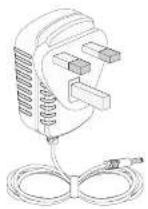
A AC/DC power adaptor
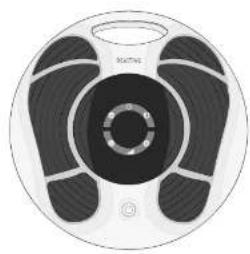
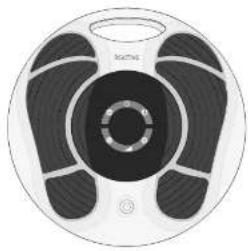
B Revitive Arthritis-Knee
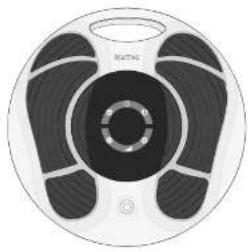
natural_image
Circular device with black and white bands, no visible text or symbolsC Small Electrode Body Pads
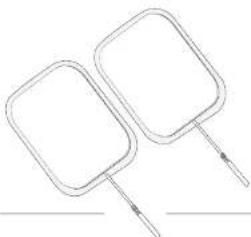
natural_image
Simple line drawing of two rectangular objects with handles, no text or symbols present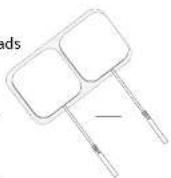
D
Large Electrode Arthritis Pads
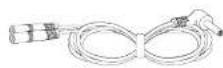
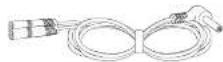
Electrode cord
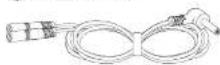
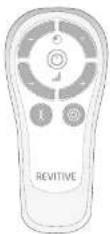
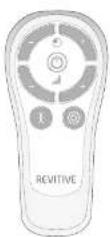
F Remote control
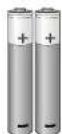
G AAA batteries x 2
text_image
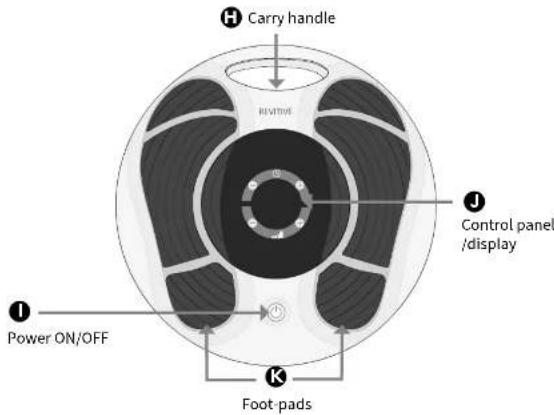
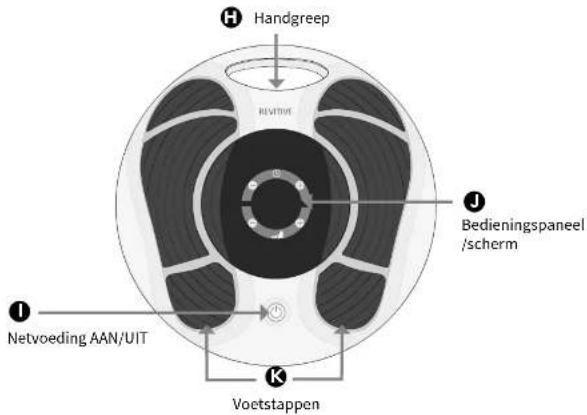
H Carry handle RIVITIME J Control panel /display I Power ON/OFF K Foot pads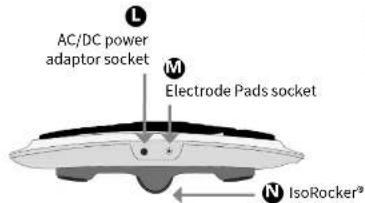
text_image
L AC/DC power adaptor socket M Electrode Pads socket N IsoRocker®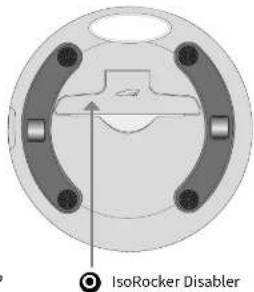
text_image
IsoRocker Disabler


Parts and Controls
Introduction to Revitive

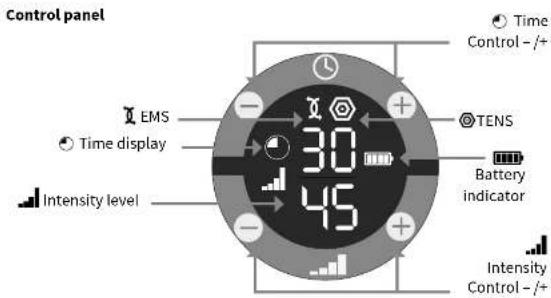
text_image
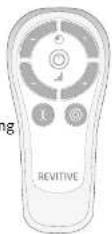
Control panel EMS Time display Intensity level 30 45 Time Control -/+ TENS Battery indicator Intensity Control -/+Remote control
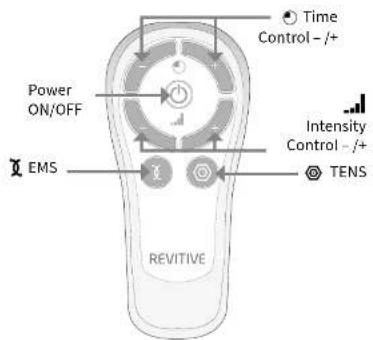
text_image
Time Control - /+ Power ON/OFF Intensity Control - /+ EMS TENS REVITIVEIndications for use
Revitive is intended to:
- Reduce pain and discomfort in the legs/ankles/feet - caused by poor circulation (Peripheral Arterial Disease), Diabetic Peripheral Neuropathy, or swelling (oedema) due to osteoarthritis or following surgery
- Reduce swelling in the legs/ankles/feet - caused by being immobile due to osteoarthritis or an injury
- Improve circulation to reduce or prevent blood-pooling (stasis) - caused by poor circulation (Chronic Venous Insufficiency/ varicose veins), diabetes or by being immobile following surgery
• Improve circulation in the legs - caused by Peripheral Arterial Disease - Increase muscle strength to help regain mobility in the legs affected by being immobile due to COPD, osteoarthritis or following surgery
- Increase walking distance before the onset of claudication symptoms (pain) – caused by Peripheral Arterial Disease
- Improve symptoms associated with varicose veins/ Chronic Venous Insufficiency
- Help maintain leg vein health - by increasing circulation, delivering more oxygenated-blood and reducing swelling (oedema) in the legs, feet & ankles
When using Revitive to deliver Transcutaneous Electrical Nerve Stimulation (TENS), it is intended to provide:
• Temporary relief of pain of musculoskeletal or neuropathic origin
- Relief of arthritis-associated pain
- Relief and management of chronic pain, associated with musculoskeletal pain, osteoarthritis and fibromyalgia
• Relief of post-surgical and post-traumatic pain
The above Indications for Use are certified under the Medical Devices Directive 93/42/EEC.


Introduction to Revitive

In addition, if you have a sedentary lifestyle or spend long periods inactive, Revitive may help to:
• Alleviate tired, aching & heavy legs, including cramp
- Reduce swollen feet & ankles
• Strengthen leg muscles
• Help maintain leg vein health
- Actively increase circulation
The above Indications for Use are certified under the Medical Devices Directive 93/42/EEC.
How Revitive Arthritis-Knee Works
With its unique TripleAction Revitive Arthritis-Knee works in three ways:
- Delivers Electrical Muscle Stimulation (EMS) to your feet via a pair of cushioned foot-pads, while you are seated. The EMS causes muscles in your calf and foot to contract, which helps to increase circulation in your legs.
Revitive has been developed so that it is comfortable for you to use. It features a patented IsoRocker ^® that allows for natural ankle movement when applying the EMS to your feet. Ankle movement is a key factor in increasing circulation in the lower legs. You can choose to enable or disable the IsoRocker ^® at any time.
Revitive is designed to be easy to use and comes with a remote control, which means you do not have to reach down to adjust settings during use.
- Delivers Electrical Muscle Stimulation to the front of the thighs/quadiceps through the use of the Arthritis (Electrode) Pads - to strengthen the quadriceps. Strengthening your quadriceps muscles may help to:
• Support and stabilise the knee
- Reduce stress on the knee
- Relieve knee pain
To get the most out of Revitive, it is recommended that you use:
• Revitive foot-pads for at least 30-60 minutes each day.
- Revitive Arthritis Pads on the thigh of your affected leg (knee) once a day for 20 minutes, 5 days per week.
- Delivers Transcutaneous Electrical Nerve Stimulation (TENS) through the smaller Body (Electrode) Pads - to provide immediate, temporary relief of pain for your legs and other areas of your body. Use as and when you need relief.
Visit www.Revitive.com for more information
8
9

Important Safeguards

Read all instructions before use
Who should not use Revitive
Revitive should NOT be used by some people.

Do not use if (contraindications):
• You are fitted with an electronic implanted device such as a heart pacemaker or Automatic Implantable Cardioverter Defibrillator (AICD)
- You are pregnant
- You are being treated for, or have the symptoms of, an existing Deep Vein Thrombosis ("DVT")
Long periods of inactivity can put you at greater risk of developing Deep Vein Thrombosis (DVT). DVT is a blood clot and usually occurs in a deep leg vein. If part of the DVT breaks off it may lead to potentially life-threatening complications such as pulmonary embolism.
If you have been inactive for prolonged periods and suspect you may have a DVT, consult your doctor immediately. To prevent dislodging the clot do not use Revitive.
In some cases of DVT there may be no symptoms. However it is important to be aware of the symptoms that may include:
• pain, swelling and tenderness in one of your legs (usually your calf)
• a heavy ache in the affected area
• warm skin in the area of the clot
- redness of your skin, particularly at the back of your leg, below the knee
Consult your doctor as soon as possible if you show any signs of the above symptoms.
Warnings
- Consult with your doctor before using this device if:
• You are in the care of a doctor
- You have a history of heart problems
• You have had medical or physical treatment for your pain
- You have suspected or diagnosed heart disease
• You have suspected or diagnosed epilepsy
- You are unsure about the suitability of the Revitive for you
- You are unsure about the cause of your symptoms
- If you have a metallic implant, you may experience pain or discomfort near the implant when applying electrical stimulation, if this should occur discontinue use and seek advice from your doctor
- The electrical stimulation may feel more intense close to a metallic implant. It is safe to continue use provided no pain is experienced. You may need to adjust the intensity to a comfortable level
- If your Arthritis symptoms worsen, or you have had knee surgery (within the last six months), consult with your doctor before reusing Revitive
- Do not use the Electrode Pads on your head, face, neck or chest
- Do not apply foot-pads or Electrode Pads directly:
- on open wounds or rashes, swollen, red, infected, or inflamed areas or skin eruptions (such as phlebitis, thrombophlebitis, varicose veins, cellulitis)
• on or close to, malignant tumours
• on areas treated with radiotherapy (within the past 6 months)
• on reproductive organs
- Electrode pads are for single person use only. Do not share with others
- Do not use the Arthritis Pads in conjunction with a brace or cast without first consulting with your doctor
- Do not use Electrode Pads after their use by date
- There is a chance you may experience skin irritation or burns beneath the Electrodes Pads or hypersensitivity due to the electrical stimulation
- Ensure that moisturiser/gel/balm is evenly applied and thoroughly
10
11

Important Safeguards

absorbed into the skin before applying stimulation. There is a chance that uneven application of a moisturiser/gel/balm could increase the risk of skin irritation or burn, when using the electrical stimulation.
- Do not use the device:
- In the presence of electronic monitoring equipment
• Together with a life-supporting medical electronic device - When you are in the bath or shower
- While you are sleeping.

rnings - EMS only
- Symptoms may worsen during the initial treatment phase before getting better. This may occur if the body has not yet adjusted to increased muscular activity and blood circulation. If this occurs, reduce the intensity and the duration of treatment which will reduce the initial symptoms. If symptoms persist consult with your doctor.

Warnings - TENS only
- When using TENS do not apply to areas of skin that lack sensation.

cautions
- Be careful when applying stimulation over areas of skin that lack normal sensation. It may cause skin irritation due to the inability to feel stimulation until the intensity is too high - use a low intensity to achieve a gentle muscle contraction, and/or use for a shorter time, to avoid overstimulation. Check for signs of skin irritation (redness), bruising or pain. If in doubt consult your doctor
- When using EMS be careful when applying stimulation:
• Over the abdomen during menstruation
• After recent surgical procedures (within the past 6 months) as stimulation may disrupt your healing process
- If your tissues are likely to bleed following an injury such as a muscle tear - it is recommended not to stimulate the immediate area within the first 12 hours after sustaining the injury. Use a low intensity and/or shorter time to avoid over-stimulation
- After a long period of immobility or inactivity – use a low intensity and shorter time to avoid overstimulation or muscle fatigue. Look for signs of skin irritation (redness), bruising or pain. If in doubt, consult your doctor
- When using TENS:
- It is possible Revitive may reduce the sensation of pain that would normally act as a warning of an underlying problem
- If your pain does not improve, gets worse or continues for more than 5 days, stop using the device and seek advice from your doctor
• TENS is not effective in treating the original source or cause of pain
• The long term effects of electrical stimulation are unknown
• Electrical stimulation may not work for every user, please seek advice from your Doctor
- This product is not intended for use by persons with reduced physical, sensory or mental capabilities, unless they are supervised by a person responsible for their safety.

Safety Precautions
- Do not stand on the machine. Use only when sitting down
- Use the device only for its intended purpose
- Do not expose the device to extreme heat
- Do not spill liquid on the device or its accessories
- Do not overload the electrical socket
- Keep device out of the reach of children
- Keep power cords and cables out of the reach of children to prevent risk of strangulation
12
13
EN
Important Safeguards
- Revitive may be used by multiple persons, ensure device is cleaned after each use
- Use Revitive only with the accessories supplied by, or purchased from, the manufacturer
- Check body pads, cords and cables periodically for damage
- Do not open Revitive or repair it yourself. This will invalidate your warranty and may cause serious harm
- In the unlikely event your Revitive malfunctions, disconnect it from the power source and contact your nearest authorised agent
- With the increased number of electronic devices such as personal computers and mobile (cellular) telephones, medical devices may be susceptible to electromagnetic interference from other devices. Revitive has passed the required tests for Electromagnetic Interference (EMI); it may still be affected by excessive emissions and/or may interfere with more sensitive equipment
- It has been reported that some universal remote control devices (e.g. for TV etc.) can change the settings on Revitive if used during a treatment. If this should occur, simply adjust the time or intensity settings on Revitive back to where you want them to be using the Revitive Remote Control, or using the device Control Panel
- After any exposure to hot or cold temperatures outside the specified operating range of 10 – 40°C allow the product to re-adjust to the recommended operating temperatures to ensure continued product performance.

Adverse Reactions
- If you experience adverse reactions, stop using Revitive and consult with your doctor.
Save these instructions
Instructions for use
EN
How do I get the most from Revitive?
EMS Stimulation - for best results:
- Use Revitive foot-pads for at least 30 to 60 minutes each day, 7 days a week and use the large Revitive Arthritis Pads on your affected leg (knee) once a day for 20 minutes, 5 days a week.
- It is important to use Revitive at a high enough intensity to give you a strong comfortable muscle contraction. Most people achieve a strong muscle contraction over intensity level 40 (intensity range 1-99).
- It can take up to 12 weeks to help reduce symptoms associated with arthritis.
Do not use Revitive, using EMS stimulation, for more than 6 sessions of 30 minutes (or the equivalent) per day.
TENS stimulation
For TENS Stimulation, through the smaller Revitive Body Pads, use as and when required, for 20-30 minutes each session.
Step 1:
Setting up Revitive for the first time
a Remove all parts from the box:
- Revitive Arthritis-Knee device - Small Electrode Body Pads
- AC/DC power adaptor - Electrode cord x2
- Large Electrode Arthritis Pads - AAA batteries x 2
- Remote control
See What is inside the Box? on pages 4-6 to help identify the parts.
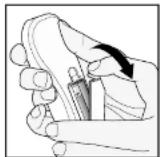
b Locate the remote control and insert the batteries.
Before you use Revitive for the first time, read the Warnings and Cautions on pages 9-14. If in doubt, consult your doctor before using the product.
14
15

Instructions for use

Step 2:
Setting up the Revitive IsoRocker®
a Turn the device over so that you can see the IsoRocker® and IsoRocker Disabler.
- The IsoRocker allows Revitive to rock while stimulating your legs & feet.
- Revitive will begin rocking on the IsoRocker once muscle contractions are strong enough.
- The IsoRocker feature can be disabled, by 'opening' the IsoRocker Disabler. Revitive will then be static and it will not rock during use.
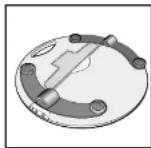
b If you want to use the IsoRocker, leave the IsoRocker Disabler in place (ie flat) on the of the device, as shown.
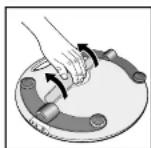
c If you do not want to use the IsoRocker
- Open the IsoRocker Disabler on the bottom of Revitive.
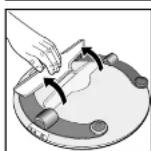
- Pull the IsoRocker Disable back until it clicks open, as shown.
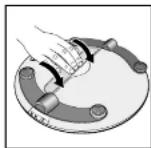
- To re-enable the IsoRocker, pull the IsoRocker Disabler and press into place on the bottom of the device (ie flat).
Step 3:
Powering Revitive
Revitive can be powered from either the rechargeable battery or by connecting it to an electrical socket.
Battery power option
If you want to use the device without connecting it to an electrical socket, it can run from the battery.
When the device is running from the battery, an indicator will show the remaining battery level.

Follow Step 4 Using The Foot-pads or Step 5 Using the Electrode Body Pads to continue setting up REVITIVE.
When the battery drops to the low level, it will require recharging. See Step 6, Recharging Battery on page 34.
If you turn the device off and the low battery level indicator blinks for 10 seconds, the battery requires recharging.
Please note that if the battery runs out, the device can still be used, by connecting to an electrical socket.
16
17

Instructions for use

Mains power option
If you want to use Revitive when the battery is low or to preserve the battery level Revitive can be used by connecting it to an electrical socket.
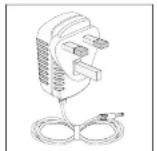
a Locate the AC/DC power adaptor.
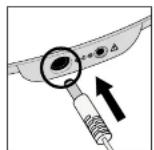
b Plug the small end of the power cord into the opening on the side of the Revitive.
c Plug the power adaptor into the nearest electrical socket. This will start charging the (integrated) rechargeable battery.
Once you have connected Revitive to the electrical socket follow Step 4 Using the Foot-pads or Step 5 Using the Electrode Body Pads to continue setting up Revitive.
Step 4:
Using the foot-pads
The foot-pads will only deliver EMS to your feet and legs.
You can use the Body Pads to receive TENS, see page 29 for details.
a It is important that you are hydrated. We recommend drinking a glass of water before using Revitive.
You may also apply a moisturiser to the soles of the feet to help hydrate the skin.
Hint: Applying a moisturiser to the soles of the feet before using Revitive can help improve the delivery of electrical stimulation.
b Get into a comfortable seated position.
For best results sit with your knees at a 90 degree angle (right angle).
c Place Revitive on the floor in front of you.
Sit with
both bare feet on the foot-pads
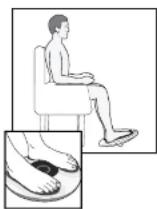
Revitive is designed to be used while seated. Never stand on the Revitive unit.
d Place both bare feet on the foot-pads.
Make sure you remove all footwear, including socks/stockings.
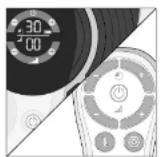
e Press the power button on the device or on the remote control to turn Revitive on.
You will hear a beep and the display lights will light up. The ⏻ time will read 30 minutes and ⚠ Intensity will read 00.
To turn off Revitive at any time during operation, press the power button on the device or on the remote control.
18
19

Instructions for use

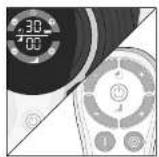
f Set the time for Revitive. The default time is 30 minutes. You can set the timer for up to 60 minutes. If you do not want to use the default time of 30 minutes, set the time for the number of minutes you want.
You can use the controls on the control panel or on the remote control.
Press the ☐ Time Control to increase the time.
Press the ⑨ Time Control to decrease the time.
For best results use Revitive foot-pads for at least 30 to 60 minutes each day, seven days a week.
It is important to use Revitive at a high enough intensity to give you a strong comfortable muscle contraction. Most people achieve a strong muscle contraction over intensity level 40 (intensity range 1-99).
If you are diagnosed with a long term medical condition such as High Blood Pressure, High Cholesterol, Diabetes, Osteoarthritis, Chronic Venous Insufficiency (CVI), Peripheral Arterial Disease (PAD), or COPD, we recommend a minimum of two (2) x 30 minute sessions per day. It can take up to 12 weeks to help reduce symptoms associated with these chronic conditions.
Do not use Revitive more than 6 sessions of 30 minutes (or the equivalent) per day. This may result in muscle fatigue.
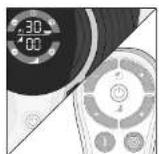
g Press the ▲+) Intensity Control one time to start stimulation.
You can use the buttons on the control panel or remote control.
Press the (+) button to increase the level. Press the (−) button to decrease the level
h Ensure you familiarise yourself with the feeling of Electrical Muscle Stimulation (EMS). Use on a low intensity for 30-60 minutes once per day for a few days.
Set the intensity at a level where you can feel the stimulation in your feet which creates a calf contraction. This will likely be less than intensity 40.
It is normal to feel tingling or varying sensations in your feet and calf muscles.
Revitive does not vibrate.
i After a few days of familiarisation, use a higher intensity that provides you with strong but comfortable calf muscle contractions.
Most people experience a strong contraction at intensity level 40 or over. You can set the intensity between 1-99.
Please note that the intensity required may vary from day to day.
If you feel pain or discomfort:
- Remove one or both feet from the foot-pads to stop the stimulation
- Lower the intensity of the foot-pads using the Intensity Control on the control panel, or remote control, before replacing your feet on Revitive
j The ⚙ Time Display will start to count down in minutes as Revitive cycles through its program.
k When Revitive times out, the ⓄTime Display reads 00 and you will hear three beeps.
I The Revitive switches itself off automatically.
20
21

Instructions for use

Step 5:
Using the Electrode Pads

Electrode Body and Arthritis Pads are for single person use only. Do not share others.
Revitive comes with one pair of reusable (up to 20-30 applications) Arthritis Pads that can be used to deliver Electrical Muscle Stimulation (EMS) to strengthen the muscles at the front of your thigh (quadriceps).
Strengthening your quadriceps muscles may help to support and stabilise the knee, reduce stress on the knee and relieve knee pain.
Revitive also comes with one pair of smaller reusable (up to 20-30 applications) Body Pads that can be used to deliver Transcutaneous Electrical Nerve Stimulation (TENS) to other parts of the body.
TENS provides stimulation of your nerves, which blocks the pain you experience in a particular area of your body. TENS can be used to provide pain relief to the areas shown on page 29. For instructions on how to use TENS, go to page 29.
Before using the Body Pads, select the area you wish to apply stimulation to and which stimulation mode you would like to use.
The positioning of the Electrode Pads will depend on which stimulation mode (EMS or TENS) you choose. The Electrode Pads cannot be used at the same time as the foot-pads. Using the Electrode Pads will automatically turn the foot-pads off.
Step 5.1:
Using the Large Arthritis Pads for Electrical Muscle Stimulation (EMS)
It is recommended that the Arthritis Pads be used on the affected leg (knee) for 20 minutes, once a day, 5 days per week. Find a routine that works for you, perhaps using the Arthritis Pads Monday - Friday and not at the weekend.
Do not use Revitive more than 6 sessions of 30 minutes (or the equivalent) per day. This may result in muscle fatigue.
a Clean and dry the thigh where you will place the Arthritis Pads (see next page for positioning instructions).
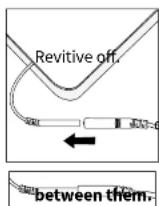
b Make sure Revitive is switched off. If the control panel is still illuminated, press the power button and turn
c Attach the ends of the Arthritis Pads to the Electrode
Press connectors until there is no gap
Leaving a gap may cause discomfort.

d Plug the other end of the Electrode cord into the opening on the side of Revitive.
22
23
EN
Instructions for use
EN
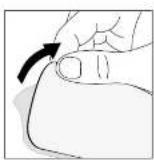
e Remove the plastic liner from the Arthritis Pads, by peeling it off carefully. Replace the Arthritis Pads onto the plastic liner after use.
text_image
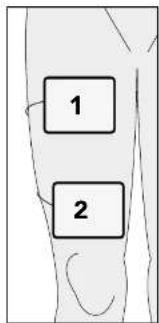
1 2f Gently press one Arthritis Pad across your thigh (1), a few centimetres away from your groin area, with the adhesive side against the skin.
g Gently press second Arthritis Pad across your thigh (2), a few centimetres from the top of your kneecap, with the adhesive side against the skin.
The Arthritis Pads do not need to be lined up exactly with each other. They need to be in a position that is comfortable and that allows you to see your thigh muscles contract & relax.
Revitive Arthritis Pads are designed to be used whilst seated.
NB The Arthritis Pads are only suitable for use on the thigh muscle with the Revitive Arthritis-Knee device in EMS mode and will not be effective for any other areas of the body.
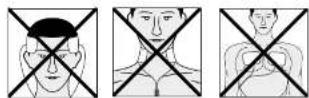
Do NOT use the Arthritis Pads on your head, face, neck or chest.
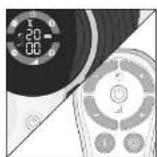
h Press the power button on the device or on the remote control to turn Revitive on.
You will hear a beep and the display lights will light up. The time will read 30 minutes, the intensity will read 00 and the IMS symbol will be displayed.
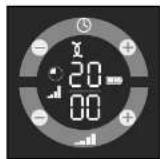
NB Revitive Electrode Pads will automatically provide stimulation in EMS mode.
See page 29 for instructions on how to use in TENS mode.
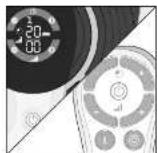
i Set the time for the number of minutes you want to use Revitive. The default time for the Arthritis Pads is 20 minutes.
You can use the buttons on the device or remote control.
Press the ⏻ Time Contol to increase the time.
Press the Ⓞ Time Contol to decrease the time.
24
25

Instructions for use

Adjusting the intensity level - At the start of therapy there will be 30 seconds of stimulation to help you set the right intensity level. This is followed by a rest period of 30 seconds, when you will feel no stimulation.
For the remainder of the therapy session you will feel 10 seconds of stimulation, followed by a 20 second rest period which repeats until the end of therapy.
Adjust the intensity when you can feel the stimulation being applied to your thigh.
It is not possible to adjust the intensity during the rest period.
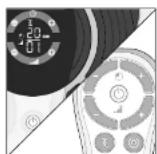
j Press the 🔍) Intensity Control, one time, to start stimulation.
You can use the buttons on the device or remote control.
Press the (+) button to increase the level.
Press the (−) button to decrease the level.
k Ensure you familiarise yourself with the feeling of Electrical Muscle Stimulation (EMS). Use on a low intensity for 20 minutes once per day for a few days.
Set the intensity at a level where you can feel the stimulation in your feet which creates a calf contraction. This will likely be less than intensity 40.
It is normal to feel tingling or varying sensations in your muscles you are treating.
I After a few days of familiarisation, use a higher intensity that provides you with strong but comfortable muscle contractions.
Most people experience a strong contraction at intensity level 40 or over. You can set the intensity between 1-99.
Please note that the intensity required may vary from day to day.
If you feel pain or discomfort:
- lower the intensity of the Arthritis Pads using either the _(-) Intensity Control on the control panel of the device or on the remote control.
- You can also choose to stop therapy before the end of the 20 minute session to avoid muscle fatigue. You can do this by pressing the power button on the device or on the remote control.
m The time control/display will start to count down in minutes as Revitive cycles through its program.
n When Revitive times out, the time display reads 00 and you will hear three beeps.
- Revitive switches itself off automatically.
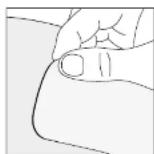
p Ensuring that the device has switched itself off, then gently peel the Arthritis Pads from the skin.
Do not pull the Arthritis Pads off the skin using the Electrode cords as this may damage the cords.
26
27

Instructions for use

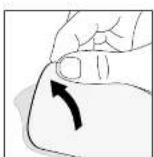
q Replace the Arthritis Pads onto their plastic liner after use.
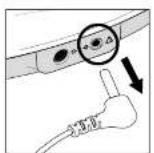
r Unplug the Electrode cord from the opening on Revitive.
Step 5.2:
Using the Small Body Pads for Transcutaneous Electrical Nerve Stimulation (TENS)
It is recommended to use Revitive, in TENS mode, for 20-30 minutes per session. TENS mode may be used as and when required.
a Select the area you wish to apply electrical stimulation to.
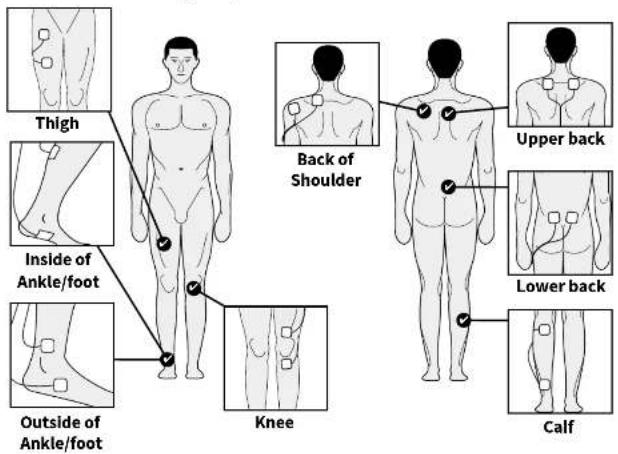
Recommended Body Pad placements are shown below:
text_image
Thigh Inside of Ankle/foot Outside of Ankle/foot Knee Back of Shoulder Upper back Lower back CalfIf using TENS for pain relief, position the Body Pads on either side of the area causing you pain.
28
29

Instructions for use

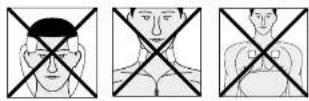
Do NOT use the Body Pads on your head, face, neck or chest.
b Clean and dry the area where you will place the Body Pads.
c Make sure Revitive is switched off. If the control panel is still illuminated, press the power button and turn Revitive off.
d Attach the ends of the Body Pads to the Electrode cord.
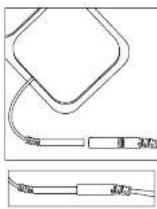
Press connectors until there is no gap between them. Leaving a gap may cause discomfort.
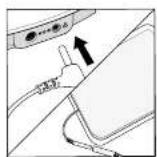
e Plug the other end of the Electrode cord into the opening on the side of Revitive.
Plugging in the Electrode cord will automatically turn the foot-pads off.
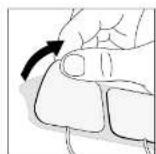
f Remove the plastic liner from the Body Pads, by peeling it off carefully. Replace the Body Pads onto the plastic liner after use.
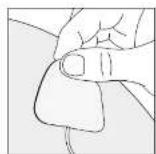
g Press the Body Pads on the area you wish to apply electrical stimulation, as shown on page 29, gently pressing the adhesive side against the skin.
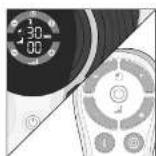
h Press the power button on the device or on the remote control to turn Revitive on.
You will hear a beep and the display lights will light up. The time will read 30 minutes, the intensity will read 00 and the EMS symbol will be displayed.
NB Revitive Body Pads will automatically provide stimulation in EMS mode.
See page 23 for instructions on how to use EMS mode.
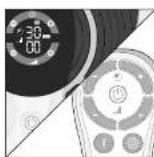
i Press the Ⓞ TENS button on the remote control. You will then see the ⓄENS symbol on the display.
30
31

Instructions for use

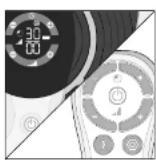
j Press the +) Intensity Control once to start stimulation.
Continue to increase the intensity until you feel a strong but comfortable tingling sensation without it causing you pain. You can set the intensity between 1-99.
You can use the buttons on the device or remote control.
Press the (+) button to increase the level. Press the (−) button to decrease the level.
If you feel pain or discomfort:
- Lower the intensity of the Body Pads using the _(-)Intensity Control on the device or remote control.
- You can also choose to stop therapy before the end of the 30 minute session to avoid skin irritation. You can do this by pressing the ☐ power button on the device or on the remote control.
k The ⏻ Time display will start to count down in minutes as Revitive cycles through its program.
When Revitive times out, you will hear three beeps, and the device will switch itself off automatically.
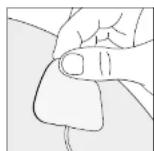
I Ensuring that the device has switched itself off, then gently peel the Body Pads from the skin.
Do not pull the Body Pads off the skin using the Electrode cords as this may damage the cords.
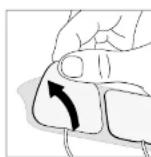
m Replace the Body Pads onto their plastic liner after use.
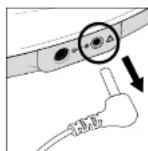
n Unplug the Electrode cord from the opening on Revitive.
Step 5.3:
Switching between EMS and TENS mode
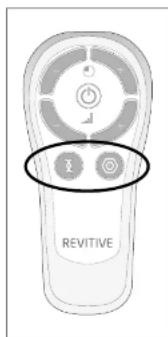
text_image
REVITIVETo change between EMS and TENS mode, press the button of the stimulation mode you require on the remote control.
During use, switching from EMS to TENS mode (or vice versa), will reset the timer back to 30 minutes. The intensity will also be reset to zero.


Instructions for use

Step 6:
Recharging the battery
Revitive can be powered from either the rechargeable battery or by connecting it to an electrical socket.
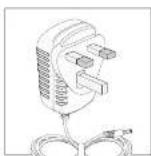
a Locate the AC/DC power adaptor.
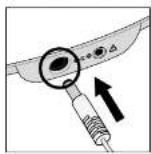
b Plug the small end of the power cord into the opening on the side of the Revitive.
c Plug the power adaptor into the nearest electrical socket. This will start charging the (integrated) rechargeable battery.
The battery indicator will illuminate constantly to indicate the device is charging and to show the battery level, as below.

A full charge will take approximately 3 hours.
d Once fully charged, the full battery indicator will stay illuminated until the power adaptor is unplugged from the device or the electrical socket.
A full charge enables approximately 3½ hours of use (the equivalent of seven (daily) 30 minute sessions).
Please note you can still use the device while it is charging but the battery indicator will not show.
Step 7:
Cleaning and storing Revitive
a Ensure Revitive is switched off.
b Wipe down the foot-pads with a soft damp cloth.
Do not clean with chemicals.
Do not immerse Revitive in water.
c Store Revitive in a cool, dry and dust-free location. Store out of direct sunlight.
d Place Electrode Pads onto the plastic liner.
e Store the Electrode Pads in a dry and ventilated location.
Store out of direct sunlight. You do not have to detach the Electrode Pads from the Electrode cords to store them.
Replacing the Batteries
The remote control requires two AAA 1.5V batteries to operate.
Replacing the Electrode Pads
The Large Electrode Arthritis Pads and Smaller Electrode Body Pads are reusable up to 20-30 applications. If the Electrode Pads start to lose their adhesiveness, rub a few drops of water into the surface. Replacement Pads can be obtained via www.revitive.com
34
35

Troubleshooting

Problem Possible Cause Solution
| Revitive is on (lights illuminated on the LED display) but I cannot feel the electrical stimulation through the foot-pads. | Not placing both bare feet on the foot-pads at the same time. | Ensure that your feet are bare and each foot is placed on each of the foot-pads at the same time. Keep increasing the intensity up to a maximum of 99 until you feel the stimulation. |
| Your feet may be dry. Moisturise the soles of your feet to improve conductivity and stimulation and try the procedure again. You may also have to increase the intensity level. | ||
| You may be dehydrated. Drink plenty of water before and after using the device. The device uses your body to create the electrical circuit. Water is an excellent conductor of electricity and if your body is less hydrated (below 60%) then the stimulation may be less, therefore it is important to always remain well hydrated. | ||
| The intensity level may be on too low a setting. | This is a very safe device. Keep increasing the intensity level towards 99 until you feel the stimulation. You may find that you have to increase the intensity level as you get used to the therapy. The aim is not to get to 99 but to find a setting that is comfortable for you. | |
| Electrode cord is connected to device. | Disconnect the Electrode cord - the foot-pads will not work while the Electrode cord is plugged in. | |
| If, having tried the solutions above, you still cannot feel the stimulation: | Test the device by placing one hand across both footpads at the same time (The heel end of the footpads is easiest). With your other hand, and starting from zero, increase the intensity level until you can feel the stimulation. If you can feel the stimulation through your hand then the device is working. If on 99 you still cannot feel the stimulation then please contact your authorised dealer. | |
Problem Possible Cause Solution
| No power or lights to Revitive when it is switched on. | AC Adaptor not switched on at the electrical socket or AC Adaptor not plugged into device properly. | Check electrical socket power is switched on and the AC Adaptor is plugged into the device correctly. If still not working - contact your authorised dealer. |
| Flat battery Plug device in an electrical socket and charge battery or run using mains power option. | ||
| Revitive is not vibrating. | Revitive IS NOT DESIGNED TO VIBRATE. | |
| The IsoRocker® is not "rocking". | It is the muscles in your legs that cause the "rocking", the IsoRocker® is not mechanical. | The IsoRocker® will only rock when increased to an intensity which causes sufficient calf muscle contraction. It may be that you cannot comfortably increase the intensity high enough until you get used to the sensation. It is important that intensity is adjusted to a level that is comfortable. |
| The device is too far in front of you. | Sit with your knees at a 90 degree angle. | |
| The IsoRocker® system is not enabled. | Ensure IsoRocker® Disabler is "flat", in centre position (see page 16). | |
| My legs are aching after treatment. | You may have the Intensity on too high a setting and your muscles are being overworked. | Leave adequate time after each treatment to allow the muscles to recover (just like after vigorous exercise!). On your next session start on a lower setting (where you can feel the mild electrical stimulation and it is comfortable) and reduce the duration until your muscles have acclimatized to the stimulation. |
| When using the IsoRocker® on a hard floor it makes a tapping noise. | Incorrect positioning of the device or too high an intensity level. | Adjust the positioning of the device or lower the intensity level to reduce the device tapping. Alternatively use a floor mat under the device to cushion the sound. |
36
37

Troubleshooting
Technical Specifications

Problem Possible Cause Solution
| I have placed my feet on the device but am unable to see the TENS symbol on the display. | TENS is only available through the Body Pads. The foot pads provide EMS only. | |
| When using the Body Pads, the stimulation feels uncomfortable. | The level of stimulation you are using may be too high. | Decrease the stimulation level using the _(-) intensity control on the device or remote control. |
| I am unsure of which therapy mode I am using when using the Body Pads. | Look at the display on the device. If the Body Pads are in EMS mode, you will see the EMS symbol. If the Body Pads are in TENS mode, you will see the TENS symbol. | |
| I suddenly can't feel stimulation when using the Body Pads. | You may have pressed the other stimulation mode button by accident. | Pressing the opposite stimula-tion mode button (i.e. pressing the TENS button when already in EMS mode or vice versa), will reset the timer back to 30 minutes. The intensity will also be reset to zero. |
| When using the Arthritis Pads, my thigh muscles are aching before the end of the treatment. | Your muscles may not yet be strong enough to carry out a full 20 minute session. | Turn the device off and end the ses-sion before the end of the 20 min-utes. On your next session start on a lower setting (where you can feel the mild electrical stimulation and it is comfortable) and reduce the duration until your muscles have acclimatised to the stimulation. |
| When using the Arthritis Pads, I can't feel the stimulation in my thigh. | Therapy has started and has reached the rest period. | You will need to wait for up to 20 seconds before the stimulation will start again. |
For more information, including Frequently Asked Questions, please visit www.revitive.com
| Name of product Revitive Arthritis-Knee | |
| Model 2836AB | |
| Frequency | EMS: 1Hz - 50HzTENS: 80Hz - 130Hz |
| Output current | EMS: Max 15mATENS: Max 15mA |
| Weight | 1.5kg |
| Dimensions (with IsoRocker* enabled and disabled) | enabled: 355(W)x355(H)x75(D) mmdisabled: 355(W)x355(H)x90(D) mm |
| Power consumption 5W | |
| AC adaptor | CE Approved |
| Battery and battery life Li-Ion / 500 recharge cycles | |
| Power sourceInput (adaptor used) ⊕Output ⊗ | 100-240V^ AC (-⊗), 50/60Hz, 0.18A5V (⊗) DC ≈1.0A |
| Applied partsParts of Revitive that in normal use come intophysical contact with the user. | Electrode Body Pads - 5cm x 5cm = 25cm2Electrode Thigh Pads - 10cm x 12.5cm = 125cm2Foot-Pads - 135.5 cm2 |
| Durable period (service life) of device | 4 Years |
The Remote Control replicates the controls found on the device
| Operating Frequencies 38 KHz | |
| Operating Range Distance | 0 to 25m at horizontal0 to 18m at +/-30 degree angle from the horizontal. |


Technical Specifications

| Complies with European Medical Devices Directive (93/42/EEC) |  |
| LOT and serial number of the device, including year (YYYY) and month (MM) of production, as stated on the packaging and on the back of the device. |  |
| Item number | [YYYT] |
| Contraindications, Warnings and CautionsMake sure you understand these before using the Revitive |  |
| Power | [077H] |
| Time Remaining | [0780] |
| Intensity Level | [HXBK] |
| EMS Mode | [07AeI] |
| TENS Mode | [07v3] |
| Battery Indicator | [TGAY] |
| IsoRocker®Disabler | [HS76] |
| Center Positive Polarity | [0WCY] |
| Class II medical electrical equipment double insulated | [0x3d] |
| Type BF medical electrical equipment | [0x4d] |
| Legal manufacturer of the device | [0x47d] |
| EU/EC European Authorised Representative | [0x57] |
| FCC markCertification mark employed on electronic products manufactured or sold in the United States which certifies that the electromagnetic interference from Revitive is under limits approved by the Federal Communications Commission | [DABH] |
| Consult instructions for use |  |
| The Waste Electrical and Electronic Equipment Directive (WEEE Directive).At the end of the product lifecycle, do not throw this product into normal household garbage, but take it to a collection point for the recycling of electronic equipment |  |
| Ingress Protection Rating |  |
| Use-by date | ### YYYY MM DD |
| Humidity, temperature and air pressure limit for storage and transport | 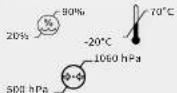 |
| Humidity, temperature and air pressure limit for operating conditionsAfter any exposure to hot or cold temperatures outside the specified operating range of 10 - 40°C allow the product to re-adjust to the recommended operating temperatures to ensure continued product performance. | ### 10°C36 ### |
| Indoor Use Only | ### |
| Medical device does not contain natural rubber latex |  |
| Do not disassemble | ### |
40
42

Your two year warranty
Table des matières
FRANCAIS

It is important to retain the retailer's receipt as proof of purchase. Staple your receipt to this back cover for future reference.
Please quote the following information if the product develops a fault. These numbers can be found on the base of the product:
Model no:
Lot no:
All Revitive devices are individually tested before leaving the factory. In the unlikely event of any device proving to be faulty within 30 days of purchase, it should be returned to the place of purchase for it to be replaced.
If the fault develops after 30 days and within 24 months of original purchase, you should contact your local distributor quoting model number and LOT number on the product, or write to your local distributor at the address shown.
You will be asked to return the product (in secure, adequate packaging) to the address shown with a copy of proof of purchase.
Subject to the exclusions set out below (see Exclusions) the faulty device will then be repaired or replaced and dispatched, usually within 14 working days of receipt.
If, for any reason, this item is replaced during the 2 year guarantee period, the guarantee on the new item will be calculated from the original purchase date. Therefore, it is vital to retain your original till receipt or invoice to indicate the date of initial purchase.
To qualify for the 2 year guarantee, the device must have been used according to the manufacturer's instructions supplied.
EXCLUSIONS:
1 Actegy, manufacturer of Revitive devices, shall not be liable to replace the goods under the terms of the guarantee where:
- The fault has been caused or is attributable to accidental use, misuse, negligent use or used contrary to the manufacturer's recommendations or where the fault has been caused by power surges or damage caused in transit.
- The device has been used on a voltage supply other than that stated on the product or used with a power adaptor other than the one supplied with the product.
• Repairs have been attempted by persons other than our service staff (or authorised dealer).
• The device has been used for hire purposes or non-domestic use.
• The device is second hand.
2 Actegy are not liable to carry out any type of servicing work, under the guarantee.
3 Accessories such as Electrode Body Pads are not covered by the guarantee.
4 Batteries and damage from leakage are not covered by the guarantee.
5 This guarantee does not confer any rights other than those expressly set out above and does not cover any claims for consequential loss or damage. This guarantee is offered as an additional benefit and does not affect your statutory rights as a consumer.
To activate your free 2 year warranty please register your device at: www.revitive.com/myrevitive
natural_image
Line drawing of a portable electronic device with attached cable (no text or symbols)
Revitive Arthrose-Genou
natural_image
Circular object with black and white bands, resembling a film reel or fan (no text or symbols visible)natural_image
Front view of a remote control device with buttons and a 'REVITIVE' label (no additional text or symbols)natural_image
Two rectangular metal fasteners with handles, no text or symbols visiblenatural_image
Circular object with segmented black and white bands, resembling a vinyl record or film reel (no text or symbols visible)E Elektroden-Kabel
F Fernbedienung
natural_image
Two rectangular metal fasteners with handles, no text or symbols visible
Grote
artrose-elektroden

Revitive Artrose-Knie
natural_image
Circular device with black and white bands, no visible text or symbols
Geleidingsdraden

Afstandsbediening
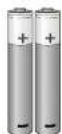

AAA-batterijen x2
text_image
Handgreep REVITIME Bedieningspaneel /scherm Netvoeding AAN/UIT Voetstappen
Aansluiting voor
natural_image
Cross-sectional diagram of a mechanical component with central bore and mounting holes (no text or symbols)health powered by science inspired by you™

Actegy Ltd
1 West Point, Western Road
Bracknell, RG12 1HJ
United Kingdom
Tel: +44 (0)800 014 6377
MDSS
Schiffgraben 41
30175 Hannover, Germany.
1 West Point, Western Road
Bracknell, RG12 1HJ
United Kingdom
Tel: +44 (0)800 014 6377
info.uk@actegy.com
FR/NL/BE:
Revitive SAS
Kundenservice@revitive.de
CA:
Actegy Health Inc
6400 Shafer Court
Suite 225.
Rosemont, IL 60018, USA
Tel: 317-672-1979
Copyright © 2021 Actegy Ltd. All rights reserved. Actegy®, Revitive®, Revitive Medic™ and Circulation Booster® are registered trademarks of Actegy Ltd. The Revitive product is a proprietary design and is protected by applicable design laws.