KDL-42W658A - Projector SONY - Free user manual and instructions
Find the device manual for free KDL-42W658A SONY in PDF.


User questions about KDL-42W658A SONY
0 question about this device. Answer the ones you know or ask your own.
Ask a new question about this device
Download the instructions for your Projector in PDF format for free! Find your manual KDL-42W658A - SONY and take your electronic device back in hand. On this page are published all the documents necessary for the use of your device. KDL-42W658A by SONY.
USER MANUAL KDL-42W658A SONY
Operating Instructions GB
Mode d'emploi FR
BRAVIA
Introduction
Thank you for choosing this Sony product. Before operating the TV, please read this manual thoroughly and retain it for future reference.
- Instructions about "Installing Wall-Mount Bracket" are included within this TV's instructions manual.
The illustrations used in this manual may differ depending on your TV model.
The illustrations of the remote control used in this manual are of the RM-GD027 unless otherwise stated.
Before operating the TV, please read page 29 (Safety Information). Retain this manual for future reference.
Trademark information
The terms HDMI and HDMI High-Definition Multimedia Interface, and the HDMI Logo are trademarks or registered trademarks of HDMI Licensing LLC in the United States and other countries.
DLNA®, the DLNA Logo and DLNA CERTIFIED® are trademarks, service marks, or certification marks of the Digital Living Network Alliance.
Manufactured under license from Dolby Laboratories.
"BRAVIA" and Bare Trademarks of Sony Corporation.
TrackID is a trademark or registered trademark of Sony Mobile Communications AB.
Music and video recognition technology and related data are provided by Gracenote. Gracenote is the industry standard in music recognition technology and related content delivery. For more information, please visit www.gracenote.com.
CD, DVD, Blu-ray Disc, and music and video-related data from Gracenote, Inc., copyright © 2000-present Gracenote. Gracenote Software, copyright © 2000-present Gracenote. One or more patents owned by Gracenote apply to this product and service. See the Gracenote website for a nonexhaustive list of applicable Gracenote patents.
Gracenote, MusicID, VideoID, Video Explore, the Gracenote logo and logotype, and the "Powered by Gracenote" logo are either registered trademarks or trademarks of Gracenote in the United States and/or other countries.
Opera Devices SDK from Opera Software ASA. Copyright 1995-2013 Opera Software ASA. All rights reserved.
Wi-Fi, Wi-Fi Direct and Miracast are marks or registered marks of the Wi-Fi Alliance.
"Blu-ray Disc", "Blu-ray" and "Blu-ray Disc" logo are trademarks of Blu-ray Disc Association.
"Sony Entertainment Network logo" and "Sony Entertainment Network" are trademarks of Sony Corporation.
MHL, Mobile High-Definition Link and the MHL Logo are trademarks or registered trademarks of MHL Licensing, LLC. Manufactured under license from DTS Licensing Limited. For U.S. and worldwide patent and trademark information, see www.dts.com/patents/legacy.aspx.
(c) DTS Licensing Limited and DTS, Inc. 2012.

HIGH-DEFINITION MULTIMEDIA INTERFACE





Location of the identification label
Labels for TV Model No. and Power Supply rating (in accordance with applicable safety regulation) are located on the rear of the TV. Labels for AC adapter Model No. and Serial No. are located at the bottom of AC adapter.
GB
About this manual (Operating Instructions)
This manual explains how to set up your TV. For more information on how to use BRAVIA TV, refer to the "Electronic manual".
Operating Instructions
Explains how to set up your TV such as connections, initial set-up, and basic operations.
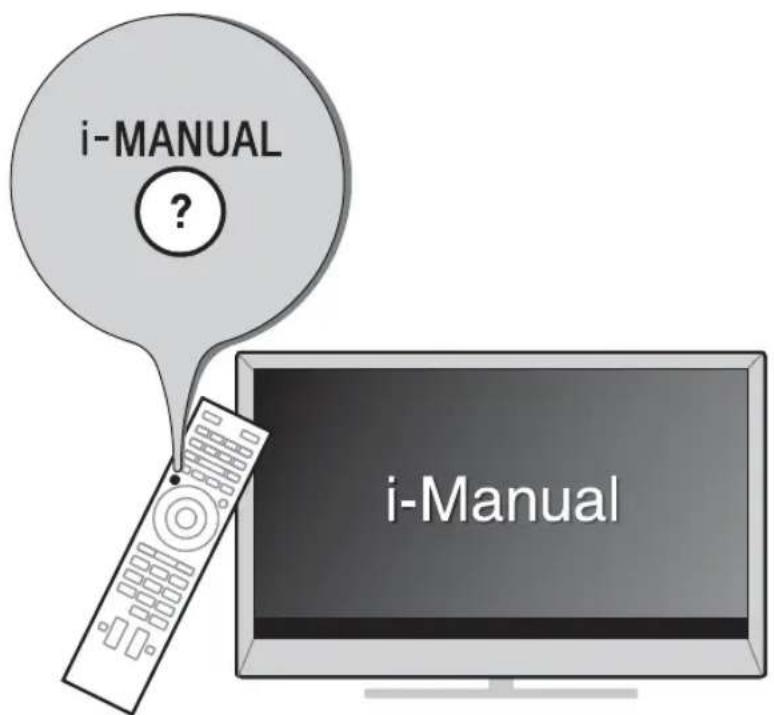
For more information, press the i-MANUAL button

Electronic manual (i-Manual)
Explains how to use all the features. See page 19 on how to use the i-Manual.
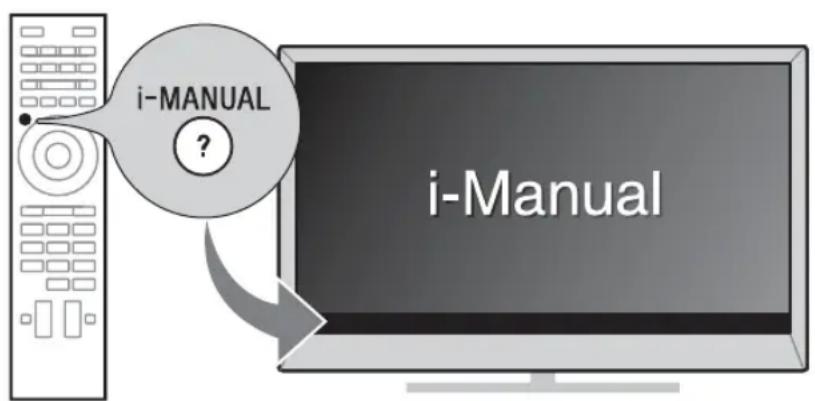
Images and illustrations used in this manual may differ from the actual screen.
Table of Contents
Getting Started
Checking the accessories. 6
Inserting batteries into the remote control. 6
1: Attaching the Table-Top Stand 7
2: Connections 8
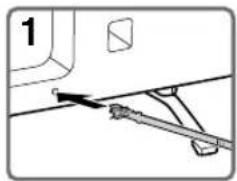
3: Preventing the TV from toppling over 10
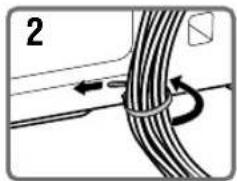
4: Bundling the cables 11
5: Connecting the TV to the Internet 11
6: Performing the initial set-up. 12
Using Your BRAVIA TV
Watching TV 14
Selecting various functions and settings (Home Menu) 16
Watching Internet Video. 18
Looking for Instructions
Looking for instructions in the electronic manual
(i-Manual) 19
Additional Information
Troubleshooting 21
Specifications 22
Installing the Accessories (Wall-Mount Bracket) 24
Safety Information. 29
Precautions 32
Checking the accessories
Remote control (1)
Size AAA batteries (R03 type) (2)
AC power cord (mains lead) (1)
AC adapter (1)
Cable holder (1)
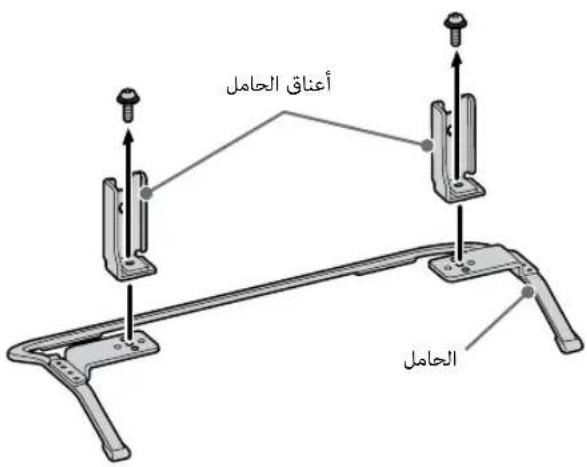
Table-Top Stand (1)*
Fixing screws for Table-Top Stand
(M5× 16) (2)
Assembling screws for Table-Top Stand
(M5 x 16) (2)
Operating Instructions (this manual), other
documents and Wall-Mount Bracket
accessories
* Refer to the supplied Table-Top Stand leaflet to assemble the Table-Top Stand.
Inserting batteries into the remote control
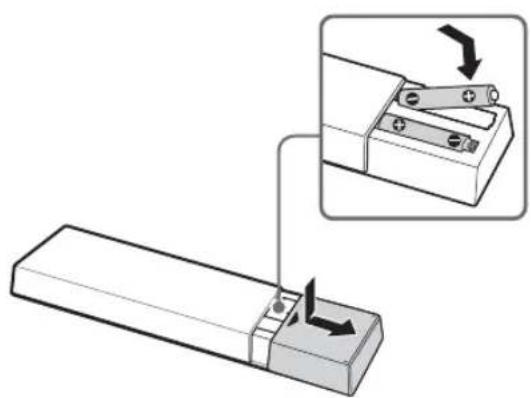
1 Remove the protection sheet.
2 Push and slide the cover to open.
1: Attaching the Table-Top Stand
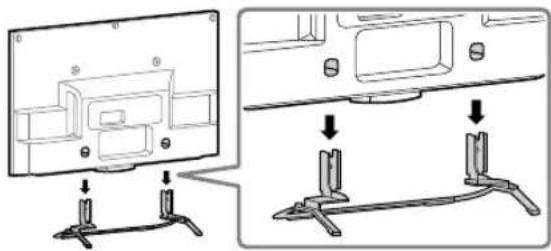
Refer to the supplied Table-Top Stand leaflet for proper attachment.
1 Place the TV set on the Table-Top Stand.
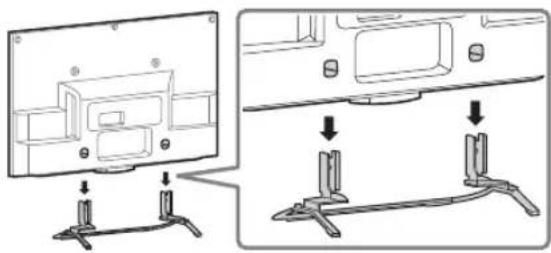
Fix the TV to the Table-Top Stand using the supplied screws. The arrow marks indicate the location of the screw holes used for securing the Table-Top Stand.
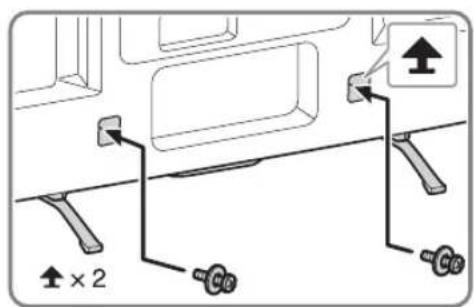

If using an electric screwdriver, set the torque at approximately 1.5N· m 15 kgf.cm

- Ensure that there are no objects in front of the TV.
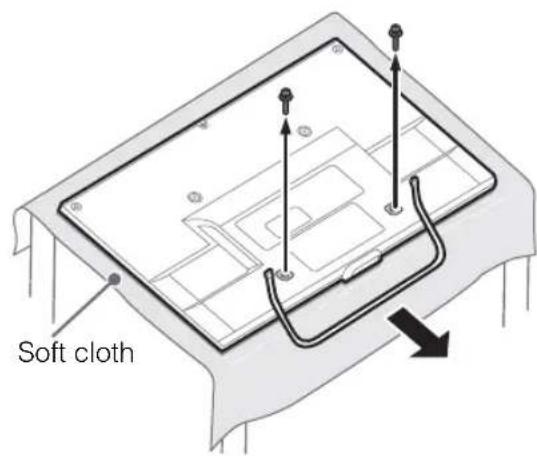
Detaching the Table-Top Stand from the TV
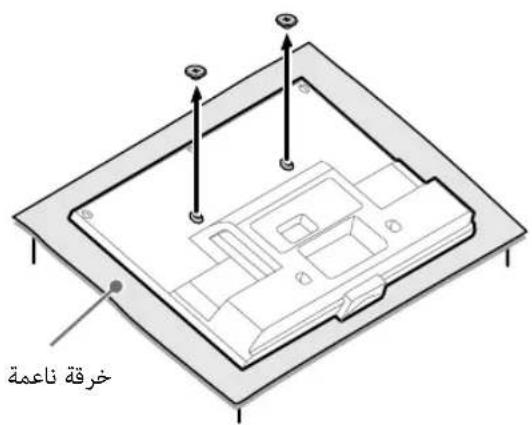
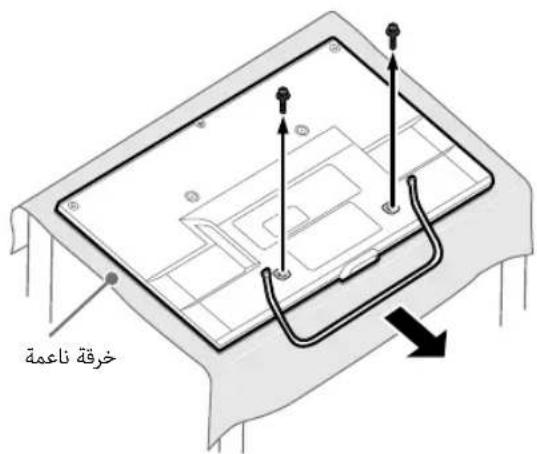
To detach the Table-Top Stand from the TV, remove the screws fixed in step 2.

- Do not remove the Table-Top Stand for any reason other than to install corresponding accessories on the TV.
- When removing the Table-Top Stand from the TV, lay the display face down on a stable work surface that is larger than the TV.
- To prevent damaging the surface of the LCD display, make sure to place a soft cloth on the work surface.
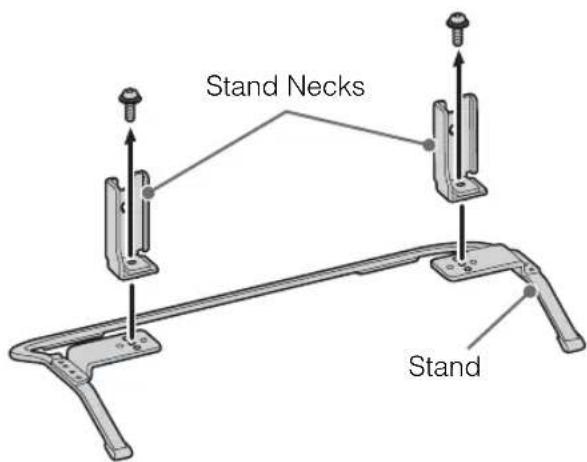
- Once the Stand Necks are detached from the Stand, be sure to keep the Stand Necks and screws in a safe place.
2: Connections
#
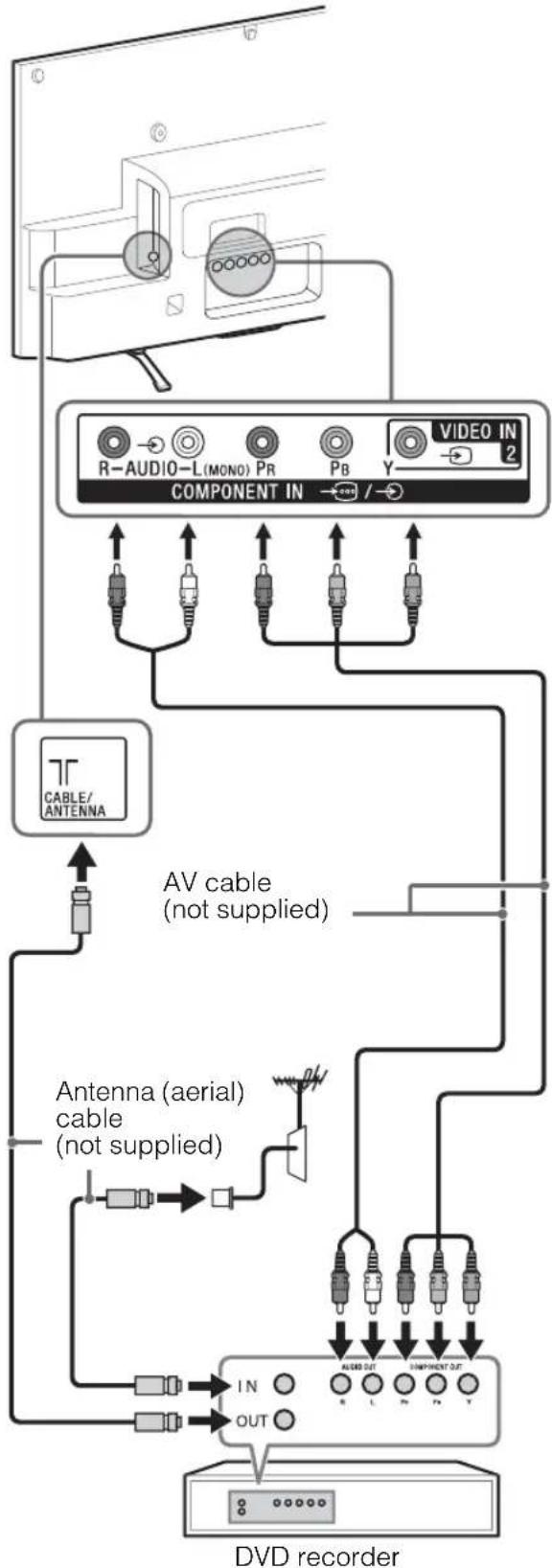
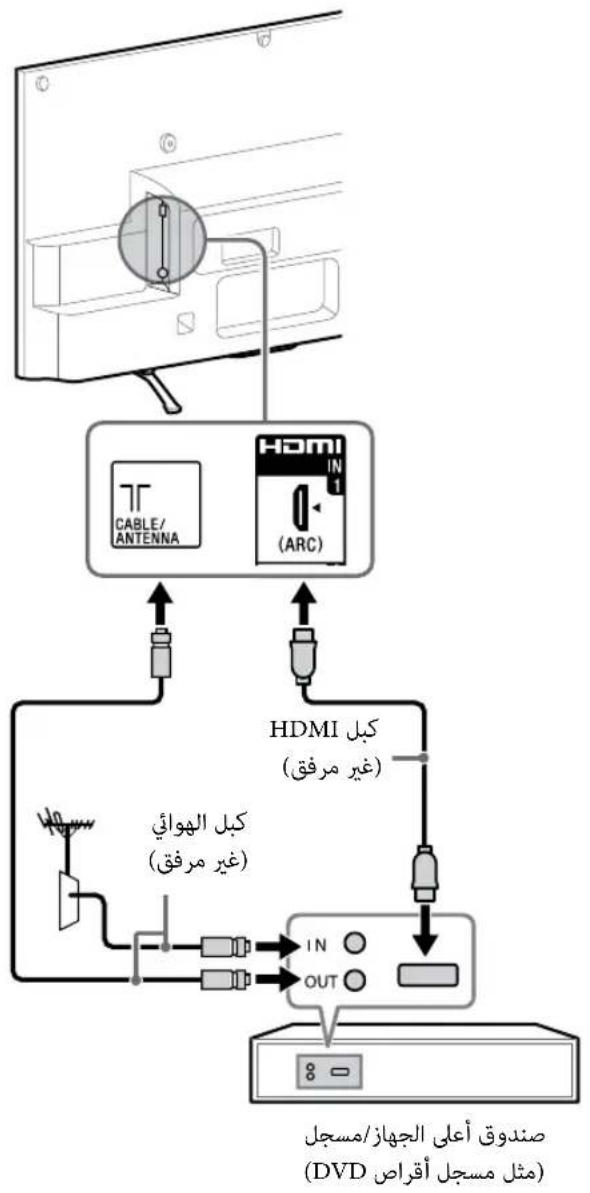
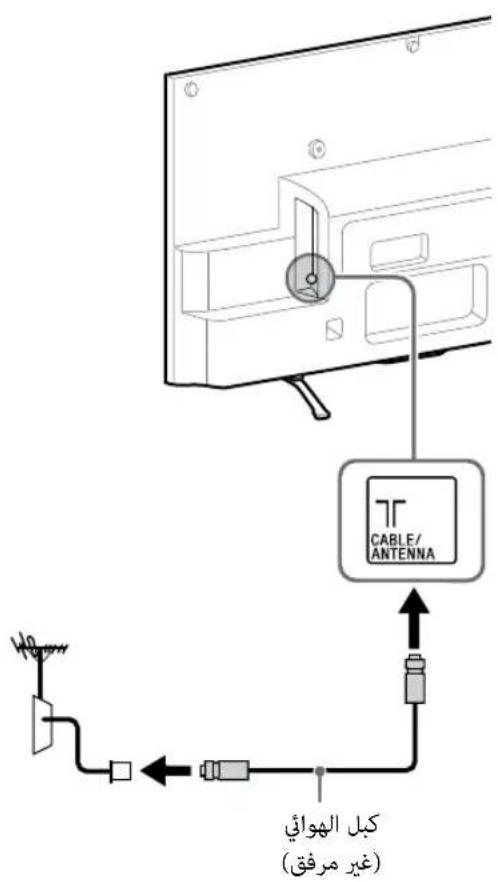
- Use an antenna (aerial) cable connector no greater than 14mm in thickness.
- Use an HDMI cable connector within 12mm (thickness) × 21mm (width).
- For more information on connections, refer to the i-Manual.
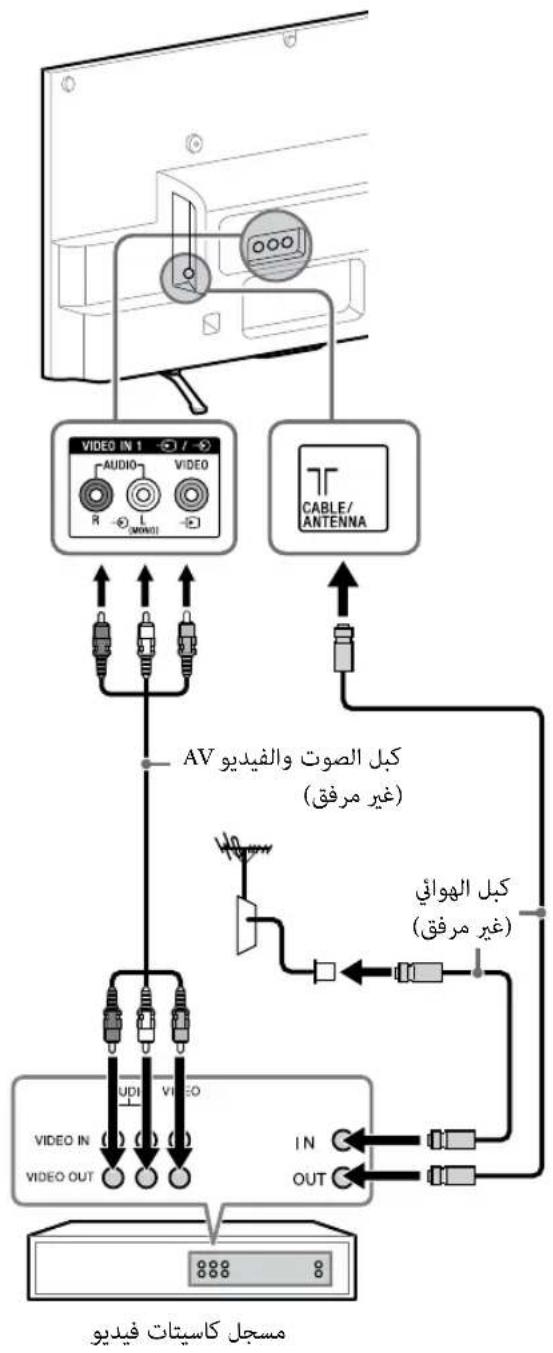
Connecting an antenna (aerial)/cable/VCR
To connect an antenna (aerial)/cable
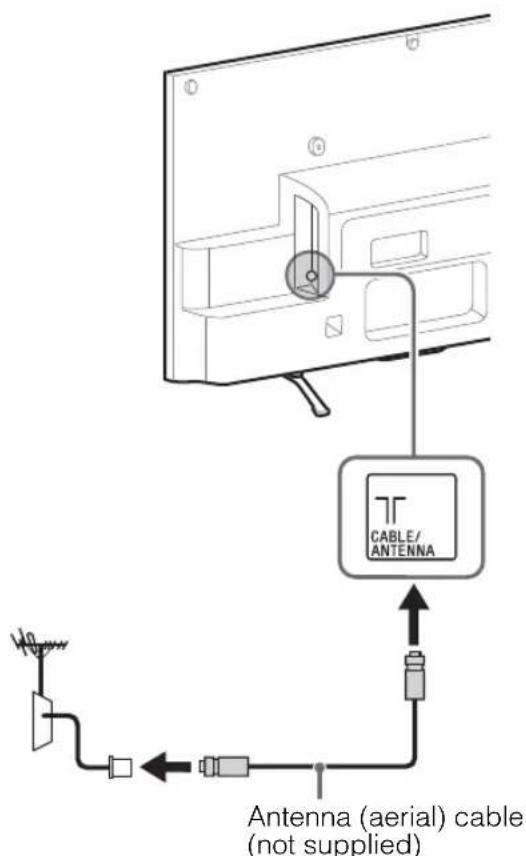
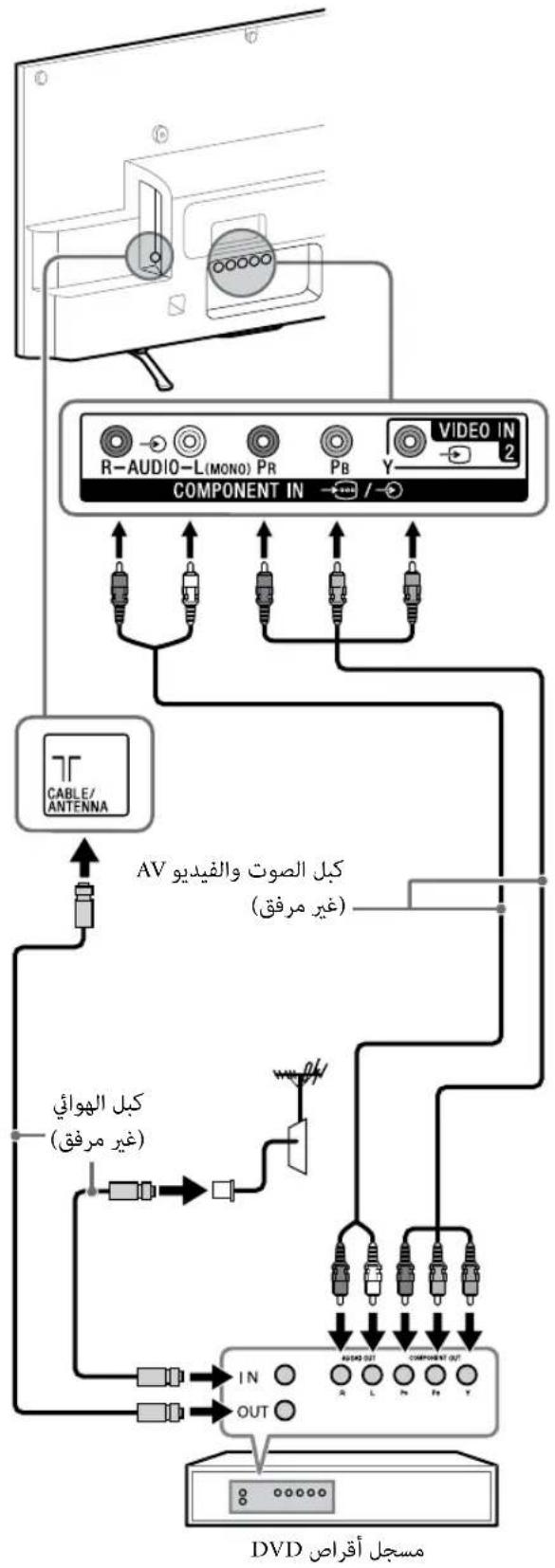
To connect a Set Top Box/ recorder (e.g. DVD recorder) with HDMI
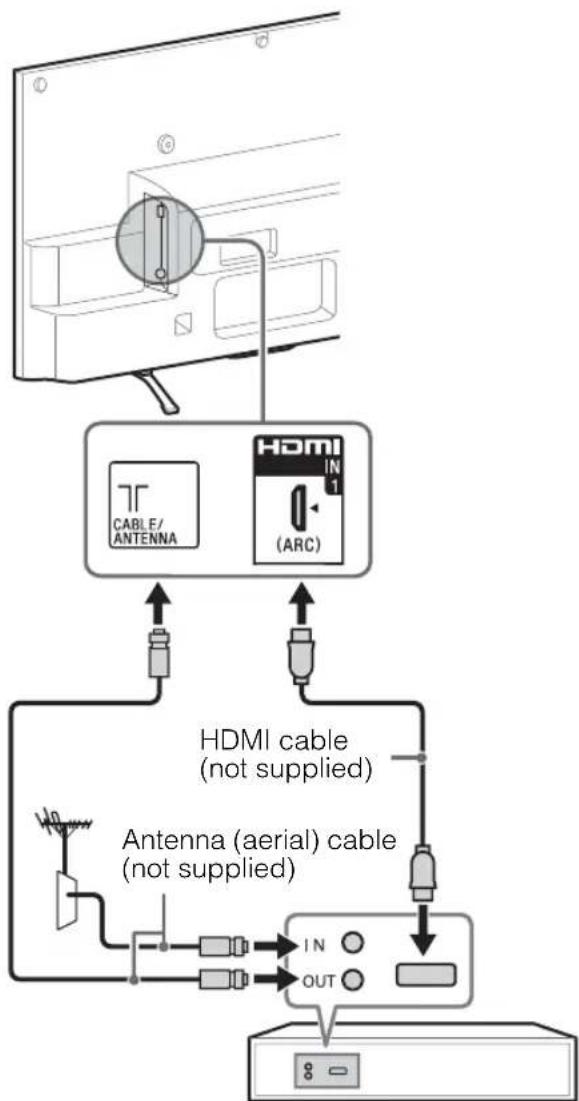
Set Top Box/ recorder (e.g. DVD recorder)
Connecting an antenna (aerial)/cable and VCR
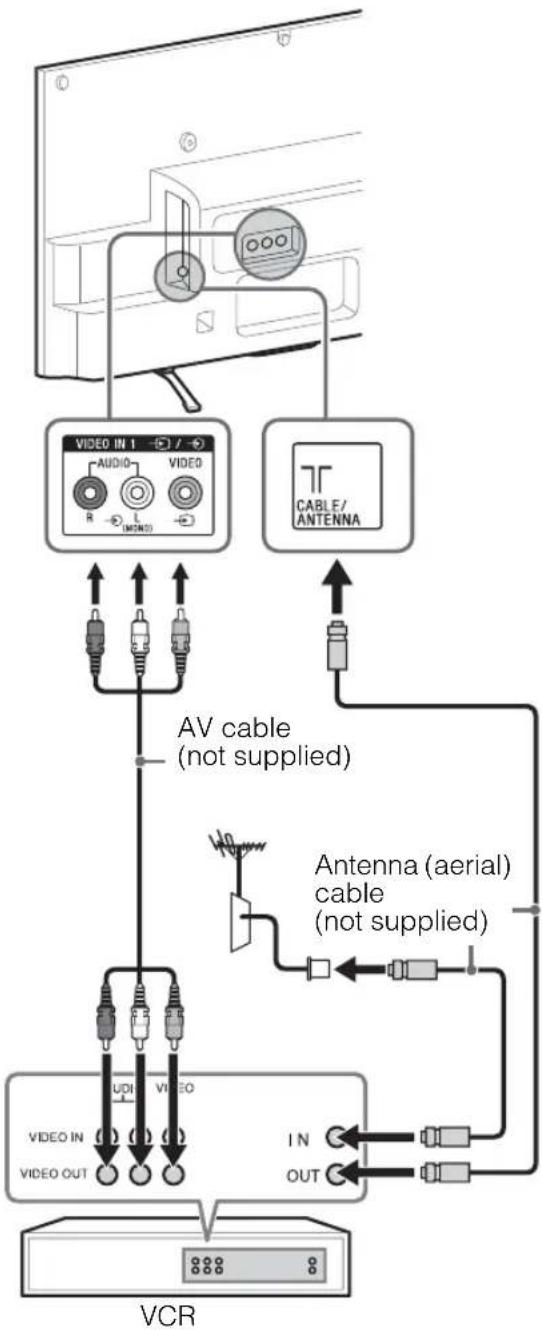
Connecting audio/video devices
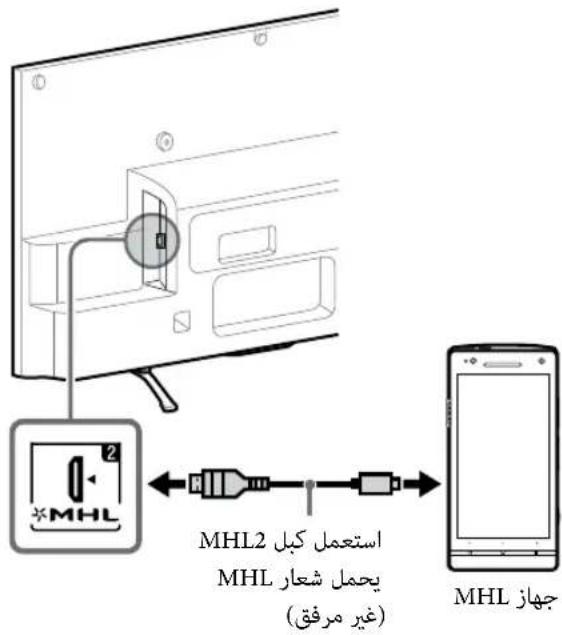
Connecting MHL device
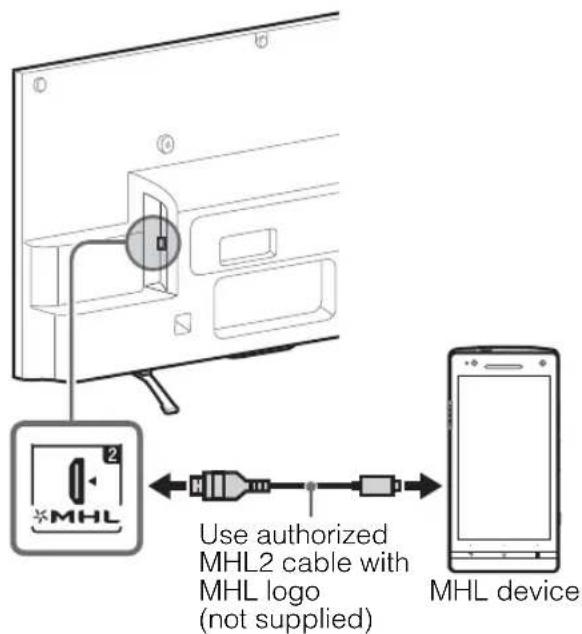
The MHL (Mobile High-Definition Link) enables the TV to communicate with a connected MHL-compatible device. The TV can charge the connected MHL-compatible device while playing photo/music/video from it. You can use the TV remote control to control the connected MHL-compatible device.
#
- If "Auto Input Change (MHL)" is set to "On", the TV automatically switches to HDMI IN 2/MHL from other input when MHL-compatible device is connected to HDMI IN 2/MHL jack. The availability of "Auto Input Change (MHL)" depends on whether the MHL-compatible device can support this feature.
- You can continue normal usage of the connected MHL-compatible device (such as receiving calls) depending on its capability.
- Some remote control functions may not be available depending on features of the connected MHL-compatible device. Please refer to the device manual for details.
- If "MHL Charging during Standby" is set to "On", you can continue charging the MHL-compatible device even when the TV is in standby mode.
- This product is officially MHL-certified for operation with other MHL-certified devices. If you encounter any problems when using the MHL function, please consult the device manufacturer for support.
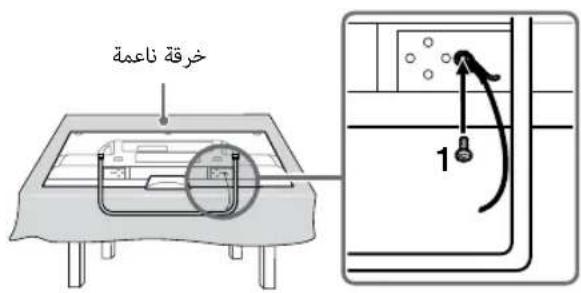
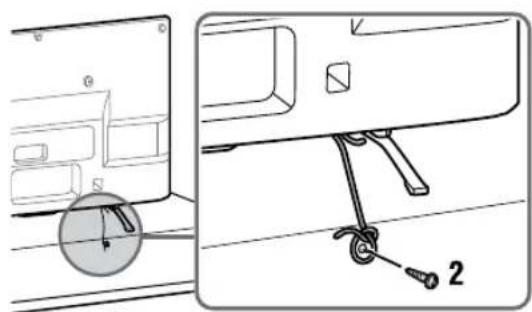
3: Preventing the TV from toppling over
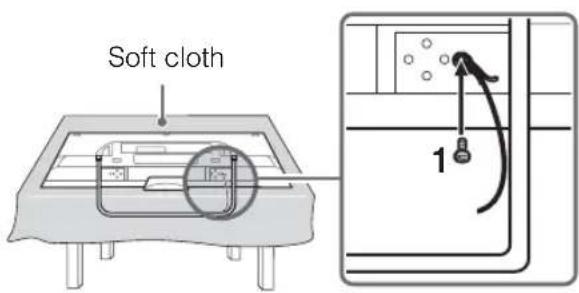
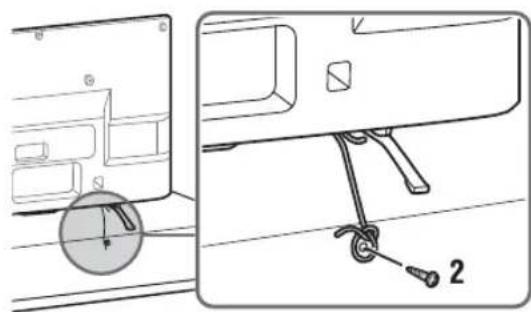
#
Before install the machine screw, lay the display face down on a stable work surface that is larger than the TV.
- To prevent damaging the surface of the LCD display, make sure to place a soft cloth on the work surface.
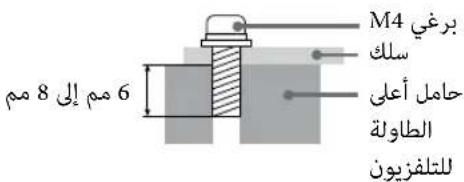
1 Install a machine screw (M4, not supplied) into the screw hole of the TV and tie with a strong cord (not supplied).
2 Install a wood screw (not supplied) in the TV stand. Then, tie the strong cord to the wood screw.
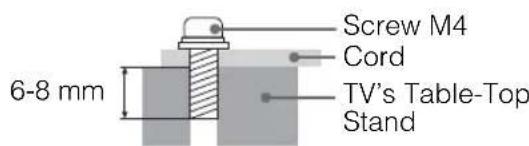
The length of the M4 machine screw differs depending on the cord diameter. Please see below illustration.
4: Bundling the cables
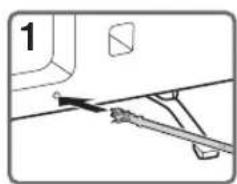
#
- Do not bundle the AC power cord (mains lead) together with other cables.
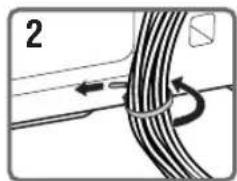
5: Connecting the TV to the Internet
When you connect this TV to the Internet, you can enjoy multiple functions. For details on the functions, refer to the i-Manual.
#
- You will need to contract with an Internet service provider to connect to the Internet.
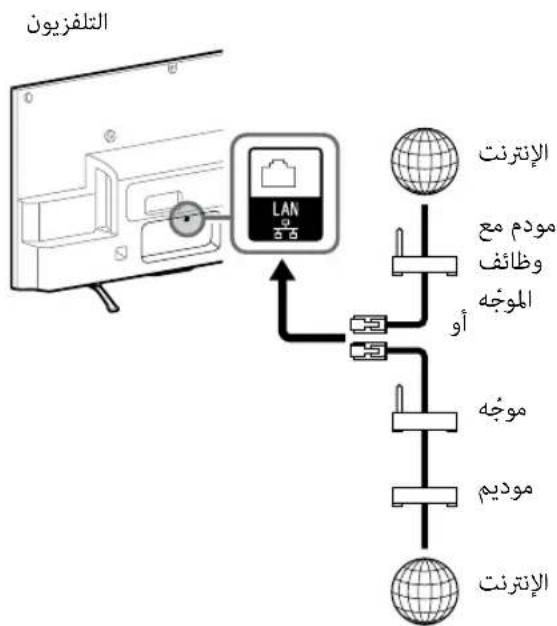
Preparing a wired network
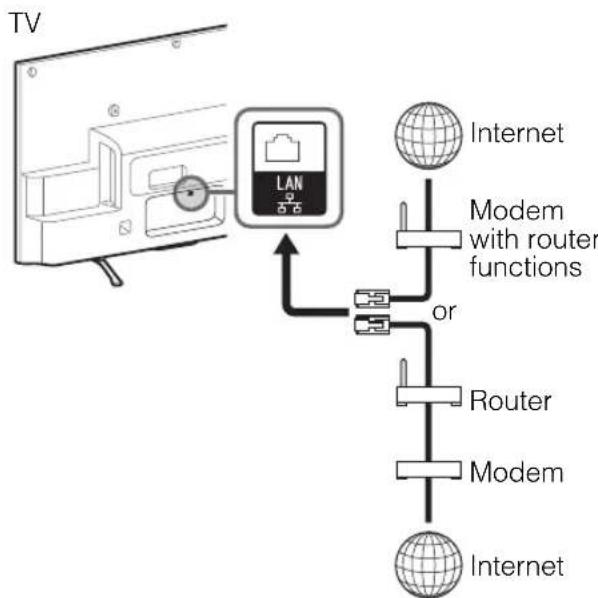
#
- For LAN connections, use a Category 7 cable (not supplied).
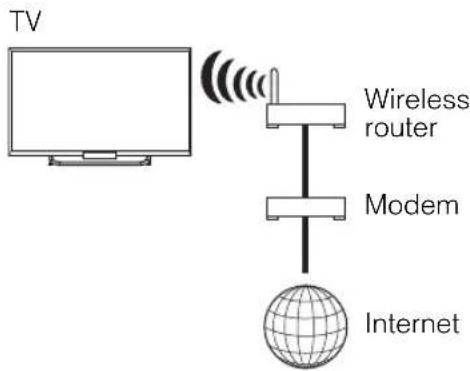
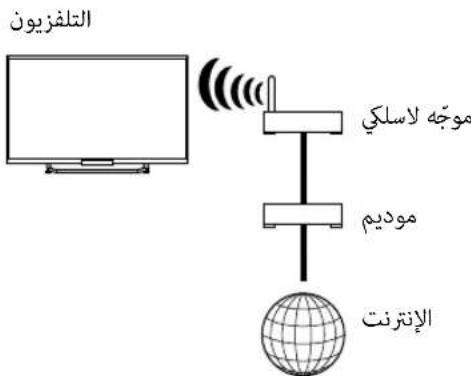
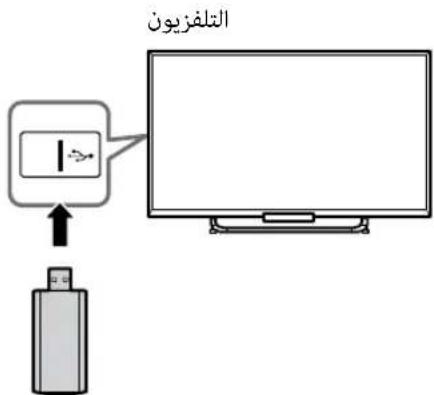
Preparing a wireless LAN
KDL-42/32W674A, KDL-42/32W670A
The built-in wireless LAN device allows you to access the Internet and your home network. With this feature, you can connect to a wireless LAN and enjoy the benefits of networking in a cable-free environment.
Except KDL-42/32W674A, KDL-42/32W670A
Wireless LAN Ready lets you easily access the Internet and your home network with the USB Wireless LAN Adapter UWA-BR100. By inserting the USB Wireless LAN Adapter into your TV's USB port, you can easily create a cable-free network.
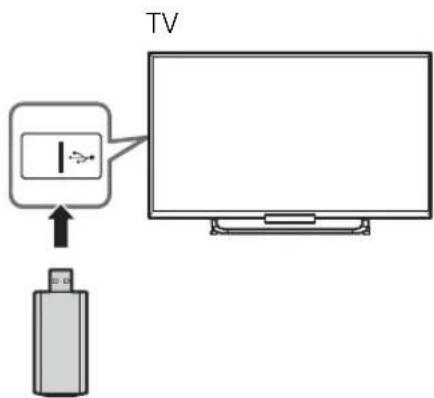
Before setting up the wireless LAN function of the TV, be sure to set up a wireless LAN router.
6: Performing the initial set-up
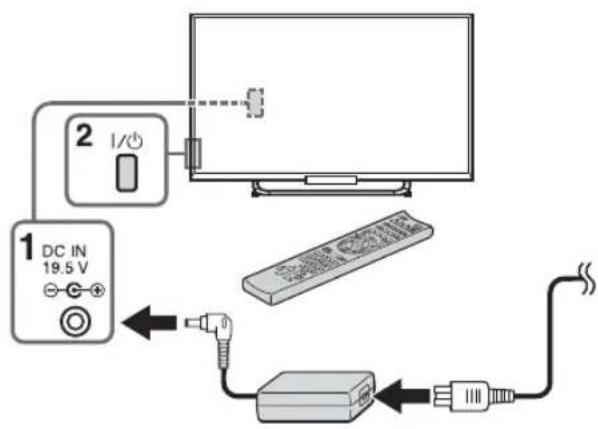
1 Connect the AC power cord (mains lead) to the AC adapter and plug the DC cable into the DC IN terminal. Then, connect the TV to your AC power outlet (mains socket).
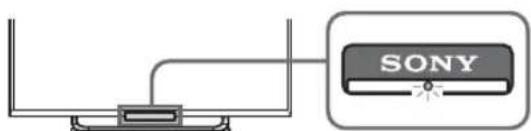
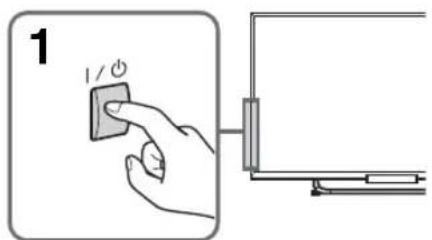
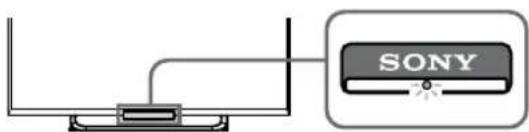
2 Press on the TV. The illumination LED will light up in white.
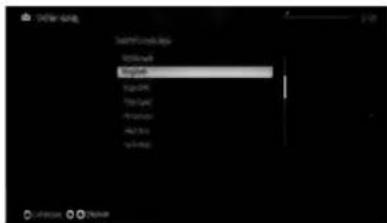
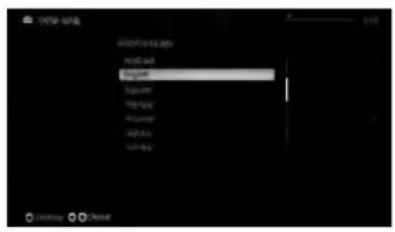
When you switch on the TV for the first time, the Language menu appears on the screen.

- When you turn on the TV for the first time, the TV requires some internal processing for optimisation before you can perform the initial setup. There will be no picture and sound, and the illumination LED on the front of the TV blinks white for about 40 seconds. Do not turn off the TV during this process. This process has been completed at the factory for some TVs.
- The illumination LED lights up in different colours according to the status of the TV. If you do not wish to light up the illumination LED, you can turn it off later. Press HOME, then select "Settings" "System Settings" "General Set-up" "Illumination LED" "Off". You can also press OPTIONS, then select "Illumination LED" "Off".
3
Press / / / to select an item, then press.
Follow the instructions on the screen.
Programme Sorting: Changes the order of analogue channels stored in the TV.
1 Press / to select the channel you want to move to a new position, then press
Press / to select the new position for the channel, then press
- You can also tune channels manually.
Network Set-up: Sets up the Internet settings. If you do not access the Internet, or to set up later, select "Skip". After you select "Continue" or "Start" (depending on model) at the Internet setup confirmation screen, select "Auto" to connect to the network automatically. Select "Custom" to connect manually.
- If you use WEP security, select "Custom" "Wireless Set-up" "Scan". Then, select the network name (SSID) you want to connect. If you cannot find the required network name, select "[Manual Entry]" and press ④ to enter network name.
- To set "Network Set-up" later, press HOME, then select "Settings" "Network" "Network Set-up".
- Use the optional USB Wireless LAN Adapter to connect with your wireless router (or access point) at 5GHz. Insert USB Wireless LAN Adapter and set "Wi-Fi Direct" to "Off". Press HOME, then select "Settings" "Network" "Wi-Fi Direct" "Off".
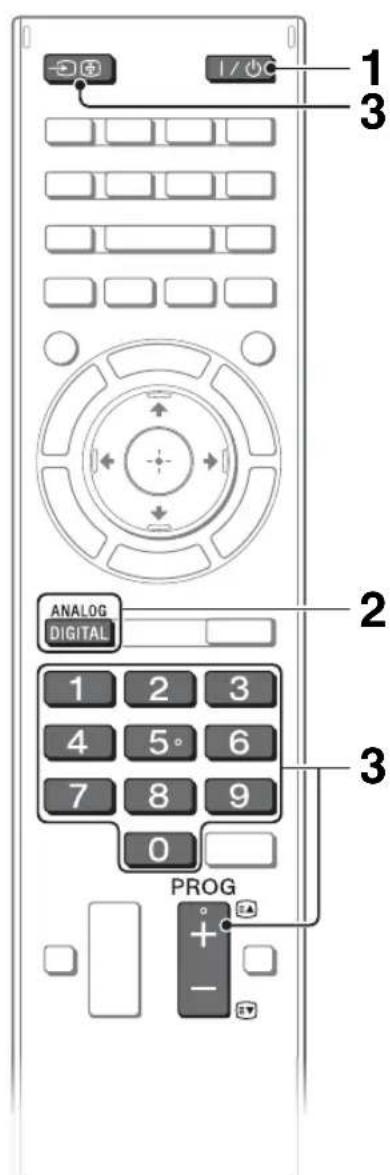
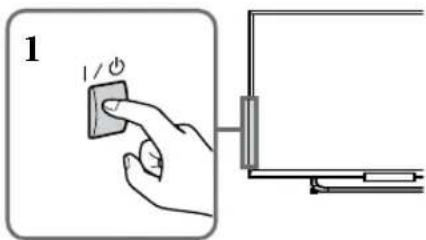
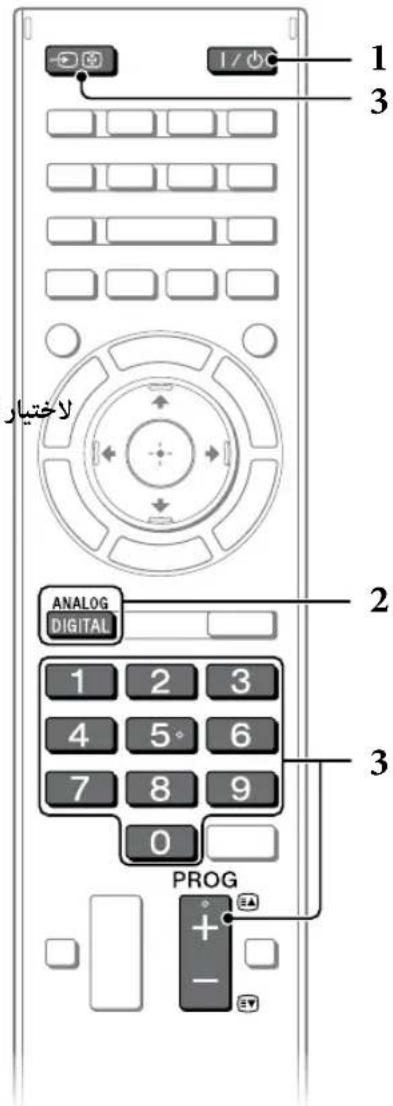
1 Turn on the TV.
Press I/O on the TV or remote control to turn on the TV.
2 Select a mode.

3 Select a TV channel or select an input.
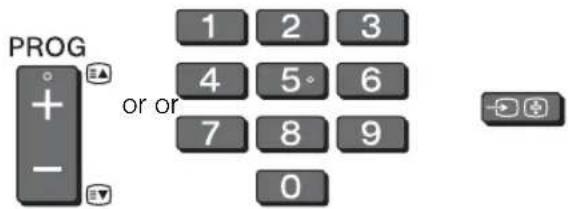
To select digital channels
Use 0-9. For channel numbers 10 and above, press the next digit quickly.

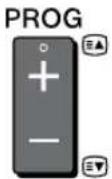
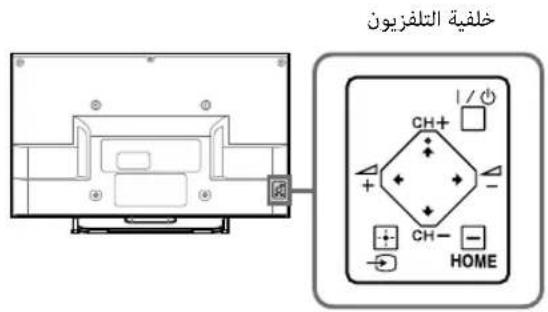
See below illustration for location of the / CH + / - , + / - , / / / ,and HOME buttons on the TV.
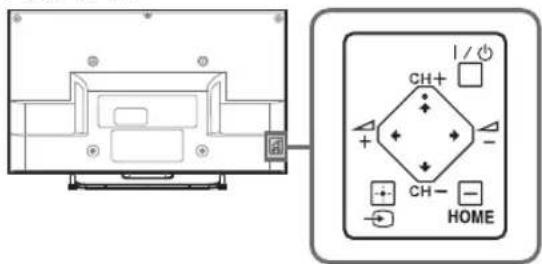
Rear of TV
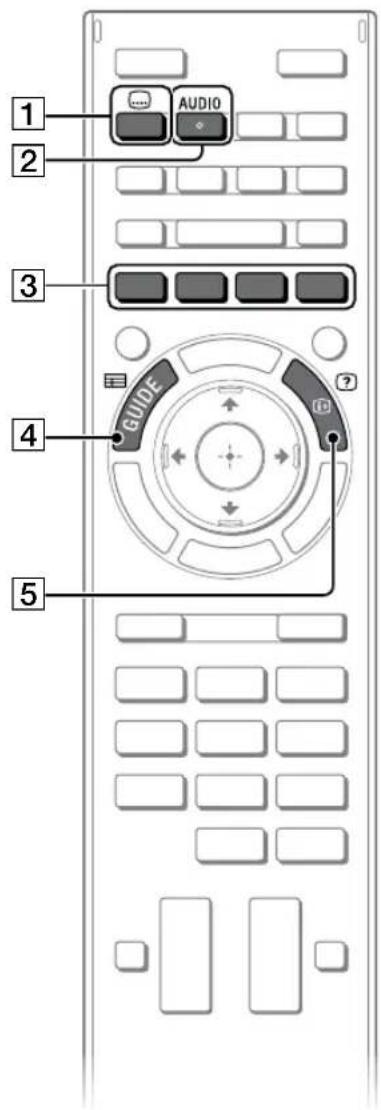
Frequently used buttons
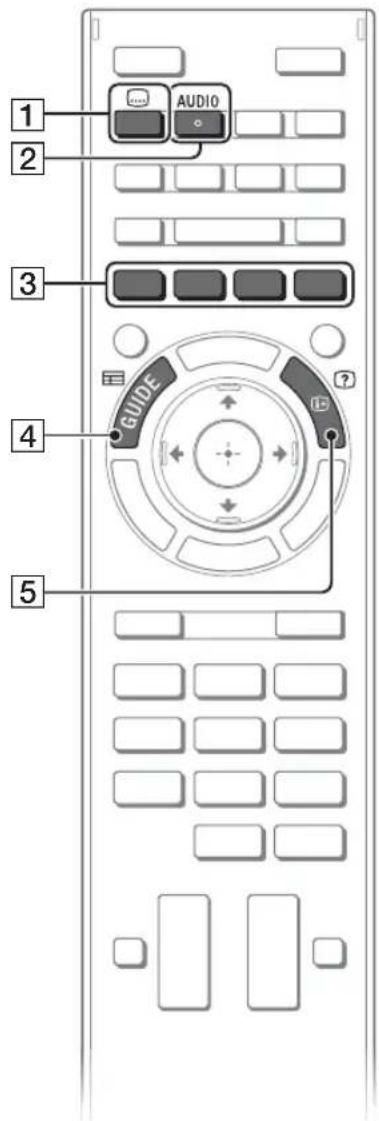
1 Subtitle setting
You can turn subtitle on/off while watching digital broadcasting.
2 AUDIO
You can select the sub sound or secondary language while watching multiplex broadcasts.
3Colour buttons
When the colour buttons are available, an operation guide appears on the screen.
4GUIDE
Displays the digital programme guide.
5/InfoText reveal
Displays channel number, details of programmes, and the clock.
Selecting various functions and settings (Home Menu)
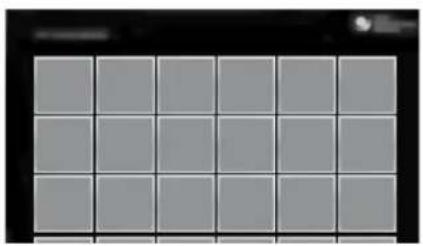
You can select the features of your TV from the Home menu.
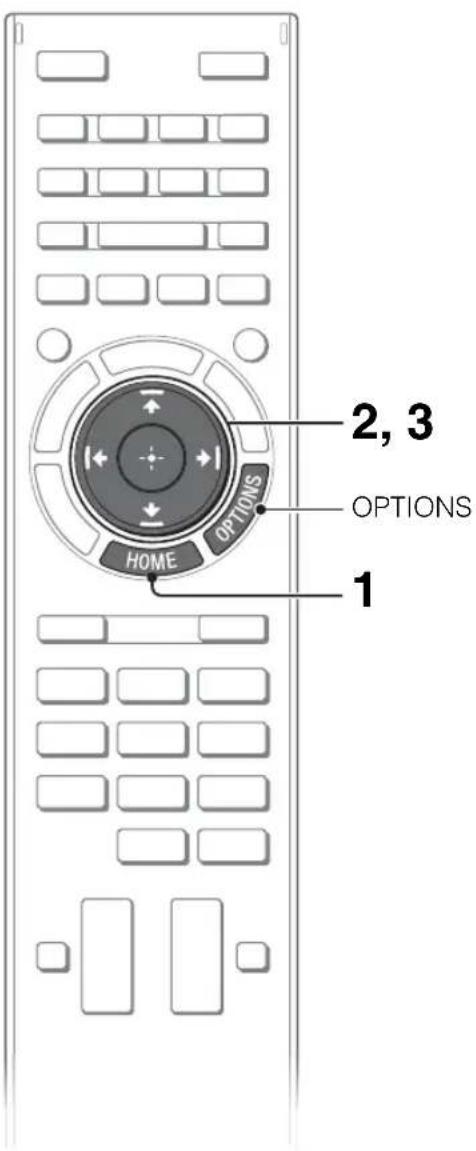
Here is an example on how to select an item and modify the TV settings.
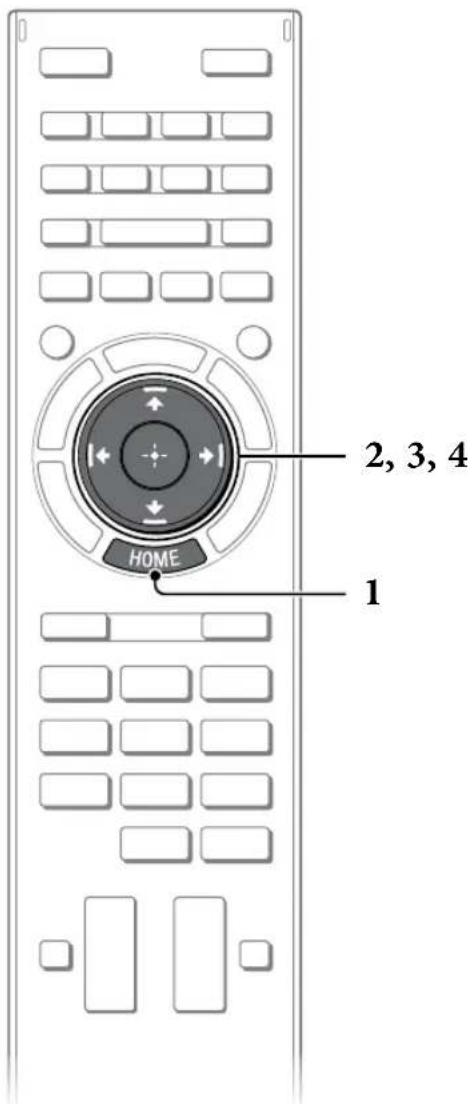
1 Press HOME.
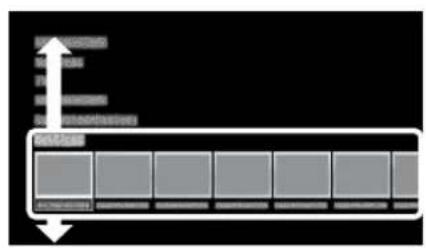
2 Press / to select "Settings" category.
The contents of "Settings" are displayed horizontally.
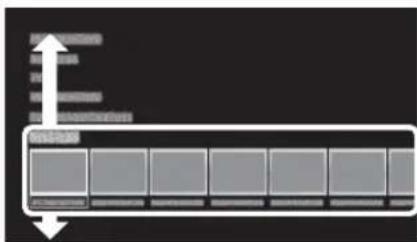
See page 17 (Category list) for all categories.
3 Press to select a desired setting item, then press
4 Modify the settings.
To exit the Home menu
Press HOME.
To select using the OPTIONS button
Press OPTIONS.
A list of convenient functions and menu shortcuts are displayed. The menu items vary based on the current input and/or content.
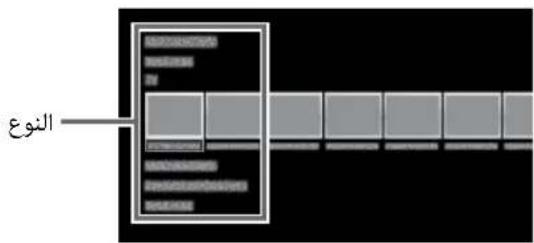
Category list
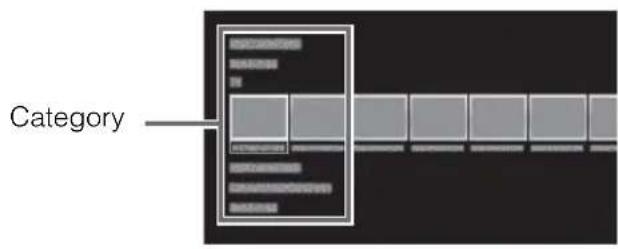
The categories are available depending on your TV model, region and country.
| Featured | Provides information on available applications and content. If there is no network connection, or the “Featured Display” setting is set to “Off”, the “Featured” category will not be displayed. |
| History | Displays recently viewed items. |
| TV | Allows you to select a list of TV channels, or a programme guide. Programme guide is available depending on your TV model or region. A list of channels registered as favourites in the “TV” category are displayed. |
| Applications | Launches applications that require an Internet connection, including Media Player which does not require an Internet connection. A list of applications registered as favourites in the “Applications” category are displayed. |
| Connected Devices | Enables selection of devices connected to the TV. |
| Settings | Provides settings (e.g. picture settings, sound settings, key tone setting) that allow you to customise your TV. |
GB
Watching Internet Video
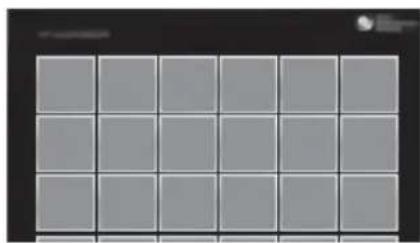
This feature serves as a gateway to Internet content, delivering a variety of on-demand entertainment straight to your TV. You can enjoy video content, including movies and cartoons. You will need to make a broadband Internet connection. For details, see page 11 (5: Connecting the TV to the Internet).
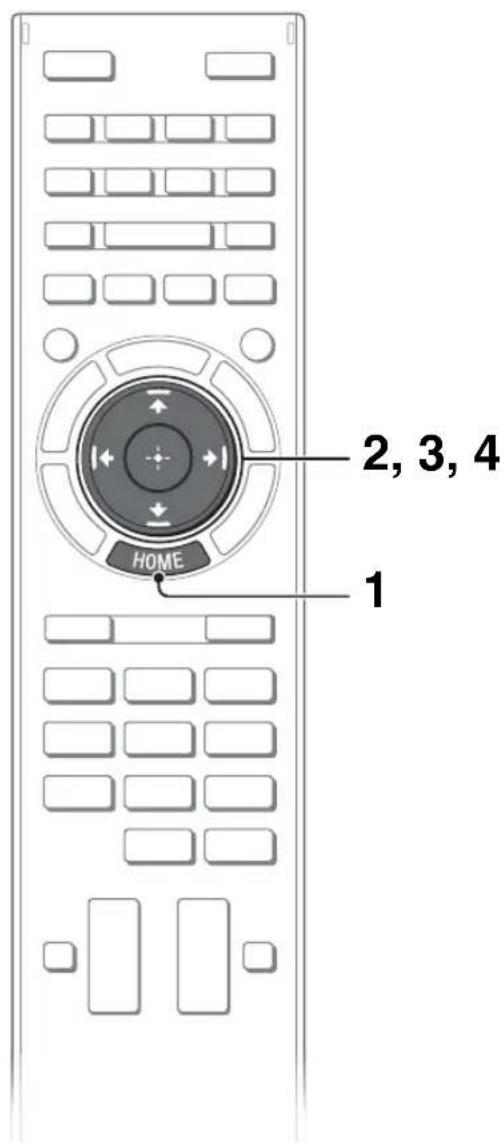
1 Press HOME.
2 Press / to select "Applications" category.
3 Press to select "All Applications", then press
4 Press / / to select the desired service, then press

- If you experience difficulties with this feature, check that the Internet connection is set up properly.
- The interface to Internet content depends on the Internet content providers.
- Services block video content based on the "Parental Lock" setting of the TV. Some service providers do not support this function.
- To update Internet Video content services, press HOME, then select "Settings" "Network" "Refresh Internet Content".
Looking for instructions in the electronic manual (i-Manual)
Operating instructions are built into your BRAVIA TV and can be displayed on the screen. To learn more about your TV features, access your i-Manual with the touch of a button.
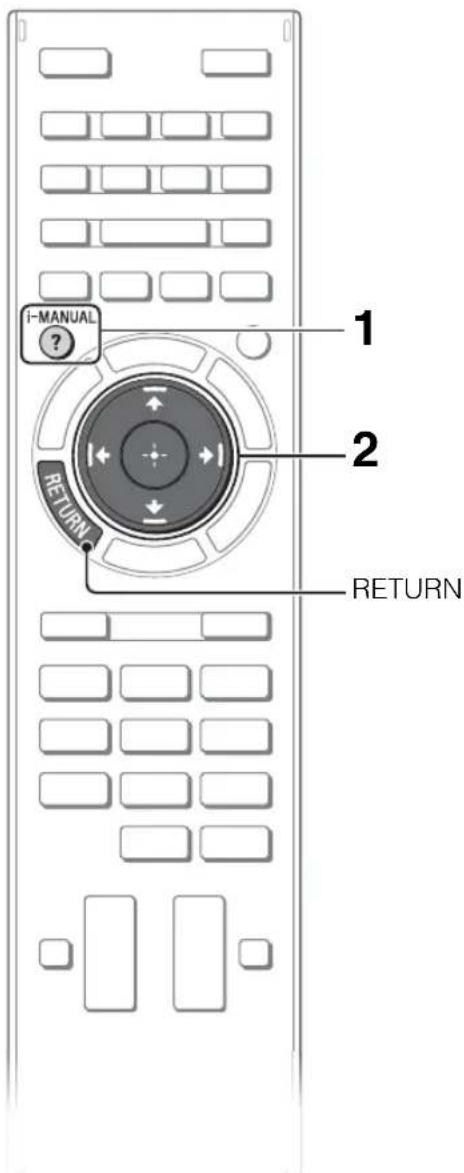
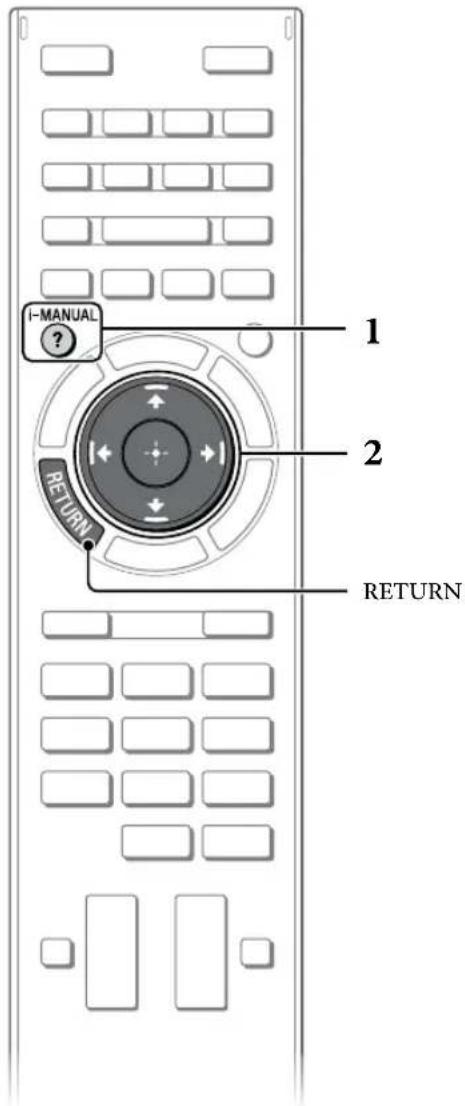
1 Press i-MANUAL.

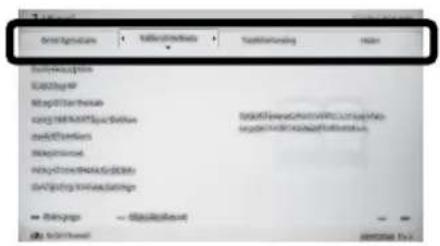
2 Select an item.
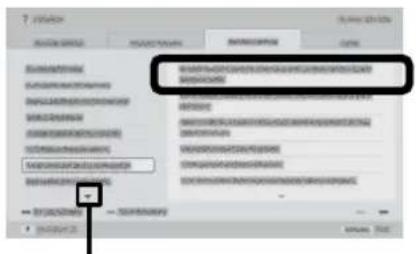
Press to select an item.
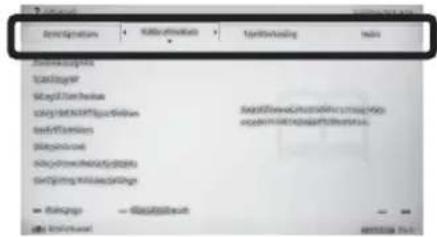
Press / / to select an item, then press .
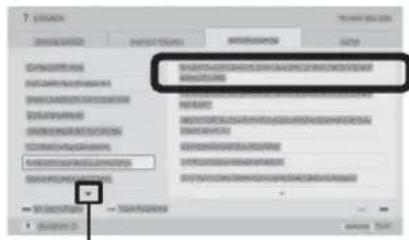
Arrow mark*
- If an arrow mark appears, press repeatedly to display more items.
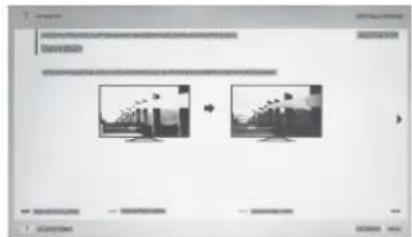
The page of the selected item appears.
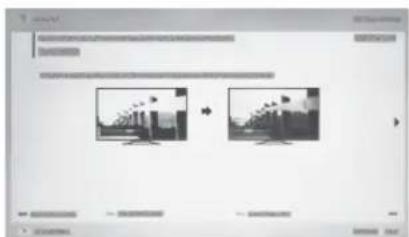

- You can step through pages using / . Press RETURN to return to the previous page.
Saving frequently viewed pages (Bookmark)
You can save frequently viewed pages for easy access anytime.
To save a page
In the page to bookmark, press the yellow button on the remote control.
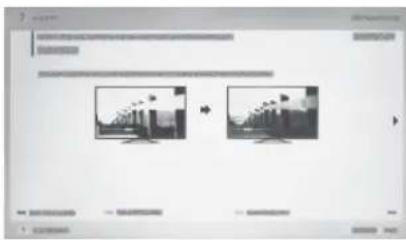
To access the bookmarked page
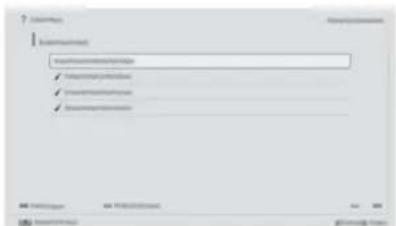
When displaying the i-Manual, press the green button on the remote control to display the bookmark list.
Press / to select the desired item, then press.
#
- To return to the previous screen, press RETURN.
To remove a bookmark
When the bookmarked page is displayed, press the yellow button on the remote control.
Displaying the page again while operating the TV
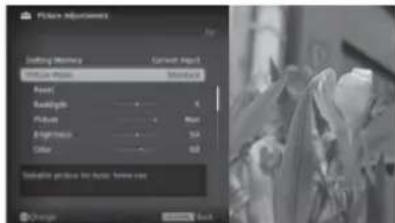
You can switch between the i-Manual screen and the TV screen. This feature allows you to refer to the instructions in the i-Manual while using your BRAVIA TV. Press i-MANUAL to switch between the i-Manual screen previously displayed and the TV screen.

i-Manual screen previously displayed


i-MANUAL

BRAVIA TV screen
#
- To jump to the top page of i-Manual, press the red button on the remote control. You can also press HOME, then select "Settings"
"i-Manual" to jump to the top page of i-Manual
- Once you turn off the TV or the TV goes to standby mode, the i-Manual will be displayed from the top page when you select "i-Manual".
Troubleshooting
When the illumination LED is flashing in red, count how many times it flashes (interval time is three seconds).
Press / on the TV to turn it off, disconnect the AC power cord (mains lead), and inform your dealer or Sony service centre of how the indicator flashes (number of flashes).
When the illumination LED is not flashing, check the items in the tables as follows.
Also refer to "Troubleshooting" in the i-Manual. If the problem persists, have your TV serviced by qualified service personnel.
Condition Explanation/Solution
| There is no picture (screen is dark) and no sound. | ·Check the antenna (aerial)/cable connection. ·Connect the TV to the AC power (mains), and press I/O on the TV or remote control. |
| Some programmes cannot be tuned. | ·Check the antenna (aerial). |
| The remote control does not function. | ·Replace the batteries. ·Your TV may be in SYNC mode. Press SYNC MENU, select "TV Control" and then select "Home (Menu)" or "Options" to control the TV. |
| The "Parental Lock" password has been forgotten. | ·Enter 9999 for the PIN code. (PIN code 9999 is always accepted.) |
| The TV surrounds become warm. | ·When the TV is used for an extended period, the TV surrounds become warm. You may feel hot when touching there by the hand. |
| Frozen audio or video, a blank screen, or the TV does not respond to TV or remote control buttons. | ·Perform a simple reset of the TV by unplugging the AC power cord (mains lead) for two minutes, then plug it in again. |
GB
Specifications
| System | |
| Panel system | LCD (Liquid Crystal Display) Panel |
| TV system | Analogue: B/G, I, D/K, M, L Digital: DVB-T2 (Depending on your TV model) DVB-T |
| Colour/video system | Analogue: PAL, SECAM, NTSC3.58, NTSC4.43 Digital: Refer to the i-Manual |
| Channel coverage | Analogue: UHF/VHF/Cable, Depending on your country/area selection. Digital: UHF/VHF, Depending on your country/area selection. |
| Sound output | 8 W + 8 W (KDL-42W674A/42W670A/42W654A/42W650A) 5 W + 5 W (KDL-32W674A/32W670A/32W654A/32W650A/32W600A) |
| Input/Output jacks | |
| Antenna (aerial)/cable | 75 ohm external terminal for VHF/UHF |
| VIDEO IN 1 | Video/Audio input (phono jacks) |
| COMPONENT IN VIDEO IN 2 | YPbPR (Component Video): 1080p (50, 60Hz), 1080i (50, 60Hz), 720p (50, 60Hz), 576p, 576i, 480p, 480i Audio input (phono jacks) Video input (common phono pin with Y input) |
| HDMI IN 1, 2 | Video: 1080p (30, 50, 60Hz), 1080/24p, 1080i (50, 60Hz), 720p (30, 50, 60Hz), 720/24p, 576p, 576i, 480p, 480i, PC Formats Audio: Two channel linear PCM: 32, 44.1 and 48kHz, 16, 20 and 24 bits, Dolby Digital ARC (Audio Return Channel) (HDMI IN 1 only) |
| MHL (common with HDMI IN 2) | Video: 1080p (30Hz), 1080/24p, 1080i (50, 60Hz), 720p (30, 50, 60Hz), 720/24p, 576p, 576i, 480p, 480i Audio: Two channel linear PCM: 32, 44.1 and 48kHz, 16, 20 and 24 bits, Dolby Digital |
| DIGITAL AUDIO OUT (OPTICAL) | Digital optical jack (Two channel linear PCM, Dolby Digital) |
| AUDIO OUT/Ω | Audio output (stereo minijack) Headphones jack |
| LAN | USB port (Only Australia and New Zealand model support HDD Rec) |
| 10BASE-T/100BASE-TX connector (Depending on the operating environment of the network, connection speed may differ. 10BASE-T/100BASE-TX communication rate and communication quality are not guaranteed for this TV.) | |
| DC IN 19.5V | AC adapter input |
| Others | |
| Supplied accessories | See "Checking the accessories" (page 6). |
| Optional accessories | Camera and Microphone Unit: CMU-BR200/CMU-BR100 USB Wireless LAN Adapter: UWA-BR100 |
| Operating temperature | 0 °C - 40 °C |
| Operating humidity | 10% - 80% RH (non-condensing) |
| Model name KDL- 42W67 | 4A 42W670A 42W654A 42W650A | 32W674A 32W670A 32W654A 32W650A | 32W600A |
| Power and others | |||
| Power Requirements | 19.5 V DC with AC adapter Rating: Input 110 V - 240 V AC, 50/60 Hz | ||
| Screen size (measured diagonally) | Approx. 106.7cm/42 inches | Approx. 80.1cm/32 inches | Approx. 80.1cm/32 inches |
| Display resolution | 1,920 dots (horizontal) × 1,080 lines (vertical) | 1,920 dots (horizontal) × 1,080 lines (vertical) | 1,366 dots (horizontal) × 768 lines (vertical) |
| Power consumption | 84 W (when using the AC adapter) | 67 W (when using the AC adapter) | 67 W (when using the AC adapter) |
| Dimensions (Approx.) (w × h × d) | |||
| With Table-Top Stand (mm) | 954 × 595 × 197 725 × | 465 × 197 721 × 463 × 197 | |
| Without Table-Top Stand (mm) | 954 × 568 × 69 725 × | 38 × 69 721 × 436 × 69 | |
| Mass (Approx.) | |||
| With Table-Top Stand (kg) | 11.0 7.8 7.7 | ||
| Without Table-Top Stand (kg) | 9.9 6.8 6.7 | ||
Optional accessories availability depends on countries/region/TV model/stock.
Design and specifications are subject to change without notice.
GB
Installing the Accessories (Wall-Mount Bracket)
To Customers
Sufficient expertise is required for installing this product. Be sure to subcontract the installation to Sony dealers or licensed contractors and pay special attention to safety during the installation. Sony is not liable for any damages or injury caused by mishandling or improper installation, or installing any other than the specified product. Your Statutory Rights (if any) are not affected.
To Sony Dealers and Contractors
Sufficient expertise is required for installing this product. Be sure to read this instruction manual thoroughly to do the installation work safely. Sony is not liable for any damages or injury caused by mishandling or improper installation. Please give this manual to the customer after installation.
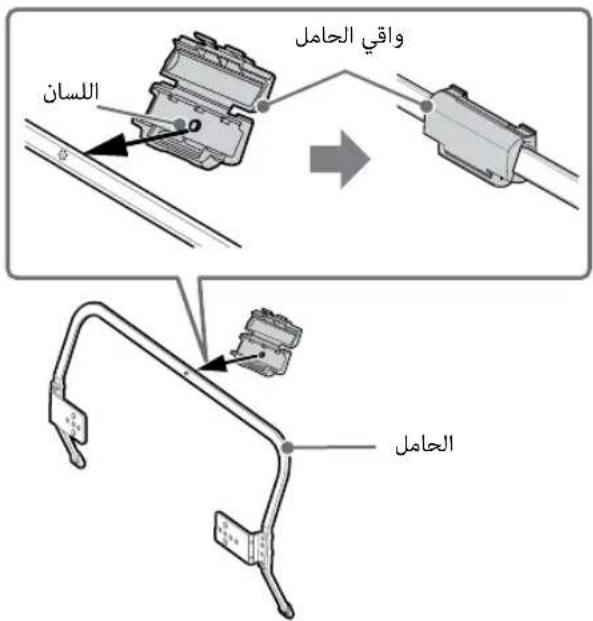
Your TV's Table-Top Stand will be used as a part of the Wall-Mount Bracket.
See page 29 (Safety Information) and page 32 (Precautions) on WALL-MOUNT BRACKET before carrying out Wall-Mount Bracket installation.
Precautions
- Detach the Table-Top Stand from the TV. For details, see page 7 (Detaching the Table-Top Stand from the TV)
- When your TV is installed on the wall, theVIDEO IN 1 -terminal on the rear of the TV cannot be used.
Checking the accessories
Wall-Mount Base (1)
AC Adapter Holder (1)
Paper Template (1)
Stand Protector (1)
Bracket Cap Plate (1)
Assembling screws for Wall-Mount Bracket
(+PSW6× 12) (2)
Spacers (2)
Fixing screw for Bracket Cap Plate
(+PSW4× 10) (1)
- The screws needed to secure the Wall-Mount Base and AC Adapter Holder to the wall are not supplied.
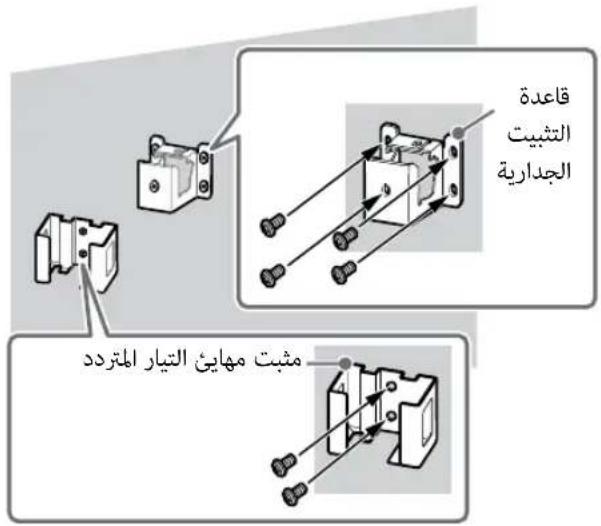
Installing the Brackets on the wall
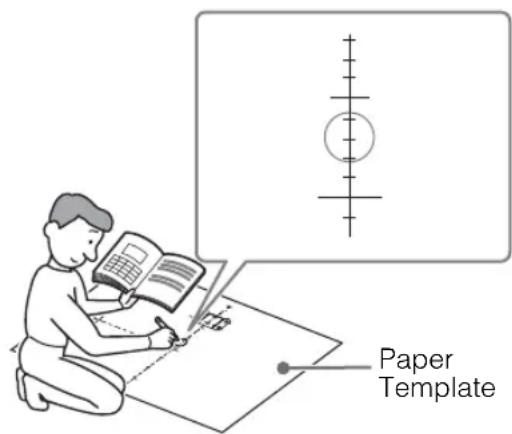
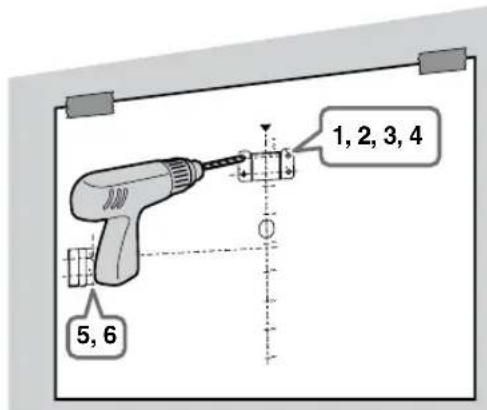
1 Decide on the centre position of your TV. Make a mark on the Paper Template that indicates the screen centre of your TV, referring to page 28 (TV installation dimensions table) for the screen centre dimension.
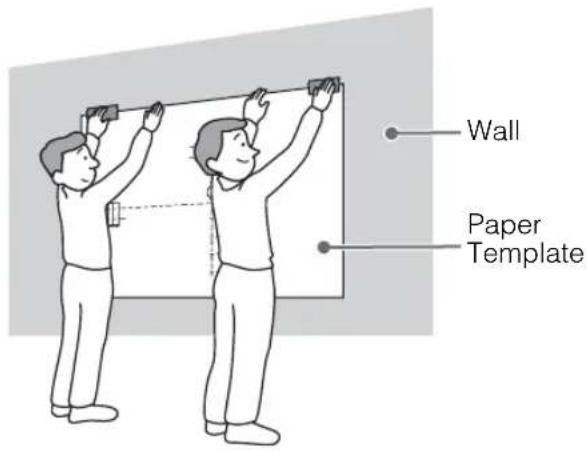
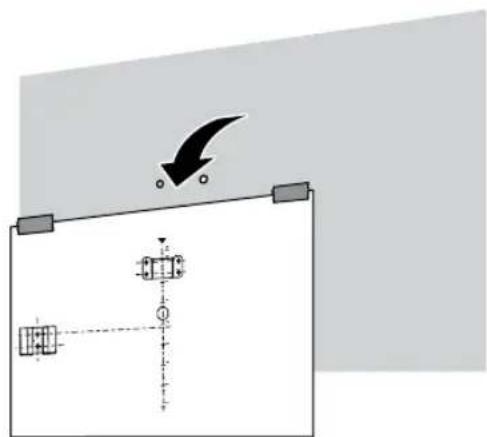
2 Decide on the installation location of your TV. Tape the Paper Template to the wall.
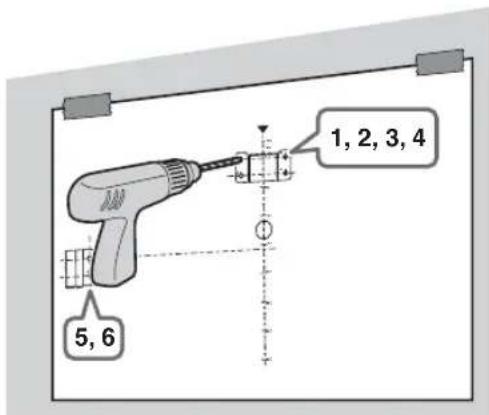
3 Make six holes according to the numbering (1, 2, 3, 4, 5 and 6) on the Paper Template using an electric drill.
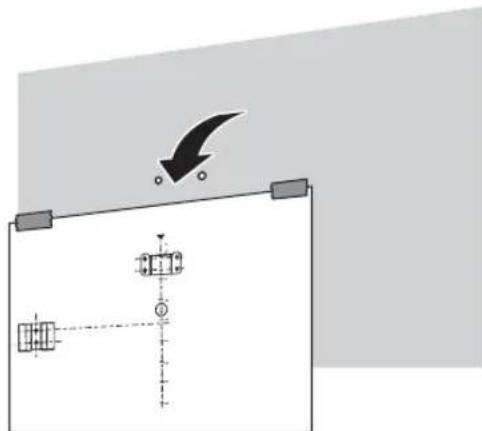
4 Peel the Paper Template from the wall.
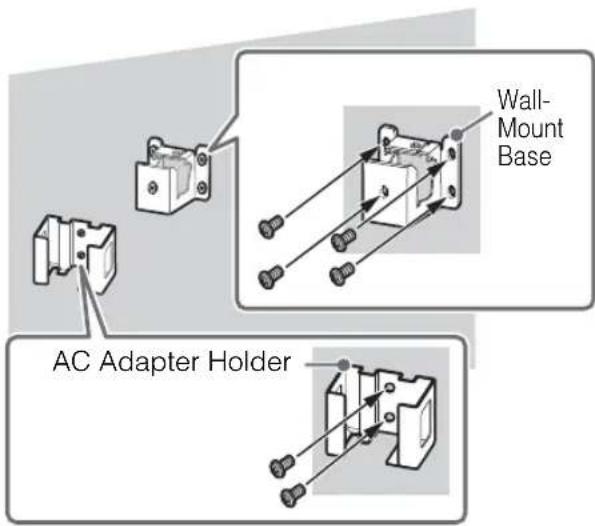
5 Install screws (8 mm in diameter, not supplied) to the Wall-Mount Base and AC Adapter Holder on the wall.
Preparing for the installation of the TV
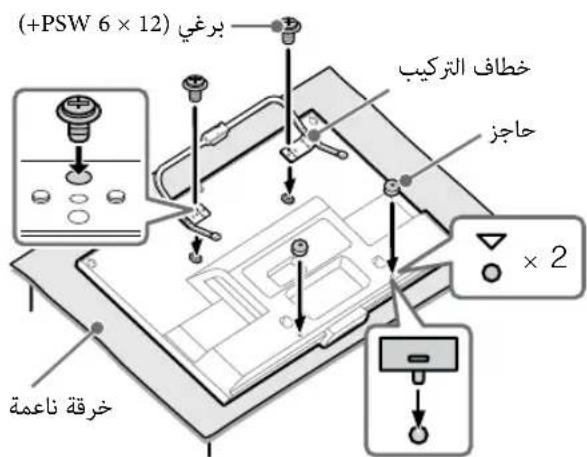
1 Remove the screws from the rear of the TV. Be sure to store the removed screws in a safe place, keeping them away from children.
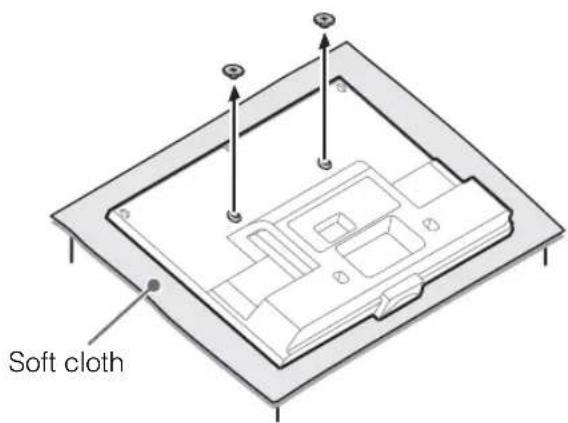

- When removing the Table-Top Stand from the TV, lay the display face down on a stable work surface that is larger than the TV.
- To prevent damaging the surface of the LCD display, make sure to place a soft cloth on the work surface.
- Once the Stand Necks are detached from the Stand, be sure to keep the Stand Necks and screws in a safe place.
- When attaching the Table-Top Stand again, be sure to fasten the screws (previously removed) to the original holes on the rear of the TV.
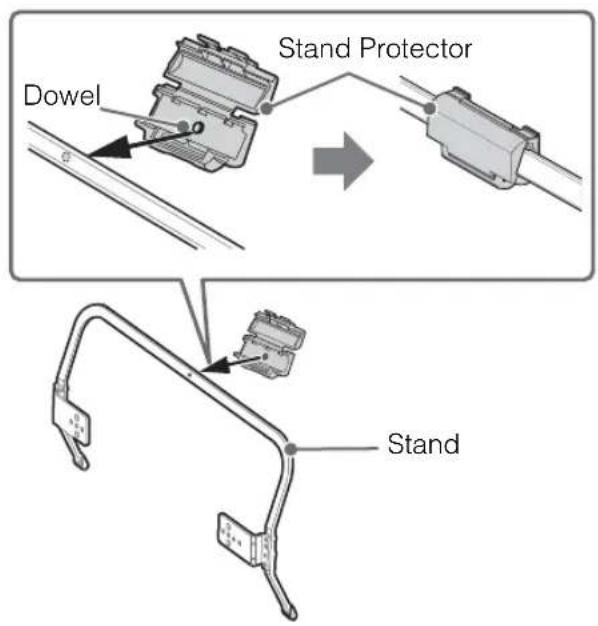
2 Make sure the dowel (on the Stand Protector) is inserted into the hole on the Stand. Fold up the Stand Protector once the dowel is inserted into the Stand.
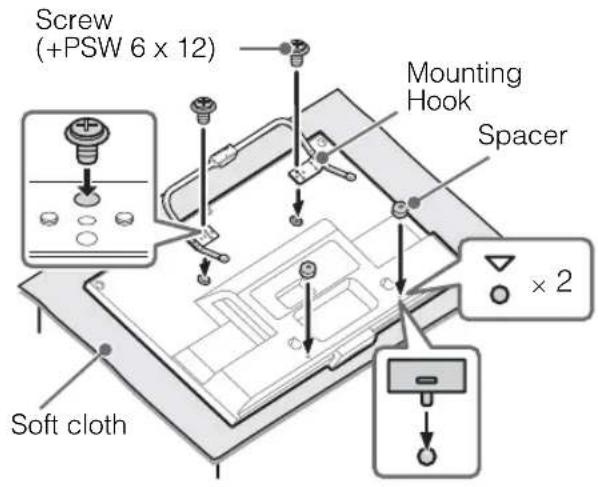
3 Attach the Mounting Hooks (on the Stand) using the supplied screws. Attach the Spacers to the holes indicated by the triangle marks
Installing the TV on the wall
1 Install the TV on the wall. Then, confirm the Stand Protector is firmly latched into the Wall-Mount Base.
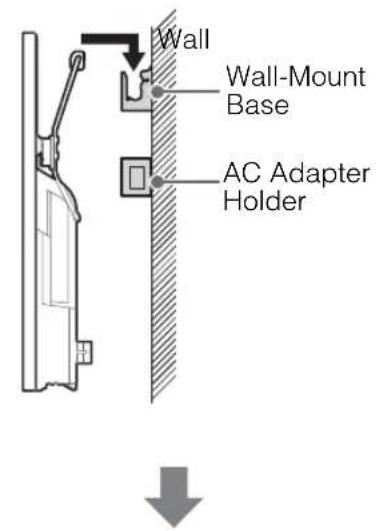
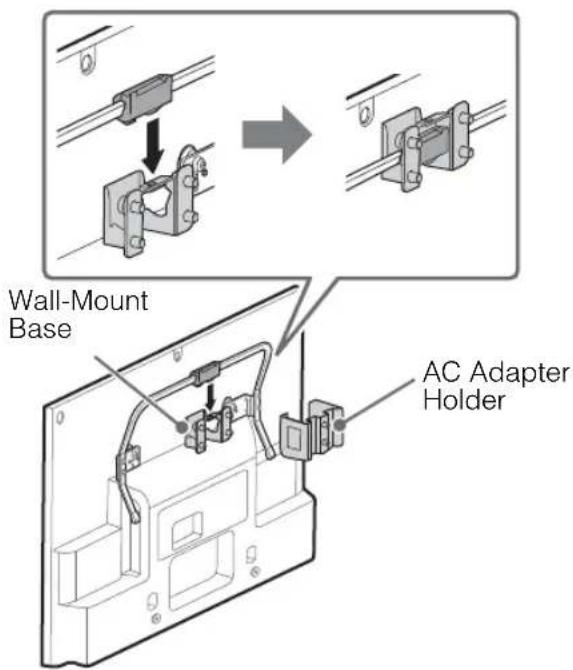
Make sure to connect and bundle the cables before installing the TV on the wall.
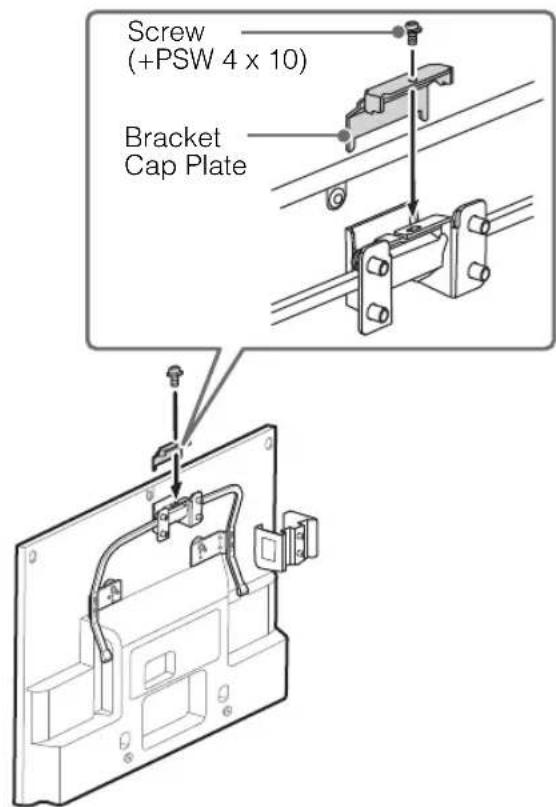
2 Attach the Bracket Cap Plate using the supplied screw.
3 Insert the AC adapter into the AC Adapter Holder. Make sure that the label is facing outwards.
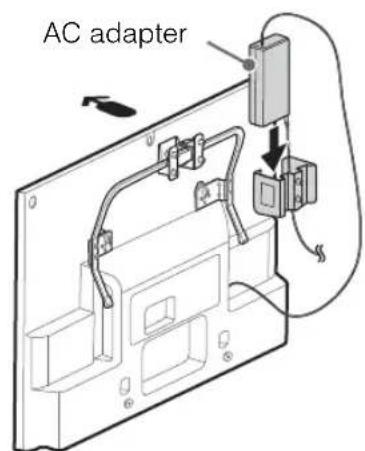
Arrow direction shows front of the TV.
#
- Tilt the TV to the front to easily insert the AC adapter, and connect or disconnect the cord and cables with the TV hung to the wall.
TV installation dimensions table
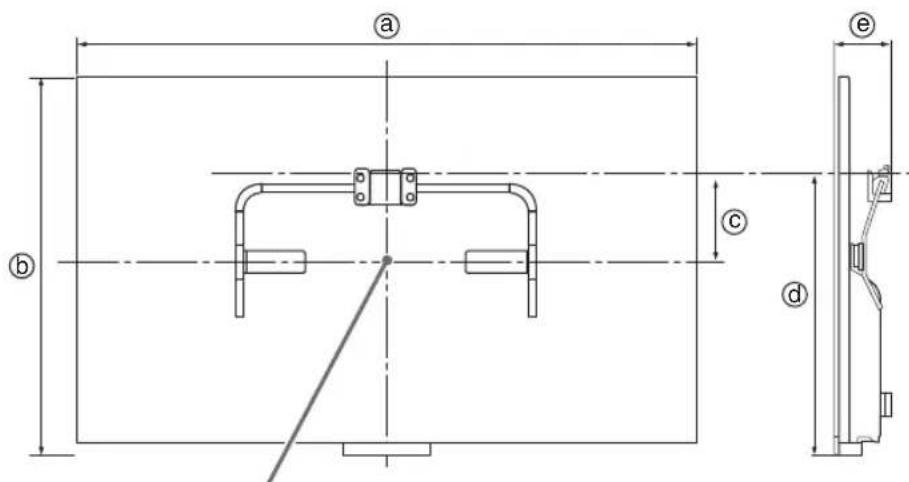
Screen centre point
Unit: mm
Figures in the table may differ slightly depending on the installation.
| Model Name KDL- | Display dimensions | Screen centre dimension | Length for mounting | ||
| a | b | c | d | e | |
| 42W674A/42W670A 42W654A/42W650A | 954 568 12 | 4419 87 | |||
| 32W674A/32W670A 32W654A/32W650A | 725 438 19 | 0 419 87 | |||
| 32W600A | 721 436 19 | 0 419 87 | |||
WARNING
The wall that the TV will be installed should be capable of supporting a weight of at least four times that of the TV. See page 22-23 (Specifications) for its weight.
Safety Information
WARNING
Batteries must not be exposed to excessive heat such as sunshine, fire or the like.
Installation/Set-up
Install and use the TV set in accordance with the instructions below in order to avoid any risk of fire, electrical shock or damage and/or injuries.
Installation
The TV set should be installed near an easily accessible AC power outlet (mains socket).
- Place the TV set on a stable, level surface to avoid it from falling down and cause personal injury or damage to the TV.
- Only qualified service personnel should carry out wall installations.
- For safety reasons, it is strongly recommended that you use Sony accessories, including: - Wall-Mount Bracket
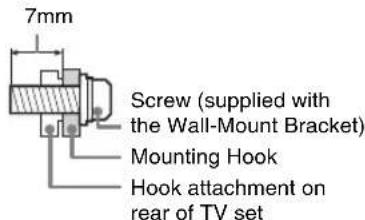
- Be sure to use the screws supplied with the Wall-Mount Bracket when attaching the mounting hooks to the TV set. The supplied screws are designed as indicated by illustration when measured from the attaching surface of the mounting hook. The diameter and length of the screws differ depending on the Wall-Mount Bracket model. Use of screws other than those supplied may result in internal damage to the TV set or cause it to fall, etc.
Transporting
- Before transporting the TV set, disconnect all cables.
- Two or three people are needed to transport a large TV set.
- When transporting the TV set by hand, hold it as shown below. Do not put stress on the LCD panel and the frame around the screen.
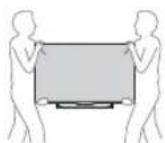
- When transporting the TV set, do not subject it to jolts or excessive vibration.
- When transporting the TV set for repairs or when moving, pack it using the original carlon and packing material.
Ventilation
- Never cover the ventilation holes or insert anything in the cabinet.
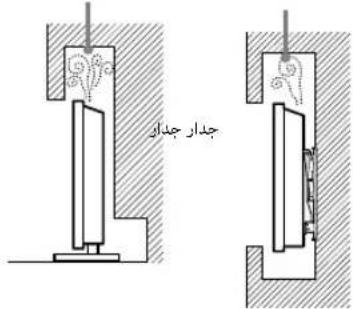
- Leave space around the TV set as shown below.
It is strongly recommended that you use a Sony wall-mount bracket in order to provide adequate aircirculation.
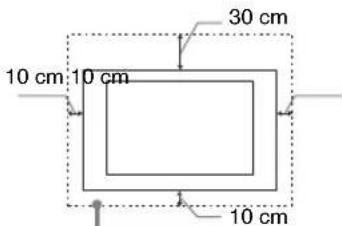
Installed on the wall
Leave at least this space around the set.
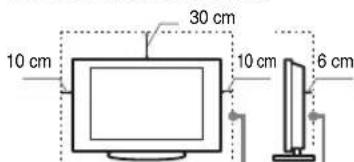
Installed with stand
Leave at least this space around the set.
To ensure proper ventilation and prevent the collection of dirt or dust:
- Do not lay the TV set flat, install upside down, backwards, or sideways.
- Do not place the TV set on a shelf, rug, bed or in a closet.
- Do not cover the TV set with a cloth, such as curtains, or items such as newspapers, etc.
- Do not install the TV set as shown below.
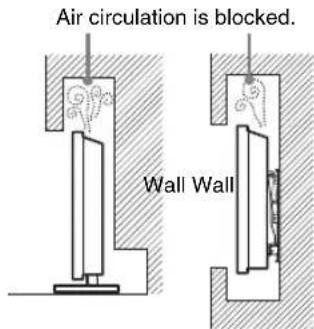
AC power cord (mains lead)
Handle the AC power cord (mains lead) and outlet (mains socket) as follows in order to avoid any risk of fire, electrical shock or damage and/or injuries:
Use only Sony supplied AC power cord (mains lead), not those of other brands.
- Insert the plug fully into the AC power outlet (mains socket).
- Operate the TV set on a 110-240 V AC supply only.
- When wiring cables, be sure to unplug the AC power cord (mains lead) for your safety and take care not to catch your feet on the cables.
- Disconnect the AC power cord (mains lead) from the AC power outlet (mains socket) before working on or moving the TV set.
- Keep the AC power cord (mains lead) away from heat sources.
- Unplug the AC power plug (mains plug) and clean it regularly. If the plug is covered with dust and it picks up moisture, its insulation may deteriorate, which could result in a fire.
Notes
- Do not use the supplied AC power cord (mains lead) on any other equipment.
- Do not pinch, bend, or twist the AC power cord (mains lead) excessively. The core conductors may be exposed or broken.
- Do not modify the AC power cord (mains lead).
- Do not put anything heavy on the AC power cord (mains lead).
- Do not pull on the AC power cord (mains lead) itself when disconnecting the AC power cord (mains lead).
- Do not connect too many appliances to the same AC power outlet (mains socket).
- Do not use a poor fitting AC power outlet (mains socket).
NOTE ON AC ADAPTER Warning
To reduce the risk of fire or electric shock, do not expose this apparatus to rain or moisture.
To prevent fire or shock hazard, do not place objects filled with liquids, such as vases, on the apparatus.
Do not install this equipment in a confined space, such as a bookshelf or similar unit.
-
Please ensure that the AC power outlet (mains socket) is installed near the equipment and shall be easily accessible.
-
Be sure to use the supplied AC adapter and AC power cord (mains lead). Otherwise it may cause a malfunction.
-
Connect the AC adapter to an easily accessible AC power outlet (mains socket).
-
Do not coil the AC power cord (mains lead) around the AC adapter. The core wire may cause a malfu
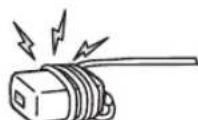
- Do not touch the AC adapter with wet hands.
- If you notice an abnormality in the AC adapter, disconnect it from the AC power outlet (mains socket) immediately.
- The set is not disconnected from the AC source as long as it is connected to the AC power outlet (mains socket), even if the set itself has been turned off.
- As the AC adapter will become warm when it is used for a long time, you may feel hot when touching it by hand.
Prohibited Usage
Do not install/use the TV set in locations, environments or situations such as those listed below, or the TV set may malfunction and cause a fire, electrical shock, damage and/or injuries.
Location:
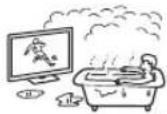
- Outdoors (in direct sunlight), at the seashore, on a ship or other vessel, inside a vehicle, in medical institutions, unstable locations, near water, rain, moisture or smoke.
If the TV is placed in the changing room of a public bath or hot spring, the TV may be damaged by airborne sulfur, etc.
- For best picture quality, do not expose the screen to direct illumination or sunlight.
- Avoid moving the TV from a cold area to a warm area. Sudden room temperature changes may cause moisture condensation. This may cause the TV to show poor picture and/or poor colour. Should this occur, allow moisture to evaporate completely before powering the TV on.
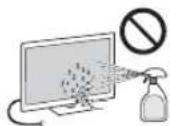
- Never spray water or detergent directly on the TV set. It may drip to the bottom of the screen or exterior parts and enter the TV set, and may cause damage to the TV set.
Environment:
- Places that are hot, humid, or excessively dusty; where insects may enter; where it might be exposed to mechanical vibration, near flammable objects (candles, etc). The TV set shall not be exposed to dripping or splashing and no objects filled with liquids, such as vases, shall be placed on the TV.
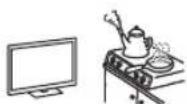
- Do not place the TV in a humid or dusty space, or in a room with oily smoke or steam (near cooking tables or humidifiers). Fire, electric shock, or warping may result.
- Do not install the TV in places subject to extreme temperature, such as in direct sunlight, near a radiator or a heating vent. The TV may overheat in such conditions which can cause deformation of the enclosure and/or TV malfunction.
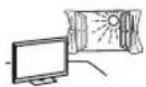
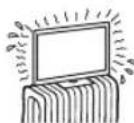
Situation:
- Do not use when your hands are wet, with the cabinet removed, or with attachments not recommended by the manufacturer. Disconnect the TV set from AC power outlet (mains socket) and antenna during lightning storms.
- Do not install the TV so that it sticks out into an open space. Injury or damage from a person or object bumping into the TV may result.
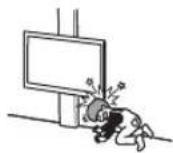
Broken pieces:
- Do not throw anything at the TV set. The screen glass may break by the impact and cause serious injury.
If the surface of the TV set cracks, do not touch it until you have unplugged the AC power cord (mains lead). Otherwise electric shock may result.
When not in use
- If you will not be using the TV set for several days, the TV set should be disconnected from the AC power (mains) for environmental and safety reasons.
- As the TV set is not disconnected from the AC power (mains) when the TV set is just turned off, pull the plug from the AC power outlet (mains socket) to disconnect the TV set completely.
However, some TV sets may have features that require the TV set to be left in standby to work correctly.
For children
- Do not allow children to climb on the TV set.
- Keep small accessories out of the reach of children, so that they are not mistakenly swallowed.
If the following problems occur...
Turn off the TV set and unplug the AC power cord (mains lead) immediately if any of the following problems occur.
Ask your dealer or Sony service centre to have it checked by qualified service personnel.
When:
- AC power cord (mains lead) is damaged.
- Poor fitting of AC power outlet (mains socket).
- TV set is damaged by being dropped, hit or having something thrown at it.
- Any liquid or solid object falls through openings in the cabinet.
About LCD Monitor
Temperature
When the LCD Monitor is used for an extended period, the panel surrounds become warm.
You may feel hot when touching there by the hand.
WALL-MOUNT BRACKET
Below information shows the correct handling of the Wall-Mount Bracket. Be sure to read this information thoroughly and use the Wall-Mount Bracket correctly.
To Customers:
Be sure to observe the following precautions for safety to prevent a serious injury through fire, electric shock, the product toppling over, or the product dropping.
- Be sure to subcontract the installation to licensed contractors and keep small children away during installation.
- Be sure to subcontract moving or dismounting of the TV to licensed contractors.
- Do not remove screws, etc., after mounting the TV.
- Do not make alterations to the parts of the Wall-Mount Bracket.
- Do not mount any equipment other than the specified product.
- Do not apply any load other than the TV on the Wall-Mount Bracket.
- Do not lean on or hang from the TV.
- Do not handle the TV with excessive force during cleaning or maintenance.
To Sony Dealers and Contractors:
The following instructions are for Sony dealers and contractors only. Be sure to read safety precautions described below and pay special attention to safety during the installation, maintenance and checking of this product.
- Do not install the Wall-Mount Bracket on wall surfaces where the corners or the sides of the TV are protruding away from the wall surface.
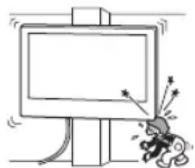
- Do not install the TV over or under an air-conditioner.
- Be sure to install the Wall-Mount Bracket securely to the wall following the instructions in this instruction manual. If any of the screws are loose or fall out, the Wall-Mount Bracket may fall and cause injury or property damage.
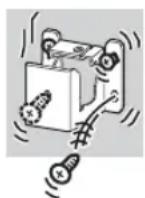
GB
- Be sure to use the supplied screws and attachment parts properly following the instructions given in this instruction manual. If you use substitute items, the TV may fall and cause bodily injury to someone or damage to the TV.
- Be sure to assemble the bracket properly following the instructed procedure explained in this instruction manual.
- Be sure to tighten the screws securely in the designated position.
- Be careful not to subject the TV to shock during installation.
- Be sure to install the TV on a wall that is both perpendicular and flat.
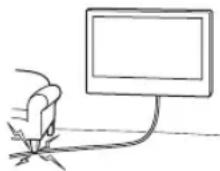
After proper installation of the TV, secure the cables properly. - Do not allow the AC power cord or the connecting cable to be pinched as the internal conductors may become exposed and cause a short circuit or an electrical break.
Precautions
Viewing the TV
View the TV in moderate light, as viewing the TV in poor light or during long period of time, strains your eyes.
- When using headphones, adjust the volume so as to avoid excessive levels, as hearing damage may result.
LCD Screen
- Although the LCD screen is made with high-precision technology and 99.99% or more of the pixels are effective, black dots may appear or bright points of light (red, blue, or green) may appear constantly on the LCD screen. This is a structural property of the LCD screen and is not a malfunction.
- Do not push or scratch the front filter, or place objects on top of this TV set. The image may be uneven or the LCD screen may be damaged.
- If this TV set is used in a cold place, a smear may occur in the picture or the picture may become dark. This does not indicate a failure. These phenomena disappear as the temperature rises.
- Ghosting may occur when still pictures are displayed continuously. It may disappear after a few moments.
- The screen and cabinet get warm when this TV set is in use. This is not a malfunction.
- The LCD screen contains a small amount of liquid crystal. Follow your local ordinances and regulations for disposal.
Handling and cleaning the screen surface/cabinet of the TV set
Be sure to unplug the AC power cord (mains lead) connected to the TV set from AC power outlet (mains socket) before cleaning.
To avoid material degradation or screen coating degradation, observe the following precautions.
- To remove dust from the screen surface/cabinet, wipe gently with a soft cloth. If dust is persistent, wipe with a soft cloth slightly moistened with a diluted mild detergent solution.
- Never spray water or detergent directly on the TV set. It may drip to the bottom of the screen or exterior parts and enter the TV set, and may cause damage to the TV set.
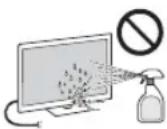
- Never use any type of abrasive pad, alkaline/acid cleaner, scouring powder, or volatile solvent, such as alcohol, benzene, thinner or insecticide. Using such materials or maintaining prolonged contact with rubber or vinyl materials may result in damage to the screen surface and cabinet material.
Periodic vacuuming of the ventilation openings is recommended to ensure to proper ventilation. - When adjusting the angle of the TV set, move it slowly so as to prevent the TV set from moving or slipping off from its table stand.
Optional Equipment
Keep optional components or any equipment emitting electromagnetic radiation away from the TV set. Otherwise picture distortion and/or noisy sound may occur.
Wireless Function of the unit
- Do not operate this unit near medical equipment (pacemaker, etc.), as malfunction of the medical equipment may result.
- Although this unit transmits/receives scrambled signals, be careful of unauthorised interception. We cannot be responsible for any trouble as a result.
(Caution about handling the remote control) Notes
- Observe the correct polarity when inserting batteries.
- Do not use different types of batteries together or mix old and new batteries.
- Dispose of batteries in an environmentally friendly way. Certain regions may regulate the disposal of batteries. Please consult your local authority.
- Handle the remote control with care. Do not drop or step on it, or spill liquid of any kind onto it.
- Do not place the remote control in a location near a heat source, a place subject to direct sunlight, or a damp room.
WALL-MOUNT BRACKET
- If you use the TV installed on the Wall-Mount Bracket for a long time, the wall behind or above the TV may become discoloured or the wallpaper may come unstuck, depending on the material of the wall.
- If the Wall-Mount Bracket is removed after installing it on the wall, the screw holes are left.
- Do not use the Wall-Mount Bracket in a place where it is subjected to mechanical vibrations.
GB
Introduction
Opera® Devices SDK from Opera Software ASA. Copyright 1995-2013 Opera Software ASA. All rights reserved.
Condition Description/Solution
Jo aal Sony 8aai aiu s gai Lai Jaa jia J
AC 1
AC 2023111 jyj yj yj yj yj yj yj yj yj yj yj yj yj yj yj yj yj yj yj yj yj yj yj yj yj yj yj yj yj yj yj yj yj yj yj yj yj yj yj yj yj yj yj
LCD aaiw ojg j0
cuii iuig biaoj jLCD lae Jusaiuei ic 2010 aagilabaijblit 3yblt ciiu uie agw y
:
Jlalll aai gai jg jg jy jil Jsla Jzj 1000000000000000000000000000000000000000000000000000000000000000000000000000000
ACs0jdlgaoy ACssjdlgao
JgACo jll jlll 1000000000000000000000000000000000000000000000000000000000000000000000000000000
gclogy1 gaoj yolajdaal 2gjll jla
45jgl 100000000000000000000000000000000000000000000000
gjoojglj 0jgjzjj jy
jitwll Jta. wally jyjdtal jg bay - 1... aall 33 g slge
.013 200g ggs 15 ugs jall jgl y
ssybl llll
gssjll jll sbag AC 00sbl jll llll g Jolai
aai 1003 jolao golai jao ly l0s
yolg/gy aouo ggl ydi
aLio jssjll jll lUuJb3 pao - .gJ1 15Joo JnJy
J 100000000000000000000000000000000000000000000000000000
JUJU JIJI JIJI JIJI JIJI -JGAC240-110
j 1000000000000000000000000000000000000000000000000000000
Jus Jus AC ssjll Jus ll Jus - 1e Jus Apll jssjll AC ssjll
jLae jie AC oJall Jll lal -
J 1200AC 3000 J 1000 - 1000000000000000000000000000000000000000000
JzJ
山
jlll lalalalalalalalalalalal
. Jolol
()
d1b1 cdoa: a0g6b1 g211 3 jzlg211 s jz g. d2s
5
Jdally 0jdl Jd1 1goo
2
BAC = 1

3
y
#
1
Jgluae 1aue aae 100
Jab
JUJI JG
4
Jauaia aaii joojai jao jaiol Jaloe iis
aai 1
Jouy j 2
Jolalglie! 1o Jolal Jolal Jolal
a
gjlll j 5i j s j o a glal ldo j
aalll aagllgdo gao gao aolol yolil (lge jy
.
Lulol 10
(1) aJuljll 0
(1) 00j6j j00j00
(1) 3g
(1)Jolal
(1) sluiI sIbJ joo
32 aagog (jolll jilb clogz) 29 aao jbl
s j aoe oj J 3 a jauuall aai (a b
a
abla
Eji)7aiao jbal. Jolalil .gjiall jai gllal
.(jgjzjj)
.1J 1
| 32W600A | 32W674A 32W670A 32W654A 32W650A | 42W670A 42W654A 42W650A | KDL-الإستعمال |
| الترجمة وعربيKHONGKONG | |||
| %.ملاويات الحرفية 19.5 %.عربية 60/50.50.50.50.50.50.50.50.50.50.50.50.50.50.50.50.50.50.50.50.50.50.50.50.50.50.50.50.50.50.50.50.50.50.80. %.ملاويات الحرفية 32/ps 80.1:ps 80.40000000000000000000000000000000000000000000000000000000000000000000000000000000000000000000000000000 | %.ملاويات الحرفية %.ملاويات الحرفية 32/ps 80.1:ps 80.400000000000000000000000000000000000000000000000000000000000000000000000000 | ||
| 42 / ρ 106.7 | 32 / ρ 80.1: ρ 80.40000000000000000000000000000000000000000000000000000000000000000000000000000000000000000000000 | ||
| x(الصف)”الإستعمال 1,366 (الصف)”الإستعمال 768 | x(الصف)”الإستعمال 1,920 (الصف)”الإستعمال 1,080 | x(الصف)”الإستعمال 1,920 (الصف)”الإستعمال 1,080 | الإستعمال الإستعمال الإستعمال |
| %.عربية 67 (العربية) | %.عربية 67 (العربية) | %.عربية 67 (العربية) | %.عربية 67 (العربية) |
| (العربية × نetwork) × نetwork) (العربية) | |||
| 197 × 595 × 954197 × 465 | (العربية × نetwork) × نetwork | ||
| 69 × 568 × 95469 × 438 | (العربية × نetwork) × نetwork | ||
| (العربية) | |||
| 11.07.87.7 | (العربية) | ||
| 9.96.86.7 | (العربية) | ||
jgl/1gjzal jdo/gabibl/JuljI 1000000000000000000000000000000000000000000
| (الله) | (الله) |
| (L.M.D/K.I.B/G) | (الله) |
| (dskla:الله) DVB-T2:الله DVB-T | (الله) |
| NTSC4.43 .NTSC3.58 .SECAM .PAL :الله i-Manual IJIKI (الله) | (الله) |
| dkiabia/klklaie lalcia baiy alaia VHF/UHF :الله dkiabia/klklaie baiy alaia VHF/UHF :الله | (الله) |
| (KDL-42W674A/42W670A/42W654A/42W650A) 1blg 8 + 1blg 8 (KDL-32W674A/32W670A/32W654A/32W650A/32W600A) 1blg 5 + 1blg 5 | (الله) |
| (الله) | (الله) |
| VHF/UHF 75 75 75 75 75 75 75 75 75 75 75 75 75 75 75 75 75 75 75 75 75 75 75 75 75 75 75 75 75 75 75 75 75 75 (الله) | (الله) |
| (dskla:الله) مانيبس φواني (dskla:الله) مانيبس φواني (dskla:الله) مانيبس φواني (dskla:الله) مانيبس φواني (dskla:الله) مانيبس φواني (dskla:الله) مانيبس φواني (dskla:الله) مانيبس φواني (dskla:الله) ماني庇س φواني (dskla:الله) ماني庇س φواني (dskla:الله) ماني庇س φoاني (dskla:الله) ماني庇س φoاني (dskla:الله) ماني庇س φoاني (dskla:الله) ماني庇س φoاني (dskla:الله) ماني庇س φoاني (dskla:الله) ماني庇س φoاني (dskla:الله) ماني庇س φoاني (dskla:الله) mاني庇س φoاني (dskla:الله) mاني庇س φoاني (dskla:الله) mاني庇س φoاني (dskla:الله) mاني庇س φoاني (dskla:الله) mاني庇س φoاني (dskla:الله) mاني庇س φoاني (dskla:الله) mاني庇س φoاني (dskl:الله) mاني庇س φoاني (dskl:الله) mاني庇س φoاني (dskl:الله) mاني庇س φoاني (dskl:الله) mاني庇س φoاني (dskl:الله) mاني庇س φoاني (dskl:الله) mاني庇س φoاني (dskl:الله) mاني庇س φ0اني (dskl:الله) mاني庇س φ0اني (dskl:الله) mاني庇س φ0اني (dskl:الله) mاني庇س φ0اني (dskl:الله) mاني庇س φ0اني (dskl:الله) mاني庇س φ0اني (dskl:الله) mاني庇س φ0اني (dskl:الله) dkiy (dskl:الله) dkiy (dskl:الله) dkiy (dskl:الله) dkiy (dskl:الله) dkiy (dskl:الله) dkiy (dskl:الله) dkiy (dskl:الله) dkiy (dskl:الله) dkiy (dskl:الله) dkiy | (الله) |
| (الله) | (الله) |
| VHF/UHF 75 75 75 75 75 75 75 75 75 75 75 75 75 75 75 75 75 75 75 75 75 75 75 75 75 (الله) | (الله) |
| (dskla:الله) ماني庇س φoاني (dskla:الله) ماني庇س φoاني (dskla:الله) mاني庇س φoاني (dskla:الله) mاني庇س φoاني (dskla:الله) mاني庇س φoاني (dskla:الله) mاني庇س φoاني (dskla:الله) mاني厄 (dskla:الله) mاني厄 (dskla:الله) mاني厄 (dskla:الله) mاني厄 (dskla:الله) mاني厄 (dskla:الله) mاني厄 (dskla:الله) mاني厄 (dskla:الله) mاني厄 (dskla:الله) mاني厄 (dskla:الله) mاني厄 | |
| (الله) | (الله) |
| VHF/UHF 75 75 75 75 75 75 75 75 75 75 75 75 75 75 75 75 75 75 75 75 75 75 75 75 75 75 76 (الله) | (الله) |
| (dskla:الله) ماني庇س φoاني (dskla:الialef) (dskla:الialef) (dskla:الialef) (dskla:الialef) (dskla:الialef) (dskla:الialef) (dskla:الialef) (dskla:الialef) (dskla:الialef) (dskla:الialef) (dskla:الialef) (dskla:الialef) (dskla:الialef) (dskla;dkiy) (dskla;dkiy) (dskla;dkiy) (dskla;dkiy) (dskla;dkiy) (dskla;dkiy) (dskla;dkiy) (dskla;dkiy) (dskla;dkiy) (dskla;dkiy) (dskla;dkiy) (dskla;dkiy) (dskla;dkiy) (dskl;dkiy) (dskl;dkiy) (dskl;dkiy) (dskl;dkiy) (dskl;dkiy) (dskl;dkiy) (dskl;dkiy) (dskl;dkiy) (dskl;dkiy) (dskl;dkiy) (dskl;dkiy) (dskl;dkiy) (dskl;dki y) (dskl;dkiy) (dskl;dkiy) (dskl;dkiy) (dskl;dkiy) (dskl;dkiy) (dskl;dkiy) (dskl;dkiy) (dskl;dkiy) (dskl;dkiy) (dskl;dkiy) (dskl;dkiy) (dskl;dkiy) (dskla;dkiy) (dskla;dkiy) (dskla;dkiy) (dskla;dkiy) (dskla;dkiy) (dskla;dkiy) (dskla;dkiy) (dskla;dkiy) (dskla;dkiy) (dskla;dkiy) (dskla;dkiy) (dskla;dki y) (dskla;dkiy) (dskla;dkiy) (dskla;dkiy) (dskla;dkiy) (dskla;dkiy) (dskla;dkiy) (dskla;dkiy) (dskla;dkiy) (dskla;dkiy) (dskla;dkiy) (dskla;dkiy) (dskla;dkiy) (dskLA;dkiy) (dskla;dkiy) (dskla;dkiy) (dskla;dkiy) (dskla;dkiy) (dskla;dkiy) (dskla;dkiy) (dskla;dkiy) (dskla;dkiy) (dskla;dkiy) (dskla;dkiy) (dskla;dkiy) (dskla;dkiY) (dskla;dkiY) (dskla;dkiY) (dskla;dkiY) (dskla;dkiY) (dskla;dkiY) (dskla;dkiY) (dskla;dkiY) (dskla;dkiY) (dskla;dkiY) (dskla;dkiY) (dskla;dkiY) (dskla;dkiY) (dskl;dkiY) (dskl;dkiY) (dskl;dkiY) (dskl;dkiY) (dskl;dkiY) (dskl;dkiY) (dskl;dkiY) (dskl;dkiY) (dskl;dkiY) (dskl;dkiY) (dskl;dkiY) (dskl;dkiY) (dskl;dki Y) (dskl;dkiY) (dskl;dkiY) (dskl;dkiY) (dskl;dkiY) (dskl;dkiY) (dskl;dkiY) (dskl;dkiY) (dskl;dkiY) (dskl;dkiY) (dskl;dkiY) (dskl;dkiY) (dskl;dkiY) (dskla;dkiY) (dskla;dkiY) (dskla;dkiY) (dskla;dkiY) (dskla;dkiY) (dskla;dkiY) (dskla;dkiY) (dskla;dkiY) (dskla;dkiY) (dskla;dkiY) (dskla;dkiY) (dskla;dki Y) (dskla;dkiY) (dskla;dkiY) (dskla;dkiY) (dskla;dkiY) (dskla;dkiY) (dskla;dkiY) (dskla;dkiY) (dskla;dkiY) (dskla;dkiY) (dskla;dkiY) (dskla;dkiY) (dskla;dkiY) (dskLA;dkiY) (dskla;dkiY) (dskla;dkiY) (dskla;dkiY) (dskla;dkiY) (dskla;dkiY) (dskla;dkiY) (dskla;dkiY) (dskla;dkiY) (dskla;dkiY) (dskla;dkiY) (dskla;dkiY) (dskla;dki!) (dskla;dki!) (dskla;dki!) (dskla;dki!) (dskla;dki!) (dskla;dki!) (dskla;dki!) (dskla;dki!) (dskla;dki!) (dskla;dki!) (dskla;dki!) (dskla;dki!) (dskla;dki!) (dskl;dki!) (dskl;dki!) (dskl;dki!) (dskl;dki!) (dskl;dki!) (dskl;dki!) (dskl;dki!) (dskl;dki!) (dskl;dki!) (dskl;dki!) (dskl;dki!) (dskl;dki!) (dskl;dki! (dskl;dki! (dskl;dki! (dskl;dki! (dskl;dki! (dskl;dki! (dskl;dki! (dskl;dki! (dskl;dki! (dskl;dki! (dskl;dki! (dskl;dki! (dskl;dki! (dskl;dki! (dskl;dki! (dckl;dki! (dckl;dki! (dckl;dki! (dckl;dki! (dckl;dki! (dckl;dki! (dckl;dki! (dckl;dki! (dckl;dki! (dckl;dki! (dckl;dki! (dckl;dki! (dckl;dki! (dckl;dki! (dckl;dki! (dckl;dki! (dckl;dki! (dckl;dki! (dckl;dki! (dckl;dki! (dckl;dki! (dckl;dki! (dckl;dki! (dckl;dki! (dckl;dki! (dckl;dki! (dckl;dki! (dckl;dki! (dckl;dkl (dckl;dkl (dckl;dkl (dckl;dkl (dckl;dkl (dckl;dkl (dckl;dkl (dckl;dkl (dckl;dkl (dckl;dkl (dckl;dkl (dckl;dkl (dckl;dkl (dckl;dkl (dckl;dkl (ddkl;dkl (ddkl;dkl (ddkl;dkl (ddkl;dkl (ddkl;dkl (ddkl;dkl (ddkl;dkl (ddkl;dkl (ddkl;dkl (ddkl;dkl (ddkl;dkl (ddkl;dkl (ddkl;dkl (ddkl;dkl (ddkl; (ddkl;dkl (ddkl;dkl (ddkl;dkl (ddkl;dkl (ddkl;dkl (ddkl;dkl (ddkl;dkl (ddkl;dkl (ddkl;dkl (ddkl;dkl (ddkl;dkl (ddkl;dkl (ddkl;dkl (ddkl;dkl (dDKl;dkl (ddkl;dkl (ddkl;dkl (ddkl;dkl (ddkl;dkl (ddkl;dkl (ddkl;dkl (ddkl;dkl (ddkl;dkl (ddkl;dkl (ddkl;dkl (ddkl;dkl (ddkl;dkl (ddkl;dkl (ddkl; dkl (ddkl;dkl (ddkl;dkl (ddkl;dkl (ddkl;dkl (ddkl;dkl (ddkl;dkl (ddkl;dkl (ddkl;dkl (ddkl;dkl (ddkl;dkl (ddkl;dkl (ddkl;dkl (ddkl;dkl (ddkl;dkl |
Laaa aagabil i-Manual

I-MANUAL


BRAVIA 1j
80g jydyjI bcld-1-Manual aao oJ 1jai
jlois iouie ayolll aal no i-Manual yoe yogw
i-Manual
()
g 13 15

aai 100 gge ydyjll beol, 100g ydlak aaeall
S OBC = S BOC + S_ BOC

J
Jee 80000000000000000000000000000000000000000000000000000000000000000
a 2
bdojol o,oglbbl jy
RETURN 1

x
aaii aaii jaiy jaiy jaiy ai y
(i-Manual)
aLlIe Igge jScg BRAVIA gjol Jol oog Jaalll
jduaii-Manual 1000
.i-MANUAL 1
i-MANUAL
?
2

b201p5.()

paa dox
j51 j60 j60 j60 j60 j60 j60 j60 j60 j60 j60 j60 j60 j60 j60 j60 j60 j60 j60 j60 j60 j60 j60
Jiaobu Jiu Jiaozai

1Juswblal jaiil dKs. aLdl aall gurl RETURN
15 15
.HOME 1
"“gj 2
3
4
j1
aagaaeggaiyjlljogbi gai jai aai oaoe ge aggagagag
CjjssggsogjoLcjjssgJoo
aagbll aaiy y aolll gaj jayj jayjailil "jnlllg jalb" bao jowl gl gauall giao cloull gi
"CHyHCHyGzOe"←"C"←"CHdI" jHOME bchdI GgJyH
AR
Jg 1000000000000000000000000000000000000000000
| الجُدِهُّةِّةِّةِّةِّةِّةِّةِّةِّةِّةِّةِّةِّةِّةِّةِّةِّةِّةِّةِّةِّةِّةِّةِّةِّةِّةِّةِّةِّةِّةِّةِّةِّةِّةِ"الجُدِهُّةِّةِّةِّةِّةِّةِّةِّةِ'الجُدِهُّةِ'الجُدِهُّةَ'الجُدِهُ'الجُدِهُ'الجُدِهُ'الجُدِهُ'الجُدِهُ'الجُدِهُ'الجُدِهُ'الجُدِهُ'الجُدِهُ'الجُدِهُ'الجُدِهُ'الجُdْرْرْرْرْرْرْرْرْرْرْرْرْرْرْرْrْرْرْrْrْrْrْrْrْrْrْrْrْrْrْrْrْrْrْrْrْrْrْrْrْrْrْrْrْrْrْrْrْrْrْrْrْrْrْrْrْrْrْrْrْrْrْrْrْrْrْrْrْ r^\n |
| الجُدِهُّةِّةِّةِ'الجُدِهُ'الجُdْرْرْrْr^\n |
| الجُدِهُ'الجُdْرْrْr^\n |
| الجُdْرْr^\n |
| الجُdْرْr^\n |
| الجُdْرْr^\n |
| الجُdْرْr^\n |
| الجُdْr^\n |
| الجُdْr^\n |
| الجُdْr^\n |
| الجُdْr^\n |
| الجُdْr^\n |
| الجُdْr^\n |
| الجُdْr^\n |
| الجُdْr^\n |
| الجُdْr^\n |
| الجُd^-r^\n |
| الجُd^-r^\n |
| الجُd^-r^\n |
| الجُd^-r^\n |
| الجُd^-r^\n |
| الجُd^-r^\n |
| الجُd^-r^\n |
| الجُd^-r^\n |
| الجُd^-r^\n |
| الجُd^- r^\n |
| الجُd^- r^\n |
| الجُd^- r^\n |
| الجُd^- r^\n |
| الجُd^- r^\n |
| الجُd^- r^\n |
| الجُd^- r^\n |
| الجُd^- r^\n |
| الجُd^- r^\n |
| الجُd^- r_\n |
| الجُd^- r_\n |
| الجُd^- r_\n |
| الجُd^- r_\n |
| الجُd^- r_\n |
| الجُd^- r_\n |
| الجُd^- r_\n |
| الجُd^- r_\n |
| الجُd^- r_\n |
| الجُd^- r_\ n |
| الجُd^- r_\n |
| الجُd^- r_\n |
| الجُd^- r_\n |
| الجُd^- r_\n |
| الجُd^- r_\n |
| الجُd^- r_\n |
| الجُd^- r_\n |
| الجُd^- r_\n |
| الجُd^- r_\n . . . . . . . . . . . . . . . . . . . . . . . . . . . . . . . . . . . . . . . . . . . . . . . . . . . . . . . . . . . . . . . . . . . . . . . . . . . . . . . . . . . . . . . . . . . . . . . . . . . . - . . . . . . . . . . . . . . . . . . . . . . . . . . . . . . . . . . . . . . . . . . . . . . . . . . . . . . . . . . . . . . . . . . . . . . . . . . . . . . . . . . . . . . . . . . . . . . . . . . . ? . . . . . . . . . . . . . . . . . . . . . . . . . . . . . . . . . . . . . . . . . . . . . . . . . . . . . . . . . . . . . . . . . . . . . . . . . . . . . . . . . . . . . . . . . . . . . . . . . . . \ |
Jooiia jooi joi joojai 1joo jooi o
jgl jll 1s1e i jg i jie aie jitio
.HOME 1
"山!"gj 2
"151e" 0
Egill (Eglil 17 a
b201 p. uugabbl sUyI yJy jll b201 3
.
J 4
A
.HOME
OPTIONS
OPTIONS
.5gab1 g/9 lall Jz W L
| AUDIO 2 |
| . . . . . . . . . . . . . . . . . . . . . . . . . . . . . . . . . . . . . . . . . . . . . . . . . . . . . . . . . . . . . . . . . . . . . . . . . . . . . . . . . . . . . . . . . . . . . . . . . . . . . . . . . . . . . . . . . . . . . . . . . . . . . . . . . . . . . . . . . . . . . . . . . . . . . . . . . . . . . . . . . . . . . . . . . . . . . . . . . . . . . . . . . . . . . . . . . . . . . . . . .. GUIDE 4 |
| . . . . . . . . . . . . . . . . . . . . . . . . . . . . . . . . . . . . . . . . . . . . . . . . . . . . . . . . . . . . . . . . . . . . . . . . . . . . . . . . . . . . . . . . . . . . . . . . . . . . . . . . . . . . . . . . . . . . . . . . . . . . . . . . . . . . . . . . . . . . . . . . . . . . . . . . . . . . . . . . . . . . . . . . . . . . . . . . . . . . . . . . . . . . . . . . . . . . . . . . . . . . . . . . . . . . . . . . . . . . . . . . . . . . . . . . . . . . . . . . . . . . . . . . . . . . . . . . . . . . . . . . . . . . . . . . . . . . . . . . . . . . . . . . . . . . . . . . . . . . . . . . . . . . . . . . . . . . . . . . . . . . . . . . . . . . . . . . . . . . . . . . . . . . . . . . . . . . . . . . . . . . . . . . . . . . . . . . . . . . . . . . . . . . . . . . . . . . . . . . . . . . . . . . . . . . . . . . . . . . . . . . . . . . . . . . . . . . . . . . . . . . . . . . . . . . . . . . . . . . . . . . . . . . . . . . . . . . . . . . . . . . . . . . . . . . . . . . . . . . . . . . . . . . . . . . . . . . . . . . . . . . . . . . . . . . . . . . . . . . . . . . . . . . . . . . . . . . . . . . . . . . . . . . . . . . . . . . . . . . . . . . . . . . . . . . . . . . . . . . . . . . . . . . . . . . . . . . . . . . . . . . . . . . . . . . . . . . . ? . . . . . . . . . . . . . . . . . . . . . . . . . . . . . . . . . . . . . . . . . . . . . . . . . . . . . . . . . . . . . . . . . . . . . . . . . . . . . . . . . . . . . . . . . . . . . . . . . . . ; . . . . . . . . . . . . . . . . . . . . . . . . . . . . . . . . . . . . . . . . . . . . . . . . . . . . . . . . . . . . . . . . . . . . . . . . . . . . . . . . . . . . . . . . . . . . . . . . . . . - . . . . . . . . . . . . . . . . . . . . . . . . . . . . . . . . . . . . . . . . . . . . . . . . . . . . . . . . . . . . . . . . . . . . . . . . . . . . . . . . . . . . . . . . . . . . . . . . . . . - - - - - - - - - - - - - - - - - - - - - - - - - - - - - - - - - - - - - - - - - - - - - - - - - - - - - - - - - - - - - - - - - - - - - - - - - - - - - - - - - - - - - - - - - - - - - - - - - - - - - - . . . . . . . . . . . . . . . . . . . . . . . . . . . . . . . . . . . . . . . . . . . . . . . . . . . . . . . . . . . . . . . . . . . . . . . . . . . . . . . . . . . . . . . . . . . . . . . . . . . ? . . - - - - - - - - - - - - - - - - - - - - - - - - - - - - - - - - - - - - - - - - - - - - - - - - - - - - - - - - - - - - - - - - - - - - - - - - - - - - - - - - - - - - - - - - - - - - - - - - - - . . - - - - - - - - - - - - - - - - - - - - - - - - - - - - - - - - - - - - - - - - - - - - - - - - - - - - - - - - - - - - - - - - - - - - - - - - - - - - - - - - - - - - - - - - - - - - - - - - - - - - - - - - - - - - - - - - - - - - - - - - - - - - - - - - - - - - - - - - - - - - - - - - - - - - - - - - - - - - - - - - - - - - - - - - - - - - - - - - - - - - - - - - - - - - - - - - - - - - - - - - - - - - - - - - - - - - - - - - - - - - - - - - - - - - - - - - - - - - - - - - - - - - - - - - - - - - - - - - - - - - - - - - - - - - - - - - - - - - - - - - - - - - - - - - - - - - - - - - - - - - - - - - - - - - - - - - - - - - - - - - - - - - - - - - - - - - - - - - - - - - - - - - - - - - - - - - - - - - - - - - - - - - - - - - - - - - - - - - - - - - - - - - - - - - - - - - - - - - - - - - - - - - - - - - - - - - - - - - - - - - - - - - - - - - - - - - - - - - - - - - - - - - - - - - - - - - - - - - - - - - - - - - - - - - - - - - - - - - - - - - - - - - - - - - - - - - - - - - - - - - - - - - - - - - - - - - - - - - - - - - - - - - - - - - - - - - - - - - - - - - - - - - - - - - - - - - - - - - - - - - - - - - - - - - - - - - - - - - - - - - - - - - - - - - - - - - - - - - - - - - - - - - - - - - - - - - - - - - - - - - - - - - - - - - - - - - - - - - - - - - - - - - - - - - - - - - - - - - - - - - - - - - - - - - - - - - - - - - - - - - - - - - - - - - - - - - - - - - - - - - - - - - - - - - - - - - - - - - - - - - - - - - - - - - - - - - - - - - - - - - - - - - - - - - - - - - - - - - - - - - - - - - - - - - - - - - - - - - - - - - - - - - - - - - - - - - - - - - - - - - - - - - - - - - - - - - - - - - - - - - - - - - - - - - - - - - - - - - - - - - - - - - - - - - - - - - - - - - - - - - - - - - - - - - - - - - - - - - - - - - - - - - - - - - - - - - - - - - - - - - - - - - - - - - - - - - - - - - - - - - - - - - - - - - - - - - - - - - - - - - - - - - - - - - - - - - - - - - - - - - - - - - - - - - - - - - - - - - - - - - - - - - - - - - - - - - - - - - - - - - - - - - - - - - - - - - - - - - - - - - - - - - - - - - - - - - - - - - - - - - - - - - - - - - - - - - - - - - - - - - - - - - - - - - - - - - - - - - - - - - - - - - - - - - - - - - - - - - - - - - - - - - - - - - - - - - - - - - - - - - - - - - - - - - - - - - - - - - - - - - - - - - - - - - - - - - - - - - - - - - - - - - - - - - - - - - - - - - - - - - - - - - - - - - - - - - - - - - - - - - - - - - - - - - - - - - - - - - - - - - - - - - - - - - - - - - - - - - - - - - - - - - - - - - - - - - - - - - - - - - - - - - - - - - - - - - - - - - - - - - - - - - - - - - - - - - - - - - - - - # - # - # - # - # - # - # - # - # - # - # - # - # - # - # - # - # - # - # - # - # - # - # - # - # - # - # - # - # - # - # - # - # - # - # - # - # - # - # - # - # - # - # - # - # - # - # - # - # - # - - - # - # - # - # - # - # - # - # - # - # - # - # - # - # - # - # - # - # - # - # - # - # - # - # - # - # - # - # - # - # - # - # - # - # - # - # - # - # - # - # - # - # - # - # - # - # - # - # - # - = - # - # - # - # - # - # - # - # - # - # - # - # - # - # - # - # - # - # - # - # - # - # - # - # - # - # - # - # - # - # - # - # - # - # - # - # - # - # - # - # - # - # - # - # - # - # - # - # - # - ### - # - # - # - # - # - # - # - # - # - # - # - # - # - # - # - # - # - # - # - # - # - # - # - # - # - # - # - # - # - # - # - # - # - # - # - # - # - # - # - # - # - # - # - # - # - # - # - # - # -# - - - - - - - - - - - - - - - - - - - - - - - - - - - - - - - - - - - - - - - - - - - - - - - - - - - - - - - - - - - - - - - - - - - - - - - - - - - - - - - - - - - - - - - - - - - - - - - - - - - - - - - - - - - - - - - - - - - - - - - - - - - - - - - - - - - - - - - - - - - - - - - - - - - - - - - - - - - - - - - - - - - - - - - - - - - - - - - - - - - - - - - - - - - - - - - - - - - - - - - - - + - - - - - - - - - - - - - - - - - - - - - - - - - - - - - - - - - - - - - - - - - - - - - - - - - - - - - - - - - - - - - - - - - - - - - - - - - - - - - - - - - - - - - - - - - - - - - - - - - - - > - - - - - - - - - - - - - - - - - - - - - - - - - - - - - - - - - - - - - - - - - - - - - - - - - - - - - - - - - - - - - - - - - - - - - - - - - - - - - - - - - - - - - - - - - - - - - - - - - - - # |
1
j0g jol 1
gj1 2
ANALOG
DIGITAL
3

1 2 3
4 5.6
7 8 9
0
a
y_( 1) = 12x + 1
10 0-9 J
A/√/4/CH+/-1/CH+/-1/2jzJyLJyLJyLJyLJyLJyLJyLJyLJyLJyLJyLJyLJyLJyLJyLJyLJyLJyLJyLJyLJyLJyLJyLJyLJyLJyLJyLJyLJyLJyLJyLJyLJyLJyL
J 1
J 1
J 1
J 1
J 1
J 1
J 1
J 1
J 1
J 1
J 1
J 1
J 1
J 1
J 1
J 1
J 1
J 1
J 1
J 1
J 1
J 1
J 1
J 1
J 1
J 1
KDL-42/32W670A KDL-42/32W674A
aikol uu jauy fia aas LLAN o 0
oall oao go. aljial kss yg ciyyll s 10
Jal asll usg eiaaaWg ykLwLL LAN go Lsogll k
. dLwI no a
KDL-42/32W670A KDL-42/32W674A
aJn JSLb jyjALI 4 SLWU LAN aL b g aJLAN
0g 5
#
aIbglgEeXyUdUxG.oojyJzalU Josu
.i-Manual jgj j
i j 105 pao go dellil koo i jyll aagill
aS1w1 aS1w1
.(jyo)7aJlnoLJUanLAN 4
.5
()
() 1
2 2
Jy 100000000000000000000000000000000000000
Jn Jn jn jn jn jn Jn Jn Jn Jn Jn Jn Jn Jn Jn Jn Jn Jn Jn Jn Jn Jn Jn Jn Jn Jn Jn Jn Jn Jn Jn Jn Jn Jn Jn Jn Jn Jn Jn Jn Jn Jn Jn Jn Jn Jn Jn Jn Jn Jn Jn Jn Jn Jn Jn Jn
"Jz" (MHL) jIJIH HDMIN 2/MHL JIJIyI IJyI HDMIN 2/MHL JIJIyI HDMIN 2/MHL JIJIyI HDMIN 2/MHL JIJIyI HDMIN 2/MHL JIJIyI HDMIN 2/MHL JIJIyI HDMIN 2/MHL JIJIyI HDMIN 2/MHL JIJIyI HDMIN 2/MHL JIJIyI HDMIN 2/MHL JIJIyI HLMHDMIN 2/MHL JIJIyI HDMIN 2/MHL JIJIyI HDMIN 2/MHL JIJIyI HDMIN 2/MHL JIJIyI HDMIN 2/MHL JIJIyI HDMIN 2/MHL JIJIyI HDMIN 2/MHL JIJIyI HDMIN 2/MHL JIJIyI HDMIN 151 MHL.
"Jz" (MHL) jIJIyI HLMHLMJiJIyI HLMHLMJiJIyI HLMHLMJiJIyI HLMHLMJiJIyI HLMHLMJiJIyI HLMHLMJiJIyI HLMHLMJiJIyI HLMHLMJiJIyI HLMHLMJiJIyI HLMHLMJiJIyI HLMHLMJiJIyI HLMHLMJiLIHMMHMMHMMHMMHMMHMMHMMHMMHMMHMMHMMHMMHMMHMMHMMHMMHMMHMMHMMHMMHMMHMMHMMHMMHMMHMMHMMHMMHMMHMMHMMHMMHMMHMMHMMHMMHMMHMMHMMHMMHMMHMMHMMHMMHMMHMMHMMHMMHMMHMMH
y/0g
VCR y
AR
J 1/5 Jg
joo jn no nol
.2gbs
左
j 100
J
Jauaia aaii joojai jao juaai Jolal ejiie
a#i 150
. Jozalj
- AD = BD = 12AB,AB = AC
Jgljolol:1
Jolz 23g g Jd aoo o o jglb Jolz
a a 1al
1
2
Mobile High-Definition Link
dt
2.0 Channel
Jgagall Jlll oio gaoaannal Gogyll aegagill Lgwrj
.53 53 53 53 RM-GD027
.(jolil jwclgka)29 aio 8360j gjzall J
Juaaunu geos uuuu 1
4yjlllloxlalje logls
HDMI High-Definition Multimedia Interface 9 HDMI
aJai aiaaa aayai cIolagai yai ciHDMJIeJllg
sJgHdHDMI Lc
"Powered by Gracenote"
sJgJgJgJgJgJgJgJgJgJgJgJgJgJgJgJgJgJgJgJgJgJgJgJgJgJgJgJgJgJgJgJgJgJgJgJgJgJgJgJgJgJgJgJgJgJgJgJgJgJgJ
Opera Devices SDK from Opera Software ASA. Copyright 1995-2013
Opera Software ASA. All rights reserved.
AsdAeMaOe gIeMiracastWi-Fi Direct.Wi-Fi
.Wi-Fi Alliance
aBlu-rayDisc"Blu-ray"Blu-rayDisc
. Blu-ray Disc Association
"Sony Entertainment Network" "Sony Entertainment Network logo"
.Sony Corporation 4j
MHL Mobile High-Definition Link MHL
.MHI.Licensing,LLC
.DTS Licensing Limited 5
jzjzjzjjzjzjjzjjzjjzjjzjjzjjzjjzjjzjjzjjzjjzjjzjjzjjzjjzjjzjjzjjzjjzjjzjjzjjzjjzjjzjjzjjzjjzjjzjjzjjzjjzjjzjjzjjzjjzjjzjjzjjzjjzjjzjjzjjzjjzjjzjjzjjzjjzjjzjjzjjz
. www.dts.com/patents/legacy.aspx
. DTS, Inc. 2012 g (c) DTS Licensing Limited _
Instructions about "Installing Wall Mount Bracket" are included within this TV's instructions manual.