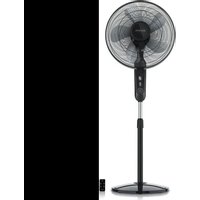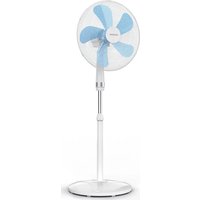
305007 - Fan Brandson - Free user manual and instructions
Find the device manual for free 305007 Brandson in PDF.


User questions about 305007 Brandson
0 question about this device. Answer the ones you know or ask your own.
Ask a new question about this device
Download the instructions for your Fan in PDF format for free! Find your manual 305007 - Brandson and take your electronic device back in hand. On this page are published all the documents necessary for the use of your device. 305007 by Brandson.
USER MANUAL 305007 Brandson
text_image
Technical diagram of a fan assembly with numbered parts and labeled componentsImportant safety guidelines for this device
- Use the device for the private and intended purpose only. This device is not intended for commercial use. Do not use the device outdoors and keep it away from heat and direct sunlight
- Please do not keep the device in the immediate vicinity of water sources like, for example, bathtub, shower, washbasin or swimming pool.
- Do not use this device with wet hands
- If the device becomes moist or wet, pull out the power plug immediately. Pay attention to your own safety and
do not touch any conductive material on the device
- Protect the device from moisture (this device should not be immersed in liquids under any circumstances), sharp edges or large sources of dust
- Do not keep the device in the immediate vicinity of heat sources (e.g. ovens or heaters)
- Keep it on an appropriate surface so that it does not tip over
-
Unplug the power plug when the device is not in use, during transport or during cleaning
-
Never leave the fan unattended and choose a location in which the device is safe from the reach of animals and children
- Operate the device solely with the voltage mentioned on the device label
-
This device is not intended to be used, cleaned or serviced by individuals (including children) with reduced physical, sensory, or mental capabilities or lack of experience and/or knowledge unless they are supervised by a person responsible for their safety or have received instructions on how to use the device from any such authorized person.
-
Children should be supervised to ensure that they do not play with the device.
- For the safety of your children, keep the packaging parts away from their reach (plastic bag, foils, carton or polystyrene).
- Do not allow small children to play with the foil or plastic bags as there is a risk of suffocation!
- While operating the device, ensure that the protective cage is closed.
-
The fan, rotary knob and switches should not be blocked!
-
It is not allowed to remove the cage for cleaning purposes once the fan is mounted.
- Never insert your body parts (e.g. fingers) or objects through the protective cage.
- Ensure that your hair is not within the range of the protective cage as it may get caught in the air current.
Thank you for choosing a Brandon product. Please read the following user manual carefully to have an enjoyable experience with your purchased product.
1. Scope of supply
- Standing Fan
- User manual
2. Technical data
| Input voltage 220 - 240V AC | |
| Power input 50 W | |
| Noise emission Workplace related emission value less than 70 dB(A) | |
| Rotor blade diameter approx. 40 cm (5 rotor blades) | |
| Oscillation approx. 80° can be enabled / disabled | |
| Dimensions Width 42cm, depth about 39cm,height about 104- 125cm (adjustable) | |
3. Functions
The Brandson pedestal fan has a powerful motor and 40 cm rotor blades which ensure optimum ventilation even on hot days. Thanks to the three speed levels, adjustable angle of inclination and oscillation, you can adapt the fan to your individual requirements.
4. Product details
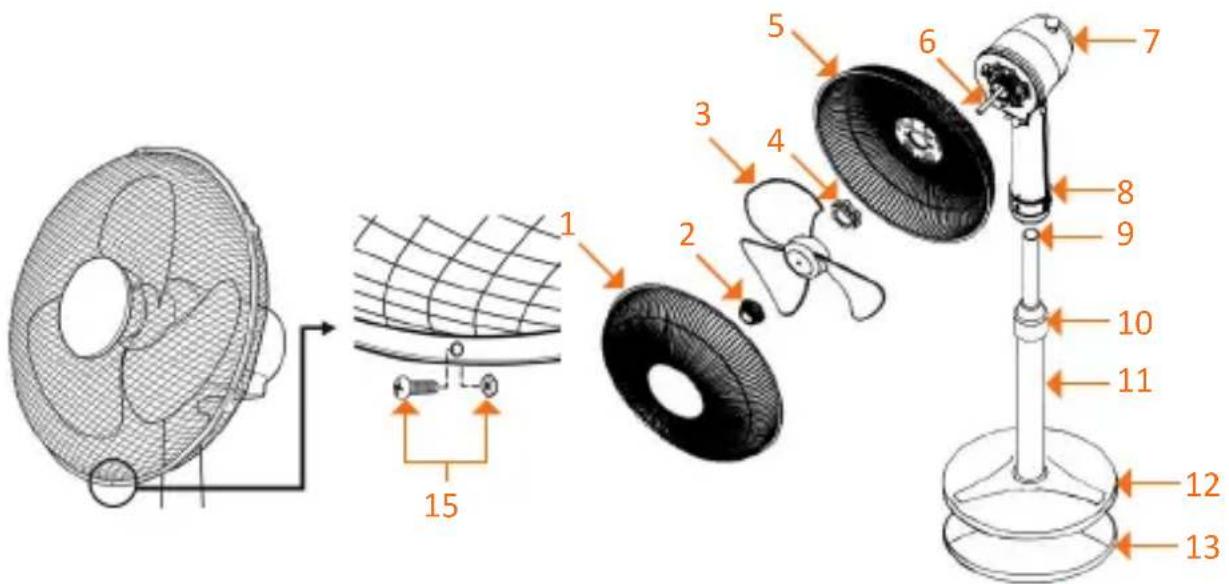
text_image
Technical diagram of a fan assembly with numbered parts and labeled components| 1 Protective | cage - front |
| 2 Rotor blade | mounting nut |
| 3 Rotor blade | |
| 4 Protective | cage - mounting nut |
| 5 Protective | cage - rear |
| 6 Rotor axis | |
| 7 Oscillation | knob |
| 8 Pedestal - | locking screw |
| 9 Inner pipe | for pedestal height adjustment |
| 10 Height adjustment mechanism | |
| 11 Pedestal | -outer pipe |
| 12 Pedestal | cover |
| 13 Pedestal | |
| 14 Pedestal | mounting screw |
| 15 Locking screw + Screw nut | |
5. Assembly
Take the fan out of the package and check the device as well as the scope of delivery mentioned in the table above. Please contact the vendor if any part is missing or has been damaged. Now place the rear protective cage (5) on the fan unit. Make sure that the handle is facing up.
Tighten the protective cage firmly using the mounting nut (4).
Then insert the rotor blade (3) onto the rotor axis (6) and fasten it using the appropriate mounting nut (2).
Caution: The mounting nut needs to be tightened counter-clockwise.
Mount the front protective cage (1) onto the rear protective cage. A hole is provided for a locking screw at the bottom of the two protective cages.
Insert the locking screw (15) through the hole of the front and rear guards and fasten it using the locking nut. Then connect the four mounting brackets to the side.
Take the pedestal (13), place the guard (12) on it and connect the outer pipe (11) to the pedestal.
Fix the outer pipe (11) to the pedestal (13) from below using the fastening screw (14).
Then slide the height adjustment mechanism (10) from above onto the inner pipe (9).
Finally, the fan and pedestal have to be put together.
Attach the fan to the pedestal and secure it using the locking screw (8).
6. Usage
Keep the fan in an appropriate location and connect the device to a properly installed 220-240V AC socket.
By tipping the protective cage, you can change the angle of inclination according to your needs.
Push the pin at the top to enable the oscillation. If you do not want to use the oscillation function, pull the pin out slightly.
You can select between three different speed levels using the rotary switch on the pedestal pipe.
| Speed level | |
| 0 Off | |
| 1 Slow | |
| 2 Medium | |
| 3 Fast |
7. Cleaning
Pull out the power plug from the socket before starting with the cleaning process!
Use a slightly moist cloth for cleaning (wetted with water).
For cleaning, never immerse the device into water! This could lead to electric shock or fire!
8. Safety instructions and liability disclaimer
Never try to open the device to carry out repairs or conversions. Avoid contact with mains voltages. Do not short-circuit the product. The device is not certified for use in the open air; only use it in dry conditions. Protect it from high humidity, water and snow. Keep it away from high temperatures. Do not subject the device to sudden changes in temperature or heavy vibration as this might damage electronic components. Examine the device for damage before using it. The unit should not be used if it has received an impact or has been damaged in any other
way. Please observe national regulations and restrictions. Do not use the device for purposes other than those described in the instructions. This product is not a toy. Keep it out of the reach of children or mentally impaired persons. Any repair or alteration to the device not carried out by the original supplier, will invalidate the warranty or guarantee. The product may only be used by persons who have read and understood these instructions. The device specifications may change without any separate prior notice to this effect.
9. Disposal instructions
Electrical and electronic devices may only be disposed of in accordance with the European WEEE Directive and not with household rubbish. Components must be disposed of or recycled separately as dangerous, toxic elements can inflict sustained damage on the environment if they are disposed of incorrectly. As a consumer, you are bound by the Electrical and Electronic Devices Act (ElektroG) to return electrical and electronic goods free of charge at the end of their useful life to the manufacturer, the place of purchase or to specially set up, public collection points. The details in each case are governed by national law. The symbol on the product, the operating instructions and/or the packaging refers to these regulations. By separating materials in this way, recycling and disposing of old devices, you are making an important contribution towards protecting our environment.


WEEE guideline: 2012/19/EU
WEEE register number: DE 67896761
WD Plus GmbH, herewith declares that this product 305007 conforms to the principle requirements and other relevant stipulations of Directive 2014/35/EU, 2014/30/EU and 2011/65/EU. The complete Declaration of Conformity can be obtained from: WD Plus GmbH, Wohlenbergstraße 16, 30719 Hanover