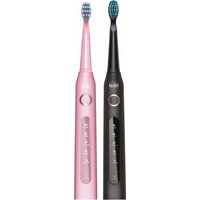
IDEAL IZ8901 - Toothbrush Eldom - Free user manual and instructions
Find the device manual for free IDEAL IZ8901 Eldom in PDF.


| Brand | Eldom |
| Model | IDEAL IZ8901 |
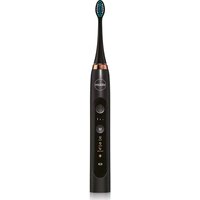
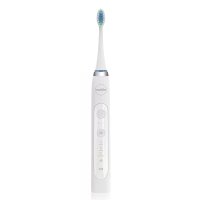
| Product type | Sonic electric toothbrush |
| Power | Built-in rechargeable battery, charges via USB cable (5V, 1A) |
| Charging time | Approximately 4 hours |
| Battery life | Up to 30 days (2 x 2 min/day) |
| Brushing speed | 31 000 - 40 000 strokes/min |
| Operating modes | White, Clean, Sensitive, Polish, Massage |
| Cycle duration | 2 minutes with a pulse every 30 seconds |
| Water resistance | IPX7 (immersion up to 1 meter for 30 minutes) |
| Body material | ABS/TPE |
| Bristle material | Dupont Nylon |
| Replaceable brush head | Yes, model IZK8901, replace every 3 months or if bristles are deformed |
| Battery indicator | Light indicator: on during charging, off when charged; flashes 10 times if battery low |
| Auto shut-off | Yes, after 2 minutes of brushing |
| Use while charging | Not possible |
| Included accessories | USB cable, travel case |
| Maintenance | Clean after each use, rinse brush head, wipe body with a damp cloth |
| Recycling | Do not throw away with household waste, deposit at a collection point for WEEE |
Frequently Asked Questions - IDEAL IZ8901 Eldom
User questions about IDEAL IZ8901 Eldom
0 question about this device. Answer the ones you know or ask your own.
Ask a new question about this device
Download the instructions for your Toothbrush in PDF format for free! Find your manual IDEAL IZ8901 - Eldom and take your electronic device back in hand. On this page are published all the documents necessary for the use of your device. IDEAL IZ8901 by Eldom.
USER MANUAL IDEAL IZ8901 Eldom
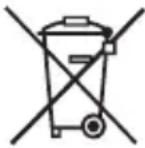
/EN/ The disposal of used electrical and electronic equipment (applies to European Union countries and other European countries with separate waste-collection systems).
This symbol on the product or its packaging indicates that it should not be classified as household waste. It should be handed over to an appropriate company dealing with the collection and recycling of electrical and electronic equipment. The correct disposal of the product will prevent potential negative consequences for the environment and human health resulting from hazardous substances present in the product. Electrical devices must be handed over to restrict their re-use and further treatment. If the device contains batteries, remove them, and hand them over to a storage point separately. DO NOT THROW EQUIPMENT INTO THE MUNICIPAL WASTE BIN. Material recycling helps to preserve natural resources. For detailed information on how to recycle this product, please contact your local authority, the recycling company, or the shop where you bought it.
IV
| A | B | C |
 |  |  |
| D | E | F |
| [D2YA] |  |  |
WSKAZÓWKI BEZPIECZEŃSTWA
PROBLEMY I ROZWIĄZANIA
- Carefully read the entire contents of this manual before first use.
- Keep all warnings and safety instructions for future reference.
- The appliance must be connected to a mains supply compatible with the current parameters specified in the manual.
- This equipment may be used by children of at least 8 years of age and by people with reduced physical and mental capabilities and lack of experience and knowledge of the equipment, if supervision or instruction is provided on how to use the equipment safely so that the associated risks are understood. Children should not play with the equipment. Unsupervised children should not perform cleaning or maintenance on the equipment.
- Do not place the equipment near heat sources.
- Always switch off the appliance before cleaning and maintenance, and if it is not working properly and after use.
- Do not use with damaged tips, as this may lead to injury.
- Do not use if the appliance has fallen or been otherwise damaged.
- Do not use in the open air.
- Use only with the originally supplied accessories.
- Do not leave the appliance switched on unattended.
- Repairs to the equipment may only be carried out by an authorised service centre. Any modernisation or use of other than original spare parts or components of the appliance is forbidden and endangers the safety of use.
- Eldom sp. z o. o. shall not be held liable for any damage resulting from inappropriate use of the appliance.
NOTE:
- This device is designed exclusively for cleaning teeth, gums and tongue.
- When using this product for the first time, some people may experience discomfort. Use the toothbrush normally and any unpleasant sensations should gradually disappear within a week without hurting your teeth or gums.
- If you have received dental treatment in the last 2 months, consult your dentist before using the toothbrush.
- If you experience bleeding after using the toothbrush, consult your dentist
GENERAL INFORMATION
- Spindle
- Housing
- Power switch
- Operating mode indicator
- Empty battery indicator
- Socket
- Replaceable head
- USB cable
- Case
TECHNICAL DATA
Speed: 31,000 - 40,000 bpm
Battery: DC 3.7V, 260mAh, Li-Ion
Charging time: 4 hours
Operating time: up to 30 days
(2 minutes twice/day)
Toothbrush water-tightness: IPX7
Material
- housing: ABS/TPE
- head bristles: Dupont Nylon
Charging method: cable
Connect the cable (8) to a power supply unit with the following parameters:
DC 5V, 1A (not included)
INTENDED USE
The IZ8901 toothbrush has been designed to use sonic technology. During operation, the toothbrush head vibrates at speeds ranging from 31,000 to as many as 40,000 beats per minute, dynamically cleaning teeth and inter-dental spaces. This makes it possible to remove impurities from hard-to-reach areas more accurately.
CHARGING THE DEVICE
The device may only be used after it has been charged.
Turn off the device before charging.
- When the battery level is low, the charging indicator will flash 10 times to remind you to charge.
- Connect one end of the cable (8) to the socket (6) and the other end to the power adapter (not included) with the parameters listed above, and then to the mains.
- During charging, the light (5) will be on, and after charging, it will turn off.
• The device cannot be used during charging. - When using the device for the first time or when it is not used for a long time, it is normal for the indicator (5) not to light up for the first few minutes.
REPLACING THE HEAD (7)
The brush head (7) is a working part and should be replaced every 3 months for hygienic reasons and whenever its bristles are worn. It is not subject to warranty repair.
The brush head (7) can only be replaced by the original brush head type included in the IZK8901 range.
- The head can only be replaced when the toothbrush is switched off.
- Replacing the head (7) while the toothbrush is running may cause damage to the spindle (1).
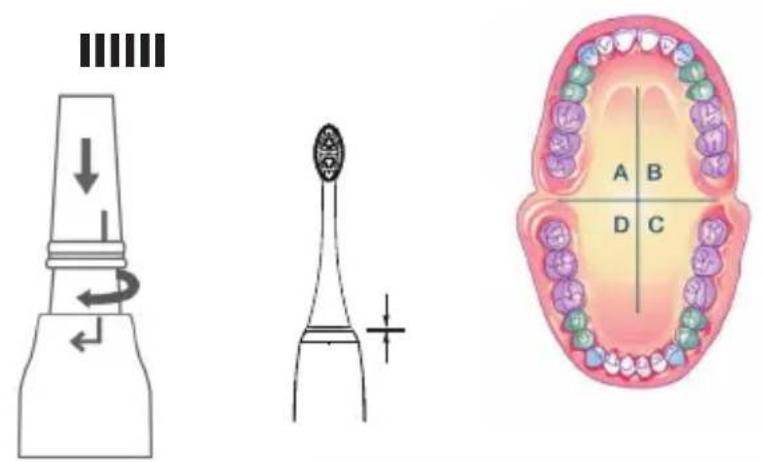
- Attach the head (7) as shown in Fig. 1.
- Keep a small gap between the housing (2) and the head (7) to allow proper device operation. Fig. 1.
If there is no gap, the device will be damaged when turned on.
- To select the operating mode, press the button (3) until the correct light (4) comes on.
- If the button (3) is not pressed within 3 seconds, pressing the button (3) again will switch off the product.
- The toothbrush will always begin working in the last mode selected.
| Mode Method of operation Operating time | |
| White For the elimination of stains. Two minutes, impulse every Clean Daily plaque removal | 30 seconds |
| Sensitive For cleaning sensitive teeth and gums | |
| Polish For polishing teeth and brightening Front teeth. | |
| Massage For massaging the gums |
USE
- Put the tip (7) on the stem (1) - Fig. 1.
-
Wet the bristles on the tip (7).
-
Apply a small amount of toothpaste to the wet bristles.
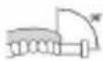
- Insert the toothbrush into the mouth and position it at a suitable angle (Fig. 4) and switch on.
- Brush the teeth in a circular motion, gently moving the brush head over each section of the teeth (Fig. 3) for 10 seconds, including the front, back and gum surfaces.
- Do not press the device too hard against the teeth and gums.
- The cleaning cycle lasts 2 min. The toothbrush will generate a pulse every 30s.
- When the set time has elapsed, the device will switch off automatically.
- The device operation can be interrupted at any time using the switch (3).
- Rinse your mouth after brushing is complete. A specialised mouthwash can be used.
- Remove the brush head (7), wash it thoroughly and set aside to dry.
- Wipe off the appliance and place it in a dry place.
TEETH CLEANING – RECOMMENDATIONS
- Divide the teeth into 4 areas – Fig. 3.
- Brush each part for approximately 30 seconds
• The toothbrush signals when the time is up. - Apply the head bristles to the teeth correctly – Fig. 4
CLEANING AND MAINTENANCE
Clean the appliance after each use.
- Before cleaning, make sure the device is turned off.
- Do not immerse the cable (8) in water.
- Do not use strong or surface-damaging cleaning agents or products.
- Wipe the cord (8) and housing (2) with a damp cloth.
- Rinse the tip (7) thoroughly. Do not squeeze or pull the bristles to avoid damage.
PROBLEMS AND SOLUTIONS
| Problem Possible | cause Solution | |
| The head vibrations are too weak | The bristles are too tightly pressed against the teeth | Press the toothbrush gently against the teeth |
| The head vibrations are too weakOperating time is short | The toothbrush is not sufficiently charged:1. The cord is incorrectly connected to the toothbrush or to the power adapter.2. Low battery charge. | 1. Check cord connection.2. Extend the charging time of the battery. |
| The toothbrush does not work | 1. The toothbrush is not charged.2. The toothbrush has been damaged. | 1. Charge the toothbrush.2. Contact the manufacturer's maintenance service. |
SICHERHEITSHINWEISE
Batterie rechargeable :
DC 3.7V, 260mAh, Li-ION
REPLACEMENT DE LA TETE DE BROSSE (7)
- WSKAZÓWKI BEZPIECZEŃSTWA
- NOTE:
- GENERAL INFORMATION
- TECHNICAL DATA
- Material
- INTENDED USE
- CHARGING THE DEVICE
- The device may only be used after it has been charged.
- Turn off the device before charging.
- REPLACING THE HEAD (7)
- If there is no gap, the device will be damaged when turned on.
- USE
- TEETH CLEANING – RECOMMENDATIONS
- CLEANING AND MAINTENANCE
- SICHERHEITSHINWEISE
- REPLACEMENT DE LA TETE DE BROSSE (7)
Brand : Eldom
Model : IDEAL IZ8901
Category : Toothbrush