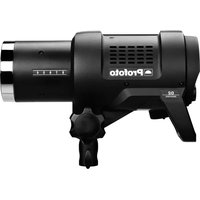
D2 Industrial - Lamp PROFOTO - Free user manual and instructions
Find the device manual for free D2 Industrial PROFOTO in PDF.


User questions about D2 Industrial PROFOTO
0 question about this device. Answer the ones you know or ask your own.
Ask a new question about this device
Download the instructions for your Lamp in PDF format for free! Find your manual D2 Industrial - PROFOTO and take your electronic device back in hand. On this page are published all the documents necessary for the use of your device. D2 Industrial by PROFOTO.
USER MANUAL D2 Industrial PROFOTO
Quick Start and Safety Guide Warranty
Profoto D2 500 Profoto D2 1000 Profoto D2 Industrial
Table of Contents
English 4
Français....11
Español....18
Deutsch....25
Italiano 30
Svenska 35
Nederlands....40
简体中文 (Simplified Chinese) 45
繁體中文 (Traditional Chinese) 48
日本語 (Japanese) 51
قيرعلا (Arabic) 55
Русский (Russian) 58
한국어(Korean)63
Warranty 66
English

IMPORTANT SAFETY INFORMATION & WARNINGS!
Do not operate the equipment before studying the Quick Start and Safety Guide and the User Guide. Make sure that the Quick Start and Safety Guide is always accessible to the user! Profoto products are intended for professional use! Profoto products are intended for indoor condition use! Do not place or use the equipment where it can be exposed to moisture, extreme electromagnetic fields or in areas with flammable gases or dust! Do not expose the equipment to dripping or splashing. Do not place any objects filled with liquids, such as vases, on or near the equipment. Should any water or pollutants such as ash, dust or insects end up in the product, disconnect the mains power cable from the outlet. Do not touch the equipment. Contact Profoto service! Do not expose the equipment to hasty temperature changes in humid conditions as this could lead to condensation water in the unit. Do not connect lights, or use light shaping tools, from other manufacturers. Do not use flash heads without supplied protective glass covers or protective grids. Glass covers shall be replaced, before using the equipment, if it has become visibly damaged to such an extent that their effectiveness is impaired, for example by cracks or deep scratches. Lamps shall be replaced if they are damaged or thermally deformed. When placing a lamp into the holder ensure not to touch the bulb with bare hands. Always use protective gloves and safety glasses while performing maintenance on the flash equipment. Disconnect the mains cable and wait at least 10 minutes before attempting to replace flash tube and/or modelling light. It is unavoidable that the type of capacitor used in flash products can sometime break. If this should happen a sharp smell may emit from the flash product along with smoke. Avoid getting the emission in the face. If the emissions should get in the eyes or mouth, rinse with water. The emission is nontoxic. Rinse with water and soap if you get leaking electrolyte on skin. Do not ingest the electrolyte. Always lift generators and lights by their handles and never by the connectors or cables. Do not connect to mains power or operate a product which has been left in a hot or cold environment, such as a car. Let the product reach the approved operating temperature before doing so. This equipment is not suitable for use in locations where children are likely to be present. Do not mount or use the equipment at a height exceeding 2 m (6.5 feet). When using a stand, always make sure that the equipment is securely attached. Make sure that rated voltage for modeling lamp corresponds with technical data of user guide regarding power supply! Remove transport cap from lamp head before use! Never install the product in a confined space. Always leave a space around the product for ventilation, do not cover any ventilation openings! Do not obstruct ventilation by placing filters, diffusing materials, etc. over inlets and outlets of the equipment ventilation or directly over glass cover, modeling lamp or flash tube! Product shall not be exposed to excessive heat such as sunshine, heat sources, and fire or similar. Profoto products are only intended for the purpose of image capture, such as photography and videography. They are not intended for use in any other application.
Do not attempt to repair this product yourself, as opening or removing screwed covers may expose you to the risk of electric shock. The charger mains cable and plug serve as the disconnect device from mains power. Always disconnect the charger from the mains outlet by pulling the plug, not the cable. The socket outlet should be near the equipment and should be easily accessible.
Do not touch hot parts with bare fingers! Modeling lamps and flash tubes may make certain metal parts, front lenses or glas covers emit strong heat when used! All lamps may on rare occasions explode and throw out hot particles! Do not point modeling lamps or flash tubes too close to persons.

Warning - Loud Noise. There is a risk for exposure to sudden loud noise. Please use hearing protection and / or observe a minimum safety distance of 44 cm (17 in.) between the generator and users/other people present.

Possibly hazardous optical radiation emitted from this product. Do not stare at operating lamp. May be harmful to the eye. Do not trigger a flash towards an unexpected subject, any person operating heavy equipment, or on anyone performing any other activities where an unexpected flash could cause injury or harm. Please note that flashes can be triggered remotely from a long distance.
Note about RF!
This equipment makes use of the radio spectrum and emits radio frequency energy. Make sure the device is operated according to the local regulations. The frequency spectrum this device is using is shared with other users. Interference can not be ruled out.
QUICK START
Before using the device for the first time
Before using your product for the first time, we recommend that you register it and update it. Start with logging-in with your personal account on profoto.com/myprofoto. If you don't have an account yet, you need to create a new account first. Once you have an account you can register your device, and access the latest free upgrades. Upgrade of firmware is made via the Micro USB port on device, following the instructions provided in the upgrade application. You will also receive email notifications when new product updates are released.
Additional information:
The full user guide and other downloads can be found at https://www.profoto.com
- Choose the region you are in. Search for your product in the search field. Click on “Downloads” and you will find the full user guide for download.
Credit:
Other trademarks and trade names are those of their respective owners.
Regulatory information
Compliance marking
Regulatory information, certification, and compliance marks specific to D2 are available on the unit. It can be found on the products type label.
RF Exposure Information
According to RF exposure regulations, under normal operations the end user shall refrain from being closer than 1 cm from the device.
Final Disposal

When the product reaches end of service, do not dispose of it with your other household waste. Equipment contains battery, electrical and electronic components that could be harmful to the environment. Equipment may be returned to Profoto distributors free of charge for recycling. Follow local legislation for disposal of batteries, electrical and electronic components, respectively.
EU Declaration of Conformity
Hereby, Profoto Aktiebolag declares that the Profoto D2 is in compliance with Directive 2014/53/EU.
The full text of the EU declaration of conformity can be found at https://profoto.com/int/support/declaration-of-conformity
Technical Specification
| Model Name Profoto D2 | |
| Type PCA1361-0000, PCA1362-0000, PCA1468-0000 | |
| Input power supply charger | 100-120V / 200-240 V, 50-60 Hz |
| Operating temperature 10°C to +35°C /50°F to +95°F | |
| Operating frequency and radio output power (Air) | 2404-2480 MHz - <10 dBmEIRP |
For indoor use only.
Manufacturer: Profoto Aktiebolag
Address: Box 1264, SE-172 25 Sundbyberg, Sweden
UK Declaration of Conformity
Hereby, Profoto Aktiebolag declares that the Profoto D2 is in compliance with Radio Equipment Regulations 2017.
The full text of the UK declaration of conformity can be found at https://profoto.com/int/support/declaration-of-conformity
UK Importer: Profoto Ltd.
Lytchett House, 13 Freeland Park, Wareham Road, Poole, Dorset, BH16 6FA
Unites States and Canada
FCC Suppliers Declaration of Conformity (SDoC)
Profoto AB
Transmitter / Receiver
MODEL: Profoto D2
PRODUCT NO: PCA1361-0000 / PCA1362-0000 / PCA1468-0000
Contains FCC ID: W4G-RMI3
and IC: 8167A-RMI3
Designed in Sweden, manufactured in Thailand.
Responsible Party - U.S. Contact Information
Profoto US
Profoto US
220 Park Ave
Suite 120
Florham Park NJ 07932
+1973-822-1300
us-info@profoto.com
RF Exposure Information
According to RF exposure regulations, under normal operations the end user shall refrain from being closer than 1 cm from the device.
This device complies with Part 15 of the FCC Rules/Innovation Science and Economic Development Canada's license-exempt RSS standard(s). Operation is subject to the following two conditions:
-
this device may not cause harmful interference, and
-
this device must accept any interference received, including interference that may cause undesired operation of the device.
WARNING:
Any changes or modifications to this unit not expressly approved by the party responsible for compliance could void the user's authority to operate the equipment.
NOTE:
This equipment has been tested and found to comply with the limits for a Class B digital device, pursuant to part 15 of the FCC Rules. These limits are designed to provide reasonable protection against harmful interference in a residential installation.
This equipment generates, uses and can radiate radio frequency energy and, if not installed and used in accordance with the instructions, may cause harmful interference to radio communications. However, there is no guarantee that interference will not occur in a particular installation. If this equipment does cause harmful interference to radio or television reception, which can be determined by turning the equipment off and on, the user is encouraged to try to correct the interference by one or more of the following measures:
Reorient or relocate the receiving antenna.
- Connect the equipment into an outlet on a circuit different from that to which the receiver is connected.
- Increase the separation between the equipment and receiver.
- Consult the dealer or an experienced radio/TV technician for help.
Français

INFORMATIONS ET AVERTISSEMENTS IMPORTANTS EN MATIÈRE DE SÉCURITÉ !
简体中文 (Simplified Chinese)

重要安全信息和警告!
繁體中文 (Traditional Chinese)
重要安全資訊及警告!
For warranty information visit: https://profoto.com/support/warranty
ES - Garantía