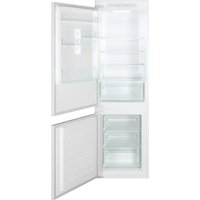
BBL3518EK - Refrigerator BAUMATIC - Free user manual and instructions
Find the device manual for free BBL3518EK BAUMATIC in PDF.


| Product type | Fridge freezer combination |
| Brand | Baumatic |
| Model | BBL3518EK |
| Energy class | E (estimated) |
| Refrigerator capacity | Approximately 200 L (estimated) |
| Freezer capacity | Approximately 90 L (estimated) |
| Dimensions (W x D x H) | 540 x 955 x 1770 mm (estimated for 540 mm cabinet) |
| Weight | Approximately 70 kg (estimated) |
| Power supply | 220-240 V / 50 Hz |
| Adjustable refrigerator temperature | 2 °C, 3 °C, 4 °C, 6 °C, 8 °C |
| Adjustable freezer temperature | -16 °C, -18 °C, -20 °C, -22 °C, -24 °C |
| Super cooling function | Yes, activates 2 °C for max 12 h |
| Super freezing function | Yes, activates -22 °C for max 50 h |
| Eco mode | Yes, 4 °C / -18 °C automatic |
| Holiday function | Yes, reduces consumption |
| Defrosting | Manual, recommended every 3 mm of frost |
| Open door alarm | Yes, after 3 minutes |
| Interior lighting | LED |
| Connectivity | hOn app (Wi-Fi) |
| Control panel | Touch screen with On/Off, Mode, Temp buttons |
| Maintenance | Regular cleaning of drain hose, door seals |
| Safety | Stop and restart function after power cut |
| Spare parts | Contact Baumatic after-sales service |
Frequently Asked Questions - BBL3518EK BAUMATIC
User questions about BBL3518EK BAUMATIC
0 question about this device. Answer the ones you know or ask your own.
Ask a new question about this device
Download the instructions for your Refrigerator in PDF format for free! Find your manual BBL3518EK - BAUMATIC and take your electronic device back in hand. On this page are published all the documents necessary for the use of your device. BBL3518EK by BAUMATIC.
USER MANUAL BBL3518EK BAUMATIC
Discover extra contents and create your inventory list


Summary
PRODUCT DESCRIPTION 2
USE....3
Use 3
Display StandBy....4
Mode....4
Fridge Temp Setting 4
Freezer Temp Setting 4
Super Cool function....5
Super Freeze function 6
Eco mode....6
Holiday function....7
Defrosting....7
Demo mode....7
Error codes....7
APP CONNECTION (Content only)......8
TROUBLESHOOTING....9
PRODUCT DESCRIPTION
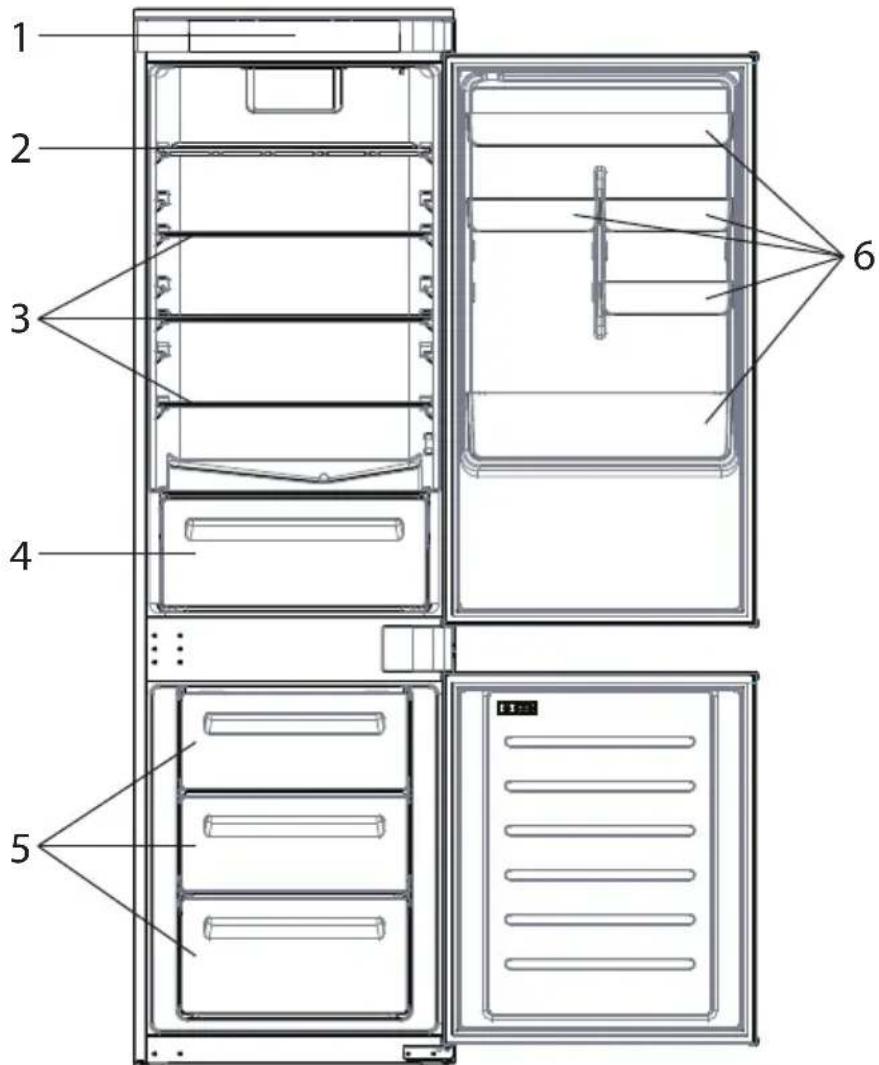
- Control Panel
- Wine Rack
- Shelves
- Crisper
- Freezer Boxes
- Door Rack
* The most energy-saving configuration requires drawers, food box and shelves to be positioned in the product and fan to be off, please refer to the above pictures.
** The pictures above are only for reference. The actual configuration will depend on the physical product or statement by the distributor.
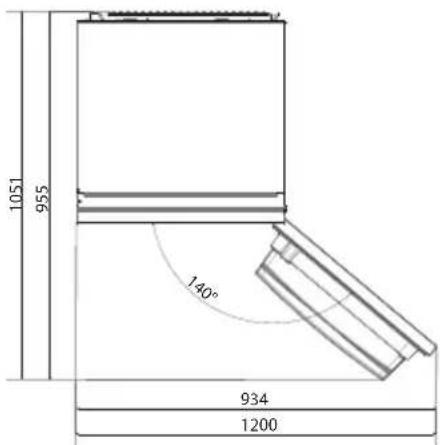
Space requirements
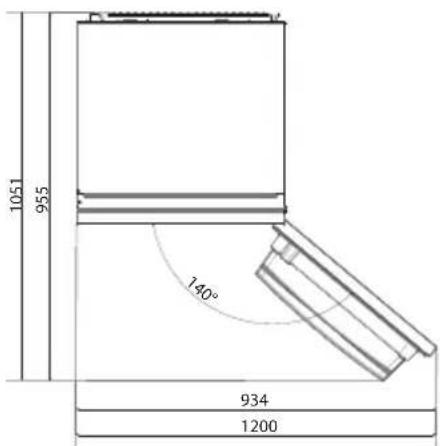
The unit's door must be able to fully open as shown.
Spare enough space for convenient opening of the doors and drawers.
Keep a distance of at least 50 mm between the side walls of the product and adjacent parts.
540 mm Cabinet: Width: 934 mm
Depth: 955 mm
700 mm Cabinet: Width: 1200 mm
Depth: 1051 mm
USE

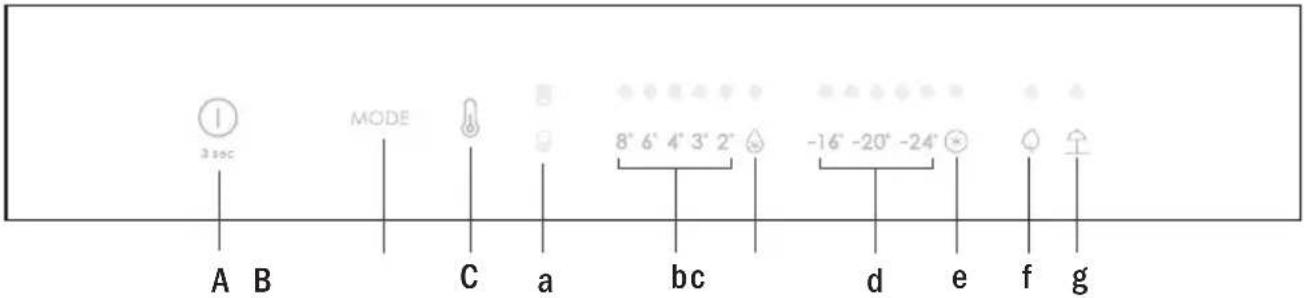
A. ON/OFF key, push for 3 seconds. Appliance turns on with a long acoustic feedback (1sec)
B. Mode key, used to select between Fridge, Freezer, Eco and Holiday
C. TEMP key, used to select between temperatures levels (also Super Cool and Super Freeze)
a. Fridge/Freezer area icon, shows which compartment of the appliance is selected
b. Fridge temperature levels, shows which is the selected temperature
c. Super Cool icon, shows if the Super Cool function is activated
d. Freezer temperature levels, shows which is the selected temperature in the freezer
e. Super Freeze icon, shows if the Super Freeze function is activated
f. Eco mode icon, shows whether the Eco mode is activated
g. Holiday function icon, shows whether the holiday function is activated
Use • Plug in the appliance and it automatically turns on with a long acoustic feedback (1 sec) All LEDs turn on (1 sec), then the Fridge temperature LED and Freezer LED turn on fixed.
- The temperature will automatically set at 4 °C in the fridge and -18 °C in the freezer.
NOTE: wait at least 2/3 hours before putting food in the appliance, so as to ensure the temperature inside the fridge.
- In case of power loss, the last cooling level set will be restored.
- To restore the default setting, keep pressed the door switch inside the refrigerator and simultaneously press the ON/OFF key for 5 seconds.
- Unde r the normal operating condition (in spring and autumn), it is recommended to set the temperature at 4 °C. In summer when the ambient temperature is high, it is recommended to set temperature at 6\~8 °C, so as to guarantee the fridge and freezer temperatures and reduce the refrigerator continuous running time; and in winter when the ambient temperature is low, it is recommended to set temperature at 3\~4 °C to avoid frequent start/stop of the refrigerator.
Display stand by mode management
- If the door is closed -> display in standby (all LEDs switched off)
- If the door is open -> current fridge temperature LED and freezer temperature LED are turned on (fixed).
- ECO mode LED + Holiday mode LED are turned on (fixed) if previously selected.
- Display is ready to receive inputs (no need to activate it by touch).
Mode
The mode button is used to switch between the different modes.
The related LED turns on and selection is immediately confirmed (no blink).
Short acoustic feedback confirms the selection.
Fridge temperature setting
When display panel is on, select the "fridge temperature setting" pushing the MODE button. The fridge area LED turns on. Push the "TEMP" button until the desired temperature is set.
The temperature value changes in this way: 8^ 6^ 4^ 3^ 2^ super cooling >8^ ...
The related LED turns on and selection is immediately confirmed (no blink).
Short acoustic feedback confirms the selection.
Freezer temperature setting
When display panel is on, select the "freezer temperature setting" pushing the MODE button. The freezer area LED turns on.
Push the "TEMP" button until the desired temperature is set.
The temperature value changes in this way: -16^ -18^ -20^ -22^ -24^ Super freezing- >-16^ ...
The related LED turns on and selection is immediately confirmed (no blink).
Short acoustic feedback confirms the selection.
Note
Switching from fridge to freezer areas and vice versa is immediate when the user pushes the MODE button, and the selection is immediately active.
Temperature LEDs do not blink.
Super Cool function
It is suggested to switch on the Super Cool function if a large quantity of food should be stored (for example after the purchase). The Super-Cool function accelerates the cooling of fresh food and protects the goods already stored from undesirable warming. When the function is activated, the temperature of the fridge is automatically set at 2 °C. How to use the Super Cool function:
- The function can be activated by long pressing TEMP key to select the fridge compartment, and then quick pressing the TEMP key until the Super Cool icon led is turned on, or it can be turned on from the app. When the function is activated, the Super Cool LED is always ON.
• To exit the Super Cool function, press the TEMP key or turn it off from the app. - The Super Cool function automatically ends when the function has lasted for more than 12 hours.
- When the Super Cool ends, the icon of the control panel is switched off and the previously set cooling level is restored.
Note: Super Cool and Super Freeze function cannot be activated simultaneously.
Super Freeze function
The super freezing function accelerates the freezing of fresh food and protects the goods already stored from undesirable warming. If a large amount of food has to be freeze, it is recommended to set the Super-Freeze function on 24h before the usage. When the function is activated, the temperature is automatically set at -22 °C.
How to use the Super Freeze function:
- The function can be launched by long pressing TEMP key to select the freezer compartment, and then quick pressing TEMP key until the Super Freeze icon led is turned on, or it can be turned on from the app. When the function is activated, the Super Freeze LED is always ON.
• To exit the Super Freeze function, press the TEMP key or turn it off from the app. - The Super Freeze function automatically ends when the function has lasted for more than 50 hours.
- When the Super Freeze ends, the icon of the control panel is switched off and the previously set freezing level is restored.
Note: Super Cool and Super Freeze function cannot be activated simultaneously.
Eco mode
The Eco mode can be activated to optimize the performance of the appliance, whereas obtaining the best food storage. The Eco mode will automatically set the temperature at 4 °C in fridge and at -18 °C in the freezer.
How to use the Eco mode:
- The function can be activated from control panel by pressing the “mode” key until the Eco mode icon turns on (an acoustic signal confirms the selection), or by selecting the function from the app. When the function is activated, the Eco mode icon is always ON.
- To exit the Eco turn it off from the app or chose another function from the control panel.
- When the Eco Mode ends, the icon of the control panel is switched off and the previously set cooling levels are restored.
Holiday function
The Holiday function can be used to reduce the energy consumption of the appliance, when it is not used regularly. When the function is on, the LED lights will be off (even if the door is open) and the fridge will work on low power consumption mode, whereas the freezer will keep working normally.
How to use the Holiday function:
- The function can be activated from control panel by pressing the “mode” key until the Holiday icon turns on (an acoustic signal confirms the selection), or by selecting the function from the app. When the function is activated, the Holiday icon is always ON.
- To exit the Holiday function, turn it off from the app or chose another function from the control panel.
- When the Holiday function ends, the icon of the control panel is switched off and the previously set cooling levels are restored.
Defrosting
When the layer of frost present in the freezer compartment exceeds 3mm, it is recommended to proceed with the defrosting as it increases energy consumption.
- Switch off the appliance and disconnect the power cord.
- Remove the frozen food and temporarily place them in a cool place.
- Leave the freezer door open and collect the water on the bottom of the product.
- When defrosting is completed, dry the interior thoroughly.
- Reconnect the power cord and set the desired values.
- Wait a moment and reintroduce the frozen foods.
Demo mode
To enter or exit the demo mode, with the door open, long press the ON/OFF key and simultaneously quick press the MODE key 5 times (within 5 seconds).
Error Codes
Communication error
8 °C – 6 °C – 4 °C – 3 °C – 2 °C LED lights turn on sequentially, it means there has been a communication error between the main control board and the display board. Please, contact the technical assistance to help solve the problem
APP CONNECTION (Content only)
In app pairing procedure
Step 1
- Download the hOn app on the stores


Step 2
- Create your account on the hOn App or log in if you already have an account
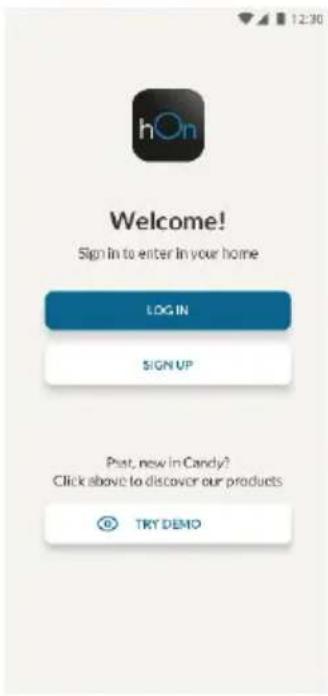
Step 3
- Follow pairing instructions in the hOn App
TROUBLESHOOTING
| The inside light bulb does not turn on. | No electricity. | The power cable is not properly plugged in.Check if the appliance is switched off (see Temperature Adjustment).Check the power socket is working correctly (e.g. with another electric device). |
| Holiday Mode is activated. | Deactivate Holiday mode. | |
| The internal temperature of the refrigerator and/or freezer is not cold enough. | The doors are not closed. | Check that the door and gaskets close properly. |
| The doors are frequently opened. | Avoid opening the doors unnecessarily for some time. | |
| Incorrect temperature setting. | Check the temperature setting and, if possible, set a lower temperature (see Temperature Adjustment). | |
| The refrigerator and/or freezer are too full. | Wait for the temperature of the refrigerator/ freezer to stabilise.Avoid filling the refrigerator and freezer excessively. | |
| The surrounding temperature is too low. | Move the unit to a warmer place or heat the current room. | |
| Warm items have been stored. | Always allow items to cool before storing them. | |
| The food in the refrigerator freezes. | Incorrect temperature setting. | Check the temperature setting and, if possible, increase the temperature. |
| Food in contact with the back wall. | Keep the food away from the refrigerator's back wall. | |
| The bottom of the refrigerator compartment is wet or water droplets are present. | The drain hose could be clogged. | Clean the drain hose with a stick or similar item to allow the water to drain. |
| Presence of drops of water or frost on the rear wall of the refrigerator. | Depending on the function, drops of water or frost form on the rear wall of the refrigerator during operation. | It is not a defect. |
| Warm items have been stored. | Always allow items to cool before storing them. | |
| There are open food containers or liquids. | Always cover food and liquids. | |
| The doors are not closed. | Check that the door and gaskets close properly. | |
| The doors are frequently opened. | Avoid opening the doors unnecessarily for some time. | |
| Presence of water in the vegetable drawer. | Lack of air circulation. | Verify that your appliance is not too full. |
| Vegetables and fruit with too much moisture. | Wrap the fruit and vegetables in plastic materials, e.g. cling film, bags or containers. | |
| The motor runs continuously. | The doors are not closed. | Make sure the doors are closed and check the seals close properly. |
| The doors are opened frequently. | Avoid opening the doors unnecessarily for some time. | |
| Ambient temperature is very high. | Verify that the ambient temperature is in the range set out in the specifications on the appliance tag.Set the display screen/thermostat to a warmer temperature. | |
| The appliance has been off (no power) for some time. | It normally takes the appliance 8-12h to cool completely. | |
| The frozen food is thawing. | Surrounding temperature is too low. | Move the unit to a warmer place or heat the current room. |
| The freezer door is not closed. | Make sure the door is closed and that the gasket is sealing properly. | |
| Fridge door alarm. | Fridge door alarm (acoustic beep) activates whenever the door is left open for more than 3 minutes. | Avoid leaving the door open when not needed. The beep ceases when the door is closed. |
| The appliance makes noises such as gurgling, buzzing, clicking, creaking. | No breakdowns. An engine is running, e.g. refrigeration unit, fan. The refrigerant flows into the pipes. Motor, switches and solenoid valves are switched on or off. | No action needed. |
| The appliance is not located on level ground. | Adjust the feet to level the appliance. | |
| The appliance touches an object around it. | Remove objects around the appliance. | |
| The appliance does not cool, the temperature and lighting indicators are on. | Demo mode is activated. | Deactivate DEMO mode. |
| Strong ice and frost in the freezer compartment. | The items were not adequately packaged. | Always pack the items well. |
| A door/drawer of the appliance is not tightly closed. | Close the door/drawer. | |
| The door/drawer has been opened too frequently or for too long. | Do not open the door/drawer too frequently. | |
| The door/drawer gasket is dirty, worn, cracked or mismatched. | Clean the door/drawer gasket or replace it with a new one. | |
| Something on the inside prevents the door/drawer from closing properly. | Reposition the shelves, door racks or internal containers to allow the door/drawer to close. | |
| The sides of the appliance are warm. | This is normal. |
Резюме
ОПИСАНИЕ НА ПРОДУКТА 2
УПОТРЕБА 3
Употреба .... 3

Стъпка 2
Стъпка 3

Krok 2
Krok 3

Trin 2
Trin 3

Schritt 2
Schritt 3

Βήμα 2
Βήμα 3

Paso 2
Paso 3

Vaihe 2
Vaihe 3

Étape 2
Étape 3

2. korak
3. korak
- Pridržavajte se uputa za uparivanje u aplikaciji hOn
RJEŠAVANJE PROBLEMA
| Ne uključuje se žarulja unutarnjeg osvjetljenja. | Nema struje. | Kabel napajanja nije propisno ukopčan.Provjerite da uređaj nije isključen (pogledajte Podešavanje temperature).Provjerite radi li električna uličnica ispravno (npr. s drugim električnim uređajem). |
| Aktiviran je način rada Holiday. | Deaktivirajte način rada Holiday. | |
| Unutarnja temperatura hladnjaka i/ili zamrzivača nije dovoljno niska. | Vrata nisu zatvorena. | Provjerite zatvaraju li se vrata i brtve pravilno. |
| Vrata se često otvaraju. | Izbjegavajte nepotrebno otvaranje vrata neko vrijeme. | |
| Neodgovarajuća postavka temperature. | Provjerite postavku temperature i po mogućnostli smanljite je (pogledajte odjeljak Podešavanje temperature). | |
| Hladnjak i/ili zamrzivač je/su prepuni. | Pričekajte da se temperatura hladnjaka/zamrzivača stabilizira.Izbjegavajte prekomjemo punjenje hladnjaka i zamrzivača. | |
| Temperatura okoline je preniska. | Premjestite uređaj na toplije mjesto ili zagrijlte prostoriju. | |
| Pohranjene su tople namirnice. | Uvijek pričekajte da se namirnice ohlade prije nego ih spremite. | |
| Hrana u hladnjaku se zamrzava. | Neodgovarajuća postavka temperature. | Provjerite postavku temperature i, ako je moguće, povećajte je. |
| Hrana dodiruje stražnju stijenku. | Držite hranu dalje od stražnje stijenke hladnjaka. | |
| Donji dio odjeljka hladnjaka je mokar ili su prisutne kapljice vode. | Odvodno crijevo možda je začepljeno. | Očistite odvodno crijevo štapom ili sličnim predmetom kako biste omogučili odvod vode. |
| Kapljice vode ili mraz na stražnjoj stijenci hladnjaka. | Ovisno o funkciji, kapljice vode ili mraz formiraju se na stražnjoj stijenci hladnjaka tijekom rada. | To nije znak kvara. |
| Pohranjene su tople namirnice. | Uvijek pričekajte da se namirnice ohlade prije nego ih spremite. | |
| Otvoreni su spremnici hrane ili tekućine. | Uvijek prekrijte hranu i tekućine. | |
| Vrata nisu zatvorena. | Provjerite zatvaraju li se vrata i brtve pravilno. | |
| Vrata se često otvaraju. | Izbjegavajte nepotrebno otvaranje vrata neko vrijeme. | |
| U ladici s povrćem ima vode. | Nema cirkulacije zraka. | Provjerite da uređaj nije prepun. |
| Povrće i voće sadrži previše vlage. | Zamctajte voće i povrće u plastične materijale, npr. prianjajuću foliju, vrećice ili spremnike. | |
| Motor radi neprekidno. | Vrata nisu zatvorena. | Provjerite jesu li vrata zatvorena i jesu li brtve propisno zatvorena. |
| Vrata se često otvaraju. | Izbjegavajte nepotrebno otvaranje vrata neko vrijeme. | |
| Temperatura okoline vrlo je visoka. | Provjerite je li temperatura okoline u rasponu navedenom u specifikacijama na oznaci uređaja.Postavite zaslon/termostat na višu temperaturu. | |
| Uređaj je isključen (nema napajanja) već neko vrijeme. | Obično je potrebno 8 do 12 sati da se uređaj potpuno ohladi. | |
| Zamrznuta hrana se odmrzava. | Temperatura okoline je preniska. | Premjestite uređaj na toplijo mjesto ili zagrijte prostoriju. |
| Vrata zamrzivača nisu čvrsto zatvorena. | Provjerite jesu li vrata zatvorena i ispravnost brtve. | |
| Alarm za vrata hladnjaka. | Alarm za vrata hladnjaka (zvučni signal) aktivira se uvijek kada su vrata otvorena dulje od 3 minute. | Ne ostavljajte vrata otvorena kada to nije potrebno. Zvučni signal prestaje nakon zatvaranja vrata. |
| Uređaj proizvodi zvukove kao što su grgljanje, zujanje, klikanje, škripanje. | Nema kvarova. Motor radi, npr. rashladna jedinica, ventilator. Rashladno sredstvo ulazi u cijevi. Motor, prekidači i elektromagnetski ventili uključeni su ili isključeni. | Nije potrebno ništa poduzimati. |
| Uređaj se ne nalazi na ravnom tlu. | Podesite nožice za niveliranje uređaja. | |
| Uređaj dodiruje predmet u svojoj okolini. | Uklonite predmete oko uređaja. | |
| Uređaj se ne hladi, indikatori temperature i osvjetljenja uključeni su. | Aktiviran je demonstracijski način rada. | Deaktivirajte demonstracijski način rada. |
| Mnogo je leda i mraza u odjeljku zamrzivača. | Namirnice nisu primjereno zapakirane. | Uvijek dobro zapakirajte namimice. |
| Ladica ili vrata uređaja nisu dobro zatvorena. | Zatvorite vrata/ladicu. | |
| Vrata/ladica su/je otvarana prečesto ili predugo. | Ne otvarajte vrata/ladicu prečesto. | |
| Brtva vrata/ladice je prljava, istrošena, napuknuta ili nepravilno postavljena. | Očistite brtvu vrata/ladice ili je zamijenite novom. | |
| Nešto u unutrašnjosti onemogućuje pravilno zatvaranje vrata/ladice. | Premjestite police, police na vratima ili unutarnje spremnike kako bi se vrata/ladica mogla zatvoriti. | |
| Bočne strane uređaja su tople. | To je normalno. |
Összegzés
TERMÉKLEÍRÁS 2
HASZNÁLAT 3
Használat.... 3

2. lépés
3. lépés

Fase 2
Fase 3
PRODUCTBESCHRIJVING.... 2
GEBRUIK 3
Gebruik.... 3

Stap 2
Stap 3
Temperaturinnstilling for fryseren....4
I app-paringsprosedyren
Trinn 1

Trinn 2
- Opprett kontoen din på hOn-appen, eller logg på hvis du allerede har en konto
Trinn 3

Krok 2
Krok 3

Passo 2
Passo 3
540 mm Dulap: Latime: 934 mm
Adâncime: 955 mm
700 mm Dulap: Latime: 1200 mm
Adâncime: 1051 mm
UTILIZAREA

Pasul 2
Pasul 3

War 2
War 3

Krok 2
Krok 3

2. korak
3. korak
A. Taster ON/OFF, pritisnite 3 sekunde. Uređaj se uključuje i emituje dugi zvučni signal (1 sek).
B. Taster Mode, koji se koristi za used to select between Fridge, Freezer, Eco and Holiday
C. Taster TEMP, koji se koristi za odabir između nivoa temperature (takođe Super Cool i Super Freeze)
a. Ikonica prostora frižidera / zamrzivača, pokazuje koji odeljak aparata je izabran
b. Nivoi temperature frižidera pokazuju koja je temperatura izabrana
c. Ikonica Super Cool pokazuje da li je funkcija Super Cool aktivirana
d. Nivoi temperature zamrzivača pokazuju koja je izabrana temperatura u zamrzivaču
e. Ikonica Super Freeze, pokazuje da li je aktivirana funkcija Super Freeze
f. Ikonica režima Eco, pokazuje da li je eko režim aktiviran
g. Ikonica funkcije Holiday, prikazuje da li je aktivirana funkcija praznika
Upotreba
- Uključite uređaj i on se automatski uključuje uz dugu akustičnu povratnu informaciju (1 sek.). Sve LED diode se pale (1 sek.), a zatim se LED dioda temperature frižidera i LED dioda zamrzivača stalno uključuju.
- Temperatura će se automatski postaviti na 4 °C u frižideru i -18 °C u zamrzivaču. NAPOMENA: sačekajte najmanje 2/3 sata pre nego što stavite hranu u aparat, kako biste osigurali temperaturu u frižideru.
- U slučaju nestanka struje, frižider će se vratiti na poslednji skup nivoa hlađenja.
- Da biste vratili podrazumevano podešavanje, držite pritisnut prekidač na vratima unutar frižidera i istovremeno pritisnite taster ON/OFF 5 sekundi.
- U uobičajenom radnom stanju (u proleće i jesen), preporučuje se postavljanje temperature na 4 °C. Leti ili kada je ambijentalna temperatura visoka, preporučuje se postavljanje temperature na 6-8 °C, da bi se garantovale temperature frižidera i zamrzivača i smanjilo neprekidno vreme rada frižidera; a zimi ili kada je ambijentalna temperatura niska, preporučuje se postavljanje temperature na 3-4 °C kako bi se izbeglo često pokretanje / zaustavljanje frižidera.

2. korak
3. korak
- Pratite uputstva za uparivanje u hOn aplikaciji
REŠAVANJE PROBLEMA
| Unutrašnja sijalica se ne uključuje. | Nema struje. | Kabl za napajanje nije pravilno priključen.Proverite da li je uređaj isključen (pogledajte Podešavanje temperature).Proverite da ii utičnica radi ispravno (npr. sa drugim električnim uređajem). |
| Režim Holiday je aktiviran. | Deaktivirajte režim Holiday. | |
| Unutrašnja temperatura frižidera i/ili zamrzivača nije dovoljno hladna. | Vrata nisu zatvorena. | Proverite da li su vrata i zaptivke pravilno zatvoreni. |
| Vrata se često otvaraju. | Izbegavajte neko vreme nepotrebno otvaranje vrata. | |
| Pogrešno podešavanje temperature. | Proverite podešavanje temperature i, ako je moguće, podesite nižu temperaturu (pogledajte Podešavanje temperature). | |
| Frižider i/ili zamrzivač su previše puni. | Sačekajte da se temperatura frižidera/ zamrzivača stabilizuje.Izbegavajte prekomerno punjenje frižidera i zamrzivača. | |
| Temperatura okoline je previše niska. | Pomerite jedinicu na toplije mesto ili zagrejte prostoriju u kojoj se trenutno nalazi. | |
| Topli artikli su uskladišteni. | Uvek ostavite artikle da se ohlade pre skladištenja. | |
| Hrana u frižideru se zamrzava. | Pogrešno podešavanje temperature. | Proverite podešavanje temperature i, ako je moguće, povećajte temperaturu. |
| Hrana je u kontaktu sa zadnjim zidom. | Držite hranu dalje od zadnjeg zida frižidera. | |
| Dno odeljka frižidera je mokro ili su prisutne kapljice vode. | Možda je zapušeno odvodno crevo. | Očistite odvodno crevo štapićem ili sličnim predmetom kako biste omogućili odvod vode. |
| Prisustvo kapljica vode ili mraza na zadnjem zidu frižidera. | U zavisnosti od funkcije, kapljice vode ili mraza se tokom rada formiraju na zadnjem zidu frižidera. | To nije kvar. |
| Topli artikli su uskladišteni. | Uvek ostavite artikle da se ohlade pre skladištenja. | |
| Postoje otvorene posude za hranu ili tečnosti. | Uvek pokrijte hranu i tečnosti. | |
| Vrata nisu zatvorena. | Proverite da li su vrata i zaptivke pravilno zatvoreni. | |
| Vrata se često otvaraju. | Izbegavajte neko vreme nepotrebno otvaranje vrata. | |
| Prisustvo vode u fioci za povrće. | Nedostatak cirkulacije vazduha. | Uverite se da uređaj nije previše pun. |
| Povrće i voće sadrži previše vlage. | Voće i povrće umotajte u plastične materijale, npr. plastičnu foliju, kese ili posude. | |
| Motor radi neprekidno. | Vrata nisu zatvorena. | Proverite da li su vrata zatvorena i da li su zaptivke pravilno zatvorene. |
| Vrata se često otvaraju. | Izbegavajte neko vreme nepotrebno otvaranje vrata. | |
| Temperatura okruženja je veoma visoka. | Proverite da li je temperatura okruženja u opsegu navedenom u specifikacijama na nalepnici uređaja.Podesite displej/termostat na višu temporaturu. | |
| Uređaj je isključen (nema struje) već neko vreme. | Obično je potrebno 8-12 sati da se uređaj potpuno ohladi. | |
| Zamrznuta hrana se otaça. | Temperatura okoline je previše niska. | Pomerite jedinicu na toplije mesto ili zagrejte prostoriju u kojoj se tronutno nalazi. |
| Vrata zamrzivača nisu zatvorena. | Proverite da li su vrata zatvorena i da li zaptivka pravilno zaptiva. | |
| Alarm za vrata frižidera. | Alarm za vrata frižidera (zvučni signal) se aktivira kad god su vrata otvorena duže od 3 minuta. | Ne ostavljajte vrata otvorena kada to nije potrebno. Zvučni signal prestaje kada se zatvore vrata. |
| Uređaj proizvodi zvukove kao što su klokotanje, zujanje, škljocanje, škripanje. | Nema kvarova. Motor radi, npr. rashladna jedinica, ventilator. Rashladno sredstvo teče u cevima. Motor, prekidači i elektromagnetni ventili su uključeni ili isključeni. | Nikakva radnja nije potrebna. |
| Uređaj se nalazi na neravnoj površini. | Podesite stopice za nivelisanje uređaja. | |
| Uređaj dodiruje neki predmet do njega. | Uklonite predmete oko uređaja. | |
| Uređaj ne hladi, indikatori temperature i osvetljenja su uključeni. | Aktiviran je Demo režim. | Deaktivirajte DEMO režim. |
| Velike količine leda i mraza su se formirale u zamrzivaču. | Artikli nisu adekvatno upakovani. | Uvek dobro upakujte predmete. |
| Vrata/fioka uređaja nije dobro zatvorena. | Zatvorite vrata/fioku. | |
| Vrata/fioka je otvorena prečesto ili predugo. | Ne otvarajte vrata/fioku prečesto. | |
| Zaptivka vrata/fioke je prljava, istrošena, napukla ili neodgovarajuća. | Očistite zaptivku vrata/fioke ili je zamenite novom. | |
| Nešto iznutra sprečava da se vrata/fioka pravilno zatvore. | Promenite položaj polica, polica za vrata ili unutrašnjih posuda kako biste omogućili zatvaranje vrata/fioke. | |
| Bočne strane uređaja su tople. | Ovo je normalna pojava. |
Sammanfattning
PRODUKTBESKRIVNING 2
ANVÄNDNING 3
Användning 3

Steg 2
Steg 3

Крок 2
Крок 3

2 alخطوة
3 الخطة
• تتران في تطبيق

Adim 2
Adim 3



- Summary
- PRODUCT DESCRIPTION 2
- USE....3
- APP CONNECTION (Content only)......8
- TROUBLESHOOTING....9
- Space requirements
- USE
- Display stand by mode management
- Mode
- Fridge temperature setting
- Freezer temperature setting
- Note
- Super Cool function
- Super Freeze function
- Eco mode
- Holiday function
- Defrosting
- Demo mode
- Error Codes
- APP CONNECTION (Content only)
- In app pairing procedure
- Step 1
- Step 2
- Step 3
- Резюме
- Стъпка 2
- Стъпка 3
- Krok 2
- Krok 3
- Trin 2
- Trin 3
- Schritt 2
- Schritt 3
- Βήμα 2
- Βήμα 3
- Paso 2
- Paso 3
- Vaihe 2
- Vaihe 3
- Étape 2
- Étape 3
- korak
- korak
- Összegzés
- lépés
- lépés
- Fase 2
- Fase 3
- Stap 2
- Stap 3
- I app-paringsprosedyren
- Trinn 1
- Trinn 2
- Trinn 3
- Passo 2
- Passo 3
- UTILIZAREA
- Pasul 2
- Pasul 3
- War 2
- War 3
- Upotreba
- Sammanfattning
- Steg 2
- Steg 3
- Крок 2
- Крок 3
- Adim 2
- Adim 3
Brand : BAUMATIC
Model : BBL3518EK
Category : Refrigerator